
Platform reference: this article follows the Rockchip RKNN2 SDK V2.5.0 Development Guide, including only the SoCs, Linux/Android Runtime and Toolkit combinations stated by the source. Features apply under the chip, SDK, driver and kernel conditions in each section, not automatically to every ArmSoM board. Check the actual ArmSoM BSP, NPU driver, Runtime and model versions before deployment. No ArmSoM hardware validation was performed; logs, performance figures and examples belong to the source.
Sources and proofreading: Chinese follows Chinese V2.5.0 (182 pages); English, Russian and German follow English V2.5.0 (208 pages). Source-specific technical information is retained; older-version content is not presented as new-version fact. Chinese figures come from the Chinese PDF; EN/RU/DE figures come from the English PDF, including separately extracted vector flowcharts. Original section and equation numbers remain. Some source cross-references still use old chapter numbers; dynamic-shape capacity examples contain “1224+140=264”, TP_NORM support statements conflict, and names such as init()/rknn.val_perf() differ from later API descriptions. These source issues are retained and require checking against actual V2.5.0 SDK headers/API references before execution. Code and parameters remain; PDF wrapping and table continuations are repaired.
RKNN2 SDK V2.5.0 · 22/22
1. Software stack and core concepts
2. Environment, versions and board connection
3. Development workflow and interface selection
4. Model conversion and ONNX editing
5. Quantization, hybrid quantization and QAT
6. Inference, accuracy, performance and memory evaluation
7. Runtime lifecycle, layouts and memory
8. Zero-copy interfaces and I/O constraints
9. C API deployment and code generation
10. Toolkit Lite2 Python deployment
11. Matmul API and matrix layouts
12. NPU multicore configuration and performance
13. Dynamic-shape models and deployment
16. Cache coherency and sparse inference
17. Custom operators: Python and C API
18. Encrypted model deployment
20. Performance analysis and network optimization
21. Memory analysis, sharing and reuse
FAQ, error handling and references
5.4 FAQs and Error Handling
5.4.1 NPU SDK environment problem
Version compatibility
NPU kernel driver and Runtime
It is recommended to upgrade the NPU kernel driver to version 0.9.2 or later. When encountering problems, update to the latest version of the NPU kernel driver first.
The compatibility relationship between models exported by RKNN-Toolkit2 and the Runtime version is shown in the table below
Table 5-6 Correspondence between RKNN model and Runtime version
| RKNN model version | Runtime version |
|---|---|
| 1.2.0 | >=1.2.0 and <=1.5.0 |
| 1.3.0 | >=1.3.0 and <=1.5.0 |
| 1.4.0 | >=1.4.0 and <=1.5.0 |
| 1.5.0 | 1.5.0 |
| 1.5.2 | >=1.5.2 |
| 1.6.0 | >=1.5.2 |
| 2.0.0 | >=2.0.0 |
| 2.1.0 | >=2.0.0 |
How to update the NPU kernel driver
It is recommended to upgrade the complete firmware to update the NPU driver. The corresponding firmware can be provided by the vendor.
Using NPU in the Docker environment on the board
When deploying applications with Docker on the board, if you want to use NPU resources, you need to map the NPU-related resources when starting the container. The reference command is as follows:
docker run -t -i --privileged -v /dev/dri/renderD129:/dev/dri/renderD129 -v /proc/device-
tree/compatible:/proc/device-tree/compatible -v /usr/lib/librknnrt.so:/usr/lib/librknnrt.so ai_application:v1.0.0
/bin/bash
Pay attention to the following parameters: - /dev/dri/renderD129: RK3588 NPU device node. Runtime relies on this node to enable the NPU. - /proc/device-tree/compatible: This file records the SOC model. Components such as RKNN-Toolkit Lite2 rely on this file to obtain the current SOC information. - /usr/lib/librknnrt.so: The location where the Runtime library is stored. RKNN-Toolkit Lite2 and the RKNPU2 C API rely on this file to use NPU resources. - ai_application:v1.0.0: The image name and version used by the container to be started.
5.4.2 RKNN-Toolkit2 installation issue
The dependency constraints of RKNN-Toolkit2 are too strict, causing the installation to fail
When all dependent libraries have been installed but the versions of some libraries do not match the requirements, you can try adding the “no-deps” parameter after the installation command to skip the environment check when installing the Python library. For example:
pip install rknn-toolkit2*.whl --no-deps
PyTorch dependency notes
The PyTorch model loading function of RKNN-Toolkit2 depends on PyTorch. PyTorch models are divided into floating-point models and quantized models (including QAT and PTQ quantized models).
For models exported by PyTorch 1.6.0, it is recommended to downgrade the PyTorch version that RKNN-Toolkit2 depends on to 1.6.0 to avoid loading failures.
For quantized models (QAT, PTQ), we recommend using PyTorch 1.10~1.13.1 to export the model, and upgrading the PyTorch version that RKNN-Toolkit2 depends on to 1.10~1.13.1.
In addition, when loading a PyTorch model, it is recommended that the PyTorch version used to export the original model be as consistent as possible with the PyTorch version that RKNN-Toolkit2 depends on.
The recommended PyTorch versions are 1.6.0, 1.9.0, 1.10, and 1.13.1.
TensorFlow dependency notes
The TensorFlow model loading function of RKNN-Toolkit2 depends on TensorFlow. Since the compatibility between TensorFlow versions is generally poor, other versions may cause RKNN-Toolkit2 model loading errors. Therefore, when loading a TensorFlow model, it is recommended that the TensorFlow version used to export the original model be consistent with the TensorFlow version that RKNN-Toolkit2 depends on.
Problems caused by the TensorFlow version are usually reflected in the “rknn.load_tensorflow()” stage, and the error message will point to the dependent TensorFlow path.
The recommended TensorFlow versions are 2.6.2 or 2.8.0.
RKNN-Toolkit2 installation package naming rules Taking the release artifacts of version
1.5.2 as an example, the RKNN-Toolkit2 wheel package naming rules are as follows:
rknn_toolkit2-1.5.2+b642f30c-cp38-cp38-linux_x86_64.whl
rknn_toolkit2: tool name.
1.5.2: version number.
b642f30c: commit id.
cp<xx>-cp<xx>: the applicable Python version, for example, cp38-cp38 means the applicable Python version is 3.8.
linux_x86_64: system type and CPU architecture.
Please install the corresponding package according to your operating system, CPU architecture, and Python version, otherwise the installation will fail.
Is there an ARM Linux version of RKNN-Toolkit2
RKNN-Toolkit2 has no ARM Linux version. If you need to use the Python interface for inference on ARM Linux, you can install RKNN-Toolkit-lite2, which can run inference with Python on ARM Linux.
The bfloat16 dependency library fails to install
An error occurs when installing the bfloat16 dependency library, as follows:
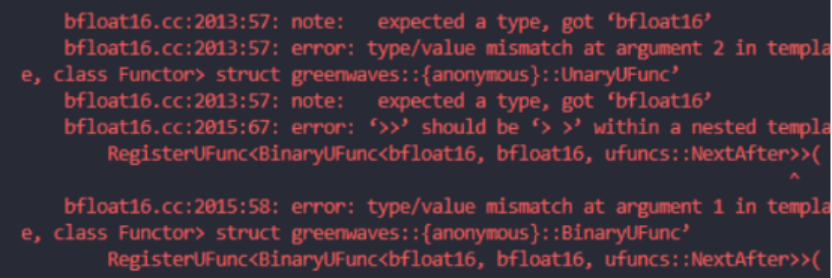
Figure 5-19 bfloat16 dependent library installation failure log
Change the pip source to the Alibaba source, or update RKNN-Toolkit2 to version 1.5.0 or later (versions 1.5.0 and later have removed the dependency on the bfloat16 library).
5.4.3 Model conversion parameters description
This section mainly covers the usage of commonly used parameters in the model conversion stage.
Parameters determined by the model
During model conversion, the rknn.config() and rknn.build() interfaces affect the model conversion result.
The input and output nodes specified by rknn.load_onnx() and rknn.load_tensorflow() affect the model conversion result.
The input sizes specified by rknn.load_pytorch() and rknn.load_tensorflow() affect the model conversion result.
You can refer to the following basic steps for model conversion:
-
Prepare quantization data and provide the dataset.txt file.
-
Determine the NPU platform to be used by the model, such as RK3566, RV1106, etc., and fill in the target_platform parameter in the rknn.config() interface.
-
When the input is a 3-channel image and the quantization data is in image format (such as jpg, png), you need to confirm whether the model input is RGB or BGR to determine the value of the quant_img_RGB2BGR parameter in the rknn.config() interface.
-
Confirm the normalization parameters used during model training to determine the values of the mean_values and std_values parameters in the rknn.config interface.
-
Confirm the input size of the model and fill it into the corresponding parameters of the load interface, such as the input_size_list parameter in the rknn.load_pytorch() interface.
-
Confirm the number of quantization bits of the model to determine the value of the quantized_dtype parameter in the rknn.config() interface. This step can be ignored when the model is not quantized or an already quantized model is loaded.
-
Confirm the quantization algorithm to be used for model quantization to determine the value of the quantized_algorithm parameter in the rknn.config() interface. This step can be ignored when the model is not quantized or an already quantized model is loaded.
-
Confirm whether the model should be quantized to determine the value of the do_quantization parameter in the rknn.build() interface. When choosing to quantize the model, the dataset parameter in the rknn.build() interface must also be filled in to specify the quantization calibration data.
9. Cross-platform compatibility of RKNN models
For the platform parameter set by target_platform of rknn.config(), the compatibility relationship is as follows:
Models used on the RK3566 and RK3568 platforms are compatible with each other.
Models used on the RK3588 and RK3588S platforms are compatible with each other.
Models used on the RV1103 and RV1106 platforms are compatible with each other.
10. Format and requirements of quantization calibration data
There are two options for the format of quantization calibration data. One is image format (jpg, png), which RKNN-Toolkit2 reads through OpenCV interfaces; the other is npy format, which RKNN-Toolkit2 reads through numpy interfaces.
For models with non-RGB/BGR image input, it is recommended to provide the quantization data in numpy’s npy format.
11. How to fill in the dataset.txt file for multi-input models
Model quantization requires the dataset.txt file to specify the paths of the quantization data. The rule is that one line serves as one set of inputs; when the model has multiple inputs, the multiple inputs are written on the same line and separated by spaces.
For example, for a single-input model using two sets of quantization data:
sampleA.npy
sampleB.npy
For a model with three inputs, two sets of quantization data are filled in as follows:
sampleA_in0.npy sampleA_in1.npy sampleA_in2.npy
sampleB_in0.npy sampleB_in1.npy sampleB_in2.npy
12. Confirm the quant_img_RGB2BGR parameter of rknn.config()
When using images (jpg, png) as quantization data, you need to consider setting the quant_img_RGB2BGR parameter.
If the model is trained with RGB images, set the quant_img_RGB2BGR parameter to False or leave it unset. And when performing inference with the Python inference interface or the RKNPU2 C API, input RGB images.
If the model is trained with BGR images, set the quant_img_RGB2BGR parameter to True. But when performing inference with the Python inference interface or the RKNPU2 C API, you also need to input BGR images (quant_img_RGB2BGR only affects the images read from the quantization calibration set).
If the quantization data is in numpy’s npy format, it is recommended not to use the quant_img_RGB2BGR parameter to avoid confusion in usage.
13. Calculation order of mean, std and quant_img_RGB2BGR in rknn.config()
Because quant_img_RGB2BGR only controls whether channel conversion is performed when reading calibration set images during quantization, and does not affect other steps, both the RKNN-Toolkit2 inference interface and the RKNPU2 C API only perform mean subtraction first and then standard deviation (std) division on the input data, without any channel conversion operation.
14. Setting mean_values and std_values in rknn.config() when the model has non-3- channel input or multiple inputs
The setting formats of mean_values and std_values are the same. Take mean_values as an example.
Assuming the input has N channels, the value of mean_values is [[channel_1, channel_2, channel_3, channel_4, …, channel_n]].
When there are multiple inputs, the value of mean_values is [[channel_1, channel_2, channel_3, channel_4, …, channel_n], [channel_1, channel_2, channel_3, channel_4, …, channel_n]].
15. Selection of the quantization parameter correction algorithm and the number of quantization images
RKNN-Toolkit2’s quantization algorithm (quantized_algorithm of rknn.config()) provides three algorithms for parameter correction, namely normal, mmse and kl_divergence, with normal used by default. normal is the conventional quantization parameter correction algorithm; mmse iterates over the calculation results of intermediate layers and clips the weight values within a certain range to obtain higher inference accuracy. Using mmse does not necessarily improve quantization accuracy, but compared with the normal method, quantization occupies more memory and takes longer model conversion time; the kl_divergence quantization algorithm takes somewhat more time than normal, but much less than mmse, and can achieve good improvement in some scenarios (when the feature distribution is uneven).
It is recommended to use the normal algorithm first; if the quantization result is not good, try the mmse or kl_divergence algorithm.
When using the normal or kl_divergence algorithm, 20-200 sets of data are recommended for quantization. When using mmse, 20-50 sets of data are recommended.
16. Differences in inference inputs and outputs between quantized and non- quantized models
When calling the general RKNPU2 C API (meaning calling the C API without using pass_through or zero_copy), the data type of the input data (such as uint8 data, float data) has nothing to do with whether the model is quantized. The data type of the output data can be automatically processed into float32 format, or you can choose to directly output the model inference result, in which case the data type is the same as that of the output node. Using the Python inference interface is slightly different. The specific relationship is as follows:
Table 5-7 Differences between the Python inference interface and the general C API interface
| After model quantization | Python inference (rknn.inference()) | C API inference (rknn.run()) (non pass_through, zero_copy) |
|---|---|---|
| Whether the input type is restricted | No restrictions. The input of rknn.inference() is a numpy array that carries a data type attribute itself, and the input is automatically converted into the data format required by the RKNN model. | No restrictions. The rknn_tensor_type parameter of rknn_inputs can be set to RKNN_TENSOR_FLOAT32, RKNN_TENSOR_FLOAT16, RKNN_TENSOR_INT8, RKNN_TENSOR_UIN8, RKNN_TENSOR_INT16 according to the actual input. Once set, the input is automatically converted into the data format required by the RKNN model. |
| Whether the output type changes | No change. Regardless of whether the model is quantized, Python’s rknn.inference() interface always returns float output. No other data type can be selected. | Changed. With the rknn outputs attr of the RKNPU2 C API, want_float=1 can be set to get float output. After quantization, want_float=0 can be set, in which case the raw output data of the last node is output, for example int8 data when quantized as i8. |
| Whether the input format changes (NCHW, NHWC) | No change. Regardless of whether the model is quantized, the data_format parameter of the rknn.inference() interface can be set to nchw or nhwc as needed. | No change. Regardless of whether the model is quantized, the rknn_tensor_format parameter of the rknn inputs structure can be set to NCHW or NHWC as needed. |
Is there an online pre-compilation mode
RKNN-Toolkit2 only supports exporting offline pre-compiled models, and does not support exporting online pre-compiled models (which is supported by RKNN-Toolkit1), so there is no choice between offline pre-compilation and online pre-compilation modes.
Can the RKNN model converted by RKNN-Toolkit be used on the RK3566 platform
No.
The RKNN model converted by RKNN-Toolkit is applicable to platforms such as RK1806 / RK1808 / RK3399Pro / RV1109 / RV1126; the RK3566 platform requires the RKNN model converted by RKNN-Toolkit2. The RKNN model converted by RKNN-Toolkit2 is applicable to platforms such as RK3566 / RK3568 / RK3588 / RK3588S / RV1103 / RV1106 / RK3562 / RK3576 / RV1126B.
For instructions on using the RKNN-Toolkit tool, please refer to the following project:
https://github.com/airockchip/rknn-toolkit
For instructions on using the RKNN-Toolkit2 tool, please refer to the following project:
https://github.com/airockchip/rknn-toolkit2
5.4.4 Deep-learning framework FAQs
5.4.4.1 DEEP LEARNING FRAMEWORKS AND CORRESPONDING VERSIONS SUPPORTED BY RKNN-TOOLKIT2
Please refer to Chapter 2.1.
5.4.4.2 OP SUPPORT LIST FOR EACH FRAMEWORK
RKNN-Toolkit2 has different support levels for different frameworks. For detailed information, please refer to the RKNNToolkit2_OP_Support document in the following link:
https://github.com/airockchip/rknn-toolkit2/blob/master/doc/
5.4.4.3 FAQS ABOUT ONNX MODEL CONVERSION
“Error parsing message” appears when loading the model
For example, converting the examples/onnx/resnet50v2 model fails and the prompt is as follows:
E load_onnx: Catch exception when loading onnx model: /rknn_resnet_demo/resnet50v2.onnx!

E lod_onnx: Traceback (most recent call last):

E load_onnx: File "rknn/api/rknn_base.py", line 1094, in rknn.api.rknn_base.RKNNBase.load_onnx

E load_onnx: File "/usr/local/lib/python3.6/dist-packages/onnx/__init__.py", line 115, in load_model

……

E load_onnx: google.protobuf.message.DecoderError: Error parsing message
The reason may be that the resnet50v2.onnx model is damaged (if the entire model is not downloaded). Re-download the model and ensure that its MD5 value is correct, such as:
22ed6e6a8fb9192f0980acca0c941414 resnet50v2.onnx
Is dynamic input shape supported?
For example, the input dimension of ONNX is [-1, 3, -1, -1], which means that the batch, height and width dimensions are not fixed. RKNN-Toolkit2 before 1.5.2 version does not support dynamic input shape.
Versions 1.5.2 and later support dynamic input shapes through the dynamic_input parameter of rknn.config(), see Chapter 4.1.3 for details.
An error occurs when customizing the output node
For example, calling rknn.load_onnx() with setting outputs parameter and the error occurs as follows.
E load_onnx: the '378' in outputs=['378', '439', '500'] is invalied!
The log prompts that output node 378 is invalid. It means that the outputs parameter needs to be set to the correct output node name.
5.4.4.4 FAQS ABOUT PYTORCH MODEL CONVERSION
An error occurs when loading a Pytorch model: torch._C does not have the _jit_pass_inline attribute
The error log is as follows:
'torch._C' has no attribute '_jit_pass_inline'
Please upgrade PyTorch to version 1.6.0 or later.
Saving format of Pytorch models
Currently, only models exported by torch.jit.trace() are supported. The torch.save() interface only saves the weight parameter dictionary, which lacks network structure information and cannot be normally imported and converted into an RKNN model.
PytorchStreamReader failed during the conversion
The error log is as follows:
E Catch exception when loading pytorch model: ./mobilenet0.25_Final.pth!

E Traceback (most recent call last):

……

E cpp_module = torch._C.import_ir_module(cu, f, map_location, extra_files)

E RuntimeError: [enforce fail at inline container.cc:137]. PytorchStreamReader failed reading zip archive: faild
finding central directory frame #0 ……
The reason is that the PyTorch model does not have network structure information.
Usually .pth file only contains weights but not network structure information. To export a model with the network structure, initialize the corresponding network structure and then use net.load_state_dict() to load the .pth weight file. Next, use torch.jit.trace() interface to solidify the network structure and weight. Finally, use torch.jit.save() to save the traced model in .pt format, which can be used for the rknn.load_pytorch() interface to convert it into an RKNN model.
KeyError encountered during conversion
The error log is as follows:
E Traceback (most recent call last):

……

E KeyError: 'aten::softmax'
When an error message in the form of KeyError: ‘aten::xxx’ appears, it means that the current version of the operator does not support it. RKNN-Toolkit2 will fix such bugs every time it is upgraded. Please use the latest version of RKNN-Toolkit2 to solve it.
“Syntax error in input! LexToken(xxx)” error encountered during conversion
The error log is as follows:
WARNING: Token 'COMMENT' defined, but not used

WARNING: There is 1 unused token

!!!!! Illegal character '"'

Syntax error in input! LexToken(NAMED_IDENTIFIER, 'fc', 1, 27)

!!!!! Illegal character '"'
There are many reasons for this error. Please troubleshoot in the following order:
1)The torch.nn.module is not inherited to create the network. Please inherit the torch.nn.module class type to create the network, and then use torch.jit.trace() to generate the pt file.
2)To update RKNN-Toolkit2 1.4.0 or later version, torch recommends version 1.6.0, 1.9.0, 1.10.0 or 1.13.1.
5.4.4.5 FAQS ABOUT TENSORFLOW MODEL CONVERSION
Tensorflow1.x model error
Loading tensorflow1.x model with rknn.load_tensorflow() interface, an error message appears:
E load_tensorflow: Catch exception when loading tensorflow model: ./yolov3_mobilenetv2.pb!

E load_tensorflow: Traceback (most recent call last):

……

E load_tensorflow: tensorflow.python.framework.errors_impl.InvalidArgumentError: Node
'MobilenetV2/expanded_conv/depthwise/BatchNorm/cond/Switch_1' expects to be colocated with unknown node
'MobilenetV2/expanded_conv/depthwise/BatchNorm/moving_mean'

E load_tensorflow: During handling of the above exception, another exception occurred:

E load_tensorflow: Traceback (most recent call last):

E load_tensorflow: File "rknn/api/rknn_base.py", line 990, in rknn.api.rknn_base.RKNNBase.load_tensorflow

……

E load_tensorflow: return func(*args, **kwargs)

E load_tensorflow: File "/usr/local/lib/python3.6/dist-packages/tensorflow/python/framework/importer.py", line
431, in import_graph_def

E load_tensorflow: raise ValueError(str(e))

E load_tensorflow: ValueError: Node 'MobilenetV2/expanded_conv/depthwise/BatchNorm/cond/Switch_1' expects
to be colocated with unknown node 'MobilenetV2/expanded_conv/depthwise/BatchNorm/moving_mean'
Suggestion:
If TensorFlow 1.x is currently installed, please update to TensorFlow 2.x.
Update RKNN-Toolkit2/RKNPU2 to the latest version.
TransformGraph error
The error log is as follows:
Traceback (most recent call last):

File "test.py", line 80, in <module>

input_size_list=[[1, 368, 368, 3]])

File "/usr/local/lib/python3.6/site-packages/rknn/api/rknn.py", line 68, in
load_tensorflow

input_size_list=input_size_list, outputs=outputs)

File "rknn/api/rknn_base.py", line 940, in
rknn.api.rknn_base.RKNNBase.load_tensorflow

File "/usr/local/lib/python3.6/dist-
packages/tensorflow/tools/graph_transforms/__init__", line 51, in
TransformGraph.transforms_string, status)

File "/usr/local/lib/python3.6/dist-
packages/tensorflow/python/framework/errors_impl.py". ;ome 548, in __exit__

C_api.TF_GetCode(self.status.status)

Tensorflow.python.framework.error_impl.InvalidArgumentError: Beta input to batch
norm has bad shape: [24]
Reason:
1)RKNN-Toolkit2 calls TensorFlow’s native TransformGraph function for the model optimization but it fails.
2)One probable reason is that the TensorFlow version used for exporting the model is no longer compatible with the currently installed version.
Suggestion:
Use TensorFlow version 1.14.0 to export the model, or find the same type of model in other deep- learning frameworks.
“Shape must be rank 4 but is rank 0” error
When loading the pb model with the command as follows:
  rknn.load_tensorflow(tf_pb='./model.pb',

  inputs=["X","Y"],

  outputs=['generator/xs'],

  input_size_list=1, INPUT_SIZE, INPUT_SIZE, 3)
Error occurs:
  E load_tensorflow: Catch exception when loading tensorflow model: ./model.pb!

  E load_tensorflow: Traceback (most recent call last):

  E load_tensorflow: File "/usr/local/lib/python3.6/dist-packages/tensorflow/python/framework/importer.py", line
427, in import_graph_def

  E load_tensorflow: graph._c_graph, serialized, options) # pylint: disable=protected-access

  E load_tensorflow: tensorflow.python.framework.errors_impl.InvalidArgumentError: Shape must be rank 4 but is
rank 0 for 'generator/conv2d_3/Conv2D' (op: 'Conv2D') with input shapes: [], [7,7,3,32].
The reason may be that the model is a multi-input model and the input_size_list of rknn.load_tensorflow() is not filled in according to the specifications. Please refer to the following usage in examples/functions/multi_input_test :
  rknn.load_tensorflow(tf_pb='./conv_128.pb',

  inputs=['input1', 'input2', 'input3', 'input4'],

  outputs=['output'],

  input_size_list=[[1, 128, 128, 3], [1, 128, 128, 3],

  [1, 128, 128, 3], [1, 128, 128, 1]])
Troubleshooting when loading model errors
First confirm whether the original deep-learning framework can load the model and invoke it correctly.
Secondly, please upgrade RKNN-Toolkit2 to the latest version. If the model has layers (or OPs) that RKNN-Toolkit2 does not support, the debug log should prompt it. If needed, call RKNN(verbose=True) to enable more conversion logs.
If it still cannot be solved, please provide the RKNN-Toolkit2 version and the detailed error log to the Rockchip NPU development team.
5.4.5 Model Quantification Issues
Quantization effect on model size
There are two situations. When the imported model is a quantized model, do_quantization=False of the rknn.build() interface will use the quantization parameters in the model. When the imported model is a floating-point model, do_quantization=False will not perform quantization operations, but will convert the weights from float32 to float16, with almost no accuracy loss. Both cases reduce the size of the model size, thereby making the entire model take up less space.
When quantizing the model, does the image need to be consistent with the size of the model input?
Unnecessary.
RKNN-Toolkit2 will automatically resize these images. However, the resize operation may also change the image information and have a certain impact on the quantization accuracy, so it is best to use images matching the input size.
If the correction data is in a non-image format, such as npy format, it needs to be consistent with the shape input by the model.
Whether the quantization correction data needs to be modified according to the rknn_batch_size parameter
Unnecessary.
The rknn_batch_size parameter of rknn.build() will only modify the batch dimension of the finally exported RKNN model (from 1 to rknn_batch_size ), and will not affect the process of the quantization stage. Therefore, the quantization correction data should be prepared like a non-batch model.
While quantizing model, the conversion program is stuck or killed after a period of time
During the model quantization process, RKNN-Toolkit2 will allocate partitioned system memory, which may cause the program to be killed or stuck.
Solution: Increase computer memory or increase virtual memory (swap partition).
5.4.6 Model conversion issues
Common conversion bug errors
If you encounter a conversion error similar to the following, it is likely caused by a bug in the current version. You can try updating RKNN-Toolkit2 to the latest version.
infer_shapes similar error
  (op_type:Mul, name:Where_2466_mul): Inferred elem type differs from existing elem type: (FLOAT) vs
(INT64)

  E build: Catch exception when building RKNN model!

  E build: Traceback (most recent call last):

  E build: File "rknn/api/rknn_base.py", line 1555, in rknn.api.rknn_base.RKNNBase.build

  E build: File "rknn/api/graph_optimizer.py", line 5409, in rknn.api.graph_optimizer.GraphOptimizer.run

  E build: File "rknn/api/graph_optimizer.py", line 5123, in
rknn.api.graph_optimizer.GraphOptimizer._fuse_ops

  E build: File "rknn/api/ir_graph.py", line 180, in rknn.api.ir_graph.IRGraph.rebuild

  E build: File "rknn/api/ir_graph.py", line 140, in rknn.api.ir_graph.IRGraph._clean_model

  E build: File "rknn/api/ir_graph.py", line 56, in rknn.api.ir_graph.IRGraph.infer_shapes

  E build: File "/home/anaconda3/envs/rk2/lib/python3.6/site-packages/onnx/shape_inference.py", line 35, in
infer_shapes

  E build: inferred_model_str = C.infer_shapes(model_str, check_type)

  E build: RuntimeError: Inferred elem type differs from existing elem type: (FLOAT) vs (INT64)
or:
E build: Traceback (most recent call last):
E build: File "rknn/api/rknn_base.py", line 1643, in
rknn.api.rknn_base.RKNNBase.build
E build: File "rknn/api/graph_optimizer.py", line 6256, in
rknn.api.graph_optimizer.GraphOptimizer.fuse_ops
E build: File "rknn/api/ir_graph.py", line 285, in
rknn.api.ir_graph.IRGraph.rebuild
E build: File "rknn/api/ir_graph.py", line 149, in
rknn.api.ir_graph.IRGraph._clean_model
E build: File "rknn/api/ir_graph.py", line 62, in
rknn.api.ir_graph.IRGraph.infer_shapes
E build: File "/usr/local/lib/python3.6/dist-packages/onnx/shape_inference.py",
line 35, in infer_shapes
E build: inferred_model_str = C.infer_shapes(model_str, check_type)
E build: RuntimeError: Inferred shape and existing shape differ in rank: (0) vs
(3)
or:
  (op_type:ReduceMax, name:ReduceMax_18): Interred shape and existing shape differ in rank: (3) vs (0)

  E build: Catch exception when building RKNN model!

  E build: Traceback (most recent call last):

  ……

  E build: RuntimeError: Interred shape and existing shape differ in rank: (3) vs (0)
- _p_fuse_two_mul similar error
  E build: Catch exception when building RKNN model!

  E build: Traceback (most recent call last):

  E build: File "rknn/api/rknn_base.py", line 1643, in rknn.api.rknn_base.RKNNBase.build

  E build: File "rknn/api/graph_optimizer.py", line 6197, in
rknn.api.graph_optimizer.GraphOptimizer.fuse_ops

  E build: File "rknn/api/graph_optimizer.py", line 204, in rknn.api.graph_optimizer._p_fuse_two_mul

  E build: ValueError: non-broadcastable output operand with shape () doesn't match the broadcast shape
(3,2)
“Segmentation fault” similar error
For example, an error occurs when converting the picodet model:
I _fold_constant remove nodes = ['Shape_0', 'Gather_4', 'Shape_1', 'Gather_6',
'Unsqueeze_0', 'Concat_8', 'Cast_3']
**Segmentation fault (Core dumped)**
_p_fuse_mul_into_conv similar error
E build: Catch exception when building RKNN model:

……
E build: ValueError: non broadcastable output operand whith shape (1,258,1,256) doesn`t match the
broadcast shape (80256,258,1,256)
How to determine whether an operator is supported by RKNN
Directly perform model conversion. If it is not supported, a relevant prompt will be displayed.
You can also refer to 《06_RKNN2_Supported_Operators_and_Constraints_Reference_V2.5.0》, which contains the operator support list of each framework and detailed RKNN operator specification constraints.
Prompt that the Expand operator is not supported during conversion
Suggestions:
1) Newer versions already support Expand on CPU. You can try updating RKNN-Toolkit2 / RKNPU2 to the latest version.
2) Modify the model and use the repeat operator instead of the expand operator.
Prompt “Meet unsupported dims in reducesum” during conversion
Meet unsupported dims in reducesum, dims: 6 appears during model conversion, as follows:
D RKNN: [14:54:19.434] >>>>>> start: N4rknn17RKNNInitCastConstE
D RKNN: [14:54:19.434] <<<<<< end: N4rknn17RKNNInitCastConstE
D RKNN: [14:54:19.434] >>>>>> start: N4rknn20RKNNMultiSurfacePassE
D RKNN: [14:54:19.434] <<<<<< end: N4rknn20RKNNMultiSurfacePassE
D RKNN: [14:54:19.434] >>>>>> start: N4rknn14RKNNTilingPassE
D RKNN: [14:54:19.434] <<<<<< end: N4rknn14RKNNTilingPassE
D RKNN: [14:54:19.434] >>>>>> start: N4rknn23RKNNProfileAnalysisPassE
D RKNN: [14:54:19.434] <<<<<< end: N4rknn23RKNNProfileAnalysisPassE
D RKNN: [14:54:19.434] >>>>>> start: OpEmit
E RKNN: [14:54:19.438] Meet unsupported dims in reducesum, dims: 6
Aborted (core dumped)
Currently, RKNN does not support 6-dimensional OPs. In most cases, only 4 dimensions are supported.
Conversion error caused by post-processing Ops such as NonMaxSuppression
Post-processing Ops such as NonMaxSuppression are currently not supported by RKNN.
The post-processing subgraph of the graph can be removed, for example:
rknn.load_onnx(model='picodet_xxx.onnx', outputs=['concat_4.tmp_0', 'tmp_16'])
The removed subgraph is processed separately on the CPU side.
“invalid expand shape” similar error
For example, the following error occurs when converting rvm_mobilenetv3_fp32.onnx :
[E:onnxruntime:, sequential_executor.cc:333 Execute] Non-zero status code
returned while running Expand node. Name:'Expand_294' Status Message: invalid
expand shape

E build: Catch exception when building RKNN model!
E build: Traceback (most recent call last):
E build: File "rknn/api/rknn_base.py", line 1638, in
rknn.api.rknn_base.RKNNBase.build
E build: File "rknn/api/graph_optimizer.py", line 5529, in
rknn.api.graph_optimizer.GraphOptimizer.fold_constant
E build: File "rknn/api/session.py", line 69, in rknn.api.session.Session.run
E build: File "/home/cx/work/tools/Anaconda3/envs/rknn/lib/python3.8/site-
packages/onnxruntime/capi/onnxruntime_inference_collection.py", line 124, in
run
E build: return self._sess.run(output_names, input_feed, run_options)
E build: onnxruntime.capi.onnxruntime_pybind11_state.InvalidArgument:
[ONNXRuntimeError] : 2 : INVALID_ARGUMENT : Non-zero status code returned while
running Expand node. Name:'Expand_294' Status Message: invalid expand shape
Because the input value of downsample_ratio changes the size of the intermediate feature in the model, this kind of graph is essentially a dynamic graph. It is recommended to modify the downsample_ratio logic of the model, and not use the input value to control the shape of the intermediate feature. If you need to use the dynamic graph function, after updating RKNN-Toolkit2 to 1.5.2, you can use the dynamic shape function to simulate a dynamic graph (the downsample_ratio logic of the model also needs to be modified, and the input value must not be used to control the shape of the intermediate feature; currently the dynamic shape function only supports the case where the input shape is variable).
mean_values error prompt of rknn.config()
Set mean/std to:
rknn.config(mean_values=[128, 128, 128], std_values=[128, 128, 128])
Then an error occurs when converting the model:
--> Loading model

transpose_input for input_1: shape must be rank 4, ignored

E load_tflite: The len of mean_values ([128, 128, 128]) for input 0 is wrong, expect 32!
The reason may be that the model input is not 3-channel image data (for example, the input shape is 1x32, non-image data). In this case:
mean_values / std_values need to be set according to the number of input channels.
If the model does not need mean/std specified, rknn.config() can omit mean_values / std_values ( mean/std is generally only effective for image input).
Error when the model contains Ops with more than 4 dimensions (such as 5 or 6 dimensions)
When the model contains Ops with more than 4 dimensions (such as 5 or 6 dimensions), the following error occurs:
E build: Catch exception when building RKNN model!

E build: Traceback (most recent call last):

E build: File "rknn/api/rknn_base.py", line 1580, in rknn.api.rknn_base.RKNNBase.build

E build: File "rknn/api/rknn_base.py", line 341, in rknn.api.rknn_base.RKNNBase._generate_rknn

E build: File "rknn/api/rknn_base.py", line 307, in rknn.api.rknn_base.RKNNBase._biild_rknn

E build: IndexError: vector::_M_range_check: __n (which is 4) >= this->size() (which is 4)
RKNN currently does not support OPs with more than 4 dimensions. You can remove these nodes manually.
Does RKNN support dynamic convolution
Currently, the RK3588/RK3576/RV1126B platforms support dynamic convolution with the group parameter set to 1. Other platforms are not yet supported.
“Not support input data type ‘float16’” error
For a model trained in PyTorch whose weight type is float16, the following error occurs when converting to RKNN:
--> Building model

E build: Not support input data type 'float16'

W build: ==================== WARN(3) =================

E rknn-toolkit2 version: 1.3.0-11912b58

E build: Catch exception when building RKNN model!

E build: Traceback (most recent call last):

E build: File "rknn/api/rknn_base.py", line 1638, in rknn.api.rknn_base.RKNNBase.build

E build: File "rknn/api/graph_optimizer.py", line 5524, in rknn.api.graph_optimizer.GraphOptimzer.fold_constant

E build: File "rknn/api/load_checker.py", line 63, in rknn.api.load_checker.create_random_data

E build: File "rknn/api/rknn_log.py", line 113, in rknn.api.rknn_log.RKNNLog.e

E build: ValueError: Not support input data type 'float16'!
Currently, RKNN-Toolkit2 does not yet support PyTorch models with float16 weight type; they need to be changed to float32.
Dynamic graph related errors
When converting a model, if an error similar to the following occurs:
E build: ValueError: The Op of 'NonZero' is not support! it will cause the graph to be a dynamic graph!
It indicates that the model containing this OP is a dynamic graph, and the model needs to be modified manually: replace the OP with another OP or remove it.
RKNN model size issue
After model conversion is completed, the converted RKNN model may be larger than the original model, and this may even be related to the input shape of the model. This phenomenon is normal, because the RKNN model contains not only weights and graph structure information, but also a lot of NPU register configuration information. In addition, to improve runtime efficiency, operations such as OP decomposition may be performed, all of which cause the RKNN model to become larger.
5.4.7 Description of inference with simulator or device
Explanation of terminology
Simulator inference: RKNN-Toolkit2 provides a simulator function on the Linux x86_64 platform, which can perform model inference and obtain inference results without a development board. (The output result of this function may not be consistent with the board end. It is more recommended to inference with board-connected or on-board).
Inference with board-connected: When the board is connected to the PC, use the RKNN-Toolkit2 Python API to infer the model and obtain the inference results.
On-board inference: using RKNPU2’s C API interface to obtain inference results.
The simulator inference results are inconsistent with the board-connected
When this happens, it may mean that the board-side results are incorrect.
Due to hardware and driver differences, the simulator is not guaranteed to get the exact same results as the board. But if the difference is too large, it is likely to be caused by a bug in the on- board driver, and the problem can be fed back to RK’s NPU team for analysis and debugging.
How inference with board-connected works
When using inference with board-connected, RKNN-Toolkit2 will communicate with the rknn_server on the board side. During the communication, the model and model input will be transmitted from the PC side to the board side, and then the RKNPU2 C API will be called to perform model inference. After the board-side inference is completed, the results will be sent to PC.
Differences between the results of inference with board-connected and inference on board
Inference with board-connected is implemented based on RKNPU2 C API. Theoretically, the results will be consistent with the RKNPU2 C API inference results. When there is a big difference between the two, please confirm whether there is any difference in the input preprocessing, data type, and data arrangement ( NCHW , NHWC ).
It should be pointed out that if the difference is very small, it is a normal phenomenon. Differences may occur in using different libraries to read images, convert data types, etc.
Inference on-board is faster than inference with board-connected
Since inference with board-connected involves additional data copying and transmission processes, the performance is not as good as the on-board inference with RKNPU2 C API. Therefore, the actual inference performance of NPU is subject to the on-board inference with RKNPU2 C API.
Getting the log with more detailed
When inference with board-connected, the initialization and inference of the model are mainly completed on the development board, and the log information is mainly generated on the board end.
In order to obtain specific board-side debugging information, you can enter the development board operating system through the serial port. Then execute the following two commands to set the environment variables for obtaining logs. Keep the serial port window not closed, and then perform inference with board-connected. At this time, the error message on the board side will be displayed on the serial port window:
export RKNN_LOG_LEVEL=5

restart_rknn.sh
Explanation of Data Layout for Batch Inference
The input data layout for rknn.inference during inference can be configured as either NCHW or NHWC, specified by 1data_format=’NCHW’ or data_format=’NHWC’ . The default is NHWC.
In rknn-toolkit2, the ONNX models with 4D inputs are typically in NCHW format by default during conversion. However, when performing inference using RKNN, the default input layout is NHWC, and the toolkit internally converts data from NCHW to NHWC. If data_format=’NCHW’ is explicitly set during inference, this default conversion is skipped, and the input data is used as-is in NCHW format.For specific examples, refer to the discussion in this GitHub issue“https://github.com/airockchip/rknn-toolkit2/issues/220”.
5.4.8 Common issue about model evaluation
Quantized model accuracy is not as good as expected
Refer to Chapter 5.1 of this document.
Which frameworks of quantized models are supported
RKNN-Toolkit2 1.4 and later versions support quantized models from the TensorFlow, TensorFlow Lite and PyTorch frameworks.
Failed to connect to the device during board-connected debugging
The following error occurs during board-connected accuracy analysis ( rknn.accuracy_analysis() ):
  E accuracy_analysis: Connect to Device Failure (-1)

  E accuracy_analysis: Catch exception when init runtime!

  E accuracy_analysis: Traceback (most recent call last):

  E accuracy_analysis: File "rknn/api/rknn_base.py", line 2001, in rknn.api.rknn_base.RKNNBase.init_runtime

  E accuracy_analysis: File "rknn/api/rknn_runtime.py", line 194, in
rknn.api.rknn_runtime.RKNNRuntime.__init__

  E accuracy_analysis: File "rknn/api/rknn_platform.py", line 331, in rknn.api.rknn_platform.start_ntp_or_adb
Or the following error occurs during board-connected inference ( rknn.inference ):
I target set by user is: rk3568
I Starting ntp or adb, target is RK3568
I Device [0c6a9900ef4871e1] not found in ntb device list.
I Start adb...
I Connect to Device success!
I NPUTransfer: Starting NPU Transfer Client, Transfer version 2.1.0
(b5861e7@2020-11-23T11:50:36)
D NPUTransfer: Transfer spec = local:transfer_proxy
D NPUTransfer: ERROR: socket read fd = 3, n = -1: Connection reset by peer
D NPUTransfer: Transfer client closed fd = 3

E RKNNAPI: rknn_init, server connect fail! ret = -9(ERROR_PIPE)!
E init_runtime: Catch exception when init_runtime!
E init_runtime: Traceback (most recent call last):
E init_runtime: File "rknn/api/rknn_base.py", line 2001, in
rknn.api.rknn_base.RKNNBase.init_runtime
E init_runtime: File "rknn/api/rknn_runtime.py", line 361, in
rknn.api.rknn_runtime.RKNNRuntime.build_graph
E init_runtime: Exception: RKNN init failed. error code:
RKNN_ERR_DEVICE_UNAVAILABLE
The cause may be that the RKNN Server service is not started on the board. Please run the RKNN Server service on the board according to the relevant instructions in 1.2.2.
During board-connected debugging, rknn_init fails and returns -6 or a model invalid error
The error message is as follows:
E RKNNAPI: rknn_init, msg_load_ack fail, ack = 1(ACK_FAIL), expect 0(ACK_SUCC)!

D NPUTransfer: Transfer client closed, fd = 4

E init_runtime: Catch exception when init runtime!

E init_runtime: Traceback (most recent call last):

E init_runtime: File "rknn/api/rknn_base.py", line 2011, in rknn.api.rknn_base.RKNNBase.init_runtime

E init_runtime: File "rknn/api/rknn_runtime.py", line 361, in rknn.api.rknn_runtime.RKNNRuntime.build_graph

E init_runtime: Exception: RKNN init failed. error code: RKNN_ERR_MODEL_INVALID
This error generally occurs in the following situations:
When generating the RKNN model, different versions of RKNN-Toolkit2 and drivers have corresponding relationships. It is recommended to upgrade RKNN-Toolkit2 / RKNPU2 and the firmware of the development board to the latest versions.
target_platform is not set correctly. For example, when target_platform in the rknn.config() interface is not set, the generated RKNN model can only run on RK3566/RK3568. To run on other platforms (such as RK3588/RK3588S/RV1103/RV1106/RK3562), you need to set the corresponding target_platform when calling the rknn.config() interface.
If this problem occurs during inference in a Docker container, it may be because the npu_transfer_proxy process on the host was not terminated, causing communication exceptions. You can exit the Docker container first, terminate the npu_transfer_proxy process on the host, and then enter the container again to execute the inference script.
There may also be a problem with the RKNN model itself. In this case, you can connect to the development board via the serial port, execute restart_rknn.sh after setting the environment variable RKNN_LOG_LEVEL=5 , then rerun the program, record the detailed logs generated, and feed them back to the Rockchip NPU team.
During board-connected debugging, rknn_init() fails and returns a device unavailable error
The error message is as follows:
E RKNNAPI: rknn_init, msg_ioctl_ack fail, data_len = 104985, except 102961!

D NPUTransfer: Transfer client closed, fd = 3

E init_runtime: Catch exception when init_runtime!

E init_runtime: Traceback (most recent call last):

E init_runtime: File "rknn/api/rknn_base.py", line 1961, in rknn.api.rknn_base.RKNNBase.init_runtime

E init_runtime: File "rknn/api/rknn_runtime.py", line 360, in rknn.api.rknn_runtime.RKNNRuntime.build_graph

E init_runtime: Exception: RKNN init failed. error code: RKNN_ERR_DEVICE_UNAVAILABLE
The cause of this problem is rather complex. Please troubleshoot as follows:
Make sure that RKNN-Toolkit2 / RKNPU2 and the system firmware of the development board have been upgraded to the latest versions. For how to query the version of each component, refer to 1.2.2.
In addition, make sure the device is visible in both adb devices and rknn.list_devices() , and that target and device_id of rknn.init_runtime() are set correctly.
“Invalid RKNN model version 6” error occurs in Runtime
Runtime reports the following error:
  Loading model …

  E RKNN: [09:13:25.728] 6, 1

  E RKNN: [09:13:25.728] Invalid RKNN model version 6

  E RKNN: [06:28:39.049] rknn_init, load model failed!

  Exception: RKNN init failed. error code: RKNN_ERR_FAIL
Cause:
The model version is incompatible with the RKNN Runtime.
Suggestion:
Refer to the version compatibility in section 16.1 to upgrade the corresponding model and Runtime versions, or directly upgrade both to the latest version at the same time.
“Invalid RKNN format” error occurs in Runtime
Runtime reports the following error:
Loading model …

E RKNN: [06:28:39.048] parseRKNN from buffer: Invalid RKNN format!

E RKNN: [06:28:39.049] rknn_init, load model failed!

rknn_init error ret=-1
Cause:
1) The target_platform of rknn.config() during model conversion may be set incorrectly, or not set (if not set, the default is RK3566).
2) The Runtime version is incompatible with RKNN-Toolkit2.
Suggestion:
1) Set the correct target_platform .
2) RKNN-Toolkit2 and Runtime should be updated together to the same version.
The elapsed time of rknn.inference() is inconsistent with the theoretical speed of rknn.eval_perf()
Because rknn.inference() performs board-connected inference via PC + adb, there is some fixed data transmission overhead, so it is inconsistent with the theoretical speed of rknn.eval_perf() .
For a more realistic frame rate, it is recommended to test directly on the development board using the RKNPU2 C API.
Multi-batch support of rknn.inference()
In RKNN-Toolkit2 1.4.0 and later versions, the number of input images can be specified when building the RKNN model. For detailed usage, refer to the description of the rknn.build interface in the RKNN-Toolkit2 API manual.
In addition, when rknn_batch_size is greater than 1 (e.g. equal to 4), the inference call in Python should be changed from:
outputs = rknn.inference(inputs=[img])
to:
img = np.expand_dims(img, 0)

img = np.concatenate((img, img, img, img), axis=0)

outputs = rknn.inference(inputs=[img])
For a complete example, please refer to: examples/functions/multi_batch/
Running multiple RKNN models
When running two or more models, you need to create multiple RKNN objects. One RKNN object corresponds to one model, similar to a context. Each model initializes the model, performs inference, and obtains the inference results in its own context, without interfering with each other. These models run serially on the NPU.
Model inference takes a very long time and the results are wrong
If the inference takes more than 20s and the results are wrong, this is usually an NPU Hang bug in the NPU. If you encounter this problem, you can try updating RKNN-Toolkit2 / RKNPU2 to the latest version.
Board-connected inference results are wrong when the model input is 3- dimensional
When the model input is 3-dimensional, it may happen that the Simulator simulation results are correct while the board-connected inference results are wrong. The cause may be that the current NPU’s support for 3-dimensional input is not yet complete; 3-dimensional support will be improved later.
Suggestion:
Change the model input to 4-dimensional first.
Try updating RKNN-Toolkit2 / RKNPU2 to the latest version.
Board-connected inference results are wrong and inconsistent each time
After an ONNX model is converted to RKNN, the Simulator simulation results are correct and consistent every time, but the board-connected inference results are wrong and inconsistent each time. This kind of problem may be caused by a bug in the NPU kernel driver on the board. In this case, the NPU kernel driver on the board needs to be updated, and the latest RKNN-Toolkit2 / RKNPU2 needs to be updated as well.
Accuracy degradation when the model contains many Resize OPs
When there are many Resize OPs in the ONNX model, accuracy degrades after conversion to RKNN. Possible causes are:
1) The accuracy degradation is because the NPU does not currently support hardware-level Resize (it will be supported later), and the conversion tool converts Resize to ConvTranspose , which causes a slight loss of accuracy.
2) If the model has multiple Resize ops in series, too many accumulated errors may cause a larger accuracy drop.
Suggestion:
1) At present, try to avoid the use of Resize (e.g. change Resize to ConvTranspose before training)
2) You can add the optimization_level=2 parameter to rknn.config() . In this case the Resize Op runs on the CPU and the accuracy will not drop, but performance will degrade.
Inference results are all nan after do_quantization is set to False
When do_quantization in the rknn.build() interface is set to True , the inference results are normal, but after it is set to False , all inference results become nan . The cause may be that when do_quantization=False , the computation type of the RKNN model is fp16, but the output range of the model’s intermediate layers (such as convolution) may exceed the range of fp16 (65536) (e.g. -51597~75642).
Suggestion:
During training, make sure the outputs of the intermediate layers do not exceed the representable range of fp16 (this problem is generally solved by adding a BN layer).
The results of the QAT model and the RKNN model are inconsistent
A classification model was trained with QAT under the PyTorch framework and converted to an RKNN model. Inferring this model with PyTorch and RKNN respectively gives different results. The cause may be that the PyTorch inference did not set engine=’qnnpack’ , because the RKNN inference method is closer to qnnpack .
How to get the memory usage when the model is running
You can use the rknn.eval_memory() interface. There is a Total item in the output log, which is the total memory usage.
Difference in performance data when the perf_debug parameter of rknn.init_runtime() is enabled or disabled during performance evaluation
When perf_debug is enabled, some debugging code is added to collect the information of each layer, and some parallel mechanisms may be disabled, so the elapsed time is longer than when perf_debug=False .
The main purpose of enabling perf_debug is to check whether the model has layers that account for a large proportion of the elapsed time, and use this as the basis for designing an optimization plan.
The environment uses docker. Board-connected inference worked before, but after restarting docker, inference gets stuck at the environment initialization stage?
Because when docker restarts, npu_transfer_proxy is left in a state similar to an abnormal exit, the RKNN Server on the development board cannot detect that the host connection has been disconnected. In this case, you need to restart the development board to reset the connection state of the RKNN Server.
5.4.9 C API usage FAQ
Will rknn_outputs_release() release the rknn_output array?
rknn_outputs_release() is called in conjunction with rknn_outputs_get() . It only releases the buffer in the rknn_output array. A similar situation exists with rknn_destroy_mem() .
How does rknn_create_mem create memory with appropriate size?
For input, the general principle is: if it is a quantized RKNN model, rknn_create_mem() uses the size_with_stride of rknn_tensor_attr to allocate memory; if it is a non-quantized model, rknn_create_mem() uses the n_bytes_type * n_elems to allocate memory.
For output, rknn_create_mem() uses the n_bytes_type * n_elems to allocate memory.
How to fill in the input data?
If you use the general API, for 4-dimensional input, fmt is NHWC , that is, the data filling order is [batch, height, width, channel]. For non-4D input, fmt is UNDEFINED , which means the data is filled according to the original shape of the model.
If using the zero-copy API, for 4D input, fmt can be NHWC/NC1HWC2 . For how to fill data when fmt=NC1HWC2 , please refer to the chapter “RKNN Runtime Zero Copy”. For non-4D input, fmt is UNDEFINED , which means the data is filled according to the original shape of the model.
How to use pass_through?
The input data format is obtained by the RKNN_NATIVE_INPUT_ATTR command of rknn_query() . If it is a 4-dimensional shape: For channel values 1, 3, and 4, the layout requires using NHWC , and other channel values require using NC1HWC2 ; if it is a non-4-dimensional shape, it is recommended to specify the layout as UNDEFINED .
In addition, in pass_through mode, quantized models usually specify the dtype of the input Tensor as INT8, and non-quantized models usually specify the dtype of the input Tensor as FLOAT16.
How to deal with the “failed to submit” error?
If the error occurs in the first layer of convolution and the zero-copy interface is used, the possible cause is insufficient memory allocation for the input tensor. In this case, size_with_stride in the tensor attribute should be used to allocate memory.
If the error occurs in the middle NPU layer, the possible reason is that the model configuration is wrong. At this time, you can find the latest SDK link in the error log. It is recommended to upgrade the latest toolchain or assign this layer to the CPU when converting the RKNN model.
How to deal with the “Meet unsupport xxx operator” error?
When a similar error occurs when running the demo on the board end, it is usually because the runtime (librknnrt.so) of the board end does not support this operator. It is recommended that users update the RKNN related toolchain to the latest version first, then convert the model again, and rerun the demo on the board.
If the same error still occurs in the latest toolchain, the user needs to add the implementation of the operator by himself. You can refer to Chapter 4.2.1 to customize the implementation of the operator, or report it to the RKNN team through redmine.
Whether the dynamic shape model supports the use of externally allocated memory in the zero-copy process
Versions before 1.6.0 do not support it. Later versions start to support using the RKNN_FLAG_MEM_ALLOC_OUTSIDE flag to initialize the context.
Performance accessment for Custom OP on runtime
This can be achieved via setting RKNN_LOG_LEVEL=4 or above, then running the testing c api demo, which will print out the performance of each layer including the custom op.
Note: The performance time for custom op involves things need to do during the compute call back function. For example, custom GPU ops would include the time cost for clImportMemoryARM function, converting for data layout and data type (both inputs and outputs) and the final GPU OpenCL kernel running time.
5.5 Related Resources
RKNN: https://github.com/airockchip/rknn-toolkit2
RKNN_Model_Zoo: https://github.com/airockchip/rknn_model_zoo
RGA: https://github.com/airockchip/librga