
Platform reference: this article follows the Rockchip RKNN2 SDK V2.5.0 Development Guide, including only the SoCs, Linux/Android Runtime and Toolkit combinations stated by the source. Features apply under the chip, SDK, driver and kernel conditions in each section, not automatically to every ArmSoM board. Check the actual ArmSoM BSP, NPU driver, Runtime and model versions before deployment. No ArmSoM hardware validation was performed; logs, performance figures and examples belong to the source.
Sources and proofreading: Chinese follows Chinese V2.5.0 (182 pages); English, Russian and German follow English V2.5.0 (208 pages). Source-specific technical information is retained; older-version content is not presented as new-version fact. Chinese figures come from the Chinese PDF; EN/RU/DE figures come from the English PDF, including separately extracted vector flowcharts. Original section and equation numbers remain. Some source cross-references still use old chapter numbers; dynamic-shape capacity examples contain “1224+140=264”, TP_NORM support statements conflict, and names such as init()/rknn.val_perf() differ from later API descriptions. These source issues are retained and require checking against actual V2.5.0 SDK headers/API references before execution. Code and parameters remain; PDF wrapping and table continuations are repaired.
RKNN2 SDK V2.5.0 · 21/22
1. Software stack and core concepts
2. Environment, versions and board connection
3. Development workflow and interface selection
4. Model conversion and ONNX editing
5. Quantization, hybrid quantization and QAT
6. Inference, accuracy, performance and memory evaluation
7. Runtime lifecycle, layouts and memory
8. Zero-copy interfaces and I/O constraints
9. C API deployment and code generation
10. Toolkit Lite2 Python deployment
11. Matmul API and matrix layouts
12. NPU multicore configuration and performance
13. Dynamic-shape models and deployment
16. Cache coherency and sparse inference
17. Custom operators: Python and C API
18. Encrypted model deployment
20. Performance analysis and network optimization
Memory analysis, sharing and reuse
22. FAQ, error handling and references
5.3 Memory Analysis and Optimization
5.3.1 Introduction to memory composition and analysis methods
5.3.1.1 MEMORY COMPOSITION DURING RKNN MODEL RUNTIME
The RKNN model runtime memory mainly consists of four parts: weights and internal tensors, register configurations, input tensors and output tensors. Runtime memory is usually created during rknn_init.
5.3.1.2 MODEL MEMORY ANALYSIS METHOD
After the rknn_init() interface is called, when the user needs to view the memory allocated by the model or needs to allocate model weights externally, call the rknn_query interface and pass in RKNN_QUERY_MEM_SIZE to query the model’s weights and internal memory (excluding input and output) , the occupancy of all DMA memory and SRAM memory used for model inference (0 if SRAM is not turned on or does not have this function).
The following is the sample code:
 rknn_context ctx = 0;

 // Load RKNN Model
 int ret = rknn_init(&ctx, model_path, 0, NULL, NULL);
 if (ret < 0) {
    printf("rknn_init fail! ret=%d\n", ret);
    return -1;
 }

 // Get weight and internal mem size
 rknn_mem_size mem_size;
 ret = rknn_query(ctx, RKNN_QUERY_MEM_SIZE, &mem_size, sizeof(mem_size));
 if (ret != RKNN_SUCC) {
    printf("rknn_query fail! ret=%d\n", ret);
    return -1;
 }
 printf("total weight size: %d, total internal size: %d\n", mem_size.total_weight_size, mem_size.total_internal_size);
5.3.2 How to use externally allocated memory
5.3.2.1 EXTERNALLY ALLOCATE INPUT AND OUTPUT MEMORY
According to what is mentioned in section C API Zero-Copy Process, if the user uses the zero- copy API, they can allocate memory externally for the input and output tensors, and then configure it for use by the NPU. For the specific process, please refer to the flow chart in C API Zero-Copy Process. Note that to use the external memory allocation method, you can only use the zero-copy API. This method is mainly applicable to scenarios where users need to manually allocate memory for the NPU to use, instead of letting the NPU allocate memory itself through the rknn_create_mem() interface.
External memory can be recorded with physical addresses and fds, and is mainly created through the following two interfaces:
rknn_create_mem_from_phys(): Create the rknn_tensor_mem structure through a physical address
rknn_create_mem_from_fd(): Create the rknn_tensor_mem structure through an fd
Here is an example of creating memory with mpi mmz. This example uses the rknn_create_mem_from_phys() interface to import the physical address of external memory and create an rknn tensor mem structure carrying the physical memory information. The following is the sample code:
// Create input tensor memory
rknn_tensor_mem* input_mems[1];
// default input type is int8 (normalize and quantize need compute in outside)
// if set uint8, will fuse normalize and quantize to npu
input_attrs[0].type = input_type;
// default fmt is NHWC, npu only support NHWC in zero copy mode
input_attrs[0].fmt = input_layout;

input_mems[0] = rknn_create_mem_from_phys(ctx, input_phys, input_virt, input_attrs[0].size_with_stride);

...

// Create output tensor memory
rknn_tensor_mem* output_mems[io_num.n_output];
for (uint32_t i = 0; i < io_num.n_output; ++i) {
    output_mems[i] = rknn_create_mem_from_phys(ctx, output_physs[i], output_virts[i], output_attrs[i].size);
}

// Set input tensor memory
ret = rknn_set_io_mem(ctx, input_mems[0], &input_attrs[0]);
if (ret < 0) {
    printf("rknn_set_io_mem fail! ret=%d\n", ret);
    return -1;
}

// Set output tensor memory
for (uint32_t i = 0; i < io_num.n_output; ++i) {
    // set output memory and attribute
    ret = rknn_set_io_mem(ctx, output_mems[i], &output_attrs[i]);
    if (ret < 0) {
        printf("rknn_set_io_mem fail! ret=%d\n", ret);
        return -1;
    }
}
In addition to referencing the physical address of external memory, externally allocated memory can also be used by referencing an fd. The following is the sample code:
int mb_flags = RK_MMZ_ALLOC_TYPE_CMA | RK_MMZ_ALLOC_UNCACHEABLE;

// Allocate weight memory in outside
MB_BLK weight_mb;
rknn_tensor_mem* weight_mem;
ret = RK_MPI_MMZ_Alloc(&weight_mb, mem_size.total_weight_size, mb_flags);
if (ret < 0) {
    printf("RK_MPI_MMZ_Alloc failed, ret: %d\n", ret);
    return ret;
}

void* weight_virt = RK_MPI_MMZ_Handle2VirAddr(weight_mb);
if (weight_virt == NULL) {
    printf("RK_MPI_MMZ_Handle2VirAddr failed!\n");
    return -1;
}

int weight_fd = RK_MPI_MMZ_Handle2Fd(weight_mb);
if (weight_fd < 0) {
    printf("RK_MPI_MMZ_Handle2Fd failed!\n");
    return -1;
}

weight_mem = rknn_create_mem_from_fd(ctx, weight_fd, weight_virt, mem_size.total_weight_size, 0);
printf("weight mb info: virt = %p, fd = %d, size: %d\n", weight_virt, weight_fd, mem_size.total_weight_size);

int mb_flags = RK_MMZ_ALLOC_TYPE_CMA | RK_MMZ_ALLOC_UNCACHEABLE;

// Allocate weight memory in outside
MB_BLK weight_mb;
rknn_tensor_mem* weight_mem;
ret = RK_MPI_MMZ_Alloc(&weight_mb, mem_size.total_weight_size, mb_flags);
if (ret < 0) {
    printf("RK_MPI_MMZ_Alloc failed, ret: %d\n", ret);
    return ret;
}

void* weight_virt = RK_MPI_MMZ_Handle2VirAddr(weight_mb);
if (weight_virt == NULL) {
    printf("RK_MPI_MMZ_Handle2VirAddr failed!\n");
    return -1;
}

int weight_fd = RK_MPI_MMZ_Handle2Fd(weight_mb);
if (weight_fd < 0) {
    printf("RK_MPI_MMZ_Handle2Fd failed!\n");
    return -1;
}

weight_mem = rknn_create_mem_from_fd(ctx, weight_fd, weight_virt, mem_size.total_weight_size, 0);
printf("weight mb info: virt = %p, fd = %d, size: %d\n", weight_virt, weight_fd, mem_size.total_weight_size);
5.3.2.2 EXTERNALLY ALLOCATED MODEL MEMORY
As mentioned in section 9.1, model memory occupancy is divided into two parts: one part is internal memory, and the other part is weight memory. If the application needs to use externally allocated model memory, it can set the memory used by the model weight and internal through the rknn_set_weight_mem() and rknn_set_internal_mem() interfaces. The following is the reference example:
// Load RKNN Model
ret = rknn_init(&ctx, model_virt, model_size, RKNN_FLAG_MEM_ALLOC_OUTSIDE, NULL);
TIME_END(rknn_init);
if (ret < 0) {
    printf("rknn_init fail! ret=%d\n", ret);
    return -1;
}

//query and inset input / output tensor
...

// Allocate weight memory in outside
MB_BLK weight_mb;
rknn_tensor_mem* weight_mem;
ret = RK_MPI_MMZ_Alloc(&weight_mb, SIZE_ALIGN_128(mem_size.total_weight_size), mb_flags);
void* weight_virt = RK_MPI_MMZ_Handle2VirAddr(weight_mb);
int weight_fd = RK_MPI_MMZ_Handle2Fd(weight_mb);
weight_mem = rknn_create_mem_from_fd(ctx, weight_fd, weight_virt, mem_size.total_weight_size, 0);
ret = rknn_set_weight_mem(ctx, weight_mem);
if (ret < 0) {
    printf("rknn_set_weight_mem fail! ret=%d\n", ret);
    return -1;
}
printf("weight mb info: virt = %p, fd = %d, size: %d\n", weight_virt, weight_fd, mem_size.total_weight_size);

// Allocate internal memory in outside
MB_BLK internal_mb;
rknn_tensor_mem* internal_mem;
ret = RK_MPI_MMZ_Alloc(&internal_mb, SIZE_ALIGN_128(mem_size.total_internal_size), mb_flags);
void* internal_virt = RK_MPI_MMZ_Handle2VirAddr(internal_mb);
int internal_fd = RK_MPI_MMZ_Handle2Fd(internal_mb);

internal_mem = rknn_create_mem_from_fd(ctx, internal_fd, internal_virt, mem_size.total_internal_size, 0);
ret = rknn_set_internal_mem(ctx, internal_mem);
if (ret < 0) {
    printf("rknn_set_internal_mem fail! ret=%d\n", ret);
    return -1;
}
printf("internal mb info: virt = %p, fd = %d, size: %d\n", internal_virt, internal_fd, mem_size.total_internal_size);
5.3.3 Internal Memory Reuse
The RKNN API provides a mechanism for external management of NPU memory. Through the RKNN_FLAG_INTERNAL_ALLOC_OUTSIDE parameter, users can specify that the intermediate feature memory of the model is allocated externally. Typical application scenarios of this function are as follows:
During deployment, all NPU memory is allocated by the user, which facilitates the overall arrangement of the entire system memory.
It is used in multiple model serial running scenarios, where the intermediate feature memory is reused across different contexts, especially for devices such as RV1103/RV1106 where memory is extremely tight.
For example, there are two models in the figure below. The Internal Tensor occupancy of model 1 is larger than that of model 2. If model 1 and model 2 are run sequentially, only one block of memory at the address 0x00000000~0x000c4000 needs to be allocated for model 1 and model 2 to share. After the inference of model 1 finishes, this memory can be used by model 2 to read and write Internal Tensor data, thereby saving memory.
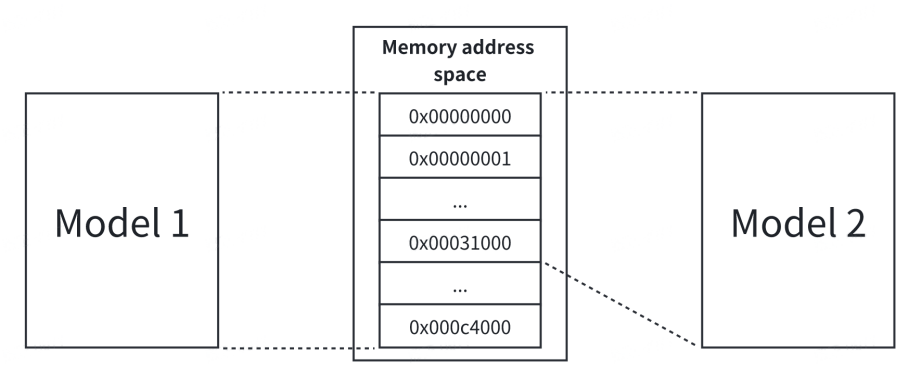
Figure 5-16 Example of two model Internal Tensors sharing the same memory address space
Assume that the path of model 1 is model_path_a and the path of model 2 is model_path_b. The sample code is as follows:
rknn_init(&ctx_a, model_path_a, 0, RKNN_FLAG_INTERNAL_ALLOC_OUTSIDE, NULL);
rknn_query(ctx_a, RKNN_QUERY_MEM_SIZE, &mem_size_a, sizeof(mem_size_a));
rknn_init(&ctx_b, model_path_b, 0, RKNN_FLAG_INTERNAL_ALLOC_OUTSIDE, NULL);
rknn_query(ctx_b, RKNN_QUERY_MEM_SIZE, &mem_size_b, sizeof(mem_size_b));

// Get the largest internal size of the two models
max_internal_size = MAX(mem_size_a.total_internal_size,
mem_size_b.total_internal_size);
internal_mem_max = rknn_create_mem(ctx_a, max_internal_size);

// Set the internal memory of model a
internal_mem_a = rknn_create_mem_from_fd(ctx_a, internal_mem_max->fd, internal_mem_max->virt_addr, mem_size_a.total_internal_size, 0);
rknn_set_internal_mem(ctx_a, internal_mem_a);

// Set the internal memory of model b
internal_mem_b = rknn_create_mem_from_fd(ctx_b, internal_mem_max->fd, internal_mem_max->virt_addr, mem_size_b.total_internal_size, 0);
rknn_set_internal_mem(ctx_b, internal_mem_b);
5.3.4 Multi-threaded Reuse RKNN Context
In a multi-threaded scenario, a model may be executed by multiple threads at the same time. If each thread initializes a context separately, the memory consumption will be very large. Therefore, you can consider sharing a context to avoid repeated construction of data structures and reduce runtime memory usage. The RKNN API provides an interface for reusing contexts. The interface is defined as follows:
int rknn_dup_context(rknn_context* context_in,rknn_context* context_out)
where context_in is the already initialized context, and context_out is the context that reuses context_in. As shown in the figure below, the model structures of the two contexts are the same, so the contexts can be reused.
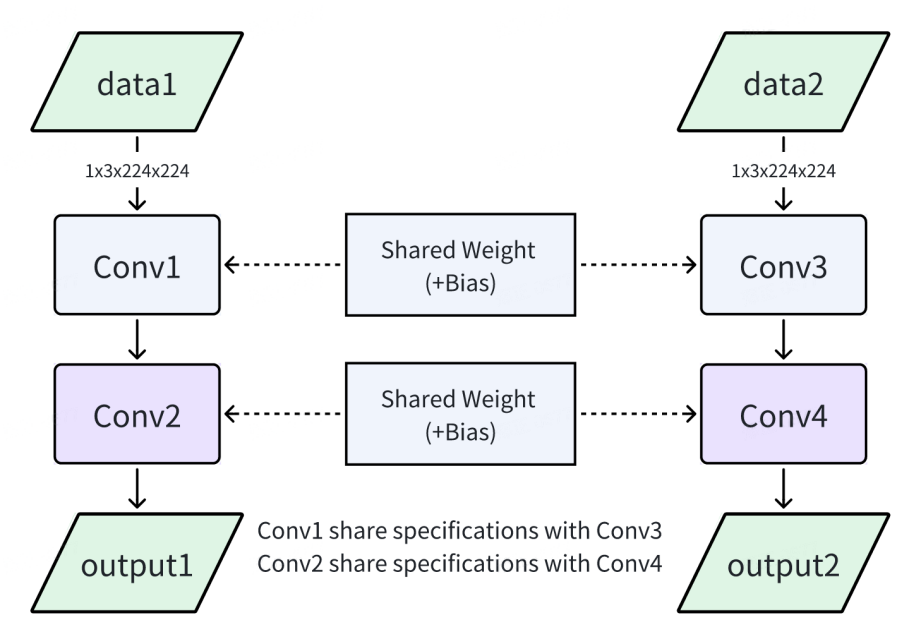
Figure 5-17 Example of two identical model reuse contexts
5.3.5 Multiple resolution models share the same weights
When multiple models with different resolutions have the same weights, they can share the same weights to reduce memory usage. In RKNPU SDK versions <= 1.5.0, this function can realize dynamic switching between models with different resolutions with a smaller memory footprint. After version 1.5.0, this function was replaced by the dynamic shape function.
As shown in the figure below, the weights of model A and model B are exactly the same.
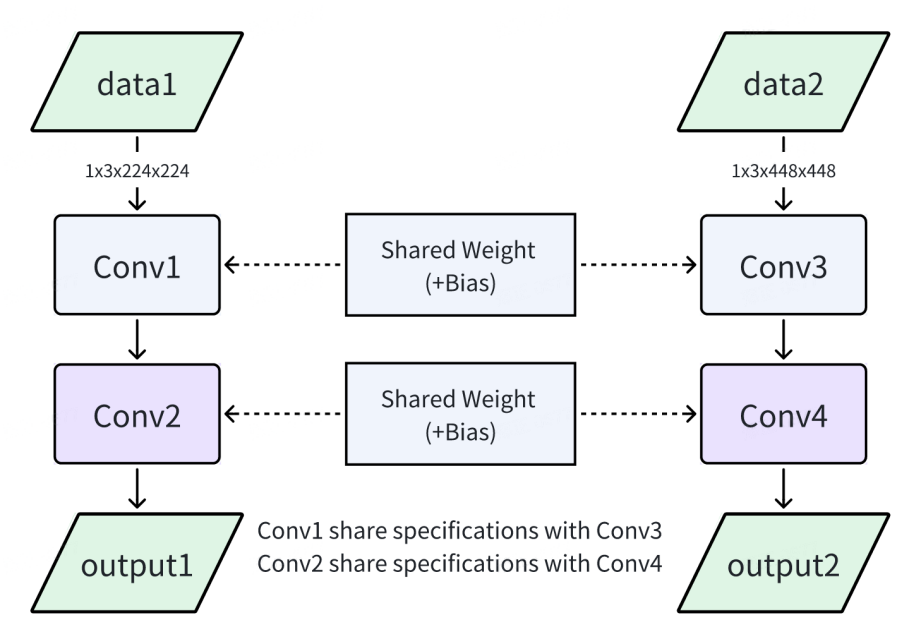
Figure 5-18 Example of two models with different resolutions sharing weights
Multiple resolution models can share the same weights by following the steps below:
-
When converting the RKNN model, one of the models is set as the master model, and the rknn.config interface sets the parameter remove_weight=False; the other model is set as the slave model, with the parameter remove_weight=True set. The master RKNN model contains weights, and the slave RKNN model does not contain convolutional class weights.
-
When deploying, initialize the master RKNN model first, and then initialize the slave RKNN model. When initializing the slave model, use the RKNN_FLAG_SHARE_WEIGHT_MEM flag and add the new parameter rknn_init_extend, whose value is the context of the master model. Assume that the master model path is model_A and the slave model path is model_B. The sample code is as follows:
rknn_context context_A;
rknn_context context_B;
ret = rknn_init(&context_A,model_A,0,0,NULL);
...
rknn_init_extend extend;
extend.ctx = context_A;
ret = rknn_init(&context_B,model_B,0,RKNN_FLAG_SHARE_WEIGHT_MEM,&extend);