
Platform reference: this article follows the Rockchip RKNN2 SDK V2.5.0 Development Guide, including only the SoCs, Linux/Android Runtime and Toolkit combinations stated by the source. Features apply under the chip, SDK, driver and kernel conditions in each section, not automatically to every ArmSoM board. Check the actual ArmSoM BSP, NPU driver, Runtime and model versions before deployment. No ArmSoM hardware validation was performed; logs, performance figures and examples belong to the source.
Sources and proofreading: Chinese follows Chinese V2.5.0 (182 pages); English, Russian and German follow English V2.5.0 (208 pages). Source-specific technical information is retained; older-version content is not presented as new-version fact. Chinese figures come from the Chinese PDF; EN/RU/DE figures come from the English PDF, including separately extracted vector flowcharts. Original section and equation numbers remain. Some source cross-references still use old chapter numbers; dynamic-shape capacity examples contain “1224+140=264”, TP_NORM support statements conflict, and names such as init()/rknn.val_perf() differ from later API descriptions. These source issues are retained and require checking against actual V2.5.0 SDK headers/API references before execution. Code and parameters remain; PDF wrapping and table continuations are repaired.
RKNN2 SDK V2.5.0 · 6/22
1. Software stack and core concepts
2. Environment, versions and board connection
3. Development workflow and interface selection
4. Model conversion and ONNX editing
5. Quantization, hybrid quantization and QAT
Inference, accuracy, performance and memory evaluation
7. Runtime lifecycle, layouts and memory
8. Zero-copy interfaces and I/O constraints
9. C API deployment and code generation
10. Toolkit Lite2 Python deployment
11. Matmul API and matrix layouts
12. NPU multicore configuration and performance
13. Dynamic-shape models and deployment
16. Cache coherency and sparse inference
17. Custom operators: Python and C API
18. Encrypted model deployment
20. Performance analysis and network optimization
21. Memory analysis, sharing and reuse
22. FAQ, error handling and references
2.3 Model Evaluation
2.3.1 Model Inferencing
After the original model is converted into an RKNN model, inference can be performed on the simulator or on the development board, and the inference results can be post-processed to check whether they are correct. If the inference results are incorrect, you can run accuracy analysis on the quantized model and check whether the pre-processing and post-processing flows are correct. The main interface parameters used in the model inference stage are described as follows:
The runtime initialization interface rknn.init_runtime() takes the following parameters:
target: target hardware platform. The default value is None , and inference is performed on the simulator. To obtain the actual on-board inference results, this parameter must be set to the corresponding platform (RK3562 / RK3566 / RK3568 / RK3588 / RK3576 / RV1103 / RV1103B / RV1106 / RV1106B / RV1126B).
device_id: device number. The default value is None . If target is set, the only device is selected for inference. If the computer is connected to multiple devices for board-connected inference, the corresponding device ID must be specified. If a device is connected over the network via ADB for model inference, the user needs to manually run the command adb connect [IP] to connect to the network device first and then fill in the device number, usually in the form of [IP] or [IP:Port] . The adb devices command can be used to list all connected devices.
perf_debug: whether to enable debug mode during performance evaluation. The default value is False . Calling the rknn.val_perf() interface returns the total running time of the model. When set to True , the running time of each layer can be obtained; this is not supported on RV1103, RV1103B, RV1106 and RV1106B platforms.
eval_mem: whether to enter memory evaluation mode. The default value is False . After setting it to True to enter memory evaluation mode, the rknn.eval_memory() interface can be called to obtain the memory usage of the model at runtime.
The inference interface rknn.inference() takes the following parameters:
inputs: list of inputs to be inferred, in ndarray format.
data_format: list of layouts of the input data, only valid for 4-dimensional inputs, in the format “ NCHW “ or “ NHWC “. The default value is None , which means the layout of all inputs is NHWC .
Example code:
ret = rknn.init_runtime(target=platform, device_id='515e9b401c060c0b')

# Preprocess
image_src = cv2.imread(IMG_PATH)
img = preprocess(image_src)

# Inference
outputs = rknn.inference(inputs=[img])

# Postprocess
outputs = postprocess(outputs)
Notes: 1.When performing inference on the RV1103 / RV1106 platforms, if the error “E RKNN: failed to allocate fd, ret: -1, errno: 12” is encountered, you can run RkLunch-stop.sh in the development board terminal to close other memory-consuming applications before performing board-connected inference. Updating rknn_server to version 2.1.0 can also mitigate this problem.
2.In the ARM64 version, rknn.init_runtime() does not need device_id
2.3.2 Model Accuracy Analysis
If there are problems with the inference results of a quantized model, you can use the rknn.accuracy_analysis() interface to perform accuracy analysis and check the accuracy of each layer of operators.
The accuracy analysis interface rknn.accuracy_analysis() takes the following parameters:
inputs: list of input file paths (formats include jpg , png , bmp and npy ).
output_dir: directory where the analysis results are saved, default value ‘ ./snapshot ‘.
target: target hardware platform. The default value is None , and the simulator is used for accuracy analysis. If target is set (RK3562 / RK3566 / RK3568 / RK3588 / RK3576 / RV1103 / RV1103B / RV1106 / RV1106B / RV1126B), the results of each layer at runtime will be obtained and accuracy analysis will be performed.
device_id: device number. The default value is None . If target is set, the only device is selected for accuracy analysis. If the computer is connected to multiple devices, the corresponding device ID must be specified. If a device is connected over the network via ADB for accuracy analysis, the user needs to manually run the command adb connect [IP] to connect to the network device first and then fill in the device number, usually in the form of [IP] or [IP]:[Port] .
Notes:
1.Accuracy analysis may fail because the model is too large and the storage capacity of the development board is insufficient. You can use the df -h command in the development board terminal to confirm the storage capacity. If there is insufficient space, please delete useless files to ensure that the partition corresponding to output_dir has enough storage space for saving the result files.
2.After loading an RKNN model via rknn.load_rknn() , the model accuracy analysis function cannot be used because the RKNN model lacks the original model information.
3.In the ARM64 version, rknn.accuracy_analysis() does not need device_id, and this version does not support analyzing accuracy on a device connected to another device via ADB.
Example code:
ret = rknn.accuracy_analysis(inputs=[img_path], target=platform, device_id='515e9b401c060c0b')
The accuracy analysis results are shown in the figure below
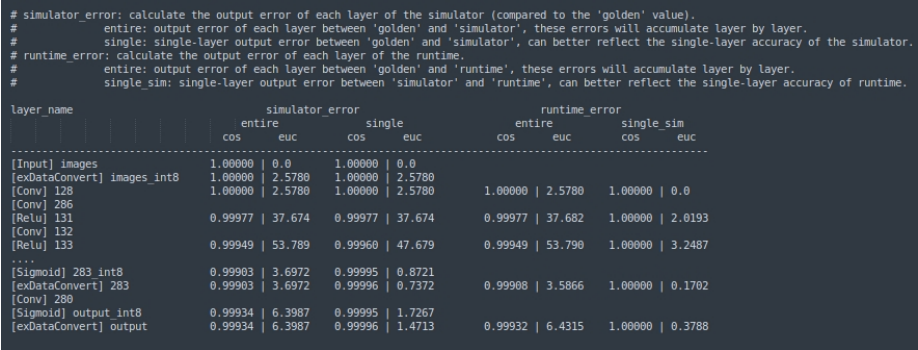
Figure 2-8 Accuracy analysis results
A complete accuracy analysis includes both simulator accuracy analysis results and on-board accuracy analysis results, and both the simulator and on-board accuracy analysis results are divided into whole-model inference result comparison and layer-by-layer inference result comparison. Details are as follows:
simulator_error:
entire: the cosine distance and Euclidean distance between the simulator result and the golden result from the input layer to the current layer.
single: when the current layer uses the golden input, the cosine distance and Euclidean distance between the simulator result and the golden result.
runtime_error:
entire: the cosine distance and Euclidean distance between the actual on-board inference result and the golden result from the input layer to the current layer.
single: when the current layer uses the golden input, the cosine distance and Euclidean distance between the actual on-board inference result of the current layer and the golden result.
2.3.3 Model performance evaluation
The interface rknn.eval_perf() outputs the current hardware frequencies and obtains the performance evaluation results of the model. The fix_freq parameter indicates whether to try to fix the frequency of the hardware (including CPU/NPU/DDR). Set it to True to fix the hardware frequency, otherwise set it to False ; the default value is True . If the perf_debug parameter of rknn.init_runtime() is set to True during initialization, the time consumption of each layer and the total time consumption will be output; if it is False , only the total time consumption will be output.
Note:
1.The RV1103 / RV1103B / RV1106 / RV1106B platforms do not support the perf_debug set to True mode and can only output the total time consumption of the model.
Example code:
ret = rknn.init_runtime(target=platform, perf_debug=True)
perf_detail = rknn.eval_perf()
Taking RK3588 as an example, the hardware frequencies output after executing eval_perf are as follows (the frequencies supported by different firmware may vary). Since the RK3588 CPU has a big.LITTLE core architecture, the CPU frequency column outputs multiple frequency values in KHz, while the NPU and DDR frequencies are both in Hz.
CPU Current Frequency List:
  - 1800000
  - 2256000
  - 2304000
NPU Current Frequency List:
  - 1000000000
DDR Current Frequency List:
  - 2112000000
The performance evaluation results are as follows:
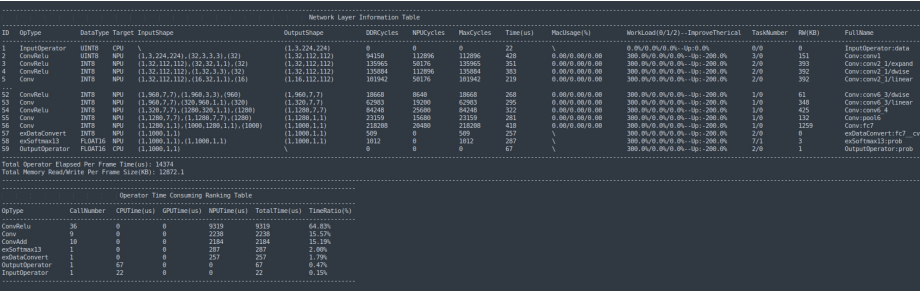
Figure 2-9 Performance evaluation results
The fields of the performance evaluation results are described in the following table:
Table 2-2 Description of the fields in the performance evaluation results
| Field | Description |
|---|---|
| ID | Operator ID |
| OpType | Operator type |
| DataType | Input data type |
| Target | Hardware on which the operator runs (CPU/NPU/GPU) |
| InputShape | Input shape |
| OutputShape | Output shape |
| DDRCycles | Number of DDR read/write clock cycles |
| NPUCycles | Number of NPU computation clock cycles |
| MaxCycles | Maximum of DDR Cycles and NPU Cycles |
| Time(us) | Operator computation time (us) |
| MacUsage(%) | MAC usage |
| WorkLoad(0/1/2) | Load of cores 0/1/2 (RK3588 platform only) |
| WorkLoad(0/1) | Load of cores 0/1 (RK3576 platform only) |
| TaskNumber | Number of NPU tasks |
| RW(KB) | Total amount of data read and written (KB) |
| FullName | Full name of the operator |
| Total Operator Elapsed Per Frame Time(us) | Total time consumption per frame of model inference |
| Total Memory Read/Write Per Frame Size(KB) | Total bandwidth consumption per frame of model inference |
| CallNumber | Number of times the operator runs within a single frame |
| CPUTime(us) | Total time consumption of the operator on the CPU within a single frame |
| GPUTime(us) | Total time consumption of the operator on the GPU within a single frame |
| NPUTime(us) | Total time consumption of the operator on the NPU within a single frame |
| TotalTime(us) | Total time consumption of the operator within a single frame |
| TimeRatio(%) | Ratio of the total time consumption of the operator within a single frame to the total time consumption of the single frame |
2.3.4 Model memory evaluation
The interface rknn.eval_memory() can obtain the memory consumption evaluation results of the model. If the eval_mem parameter of rknn.init_runtime() is set to True during initialization, the memory consumption of each part will be output.
Example code:
ret = rknn.init_runtime(target=platform, eval_mem=True)
memory_detail = rknn.eval_memory()
The memory evaluation results are as follows:
======================================================
      Memory Profile Info Dump
======================================================
NPU model memory detail(bytes):
  Weight Memory: 8.67 MiB
  Internal Tensor Memory: 7.42 MiB
  Other Memory: 3.03 MiB
  Total Memory: 19.12 MiB

INFO: When evaluating memory usage, we need consider
the size of model, current model size is: 11.86 MiB
======================================================
The fields of the memory evaluation results are described as follows:
Table 2-3 Description of the fields in the memory evaluation results
| Field | Description |
|---|---|
| Total Weight Memory | Memory usage of the weights in the model (MB) |
| Total Internal Tensor Memory | Memory usage of the intermediate tensors of the model (MB) |
| Other Memory | Other memory usage (e.g. register configuration, input and output tensors) (MB) |
| Total Memory | Total memory usage of the model (MB) |