
Platform reference: this article follows the Rockchip RKNN2 SDK V2.5.0 Development Guide, including only the SoCs, Linux/Android Runtime and Toolkit combinations stated by the source. Features apply under the chip, SDK, driver and kernel conditions in each section, not automatically to every ArmSoM board. Check the actual ArmSoM BSP, NPU driver, Runtime and model versions before deployment. No ArmSoM hardware validation was performed; logs, performance figures and examples belong to the source.
Sources and proofreading: Chinese follows Chinese V2.5.0 (182 pages); English, Russian and German follow English V2.5.0 (208 pages). Source-specific technical information is retained; older-version content is not presented as new-version fact. Chinese figures come from the Chinese PDF; EN/RU/DE figures come from the English PDF, including separately extracted vector flowcharts. Original section and equation numbers remain. Some source cross-references still use old chapter numbers; dynamic-shape capacity examples contain “1224+140=264”, TP_NORM support statements conflict, and names such as init()/rknn.val_perf() differ from later API descriptions. These source issues are retained and require checking against actual V2.5.0 SDK headers/API references before execution. Code and parameters remain; PDF wrapping and table continuations are repaired.
RKNN2 SDK V2.5.0 · 16/22
1. Software stack and core concepts
2. Environment, versions and board connection
3. Development workflow and interface selection
4. Model conversion and ONNX editing
5. Quantization, hybrid quantization and QAT
6. Inference, accuracy, performance and memory evaluation
7. Runtime lifecycle, layouts and memory
8. Zero-copy interfaces and I/O constraints
9. C API deployment and code generation
10. Toolkit Lite2 Python deployment
11. Matmul API and matrix layouts
12. NPU multicore configuration and performance
13. Dynamic-shape models and deployment
Cache coherency and sparse inference
17. Custom operators: Python and C API
18. Encrypted model deployment
20. Performance analysis and network optimization
21. Memory analysis, sharing and reuse
22. FAQ, error handling and references
4.1.6 Cacheable Memory Consistency
The Cacheable memory consistency problem means that when both the CPU and NPU devices access the same memory with cache flag, the CPU will cache the data into the data cache. If the DDR data accessed by the NPU is inconsistent with the CPU cache, it will cause data reading errors. Therefore, it is necessary to call the refresh cache interface to ensure that the DDR memory data accessed by the CPU and NPU is consistent. This chapter introduces the direction of synchronized data and how to use the rknn_mem_sync interface to refresh the cache.
4.1.6.1 DIRECTION OF CACHEABLE MEMORY SYNCHRONIZATION
When the CPU writes data to the cacheable memory, and then when the NPU accesses the memory, it must ensure that the data in the CPU cache is synchronized to the DDR. The direction of synchronization at this time is from the CPU to the NPU device; when the NPU finishes writing the data, the CPU begins to access the memory. When accessing memory, ensure that the DDR data is consistent with the data in the CPU cache. At this time, the direction of synchronization is from the NPU device to the CPU. RKNN C API provides the rknn_mem_sync_mode enumeration type to indicate the direction of cacheable memory synchronization. The data structure is as follows:
/*
  The mode to sync cacheable rknn memory.
*/
typedef enum _rknn_mem_sync_mode {
RKNN_MEMORY_SYNC_TO_DEVICE = 0x1, /* the mode used for consistency of device access after CPU accesses
data. */
RKNN_MEMORY_SYNC_FROM_DEVICE = 0x2, /* the mode used for consistency of CPU access after device
accesses data. */
RKNN_MEMORY_SYNC_BIDIRECTIONAL =
  RKNN_MEMORY_SYNC_TO_DEVICE | RKNN_MEMORY_SYNC_FROM_DEVICE, /* the mode used for
consistency of data access
between device and CPU in both directions. */
} rknn_mem_sync_mode;
RKNN_MEMORY_SYNC_TO_DEVICE: Indicates that the data synchronization direction is from CPU to NPU device
RKNN_MEMORY_SYNC_FROM_DEVICE: Indicates that the data synchronization direction is from NPU device to CPU
RKNN_MEMORY_SYNC_BIDIRECTIONAL: Indicates that data is synchronized in both directions between NPU and CPU. This enumeration can be used when the user is not sure about the direction of synchronized data.
When clarifying the data synchronization direction, it is recommended to use the one-way CPU cache refresh mode to avoid performance losses caused by redundant CPU cache refresh actions.
4.1.6.2 SYNCHRONIZING CACHEABLE MEMORY
After clarifying the data synchronization direction, you can use the rknn_mem_sync interface to synchronize the cacheable memory. The interface form is as follows:
int rknn_mem_sync(rknn_context context, rknn_tensor_mem* mem, rknn_mem_sync_mode mode);
Among them, context is the context (set to NULL by default on non- RV1103/RV1103B/RV1106/RV1106B platforms), mem is the rknn_tensor_mem* pointer type returned by the rknn_create_mem interface, and mode refers to the direction of synchronized data.
4.1.7 Model Sparse Inference
This function is used by the Torch model to automatically sparse the model weights during the training phase and use RKNN for sparse reasoning, thereby reduce model inference time. Currently the function only supports RK3576 and RK1126B.
4.1.7.1 SPARSITY PRINCIPLE
The model weights are sparsified (set to zero) in a user-defined manner during the training stage. The specific methods include 4:2 input direction sparsification, 4:2 output direction sparsification, 16:4 input and output sparsification, and 16:4 output and input sparsification. The implementation principle of 4:2 input direction sparsification is shown in Figure 4-9: along the input direction of the model weights, two of every four consecutive values are selected and set to zero. Note that when the specified direction of the model weights is not 4-aligned, a padding operation will be performed.
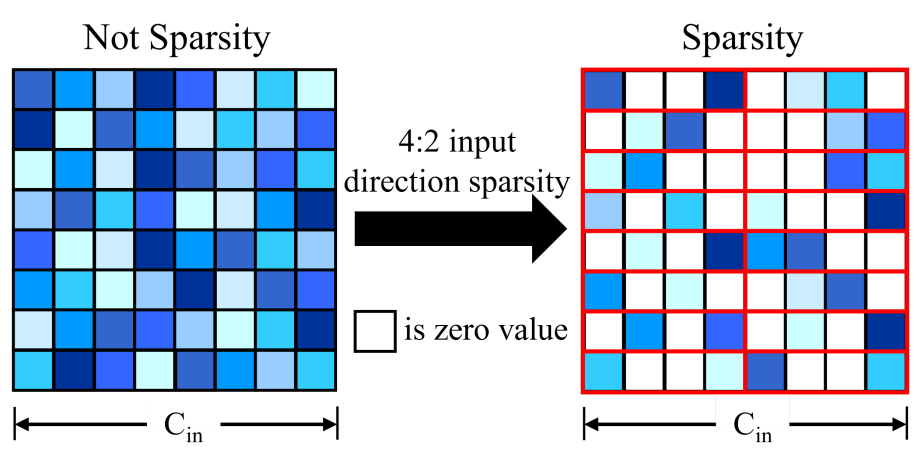
Figure 4-9 4:2 input direction sparsity principle diagram
The descriptions of the four weight sparsification methods are shown in Table 4-8, where the input and output directions refer to the directions of the weights. For example, for a 2- dimensional convolution with shape C out×C in×K h×K w, the input direction is C in and the output direction is C out. For the methods with a sparsity rate of 75%, the pre-trained model can be either an unsparsified model or a sparse model. It is recommended to use a single-direction sparse model as the pre-trained model, which can reduce the accuracy loss after sparsification.
Table 4-8 Model weight sparsification description
| Sparsification method | Sparsity rate | Description |
|---|---|---|
| 4:2 input direction sparsification | 50% | Sparsify the weights along the input direction |
| 4:2 output direction sparsification | 50% | Sparsify the weights along the output direction |
| 16:4 input and output sparsification | 75% | First sparsify 4:2 along the input direction, then sparsify 4:2 along the output direction |
| 16:4 output and input sparsification | 75% | First sparsify 4:2 along the output direction, then sparsify 4:2 along the input direction |
4.1.7.2 TRAINING THE SPARSE MODEL
- First, make sure that cuda is available and install the autosparsity package for the corresponding Python version
pip install autosparsity-1.0-cp38-cp38m-linux_x86_64.whl
The autosparsity installation package path is: https://github.com/airockchip/rknn-toolkit2/tree/master/autosparsity/packages
- Take the 4:2 input direction sparsification of resnet50 in torchvision as an example to perform weight sparsification training
import torch
import torchvision.models as models
from autosparsity.sparsity import sparsity_model

if __name__ == "__main__":
  model = models.resnet50(pretrained=True).cuda()
  optimizer = None
  mode = 0
  sparsity_model(model, optimizer, mode)
  model.eval()
  x = torch.randn((1,3,224,224)).cuda()
  torch.onnx.export(
  model, x, 'resnet50.onnx', input_names=['inputs'], output_names=['outputs']
  )
To sparsify a custom model, simply add the sparsity_model function before model training. The reference example is as follows:
# insert model autosparsity code before training
    import torch
    import torchvision.models as models
    from autosparsity.sparsity import sparsity_model

    ...

    model = models.resnet34(pretrained=True).cuda()
    mode = 0
    sparsity_model(model, optimizer, mode)

# normal training
    x, y = DataLoader(args)
    for epoch in range(epochs):
        y_pred = model(x)
        loss = loss_func(y_pred, y)
        loss.backward()
        optimizer.step()
    ...
Note: Sparse training of Attention models relies on a well-trained front-end model. Therefore, before performing sparsification training, please first train a model with ‘good’ accuracy, and then perform sparsification training based on that model.
The descriptions of the parameters of the sparsity_model function are as follows:
Table 4-9 Description of parameters of sparsity_model function
| Parameters | Description |
|---|---|
| model | Original training model |
| Parameters | Description |
|---|---|
| optimizer | Original optimizer, default is None |
| mode | Sparsification method, optional values are 0, 1, 2, 3, default is 0 0: 4:2 input direction sparsification (50% sparsity rate) 1: 4:2 output direction sparsification (50% sparsity rate) 2: 16:4 input and output sparsification (75% sparsity rate) 3: 16:4 output and input sparsification (75% sparsity rate) |
| verbose | Log level, optional values are 0, 1, 2, 3, default is 2 0: Errors 1: Errors and Warnings 2: Errors, warnings and info |
| whitelist | List of modules supported by sparsification, supporting 1d conv, 2d conv, 3d conv, linear, MultiheadAttention, default is [torch.nn.Linear, torch.nn.Conv2d] |
| allowed_layer_names | Layer names allowed to be sparsified. When configured by the user, only the specified layers will be sparsified, default is None |
| disallowed_layer_names | Layer names not allowed to be sparsified. When configured by the user, these layers will be skipped, default is [] |
| fast | Set to True to use a fast method to calculate the mask, default is False (the default mask calculation method fails for some models; if a sparsification error is reported, try setting this parameter to True) |
4.1.7.3 RKNN SPARSE INFERENCE USAGE
Model sparsification can be enabled or disabled through the “sparse_infer” parameter of the config() interface in RKNN-Toolkit2. The corresponding parameter values are True/False , and the default value is False . The reference code for enabling sparse inference is as follows:
rknn.config(target_platform=’rk3576’, sparse_infer=True)
The complete sparse inference Python code can be found at: https://github.com/airockchip/rknn-toolkit2/tree/master/autosparsity/examples
When deploying with the C API, first use RKNN-Toolkit2 to set the “ sparse_infer “ parameter to True in the config() interface to generate an RKNN model with sparse inference, and then call the general API interface process or the zero-copy API interface process normally.
When using Python code for inference, you can set verbose=True when building the RKNN object to enable the log that prints the sparsification status of each layer; when using the C API for inference, set the environment variable RKNN_LOG_LEVEL=4 to enable the log that prints the sparsification status of each layer. The log information is as follows:
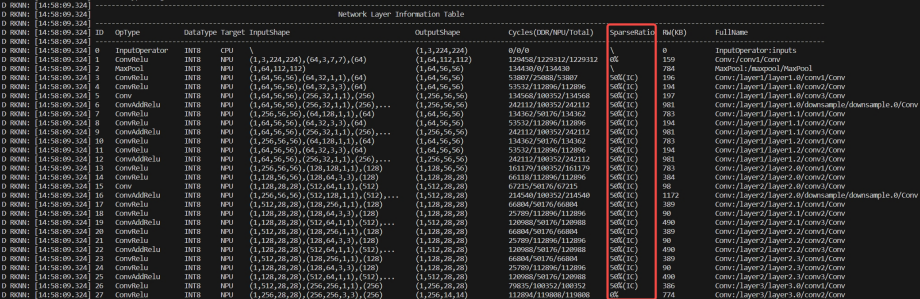
Figure 4-10 4:2 input direction sparsification Python printing log
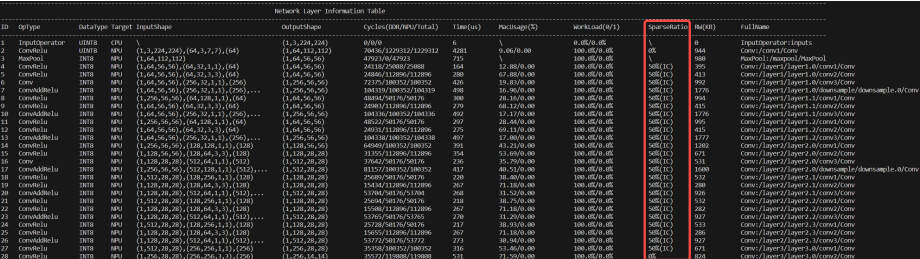
Figure 4-11 4:2 input direction sparsification C API printing log
Here, SparseRation represents the sparsity rate: 4:2 input direction sparsification corresponds to 50% (IC), 4:2 output direction sparsification corresponds to 50% (OC), and 16:4 input and output sparsification and 16:4 output and input sparsification correspond to 75%. 0% means no sparsification has been performed.
4.1.7.4 RKNN SPARSE INFERENCE RESTRICTIONS
Sparse inference is implemented based on the NPU hardware architecture. Limited by hardware specifications, the sparse inference of RK3576 currently only supports 2d Conv with the group parameter set to 1. The other restrictions are as follows:
Table 4-10 RKNN sparse inference restrictions
| Number of channels | Data type | |
|---|---|---|
| 4:2 input direction sparsification | Input is 32-aligned, output is 32-aligned | Only Int8 is supported, Float16 is not supported |
| 4:2 output direction sparsification | Input is 32-aligned, output is 32-aligned | Only Int8 is supported, Float16 is not supported |
| 16:4 input and output sparsification | Input is 32-aligned, output is 32-aligned | Only Int8 is supported, Float16 is not supported |
| 16:4 output and input sparsification | Input is 32-aligned, output is 32-aligned | Only Int8 is supported, Float16 is not supported |