
Platform reference: this article follows the Rockchip RKNN2 SDK V2.5.0 Development Guide, including only the SoCs, Linux/Android Runtime and Toolkit combinations stated by the source. Features apply under the chip, SDK, driver and kernel conditions in each section, not automatically to every ArmSoM board. Check the actual ArmSoM BSP, NPU driver, Runtime and model versions before deployment. No ArmSoM hardware validation was performed; logs, performance figures and examples belong to the source.
Sources and proofreading: Chinese follows Chinese V2.5.0 (182 pages); English, Russian and German follow English V2.5.0 (208 pages). Source-specific technical information is retained; older-version content is not presented as new-version fact. Chinese figures come from the Chinese PDF; EN/RU/DE figures come from the English PDF, including separately extracted vector flowcharts. Original section and equation numbers remain. Some source cross-references still use old chapter numbers; dynamic-shape capacity examples contain “1224+140=264”, TP_NORM support statements conflict, and names such as init()/rknn.val_perf() differ from later API descriptions. These source issues are retained and require checking against actual V2.5.0 SDK headers/API references before execution. Code and parameters remain; PDF wrapping and table continuations are repaired.
RKNN2 SDK V2.5.0 · 1/22
Software stack and core concepts
2. Environment, versions and board connection
3. Development workflow and interface selection
4. Model conversion and ONNX editing
5. Quantization, hybrid quantization and QAT
6. Inference, accuracy, performance and memory evaluation
7. Runtime lifecycle, layouts and memory
8. Zero-copy interfaces and I/O constraints
9. C API deployment and code generation
10. Toolkit Lite2 Python deployment
11. Matmul API and matrix layouts
12. NPU multicore configuration and performance
13. Dynamic-shape models and deployment
16. Cache coherency and sparse inference
17. Custom operators: Python and C API
18. Encrypted model deployment
20. Performance analysis and network optimization
21. Memory analysis, sharing and reuse
22. FAQ, error handling and references
1. Overview and Development Preparation
1.1 RKNN2 SDK Overview
1.1.1 SDK Positioning and Typical Application Scenarios
1.1.1.1 OVERVIEW OF THE RKNN SOFTWARE STACK
The RKNN software stack enables users to quickly deploy AI models to Rockchip chips. The overall framework is as follows:
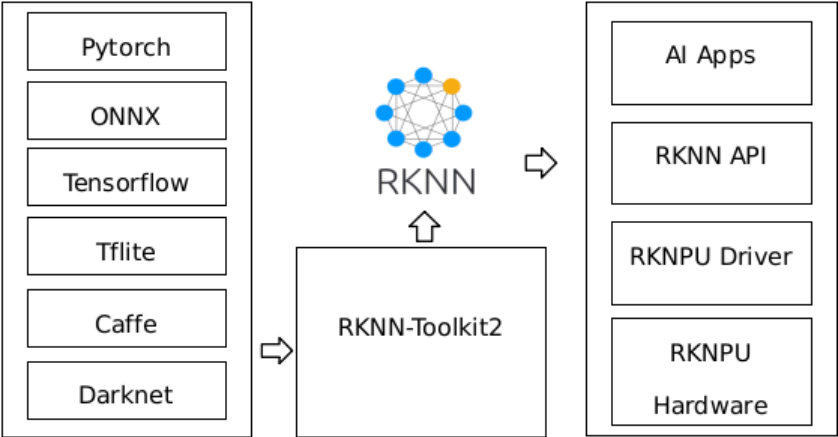
Figure 1-1 RKNN Software Stack
In order to use RKNPU, users need to first run the RKNN-Toolkit2 tool on the computer, convert the trained model into an RKNN format model, and then install it on the development board using the RKNN C API or Python.
1.1.1.2 INTRODUCTION TO RKNN-TOOLKIT2 FEATURES
RKNN-Toolkit2 is a development suite that allows users to convert, infer, and evaluate models on computer. The main diagram of RKNN-Toolkit2 is as follows:
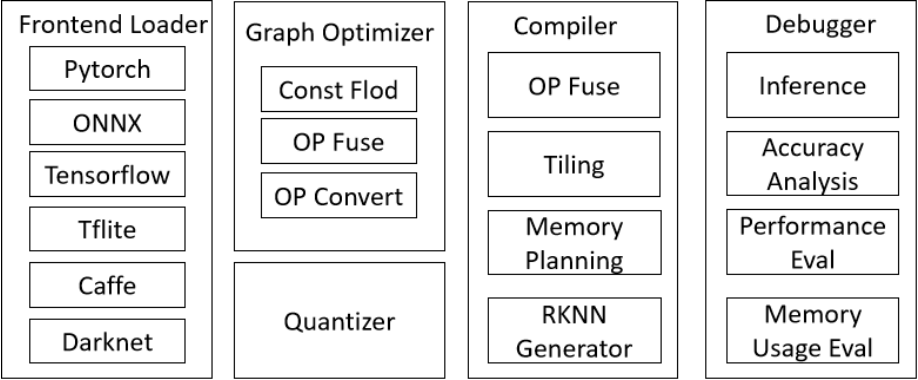
Figure 1-2 RKNN-Toolkit2 Software Diagram
The toolkit provides a convenient Python interface to perform the following functions:
-
Model Conversion: Support the conversion of PyTorch, ONNX, TensorFlow, TensorFlow Lite, Caffe, DarkNet, and other models into RKNN models.
-
Quantization Functionality: Support quantizing floating-point models into fixed-point models. It also supports mixed quantization functionality.
-
Model Inference: Distribute the RKNN model to the designated NPU device for inference and obtain the inference results; or simulate the NPU on the computer to run the RKNN model and obtain the inference results.
-
Performance and Memory Evaluation: Distributes the RKNN model to a designated NPU device to evaluate the performance and memory usage of the model when running on the actual device.
-
Quantization accuracy analysis: This function will give the cosine distance and Euclidean distance between the inference results of each layer of quantized model and that of floating-point model, so as to facilitate the analysis of how quantization errors occur and provide information for improving the accuracy of the quantization model.
-
Model Encryption: Encrypts the RKNN model using a hybrid encryption scheme of AES-256- CTR and RSA-OAEP to protect the model’s intellectual property.
1.1.1.3 INTRODUCTION TO RKNN RUNTIME FEATURES
RKNN Runtime is responsible for loading the RKNN model and calling the NPU driver to infer the RKNN model on the NPU. When inferring the RKNN model, three processes are involved: pre- processing of the raw input data, running the model on the NPU, and post-processing of the output. Depending on the model input format and quantization method, RKNN Runtime provides two processing flows: the general API and the zero-copy API.
General API inference: Provides a simple, low-barrier set of inference APIs that are easy to use. The process is shown in Figure 1-3. Data normalization, quantization, data layout format conversion, and dequantization are all performed on the CPU, while the model inference itself is executed on the NPU.
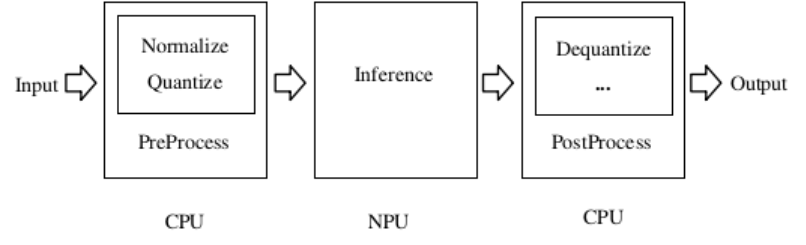
Figure 1-3 Data Processing Flow of the General API
Zero-copy API inference: The process is shown in Figure 1-4. It optimizes the data processing flow of the general API. Normalization, quantization, and model inference are all performed on the NPU, while the data layout format conversion of the NPU output and the dequantization process are executed on the CPU or NPU. The zero-copy API is more efficient than the general API in handling the input data flow. It supports data flowing between different IP cores without any data copying, reducing CPU and DDR bandwidth consumption. For example, data obtained through a camera or from decoding can be imported into the NPU by zero-copy.
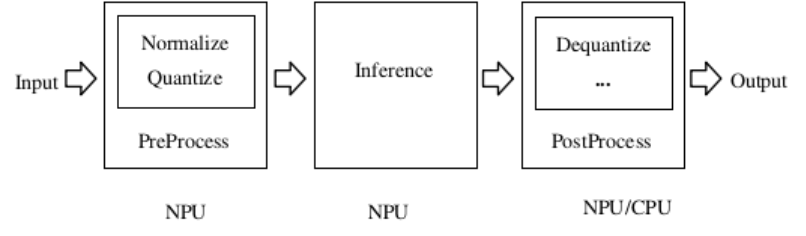
Figure 1-4 Data Processing Flow of the Zero-copy API
When the user’s input data only has a virtual address, only the general API can be used; when the user’s input data has a physical address or fd, both sets of APIs can be used.
1.1.2 Supported Hardware Platforms and Deployment Modes
This document applies to the following hardware platforms:
RV1103, RV1103B, RV1106, RV1106B, RK2118, RK3562, RK3566 series, RK3568 series, RK3576, RK3588 series, RV1126B
Note: RK3566_RK3568 is used to indicate RK3566/RK3568 series in this document. RK3588 is used to indicate RK3588/RK3588S series in this document.
1.1.3 Terms, Abbreviations, and Document Conventions
This section describes the terms and abbreviations commonly used in this document.
Hardware and Deployment
Board-connected inference: The PC is connected to the development board via USB; inference is initiated by RKNN-Toolkit2 on the PC side and the model is executed on the NPU of the development board. It is used for model verification and accuracy analysis.
Models and Tensors
RKNN model: A model file that runs on the RKNPU, with the .rknn extension.
Tensor: A data structure representing multi-dimensional arrays, containing data memory and attribute information (shape / dtype / layout, etc.).
Data type (dtype): The data type of tensor elements, such as FP32 / FP16 / INT8 / UINT8.
Data layout (layout): The arrangement of a tensor in memory, such as NCHW / NHWC / NC1HWC2.
NC1HWC2: An NPU-optimized memory layout format that stores the channel dimension in blocks to improve NPU access efficiency. The number of sub-channels on different platforms is described in 3.1.2 NPU layout.
Quantization
Quantized model: A model running with low-precision data types such as INT8; scale and zero_point parameters are required for quantization/dequantization.
Non-quantized model: A model running with the FP16 data type; no quantization parameters are required.
Document Conventions
Lines starting with # in code blocks are comments.
Content in <> is a parameter placeholder and should be replaced with actual values.
Interface function names, parameter names, and file names are wrapped in backticks (`) .
For detailed API parameter descriptions involved in this document, refer to the corresponding API reference manual.