
Platform reference: this article follows the Rockchip RKNN2 SDK V2.5.0 Development Guide, including only the SoCs, Linux/Android Runtime and Toolkit combinations stated by the source. Features apply under the chip, SDK, driver and kernel conditions in each section, not automatically to every ArmSoM board. Check the actual ArmSoM BSP, NPU driver, Runtime and model versions before deployment. No ArmSoM hardware validation was performed; logs, performance figures and examples belong to the source.
Sources and proofreading: Chinese follows Chinese V2.5.0 (182 pages); English, Russian and German follow English V2.5.0 (208 pages). Source-specific technical information is retained; older-version content is not presented as new-version fact. Chinese figures come from the Chinese PDF; EN/RU/DE figures come from the English PDF, including separately extracted vector flowcharts. Original section and equation numbers remain. Some source cross-references still use old chapter numbers; dynamic-shape capacity examples contain “1224+140=264”, TP_NORM support statements conflict, and names such as init()/rknn.val_perf() differ from later API descriptions. These source issues are retained and require checking against actual V2.5.0 SDK headers/API references before execution. Code and parameters remain; PDF wrapping and table continuations are repaired.
RKNN2 SDK V2.5.0 · 9/22
1. Software stack and core concepts
2. Environment, versions and board connection
3. Development workflow and interface selection
4. Model conversion and ONNX editing
5. Quantization, hybrid quantization and QAT
6. Inference, accuracy, performance and memory evaluation
7. Runtime lifecycle, layouts and memory
8. Zero-copy interfaces and I/O constraints
C API deployment and code generation
10. Toolkit Lite2 Python deployment
11. Matmul API and matrix layouts
12. NPU multicore configuration and performance
13. Dynamic-shape models and deployment
16. Cache coherency and sparse inference
17. Custom operators: Python and C API
18. Encrypted model deployment
20. Performance analysis and network optimization
21. Memory analysis, sharing and reuse
22. FAQ, error handling and references
3.2 Deploying General Models with the C API
This chapter describes the deployment process of the general C API, covering the complete invocation process from model initialization, input/output preparation, and inference execution to output processing. It is suitable for production deployment and performance-sensitive scenarios. For the zero-copy C API invocation process, refer to 3.1.6 RKNN Runtime Zero-Copy Interface.
3.2.1 Complete Invocation Process
The typical calling sequence for deploying a general model with the C API is: model initialization → query input/output attributes → prepare and set inputs → run inference → get outputs → post- processing → release resources. The overall flow is shown in the figure below:
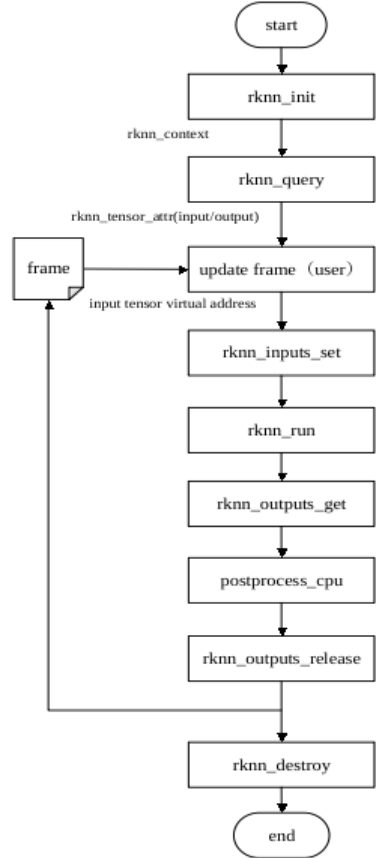
Figure 3-10 General API calling process
RKNN general API interface calling process:
-
Call rknn_init() to initialize the model;
-
Call rknn_query() to query the input and output attributes of the model;
-
Pre-process the input;
-
Call rknn_inputs_set() to configure the input data;
-
Call rknn_run() to run model inference;
-
Call rknn_outputs_get() to acquire the inference result data;
-
Post-process the output;
-
Call rknn_outputs_release() to release the output data memory;
-
Call rknn_destroy() to destroy RKNN;
The general API calling process is shown in Figure 3-10.
Example code of the general API calling process:
// Init RKNN model
ret = rknn_init(&ctx, model, model_len, 0, NULL);

// Get Model Input Output Number
rknn_input_output_num io_num;
ret = rknn_query(ctx, RKNN_QUERY_IN_OUT_NUM, &io_num, sizeof(io_num));

// Get Model Input Info
rknn_tensor_attr input_attrs[io_num.n_input];
memset(input_attrs, 0, sizeof(input_attrs));
for (int i = 0; i < io_num.n_input; i++)
{
    input_attrs[i].index = i;
    ret = rknn_query(ctx, RKNN_QUERY_INPUT_ATTR, &(input_attrs[i]), sizeof(rknn_tensor_attr));
}

// Get Model Output Info
rknn_tensor_attr output_attrs[io_num.n_output];
memset(output_attrs, 0, sizeof(output_attrs));
for (int i = 0; i < io_num.n_output; i++)
{
    output_attrs[i].index = i;
    ret = rknn_query(ctx, RKNN_QUERY_OUTPUT_ATTR, &(output_attrs[i]), sizeof(rknn_tensor_attr));
}

rknn_input inputs[io_num.n_input];
rknn_output outputs[io_num.n_output];
memset(inputs, 0, sizeof(inputs));
memset(outputs, 0, sizeof(outputs));

// Pre-process
// Read Image
image_buffer_t src_image;
memset(&src_image, 0, sizeof(image_buffer_t));
ret = read_image(image_path, &src_image);

// Set Input Data
inputs[0].index = 0;
inputs[0].type = RKNN_TENSOR_UINT8;
inputs[0].fmt = RKNN_TENSOR_NHWC;
inputs[0].size = src_image.size;
inputs[0].buf = src_image.virt_addr;

ret = rknn_inputs_set(rknn_ctx, io_num.n_input, inputs);

// Run
ret = rknn_run(rknn_ctx, nullptr);

// Get Output Data
ret = rknn_outputs_get(rknn_ctx, io_num.n_output, outputs, NULL);

// Post-process
post_process(outputs, results);

// Release RKNN Output
rknn_outputs_release(rknn_ctx, io_num.n_output, outputs);

if (rknn_ctx != 0)
{
    rknn_destroy(rknn_ctx);
}
3.2.2 Model Initialization
Model initialization is done via the rknn_init() API, which loads the RKNN model and creates the runtime context; it is the prerequisite of all subsequent operations.
rknn_init() supports two model loading modes:
Load from file path: pass the .rknn model file path string via the model parameter with size set to 0; the Runtime reads the model file itself.
Load from memory: read the .rknn model file into memory and pass the data pointer via model with the data length via size . Suitable for scenarios where the model is preloaded in memory, or decrypted in application code after model encryption.
The flag parameter specifies initialization flags (e.g. runtime performance collection RKNN_FLAG_COLLECT_PERF_MASK , user-allocated memory RKNN_FLAG_MEM_ALLOC_OUTSIDE ); pass 0 for default initialization. The ext parameter carries extension information; pass NULL in general.
rknn_context ctx;
int ret = rknn_init(&ctx, "./model.rknn", 0, 0, NULL);
if (ret != RKNN_SUCCESS) {
    printf("rknn_init failed! ret=%d\n", ret);
    goto out;
}
On RK3588 / RK3576, the NPU cores used by the model can be specified via rknn_set_core_mask() after initialization; it must match the configuration used during model conversion. See 4.1.2 NPU Multi-Core Configuration.
3.2.3 Input/Output Preparation
After model initialization, query the model’s input/output attributes and prepare the input data accordingly.
1. Query input/output attributes
Query the number and attributes of the model’s input/output tensors via rknn_query() : first query RKNN_QUERY_IN_OUT_NUM for the counts, then query each tensor’s attributes ( RKNN_QUERY_INPUT_ATTR / RKNN_QUERY_OUTPUT_ATTR ) to get shape, dtype, layout, quantization parameters, etc., which are used to organize input data and parse output results.
// Query the number of inputs and outputs
rknn_input_output_num io_num;
ret = rknn_query(ctx, RKNN_QUERY_IN_OUT_NUM, &io_num, sizeof(io_num));

// Query each input tensor's attributes
rknn_tensor_attr input_attrs[io_num.n_input];
memset(input_attrs, 0, sizeof(input_attrs));
for (int i = 0; i < io_num.n_input; i++)
{
    input_attrs[i].index = i;
    ret = rknn_query(ctx, RKNN_QUERY_INPUT_ATTR, &(input_attrs[i]), sizeof(rknn_tensor_attr));
}
2. Prepare and set input data
After preprocessing the input data (resize, color-space conversion, etc.), fill in the rknn_input structure and pass it to the Runtime via rknn_inputs_set() :
index : input index.
buf / size : input data pointer and size in bytes; size equals the number of elements times the per-element byte count.
type : input data type (e.g. RKNN_TENSOR_UINT8 ); if it differs from the model input type, the Runtime converts it automatically.
fmt : input data layout (e.g. RKNN_TENSOR_NHWC ); 4-dimensional inputs should specify the correct layout, non-4-dimensional inputs use RKNN_TENSOR_UNDEFINED .
pass_through : whether to skip the Runtime’s internal preprocessing (normalization, type conversion, layout conversion).
rknn_input inputs[io_num.n_input];
memset(inputs, 0, sizeof(inputs));
inputs[0].index = 0;
inputs[0].type = RKNN_TENSOR_UINT8;
inputs[0].fmt = RKNN_TENSOR_NHWC;
inputs[0].size = src_image.size;
inputs[0].buf = src_image.virt_addr;

ret = rknn_inputs_set(ctx, io_num.n_input, inputs);
Note:
If mean_values and std_values were configured via rknn.config() during model conversion, the Runtime performs normalization automatically during general-API inference; no mean/std handling is needed in the application, which effectively reduces deployment time.
The channel order (RGB / BGR) of input data must match the model’s training configuration. If quant_img_RGB2BGR was used during quantization, note that it does not take effect at inference time; channel conversion is the user’s responsibility.
Input preparation differs for the zero-copy API: allocate memory via rknn_create_mem() and bind it with rknn_set_io_mem() ; the memory size, dtype, and layout must strictly match the queried tensor attributes. See 3.1.6 RKNN Runtime Zero-Copy Interface for details.
3.2.4 Running Inference
After the inputs are set, run inference via rknn_run() . It is a synchronous blocking call: when it returns, the current inference is complete.
ret = rknn_run(ctx, nullptr);
if (ret < 0) {
    printf("rknn_run failed! ret=%d\n", ret);
    goto out;
}
On the multi-core RK3588 / RK3576 platforms, set the core mask via rknn_set_core_mask() before inference (see 3.2.2 Model Initialization). For methods of measuring inference time ( RKNN_QUERY_PERF_RUN query, RKNN_LOG_LEVEL logs), see 5.2 Performance Analysis and Optimization.
3.2.5 Output Processing
After inference, retrieve the output data via rknn_outputs_get() , run post-processing, and call rknn_outputs_release() to free the output memory after use.
rknn_output outputs[io_num.n_output];
memset(outputs, 0, sizeof(outputs));
outputs[0].want_float = 1;
ret = rknn_outputs_get(ctx, io_num.n_output, outputs, NULL);
if (ret < 0) {
    printf("rknn_outputs_get failed! ret=%d\n", ret);
    goto out;
}

// Post-processing (e.g. argmax for classification, NMS for detection)
post_process(outputs, results);

// Release output memory
rknn_outputs_release(ctx, io_num.n_output, outputs);
Notes when reading output data:
Data type: with want_float = 1 , the Runtime converts outputs to float32 before returning; with want_float = 0 , the model’s original output type is returned (INT8 quantized data for quantized models, float16 for non-quantized models), and dequantization to floating-point values must be done with the quantization parameters (scale / zero_point) from the queried tensor attributes.
Data layout: the general API returns outputs in the model’s original layout; 4-dimensional outputs are generally NCHW , which post-processing should parse accordingly.
Memory release: the output memory obtained via rknn_outputs_get() is allocated by the Runtime and must be released via rknn_outputs_release() to avoid leaks; the zero- copy API reads the bound memory directly and has no such step.
3.2.6 Generating Deployment C Code
RKNN-Toolkit2 version 2.0.0 adds a new Codegen interface, which is used to generate model deployment code and simplify the difficulty for developers to get started. Codegen is re- encapsulated based on the CAPI zero-copy interface, and the interface style is consistent with the demo in RKNN_Model_Zoo. The generated deployment code can be used to directly test performance and verify inference accuracy, and developers can also conduct secondary development based on the generated code.
Usage example:
ret = rknn.codegen(output_path='./rknn_app_demo',
          inputs=['../../caffe/mobilenet_v2/dog_224x224.jpg'], overwrite=True)
Before calling the codegen interface, you must first call the rknn.export interface to save the RKNN model.
output_path is the output folder directory, the user can configure the directory name
Inputs fills in the path list of model input. It is allowed to leave it blank. The valid file format is jpg/png/npy. When npy files are used as input, the dimension information of npy data should be consistent with the dimension information of the model input.
When overwrite is set to True, the files in the directory specified by output_path will be overwritten. The default value is False
After generating the deployment code, please refer to the README.md document instructions in the generation directory to compile and test
If inputs are filled with valid values, after inference, the deployment code example will evaluate the difference in inference results between the CAPI interface and the RKNN- Toolkit2 simulator. The evaluation method is to compare the cosine similarity of each output.
No NPU hardware platform restrictions, the board system is required to be Linux or Android
Supports quantitative and non-quantitative models