
Platform reference: this article follows the Rockchip RKNN2 SDK V2.5.0 Development Guide, including only the SoCs, Linux/Android Runtime and Toolkit combinations stated by the source. Features apply under the chip, SDK, driver and kernel conditions in each section, not automatically to every ArmSoM board. Check the actual ArmSoM BSP, NPU driver, Runtime and model versions before deployment. No ArmSoM hardware validation was performed; logs, performance figures and examples belong to the source.
Sources and proofreading: Chinese follows Chinese V2.5.0 (182 pages); English, Russian and German follow English V2.5.0 (208 pages). Source-specific technical information is retained; older-version content is not presented as new-version fact. Chinese figures come from the Chinese PDF; EN/RU/DE figures come from the English PDF, including separately extracted vector flowcharts. Original section and equation numbers remain. Some source cross-references still use old chapter numbers; dynamic-shape capacity examples contain “1224+140=264”, TP_NORM support statements conflict, and names such as init()/rknn.val_perf() differ from later API descriptions. These source issues are retained and require checking against actual V2.5.0 SDK headers/API references before execution. Code and parameters remain; PDF wrapping and table continuations are repaired.
RKNN2 SDK V2.5.0 · 13/22
1. Software stack and core concepts
2. Environment, versions and board connection
3. Development workflow and interface selection
4. Model conversion and ONNX editing
5. Quantization, hybrid quantization and QAT
6. Inference, accuracy, performance and memory evaluation
7. Runtime lifecycle, layouts and memory
8. Zero-copy interfaces and I/O constraints
9. C API deployment and code generation
10. Toolkit Lite2 Python deployment
11. Matmul API and matrix layouts
12. NPU multicore configuration and performance
Dynamic-shape models and deployment
16. Cache coherency and sparse inference
17. Custom operators: Python and C API
18. Encrypted model deployment
20. Performance analysis and network optimization
21. Memory analysis, sharing and reuse
22. FAQ, error handling and references
4.1.3 Dynamic Shape
4.1.3.1 DYNAMIC SHAPE INTRODUCTION
Dynamic shape means that the shape of the model input data can change at runtime. It can help handle situations where the input data size is not fixed and increase the flexibility of the model. In the case of the RKNN model that only supported static shape before, if the user needs to use multiple input shapes, the traditional approach is to generate multiple RKNN models and initialize multiple contexts to perform inference separately when deploying the model. However, after the introduction of dynamic shape, can only keep a copy of the dynamic shape RKNN model that is similar in size to the static shape RKNN model, and use one context for inferenceing, thus saving Flash and DDR occupancy. Dynamic shape plays an important role in image processing and sequence model reasoning. Typical application scenarios include:
Models with changing sequence lengths, common in NLP models, such as BERT, GPT
Models that vary in spatial dimensions, such as segmentation and style transfer
The model with batch, the batch dimension changes
Object detection model with variable output number
4.1.3.2 RKNN SDK VERSION AND PLATFORM REQUIREMENTS
RKNN-Toolkit2 version>=1.5.0
RKNPU Runtime library (librknnrt.so) version >=1.5.0
The NPU of the RK3562/RK3566/RK3568/RK3576/RK3588/RK3588S/RV1126B platforms supports this function
4.1.3.3 GENERATE RKNN MODEL OF DYNAMIC SHAPE
This section introduces the steps to generate an RKNN model with dynamic shape using the Python interface of RKNN-Toolkit2:
- Confirm that the model supports dynamic shape
If the model file itself is not of dynamic shape, RKNN-Toolkit2 supports expanding it into an RKNN model with dynamic shape. First, the user must confirm that the model itself does not contain operators or subgraph structures that limit dynamic shape. For example, the shape of a constant cannot be changed, and the RKNN-Toolkit2 tool will report an error during the conversion process. If dynamic shape expansion is not supported, the user should modify the model structure according to the error message and retrain the model to support dynamic shape. It is recommended to use a model that is originally of dynamic shape.
- Set the input shapes to be used
Due to NPU hardware characteristics, a dynamic shape RKNN model does not support arbitrary changes of input shapes, and users are required to set a limited number of input shapes. For models with multiple inputs, the number of shapes for each input must be the same. For example, when using RKNN-Toolkit2 to convert a Caffe model, the Python code example is as follows:
# Python
dynamic_input = [
    [[1,3,224,224]], # set the first shape for all inputs
    [[1,3,192,192]], # set the second shape for all inputs
    [[1,3,160,160]], # set the third shape for all inputs
]

# Pre-process config
rknn.config(mean_values=[103.94, 116.78, 123.68], std_values=[58.82, 58.82, 58.82],
quant_img_RGB2BGR=True, dynamic_input=dynamic_shapes)
The above interface configuration will generate a dynamic shape RKNN model that supports three shapes: [1,3,224,224], [1,3,192,192] and [1,3,160,160].
The shape in dynamic_input is consistent with the layout of the original model framework. For example, for classifying RGB images of the same 224x224 size, the TensorFlow/TFLite model input is [1,224,224,3], while the ONNX model input is [1,3,224,224].
- Quantization
After setting the input shapes, if quantization is needed, the quantization calibration dataset must be set. The tool will read the maximum resolution input set by the user for quantization (the group of shapes with the largest sum of all input sizes). For example, a model has two inputs, one input has shapes [1,224] and [1,112], and the other input has shapes [1,40] and [1,80]. The sum of all input sizes for the first group of shapes is 1224+140=264, and the sum of all input sizes for the second group of shapes is 1112+180=192. The sum of all input sizes for the first group of shapes is larger, so the two inputs are quantized with the shapes [1,224] and [1,40] respectively.
If the quantization calibration dataset is in jpg/png image format, the user can use images of different resolutions for quantization, because the tool will resize the images to the maximum resolution using the resize method of opencv before quantization.
If the quantization calibration dataset is in npy format, the user must use the shape of the maximum resolution input. After quantization, all shapes in the model use the same set of quantization parameters for inference at runtime.
In addition, the maximum resolution input shape will also be printed out when calling rknn.config, as follows:
W config: The 'dynamic_input' function has been enabled, the MaxShape is dynamic_input[0] = [[1,224],[1,40]]!
The following functions are subject to the MaxShape:
1. The quantified dataset needs to be configured according to MaxShape
2. The eval_perf or eval_memory return the results of MaxShape
- Inference evaluation or accuracy analysis
When performing inference or accuracy analysis with a dynamic shape RKNN model, the user must provide inputs with one of the groups of shapes set in step 2. The interface usage is consistent with the static shape RKNN model scenario, and will not be described in detail here.
For a complete example of creating a dynamic shape RKNN model, please refer to (https://github.com/airockchip/rknn-toolkit2/tree/master/rknn-toolkit2/examples/functions/dynamic_shape)
4.1.3.4 C API DEPLOYMENT
After obtaining the dynamic shape RKNN model, use the RKNPU2 C API to deploy it. According to the interface form, it is divided into general API and zero-copy API deployment processes.
4.1.3.4.1 General API
The process of deploying a dynamic shape RKNN model using the general API is shown in the figure below:
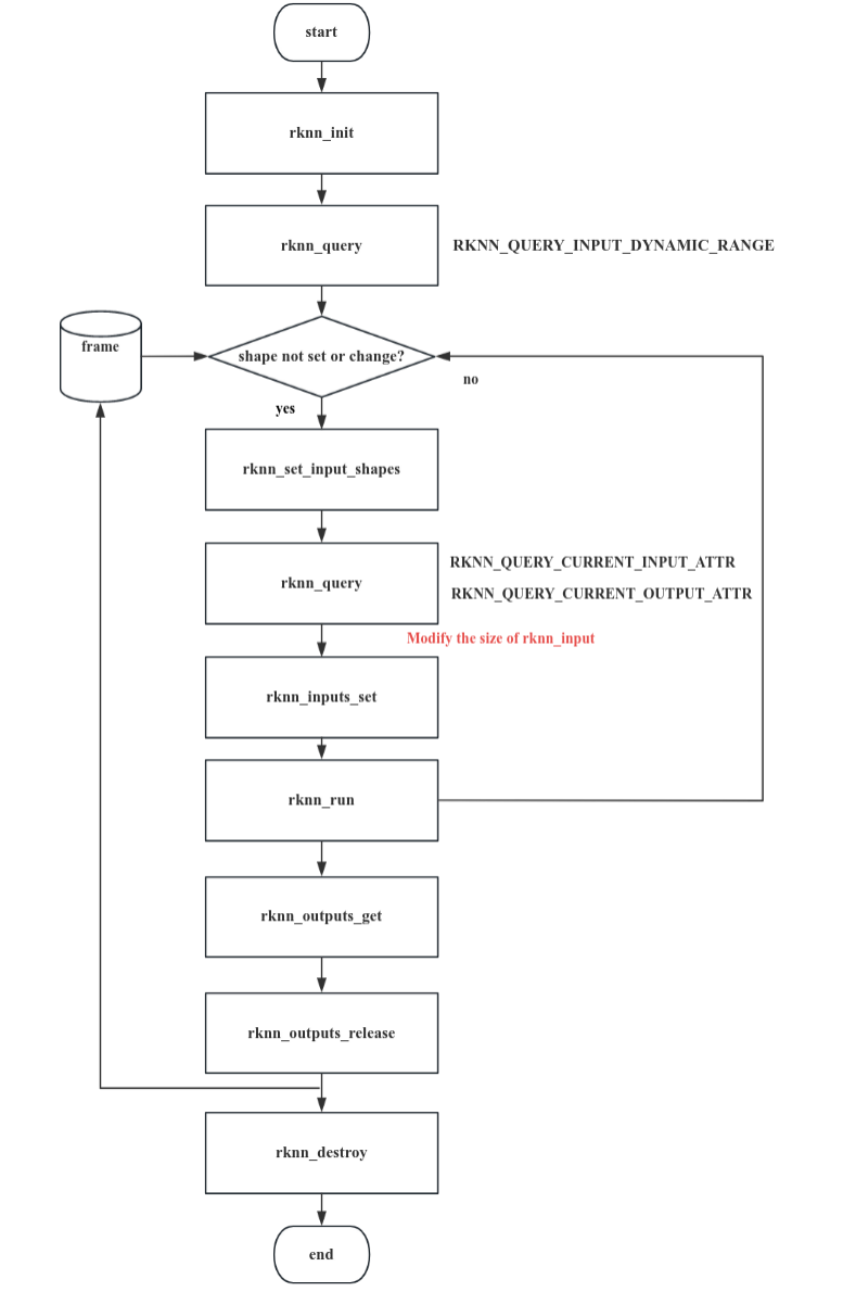
Figure 4-5 General API calling process of dynamic shape input interface
After loading a dynamic shape RKNN model, the input shape can be dynamically modified at runtime. First, the list of input shapes supported by the RKNN model can be queried through rknn_query() . The shape list information supported by each input is returned in the form of the rknn_input_range structure, which contains the name, data layout information, number of shapes, and specific shapes of each input. Then, by calling the rknn_set_input_shapes() interface and passing in the rknn_tensor_attr array pointer containing the shape information of each input, the shape used for the current inference can be set. After setting the input shape, rknn_query() can be called again to query the input and output shapes after the current setting is successful.
Finally, complete the inference according to the general API process. Each time the input shape is switched, a new shape needs to be set again, data of the new shape size prepared, and the rknn_inputs_set() interface called again. If there is no need to switch the input shape before inference, there is no need to call the rknn_set_input_shapes() interface repeatedly.
1. Initialization
Call the rknn_init() interface to initialize the dynamic shape RKNN model.
For dynamic shape RKNN models, there are the following restrictions when initializing the context:
The weight sharing function is not supported (initialization with the RKNN_FLAG_SHARE_WEIGHT_MEM flag).
The context reuse function is not supported (see the rknn_dup_context interface for details).
2. Query the input shape combinations supported by the RKNN model
After successful initialization, the list of input shapes supported by the RKNN model can be queried through rknn_query() . The shape list information supported by each input is returned in the form of the rknn_input_range structure, which contains the name, layout information, number of supported shapes, and specific shapes of each input. The C code example is as follows:
// Query the input shapes supported by the model
rknn_input_range dyn_range[io_num.n_input];
memset(dyn_range, 0, io_num.n_input * sizeof(rknn_input_range));
for (uint32_t i = 0; i < io_num.n_input; i++)
{
    dyn_range[i].index = i;
    ret = rknn_query(ctx, RKNN_QUERY_INPUT_DYNAMIC_RANGE, &dyn_range[i], sizeof(rknn_input_range));
    if (ret != RKNN_SUCC)
    {
        fprintf(stderr, "rknn_query error! ret=%d\n", ret);
        return -1;
    }
    dump_input_dynamic_range(&dyn_range[i]);
}
Note: For multi-input models, the shapes of all inputs correspond one-to-one in order. For example, for an RKNN model with two inputs and multiple shapes, the first shape of the first input combined with the first shape of the second input is valid, and there are no intersecting shape combinations. For example, a model has two inputs A and B, where the shapes of A are [1,224] and [1,112], and the shapes of B are [1,40] and [1,80]. In this case, only the following two groups of input shapes are supported:
A shape = [1,224], B shape=[1,40]
A shape = [1,112], B shape=[1,80]
3. Set input shape
When input data is set for the first time or the shape of the input data changes, the rknn_set_input_shapes() interface needs to be called to dynamically modify the input shape. After loading a dynamic shape RKNN model, the input shape can be dynamically modified at runtime. By calling the rknn_set_input_shapes() interface and passing in the rknn_tensor_attr array of all inputs, the three members dims , n_dims and fmt in each rknn_tensor_attr represent the shape used for the current inference. The C code example is as follows:
/**
 dynamic inputs shape range:
 index=0, name=data, shape_number=2, range=[[1, 224, 224, 3],[1, 112, 224, 3]], fmt = NHWC
**/
input_attrs[0].dims[0] = 1;
input_attrs[0].dims[1] = 224;
input_attrs[0].dims[2] = 224;
input_attrs[0].dims[3] = 3;
input_attrs[0].fmt=RKNN_TENSOR_NHWC;
ret = rknn_set_input_shapes(ctx, io_num.n_input, input_attrs);
if (ret < 0) {
  fprintf(stderr, "rknn_set_input_shapes error! ret=%d\n", ret);
  return -1;
}
Among them, io_num.n_input is the number of inputs, and input_attrs is the rknn_tensor_attr structure array of the model inputs.
Note: The shape set here must be included in the shape list queried in step 2.
After setting the input shape, rknn_query can be called again to query the input and output shapes after the current setting is successful. The C code example is as follows:
// Get the input and output shapes of the current inference
rknn_tensor_attr cur_input_attrs[io_num.n_input];
memset(cur_input_attrs, 0, io_num.n_input * sizeof(rknn_tensor_attr));
for (uint32_t i = 0; i < io_num.n_input; i++)
{
    cur_input_attrs[i].index = i;
    ret = rknn_query(ctx, RKNN_QUERY_CURRENT_INPUT_ATTR, &(cur_input_attrs[i]), sizeof(rknn_tensor_attr));
    if (ret < 0)
    {
        printf("rknn_init error! ret=%d\n", ret);
        return -1;
    }
    dump_tensor_attr(&cur_input_attrs[i]);
}
rknn_tensor_attr cur_output_attrs[io_num.n_output];
memset(cur_output_attrs, 0, io_num.n_output * sizeof(rknn_tensor_attr));
for (uint32_t i = 0; i < io_num.n_output; i++)
{
    cur_output_attrs[i].index = i;
    ret = rknn_query(ctx, RKNN_QUERY_CURRENT_OUTPUT_ATTR, &(cur_output_attrs[i]), sizeof(rknn_tensor_attr));
    if (ret != RKNN_SUCC)
    {
        printf("rknn_query fail! ret=%d\n", ret);
        return -1;
    }
    dump_tensor_attr(&cur_output_attrs[i]);
}
Notes:
The rknn_set_input_shape interface requires that fmt use NHWC when the input tensor’s shape is 4-dimensional, and UNDEFINED when it is not 4-dimensional.
Before rknn_set_input_shapes is called, the shape information queried using commands with the RKNN_QUERY_CURRENT prefix is invalid.
4. Inference
After setting the current input shape, assume that the shape information of the input Tensor is stored in the cur_input_attrs array. Taking the general API interface as an example, the C code example is as follows:
// Set input information
rknn_input inputs[io_num.n_input];
memset(inputs, 0, io_num.n_input * sizeof(rknn_input));
for (int i = 0; i < io_num.n_input; i++)
{
    int height = cur_input_attrs[i].fmt == RKNN_TENSOR_NHWC ? cur_input_attrs[i].dims[1] : cur_input_attrs[i].dims[2];
    int width = cur_input_attrs[i].fmt == RKNN_TENSOR_NHWC ? cur_input_attrs[i].dims[2] : cur_input_attrs[i].dims[3];
    cv::resize(imgs[i], imgs[i], cv::Size(width, height));
    inputs[i].index = i;
    inputs[i].pass_through = 0;
    inputs[i].type = RKNN_TENSOR_UINT8;
    inputs[i].fmt = RKNN_TENSOR_NHWC;
    inputs[i].buf = imgs[i].data;
    inputs[i].size = imgs[i].total() * imgs[i].channels();
}

// Convert the input data into the correct format and put it into the input buffer
ret = rknn_inputs_set(ctx, io_num.n_input, inputs);
if (ret < 0)
{
    printf("rknn_input_set fail! ret=%d\n", ret);
    return -1;
}

// Run inference
printf("Begin perf ...\n");
double total_time = 0;
for (int i = 0; i < loop_count; ++i)
{
    int64_t start_us = getCurrentTimeUs();
    ret = rknn_run(ctx, NULL);
    int64_t elapse_us = getCurrentTimeUs() - start_us;
    if (ret < 0)
    {
        printf("rknn run error %d\n", ret);
        return -1;
    }
    total_time += elapse_us / 1000.f;
    printf("%4d: Elapse Time = %.2fms, FPS = %.2f\n", i, elapse_us / 1000.f, 1000.f
* 1000.f / elapse_us);
}
printf("Avg FPS = %.3f\n", loop_count * 1000.f / total_time);

// Get output results
rknn_output outputs[io_num.n_output];
memset(outputs, 0, io_num.n_output * sizeof(rknn_output));
for (uint32_t i = 0; i < io_num.n_output; ++i)
{
    outputs[i].want_float = 1;
    outputs[i].index = i;
    outputs[i].is_prealloc = 0;
}

ret = rknn_outputs_get(ctx, io_num.n_output, outputs, NULL);
if (ret < 0)
{
    printf("rknn_outputs_get fail! ret=%d\n", ret);
    return ret;
}

// Release the output buffer
ret = rknn_outputs_release(ctx, io_num.n_output, outputs);
4.1.3.4.2 Zero-Copy API
For the zero-copy API, after successful initialization, the list of input shapes supported by the RKNN model can be queried through rknn_query() , and the input and output memory are allocated by calling the rknn_create_mem() interface. Next, by calling the rknn_set_input_shapes() interface and passing in the rknn_tensor_attr array pointer containing the shape information of each input, the shape used for the current inference can be set. After setting the input shape, rknn_query() can be called again to query the input and output shapes after the successful setting. Finally, call the rknn_set_io_mem() interface to set the required input and output memory. Each time the input shape is switched, a new shape needs to be set again, data of the new shape size prepared, and the rknn_set_io_mem() interface called again. If there is no need to switch the input shape before inference, there is no need to call the rknn_set_input_shapes() interface repeatedly. The typical usage process is shown in the figure below:
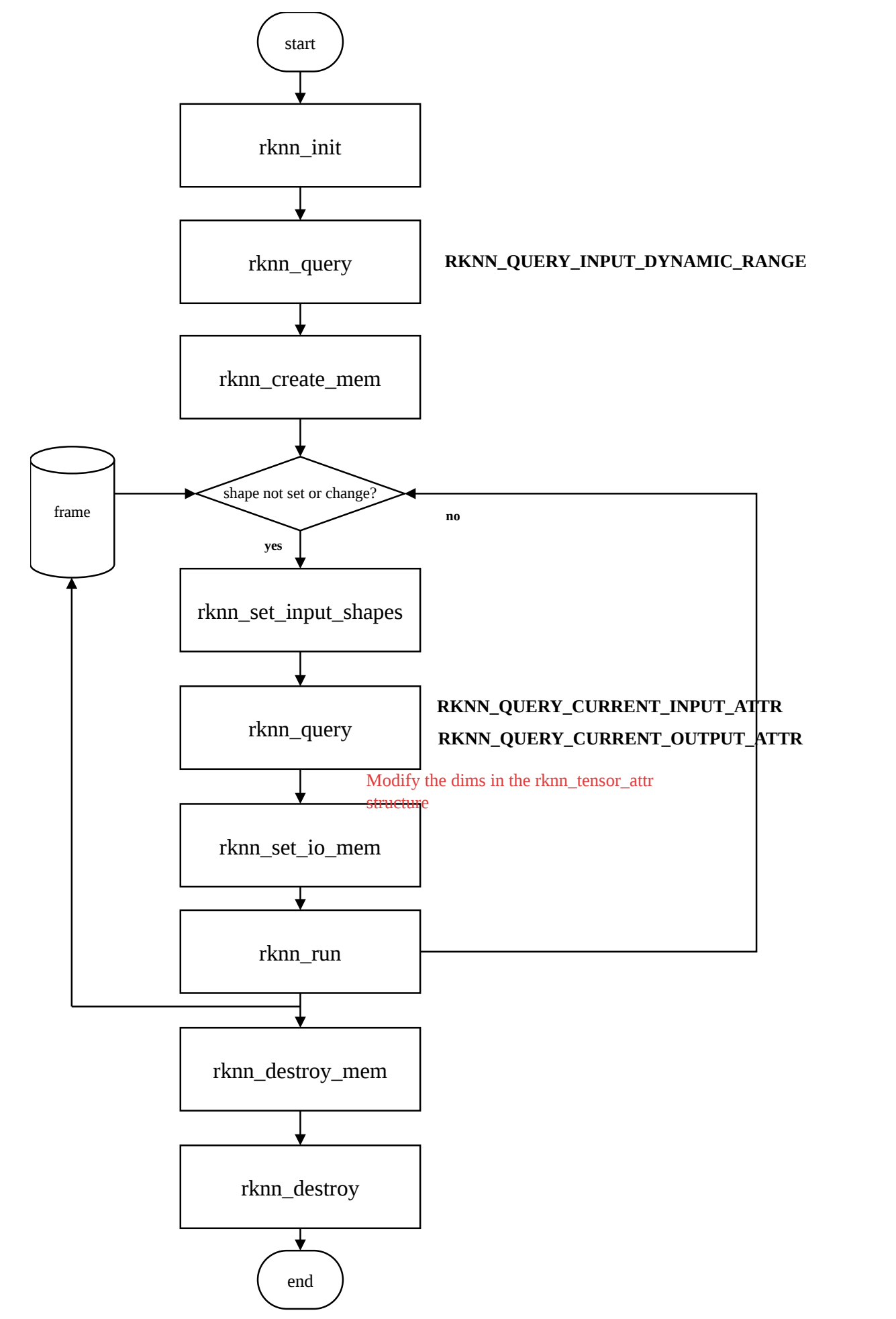
Figure 4-6 Zero-copy API calling process of dynamic shape input interface
Initialization, querying the input shape combinations supported by the RKNN model, and setting the input shape are the same as the above general API, and will not be described in detail here.
The difference is that the interfaces used after setting the input shape are different. The zero- copy inference C code example is as follows:
// Create the largest input tensor memory
rknn_tensor_mem *input_mems[io_num.n_input];
for (int i = 0; i < io_num.n_input; i++) {
    // default input type is int8 (normalize and quantize need compute in outside)
    // if set uint8, will fuse normalize and quantize to npu
    input_attrs[i].type = RKNN_TENSOR_UINT8;
    // default fmt is NHWC, npu only support NHWC in zero copy mode
    input_attrs[i].fmt = RKNN_TENSOR_NHWC;
    input_mems[i] = rknn_create_mem(ctx, input_attrs[i].size_with_stride);
...
// Create the largest output tensor memory
rknn_tensor_mem *output_mems[io_num.n_output];
for (uint32_t i = 0; i < io_num.n_output; ++i) {
    // default output type is depend on model, this require float32 to compute top5
    // allocate float32 output tensor
    int output_size = output_attrs[i].size * sizeof(float);
    output_mems[i] = rknn_create_mem(ctx, output_size);
...
// Load the input and set the model input shape, which is called once each time the input shape is switched
for (int s = 0; s < shape_num; ++s) {
    for (int i = 0; i < io_num.n_input; i++) {
        for (int j = 0; j < input_attrs[i].n_dims; ++j) {
           input_attrs[i].dims[j] = shape_range[i].dyn_range[s][j];
    .....
    ret = rknn_set_input_shapes(ctx, io_num.n_input, input_attrs);
    if (ret < 0) {
        fprintf(stderr, "rknn_set_input_shape error! ret=%d\n", ret);
        return -1;
    ....
    // Get the input and output shapes of the current inference
    printf("current input tensors:\n");
    rknn_tensor_attr cur_input_attrs[io_num.n_input];
    memset(cur_input_attrs, 0, io_num.n_input * sizeof(rknn_tensor_attr));
    for (uint32_t i = 0; i < io_num.n_input; i++) {
        cur_input_attrs[i].index = i;
        // query info
        ret = rknn_query(ctx, RKNN_QUERY_CURRENT_INPUT_ATTR, &(cur_input_attrs[i]), sizeof(rknn_tensor_attr));
        if (ret < 0) {
           printf("rknn_init error! ret=%d\n", ret);
           return -1;
        dump_tensor_attr(&cur_input_attrs[i]);
        ...
        printf("current output tensors:\n");
    rknn_tensor_attr cur_output_attrs[io_num.n_output];
    memset(cur_output_attrs, 0, io_num.n_output * sizeof(rknn_tensor_attr));
    for (uint32_t i = 0; i < io_num.n_output; i++) {
        cur_output_attrs[i].index = i;
        // query info
        ret = rknn_query(ctx, RKNN_QUERY_CURRENT_OUTPUT_ATTR, &
(cur_output_attrs[i]), sizeof(rknn_tensor_attr));
        if (ret != RKNN_SUCC) {
           printf("rknn_query fail! ret=%d\n", ret);
           return -1;
        ...
        dump_tensor_attr(&cur_output_attrs[i]);
    // Specify the number of NPU cores, only 3588/3576 is supported
    rknn_set_core_mask(ctx, (rknn_core_mask)core_mask);
    // Set input information
    rknn_input inputs[io_num.n_input];
    memset(inputs, 0, io_num.n_input * sizeof(rknn_input));
    std::vector<cv::Mat> resize_imgs;
    resize_imgs.resize(io_num.n_input);
    for (int i = 0; i < io_num.n_input; i++) {
        int height = cur_input_attrs[i].fmt == RKNN_TENSOR_NHWC ? cur_input_attrs[i].dims[1] : cur_input_attrs[i].dims[2];
        int width = cur_input_attrs[i].fmt == RKNN_TENSOR_NHWC ? cur_input_attrs[i].dims[2] : cur_input_attrs[i].dims[3];
        int stride = cur_input_attrs[i].w_stride;
        cv::resize(imgs[i], resize_imgs[i], cv::Size(width, height));
        int input_size = resize_imgs[i].total() * resize_imgs[i].channels();
        // Copy external data to the zero-copy input buffer
        if (width == stride)
           memcpy(input_mems[i]->virt_addr, resize_imgs[i].data, input_size);
        else {
           int height = cur_input_attrs[i].dims[1];
           int channel = cur_input_attrs[i].dims[3];
           // copy from src to dst with stride
           uint8_t *src_ptr = resize_imgs[i].data;
           uint8_t *dst_ptr = (uint8_t *)input_mems[i]->virt_addr;
           // width-channel elements
           int src_wc_elems = width * channel;
           int dst_wc_elems = stride * channel;
           for (int b = 0; b < cur_input_attrs[i].dims[0]; b++) {
               for (int h = 0; h < height; ++h) {
                   memcpy(dst_ptr, src_ptr, src_wc_elems);
                   src_ptr += src_wc_elems;
                   dst_ptr += dst_wc_elems;
           ....
    // Update the input zero-copy buffer memory
    for (int i = 0; i < io_num.n_input; i++) {
        cur_input_attrs[i].type = RKNN_TENSOR_UINT8;
        ret = rknn_set_io_mem(ctx, input_mems[i], &cur_input_attrs[i]);
        if (ret < 0) {
           printf("rknn_set_io_mem fail! ret=%d\n", ret);
           return -1;
     ....
    // Update the output zero-copy buffer memory
    for (uint32_t i = 0; i < io_num.n_output; ++i) {
        // default output type is depend on model, this require float32 to compute top5
        cur_output_attrs[i].type = RKNN_TENSOR_FLOAT32;
        cur_output_attrs[i].fmt = RKNN_TENSOR_NCHW;
        // set output memory and attribute
        ret = rknn_set_io_mem(ctx, output_mems[i], &cur_output_attrs[i]);
        if (ret < 0) {
           printf("rknn_set_io_mem fail! ret=%d\n", ret);
           return -1;
      ....
    // Inference
    printf("Begin perf ...\n");
    double total_time = 0;
    for (int i = 0; i < loop_count; ++i) {
        int64_t start_us = getCurrentTimeUs();
        ret = rknn_run(ctx, NULL);
        int64_t elapse_us = getCurrentTimeUs() - start_us;
        if (ret < 0) {
           printf("rknn run error %d\n", ret);
           return -1;
        ...
        total_time += elapse_us / 1000.f;
        printf("%4d: Elapse Time = %.2fms, FPS = %.2f\n", i, elapse_us / 1000.f, 1000.f * 1000.f / elapse_us);
    printf("Avg FPS = %.3f\n", loop_count * 1000.f / total_time);
Notes:
-
For the rknn_set_io_mem() interface in the dynamic shape case, the description of the input buffer’s shape and size:
-
After initialization is completed and before calling the rknn_set_input_shapes() interface, the shapes of the input and output Tensors queried by the rknn_query() interface using RKNN_QUERY_INPUT_ATTR and RKNN_QUERY_OUTPUT_ATTR are usually the largest. Users can use the sizes obtained from these two commands to allocate the input and output memory. For multi-input models, the shapes of some inputs may not be the largest; in this case, you need to search for the largest specification among the supported shapes and allocate the largest input and output memory.
-
If the input is non-4-dimensional, use fmt=UNDEFINED and pass in the buffer of the original model input shape, whose size is calculated from the input shape and type.
-
If the input is 4-dimensional, using fmt=NHWC or NC1HWC2 is supported, passing in the buffer of the NHWC or NC1HWC2 shape and the corresponding size (obtain the shape and size by querying the corresponding fields via rknn_query ).
-
In the rknn_query() interface, when the flags are RKNN_QUERY_CURRENT_INPUT_ATTR and RKNN_QUERY_CURRENT_OUTPUT_ATTR , the shape of the original model input/output is obtained, whose format is NHWC or UNDEFINED ; when the flags are RKNN_QUERY_CURRENT_NATIVE_INPUT_ATTR and RKNN_QUERY_CURRENT_NATIVE_OUTPUT_ATTR , the shape of the model input/output when the NPU reads data with optimal performance is obtained, whose format is NHWC or NC1HWC2 .
-
When the buffer arrangement format used in the rknn_set_io_mem() interface is NHWC , the shape and fmt in rknn_tensor_attr must be set according to the information queried by RKNN_QUERY_CURRENT_INPUT_ATTR ; if the buffer arrangement format used is NC1HWC2 , they must be set according to the information queried by RKNN_QUERY_CURRENT_NATIVE_INPUT_ATTR .
For the complete dynamic shape C API Demo, please refer to (https://github.com/airockchip/rknn-toolkit2/tree/master/rknpu2/examples/rknn_dynamic_shape_input_demo)