
Platform reference: this article follows the Rockchip RKNN2 SDK V2.5.0 Development Guide, including only the SoCs, Linux/Android Runtime and Toolkit combinations stated by the source. Features apply under the chip, SDK, driver and kernel conditions in each section, not automatically to every ArmSoM board. Check the actual ArmSoM BSP, NPU driver, Runtime and model versions before deployment. No ArmSoM hardware validation was performed; logs, performance figures and examples belong to the source.
Sources and proofreading: Chinese follows Chinese V2.5.0 (182 pages); English, Russian and German follow English V2.5.0 (208 pages). Source-specific technical information is retained; older-version content is not presented as new-version fact. Chinese figures come from the Chinese PDF; EN/RU/DE figures come from the English PDF, including separately extracted vector flowcharts. Original section and equation numbers remain. Some source cross-references still use old chapter numbers; dynamic-shape capacity examples contain “1224+140=264”, TP_NORM support statements conflict, and names such as init()/rknn.val_perf() differ from later API descriptions. These source issues are retained and require checking against actual V2.5.0 SDK headers/API references before execution. Code and parameters remain; PDF wrapping and table continuations are repaired.
RKNN2 SDK V2.5.0 · 17/22
1. Software stack and core concepts
2. Environment, versions and board connection
3. Development workflow and interface selection
4. Model conversion and ONNX editing
5. Quantization, hybrid quantization and QAT
6. Inference, accuracy, performance and memory evaluation
7. Runtime lifecycle, layouts and memory
8. Zero-copy interfaces and I/O constraints
9. C API deployment and code generation
10. Toolkit Lite2 Python deployment
11. Matmul API and matrix layouts
12. NPU multicore configuration and performance
13. Dynamic-shape models and deployment
16. Cache coherency and sparse inference
Custom operators: Python and C API
18. Encrypted model deployment
20. Performance analysis and network optimization
21. Memory analysis, sharing and reuse
22. FAQ, error handling and references
4.2 Extensions and Security
4.2.1 Custom Operators
4.2.1.1 INTRODUCTION
The RKNN SDK provides a mechanism for custom operators, which allows developers to define and execute custom operators in the inference stage of RKNN models. By implementing custom operators, developers can extend model functionality and optimize for specific hardware (CPU or GPU) to make full use of hardware resources and increase inference speed. At the same time, developing custom operators requires a deep understanding of deep learning computing principles and the characteristics of the target hardware platform to ensure correctness and performance. Currently, only custom operators for ONNX models are supported.
RKNN custom operators mainly include two major steps:
Use RKNN-Toolkit2 to register custom operators and export the RKNN model.
Write the C code implementation of the custom operator, and load, register and execute it through the RKNN API.
The overall process is shown in the following figure:
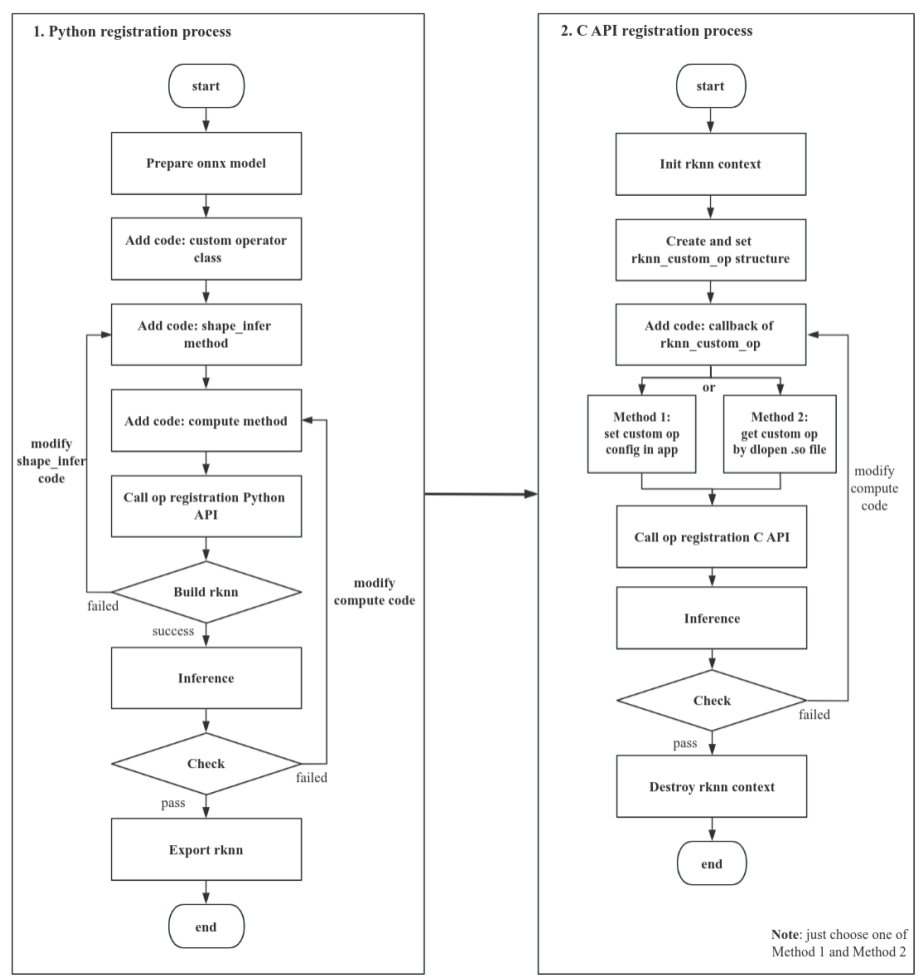
Figure 4-12 Complete process of registering custom operators
4.2.1.2 OVERALL PROCESS
4.2.1.2.1 Use RKNN-Toolkit2 to register custom operators and export RKNN models
-
Prepare the onnx model: According to the ONNX specification, the user designs the op type, name, attributes, input/output number of the custom operator, and inserts the operator into the topology graph position in onnx. The user designs and exports onnx models using the API provided by the onnx package.
-
Implement the custom operator Python class, which mainly includes two function interfaces: shape_infer() and compute(), and call rknn.reg_custom_op() to register the operator.
-
If rknn.build() is executed successfully, inference can be performed, otherwise you need to check the shape_infer() code implementation in step 2. Then run the simulation. If the simulation results are correct, you can call the rknn.export_rknn() interface to export the RKNN model. Otherwise, you need to check the compute() code in step 2.
4.2.1.2.2 C code implementation of the custom operator, load, register and execute through RKNN API.
-
Based on the rknn_custom_op class of rknn_custom_op.h, write the C code implementation of the custom operator. After the writing is completed, fill in the information of the rknn_custom_op class.
-
Call rknn_register_custom_ops() to register the information of the rknn_custom_op class.
-
Refer to the process of the general API or zero-copy API to build and infer the model. You can turn on the model detailed log and dump function to confirm the correctness of the custom operator implementation.
4.2.1.2.3 Use RKNN-Toolkit2 device connected inference or accuracy analysis
If the user needs to perform device connected accuracy analysis on a model containing a custom operator, need to compile the callback function implementation code of the custom operator into .so, place it in the specified path, and restart rknn_server. Please refer to Chapter 4.2.1.4.4 for details.
4.2.1.3 PYTHON PROCESS
Currently, only the onnx model supports custom operators, allowing users to add Non-ONNX standard operators supported by RKNN.
Adding an Non-ONNX standard custom operator is used to add a new operator that does not exist in the ONNX operator list. In addition to meeting the ONNX spec specification, the operator must also meet the following rules:
The op_type of the operator cannot be the same as the ONNX standard operator. It is recommended to start with the “cst” character.
The operator must have a connection relationship with other operators, including the shape of each input/output, data type, etc.
Operator input attributes support single values or arrays of types bool, int32, float32, and int64.
Operator constant input supports bool, int32, float32, and int64 types. This type refers to the data type of the unquantized ONNX model.
Because the Non-ONNX standard operator is not a standard operator in the ONNX SPEC. Therefore, users need to build and export an ONNX model containing the Non-ONNX standard operator through the ONNX API or the API of other frameworks.
For convenience, a simple modification of the definition of Softmax is used as an example to build an ONNX model containing the Non-ONNX standard operator cstSoftmax. The modification method is as follows:
import onnx

path="test_softmax.onnx"
model=onnx.load(path)

for node in model.graph.node:
  if node.op_type =="Softmax":
    node.op_type = "cstSoftmax"
    ... # Modify the attribute definition of cstSoftmax, etc
onnx.save(model, "./test_softmax_custom.onnx")
After building an onnx model containing custom operators, you can use Netron to open the ONNX model and check whether the custom operator meets the specifications. Then you can implement the custom operator class, as follows (taking custom Softmax as an example):
import numpy as np
from rknn.api.custom_op import get_node_attr
class cstSoftmax:
  op_type = 'cstSoftmax'
  def shape_infer(self, node, in_shapes, in_dtypes):
    out_shapes = in_shapes.copy()
    out_dtypes = in_dtypes.copy()
    return out_shapes, out_dtypes
  def compute(self, node, inputs):
    x = inputs[0]
    axis = get_node_attr(node, 'axis')
    x_max = np.max(x, axis=axis, keepdims=True)
    tmp = np.exp(x - x_max)
    s = np.sum(tmp, axis=axis, keepdims=True)
    outputs = [tmp / s]
    return outputs
The custom operator must be a Python class.
The custom operator class must contain a string variable named op_type, which is consistent with the name of the custom operator type in the ONNX.
The custom operator class must contain the member function shape_infer(self, node, in_shapes, in_dtypes). The function name and parameter name must be consistent, otherwise an error will be reported. This function is used for shape inference of custom operators. Among node is the operator node object of ONNX, which contains the attributes and input and output information of the custom operator; in_shapes is the shape information of all inputs of the operator, the format is [shape_0, shape_1, …], and the type of the shape in the list is a list; in_dtypes is the dtype information of all inputs to the operator, the format is [dtype_0, dtype_1, …], and the type of the dtype in the list is the numpy’s dtype. In addition, this function needs to return all the output shape information and dtype information of the operator, and the format is consistent with in_shapes and in_dtypes.
The custom operator class must contain the member function compute(self, node, inputs), and the function name and parameter name must be consistent, otherwise an error will be reported. This function is used for inference of custom operators. Among node is the operator node object of ONNX, which contains the attributes and input and output information of the custom operator; inputs is the input data of the operator, and the format is [array_0, array_1, …], and the type of the dtype in the list is the numpy’s ndarray. In addition, this function needs to return all output data of the operator, in the same format as inputs.
If the custom operator contains custom attributes, you can obtain the attribute value of the custom operator through from rknn.api.custom_op import get_node_attr.
After completing the custom operator class, you can register the operator class through rknn.reg_custom_op(). After registration, you can call rknn.build() to convert and generate the RKNN model. Custom operator classes can ensure normal functions such as model conversion and inference. The specific implementation is as follows (taking custom Softmax as an example):
from rknn.api import RKNN
# Create RKNN object
rknn = RKNN(verbose=True)

# Pre-process config
print('--> Config model')
rknn.config(mean_values=[103.94, 116.78, 123.68], std_values=[58.82, 58.82, 58.82], quant_img_RGB2BGR=True,
target_platform='rk3566')
print('done')

print('--> Register cstSoftmax op')
ret = rknn.reg_custom_op(cstSoftmax())
if ret != 0:
  print('Register cstSoftmax op failed!')
  exit(ret)
print('done')

print('--> Loading model')
ret = rknn.load_onnx(model='mobilenet_v2.onnx')
if ret != 0:
  print('Load model failed!')
  exit(ret)
print('done')

# Build model
print('--> Building model')
ret = rknn.build(do_quantization=True, dataset='./dataset.txt')
if ret != 0:
  print('Build model failed!')
  exit(ret)
print('done')
rknn.reg_custom_op() needs to be called between rknn.config() and rknn.load_xxx().
4.2.1.4 C API DEPLOYMENT
After obtaining the RKNN model with custom operators, start calling the C API for deployment. First, the structure and interface of the custom operators are located in the rknn_custom_op.h header file, and the developer program needs to include this header file. The process of registering and using custom operators is shown in the figure below:
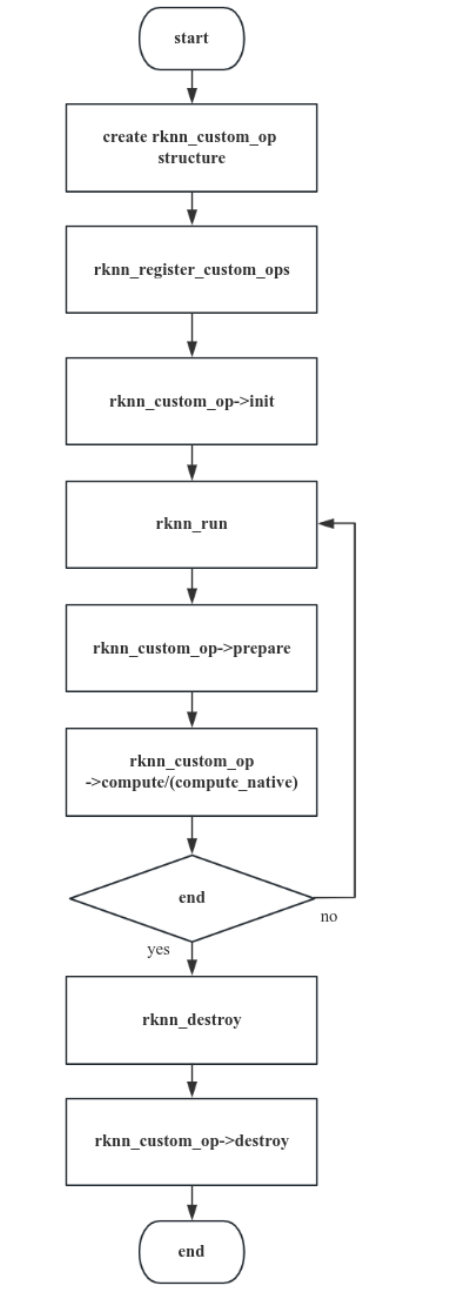
Figure 4-13 C API calling process for registering custom operators
4.2.1.4.1 Initialize Custom Operator Structure
After creating the rknn context, developers need to create the rknn_custom_op structure and set custom operator information. Operator information includes the following:
version: The version of the operator.
target: The execution backend of the operator, currently supports CPU and GPU.
op_type: The type of operator, which is the same as the type in the ONNX model.
cl_kernel_name: cl_kernel function name of OpenCL code. Must be configured when registering a GPU operator.
cl_kernel_source: The full path of the .cl file of the custom operator or the OpenCL kernel string. When cl_source_size=0, it represents the full path of the .cl file; when cl_source_size>0, it represents the OpenCL kernel code string. Must be configured when registering a GPU operator.
cl_source_size: The size of cl_kernel_source. Size equal to 0 is a special case, it means cl_kernel_source is the path.
cl_build_options: OpenCL kernel compilation options, passed in as a string. Must be configured when registering a GPU operator.
init: optional, called once in rknn_register_custom_ops.
prepare: optional, it is a preprocessing callback function. Each time rknn_run will execute prepare and compute/compute_native callback functions, the order of execution is prepare first, compute/compute_native last.
compute: Must be implemented, operator computation callback function, its input/output are NCHW float32 format data (onnx model if the input/output is int64 data type, it will be int64 format data)
compute_native: reserved, please set to NULL.
destroy: optional, executed once in rknn_destory.
The init/prepare/compute callback function parameter definition specifications are as follows:
rknn_custom_op_context* op_ctx: context information of op callback function
rknn_custom_op_tensor* inputs: op input tensor data and information
uint32_t n_inputs: number of op inputs
rknn_custom_op_tensor* outputs: op output tensor data and information
uint32_t n_outputs: number of op outputs
The destroy callback function only has one parameter: rknn_custom_op_context* op_ctx.
rknn_custom_op_context
Contains target (execution backend device), GPU context, custom operator private context and priv_data, of which priv_data is managed by the developer (assignment, reading, writing, and destroy). The GPU context includes cl_context, cl_command_queue, and cl_kernel pointers, which can be passed forced type conversion to obtain the corresponding OpenCL object.
priv_data is a pointer that the user can choose to configure or not. The usual usage is that the user creates a resource in the init() callback function, points priv_data to the memory address and applys in the prepare()/compute() callback function, finally in destroy resources within the destroy() callback function.
rknn_custom_op_tensor
Represents input/output tensor information, including tensor name, shape, size, quantization parameters, virtual base address, fd, data offset and other information.
The user does not need to create the input and output Tensor memory of the operator in the callback compute() callback function. The data corresponding to the virtual address is ready when entering the compute() callback function. The calculation formula of virtual address is Tensor’s effective address = virtual base address + data offset. The virt_addr of the mem member represents the virtual base address, and the offset of the mem member represents the data offset (in bytes). The user can read the effective address of the input tensor in the callback function, which points to the output data calculated by the previous layer operator, and the effective address of the output tensor points for the input that will be sent to the next layer operator.
rknn_custom_op_attr
The developer obtains the attribute information by calling the rknn_custom_op_get_op_attr() interface and passing in the attribute field. The attribute information is represented by rknn_custom_op_attr. The void type buffer, dtype and number of elements in rknn_custom_op_attr represent a memory segment. The developers can obtain an array of the corresponding numerical type by forcefully casting the buffer pointer type in C/C++ based on the dtype.
4.2.1.4.1.1 Init Callback Function
It is used for parsing operator information or initializing temporary buffers or input/output buffers, such as for allocating a temporary buffer. The sample code of the init callback function is as follows:
CPU Operator:
/**
* cpu kernel init callback for custom op
*/
int custom_op_init_callback(rknn_custom_op_context* op_ctx, rknn_custom_op_tensor* inputs, uint32_t n_inputs,
              rknn_custom_op_tensor* outputs, uint32_t n_outputs)
{
  printf("custom_op_init_callback\n");
  // create tmp buffer
  float* tmp_buffer = (float*)malloc(inputs[0].attr.n_elems * sizeof(float));
  op_ctx->priv_data = tmp_buffer;
  return 0;
}
GPU Operator:
/**
* opencl kernel init callback for custom op
* */
int relu_init_callback_gpu(rknn_custom_op_context* op_ctx, rknn_custom_op_tensor* inputs, uint32_t n_inputs,
             rknn_custom_op_tensor* outputs, uint32_t n_outputs)
{
  printf("relu_init_callback_gpu\n");
  // 获取opencl context
  cl_context cl_ctx = (cl_context)op_ctx->gpu_ctx.cl_context;

  // create tmp cl buffer
  cl_mem* memObject = (cl_mem*)malloc(sizeof(cl_mem) * 2);
  memObject[0] = clCreateBuffer(cl_ctx, CL_MEM_READ_WRITE, inputs[0].attr.size, NULL, NULL);
  memObject[1] = clCreateBuffer(cl_ctx, CL_MEM_READ_WRITE, outputs[0].attr.size, NULL, NULL);
  op_ctx->priv_data = memObject;
  return 0;
}
4.2.1.4.1.2 Prepare Callback Function
This callback function is called for each frame inference and is currently reserved for future.
4.2.1.4.1.3 Compute Callback Function
It is the computation function of a custom operator. Developers must complete the kernel function whose inputs and outputs are float32 data in NCHW or UNDEFINED format.
- compute callback (CPU). Assuming the developer wants to implement a custom layer that performs the softmax function, an example of the CPU operator compute function is as follows:
/**
 * float32 kernel implemetation sample for custom op
 * */
int compute_custom_softmax_float32(rknn_custom_op_context* op_ctx,
rknn_custom_op_tensor* inputs, uint32_t n_inputs,
                                 rknn_custom_op_tensor* outputs, uint32_t
n_outputs)
{
  unsigned char* in_ptr = (unsigned char*)inputs[0].mem.virt_addr +
inputs[0].mem.offset;
  unsigned char* out_ptr = (unsigned char*)outputs[0].mem.virt_addr +
outputs[0].mem.offset;
  int axis = 0;
  const float* in_data = (const float*)in_ptr;
  float* out_data = (float*)out_ptr;
  std::string name = "";
  rknn_custom_op_attr op_name;
  rknn_custom_op_get_op_attr(op_ctx, "name", &op_name);
  if (op_name.n_elems > 0 && op_name.dtype == RKNN_TENSOR_UINT8) {
    name = (char*)op_name.data;
  }

  rknn_custom_op_attr op_attr;
  rknn_custom_op_get_op_attr(op_ctx, "axis", &op_attr);
  if (op_attr.n_elems == 1 && op_attr.dtype == RKNN_TENSOR_INT64) {
    axis = ((int64_t*)op_attr.data)[0];
  }

  printf("op name = %s, axis = %d\n", name.c_str(), axis);
  float* tmp_buffer = (float*)op_ctx->priv_data;
  // kernel implemetation for custom op
  {
    int inside = 1;
    int outside = 1;
    int channel = 1;

    while (axis < 0) {
      axis += inputs[0].attr.n_dims;
    }

    for (int i = 0; i < axis; i++) {
      outside *= inputs[0].attr.dims[i];
    }
    channel = inputs[0].attr.dims[axis];
    for (int i = axis; i < inputs[0].attr.n_dims; i++) {
      inside *= inputs[0].attr.dims[i];
    }

    for (int y = 0; y < outside; y++) {
      const float* src_y = in_data + y * inside;
      float* dst_y = out_data + y * inside;
      float max_data = -FLT_MAX;
      float sum_data = 0.0f;

      for (int i = 0; i < inside; ++i) {
        max_data = fmaxf(max_data, src_y[i]);
      }
      for (int i = 0; i < inside; ++i) {
        tmp_buffer[i] = expf(src_y[i] - max_data);
        sum_data += tmp_buffer[i];
      }
      for (int i = 0; i < inside; ++i) {
        dst_y[i] = tmp_buffer[i] / sum_data;
      }
    }
  }
  return 0;
}
- compute callback function (GPU)
For GPU operators, developers can complete the following steps in the callback function:
The developer retrieves the OpenCL cl_context , cl_command_queue and cl_kernel objects from gpu_ctx in rknn_custom_op_context . This process requires the developer to perform data type conversions.
If necessary, the user creates cl_mem object buffers for the op inputs or outputs.
Set the function arguments of the cl_kernel .
The input buffer data of the OpenCL kernel function arguments currently only supports float; other types are not supported yet.
When zero-copy is used, calling clImportMemoryARM can help the user map the memory of the input tensor into the OpenCL cl_mem structure. The input tensor already contains the input data, so the user does not need to copy it again. This process can also be handled in the init callback function, where the cl_mem structure is recorded in the priv_data member, and finally priv_data is read and used in the compute callback.
Run the cl_kernel in a blocking manner.
The input data inside the CL kernel is provided in NCHW layout.
If the developer needs the CPU to access the data after the GPU computation is finished, the cache of the output tensor must be flushed by calling the rknn_mem_sync function before reading the data.
Assuming the developer wants to implement a custom layer that performs the relu function, an example of the GPU operator compute function is as follows:
/**
 * opencl kernel init callback for custom op
 * */
int compute_custom_relu_float32(rknn_custom_op_context* op_ctx,
rknn_custom_op_tensor* inputs, uint32_t num_inputs,
                              rknn_custom_op_tensor* outputs, uint32_t
num_outputs)
{
  std::string name = "";
  rknn_custom_op_attr op_name;
  rknn_custom_op_get_op_attr(op_ctx, "name", &op_name);
  if (op_name.n_elems > 0 && op_name.dtype == RKNN_TENSOR_UINT8) {
    name = (char*)op_name.data;
  }

  // get context
  cl_context cl_ctx = (cl_context)op_ctx->gpu_ctx.cl_context;

  // get command queue
  cl_command_queue queue = (cl_command_queue)op_ctx->gpu_ctx.cl_command_queue;

  // get kernel
  cl_kernel kernel = (cl_kernel)op_ctx->gpu_ctx.cl_kernel;

  // import input/output buffer
  const cl_import_properties_arm props[3] = {
    CL_IMPORT_TYPE_ARM,
    CL_IMPORT_TYPE_DMA_BUF_ARM,
    0,
  };

  cl_int status;
  cl_mem inObject = clImportMemoryARM(cl_ctx, CL_MEM_READ_WRITE, props,
&inputs[0].mem.fd,
                                    inputs[0].mem.offset + inputs[0].mem.size,
&status);
  if (status != CL_SUCCESS) {
    printf("Tensor: %s clImportMemoryARM failed\n", inputs[0].attr.name);
  }
  cl_mem outObject = clImportMemoryARM(cl_ctx, CL_MEM_READ_WRITE, props,
&outputs[0].mem.fd,
                                     outputs[0].mem.offset + outputs[0].mem.size,
&status);
  if (status != CL_SUCCESS) {
    printf("Tensor: %s clImportMemoryARM failed\n", outputs[0].attr.name);
  }

  int in_type_bytes = get_type_bytes(inputs[0].attr.type);
  int out_type_bytes = get_type_bytes(outputs[0].attr.type);
  int in_offset = inputs[0].mem.offset / in_type_bytes;
  int out_offset = outputs[0].mem.offset / out_type_bytes;
  unsigned int elems = inputs[0].attr.n_elems;

  // set kernel args
  int argIndex = 0;
  clSetKernelArg(kernel, argIndex++, sizeof(cl_mem), &inObject);
  clSetKernelArg(kernel, argIndex++, sizeof(cl_mem), &outObject);
  clSetKernelArg(kernel, argIndex++, sizeof(int), &in_offset);
  clSetKernelArg(kernel, argIndex++, sizeof(int), &out_offset);
  clSetKernelArg(kernel, argIndex++, sizeof(unsigned int), &elems);
  // set global worksize
  const size_t global_work_size[3] = {elems, 1, 1};

  // enqueueNDRangeKernel
  clEnqueueNDRangeKernel(queue, kernel, 1, NULL, global_work_size, NULL, 0, NULL,
NULL);

  // finish command queue
  clFinish(queue);

  // //cpu access data after sync to device
  // rknn_mem_sync(&outputs[0].mem, RKNN_MEMORY_SYNC_FROM_DEVICE);
  // // save output npy
  // char output_path[PATH_MAX];
  // sprintf(output_path, "%s/cpu_output%d.npy", ".", 0);
  // unsigned char* out_data = (unsigned char*)outputs[0].mem.virt_addr+outputs[0].mem.offset;
  // save_npy(output_path, (float*)out_data, &inputs[0].attr);
  return 0;
}
4.2.1.4.1.4 Destroy Callback Function
It is used to destroy temporary buffers or input/output buffers of custom operators. The sample code to destroy the temporary buffer is as follows:
CPU Operator
/**
* cpu kernel destroy callback for custom op
*/
int custom_op_destroy_callback(rknn_custom_op_context* op_ctx)
{
  printf("custom_op_destroy_callback\n");
  // clear tmp buffer
  free(op_ctx->priv_data);
  return 0;
}
GPU Operator
/**
* opencl kernel destroy callback for custom op
*/
int relu_destroy_callback_gpu(rknn_custom_op_context* op_ctx)
{
  // clear tmp buffer
  printf("relu_destroy_callback_gpu\n");
  cl_mem* memObject = (cl_mem*)op_ctx->priv_data;
  clReleaseMemObject(memObject[0]);
  clReleaseMemObject(memObject[1]);
  free(memObject);
  return 0;
}
4.2.1.4.2 Register Custom Operator
After setting the rknn_custom_op structure, you need to call rknn_register_custom_ops() to register it in rknn_context. This interface supports registering multiple custom operators at the same time.
After completing the CPU’s compute callback function, the code example for registering a CPU custom operator named “cstSoftmax” and “ArgMax” is as follows:
CPU Operator
// CPU operators
rknn_custom_op user_op[2];
memset(user_op, 0, 2 * sizeof(rknn_custom_op));
strncpy(user_op[0].op_type, "cstSoftmax", RKNN_MAX_NAME_LEN - 1);
user_op[0].version = 1;
user_op[0].target = RKNN_TARGET_TYPE_CPU;
user_op[0].init = custom_op_init_callback;
user_op[0].compute = compute_custom_softmax_float32;
user_op[0].destroy = custom_op_destroy_callback;

strncpy(user_op[1].op_type, "ArgMax", RKNN_MAX_NAME_LEN - 1);
user_op[1].version = 1;
user_op[1].target = RKNN_TARGET_TYPE_CPU;
user_op[1].init = custom_op_init_callback;
user_op[1].compute = compute_custom_argmax_float32;
user_op[1].destroy = custom_op_destroy_callback;

ret = rknn_register_custom_ops(ctx, user_op, 2);
if (ret < 0) {
  printf("rknn_register_custom_ops fail! ret = %d\n", ret);
  return -1;
}
GPU Operator
For GPU operators, OpenCL kernel registration is supported in two ways: constant string or file path. When cl_source_size in the rknn_custom_op structure is equal to 0, cl_kernel_source represents the file path of the OpenCL kernel. When cl_source_size is greater than 0, cl_kernel_source represents the OpenCL kernel function string. The sample code of the OpenCL kernel with relu function saved as a string is as follows:
char* cl_kernel_source = "#pragma OPENCL EXTENSION cl_arm_printf : enable"
    "#pragma OPENCL EXTENSION cl_khr_fp16 : enable "
    " __kernel void relu_float(__global const float* input, __global float* output, int "
    "in_offset, int out_offset, const unsigned int elems) "
    "{"
    " int gid = get_global_id(0);"
    " if (gid < elems) {"
    " float in_value = input[in_offset + gid];"
    " output[out_offset + gid] = in_value >= 0.f ? in_value : 0.f;"
    " }"
    "}"
    "__kernel void relu_half(__global const half* input, __global half* output, int in_offset, "
    "int out_offset, const unsigned int elems)"
    "{"
    " int gid = get_global_id(0);"
    " if (gid < elems) {"
    " half in_value = input[in_offset + gid];"
    " output[out_offset + gid] = in_value >= 0.f ? in_value : 0.f;"
    " }"
    "}";
After completing the OpenCL kernel function and the GPU compute callback function, you can set the rknn_custom_op structure array and register the GPU operator. The sample code for registering the GPU operator is as follows:
// GPU operators
rknn_custom_op user_op[1];
memset(user_op, 0, sizeof(rknn_custom_op));
strncpy(user_op->op_type, "cstSoftmax", RKNN_MAX_NAME_LEN - 1);
user_op->version = 1;
user_op->target = RKNN_TARGET_TYPE_GPU;
user_op->init = relu_init_callback_gpu;
user_op->compute = compute_custom_relu_float32;
user_op->destroy = relu_destroy_callback_gpu;
#ifdef LOAD_FROM_PATH
user_op->cl_kernel_source = "./custom_op.cl";
user_op->cl_source_size = 0;
#else
user_op->cl_kernel_source = cl_kernel_source;
user_op->cl_source_size = strlen(cl_kernel_source);
#endif
strcpy(user_op->cl_kernel_name, "relu_float");

ret = rknn_register_custom_ops(ctx, user_op, 1);
if (ret < 0) {
  printf("rknn_register_custom_ops fail! ret = %d\n", ret);
  return -1;
}
Before registering and calling this interface, you must clearly define the op_type of the custom operator, prepare the operator information and configure the rknn_custom_op array. Each type of custom operator must call the registration interface once, and operators of the same type on the network must be called only once.
4.2.1.4.3 Model Inference
After registering all operators, you can use the general API or zero-copy API process to complete inference.
4.2.1.4.4 Connected Device Accuracy Analysis
The board-connected debugging function of custom operators requires that the rknn_server version >= 1.6.0.
During board-connected debugging, RKNN Server will use dlopen to open the user-compiled custom operator plugin library from a specific directory to obtain operator information. For registering custom operators via the plugin library approach, the user must implement a function named get_rknn_custom_op .
If the user needs to perform connected device accuracy analysis on a model containing custom operators, the specific steps are as follows:
-
Implement a get_rknn_custom_op() function and the necessary callback functions, and compile them into a library for the corresponding system. The compiled plugin library name must be prefixed with “librkcst_”, for example, the library name is librkcst_relu.so .
-
Place the plugin in /vendor/lib64/ (Android arm64-v8a) or /usr/lib/rknpu/op_plugins (Linux)
-
Use the Python interface of RKNN-Toolkit2 on the host or upper computer to perform connected device accuracy analysis.
The sample code for the get_rknn_custom_op function is as follows:
std::vector<std::string> get_all_plugin_paths(std::string plugin_dir)
{
  std::vector<std::string> plugin_paths;
  if (access(plugin_dir.c_str(), 0) != 0) {
    fprintf(stderr, "Can not access plugin directory: %s, please check it!\n",
plugin_dir.c_str());
  }

  DIR* dir;
  struct dirent* ent;
  const char* prefix = RKNN_CSTOP_PLUGIN_PREFIX; // All library file names should start with this prefix

  if ((dir = opendir(plugin_dir.c_str())) != NULL) {
    while ((ent = readdir(dir)) != NULL) {
      if (ent->d_type == DT_REG) {
        const char* filename = ent->d_name;
        size_t len = strlen(filename);

        if (len > 10 && strncmp(filename, prefix, strlen(prefix)) == 0) {
         printf("Found plugin: %s file in %s\n", filename, plugin_dir.c_str());
         plugin_paths.push_back(plugin_dir + "/" + filename);
        }
      }
    }
    closedir(dir);
  } else {
    fprintf(stderr, "Unable to open directory");
  }

  return plugin_paths;
}

// the default path of the custom operator plugin libraries
std::string plugin_dir =
#if defined(__ANDROID__)
# if defined(__aarch64__)
    "/vendor/lib64/";
# else
    "/vendor/lib/";
# endif // __aarch64__
#elif defined(__linux__)
    "/usr/lib/rknpu/op_plugins/";
#endif

std::vector<std::string> plugin_paths = get_all_plugin_paths(plugin_dir);
std::vector<void*> so_handles;
for (auto path : plugin_paths) {
printf("load plugin %s\n", path.c_str());
void* plugin_lib = dlopen(path.c_str(), RTLD_NOW);
char* error = dlerror();
if (error != NULL) {
    fprintf(stderr, "dlopen %s fail: %s.\nPlease try to set 'export LD_LIBRARY_PATH=$LD_LIBRARY_PATH:%s'\n",
           path.c_str(), error, plugin_dir.c_str());
    dlclose(plugin_lib);
    return -1;
}
printf("dlopen %s successfully!\n", path.c_str());
get_custom_op_func custom_op_func = (get_custom_op_func)dlsym(plugin_lib,
"get_rknn_custom_op");
error = dlerror();
if (error != NULL) {
    fprintf(stderr, "dlsym fail: %s\n", error);
    dlclose(plugin_lib);
    return -1;
}

rknn_custom_op* user_op = custom_op_func();
ret = rknn_register_custom_ops(ctx, user_op, 1);
if (ret < 0) {
    printf("rknn_register_custom_ops fail! ret = %d\n", ret);
    return -1;
}
so_handles.push_back(plugin_lib);
}
The plugin library has the following notes:
A custom operator plugin library can only register one custom operator. If multiple custom operators need to be registered, multiple plugin libraries must be created.
The name of the plugin library must start with “librkcst_” and end with .so.
If the plugin library is implemented in C++ code, in order to correctly open the function symbols in the C interface, the following macros must be added before and after the function definition:
#ifdef __cplusplus
extern "C" {
#endif

//code

#ifdef __cplusplus
} // extern "C"
#endif
If dlopen fails to load the plugin library, you need to check whether the LD_LIBRARY_PATH environment variable is set, and check whether the directory containing the plugin library is in the path specified by the environment variable.