
Platform reference: this article follows the Rockchip RKNN2 SDK V2.5.0 Development Guide, including only the SoCs, Linux/Android Runtime and Toolkit combinations stated by the source. Features apply under the chip, SDK, driver and kernel conditions in each section, not automatically to every ArmSoM board. Check the actual ArmSoM BSP, NPU driver, Runtime and model versions before deployment. No ArmSoM hardware validation was performed; logs, performance figures and examples belong to the source.
Sources and proofreading: Chinese follows Chinese V2.5.0 (182 pages); English, Russian and German follow English V2.5.0 (208 pages). Source-specific technical information is retained; older-version content is not presented as new-version fact. Chinese figures come from the Chinese PDF; EN/RU/DE figures come from the English PDF, including separately extracted vector flowcharts. Original section and equation numbers remain. Some source cross-references still use old chapter numbers; dynamic-shape capacity examples contain “1224+140=264”, TP_NORM support statements conflict, and names such as init()/rknn.val_perf() differ from later API descriptions. These source issues are retained and require checking against actual V2.5.0 SDK headers/API references before execution. Code and parameters remain; PDF wrapping and table continuations are repaired.
RKNN2 SDK V2.5.0 · 7/22
1. Software stack and core concepts
2. Environment, versions and board connection
3. Development workflow and interface selection
4. Model conversion and ONNX editing
5. Quantization, hybrid quantization and QAT
6. Inference, accuracy, performance and memory evaluation
Runtime lifecycle, layouts and memory
8. Zero-copy interfaces and I/O constraints
9. C API deployment and code generation
10. Toolkit Lite2 Python deployment
11. Matmul API and matrix layouts
12. NPU multicore configuration and performance
13. Dynamic-shape models and deployment
16. Cache coherency and sparse inference
17. Custom operators: Python and C API
18. Encrypted model deployment
20. Performance analysis and network optimization
21. Memory analysis, sharing and reuse
22. FAQ, error handling and references
3. Board Deployment
3.1 Runtime Deployment Basics
This section describes the fundamental concepts of the RKNN Runtime and is the prerequisite for board deployment (with either the C API or Toolkit Lite). It covers the model and context lifecycle, tensors and data layout formats, input/output memory, synchronous and asynchronous inference, and error handling and resource release conventions.
3.1.1 Model and Context Lifecycle
rknn_context is the core handle of the RKNN Runtime, representing a runtime context instance. All model loading, attribute query, and inference operations are performed through this handle. During board deployment, strictly follow the “create → use → destroy” lifecycle management convention to avoid resource leaks or runtime exceptions.
Create: initialize the context and load the RKNN model via rknn_init() . After successful initialization, the model weights and the internal memory required for running are ready.
Use: after initialization, query the model’s input/output attributes via rknn_query() , and run inference repeatedly through the general API ( rknn_inputs_set() / rknn_run() / rknn_outputs_get() ) or the zero-copy API ( rknn_set_io_mem() + rknn_run() ); the handle stays unchanged. On RK3588 / RK3576, the NPU cores used by the model can be specified via rknn_set_core_mask() before inference; see 4.1.2 NPU Multi-Core Configuration.
Destroy: after all inference tasks are completed, destroy the context via rknn_destroy() to release all memory occupied by the model. The handle cannot be used after destruction.
3.1.2 Tensors and Data Layout Formats
The input and output of an RKNN model are managed through tensors. Before on-board deployment, use rknn_query() to query the tensor attributes ( rknn_tensor_attr ), which include the tensor name, shape, data type (dtype), data layout (layout), and quantization parameters (qnt_type / qnt_info), and then organize the input data and parse the output data accordingly.
Data type (dtype): includes FP32 / FP16 / INT8 / INT16 / UINT8, etc., determined by the quantization configuration at model conversion; quantized models default to INT8 (asymmetric quantization).
Data layout (layout): mainly NCHW , NHWC , NC1HWC2 , and UNDEFINE ; NC1HWC2 is the memory layout format dedicated to RKNPU hardware, see below for details.
Currently, there are four data layout formats of RKNN: NHWC , NCHW , NC1HWC2 , and UNDEFINE .
The NHWC and NCHW data layouts are common data layouts in deep learning, and no additional explanation is given in this section. This section focuses on the storage and conversion of the NC1HWC2 data format dedicated to RKNPU hardware.
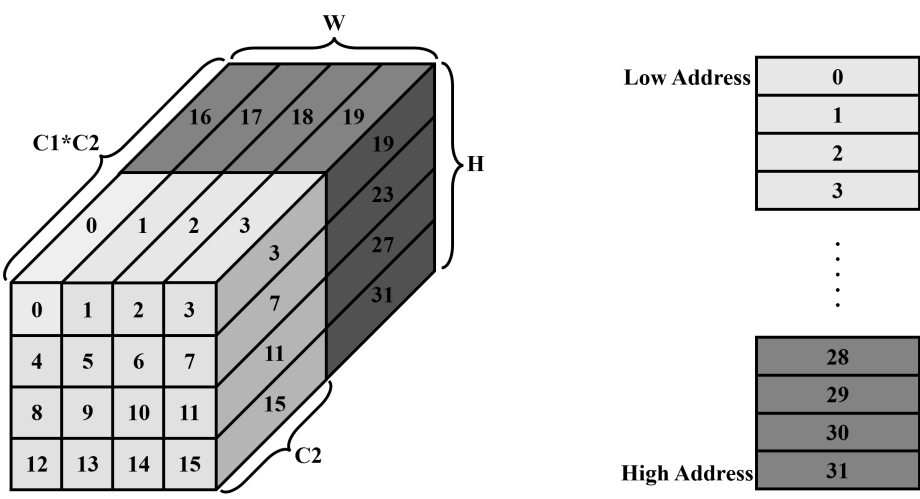
Figure 3-1 RKNPU NC1HWC2 data layout and storage
As shown in Figure 3-1, the number 0 represents one chunk of data, that is, C2 data elements are stored at a time, where C2 is determined by the platform. The rule constraints of C2 on different hardware platforms are shown in Table 3-1, and C1 is the rounded-up value of C/C2. The order in which NC1HWC2 data is stored is consistent with the order of the increasing numbers in the figure: data 0-15 is stored first, and then data 16-31. Taking the RK3568 platform as an example, when the feature is (1, 13, 4, 4) int8 data, the corresponding NC1HWC2 is (1, 2, 4, 4, 8); in this case, C2 is 8 and C1 is 2. For the feature data stored at positions 16-31 in memory, only the first 5 data of each corresponding C2 data block are valid, and the remaining 3 data are extra padded alignment data.
Table 3-1 C2 values for different hardware platforms
| RK2118 | RK3566/RK3568 | RK3588/RK3576/RV1126B | RV1103B/RV1106B | RV1103/RV1106 | RK3562 | |
|---|---|---|---|---|---|---|
| int8 | / | 8 | 16 | 8 | 16 | 16 |
| float16 | 4 | 4 | 8 | / | 8 | 8 |
Next, the process of converting the NC1HWC2 data layout into NCHW and NHWC data in memory is described in detail.
Taking the feature (1, 13, 2, 2) on RK3568 as an example, for the conversion of the data in the memory layout, according to the alignment requirements above, the NC1HWC2 corresponding to feature (1, 13, 2, 2) is (1, 2, 2, 2, 8). The storage of NC1HWC2 is shown in the figure below, where the red parts are invalid data added for alignment.
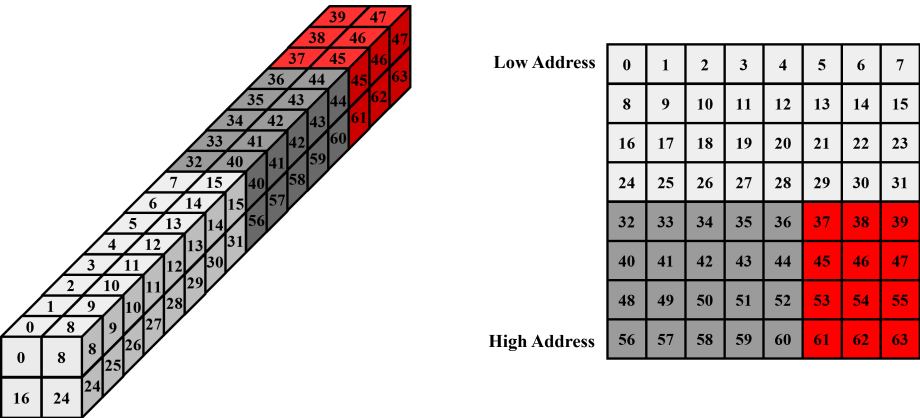
Figure 3-2 NC1HWC2 data layout expansion
Remove the invalid data and convert it into NCHW , that is, (1, 13, 2, 2) data, which is arranged in memory as follows:
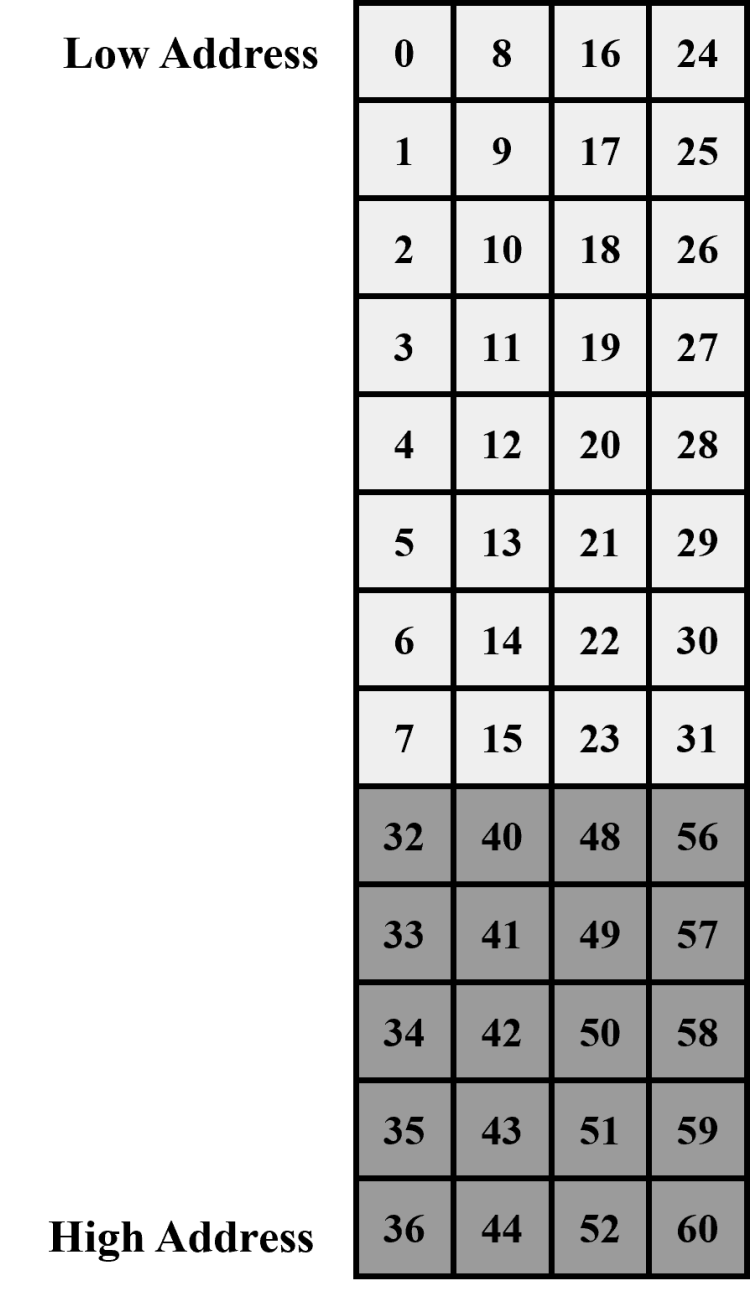
Figure 3-3 NCHW data layout
Remove the invalid data and convert it into NHWC , that is, (1, 2, 2, 13) data, which is arranged in memory as follows:
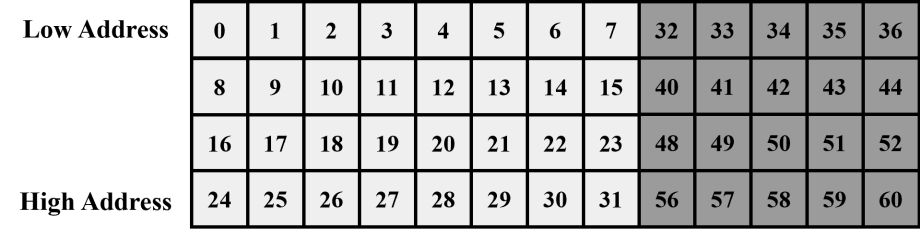
Figure 3-4 NHWC data layout
Conversion example code:
NC1HWC2 to NCHW : converting an NC1HWC2 with int8 data layout into an NCHW with int8 data layout is shown as follows:
/*
 *src: represents the address of the NC1HWC2 input tensor
 *dst: represents the address of the NCHW output tensor
 *dims: represents the shape information of NC1HWC2
 *channel: represents the value of C in NCHW
 * h : represents the value of h in NCHW
 * w: represents the value of w in NCHW
 */
int NC1HWC2_to_NCHW(const int8_t* src, int8_t* dst, int* dims, int channel, int h,
int w)
{
  int batch = dims[0];
  int C1 = dims[1];
  int C2 = dims[4];
  int hw_src = dims[2] * dims[3];
  int hw_dst = h * w;
  for (int i = 0; i < batch; i++) {
    src = src + i * C1 * hw_src * C2;
    dst = dst + i * channel * hw_dst;
    for (int c = 0; c < channel; ++c) {
      int plane = c / C2;
      const int8_t* src_c = plane * hw_src * C2 + src;
      int offset = c % C2;
      for (int cur_h = 0; cur_h < h; ++cur_h)
        for (int cur_w = 0; cur_w < w; ++cur_w) {
         int cur_hw = cur_h * w + cur_w;
         dst[c * hw_dst + cur_h * w + cur_w] = src_c[C2 * cur_hw + offset];
        }
    }
  }
  return 0;
}
NC1HWC2 to NHWC : converting an NC1HWC2 with int8 data layout into an NHWC with int8 data layout is shown as follows:
/*
 *src: represents the address of the NC1HWC2 input tensor
 *dst: represents the address of the NCHW output tensor
 *dims: represents the shape information of NC1HWC2
 *channel: represents the value of C in NHWC
 * h : represents the value of h in NCHW
 * w: represents the value of w in NCHW
 */
int NC1HWC2_to_NHWC(const int8_t* src, int8_t* dst, int* dims, int channel, int h,
int w)
{
  int batch = dims[0];
  int C1 = dims[1];
  int C2 = dims[4];
  int hw_src = dims[2] * dims[3];
  int hw_dst = h * w;
  for (int i = 0; i < batch; i++) {
    src = src + i * C1 * hw_src * C2;
    dst = dst + i * channel * hw_dst;
    for (int cur_h = 0; cur_h < h; ++cur_h) {
      for (int cur_w = 0; cur_w < w; ++cur_w) {
        int cur_hw = cur_h * dims[3] + cur_w;
        for (int c = 0; c < channel; ++c) {
         int plane = c / C2;
         const auto* src_c = plane * hw_src * C2 + src;
         int offset = c % C2;
         dst[cur_h * w * channel + cur_w * channel + c] = src_c[C2 * cur_hw + offset];
        }
      }
    }
  }
  return 0;
}
3.1.3 Input/Output Memory
In the RKNN Runtime, the model’s input/output data is passed through memory objects. There are two ways — the general API and the zero-copy API — with different memory management:
General API (internal-copy mode): the input buffer is prepared by the user (the buf member of rknn_input points to user memory); when rknn_inputs_set() is called, the Runtime copies the data into the model input. After inference, outputs are retrieved via rknn_outputs_get() (the Runtime allocates output memory and copies the results), and rknn_outputs_release() must be called after use to free that output memory. Type conversion, layout conversion, and normalization of inputs/outputs are all done inside the Runtime; it is simple to use and suitable for most scenarios.
Zero-copy API: input/output memory accessible by the NPU is allocated via rknn_create_mem() (or externally allocated physical memory via rknn_create_mem_from_fd() / rknn_create_mem_from_phys() ), and bound to tensors via rknn_set_io_mem() ; the NPU reads/writes the memory directly, eliminating the internal data copy of the general API for better performance. The memory size, data type, and layout must strictly match the tensor attributes.
Selection suggestion: use the general API for routine deployment or when performance is not critical — it is simple and reliable; use the zero-copy API for maximum performance (eliminating input/output copy time), see 3.1.6 RKNN Runtime Zero-Copy Interface.
Memory release conventions:
-
Output memory of the general API is released via rknn_outputs_release() after post- processing; input/output memory of the zero-copy API is released via rknn_destroy_mem() .
-
Memory must be released before the context is destroyed ( rknn_destroy() ); otherwise resources may leak.
-
Released memory must not be used again; otherwise behavior is undefined.
3.1.4 Synchronous and Asynchronous Inference
The inference interface rknn_run() provided by the RKNN Runtime is a synchronous blocking call: the calling thread blocks until the NPU finishes the current inference and returns, after which the output results can be obtained without extra synchronization.
The current version of the RKNN Runtime does not provide an asynchronous inference interface. If other tasks need to run in parallel during inference (e.g. capturing and preprocessing the next frame), wrap it at the application level with multiple threads: for example, run rknn_run() in a dedicated inference thread while the main thread preprocesses data, passing tasks between producer and consumer through queues to form a pipeline and improve overall throughput.
Note: multiple threads must not call rknn_run() on the same context concurrently. For multi- threaded concurrent inference, refer to 5.3.4 Multi-threaded Reuse RKNN Context and create an independent context for each thread via rknn_dup_context() .
3.1.5 Error Handling and Resource Release
Error Handling
RKNN C API functions return an int status code, where RKNN_SUCCESS (0) indicates success and negative values indicate errors. During on-board deployment, the return value of every API call should be checked; on error, subsequent operations must not continue — jump to the resource cleanup path and exit, so as to avoid undefined behavior caused by executing in an abnormal state.
For the complete error code definitions, refer to《05_RKNN2_Runtime_C_API_Reference_V2.5.0》. During troubleshooting, logs can be used to locate the problem: setting the environment variable RKNN_LOG_LEVEL=5 before running the application outputs detailed layer-by-layer debugging information. For the analysis and handling of common errors, see section 5.4 FAQs and Error Handling.
Example of error handling in the initialization phase (jump to the cleanup path on error):
int ret = rknn_init(&ctx, model, model_len, 0, NULL);
if (ret != RKNN_SUCCESS) {
    printf("rknn_init failed! ret=%d\n", ret);
    goto out;
}
Resource Release
The various resources in on-board deployment must be released in the correct order to avoid resource leaks. It is recommended to use goto to jump to a unified cleanup path, ensuring that resources are released correctly on both the normal path and the error path.
General API: the release order is to first call rknn_outputs_release() to release the output data memory, and then call rknn_destroy() to destroy the context.
out:
    // Release the output data memory (general API)
    rknn_outputs_release(ctx, io_num.n_output, outputs);
    // Destroy the context
    if (ctx) rknn_destroy(ctx);
Zero-copy API: the release order is to first call rknn_destroy_mem() to release the input and output memories one by one, and then destroy the context.
out:
    // Release the input/output memory (zero-copy API; input_mems/output_mems are rknn_tensor_mem pointers returned by rknn_create_mem())
    for (int i = 0; i < io_num.n_input; i++) {
        rknn_destroy_mem(ctx, input_mems[i]);
    }
    for (int i = 0; i < io_num.n_output; i++) {
        rknn_destroy_mem(ctx, output_mems[i]);
    }
    // Destroy the context
    if (ctx) rknn_destroy(ctx);
Note: After the context is destroyed, all resources allocated based on that context can no longer be accessed. Make sure that all resources have been released before the context is destroyed.