
programmer_image_tool: all examples from both manuals
The two user_manual.pdf files accompany Linux 1.26 and Windows 1.28 and contain the same four commands. The Linux usage-description section has a broken local image reference; the Windows manual has a help screenshot, reproduced below alongside every textual example. Outputs are programmer images; generation does not flash a board.
1. eMMC
./programmer_image_tool -i update.img -t emmc
Generates out_image.bin in the program directory.
2. SPI NOR
./programmer_image_tool -i update.img -t spinor
Also generates out_image.bin in the program directory, but for SPI NOR; it is not interchangeable with the eMMC output.
3. SPI NAND: 256 KB block, 4 KB page
./programmer_image_tool -i update.img -b 256 -p 4 -t spinand -o out
Generates partition-named images in out. The source spells the placeholder partiiton_name.img; it denotes a partition name, not a mandated misspelling.
4. SLC NAND: 256 KB block, 4 KB page, 256 B OOB
./programmer_image_tool -i update.img -b 256 -p 4 -s 256 -t slc -2 -o rockdev
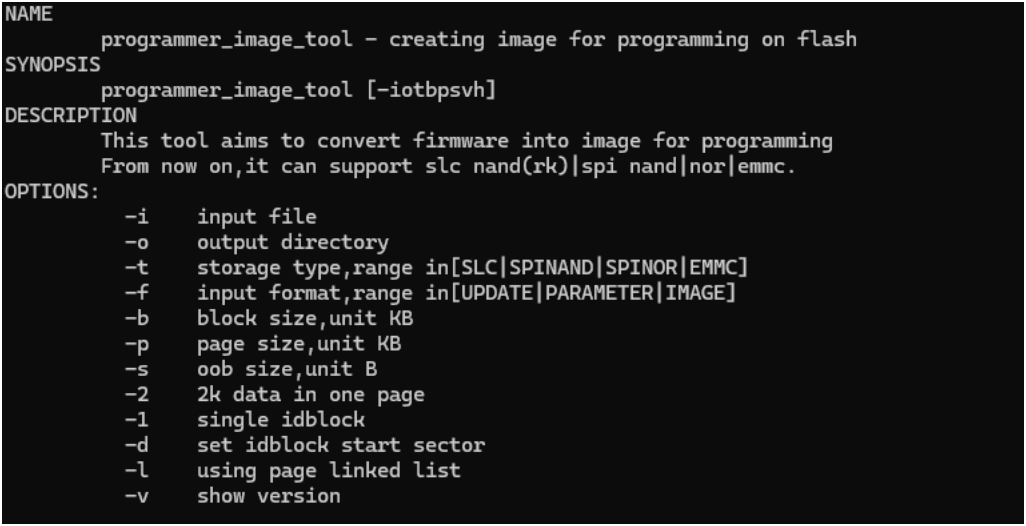
Generates partition images in rockdev. The source heading additionally says 2k_page, while the command uses -p 4 and -2. Both are preserved; the help screenshot below confirms -2 as 2k data per page, not a change to the physical page size. Check the actual NAND datasheet and tool help.
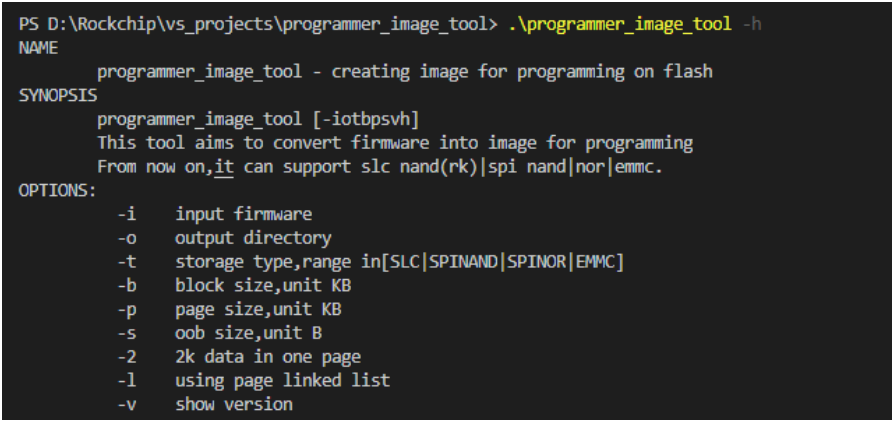
Complete options from the help screenshot
The Windows source screenshot confirms that -2 means 2k data in one page, not changing -p 4 into a 2 KB physical page. A copyable transcription follows. SYNOPSIS lists fewer options than OPTIONS; that source difference is retained.
NAME
    programmer_image_tool - creating image for programming on flash
SYNOPSIS
    programmer_image_tool [-iotbpsvh]
DESCRIPTION
    This tool aims to convert firmware into image for programming
    From now on,it can support slc nand(rk)|spi nand|nor|emmc.
OPTIONS:
    -i    input file
    -o    output directory
    -t    storage type,range in[SLC|SPINAND|SPINOR|EMMC]
    -f    input format,range in[UPDATE|PARAMETER|IMAGE]
    -b    block size,unit KB
    -p    page size,unit KB
    -s    oob size,unit B
    -2    2k data in one page
    -1    single idblock
    -d    set idblock start sector
    -l    using page linked list
    -v    show version
Applicability and verification
This is a documentation-based workflow for the supplied tool collection. Confirm the exact board, SoC, carrier, SDK/BSP and host architecture before using it. No flashing, provisioning, register writes or hardware tests were performed. Package availability does not establish support for every ArmSoM product.
GitHub tool directory, versions and SHA-256
Open the matching GitHub directory, select the required host/version, then verify the file hash and extract the full directory. Links below open repository directories.
Open the tool directory on GitHub
| Platform / version | File | SHA-256 |
|---|---|---|
| Linux / 1.26 | programmer_image_tool_v1.26_linux.tar.gz |
ea38df34e97cd697aa53d09af06fa1ff2b0847fe2c9699c49d1890509cc5c0d0 |
| Windows / 1.28 | programmer_image_tool_v1.28.zip |
696d07d8232a637ef59b724d0c0522e500fc9f26571c2633d96271ffce48e56f |
GitHub · catalog.json · SHA256SUMS
Source documents and figures
- user_manual.pdf
- user_manual.pdf
Continue with the related workflow
- Firmware_Merger: flat RK, flat GPT and compact GPT images
- afptool and rkImageMaker: understand and package Rockchip update.img
- Rockchip Storage Application Guide: Flash, Boot Flow, Partitions, Programming and Vendor Storage
- Rockchip tool download and workflow index
Find the correct ArmSoM board documentation
For board and carrier requirements, use the product manual first. The links below are platform references, not a statement that this archived tool has been validated on these products.
ArmSoM Docs · Sige7 / Docs · CM5 / Docs