
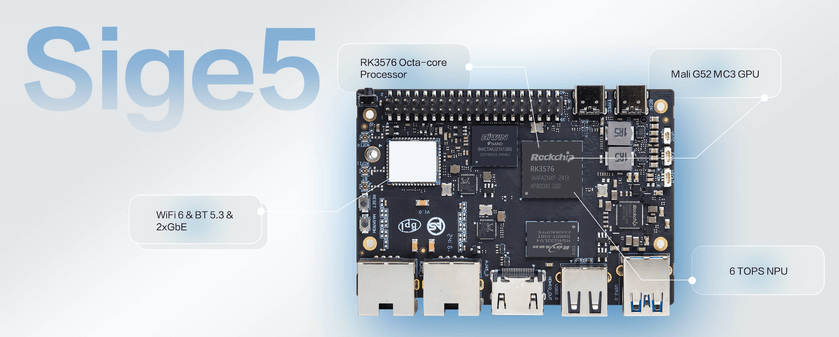
Official ArmSoM product image; illustrated chip capabilities do not establish complete acceleration support in an Armbian image.
A specification sheet answers only part of the board-selection question. Start with what the device must connect to, what it must retain, who uses it and how it recovers after failure. Sige5 and Sige7 offer complete single-board platforms; with Armbian, you can grow a Linux environment from one useful service.
The six scenarios below are development proposals, not a list of tested applications or benchmark results. Verify the drivers and application versions in your chosen image independently.
1. Start with interfaces
| Platform | Selection anchors | Directions to evaluate |
|---|---|---|
| Sige5 | RK3576, dual Gigabit networking, NVMe expansion | Data acquisition, device services, everyday Linux development |
| Sige7 | RK3588, dual 2.5GbE, PCIe 3.0 storage expansion | Multi-service hosts, higher-bandwidth storage prototypes |
These are hardware attributes, not throughput guarantees under Armbian. Storage, cooling, software and the remote endpoint affect results. See the Sige5 and Sige7 product pages; confirm memory, storage and accessories for the purchased variant.
Armbian has separate Sige5 and Sige7 entries. Similar board shapes do not make images interchangeable. The entries currently have community status; the companion introduction covers image selection and first boot.
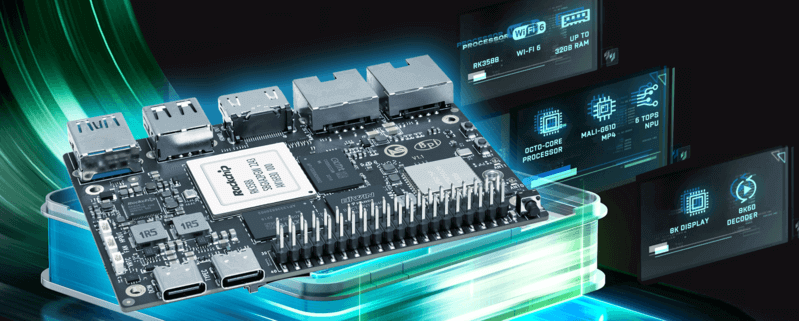
Official ArmSoM product image; illustrated chip capabilities do not establish complete acceleration support in an Armbian image.
2. Project one: a dedicated Linux development desktop
Keeping an editor, terminal, Git checkout and serial tools on one board reduces the need to move a project between machines. Consider teaching exercises, small tool builds, network debugging or a dedicated development terminal.
Start with one display, keyboard and mouse. Validate login, display mode, audio and networking before installing the actual editor. Check for packages matching the target architecture. A working desktop does not prove accelerated browser video, 3D or every graphics API. Validate a real task: edit a project, build it, connect an external device and resume work after logging in again.
3. Project two: local container services
A dashboard, project-documentation site or messaging service is a manageable deployment exercise. Run one application first, then decide whether containers help. Containers separate dependencies but do not replace host kernel drivers; their images must support the target CPU architecture.
Keep persistent data independent of container lifetime. Configure log rotation, resource limits and health checks. Expose only required ports, initially on the local network, and keep management interfaces off the public Internet. Test board reboot, abnormal service exit, full storage and backup restoration. Recreating a container without recovering its data is not a complete recovery plan.
4. Project three: a personal file library and backup node
Family photos, project archives or small-team sharing make a more useful starting goal than peak bandwidth. Confirm disk detection and mount paths before selecting a file service. Use stable disk identifiers so a changed device name does not redirect writes.
Separate the system disk, application data and backup copies. A network share is not a backup, and multiple drives do not replace an offline or off-site copy. Exercise large files, many small files, concurrent clients and integrity checks after recovery from interrupted power. Sige7 interfaces can inform selection, but nominal link rates are not measured transfer results.
5. Project four: an automation and IoT console
Collecting sensor values, displaying state and relaying messages provides a project that can grow gradually. Separate acquisition, messaging, rules and presentation. Connect the flow using simulated input before attaching real equipment.
For GPIO, I2C and serial links, check pins, levels, multiplexing and drivers. UART is not RS485; field interfaces often need transceivers and isolation. USB radio coordinators also need a matching chipset driver. Validate safe behaviour offline, duplicate command prevention after reconnection and detection of expired data when clocks disagree.
6. Project five: a networking and operations lab
Two Ethernet ports can help create an isolated lab for routing, monitoring and remote management. Preserve an independent management path, record interface names and change configuration incrementally. A local console should remain available for recovery.
These non-destructive checks do not enable routing or configure a firewall:
ip -br link
ip route
ss -lnt
lsblk -o NAME,SIZE,TYPE,MOUNTPOINTS
df -h
Do not copy an experimental configuration straight into an office network. Check address conflicts, lost links, persistence after reboot and management permissions rather than stopping at Internet access.
7. Project six: an edge-vision prototype
Develop acquisition, preprocessing, inference and presentation as separate stages. Establish an accuracy baseline with image files before connecting a camera. Make results reproducible before pursuing frame rate; this exposes whether acquisition, the model or display is the bottleneck.
An NPU in the processor does not mean an application automatically uses it after installing Armbian. Kernel driver, RKNN runtime, model-conversion version and application integration must match. Camera, ISP and video codecs have their own support conditions. Record end-to-end latency, accuracy, CPU use, temperature and dropped frames over time. TOPS is not a substitute for application measurements. A CPU reference path can help diagnose an incomplete acceleration stack.
8. Build an acceptance table
| Stage | Evidence to retain |
|---|---|
| Basic boot | Hardware revision, image, kernel and power configuration |
| Function | Real input, expected output, failure and recovery steps |
| Long run | Memory trend, log growth, temperature and errors |
| Maintenance | Restore test, before/after update comparison, rollback method |
Make one scenario recoverable before combining services. Desktop plus storage or acquisition plus messaging needs another test for resource contention. ArmSoM documentation and Armbian build entries provide a starting point; application validation determines fitness for your project.
9. Products and implementation resources
- Sige5 product and configurations · Hardware documentation
- Sige7 product and configurations · Hardware documentation
- Armbian documentation: check installation and software instructions against the current image.