
This task-focused guide explains the source with key specifications, limitations and original figures. It is not a page-by-page translation or a complete pin/register manual. Vendor examples are not ArmSoM measurements. Check the actual board revision, schematic, SDK/BSP, kernel and drivers before applying them; no new hardware validation was performed for this article.
Primary source: Rockchip RK3528 Datasheet V1.0-20230522.pdf · PDF 28 pages.
What RK3528 is intended to do
The V1.0 datasheet positions RK3528 for IPTV, OTT and multimedia equipment. Four Cortex-A53 cores run applications and networking while dedicated blocks process video and graphics. ArmSoM confirms RK3528 for Sige1, a useful software-evaluation starting point. A chip block diagram is not a list of connectors fitted to Sige1.
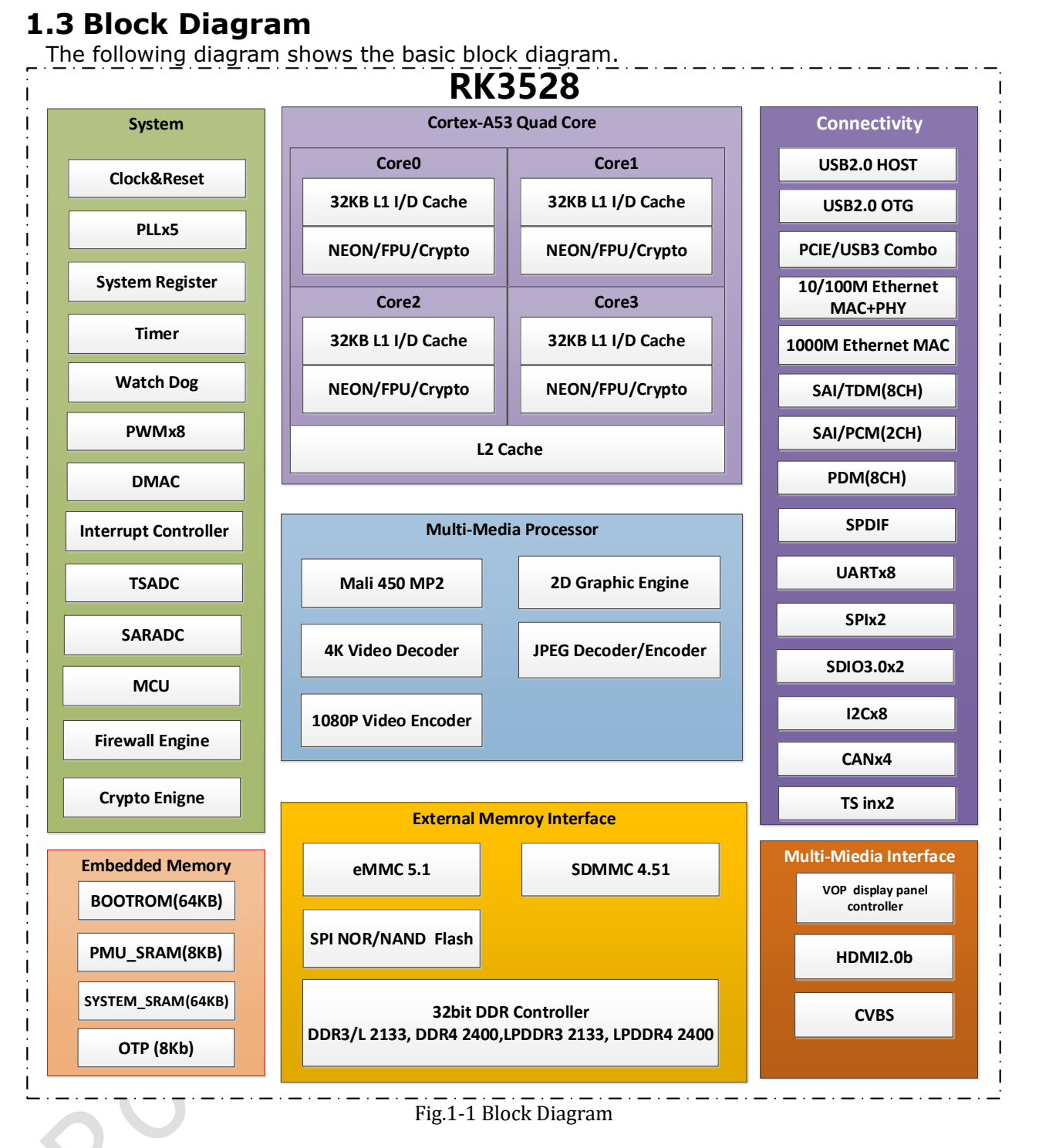
RK3528 vendor block diagram — Original English figure. Rockchip RK3528 Datasheet V1.0-20230522.pdf, PDF p. 14.
Specifications and their boundaries
| Item | Source information | Selection check |
|---|---|---|
| CPU / GPU | 4× Cortex-A53; Mali-450; OpenGL ES 1.1/2.0, OpenVG 1.1 | This does not establish compatibility with modern Vulkan applications |
| Memory | 32-bit; DDR3(L)/LPDDR3/DDR4/LPDDR4(4X); 4GB addressing | Actual capacity and type depend on the board |
| eMMC | eMMC 5.1, HS400, CMD Queue | Controller capability is not sustained flash-write speed |
| Decode | H.264/H.265/AVS2 up to 4K×2K@60fps | Match format, profile, bit depth and player path |
| Encode | H.264/H.265 up to 1920×1080@60fps; JPEG encoding | Verify camera input and driver support separately |
| Display | HDMI 2.0b; CVBS 480i/576i; HDR10, HLG, Vivid HDR | Validate monitor, colour format, bandwidth and software together |
| Network | Gigabit MAC plus Fast Ethernet MAC/PHY resources | Follow Sige1 connectors and schematics |
This datasheet provides no basis for an NPU claim. Sige1 should therefore not be presented here as an RKNN NPU-accelerated platform. Running an algorithm on the CPU is different from dedicated NPU acceleration.
Choosing between USB and PCIe resources
The note on p. 13 gives two combinations: 1× USB2 Host + 1× USB2 OTG + PCIe, or 1× USB2 Host + 1× USB3.0. Do not budget USB3 and PCIe as independent simultaneous resources. For a USB camera, external disk or expansion controller, check routing first and BSP PHY configuration second.
The PCIe2.1 section also mentions Base Specification Revision 3.0, but lists single-lane rates of 2.5/5.0Gbps. This discrepancy is retained; it is not interpreted as support for 8.0Gbps PCIe Gen3.
Three Sige1 project directions
Digital signage and information terminals: select representative media, verify hardware decoding, subtitle composition, rotation and audio/video synchronization. Then test offline playback, update rollback and scheduled recovery. Maximum decode resolution does not guarantee smooth complex browser animations in the same application.
Local media and lightweight services: evaluate file sharing, an equipment dashboard or playback management. Measure networking, storage and protocol overhead separately. Define behaviour for a full disk, corrupt files and power loss. One transfer-speed result is not evidence of long-term reliability.
Device communication and education: use only interfaces documented as exposed on the board. Check voltage and multiplexing before connecting peripherals. Include service management, log rotation, watchdogs and updating so the Linux device remains maintainable.
Keep the conditions with media claims
Support for a codec does not imply every profile, bit depth and container. Record the media properties, player version, decode device, CPU load, dropped frames, temperature and playback duration together. For encoding, also examine bitrate control, latency and image quality.
The HDMI section literally gives a bandwidth of 10.2bps, inconsistent with its context. This article neither silently supplies a missing unit nor derives output capability from that sentence. Consult updated formal specifications and the selected output mode.
Power, temperature and revision checks
Several electrical limits are TBD, with NA temperature fields; the thermal chapter separately requires junction temperature below 125℃. Missing values are not unrestricted operation, and junction temperature is not ambient temperature. Select the board’s required supply and validate cooling under sustained load before finalizing the enclosure.
Record Sige1 revision, image, kernel and driver versions, then test display, networking and storage individually and concurrently. Existing RK3528 hardware-design articles cover schematics and PCB rules; this guide turns the datasheet into selection and verification questions.
Products and development resources
- Sige1 — Product · Documentation
Datasheet series and original PDF
- RK3528 overview
- RK3528 architecture: memory, 4K video and shared PHYs
- RK3528 package and pins: all 401 ball assignments
- RK3528 electrical and thermal guide: supplies, I/O and thermal resistance
- Download the complete original PDF
Other chip datasheets
These links support cross-platform reading; electrical conditions and pins are not interchangeable.