
Платформенная справка ArmSoM по предоставленным китайскому и английскому оригиналам Rockchip. Проверяйте конкретную плату, SoC, SDK/BSP, ядро и периферию; поддержка всех плат ArmSoM не заявляется. Примеры и измерения источника не являются испытаниями ArmSoM. Команды и аппаратные тесты не выполнялись.
Buildroot LVGL 8.4.x / 9.1.x и расширение Rockchip lv_gl; в примерах есть намеренные пропуски исходника.
Оба V1.2.1; сохранены все 7 глав, параметры API и сноска об объединении lv_drivers в версии 9. ZH использует 13 китайских рисунков, EN/RU/DE — 13 английских. Анимационные примеры намеренно неполны и не являются готовыми программами. Источник смешивает прозрачность и видимость; смысл и сомнения отмечены без изменения кода.
| ОС | Версия |
|---|---|
| Buildroot | 8.4.x |
| Buildroot | 9.1.x |
1. Введение в LVGL
LVGL — свободная открытая графическая библиотека для встроенных интерфейсов на MCU/MPU и разных дисплеях. В исходнике она названа самой популярной; это характеристика источника, а не результат отдельного исследования. Полностью открытый код и отсутствие внешних зависимостей упрощают перенос. Библиотека может работать на современных MCU/MPU с (RT)OS либо без ОС и управлять ePaper, монохромными, OLED, TFT-дисплеями и мониторами.
2. Исходный код LVGL
Linux SDK содержит три репозитория: lvgl, lv_drivers¹ и lvgl_demo. lvgl — основной фреймворк; lv_drivers содержит интерфейсы вывода DRM, SDL, Wayland и др. lvgl_demo содержит примеры Rockchip: базовую инициализацию и вызов демонстраций LVGL. lvgl и lv_drivers загружаются из GitHub с патчами Rockchip из buildroot/package/lvgl/lvgl/ и buildroot/package/lvgl/lv_drivers/. lvgl_demo находится в <SDK>/app/lvgl_demo. Сноска 1 о версии 9 приведена в конце.
3. Конфигурация LVGL
В качестве бэкенда отрисовки можно выбрать DRM, SDL или RKADK. DRM предназначен для платформ без GPU/RGA, например RK3308; SDL — для платформ с GPU, например RK3568; RKADK — для платформ с GPU или RGA.
3.1 Файлы конфигурации
Базовые файлы: <SDK>/buildroot/configs/rockchip/gui/lvgl/.
<SDK>/buildroot/configs/rockchip/gui/lvgl/
├── lvgl_drm.config         # symlink to V8
├── lvgl_rkadk.config       # symlink to V8
├── lvgl_sdl.config         # symlink to V8
├── music.config            # Music DEMO from LVGL team
├── rk_demo.config          # DEMO from Rockchip team
├── v8                      # configurations for LVGL V8
│   ├── base.config         # basic configurations for LVGL
│   ├── lvgl_drm.config     # DRM configurations
│   ├── lvgl_rkadk.config   # RKADK configurations
│   └── lvgl_sdl.config     # SDL configurations
├── v9                      # configurations for LVGL V9
│   ├── base.config
│   ├── lvgl_drm.config
│   ├── lvgl_rkadk.config
│   └── lvgl_sdl.config
└── widgets.config          # Widgets DEMO from LVGL team
3.2 Использование файлов конфигурации
Включите конфигурации LVGL в defconfig:
$ cat buildroot/configs/rockchip_rk3308_bs_32_ia_release_defconfig | grep lvgl
# select a backend
#include "gui/lvgl/lvgl_drm.config"
# select a demo
#include "gui/lvgl/rk_demo.config"
3.3 Дополнительные настройки SDL
При использовании SDL выберите его бэкенд:
BR2_PACKAGE_SDL2=y
BR2_PACKAGE_SDL2_OPENGLES=y
# Use wayland backend. Depends on your environment
BR2_PACKAGE_SDL2_WAYLAND=y
Для дополнительных OpenGL(ES) API включите:
BR2_PACKAGE_LV_DRIVERS_USE_OPENGL=y
4. Сборка LVGL
cd buildroot
source envsetup.sh
# choose your board defconfig
# Compile these three package in version 8
make lvgl lv_drivers lvgl_demo -j20
# Compile these two package in version 9
make lvgl lvgl_demo -j20
После изменения LVGL через menuconfig рекомендуется пересобрать все три репозитория во избежание неожиданных ошибок:
cd buildroot
# Compile these three package in version 8
make lvgl-reconfigure lv_drivers-reconfigure lvgl_demo-reconfigure -j20
# Compile these two package in version 9
make lvgl-reconfigure lvgl_demo-reconfigure -j20
5. Код LVGL_DEMO
Путь: <SDK>/app/lvgl_demo/.
5.1 Структура каталогов
app/lvgl_demo/
├── cJSON   # cJSON source code
├── common  # common widgets
├── gallery # gallery application
├── lv_demo # basic demos
├── lvgl8   # API porting for V8
├── lvgl9   # API porting for V9
├── rk_demo
│   ├── asr                 # ASR function
│   ├── furniture_control
│   ├── home                # home page
│   ├── include             # head files
│   ├── intercom_homepage
│   │   ├── intercom_call
│   │   └── video_monitor
│   ├── layout              # layout widgets
│   ├── resource            # pictures, fonts
│   ├── rockit              # rockit adaptions
│   ├── setting             # system setting page
│   ├── smart_home
│   └── wifibt              # rkwifibt adaptions
├── sys     # timestamp, cpu information, soc information, etc.
└── tools   # coding style formater
5.2 Код lv_demo
Путь: <SDK>/app/lvgl_demo/lv_demo. Это пример запуска официального DEMO. Исходник опускает не относящийся к объяснению код и показывает важные фрагменты; это не полная программа.
/* <SDK>/app/lvgl_demo/lv_demo/main.c */
...
int main(int argc, char **argv)
{
    lv_port_init();

    /* DEMO UI initialization */
#if LV_USE_DEMO_WIDGETS
    lv_demo_widgets();
#elif LV_USE_DEMO_BENCHMARK
    lv_demo_benchmark();
#elif LV_USE_DEMO_MUSIC
    lv_demo_music();
#endif
    while (!quit)
    {
        /* call the task handler, all events, rendering,
         * display will be done in this function
         */
        lv_task_handler();
        usleep(100);
    }

    return 0;
}
/* <SDK>/app/lvgl_demo/lvgl8/lv_port_init.c */
/* touch screen rotation */
/* 0, 90, 180, 270 */
static int g_indev_rotation = 0;
/* display rotation */
/* 0, 90, 180, 270 */
static int g_disp_rotation = 0;

void lv_port_init(void)
{
    /* Start of any LVGL applications */
    lv_init();

    /* display initialization */
    lv_port_disp_init(0, 0, g_disp_rotation);
    /* touch screen initialization */
    lv_port_indev_init(g_indev_rotation);
}
/* <SDK>/app/lvgl_demo/lvgl9/lv_port_init.c */
/* touch screen rotation */
/* 0, 90, 180, 270 */
static int g_indev_rotation = 0;
/* display rotation */
/* 0, 90, 180, 270 */
static int g_disp_rotation = 0;
/* log level */
static int log_level = LV_LOG_LEVEL_WARN;
...
void lv_port_init(void)
{
    const char *buf;

    /* Start of any LVGL applications */
    lv_init();

    /* update log level bt getenv */
    buf = getenv("LV_DEBUG");
    if (buf)
        log_level = buf[0] - '0';
    /* setting log callback */
    lv_log_register_print_cb(print_cb);
    /* setting systick callback */
    lv_tick_set_cb(lv_systick);
    /* setting delay callback */
    lv_delay_set_cb(lv_sysdelay);

    /* display initialization */
    lv_port_disp_init(0, 0, g_disp_rotation);
    /* touch screen initialization */
    lv_port_indev_init(g_indev_rotation);
}
6. Интерфейсы OpenGL(ES)
В описываемой версии LVGL нет собственного интерфейса OpenGL(ES), а SDL не поддерживает 3D-объекты. Поэтому набор lv_gl инкапсулирует необходимые функции, позволяя приложению LVGL накладывать 3D-эффекты на исходный UI.
6.1 Файлы
lv_drivers/sdl/gl/
├── gl.c                // APIs implementation
├── gl.h                // APIs and external structure definition
├── mat.c               // Matrix function implementation
├── mat.h               // Matrix function definition
└── shaders             // OpenGL shaders
    ├── bgra_cube.frag  // BGRA cube fragment shader
    ├── bgra.frag       // BGRA 2D picture fragment shader
    ├── common.vert     // common vertex shader
    ├── cube.vert       // cube vertex shader
    ├── default.vert    // 2D picture vertex shader
    ├── rgba_cube.frag  // RGBA cube fragment shader
    └── rgba.frag       // RGBA 2D picture fragment shader
6.2 Перечисления
6.2.1 Цветовой формат
Поддерживаются LV_GL_FMT_RGBA и LV_GL_FMT_BGRA.
enum {
    LV_GL_FMT_ALPHA,
    LV_GL_FMT_LUMINANCE,
    LV_GL_FMT_LUMINANCE_ALPHA,
    LV_GL_FMT_INTENSITY,
    LV_GL_FMT_RGB,
    LV_GL_FMT_RGBA,
    LV_GL_FMT_BGRA,
};
6.2.2 Тип текстуры
enum {
    GL_TEX_TYPE_2D,
    GL_TEX_TYPE_CUBE,
};
6.2.3 Грани куба
Выбор целевой грани при импорте или отрисовке изображения.
enum {
    CUBE_LEFT,
    CUBE_RIGHT,
    CUBE_TOP,
    CUBE_BOTTOM,
    CUBE_FRONT,
    CUBE_BACK,
};
В координатах OpenGL центр экрана — начало (0, 0), X направлен вправо, Y вверх, Z перпендикулярно экрану наружу. У куба без поворота грань к пользователю — передняя CUBE_FRONT; остальные определяются аналогично. Пунктир показывает невидимые части.
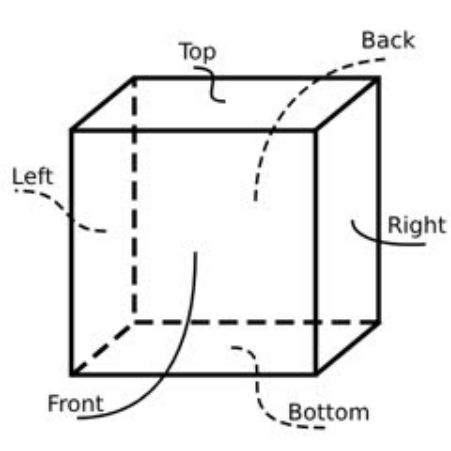
6.3 Структуры
Основные структуры приложения: lv_gl_img_t, lv_gl_tex_t и lv_gl_obj_t. lv_gl_img_t импортирует внешнее изображение как текстуру GPU.
typedef struct {
    /* the address of image */
    const void *pixels;
    /* image format */
    int format;
    /* width */
    int w;
    /* height */
    int h;
} lv_gl_img_t;
lv_gl_tex_t хранит объект текстуры GPU и связанные сведения.
typedef struct {
    /* width */
    int w;
    /* height */
    int h;
} lv_gl_size_t;

typedef struct {
    /* GPU texture object */
    GLuint gl_tex;
    /* GPU Frame Buffer Object */
    GLuint FBO;
    /* Texture size. For 2D textures, only the first set of sizes is valid.
     * A cube has 6 faces and 6 sets of size information. */
    lv_gl_size_t size[6];
    /* Texture format */
    int format;
    /* Object type, 2D or CUBE */
    int type;
    /* refrence count */
    int ref_cnt;
} lv_gl_tex_t;
lv_gl_obj_t хранит объект отрисовки GPU, вершины, параметры преобразования и другие сведения.
typedef struct {
    float x, y, z;
} lv_gl_vec_t;

typedef struct {
    /* width */
    int w;
    /* height */
    int h;
    /* reverse y, just keep it 0 */
    int reverse_y;
    /* bound textures */
    lv_gl_tex_t *tex;
    /* rendering rectangle */
    SDL_Rect r;
    /* viewport rectangle */
    SDL_Rect view;
    /* crop rectagnle */
    SDL_Rect crop;
    /* The viewport area needs to be updated.
     * It is used internally and can be ignored by the application.
     */
    int view_dirty;
    /* The crop area needs to be updated.
     * It is used internally and can be ignored by the application.
     */
    int crop_dirty;
    /* enable crop */
    int crop_en;
} lv_gl_base_t;

typedef struct {
    lv_gl_base_t base;
    /* GPU Vertex Array Object */
    GLuint VAO;
    /* GPU Vertex Buffer Object */
    GLuint VBO;
    /* Output type, default GL_TEXTURE_2D.
     * If you need to render on a cube,
     * specify the rendered surface through this variable.
     */
    int out_type;
    /* Manually specify the coordinates of the four vertices of
     * a 2D object. The default vertex is full screen (note that
     * it is the view size of the framebuffer, not the screen size,
     * and the two may not be equal). Then set the scale, offset
     * and other attributes to perform matrix transformation.
     * You can also freely specify vertex coordinates through this attribute.
     * However, it is not recommended to use both methods together,
     * as the transformations involved are more complicated and
     * it is difficult to estimate the final effect by manual calculation.
     * The range of x, y, and z is [-1, 1]
     */
    lv_gl_vec_t p[4];
    /* Manually specify the reference range of the texture,
     * which is used when only part of the texture slice is needed.
     */
    SDL_Rect tp;

    /* global alpha */
    float alpha;
    /*
     * The order of the following transformations is:
     * pos * offset * scale * self_rot * view_rot * perspective * move
     * Calculate from left to right.
     * The perspective is the view transformation to achieve
     * the effect of near big and far small.
     */
    /* Scaling in three axes */
    lv_gl_vec_t scale;
    /* Offset in three axes */
    lv_gl_vec_t offset;
    /* Roration in three axes */
    lv_gl_vec_t self_rot;
    /* Viewport rotation in three axes */
    lv_gl_vec_t view_rot;
    /* Movements in three axes */
    lv_gl_vec_t move;
} lv_gl_obj_t;
6.4 Функции
void lv_gl_set_render_cb(lv_gl_render_cb_t cb);
Регистрация callback отрисовки приложения. Объекты можно рисовать только внутри него. cb — указатель callback.
void lv_gl_set_fb(lv_gl_obj_t *obj);
Выбор framebuffer. obj = NULL: следующий вывод на экран; иначе — в текстуру obj.
void lv_gl_read_pixels(void *ptr, SDL_Rect *r, int type);
Копирование области текущего framebuffer в память. ptr — память назначения; r — читаемая область; type — тип чтения, по умолчанию GL_TEXTURE_2D. Для грани куба выберите значение из перечисления граней. Передача type = 0 выбирает GL_TEXTURE_2D.
lv_gl_tex_t *lv_gl_tex_create(int type, int w, int h, lv_gl_img_t *img);
Создать текстуру. type: GL_TEX_TYPE_2D или GL_TEX_TYPE_CUBE; w/h — ширина/высота, игнорируются при img != NULL. img — импортируемое изображение; NULL только выделяет место GPU, исходно заполненное 0.0; ненулевой указатель также импортирует данные. Для GL_TEX_TYPE_CUBE нужен массив минимум из 6 элементов. Возвращает lv_gl_tex_t *, указатель текстуры.
void lv_gl_tex_del(lv_gl_tex_t *tex);
Удалить текстуру. tex — указатель текстуры.
void lv_gl_tex_import_img(lv_gl_tex_t *tex, lv_gl_img_t *img);
Импорт внешнего изображения в текстуру. tex — указатель текстуры; img — изображение, для GL_TEX_TYPE_CUBE массив минимум из 6 элементов. Если изображение уже импортировано при создании, повторный вызов не требуется. Он нужен при смене изображения или после создания пустой текстуры.
void lv_gl_tex_clear(lv_gl_tex_t *tex, float r, float g, float b, float a);
Залить текстуру цветом. tex — указатель текстуры; r/g/b/a — значения красного, зелёного, синего и alpha-канала.
lv_gl_obj_t *lv_gl_obj_create(int w, int h);
Создать объект отрисовки. Рисовать его можно только после привязки текстуры. w/h — ширина/высота. Возвращает lv_gl_obj_t *, указатель объекта. Ширина и высота используются для расчёта масштабирования.
void lv_gl_obj_del(lv_gl_obj_t *obj);
Удалить объект отрисовки. obj — указатель объекта.
void lv_gl_obj_resize(lv_gl_obj_t *obj, lv_gl_obj_t *parent);
Изменить размер объекта. По умолчанию он занимает весь экран; функция сбрасывает scale. Расчёт использует ширину/высоту obj и viewport родителя, а не размеры самого parent. obj — объект; parent — цель отрисовки, NULL означает экран.
void lv_gl_obj_move(lv_gl_obj_t *obj, lv_gl_obj_t *parent);
Пересчитать позицию по цели отрисовки: scale, base.r и размерам viewport родителя. Вызывайте после resize, поскольку используется scale; после ручного изменения scale вызов рекомендуется повторить. obj — объект; parent — цель, NULL означает экран.
void lv_gl_obj_reset_points(lv_gl_obj_t *obj);
Сбросить вершины объекта для полноэкранного отображения. obj — объект.
void lv_gl_obj_reset_tex_points(lv_gl_obj_t *obj);
Сбросить координаты вершин текстуры, чтобы использовать всё изображение. obj — объект.
void lv_gl_obj_update_vao(lv_gl_obj_t *obj);
Обновить VAO/VBO по текущим вершинам объекта и текстуры. После ручного изменения этих данных вызов обязателен для применения. Если VAO/VBO ещё нет, они создаются. obj — объект.
void lv_gl_obj_release_vao(lv_gl_obj_t *obj);
Освободить VAO/VBO и использовать значения по умолчанию. obj — объект.
void lv_gl_obj_bind_tex(lv_gl_obj_t *obj, lv_gl_tex_t *tex);
Привязка текстуры увеличивает её счётчик ссылок на 1. Если другая текстура уже привязана, её счётчик уменьшается; при значении <= 0 она освобождается автоматически. Вызов может освобождать память: приложение должно избегать внешних ссылок на освобождённые текстуры и повторного освобождения. obj — объект; tex — текстура.
void lv_gl_obj_set_crop(lv_gl_obj_t *obj, SDL_Rect *r, int en);
Задать обрезку. Начало координат — левый нижний угол экрана; X вправо, Y вверх. obj — объект, NULL означает экран. r — начальные координаты и размер; при NULL начало сбрасывается в 0, размер — в размер объекта. en: 1 включает обрезку, 0 выключает. Это отличается от стандартного начала координат LVGL слева вверху; учитывайте различие.
void lv_gl_obj_get_crop(lv_gl_obj_t *obj, SDL_Rect *r);
Получить область обрезки. obj — объект, NULL означает экран; r — указатель для результата. r содержит начальные координаты и размер области.
void lv_gl_obj_set_viewport(lv_gl_obj_t *obj, SDL_Rect *r);
Задать viewport: начало слева внизу, X вправо, Y вверх. obj — объект, NULL означает экран. r — начальные координаты и размер; при NULL координаты сбрасываются к началу, размер — к размеру объекта. Это отличается от стандартного начала координат LVGL слева вверху; учитывайте различие.
void lv_gl_obj_get_viewport(lv_gl_obj_t *obj, SDL_Rect *r);
Получить viewport. obj — объект, NULL означает экран; r — указатель для результата. r содержит начальные координаты и размер области.
void lv_gl_obj_render(lv_gl_obj_t *obj);
Нарисовать obj в framebuffer. Разрешено только в callback отрисовки. obj — указатель объекта.
7. Код Gallery DEMO
Для альбомов и галерей добавлено Gallery DEMO с эффектами: сдвиг, появление, вращение/переворот куба, текст на кубе, просмотр изображений на барабане, поток фотографий и др.
7.1 Структура каталогов
gallery/
├── anims                   // animations
│   ├── cube_flip.c         // cube flip
│   ├── cube_flip.h
│   ├── cube_lyric.c        // cube lyric rendering
│   ├── cube_lyric.h
│   ├── cube_rotate.c       // cube rotate
│   ├── cube_rotate.h
│   ├── fade_out.c          // picture fade out
│   ├── fade_out.h
│   ├── fade_slide_out.c    // picture slide and fade out
│   ├── fade_slide_out.h
│   ├── fold.c              // picture fold
│   ├── fold.h
│   ├── photo_stream.c      // photo stream
│   ├── photo_stream.h
│   ├── roller.c            // picture rollering preview
│   ├── roller.h
│   ├── slide_out.c         // picture slide out
│   ├── slide_out.h
│   ├── stiker.c            // picture stiker testing
│   └── stiker.h
├── CMakeLists.txt
├── gallery.c               // UI entry
├── gallery.h
├── main.c                  // application entry
├── main.h
└── pics                    // picture resources
7.2 Вход в UI
main.c совпадает с примером lv_demo, поэтому ниже рассматривается главным образом точка входа UI.
// gallery.c

/* Define the characters in cube lyric rendering demo, two lines for one surface */
static char *lyric[]...

/* The texture objects */
lv_gl_tex_t *tex_cube;
lv_gl_tex_t *tex_2d[6];
lv_gl_tex_t *tex_roller;
lv_gl_tex_t *tex_fb;

/* The rendering objects */
lv_gl_obj_t *obj_fb;
lv_gl_obj_t *obj_img0;
lv_gl_obj_t *obj_img1;
lv_gl_obj_t *obj_cube;
lv_gl_obj_t *obj_fold[4];
lv_gl_obj_t *obj_roller_items[6];
lv_gl_obj_t *obj_roller;
/* The lyric_row array used in cube lyric rendering demo. */
lyric_row *obj_lyrics;

/* Viewport size, equal to the screen size minus the button matrix size. */
SDL_Rect view;

/* Screen size */
SDL_Rect screen;

/* Indicates whether the current animation is playing */
int animing = 0;

/* Font imported from ttf file */
lv_ft_info_t ttf_main;

/* lvgl screen object */
lv_obj_t *scr;
/* lvgl image object */
lv_obj_t *img1;
/* lvgl image object */
lv_obj_t *img2;
/* lvgl object, animation area */
lv_obj_t *anim_area;
/* lvgl button matrix object */
lv_obj_t *btn_mat;
/* lvgl slider object */
lv_obj_t *slider;
/* lvgl object, photo stream container */
lv_obj_t *photo_box;
/* lvgl image objects for photo stream */
lv_obj_t *photos[6];

/* lvgl animations */
static lv_anim_t anims[]...

/* label texts for button matrix */
static const char *btnm_map[]...

/* event callback of button matrix */
static void event_handler(lv_event_t * e)

/* font initialization */
static void font_init(void)

/* create canvas, rendering texts to pictures */
static label_canvas *create_canvas(lv_color_t color, lv_font_t *font)

/* rendering texts to pictures and import to a GPU texture object */
static lv_gl_obj_t *utf8_to_obj(lv_gl_obj_t *parent, label_canvas *lc, char *text)

/* common animation start callback */
void common_anim_start(void)

/* texture object initialization */
static void tex_init(void)

/* UI entry */
void gallery(void)
// gallery.h
typedef struct
{
    /* Specify the text font and color */
    lv_draw_label_dsc_t label_dsc;
    /* buffer for canvas */
    lv_img_dsc_t *img_dsc;
    /* lvgl canvas object */
    lv_obj_t *canvas;
} label_canvas;

typedef struct {
    /* GPU rendering object */
    lv_gl_obj_t **objs;
    /* charactor length */
    int len;
} lyric_row;
7.3 Анимации
lv_gl не инициирует отрисовку автоматически. В callback анимации нужно запустить процесс отрисовки LVGL; все примеры вызывают lv_obj_invalidate(lv_layer_top()). У верхнего слоя нет дочерних объектов, поэтому это не ухудшает обычную производительность отрисовки.
7.3.1 Переворот куба
Две фотографии переключаются поворотом куба, который во время поворота немного уменьшается.
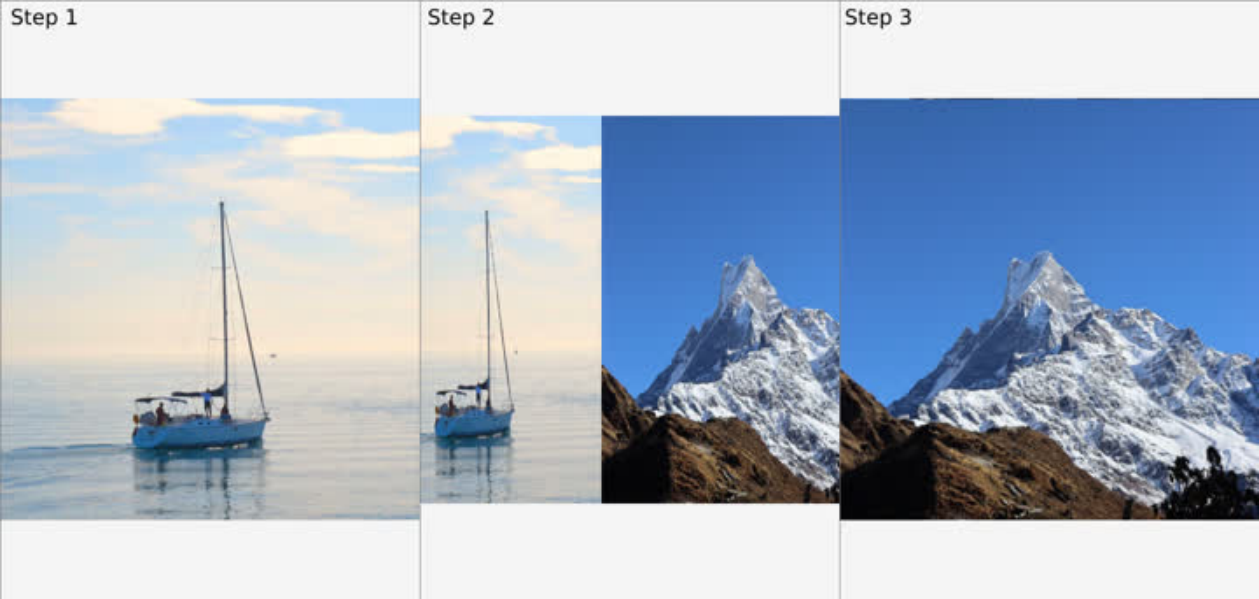
Поворот по оси X на 15 градусов делает эффект более заметным.
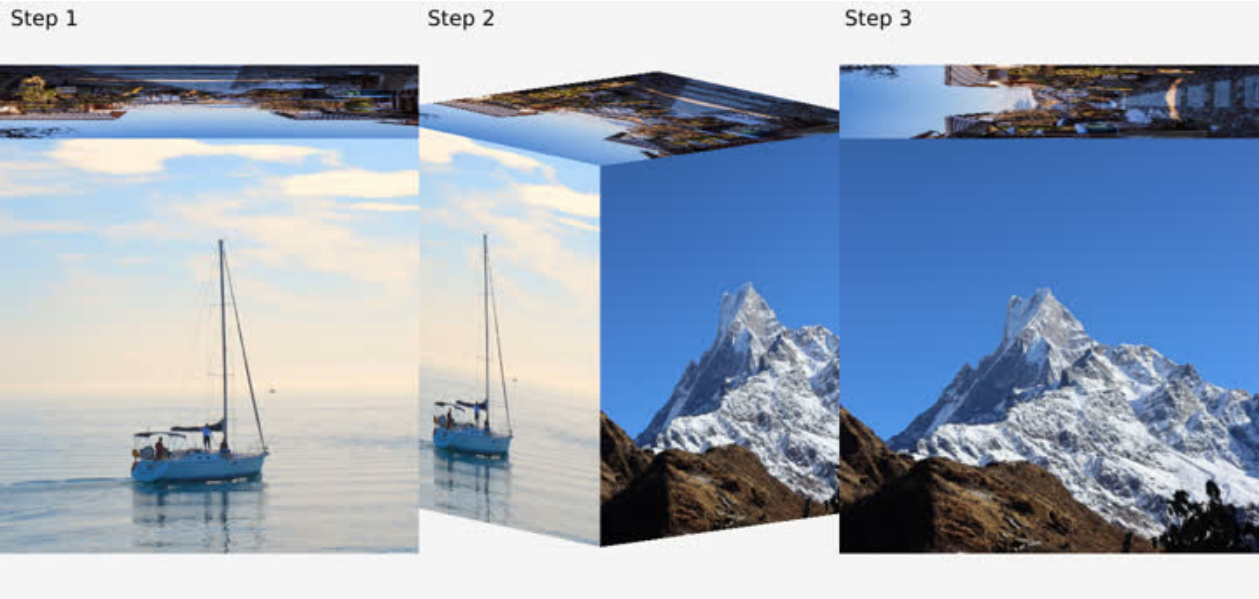
Разбор кода:
 /* anims/cube_flip.c */
/*
 * Define three additional sub-animations.
 * The application divides the complete animation into 4 steps, each rotating 90 degrees
 * The first animation is defined in anims/cube_flip.h, from 0 degrees to 90 degrees
 * The first sub-animation rotates from 90 degrees to 180 degrees
 * The second sub-animation goes from 180 degrees to 270 degrees
 * The third sub-animation goes from 270 degrees to 360 degrees
 * Each sub-animation has act_time = -1000 set to achieve a 1s interval
 * between each action
 */
static lv_anim_t sub_anims[]...
/* Set viewport for all cube animations */
SDL_Rect cube_view;
/* Set the zoom effect according to the current animation progress */
#define ZOOM_IN ...
/* Cube animation rendering callback, for all cube animations */
void anim_cube_render(void)
/*
 * Cube animation start callback, for all cube animations
 * Modify the view to a specific value in the start callback,
 * First, take the side with smaller width and height in the default view
 * for example, if the width is smaller than the height, take the width.
 * And divide this value by 0.57 and plus 2 as the width and height of the new view
 * (the view needs to be square, otherwise subsequent transformations may be abnormal).
 * Since the distance from the center of the cube to any corner is d=sqrt(3)/2*a
 * a is the side length and is equal to 2.0 (the coordinate system is
 * [-1, -1, -1]-[1, 1, 1])
 * Therefore, in order to ensure that no matter how the cube is rotated,
 * any corner will not exceed the coordinate system, that is,
 * d should always be less than 1.0.
 * Then choose a scaling factor of 0.57. sqrt(3)/2*a*0.57=0.9873
 * plus 2 is just an empirical value, which ensures that the cube slightly exceeds the
 * screen and leaves no gaps on the left and right.
 * It can be removed according to actual application conditions
 */
void anim_cube_start(lv_anim_t *a)
/* Start callback */
void anim_cube_flip_start(lv_anim_t *a)
/* Animation callback, set the Y-axis rotation angle and scaling ratio
 * according to the current animation progress
 */
void anim_cube_flip(void *var, int32_t v)
/* End callback, determine the current animation segment according to
 * the value of a->var, and execute the next animation segment or end it
 */
void anim_cube_flip_end(lv_anim_t *a)
7.3.2 Вращение куба
Куб вращается, показывая изображения всех граней.
Разбор кода:
/* anims/cube_rotate.c */
/* start callback, just call anim_cube_start */
void anim_cube_rotate_start(lv_anim_t *a)
/* Animation callback, set the scale to 0.57 (see the previous section for the reason),
 * and set the rotation angle of the X and Y axes according to the animation progress */
void anim_cube_rotate(void *var, int32_t v)
/* End callback, restore animation flag, and restore progress bar */
void anim_cube_rotate_end(lv_anim_t *a)
7.3.3 Текст песни на кубе
Описание анимации:
Куб поочерёдно показывает шесть граней, на текущей рисуются символы. Заменив их строками песни и синхронизировав с музыкой, можно получить 3D-текст песни.
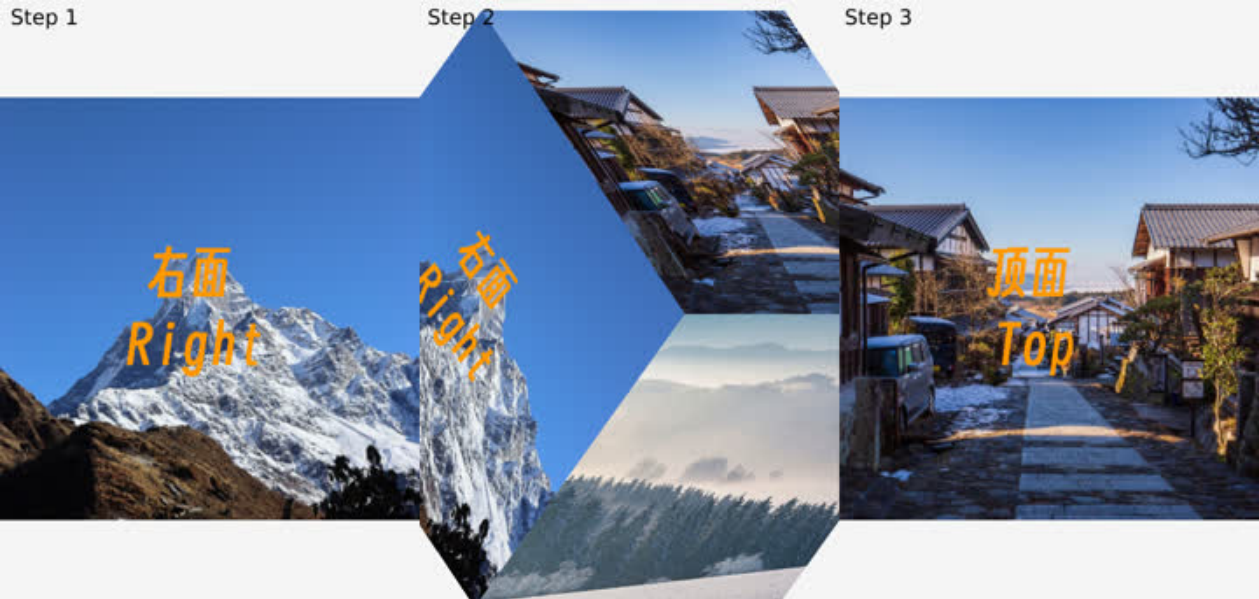
Разбор кода:
/* anims/cube_lyric.c */
/*
 * Define two additional sub-animations. In the application, each rotation and
 * each line of text rendering is divided into sub-animations to complete.
 * The animation starts from the left, and the main animation completes the two
 * lines of drawing on the left.
 * After the main animation is completed, enable the first rotation sub-animation,
 * rotating from left to right
 * After the rotation is completed, enable the first rendering sub-animation and
 * complete the drawing of the two lines on the right surface.
 * After drawing is completed, enable the second rotation sub-animation,
 * and repeat this cycle until all 6 surfaces are drawn.
 */
static lv_anim_t sub_anims[]...
/* Indicates the number of characters in the current line being drawn. */
static int line;
static int row;
static int col;
/*
 * The rendering callback is different from the ordinary cube.
 * It has an extra step of drawing on the cube, so it has an independent callback.
 * In this callback:
 * The first step is to set the cube as a framebuffer, which means that all
 * subsequent rendering will be drawn onto the cube.
 * The second step is to draw the current character
 * The third step is to reset the framebuffer, which means that subsequent rendering
 * is directly displayed on the screen
 * The fourth step is to render the cube to the screen
 */
void anim_cube_lyric_render(void)
/*
 * The starting callback first calls the cube general starting callback and
 * sets the rendering callback to anim_cube_lyric_render
 * Then rotate the cube to the left to facilitate subsequent animation
 */
void anim_cube_lyric_start(lv_anim_t *a)
/* Draw animation callback, update character index according to current progress,
 * trigger rendering */
void anim_cube_lyric(void *var, int32_t v)
/* Rotation animation callback, rotate the cube to the appropriate face according
 * to the current progress */
void anim_cube_lyric_sub(void *var, int32_t v)
/* The rotation animation ends callback. According to the length of the next line
 * of text, the drawing animation duration is updated (calculated as 300ms per word)
 * and the drawing animation is started.*/
void anim_cube_lyric_sub_end(lv_anim_t *a)
/*
 * Callback when the animation ends. The number of lines increases by one each time
 * the animation is finished.
 * If the number of lines is an odd number, it means that there is still one line that
 * has not been displayed. According to the length of the next line of text,
 * the duration of the drawing animation is updated (calculated at 300ms per word),
 * and the drawing animation is started.
 * If the number of rows is even, it means that the current page has been drawn,
 * than start the rotation animation.
 * If all 12 lines are drawn, end the animation
 * The DEMO has 12 rows in total, 2 rows per page. If you plan for other numbers of
rows,
 * the logic will be different.
 */
void anim_cube_lyric_end(lv_anim_t *a)
7.3.4 Складывание изображения
Первое изображение складывается внутрь и исчезает; второе делится на две части, которые входят извне экрана.
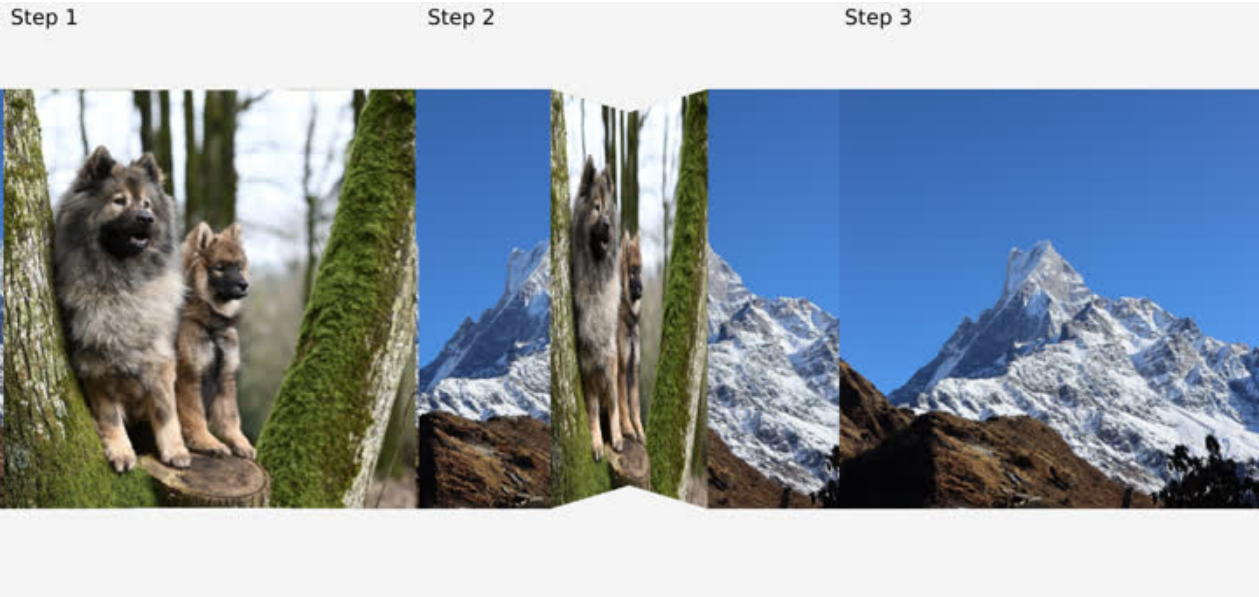
Разбор кода:
/* anims/fold.c */
/* Rendering callback.
 * The application divides the two images into four parts (each is divided into two
 * parts, left and right), so four rendering calls are made in the rendering callback.
*/
static void anim_fold_render(void)
/*
 * Start callback
 * 1 Set the view to 480x480 (picture size, optional, adjust according to
 *   actual situation)
 * 2 Reset the scale parameters of the 4 render objects according to the new view
 * 3 Divide the image into 4 parts, obj_fold[0] is the left half of image 1,
 *   obj_fold[1] is the right half of image 1, and so on.
 * 4 Set the render callback
 */
void anim_fold_start(lv_anim_t *a)
/*
 * Animation callbacks
 * The requirement for using rotation transformation is relatively complex,
 * because the rotation axis is constantly changing, and the rotation angle needs to be
 * inferred based on the offset value. Therefore, it is achieved by directly setting the
 * vertex coordinates. It only needs to continuously update the X-axis coordinates of
 * each vertex of the four objects in the animation callback. The two points on the
right
 * of obj_fold[0] and the two points on the left of obj_fold[1] are fixedly folded
inward
 * and unchanged. Therefore, the X coordinates of these four points do not need to be
 * changed, and only the Z coordinates need to be set to negative values (currently set
 * to 0~-0.2, adjusted according to the effect). The perspective transformation in the
 * vertex shader will automatically transform the effect of near large and far small.
 */
void anim_fold(void *var, int32_t v)
/* End callback */
void anim_fold_end(lv_anim_t *a)
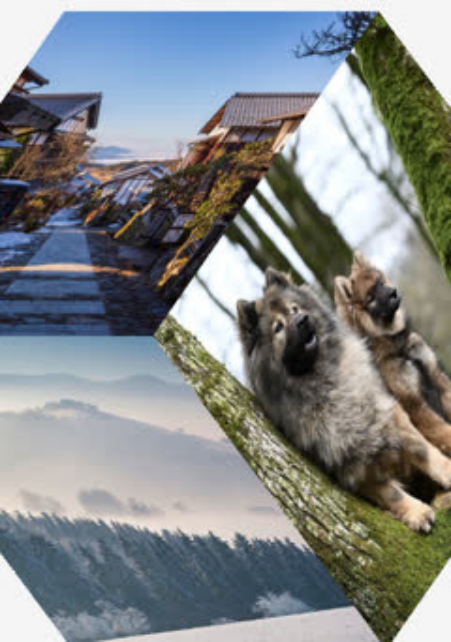
7.3.5 Просмотр на вращающемся барабане
Шесть изображений образуют барабан, вращение которого показывает каждое из них.
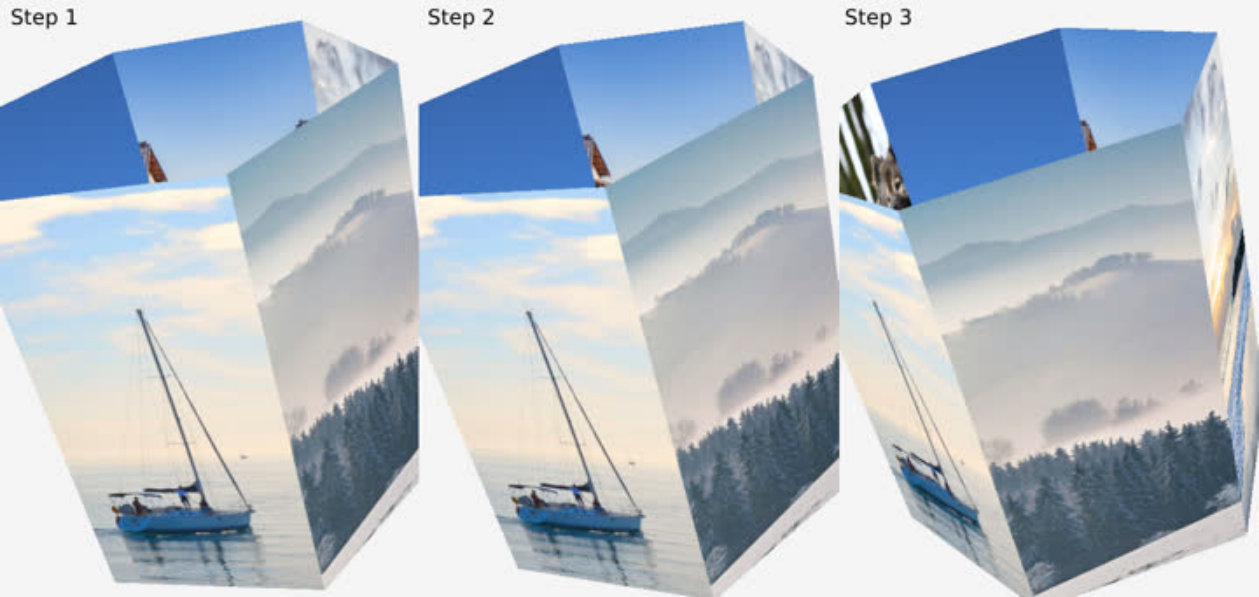
Разбор кода:
/* anims/roller.c */
/* Rendering callback, render 6 pictures in sequence */
void anim_roller_render(void)
/*
 * Start callback
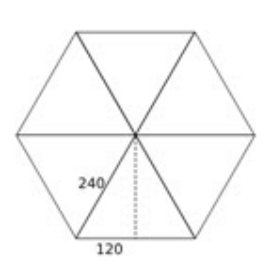
 * 1 Set the view to 2000x2000. Because it involves rotation, in order to avoid the
image
 *   exceeding the coordinates and causing cropping and loss of the screen, set it to a
 *   large value.
 * 2 Recalculate the size of the rendered object according to the new view, and set
 *   the Z axis offset to 0.20785, so that the image is a certain distance from the
 *   center, thus forming a barrel shape. The Z axis calculation is a simple Pythagorean
 *   theorem, sqrt(240^2 - 120^2) / 2000 * 2.0 = 0.20785, the image width is 240 (see
the
 *   image below), and since it is a hexagon, a simple sqrt(240^2 - 120^2) can calculate
 *   the distance from each face to the center. 2000 is the view size, and the scale
 *   ratio is calculated from it, and then multiplied by the range 2.0 (coordinates
 *   -1.0~1.0) to get the offset value. If it is not a hexagon, you need to calculate
the
 *   distance in other ways, and the way to calculate the scale ratio and offset value
 *   remains unchanged.
 * 3 Set the X-axis rotation to 30 and the Z-axis rotation to 15. In order to have a
 *   tilt effect, set them as needed.
 */
void anim_roller_start(lv_anim_t *a)
/* Animation callback. Add the rotation value to the Y axis of each image.
 * The first image is 0 degrees plus the rotation value, the second image is 60 degrees
 * plus the rotation value, and so on. */
void anim_roller(void *var, int32_t v)
/* End callback */
void anim_roller_end(lv_anim_t *a)
7.3.6 Тест наклеек (Stiker)
По фоновому изображению перемещается небольшая сетка; через заданный шаг вставляется небольшое изображение.
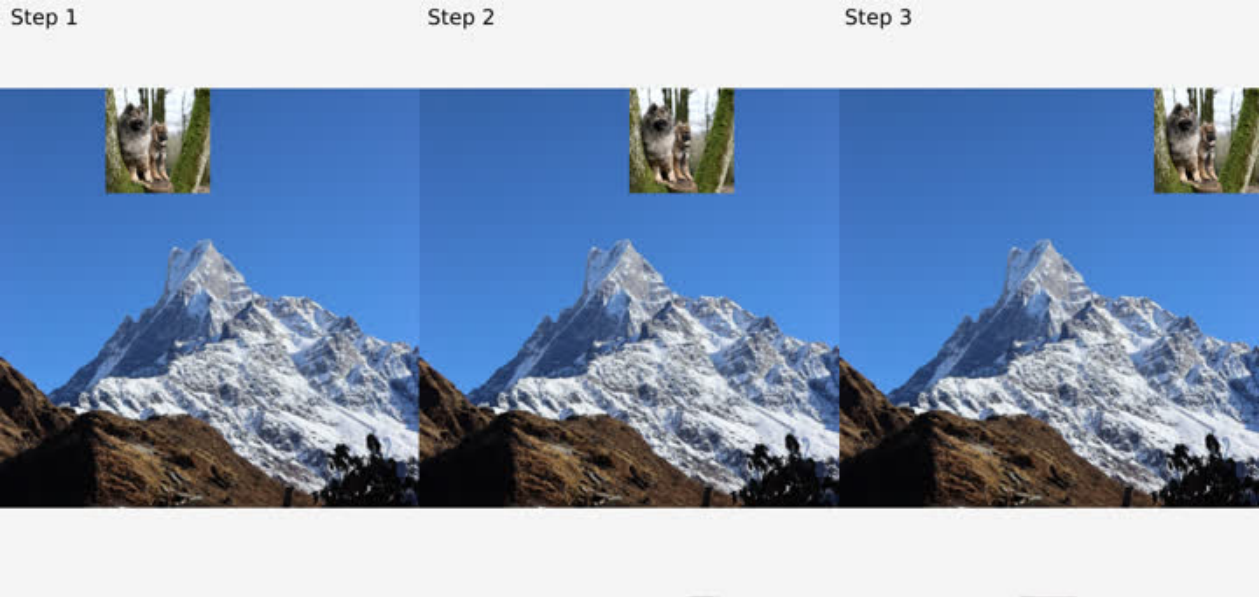
Разбор кода:
/* anims/stiker.c */
/*
 * Rendering callback
 * 1 Set obj_fb as framebuffer
 * 2 Clear obj_fb with color(0.0, 0.0, 0.0, 1.0) because we need the alpha of framebuffer
 *   always be 1.0 before each rendering
 * 3 Rendering obj_img1 to obj_fb as a backgroud
 * 4 Rendering obj_img0 to obj_fb as a stiker
 * 5 Reset to default framebuffer, rendering obj_fb to screen
 * In actual use, the two images can be rendered directly to the screen.
 * The DEMO is just to show the rendering function and framebuffer function.
 */
static void anim_stiker_render(void)
/* Start callback. Set the coordinates of the texture to 0,0 and call lv_gl_obj_move
 * to update the parameter values.
 */
void anim_stiker_start(lv_anim_t *a)
/* Animation callback. Set the coordinates according to the current animation progress,
 * and call lv_gl_obj_move to update the parameter values.
 */
void anim_stiker(void *var, int32_t v)
/* End callback */
void anim_stiker_end(lv_anim_t *a)
7.3.7 Сдвиг наружу
Простой пример: первое изображение постепенно уходит влево за экран, второе одновременно входит движением влево.
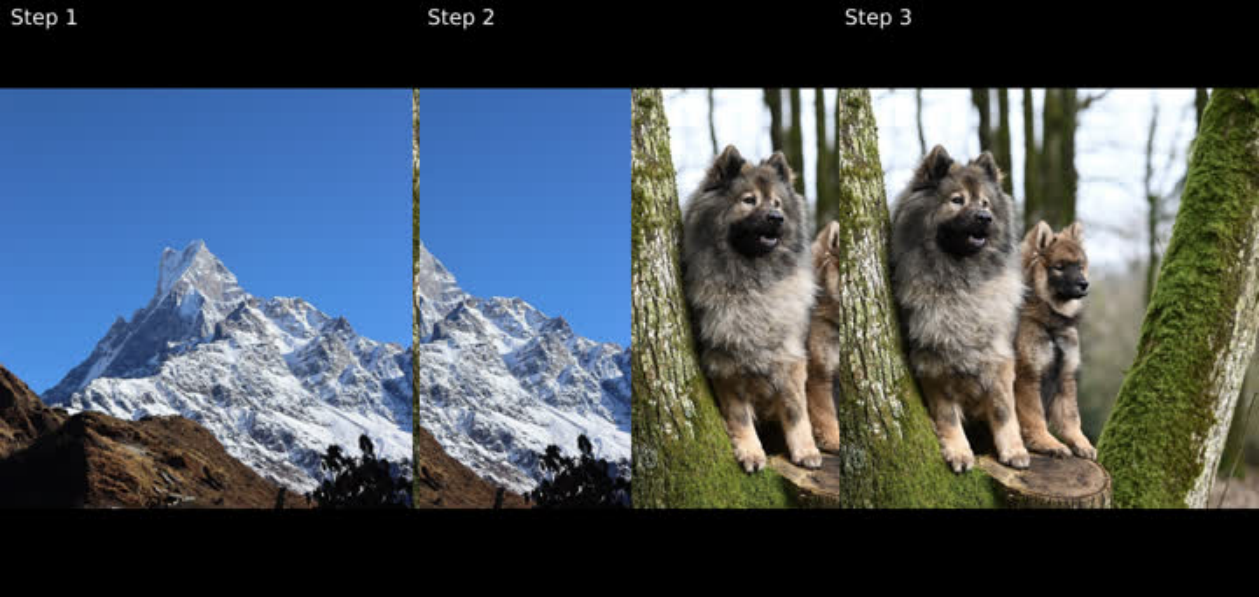
Разбор кода:
/* anims/slide_out.c */
/* Calls the common start callback and sets the animation area to be visible */
void anim_slide_out_start(lv_anim_t *a)
/* Animation callback, updates the X coordinates of the two images */
void anim_slide_out(void *var, int32_t v)
/* End callback */
void anim_slide_out_end(lv_anim_t *a)
7.3.8 Плавное исчезновение
Пример плавного перехода: первое изображение постепенно исчезает, второе появляется. В исходнике это описано как уменьшение прозрачности первого и увеличение прозрачности второго; при проверке реализации следует различать прозрачность и непрозрачность/alpha.
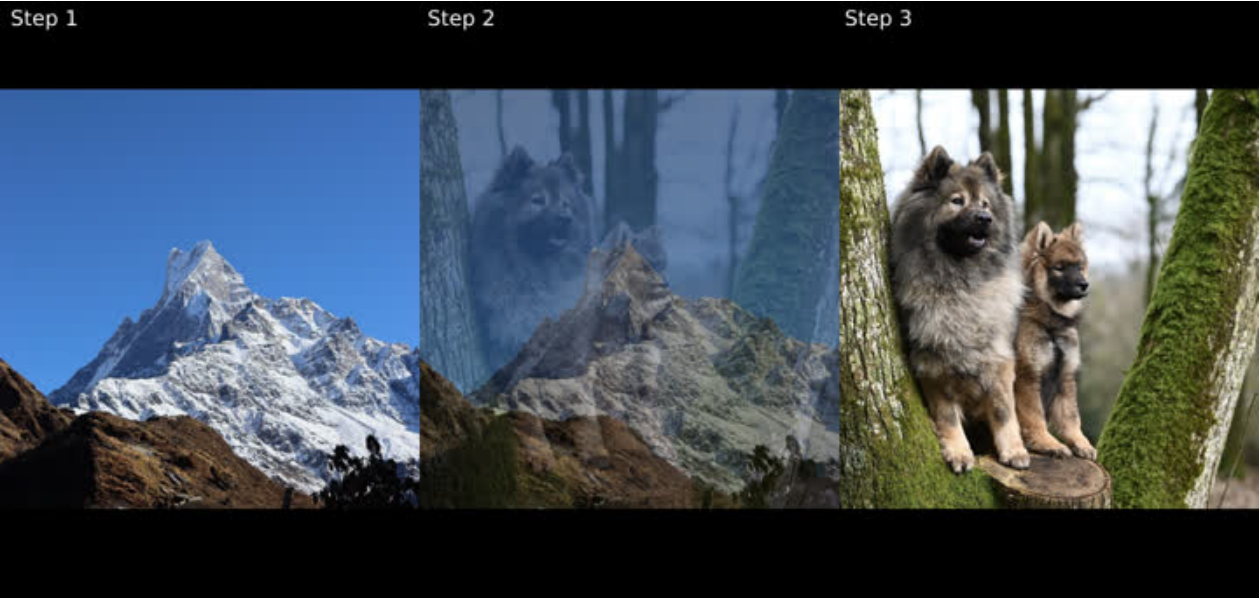
Разбор кода:
/* anims/fade_out.c */
/* Calls the common start callback and sets the animation area to be visible */
void anim_fade_out_start(lv_anim_t *a)
/* Animation callback, updates the transparency of the two images */
void anim_fade_out(void *var, int32_t v)
/* End callback */
void anim_fade_out_end(lv_anim_t *a)
7.3.9 Исчезновение со сдвигом
Объединение двух эффектов: первое изображение выходит со снижением видимости, второе входит. Исходная формулировка говорит об уменьшении прозрачности первого.
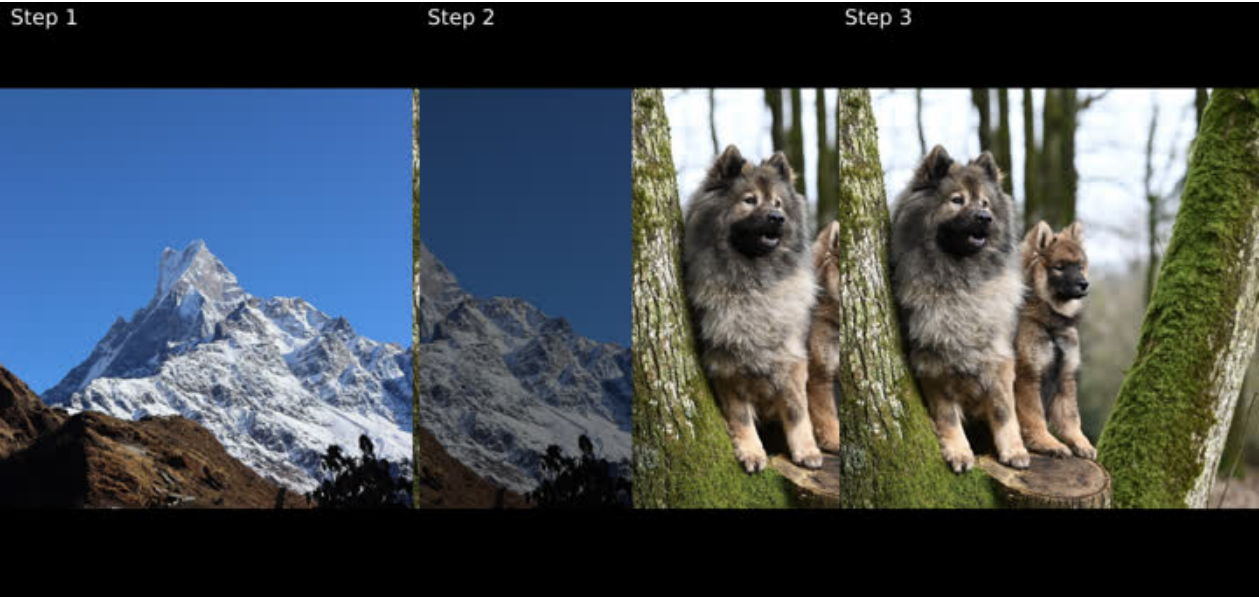
Разбор кода:
/* anims/fade_slide_out.c */
/* Calls the common start callback and sets the animation area to be visible */
void anim_fade_slide_out_start(lv_anim_t *a)
/* Animation callback, updates the X coordinates of the two images and the
 * transparency of first image according to the current animation progress */
void anim_fade_slide_out(void *var, int32_t v)
/* End callback */
void anim_fade_slide_out_end(lv_anim_t *a)
7.3.10 Поток фотографий
Шесть фотографий прокручиваются сверху вниз. Касание приостанавливает анимацию, изображения следуют за пальцем; после отпускания анимация продолжается.
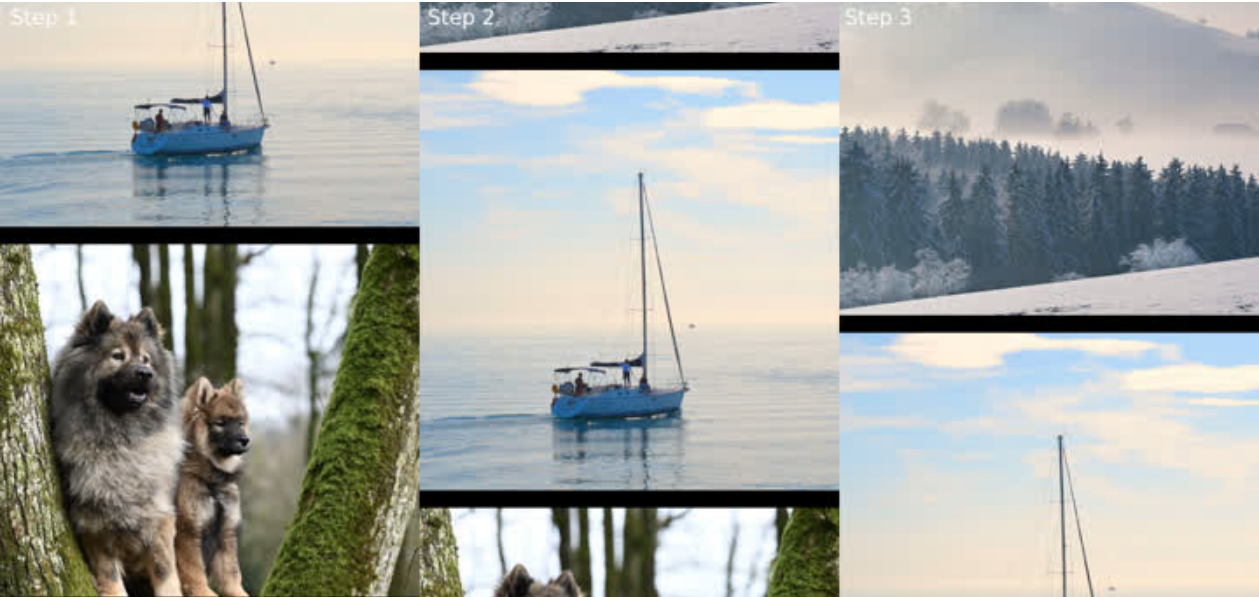
Разбор кода:
/* anims/photo_stream.c */
/* image height */
static int32_t img_h = 480;
/* image gap */
static int32_t gap_h = 20;
/*
 * Calculate the maximum Y coordinate based on the image height, image gap,
 * and number of images
 * max_y = n * img_h + (n - 1) * gap_h
 */
static int32_t max_y;
/*
 * Boundary value, used to reset to the top of the photo stream and continue
 * looping after the image reaches max_y
 * boundary = n * img_h + n * gap_h
 * Since the image needs to return to the top after the loop and needs to be
 * spaced from the first image, boundary has one more gap_h than max_y.
 */
static int32_t boundary;
/* Update image coordinates regularly */
static lv_timer_t *timer;
/* The coordinate offset increased by the timer*/
static int32_t timer_ofs = 0;
/* The coordinate offset increased by the last touch */
static int32_t touch_ofs_s = 0;
/* The coordinate offset increased by this touch */
static int32_t touch_ofs = 0;
/* Update and check the Y coordinate of the image to achieve animation effect */
static void update_y(void)
/* Timer callback */
static void lv_timer_cb(lv_timer_t *timer)
/*
 * Touch callback
 * LV_EVENT_PRESSED: Pause the timer and get the coordinates of the pressed
 * LV_EVENT_PRESSING: Get the current touch coordinates, compare with the pressed
 * coordinates, add touch_ofs_s to calculate the offset value and update the coordinates
 * LV_EVENT_RELEASED: Re-enable the timer and record the touch offset to touch_ofs_s
 * The reason for dividing into three offsets is to ensure the continuity of the
 * animation coordinates when the touch is pressed and released,
 * and to avoid coordinate shifting.
 */
static void touch_handler(lv_event_t * e)
/* Stop photo stream */
void anim_photo_stream_stop(void)
/* Initialize the photo stream, create a timer, calculate max_y, boundary, etc. */
void anim_photo_stream_start(lv_anim_t *a)
/* Animation callback
 * In fact, the photo stream is implemented using a timer and has nothing to do
 * in animation callback. The animation callback is used here just to unify the
 * interface and facilitate embedding into the DEMO framework.
 * The actual application development can just use the timer callback.
 */
void anim_photo_stream(void *var, int32_t v)
void anim_photo_stream_end(lv_anim_t *a)
- В версии 9 команда LVGL объединила lv_drivers с основным репозиторием lvgl.
Дополнительные пояснения китайского источника
Комментарии китайского и английского исходников различаются подробностью; оба листинга сохранены. Китайский источник уточняет: furniture_control управляет бытовой техникой, intercom_homepage — домофон, intercom_call — вызовы, video_monitor воспроизводит RTSP, smart_home — умный дом, wifibt адаптирует rkwifibt. VAO кэширует VBO и конфигурацию атрибутов для переключения; VBO хранит координаты и вершины текстуры; FBO используется при назначении текстуры framebuffer. Текст Gallery содержит 12 строк, по две на грань куба; массив lyric_row имеет 12 элементов с символами соответствующих строк. Кнопки находятся внизу экрана, область анимации — вверху; одновременно ожидается завершение одной анимации. В примере наклейки итоговая alpha равна d.a фонового изображения назначения, поэтому alpha цвета очистки задаётся 1.0; иначе результат может стать прозрачным или невидимым.
Китайский §1 уточняет: внешние зависимости не требуются, кроме отдельных расширений. В среде Windows или Linux на PC можно отлаживать платформонезависимый интерфейс без повторных сборок и прошивки, затем перенести код на встроенное устройство, собрать и запустить его. Расширения требуют соответствующих зависимостей.