
ArmSoM-Plattformreferenz anhand der bereitgestellten chinesischen und englischen Rockchip-Quellen. Konkrete Platine, SoC, SDK/BSP, Kernel und Peripherie einzeln abgleichen; keine allgemeine Unterstützung aller ArmSoM-Platinen. Quellbeispiele und Messwerte sind keine ArmSoM-Tests. Keine Befehle oder Hardwaretests ausgeführt.
Buildroot LVGL 8.4.x / 9.1.x und Rockchip-lv_gl-Erweiterungen; Beispiele enthalten beabsichtigte Quellauslassungen.
Beide V1.2.1; alle 7 Kapitel, API-Parameter und Fußnote zur lv_drivers-Zusammenführung in Version 9 erhalten. ZH nutzt 13 chinesische, EN/RU/DE 13 englische Abbildungen. Animationsbeispiele sind bewusst unvollständig und nicht direkt kompilierbar. Die Quelle vermischt Transparenz und Sichtbarkeit; Bedeutung und Zweifel sind ohne Codeänderung erläutert.
| OS | Version |
|---|---|
| Buildroot | 8.4.x |
| Buildroot | 9.1.x |
1. Einführung in LVGL
LVGL ist eine freie, offene Grafikbibliothek für eingebettete Oberflächen auf MCU/MPU und unterschiedlichen Displays. Die Quelle bezeichnet sie als besonders populär; dies ist eine Quellenaussage, keine eigene Marktuntersuchung. Vollständig offener Code ohne externe Abhängigkeiten erleichtert die Portierung. Die Bibliothek kann auf modernen MCU/MPU mit (RT)OS oder ohne Betriebssystem ePaper-, monochrome, OLED-, TFT-Displays und Monitore ansteuern.
2. LVGL-Quellcode
Das Linux SDK enthält drei Repositories: lvgl, lv_drivers¹ und lvgl_demo. lvgl ist das Hauptframework; lv_drivers enthält Anzeigeanbindungen wie DRM, SDL und Wayland. lvgl_demo enthält Rockchip-Beispiele für die Grundinitialisierung und den Aufruf von LVGL-Demos. lvgl und lv_drivers stammen aus GitHub mit Rockchip-Patches unter buildroot/package/lvgl/lvgl/ und buildroot/package/lvgl/lv_drivers/. lvgl_demo liegt unter <SDK>/app/lvgl_demo. Fußnote 1 zu Version 9 steht am Ende.
3. LVGL-Konfiguration
Als Rendering-Backend stehen DRM, SDL und RKADK zur Auswahl. DRM dient Plattformen ohne GPU/RGA, etwa RK3308; SDL Plattformen mit GPU, etwa RK3568; RKADK Plattformen mit GPU oder RGA.
3.1 Konfigurationsdateien
Basisdateien: <SDK>/buildroot/configs/rockchip/gui/lvgl/.
<SDK>/buildroot/configs/rockchip/gui/lvgl/
├── lvgl_drm.config         # symlink to V8
├── lvgl_rkadk.config       # symlink to V8
├── lvgl_sdl.config         # symlink to V8
├── music.config            # Music DEMO from LVGL team
├── rk_demo.config          # DEMO from Rockchip team
├── v8                      # configurations for LVGL V8
│   ├── base.config         # basic configurations for LVGL
│   ├── lvgl_drm.config     # DRM configurations
│   ├── lvgl_rkadk.config   # RKADK configurations
│   └── lvgl_sdl.config     # SDL configurations
├── v9                      # configurations for LVGL V9
│   ├── base.config
│   ├── lvgl_drm.config
│   ├── lvgl_rkadk.config
│   └── lvgl_sdl.config
└── widgets.config          # Widgets DEMO from LVGL team
3.2 Konfigurationsdateien verwenden
LVGL-Konfigurationen in defconfig einbinden:
$ cat buildroot/configs/rockchip_rk3308_bs_32_ia_release_defconfig | grep lvgl
# select a backend
#include "gui/lvgl/lvgl_drm.config"
# select a demo
#include "gui/lvgl/rk_demo.config"
3.3 Zusätzliche SDL-Einstellungen
Bei SDL dessen Backend auswählen:
BR2_PACKAGE_SDL2=y
BR2_PACKAGE_SDL2_OPENGLES=y
# Use wayland backend. Depends on your environment
BR2_PACKAGE_SDL2_WAYLAND=y
Für zusätzliche OpenGL(ES)-APIs aktivieren:
BR2_PACKAGE_LV_DRIVERS_USE_OPENGL=y
4. LVGL bauen
cd buildroot
source envsetup.sh
# choose your board defconfig
# Compile these three package in version 8
make lvgl lv_drivers lvgl_demo -j20
# Compile these two package in version 9
make lvgl lvgl_demo -j20
Nach Änderungen an LVGL über menuconfig empfiehlt die Quelle, alle drei Repositories neu zu bauen, um unerwartete Fehler zu vermeiden:
cd buildroot
# Compile these three package in version 8
make lvgl-reconfigure lv_drivers-reconfigure lvgl_demo-reconfigure -j20
# Compile these two package in version 9
make lvgl-reconfigure lvgl_demo-reconfigure -j20
5. LVGL_DEMO-Code
Pfad: <SDK>/app/lvgl_demo/.
5.1 Verzeichnisstruktur
app/lvgl_demo/
├── cJSON   # cJSON source code
├── common  # common widgets
├── gallery # gallery application
├── lv_demo # basic demos
├── lvgl8   # API porting for V8
├── lvgl9   # API porting for V9
├── rk_demo
│   ├── asr                 # ASR function
│   ├── furniture_control
│   ├── home                # home page
│   ├── include             # head files
│   ├── intercom_homepage
│   │   ├── intercom_call
│   │   └── video_monitor
│   ├── layout              # layout widgets
│   ├── resource            # pictures, fonts
│   ├── rockit              # rockit adaptions
│   ├── setting             # system setting page
│   ├── smart_home
│   └── wifibt              # rkwifibt adaptions
├── sys     # timestamp, cpu information, soc information, etc.
└── tools   # coding style formater
5.2 lv_demo-Code
Pfad: <SDK>/app/lvgl_demo/lv_demo. Das Beispiel zeigt den Start des offiziellen DEMO. Die Quelle lässt für die Erläuterung unerheblichen Code weg und zeigt wichtige Ausschnitte; dies ist kein vollständiges Programm.
/* <SDK>/app/lvgl_demo/lv_demo/main.c */
...
int main(int argc, char **argv)
{
    lv_port_init();

    /* DEMO UI initialization */
#if LV_USE_DEMO_WIDGETS
    lv_demo_widgets();
#elif LV_USE_DEMO_BENCHMARK
    lv_demo_benchmark();
#elif LV_USE_DEMO_MUSIC
    lv_demo_music();
#endif
    while (!quit)
    {
        /* call the task handler, all events, rendering,
         * display will be done in this function
         */
        lv_task_handler();
        usleep(100);
    }

    return 0;
}
/* <SDK>/app/lvgl_demo/lvgl8/lv_port_init.c */
/* touch screen rotation */
/* 0, 90, 180, 270 */
static int g_indev_rotation = 0;
/* display rotation */
/* 0, 90, 180, 270 */
static int g_disp_rotation = 0;

void lv_port_init(void)
{
    /* Start of any LVGL applications */
    lv_init();

    /* display initialization */
    lv_port_disp_init(0, 0, g_disp_rotation);
    /* touch screen initialization */
    lv_port_indev_init(g_indev_rotation);
}
/* <SDK>/app/lvgl_demo/lvgl9/lv_port_init.c */
/* touch screen rotation */
/* 0, 90, 180, 270 */
static int g_indev_rotation = 0;
/* display rotation */
/* 0, 90, 180, 270 */
static int g_disp_rotation = 0;
/* log level */
static int log_level = LV_LOG_LEVEL_WARN;
...
void lv_port_init(void)
{
    const char *buf;

    /* Start of any LVGL applications */
    lv_init();

    /* update log level bt getenv */
    buf = getenv("LV_DEBUG");
    if (buf)
        log_level = buf[0] - '0';
    /* setting log callback */
    lv_log_register_print_cb(print_cb);
    /* setting systick callback */
    lv_tick_set_cb(lv_systick);
    /* setting delay callback */
    lv_delay_set_cb(lv_sysdelay);

    /* display initialization */
    lv_port_disp_init(0, 0, g_disp_rotation);
    /* touch screen initialization */
    lv_port_indev_init(g_indev_rotation);
}
6. OpenGL(ES)-Schnittstellen
In der beschriebenen Version besitzt LVGL keine eigene OpenGL(ES)-Schnittstelle, und SDL unterstützt keine 3D-Objekte. Deshalb kapselt lv_gl die benötigten Funktionen, sodass LVGL-Anwendungen 3D-Effekte über die vorhandene Oberfläche legen können.
6.1 Dateien
lv_drivers/sdl/gl/
├── gl.c                // APIs implementation
├── gl.h                // APIs and external structure definition
├── mat.c               // Matrix function implementation
├── mat.h               // Matrix function definition
└── shaders             // OpenGL shaders
    ├── bgra_cube.frag  // BGRA cube fragment shader
    ├── bgra.frag       // BGRA 2D picture fragment shader
    ├── common.vert     // common vertex shader
    ├── cube.vert       // cube vertex shader
    ├── default.vert    // 2D picture vertex shader
    ├── rgba_cube.frag  // RGBA cube fragment shader
    └── rgba.frag       // RGBA 2D picture fragment shader
6.2 Aufzählungstypen
6.2.1 Farbformat
Unterstützt werden LV_GL_FMT_RGBA und LV_GL_FMT_BGRA.
enum {
    LV_GL_FMT_ALPHA,
    LV_GL_FMT_LUMINANCE,
    LV_GL_FMT_LUMINANCE_ALPHA,
    LV_GL_FMT_INTENSITY,
    LV_GL_FMT_RGB,
    LV_GL_FMT_RGBA,
    LV_GL_FMT_BGRA,
};
6.2.2 Texturtyp
enum {
    GL_TEX_TYPE_2D,
    GL_TEX_TYPE_CUBE,
};
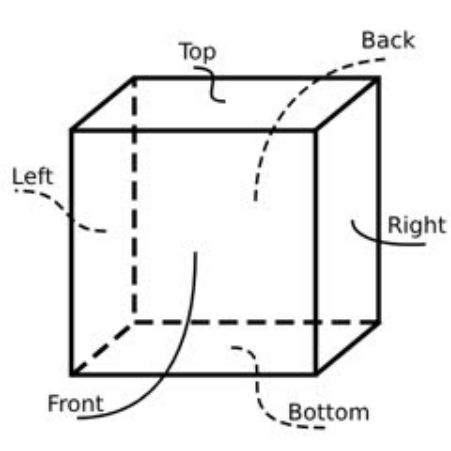
6.2.3 Würfelseiten
Auswahl der Zielfläche beim Importieren oder Rendern eines Bildes.
enum {
    CUBE_LEFT,
    CUBE_RIGHT,
    CUBE_TOP,
    CUBE_BOTTOM,
    CUBE_FRONT,
    CUBE_BACK,
};
In OpenGL-Koordinaten ist die Bildschirmmitte der Ursprung (0, 0), X zeigt nach rechts, Y nach oben und Z senkrecht aus dem Bildschirm heraus. Beim ungedrehten Würfel ist die dem Benutzer zugewandte Seite CUBE_FRONT; die anderen folgen entsprechend. Gestrichelte Linien zeigen unsichtbare Teile.
6.3 Strukturen
Zentrale Anwendungsstrukturen sind lv_gl_img_t, lv_gl_tex_t und lv_gl_obj_t. lv_gl_img_t importiert externe Bilder als GPU-Texturen.
typedef struct {
    /* the address of image */
    const void *pixels;
    /* image format */
    int format;
    /* width */
    int w;
    /* height */
    int h;
} lv_gl_img_t;
lv_gl_tex_t speichert das GPU-Texturobjekt und zugehörige Angaben.
typedef struct {
    /* width */
    int w;
    /* height */
    int h;
} lv_gl_size_t;

typedef struct {
    /* GPU texture object */
    GLuint gl_tex;
    /* GPU Frame Buffer Object */
    GLuint FBO;
    /* Texture size. For 2D textures, only the first set of sizes is valid.
     * A cube has 6 faces and 6 sets of size information. */
    lv_gl_size_t size[6];
    /* Texture format */
    int format;
    /* Object type, 2D or CUBE */
    int type;
    /* refrence count */
    int ref_cnt;
} lv_gl_tex_t;
lv_gl_obj_t speichert das GPU-Renderobjekt, Eckpunkte, Transformationsparameter und weitere Angaben.
typedef struct {
    float x, y, z;
} lv_gl_vec_t;

typedef struct {
    /* width */
    int w;
    /* height */
    int h;
    /* reverse y, just keep it 0 */
    int reverse_y;
    /* bound textures */
    lv_gl_tex_t *tex;
    /* rendering rectangle */
    SDL_Rect r;
    /* viewport rectangle */
    SDL_Rect view;
    /* crop rectagnle */
    SDL_Rect crop;
    /* The viewport area needs to be updated.
     * It is used internally and can be ignored by the application.
     */
    int view_dirty;
    /* The crop area needs to be updated.
     * It is used internally and can be ignored by the application.
     */
    int crop_dirty;
    /* enable crop */
    int crop_en;
} lv_gl_base_t;

typedef struct {
    lv_gl_base_t base;
    /* GPU Vertex Array Object */
    GLuint VAO;
    /* GPU Vertex Buffer Object */
    GLuint VBO;
    /* Output type, default GL_TEXTURE_2D.
     * If you need to render on a cube,
     * specify the rendered surface through this variable.
     */
    int out_type;
    /* Manually specify the coordinates of the four vertices of
     * a 2D object. The default vertex is full screen (note that
     * it is the view size of the framebuffer, not the screen size,
     * and the two may not be equal). Then set the scale, offset
     * and other attributes to perform matrix transformation.
     * You can also freely specify vertex coordinates through this attribute.
     * However, it is not recommended to use both methods together,
     * as the transformations involved are more complicated and
     * it is difficult to estimate the final effect by manual calculation.
     * The range of x, y, and z is [-1, 1]
     */
    lv_gl_vec_t p[4];
    /* Manually specify the reference range of the texture,
     * which is used when only part of the texture slice is needed.
     */
    SDL_Rect tp;

    /* global alpha */
    float alpha;
    /*
     * The order of the following transformations is:
     * pos * offset * scale * self_rot * view_rot * perspective * move
     * Calculate from left to right.
     * The perspective is the view transformation to achieve
     * the effect of near big and far small.
     */
    /* Scaling in three axes */
    lv_gl_vec_t scale;
    /* Offset in three axes */
    lv_gl_vec_t offset;
    /* Roration in three axes */
    lv_gl_vec_t self_rot;
    /* Viewport rotation in three axes */
    lv_gl_vec_t view_rot;
    /* Movements in three axes */
    lv_gl_vec_t move;
} lv_gl_obj_t;
6.4 Funktionen
void lv_gl_set_render_cb(lv_gl_render_cb_t cb);
Rendercallback der Anwendung registrieren. Objekte dürfen nur darin gerendert werden. cb ist der Callback-Zeiger.
void lv_gl_set_fb(lv_gl_obj_t *obj);
Framebuffer auswählen. obj = NULL: folgende Ausgabe auf den Bildschirm; sonst in die Textur von obj.
void lv_gl_read_pixels(void *ptr, SDL_Rect *r, int type);
Bereich des aktuellen Framebuffers in Speicher kopieren. ptr: Zielspeicher; r: Lesebereich; type: Lesetyp, standardmäßig GL_TEXTURE_2D. Für eine Würfelseite den passenden Wert der Seitenaufzählung wählen. type = 0 wählt GL_TEXTURE_2D.
lv_gl_tex_t *lv_gl_tex_create(int type, int w, int h, lv_gl_img_t *img);
Textur erzeugen. type: GL_TEX_TYPE_2D oder GL_TEX_TYPE_CUBE; w/h: Breite/Höhe, bei img != NULL ignoriert. img: importiertes Bild; NULL reserviert nur GPU-Speicher mit Ausgangswerten 0.0; sonst werden Bilddaten importiert. GL_TEX_TYPE_CUBE benötigt ein Array mit mindestens 6 Einträgen. Rückgabe: lv_gl_tex_t *, Texturzeiger.
void lv_gl_tex_del(lv_gl_tex_t *tex);
Textur löschen. tex: Texturzeiger.
void lv_gl_tex_import_img(lv_gl_tex_t *tex, lv_gl_img_t *img);
Externes Bild in eine Textur importieren. tex: Texturzeiger; img: Bild, bei GL_TEX_TYPE_CUBE Array mit mindestens 6 Einträgen. Wurde beim Erstellen bereits ein Bild importiert, ist kein erneuter Aufruf nötig. Der Aufruf dient zum Bildwechsel oder zum Import nach Erzeugen einer leeren Textur.
void lv_gl_tex_clear(lv_gl_tex_t *tex, float r, float g, float b, float a);
Textur mit Farbe füllen. tex: Texturzeiger; r/g/b/a: Rot-, Grün-, Blau- und Alphawert.
lv_gl_obj_t *lv_gl_obj_create(int w, int h);
Renderobjekt erzeugen. Erst nach Texturbindung renderbar. w/h: Breite/Höhe. Rückgabe: lv_gl_obj_t *, Objektzeiger. Breite und Höhe werden zur Skalierungsberechnung verwendet.
void lv_gl_obj_del(lv_gl_obj_t *obj);
Renderobjekt löschen. obj: Objektzeiger.
void lv_gl_obj_resize(lv_gl_obj_t *obj, lv_gl_obj_t *parent);
Objektgröße ändern. Standardmäßig füllt es den Bildschirm; die Funktion setzt scale neu. Berechnet wird mit Breite/Höhe von obj und dem Viewport des Elternobjekts, nicht dessen eigentlichen Abmessungen. obj: Objekt; parent: Renderziel, NULL bedeutet Bildschirm.
void lv_gl_obj_move(lv_gl_obj_t *obj, lv_gl_obj_t *parent);
Position anhand des Renderziels neu berechnen: scale, base.r und Viewport-Abmessungen des Elternobjekts. Wegen scale nach resize aufrufen; nach manueller scale-Änderung erneut empfohlen. obj: Objekt; parent: Ziel, NULL bedeutet Bildschirm.
void lv_gl_obj_reset_points(lv_gl_obj_t *obj);
Objekteckpunkte für Vollbilddarstellung zurücksetzen. obj: Objekt.
void lv_gl_obj_reset_tex_points(lv_gl_obj_t *obj);
Textureckpunkte zurücksetzen, um das ganze Bild zu verwenden. obj: Objekt.
void lv_gl_obj_update_vao(lv_gl_obj_t *obj);
VAO/VBO anhand aktueller Objekt- und Textureckpunkte aktualisieren. Nach manuellen Änderungen zum Anwenden aufrufen. Fehlende VAO/VBO werden erstellt. obj: Objekt.
void lv_gl_obj_release_vao(lv_gl_obj_t *obj);
VAO/VBO freigeben und Standardparameter verwenden. obj: Objekt.
void lv_gl_obj_bind_tex(lv_gl_obj_t *obj, lv_gl_tex_t *tex);
Texturbindung erhöht deren Referenzzähler um 1. Eine bereits gebundene andere Textur verliert eine Referenz und wird bei <= 0 automatisch freigegeben. Der Aufruf kann Speicher freigeben: externe Verweise auf freigegebene Texturen und doppelte Freigabe vermeiden. obj: Objekt; tex: Textur.
void lv_gl_obj_set_crop(lv_gl_obj_t *obj, SDL_Rect *r, int en);
Beschnitt setzen. Ursprung unten links am Bildschirm; X nach rechts, Y nach oben. obj: Objekt, NULL bedeutet Bildschirm. r: Startkoordinaten und Größe; bei NULL Ursprung 0 und Objektgröße. en: 1 aktiviert, 0 deaktiviert den Beschnitt. Dies unterscheidet sich vom LVGL-Standardursprung oben links; diesen Unterschied beachten.
void lv_gl_obj_get_crop(lv_gl_obj_t *obj, SDL_Rect *r);
Beschnittbereich abrufen. obj: Objekt, NULL bedeutet Bildschirm; r: Ergebniszeiger. r enthält Startkoordinaten und Größe des Bereichs.
void lv_gl_obj_set_viewport(lv_gl_obj_t *obj, SDL_Rect *r);
Viewport setzen: Ursprung unten links, X nach rechts, Y nach oben. obj: Objekt, NULL bedeutet Bildschirm. r: Startkoordinaten und Größe; bei NULL werden Ursprung und Objektgröße verwendet. Dies unterscheidet sich vom LVGL-Standardursprung oben links; diesen Unterschied beachten.
void lv_gl_obj_get_viewport(lv_gl_obj_t *obj, SDL_Rect *r);
Viewport abrufen. obj: Objekt, NULL bedeutet Bildschirm; r: Ergebniszeiger. r enthält Startkoordinaten und Größe des Bereichs.
void lv_gl_obj_render(lv_gl_obj_t *obj);
obj in den Framebuffer rendern. Nur im Rendercallback zulässig. obj: Objektzeiger.
7. Gallery-DEMO-Code
Für Album- und Galerieanwendungen gibt es Gallery DEMO mit Effekten wie Einschieben, Einblenden, Würfeldrehung/-kippen, Würfeltext, Bildvorschau auf einer Trommel und Fotostream.
7.1 Verzeichnisstruktur
gallery/
├── anims                   // animations
│   ├── cube_flip.c         // cube flip
│   ├── cube_flip.h
│   ├── cube_lyric.c        // cube lyric rendering
│   ├── cube_lyric.h
│   ├── cube_rotate.c       // cube rotate
│   ├── cube_rotate.h
│   ├── fade_out.c          // picture fade out
│   ├── fade_out.h
│   ├── fade_slide_out.c    // picture slide and fade out
│   ├── fade_slide_out.h
│   ├── fold.c              // picture fold
│   ├── fold.h
│   ├── photo_stream.c      // photo stream
│   ├── photo_stream.h
│   ├── roller.c            // picture rollering preview
│   ├── roller.h
│   ├── slide_out.c         // picture slide out
│   ├── slide_out.h
│   ├── stiker.c            // picture stiker testing
│   └── stiker.h
├── CMakeLists.txt
├── gallery.c               // UI entry
├── gallery.h
├── main.c                  // application entry
├── main.h
└── pics                    // picture resources
7.2 UI-Einstieg
main.c entspricht dem lv_demo-Beispiel; daher wird hauptsächlich der UI-Einstieg erläutert.
// gallery.c

/* Define the characters in cube lyric rendering demo, two lines for one surface */
static char *lyric[]...

/* The texture objects */
lv_gl_tex_t *tex_cube;
lv_gl_tex_t *tex_2d[6];
lv_gl_tex_t *tex_roller;
lv_gl_tex_t *tex_fb;

/* The rendering objects */
lv_gl_obj_t *obj_fb;
lv_gl_obj_t *obj_img0;
lv_gl_obj_t *obj_img1;
lv_gl_obj_t *obj_cube;
lv_gl_obj_t *obj_fold[4];
lv_gl_obj_t *obj_roller_items[6];
lv_gl_obj_t *obj_roller;
/* The lyric_row array used in cube lyric rendering demo. */
lyric_row *obj_lyrics;

/* Viewport size, equal to the screen size minus the button matrix size. */
SDL_Rect view;

/* Screen size */
SDL_Rect screen;

/* Indicates whether the current animation is playing */
int animing = 0;

/* Font imported from ttf file */
lv_ft_info_t ttf_main;

/* lvgl screen object */
lv_obj_t *scr;
/* lvgl image object */
lv_obj_t *img1;
/* lvgl image object */
lv_obj_t *img2;
/* lvgl object, animation area */
lv_obj_t *anim_area;
/* lvgl button matrix object */
lv_obj_t *btn_mat;
/* lvgl slider object */
lv_obj_t *slider;
/* lvgl object, photo stream container */
lv_obj_t *photo_box;
/* lvgl image objects for photo stream */
lv_obj_t *photos[6];

/* lvgl animations */
static lv_anim_t anims[]...

/* label texts for button matrix */
static const char *btnm_map[]...

/* event callback of button matrix */
static void event_handler(lv_event_t * e)

/* font initialization */
static void font_init(void)

/* create canvas, rendering texts to pictures */
static label_canvas *create_canvas(lv_color_t color, lv_font_t *font)

/* rendering texts to pictures and import to a GPU texture object */
static lv_gl_obj_t *utf8_to_obj(lv_gl_obj_t *parent, label_canvas *lc, char *text)

/* common animation start callback */
void common_anim_start(void)

/* texture object initialization */
static void tex_init(void)

/* UI entry */
void gallery(void)
// gallery.h
typedef struct
{
    /* Specify the text font and color */
    lv_draw_label_dsc_t label_dsc;
    /* buffer for canvas */
    lv_img_dsc_t *img_dsc;
    /* lvgl canvas object */
    lv_obj_t *canvas;
} label_canvas;

typedef struct {
    /* GPU rendering object */
    lv_gl_obj_t **objs;
    /* charactor length */
    int len;
} lyric_row;
7.3 Animationen
lv_gl löst das Rendering nicht automatisch aus. Der Animationscallback muss den LVGL-Renderprozess anstoßen; alle Beispiele verwenden lv_obj_invalidate(lv_layer_top()). Die oberste Ebene hat keine Kindobjekte, sodass die normale Renderleistung nicht beeinträchtigt wird.
7.3.1 Würfel kippen
Zwei Fotos wechseln durch Drehen des Würfels, der dabei etwas verkleinert wird.
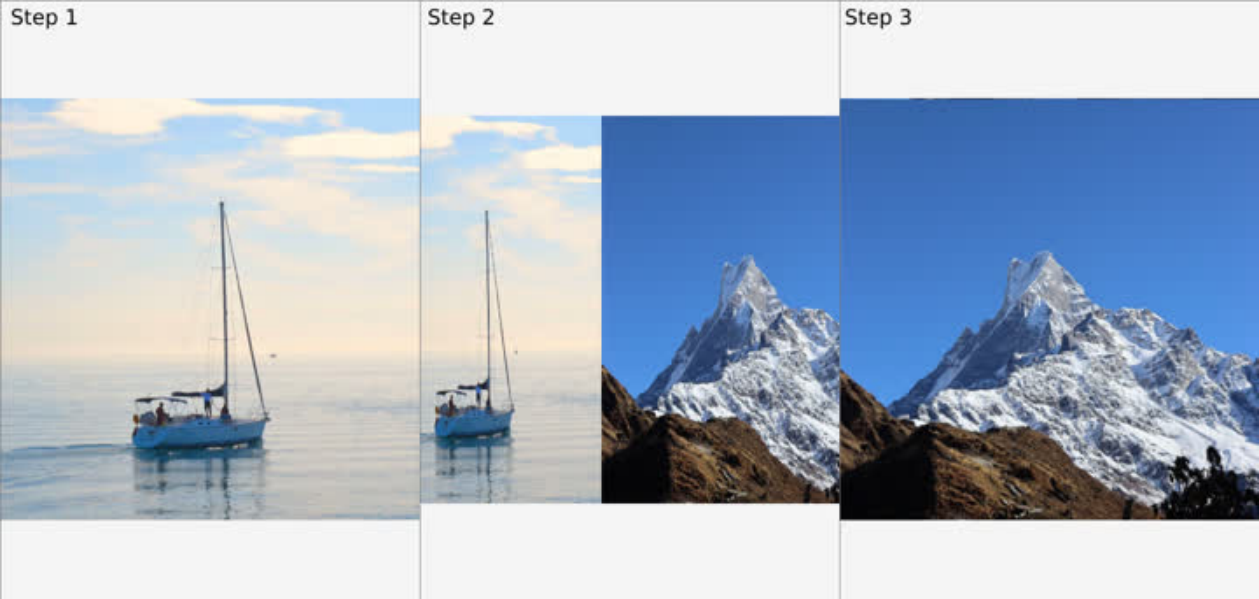
Eine Drehung um die X-Achse um 15 Grad macht den Effekt besser sichtbar.
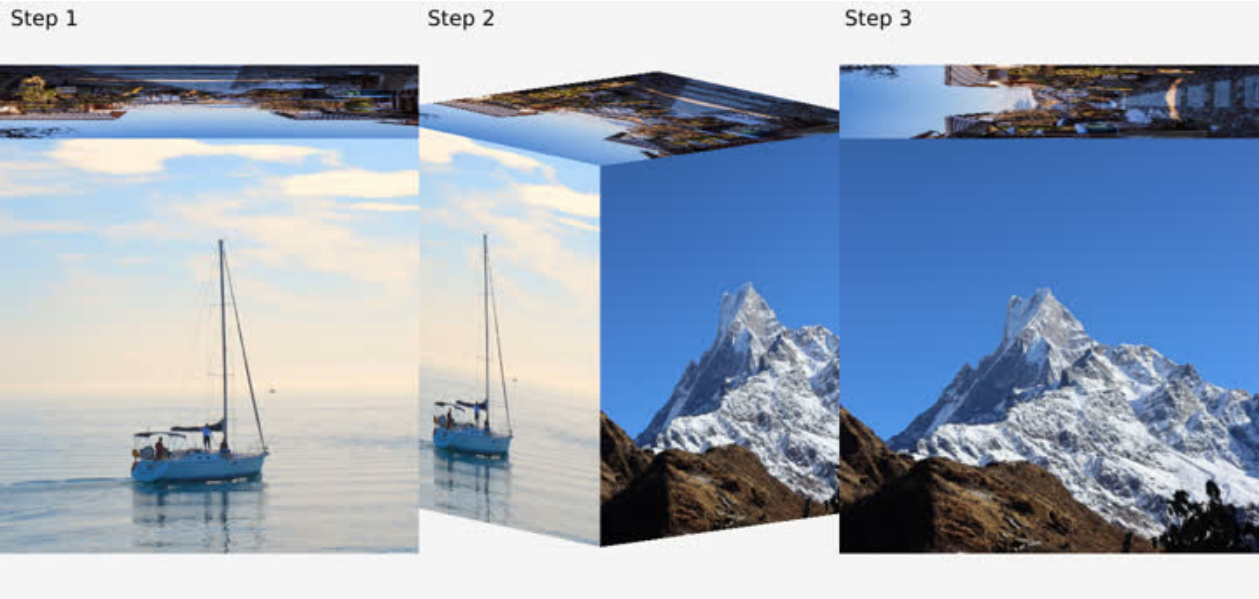
Codeerläuterung:
 /* anims/cube_flip.c */
/*
 * Define three additional sub-animations.
 * The application divides the complete animation into 4 steps, each rotating 90 degrees
 * The first animation is defined in anims/cube_flip.h, from 0 degrees to 90 degrees
 * The first sub-animation rotates from 90 degrees to 180 degrees
 * The second sub-animation goes from 180 degrees to 270 degrees
 * The third sub-animation goes from 270 degrees to 360 degrees
 * Each sub-animation has act_time = -1000 set to achieve a 1s interval
 * between each action
 */
static lv_anim_t sub_anims[]...
/* Set viewport for all cube animations */
SDL_Rect cube_view;
/* Set the zoom effect according to the current animation progress */
#define ZOOM_IN ...
/* Cube animation rendering callback, for all cube animations */
void anim_cube_render(void)
/*
 * Cube animation start callback, for all cube animations
 * Modify the view to a specific value in the start callback,
 * First, take the side with smaller width and height in the default view
 * for example, if the width is smaller than the height, take the width.
 * And divide this value by 0.57 and plus 2 as the width and height of the new view
 * (the view needs to be square, otherwise subsequent transformations may be abnormal).
 * Since the distance from the center of the cube to any corner is d=sqrt(3)/2*a
 * a is the side length and is equal to 2.0 (the coordinate system is
 * [-1, -1, -1]-[1, 1, 1])
 * Therefore, in order to ensure that no matter how the cube is rotated,
 * any corner will not exceed the coordinate system, that is,
 * d should always be less than 1.0.
 * Then choose a scaling factor of 0.57. sqrt(3)/2*a*0.57=0.9873
 * plus 2 is just an empirical value, which ensures that the cube slightly exceeds the
 * screen and leaves no gaps on the left and right.
 * It can be removed according to actual application conditions
 */
void anim_cube_start(lv_anim_t *a)
/* Start callback */
void anim_cube_flip_start(lv_anim_t *a)
/* Animation callback, set the Y-axis rotation angle and scaling ratio
 * according to the current animation progress
 */
void anim_cube_flip(void *var, int32_t v)
/* End callback, determine the current animation segment according to
 * the value of a->var, and execute the next animation segment or end it
 */
void anim_cube_flip_end(lv_anim_t *a)
7.3.2 Würfelrotation
Der Würfel dreht sich und zeigt die Bilder aller Seiten.

Codeerläuterung:
/* anims/cube_rotate.c */
/* start callback, just call anim_cube_start */
void anim_cube_rotate_start(lv_anim_t *a)
/* Animation callback, set the scale to 0.57 (see the previous section for the reason),
 * and set the rotation angle of the X and Y axes according to the animation progress */
void anim_cube_rotate(void *var, int32_t v)
/* End callback, restore animation flag, and restore progress bar */
void anim_cube_rotate_end(lv_anim_t *a)
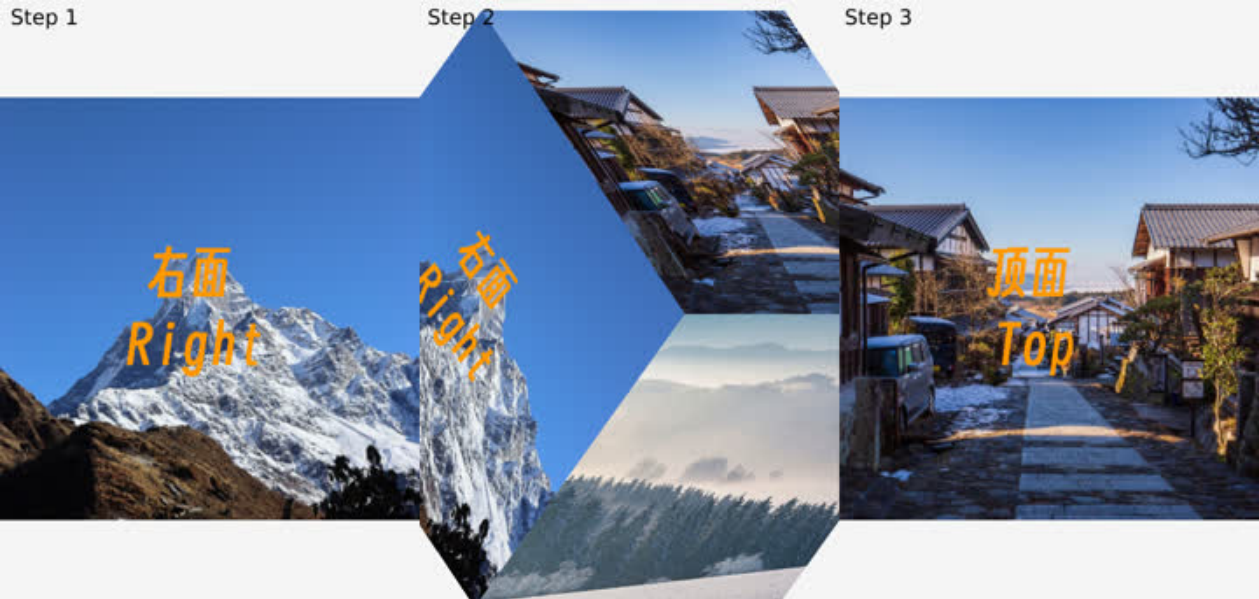
7.3.3 Liedtext auf dem Würfel
Animationsbeschreibung:
Der Würfel zeigt nacheinander sechs Seiten; auf die aktuelle werden Zeichen gezeichnet. Mit Liedtext und Musikabstimmung entsteht eine 3D-Liedtextanzeige.
Codeerläuterung:
/* anims/cube_lyric.c */
/*
 * Define two additional sub-animations. In the application, each rotation and
 * each line of text rendering is divided into sub-animations to complete.
 * The animation starts from the left, and the main animation completes the two
 * lines of drawing on the left.
 * After the main animation is completed, enable the first rotation sub-animation,
 * rotating from left to right
 * After the rotation is completed, enable the first rendering sub-animation and
 * complete the drawing of the two lines on the right surface.
 * After drawing is completed, enable the second rotation sub-animation,
 * and repeat this cycle until all 6 surfaces are drawn.
 */
static lv_anim_t sub_anims[]...
/* Indicates the number of characters in the current line being drawn. */
static int line;
static int row;
static int col;
/*
 * The rendering callback is different from the ordinary cube.
 * It has an extra step of drawing on the cube, so it has an independent callback.
 * In this callback:
 * The first step is to set the cube as a framebuffer, which means that all
 * subsequent rendering will be drawn onto the cube.
 * The second step is to draw the current character
 * The third step is to reset the framebuffer, which means that subsequent rendering
 * is directly displayed on the screen
 * The fourth step is to render the cube to the screen
 */
void anim_cube_lyric_render(void)
/*
 * The starting callback first calls the cube general starting callback and
 * sets the rendering callback to anim_cube_lyric_render
 * Then rotate the cube to the left to facilitate subsequent animation
 */
void anim_cube_lyric_start(lv_anim_t *a)
/* Draw animation callback, update character index according to current progress,
 * trigger rendering */
void anim_cube_lyric(void *var, int32_t v)
/* Rotation animation callback, rotate the cube to the appropriate face according
 * to the current progress */
void anim_cube_lyric_sub(void *var, int32_t v)
/* The rotation animation ends callback. According to the length of the next line
 * of text, the drawing animation duration is updated (calculated as 300ms per word)
 * and the drawing animation is started.*/
void anim_cube_lyric_sub_end(lv_anim_t *a)
/*
 * Callback when the animation ends. The number of lines increases by one each time
 * the animation is finished.
 * If the number of lines is an odd number, it means that there is still one line that
 * has not been displayed. According to the length of the next line of text,
 * the duration of the drawing animation is updated (calculated at 300ms per word),
 * and the drawing animation is started.
 * If the number of rows is even, it means that the current page has been drawn,
 * than start the rotation animation.
 * If all 12 lines are drawn, end the animation
 * The DEMO has 12 rows in total, 2 rows per page. If you plan for other numbers of
rows,
 * the logic will be different.
 */
void anim_cube_lyric_end(lv_anim_t *a)
7.3.4 Bild falten
Das erste Bild faltet sich nach innen und verschwindet; das zweite wird in zwei Teile geteilt, die von außerhalb des Bildschirms hineinwandern.
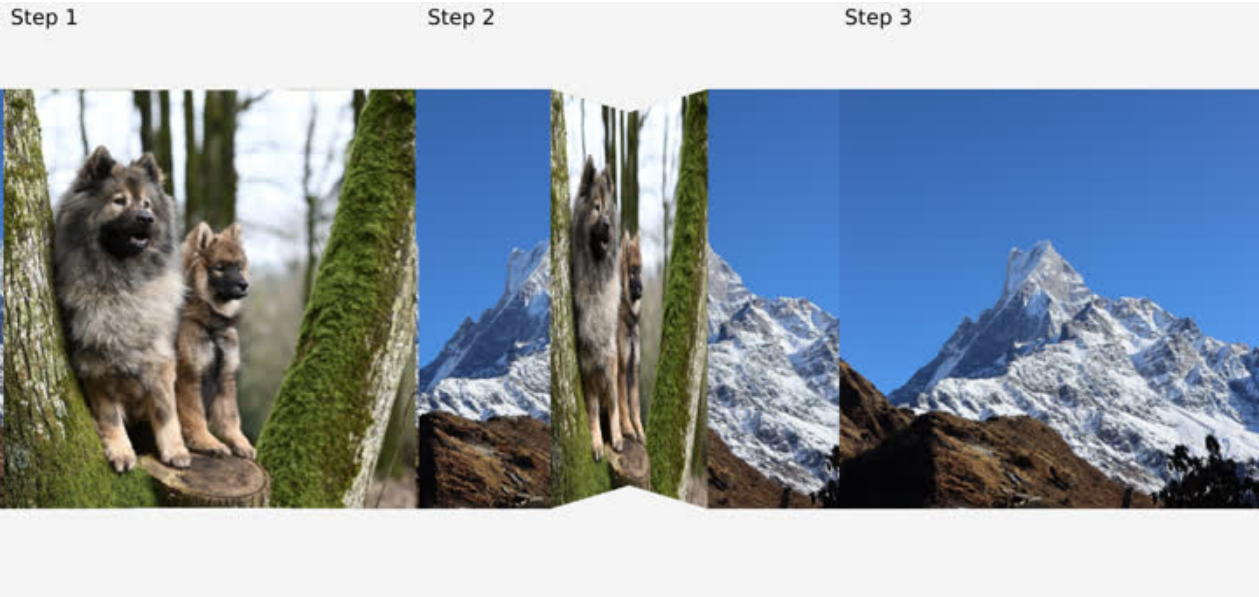
Codeerläuterung:
/* anims/fold.c */
/* Rendering callback.
 * The application divides the two images into four parts (each is divided into two
 * parts, left and right), so four rendering calls are made in the rendering callback.
*/
static void anim_fold_render(void)
/*
 * Start callback
 * 1 Set the view to 480x480 (picture size, optional, adjust according to
 *   actual situation)
 * 2 Reset the scale parameters of the 4 render objects according to the new view
 * 3 Divide the image into 4 parts, obj_fold[0] is the left half of image 1,
 *   obj_fold[1] is the right half of image 1, and so on.
 * 4 Set the render callback
 */
void anim_fold_start(lv_anim_t *a)
/*
 * Animation callbacks
 * The requirement for using rotation transformation is relatively complex,
 * because the rotation axis is constantly changing, and the rotation angle needs to be
 * inferred based on the offset value. Therefore, it is achieved by directly setting the
 * vertex coordinates. It only needs to continuously update the X-axis coordinates of
 * each vertex of the four objects in the animation callback. The two points on the
right
 * of obj_fold[0] and the two points on the left of obj_fold[1] are fixedly folded
inward
 * and unchanged. Therefore, the X coordinates of these four points do not need to be
 * changed, and only the Z coordinates need to be set to negative values (currently set
 * to 0~-0.2, adjusted according to the effect). The perspective transformation in the
 * vertex shader will automatically transform the effect of near large and far small.
 */
void anim_fold(void *var, int32_t v)
/* End callback */
void anim_fold_end(lv_anim_t *a)
7.3.5 Bildvorschau auf einer Trommel
Sechs Bilder bilden eine Trommel, deren Drehung jedes Bild zeigt.
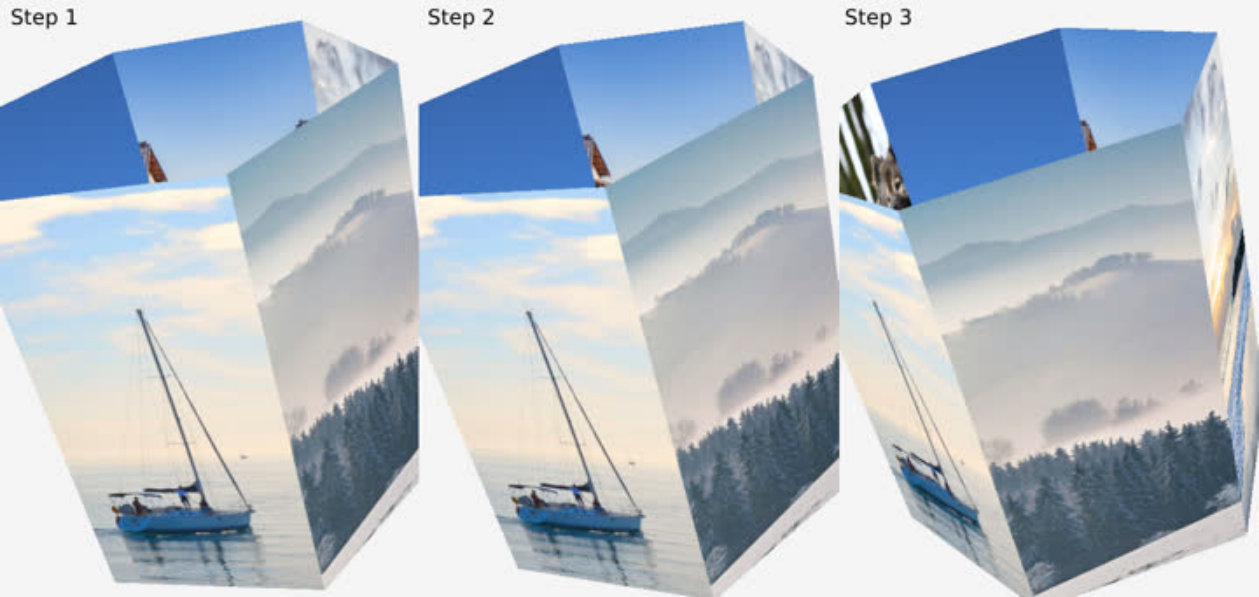
Codeerläuterung:
/* anims/roller.c */
/* Rendering callback, render 6 pictures in sequence */
void anim_roller_render(void)
/*
 * Start callback
 * 1 Set the view to 2000x2000. Because it involves rotation, in order to avoid the
image
 *   exceeding the coordinates and causing cropping and loss of the screen, set it to a
 *   large value.
 * 2 Recalculate the size of the rendered object according to the new view, and set
 *   the Z axis offset to 0.20785, so that the image is a certain distance from the
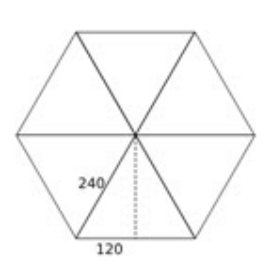
 *   center, thus forming a barrel shape. The Z axis calculation is a simple Pythagorean
 *   theorem, sqrt(240^2 - 120^2) / 2000 * 2.0 = 0.20785, the image width is 240 (see
the
 *   image below), and since it is a hexagon, a simple sqrt(240^2 - 120^2) can calculate
 *   the distance from each face to the center. 2000 is the view size, and the scale
 *   ratio is calculated from it, and then multiplied by the range 2.0 (coordinates
 *   -1.0~1.0) to get the offset value. If it is not a hexagon, you need to calculate
the
 *   distance in other ways, and the way to calculate the scale ratio and offset value
 *   remains unchanged.
 * 3 Set the X-axis rotation to 30 and the Z-axis rotation to 15. In order to have a
 *   tilt effect, set them as needed.
 */
void anim_roller_start(lv_anim_t *a)
/* Animation callback. Add the rotation value to the Y axis of each image.
 * The first image is 0 degrees plus the rotation value, the second image is 60 degrees
 * plus the rotation value, and so on. */
void anim_roller(void *var, int32_t v)
/* End callback */
void anim_roller_end(lv_anim_t *a)
7.3.6 Aufklebertest (Stiker)
Auf dem Hintergrundbild wird jeweils eine kleine Rasterzelle um einen bestimmten Abstand weiterbewegt und ein kleines Bild eingefügt.
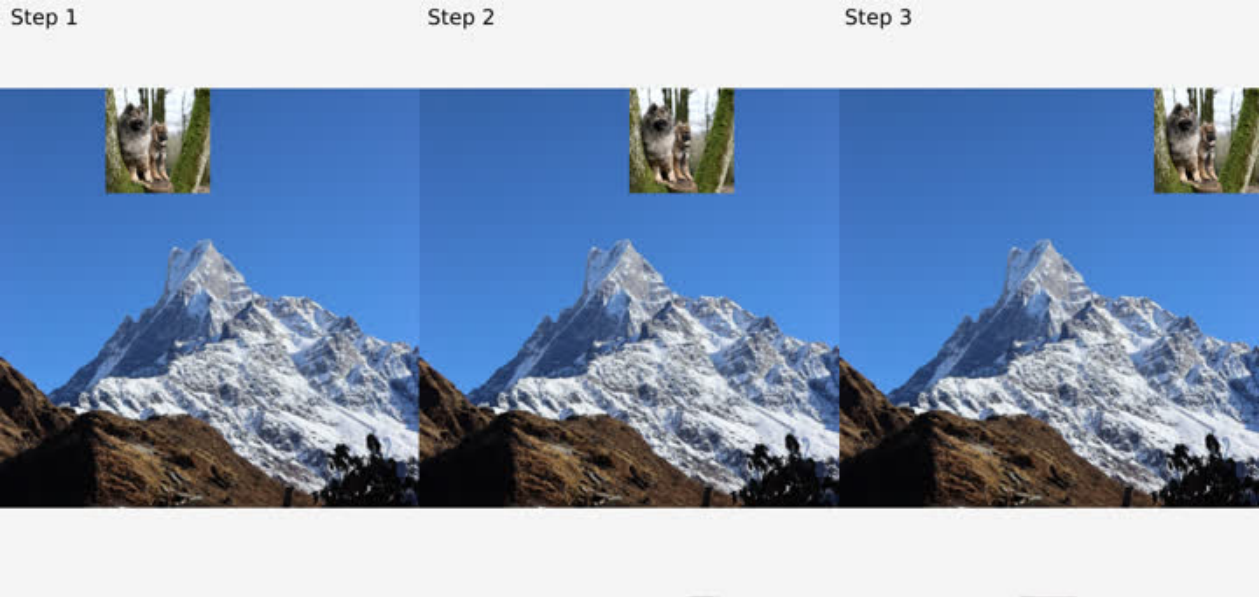
Codeerläuterung:
/* anims/stiker.c */
/*
 * Rendering callback
 * 1 Set obj_fb as framebuffer
 * 2 Clear obj_fb with color(0.0, 0.0, 0.0, 1.0) because we need the alpha of framebuffer
 *   always be 1.0 before each rendering
 * 3 Rendering obj_img1 to obj_fb as a backgroud
 * 4 Rendering obj_img0 to obj_fb as a stiker
 * 5 Reset to default framebuffer, rendering obj_fb to screen
 * In actual use, the two images can be rendered directly to the screen.
 * The DEMO is just to show the rendering function and framebuffer function.
 */
static void anim_stiker_render(void)
/* Start callback. Set the coordinates of the texture to 0,0 and call lv_gl_obj_move
 * to update the parameter values.
 */
void anim_stiker_start(lv_anim_t *a)
/* Animation callback. Set the coordinates according to the current animation progress,
 * and call lv_gl_obj_move to update the parameter values.
 */
void anim_stiker(void *var, int32_t v)
/* End callback */
void anim_stiker_end(lv_anim_t *a)
7.3.7 Herausschieben
Einfaches Beispiel: Das erste Bild gleitet links aus dem Bildschirm, das zweite gleitet gleichzeitig nach links hinein.
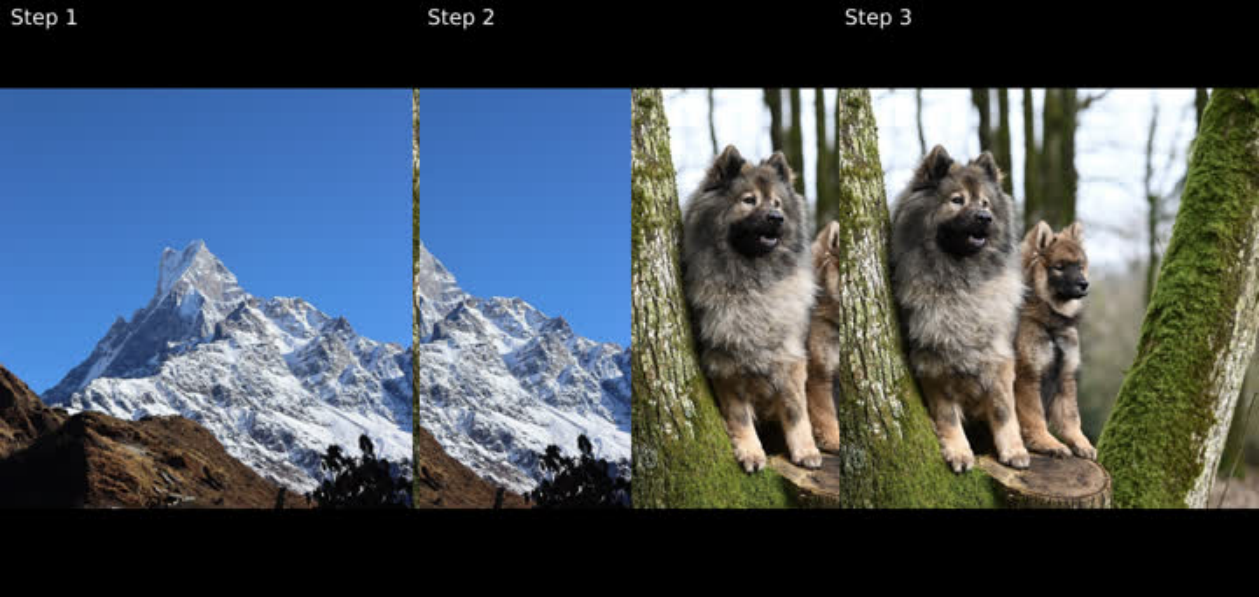
Codeerläuterung:
/* anims/slide_out.c */
/* Calls the common start callback and sets the animation area to be visible */
void anim_slide_out_start(lv_anim_t *a)
/* Animation callback, updates the X coordinates of the two images */
void anim_slide_out(void *var, int32_t v)
/* End callback */
void anim_slide_out_end(lv_anim_t *a)
7.3.8 Ausblenden
Überblendbeispiel: Das erste Bild verschwindet allmählich, das zweite erscheint. Die Quelle beschreibt dies als sinkende Transparenz des ersten und steigende Transparenz des zweiten; bei der Implementierung Transparenz und Deckkraft/Alpha unterscheiden.
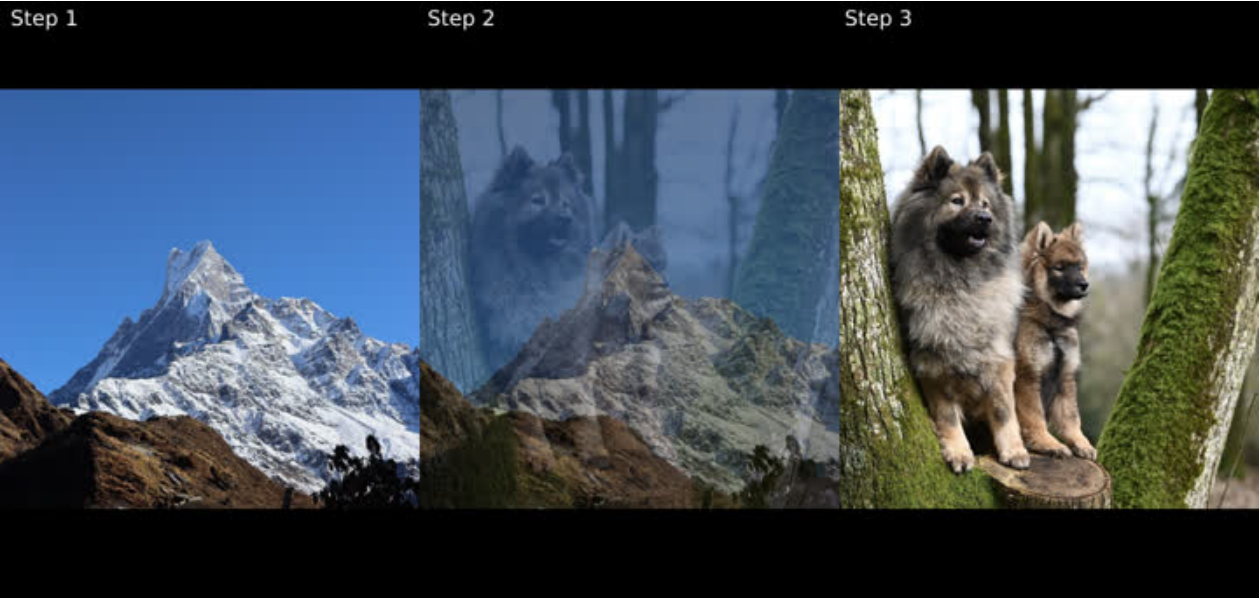
Codeerläuterung:
/* anims/fade_out.c */
/* Calls the common start callback and sets the animation area to be visible */
void anim_fade_out_start(lv_anim_t *a)
/* Animation callback, updates the transparency of the two images */
void anim_fade_out(void *var, int32_t v)
/* End callback */
void anim_fade_out_end(lv_anim_t *a)
7.3.9 Ausblenden und Herausschieben
Kombination beider Effekte: Das erste Bild gleitet mit abnehmender Sichtbarkeit heraus, das zweite hinein. Die Quellformulierung spricht von abnehmender Transparenz des ersten Bildes.
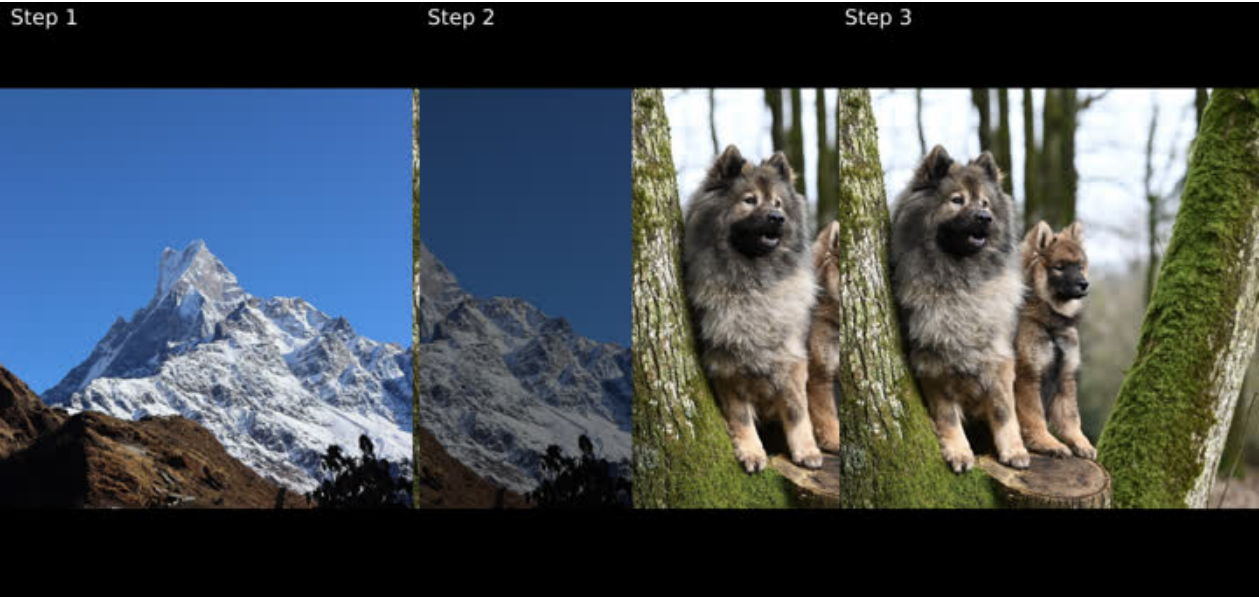
Codeerläuterung:
/* anims/fade_slide_out.c */
/* Calls the common start callback and sets the animation area to be visible */
void anim_fade_slide_out_start(lv_anim_t *a)
/* Animation callback, updates the X coordinates of the two images and the
 * transparency of first image according to the current animation progress */
void anim_fade_slide_out(void *var, int32_t v)
/* End callback */
void anim_fade_slide_out_end(lv_anim_t *a)
7.3.10 Fotostream
Sechs Fotos laufen von oben nach unten. Berühren pausiert die Animation, die Bilder folgen dem Finger; nach dem Loslassen läuft sie weiter.
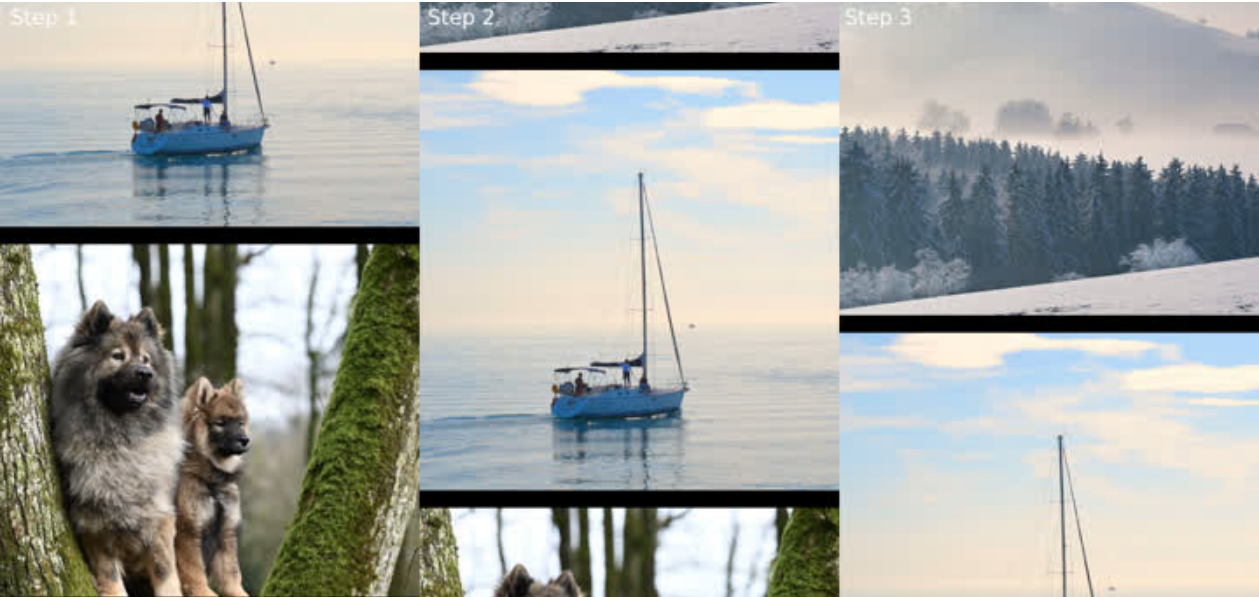
Codeerläuterung:
/* anims/photo_stream.c */
/* image height */
static int32_t img_h = 480;
/* image gap */
static int32_t gap_h = 20;
/*
 * Calculate the maximum Y coordinate based on the image height, image gap,
 * and number of images
 * max_y = n * img_h + (n - 1) * gap_h
 */
static int32_t max_y;
/*
 * Boundary value, used to reset to the top of the photo stream and continue
 * looping after the image reaches max_y
 * boundary = n * img_h + n * gap_h
 * Since the image needs to return to the top after the loop and needs to be
 * spaced from the first image, boundary has one more gap_h than max_y.
 */
static int32_t boundary;
/* Update image coordinates regularly */
static lv_timer_t *timer;
/* The coordinate offset increased by the timer*/
static int32_t timer_ofs = 0;
/* The coordinate offset increased by the last touch */
static int32_t touch_ofs_s = 0;
/* The coordinate offset increased by this touch */
static int32_t touch_ofs = 0;
/* Update and check the Y coordinate of the image to achieve animation effect */
static void update_y(void)
/* Timer callback */
static void lv_timer_cb(lv_timer_t *timer)
/*
 * Touch callback
 * LV_EVENT_PRESSED: Pause the timer and get the coordinates of the pressed
 * LV_EVENT_PRESSING: Get the current touch coordinates, compare with the pressed
 * coordinates, add touch_ofs_s to calculate the offset value and update the coordinates
 * LV_EVENT_RELEASED: Re-enable the timer and record the touch offset to touch_ofs_s
 * The reason for dividing into three offsets is to ensure the continuity of the
 * animation coordinates when the touch is pressed and released,
 * and to avoid coordinate shifting.
 */
static void touch_handler(lv_event_t * e)
/* Stop photo stream */
void anim_photo_stream_stop(void)
/* Initialize the photo stream, create a timer, calculate max_y, boundary, etc. */
void anim_photo_stream_start(lv_anim_t *a)
/* Animation callback
 * In fact, the photo stream is implemented using a timer and has nothing to do
 * in animation callback. The animation callback is used here just to unify the
 * interface and facilitate embedding into the DEMO framework.
 * The actual application development can just use the timer callback.
 */
void anim_photo_stream(void *var, int32_t v)
void anim_photo_stream_end(lv_anim_t *a)
- In Version 9 führte das LVGL-Team lv_drivers mit dem Hauptrepository lvgl zusammen.
Zusätzliche Erläuterungen der chinesischen Quelle
Die chinesischen und englischen Codekommentare unterscheiden sich im Detail; beide Quellfassungen bleiben erhalten. Die chinesische Quelle erläutert zusätzlich: furniture_control steuert Haushaltsgeräte, intercom_homepage ist die Gebäudesprechanlage, intercom_call behandelt Anrufe, video_monitor spielt RTSP ab, smart_home ist die Smart-Home-Anwendung, wifibt bindet rkwifibt an. VAO speichert VBO und Attributkonfiguration für schnelle Wechsel; VBO enthält Koordinaten und Texturvertices; FBO wird verwendet, wenn eine Textur als Framebuffer dient. Der Gallery-Liedtext umfasst 12 Zeilen, zwei je Würfelseite; das Array lyric_row hat 12 Elemente mit den Zeichen der jeweiligen Zeile. Unten liegen die Bedientasten, oben der Animationsbereich; jeweils eine Animation wird beendet. Beim Aufkleberbeispiel entspricht das endgültige Alpha dem d.a des Zielhintergrunds. Deshalb beträgt das Alpha der Löschfarbe 1.0; andernfalls kann das Ergebnis transparent oder unsichtbar sein.
Der chinesische §1 schränkt die Aussage ein: keine externen Abhängigkeiten außer bei einzelnen Erweiterungen. Auf einem Windows- oder Linux-PC lässt sich die plattformunabhängige Oberfläche ohne wiederholtes Firmware-Bauen und Flashen entwickeln und prüfen. Anschließend den Code auf das eingebettete Gerät kopieren, dort bauen und ausführen. Erweiterungen benötigen ihre jeweiligen Abhängigkeiten.