
Based on the Chinese and English Rockchip Debian V1.8.0 sources (2024-09-20), retaining all 11 technical chapters, commands, configurations, tables and original figures. Maintenance status, roadmap, performance figures and default accounts are historical source statements, not current status or ArmSoM test results. Check the actual board, SoC, SDK/BSP, kernel and peripherals before use. No source commands or hardware tests were executed.
The English PDF incorrectly places several FAQ headings and explanations inside code boxes and loses shell escapes or arguments. Code boundaries and numbering 9.1–9.30, including subsections, are restored against the Chinese baseline; the English final 0.19/0.20/1/2 become 9.29/9.30/10/11. Source spellings -no-sandbox / --no-sandbox, vvp8enc, differing Padding orders and version values are not silently unified. Weak default credentials, passwordless root and disabled sandboxing describe the original development environment, not production recommendations.
| Debian version | Platform | SoCs validated in the source |
|---|---|---|
| 12 | ARM | RK3588, RK3576, RK3568, RK3566, RK3562 |
| 11 | ARM | RK3588, RK3568, RK3566, RK3562, RK3399, RK3288 |
| 10 | ARM | RK3399PRO, PX30, RK3326, RK3288, RK3328, RK3126C |
1. Introduction to Debian
1.1 What is Debian
Debian is a completely free and open-source Linux operating system widely used on various devices. The reasons for choosing Debian are as follows: Debian is free software Debian is composed of free and open-source software and will always remain 100% free. Everyone is free to use, modify, and distribute it. You can build a Debian system based on Rockchip for secondary development. Debian is a stable and secure Linux-based operating system. Debian is an operating system widely used on various devices, including laptops, desktops, and servers. Since 1993, its stability and reliability have been well-received by users. We provide reasonable default configurations for each software package. Debian developers strive to provide security updates for all packages throughout their lifecycle. Debian has extensive hardware support. Most hardware is supported by the Linux kernel. When free software does not provide sufficient support, proprietary hardware drivers can also be used. Currently, chips such as Rockchip RK3588/RK3576/RK356X/RK3399/RK3288 have been adapted and supported. Debian provides smooth updates. Debian is known for its easy and smooth updates during its release cycle, including easy upgrades to the next major version. Rockchip has already upgraded from Debian Stretch (9) to Debian Buster (10), Bullseye (11), and Bookworm (12). Debian is the seed and foundation for many other distributions.
Many popular Linux distributions, such as Ubuntu, Knoppix, PureOS, SteamOS, and Tails, have chosen Debian as their software base. Debian provides all the tools so that everyone can extend the software packages in the Debian archive with packages that meet their own needs. The Debian project is a community. Debian is not just a Linux operating system. The software is produced by hundreds of volunteers from around the world. Even if you are not a programmer or system administrator, you can become a member of the Debian community.
1.2 Supported Debian Versions
| Version | Supported Architectures |
(Estimated) End of Life |
Current Status |
|---|---|---|---|
| Debian 9 “Stretch” | armhf and arm64 | 2022-06 | Maintenance Ended |
| Debian 10 “Buster” | armhf and arm64 | 2024-06 | Under Maintenance |
| Debian 11 “Bullseye” |
armhf and arm64 | 2026-06 | Under Maintenance |
| Debian 12 “Bookworm” |
armhf and arm64 | 2028-06 | In Development |
More information on Debian Long Term Support versions is available on the official website.
2. Quick Start with Debian
2.1 Environment Setup
We recommend using the Ubuntu 22.04 system for compilation. Other Linux versions may require corresponding adjustments to the software packages. In addition to system requirements, there are also other hardware and software requirements. Hardware requirements: 64-bit system, disk space greater than 40G. If you are building multiple projects, you will need more disk space. Software requirements: Ubuntu 22.04 system. The installation commands for the software packages that the compilation SDK environment setup depends on are as follows:
sudo apt-get update && sudo apt-get install git ssh make gcc libssl-dev liblz4-
tool expect expect-dev g++ patchelf chrpath gawk texinfo chrpath diffstat binfmt-
support qemu-user-static live-build bison flex fakeroot cmake gcc-multilib g++-
multilib unzip device-tree-compiler ncurses-dev libgucharmap-2-90-dev bzip2 expat
gpgv2 cpp-aarch64-linux-gnu libgmp-dev libmpc-dev bc python-is-python3 python2
It is recommended to use the Ubuntu22.04 system or a higher version for development. If you encounter errors during compilation, you can install the corresponding software packages based on the error messages.
2.2 Obtaining the Source Code
Obtain the source code from the SDK published by Rockchip’s code server, located in the project directory <SDK>/debian .
2.3 Compilation
Installation packages required for Debian compilation
sudo dpkg -i debian/ubuntu-build-service/packages/*
sudo apt-get install -f

Note: The live-build_*.deb is sourced from
https://mirrors.ustc.edu.cn/debian/pool/main/l/live-build/
The debootstrap_*.deb is sourced from
https://mirrors.ustc.edu.cn/debian/pool/main/d/debootstrap/

Alternatively, you can install the dependency environment by:
sudo apt-get remove live-build
git clone https://salsa.debian.org/live-team/live-build.git --depth 1 -b
debian/1%20230131
cd live-build
rm -rf manpages/po/
sudo make install -j8
Debian Compilation Navigate to the SDK project and compile directly
./build.sh debian
Or enter the Debian/ directory:
cd debian/
Refer to the current directory readme.md.
3. Debian Directory Structure
debian
├── mk-base-debian.sh ##Retrieve Debian base packages and compile
├── mk-image.sh ##Package to generate ext4 firmware
├── mk-rootfs-<debian-version>.sh ##Adapt for Rockchip hardware acceleration
packages
├── mk-rootfs.sh  ##Point to specific Rootfs version, currently Bullseye and
Bookworm versions are available.
├── overlay ##Common configuration files for Rockchip platform adaptation
├── overlay-debug ##System frequently used debugging tools
├── overlay-firmware ##Storage for some device firmware, such as npu/dp, etc.
├── packages ##Contains precompiled packages for armhf/arm64 system adaptation
with hardware acceleration
├── packages-patches ##Precompiled packages with patches based on official
versions
├── readme.md ##Documentation guide
└── ubuntu-build-service ##Obtain Debian distribution from official sources, can
depend on packages and customize installation of related packages.
The entire directory structure is achieved through shell scripts to obtain, build, compile, and install the operating system adapted with Rockchip hardware acceleration packages for the Linux Debian distribution.
4. Debian live-build Usage Guide
live build is a suite of scripts for building live system images. The idea behind live build is a toolkit that uses a configuration directory to fully automate and customize all aspects of building live images. For more usage instructions, refer to the official website Live manual. Debian package source repository (VCS: Git) live-build-git Debian package source repository (browsable online) live-build
4.1 Related Commands
lb config Create auto and config directories along with related configuration files in the current directory, and run the auto/config script. lb clean Run the auto/clean script.
lb build Build the system image according to various configuration scripts in the config directory.
4.2 Software Source Configuration
Method One
lb config --mirror-bootstrap http://mirrors.ustc.edu.cn/debian --mirror-chroot-
security http://mirrors.ustc.edu.cn/debian-security/ --mirror-chroot-backports
http://mirrors.ustc.edu.cn/debian-backports/
chroot mirror: –mirror-chroot, by default, it uses the value of –mirror-bootstrap or creates a config/archives/your-repository.list.chroot file with the source address. The source will be added to the live system’s /etc/apt/sources.list.d/ directory. Method Two
lb config --mirror-binary http://mirrors.ustc.edu.cn/debian --mirror-binary-
security http://mirrors.ustc.edu.cn/debian-security/
Alternatively, create a config/archives/your-repository.list.binary file with the source address.
4.3 Customizing System Packages
Method One Place the required package list in the customization/package-lists directory and name it XXX.list.chroot or XXX.list.binary. Method Two Use the –package-lists “XXX” option to specify the package list under /usr/share/live/build/package-lists/. After executing lb config, it will generate four configuration files under the config directory based on the parameters in this script: binary, bootstrap, chroot, and common. lb build reads these four configuration files, so you can also make specific modifications to the parameters within these four files after lb config. In auto/config, there are configuration parameters, for example:
set -e

echo "I: create configuration"
export LB_BOOTSTRAP_INCLUDE="apt-transport-https gnupg"
lb config  --mirror-bootstrap "http://mirrors.ustc.edu.cn/debian"  --mirror-
chroot "http://mirrors.ustc.edu.cn/debian"  --mirror-chroot-security
"http://mirrors.ustc.edu.cn/debian-security"  --mirror-binary
"http://mirrors.ustc.edu.cn/debian"  --mirror-binary-security
"http://mirrors.ustc.edu.cn/debian-security"  --apt-indices false  --apt-
recommends false  --apt-secure false  --architectures arm64  --archive-areas
'main contrib non-free'  --backports false  --binary-filesystem ext4  --binary-
images tar  --bootappend-live "hostname=linaro-alip username=linaro"  --
bootloader "syslinux"  --bootstrap-qemu-arch arm64  --bootstrap-qemu-static
/usr/bin/qemu-aarch64-static  --cache false  --chroot-filesystem none  --
compression gzip  --debootstrap-options "--variant=minbase --include=apt-
transport-https,gnupg"  --distribution bullseye  --gzip-options '-9 --rsyncable'
--iso-publisher 'Linaro; http://www.linaro.org/; linaro-dev@lists.linaro.org'  --
iso-volume 'Linaro Bullseye $(date +%Y%m%d-%H:%M)'  --linux-flavours none  --
linux-packages none  --mode debian  --security true  --system normal  --updates
true
4.3.1 Custom Directory
Custom directories and their files should be placed under the corresponding include directory in config/ . config/binary_local-includes (with the root directory of the generated image as the root) config/chroot_local-includes (with the root directory of the target system as the root)
4.3.2 HOOKS
After each phase of live-build is completed, scripts in the config/ corresponding hooks are executed. config/binary_local-hooks config/chroot_local-hooks New versions of live-build will obtain patches from the live/normal directories.
customization/hooks/live/
├── 0001-setup_user_linaro.binary
├── 0002-add_linaro_to_groups.binary
├── 0003-check_sudoers_for_admin.binary
├── 0021-silence-systemd.binary
├── 0022-disable-systemd-services.binary
├── 0023-lightdm-autologin.binary
└── 0098-resolvconf.binary
5. Introduction to Debian Precompiled Packages
packages/
├── arm64/armhf
│   ├── blueman
│   ├── cheese
│   ├── chromium
│   ├── glmark2
│   ├── gst-plugins-bad1.0
│   ├── gst-plugins-base1.0
│   ├── gst-plugins-good1.0
│   ├── gst-plugins-ugly1.0
│   ├── gstreamer
│   ├── gst-rkmpp
│   ├── libdrm
│   ├── libdrm-cursor
│   ├── libmali
│   ├── libv4l
│   ├── mpp
│   ├── openbox
│   ├── pcmanfm
│   ├── pipewire
│   ├── rga
│   ├── rga2
│   ├── rkaiq
│   ├── rkisp
│   ├── rknpu2
│   ├── rktoolkit
│   ├── rkwifibt
│   ├── wayland
│   ├── weston
│   ├── wireplumber
│   └── xserver
5.1 Blueman
Blueman is a GTK+ Bluetooth manager. Blueman can efficiently manage the BlueZ API and simplify the following Bluetooth management tasks, such as: Dial-up connections for 3G/EDGE/GPRS Connect/create Bluetooth networks Connect input devices Connect audio devices Send, receive, and browse files via OBEX (Object Exchange) Pairing Precompiled packages are as follows:
blueman/
├── blueman_2.3.5-2_arm64.deb
└── blueman-dbgsym_2.3.5-2_arm64.deb

packages-patches/blueman/
├── 0001-Blueman-Fix-DisplayPasskey-for-Keyboard.patch
└── 0002-Don-t-turn-off-the-bt-power.patch
Rockchip has updated the Blueman software package, primarily to address issues encountered by Bluetooth devices (such as keyboards and speakers) during sleep and wake-up processes. Additionally, many third-party Bluetooth and Wi-Fi software attempt to control the power status of hardware modules through the /dev/rfkill interface. However, the Rockchip platform uses vendor-provided non-standard drivers, which typically require specific initialization steps and may not function properly after being re-powered. Therefore, the SDK’s scripts are responsible for independently managing the power and initialization processes of Wi-Fi and Bluetooth modules to avoid interference from third-party software.
5.2 Media Process Platform (MPP)
Rockchip provides a media processing software platform known as Media Process Platform (MPP), which is a general-purpose media processing software platform applicable to the Rockchip chip series. This platform abstracts the complexity of chip-related low-level processing from the application software, with the aim of shielding the differences between different chips and providing users with a unified video media processing interface (Media Process Interface, abbreviated as MPI). The functionalities provided by MPP include: Video Decoding H.265 / H.264 / H.263 / VP9 / VP8 / MPEG-4 / MPEG-2 / MPEG-1 / VC1 / MJPEG / AV1 Video Encoding H.265 / H.264 / VP8 / MJPEG Video Processing Video copy, scaling, color space conversion, field video deinterlacing (Deinterlace) If you encounter issues that require debugging, you can obtain more detailed log information by enabling the following log switches:
export mpi_debug=1
export mpp_debug=1
export h264d_debug=1
export mpp_buffer_debug=2
Please note that by default, MPP logs are not output directly to the terminal. If you wish to view logs in the terminal, please set:
export mpp_syslog_perror=1
Debugging log switches for different kernel versions are as follows: For 4.19/5.10/6.1 kernels (Linux 4.19 and above):
echo 0x100 > /sys/module/rk_vcodec/parameters/mpp_dev_debug
cat /proc/kmsg
For 4.4 kernel (Linux 4.4):
echo 0x100 > /sys/module/rk_vcodec/parameters/debug
cat /proc/kmsg
After executing the above commands, you will be able to see the execution time of kernel single- frame encoding and decoding, which is very useful for performance evaluation or analyzing issues related to stuttering and smoothness. For example, log information may appear as follows:
rk_vcodec: fdf80200.rkvdec:0 session 2269:34 time: 14870 us hw 5430 us
rk_vcodec: fdf80200.rkvdec:0 session 2269:34 time: 13157 us hw 4132 us
rk_vcodec: fdf80200.rkvdec:0 session 2269:34 time: 12976 us hw 4098 us
rk_vcodec: fdf80200.rkvdec:0 session 2269:34 time: 11295 us hw 4070 us
...
For more information, please refer to the MPP development documentation in the <SDK>/docs/Linux/Multimedia directory of the SDK. Precompiled packages integrated in Debian are as follows:
mpp/
├── librockchip-mpp-dev_1.5.0-1_arm64.deb
├── librockchip-mpp1-dbgsym_1.5.0-1_arm64.deb
├── librockchip-mpp1_1.5.0-1_arm64.deb
├── librockchip-vpu0-dbgsym_1.5.0-1_arm64.deb
├── librockchip-vpu0_1.5.0-1_arm64.deb
├── rockchip-mpp-demos-dbgsym_1.5.0-1_arm64.deb
└── rockchip-mpp-demos_1.5.0-1_arm64.deb
In the Debian system, MPP can be integrated with Rockchip’s self-developed Rockit framework and third-party multimedia frameworks such as GStreamer, providing robust multimedia processing support. Please note: Due to copyright and commercial licensing restrictions, the official Linux SDK does not provide support for FFmpeg.
5.3 libv4l
A v4l2 plugin for interfacing Chromium browser with mpp to implement hardware decoding. Precompiled packages:
libv4l/
...
├── libv4l-0_1.22.1-5_arm64.deb
├── libv4l-0-dbgsym_1.22.1-5_arm64.deb
├── libv4l2rds0_1.22.1-5_arm64.deb
├── libv4l2rds0-dbgsym_1.22.1-5_arm64.deb
├── libv4lconvert0_1.22.1-5_arm64.deb
├── libv4lconvert0-dbgsym_1.22.1-5_arm64.deb
├── libv4l-dev_1.22.1-5_arm64.deb
├── libv4l-rkmpp_1.5.1-1.1_arm64.deb
├── libv4l-rkmpp-dbgsym_1.5.1-1.1_arm64.deb
├── v4l-utils_1.22.1-5_arm64.deb
└── v4l-utils-dbgsym_1.22.1-5_arm64.deb
The third-party package v4l-utils requires the following patches:
├── 0001-libv4l2-Support-mmap-to-libv4l-plugin.patch
├── 0002-libv4l-mplane-Filter-out-multiplane-formats.patch
├── 0003-libv4l-add-V4L2_MEMORY_DMABUF-memory-support.patch
├── 0004-libv4l-mplane-plugin-add-exbuf_ioctl-for-dmabuf.patch
├── 0005-video-max-frame-change-from-32-to-64.patch
├── 0006-Support-builtin-v4l-plugins.patch
├── 0007-libv4l-Disallow-conversion-by-default.patch
Then compile libv4l-rkmpp, the plugin for libv4l to interface with mpp.
5.4 Chromium
The Chromium browser integrated in Debian is compiled based on Yocto.
chromium/
└── chromium-x11_126.0.6478.126_arm64/armhf.deb
The Chromium browser supports a variety of video formats, including H264, VP8, VP9, AV1, etc. Starting from version 105, it added support for the H265 video format. Currently, in the Debian system, support for Chromium video hardware decoding has been integrated, implemented through a customized version of Chromium, V4L2 plugin, and MPP efficient hardware decoding. Customization of Chromium mainly involves the following modifications: Modify Chromium to enable v4l2 vda support, as well as related patches Add v4l2 mpp plugin The disadvantages are: a. Decoding only supports vp8, h264, h265, vp9, av1 b. Encoding only supports vp8 and h264 c. Requires modification of the compilation of Chromium (to complete the Yocto compilation process) We currently provide Chromium wayland patches, supporting on systems like Yocto, buildroot, etc. Chromium version root@linaro-alip:~# chromium –version Chromium 126.0.6478.126 stable
root@linaro-alip:~# chromium --version
Chromium 126.0.6478.126 stable
5.5 glmark2
glmark2/
├── glmark2-data_2023.01+dfsg-1_all.deb
├── glmark2-drm-dbgsym_2023.01+dfsg-1_arm64.deb
├── glmark2-drm_2023.01+dfsg-1_arm64.deb
├── glmark2-es2-drm-dbgsym_2023.01+dfsg-1_arm64.deb
├── glmark2-es2-drm_2023.01+dfsg-1_arm64.deb
├── glmark2-es2-wayland-dbgsym_2023.01+dfsg-1_arm64.deb
├── glmark2-es2-wayland_2023.01+dfsg-1_arm64.deb
├── glmark2-es2-x11-dbgsym_2023.01+dfsg-1_arm64.deb
├── glmark2-es2-x11_2023.01+dfsg-1_arm64.deb
├── glmark2-wayland-dbgsym_2023.01+dfsg-1_arm64.deb
├── glmark2-wayland_2023.01+dfsg-1_arm64.deb
├── glmark2-x11-dbgsym_2023.01+dfsg-1_arm64.deb
└── glmark2-x11_2023.01+dfsg-1_arm64.deb
Glmark2 is an open-source benchmarking tool for OpenGL 2.0 and ES 2.0, typically used for benchmarking GPUs. The open-source code Glmark2 has been integrated into Debian for specific testing,
usr/local/bin/test_glmark2_*.sh
├── test_glmark2_fullscreen.sh  ### Full screen test
├── test_glmark2_normal.sh ### Default display resolution test at 800x600
├── test_glmark2_offscreen.sh ### Screenless test

root@linaro-alip:~# test_glmark2_normal.sh
arm_release_ver: g24p0-00eac0, rk_so_ver: 3
=======================================================
    glmark2 2023.01
=======================================================
    OpenGL Information
    GL_VENDOR:      ARM
    GL_RENDERER:    Mali-G610
    GL_VERSION:     OpenGL ES 3.2 v1.g24p0-
00eac0.98fbd14bd397c6bd1b57c689f07cf638
    Surface Config: buf=24 r=8 g=8 b=8 a=0 depth=24 stencil=0 samples=0
    Surface Size:   1080x1920 fullscreen
=======================================================
[build] use-vbo=false:
---
For more usage methods, check the help.
root@linaro-alip:~# glmark2-es2 --help
A benchmark for Open GL (ES) 2.0

Options:
  -b, --benchmark BENCH  A benchmark or options to run: '(scene)?(:opt1=val1)*'
                         (the option can be used multiple times)
  -f, --benchmark-file F Load benchmarks to run from a file containing a
                         list of benchmark descriptions (one per line)
(the option can be used multiple times)
    --validate         Run a quick output validation test instead of
                       running the benchmarks
    --data-path PATH   Path to glmark2 models, shaders and textures
                       Default: /usr/share/glmark2
    --frame-end METHOD How to end a frame [default,none,swap,finish,readpixels]
    --off-screen       Render to an off-screen surface
    --visual-config C  The visual configuration to use for the rendering
                       target: 'red=R:green=G:blue=B:alpha=A:buffer=BUF'.
                       The parameters may be defined in any order, and any
                       omitted parameters assume a default value of '1'
    --reuse-context    Use a single context for all scenes
                       (by default, each scene gets its own context)
-s, --size WxH         Size of the output window (default: 800x600)
    --fullscreen       Run in fullscreen mode (equivalent to --size -1x-1)
-l, --list-scenes      Display information about the available scenes
                       and their options
    --show-all-options Show all scene option values used for benchmarks
                       (only explicitly set options are shown by default)
    --run-forever      Run indefinitely, looping from the last benchmark
                       back to the first
    --annotate         Annotate the benchmarks with on-screen information
                       (same as -b :show-fps=true:title=#info#)
-d, --debug            Display debug messages
-h, --help             Display help
5.6 gst-rkmpp
GStreamer-Rockchip is an audio and video codec middleware based on GStreamer adapted for the Rockchip platform, mainly interfacing with the mpp interface. Precompiled packages of GStreamer-Rockchip are as follows:
gst-rkmpp/
├── gstreamer1.0-rockchip1-dbgsym_1.14-4_arm64.deb
└── gstreamer1.0-rockchip1_1.14-4_arm64.deb
5.7 GStreamer
GStreamer includes the core framework and core components. The GStreamer 1.22.0 patch adds DMABUF as part of the system memory, which can make the related memory operations more flexible and efficient, and solve the problem of video looping playback getting stuck. The relevant patches are as follows,
├── 0001-filesrc-Fix-stopping-race-in-pull-mode.patch
├── 0002-HACK-gstpad-Add-1-sec-timeout-for-activation.patch
├── 0003-HACK-caps-Consider-dmabuf-subset-of-system-memory.patch
├── 0004-gst-launch-Fix-random-hang-when-EOS.patch
5.8 gst-plugins-base1.0
The gst1-plugins-base is a part of the GStreamer project, providing a set of fundamental plugins to support various media processing functions. Based on the official version of GStreamer’s gst-plugins-base, it enhances the performance, compatibility, and functionality of the GStreamer base plugins by optimizing aspects such as decoding, playback, video rendering, user interface management, and file format support. The main modifications are as follows: Removed the limitation that certain decoders only emit the drained signal in the top-level container. Improved the behavior of playbin and playbin2, including handling end signals, avoiding clearing the buffer on the first end, fixing deadlock issues, and improving video state transitions. Added support for DMABUF rendering, especially in the xvimagesink plugin. Supported the use of Rockchip RGA 2D acceleration in the video-converter. Allowed direct import of DMABUF in the gl plugin, even if EGLImage cannot be used. Supported the priority use of DirectDmabufExternal in the OpenGL uploader. Added support for specific video formats, such as NV12_10LE40. Allowed disabling window decorations in xvimagesink. Applied top-level window position settings. Ignored expose redraw events when the video is not ready. Added support for preferred audio and video receivers. Corrected the error in calculating the bit rate of ADPCM in the RIFF file format. Allowed disabling QoS (Quality of Service) by default. Supported new video formats NV16_10LE40. The patches related to gst-plugins-base1.0-1.22.0 are as follows:
gst1-plugins-base
├── 0001-Revert-decodebin-only-emit-drained-signal-when-top-c.patch
├── 0002-playbin2-send-one-about-to-finish-per-group.patch
├── 0003-playbin-do-not-drain-on-first-EOS.patch
├── 0004-playbin2-Fix-deadlock-when-hooking-about-to-finish-s.patch
├── 0005-playbin3-Fix-Qt-videoplayer-cannot-change-video-stat.patch
├── 0006-playbin2-Add-preferred-audio-video-sink.patch
├── 0007-HACK-xvimagesink-Support-dma-buffer-rendering.patch
├── 0008-video-converter-Support-rockchip-RGA-2D-accel.patch
├── 0009-HACK-gl-egl-allow-direct-dmabuf-import-when-unable-t.patch
├── 0010-glupload-dmabuf-prefer-DirectDmabufExternal-uploader.patch
├── 0011-videoconvert-Support-preferred-formats.patch
├── 0012-glupload-Support-NV12_10LE40-and-NV12-NV12_10LE40-NV.patch
├── 0013-xvimagesink-Defer-prepare-window-when-getting-zero-w.patch
├── 0014-riff-Fix-bps-caculation-error-for-ADPCM.patch
├── 0015-xvimagesink-Allow-disabling-decorations.patch
├── 0016-xvimagesink-Apply-toplevel-window-s-position.patch
├── 0017-xvimagesink-Ignore-expose-redraw-when-video-not-read.patch
├── 0018-gl-x11-Honor-render-rectangle-for-toplevel-window.patch
├── 0019-gl-wayland-Honor-render-rectangle-for-toplevel-windo.patch
├── 0020-gl-x11-Allow-disabling-decorations-for-toplevel-wind.patch
├── 0021-gst-libs-Support-NV16_10LE40.patch
├── 0022-videodecoder-Allow-disabling-QoS-by-default.patch
5.9 gst-plugins-bad1.0
The patches under the gst1-plugins-bad1.0 directory primarily focus on a series of improvements and fixes for the advanced plugin set of GStreamer, covering various aspects such as video processing, audio processing, window management, performance optimization, and compatibility enhancement. The main modifications are as follows: Fixed the VUI read error in the H.265 parser. Fixed the potential memory leak issue of VC1 streams under specific conditions. Support for splitting the MPEG video parser into individual frames. Enhanced compatibility and functionality with Wayland and KMS (Kernel Mode Setting) window managers, including support for window position, hierarchy, transparency, fill mode, synchronization mode, and other properties. Fixed multiple issues with Wayland windows during preparation, display, and full-screen. Optimized the logic of the MPEG-TS demultiplexer for handling large gap PCR groups. Fixed the potential issue of double closing shared resource handles for KMS windows under certain conditions. Added support for NV12_10LE40, NV16_10LE40, and other video formats. Support for ignoring corrupted PCR streams. Specific optimizations for the Rockchip platform, including the use of Rockchip drivers and support for HDR. Improvements for the KMS window manager, including avoiding the selection of disconnected connectors, and support for scaling and full-screen properties in mode setting. Allows the use of the JPEG parser when parsing binary auto-insertion. Support for using DMABUF in Wayland windows. Support for transparent video and touch pointers. Based on the official GStreamer version of gst-plugins-bad, additional plugins such as kmssink and waylandsink have been added to adapt to some features and problem fixes of the Rockchip platform. The patches for gst-plugins-bad1.0-1.22.0 are as follows:
gst1-plugins-bad
├── 0001-h265parser-Fix-read-vui-error.patch
├── 0002-interim-fix-vc1-stream-may-memory-leak-when-pending.patch
├── 0003-waylandsink-release-frame-callback-when-finalizing.patch
├── 0004-kmssink-Support-render-rectangle-for-plane.patch
├── 0005-kmssink-Request-window-handle.patch
├── 0006-waylandsink-Support-place-below-above.patch
├── 0007-waylandsink-Enable-changing-window-handle.patch
├── 0008-kmssink-Support-setting-plane-zpos.patch
├── 0009-waylandsink-Support-setting-toplevel-window-position.patch
├── 0010-HACK-gstmpegvideoparse-Split-every-picture.patch
├── 0011-mpegtsdemux-Create-new-PCR-group-for-big-gap.patch
├── 0012-gstjpegparse-Allow-parsebin-to-use-it-for-autopluggi.patch
├── 0013-waylandsink-Drop-frame-when-window-not-ready.patch
├── 0014-waylandsink-Fix-random-crash.patch
├── 0015-camerabin2-Support-setting-default-filters.patch
├── 0016-waylandsink-Defer-prepare-window-when-getting-zero-w.patch
├── 0017-mpegts-Support-ignoring-broken-PCR-streams-by-defaul.patch
├── 0018-waylandsink-Fix-crash-when-setting-fullscreen-proper.patch
├── 0019-waylandsink-Support-window-layer-property.patch
├── 0020-waylandsink-Support-window-alpha-property.patch
├── 0021-waylandsink-Support-window-fill-mode-property.patch
├── 0022-HACK-kmssink-Open-drm-devnode-directly.patch
├── 0023-waylandsink-Use-create_immed-to-create-dmabuf.patch
├── 0024-waylandsink-Support-frame-sync-mode.patch
├── 0025-kmssink-Support-NV12_10LE40-and-NV12-NV12_10LE40-NV1.patch
├── 0026-waylandsink-Support-NV12_10LE40-and-NV12-NV12_10LE40.patch
├── 0027-waylandsink-Use-the-correct-video-info-to-access-all.patch
├── 0028-waylandsink-Prefer-to-use-waylandsink.patch
├── 0029-kmssink-Avoid-double-closing-shared-gem-handle.patch
├── 0030-kmssink-Support-ignoring-aspect-ratio.patch
├── 0031-kmssink-Support-setting-prefered-frame-syncing-mode.patch
├── 0032-waylandsink-Support-pointer-and-touch.patch
├── 0033-waylandsink-Parse-video-size-in-propose_allocation.patch
├── 0034-waylandsink-Wait-10s-for-toplevel-window-s-configure.patch
├── 0035-waylandsink-Fix-buffer-size-error-when-video-cropped.patch
├── 0036-HACK-waylandsink-Set-size-in-wl_subsurface_set_posit.patch
├── 0037-waylandsink-Support-transparent-video.patch
├── 0038-kmssink-Improve-monitor-and-plane-selection.patch
├── 0039-kmssink-Support-scaling-in-modesetting.patch
├── 0040-kmssink-Support-fullscreen-prop.patch
├── 0041-av1parser-Don-t-consider-unknown-metadata-OBUs-a-bit.patch
├── 0042-kmssink-Avoid-src-size-overflow.patch
├── 0043-waylandsink-Support-force-trying-dmabuf.patch
├── 0044-kmssink-Support-NV16_10LE40.patch
5.10 gst-plugins-good1.0
Patches in the gst1-plugins-good1.0 directory primarily address the adaptation of GStreamer’s “good” plugin set for v4l2, rga, and other plugins to accommodate certain features and issue fixes on the Rockchip platform. The main modifications are as follows: Added support for Rockchip RGA 2D accelerators for video flipping processing. Support for setting the default video device. Filtering out unavailable Rockchip video sources. Support for setting the maximum video capture resolution. Increased the VIDEO_MAX_FRAME limit to support more frame buffers. Support for setting the minimum buffer count for V4L2. Support for configuring buffer sharing.
Support for bypassing buffer cache cleaning to improve the performance of the V4L2 source. The patches for gst-plugins-good1.0-1.22.0 are as follows:
gst1-plugins-good/
├── 0001-qtdemux-don-t-skip-the-stream-duration-longer-than-3.patch
├── 0002-HACK-flacparse-Handle-metadata-127.patch
├── 0003-autodetect-Add-preferred-for-autovideosink-autoaudio.patch
├── 0004-v4l2-Support-preferred-formats.patch
├── 0005-video-flip-Support-Rockchip-RGA-2D-accel.patch
├── 0006-v4l2src-Support-setting-default-device.patch
├── 0007-v4l2src-Filter-out-unavailable-RK-sources.patch
├── 0008-v4l2src-Support-setting-max-resolution.patch
├── 0009-matroska-demux-parse-Disable-QoS-lace-skipping-by-de.patch
├── 0010-v4l2-Increase-VIDEO_MAX_FRAME-to-64.patch
├── 0011-v4l2-Support-setting-v4l2-min-buffers.patch
├── 0012-v4l2-Support-disabling-buffer-sharing.patch
5.11 libdrm
Based on the official LIBDRM version, the main modifications are as follows: By default, open the Rockchip DRM device. By default, bypass the authentication DRM API, such as drmGetBusid, drmSetBusid, drmGetMagic, drmAuthMagic, drmSetInterfaceVersion, drmSetMaster, drmDropMaster. LIBDRM is a cross-driver middleware that allows user-space applications (e.g., as Mesa and 2D drivers) to communicate with the kernel through the DRI protocol. Refer to the following DRM structure diagram:
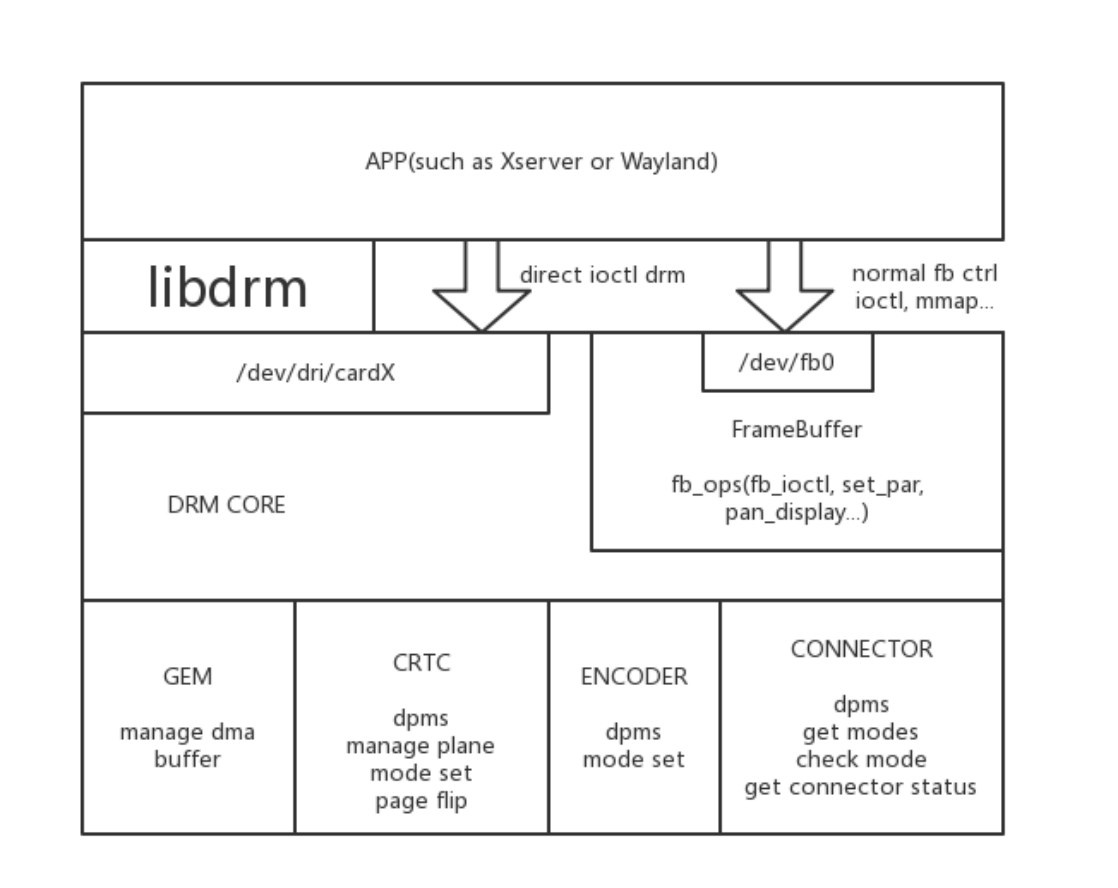
Precompiled libdrm packages are as follows:
libdrm
├── libdrm2_2.4.114-1_arm64.deb
├── libdrm2-dbgsym_2.4.114-1_arm64.deb
├── libdrm-common_2.4.114-1_all.deb
├── libdrm-dev_2.4.114-1_arm64.deb
├── libdrm-tests_2.4.114-1_arm64.deb
└── libdrm-tests-dbgsym_2.4.114-1_arm64.deb
Patches are as follows:
├── 0001-tests-meson.build-disable-nouveau-tests-for-static-b.patch
├── 0002-modetest-Speed-up-dumping-info.patch
├── 0003-HACK-Open-Rockchip-drm-device-by-default.patch
├── 0004-HACK-Bypass-auth-APIs-by-default.patch
5.12 libdrm-cursor
This package is primarily used for issues with only AFBC layers on RK3566/RK3568, with three main functionalities: The vop does not have a mouse layer, supporting the use of overlay as a mouse layer. Support for the display of overlay layers in AFBC format. Handling of abnormal situations where the mouse exceeds boundary limits.
Configuration features of drm-cursor are as follows:
$cat /etc/drm-cursor.conf

# Configure file for libdrm-cursor.
#
#debug=
# log-file=
# hide=1 # hide cursors
# atomic=0 # disable atomic drm API
# max-fps=60
# allow-overlay=1 # allowing overlay planes
# prefer-afbc=0 # prefer plane with AFBC modifier supported
# num-surfaces=8 # num of egl surfaces to avoid edge moving corruption
# prefer-plane=65
# prefer-planes=61,65
# crtc-blocklist=64,83
Default log is located at /var/log/drm-cursor.log Precompiled packages of libdrm-cursor are as follows:
libdrm-cursor/
├── libdrm-cursor-dbgsym_1.4.1-1_arm64.deb
├── libdrm-cursor-dev_1.4.1-1_arm64.deb
└── libdrm-cursor_1.4.1-1_arm64.deb
5.13 libmali
libmali is the software development kit for the ARM Mali GPU series. Rockchip provides a series of pre-compiled libmali Debian packages to streamline the development process. Mali GPU is a graphics acceleration platform that adheres to open standards, supporting 2D and 3D graphics rendering as well as general-purpose computing on the GPU (GPGPU). The GPU support under the Rockchip Linux system includes the following APIs: OpenGL ES 1.1, 2.0, 3.2 Vulkan 1.0, 1.1 OpenCL 2.0 Note: Although OpenGL ES is supported, the full OpenGL API is not supported. The naming of the software packages follows this rule: GPU model - software version - hardware version (if differentiated, such as r1p0 to distinguish between RK3288 and RK3288w) - compilation options. Regarding compilation options, please note the following points: The version without a suffix is x11-gbm, where GBM is a memory management mechanism based on DRM configuration, suitable for EGLFS programs, and does not depend on X11 or Wayland display services. Wayland and Wayland-gbm versions are used for the Wayland display environment.
The dummy version is primarily used for the rockit multimedia development environment. Different chip platforms may support different types of APIs, and specific information should be referred to the respective chip manuals.
libmali/
├── libmali-valhall-g610-g13p0-dummy-dbgsym_1.9-1_arm64.deb
├── libmali-valhall-g610-g13p0-dummy_1.9-1_arm64.deb
├── libmali-valhall-g610-g13p0-gbm-dbgsym_1.9-1_arm64.deb
├── libmali-valhall-g610-g13p0-gbm_1.9-1_arm64.deb
├── libmali-valhall-g610-g13p0-wayland-gbm-dbgsym_1.9-1_arm64.deb
├── libmali-valhall-g610-g13p0-wayland-gbm_1.9-1_arm64.deb
├── libmali-valhall-g610-g13p0-x11-gbm-dbgsym_1.9-1_arm64.deb
├── libmali-valhall-g610-g13p0-x11-gbm_1.9-1_arm64.deb
...
5.14 RGA
Rockchip RGA is an independent 2D raster graphics acceleration unit. It accelerates 2D graphic operations, such as point/line drawing, image scaling, rotation, bitmaps, image composition, etc. Precompiled packages are as follows: Among them: RGA is suitable for RK kernel 4.4 and other older versions, mainly corresponding to the im2d branch of the linux-rga repository. RGA2 is suitable for RK kernel 4.19, 5.10, 6.1, and other newer versions, mainly corresponding to the multi_rga_im2d_api branch of the linux-rga repository.
rga/
├── librga-dev_2.1.0-1_arm64.deb
├── librga2-deb
└── librga2_2.1.0-1_arm64.deb

rga2
├── librga2_2.2.0-1_arm64.deb
├── librga2-dbgsym_2.2.0-1_arm64.deb
└── librga-dev_2.2.0-1_arm64.deb
5.15 Openbox
Openbox is a lightweight X11 window manager. Improvements have been made to the official version of the Openbox window manager, adding support for outline movement and limiting the interval of movement.
Modify /home/linaro/.config/openbox/lxde-rc.xml to wireframe, change the
drawContents content:
<drawContents>yes</drawContents> to <drawContents>no</drawContents>

Set moveInterval to limit the interval of window movement:
<moveInterval>50</moveInterval>
For more details, refer to Openbox Precompiled package as follows:
openbox/
└── openbox_3.6.1-10_arm64.deb
5.16 pcmanfm
is a lightweight file manager, primarily used for lightweight desktop environments, such as LXDE (Lightweight X11 Desktop Environment). It adds support for outlines based on the official version. Precompiled packages are as follows:
pcmanfm/
├── pcmanfm_1.3.2-1_arm64.deb
└── pcmanfm-dbgsym_1.3.2-1_arm64.deb
5.17 Pipewire
Pipewire is an open-source multimedia service framework designed to provide flexible, low- latency audio and video pipelines for modern Linux systems. It is intended to replace older multimedia frameworks such as PulseAudio and the JACK Audio Connection Kit, offering a more modern and efficient solution. The update of the pipewire package is mainly due to the recording noise issue in the official version of Debian 12, for details refer to official bug. Precompiled packages are as follows:
pipewire/
└── libspa-0.2-modules_0.3.65-3+deb12u1_arm64.deb
5.18 wireplumber
WirePlumber is an open-source audio and video routing tool built on the PipeWire framework. It provides a flexible pipeline system for handling audio and video streams. The official version modifications are primarily aimed at adapting the automatic sound switching feature. Precompiled packages are as follows:
wireplumber/
├── gir1.2-wp-0.4_0.4.13-1_arm64.deb
├── libwireplumber-0.4-0_0.4.13-1_arm64.deb
├── libwireplumber-0.4-0-dbgsym_0.4.13-1_arm64.deb
├── libwireplumber-0.4-dev_0.4.13-1_arm64.deb
├── wireplumber_0.4.13-1_arm64.deb
├── wireplumber-dbgsym_0.4.13-1_arm64.deb
└── wireplumber-doc_0.4.13-1_all.deb
5.19 Rockchip Automatic Image Quality
Full name Rockchip Automatic Image Quality, automatically adjusts the image signal processor. Mainly implements Camera 3A effects, suitable for ISP2.x chips, such as RK3588, RK3576, RK356X, and other chips. Precompiled packages are as follows:
rkaiq/
├── camera_engine_rkaiq_rk3562_arm64.deb ##Suitable for RK3562 series chips
├── camera_engine_rkaiq_rk3568_arm64.deb ##Suitable for RK3566/RK3568 series
chips
├── camera_engine_rkaiq_rk3576_arm64.deb ##Suitable for RK3576 series chips
└── camera_engine_rkaiq_rk3588_arm64.deb ##Suitable for RK3588 series chips
5.20 rkisp
Full name Rockchip Image Signal Processor, an image signal processor. It mainly achieves Camera 3A effects and is suitable for ISP1.X chips, such as RK3288, RK3399, RK3326, PX30, etc. Precompiled package is as follows:
rkisp/
└──  camera_engine_rkisp_v2.3.0_arm64.deb
5.21 rknpu2
Full name Rockchip Neural Processing Unit, neural network processing unit. RKNPU, users need to first run the RKNN-Toolkit2 tool on the computer to convert the trained model into RKNN format model, and then use RKNN C API or Python API for deployment on the development board. The RKNN software stack can help users quickly deploy AI models to Rockchip chips. Currently, it can be used on chips such as RK356X, RK3576, RK3588, etc. Integration package is as follows:
rknpu2/
└── rknpu2.tar
5.22 rkwifibt
Debugged WIFI-BT related modules based on the Rockchip platform, which includes firmware, tools, configuration files, etc. Precompiled packages are as follows:
rkwifibt/
├── rkwifibt-broadcom-firmware_1.0.0-1_arm64.deb
├── rkwifibt-dev-tools-dbgsym_1.0.0-1_arm64.deb
└── rkwifibt-dev-tools_1.0.0-1_arm64.deb
5.23 rktoolkit
rktoolkit is a specialized toolkit for Rockchip, including tools such as io/update/vendor_storage/modetest/stressapptest/memtester/vendor_storage , etc.: Precompiled packages are as follows:
rktoolkit/
├── rktoolkit_1.0.0-1_arm64.deb
└── rktoolkit-dbgsym_1.0.0-1_arm64.deb
5.24 X Server
The X server is a shortened term for the graphical interface server within the Linux system. Common Linux desktop environments such as XFCE, KDE, and GNOME are all supported by the X server. Currently, Debian uses the lightweight LXDE/XFCE desktop environment. Below is a comparison of various desktop environments and window managers available for Linux:
| Desktop Environment/Window Manager |
Memory Usage |
CPU Usage |
Type |
|---|---|---|---|
| KDE 4.6 | 363MB | 4% | Desktop Environment |
| Unity | 271MB | 14% | Desktop Environment |
| GNOME 3 | 193MB | 10% | Desktop Environment |
| GNOME 2.x | 191MB | 1% | Desktop Environment |
| XFCE 4.8 | 144MB | 10% | Desktop Environment |
| LXDE | 85MB | 10% | Desktop Environment |
| IceWM | 85MB | 2% | Desktop Environment |
| Enlightenment (E17 Standard) | 72MB | 1% | Window Manager |
| Fluxbox | 69MB | 1% | Window Manager |
| OpenBox | 60MB | 1% | Window Manager |
| JWM | 58MB | 1% | Window Manager |
Rockchip provides the following enhanced features for X Server: Specified Graphics Card: Allows users to manually specify a graphics card or integrated graphics. Through the OutputClass section, devices using the “rockchip” driver are designated as the primary GPU to prevent display anomalies caused by automatic enumeration. Hardware Acceleration: Supports glamor and exa acceleration modes. Glamor uses the GPU for rendering composition, while exa uses Rockchip RGA 2D hardware for rendering composition (exa is commented out by default and must be uncommented to use). These settings are typically configured in the /etc/X11/xorg.conf.d/20-modesetting.conf file. Tear Prevention: By setting FlipFB to “always”, tear prevention is always enabled to avoid screen tearing, but this may result in up to a 50% performance loss. Performance Optimization: The commented-out MaxFlipRate option can be used to limit the refresh rate and dropped frames to reduce performance loss. EDID Disable:
Setting NoEDID to “true” disables EDID, which is typically used when the EDID information of the monitor is inaccurate. Gamma Correction: Enabling UseGammaLUT allows the use of a Gamma correction lookup table (LUT) to improve color display. Virtual Screen Size: The commented-out VirtualSize option can be used to set the virtual screen size, which is scaled by the VOP hardware. Physical Display Padding: The commented-out Padding option can be used to set the padding for the physical display to adjust the blank areas around the screen edges. Screen and Monitor Settings: A default screen and monitor are defined, associating them with the previously defined devices, and setting the default rotation mode to “normal”. Users can set the screen to normal (normal), left (left), right (right), and other rotation modes through the Rotate option in the configuration file. The specific configuration file is as follows:
### Use Rockchip DRM driver
Section "OutputClass"
    Identifier  "RockchipDRM"
    MatchDriver "rockchip"
    Option      "PrimaryGPU"     "yes"
EndSection

Section "Device"
    Identifier  "Rockchip Graphics"
    Driver      "modesetting"

### Use Rockchip RGA 2D HW accel
#    Option      "AccelMethod"    "exa"

### Use GPU HW accel
    Option      "AccelMethod"    "glamor"

    Option      "DRI"            "2"

### Set to "always" to avoid tearing, could lead to up 50% performance loss
    Option      "FlipFB"         "always"

### Limit flip rate and drop frames for "FlipFB" to reduce performance lost
#    Option      "MaxFlipRate"    "60"

    Option      "NoEDID"         "true"
    Option      "UseGammaLUT"    "true"

### Set virtual screen size (scaled by VOP hardware)
#    Option "VirtualSize" "DSI-1:600x1080"
### Set physical display paddings <top,bottom,left,right>
#    Option "Padding" "DSI-1:180,300,300,540"

EndSection

Section "Screen"
    Identifier  "Default Screen"
    Device      "Rockchip Graphics"
    Monitor     "Default Monitor"
EndSection

### Valid values for rotation are "normal", "left", "right"
Section "Monitor"
    Identifier  "Default Monitor"
    Option      "Rotate"         "normal"
EndSection
Precompiled packages are as follows:
Debian10 xserver/
├── xserver-common_1.20.4-1+deb10u3_all.deb
├── xserver-xorg-core-dbgsym_1.20.4-1+deb10u3_arm64.deb
├── xserver-xorg-core_1.20.4-1+deb10u3_arm64.deb
├── xserver-xorg-dev_1.20.4-1+deb10u3_arm64.deb
├── xserver-xorg-legacy-dbgsym_1.20.4-1+deb10u3_arm64.deb
└── xserver-xorg-legacy_1.20.4-1+deb10u3_arm64.deb

Debian11 xserver/
├── xserver-common_1.20.11-1_all.deb
├── xserver-xorg-core-dbgsym_1.20.11-1_arm64.deb
├── xserver-xorg-core_1.20.11-1_arm64.deb
├── xserver-xorg-dev_1.20.11-1_arm64.deb
├── xserver-xorg-legacy-dbgsym_1.20.11-1_arm64.deb
└── xserver-xorg-legacy_1.20.11-1_arm64.deb

Debian12 xserver/
├── xserver-common_21.1.7-3_all.deb
├── xserver-xorg-core-dbgsym_21.1.7-3_arm64.deb
├── xserver-xorg-core_21.1.7-3_arm64.deb
├── xserver-xorg-dev_21.1.7-3_arm64.deb
├── xserver-xorg-legacy-dbgsym_21.1.7-3_arm64.deb
└── xserver-xorg-legacy_21.1.7-3_arm64.deb
The startup log is located at /var/log/Xorg* . The specific version of Xserver can be confirmed using the following method:
root@linaro-alip:~# cat /var/log/Xorg.0.log |grep "X.Org X Server"
X.Org X Server 1.20.11
Rockchip’s corresponding modifications can be confirmed using the following method:
root@linaro-alip:~# cat /var/log/Xorg.0.log |grep xorg-server
[    26.786] xorg-server f805fe554 modesetting: Filter out invalid format
modifiers (https://www.debian.org/support)
5.25 Weston
Weston is a reference implementation based on the Wayland protocol, an open-source display server. The modifications based on the official version are as follows: Dynamic screen state management (resolution, rotation, power on/off, freeze, position) Configurable mouse size, native mouse is too small on high-resolution screens Desktop icons Efficient VNC screen sharing Mirror mode Support for user-level virtual VT Support for cropped screens Boot animation Precompiled packages are as follows:
weston/
├── libweston-10-0_10.0.1-1_arm64.deb
├── libweston-10-0-dbgsym_10.0.1-1_arm64.deb
├── libweston-10-dev_10.0.1-1_arm64.deb
├── weston_10.0.1-1_arm64.deb
└── weston-dbgsym_10.0.1-1_arm64.deb
5.26 Wayland
Wayland is a new open-source display protocol that offers an advanced alternative to the traditional X Window System (widely known as X11). Based on the latest official version, we have implemented key functional enhancements, including support for wayland-egl and the addition of socket wait functionality in Wayland clients. Precompiled packages are as follows:
wayland
├── libwayland-bin_1.21.0-1_arm64.deb
├── libwayland-client0_1.21.0-1_arm64.deb
├── libwayland-cursor0_1.21.0-1_arm64.deb
├── libwayland-dev_1.21.0-1_arm64.deb
├── libwayland-egl1_1.21.0-1_arm64.deb
├── libwayland-egl-backend-dev_1.21.0-1_arm64.deb
└── libwayland-server0_1.21.0-1_arm64.deb
6. Basic Skills for Debian Development
6.1 Restructuring Debian Packages
Debian Third-Party Packages modification and repackaging steps are as follows: apt-get build-dep <pkg> ## Install build dependencies apt source <pkg> ## Download the source code of package <pkg> Create git and apply patches dpkg-buildpackage -b -uc -us -d ## Repackage and compile For example: Changing the Xserver package, modify and repackage the deb, the method is as follows Note to confirm that /etc/apt/sources.list has deb-src enabled, and also update the source with apt update
- Install build dependencies
`apt-get build-dep xorg-server-source`

- Download Xorg-xserver source code
`apt source xorg-server-source`

- Create git and apply patches
$ cd xorg-server_*
$ git init && git add .
$ git commit -s "xxxxx"

- Start compiling and packaging deb
dpkg-buildpackage -b -uc -us -d
6.2 Debian Docker Construction
Supports building Docker compilation-related source code through a PC environment and packaging it into deb for easy integration into the system. For specific reference, see <SDK>/docs/en/Linux/Docker/Rockchip_Developer_Guide_Debian_Docker_EN.pdf
6.3 Debian Partition Management
The Debian system supports partition handling such as check, resize, and mount rootfs/oem/userdata at boot time. A service related to resize-all.service is added to the system, supporting the resize function for partitions of various formats.
The system service is located at /lib/systemd/system/resize-all.service and the main executable files are /usr/bin/resize-helper and /usr/bin/disk-helper . The debugging log is in /var/log/resize-all.log , for example:
root@linaro-alip:~# cat /var/log/resize-all.log
Start resizing all internal mounted partitions
Log saved to /var/log/resize-all.log
[19]: Handling /dev/sda8 /userdata ext4 rw,relatime,stripe=128
[18]: Handling /dev/sda7 /oem ext4 rw,relatime
[0]: Handling /dev/sda6 / ext4 rw,relatime
[19]: Already resized /dev/sda8(ext4)
[18]: Already resized /dev/sda7(ext4)
[0]: Already resized /dev/sda6(ext4)
Regarding partition mounting, the normal Kernel cmdline root=PARTUUID=614e0000-0000 will be mounted on the root directory by rootfs, and oem/userdata is written in /etc/fstab where systemd will handle the mounting during startup.
root@linaro-alip:/# cat /etc/fstab
/* <file system> <mount point>   <type>  <options>       <dump>  <pass> */
proc    /proc   proc    defaults        0 0
devtmpfs        /dev    devtmpfs        defaults        0 0
devpts  /dev/pts        devpts  mode=0620,ptmxmode=0666,gid=5   0 0
tmpfs   /dev/shm        tmpfs   nosuid,nodev,noexec     0 0
sysfs   /sys    sysfs   defaults        0 0
debugfs /sys/kernel/debug       debugfs defaults        0 0
pstore  /sys/fs/pstore  pstore  defaults      0 0
PARTLABEL=oem   /oem    ext4    defaults      0 2
PARTLABEL=userdata      /userdata       ext4  defaults  0 2

File system: Device name or UUID, or the path of a network file system (NFS).
Mount point: The mount point of the file system, such as / or /mnt/mydrive.
File system type: Such as ext4, ntfs, swap, etc.
Mount options: Options used when mounting, such as defaults, ro (read-only),
noatime, etc. Multiple options are separated by commas.
dump: This field is used for the dump command, usually set to 0, indicating no
backup is needed.
pass: This field is used for the fsck command, the number indicates the order of
fsck checking. The root file system is usually 1, other file systems are 2, set
to 0 means no check.
6.4 Debian Graphical Adaptation Solutions
Currently, the display architecture primarily supports X11 and Wayland, with the main combinations being as follows: Default adaptation combination for X11 systems:
xfce4/lxde + xserver + lightdm
Default adaptation combination for WAYLAND systems:
Weston+Wayland or gnome + Wayland + gdm3
6.4.1 Display Architecture Adaptation Plan
The current pairing of X11/Xserver is with lightweight desktop environments like LXDE/XFCE, and the desktop manager uses lightdm. GNOME, as a mainstream desktop environment, primarily works in conjunction with the WAYLAND display server protocol and is configured through the gdm3 desktop manager. To test WAYLAND-related demonstration programs, one can switch to the Weston desktop environment, which is the same as the desktop system built through Buildroot or Yocto in the SDK.
6.4.2 Window Management Adaptation Solutions
Openbox The Openbox project is a fast, lightweight, and highly extensible window manager that fully complies with standards. The Openbox 3 series is a completely new window manager that does not inherit any code from previous similar software, although it still looks similar to Blackbox (the code of Openbox 2 series is based on Blackbox 0.65.0). Openbox can be used as a standalone operating environment, and it can also be used as a window manager to replace the default window manager of desktop environments like KDE and Gnome. KWin KWin is a window manager in the X Window system. It is part of the KDesktop Environment (KDE), although it can be used standalone or with other desktop environments. In KDE 4, KWin added support for compositing mode and OpenGL. Xfwm Xfwm4 is the native window manager of Xfce4. It uses a simple and flexible pixel-based theme engine that uses images in the .xpm format. Xfwm4 also uses a text file to configure other options. Additionally, you can choose gtk theme colors.
6.4.3 Desktop Environment Adaptation Plan
GNOME GNOME 3, as the new version of GNOME, has significant changes compared to GNOME 2.x. GNOME 3 is relatively intuitive, and you can click on “Activities” in the upper left corner or swipe to view applications, workspace partitions, etc. Currently, distribution versions such as Debian use GNOME 3 as the default desktop environment. KDE KDE has a Windows-like “Start Menu” with a gorgeous interface. Many distribution versions, such as OpenSUSE, PCLinuxOS, and Mandriva, use KDE as the default desktop environment.
XFCE It consumes fewer resources than GNOME and KDE. Suitable for lightweight desktops. Similar to the Windows interface environment. LXDE LXDE is also one of the four major desktop environments, a lightweight desktop that consumes fewer resources.
6.4.4 Chromium Adaptation Solution
The Chromium browser supports a variety of video formats, including H264, VP8, VP9, AV1, etc. Starting from version 105, it has added support for the H265 video format. Currently, in the Debian system, support for Chromium video hardware decoding has been integrated, achieved through a customized version of Chromium, V4L2 plugin, and MPP efficient hardware decoding. The main modifications in the customized Chromium are as follows: Modify Chromium to enable v4l2 vda support, as well as related patches Add v4l2 mpp plugin The drawbacks are: a. Decoding only supports vp8, h264, h265, vp9, av1 b. Encoding only supports vp8 and h264 c. Requires modification of the compilation of Chromium (complete compilation process through Yocto) We currently provide Chromium Wayland patches, which support systems such as Yocto and Buildroot. The general process involves enabling V4L2 VDA/VEA in Chromium, creating a virtual v4l2 node at boot, and Chromium’s operations on the virtual device being intercepted by v4l-utils to the v4l- rkmpp plugin, converting it into a call to the mpp interface.
6.4.4.1 Version
root@linaro-alip:~# chromium --version
Chromium 126.0.6478.126 stable
6.4.4.2 How to Test
Use the following command to perform the test:
chromium --no-sandbox file:///usr/local/test.mp4
The specific test script is located at /rockchip-test/chromium/test_chromium_with_video.sh
root@linaro-alip:~# /rockchip-test/chromium/test_chromium_with_video.sh
mpp[3048]: mpp_info: mpp version: 48962a10 author: Hongjin Li    2024-09-19
fix[avsd]: Fix attach dev error issue
[   73.431901] rk_vcodec: 27b00100.rkvdec:0 session 3129:1 time: 2893 us hw 2681
us
[   73.434160] rk_vcodec: 27b00100.rkvdec:0 session 3129:1 time: 2169 us hw 1935
us
[   73.437078] rk_vcodec: 27b00100.rkvdec:0 session 3129:1 time: 1500 us hw 1400
us
[   73.440013] rk_vcodec: 27b00100.rkvdec:0 session 3129:1 time: 1526 us hw 1497
us
[   73.441579] rk_vcodec: 27b00100.rkvdec:0 session 3129:1 time: 1345 us hw 1314
us
...
Linux4.19/5.10/6.1+ can check whether hardware decoding is invoked with the following command:
export mpp_syslog_perror=1
echo 0x100 > /sys/module/rk_vcodec/parameters/mpp_dev_debug
Linux4.4 can check whether hardware decoding is invoked with the following command:
export mpp_syslog_perror=1
echo 0x4 > /sys/module/rk_vcodec/parameters/debug
6.4.4.3 How to Debug
If you encounter some issues, turn on the following switches to get more logs for debugging.
export mpi_debug=1
export mpp_debug=1
export h264d_debug=1
You can actually check the GPU utilization rate to determine whether hardware acceleration is being used:
cat /sys/devices/platform/*gpu/utilisation
If acceleration or hardware decoding is not being used, you need to analyze the reasons in detail, such as GPU-related issues, libv4l adaptation problems, or some other permission-related issues. For example, create related device nodes in /etc/init.d/rockchip.sh
/* Create dummy video node for chromium V4L2 VDA/VEA with rkmpp plugin */
echo dec > /dev/video-dec0
echo enc > /dev/video-enc0
chmod 660 /dev/video-*
chown root.video /dev/video-*

/* The chromium using fixed pathes for libv4l2.so */
ln -rsf /usr/lib/*/libv4l2.so /usr/lib/
[ -e /usr/lib/aarch64-linux-gnu/ ] && ln -Tsf lib /usr/lib64
Also, handle the permissions of related kernel nodes in /etc/udev/rules.d/99-rockchip- permissions.rules , such as below:
ACTION=="remove", GOTO="permissions_end"

/* VPU devices */
KERNEL=="avsd", MODE="0660", GROUP="video"
KERNEL=="vepu", MODE="0660", GROUP="video"
KERNEL=="h265e", MODE="0660", GROUP="video"
KERNEL=="rkvdec", MODE="0660", GROUP="video"
KERNEL=="rkvenc", MODE="0660", GROUP="video"
KERNEL=="mpp_service", MODE="0660", GROUP="video"
KERNEL=="vpu[_-]service", MODE="0660", GROUP="video"
KERNEL=="hevc[_-]service", MODE="0660", GROUP="video"

/* RGA device */
KERNEL=="rga", MODE="0660", GROUP="video"

/* MALI devices (/dev/mali for mali400) */
KERNEL=="mali*", MODE="0660", GROUP="video"
6.4.4.4 Performance Testing
By default, the display uses GPU acceleration mode, and the general process of video hardware decoding is that Chromium enables V4L2 VDA/VEA. Upon booting, a virtual V4L2 node is created, and Chromium’s operations on the virtual device are intercepted by v4l-utils to the v4l-rkmpp plugin, which is then converted into a call to the mpp interface. Common web page testing browsers include the following: ARES-6 ARES-6 measures the execution time of the latest JavaScript features, and browsers that start quickly and run smoothly have an advantage. Basemark Web 3.0 Basemark Web 3.0 is a comprehensive web browser performance benchmark that tests your browser’s ability to run web applications, measuring real-world client performance to detect browser bottlenecks. JetStream 2
JetStream 2 is a JavaScript and WebAssembly benchmark suite focused on the most advanced web applications. Browsers that start quickly, execute code rapidly, and run smoothly score higher. MotionMark 1.2 MotionMark is a graphics benchmark that measures a browser’s ability to animate complex scenes at target frame rates. Octane Octane is an early general JavaScript performance benchmark that has been deprecated. It can indeed measure the performance of the JS engine, but it does not accurately reflect the optimization of the JS engine for modern web applications. Optimizations made for Octane often lack impact on real-world web pages, and in some cases, these optimizations can slow down real- world websites. Speedometer 2.1 Speedometer is a browser benchmark that measures the responsiveness of web applications. It uses demo web applications to simulate user actions, such as adding to-do items. Compared to Octane, Speedometer more accurately reflects the optimization of the JS engine for modern web applications.
6.4.4.5 Additional Information Acquisition
For more Chromium information, you can enter chrome://about in the URL.
List of Chrome URLs
chrome://about
...
chrome://flags
chrome://gcm-internals
chrome://gpu
chrome://help
chrome://histograms
chrome://history
chrome://indexeddb-internals
chrome://inspect
chrome://interstitials
chrome://invalidations
chrome://settings
chrome://version
chrome://webrtc-internals
chrome://webrtc-logs
List of chrome://internals pages
chrome://internals/web-app

For Debug
The following pages are for debugging purposes only. Because they crash or hang
the renderer, they're not linked directly; you can type them into the address bar
if you need them.

chrome://badcastcrash/
chrome://memory-exhaust/
chrome://memory-pressure-critical/
chrome://memory-pressure-moderate/
...
chrome://quit/
chrome://restart/
6.4.5 Debian Panfrost Adaptation Scheme
Refer to the official Debian Panfrost Adaptation
6.5 Debian Audio-Video Adaptation Solution
Introduction to the general video encoding and decoding process on the Rockchip platform
vpu_service  -->  mpp --> GStreamer/rockit --> app
vpu_service: Driver
mpp: The video encoding and decoding middleware on the Rockchip platform, refer
to the mpp documentation for details
GStreamer/rockit: Interface with app and other components
Currently, on the Debian system, GStreamer is mainly used to interface with app and encoding/decoding components. Encoding and decoding functions can also be tested directly through the mpp provided test interfaces (such as mpi_dec_test\mpi_enc_test…) mpp source code reference <SDK>/external/mpp/ Test demo reference: <SDK>/external/mpp/test Refer to the specific SDK documentation Rockchip_Developer_Guide_MPP_CN.pdf
6.5.1 Audio Pulseaudio Path Adaptation
By default, audio uses pulseaudio, and it is typically sufficient to configure /etc/pulse/default.pa . Currently, the SDK supports adaptation for ES8388 and RK809 codecs.
+set-default-source alsa_input.platform-es8388-
sound.HiFi__hw_rockchipes8388__source
+set-default-sink alsa_output.platform-es8388-sound.HiFi__hw_rockchipes8388__sink
+set-default-source alsa_input.platform-rk809-
sound.HiFi__hw_rockchiprk809__source
+set-default-sink alsa_output.platform-rk809-sound.HiFi__hw_rockchiprk809__sink
If you need to add support for more codecs, obtain relevant information through the following commands:
pactl list sinks short
pactl list sources short
For more detailed information, refer to the Debian official PulseAudio and <SDK>/docs/Common/AUDIO/Rockchip_Developer_Guide_PulseAudio_EN.pdf .
6.5.2 MPP and VPU Adaptation
By default, MPP is precompiled into deb and integrated in
/usr/lib/aarch64-linux-gnu/librockchip_mpp.so
/usr/lib/aarch64-linux-gnu/librockchip_mpp.so.0
/usr/lib/aarch64-linux-gnu/librockchip_mpp.so.1
Also ensure that the kernel has /dev/mpp_service related nodes. For specific reference, see <SDK>/docs/Linux/Multimedia/Rockchip_Developer_Guide_MPP_EN.pdf
6.5.3 GStreamer Adaptation
For specific reference, see <SDK>/docs/Linux/Multimedia/Rockchip_User_Guide_Linux_Gstreamer_EN.pdf
6.5.4 Rockit Adaptation
Refer to <SDK>/docs/Linux/Multimedia/Rockchip_User_Guide_Linux_Rockit_EN.pdf
6.6 Debian Network Adaptation Solution
6.6.1 RKWIFIBT Adaptation
Refer to <SDK>/docs/Linux/Wifibt/Rockchip_Developer_Guide_Linux_WIFI_BT_EN.pdf
6.7 Debian Webcam Adaptation Solution
The default system’s webcam application is cheese, which calls GStreamer->mpp->vpu to achieve the encoding and decoding implementation on the Rockchip platform. If cheese is not needed, GStreamer is also integrated to directly call the USB camera and adapt to the Rockchip’s 3A effects for the MIPI/CSI camera. For example, the test script is as follows:
/rockchip-test$ tree -L 1 camera/
camera/
├── camera_rkaiq_test.sh
├── camera_rkisp_test.sh
├── camera_stresstest.sh
├── camera_test.sh
└── camera_usb_test.sh
6.7.1 Cheese Adaptation
Cheese is a camera application used under the Debian system, offering some interesting features such as applying real-time effects, taking photos, and recording videos. Cheese supports almost all common types of cameras, including built-in and USB cameras. Here are some features of Cheese: Real-time effects: Cheese allows you to apply real-time effects when taking photos or recording videos. These effects include black and white, comic, fisheye, oil painting, etc. Taking photos and recording videos: Cheese allows you to use the camera to take photos and record videos, and supports various different resolutions and video formats. Automatic saving: Cheese can automatically save the photos you take and the videos you record. You can also manually select the save location and file name. Video preview: Cheese provides real-time video preview, making it convenient for you to preview the effect before shooting. Compatibility: Cheese supports almost all common types of cameras, including built-in and USB cameras. To adapt the cheese app, address the following related issues encountered.
6.7.1.1 Cheese Unable to Acquire Valid Device Node
Cheese defaults to searching for valid devices with names related to video*, and the actual device name information for Rockchip ISP is as follows (including rkisp_mainpath, rkisp_selfpath, etc.).
root@rk3568:~# grep '' /sys/class/video4linux/video*/name
/sys/class/video4linux/video0/name:rkisp_mainpath
/sys/class/video4linux/video1/name:rkisp_selfpath
/sys/class/video4linux/video2/name:rkisp_rawwr0
/sys/class/video4linux/video3/name:rkisp_rawwr2
/sys/class/video4linux/video4/name:rkisp_rawwr3
/sys/class/video4linux/video5/name:rkisp_rawrd0_m
/sys/class/video4linux/video6/name:rkisp_rawrd2_s
/sys/class/video4linux/video7/name:rkisp-statistics
/sys/class/video4linux/video8/name:rkisp-input-param
Currently resolved by filtering through the GStreamer v4l2 plugin. Set the relevant environment variables in /etc/profile.d/gst.sh :
# Default device for v4l2src
export GST_V4L2SRC_DEFAULT_DEVICE=/dev/video-camera0

# Available RK devices for v4l2src
export GST_V4L2SRC_RK_DEVICES=_mainpath_selfpath:_bypass:_scale
6.7.1.2 Frame Loss Issue with High-Resolution Camera in Cheese
When Cheese opens the imx415, the mipi sensor experiences frame loss, exhibiting the following phenomena:
root@linaro-alip:/# cheese -d rkisp_mainpath

[  488.510646] rkisp0-vir0: MIPI drop frame
[  488.544222] rkisp0-vir0: MIPI drop frame
[  488.577718] rkisp0-vir0: MIPI drop frame
[  488.611408] rkisp0-vir0: MIPI drop frame
[  488.644975] rkisp0-vir0: MIPI drop frame
[  488.678581] rkisp0-vir0: MIPI drop frame

Output     rkisp_mainpath Format:UYVY Size:4672x3504
The size obtained from the device is 4672x3504, which exceeds the range supported by our hardware. Currently, the maximum output of ISP’s mp is limited to 3840x2160 through the Gstreamer v4l2 plugin. Set the relevant environment variables in /etc/profile.d/gst.sh :
# Max resolution for v4l2src
export GST_V4L2SRC_MAX_RESOLUTION=3840x2160
6.7.1.3 Format Exceptions in Cheese Acquisition
Some formats may not be supported in the ISP driver, for instance, although the kernel ISP driver reports support for certain formats, there may still be some formats that are not supported. For example:
root@linaro-alip:~# v4l2-ctl --list-formats-ext -d /dev/video8
ioctl: VIDIOC_ENUM_FMT
        Type: Video Capture Multiplanar

        [0]: 'UYVY' (UYVY 4:2:2)
                Size: Stepwise 32x16 - 4672x3504 with step 8/8
        [1]: '422P' (Planar YUV 4:2:2)
                Size: Stepwise 32x16 - 4672x3504 with step 8/8
        [2]: 'NV16' (Y/CbCr 4:2:2)
                Size: Stepwise 32x16 - 4672x3504 with step 8/8
...
Currently, formats such as NV12 and NV16 are tested and found to be normal, but the I420 format displays content abnormally, and there may be many unsupported formats. Early Windows applications often prioritize RGB formats, and if the ISP driver reports support for RGB formats but actually does not, it will cause many applications to malfunction.
Solution: Currently, preferred formats are selected through Gstreamer v4l2 environment variables. Set the relevant environment variables in /etc/profile.d/gst.sh :
# Preferred formats for videoconvert
export GST_VIDEO_CONVERT_PREFERRED_FORMAT=NV12:NV16:I420:YUY2
6.7.1.4 Cheese Recording Freeze Issue
In Cheese, the hard-coded software vp8enc is used, but it can cause native pulseaudio to malfunction and freeze. Solution: Currently, support for software vp8enc encoding is added through GStreamer and pulseaudio is updated. Set the relevant environment variables in /etc/profile.d/gst.sh :
export GST_MPP_VP8ENC_FAKE_VP8ENC=1
6.7.1.5 Using mpp for Cheese Video Recording Encoding
Cheese defaults to using the vvp8enc software encoder, which has poor performance. The default modification is as follows: Force the use of the mppvp8enc hardware encoding in Rockchip mpp.
--- a/libcheese/cheese-camera.c
+++ b/libcheese/cheese-camera.c
@@ -442,7 +442,7 @@ cheese_camera_set_video_recording (CheeseCamera *camera,
GError **error)
   gboolean res;
   /* Check if we can use global preset for vp8enc. */
-  video_enc = gst_element_factory_make ("vp8enc", "vp8enc");
+  video_enc = gst_element_factory_make ("mppvp8enc", "vp8enc");
   video_preset = (gchar *) &CHEESE_VIDEO_ENC_PRESET;
   res = gst_preset_load_preset (GST_PRESET (video_enc), video_preset);
You can confirm this way:
root@linaro-alip:/# gst-inspect-1.0 |grep vp8
vpx:  vp8dec: On2 VP8 Decoder
vpx:  vp8enc: On2 VP8 Encoder
rtp:  rtpvp8depay: RTP VP8 depayloader
rtp:  rtpvp8pay: RTP VP8 payloader
rockchipmpp:  mppvp8enc: Rockchip Mpp VP8 Encoder
Below is the encoding support status for Rockchip chips. Encoding Capability Specification Table
| Chip Name | H264 | H265 | VP8 |
|---|---|---|---|
| RK3588 | 7680x4320@30f | 7680x4320@30f | 1920x1088@30f |
| RK3566/RK3568 | 1920x1088@60f | 1920x1088@60f | N/A |
| RK3562 | 1920x1088@60f | N/A | N/A |
| RK3399 | 1920x1088@30f | N/A | 1920x1088@30f |
| RK3328 | 1920x1088@30f | 1920x1088@30f | 1920x1088@30f |
| RK3288 | 1920x1088@30f | N/A | 1920x1088@30f |
| RK3326 | 1920x1088@30f | N/A | 1920x1088@30f |
| PX30 | 1920x1088@30f | N/A | 1920x1088@30f |
| RK312X | 1920x1088@30f | N/A | 1920x1088@30f |
6.7.1.6 How to Change the Storage Path for Cheese Images and Videos
The default storage path for images or videos is in the directory ~/.gnome2/cheese . If you need to change the path, follow these steps to change it:
cat << EOF >~/.config/user-dirs.dirs
> #!/bin/bash
> XDG_DESKTOP_DIR="$HOME/Desktop"
> XDG_DOWNLOAD_DIR="$HOME/Downloads"
> XDG_TEMPLATES_DIR="$HOME/Templates"
> XDG_PUBLICSHARE_DIR="$HOME/Public"
> XDG_DOCUMENTS_DIR="$HOME/Documents"
> XDG_MUSIC_DIR="$HOME/Music"
> XDG_PICTURES_DIR="$HOME/Pictures"
> XDG_VIDEOS_DIR="$HOME/Videos"
> EOF
Where XDG_VIDEOS_DIR is the video path, and XDG_PICTURES_DIR is the image path.
6.7.2 RKISP Adaptation
Supports ISP1.X mainly applicable to chips such as RK3399/RK3288/PX30/RK3326
rkisp/
└── camera_engine_rkisp-v2.2.0_arm64.deb
6.7.3 RKAIQ Adaptation
Supports different versions of ISP21/30/32-Lite, mainly applicable to RK3566/RK3568/RK3588/RK3562 and other chips
rkaiq/
├── camera_engine_rkaiq_rk3562_arm64.deb
├── camera_engine_rkaiq_rk3568_arm64.deb
└── camera_engine_rkaiq_rk3588_arm64.deb
6.7.3.1 RKAIQ Debugging
Confirm the rkaiq version and related logs
root@linaro-alip:/# cat /var/log/syslog |grep rkaiq
...
Jun 18 17:37:50 linaro-alip rkaiq: ************************** VERSION INFOS
**************************
Jun 18 17:37:50 linaro-alip rkaiq: version release date: 2023-10-07
Jun 18 17:37:50 linaro-alip rkaiq:          AIQ:       AIQ v5.0x4.0
Jun 18 17:37:50 linaro-alip rkaiq:    IQ PARSER:       Calib
v1.4.8,magicCode:1170944
Jun 18 17:37:50 linaro-alip rkaiq: ************************ VERSION INFOS END
************************
Check if the rkaiq service is running root@linaro-alip:/# ps aux |grep rkaiq root 2339 0.0 0.4 163020 8076 ? Sl 17:37 0:00 /usr/bin/rkaiq_3A_server root 2340 0.0 0.0 8508 1240 ? S 17:37 0:00 logger -t rkaiq root 2699 0.0 0.0 6264 604 ttyFIQ0 S+ 17:42 0:00 grep rkaiq Kernel ISP Debugging Log echo 3 > /sys/module/video_rkisp/parameters/debug echo 3 > /sys/module/video_rkcif/parameters/debug rkaiq Debugging Log AE Module Log: echo 0x1ff4 > /tmp/.rkaiq_log AWB Module Log: echo 0x2ff4 > /tmp/.rkaiq_log AF Module Log: echo 0x4ff4 > /tmp/.rkaiq_log HDR Module Log: echo 0x20ff3 > /tmp/.rkaiq_log NR Module Log: echo 0x40ff4 > /tmp/.rkaiq_log
root@linaro-alip:/# ps aux |grep rkaiq
root 2339 0.0 0.4 163020 8076 ? Sl 17:37 0:00 /usr/bin/rkaiq_3A_server
root 2340 0.0 0.0 8508 1240 ? S 17:37 0:00 logger -t rkaiq
root 2699 0.0 0.0 6264 604 ttyFIQ0 S+ 17:42 0:00 grep rkaiq
echo 3 > /sys/module/video_rkisp/parameters/debug
echo 3 > /sys/module/video_rkcif/parameters/debug
# AE
echo 0x1ff4 > /tmp/.rkaiq_log
# AWB
echo 0x2ff4 > /tmp/.rkaiq_log
# AF
echo 0x4ff4 > /tmp/.rkaiq_log
# HDR
echo 0x20ff3 > /tmp/.rkaiq_log
# NR
echo 0x40ff4 > /tmp/.rkaiq_log
Dehaze Log: echo 0x2000ff3 > /tmp/.rkaiq_log Sharp Log: echo 0x80000ff4 > /tmp/.rkaiq_log CAMHW Log: echo 0x4000000ff4 > /tmp/.rkaiq_log Check Device Node Information
# Dehaze
echo 0x2000ff3 > /tmp/.rkaiq_log
# Sharp
echo 0x80000ff4 > /tmp/.rkaiq_log
# CAMHW
echo 0x4000000ff4 > /tmp/.rkaiq_log
root@linaro-alip:/# grep '' /sys/class/video4linux/video*/name
/sys/class/video4linux/video0/name:stream_cif_mipi_id0
/sys/class/video4linux/video1/name:stream_cif_mipi_id1
/sys/class/video4linux/video2/name:stream_cif_mipi_id2
/sys/class/video4linux/video3/name:stream_cif_mipi_id3
/sys/class/video4linux/video4/name:rkcif_scale_ch0
/sys/class/video4linux/video5/name:rkcif_scale_ch1
/sys/class/video4linux/video6/name:rkcif_scale_ch2
/sys/class/video4linux/video7/name:rkcif_scale_ch3
/sys/class/video4linux/video8/name:rkcif_tools_id0
/sys/class/video4linux/video9/name:rkcif_tools_id1
/sys/class/video4linux/video10/name:rkcif_tools_id2
...
6.8 Debian Power Management Adaptation Solution
6.8.1 Power Management Adaptation
Power management on Debian is quite complex, with different systems having multiple standby paths, such as: the power-key.sh button standby we added (pm-utils or directly writing nodes), pm-utils command standby (writing nodes after executing hook scripts). Automatic standby in power management of desktop systems like xfce4, mate, gnome, etc., is generally prioritized with systemd, followed by consolekit or pm-utils systemd (directly writing nodes). Here, we uniformly prioritize letting systemd default to using pm-utils to implement the standby and wake-up process. Debian’s overlay/etc/Powermanager has integrated related configuration files by default.
├── 01npu
├── 02npu
├── 03wifibt
├── 04wifibt
├── power-key.conf
├── power-key.sh
├── triggerhappy
└── triggerhappy.service
You can check that etc/init.d/rockchip.sh has some special processing for power management. Especially for the NPU and RKWIFIBT parts, and also add power button processing.
# support power management
if [ -e "/usr/sbin/pm-suspend" -a -e /etc/Powermanager ] ;
then
    mv /etc/Powermanager/power-key.sh /usr/bin/
    mv /etc/Powermanager/power-key.conf /etc/triggerhappy/triggers.d/
    if [[ "$CHIPNAME" == "rk3399pro" ]];
    then
        mv /etc/Powermanager/01npu /usr/lib/pm-utils/sleep.d/
        mv /etc/Powermanager/02npu /lib/systemd/system-sleep/
    fi
    mv /etc/Powermanager/03wifibt /usr/lib/pm-utils/sleep.d/
    mv /etc/Powermanager/04wifibt /lib/systemd/system-sleep/
    mv /etc/Powermanager/triggerhappy /etc/init.d/triggerhappy

    rm /etc/Powermanager -rf
    service triggerhappy restart
fi
If there are other special modules that need wake-up processing, they can be placed in the following two configuration directories.
/usr/lib/pm-utils/sleep.d/ and /lib/systemd/system-sleep/
For standby and wake-up testing, refer to /rockchip-test/suspend_resume/suspend_resume.sh . For specific handling of sleep and wake-up related to other chips, you can refer to the development document <SDK>/docs/en/Common/TRUST/Rockchip_RK3588_Developer_Guide_System_Suspend_EN.pdf .
6.8.2 Power Management Configuration
This section primarily discusses the power management configuration of xfce4, mainly involving DPMS and sleep standby-related configurations. The specific configuration is described as follows:
#/etc/xdg/xfce4/xfconf/xfce-perchannel-xml/xfce4-power-manager.xml

<channel name="xfce4-power-manager" version="1.0">
  <property name="xfce4-power-manager" type="empty">
    <!-- Let other power manager(e.g. trigger-happy) handle power key -->
    <property name="power-button-action" type="uint" value="0"/>

    <!-- Disable DPMS(auto screen-off) by default -->
    <property name="dpms-enabled" type="bool" value="false"/>
    <property name="blank-on-ac" type="int" value="0"/>

    <!-- Disable Screen lock by default -->
    <property name="lock-screen-suspend-hibernate" type="bool" value="false"/>
  </property>
</channel>
6.9 Debian AI Adaptation Plan
Rockchip platform NPU-related adaptation, RKNPU mainly used for model conversion, model inference, model performance evaluation functions, etc.
6.9.1 RKNPU Adaptation
Primarily used for chips such as RK3568/RK3566/RK3588
rknpu2/
└── rknpu2.tar
6.9.2 RKNN Testing
Primarily includes NPU frequency scaling/stress/demo-related testing
/rockchip-test/npu2/
├── npu_freq_scaling.sh
├── npu_stress_test.sh
├── npu_test.sh
├── rknn_demo.sh
└── rknn_stress_test
6.10 Debian Firmware Upgrade Solution
Debian firmware upgrade methods are primarily as follows: USB upgrade SD card or USB flash drive boot upgrade Burner upgrade OTA upgrade Among them, OTA upgrades are divided into Recovery upgrades (including Loader, Parameter, other partitions, customer-defined partitions), A/B partition upgrades, and differential upgrades. For details, refer to <SDK>/docs/en/Linux/Recovery/Rockchip_Developer_Guide_Linux_Upgrade_EN.pdf
6.11 Debian Secure Boot Solution
6.11.1 Secure Boot
Secure Boot is primarily divided into AVB and FIT methods, with the following support for each chip:
| Chip Name | Kernel Verification Method |
Kernel Version |
Storage Medium |
|---|---|---|---|
| RK3399/RK3288 | AVB | 4.4 | eFuse |
| RK3308/RK3328/RK3326/PX30/RK3358 | AVB | 4.4 | OTP |
| RK3588/RK3562/RK3566/RK3568 | FIT | 5.10 | OTP |
For details, refer to <SDK>/docs/en/Linux/Security/Rockchip_Developer_Guide_Linux_Secure_Boot_EN.pdf
6.12 Debian Touch Adaptation Solution
X server configuration needs to be set up, configure the maxrix-related parameters or test with command line to see
6.13 Debian USB Device Adaptation Solution
Currently, support for services related to usbdevice has been added to support functions such as usb adb/acm/hid/mtp/ntb/rndis/uac1/uac2/ums/uvc. The system service is located at /lib/systemd/system/usbdevice.service , with the main executable being /usr/bin/usbdevice . USB-related functions can be configured through /etc/profile.d/usbdevice.sh , for example:
#!/bin/sh

# The env variables below can be overridden

# option: adb acm hid mtp ntb rndis uac1 uac2 ums uvc
export USB_FUNCS="adb"

export UMS_FILE=/userdata/ums_shared.img
export UMS_SIZE=256M
export UMS_FSTYPE=vfat
export UMS_MOUNT=0
export UMS_MOUNTPOINT=/mnt/ums
export UMS_RO=0
Debugging logs are located at /tmp/usbdevice.log , and the supported USB functions can be checked through the configuration file /tmp/.usbdevice .
6.14 Debian Sensor Adaptation Solution
gsensor/lsensor.. Install the lm-sensors package
sudo apt-get install lm-sensors
Detect sensors on the system
sudo sensors-detect
This will scan your system for sensors and prompt you to enable support for each type of sensor. Follow the prompts to enable support for the sensors you wish to use. Test the installation
sensors
6.15 Debian System Information
6.15.1 Specific Debian Version Number
root@linaro-alip:~# cat /etc/debian_version
11.8
6.15.2 Debian Version Information
root@linaro-alip:~# cat /etc/os-release
PRETTY_NAME="Debian GNU/Linux 11 (bullseye)"
NAME="Debian GNU/Linux"
VERSION_ID="11"
VERSION="11 (bullseye)"
VERSION_CODENAME=bullseye
ID=debian
HOME_URL="https://www.debian.org/"
SUPPORT_URL="https://www.debian.org/support"
BUG_REPORT_URL="https://bugs.debian.org/"
BUILD_INFO="root@pc April 27, 2022 Wednesday 11:49:33 CST"
6.15.3 Hardware Information of Debian System
root@linaro-alip:~# hardinfo  -r
Computer
 Summary
 Operating System
 Kernel Modules
 Boots
 Languages
 Filesystems
 Display
 Environment Variables
 Development
 Users
 Groups
...
6.15.4 Debian System Log Information
/info/
├── clk_summary -> /sys/kernel/debug/clk/clk_summary
├── cmdline -> /proc/cmdline
├── cpuinfo -> /proc/cpuinfo
├── device-tree -> /proc/device-tree
├── diskstats -> /proc/diskstats
├── dma_buf -> /sys/kernel/debug/dma_buf
├── dri -> /sys/kernel/debug/dri
├── fstab -> /etc/fstab
├── gpio -> /sys/kernel/debug/gpio
├── interrupts -> /proc/interrupts
├── iomem -> /proc/iomem
├── kallsyms -> /proc/kallsyms
├── log -> /var/log
├── meminfo -> /proc/meminfo
├── mountall.log -> /tmp/mountall.log
├── os-release -> /etc/os-release
├── partitions -> /proc/partitions
├── pinctrl -> /sys/kernel/debug/pinctrl/
├── rkcif-mipi-lvds -> /proc/rkcif-mipi-lvds
├── rk_dmabuf -> /proc/rk_dmabuf
├── rkisp0-vir0 -> /proc/rkisp0-vir0
├── slabinfo -> /proc/slabinfo
├── softirqs -> /proc/softirqs
├── version -> /proc/version
└── wakeup_sources -> /sys/kernel/debug/wakeup_sources

...
6.16 Debian Trimming
The Debian distribution requires increasingly more disk space with the addition of new features in each version. Here, we focus on some component trimming for the desktop version on the Rockchip arm platform. To trim the firmware, you can cut: Base firmware packages, such as
debian/ubuntu-build-service/bullseye-desktop-arm64/customization/package-
lists/linaro.list.chroot
Newly added packages in the rockchip shell script
mk-rootfs-buster.sh
Additionally, the following can be removed from the firmware: The mesa libgl1-mesa-dri package, in /usr/lib/*/dri/, only retain kms_swrast_dri.so and swrast_dri.so, as others are not used. The linux-firmware package (if present), in /usr/lib/firmware, only retain the firmware you use (customers generally do not need it). packages, only retain the x11 mali packages corresponding to your chip. var/cache Furthermore, when creating the image, you can also adjust the size of the dd image file inside mk-image.sh, for example:
truncate -s 2500M rootfs.img
mkfs.ext4 -d binary rootfs.img
The main system space usage is as follows:
root@pc:/# du -sh */
120M    bin/
22M boot/
12K dev/
10M etc/
20K home/
1.6G    lib/
4.0K    media/
4.0K    mnt/
4.0K    opt/
4.0K    proc/
36M rockchip-test/
28K root/
44K run/
26M sbin/
4.0K    srv/
4.0K    sys/
18M system/
4.0K    tmp/
1.3G    usr/
73M var/
8.0K    vendor/
You can also view the space occupied by installed packages in the system in the following way:
dpkg-query -Wf '${Installed-size}K\t${Package}\t${Status}\n' | grep -w installed
| column -t|sort -h
6.17 Debian Testing
Integration of Rockchip Stress Testing Script The rockchip_test integrates functionality, stress, and performance-related tests.
root@linaro-alip:~# /rockchip-test/rockchip_test.sh

cpu test:             1 (cpufreq stresstest)
ddr test:             2 (memtester & stressapptest)
gpu test:             3 (use glmark2)
npu test:             4 (npu2:rk3588)
auto reboot test:     5 (reboot tests)
suspend_resume test:  6 (suspend & resume)
nand power lost test: 7 (S5 stress tests)
flash stress test:    8 (flash tests)
audio test:           9 (audio tests)
recovery test:        10 (default wipe all)
bluetooth test:       11 (bluetooth on&off test)
wifi test:            12 (wifi on&off test)
ethernet test:        13 (ethernet tests)
camera test:          14 (use rkaiq_demo)
video test:           15 (use gstreamer-wayland and app_demo)
chromium test:        16 (chromium with video hardware acceleration)
hardware information:  17 (to get the hardware information)

*****************************************************
please input your test module:
6.18 Debugging Tools for Debian
6.18.1 ADB Tools
6.18.1.1 Overview of ADB
Running the device’s shell (command line) Managing port mapping for emulators or devices Uploading/Downloading files between the computer and the device
Installing local software on Debian devices ADB is a “client-server” program, where the client mainly refers to the PC, and the server is the physical machine or virtual machine of the Debian device. Depending on how the PC connects to the Debian device, ADB can be divided into two categories: Network ADB: The host connects to the STB device via wired/wireless network (same local area network) USB ADB: The host connects to the STB device via a USB cable
6.18.1.2 USB ADB Usage Instructions
Limitations of USB ADB usage include: Only supports USB OTG ports Does not support multiple clients using simultaneously Only supports host connection to one device, does not support connection to multiple devices Connection steps are as follows: To test if the connection is successful, run the “adb devices” command. If the machine’s serial number is displayed, it indicates a successful connection.
6.18.2 Analyzing Boot Performance with systemd-analyze
systemd-analyze is a tool for analyzing boot performance, used to analyze the time consumed by services during startup. Display the time consumed by each initialization step
root@linaro-alip:/# systemd-analyze time
Startup finished in 1.523s (kernel) + 3.833s (userspace) = 5.357s
graphical.target reached after 3.810s in userspace
List the initialization time of all units
root@linaro-alip:/# systemd-analyze blame

1.680s rkwifibt.service
1.368s keyboard-setup.service
1.148s console-setup.service
 588ms blueman-mechanism.service
 557ms dev-mmcblk0p6.device
 495ms usbdevice.service
 319ms udisks2.service
 287ms resize-all.service
 283ms systemd-udev-trigger.service
 246ms systemd-journal-flush.service
 203ms user@0.service
 198ms user@1000.service
 196ms NetworkManager.service
 185ms nginx.service
 185ms systemd-rfkill.service
184ms systemd-journald.service
...
6.18.3 Performance Tuning Tool
Performance tuning tool perf , usage introduction is as follows:
apt install -fy linux-perf-5.10

root@linaro-alip:/# perf

 usage: perf [--version] [--help] [OPTIONS] COMMAND [ARGS]

 The most commonly used perf commands are:
   annotate        Read perf.data (created by perf record) and display annotated
code
   archive         Create archive with object files with build-ids found in
perf.data file
   bench           General framework for benchmark suites
   buildid-cache   Manage build-id cache.
   buildid-list    List the buildids in a perf.data file
   c2c             Shared Data C2C/HITM Analyzer.
   config          Get and set variables in a configuration file.
   data            Data file related processing
   diff            Read perf.data files and display the differential profile
   evlist          List the event names in a perf.data file
   ftrace          simple wrapper for kernel's ftrace functionality
   inject          Filter to augment the events stream with additional
information
   kallsyms        Searches running kernel for symbols
   kmem            Tool to trace/measure kernel memory properties
   kvm             Tool to trace/measure kvm guest os
   list            List all symbolic event types
   lock            Analyze lock events
   mem             Profile memory accesses
   record          Run a command and record its profile into perf.data
   report          Read perf.data (created by perf record) and display the
profile
   sched           Tool to trace/measure scheduler properties (latencies)
   script          Read perf.data (created by perf record) and display trace
output
   stat            Run a command and gather performance counter statistics
   test            Runs sanity tests.
   timechart       Tool to visualize total system behavior during a workload
   top             System profiling tool.
   version         display the version of perf binary
   probe           Define new dynamic tracepoints
   trace           strace inspired tool
7. Debian Security Updates
Debian Security Updates reference as follows: Debian-security Additionally, you can use APT to conveniently obtain the latest security updates. To ensure your Debian operating system receives the latest security updates, please add the following line to your /etc/apt/sources.list file:
deb http://security.debian.org/debian-security bookworm-security main contrib
non-free non-free-firmware
After saving the changes, please execute the following two commands to download and install security updates:
apt-get update && apt-get upgrade
If you find a security issue in your packages or someone else’s packages, please contact the security team via the email address team@security.debian.org . They track existing security issues, can help maintainers resolve security issues or fix them themselves, and are responsible for sending security advisories and maintaining security.debian.org. Latest Alerts The following page is a brief archive of security alerts published on the debian-security-announce mailing list.
[2023/08/07] DSA-5471-1 libhtmlcleaner-java security update
[2023/08/06] DSA-5470-1 python-werkzeug security update
[2023/08/05] DSA-5469-1 thunderbird security update
[2023/08/05] DSA-5468-1 webkit2gtk security update
[2023/08/04] DSA-5467-1 chromium security update
[2023/08/04] DSA-5466-1 ntpsec security update
[2023/08/03] DSA-5465-1 python-django security update
[2023/08/03] DSA-5464-1 firefox-esr security update
[2023/07/30] DSA-5463-1 thunderbird security update
[2023/07/30] DSA-5462-1 linux security update
[2023/07/30] DSA-5461-1 linux security update
[2023/07/26] DSA-5460-1 curl security update
[2023/07/25] DSA-5459-1 amd64-microcode security update
[2023/07/25] DSA-5458-1 openjdk-17 security update
[2023/07/22] DSA-5457-1 webkit2gtk security update
[2023/07/20] DSA-5456-1 chromium security update
[2023/07/17] DSA-5455-1 iperf3 security update
[2023/07/16] DSA-5454-1 kanboard security update
[2023/07/16] DSA-5453-1 linux security update
[2023/07/14] DSA-5452-1 gpac security update
[2023/07/09] DSA-5451-1 thunderbird security update
8. Debian Roadmap
Currently, the official Debian versions supported by RK range from stretch (9) to bookworm (12), with the main maintenance focus on bullseye (11).
| Version | Debian Released | SDK Released | EOL LTS |
|---|---|---|---|
| Stretch (9) | 2017-06-17 | 2018-06-20 | 2022-07-01 |
| Buster (10) | 2019-07-06 | 2020-12-11 | 2024-06-30 |
| Bullseye (11) | 2021-08-14 | 2022-01-15 | ~ 2026 |
| Bookworm (12) | 2023-06-10 | 2023 Q4 | ~ 2028 |
Debian LTS versions are updated every two years. For specific reference, please consult the official Debian release information: Debian-Release
9. Debian FAQ
This section primarily addresses common questions about Debian GNU/Linux on the Rockchip platform, with other references available in the official Debian FAQ.
9.1 Encountering “noexec or nodev” Issues
noexec or nodev issue /usr/share/debootstrap/functions: line 1450:
..../rootfs/ubuntu-build-service/buster-desktop-arm64/chroot/test-dev-null:
Permission denied E: Cannot install into target '/rootfs/ubuntu-build-
service/buster-desktop-arm64/chroot' mounted with noexec or nodev
Resolution:
mount -o remount,exec,dev xxx
(Where xxx is the project directory path, then recompile)
Additionally, if encountering other compilation exceptions, first rule out the use of a file system type that is ext2/ext4.
9.2 Issues with Downloading “Base Debian”
Due to the need to access foreign websites to compile Base Debian, and the frequent download failures when accessing foreign websites from within China: Debian uses live build, and the mirror source can be changed to domestic as follows:
32位系统:

+++ b/ubuntu-build-service/{buster/bullseye}-desktop-armhf/configure
@@ -11,6 +11,11 @@ set -e
 echo "I: create configuration"
 export LB_BOOTSTRAP_INCLUDE="apt-transport-https gnupg"
 lb config \
+ --mirror-bootstrap "http://mirrors.ustc.edu.cn/debian" \
+ --mirror-chroot "http://mirrors.ustc.edu.cn/debian" \
+ --mirror-chroot-security "http://mirrors.ustc.edu.cn/debian-security" \
+ --mirror-binary "http://mirrors.ustc.edu.cn/debian" \
+ --mirror-binary-security "http://mirrors.ustc.edu.cn/debian-security" \
  --apt-indices false \
  --apt-recommends false \
  --apt-secure false \

  64位系统:
  --- a/ubuntu-build-service/{buster/bullseye}-desktop-arm64/configure
+++ b/ubuntu-build-service/{buster/bullseye}-desktop-arm64/configure
@@ -11,6 +11,11 @@ set -e
 echo "I: create configuration"
 export LB_BOOTSTRAP_INCLUDE="apt-transport-https gnupg"
 lb config \
+ --mirror-bootstrap "http://mirrors.ustc.edu.cn/debian" \
+ --mirror-chroot "http://mirrors.ustc.edu.cn/debian" \
+ --mirror-chroot-security "http://mirrors.ustc.edu.cn/debian-security" \
+ --mirror-binary "http://mirrors.ustc.edu.cn/debian" \
+ --mirror-binary-security "http://mirrors.ustc.edu.cn/debian-security" \
  --apt-indices false \
--apt-recommends false \
--apt-secure false \
If other network issues prevent package downloads, there are pre-compiled packages shared on Baidu Cloud Disk. Place them in the current directory and proceed to the next step directly.
9.3 Error Mounting /dev Due to Abnormal Operations
For instance, encountering an issue like “askpass command or cannot use one”
The cause might be frequent abnormal operations during the compilation process (CTRL+C), leading to the error mentioned above. It can be fixed by the following method:
sudo -S umount /dev
9.4 Issues with Multiple Mounts Causing Errors in /dev
For instance, encountering an error like sudo: unable to allocate pty: No such device.
The cause might be due to multiple mounts during the compilation process, leading to the error mentioned above. It can be fixed by following these steps:
ssh <⽤⼾名>@<IP地址> -T sudo -S umount /dev -l
9.5 How to View System Information
9.5.1 How to check the Debian version of the system
root@linaro-alip:~# cat /etc/debian_version
11.1
9.5.2 How to Check if Debian is Using X11 or Wayland
On an X11 system:
$ echo $XDG_SESSION_TYPE
x11
On a Wayland system:
$ echo $XDG_SESSION_TYPE
wayland
9.5.3 How to Check System Partition Status
root@linaro-alip:~# parted -l

Model: MMC BJTD4R (sd/mmc)
Disk /dev/mmcblk0: 31.3GB
Sector size (logical/physical): 512B/512B
Partition Table: gpt
Disk Flags:

Number  Start   End     Size    File system  Name      Flags
 1      8389kB  12.6MB  4194kB               uboot
 2      12.6MB  16.8MB  4194kB               misc
 3      16.8MB  83.9MB  67.1MB               boot
 4      83.9MB  218MB   134MB                recovery
 5      218MB   252MB   33.6MB               backup
 6      252MB   15.3GB  15.0GB  ext4         rootfs
 7      15.3GB  15.4GB  134MB   ext2         oem
 8      15.6GB  31.3GB  15.6GB  ext2         userdata
9.5.4 SSH Service Exception
This is an issue existing in Debian10 or earlier versions. Add the following to /etc/rc.local:
#!/bin/sh -e
#
# rc.local
#
# This script is executed at the end of each multiuser runlevel.
# Make sure that the script will "exit 0" on success or any other
# value on error.
#
# In order to enable or disable this script just change the execution
# bits.
#
# By default this script does nothing.
# Generate the SSH keys if non-existent
if [ ! -f /etc/ssh/ssh_host_rsa_key ]
then
    # else ssh service start in dpkg-reconfigure will fail
    systemctl stop ssh.socket||true
    dpkg-reconfigure openssh-server
fi

exit 0
9.6 Debian11 Base Package Compilation Failure
Encountering errors similar to the following:
W: Failure trying to run:  /sbin/ldconfig
W: See //debootstrap/debootstrap.log for details
The main requirement is that the PC’s kernel version must be 5.10+, which is a bug present in older versions of QEMU. There are two main solutions: The PC’s kernel version must meet the requirement of 5.10+. Check the PC kernel version
cat /proc/version
Linux version 5.13.0-39-generic
Update the system’s QEMU Refer to QEMU.
9.7 Method for Extracting, Modifying, and Re-packaging Debian deb Packages
If you wish to modify and repackage an existing deb package, follow these steps:
# Extract the package files into the extract directory
dpkg -X xxx.deb extract/

# Extract the package control information into extract/DEBIAN/
dpkg -e xxx.deb extract/DEBIAN/

# Modify the file XXX

# Repackage the modified content to generate a deb package
dpkg-deb -b extract/ .
9.8 How to Add a Swap Partition in Debian
When the system’s physical memory is insufficient, you can increase the swap virtual memory partition in Debian for use by currently running programs. For example, create a 2G virtual memory. Create a swap file
cd /opt
mkdir swap
dd if=/dev/zero of=swapfile bs=1024 count=2000000
# count represents the size, which is 2G here.
Convert the file to a swap file
sudo mkswap swapfile
Activate the swap file
swapon /opt/swapfile

To deactivate:
swapoff /opt/swapfile
To mount it automatically after booting, you can add it to the /etc/fstab file eg: /opt/swapfile swap swap defaults 0 0 Verify if it takes effect
root@linaro-alip:/opt# free -h
               total        used        free      shared  buff/cache   available
Memory:      1.9Gi       390Mi        91Mi        75Mi       1.5Gi       1.4Gi
Swap:       1.9Gi          0B       1.9Gi
9.9 First System Update on Debian May Trigger Display Service Restart
General Debian, for compatibility with various chips, will install various differential packages such as libmali isp when /etc/init.d/rockchip.sh is executed for the first time, based on the chip. After the installation, the display service will be restarted. For standalone projects, this difference can be handled during the image-making process.
9.10 Issues with libGL-related dri.so Invocation in Debian
Explanation is as follows: EGL is an extension of OpenGL for the ARM platform targeting the x window system, functionally equivalent to the glx library on x86. Since Xorg uses the Driver modesetting, which by default loads libglx.so (disabling glx can cause some applications that detect the glx environment to fail to start), libglx.so searches for dri implementation libraries in the system. However, Xorg 2D acceleration is directly based on DRM and does not implement the dri library, so during startup, libglx.so will report the following error.
AIGLX error: dlopen of /usr/lib/aarch64-linux-gnu/dri/rockchip_dri.so failed
This has no impact on system operation and does not need to be processed. For the same reason, some applications may report the following errors during startup, which do not need to be processed and will not affect the operation of the application.
libGL error: unable to load driver: rockchip_dri.so
libGL error: driver pointer missing
libGL error: failed to load driver: rockchip
9.11 How to Confirm Hardware Mouse Layer is Active in Debian
Kernel dts configuration is set up Logs similar to the following:
root@linaro-alip:~# dmesg |grep cursor
[    2.062561] rockchip-vop2 fe040000.vop: [drm:vop2_bind] Cluster1-win0 as
cursor plane for vp0
[    2.062669] rockchip-vop2 fe040000.vop: [drm:vop2_bind] Cluster0-win0 as
cursor plane for vp1
modetest to check if the layer is reported
102     0       0       0,0             0,0     0               0x00000002
  formats: XR30 AR30 XB30 AB30 XR24 AR24 XB24 AB24 RG24 BG24 RG16 BG16 YU08 YU10
YUYV Y210
  props:
        8 type:
                flags: immutable enum
                enums: Overlay=0 Primary=1 Cursor=2
                value: 2
Check if the summary calls the hardware mouse layer root@linaro-alip:~# cat /sys/kernel/debug/dri/0/summary |grep 64 x 64 If steps 1/2 are both present, and if there are still issues, then check /var/log/drm-cursor.log for any abnormalities.
9.12 Log Size Issues in Debian
Debian provides logrotate specifically for managing log files. Logrotate is designed to simplify the management of log files for systems that generate many log files. Logrotate supports automatic rotation, compression, deletion, and sending of log-related emails. Logrotate can be set to run daily, weekly, monthly, or when the size of the log file reaches a certain value. Typically, logrotate is set up as a daily cron job.
apt install -fy logrotate cron
9.13 Issues with Multi-User Target Setup in Debian
Upon system startup, the systemd process attempts to initiate /lib/systemd/system/default.target (typically a symbolic link to “graphical.target” for graphical interface systems). You can obtain the status with the following command:
systemctl get-default
graphical.target
Set up multi-user mode (command-line system)
systemctl set-default multi-user.target
After rebooting, the interface is found to be stuck on the logo, unable to enter the system.
The normal system startup sequence is sysinit->multi-user->graphic . If set to multi- user.target , it means the graphical interface has not started. At this point, VT2 (terminal interaction needs to be enabled), which means the kernel needs to enable the following two macros:
CONFIG_FRAMEBUFFER_CONSOLE=y
CONFIG_VT=y
9.14 Debian Username and Password
The default username and password for the system are linaro and linaro, respectively. The root account can be logged into without a password, and you can switch to it via the command line with sudo su.
9.15 Debian XFCE Desktop Icon Double-Click Exception
The XFCE desktop has a native bug that can be bypassed by checking Settings--- >Desktop--->Icons and selecting Single-click to activate items.
9.16 Chromium Browser Will Have Command-Line Flag: –no-sandbox
Unless using non-hardware acceleration, the official native browser version. Otherwise, custom browser versions need to be started with the -no-sandbox parameter, because sandbox is permission management, controlling file access, without sandbox to allow access to hardware nodes, to achieve hard acceleration.
9.17 Setting up DRI2 Extension Support in Debian System X11
The glmark2-es2 in the SDK and the Mali GPU library send display through the dri2 interface.
For specific implementation details, you can refer to the relevant code of the xserver: ./hw/xfree86/drivers/modesetting/dri2.c ms_dri2_get_msc ms_dri2_schedule_wait_msc
You can confirm whether DRI2 is supported by Xserver through the following log:
root@linaro-alip:/# grep -i dri2 /var/log/Xorg.0.log
[    47.696] (II) modeset(0): [DRI2] Setup complete
[    47.699] (II) modeset(0): [DRI2]   DRI driver: rockchip
[    47.712] (II) modeset(0): [DRI2]   VDPAU driver: rockchip
[    48.502] (II) Initializing extension DRI2
Below is a test code snippet for DRI2 named dri2-test.c
#include <stdlib.h>
#include <stdio.h>
#include <xcb/xcb.h>
#include <xcb/dri2.h>
#include <X11/Xlib.h>
#include <X11/Xlib-xcb.h>

int main(void)
{
    xcb_connection_t *c;
    xcb_dri2_connect_cookie_t cookie;
    xcb_dri2_connect_reply_t *reply;
    Display *display = XOpenDisplay(NULL);
    Window window = DefaultRootWindow(display);
    c = XGetXCBConnection(display);
    cookie = xcb_dri2_connect(c, window, XCB_DRI2_DRIVER_TYPE_DRI);
    reply = xcb_dri2_connect_reply(c, cookie, 0);
    printf("%s[%d] device(%s)\n", __func__, __LINE__,
xcb_dri2_connect_device_name (reply));
    c = xcb_connect(NULL, NULL);
    xcb_screen_t *screen = xcb_setup_roots_iterator(xcb_get_setup(c)).data;
    cookie = xcb_dri2_connect(c, screen->root, XCB_DRI2_DRIVER_TYPE_DRI);
    reply = xcb_dri2_connect_reply(c, cookie, 0);
    printf("%s[%d] device(%s)\n", __func__, __LINE__,
xcb_dri2_connect_device_name (reply));
    return 0;
}
Compile and test:
$ gcc dri2-test.c -lxcb -lxcb-dri2 -lX11 -lX11-xcb -o dri2-test
$ ./dri2-test
main[21] device(/dev/dri/card0)
main[27] device(/dev/dri/card0)
9.18 Installing GCC Toolchain on Debian
Run the following commands to install:
apt update && apt install -y build-essential manpages-dev
After installation, confirm the GCC version:
root@linaro-alip:/# gcc -v
Using built-in specs.
COLLECT_GCC=gcc
COLLECT_LTO_WRAPPER=/usr/lib/gcc/aarch64-linux-gnu/10/lto-wrapper
Target: aarch64-linux-gnu
Configured with: ../src/configure -v --with-pkgversion='Debian 10.2.1-6' --with-
bugurl=file:///usr/share/doc/gcc-10/README.Bugs --enable-
languages=c,ada,c++,go,d,fortranx
Thread model: posix
Supported LTO compression algorithms: zlib zstd
gcc version 10.2.1 20210110 (Debian 10.2.1-6)
9.19 Debian Installation of Packages without Auto- Completion
This is a common operation for Linux systems, where all major Linux distributions require the manual installation of the bash-completion package. For specific operations, please search on Baidu for details, which generally include:
sudo apt-get install bash-completion
source /etc/bash_completion
9.20 Supporting DRI3 Extension in Debian X11 System
The DRI3 extension is part of X11 and provides improved support for direct rendering. In Debian systems, DRI3 is typically enabled by default. As it is a low-level protocol, it is not usually executed directly without external calls. To use the DRI3 extension in applications, you need to refer to the relevant documentation of DRI3 and write code to call the corresponding interfaces. For example, you can use the DRI3 interfaces provided by the XCB (X protocol C-language Binding) library. Below are the steps on how to install and view these interfaces in the Debian system: Install XCB DRI3 Development Library Use the following command to install the libxcb-dri3 development library:
sudo apt-get install libxcb-dri3-dev
This will install the necessary libraries and header files so that you can use DRI3-related features in your applications. View DRI3 Interfaces
To view the definition and available functions of the DRI3 interface, you can check the dri3.h header file:
vi /usr/include/xcb/dri3.h
This file contains the specific implementation of the DRI3 interface, which can help you understand how to use the DRI3 extension in your applications. By following these steps, you can start to leverage the DRI3 extension in the Debian system to develop or improve your graphics applications. Remember to refer to the official documentation of XCB and DRI3 when writing applications to ensure correct and efficient use of these interfaces.
9.21 How to Set Up the System to Boot into Command Line Mode
General approach is: Uninstall xserver Enable CONFIG_FRAMEBUFFER_CONSOLE, CONFIG_DRM_FBDEV_EMULATION, CONFIG_VT, CONFIG_VT_CONSOLE in the kernel
9.22 How to Configure Screen Rotation
Refer to /etc/X11/xorg.conf.d/20-modesetting.conf
...
Section "Screen"
    Identifier  "Default Screen"
    Device      "Rockchip Graphics"
    Monitor     "Default Monitor"
    DefaultDepth        24
    SubSection "Display"
            Depth       24
            Modes       "1024x600"
    EndSubSection
EndSection

### Valid values for rotation are "normal", "left", "right"
Section "Monitor"
    Identifier  "HDMI-A-1"
    Option      "Rotate" "inverted"
    Option      "Position" "0x0"
EndSection
Section "Monitor"
    Identifier  "DSI-1"
    Option      "Rotate" "left"
    Option      "Position" "0x0"
EndSection
9.23 Implementing Non-Black Screen Feature in Debian
Black screen occurs from the startup of the X service to the display of desktop applications (time- consuming within the desktop application itself). If you wish to maintain the logo during this time, you can add it in the following manner: Before executing Xorg.wrap in /usr/bin/X , add:
export XSERVER_FREEZE_DISPLAY=/.freeze_xserver
touch $XSERVER_FREEZE_DISPLAY
$(sleep 6; rm $XSERVER_FREEZE_DISPLAY)&
Freeze for 6 seconds, then display the desktop. The duration of the freeze can be reasonably changed according to specific product requirements.
{
        export XSERVER_FREEZE_DISPLAY=/.freeze_xserver
        touch $XSERVER_FREEZE_DISPLAY
        while sleep .5; do
                pgrep panel && break # Wait for the status bar service
        done
        sleep 2 # Wait for the status bar to be drawn
        rm $XSERVER_FREEZE_DISPLAY
}&
9.24 How to Remove Desktop Mouse Pointer Display on Debian System
The native mechanism is designed this way, primarily to accommodate applications that do not support touch, as the Xserver will forcibly convert the first touch event into a mouse event. If you wish to bypass this, you can try the following three methods: Use a transparent mouse theme (for specifics, please search online) Modify the source code of hw/xfree86/drivers/modesetting/drmmode_display.c, remove the calls to drmModeSetCursor and drmModeMoveCursor If the SDK includes the drm-cursor library, modify /etc/drm-cursor.conf, add hide=1
9.25 Steps for Compiling and Porting rkaiq/rkisp Repository in Debian
How to correctly port the rkaiq/rkisp functionality, which is normally debugged in Buildroot, to Debian?
9.25.1 Overview of Steps
For instance, the RK3588 chip can switch to use a lower version of GCC and GLIBC to generate a port to a third-party system. Step One: Modify Buildroot configuration to support GCC 8
diff --git a/configs/rockchip/chips/rk3588.config
b/configs/rockchip/chips/rk3588.config
index f806813a6e..affb5e71ad 100644
--- a/configs/rockchip/chips/rk3588.config
+++ b/configs/rockchip/chips/rk3588.config
@@ -1,4 +1,4 @@
-BR2_cortex_a76_a55=y
+BR2_cortex_a72_a53=y
 BR2_PACKAGE_RK3588=y
 BR2_ROOTFS_OVERLAY+="board/rockchip/rk3588/fs-overlay/"
 BR2_TARGET_GENERIC_HOSTNAME="rk3588"
diff --git a/package/gcc/Config.in.host b/package/gcc/Config.in.host
index 7556e1ece6..c917823f57 100644
--- a/package/gcc/Config.in.host
+++ b/package/gcc/Config.in.host
@@ -17,7 +17,6 @@ config BR2_GCC_VERSION_ARC
 config BR2_GCC_VERSION_8_X
    bool "gcc 8.x"
-   depends on !BR2_ARCH_NEEDS_GCC_AT_LEAST_9
    # ARC HS48 rel 31 only supported by gcc arc fork.
    depends on !BR2_archs4x_rel31
    select BR2_TOOLCHAIN_GCC_AT_LEAST_8
Step Two: Set Buildroot configuration to use GCC 8 and GLIBC 2.28 by default for compilation.
buildroot#cat configs/rockchip_rk3588_glibc2.28_defconfig

#include "../rockchip_rk3588_defconfig"
BR2_GCC_VERSION_8_X=y
BR2_PACKAGE_GLIBC_2_28=y
Step Three: Use Buildroot to compile with the corresponding configuration. Set up the Buildroot environment and compile the camera-engine-rkaiq module.
<SDK>#source buildroot/envsetup.sh rockchip_rk3588_glibc2.28
<SDK>## cd buildroot
buildroot# make camera-engine-rkaiq
After compilation, port the generated files (e.g., output/rockchip_rk3588_glibc2.28/build/camera-engine-rkaiq-1.0/camera-engine- rkaiq-1.0.tar) to the Debian system.
9.26 How to Download Offline Deb Packages in Debian
root@linaro-alip:/# apt-get download <package name>
9.27 How to Check the Version of glibc in Debian
root@linaro-alip:/# ldd --version
ldd (Debian GLIBC 2.31-13+deb11u7) 2.31

# /lib/libc.so.6
GNU C Library (GNU libc) stable release version 2.35.
9.28 Debian System Support for Screen Splitting
The customer’s screen is a physical split-screen with a resolution of 3840x2160 split into 3840x720. The underlying output resolution must be 3840x2160 to light up the screen, but the lit screen only displays the 720 part, with another 1440 resolution at the bottom that the mouse can scroll into but does not display.
The latest xserver has added padding support.
Configuration method:
+++ b/overlay/etc/X11/xorg.conf.d/20-modesetting.conf
@ -2,6 +2,9 @ Section "Device"
Identifier "Rockchip Graphics"
Driver "modesetting"

+ Option "VirtualSize" "LVDS-1:3840x720"
+ Option "Padding" "LVDS-1:0,1440,0,0"
/etc/X11/xorg.conf.d/20-modesetting.conf should be modified according to the above method. VirtualSize is configured for the resolution that the application wants to see, and Padding is configured according to the order of pixels cut off from top to bottom and left to right. If the screen text is not clear, the Padding order can be changed to: left right top bottom Option “VirtualSize” “DSI-1:1920x316” Option “Padding” “DSI-1:0,0,0,764” The mouse moves relatively and does not normally require special modifications. If there is a ratio or positional offset, you can try changing to a software mouse (kernel dts configuration to remove the mouse layer, or configure SWcursor in the upper layer modesetting conf). Search for cursor deletion in kernel dts, similar to:
kernel/arch/arm64/boot/dts/rockchip# ag cursor
rk3566-evb2-lp4x-v10-linux.dts
12:     cursor-win-id = <ROCKCHIP_VOP2_CLUSTER0>;
Or:
--- a/overlay/etc/X11/xorg.conf.d/20-modesetting.conf
+++ b/overlay/etc/X11/xorg.conf.d/20-modesetting.conf
@@ -2,6 +2,8 @@ Section "Device"
     Identifier  "Rockchip Graphics"
     Driver      "modesetting"

+    Option      "SWcursor"       "TRUE"
9.29 Debian XFCE4 Desktop Lock Screen Feature Ineffective
The XFCE desktop’s lock screen feature in the upper right corner requires the installation of the light-locker package.
sudo apt install -y light-locker
9.30 Compiling Debian Issues for Ubuntu 24.04 on PC
If you encounter issues with /sbin/ldconfig failing to run, this may be due to improper configuration of the QEMU environment. To resolve this issue, please replace the QEMU executable in the device/rockchip/common/tools/x86_64/qemu-aarch64-static directory within the SDK, and then restart your system. Before making the replacement, ensure that you
have backed up the relevant files. Note that as of now, versions of QEMU after V8.1.1 have compatibility issues with the old version of ldconfig . For details, see the official bug report #2072564.
10. Debian Third-Party Open Source Software and License Information
Debian open source information is explained here, refer to the official website legal
11. Debian References
Refer to the official Debian documentation debian-docs Refer to the official stable Debian packages packages