
本文以 Rockchip Debian V1.8.0(2024-09-20)中英文原稿为依据,保留全部 11 章技术内容、命令、配置、表格及原图。版本维护状态、路线图、性能数字和默认账户均为原稿历史记录,不代表当前状态或 ArmSoM 实测。使用前须核对具体板卡、SoC、SDK/BSP、内核和外设;未运行文中命令或进行硬件测试。
英文原稿 FAQ 的多处 Markdown 标题和说明误排入代码框,命令转义及部分参数丢失;本页依据中文原稿恢复代码边界、9.1–9.30 与子节编号,并将英文末尾 0.19/0.20/1/2 对齐为 9.29/9.30/10/11。源文的 -no-sandbox / --no-sandbox 写法、vvp8enc、不同 Padding 顺序和版本数字未擅自统一。默认弱口令、root 无口令及关闭沙箱仅为原始开发环境说明,不应直接用于生产。
| Debian 版本 | 平台 | 原稿已验证 SoC |
|---|---|---|
| 12 | ARM | RK3588, RK3576, RK3568, RK3566, RK3562 |
| 11 | ARM | RK3588, RK3568, RK3566, RK3562, RK3399, RK3288 |
| 10 | ARM | RK3399PRO, PX30, RK3326, RK3288, RK3328, RK3126C |
1. Debian介绍
1.1 什么是Debian
Debian 是一种完全自由开放并广泛用于各种设备的 Linux 操作系统。选择Debian原因如下:Debian 是自由软件Debian 是由自由和开放源代码的软件组成,并将始终保持100%自由。每个人都能自由使用、修改,以及发布。大家可以基于Rockchip构建的Debian系统进行二次开发。Debian 是一个基于 Linux稳定且安全的的操作系统。Debian 是一个广泛用于各种设备的操作系统,其使用范围包括笔记本计算机,台式机和服务器。自1993年以来,它的稳定性和可靠性就深受用戶的喜爱。我们为每个软件包提供合理的默认配置。Debian 开发人员会尽可能在其生命周期内为所有软件包提供安全更新。Debian 具有广泛的硬件支持。大多数硬件已获得 Linux 内核的支持。当自由软件无法提供足够的支持时,也可使用专用的硬件驱动程序。目前Rockchip RK3588/RK3576/RK356X/RK3399/RK3288等芯片已经适配并支持。Debian 提供平滑的更新。Debian 以在其发行周期内轻松流畅地进行更新而闻名,不仅如此,还包括轻松升级到下一个大版本。Rockchip目前已从Debian Stretch(9)升级到Debian Buster(10)、Bullseye(11)和Bookworm(12)版本。Debian 是许多其他发行版的种子和基础。许多非常受欢迎的 Linux 发行版,例如 Ubuntu、Knoppix、PureOS、SteamOS 以及 Tails,都选择了 Debian 作为它们的软件基础。Debian 提供了所有工具,因此每个人都可以用能满足自己需求的软件包来扩展 Debian 档案库中的软件包。Debian 项目是一个社区。Debian 不只是一个 Linux 操作系统。该软件由来自世界各地的数百名志愿者共同制作。即使您不是一个程序员或系统管理员,也可以成为 Debian 社区的一员。
1.2 Debian支持的版本
| 版本 | 支持架构 | (预计)终止时间 | 目前状态 |
|---|---|---|---|
| Debian 9 “Stretch” | armhf and arm64 | 2022-06 | 停止维护 |
| Debian 10 “Buster” | armhf and arm64 | 2024-06 | 维护中 |
| Debian 11 “Bullseye” | armhf and arm64 | 2026-06 | 维护中 |
| Debian 12 “Bookworm” | armhf and arm64 | 2028-06 | 开发中 |
更多Debian⻓期支持版本时间以官网为主。
2. Debian快速入⻔
2.1 环境搭建
我们推荐使用 Ubuntu 22.04 的系统进行编译。其他的 Linux 版本可能需要对软件包做相应调整。除了系统要求外,还有其他软硬件方面的要求。硬件要求:64 位系统,硬盘空间大于 40G。如果您进行多个构建,将需要更大的硬盘空间。软件要求:Ubuntu 22.04 系统。编译 SDK 环境搭建所依赖的软件包安装命令如下:
sudo apt-get update && sudo apt-get install git ssh make gcc libssl-dev \
liblz4-tool expect expect-dev g++ patchelf chrpath gawk texinfo chrpath \
diffstat binfmt-support qemu-user-static live-build bison flex fakeroot \
cmake gcc-multilib g++-multilib unzip device-tree-compiler ncurses-dev \
libgucharmap-2-90-dev bzip2 expat gpgv2 cpp-aarch64-linux-gnu libgmp-dev \
libmpc-dev bc python-is-python3 python2
建议使用 Ubuntu22.04 系统或更高版本开发,若编译遇到报错,可以视报错信息,安装对应的软件包。
2.2 获取源码
从瑞芯微代码服务器对外发布SDK中获取源码,位于工程 <SDK>/debian 目录下。
2.3 编译
编译Debian所需的安装包
sudo dpkg -i debian/ubuntu-build-service/packages/*
sudo apt-get install -f

备注:其中
live-build_*.deb来源https://mirrors.ustc.edu.cn/debian/pool/main/l/live-build/
debootstrap_*.deb来源https://mirrors.ustc.edu.cn/debian/pool/main/d/debootstrap/

或者通过如下⽅式, 安装依赖环境:
sudo apt-get remove live-build
git clone https://salsa.debian.org/live-team/live-build.git --depth 1 -b
debian/1%20230131
cd live-build
rm -rf manpages/po/
sudo make install -j8
编译Debian进入SDK工程中, 直接编译
./build.sh debian
或进入 Debian/ 目录:
cd debian/
参考当前目录 readme.md。
3. Debian目录结构
debian
├── mk-base-debian.sh ##获取Debian基础包和编译
├── mk-image.sh ##打包⽣成ext4的固件
├── mk-rootfs-<debian-version>.sh ##适配Rockchip相关硬件加速包
├── mk-rootfs.sh  ##指向具体Rootfs版本,⽬前有Bullseye、Bookworm两个版本。
├── overlay ##适配Rockchip平台共性配置⽂件
├── overlay-debug ##系统常使⽤的调试⼯具
├── overlay-firmware ##⼀些设备firmware的存放,⽐如npu/dp等
├── packages ## 包含armhf\arm64系统适配硬加速使⽤的预编译的包
├── packages-patches ##预编包,基于官⽅打上的补丁
├── readme.md ## ⽂档指引
└── ubuntu-build-service ##从官⽅获取Debian发⾏版,可依赖包和定制安装相关包。
整个目录结构内容是通过Shell脚本来达到获取构建Linux Debian发行版源码,编译和安装适配Rockchip硬加速包的操作系统。
4. Debian live-build使用指南
live build 是一组用于构建实时系统映像的脚本。live build背后的思想是一个工具套件,它使用一个配置目录来完全自动化和定制构建live映像的所有方面。更多使用说明参考官网Live manual。Debian 软件包源码仓库(VCS:Git)live-build-gitDebian 软件包源码仓库(可在线浏览)live-build
4.1 相关命令
lb config在当前目录下建立auto和config目录和相关配置文件,运行auto/config脚本。lb clean运行auto/clean脚本
lb build按照config目录下的各种配置脚本构建系统镜像
4.2 软件源设定
方法一
$ lb config --mirror-bootstrap http://mirrors.ustc.edu.cn/debian \
--mirror-chroot-security http://mirrors.ustc.edu.cn/debian-security/ \
--mirror-chroot-backports http://mirrors.ustc.edu.cn/debian-backports/
chroot mirror:–mirror-chroot, 默认使用—mirror-bootstrap 的值或者创建config/archives/your-repository.list.chroot 文件,内容为源地址。源会被加入到live系统的/etc/apt/sources.list.d/目录。方法二
$ lb config --mirror-binary http://mirrors.ustc.edu.cn/debian \
--mirror-binary-security http://mirrors.ustc.edu.cn/debian-security/
或者创建config/archives/your-repository.list.binary 文件,内容为源地址。
4.3 对系统的软件包进行定制
方法一将所需的包列表放在customization/package-lists目录下,并命名为XXX.list.chroot或XXX.list.binary即可。方法二使用–package-lists “XXX”,将使用/usr/share/live/build/package-lists/下的指定包列表。在执行lb config后会按此脚本中的参数生成config目录下的binary、bootstrap、 chroot、 common四个配置文件。lb build读取这四个配置文件,所以也可以在lb config后可以对这四个文件内的参数做具体修改。auto/config中为配置参数,例如:
set -e

echo "I: create configuration"
export LB_BOOTSTRAP_INCLUDE="apt-transport-https gnupg"
lb config \
 --mirror-bootstrap "http://mirrors.ustc.edu.cn/debian" \
 --mirror-chroot "http://mirrors.ustc.edu.cn/debian" \
 --mirror-chroot-security "http://mirrors.ustc.edu.cn/debian-security" \
 --mirror-binary "http://mirrors.ustc.edu.cn/debian" \
 --mirror-binary-security "http://mirrors.ustc.edu.cn/debian-security" \
 --apt-indices false \
 --apt-recommends false \
 --apt-secure false \
--architectures arm64 \
--archive-areas 'main contrib non-free' \
--backports false \
--binary-filesystem ext4 \
--binary-images tar \
--bootappend-live "hostname=linaro-alip username=linaro" \
--bootloader "syslinux" \
--bootstrap-qemu-arch arm64 \
--bootstrap-qemu-static /usr/bin/qemu-aarch64-static \
--cache false \
--chroot-filesystem none \
--compression gzip \
--debootstrap-options "--variant=minbase --include=apt-transport-https,gnupg" \
--distribution bullseye \
--gzip-options '-9 --rsyncable' \
--iso-publisher 'Linaro; http://www.linaro.org/; linaro-dev@lists.linaro.org' \
--iso-volume 'Linaro Bullseye $(date +%Y%m%d-%H:%M)' \
--linux-flavours none \
--linux-packages none \
--mode debian \
--security true \
--system normal \
--updates true
4.3.1 自定义目录
自定义的目录和其中的文件放在config/相应的include目录下即可config/binary_local-includes(以生成镜像的根目录为根目录)config/chroot_local-includes(以目标系统的根目录为根目录)
4.3.2 HOOKS
在live-build完成每个阶段的工作后都会运行config/相应hooks中的脚本。config/binary_local-hooksconfig/chroot_local-hookslive-build新版本会从live/normal两个目录中获取补丁。
customization/hooks/live/
├── 0001-setup_user_linaro.binary
├── 0002-add_linaro_to_groups.binary
├── 0003-check_sudoers_for_admin.binary
├── 0021-silence-systemd.binary
├── 0022-disable-systemd-services.binary
├── 0023-lightdm-autologin.binary
└── 0098-resolvconf.binary
5. Debian预编包介绍
packages/
├── arm64/armhf
│   ├── blueman
│   ├── cheese
│   ├── chromium
│   ├── glmark2
│   ├── gst-plugins-bad1.0
│   ├── gst-plugins-base1.0
│   ├── gst-plugins-good1.0
│   ├── gst-plugins-ugly1.0
│   ├── gstreamer
│   ├── gst-rkmpp
│   ├── libdrm
│   ├── libdrm-cursor
│   ├── libmali
│   ├── libv4l
│   ├── mpp
│   ├── openbox
│   ├── pcmanfm
│   ├── pipewire
│   ├── rga
│   ├── rga2
│   ├── rkaiq
│   ├── rkisp
│   ├── rknpu2
│   ├── rktoolkit
│   ├── rkwifibt
│   ├── wayland
│   ├── weston
│   ├── wireplumber
│   └── xserver
5.1 blueman
Blueman是一个GTK+的蓝牙管理器。Blueman能够简单、高效管理BlueZ API并能简化如下一些蓝牙管理任务, 比如:拨号连接3G/EDGE/GPRSp连接/创建蓝牙网络连接输入设备连接音频设备通过OBEX(Object Exchange)发送、接收、浏览文件配对预编译包如下:
blueman/
├── blueman_2.3.5-2_arm64.deb
└── blueman-dbgsym_2.3.5-2_arm64.deb

packages-patches/blueman/
├── 0001-Blueman-Fix-DisplayPasskey-for-Keyboard.patch
└── 0002-Don-t-turn-off-the-bt-power.patch
Rockchip对Blueman软件包进行了更新,主要是为了解决蓝牙设备(如键盘和音箱)在休眠和唤醒过程中遇到的问题。此外,许多第三方蓝牙和Wi-Fi软件尝试通过 /dev/rfkill 接口来控制硬件模块的电源状态。然而,Rockchip平台使用的是厂商提供的非标准驱动程序,这些驱动程序通常需要特定的初始化步骤,并且在重新上电后可能无法正常工作。因此,SDK中的脚本负责独立管理Wi-Fi和蓝牙模块的电源和初始化过程,以避免第三方软件的干扰。
5.2 mpp
瑞芯微提供的媒体处理软件平台(Media Process Platform,简称MPP)是适用于瑞芯微芯片系列的通用媒体处理软件平台。该平台对应用软件屏蔽了芯片相关的复杂底层处理,其目的是为了屏蔽不同芯片的差异,为使用者提供统一的视频媒体处理接口(Media Process Interface,缩写MPI)。MPP提供的功能包括:视频解码H.265 / H.264 / H.263 / VP9 / VP8 / MPEG-4 / MPEG-2 / MPEG-1 / VC1 / MJPEG / AV1视频编码H.265 / H.264 / VP8 / MJPEG视频处理视频拷⻉,缩放,色彩空间转换,场视频解交织(Deinterlace)若遇到问题需要调试,可以通过启用以下日志开关来获取更详细的日志信息:
export mpi_debug=1
export mpp_debug=1
export h264d_debug=1
export mpp_buffer_debug=2
请注意,默认情况下mpp日志不会直接输出到终端。若希望在终端中查看日志,请设置:
export mpp_syslog_perror=1
针对不同内核版本的调试日志开关如下:对于4.19/5.10/6.1内核(Linux 4.19及以上版本):
echo 0x100 > /sys/module/rk_vcodec/parameters/mpp_dev_debug
cat /proc/kmsg
对于4.4内核(Linux 4.4):
echo 0x100 > /sys/module/rk_vcodec/parameters/debug
cat /proc/kmsg
执行上述命令后,您将能够看到内核单帧编解码的执行时间,这对于性能评估或分析卡顿和流畅性问题非常有用。例如,日志信息可能如下所示:
rk_vcodec: fdf80200.rkvdec:0 session 2269:34 time: 14870 us hw 5430 us
rk_vcodec: fdf80200.rkvdec:0 session 2269:34 time: 13157 us hw 4132 us
rk_vcodec: fdf80200.rkvdec:0 session 2269:34 time: 12976 us hw 4098 us
rk_vcodec: fdf80200.rkvdec:0 session 2269:34 time: 11295 us hw 4070 us
...
如需了解更多信息,请参考SDK中 <SDK>/docs/Linux/Multimedia 目录下的MPP开发文档。Debian中集成的预编译包如下:
mpp/
├── librockchip-mpp-dev_1.5.0-1_arm64.deb
├── librockchip-mpp1-dbgsym_1.5.0-1_arm64.deb
├── librockchip-mpp1_1.5.0-1_arm64.deb
├── librockchip-vpu0-dbgsym_1.5.0-1_arm64.deb
├── librockchip-vpu0_1.5.0-1_arm64.deb
├── rockchip-mpp-demos-dbgsym_1.5.0-1_arm64.deb
└── rockchip-mpp-demos_1.5.0-1_arm64.deb
在Debian系统中,MPP能够与Rockchip自研的Rockit框架以及第三方多媒体框架如GStreamer等进行集成,提供强大的多媒体处理支持。请注意:由于版权和商业许可的限制,Linux SDK官方不提供对FFmpeg的支持。
5.3 libv4l
对接Chromium浏览器和mpp实现硬解的v4l2 plugin。预编译包:
libv4l/
...
├── libv4l-0_1.22.1-5_arm64.deb
├── libv4l-0-dbgsym_1.22.1-5_arm64.deb
├── libv4l2rds0_1.22.1-5_arm64.deb
├── libv4l2rds0-dbgsym_1.22.1-5_arm64.deb
├── libv4lconvert0_1.22.1-5_arm64.deb
├── libv4lconvert0-dbgsym_1.22.1-5_arm64.deb
├── libv4l-dev_1.22.1-5_arm64.deb
├── libv4l-rkmpp_1.5.1-1.1_arm64.deb
├── libv4l-rkmpp-dbgsym_1.5.1-1.1_arm64.deb
├── v4l-utils_1.22.1-5_arm64.deb
└── v4l-utils-dbgsym_1.22.1-5_arm64.deb
其中v4l-utils第三方包需要以下补丁
├── 0001-libv4l2-Support-mmap-to-libv4l-plugin.patch
├── 0002-libv4l-mplane-Filter-out-multiplane-formats.patch
├── 0003-libv4l-add-V4L2_MEMORY_DMABUF-memory-support.patch
├── 0004-libv4l-mplane-plugin-add-exbuf_ioctl-for-dmabuf.patch
├── 0005-video-max-frame-change-from-32-to-64.patch
├── 0006-Support-builtin-v4l-plugins.patch
├── 0007-libv4l-Disallow-conversion-by-default.patch
然后编译libv4l-rkmpp,libv4l对接mpp的插件
├── libv4l-rkmpp_1.5.1-1.1_arm64.deb
├── libv4l-rkmpp-dbgsym_1.5.1-1.1_arm64.deb
5.4 chromium
Debian中集成的chromium浏览器是基于Yocto编译.
chromium/
└── chromium-x11_126.0.6478.126_arm64/armhf.deb
Chromium浏览器支持多种视频格式,包括H264、VP8、VP9、AV1等。从Chromium 105版本开始,它增加了对H265视频格式的支持。目前在Debian系统中,已经集成了对Chromium视频硬解的支持,通过定制的Chromium版本、V4L2插件以及MPP高效硬解实现。定制Chromium主要修改如下:修改chromium开启v4l2 vda支持,以及相关补丁添加v4l2 mpp plugin缺点是:a、解码只支持vp8、h264、h265、vp9、av1b、编码只支持vp8和h264c、需要修改编译chromium(调通yocto完整编译流程)目前我们提供chromium wayland补丁,在yocto、buildroot等系统上支持Chromium版本root@linaro-alip:~# chromium –versionChromium 126.0.6478.126 stable
root@linaro-alip:~# chromium --version
Chromium 126.0.6478.126 stable
5.5 glmark2
glmark2/
├── glmark2-data_2023.01+dfsg-1_all.deb
├── glmark2-drm-dbgsym_2023.01+dfsg-1_arm64.deb
├── glmark2-drm_2023.01+dfsg-1_arm64.deb
├── glmark2-es2-drm-dbgsym_2023.01+dfsg-1_arm64.deb
├── glmark2-es2-drm_2023.01+dfsg-1_arm64.deb
├── glmark2-es2-wayland-dbgsym_2023.01+dfsg-1_arm64.deb
├── glmark2-es2-wayland_2023.01+dfsg-1_arm64.deb
├── glmark2-es2-x11-dbgsym_2023.01+dfsg-1_arm64.deb
├── glmark2-es2-x11_2023.01+dfsg-1_arm64.deb
├── glmark2-wayland-dbgsym_2023.01+dfsg-1_arm64.deb
├── glmark2-wayland_2023.01+dfsg-1_arm64.deb
├── glmark2-x11-dbgsym_2023.01+dfsg-1_arm64.deb
└── glmark2-x11_2023.01+dfsg-1_arm64.deb
Glmark2 是开源的对OpenGL 2.0 和 ES 2.0的基准测试程序,一般用来对GPU进行基准测试。开源代码 Glmark2 具体测试已集成到Debian中,
usr/local/bin/test_glmark2_*.sh
├── test_glmark2_fullscreen.sh  ### 全屏测试
├── test_glmark2_normal.sh ### 默认显⽰800x600分辨率测试
├── test_glmark2_offscreen.sh ### 不显⽰屏幕测试

root@linaro-alip:~# test_glmark2_normal.sh
arm_release_ver: g24p0-00eac0, rk_so_ver: 3
=======================================================
    glmark2 2023.01
=======================================================
    OpenGL Information
    GL_VENDOR:      ARM
    GL_RENDERER:    Mali-G610
    GL_VERSION:     OpenGL ES 3.2 v1.g24p0-
00eac0.98fbd14bd397c6bd1b57c689f07cf638
    Surface Config: buf=24 r=8 g=8 b=8 a=0 depth=24 stencil=0 samples=0
    Surface Size:   1080x1920 fullscreen
=======================================================
[build] use-vbo=false:
---
更多使用方法help查看
root@linaro-alip:~# glmark2-es2 --help
A benchmark for Open GL (ES) 2.0

Options:
  -b, --benchmark BENCH  A benchmark or options to run: '(scene)?(:opt1=val1)*'
                         (the option can be used multiple times)
  -f, --benchmark-file F Load benchmarks to run from a file containing a
                         list of benchmark descriptions (one per line)
                         (the option can be used multiple times)
      --validate         Run a quick output validation test instead of
                         running the benchmarks
      --data-path PATH   Path to glmark2 models, shaders and textures
                         Default: /usr/share/glmark2
      --frame-end METHOD How to end a frame [default,none,swap,finish,readpixels]
      --off-screen       Render to an off-screen surface
      --visual-config C  The visual configuration to use for the rendering
                         target: 'red=R:green=G:blue=B:alpha=A:buffer=BUF'.
                         The parameters may be defined in any order, and any
                         omitted parameters assume a default value of '1'
      --reuse-context    Use a single context for all scenes
                         (by default, each scene gets its own context)
-s, --size WxH         Size of the output window (default: 800x600)
    --fullscreen       Run in fullscreen mode (equivalent to --size -1x-1)
-l, --list-scenes      Display information about the available scenes
                       and their options
    --show-all-options Show all scene option values used for benchmarks
                       (only explicitly set options are shown by default)
    --run-forever      Run indefinitely, looping from the last benchmark
                       back to the first
    --annotate         Annotate the benchmarks with on-screen information
                       (same as -b :show-fps=true:title=#info#)
-d, --debug            Display debug messages
-h, --help             Display help
5.6 gst-rkmpp
gstreamer-rockchip是基于GStreamer适配Rockchip平台的音视频编解码中间件,主要对接mpp接口。gstreamer-rockchip 预编译包如下:
gst-rkmpp/
├── gstreamer1.0-rockchip1-dbgsym_1.14-4_arm64.deb
└── gstreamer1.0-rockchip1_1.14-4_arm64.deb
5.7 gstreamer
GStreamer包含core framework及core 组件。GStreamer 1.22.0 补丁增加DMABUF视为系统内存的一部分,可以使得相关的内存操作更加灵活和高效,并解决多路视频循环播放卡住的问题,相关补丁如下,
├── 0001-filesrc-Fix-stopping-race-in-pull-mode.patch
├── 0002-HACK-gstpad-Add-1-sec-timeout-for-activation.patch
├── 0003-HACK-caps-Consider-dmabuf-subset-of-system-memory.patch
├── 0004-gst-launch-Fix-random-hang-when-EOS.patch
5.8 gst-plugins-base1.0
gst1-plugins-base 是 GStreamer 项目的一部分,提供了一组基础的插件,用于支持各种媒体处理功能。基于 GStreamer官方的gst-plugins-base 版本,提升 GStreamer 基础插件的性能、兼容性和功能,通过优化解码、播放、视频渲染、用戶界面管理以及文件格式支持等方面。主要修改如下:撤销了某些解码器只在顶级容器中发出drained信号的限制。改进了playbin和playbin2的行为,包括处理结束信号、避免在首次结束时清空缓冲区、修复死锁问题、改进视频状态切换等。增加了对 DMABUF 渲染的支持,特别是在xvimagesink插件中。
支持在video-converter中使用 Rockchip RGA 2D 加速。允许在gl插件中直接导入 DMABUF,即使无法使用 EGLImage。支持在 OpenGL 上传器中优先使用 DirectDmabufExternal。增加了对特定视频格式的支持,如 NV12_10LE40。允许在xvimagesink中禁用窗口装饰。应用顶级窗口的位置设置。忽略视频未就绪时的暴露重绘事件。增加了对首选音频和视频接收器的支持。修正了 RIFF 文件格式中 ADPCM 位率计算错误。允许默认情况下禁用 QoS(Quality of Service)。支持了新的视频格式 NV16_10LE40。gst-plugins-base1.0-1.22.0 相关补丁如下:
gst1-plugins-base
├── 0001-Revert-decodebin-only-emit-drained-signal-when-top-c.patch
├── 0002-playbin2-send-one-about-to-finish-per-group.patch
├── 0003-playbin-do-not-drain-on-first-EOS.patch
├── 0004-playbin2-Fix-deadlock-when-hooking-about-to-finish-s.patch
├── 0005-playbin3-Fix-Qt-videoplayer-cannot-change-video-stat.patch
├── 0006-playbin2-Add-preferred-audio-video-sink.patch
├── 0007-HACK-xvimagesink-Support-dma-buffer-rendering.patch
├── 0008-video-converter-Support-rockchip-RGA-2D-accel.patch
├── 0009-HACK-gl-egl-allow-direct-dmabuf-import-when-unable-t.patch
├── 0010-glupload-dmabuf-prefer-DirectDmabufExternal-uploader.patch
├── 0011-videoconvert-Support-preferred-formats.patch
├── 0012-glupload-Support-NV12_10LE40-and-NV12-NV12_10LE40-NV.patch
├── 0013-xvimagesink-Defer-prepare-window-when-getting-zero-w.patch
├── 0014-riff-Fix-bps-caculation-error-for-ADPCM.patch
├── 0015-xvimagesink-Allow-disabling-decorations.patch
├── 0016-xvimagesink-Apply-toplevel-window-s-position.patch
├── 0017-xvimagesink-Ignore-expose-redraw-when-video-not-read.patch
├── 0018-gl-x11-Honor-render-rectangle-for-toplevel-window.patch
├── 0019-gl-wayland-Honor-render-rectangle-for-toplevel-windo.patch
├── 0020-gl-x11-Allow-disabling-decorations-for-toplevel-wind.patch
├── 0021-gst-libs-Support-NV16_10LE40.patch
├── 0022-videodecoder-Allow-disabling-QoS-by-default.patch
5.9 gst-plugins-bad1.0
在 gst1-plugins-bad1.0 目录下的补丁主要针对 GStreamer 的高级插件集进行了一系列的改进和修复,涵盖了视频处理、音频处理、窗口管理、性能优化和兼容性增强等多个方面。主要修改如下:修复了 H.265 解析器中的 VUI 读取错误。修复了 VC1 流在特定情况下可能的内存泄漏问题。支持将 MPEG 视频解析器分割为每一幅画面。增强了 Wayland 和 KMS(Kernel Mode Setting)窗口管理器的兼容性和功能,包括窗口位置、层级、透明度、填充模式、同步模式等属性的支持。
修复了 Wayland 窗口在准备、显示和全屏时的多个问题。优化了 MPEG-TS 解复用器处理大间隔 PCR 组的逻辑。修复了 KMS 窗口在特定条件下可能的共享资源句柄重复关闭问题。增加了对 NV12_10LE40、NV16_10LE40 和其他视频格式的支持。支持了忽略损坏的 PCR 流。针对 Rockchip 平台的特定优化,包括使用 Rockchip 驱动和支持 HDR。针对 KMS 窗口管理器的改进,包括避免选择断开的连接器、支持模式设置中的缩放和全屏属性。允许解析二进制自动插入时使用 JPEG 解析器。支持在 Wayland 窗口中使用 DMABUF。支持透明视频和触摸指针。基于 GStreamer官方的gst-plugins-bad 版本,增加kmssink、waylandsink等插件来适配Rockchip平台一些特性和问题修复。gst-plugins-bad1.0-1.22.0补丁如下:
gst1-plugins-bad
├── 0001-h265parser-Fix-read-vui-error.patch
├── 0002-interim-fix-vc1-stream-may-memory-leak-when-pending.patch
├── 0003-waylandsink-release-frame-callback-when-finalizing.patch
├── 0004-kmssink-Support-render-rectangle-for-plane.patch
├── 0005-kmssink-Request-window-handle.patch
├── 0006-waylandsink-Support-place-below-above.patch
├── 0007-waylandsink-Enable-changing-window-handle.patch
├── 0008-kmssink-Support-setting-plane-zpos.patch
├── 0009-waylandsink-Support-setting-toplevel-window-position.patch
├── 0010-HACK-gstmpegvideoparse-Split-every-picture.patch
├── 0011-mpegtsdemux-Create-new-PCR-group-for-big-gap.patch
├── 0012-gstjpegparse-Allow-parsebin-to-use-it-for-autopluggi.patch
├── 0013-waylandsink-Drop-frame-when-window-not-ready.patch
├── 0014-waylandsink-Fix-random-crash.patch
├── 0015-camerabin2-Support-setting-default-filters.patch
├── 0016-waylandsink-Defer-prepare-window-when-getting-zero-w.patch
├── 0017-mpegts-Support-ignoring-broken-PCR-streams-by-defaul.patch
├── 0018-waylandsink-Fix-crash-when-setting-fullscreen-proper.patch
├── 0019-waylandsink-Support-window-layer-property.patch
├── 0020-waylandsink-Support-window-alpha-property.patch
├── 0021-waylandsink-Support-window-fill-mode-property.patch
├── 0022-HACK-kmssink-Open-drm-devnode-directly.patch
├── 0023-waylandsink-Use-create_immed-to-create-dmabuf.patch
├── 0024-waylandsink-Support-frame-sync-mode.patch
├── 0025-kmssink-Support-NV12_10LE40-and-NV12-NV12_10LE40-NV1.patch
├── 0026-waylandsink-Support-NV12_10LE40-and-NV12-NV12_10LE40.patch
├── 0027-waylandsink-Use-the-correct-video-info-to-access-all.patch
├── 0028-waylandsink-Prefer-to-use-waylandsink.patch
├── 0029-kmssink-Avoid-double-closing-shared-gem-handle.patch
├── 0030-kmssink-Support-ignoring-aspect-ratio.patch
├── 0031-kmssink-Support-setting-prefered-frame-syncing-mode.patch
├── 0032-waylandsink-Support-pointer-and-touch.patch
├── 0033-waylandsink-Parse-video-size-in-propose_allocation.patch
├── 0034-waylandsink-Wait-10s-for-toplevel-window-s-configure.patch
├── 0035-waylandsink-Fix-buffer-size-error-when-video-cropped.patch
├── 0036-HACK-waylandsink-Set-size-in-wl_subsurface_set_posit.patch
├── 0037-waylandsink-Support-transparent-video.patch
├── 0038-kmssink-Improve-monitor-and-plane-selection.patch
├── 0039-kmssink-Support-scaling-in-modesetting.patch
├── 0040-kmssink-Support-fullscreen-prop.patch
├── 0041-av1parser-Don-t-consider-unknown-metadata-OBUs-a-bit.patch
├── 0042-kmssink-Avoid-src-size-overflow.patch
├── 0043-waylandsink-Support-force-trying-dmabuf.patch
├── 0044-kmssink-Support-NV16_10LE40.patch
5.10 gst-plugins-good1.0
在 gst1-plugins-good1.0 目录下的补丁主要针对 GStreamer 的“良好”插件集进行v4l2、rga等插件来适配Rockchip平台一些特性和问题修复,主要修改如下:增加了对 Rockchip RGA 2D 加速器的支持,用于视频翻转处理。支持设置默认的视频设备。过滤掉不可用的 Rockchip 视频源。支持设置视频捕获的最大分辨率。增加了 VIDEO_MAX_FRAME 的限制,以支持更多的帧缓冲。支持设置 V4L2 的最小缓冲区数量。支持配置缓冲区共享。支持绕过缓冲区缓存清理,以提高 V4L2 源的性能。gst-plugins-good1.0-1.22.0补丁如下:
gst1-plugins-good/
├── 0001-qtdemux-don-t-skip-the-stream-duration-longer-than-3.patch
├── 0002-HACK-flacparse-Handle-metadata-127.patch
├── 0003-autodetect-Add-preferred-for-autovideosink-autoaudio.patch
├── 0004-v4l2-Support-preferred-formats.patch
├── 0005-video-flip-Support-rockchip-RGA-2D-accel.patch
├── 0006-v4l2src-Support-setting-default-device.patch
├── 0007-v4l2src-Filter-out-unavailable-RK-sources.patch
├── 0008-v4l2src-Support-setting-max-resolution.patch
├── 0009-matroska-demux-parse-Disable-QoS-lace-skipping-by-de.patch
├── 0010-v4l2-Increase-VIDEO_MAX_FRAME-to-64.patch
├── 0011-v4l2-Support-setting-v4l2-min-buffers.patch
├── 0012-v4l2-Support-disabling-buffer-sharing.patch
5.11 libdrm
基于官方LIBDRM版本,主要修改如下:默认情况下打开 Rockchip DRM 设备。默认绕过认证 DRM API,比如drmGetBusid, drmSetBusid, drmGetMagic, drmAuthMagic,drmSetInterfaceVersion, drmSetMaster, drmDropMaster。
LIBDRM是一个跨驱动的中间件,它允许用戶空间应用(例如作为Mesa和2D驱动程序)通过DRI与内核通信协议。参考如下DRM结构图:
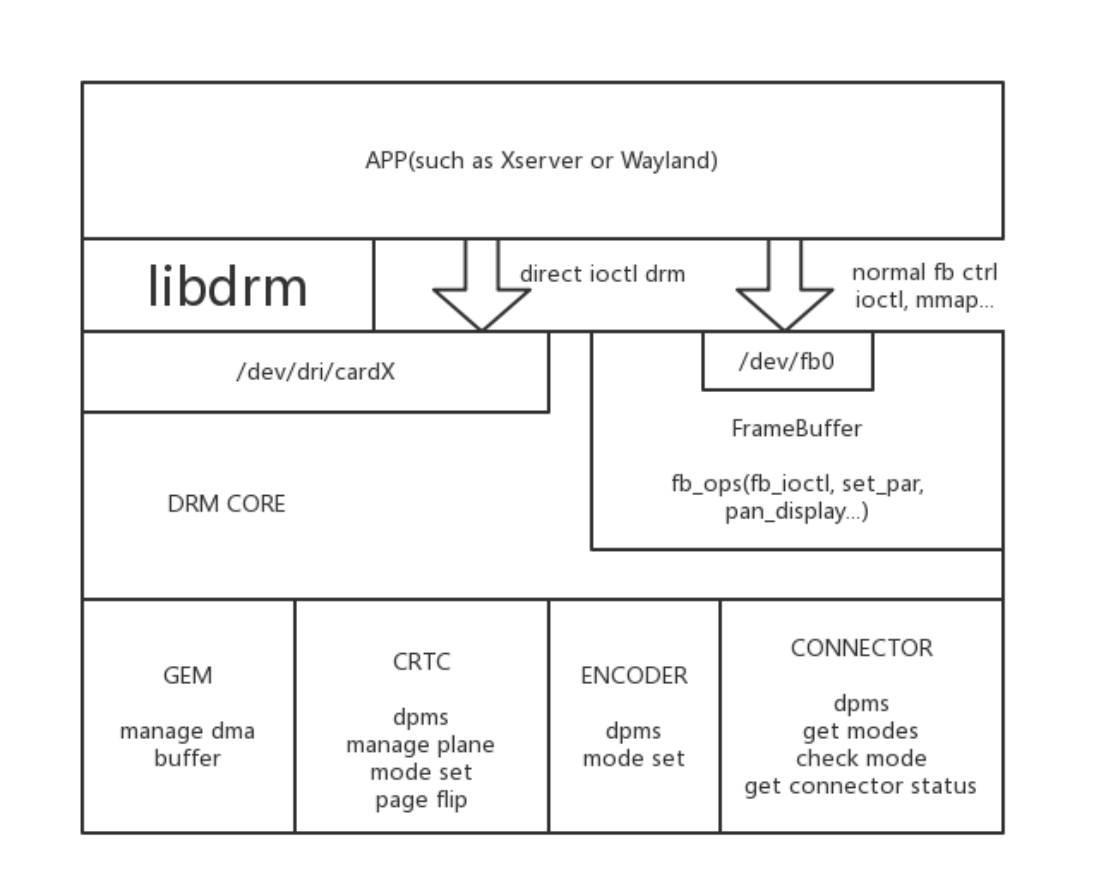
libdrm 预编译包如下:
libdrm
├── libdrm2_2.4.114-1_arm64.deb
├── libdrm2-dbgsym_2.4.114-1_arm64.deb
├── libdrm-common_2.4.114-1_all.deb
├── libdrm-dev_2.4.114-1_arm64.deb
├── libdrm-tests_2.4.114-1_arm64.deb
└── libdrm-tests-dbgsym_2.4.114-1_arm64.deb
补丁如下:
├── 0001-tests-meson.build-disable-nouveau-tests-for-static-b.patch
├── 0002-modetest-Speed-up-dumping-info.patch
├── 0003-HACK-Open-rockchip-drm-device-by-default.patch
├── 0004-HACK-Bypass-auth-APIs-by-default.patch
5.12 libdrm-cursor
这个包主要用于RK3566/RK3568只有AFBC图层的问题,主要三个功能:vop没有鼠标层,支持把overlay当鼠标层使用支持overlay层AFBC格式的显示
限制鼠标超出边界异常的处理drm-cursor 配置功能如下:
$cat /etc/drm-cursor.conf

# Configure file for libdrm-cursor.
#
#debug=
# log-file=
# hide=1 # hide cursors
# atomic=0 # disable atomic drm API
# max-fps=60
# allow-overlay=1 # allowing overlay planes
# prefer-afbc=0 # prefer plane with AFBC modifier supported
# num-surfaces=8 # num of egl surfaces to avoid edge moving corruption
# prefer-plane=65
# prefer-planes=61,65
# crtc-blocklist=64,83
默认 log 在 /var/log/drm-cursor.loglibdrm-cursor 预编译包如下:
libdrm-cursor/
├── libdrm-cursor-dbgsym_1.4.1-1_arm64.deb
├── libdrm-cursor-dev_1.4.1-1_arm64.deb
└── libdrm-cursor_1.4.1-1_arm64.deb
5.13 libmali
libmali 是 ARM Mali GPU 系列的软件开发库,Rockchip 提供了一系列预编译的 libmali Debian 软件包,以简化开发流程。Mali GPU 是一个遵循开放标准的图形加速平台,支持 2D 和 3D 图形渲染以及在 GPU 上执行的通用计算(GPGPU)。Rockchip Linux 系统下的 GPU 支持以下 API:OpenGL ES 1.1、2.0、3.2Vulkan 1.0、1.1OpenCL 2.0注意:虽然支持 OpenGL ES,但不支持完整的 OpenGL API。软件包的命名遵循以下规则:GPU型号-软件版本-硬件版本(如果有区分,如 r1p0 用于区分 RK3288 和RK3288w)-编译选项。在编译选项方面,请注意以下几点:无后缀版本为 x11-gbm,其中 GBM 是基于 DRM 配置的内存管理机制,适用于 EGLFS 程序,不依赖于 X11 或 Wayland显示服务。Wayland 和 Wayland-gbm 版本用于 Wayland 显示环境。dummy版本只要用于基于rockit多媒体开发环境
不同芯片平台支持的 API 类型可能有所不同,具体信息请参考相应芯片手册。
libmali/
├── libmali-valhall-g610-g13p0-dummy-dbgsym_1.9-1_arm64.deb
├── libmali-valhall-g610-g13p0-dummy_1.9-1_arm64.deb
├── libmali-valhall-g610-g13p0-gbm-dbgsym_1.9-1_arm64.deb
├── libmali-valhall-g610-g13p0-gbm_1.9-1_arm64.deb
├── libmali-valhall-g610-g13p0-wayland-gbm-dbgsym_1.9-1_arm64.deb
├── libmali-valhall-g610-g13p0-wayland-gbm_1.9-1_arm64.deb
├── libmali-valhall-g610-g13p0-x11-gbm-dbgsym_1.9-1_arm64.deb
├── libmali-valhall-g610-g13p0-x11-gbm_1.9-1_arm64.deb
...
5.14 rga
Rockchip RGA是一个独立的二维光栅图形加速单元。它加速了二维图形操作,例如点/线绘制、图像缩放、旋转、位图、图像合成等。预编包如下:其中:rga适用于RK kernel4.4等老版本, 主要对应linux-rga仓库的im2d分支。rga2适用于RK kernel4.19、5.10、6.1等新版本, 主要对应linux-rga仓库的multi_rga_im2d_api分支。
rga/
├── librga-dev_2.1.0-1_arm64.deb
├── librga2-deb
└── librga2_2.1.0-1_arm64.deb

rga2
├── librga2_2.2.0-1_arm64.deb
├── librga2-dbgsym_2.2.0-1_arm64.deb
└── librga-dev_2.2.0-1_arm64.deb
5.15 openbox
Openbox 是一个轻量级的 X11 窗口管理器。针对官方版本 Openbox 窗口管理器的改进,增加支持轮廓移动和限制移动间隔的支持。
修改  /home/linaro/.config/openbox/lxde-rc.xml 改为线框,修改drawContents内容:
<drawContents>yes</drawContents>  改为 <drawContents>no</drawContents>

设置moveInterval,来限制窗⼝移动的间隔:
<moveInterval>50</moveInterval>
具体可参考 Openbox预编包如下:
openbox/
└── openbox_3.6.1-10_arm64.deb
5.16 pcmanfm
是一款轻量级的文件管理器,主要用于轻量级的桌面环境,如 LXDE (轻量级 X11 桌面环境)。基于官方版本增加轮廓的支持。预编包如下:
pcmanfm/
├── pcmanfm_1.3.2-1_arm64.deb
└── pcmanfm-dbgsym_1.3.2-1_arm64.deb
5.17 pipewire
Pipewire是一个开源的多媒体服务框架,旨在为现代 Linux 系统提供灵活、低延迟的音频和视频管道。PipeWire 被设计为取代旧的多媒体框架,如 PulseAudio 和 JACK 音频连接套件,提供了一个更现代化、更高效的解决方案。更新pipewire包主要为了Debian12官方版本有录音杂音问题,具体参考官方bug。预编包如下:
pipewire/
└── libspa-0.2-modules_0.3.65-3+deb12u1_arm64.deb
5.18 wireplumber
WirePlumber 是一个开源的音频和视频路由工具,它基于 PipeWire 框架构建。提供了一个灵活的管道系统,用于处理音频和视频流。官方版本修改主要为了适配声音自动切换功能。预编包如下:
wireplumber/
├── gir1.2-wp-0.4_0.4.13-1_arm64.deb
├── libwireplumber-0.4-0_0.4.13-1_arm64.deb
├── libwireplumber-0.4-0-dbgsym_0.4.13-1_arm64.deb
├── libwireplumber-0.4-dev_0.4.13-1_arm64.deb
├── wireplumber_0.4.13-1_arm64.deb
├── wireplumber-dbgsym_0.4.13-1_arm64.deb
└── wireplumber-doc_0.4.13-1_all.deb
5.19 rkaiq
全称Rockchip Automatic Image Quality, 自动调整图像信号处理器。主要实现Camera 3A效果,适用于ISP2.x的芯片,比如RK3588、RK3576、RK356X等芯片。预编译包如下:
rkaiq/
├── camera_engine_rkaiq_rk3562_arm64.deb ##适⽤RK3562系列芯⽚
├── camera_engine_rkaiq_rk3568_arm64.deb ##适⽤RK3566/RK3568系列芯⽚
├── camera_engine_rkaiq_rk3576_arm64.deb ##适⽤RK3576系列芯⽚
└── camera_engine_rkaiq_rk3588_arm64.deb ##适⽤RK3588系列芯⽚
5.20 rkisp
全称Rockchip Image Signal Processor, 图像信号处理器。主要实现Camera 3A效果,适用于ISP1.X的芯片,比如RK3288、RK3399、RK3326、PX30等芯片。预编译包如下:
rkisp/
└──  camera_engine_rkisp_v2.3.0_arm64.deb
5.21 rknpu2
全称Rockchip Neural Processing Unit,神经网络处理单元。 RKNPU,用戶需要首先在计算机上运行RKNN-Toolkit2 工具,将训练好的模型转换为 RKNN 格式模型,之后使用 RKNN C API 或 Python API在开发板上进行部署。RKNN 软件栈可以帮助用戶快速的将 AI 模型部署到 Rockchip 芯片。目前可用于RK356X、RK3576、RK3588等芯片上。集成包如下:
rknpu2/
└── rknpu2.tar
5.22 rkwifibt
基于Rockchip平台调试过WIFI-BT相关模块,里面包含Firmware、工具、配置文件等。预编译包如下:
rkwifibt/
├── rkwifibt-broadcom-firmware_1.0.0-1_arm64.deb
├── rkwifibt-dev-tools-dbgsym_1.0.0-1_arm64.deb
└── rkwifibt-dev-tools_1.0.0-1_arm64.deb
5.23 rktoolkit
rktoolkit是Rockchip一些专用toolkit, 比如io/update/vendor_storage/modetest/stressapptest/memtester/vendor_storage 等:预编译包如下:
rktoolkit/
├── rktoolkit_1.0.0-1_arm64.deb
└── rktoolkit-dbgsym_1.0.0-1_arm64.deb
5.24 xserver
X server是Linux系统里面图形接口服务器的简称,常⻅的Linux界面操作环境有XFCE、KDE和GNOME,为它们提供系统支持的就是X server。目前Debian使用轻量级的LXDE/XFCE桌面坏境。Linux目前很多款桌面环境和窗口管理器对比如下:
| 桌面环境/窗口管理器 | 内存使用 | CPU使用率 | 类型 |
|---|---|---|---|
| KDE 4.6 | 363MB | 4% | 桌面环境 |
| Unity | 271MB | 14% | 桌面环境 |
| GNOME 3 | 193MB | 10% | 桌面环境 |
| GNOME 2.x | 191MB | 1% | 桌面环境 |
| XFCE 4.8 | 144MB | 10% | 桌面环境 |
| LXDE | 85MB | 10% | 桌面环境 |
| IceWM | 85MB | 2% | 桌面环境 |
| Enlightenment (E17 Standard) | 72MB | 1% | 窗口管理器 |
| Fluxbox | 69MB | 1% | 窗口管理器 |
| OpenBox | 60MB | 1% | 窗口管理器 |
| JWM | 58MB | 1% | 窗口管理器 |
Rockchip 提供的 X Server 具备以下增强功能:指定显卡:允许用戶手动指定显卡或核显,通过 OutputClass 部分,指定了使用 “rockchip” 驱动的设备作为主GPU,以避免自动枚举导致的显示异常。硬件加速:支持 glamor 和 exa 两种加速模式。glamor 利用 GPU 进行渲染合成,而 exa 则通过 Rockchip RGA 2D硬件实现渲染合成(默认exa被注释掉,如需使用需取消注释)。这些设置通常在/etc/X11/xorg.conf.d/20-modesetting.conf 文件中进行配置。防撕裂功能:
通过设置 FlipFB 为 “always”,始终开启防撕裂功能,以避免屏幕撕裂现象,但可能会带来最多 50% 的性能损失。性能优化:被注释掉的 MaxFlipRate 选项可以用来限制刷新率和丢帧,以减少性能损失。EDID 禁用:设置 NoEDID 为 “true”,禁用 EDID,这通常用于当显示器的 EDID 信息不准确时。Gamma 校正:启用 UseGammaLUT,允许使用 Gamma 校正查找表(LUT),以改善颜色显示。虚拟屏幕尺寸:被注释掉的 VirtualSize 选项可以用来设置虚拟屏幕尺寸,通过 VOP 硬件进行缩放。物理显示填充:被注释掉的 Padding 选项可以用来设置物理显示的填充,以调整屏幕边缘的空白区域。屏幕和监视器设置:定义了一个默认的屏幕和监视器,将它们与之前定义的设备关联,并设置了默认的旋转模式为”normal”。用戶可以通过配置文件中的 Rotate 选项设置屏幕为正常(normal)、向左(left)、向右(right)等旋转模式。具体配置文件说明如下:
### Use Rockchip DRM driver
Section "OutputClass"
    Identifier  "RockchipDRM"
    MatchDriver "rockchip"
    Option      "PrimaryGPU"     "yes"
EndSection

Section "Device"
    Identifier  "Rockchip Graphics"
    Driver      "modesetting"

### Use Rockchip RGA 2D HW accel
#    Option      "AccelMethod"    "exa"

### Use GPU HW accel
    Option      "AccelMethod"    "glamor"

    Option      "DRI"            "2"

### Set to "always" to avoid tearing, could lead to up 50% performance loss
    Option      "FlipFB"         "always"

### Limit flip rate and drop frames for "FlipFB" to reduce performance lost
#    Option      "MaxFlipRate"    "60"

    Option      "NoEDID"         "true"
    Option      "UseGammaLUT"    "true"
### Set virtual screen size (scaled by VOP hardware)
#    Option "VirtualSize" "DSI-1:600x1080"

### Set physical display paddings <top,bottom,left,right>
#    Option "Padding" "DSI-1:180,300,300,540"

EndSection

Section "Screen"
    Identifier  "Default Screen"
    Device      "Rockchip Graphics"
    Monitor     "Default Monitor"
EndSection

### Valid values for rotation are "normal", "left", "right"
Section "Monitor"
    Identifier  "Default Monitor"
    Option      "Rotate"         "normal"
EndSection
预编译包如下:
Debian10 xserver/
├── xserver-common_1.20.4-1+deb10u3_all.deb
├── xserver-xorg-core-dbgsym_1.20.4-1+deb10u3_arm64.deb
├── xserver-xorg-core_1.20.4-1+deb10u3_arm64.deb
├── xserver-xorg-dev_1.20.4-1+deb10u3_arm64.deb
├── xserver-xorg-legacy-dbgsym_1.20.4-1+deb10u3_arm64.deb
└── xserver-xorg-legacy_1.20.4-1+deb10u3_arm64.deb

Debian11 xserver/
├── xserver-common_1.20.11-1_all.deb
├── xserver-xorg-core-dbgsym_1.20.11-1_arm64.deb
├── xserver-xorg-core_1.20.11-1_arm64.deb
├── xserver-xorg-dev_1.20.11-1_arm64.deb
├── xserver-xorg-legacy-dbgsym_1.20.11-1_arm64.deb
└── xserver-xorg-legacy_1.20.11-1_arm64.deb

Debian12 xserver/
├── xserver-common_21.1.7-3_all.deb
├── xserver-xorg-core-dbgsym_21.1.7-3_arm64.deb
├── xserver-xorg-core_21.1.7-3_arm64.deb
├── xserver-xorg-dev_21.1.7-3_arm64.deb
├── xserver-xorg-legacy-dbgsym_21.1.7-3_arm64.deb
└── xserver-xorg-legacy_21.1.7-3_arm64.deb
启动log在 /var/log/Xorg* Xserver具体版本,可以通过如下方式确认:
root@linaro-alip:~# cat /var/log/Xorg.0.log |grep "X.Org X Server"
X.Org X Server 1.20.11
Rockchip修改对应的提交可以通过如下方式确认:
root@linaro-alip:~# cat /var/log/Xorg.0.log |grep xorg-server
[    26.786] xorg-server f805fe554 modesetting: Filter out invalid format
modifiers (https://www.debian.org/support)
5.25 weston
Weston 是一个基于 Wayland 协议的参考实现,它是一个开源的显示服务器。基于官方版本修改主要如下:动态屏幕状态管理(分辨率、旋转、开关、冻结、位置)配置鼠标大小,原生鼠标在高分辨率屏幕下比较小桌面图标高效VNC屏幕共享镜像模式支持用戶层虚拟VT支持裁剪屏开机动画预编译包如下:
weston/
├── libweston-10-0_10.0.1-1_arm64.deb
├── libweston-10-0-dbgsym_10.0.1-1_arm64.deb
├── libweston-10-dev_10.0.1-1_arm64.deb
├── weston_10.0.1-1_arm64.deb
└── weston-dbgsym_10.0.1-1_arm64.deb
5.26 wayland
Wayland 是一个新的开源显示协议,为传统的 X Window System(广泛称为 X11)提供了一个先进的替代选择。在最新的官方版本基础上,我们进行了关键的功能增强,包括对 wayland-egl 以及在 Wayland客戶端中新增了 socket 等待功能支持。预编译包如下:
wayland
├── libwayland-bin_1.21.0-1_arm64.deb
├── libwayland-client0_1.21.0-1_arm64.deb
├── libwayland-cursor0_1.21.0-1_arm64.deb
├── libwayland-dev_1.21.0-1_arm64.deb
├── libwayland-egl1_1.21.0-1_arm64.deb
├── libwayland-egl-backend-dev_1.21.0-1_arm64.deb
└── libwayland-server0_1.21.0-1_arm64.deb
6. Debian开发基础能力
6.1 Debian软件包重构
Debian第三方软件包修改并重新打包步骤如下:
- apt-get build-dep <pkg> ##安装编译依赖包
- apt source <pkg> ##下载 <pkg> 包的源码
- 创建git,打补丁
- dpkg-buildpackage -b -uc -us -d ## 重新打包编译比如:更改Xserver软件包,修改并重新打包deb,方法如下注意确认 /etc/apt/sources.list 中deb-src开启, 另外更新源 apt update
- 安装依赖包
`apt-get build-dep xorg-server-source`

- 下载Xorg-xserver源码
`apt source xorg-server-source`

- 创建git,打补丁
$ cd xorg-server_*
$ git init && git add .
$ git commit -s "xxxxx"

- 开始编译打包deb
dpkg-buildpackage -b -uc -us -d
6.2 Debian docker构建
支持通过PC环境来构建Docker编译相关源码,并打包成deb便于集成到系统中。具体参考文档 <SDK>/docs/cn/Linux/Docker/Rockchip_Developer_Guide_Debian_Docker_CN.pdf
6.3 Debian分区管理
Debian系统支持开机check\resize\mount rootfs/oem/userdata等分区处理。系统中增加resize-all.service相关服务,支持各格式分区的resize功能。系统服务在 /lib/systemd/system/resize-all.service 和 主要执行文件是 /usr/bin/resize-helper 和 /usr/bin/disk-helper其中调试log在 /var/log/resize-all.log ,比如下:
root@linaro-alip:~# cat /var/log/resize-all.log
Start resizing all internal mounted partitions
Log saved to /var/log/resize-all.log
[19]: Handling /dev/sda8 /userdata ext4 rw,relatime,stripe=128
[18]: Handling /dev/sda7 /oem ext4 rw,relatime
[0]: Handling /dev/sda6 / ext4 rw,relatime
[19]: Already resized /dev/sda8(ext4)
[18]: Already resized /dev/sda7(ext4)
[0]: Already resized /dev/sda6(ext4)
挂载分区方面,正常Kernel cmdline root=PARTUUID=614e0000-0000会被rootfs挂载在根目录,oem/userdata写在 /etc/fstab 中systemd启动时候会挂载处理。
root@linaro-alip:/# cat /etc/fstab
/* <file system> <mount point>   <type>  <options>       <dump>  <pass> */
proc    /proc   proc    defaults        0 0
devtmpfs        /dev    devtmpfs        defaults        0 0
devpts  /dev/pts        devpts  mode=0620,ptmxmode=0666,gid=5   0 0
tmpfs   /dev/shm        tmpfs   nosuid,nodev,noexec     0 0
sysfs   /sys    sysfs   defaults        0 0
debugfs /sys/kernel/debug       debugfs defaults        0 0
pstore  /sys/fs/pstore  pstore  defaults      0 0
PARTLABEL=oem   /oem    ext4    defaults      0 2
PARTLABEL=userdata      /userdata       ext4  defaults  0 2

⽂件系统:设备名或UUID,也可以是⽹络⽂件系统(NFS)的路径。
挂载点:⽂件系统的挂载点,例如 / 或 /mnt/mydrive。
⽂件系统类型:如 ext4、ntfs、swap 等。
挂载选项:挂载时使⽤的选项,例如 defaults、ro(只读)、noatime 等。多个选项之间⽤逗号分隔。
dump:此字段⽤于 dump 命令,通常设置为 0,表⽰不需要备份。
pass:此字段⽤于 fsck 命令,数字表⽰ fsck 检查的顺序。根⽂件系统通常是 1,其他⽂件系统是 2,设
置为 0 表⽰不检查。
6.4 Debian图形适配方案
目前主要支持X11和Wayland的显示架构,主要使用组合如下:X11系统默认适配组合:
xfce4/lxde + xserver + lightdm
WAYLAND系统默认适配组合:
Weston+Wayland或gnome + Wayland + gdm3
6.4.1 显示架构适配方案
X11/Xserver目前搭配是LXDE/XFCE轻量级桌面环境,桌面管理器使用lightdmGNOME作为主流桌面环境,主要与WAYLAND显示服务器协议配合使用,并通过gdm3桌面管理器进行配置。若要测试WAYLAND相关的演示程序,可以切换至Weston桌面环境,这与SDK中通过Buildroot或Yocto构建的桌面系统相同。
6.4.2 窗口管理适配方案
OpenboxOpenbox项目是一套完全遵循标准的快速、轻型、可扩展性强的窗口管理器。Openbox 3系列是一套全新的窗口管理器,没有继承以前任何一款同类软件的代码,尽管外观上还是很像Blackbox(Openbox 2系列的代码是基于Blackbox 0.65.0)。Openbox可以作为一个独立的运行环境,同时也可以仅仅作为窗口管理器来替代像KDE、Gnome等桌面环境的默认窗口管理器。KWinKWin是X Window系统中的一个窗口管理器。 构成K桌面环境(KDE)的一部分 ,虽然它可以单独使用或用于其他的桌面环境。在KDE 4中,KWin加入了组合模式和OpenGL的支持。XfwmXfwm4 是 Xfce4 的原生的窗口管理器,它使用一种简单而灵活基于像素图的主题引擎,使用 .xpm 格式的图像。Xfwm4 还使用一个文本文件,配置其他选项。此外,你还可以选用 gtk 主题颜色。
6.4.3 桌面坏境适配方案
GNOMEGNOME 3作为GNOME 新版本,较GNOME 2.x变革明显。GNOME 3相对直观,可在左上⻆点击“活动”或划动查看应用、工作分区等。目前,Debian等发行版本采用GNOME 3 作为默认桌面环境。KDEKDE 有类windows的“开始菜单”界面华丽。 许多发行版本如OpenSUSE, PCLinuxOS和 Mandriva等皆采用KDE作为默认桌面环境。XFCE占用资源较GNOME ,KDE较少。适合轻量级桌面。与windows界面环境类似。LXDELXDE也位列四大桌面环境之一,轻量级桌面,占用资源较少。
6.4.4 Chromium适配方案
Chromium浏览器支持多种视频格式,包括H264、VP8、VP9、AV1等。从Chromium 105版本开始,它增加了对H265视频格式的支持。目前在Debian系统中,已经集成了对Chromium视频硬解的支持,通过定制的Chromium版本、V4L2插件以及MPP高效硬解实现。定制Chromium主要修改如下:修改chromium开启v4l2 vda支持,以及相关补丁添加v4l2 mpp plugin缺点是:a、解码只支持vp8、h264、h265、vp9、av1b、编码只支持vp8和h264c、需要修改编译chromium(调通yocto完整编译流程)目前我们提供chromium wayland补丁,在yocto、buildroot等系统上支持大致流程是chromium使能V4L2 VDA/VEA,开机创建虚拟v4l2节点,chromium对虚拟设备操作会被v4l-utils拦截到v4l-rkmpp插件,转换为对mpp接口的调用。
6.4.4.1 版本
root@linaro-alip:~# chromium --version
Chromium 126.0.6478.126 stable
6.4.4.2 如何测试
用如下命令可进行测试:
chromium --no-sandbox file:///usr/local/test.mp4
具体测试脚本在 /rockchip-test/chromium/test_chromium_with_video.sh
root@linaro-alip:~# /rockchip-test/chromium/test_chromium_with_video.sh
mpp[3048]: mpp_info: mpp version: 48962a10 author: Hongjin Li    2024-09-19
fix[avsd]: Fix attach dev error issue
[   73.431901] rk_vcodec: 27b00100.rkvdec:0 session 3129:1 time: 2893 us hw 2681
us
[   73.434160] rk_vcodec: 27b00100.rkvdec:0 session 3129:1 time: 2169 us hw 1935
us
[   73.437078] rk_vcodec: 27b00100.rkvdec:0 session 3129:1 time: 1500 us hw 1400
us
[   73.440013] rk_vcodec: 27b00100.rkvdec:0 session 3129:1 time: 1526 us hw 1497
us
[   73.441579] rk_vcodec: 27b00100.rkvdec:0 session 3129:1 time: 1345 us hw 1314
us
...
Linux4.19/5.10/6.1+可以通过如下命令check是否调用硬解
export mpp_syslog_perror=1
echo 0x100 > /sys/module/rk_vcodec/parameters/mpp_dev_debug
Linux4.4可以通过如下命令check是否调用硬解
export mpp_syslog_perror=1
echo 0x4 > /sys/module/rk_vcodec/parameters/debug
6.4.4.3 如何调试
如果遇到一些问题,开启如下开关获得更多log进行调试。
export mpi_debug=1
export mpp_debug=1
export h264d_debug=1
可以实际看下GPU使用率来确定硬加速是否有用起来:
cat /sys/devices/platform/*gpu/utilisation
如果加速或硬解没用起来,需具体分析下原因,比如是GPU相关问题,libv4l适配的问题或一些权限的其他问题。比如在 /etc/init.d/rockchip.sh 中创建相关设备节点
/* Create dummy video node for chromium V4L2 VDA/VEA with rkmpp plugin */
echo dec > /dev/video-dec0
echo enc > /dev/video-enc0
chmod 660 /dev/video-*
chown root.video /dev/video-*

/* The chromium using fixed pathes for libv4l2.so */
ln -rsf /usr/lib/*/libv4l2.so /usr/lib/
[ -e /usr/lib/aarch64-linux-gnu/ ] && ln -Tsf lib /usr/lib64
还有 /etc/udev/rules.d/99-rockchip-permissions.rules 相关内核节点权限的处理, 比如下:
ACTION=="remove", GOTO="permissions_end"

/* VPU devices */
KERNEL=="avsd", MODE="0660", GROUP="video"
KERNEL=="vepu", MODE="0660", GROUP="video"
KERNEL=="h265e", MODE="0660", GROUP="video"
KERNEL=="rkvdec", MODE="0660", GROUP="video"
KERNEL=="rkvenc", MODE="0660", GROUP="video"
KERNEL=="mpp_service", MODE="0660", GROUP="video"
KERNEL=="vpu[_-]service", MODE="0660", GROUP="video"
KERNEL=="hevc[_-]service", MODE="0660", GROUP="video"

/* RGA device */
KERNEL=="rga", MODE="0660", GROUP="video"

/* MALI devices (/dev/mali for mali400) */
KERNEL=="mali*", MODE="0660", GROUP="video"
6.4.4.4 性能测试
默认显示使用GPU加速模式, 视频硬解大致流程是chromium使能V4L2 VDA/VEA,开机创建虚拟v4l2节点,chromium对虚拟设备操作会被v4l-utils拦截到v4l-rkmpp插件,转换为对mpp接口的调用 。常用网⻚测试浏览器有如下:ARES-6ARES-6 测量 JavaScript 最新特性的执行时间,快速启动和流畅运行的浏览器更具有优势。Basemark Web 3.0Basemark Web 3.0 是一个全面的网络浏览器性能基准测试,用于测试您的浏览器运行Web应用程序的能力,测量真实世界的客戶端性能以检测浏览器瓶颈。JetStream 2JetStream 2 是一个 JavaScript 和 WebAssembly 基准测试套件,专注于最先进的 Web 应用程序。那些快速启动、快速执行代码和流畅运行的浏览器得分更高。MotionMark 1.2MotionMark 是一种图形基准测试,用于衡量浏览器以目标帧速率为复杂场景制作动画的能力。OctaneOctane是早期通用的 JavaScript 性能基准测试,已被淘汰。的确能衡量JS引擎性能,但并不能真实反映JS引擎对于现代网⻚应用的优化。针对 Octane 进行的优化通常对现实世界的网⻚缺乏影响,并且在某些情况下,这些优化会使现实世界的网站变慢。Speedometer 2.1Speedometer 是一个浏览器基准测试,用于测量 Web 应用程序的响应能力。它使用演示 Web 应用程序来模拟用戶操作,例如添加待办事项。相比Octane,Speedometer更能真实的反映JS引擎对于现代网⻚应用的优化。
6.4.4.5 其他信息获取
需要更多chromium信息,可以在网址中输入chrome://about获取。
List of Chrome URLs
chrome://about
...
chrome://flags
chrome://gcm-internals
chrome://gpu
chrome://help
chrome://histograms
chrome://history
chrome://indexeddb-internals
chrome://inspect
chrome://interstitials
chrome://invalidations
chrome://settings
chrome://version
chrome://webrtc-internals
chrome://webrtc-logs
List of chrome://internals pages
chrome://internals/web-app

For Debug
The following pages are for debugging purposes only. Because they crash or hang
the renderer, they're not linked directly; you can type them into the address bar
if you need them.

chrome://badcastcrash/
chrome://memory-exhaust/
chrome://memory-pressure-critical/
chrome://memory-pressure-moderate/
...
chrome://quit/
chrome://restart/
6.4.5 Debian Panfrost适配方案
参考Debian官方 Panfrost适配
6.5 Debian音视频适配方案
先介绍rockchip平台上视频编解码大概的流程
vpu_service  -->  mpp --> GStreamer/rockit --> app
vpu_service: 驱动
mpp: rockchip平台的视频编解码中间件,相关说明参考mpp⽂档
GStreamer/rockit: 对接app等组件
目前Debian系统上主要用GStreamer来对接app和编解码组件。编解码功能, 也可以直接通过mpp提供测试接口进行测试 (比如mpi_dec_test\mpi_enc_test…)mpp源码参考 <SDK>/external/mpp/测试demo参考: <SDK>/external/mpp/test具体参考SDK文档Rockchip_Developer_Guide_MPP_CN.pdf
6.5.1 音频Pulseaudio通路适配
默认音频使用pulseaudio, 正常只要配置 /etc/pulse/default.pa目前SDK中适配 ES8388和RK809两款Codec
+set-default-source alsa_input.platform-es8388-
sound.HiFi__hw_rockchipes8388__source
+set-default-sink alsa_output.platform-es8388-sound.HiFi__hw_rockchipes8388__sink
+set-default-source alsa_input.platform-rk809-
sound.HiFi__hw_rockchiprk809__source
+set-default-sink alsa_output.platform-rk809-sound.HiFi__hw_rockchiprk809__sink
如果需要添加更多Codec支持,通过以下命令获取相关信息
pactl list sinks short
pactl list sources short
具体参考 Debian官方Pulseaduio和<SDK>/docs/Common/AUDIO/Rockchip_Developer_Guide_PulseAudio_CN.pdf
6.5.2 MPP、VPU适配
默认MPP预编成deb集成在
/usr/lib/aarch64-linux-gnu/librockchip_mpp.so
/usr/lib/aarch64-linux-gnu/librockchip_mpp.so.0
/usr/lib/aarch64-linux-gnu/librockchip_mpp.so.1
同时确保内核有 /dev/mpp_service 相关节点。具体参考 <SDK>/docs/Linux/Multimedia/Rockchip_Developer_Guide_MPP_CN.pdf
6.5.3 Gstreamer适配
具体参考 <SDK>/docs/Linux/Multimedia/Rockchip_User_Guide_Linux_Gstreamer_CN.pdf
6.5.4 Rockit适配
具体参考 <SDK>/docs/Linux/Multimedia/Rockchip_User_Guide_Linux_Rockit_CN.pdf
6.6 Debian网络适配方案
6.6.1 RKWIFIBT适配
具体参考 <SDK>/docs/Linux/Wifibt/Rockchip_Developer_Guide_Linux_WIFI_BT_CN.pdf
6.7 Debian摄像头适配方案
默认系统使用的webcam应用程序是cheese, 调用 GStreamer->mpp->vpu 从而实现Rockchip平台的编解码的实现。如果不需要cheese, 也集成Gstreamer直接调用usb camera和适配Rockchip的3A效果的mipi/csi camera。 比如测试脚本如下:
/rockchip-test$ tree -L 1 camera/
camera/
├── camera_rkaiq_test.sh
├── camera_rkisp_test.sh
├── camera_stresstest.sh
├── camera_test.sh
└── camera_usb_test.sh
6.7.1 Cheese适配
Cheese 是一款在 Debian 系统下使用的摄像头应用程序,它提供了一些有趣的特性,例如应用实时特效、拍照和录制视频。Cheese 支持几乎所有常⻅的摄像头类型,包括内置摄像头和 USB 摄像头。以下是 Cheese 的一些特点:实时特效:Cheese 允许你在拍摄照片或录制视频时应用实时特效。这些特效包括黑白、漫画、⻥眼、油画等。拍照和录制视频:Cheese 允许你使用摄像头拍照和录制视频,并且支持多种不同的分辨率和视频格式。自动保存:Cheese 可以自动保存你拍摄的照片和录制的视频。你也可以手动选择保存位置和文件名。视频预览:Cheese 提供实时的视频预览,方便你在拍摄前预览效果。兼容性:Cheese 支持几乎所有常⻅的摄像头类型,包括内置摄像头和 USB 摄像头。为了适配cheese app, 处理以下遇到的相关问题。
6.7.1.1 Cheese无法获取有效的设备节点
Cheese默认优先会从video*相关名字寻找有效设备,Rockchip ISP实际设备名信息如下 (有rkisp_mainpath, rkisp_selfpath等)。
root@rk3568:~# grep '' /sys/class/video4linux/video*/name
/sys/class/video4linux/video0/name:rkisp_mainpath
/sys/class/video4linux/video1/name:rkisp_selfpath
/sys/class/video4linux/video2/name:rkisp_rawwr0
/sys/class/video4linux/video3/name:rkisp_rawwr2
/sys/class/video4linux/video4/name:rkisp_rawwr3
/sys/class/video4linux/video5/name:rkisp_rawrd0_m
/sys/class/video4linux/video6/name:rkisp_rawrd2_s
/sys/class/video4linux/video7/name:rkisp-statistics
/sys/class/video4linux/video8/name:rkisp-input-param
目前通过Gstreamer v4l2插件过滤解决。
在 /etc/profile.d/gst.sh 中设置相关环境变量:
# Default device for v4l2src
export GST_V4L2SRC_DEFAULT_DEVICE=/dev/video-camera0

# Available RK devices for v4l2src
export GST_V4L2SRC_RK_DEVICES=_mainpath_selfpath:_bypass:_scale
6.7.1.2 Cheese打开高分辨率摄像头会丢帧问题
Cheese打开imx415时候,mipi sensor会丢帧,有如下现象
root@linaro-alip:/# cheese -d rkisp_mainpath

[  488.510646] rkisp0-vir0: MIPI drop frame
[  488.544222] rkisp0-vir0: MIPI drop frame
[  488.577718] rkisp0-vir0: MIPI drop frame
[  488.611408] rkisp0-vir0: MIPI drop frame
[  488.644975] rkisp0-vir0: MIPI drop frame
[  488.678581] rkisp0-vir0: MIPI drop frame

Output     rkisp_mainpath Format:UYVY Size:4672x3504
看设备获取的Size是4672x3504超过我们硬件支持范围。目前通过Gstreamer v4l2插件限制ISP的mp最大输出是3840x2160在 /etc/profile.d/gst.sh 中设置相关环境变量:
# Max resolution for v4l2src
export GST_V4L2SRC_MAX_RESOLUTION=3840x2160
6.7.1.3 Cheese获取相关格式异常
有些格式可能在ISP驱动中存在不支持的情况,例如,尽管内核ISP驱动报告支持某些格式,但实际上,其中很可能还有一部分格式是不支持的。比如:
root@linaro-alip:~# v4l2-ctl --list-formats-ext -d /dev/video8
ioctl: VIDIOC_ENUM_FMT
        Type: Video Capture Multiplanar

        [0]: 'UYVY' (UYVY 4:2:2)
                Size: Stepwise 32x16 - 4672x3504 with step 8/8
        [1]: '422P' (Planar YUV 4:2:2)
                Size: Stepwise 32x16 - 4672x3504 with step 8/8
        [2]: 'NV16' (Y/CbCr 4:2:2)
                Size: Stepwise 32x16 - 4672x3504 with step 8/8
...
目前测试NV12和N16等格式正常,但I420格式显示内容异常,可能会存在很多格式不支持的情况。早期Windows应用程序通常优先选择RGB格式,如果ISP驱动程序上报支持RGB格式但实际上不支持,会导致许多应用程序出现异常。解决方案: 目前通过Gstreamer v4l2环境变量优先选择支持的格式在 /etc/profile.d/gst.sh 中设置相关环境变量:
# Preferred formats for videoconvert
export GST_VIDEO_CONVERT_PREFERRED_FORMAT=NV12:NV16:I420:YUY2
6.7.1.4 Cheese录像卡死问题
在Cheese中,硬编码使用的是软件vp8enc,但是它会导致原生pulseaudio出现问题并卡死。解决方案:目前通过GStreamer增加软件vp8enc编码的支持和更新pulseaudio在 /etc/profile.d/gst.sh 中设置相关环境变量:
export GST_MPP_VP8ENC_FAKE_VP8ENC=1
6.7.1.5 Cheese录像使用mpp编码
Cheese默认会使用vvp8enc软件编码,性能比较差, 默认修改如下代码:强制使用rockchip mpp中的mppvp8enc的硬编码
--- a/libcheese/cheese-camera.c
+++ b/libcheese/cheese-camera.c
@@ -442,7 +442,7 @@ cheese_camera_set_video_recording (CheeseCamera *camera,
GError **error)
   gboolean res;
   /* Check if we can use global preset for vp8enc. */
-  video_enc = gst_element_factory_make ("vp8enc", "vp8enc");
+  video_enc = gst_element_factory_make ("mppvp8enc", "vp8enc");
   video_preset = (gchar *) &CHEESE_VIDEO_ENC_PRESET;
   res = gst_preset_load_preset (GST_PRESET (video_enc), video_preset);
可以这么确认:
root@linaro-alip:/# gst-inspect-1.0 |grep vp8
vpx:  vp8dec: On2 VP8 Decoder
vpx:  vp8enc: On2 VP8 Encoder
rtp:  rtpvp8depay: RTP VP8 depayloader
rtp:  rtpvp8pay: RTP VP8 payloader
rockchipmpp:  mppvp8enc: Rockchip Mpp VP8 Encoder
下面是Rockchip芯片编码的支持情况.编码能力规格表
| 芯片名称 | H264 | H265 | VP8 |
|---|---|---|---|
| RK3588 | 7680x4320@30f | 7680x4320@30f | 1920x1088@30f |
| RK3566/RK3568 | 1920x1088@60f | 1920x1088@60f | N/A |
| RK3562 | 1920x1088@60f | N/A | N/A |
| RK3399 | 1920x1088@30f | N/A | 1920x1088@30f |
| RK3328 | 1920x1088@30f | 1920x1088@30f | 1920x1088@30f |
| RK3288 | 1920x1088@30f | N/A | 1920x1088@30f |
| RK3326 | 1920x1088@30f | N/A | 1920x1088@30f |
| PX30 | 1920x1088@30f | N/A | 1920x1088@30f |
| RK312X | 1920x1088@30f | N/A | 1920x1088@30f |
6.7.1.6 如何更改Cheese图片和视频存储路径
默认图像或视频存储路径在 ·~/.gnome2/cheese 目录下。 如果需要更改路径, 按如下方式更改:
cat << EOF >~/.config/user-dirs.dirs
> #!/bin/bash
> XDG_DESKTOP_DIR="$HOME/Desktop"
> XDG_DOWNLOAD_DIR="$HOME/Downloads"
> XDG_TEMPLATES_DIR="$HOME/Templates"
> XDG_PUBLICSHARE_DIR="$HOME/Public"
> XDG_DOCUMENTS_DIR="$HOME/Documents"
> XDG_MUSIC_DIR="$HOME/Music"
> XDG_PICTURES_DIR="$HOME/Pictures"
> XDG_VIDEOS_DIR="$HOME/Videos"
> EOF
其中 XDG_VIDEOS_DIR 是视频路径, XDG_PICTURES_DIR 是图片路径。
6.7.2 rkisp适配
支持ISP1.X主要适用于RK3399/RK3288/PX30/RK3326等芯片
rkisp/
└── camera_engine_rkisp-v2.2.0_arm64.deb
6.7.3 rkaiq适配
支持ISP21/30/32-Lite等不同版本ISP, 主要适用于RK3566/RK3568/RK3588/RK3562等芯片
rkaiq/
├── camera_engine_rkaiq_rk3562_arm64.deb
├── camera_engine_rkaiq_rk3568_arm64.deb
└── camera_engine_rkaiq_rk3588_arm64.deb
6.7.3.1 RKAIQ调试
确认rkaiq版本以及相关log
root@linaro-alip:/# cat /var/log/syslog |grep rkaiq
...
Jun 18 17:37:50 linaro-alip rkaiq: ************************** VERSION INFOS
**************************
Jun 18 17:37:50 linaro-alip rkaiq: version release date: 2023-10-07
Jun 18 17:37:50 linaro-alip rkaiq:          AIQ:       AIQ v5.0x4.0
Jun 18 17:37:50 linaro-alip rkaiq:    IQ PARSER:       Calib
v1.4.8,magicCode:1170944
Jun 18 17:37:50 linaro-alip rkaiq: ************************ VERSION INFOS END
************************
rkaiq服务有没有起来root@linaro-alip:/# ps aux |grep rkaiqroot 2339 0.0 0.4 163020 8076 ? Sl 17:37 0:00 /usr/bin/rkaiq_3A_serverroot 2340 0.0 0.0 8508 1240 ? S 17:37 0:00 logger -t rkaiqroot 2699 0.0 0.0 6264 604 ttyFIQ0 S+ 17:42 0:00 grep rkaiq内核ISP调试debug logecho 3 > /sys/module/video_rkisp/parameters/debugecho 3 > /sys/module/video_rkcif/parameters/debugrkaiq debug logAE模块log:echo 0x1ff4 > /tmp/.rkaiq_logAWB模块log:echo 0x2ff4 > /tmp/.rkaiq_logAF模块log:echo 0x4ff4 > /tmp/.rkaiq_logHDR模块log:echo 0x20ff3 > /tmp/.rkaiq_logNR模块log:echo 0x40ff4 > /tmp/.rkaiq_log
root@linaro-alip:/# ps aux |grep rkaiq
root 2339 0.0 0.4 163020 8076 ? Sl 17:37 0:00 /usr/bin/rkaiq_3A_server
root 2340 0.0 0.0 8508 1240 ? S 17:37 0:00 logger -t rkaiq
root 2699 0.0 0.0 6264 604 ttyFIQ0 S+ 17:42 0:00 grep rkaiq
echo 3 > /sys/module/video_rkisp/parameters/debug
echo 3 > /sys/module/video_rkcif/parameters/debug
# AE
echo 0x1ff4 > /tmp/.rkaiq_log
# AWB
echo 0x2ff4 > /tmp/.rkaiq_log
# AF
echo 0x4ff4 > /tmp/.rkaiq_log
# HDR
echo 0x20ff3 > /tmp/.rkaiq_log
# NR
echo 0x40ff4 > /tmp/.rkaiq_log
Dehaze log:echo 0x2000ff3 > /tmp/.rkaiq_logSharp log:echo 0x80000ff4 > /tmp/.rkaiq_logCAMHW log:echo 0x4000000ff4 > /tmp/.rkaiq_log检查设备节点信息
# Dehaze
echo 0x2000ff3 > /tmp/.rkaiq_log
# Sharp
echo 0x80000ff4 > /tmp/.rkaiq_log
# CAMHW
echo 0x4000000ff4 > /tmp/.rkaiq_log
root@linaro-alip:/# grep '' /sys/class/video4linux/video*/name
/sys/class/video4linux/video0/name:stream_cif_mipi_id0
/sys/class/video4linux/video1/name:stream_cif_mipi_id1
/sys/class/video4linux/video2/name:stream_cif_mipi_id2
/sys/class/video4linux/video3/name:stream_cif_mipi_id3
/sys/class/video4linux/video4/name:rkcif_scale_ch0
/sys/class/video4linux/video5/name:rkcif_scale_ch1
/sys/class/video4linux/video6/name:rkcif_scale_ch2
/sys/class/video4linux/video7/name:rkcif_scale_ch3
/sys/class/video4linux/video8/name:rkcif_tools_id0
/sys/class/video4linux/video9/name:rkcif_tools_id1
/sys/class/video4linux/video10/name:rkcif_tools_id2
...
6.8 Debian电源管理适配方案
6.8.1 电源管理适配
Debian上电源管理比较复杂,不同系统存在多个待机路径,如:我们添加的power-key.sh按键待机(pm-utils或者直接写节点), pm-utils命令待机(执行hook脚本后写节点)。xfce4、mate、gnome等桌面系统的电源管理中自动待机、UI或按键待机,一般是优先systemd,然后consolekit或pm-utils systemd(直接写节点),这边统一优先让systemd默认使用pm-utils来实现待机唤醒的流程。Debian的 overlay/etc/Powermanager 默认有集成相关配置文件
├── 01npu
├── 02npu
├── 03wifibt
├── 04wifibt
├── power-key.conf
├── power-key.sh
├── triggerhappy
└── triggerhappy.service
可查看 etc/init.d/rockchip.sh 电源管理有一些特别处理。特别是NPU和RKWIFIBT的部分,同时增加电源按键得处理。
# support power management
if [ -e "/usr/sbin/pm-suspend" -a -e /etc/Powermanager ] ;
then
mv /etc/Powermanager/power-key.sh /usr/bin/
    mv /etc/Powermanager/power-key.conf /etc/triggerhappy/triggers.d/
    if [[ "$CHIPNAME" == "rk3399pro" ]];
    then
        mv /etc/Powermanager/01npu /usr/lib/pm-utils/sleep.d/
        mv /etc/Powermanager/02npu /lib/systemd/system-sleep/
    fi
    mv /etc/Powermanager/03wifibt /usr/lib/pm-utils/sleep.d/
    mv /etc/Powermanager/04wifibt /lib/systemd/system-sleep/
    mv /etc/Powermanager/triggerhappy /etc/init.d/triggerhappy

    rm /etc/Powermanager -rf
    service triggerhappy restart
fi
如果有其他特别模块需要唤醒处理, 可以放在以下两个配置目录里
/usr/lib/pm-utils/sleep.d/ 和 /lib/systemd/system-sleep/
待机唤醒测试参考 /rockchip-test/suspend_resume/suspend_resume.sh其他芯片相关休眠唤醒的处理可具体参考<SDK>/docs/cn/Common/TRUST/Rockchip_RK3588_Developer_Guide_System_Suspend_CN.pdf 开发文档。
6.8.2 电源管理配置
这边主要介绍xfce4的电源管理配置,主要涉及DPMS和待机休眠相关配置。j具体配置说名如下:
#/etc/xdg/xfce4/xfconf/xfce-perchannel-xml/xfce4-power-manager.xml

<channel name="xfce4-power-manager" version="1.0">
  <property name="xfce4-power-manager" type="empty">
    <!-- Let other power manager(e.g. trigger-happy) handle power key -->
    <property name="power-button-action" type="uint" value="0"/>

    <!-- Disable DPMS(auto screen-off) by default -->
    <property name="dpms-enabled" type="bool" value="false"/>
    <property name="blank-on-ac" type="int" value="0"/>

    <!-- Disable Screen lock by default -->
    <property name="lock-screen-suspend-hibernate" type="bool" value="false"/>
  </property>
</channel>
6.9 Debian AI适配方案
Rockchip平台上NPU相关适配,RKNPU 主要用来实现模型转换,模型推理,模型性能评估功能等
6.9.1 RKNPU适配
主要用于RK3568/RK3566/RK3588等芯片
rknpu2/
└── rknpu2.tar
6.9.2 RKNN 测试
主要包含NPU变频/压力/demo相关测试
/rockchip-test/npu2/
├── npu_freq_scaling.sh
├── npu_stress_test.sh
├── npu_test.sh
├── rknn_demo.sh
└── rknn_stress_test
6.10 Debian固件升级方案
Debian固件升级方式主要如下:USB升级SD卡或U盘启动升级烧入器升级OTA升级其中OTA升级分Recovery升级(包括Loader、Parameter、其他分区、客戶自定义分区)、A/B分区升级、差分升级具体参考 <SDK>/docs/cn/Linux/Recovery/Rockchip_Developer_Guide_Linux_Upgrade_CN.pdf
6.11 Debian安全启动方案
6.11.1 Secureboot安全启动
安全启动主要分AVB和FIT方式,各芯片的支持情况如下:
| 芯片名称 | Kernel 检验方式 | 内核版本 | 存储介质 |
|---|---|---|---|
| RK3399/RK3288 | AVB | 4.4 | eFuse |
| RK3308/RK3328/RK3326/PX30/RK3358 | AVB | 4.4 | OTP |
| RK3588/RK3562/RK3566/RK3568 | FIT | 5.10 | OTP |
具体参考<SDK>/docs/cn/Linux/Security/Rockchip_Developer_Guide_Linux_Secure_Boot_CN.pdf
6.12 Debian触摸适配方案
xserver配置需要配置, 配置maxrix相关参数或用命令行测试看看
xinput map-to-output <device> <output name>
6.13 Debian USB设备适配方案
目前增加usbdevice相关服务支持usb adb/acm/hid/mtp/ntb/rndis/uac1/uac2/ums/uvc等功能系统服务在 /lib/systemd/system/usbdevice.service , 主要执行文件是 /usr/bin/usbdevice可以通过 /etc/profile.d/usbdevice.sh 配置usb相关功能, 比如下:
#!/bin/sh

# The env variables below can be overridden

# option: adb acm hid mtp ntb rndis uac1 uac2 ums uvc
export USB_FUNCS="adb"

export UMS_FILE=/userdata/ums_shared.img
export UMS_SIZE=256M
export UMS_FSTYPE=vfat
export UMS_MOUNT=0
export UMS_MOUNTPOINT=/mnt/ums
export UMS_RO=0
其中调试log在 /tmp/usbdevice.log , usb支持的功能通过配置文件 /tmp/.usbdevice 可查
6.14 Debian传感器适配方案
gsensor/lsensor..安装 lm-sensors 包
sudo apt-get install lm-sensors
检测系统上的传感器
sudo sensors-detect
这将扫描您的系统以查找传感器并提示您启用对每种类型传感器的支持。按照提示启用对您要使用的传感器的支持。测试安装
sensors
6.15 Debian系统信息
6.15.1 Debian具体版本号
root@linaro-alip:~# cat /etc/debian_version
11.8
6.15.2 Debian 版本信息
root@linaro-alip:~# cat /etc/os-release
PRETTY_NAME="Debian GNU/Linux 11 (bullseye)"
NAME="Debian GNU/Linux"
VERSION_ID="11"
VERSION="11 (bullseye)"
VERSION_CODENAME=bullseye
ID=debian
HOME_URL="https://www.debian.org/"
SUPPORT_URL="https://www.debian.org/support"
BUG_REPORT_URL="https://bugs.debian.org/"
BUILD_INFO="root@pc 2022年 04⽉ 27⽇ 星期三 11:49:33 CST"
6.15.3 Debian系统硬件信息
root@linaro-alip:~# hardinfo  -r
Computer
 Summary
 Operating System
 Kernel Modules
 Boots
 Languages
 Filesystems
 Display
 Environment Variables
 Development
 Users
 Groups
...
6.15.4 Debian系统log信息
/info/
├── clk_summary -> /sys/kernel/debug/clk/clk_summary
├── cmdline -> /proc/cmdline
├── cpuinfo -> /proc/cpuinfo
├── device-tree -> /proc/device-tree
├── diskstats -> /proc/diskstats
├── dma_buf -> /sys/kernel/debug/dma_buf
├── dri -> /sys/kernel/debug/dri
├── fstab -> /etc/fstab
├── gpio -> /sys/kernel/debug/gpio
├── interrupts -> /proc/interrupts
├── iomem -> /proc/iomem
├── kallsyms -> /proc/kallsyms
├── log -> /var/log
├── meminfo -> /proc/meminfo
├── mountall.log -> /tmp/mountall.log
├── os-release -> /etc/os-release
├── partitions -> /proc/partitions
├── pinctrl -> /sys/kernel/debug/pinctrl/
├── rkcif-mipi-lvds -> /proc/rkcif-mipi-lvds
├── rk_dmabuf -> /proc/rk_dmabuf
├── rkisp0-vir0 -> /proc/rkisp0-vir0
├── slabinfo -> /proc/slabinfo
├── softirqs -> /proc/softirqs
├── version -> /proc/version
└── wakeup_sources -> /sys/kernel/debug/wakeup_sources

...
6.16 Debian裁剪
Debian发行版随着新版本特性的添加,需要磁盘空间越来越大。这边针对Rockchip arm平台上针对桌面版本做一些组件裁减。精简固件的话可以裁减:base固件包,如
debian/ubuntu-build-service/bullseye-desktop-arm64/customization/package-
lists/linaro.list.chroot
rockchip shell脚本新加的包
mk-rootfs-buster.sh
另外固件可以删除的如:
- mesa的libgl1-mesa-dri包,/usr/lib/*/dri/下只保留kms_swrast_dri.so和swrast_dri.so,其他的没有使用
- linux-firmware包(如果有的话),/usr/lib/firmware,只保留你们用到的firmware(一般客戶不需要)
- packages,只保留你们芯片对应的x11 mali包
- var/cache此外制作镜像时候也可以调整mk-image.sh里面dd的镜像文件大小,比如
truncate -s 2500M rootfs.img
mkfs.ext4 -d binary rootfs.img
系统占用空间主要如下:
root@pc:/# du -sh */
120M    bin/
22M boot/
12K dev/
10M etc/
20K home/
1.6G    lib/
4.0K    media/
4.0K    mnt/
4.0K    opt/
4.0K    proc/
36M rockchip-test/
28K root/
44K run/
26M sbin/
4.0K    srv/
4.0K    sys/
18M system/
4.0K    tmp/
1.3G    usr/
73M var/
8.0K    vendor/
也可以通过如下方式查看系统已安装包所占空间大小:
dpkg-query -Wf '${Installed-size}K\t${Package}\t${Status}\n' | grep -w installed
| column -t|sort -h
6.17 Debian测试
集成Rockchip压力测试脚本rockchip_test集成功能、压力、和性能相关测试
root@linaro-alip:~# /rockchip-test/rockchip_test.sh

cpu test:             1 (cpufreq stresstest)
ddr test:             2 (memtester & stressapptest)
gpu test:             3 (use glmark2)
npu test:             4 (npu2:rk3588)
auto reboot test:     5 (reboot tests)
suspend_resume test:  6 (suspend & resume)
nand power lost test: 7 (S5 stress tests)
flash stress test:    8 (flash tests)
audio test:           9 (audio tests)
recovery test:        10 (default wipe all)
bluetooth test:       11 (bluetooth on&off test)
wifi test:            12 (wifi on&off test)
ethernet test:        13 (ethernet tests)
camera test:          14 (use rkaiq_demo)
video test:           15 (use gstreamer-wayland and app_demo)
chromium test:        16 (chromium with video hardware acceleration)
hardware infomation:  17 (to get the hardware infomation)

*****************************************************
please input your test moudle:
6.18 Debian调试工具
6.18.1 ADB工具
6.18.1.1 ADB概述
运行设备的 shell(命令行)管理模拟器或设备的端口映射计算机和设备之间上传/下载文件将本地软件安装至Debian 设备ADB 是一个“客戶端-服务器端”程序,其中客戶端主要是指PC,服务器端是Debian 设备的实体机器或者虚拟机。根据PC连接Debian设备的方式不同,ADB 可以分为两类:网络 ADB:主机通过有线/无线网络(同一局域网)连接到STB设备USB ADB:主机通过 USB 线连接到STB设备
6.18.1.2 USB ADB使用说明
USB ADB使用有以下限制:只支持 USB OTG 口不支持多个客戶端同时使用只支持主机连接一个设备,不支持连接多个设备连接步骤如下:测试是否连接成功,运行”adb devices”命令,如果显示机器的序列号,表示连接成功。
6.18.2 systemd-analyze 分析启动性能
systemd-analyze 是一个分析启动性能的工具,用于分析启动时服务时间消耗显示每一个初始化步骤所消耗的时间
root@linaro-alip:/# systemd-analyze time
Startup finished in 1.523s (kernel) + 3.833s (userspace) = 5.357s
graphical.target reached after 3.810s in userspace
列出所有单元的初始化时间
root@linaro-alip:/# systemd-analyze blame

1.680s rkwifibt.service
1.368s keyboard-setup.service
1.148s console-setup.service
 588ms blueman-mechanism.service
 557ms dev-mmcblk0p6.device
 495ms usbdevice.service
 319ms udisks2.service
 287ms resize-all.service
 283ms systemd-udev-trigger.service
 246ms systemd-journal-flush.service
 203ms user@0.service
 198ms user@1000.service
 196ms NetworkManager.service
 185ms nginx.service
 185ms systemd-rfkill.service
 184ms systemd-journald.service
 ...
6.18.3 perf 性能调优工具
perf性能调优工具,使用介绍如下:
apt install -fy linux-perf-5.10

root@linaro-alip:/# perf

 usage: perf [--version] [--help] [OPTIONS] COMMAND [ARGS]

 The most commonly used perf commands are:
   annotate        Read perf.data (created by perf record) and display annotated
code
   archive         Create archive with object files with build-ids found in
perf.data file
   bench           General framework for benchmark suites
   buildid-cache   Manage build-id cache.
   buildid-list    List the buildids in a perf.data file
   c2c             Shared Data C2C/HITM Analyzer.
   config          Get and set variables in a configuration file.
data            Data file related processing
   diff            Read perf.data files and display the differential profile
   evlist          List the event names in a perf.data file
   ftrace          simple wrapper for kernel's ftrace functionality
   inject          Filter to augment the events stream with additional
information
   kallsyms        Searches running kernel for symbols
   kmem            Tool to trace/measure kernel memory properties
   kvm             Tool to trace/measure kvm guest os
   list            List all symbolic event types
   lock            Analyze lock events
   mem             Profile memory accesses
   record          Run a command and record its profile into perf.data
   report          Read perf.data (created by perf record) and display the
profile
   sched           Tool to trace/measure scheduler properties (latencies)
   script          Read perf.data (created by perf record) and display trace
output
   stat            Run a command and gather performance counter statistics
   test            Runs sanity tests.
   timechart       Tool to visualize total system behavior during a workload
   top             System profiling tool.
   version         display the version of perf binary
   probe           Define new dynamic tracepoints
   trace           strace inspired tool
7. Debian安全更新
Debian安全更新参考如下:Debian-security此外,您还可以使用 APT 来方便地获取最新的安全更新。要使您的 Debian 操作系统获得最新的安全更新,请把下面这行加入到您的 /etc/apt/sources.list 文件中:
deb http://security.debian.org/debian-security bookworm-security main contrib
non-free non-free-firmware
保存修改后,请执行以下两个命令以下载并安装安全更新:
apt-get update && apt-get upgrade
如果您在您的软件包中或其他人的软件包中发现了安全问题,请务必通过电子邮件地址team@security.debian.org 联系安全团队。他们跟踪现有的安全问题、可以帮助维护者解决安全问题或自行修复问题,并且负责发送安全建议和维护 security.debian.org。最新警报以下⻚面是发布在 debian-security-announce 邮件列表的安全警报的简要存档。
[2023/08/07] DSA-5471-1 libhtmlcleaner-java security update
[2023/08/06] DSA-5470-1 python-werkzeug security update
[2023/08/05] DSA-5469-1 thunderbird security update
[2023/08/05] DSA-5468-1 webkit2gtk security update
[2023/08/04] DSA-5467-1 chromium security update
[2023/08/04] DSA-5466-1 ntpsec security update
[2023/08/03] DSA-5465-1 python-django security update
[2023/08/03] DSA-5464-1 firefox-esr security update
[2023/07/30] DSA-5463-1 thunderbird security update
[2023/07/30] DSA-5462-1 linux security update
[2023/07/30] DSA-5461-1 linux security update
[2023/07/26] DSA-5460-1 curl security update
[2023/07/25] DSA-5459-1 amd64-microcode security update
[2023/07/25] DSA-5458-1 openjdk-17 security update
[2023/07/22] DSA-5457-1 webkit2gtk security update
[2023/07/20] DSA-5456-1 chromium security update
[2023/07/17] DSA-5455-1 iperf3 security update
[2023/07/16] DSA-5454-1 kanboard security update
[2023/07/16] DSA-5453-1 linux security update
[2023/07/14] DSA-5452-1 gpac security update
[2023/07/09] DSA-5451-1 thunderbird security update
8. Debian Roadmap
目前RK官方支持的Debian版本从stretch(9)到 bookworm(12), 主维护是 bullseye(11)。
| Version | Debian Released | SDK Released | EOL LTS |
|---|---|---|---|
| Stretch(9) | 2017-06-17 | 2018-06-20 | 2022-07-01 |
| Buster(10) | 2019-07-06 | 2020-12-11 | 2024-06-30 |
| Bullseye(11) | 2021-08-14 | 2022-01-15 | ~ 2026 |
| Bookworm(12) | 2023-06-10 | 2023 Q4 | ~ 2028 |
Debian LTS版本每两年更新一个版本。具体参考Debian官方发布信息:Debian-Release
9. Debian FAQ
本章节主要解答基于Rockchip平台一些关于 Debian GNU/Linux 的常⻅问题,其他可参考官方DebianFAQ。
9.1 遇到” noexec or nodev”问题
noexec or nodev issue /usr/share/debootstrap/functions: line 1450:
..../rootfs/ubuntu-build-service/buster-desktop-arm64/chroot/test-dev-null:
Permission denied E: Cannot install into target '/rootfs/ubuntu-build-
service/buster-desktop-arm64/chroot' mounted with noexec or nodev
解决方法:
mount -o remount,exec,dev xxx
(其中xxx 是⼯程⽬录路径,然后重新编译)
另外如果还有遇到其他编译异常,先排除使用的编译系统是 ext2/ext4 的系统类型。
9.2 下载”Base Debian”失败问题
由于编译 Base Debian 需要访问国外网站,而国内网络访问国外网站时,经常出现下载失败的情况:Debian 使用 live build,镜像源改为国内可以这样配置:
32位系统:

+++ b/ubuntu-build-service/{buster/bullseye}-desktop-armhf/configure
@@ -11,6 +11,11 @@ set -e
 echo "I: create configuration"
 export LB_BOOTSTRAP_INCLUDE="apt-transport-https gnupg"
 lb config \
+ --mirror-bootstrap "http://mirrors.ustc.edu.cn/debian" \
+ --mirror-chroot "http://mirrors.ustc.edu.cn/debian" \
+ --mirror-chroot-security "http://mirrors.ustc.edu.cn/debian-security" \
+ --mirror-binary "http://mirrors.ustc.edu.cn/debian" \
+ --mirror-binary-security "http://mirrors.ustc.edu.cn/debian-security" \
  --apt-indices false \
  --apt-recommends false \
  --apt-secure false \

  64位系统:
  --- a/ubuntu-build-service/{buster/bullseye}-desktop-arm64/configure
+++ b/ubuntu-build-service/{buster/bullseye}-desktop-arm64/configure
@@ -11,6 +11,11 @@ set -e
 echo "I: create configuration"
 export LB_BOOTSTRAP_INCLUDE="apt-transport-https gnupg"
 lb config \
+ --mirror-bootstrap "http://mirrors.ustc.edu.cn/debian" \
+ --mirror-chroot "http://mirrors.ustc.edu.cn/debian" \
+ --mirror-chroot-security "http://mirrors.ustc.edu.cn/debian-security" \
+ --mirror-binary "http://mirrors.ustc.edu.cn/debian" \
+ --mirror-binary-security "http://mirrors.ustc.edu.cn/debian-security" \
  --apt-indices false \
--apt-recommends false \
--apt-secure false \
如果其他网络原因不能下载包,有预编生成的包分享在百度云网盘,放在当前目录直接执行下一步操作。
9.3 异常操作导致挂载/dev出错问题
比如出现这种 askpass command or cannot use one引起原因可能是编译过程频繁异常操作(CTRL+C),导致上面出错的,可以通过如下方式修复:
sudo -S umount /dev
9.4 多次挂载导致/dev出错问题
比如出现这种 sudo: unable to allocate pty: No such device引起原因可能是编译过程多次挂载,导致上面出错的,可以通过如下方式修复:
ssh <⽤⼾名>@<IP地址> -T sudo -S umount /dev -l
9.5 怎么查看系统相关信息
9.5.1 如何查看系统Debian版本?
root@linaro-alip:~# cat /etc/debian_version
11.1
9.5.2 如何查看Debian显示用X11还是Wayland?
在X11系统上:
$ echo $XDG_SESSION_TYPE
x11
在Wayland系统上:
$ echo $XDG_SESSION_TYPE
wayland
9.5.3 如何查看系统分区情况
root@linaro-alip:~# parted -l

Model: MMC BJTD4R (sd/mmc)
Disk /dev/mmcblk0: 31.3GB
Sector size (logical/physical): 512B/512B
Partition Table: gpt
Disk Flags:

Number  Start   End     Size    File system  Name      Flags
 1      8389kB  12.6MB  4194kB               uboot
 2      12.6MB  16.8MB  4194kB               misc
 3      16.8MB  83.9MB  67.1MB               boot
 4      83.9MB  218MB   134MB                recovery
 5      218MB   252MB   33.6MB               backup
 6      252MB   15.3GB  15.0GB  ext4         rootfs
 7      15.3GB  15.4GB  134MB   ext2         oem
 8      15.6GB  31.3GB  15.6GB  ext2         userdata
9.5.4 系统出现ssh.service服务异常
这是Debian10或早期存在的问题 /etc/rc.local 添加如下:
#!/bin/sh -e
#
# rc.local
#
# This script is executed at the end of each multiuser runlevel.
# Make sure that the script will "exit 0" on success or any other
# value on error.
#
# In order to enable or disable this script just change the execution
# bits.
#
# By default this script does nothing.
# Generate the SSH keys if non-existent
if [ ! -f /etc/ssh/ssh_host_rsa_key ]
then
    # else ssh service start in dpkg-reconfigure will fail
    systemctl stop ssh.socket||true
    dpkg-reconfigure openssh-server
fi

exit 0
9.6 Debian11 base包编译不过
会遇到类似如下报错
W: Failure trying to run:  /sbin/ldconfig
W: See //debootstrap/debootstrap.log for details
主要要求PC的kernel版本是5.10+, 这是旧的QEMU存在的bug. 解决方法主要两种:PC自带的内核版本需满足5.10+的需求。检查PC内核版本
cat /proc/version
Linux version 5.13.0-39-generic
更新系统的qemu参考 qemu。
9.7 Debian deb包的解压、修改、重新打包方法
如果很多想在原先deb上修改重新打包,方法如下:
#解压出包中的⽂件到extract⽬录下
dpkg -X xxx.deb extract/

#解压出包的控制信息extract/DEBIAN/下:
dpkg -e xxx.deb extract/DEBIAN/

#修改⽂件XXX

# 对修改后的内容重新进⾏打包⽣成deb包
dpkg-deb -b extract/ .
9.8 Debian如何增加swap分区
当系统的物理内存不够用的时候,就可以增加Debian的swap虚拟内存分区,以供当前运行的程序使用。比如创建一个2G的虚拟内存创建一个swap文件
cd /opt
mkdir swap
dd if=/dev/zero of=swapfile bs=1024 count=2000000
# count代表的是⼤⼩,这⾥是2G。
把文件转换为swap文件
sudo mkswap swapfile
激活swap文件
swapon /opt/swapfile

卸载:
swapoff /opt/swapfile
开机启动后自动挂载的话,可以把它添加到/etc/fstab文件中eg : /opt/swapfile swap swap defaults 0 0验证是否生效
root@linaro-alip:/opt# free -h
               total        used        free      shared  buff/cache   available
内存:      1.9Gi       390Mi        91Mi        75Mi       1.5Gi       1.4Gi
交换:      1.9Gi          0B       1.9Gi
e =h
9.9 Debian第一次更新系统会重启显示服务
通用Debian为了兼容不同芯片, /etc/init.d/rockchip.sh 第一次启动的时候,会根据芯片安装各种差异包,比如libmali isp等packages. 安装完后会重启显示服务. 如果是独立项目可以放到制作镜像的时候处理这部分差异即可。
9.10 Debian中libGL相关dri.so调用出错问题
解释主要如下:EGL 是用ARM 平台上 OpenGL 针对 x window system 的扩展,功能等效于 x86 下的 glx 库。由于 Xorg 使用的 Driver modesettings 默认会加载 libglx.so (禁用 glx 会导致某些通过检测 glx 环境的应用启动失败),libglx.so 会搜索系统中的 dri 实现库。但是 Xorg 2D 加速是直接基于 DRM 实现, 并未实现 dri 库,所以启动过程中,libglx.so 会报告如下的错误。
AIGLX error: dlopen of /usr/lib/aarch64-linux-gnu/dri/rockchip_dri.so failed`
这个对系统运行没有任何影响,不需要处理。基于同样的道理,某些应用启动过程中,也会报告如下错误,不用处理,对应用的运行不会造成影响。
libGL error: unable to load driver: rockchip_dri.so
libGL error: driver pointer missing
libGL error: failed to load driver: rockchip
9.11 Debian中怎么确认硬件鼠标图层有用起来
内核dts配置起来类似如下log:
root@linaro-alip:~# dmesg |grep cursor
[    2.062561] rockchip-vop2 fe040000.vop: [drm:vop2_bind] Cluster1-win0 as
cursor plane for vp0
[    2.062669] rockchip-vop2 fe040000.vop: [drm:vop2_bind] Cluster0-win0 as
cursor plane for vp1
modetest测试图层是否有上报
102     0       0       0,0             0,0     0               0x00000002
  formats: XR30 AR30 XB30 AB30 XR24 AR24 XB24 AB24 RG24 BG24 RG16 BG16 YU08 YU10
YUYV Y210
  props:
        8 type:
                flags: immutable enum
                enums: Overlay=0 Primary=1 Cursor=2
                value: 2
看下summary是否有调用硬鼠标图层root@linaro-alip:~# cat /sys/kernel/debug/dri/0/summary |grep 64 x 64如果步骤1/2都有, 如果还有问题的话, 再检查下 /var/log/drm-cursor.log 是否有异常。
9.12 Debian中日志太大问题
Debian有提供logrotate专⻔管理日志文件。 logrotate 是为了给将生成许多日志文件的系统简化日志文件的管理。logrotate 支持自动 rotation 压缩,删除和发送日志相关邮件。logrotate 可以按每天,每周,每月或者当日志文件的大小达到某个数值之后再运行。一般地,logrotate 是 作为每天运行的 cron任务。
apt install -fy logrotate cron
9.13 Debian设置多用戶模式问题
系统启动时, systemd 进程会尝试启动 /lib/systemd/system/default.target (通常图形界面系统是到” graphical.target “的符号链接)可通过如下获取状态
systemctl get-default
graphical.target
设置多用戶模式(命令行系统)
systemctl set-default multi-user.target
重启后发现界面卡在logo,进不了系统系统正常启动顺序是 sysinit->multi-user->graphic 如果设置到 multi-user.target 等于图形界面没有启动,这时候需要VT2(终端交互需要开启)即内核需要开启以下两个宏
CONFIG_FRAMEBUFFER_CONSOLE=y
CONFIG_VT=y
9.14 Debian用戶名和密码
系统默认的用戶名和密码是 linaro 和 linaro ,root 无需密码即可登陆, 可通过命令行切入 sudo su
9.15 Debian XFCE桌面图标双击异常
XFCE桌面原生Bug ,可以通过 设置—>桌面—>图标 勾选上 单击激活项目 来绕过去这个问题。
9.16 Chromium浏览器会有命令行标记:–no-sandbox
除非用非硬件加速,官方原生的浏览器版本。不然定制的浏览器版本,都需要带 -no-sandbox 参数启动, 因为sandbox是权限管理, 控制文件访问, 不带sandbox才能允许访问硬件节点,实现硬加速。
9.17 Debian系统X11里面设置支持DRI2扩展
SDK中的glmark2-es2,Mali GPU库通过dri2接口送显。具体可以参考xserver的相关实现代码:./hw/xfree86/drivers/modesetting/dri2.cms_dri2_get_mscms_dri2_schedule_wait_mscXserver可通过如下log来确认是否支持DRI2
root@linaro-alip:/# grep -i dri2 /var/log/Xorg.0.log
[    47.696] (II) modeset(0): [DRI2] Setup complete
[    47.699] (II) modeset(0): [DRI2]   DRI driver: rockchip
[    47.712] (II) modeset(0): [DRI2]   VDPAU driver: rockchip
[    48.502] (II) Initializing extension DRI2
下面是一段DRI2的一段dri2-test.c的测试代码
#include <stdlib.h>
#include <stdio.h>
#include <xcb/xcb.h>
#include <xcb/dri2.h>
#include <X11/Xlib.h>
#include <X11/Xlib-xcb.h>

int main(void)
{
    xcb_connection_t *c;
    xcb_dri2_connect_cookie_t cookie;
    xcb_dri2_connect_reply_t *reply;
    Display *display = XOpenDisplay(NULL);
    Window window = DefaultRootWindow(display);
    c = XGetXCBConnection(display);
    cookie = xcb_dri2_connect(c, window, XCB_DRI2_DRIVER_TYPE_DRI);
    reply = xcb_dri2_connect_reply(c, cookie, 0);
    printf("%s[%d] device(%s)\n", __func__, __LINE__,
xcb_dri2_connect_device_name (reply));
    c = xcb_connect(NULL, NULL);
    xcb_screen_t *screen = xcb_setup_roots_iterator(xcb_get_setup(c)).data;
    cookie = xcb_dri2_connect(c, screen->root, XCB_DRI2_DRIVER_TYPE_DRI);
    reply = xcb_dri2_connect_reply(c, cookie, 0);
    printf("%s[%d] device(%s)\n", __func__, __LINE__,
xcb_dri2_connect_device_name (reply));
    return 0;
}

# gcc dri2-test.c -lxcb -lxcb-dri2 -lX11 -lX11-xcb -o dri2-test
# ./dri2-test
main[21] device(/dev/dri/card0)
main[27] device(/dev/dri/card0)
编译进行测试:
9.18 Debian上安装GCC工具链
运行如下命令进行安装:
apt update && apt install -y build-essential manpages-dev
安装完确认GCC版本:
root@linaro-alip:/# gcc -v
Using built-in specs.
COLLECT_GCC=gcc
COLLECT_LTO_WRAPPER=/usr/lib/gcc/aarch64-linux-gnu/10/lto-wrapper
Target: aarch64-linux-gnu
Configured with: ../src/configure -v --with-pkgversion='Debian 10.2.1-6' --with-
bugurl=file:///usr/share/doc/gcc-10/README.Bugs --enable-
languages=c,ada,c++,go,d,fortranx
Thread model: posix
Supported LTO compression algorithms: zlib zstd
gcc version 10.2.1 20210110 (Debian 10.2.1-6)
9.19 Debian安装package时无法自动补全
属于linux系统通用操作,正常linux发行版均需要自行安装bash-complition软件包。具体操作请自行百度搜索一下,大致为
sudo apt-get install bash-completion
source /etc/bash_completion
9.20 在Debian X11系统中支持DRI3扩展
DRI3扩展是X11的一部分,它为直接渲染提供了改进的支持。在Debian系统中,DRI3通常是默认启用的。由于它是一个底层协议,没有外部调用通常不会被直接执行。要在应用程序中使用DRI3扩展,您需要参考DRI3的相关文档,并编写代码来调用相应的接口。例如,您可以使用XCB(X protocol C-language Binding)库提供的DRI3接口。下面是如何在Debian系统中安装和查看这些接口的步骤:安装XCB DRI3开发库使用以下命令安装libxcb-dri3开发库:
sudo apt-get install libxcb-dri3-dev
这将安装必要的库和头文件,以便您能够在应用程序中使用DRI3相关的功能。查看DRI3接口要查看DRI3接口的定义和可用函数,可以查看 dri3.h 头文件:
vi /usr/include/xcb/dri3.h
这个文件包含了DRI3接口的具体实现,可以帮助您了解如何在您的应用程序中使用DRI3扩展。通过遵循这些步骤,您可以开始在Debian系统中利用DRI3扩展来开发或改进您的图形应用程序。记得在编写应用程序时参考XCB和DRI3的官方文档,以确保正确且高效地使用这些接口。
9.21 系统如何设置开机启动进入命令行模式
大致方式为:卸载xserverkernel开启CONFIG_FRAMEBUFFER_CONSOLE、CONFIG_DRM_FBDEV_EMULATION、CONFIG_VT、CONFIG_VT_CONSOLE
9.22 如何配置屏幕旋转
参考/etc/X11/xorg.conf.d/20-modesetting.conf
...
Section "Screen"
    Identifier  "Default Screen"
    Device      "Rockchip Graphics"
    Monitor     "Default Monitor"
    DefaultDepth        24
    SubSection "Display"
            Depth       24
            Modes       "1024x600"
    EndSubSection
EndSection

### Valid values for rotation are "normal", "left", "right"
Section "Monitor"
    Identifier  "HDMI-A-1"
    Option      "Rotate" "inverted"
    Option      "Position" "0x0"
EndSection
Section "Monitor"
    Identifier  "DSI-1"
    Option      "Rotate" "left"
    Option      "Position" "0x0"
EndSection
9.23 Debian无黑屏功能实现
黑屏是X服务启动到桌面应用开始显示(耗时在桌面应用自身)。如果是希望这个耗时保持logo,可以如下方式添加/usr/bin/X 里执行Xorg.wrap前添加:
export XSERVER_FREEZE_DISPLAY=/.freeze_xserver
touch $XSERVER_FREEZE_DISPLAY
$(sleep 6; rm $XSERVER_FREEZE_DISPLAY)&
冻结6秒,然后显示桌面。冻结时间多少合理可根据具体产品需求更改。
{
        export XSERVER_FREEZE_DISPLAY=/.freeze_xserver
        touch $XSERVER_FREEZE_DISPLAY
        while sleep .5; do
                pgrep panel && break # 等待状态栏服务
        done
        sleep 2 # 等待状态栏绘制
        rm $XSERVER_FREEZE_DISPLAY
}&
9.24 Debian系统如何删除桌面鼠标指针显示
原生机制就是这样,大致是为了兼容一些不支持触摸的应用,Xserver会强制将第一指触摸事件同时转成鼠标事件发出。如需绕过的话可以尝试如下三种方法:使用透明鼠标主题(具体请自行网上搜索)修改hw/xfree86/drivers/modesetting/drmmode_display.c源码,去掉drmModeSetCursor、drmModeMoveCursor调用如果SDK带有drm-cursor库,修改/etc/drm-cursor.conf,添加hide=1
9.25 Debian中编译和移植rkaiq/rkisp仓库的步骤
在Buildroot中rkaiq/rkisp功能调试正常,如何正确移植到Debian中?
9.25.1 步骤概览
比如RK3588芯片,可以切换使用低版本的GCC和GLIBC来生成移植到第三方系统。步骤一:修改Buildroot配置以支持GCC 8
diff --git a/configs/rockchip/chips/rk3588.config
b/configs/rockchip/chips/rk3588.config
index f806813a6e..affb5e71ad 100644
--- a/configs/rockchip/chips/rk3588.config
+++ b/configs/rockchip/chips/rk3588.config
@@ -1,4 +1,4 @@
-BR2_cortex_a76_a55=y
+BR2_cortex_a72_a53=y
 BR2_PACKAGE_RK3588=y
 BR2_ROOTFS_OVERLAY+="board/rockchip/rk3588/fs-overlay/"
 BR2_TARGET_GENERIC_HOSTNAME="rk3588"
diff --git a/package/gcc/Config.in.host b/package/gcc/Config.in.host
index 7556e1ece6..c917823f57 100644
--- a/package/gcc/Config.in.host
+++ b/package/gcc/Config.in.host
@@ -17,7 +17,6 @@ config BR2_GCC_VERSION_ARC
 config BR2_GCC_VERSION_8_X
bool "gcc 8.x"
-   depends on !BR2_ARCH_NEEDS_GCC_AT_LEAST_9
    # ARC HS48 rel 31 only supported by gcc arc fork.
    depends on !BR2_archs4x_rel31
    select BR2_TOOLCHAIN_GCC_AT_LEAST_8
步骤二:设置Buildroot配置,默认使用GCC 8和GLIBC 2.28进行编译。
buildroot#cat configs/rockchip_rk3588_glibc2.28_defconfig

#include "../rockchip_rk3588_defconfig"
BR2_GCC_VERSION_8_X=y
BR2_PACKAGE_GLIBC_2_28=y
步骤三:使用Buildroot进行相应配置的编译。设置Buildroot环境,并编译camera-engine-rkaiq模块。
<SDK>#source buildroot/envsetup.sh rockchip_rk3588_glibc2.28
<SDK>## cd buildroot
buildroot# make camera-engine-rkaiq
编译完成后,将生成的文件(例如 output/rockchip_rk3588_glibc2.28/build/camera-engine-rkaiq-1.0/camera-engine-rkaiq-1.0.tar )移植到Debian系统中。
9.26 Debian怎么下载离线deb包
root@linaro-alip:/# apt-get download <package name>
9.27 Debian怎么查看glibc版本
root@linaro-alip:/# ldd --version
ldd (Debian GLIBC 2.31-13+deb11u7) 2.31

# /lib/libc.so.6
GNU C Library (GNU libc) stable release version 2.35.
或者
9.28 Debian系统切割屏支持问题
客戶的屏幕是物理切割屏,分辨率是3840x2160切割成3840x720,底层上输出的分辨率是3840x2160才能点亮屏幕,但是点亮的屏幕只显示720部分,还有1440的分辨率在底部鼠标可以划进去,但是不显示。最新xserver添加了padding支持设置方式:
+++ b/overlay/etc/X11/xorg.conf.d/20-modesetting.conf
@ -2,6 +2,9 @ Section "Device"
Identifier "Rockchip Graphics"
Driver "modesetting"

+ Option "VirtualSize" "LVDS-1:3840x720"
+ Option "Padding" "LVDS-1:0,1440,0,0"
/etc/X11/xorg.conf.d/20-modesetting.conf按照上面方法修改VirtualSize配置为应用希望看到的分辨率,Padding按照上下左右顺序切割掉的像素配置,顺序是topbottom left right如果遇到屏幕字迹不清晰。可以Padding顺序改为:left right top bottomOption “VirtualSize” “DSI-1:1920x316”Option “Padding” “DSI-1:0,0,0,764”鼠标是相对移动,正常不需要特殊修改。如出现比例或者位置偏移,可以尝试改成软件鼠标(kernel dts配置去掉鼠标图层,或者上层modesetting conf里面配置SWcursor)kernel dts搜索cursor删除,类似:
kernel/arch/arm64/boot/dts/rockchip# ag cursor
rk3566-evb2-lp4x-v10-linux.dts
12:     cursor-win-id = <ROCKCHIP_VOP2_CLUSTER0>;
或者:
--- a/overlay/etc/X11/xorg.conf.d/20-modesetting.conf
+++ b/overlay/etc/X11/xorg.conf.d/20-modesetting.conf
@@ -2,6 +2,8 @@ Section "Device"
     Identifier  "Rockchip Graphics"
     Driver      "modesetting"

+    Option      "SWcursor"       "TRUE"
+
9.29 Debian XFCE4桌面锁屏功能无效
XFCE桌面右上⻆锁屏功能,需要安装light-locker这个包才行。
sudo apt install -y light-locker
9.30 PC为Ubuntu24.04编译Debian问题
如果遇到 /sbin/ldconfig 运行失败的问题,这可能是由于 QEMU 环境配置不当造成的。为了解决这个问题,请替换 SDK 目录下的 device/rockchip/common/tools/x86_64/qemu-aarch64-static 中的 QEMU 执行文件,并重启您的系统。在进行替换之前,请确保备份了相关文件。注意, 截止目前QEMU V8.1.1之后版本存在与旧版 ldconfig 的兼容性问题,具体看官方
bug#2072564。
10. Debian 第三方开源软件及许可说明
Debian 开源相关信息说明,参考官方网站legal
11. Debian 参考资料
参考Debian官方文档debian-docs参考Debian官方稳定包packages
原稿链接索引
-
https://gitlab.freedesktop.org/pipewire/pipewire/-/issues/3463
-
https://baike.baidu.com/item/%E7%AA%97%E5%8F%A3%E7%AE%A1%E7%90%86%E5%99%A8
-
https://baike.baidu.com/item/%E6%A1%8C%E9%9D%A2%E7%8E%AF%E5%A2%83
-
https://www.debian.org/doc/manuals/debian-faq/index.zh-cn.html
-
https://launchpad.net/~canonical-server/+archive/ubuntu/server-backports