
Source:RK-SM-YF-202 V1.1,bilingual Chinese/English. Applies to Android8.1 and later in the documented SDK;V1.1 updates Android Q. These are Rockchip instructions,not ArmSoM tests or confirmation for every later version. No commands executed. Both screenshots occur once in the bilingual PDF,with Chinese UI;no separate English screenshot exists. All languages retain those originals.
1 Overview
This covers customization of Android startup sound,shutdown sound,startup animation and shutdown animation. For quick setup see §2.
2 Quick setup
2.1 Enable and disable
In device/rockchip/common/BoardConfig.mk change BOOT_SHUTDOWN_ANIMATION_RINGING from false to true. This enables packaging the files into firmware during compilation. false disables that build-time packaging.
BOOT_SHUTDOWN_ANIMATION_RINGING := true
2.2 File locations
Animation and sound have been combined since Android7.0. Copy the startup/shutdown animation including sound to the respective source paths below. Build output is $OUT/odm/media/;flash odm.img for added material to take effect.
| Use | Source path | Device path |
|---|---|---|
| Startup | device/rockchip/common/bootshutdown/bootanimation.zip | /odm/media/bootanimation.zip |
| Shutdown | device/rockchip/common/bootshutdown/shutdownanimation.zip | /odm/media/shutdownanimation.zip |
2.3 Build output
The compiled media is placed under $OUT/odm/media/. Flash odm.img so the added animation and sound files take effect.
3 File requirements
Startup sound must be WAV;shutdown sound must be WAV or OGG. Images must be PNG with color bit depth8 and dimensions suited to the display resolution.
3.1 Build bootanimation.zip
Boot animation is a sequence of individual PNG frames,not a single GIF. Package frames as bootanimation.zip using ZIP Store (no compression). desc.txt is saved in ANSI format and specifies image size,frame rate,repeat count and folder names. part0 holds first-stage PNG frames;part1 holds second-stage frames. The archive screenshot also contains part2,although the described example only defines part0/part1.
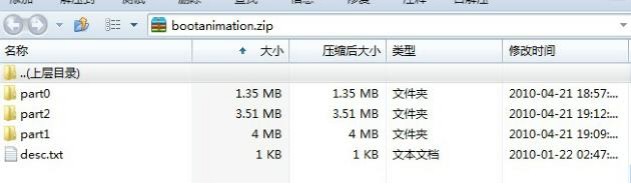
Archive contents:Chinese UI in bilingual source - Original source figure; PDF page 7 (BILINGUAL).
480 427 30
p 1 0 part0
p 0 10 part1
Line1 means width480,height427,30 frames/s. Each following line is marker,repeat count,pause in frame durations,and directory. The source requires marker p. Repeat0 means infinite repetition of that stage;thus part0 repeats once with pause0,and part1 repeats indefinitely with pause10. One frame at30fps lasts1/30s≈33.3ms,so pause10 represents about333ms. During pauses the animation process sleeps,leaving CPU time for system initialization. The source notes longer pauses can speed startup but affect appearance.
Prepare a continuous animation sequence,resize frames in a batch to suit the target panel,and export PNG with sequential names such as0000.png,0001.png. Place frames in part0/part1 and adapt desc.txt. The source screenshot illustrates numbered PNG files.
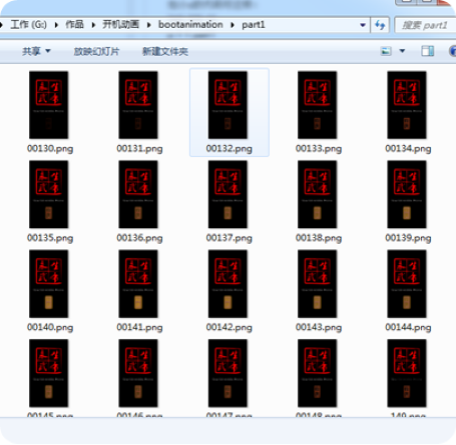
Sequential PNG frames (not a ZIP settings dialog) - Original source figure; PDF page 9 (BILINGUAL).
Finally create bootanimation.zip:the archive format must be ZIP and method must be Store;otherwise the described system cannot read it. Replace the original animation after successful creation. The Chinese text additionally requires bootanimation.zip permissions755;the parallel English paragraph omits this sentence. Preserve that Chinese requirement and verify it for the target SDK.