
Source: Rockchip Android14.0 SDK Developer Guide, Chinese RK-KF-YF-776 (58 pages) and English RK-KF-YF-777 (63 pages), both V1.4.0. Chinese technical content is the mainline; English-specific information and conflicts are noted alongside it. Source hardware/support statements concern Rockchip development platforms, not ArmSoM tests. Commands are retained documentation examples and have not been executed. Flashing, partition changes, fuse programming and publishing code require target-specific review, backups and authorization. Historical links and “latest” statements are not current availability checks.
Supported chips
| Chip | Support | SDK release |
|---|---|---|
| RK3562 | Supported | RKR1 |
| RK3568 | Supported | RKR2 |
| RK3566 | Supported | RKR2 |
| RK3326 | Supported | RKR2 |
| PX30 | Supported | RKR3 |
| RK3326-S | Supported | RKR3 |
| PX30-S | Supported | RKR3 |
| RK3588 | Supported | RKR4 |
| RK3588S | Supported | RKR4 |
| RK3399 | Supported | RKR5 |
Both support tables list RK3326 as RKR2, whereas the release-history technical statement places RK3326/RK3326-S/PX30/PX30-S in RKR3; the inconsistency is retained. RKR1 added RK3562, RKR2 RK3566/RK3568, RKR4 RK3588/RK3588S, and RKR5 RK3399.
Download SDK sources
Initialize the normal manifest, or the Express manifest if your permissions cover Express. For a server mirror add –mirror. repo is Google’s Python wrapper around Git for downloading/managing Android repositories. Rockchip’s technical contact may supply an initial split archive to accelerate checkout; unpack it, synchronize locally, then synchronize the current branch remotely.
repo init --repo-url https://gerrit.rock-chips.com:8443/repo-release/tools/repo -u https://gerrit.rock-chips.com:8443/Android_U/manifests -b master -m Android14.xml
repo init --repo-url https://gerrit.rock-chips.com:8443/repo-release/tools/repo -u https://gerrit.rock-chips.com:8443/Android_U/manifests -b master -m Android14_Express.xml
repo init --repo-url https://gerrit.rock-chips.com:8443/repo-release/tools/repo -u https://gerrit.rock-chips.com:8443/Android_U/manifests -b master -m Android14.xml --mirror
repo init --repo-url https://gerrit.rock-chips.com:8443/repo-release/tools/repo -u https://gerrit.rock-chips.com:8443/Android_U/manifests -b master -m Android14_Express.xml --mirror
git clone https://gerrit.rock-chips.com:8443/repo-release/tools/repo
mkdir Rockchip_Android14.0_SDK_RELEASE
cat Rockchip_Android14.0_SDK_RELEASE.tar.gz* | tar -zx -C Rockchip_Android14.0_SDK_RELEASE
cd Rockchip_Android14.0_SDK_RELEASE
.repo/repo/repo sync -l
.repo/repo/repo sync -c
Own repo server: environment and Gitolite
Install openssh-server for remote login, git for repositories and keychain for key management. The example server address is10.10.10.206. Create a dedicated git account and log in as it. The source requires its ~/.ssh/authorized_keys to be empty or absent: do not erase an existing account’s access keys; use a fresh dedicated account and review access first. Copy the administrator’s public key to ~/YourName.pub, clone Gitolite, create ~/bin, install and establish the administrator. Installation differs by Gitolite version; consult the matching source documentation.
sudo apt-get install openssh-server git keychain
sudo adduser --system --shell /bin/bash --group git
sudo passwd git
# Log in as git; copy the administrator public key to ~/YourName.pub
git clone https://github.com/sitaramc/gitolite.git
mkdir -p ~/bin
gitolite/install -to ~/bin
~/bin/gitolite setup -pk YourName.pub
On the client, clone gitolite-admin, copy each user’s public key into keydir, then edit conf/gitolite.conf to define the administrator group and grant it RW+ on gitolite-admin.
git clone ssh://git@10.10.10.206/gitolite-admin.git
cp username.pub keydir/username.pub
vi conf/gitolite.conf
@admin = admin1 admin2 admin3
repo gitolite-admin
    RW+ = @admin
Create the repository mirror
Server: log in as git, download repo in the working root, create/enter RK_Android14_mirror, initialize the mirror, then generate repository-group permissions. Client: copy android_u.conf into gitolite-admin/conf/, add user/admin permissions, include it from gitolite.conf and register your own manifest repository. Chinese uses @android_u and android_u.conf; English instead has @android_t in its sed command and calls the copied file android_r.conf. These are source conflicts, not interchangeable names.
git clone https://gerrit.rock-chips.com:8443/repo-release/tools/repo
mkdir RK_Android14_mirror
cd RK_Android14_mirror
repo init --repo-url https://gerrit.rock-chips.com:8443/repo-release/tools/repo -u https://gerrit.rock-chips.com:8443/Android_U/manifests -b master -m Android14.xml --mirror
.repo/repo/repo list -n > android_u.conf
sed -i 's/^/@android_u = RK_Android14_mirror\/&/g' android_u.conf
# conf/android_u.conf
@usergroup = user1 user2 user3
repo @android_u
    R = @usergroup
    RW+ = @admin

# conf/gitolite.conf
include "android_u.conf"

# additional source example in conf/android_u.conf
@android_u = Android_T/manifests_xxx
Publish your manifest
On a client, clone the new and original manifest repositories; copy the original manifest files into manifests_xxx, inspect git status, commit locally and push master. Then create Android14 and initialize repo using your own server link to share with colleagues. Source examples mix Android_T, Android_u and Android_U, and the copy command after cd manifests_xxx uses paths that must be checked against the actual working directory. Preserve subdirectories such as include/; the shown *.xml copy alone does not reproduce them. The following are source examples, not commands executed in this task.
git clone ssh://git@10.10.10.206/Android_u/manifests_xxx.git
git clone ssh://git@10.10.10.206/Android_U/manifests.git
cd manifests_xxx
cp -rf manifests/*.xml manifests_xxx/
git status
Android14.xml
Android14_Express.xml
default.xml
include/rk3562_repository.xml
include/rk_checkout_from_aosp.xml
include/rk_modules_repository.xml
remote.xml
remove_u.xml
remove_unused.xml
git add -A
git commit -m "init xxx"
git push origin master:master
git clone https://gerrit.rock-chips.com:8443/repo-release/tools/repo
mkdir Android14
cd Android14
~/repo/repo init -u ssh://git@10.10.10.206/Android_U/manifests_xxx.git -m Android14.xml
Own branches and code changes
Most repositories still use RK’s default branches. To change one, enter its directory (kernel-6.1 here), create xxx_branch from remotes/m/master and push it to remote rk29 (Tab can complete the remote name). In .repo/manifests, search for kernel to locate its project XML and replace its revision with xxx_branch. Commit/push the manifest so colleagues sync your branch, then commit product changes on that branch and push directly to xxx_branch. The diff’s kernel path and android-1s.0 tag are original historical literals, not corrected assumptions.
cd kernel-6.1
git checkout remotes/m/master -b xxx_branch
git push rk29 xxx_branch:xxx_branch
cd .repo/manifests
--- a/include/rk_modules_repository.xml
+++ b/include/rk_modules_repository.xml
@@ -10,7 +10,7 @@
<project path="hardware/rockchip/libgraphicpolicy"
name="rk/hardware/rk29/libgraphicpolicy" remote="rk"
revision="refs/tags/android-1s.0-mid-rkr1" />
<project path="hardware/rockchip/libhwjpeg" name="rk/hardware/rk29/libhwjpeg"
remote="rk" revision="refs/tags/android-14.0-mid-rkr1"/>
<project path="u-boot" name="rk/u-boot" remote="rk"
revision="refs/tags/android-14.0-mid-rkr1"/>
- <project path="kernel" name="rk/kernel" remote="rk29"
revision="refs/tags/android-14.0-mid-rkr1"/>
+ <project path="kernel" name="rk/kernel" remote="rk29" revision="xxx_branch"/>
<project path="bootable/recovery/rkupdate"
name="platform/bootable/recovery/rk_update" remote="rk"
revision="refs/tags/android-14.0-mid-rkr1"/>
<project path="bootable/recovery/rkutility"
name="platform/bootable/recovery/rk_utility" remote="rk"
revision="refs/tags/android-14.0-mid-rkr1"/>
git add include/rk_modules_repository.xml
git commit -m "change kernel branch on xxx_branch"
git push origin default:master
Synchronize RK updates
First sync the mirror on the server. On the client, obtain RK’s original manifests and compare them with manifests_xxx, merging tag updates and repository additions/removals. Review and push the resulting manifests; identify locally branched repositories. In each, inspect the remote branch, create a local branch from your remote, inspect RK tags, merge the intended release, resolve all conflicts, then push to your product branch. Repeat for every branched repository. The sample names Android10/11 and declares android-14.0-mid-rkr1 “latest” at that point; this does not override the RKR5 version scope. The shown remotes/m/xxx_branch checkout differs from the displayed remotes/m/master alias: verify available refs before use. Kernel6.1 sources live in kernel-6.1/.
cd RK_Android14_mirror
.repo/repo/repo sync -c
git clone //10.10.10.206/wlq/test/manifests.git
wlq@wlq:~/home1/test2/kernel-6.1$ git branch -av
* android-11.0-mid-rkr7 0bde59fad73a ARM: configs: rockchip_defconfig enable
ION_CMA_HEAP
xxx_branch 0bde59fad73a ARM: configs: rockchip_defconfig enable
ION_CMA_HEAP
remotes/m/master -> rk29/xxx_branch
remotes/rk29/xxx_branch 0bde59fad73a ARM: configs: rockchip_defconfig enable
ION_CMA_HEAP
git checkout remotes/m/xxx_branch -b local_xxx_branch
wlq@wlq:~/home1/test2/kernel$ git tag | grep rkr
android-10.0-mid-rkr1
android-10.0-mid-rkr10
android-10.0-mid-rkr11
android-10.0-mid-rkr13
android-10.0-mid-rkr2
android-10.0-mid-rkr3
android-10.0-mid-rkr4
android-10.0-mid-rkr5
android-10.0-mid-rkr6
android-10.0-mid-rkr7
android-10.0-mid-rkr8
android-10.0-mid-rkr9
android-11.0-ebook-rkr1
android-11.0-ebook-rkr2
android-11.0-ebook-rkr3
android-11.0-ebook-rkr4
android-11.0-ebook-rkr5
android-11.0-ebook-rkr6
android-11.0-mid-rkr1
android-11.0-mid-rkr2
android-11.0-mid-rkr3
android-11.0-mid-rkr4
android-11.0-mid-rkr4.1
android-11.0-mid-rkr5
android-11.0-mid-rkr6
android-11.0-mid-rkr7
android-11.0-mid-rkr7-prev
android-11.0-mid-rkr8
android-14.0-mid-rkr1
git merge android-14.0-mid-rkr1
# Resolve any conflicts before pushing
git push rk29 local_xxx_branch:xxx_branch
Lunch targets
All targets below are Android14, GKI-enabled by default and 64-bit-only. user is for production, userdebug for development/debugging except where the source description contradicts the target suffix. GO/2GB and hardware notes are kept per row rather than inferred from the name.
| Target | Chip | Hardware/configuration | Build purpose |
|---|---|---|---|
| rk3588_u-user | RK3588 | Development board | Production/user |
| rk3588_u-userdebug | RK3588 | Development board | Development/userdebug |
| rk3588s_u-user | RK3588S | Development board | Production/user |
| rk3588s_u-userdebug | RK3588S | Development board | Development/userdebug |
| rk3562_u-user | RK3562 | Development board | Production/user |
| rk3562_u-userdebug | RK3562 | Development board | Development/userdebug |
| rk3562_ugo-user | RK3562 | 2GB, GO enabled | Production/user |
| rk3562_ugo-userdebug | RK3562 | 2GB, GO enabled | Development/userdebug |
| rk3566_ugo-user | RK3566 | 2GB, GO enabled | Production/user |
| rk3566_ugo-userdebug | RK3566 | 2GB, GO enabled | Development/userdebug |
| rk3566_u-user | RK3566 | Development board | Production/user |
| rk3566_u-userdebug | RK3566 | Development board | Development/userdebug |
| rk3568_u-user | RK3568 | Development board | Production/user |
| rk3568_u-userdebug | RK3568 | Development board | Development/userdebug |
| rk3326_ugo-userdebug | RK3326/RK3326-S | Development board | Development/userdebug |
| rk3326_ugo-user | RK3326/RK3326-S | 2GB, GO enabled | Production/user |
| rk3326_u-userdebug | RK3326/RK3326-S | Development board | Development/userdebug |
| rk3326_u-user | RK3326/RK3326-S | Development board; GO enabled in CN | Production/user |
| PX30_u-userdebug | PX30/PX30-S | Development board | CN says user/production; EN says userdebug/development |
| PX30_u-user | PX30/PX30-S | Development board | Production/user |
| rk3399_u-userdebug | RK3399 | CN: industrial board and excavator; EN:development board | CN:user/production; EN:userdebug/development |
| rk3399_u-user | RK3399 | CN:industrial board and excavator; EN:development board | Production/user |
For rk3326_ugo-userdebug, EN additionally specifies 2GB and GO enabled whereas CN only describes the EVB; for rk3326_u-user, EN omits the CN GO-enabled statement. EN PX30 hardware prose says X30, although its chip column says PX30. These differences are not silently unified.
One-command build
Set the environment and choose the platform before building. CN uses rk3588_u-userdebug; EN shows the older rk3588_t-userdebug, retained as a version mismatch.
source build/envsetup.sh
lunch rk3588_u-userdebug
./build.sh -UKAup
| Option | Meaning |
|---|---|
| -U | Build U-Boot |
| -C | Build kernel with Clang |
| -K | Build kernel |
| -A | Build Android |
| -p | Package IMAGE |
| -o | Build OTA package |
| -u | Build update.img |
| -v | Android user/userdebug variant |
| -d | Kernel DTS name |
| -V | Build version |
| -J | Build jobs |
Platform build commands
Each Android cell is preceded by build/envsetup.sh;lunch in the source table (the actual shell setup above uses source). Normal one-command/kernel/U-Boot invocations are ./build.sh -AUCKu, ./build.sh -K and ./build.sh -U. RK3399 uses ./make.sh rk3399 for U-Boot. EN additionally includes RK3588 and RK3588S rows absent from the CN command-summary table.
| Chip | Type | Reference | Lunch target | Full build | Kernel | U-Boot |
|---|---|---|---|---|---|---|
| RK3588 | EVB (EN addition) | rk3588-evb1-lp4-v10 | rk3588_u-userdebug | ./build.sh -AUCKu | ./build.sh -K | ./build.sh -U |
| RK3588S | Tablet (EN addition) | Tablet | rk3588s_u-userdebug | ./build.sh -AUCKu | ./build.sh -K | ./build.sh -U |
| RK3562 | Development board | rk3562-evb1-lp4x-v10 | rk3562_u-userdebug | ./build.sh -AUCKu | ./build.sh -K | ./build.sh -U |
| RK3562 | Tablet | Prototype | rk3562_ugo-userdebug | ./build.sh -AUCKu | ./build.sh -K | ./build.sh -U |
| RK3566 | Tablet | Prototype | rk3566_ugo-userdebug | ./build.sh -AUCKu | ./build.sh -K | ./build.sh -U |
| RK3566 | Development board | EVB2-LP4X-V10 | rk3566_u-userdebug | ./build.sh -AUCKu | ./build.sh -K | ./build.sh -U |
| RK3568 | Development board | EVB1-DDR4-V10 | rk3568_u-userdebug | ./build.sh -AUCKu | ./build.sh -K | ./build.sh -U |
| RK3326/RK3326-S | Development board | EVB-V12 | rk3326_u-userdebug | ./build.sh -AUCKu | ./build.sh -K | ./build.sh -U |
| RK3326/RK3326-S | Prototype | Tablet | rk3326_ugo-userdebug | ./build.sh -AUCKu | ./build.sh -K | ./build.sh -U |
| PX30/PX30-S | Development board | MINI EVB | PX30_u-userdebug | ./build.sh -AUCKu | ./build.sh -K | ./build.sh -U |
| RK3399 | Industrial EVB | rk3399-evb-ind-lpddr4-v13-android-avb | rk3399_u-userdebug | ./build.sh -AUCKu | ./build.sh -K | ./make.sh rk3399 |
| RK3399 | Excavator | rk3399-sapphire-excavator-edp-avb | rk3399_u-userdebug | ./build.sh -AUCKu -d rk3399-sapphire-excavator-edp-avb | ./build.sh -K -d rk3399-sapphire-excavator-edp-avb | ./make.sh rk3399 |
GKI and non-GKI builds
CN says RK3566/RK3568/RK3562 SDK defaults to GKI and A/B; EN names only RK3562 in this paragraph, although its lunch table enables GKI for more chips. Set BOARD_BUILD_GKI=false to disable GKI and automatically A/B; example patch follows. GKI kernel/KO procedures are in RKDocs/android/Rockchip_Developer_Guide_Android14_GKI_CN.pdf.
wlq@sys2206:~/b0_A14_bringup/device/rockchip/rk3562$ git diff
diff --git a/rk3562_u/BoardConfig.mk b/rk3562_u/BoardConfig.mk
index dc9cc50..a6657dd 100644
--- a/rk3562_u/BoardConfig.mk
+++ b/rk3562_u/BoardConfig.mk
@@ -16,7 +16,7 @@
BUILD_WITH_GO_OPT := true
PRODUCT_KERNEL_DTS := rk3562-rk817-tablet-v10
CAMERA_SUPPORT_AUTOFOCUS := true
-BOARD_BUILD_GKI := true
+BOARD_BUILD_GKI := false
include device/rockchip/rk3562/BoardConfig.mk
DEVICE_IS_64BIT_ONLY := true
The following applies only to non-GKI. Android14 kernel.img/resource.img are inside boot.img and must not be flashed separately. ./build.sh -AK rebuilds kernel and Android; flash rockdev boot.img, but rebuilding Android is slow. For a kernel-only build, replace kernel.img/resource.img within an old matching boot.img. The RK3562 prose points to Image-rk3562_u/boot.img, but the source command uses Image-rk3562_t/boot.img; verify the actual base image/DTS. Flash the resulting kernel-6.1/boot.img to boot after importing parameter.txt, avoiding a wrong offset.
cd kernel-6.1
export PATH=../prebuilts/clang/host/linux-x86/clang-r487747c/bin:$PATH
alias msk='make CROSS_COMPILE=aarch64-linux-gnu- LLVM=1 LLVM_IAS=1'
msk ARCH=arm64 rockchip_defconfig android-14.config rk356x.config && msk ARCH=arm64 BOOT_IMG=../rockdev/Image-rk3562_t/boot.img rk3562-evb1-lp4x-v10.img -j32
Flashing tools and output files
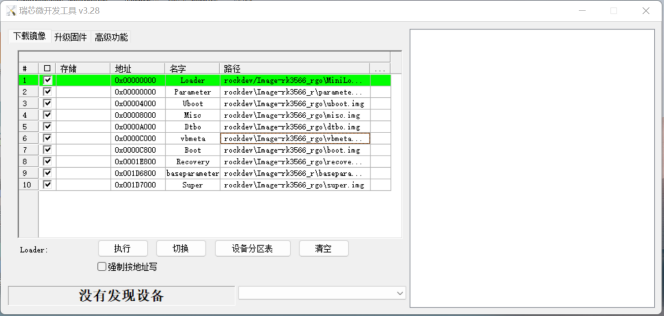
Source flashing-tool interface - Original source figure; PDF page 18 (EN).
Android14 requires DriverAssitant V5.1.1. The source lists Windows AndroidTool_Release_v3.28 and Linux_Upgrade_Tool_v2.30 and advises keeping tools synchronized; these are document versions, not verified current releases. A full build generates the first tree below; flash the subset in the second tree, or flash update.img as a complete package.
RKTools/windows/AndroidTool/AndroidTool_Release_v3.28
RKTools/linux/Linux_Upgrade_Tool/Linux_Upgrade_Tool_v2.30
rockdev/Image-rk3562_u/
├── boot-debug.img
├── boot.img
├── config.cfg
├── dtbo.img
├── MiniLoaderAll.bin
├── misc.img
├── parameter.txt
├── pcba_small_misc.img
├── pcba_whole_misc.img
├── recovery.img
├── resource.img
├── super.img
├── uboot.img
├── update.img
└── vbmeta.img
rockdev/Image-rk3562_u/
├── boot.img
├── dtbo.img
├── MiniLoaderAll.bin
├── misc.img
├── parameter.txt
├── recovery.img
├── super.img
├── uboot.img
└── vbmeta.img
| File | Meaning |
|---|---|
| boot.img | ramdisk, kernel, DTB |
| boot-debug.img | Allows root operations on user firmware |
| dtbo.img | Device Tree Overlays; see DTBO section |
| config.cfg | Import into flash tool to display selected items |
| MiniLoaderAll.bin | First-stage loader |
| misc.img | recovery-wipe boot flags; enters recovery after flashing |
| parameter.txt | Partition information |
| pcba_small_misc.img | PCBA flags; enters simplified PCBA mode |
| pcba_whole_misc.img | PCBA flags; enters full PCBA mode |
| recovery.img | recovery ramdisk, kernel, DTB |
| super.img | CN:odm/product/vendor/system/system_ext; EN lists only odm/vendor/system |
| trust.img | BL31/BL32; not generated or flashed on RK3566/RK3568 |
| uboot.img | U-Boot firmware |
| vbmeta.img | AVB verification metadata |
| update.img | Complete package of images needed for flashing |
The source states that Android14 GMS/EDLA-certified products must use GKI; see RKDocs/android/Rockchip_Developer_Guide_Android14_GKI_CN.pdf. This is the source’s historical certification statement.
Dynamic partitions, fastbootd and GSI
New R-generation devices use dynamic partitions, replacing the separate physical system/vendor/odm/product/system_ext partitions; flash super.img. To flash logical images individually from out/, use fastbootd with sufficiently current adb/fastboot. SDK host tools are RKTools/linux/Linux_adb_fastboot (Linux_x86) and RKTools/windows/adb_fastboot (Windows_x86). fastbootd displays device information; for non-dynamic partitions enter the bootloader instead.
adb reboot fastboot
fastboot flash vendor vendor.img
fastboot flash system system.img
fastboot flash odm odm.img

# Non-dynamic partitions
adb reboot bootloader
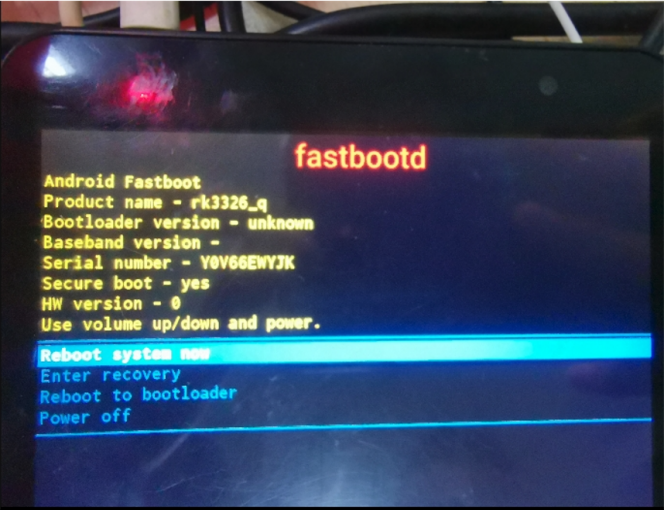
fastbootd device screen - Original source figure; PDF page 20 (EN).
GSI workflow: unlock the device if required, enter fastbootd, flash GSI system.img plus the firmware misc.img, then recovery performs a factory reset. Unlocking, flashing misc and optional product deletion can destroy data; back up first and verify the target. Customers who have programmed an AVB public key must follow the corresponding unlock document, not assume the generic command applies. If space is insufficient, the source optionally deletes the logical product partition before GSI flashing.
adb reboot bootloader
fastboot oem at-unlock-vboot
fastboot flash misc misc.img
fastboot reboot fastboot
# Optional; deletes the logical product partition
fastboot delete-logical-partition product
fastboot flash system system.img
fastboot reboot
DSU (Dynamic System Updates) is another source-supported GSI method, enabled by default on the described Rockchip platform. It consumes substantial memory, so the source advises against devices with1GB DDR or less. Reference:https://source.android.com/devices/tech/ota/dynamic-system-updates. VTS additionally needs the compiled boot-debug.img in boot; CTS-ON-GSI does not. For testing use Google’s official GSI ending in -signed.
DTBO
Android10+ supports Device Tree Overlays; flash dtbo.img for compatibility across products. Find/specify PRODUCT_DTBO_TEMPLATE, then add/change nodes. DTS must contain aliases or overlay fails. The source sample path spells rk388; CN names rk3588_u while EN names rk3588_t. Preserve these source discrepancies and select the actual product template.
get_build_var PRODUCT_DTBO_TEMPLATE
# Source example
PRODUCT_DTBO_TEMPLATE := $(LOCAL_PATH)/dt-overlay.in
# CN illustrative path: device/rockchip/rk388/rk3588_u/dt-overlay.in
/dts-v1/;
/plugin/;
&chosen {
bootargs_ext = "androidboot.boot_devices=${_boot_device}";
};
&firmware_android {
vbmeta {
status = "disabled";
};
fstab {
status = "disabled";
};
};
&reboot_mode {
mode-bootloader = <0x5242C309>;
mode-charge = <0x5242C30B>;
mode-fastboot = <0x5242C303>;
mode-loader = <0x5242C301>;
mode-normal = <0x5242C300>;
mode-recovery = <0x5242C303>;
};
fstab and partition parameters
Find/specify PRODUCT_FSTAB_TEMPLATE, then edit partition mounts, swap_zram or the data filesystem. Android14 can generate parameter.txt from a template/configuration; without a configured template it looks for the supplied parameter.txt. To bypass generation, add parameter.txt to the product device directory, for example device/rockchip/rk3326/rk3326_u/parameter.txt.
get_build_var PRODUCT_FSTAB_TEMPLATE
PRODUCT_FSTAB_TEMPLATE := device/rockchip/common/scripts/fstab_tools/fstab.in
get_build_var PRODUCT_PARAMETER_TEMPLATE
PRODUCT_PARAMETER_TEMPLATE := device/rockchip/common/scripts/parameter_tools/parameter.in
BOARD_SUPER_PARTITION_SIZE := 2688548864
BOARD_DTBOIMG_PARTITION_SIZE := xxxx
BOARD_BOOTIMAGE_PARTITION_SIZE := xxxxx
BOARD_CACHEIMAGE_PARTITION_SIZE := xxxx
Standalone parameter generation example follows. For a major-version OTA upgrade, retain the preceding version’s parameter.txt as the source instructs. Placeholder sizes above must be replaced with reviewed target values.
parameter_tools --input device/rockchip/common/scripts/parameter_tools/parameter.in --firmware-version 14.0 --machine-model rk3326 --manufacturer rockchip --machine rk3326_u --partition-list uboot_a:4096K,trust_a:4M,misc:4M,dtbo_a:4M,vbmeta_a:4M,boot_a:33554432,backup:300M,security:4M,cache:300M,metadata:4096,frp:512K,super:2G --output parameter_new.txt
To add a partition, define BOARD_WITH_SPECIAL_PARTITIONS in product BoardConfig.mk (for example baseparameter:1M,logo:16M), then append it in RebuildParameter.mk.
device/rockchip/rk356x/rk3566_u/BoardConfig.mk
+++ b/BoardConfig.mk
@@ -494,4 +494,11 @@ ifeq ($(strip $(BOARD_TWRP_ENABLE)), true)
+BOARD_WITH_SPECIAL_PARTITIONS := baseparameter:1M
device/rockchip/common/build/rockchip/RebuildParameter.mk
+ifneq ($(strip $(BOARD_WITH_SPECIAL_PARTITIONS)), )
+partition_list := $(partition_list),$(BOARD_WITH_SPECIAL_PARTITIONS)
+endif
Add a product lunch target
For rk3562_new_u, add its makefile and user/userdebug choices to device/rockchip/rk3562/AndroidProducts.mk. Create device/rockchip/rk3562/rk3562_new_u by copying the existing rk3562_u product, then replace all rk3562_u occurrences inside the new directory with rk3562_new_u.
--- a/AndroidProducts.mk
+++ b/AndroidProducts.mk
@@ -17,10 +17,14 @@
PRODUCT_MAKEFILES := \
$(LOCAL_DIR)/rk3562_u/rk3562_u.mk \
+ $(LOCAL_DIR)/rk3562_new_u/rk3562_new_u.mk \
COMMON_LUNCH_CHOICES := \
rk3562_u-userdebug \
rk3562_u-user \
+ rk3562_new_u-userdebug \
+ rk3562_new_u-user \
Product DTS references
Choose a DTS reference according to chip, PMIC and hardware topology. This reference table includes RK3528 even though the SDK support table above does not list it; a reference row is not a new support claim. The RK3588 single-PMIC hardware-reference row is rk3588-evb7-v11 in CN, but rk3588-evb4-lp7-v10 in EN; both are retained. Also note that the RK3399 industrial DTS below omits v13 whereas the build table includes it.
| SoC | PMIC | Type | Model | DTS |
|---|---|---|---|---|
| RK3588 | Dual PMIC:RK806 ×2 | Development board | RK3588 EVB1 | rk3588-evb1-lp4-v10 |
| RK3588 | Single PMIC:RK806+RK860 | Development board | RK3588 hardware reference design | CN:rk3588-evb7-v11; EN:rk3588-evb4-lp7-v10 |
| RK3588S | Dual PMIC:RK806 ×2 | Development board | RK3588S EVB1 | rk3588s-evb1-lp4x-v10 |
| RK3588S | Single PMIC:RK806+RK860 | Tablet | Tablet hardware reference design | rk3588s-tablet-v11 |
| RK3588S | Dual PMIC:RK806 ×2 | Tablet | Prototype | rk3588s-tablet-v10 |
| RK3588 | Single PMIC:RK860 | Box EVB | RK3588_NVR_DEMO1_LP4X | rk3588-nvr-demo-v10-android |
| RK3566 | RK817 | Tablet | Prototype | rk3566-rk817-tablet |
| RK3566 | RK809 | Development board | RK3566 EVB2 | rk3566-evb2-lp4x-v10 |
| RK3566 | Discrete | Development board | RK3566 BOX DEMO | rk3566-box-demo-v10 |
| RK3568 | RK809 | Development board | RK3568 EVB1 | rk3568-evb1-ddr4-v10 |
| RK3562 | RK817 | Development board | RK3562 EVB1 | rk3562-evb1-lp4x-v10 |
| RK3562 | RK809 | Development board | RK3562 EVB2 | rk3562-evb2-ddr4-v10 |
| RK3562 | RK817 | Tablet | Prototype | rk3562-rk817-tablet-v10 |
| RK3528 | Discrete | BOX | RK3528 EVB1 | rk3528-evb1-ddr4-v10 |
| RK3326 | RK817 | Development board | EVB | rk3326-evb-lp3-v10-avb |
| PX30 | RK809 | Development board | EVB | px30-mini-evb-ddr3-v11-avb |
| RK3326 | RK817 | Tablet | Prototype | rk3326-863-lp3-v10-rkisp1 |
| RK3326 | RK809 | AI voice | EVB | rk3326-evb-ai-va-v12 |
| RK3399 | RK808 | Development board | Excavator | rk3399-sapphire-excavator-edp-avb |
| RK3399 | RK809 | Development board | Industrial board | rk3399-evb-ind-lpddr4-android-avb |
Patch notifications
Important patches are published at https://redmine.rock-chips.com/projects/rockchip_patch/issues. To subscribe, sign in using a Rockchip-registered Redmine account, open My account, set email notifications to all notifications for selected projects, select the patch-release project and Save. Notifications then arrive at the registered email when patches are published. No subscription or external account change was performed here.
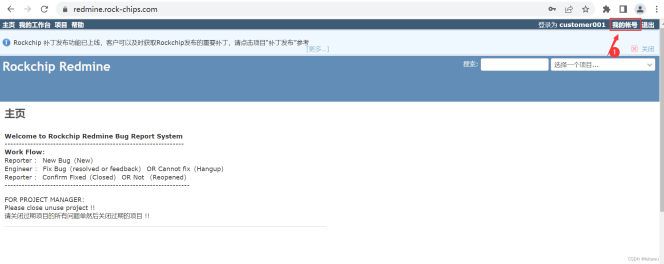
Open My account - Original source figure; PDF page 26 (EN).
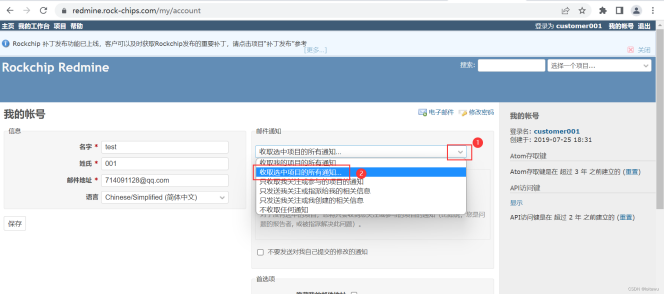
Select notification scope - Original source figure; PDF page 26 (EN).
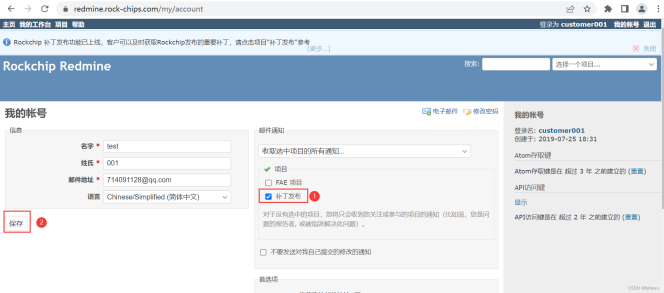
Select patch project and save - Original source figure; PDF page 27 (EN).
Documentation and peripheral support
The source gives https://redmine.rockchip.com.cn/projects/fae/documents for continuously updated DDR/EMMC/NAND FLASH/WIFI/3G/CAMERA support lists. Camera IQ Tool documents and RKNN Toolkit2 SDK documents are located below. The RKDocs tree records the documentation shipped with this SDK; filenames/language suffixes are source identifiers, not claims that an English-named file was used to translate this article.
external/camera_engine_rkaiq/rkisp2x_tuner/doc/
├── Rockchip_Color_Optimization_Guide_ISP2x_CN_v2.0.0.pdf
├── Rockchip_IQ_Tools_Guide_ISP2x_CN_v2.0.0.pdf
└── Rockchip_Tuning_Guide_ISP21_CN_v2.0.0.pdf
hardware/rockchip/rknn-toolkit2/doc/
RKDocs/
├── android
│ ├── Android11 异显开发说明.zip
│ ├── audio
│ │ └── Rockchip_Developer_Guide_Android_Multi_Audio_CN.pdf
│ ├── bt
│ │ └── Rockchip_Introduction_Android9.0_BT_Configuration_CN.pdf
│ ├── patches
│ │ └── root
│ │ ├── android11_root.pdf
│ │ └── RootChecker.apk
│ ├── Rockchip_Android14_GKI_Developer_Guide_CN.pdf
│ ├── Rockchip_Android14_SDK_Developer_Guide_CN.pdf
│ ├── Rockchip_Android14_SDK_Developer_Guide_EN.pdf
│ ├── Rockchip_Android_Remote_key_Provisioning_Guide.pdf
│ ├── Rockchip_Developer_Guide_Android11_Optimization_CN.pdf
│ ├── Rockchip_Developer_Guide_Android_AB_System_Upgrading_CN.pdf
│ ├── Rockchip_Developer_Guide_Android_Recovery_CN.pdf
│ ├── Rockchip_Developer_Guide_Android_SELinux(Sepolicy)CN.pdf
│ ├── Rockchip_Developer_Guide_PCBA_Test_Tool_V1.3_CN&EN.pdf
│ ├── Rockchip_Firmware_Upgrade_Failed_Analyze_Method_CN.pdf
│ ├── Rockchip_Introduction_Android_Application_Preinstallation_CN&EN.pdf
│ ├── Rockchip_Introduction_Android_Boot_Video_CN.pdf
│ ├── Rockchip_Introduction_Android_BOX_Display_Framework_Configuration_CN.pdf
│ ├── Rockchip_Introduction_Android_Factory_Reset_Protection_CN&EN.pdf
│ ├── Rockchip_Introduction_Android_Log_System.pdf
│ ├── Rockchip_Introduction_Android_Performance_Mode_CN&EN.pdf
│ ├──Rockchip_Introduction_Android_Power_On_Off_Animation_and_Tone_Customization_CN&EN.pdf
│ ├── Rockchip_Introduction_Android_Samba_CN.pdf
│ ├── Rockchip_Introduction_Android_Widevine_Project_Start_Preparation_CN.pdf
│ ├── Rockchip_Introduction_Box_Media_Application_CN&EN.pdf
│ ├── Rockchip-Parameter-File-Format-Version1.4-CN.pdf
│ ├── Rockchip_User_Guide_Android_GMS_Configuration_CN.pdf
│ ├── Rockchip_User_Guide_Android_GMS_Configuration_EN.pdf
│ ├── Rockchip_User_Guide_Box_FactoryTestTool_V3.0_CN.pdf
│ ├── Rockchip_User_Guide_Dr.G_CN&EN.pdf
│ ├── Rockchip_User_Guide_Magisk_Installation_EN.pdf
│ ├── video
│ │ └── Rockchip_Android_Multimedia_FAQ_CN.pdf
│ └── wifi
│ ├── Rockchip_Introduction_REALTEK_WIFI_Driver_Porting_CN&EN.pdf
│ └── Rockchip_Introduction_WIFI_Configuration_CN&EN.pdf
└── common
├── Audio
│ ├── Rockchip_Developer_Guide_Android_EQ_DRC_CN.pdf
│ ├── Rockchip_Developer_Guide_Android_Multi_Audio_CN.pdf
│ ├──Rockchip_Developer_Guide_Audio_Call_3A_Algorithm_Integration_and_Parameter_Debugging_CN.pdf
│ ├── Rockchip_Developer_Guide_Audio_CN.pdf
│ └── Rockchip_Developer_Guide_RK817_RK809_Codec_CN.pdf
├── camera
│ ├── common
│ │ └── Camera_External_FAQ_v1.0 .pdf
│ ├── HAL1
│ │ ├── README_CN.txt
│ │ ├── README_EN.txt
│ │ ├── RK312x_Camera_User_Manual_v1.4(3288&3368).pdf
│ │ ├── RK_ISP10_Camera_User_Manual_v2.3.pdf
│ │ ├── RKISPV1_Camera_Module_AVL_v1.7.pdf
│ │ ├── Rockchip_Camera_AVL_v2.0_Package_20180515.7z
│ │ ├── Rockchip_Introduction_RKISPV1_Camera_Driver_Debugging_Method_CN.pdf
│ │ ├── Rockchip_Introduction_RKISPV1_Camera_FAQ_CN.pdf
│ │ ├── Rockchip SOFIA 3G-R_PMB8018(x3_C3230RK)Camera_Module_AVL_v1.6_20160226.pdf
│ │ └── Rockchip_Trouble_Shooting_Android_CameraHAL1_CN_EN.pdf
│ ├── HAL3
│ │ ├── camera_engine_rkisp_user_manual_v2.2.pdf
│ │ ├── camera_hal3_user_manual_v2.3.pdf
│ │ ├── README_CN.txt
│ │ ├── RKCIF_Driver_User_Manual_v1.0.pdf
│ │ ├── RKISP1_IQ_Parameters_User_Guide_v1.2.pdf
│ │ ├── RKISP_Driver_User_Manual_v1.3.pdf
│ │ ├── Rockchip_Color_Optimization_Guide_ISP
│ │ │ ├── ISP21
│ │ │ │ └── CN
│ │ │ │ └── Rockchip_Color_Optimization_Guide_ISP21_CN_v2.0.1.pdf
│ │ │ ├── ISP30
│ │ │ │ └── CN
│ │ │ │ └── Rockchip_Color_Optimization_Guide_ISP30_CN_v3.0.0.pdf
│ │ │ └── ISP32-lite
│ │ │ └── CN
│ │ │ └── Rockchip_Color_Optimization_Guide_ISP32_Lite_CN_v3.1.0.pdf
│ │ ├── Rockchip_Development_Guide_3A_ISP
│ │ │ └── ISP30
│ │ │ └── CN
│ │ │ └── Rockchip_Development_Guide_3A_ISP30_v1.1.0.pdf
│ │ ├── Rockchip_Development_Guide_ISP
│ │ │ ├── ISP21
│ │ │ │ └── CN
│ │ │ │ └── Rockchip_Development_Guide_ISP21_CN_v2.1.0.pdf
│ │ │ ├── ISP30
│ │ │ │ └── CN
│ │ │ │ └── Rockchip_Development_Guide_ISP30_CN_v1.2.3.pdf
│ │ │ └── ISP32-lite
│ │ │ └── CN
│ │ │ └── Rockchip_Development_Guide_ISP32_Lite_CN_v1.0.0.pdf
│ │ ├── Rockchip_Driver_Guide_VI
│ │ │ ├── CN
│ │ │ │ └── Rockchip_Driver_Guide_VI_CN_v1.1.4.pdf
│ │ │ └── EN
│ │ │ └── Rockchip_Driver_Guide_VI_EN_v1.0.7.pdf
│ │ ├── Rockchip_IQ_Tools_Guide_ISP
│ │ │ ├── ISP21
│ │ │ │ └── Rockchip_IQ_Tools_Guide_ISP2x_CN_v2.0.3.pdf
│ │ │ ├── ISP30
│ │ │ │ └── Rockchip_IQ_Tools_Guide_ISP21_ISP30_CN_v2.0.4.pdf
│ │ │ └── ISP32-lite
│ │ │ └── CN
│ │ │ └── Rockchip_IQ_Tools_Guide_v2.0.7_CN.pdf
│ │ ├── Rockchip_Trouble_Shooting_CameraHAL3_CN_EN.pdf
│ │ ├── Rockchip_Tuning_Guide_ISP
│ │ │ ├── ISP21
│ │ │ │ └── CN
│ │ │ │ └── Rockchip_Tuning_Guide_ISP21_CN_v2.1.0.pdf
│ │ │ ├── ISP30
│ │ │ │ └── CN
│ │ │ │ └── Rockchip_Tuning_Guide_ISP30_CN_v1.1.0.pdf
│ │ │ └── ISP32-lite
│ │ │ └── CN
│ │ │ └── Rockchip_Tuning_Guide_ISP32-lite_CN_v1.0.0.pdf
│ │ └── USB_UVC_Integrated_Cameras.pdf
│ ├── README.txt
│ └── vehicle
│ └── Rockchip_Android_Fast_Reverse_Image_System_Developer_Guide_CN_V1.0.3.pdf
├── Can
│ ├── Rockchip_Developer_Guide_Can_CN.pdf
│ └── Rockchip_Developer_Guide_CAN_FD_CN.pdf
├── CLK
│ ├── Rockchip_Developer_Guide_Clock_CN.pdf
│ ├── Rockchip_Developer_Guide_Gpio_Output_Clocks_CN.pdf
│ ├── Rockchip_Develop_Guide_Pll_Ssmod_Clock_CN.pdf
│ └── Rockchip_RK3399_Developer_Guide_Clock_CN.pdf
├── CRU
│ ├── Rockchip_Developer_Guide_Linux3.10_Clock_CN.pdf
│ ├── Rockchip_Developer_Guide_Linux4.4_4.19_Clock_CN.pdf
│ ├── Rockchip_Develop_Guide_Pll_Ssmod_Clock_CN.pdf
│ ├── Rockchip_RK3399_Developer_Guide_Clock_CN.pdf
│ └── Rockchip_RK3399_Developer_Guide_Linux4.4_Clock_CN.pdf
├── CRYPTO
│ ├── Rockchip_Developer_Guide_Crypto_HWRNG_CN.pdf
│ └── Rockchip_Developer_Guide_Crypto_HWRNG_EN.pdf
├── DDR
│ ├── DDR_bandwidth_statistics_tool
│ │ ├── rk-msch-probe-for-user-32bit
│ │ ├── rk-msch-probe-for-user-64bit
│ │ └── Rockchip_Introduction_DDR_Bandwidth_Tool_CN.pdf
│ ├── Rockchip-Developer-Guide-DDR-CN.pdf
│ ├── Rockchip-Developer-Guide-DDR-EN.pdf
│ ├── Rockchip-Developer-Guide-DDR-Problem-Solution-CN.pdf
│ ├── Rockchip-Developer-Guide-DDR-Problem-Solution-EN.pdf
│ ├── Rockchip-Developer-Guide-DDR-Verification-Process-CN.pdf
│ ├── Rockchip_Developer_Guide_DDR_Verification_Process_EN.pdf
│ ├── Rockchip_Developer_Guide_HAL_DDR_ECC_CN.pdf
│ └── Rockchip-User-Guide-DDR-DQ-Eye-Tool-CN.pdf
├── debug
│ ├── RK3399-LOG-EXPLANATION.pdf
│ ├── Rockchip_Developer_Guide_DS5_CN.pdf
│ ├── Rockchip_Quick_Start_Linux_Perf.pdf
│ ├── Rockchip_Quick_Start_Linux_Streamline.pdf
│ ├── Rockchip_Quick_Start_Linux_Systrace.pdf
│ ├── Rockchip_RK3399_JTAG_Configuration_CN.pdf
│ └── Rockchip_User_Guide_J-Link_CN.pdf
├── display
│ ├── Rockchip_BT656_TX_AND_BT1120_TX_Developer_Guide_CN.pdf
│ ├── Rockchip_Developer_Guide_Baseparameter_Format_Define_And_Use_CN.pdf
│ ├── Rockchip_Developer_Guide_DRM_Display_Driver_CN.pdf
│ ├── Rockchip_Developer_Guide_DRM_Panel_Porting_CN&EN.pdf
│ ├── Rockchip_Developer_Guide_DRM_Panel_Porting_CN.pdf
│ ├── Rockchip_Developer_Guide_Dual_Display_Rotation_Direction_Debugging_CN.pdf
│ ├── Rockchip_Developer_Guide_HDMI_Based_on_DRM_Framework_CN&EN.pdf
│ ├── Rockchip_Developer_Guide_HDMI-CEC_CN.pdf
│ ├── Rockchip_Developer_Guide_HDMI_CN.pdf
│ ├── Rockchip_Develop_Guide_DRM_Direct_Show_CN.pdf
│ ├── Rockchip_Display_Issues_FAQ_V1.1.pdf
│ ├── Rockchip_DRM_RK628_Porting_Guide_CN.pdf
│ ├── Rockchip FAQ DRM Hardware Composer V1.00-20181213.pdf
│ ├── Rockchip_Introduction_DisplayAdjust_APK_CN.pdf
│ ├── Rockchip_Introduction_DRM_Integration_Helper_CN.pdf
│ ├── Rockchip_RK3588_Developer_Guide_DisplayPort_CN.pdf
│ ├── Rockchip_RK3588_Developer_Guide_MIPI_DSI2_CN.pdf
│ ├── Rockchip_RK3588_Developer_Guide_Vsync_Adjust_CN.pdf
│ ├── Rockchip_RK3588_User_Guide_DP_CN.pdf
│ ├── Rockchip_RK3588_User_Guide_eDP_CN.pdf
│ └── Rockchip_Trouble_Shooting_Graphics
├── DVFS
│ ├── Rockchip_Developer_Guide_CPUFreq_CN.pdf
│ ├── Rockchip_Developer_Guide_CPUFreq_EN.pdf
│ ├── Rockchip_Developer_Guide_Devfreq_CN.pdf
│ ├── Rockchip_Developer_Guide_Devfreq_EN.pdf
│ ├── Rockchip_Developer_Guide_Linux4.4_CPUFreq_CN.pdf
│ └── Rockchip_Developer_Guide_Linux4.4_Devfreq_CN.pdf
├── Ebook
│ ├── Rockchip_RK3566_Introduction_EBOOK_Display_Mode_CN.pdf
│ └── Rockchip_RK3566_Introduction_EBOOK_Sleep_Mode_CN.pdf
├── GMAC
│ ├── Rockchip_Developer_Guide_Ethernet_CN.pdf
│ ├── Rockchip_Developer_Guide_Linux_GMAC_CN.pdf
│ ├── Rockchip_Developer_Guide_Linux_GMAC_Mode_Configuration_CN.pdf
│ ├── Rockchip_Developer_Guide_Linux_GMAC_RGMII_Delayline_CN.pdf
│ └── Rockchip_Developer_Guide_Linux_GMAC_RGMII_Delayline_EN.pdf
├── hdmi-in
│ ├── apk
│ │ ├── HdmiInDemo_based_on_CameraHal1_2020.06.11_v1.2.tar.gz
│ │ └── rkCamera2_based_on_CameraHal3_V1.3.tar.gz
│ ├── Rockchip_Developer_Guide_HDMI_IN_Based_On_CameraHal1_CN.pdf
│ ├── Rockchip_Developer_Guide_HDMI_IN_Based_On_CameraHal3_CN.pdf
│ └── Rockchip_Developer_Guide_HDMI_RX_CN.pdf
├── I2C
│ ├── Rockchip_Developer_Guide_I2C_CN.pdf
│ └── Rockchip_Developer_Guide_I2C_EN.pdf
├── IO-Domain
│ ├── Rockchip_Developer_Guide_Linux_IO_DOMAIN_CN.pdf
│ ├── Rockchip_PX30_Introduction_IO_Power_Domains_Configuration.pdf
│ ├── Rockchip_RK3288_Introduction_IO_Power_Domains_Configuration.pdf
│ ├── Rockchip_RK3326_Introduction_IO_Power_Domains_Configuration.pdf
│ ├── Rockchip_RK3399_Introduction_IO_Power_Domains_Configuration.pdf
│ ├── Rockchip_RK3399Pro_Introduction_IO_Power_Domains_Configuration.pdf
│ └── Rockchip_RK356X_Introduction_IO_Power_Domains_Configuration.pdf
├── IOMMU
│ ├── Rockchip_Developer_Guide_Linux_IOMMU_CN.pdf
│ └── Rockchip_Developer_Guide_Linux_IOMMU_EN.pdf
├── Leds
│ └── Rockchip_Introduction_Leds_GPIO_Configuration_for_Linux4.4_CN.pdf
├── MCU
│ ├── Rockchip_RK3399_Developer_Guide_MCU_CN.pdf
│ └── Rockchip_RK3399_Developer_Guide_MCU_EN.pdf
├── Memory
│ └── Rockchip_Developer_Guide_Linux_CMA_CN.pdf
├── MMC
│ ├── Rockchip_Developer_Guide_SD_Boot_CN.pdf
│ └── Rockchip_Developer_Guide_SDMMC_SDIO_eMMC_CN.pdf
├── mobile-net
│ ├── Rockchip_Introduction_3G_Data_Card_USB_File_Conversion_CN.pdf
│ ├── Rockchip_Introduction_3G_Dongle_Configuration_CN&EN.pdf
│ └── Rockchip_Introduction_4G_Module_Configuration_CN&EN.pdf
├── MPP
│ ├── Rockchip_Developer_Guide_MPP_CN.pdf
│ └── Rockchip_Developer_Guide_MPP_EN.pdf
├── NVM
│ ├── Rockchip_Application_Notes_Storage_CN.pdf
│ ├── Rockchip_Developer_FAQ_Storage_CN.pdf
│ ├── Rockchip_Developer_Guide_OTP_CN.pdf
│ ├── Rockchip_Developer_Guide_OTP_EN.pdf
│ ├── Rockchip_Developer_Guide_SATA_CN.pdf
│ ├── Rockchip_Introduction_Partition_CN.pdf
│ ├── Rockchip_Introduction_Partition_EN.pdf
│ └── Rockchip_RK356X_Developer_Guide_SATA_CN.pdf
├── PCie
│ ├── Rockchip-Developer-Guide-linux4.4-PCIe.pdf
│ ├── Rockchip_Developer_Guide_PCIe_CN.pdf
│ ├── Rockchip_PCIe_Virtualization_Developer_Guide_CN.pdf
│ └── Rockchip_RK3399_Developer_Guide_PCIe_CN.pdf
├── perf
│ ├── perf使用说明.pdf
│ ├── Rockchip_Developer_FAQ_FileSystem_CN.pdf
│ ├── Rockchip_Optimize_Tutorial_Linux_IO_CN.pdf
│ ├── Rockchip_Quick_Start_Linux_Performance_Analyse_CN.pdf
│ └── systrace使用说明.pdf
├── PIN-Ctrl
│ ├── Rockchip_Developer_Guide_Linux_Pinctrl_CN.pdf
│ └── Rockchip_Developer_Guide_Linux_Pinctrl_EN.pdf
├── PMIC
│ ├── Rockchip_Developer_Guide_FreeRTOS_PMIC_CHARGER_POWERKEY_CN.pdf
│ ├── Rockchip_Developer_Guide_Power_Discrete_DCDC_EN.pdf
│ ├── Rockchip_Developer_Guide_RK817_RK809_Fuel_Gauge_CN&EN.pdf
│ ├── Rockchip_RK805_Developer_Guide_CN.pdf
│ ├── Rockchip_RK806_Developer_Guide_CN.pdf
│ ├── Rockchip_RK808_Developer_Guide_CN.pdf
│ ├── Rockchip_RK809_Developer_Guide_CN.pdf
│ ├── Rockchip_RK816_Developer_Guide_CN.pdf
│ ├── Rockchip_RK817_Developer_Guide_CN.pdf
│ ├── Rockchip_RK818_Developer_Guide_CN.pdf
│ ├── Rockchip_RK818_RK816_Developer_Guide_Fuel_Gauge_CN.pdf
│ └── Rockchip_RK818_RK816_Introduction_Fuel_Gauge_Log_CN.pdf
├── power
│ ├── Rockchip_Developer_Guide_Power_Analysis_EN.pdf
│ └── Rockchip_Developer_Guide_Sleep_and_Resume_CN.pdf
├── PWM
│ ├── Rockchip_Developer_Guide_Linux_PWM_CN.pdf
│ ├── Rockchip_Developer_Guide_Linux_PWM_EN.pdf
│ └── Rockchip_Developer_Guide_PWM_IR_CN.pdf
├── RGA
│ ├── Rockchip_Developer_Guide_RGA_CN.pdf
│ ├── Rockchip_Developer_Guide_RGA_EN.pdf
│ ├── Rockchip_FAQ_RGA_CN.pdf
│ └── Rockchip_FAQ_RGA_EN.pdf
├── RK628
│ ├── Rockchip_RK628D_Application_Notes_CN.pdf
│ └── Rockchip_RK628D_For_All_Porting_Guide_CN.pdf
├── RKTools manuals
│ ├── RKIQTool_User_Manual_v1.5-CH.pdf
│ ├── RKIQTool_User_Manual_v1.5-EN.pdf
│ ├── RK_Platform_apache_tomcat_ota_Server_Setup_Introduction.rar
│ ├── Rockchip_Box_Factory_Test_Tool_V2.0.rar
│ ├── Rockchip_Developer_Guide_Linux_Nand_Flash_Open_Source_Solution_CN.pdf
│ ├── Rockchip_Introduction_Image_Upgrading_Failure_Analysis_CN.pdf
│ ├── Rockchip_Introduction_MP_Tool_Upgrading_and_Related_Issues_Debugging_CN.pdf
│ ├── Rockchip_Introduction_REPO_Mirror_Server_Build_and_Management_CN.pdf
│ ├── Rockchip_Introduction_Stresstest_for_VR_CN.pdf
│ ├── Rockchip_Introduction_WNpctool_Write_Tool_CN.pdf
│ ├── Rockchip_User_Guide_Box_Factory_Test_Tool_CN.pdf
│ ├── Rockchip_User_Guide_Keybox_Burning_EN.pdf
│ ├── Rockchip_User_Guide_KeyWrite_CN.pdf
│ ├── Rockchip_User_Guide_MP_Flashing_v1.2_CN.pdf
│ ├── Rockchip_User_Guide_Production_For_Firmware_Download_CN.pdf
│ ├── Rockchip_User_Guide_RKDevInfoWriteTool_CN.pdf
│ ├── Rockchip_User_Guide_RKDevInfoWriteTool_EN.pdf
│ ├── Rockchip_User_Guide_RK_Platform_MP_Upgrading_CN.pdf
│ ├── Rockchip_User_Manual_Android_Development_Tool_CN.pdf
│ ├── Rockchip_User_Manual_RKIQTool_CN.pdf
│ ├── Rockchip_User_Manual_RKIQTool_EN.pdf
│ ├── Rockchip_User_Manual_RKUpgrade_Dll_CN.pdf
│ └── SecureBootTool_UserManual.pdf
├── SARADC
│ ├── Rockchip_Developer_Guide_Linux_SARADC_CN.pdf
│ └── Rockchip_Developer_Guide_Linux_SARADC_EN.pdf
├── security
│ ├── patch
│ │ └── u-boot
│ │ └── 0001-avb-add-embedded-key.patch
│ ├── RK3399_Efuse_Operation_Instructions_V1.00_EN.pdf
│ ├── RK356X_SecurityBoot_And_AVB_instructions_CN.pdf
│ ├── RK356X_SecurityBoot_And_AVB_instructions_EN.pdf
│ ├── RK3588_SecurityBoot_And_AVB_instructions_CN.pdf
│ ├── RK3588_SecurityBoot_And_AVB_instructions_EN.pdf
│ ├── Rockchip_Developer_Guide_Crypto_HWRNG_CN.pdf
│ ├── Rockchip_Developer_Guide_Secure_Boot_Application_Note_EN.pdf
│ ├── Rockchip_Developer_Guide_Secure_Boot_for_UBoot_Next_Dev_CN.pdf
│ ├── Rockchip_Developer_Guide_Secure_Boot_for_UBoot_Next_Dev_EN.pdf
│ ├── Rockchip_Developer_Guide_TEE_SDK_CN.pdf
│ ├── Rockchip_RK3399_User_Guide_SecurityBoot_And_AVB_CN.pdf
│ └── Rockchip Vendor Storage Application Note.pdf
├── Sensors
│ └── Rockchip_Developer_Guide_Sensors_CN.pdf
├── SPI
│ ├── Rockchip_Developer_Guide_Linux_SPI_CN.pdf
│ └── Rockchip_Developer_Guide_Linux_SPI_EN.pdf
├── Thermal
│ ├── Rockchip_Developer_Guide_Thermal_CN.pdf
│ └── Rockchip_Developer_Guide_Thermal_EN.pdf
├── TRUST
│ ├── Rockchip_Developer_Guide_Trust_CN.pdf
│ ├── Rockchip_Developer_Guide_Trust_EN.pdf
│ └── Rockchip_RK3588_Developer_Guide_System_Suspend_CN.pdf
├── Tutorial
│ ├── RK3399-CPUINFO.pdf
│ ├── RK3399-LOG-EXPLANATION.pdf
│ ├── Rockchip_Developer_FAQ_FileSystem_CN.pdf
│ ├── Rockchip_Introduction_Browser_FAQ_CN.pdf
│ └── Rockchip_Trouble_Shooting_Firmware_Upgrade_Issue_CN.pdf
├── UART
│ ├── Rockchip-Developer-Guide-RT-Thread-UART.pdf
│ ├── Rockchip_Developer_Guide_UART_CN.pdf
│ ├── Rockchip_Developer_Guide_UART_EN.pdf
│ └── Rockchip_Developer_Guide_UART_FAQ_CN.pdf
├── u-boot
│ ├── Rockchip-Developer-Guide-Linux-AB-System.pdf
│ ├── Rockchip-Developer-Guide-Uboot-mmc-device-driver-analysis.pdf
│ └── Rockchip_Developer_Guide_UBoot_Nextdev_CN.pdf
├── usb
│ ├── Rockchip_Developer_Guide_Linux_USB_Initialization_Log_Analysis_CN_V1.1.1.pdf
│ ├── Rockchip_Developer_Guide_Linux_USB_Performance_Analysis_CN_V1.1.1.pdf
│ ├── Rockchip_Developer_Guide_Linux_USB_PHY_CN.pdf
│ ├── Rockchip_Developer_Guide_USB_CN.pdf
│ ├── Rockchip_Developer_Guide_USB_EN.pdf
│ ├── Rockchip_Developer_Guide_USB_FFS_Test_Demo_CN.pdf
│ ├── Rockchip_Developer_Guide_USB_FFS_Test_Demo_CN_V1.2.1.pdf
│ ├── Rockchip_Developer_Guide_USB_Gadget_UAC_CN.pdf
│ ├── Rockchip_Developer_Guide_USB_Gadget_UAC_CN_V1.1.1.pdf
│ ├── Rockchip_Developer_Guide_USB_SQ_Test_CN.pdf
│ ├── Rockchip_Introduction_USB_SQ_Tool_CN.pdf
│ ├── Rockchip_RK3399_Developer_Guide_USB_CN.pdf
│ ├── Rockchip_RK356x_Developer_Guide_USB_CN.pdf
│ ├── Rockchip_RK356X_User_Guide_USB_CN.pdf
│ ├── Rockchip_RK3588_Developer_Guide_USB_CN.pdf
│ └── Rockchip_User_Guide_USB_PHY_Tuning_CN.pdf
└── watchdog
├── Rockchip_Developer_Guide_Linux_WDT_CN.pdf
└── Rockchip_Developer_Guide_Linux_WDT_EN.pdf
StressTest
On the device calculator, enter83991906= to open StressTest and check system stability. Module tests cover camera open/close, capture and camera switching; Bluetooth on/off; Wi-Fi on/off. ping/iperf are planned additions, not existing tested features. Other tests cover airplane-mode toggling, suspend/resume, video burn-in, reboot, factory-reset burn-in, ARM frequency scaling, GPU frequency scaling and DDR frequency scaling. Factory-reset testing destroys user data; use a dedicated test device and backup. These are available SDK test functions, not tests run by ArmSoM for this article.
PCBA and DeviceTest
PCBA quickly identifies manufacturing faults. Listed items are LCD, Wi-Fi, Bluetooth, DDR/EMMC, SD card, USB HOST, keys and speaker/headphone Codec. Wi-Fi, DDR/EMMC and Ethernet are automatic; keys, SD card, USB HOST and Codec are manual. The source lists Ethernet in the automatic group even though it is absent from the preceding item list. Configuration reference:RKDocs/android/Rockchip_Developer_Guide_PCBA_Test_Tool_CN&EN.pdf_V1.1_20171222.pdf.
DeviceTest checks peripherals after complete assembly. Enter000.= in the calculator. On the production line select TEST CHECKED to test selected items sequentially; mark pass or failed. Red items indicate failures; repair based on results. For customization ask the FAE contact for source code.
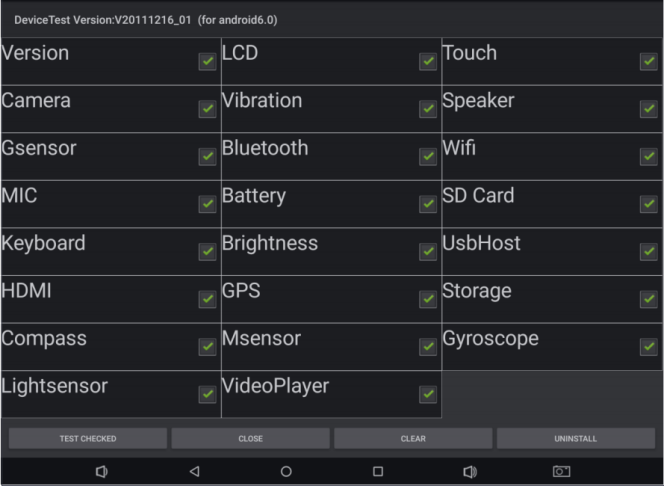
DeviceTest selection/results - Original source figure; PDF page 36 (EN).
Host tools
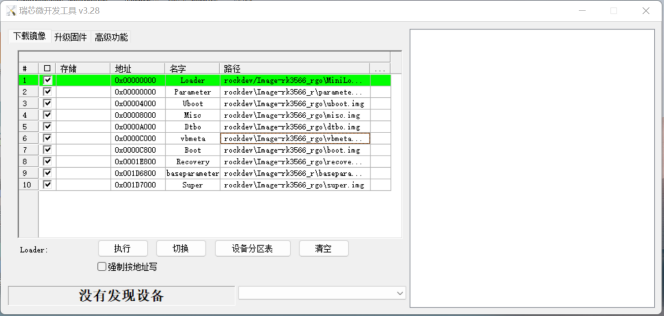
Windows flashing tool - Original source figure; PDF page 37 (EN).
| Tool/purpose | Source package/location |
|---|---|
| USB ADB and flashing drivers | RKTools/windows/DriverAssitant_v5.1.1.zip |
| Windows flashing | RKTools/windows/AndroidTool/AndroidTool_Release_v3.28.zip |
| Linux flashing | RKTools/linux/Linux_Upgrade_Tool/Linux_Upgrade_Tool_v2.30.zip |
| SD upgrade/boot/PCBA media | RKTools/windows/SDDiskTool_v1.74.zip |
| Write device identifiers; unpack/install, run as administrator | RKTools/windows/RKDevInfoWriteTool-1.3.0.7z |
| DDR connection/cold-solder testing | RKTools/windows/Rockchip_Platform_DDR_Test_Tool_V1.38_Release_Annoucement_CN.7z RKTools/windows/Rockchip_Platform_DDR_Test_Tool_V1.38_Release_Annoucement_EN.7z |
| efuse programming:RK3288W/RK3368/RK3399 | RKTools/windows/efuse_v1.37.rar |
| efuse/OTP firmware signing | RKTools/windows/SecureBootTool_v1.94.zip |
| Factory batch flashing | RKTools/windows/FactoryTool-1.72.9.7z |
| Prebuilt userdata package | RKTools/windows/OemTool_v1.3.rar |
| Camera ISP image tuning | external/camera_engine_rkaiq/rkisp2x_tuner |
Identifier-tool manual:RKDocs/common/RKTools manuals/Rockchip_User_Guide_RKDevInfoWriteTool_CN.pdf. efuse/OTP operations may be irreversible: verify the exact chip, keys and programming plan before use. The Linux help sample below is from v2.26 although the listed package is v2.30; retain its command names/options, including the source typo BlokcLen. No erase, write or fuse action was run.
Linux_Upgrade_Tool_v2.26$ sudo ./upgrade_tool -h
Program Data in /home/wlq/.config/upgrade_tool
---------------------Tool Usage ---------------------
Help: H
Quit: Q
Version: V
Clear Screen: CS
------------------Upgrade Command ------------------
ChooseDevice: CD
ListDevice: LD
SwitchDevice: SD
UpgradeFirmware: UF <Firmware> [-noreset]
UpgradeLoader: UL <Loader> [-noreset]
DownloadImage: DI <-p|-b|-k|-s|-r|-m|-u|-t|-re image>
DownloadBoot: DB <Loader>
EraseFlash: EF <Loader|firmware> [DirectLBA]
PartitionList: PL
WriteSN: SN <serial number>
ReadSN: RSN
----------------Professional Command -----------------
TestDevice: TD
ResetDevice: RD [subcode]
ResetPipe: RP [pipe]
ReadCapability: RCB
ReadFlashID: RID
ReadFlashInfo: RFI
ReadChipInfo: RCI
ReadSector: RS <BeginSec> <SectorLen> [-decode] [File]
WriteSector: WS <BeginSec> <File>
ReadLBA: RL <BeginSec> <SectorLen> [File]
WriteLBA: WL <BeginSec> <File>
EraseLBA: EL <BeginSec> <EraseCount>
EraseBlock: EB <CS> <BeginBlock> <BlokcLen> [--Force]
-------------------------------------------------------
ADB connection and commands
ADB (Android Debug Bridge) operates real devices or emulators: shell access, port mapping, file upload/download and APK installation. The source describes PC as client and device/emulator as server; it distinguishes network ADB over wired/wireless LAN (CN explicitly says same LAN) and USB ADB. Its USB instructions are restricted to the OTG port, one client and one device; these are the document’s environment restrictions, not a general statement about every ADB implementation. Start Android, enable Settings → Developer options → connected to computer and USB debugging, connect PC to USB OTG, run adb shell, then adb devices; a serial number confirms connection.
| Operation | Syntax/example | Meaning |
|---|---|---|
| List devices | adb devices | Returns serial or IP:port and state |
| Install/reinstall | adb install <apk-path> adb install “F:\WishTV\WishTV.apk” adb install -r “F:\WishTV\WishTV.apk” |
Install a local APK; -r reinstalls |
| Uninstall | adb uninstall <package> adb uninstall com.wishtv |
Complete package removal |
| Remove APK file | adb shell rm <filepath> adb shell rm “system/app/WishTV.apk” |
Removes the named device file; destructive example |
| Device shell | adb shell | Enter device/emulator command line |
| Upload | adb push <local-path> <remote-path> adb push “F:\WishTV\WishTV.apk” “system/app” |
Copy local file/folder to device; EN omits syntax operands |
| Download | adb pull <remote-path> <local-path> adb pull system/app/Contacts.apk F:\ |
Copy device file/folder to PC |
| Bug report | adb bugreport | Includes dumpsys, dumpstate and logcat |
| System properties | adb shell getprop | Inspect device system information |
Typographic quotes/dashes in the PDF commands are normalized to ASCII quotes and hyphens. Root/system writes depend on the actual firmware permissions; the examples do not grant authority or promise writable system partitions.
Logcat
Android logs software/system debugging information into buffers; logcat displays them. Large output requires filters. Syntax:[adb] logcat [
adb shell
logcat
logcat *:W
logcat ActivityManager:I MyApp:D *:S
logcat WishTV:* *:S
logcat -s WishTV
logcat WishTV:I *:S
Procrank memory snapshots
Procrank runs in the device shell to inspect process memory. USS belongs exclusively to the process and is reclaimed when it dies; VSS/RSS include shared libraries, so the source cautions against using them alone for a single process’s ownership. PSS apportions shared memory proportionally. Obtain root with su before procrank. Default sorting is PSS; -v sorts VSS descending.
| Metric | Meaning |
|---|---|
| VSS | Virtual Set Size, virtual allocation including shared libraries |
| RSS | Resident Set Size, resident physical memory including shared libraries |
| PSS | Proportional Set Size, proportionally allocated shared memory |
| USS | Unique Set Size, exclusive physical memory excluding shared libraries |
| Option | Meaning |
|---|---|
| -v | VSS |
| -r | RSS |
| -p | PSS |
| -u | USS |
| -R | Reverse ascending/descending sort |
| -w | Working-set statistics only |
| -W | Reset working-set statistics |
| -h | Help |
su
procrank [ -W ] [ -v | -r | -p | -u | -h ]
procrank
procrank -v
procrank | grep [cmdline | PID]
procrank | grep "com.android.systemui"
procrank | grep 3396
cmdline is an application name; PID is its process identifier. To investigate a possible leak, repeatedly snapshot the process and compare USS over time. After connecting ADB, run ./test.sh with this script; a trend is diagnostic evidence, not by itself proof of a leak.
#!/bin/bash
while true;do
    adb shell procrank | grep "com.android.systemui"
    sleep 1
done
Dumpsys
Dumpsys runs in the device shell and reports Android Binder services. It prints only services already registered in ServiceManager, and only if their dump implementation exists. Use -help for help, -l to list services, a full case-sensitive service name for its dump, and append an application name where supported.
dumpsys -help
dumpsys -l
dumpsys [servicename]
dumpsys SurfaceFlinger
dumpsys [servicename] [application-name]
dumpsys meminfo com.android.systemui
Last logs and FIQ
Add the two ramoops DTS nodes below. Inspect /sys/fs/pstore: dmesg-ramoops-0 saves the last kernel panic; pmsg-ramoops-0 holds previous Android/userspace logs; ftrace-ramoops-0 records function tracing; console-ramoops-0 is the previous boot kernel log, retaining messages above the default log-level threshold. Use logcat -L to extract/parse pmsg.
ramoops_mem: ramoops_mem {
reg = <0x0 0x110000 0x0 0xf0000>;
reg-names = "ramoops_mem";
};
ramoops {
compatible = "ramoops";
record-size = <0x0 0x20000>;
console-size = <0x0 0x80000>;
ftrace-size = <0x0 0x00000>;
pmsg-size = <0x0 0x50000>;
memory-region = <&ramoops_mem>;
};
cd /sys/fs/pstore
ls
cat dmesg-ramoops-0
cat console-ramoops-0
logcat -L
cat ftrace-ramoops-0
When the device crashes or hangs, enter fiq on its serial console to inspect system state, then help for commands. reboot/reset change device state; use deliberately.
127|console:/ $ fiq
debug> help
FIQ Debugger commands:
pc PC status
regs Register dump
allregs Extended Register dump
bt Stack trace
reboot [<c>] Reboot with command <c>
reset [<c>] Hard reset with command <c>
irqs Interupt status
kmsg Kernel log
version Kernel version
sleep Allow sleep while in FIQ
nosleep Disable sleep while in FIQ
console Switch terminal to console
cpu Current CPU
cpu <number> Switch to CPU<number>
ps Process list
sysrq sysrq options
sysrq <param> Execute sysrq with <param>
FAQ: versions and synchronization
Android14.0 uses kernel6.1 and U-Boot next-dev. SDK sources combine AOSP and RK changes: RK repositories are described by XML under .repo/manifests/include, AOSP defaults by .repo/manifests/default.xml. Read the RK project revision and AOSP default revision and report both; the source examples are android-14.0-mid-rkr1 and android-14.0.0_r11. A repository’s git tag lists release tags, incrementing android-14.0-mid-rkrxx. The example’s “latest RKR1” is historical, not a current claim.
vim .repo/manifests/include/rk_checkout_from_aosp.xml
<project groups="pdk" name="platform/build" path="build/make" remote="rk" revision="refs/tags/android-14.0-mid-rkr1">
vim .repo/manifests/default.xml
<default revision="refs/tags/android-14.0.0_r11"...>
# In kernel-6.1
git tag
# example result: android-14.0-mid-rkr1
To check completeness, export a pinned local manifest and compare it with the corresponding release commit manifest under .repo/manifests/commit/. CN introduces RKR1, EN introduces RKR6, but both filenames are rkr1 and both later describe the reference as RKR6. This mismatch is preserved: compare the actual intended release, not the mixed labels.
.repo/repo/repo manifest -r -o release_manifest_rkr1_local.xml
# Compare with .repo/manifests/commit/commit_release_rkr1.xml
Boot logos and 64-bit-only builds
U-Boot and kernel logos are the first/second images at startup: kernel-6.1/logo.bmp and logo_kernel.bmp. Replace with same-name BMP and rebuild kernel; packaged in boot.img. The source supports BMP under8MB,8/16/24/32-bit. It states Android14 GMS/EDLA products must be64-bit-only, reducing memory use; rk3562_ugo BoardConfig.mk example follows.
diff --git a/rk3562_ugo/BoardConfig.mk b/rk3562_ugo/BoardConfig.mk
index c06433e..dc9cc50 100644
--- a/rk3562_ugo/BoardConfig.mk
+++ b/rk3562_ugo/BoardConfig.mk
@@ -18,3 +18,11 @@ PRODUCT_KERNEL_DTS := rk3562-rk817-tablet-v10
CAMERA_SUPPORT_AUTOFOCUS := true
BOARD_BUILD_GKI := true
include device/rockchip/rk3562/BoardConfig.mk
+
+DEVICE_IS_64BIT_ONLY := true
+
+TARGET_2ND_ARCH :=
+TARGET_2ND_ARCH_VARIANT :=
+TARGET_2ND_CPU_ABI :=
+TARGET_2ND_CPU_ABI2 :=
+TARGET_2ND_CPU_VARIANT :=
Charging and charging pictures
Configure shutdown charging and low-battery precharge in DTS. uboot-charge-on and android-charge-on are mutually exclusive. uboot-low-power-voltage is the threshold to boot after precharge; screen-on-voltage is the display-on threshold; select values for the product. Replace charging BMPs with same-name/same-format files. If charging is enabled but images are absent, pack them into resource.img, then repack boot.img and flash rockdev/boot.img. The source mixes kernel-6.1 and kernel directories and spells ./mkiamge.sh; retained as source defects, so verify real paths/script names before execution.
charge-animation {
compatible = "rockchip,uboot-charge";
rockchip,uboot-charge-on = <1>;
rockchip,android-charge-on = <0>;
rockchip,uboot-low-power-voltage = <3400>;
rockchip,screen-on-voltage = <3500>;
status = "okay";
};
u-boot/tools/images/
├── battery_0.bmp
├── battery_1.bmp
├── battery_2.bmp
├── battery_3.bmp
├── battery_4.bmp
├── battery_5.bmp
└── battery_fail.bmp
cd u-boot
./scripts/pack_resource.sh ../kernel-6.1/resource.img
cp resource.img ../kernel/resource.img
# Source spelling, executed from Android root:
./mkiamge.sh
HDMI input, modem, Wi-Fi and rotation
HDMI IN and RM3104G are disabled by default; enable the corresponding BoardConfig settings below. Wi-Fi defaults to remaining connected during sleep. To disconnect, change def_wifi_sleep_policy from2 to0 in the source rk3566_rgo overlay. persist.wifi.sleep.delay.ms delays shutdown, default15minutes;0 disables Wi-Fi immediately after screen-off. The rgo path is a historical source target, not an Android14 target inferred here.
# device/rockchip/rk3588/BoardConfig.mk
BOARD_HDMI_IN_SUPPORT := true
# device/rockchip/common/BoardConfig.mk
BOARD_HAS_RK_4G_MODEM ?= true
--- a/rk3566_rgo/overlay/frameworks/base/packages/SettingsProvider/res/values/defaults.xml
+++ b/rk3566_rgo/overlay/frameworks/base/packages/SettingsProvider/res/values/defaults.xml
@@ -24,5 +24,5 @@
You can configure persist.wifi.sleep.delay.ms to delay closing wifi.
The default is 15 minutes, 0 means that the wifi is turned off
immediately after the screen is off. -->
- <integer name="def_wifi_sleep_policy">2</integer>
+ <integer name="def_wifi_sleep_policy">0</integer>
</resources>
Recovery rotation supports0/90/180/270°, default0. In device/rockchip/common/BoardConfig.mk use ROTATION_NONE/ROTATION_RIGHT/ROTATION_DOWN/ROTATION_LEFT respectively. SurfaceFlinger display orientation also accepts0/90/180/270.
TARGET_RECOVERY_DEFAULT_ROTATION ?= ROTATION_NONE
SF_PRIMARY_DISPLAY_ORIENTATION ?= 0
AOSP remote mirrors
After repo init or unpacking the base archive, change the aosp fetch URL in .repo/manifests/remote.xml to improve download speed where appropriate: Tsinghua is the source’s domestic example, Google its overseas example. Original value is fetch=”./” review=”https://10.10.10.29”. The PDF writes “< remote” and a trailing semicolon; the XML below removes these formatting defects. Availability and authorization must be checked separately.
<remote name="aosp" fetch="./" review="https://10.10.10.29" />
<!-- Alternative A -->
<remote name="aosp" fetch="https://aosp.tuna.tsinghua.edu.cn" />
<!-- Alternative B -->
<remote name="aosp" fetch="https://android.googlesource.com" />
Data performance and EXT4
The source recommends fsync_mode=nobarrier on battery-powered products for faster storage and warns against it without a battery because unexpected power loss can corrupt data. A battery does not remove all power-loss risks; validate the actual power design and backups. Both fstab.in and fstab_go.in patches are retained. The latter contains resgid=1065i, an apparent source typo: do not apply it blindly. PDF line wrapping is rejoined, but that literal is retained and flagged.
cd device/rockchip/common
diff --git a/scripts/fstab_tools/fstab.in b/scripts/fstab_tools/fstab.in
index 2ec6c265..c890cc84 100755
--- a/scripts/fstab_tools/fstab.in
+++ b/scripts/fstab_tools/fstab.in
@@ -23,6 +23,6 @@ ${_block_prefix}odm /odm ext4 ro,barrier=1 ${_flags},first_stage_mount
# For sdmmc
/devices/platform/${_sdmmc_device}/mmc_host* auto auto defaults voldmanaged=sdcard1:auto
# Full disk encryption has less effect on rk3326, so default to enable this.
-/dev/block/by-name/userdata /data f2fs noatime,nosuid,nodev,discard,reserve_root=32768,resgid=1065 latemount,wait,check,fileencryption=aes-256-xts:aes-256-cts:v2+inlinecrypt_optimized,keydirectory=/metadata/vold/metadata_encryption,quota,formattable,reservedsize=128M,checkpoint=fs
+/dev/block/by-name/userdata /data f2fs noatime,nosuid,nodev,discard,reserve_root=32768,resgid=1065,fsync_mode=nobarrier latemount,wait,check,fileencryption=aes-256-xts:aes-256-cts:v2+inlinecrypt_optimized,keydirectory=/metadata/vold/metadata_encryption,quota,formattable,reservedsize=128M,checkpoint=fs
# for ext4
#/dev/block/by-name/userdata /data ext4 discard,noatime,nosuid,nodev,noauto_da_alloc,data=ordered,user_xattr,barrier=1 latemount,wait,formattable,check,fileencryption=software,quota,reservedsize=128M,checkpoint=block
diff --git a/scripts/fstab_tools/fstab_go.in b/scripts/fstab_tools/fstab_go.in
index 582557f2..05c7653c 100755
--- a/scripts/fstab_tools/fstab_go.in
+++ b/scripts/fstab_tools/fstab_go.in
@@ -17,6 +17,6 @@ ${_block_prefix}odm /odm ext4 ro,barrier=1 ${_flags},first_stage_mount
# For sdmmc
/devices/platform/${_sdmmc_device}/mmc_host* auto auto defaults voldmanaged=sdcard1:auto
# Full disk encryption has less effect on rk3326, so default to enable this.
-/dev/block/by-name/userdata /data f2fs noatime,nosuid,nodev,discard,reserve_root=32768,resgid=1065 latemount,wait,check,fileencryption=aes-256-xts:aes-256-cts:v2+inlinecrypt_optimized,keydirectory=/metadata/vold/metadata_encryption,quota,formattable,reservedsize=128M,checkpoint=fs
+/dev/block/by-name/userdata /data f2fs noatime,nosuid,nodev,discard,reserve_root=32768,resgid=1065i,fsync_mode=nobarrier latemount,wait,check,fileencryption=aes-256-xts:aes-256-cts:v2+inlinecrypt_optimized,keydirectory=/metadata/vold/metadata_encryption,quota,formattable,reservedsize=128M,checkpoint=fs
# for ext4
#/dev/block/by-name/userdata /data ext4 discard,noatime,nosuid,nodev,noauto_da_alloc,data=ordered,user_xattr,barrier=1 latemount,wait,formattable,check,fileencryption=software,quota,reservedsize=128M,checkpoint=block
data defaults to f2fs. The source proposes EXT4 for batteryless products to reduce abnormal-power-loss data-loss probability, not guarantee immunity. Its rk3566r example changes both the Android fstab template and recovery.fstab; filesystem conversion can require reformatting, so back up and plan migration. The diff context ends in first_stage, already incomplete in the source; do not invent the missing text.
device/rockchip/common$ git diff
diff --git a/scripts/fstab_tools/fstab.in b/scripts/fstab_tools/fstab.in
index 6e78b00..a658332 100755
--- a/scripts/fstab_tools/fstab.in
+++ b/scripts/fstab_tools/fstab.in
@@ -20,6 +20,6 @@ ${_block_prefix}system_ext /system_ext ext4 ro,barrier=1 ${_flags},first_stage_
# For sdmmc
/devices/platform/${_sdmmc_device}/mmc_host* auto auto defaults voldmanaged=sdcard1:auto
# Full disk encryption has less effect on rk3326, so default to enable this.
-/dev/block/by-name/userdata /data f2fs noatime,nosuid,nodev,discard,reserve_root=32768,resgid=1065 latemount,wait,check,fileencryption=aes-256-xts:aes-256-cts:v2+inlinecrypt_optimized,quota,formattable,reservedsize=128M,checkpoint=fs
+#/dev/block/by-name/userdata /data f2fs noatime,nosuid,nodev,discard,reserve_root=32768,resgid=1065 latemount,wait,check,fileencryption=aes-256-xts:aes-256-cts:v2+inlinecrypt_optimized,quota,formattable,reservedsize=128M,checkpoint=fs
# for ext4
-#/dev/block/by-name/userdata /data ext4 discard,noatime,nosuid,nodev,noauto_da_alloc,data=ordered,user_xattr,barrier=1 latemount,wait,formattable,check,fileencryption=software,quota,reservedsize=128M,checkpoint=block
+/dev/block/by-name/userdata /data ext4 discard,noatime,nosuid,nodev,noauto_da_alloc,data=ordered,user_xattr,barrier=1 latemount,wait,formattable,check,fileencryption=software,quota,reservedsize=128M,checkpoint=block
device/rockchip/rk356x$ git diff
diff --git a/rk3566_r/recovery.fstab b/rk3566_r/recovery.fstab
index 7532217..cf789ac 100755
--- a/rk3566_r/recovery.fstab
+++ b/rk3566_r/recovery.fstab
@@ -7,7 +7,7 @@
/dev/block/by-name/odm /odm ext4 defaults defaults
/dev/block/by-name/cache /cache ext4 defaults defaults
/dev/block/by-name/metadata /metadata ext4 defaults defaults
-/dev/block/by-name/userdata /data f2fs defaults defaults
+/dev/block/by-name/userdata /data ext4 defaults defaults
/dev/block/by-name/cust /cust ext4 defaults defaults
/dev/block/by-name/custom /custom ext4 defaults defaults
/dev/block/by-name/radical_update /radical_update ext4 defaults defaults
Animation, app performance and GPU diagnosis
For boot/shutdown animation and tones, see RKDocs/android/Rockchip_Introduction_Android_Power_On_Off_Animation_and_Tone_Customization_CN&EN.pdf. Performance-mode packages go in device/rockchip/rk3xxx/package_performance.xml; obtain names with aapt dump badging (file_path.apk). mode1 enables acceleration,0 disables it; the file is packaged into firmware. Original Antutu snippets below contain malformed XML spacing/backslashes and a duplicate full-package row; retained for traceability, not a ready XML file. For initial GPU troubleshooting see RKDocs/android/Rockchip_User_Guide_Dr.G_CN&EN.pdf.
< app package="com.antutu.ABenchMark"mode="1"/>
< app package="com.antutu.benchmark.full"mode="1"\/>
< app package="com.antutu.benchmark.full"mode="1"\/>
OTP/efuse and programmed status
| Type | Source chip list |
|---|---|
| OTP | RK3326, PX30, RK3566, RK3568, RK3588 |
| EFUSE | RK3288, RK3368, RK3399 |
EN additionally lists RK3568S for OTP; CN does not. Preserve that literal as an unverified source discrepancy rather than silently changing it to another chip. Firmware signing/programming reference:RKDocs/common/security/Rockchip-Secure-Boot-Application-Note-V1.9.pdf. Kernel cmdline fuse.programmed conveys status:1 means secure-boot-signed firmware and programmed hardware;0 means signed firmware but unprogrammed hardware. If absent, firmware may be unsigned (Miniloader does not pass it), or Miniloader may be too old. Absence alone does not prove hardware is unprogrammed.
SELinux and startup consistency warning
BOARD_SELINUX_ENFORCING=false disables enforcement; true enables it. Disabling enforcement weakens protection and is not a production default recommendation. The source’s startup “internal problem” warning has two listed causes: mismatched system/boot/vendor fingerprints, or IO-debug configuration. Use the documented normal kernel build to remove the IO-debug configuration when unnecessary. The source also gives a patch to hide the warning for IO-debug projects; this does not fix inconsistent firmware. Its Java expression if (0 && …) is invalid Java and is preserved only as a source defect, not a working patch. Fix the underlying mismatch and review any debug-only change.
device/rockchip/common$
--- a/BoardConfig.mk
+++ b/BoardConfig.mk
@@ -67,7 +67,7 @@ endif
# Enable android verified boot 2.0
BOARD_AVB_ENABLE ?= false
-BOARD_SELINUX_ENFORCING ?= false
+BOARD_SELINUX_ENFORCING ?= true
diff --git a/services/core/java/com/android/server/wm/ActivityTaskManagerService.java b/services/core/java/com/android/server/wm/ActivityTaskManagerService.java
index 595c340..d4e495a 100644
--- a/services/core/java/com/android/server/wm/ActivityTaskManagerService.java
+++ b/services/core/java/com/android/server/wm/ActivityTaskManagerService.java
@@ -6555,7 +6555,7 @@ public class ActivityTaskManagerService extends
IActivityTaskManager.Stub {
} catch (RemoteException e) {
}
- if (!Build.isBuildConsistent()) {
+ if (0 && !Build.isBuildConsistent()) {
Slog.e(TAG, "Build fingerprint is not consistent, warning user");
mUiHandler.post(() -> {
if (mShowDialogs) {
Ethernet settings, AVB and IO debugging
Ethernet settings are absent by default; add BOARD_HS_ETHERNET=true as below. AVB/security-boot procedures:RKDocs/common/security/RK356X_SecurityBoot_And_AVB_instructions_CN.pdf. IO depends on DEVMEM, disabled by default. For a controlled debug build remove “# CONFIG_DEVMEM is not set” from mkcombinedroot/configs/android-14.config or android-14-go.config for GO; Android builds also need both kernel/configs patches below. Direct physical-memory access weakens isolation; do not enable indiscriminately in production.
--- a/BoardConfig.mk
+++ b/BoardConfig.mk
@@ -146,3 +146,6 @@ endif
ifeq ($(strip $(BOARD_USES_AB_IMAGE)), true)
DEVICE_MANIFEST_FILE := device/rockchip/$(TARGET_BOARD_PLATFORM)/manifest_ab.xml
endif
+# for ethernet
+BOARD_HS_ETHERNET := true
cd rk3562_Android14.0/kernel/configs
diff --git a/android-6.1/android-base.config b/android-6.1/android-base.config
index 5de76f0..6dcdf86 100644
--- a/android-6.1/android-base.config
+++ b/android-6.1/android-base.config
@@ -2,7 +2,6 @@
# CONFIG_ANDROID_LOW_MEMORY_KILLER is not set
# CONFIG_ANDROID_PARANOID_NETWORK is not set
# CONFIG_BPFILTER is not set
-# CONFIG_DEVMEM is not set
# CONFIG_FHANDLE is not set
# CONFIG_FW_CACHE is not set
# CONFIG_IP6_NF_NAT is not set
wlq@sys2206:~/rk3562_Android14.0/kernel/configs$ git diff
diff --git a/u/android-6.1/android-base.config b/u/android-6.1/android-base.config
index 29b9e98..c1b21cf 100644
--- a/u/android-6.1/android-base.config
+++ b/u/android-6.1/android-base.config
@@ -2,7 +2,6 @@
# CONFIG_ANDROID_LOW_MEMORY_KILLER is not set
# CONFIG_ANDROID_PARANOID_NETWORK is not set
# CONFIG_BPFILTER is not set
-# CONFIG_DEVMEM is not set
# CONFIG_FHANDLE is not set
# CONFIG_FW_CACHE is not set
# CONFIG_IP6_NF_NAT is not set
SN, LZ4 and additional features
SN must start with a letter and be at most14bytes. A kernel-build LZ4 error can mean the host LZ4 is too old; source requires1.8.3+. Check lz4 -v. It proposes overwriting /usr/bin/lz4 with the Android-built binary; this changes a system-managed tool, so review compatibility and preserve recovery options before applying. The source version output also says “refusing to read from a console”.
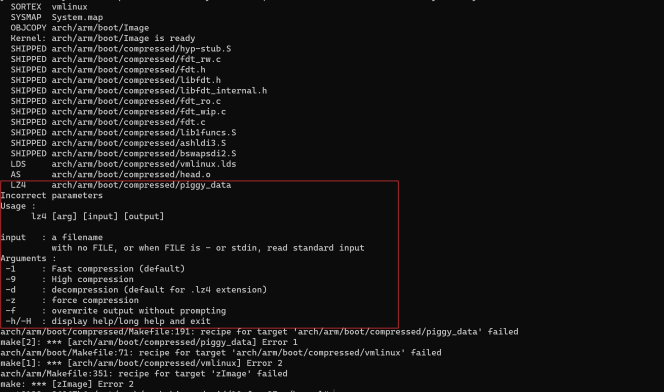
LZ4 build error - Original source figure; PDF page 56 (EN).
wlq@ubuntu:~$ lz4 -v
*** LZ4 command line interface 64-bits v1.8.3, by Yann Collet ***
refusing to read from a console
sudo cp out/host/linux-x86/bin/lz4 /usr/bin/lz4
| Feature | Reference |
|---|---|
| Samba | RKDocs/android/Rockchip_Introduction_Android_Samba_CN.pdf |
| NFS boot | RKDocs/android/patches/customized_functions/nfs_boot_patch_v1.1.0.zip |
| Independent displays/touch | RKDocs/android/patches/customized_functions/Android11异显开发说明.zip |
| Independent display audio | RKDocs/android/patches/customized_functions/Dual_Audio_v1.0.zip |
RK3528 DDR4BIT PCB loader example changes only FlashData to the4BIT variant below. Its presence does not add RK3528 to the SDK supported-chip table.
diff --git a/RKBOOT/RK3528MINIALL.ini b/RKBOOT/RK3528MINIALL.ini
index a7e3779..6a952cf 100644
--- a/RKBOOT/RK3528MINIALL.ini
+++ b/RKBOOT/RK3528MINIALL.ini
@@ -14,7 +14,7 @@ Path1=bin/rk35/rk3528_usbplug_v1.03.bin
NUM=2
LOADER1=FlashData
LOADER2=FlashBoot
-FlashData=bin/rk35/rk3528_ddr_1056MHz_v1.05.bin
+FlashData=bin/rk35/rk3528_ddr_1056MHz_4BIT_PCB_v1.05.bin
Appendix A: historical build environment
This appendix is reproduced from an older AOSP environment guide and remains English even inside the Chinese PDF. Its Ubuntu14.04/15.04, JDK8 and Mac statements are historical, not validated Android14 host requirements; the GKI guide separately requires Ubuntu20.04+. Do not treat old package instructions as a current installation recommendation. The source says Linux or Mac OS, not Windows, and references “Life of a Patch” for review/update workflow. Its dollar signs distinguish prompts from commands; web “Click to copy”/triple-click instructions are copied source UI guidance, not features of this article.
Choose a source branch first because environment requirements depend on it; “Build Numbers” lists branches. The source’s master download omits a branch specification. Its Linux instructions claim applicability to all branches/master and historical in-house testing on Ubuntu LTS14.04 and Debian testing; other distributions may provide the tools. Gingerbread2.3.x and newer require a64-bit environment, older versions could use32-bit. It references “Requirements” for full hardware/software requirements and Ubuntu/Mac setup. AOSP master includes prebuilt OpenJDK under prebuilts/jdk/; older branches need a separate OpenJDK installation and matching “JDK Requirements”.
For Ubuntu≥15.04 the historical commands install OpenJDK8. For14.04 the source says supported OpenJDK8 packages were unavailable, but15.04 packages worked, unlike15.10/16.04 packages using this procedure. Download these64-bit .deb files from old-releases.ubuntu.com and compare SHA256; no downloads were performed here.
sudo apt-get update
sudo apt-get install openjdk-8-jdk
| Package | SHA256 |
|---|---|
| openjdk-8-jre-headless_8u45-b14-1_amd64.deb | 0f5aba8db39088283b51e00054813063173a4d8809f70033976f83e214ab56c0 |
| openjdk-8-jre_8u45-b14-1_amd64.deb | 9ef76c4562d39432b69baf6c18f199707c5c56a5b4566847df908b7d74e15849 |
| openjdk-8-jdk_8u45-b14-1_amd64.deb | 6e47215cf6205aa829e6a0a64985075bd29d1f428a4006a80c9db371c2fc3c4c |
Run dpkg separately for each downloaded package; missing-dependency errors are repaired with apt-get -f install. Optionally select default java/javac with update-alternatives. The PDF concatenates the two commands; they are separated below. For build Java-version errors it references “Wrong Java version”.
sha256sum {downloaded.deb file}
sudo apt-get update
sudo dpkg -i {downloaded.deb file}
sudo apt-get -f install
sudo update-alternatives --config java
sudo update-alternatives --config javac
Historical64-bit Ubuntu14.04 dependency list follows. CN additionally includes libssl-dev, liblz4-tool and python-dev, absent from EN. SELinux policy analysis additionally needs python-networkx; LDAP users running ART host tests need libnss-sss:i386.
sudo apt-get install git-core gnupg flex bison gperf build-essential zip curl zlib1g-dev gcc-multilib g++-multilib libc6-dev-i386 lib32ncurses5-dev x11proto-core-dev libx11-dev lib32z-dev ccache libgl1-mesa-dev libxml2-utils xsltproc unzip python-pyelftools python3-pyelftools device-tree-compiler libfdt-dev libfdt1 libssl-dev liblz4-tool python-dev
The historical GNU/Linux USB rule grants a named regular user access. As root create /etc/udev/rules.d/51-android.rules and replace
# adb protocol on passion (Rockchip products)
SUBSYSTEM=="usb", ATTR{idVendor}=="2207", ATTR{idProduct}=="0010", MODE="0600", OWNER="<username>"
Appendix B: SSH keys
B-1: generate an RSA key, replacing user@host with your email. Keep id_rsa and its passphrase private; send only id_rsa.pub to the SDK release-server administrator. The screenshots are original examples, not keys generated for this task.
ssh-keygen -t rsa -C "user@host"
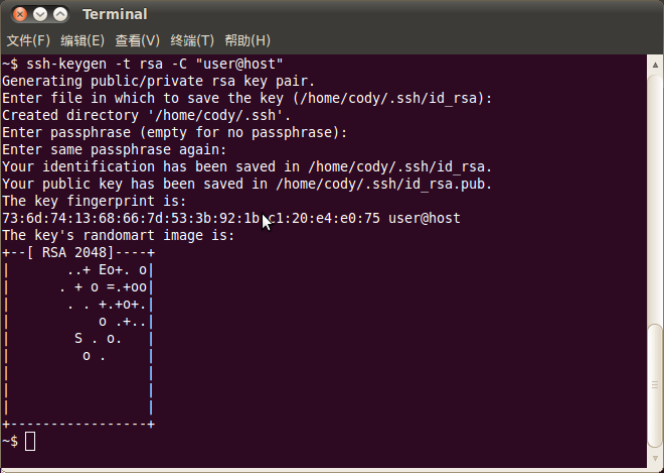
RSA key-generation example - Original source figure; PDF page 60 (EN).

Generated key filenames - Original source figure; PDF page 60 (EN).
B-2: install keychain and add its evaluation line to ~/.bashrc. Re-login and enter the key-generation passphrase if one exists. id_rsa names the private-key file. Avoid sudo/root for routine key use unless you understand the resulting ownership and agent differences.
sudo aptitude install keychain
vim ~/.bashrc
# Add to ~/.bashrc:
eval `keychain --eval ~/.ssh/id_rsa`
B-3: the source describes using the same identity on multiple authorized machines by securely copying id_rsa to ~/.ssh/id_rsa on the target. This spreads the same private credential; never send it to third parties or untrusted machines. A wrong private key produces the shown authentication failure; the correct identity permits cloning. For the source error “Agent admitted failture to sign using the key” (source spelling), run ssh-add ~/.ssh/id_rsa.
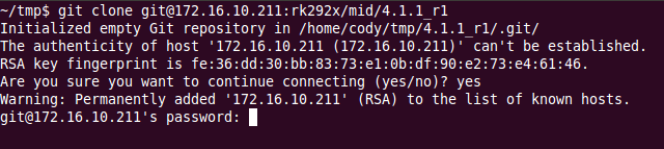
Wrong identity/authentication error - Original source figure; PDF page 61 (EN).
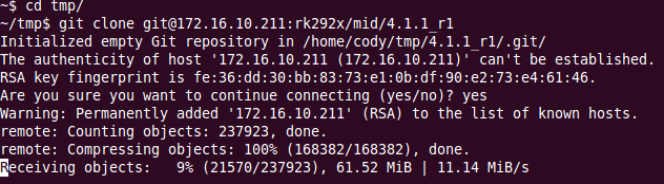
Clone with the correct identity - Original source figure; PDF page 61 (EN).
ssh-add ~/.ssh/id_rsa
B-4: consult man ssh_config. The source copies system ssh_config to ~/.ssh/config then edits it to use ~/.ssh1/id_rsa as IdentityFile, switching identities. Preserve any existing user configuration before adapting this example; copying over it would overwrite settings.
man ssh_config
cp /etc/ssh/ssh_config ~/.ssh/config
vi .ssh/config
# Relevant ssh_config directive:
IdentityFile ~/.ssh1/id_rsa
ssh_config manual - Original source figure; PDF page 62 (EN).
Alternate IdentityFile - Original source figure; PDF page 62 (EN).
B-5: the server may monitor per-key download counts/IPs and disable download privileges on abnormal use. Protect the private key and do not re-authorize it to third parties. B-6: generate the public key as above and send the public-key file to fae@rock-chips.com to apply for SDK download access. No email, key generation or access request was performed here.