
Quellen: Rockchip Android14.0 SDK, chinesisch RK-KF-YF-776 (58 Seiten), englisch RK-KF-YF-777 (63), jeweils V1.4.0. Chinesischer Fachtext ist die Grundlage; englische Ergänzungen/Widersprüche stehen daneben. Supportaussagen betreffen Rockchip-Entwicklungsplattformen, keine ArmSoM-Tests. Befehle sind nicht ausgeführte Dokumentationsbeispiele. Flashen, Partitionen, Fuse-Programmierung und Codeveröffentlichung erfordern Zielprüfung, Backup und Autorisierung. Historische Links und „neueste“-Aussagen wurden nicht aktuell verifiziert.
Unterstützte Chips
| Chip | Unterstützung | SDK-Release |
|---|---|---|
| RK3562 | Ja | RKR1 |
| RK3568 | Ja | RKR2 |
| RK3566 | Ja | RKR2 |
| RK3326 | Ja | RKR2 |
| PX30 | Ja | RKR3 |
| RK3326-S | Ja | RKR3 |
| PX30-S | Ja | RKR3 |
| RK3588 | Ja | RKR4 |
| RK3588S | Ja | RKR4 |
| RK3399 | Ja | RKR5 |
Beide Tabellen nennen RK3326 unter RKR2, die technische Releasehistorie ordnet RK3326/RK3326-S/PX30/PX30-S RKR3 zu; Widerspruch bleibt erhalten. RKR1 ergänzte RK3562, RKR2 RK3566/RK3568, RKR4 RK3588/RK3588S, RKR5 RK3399.
SDK-Quellen herunterladen
Normales Manifest oder Express bei passenden Rechten initialisieren; Servermirror mit –mirror. repo ist Googles Python-Git-Wrapper für Android-Repositories. Rockchip-Kontakt kann ein geteiltes Startarchiv bereitstellen; entpacken, lokal synchronisieren, anschließend aktuellen Branch remote synchronisieren.
repo init --repo-url https://gerrit.rock-chips.com:8443/repo-release/tools/repo -u https://gerrit.rock-chips.com:8443/Android_U/manifests -b master -m Android14.xml
repo init --repo-url https://gerrit.rock-chips.com:8443/repo-release/tools/repo -u https://gerrit.rock-chips.com:8443/Android_U/manifests -b master -m Android14_Express.xml
repo init --repo-url https://gerrit.rock-chips.com:8443/repo-release/tools/repo -u https://gerrit.rock-chips.com:8443/Android_U/manifests -b master -m Android14.xml --mirror
repo init --repo-url https://gerrit.rock-chips.com:8443/repo-release/tools/repo -u https://gerrit.rock-chips.com:8443/Android_U/manifests -b master -m Android14_Express.xml --mirror
git clone https://gerrit.rock-chips.com:8443/repo-release/tools/repo
mkdir Rockchip_Android14.0_SDK_RELEASE
cat Rockchip_Android14.0_SDK_RELEASE.tar.gz* | tar -zx -C Rockchip_Android14.0_SDK_RELEASE
cd Rockchip_Android14.0_SDK_RELEASE
.repo/repo/repo sync -l
.repo/repo/repo sync -c
Eigener repo-Server: Umgebung und Gitolite
openssh-server, git und keychain installieren; Beispielserver:10.10.10.206. Separates git-Konto anlegen und anmelden. Quelle verlangt leeres/fehlendes ~/.ssh/authorized_keys; vorhandene Zugangsschlüssel nicht löschen, neues dediziertes Konto verwenden und Zugriff prüfen. Admin-Public-Key nach ~/YourName.pub kopieren, Gitolite klonen, ~/bin anlegen, installieren und Admin setzen. Installation versionsabhängig; passende Quelldokumentation beachten.
sudo apt-get install openssh-server git keychain
sudo adduser --system --shell /bin/bash --group git
sudo passwd git
# Log in as git; copy the administrator public key to ~/YourName.pub
git clone https://github.com/sitaramc/gitolite.git
mkdir -p ~/bin
gitolite/install -to ~/bin
~/bin/gitolite setup -pk YourName.pub
Client:gitolite-admin klonen, Nutzer-Public-Keys nach keydir kopieren und in conf/gitolite.conf Admingruppe mit RW+ für gitolite-admin definieren.
git clone ssh://git@10.10.10.206/gitolite-admin.git
cp username.pub keydir/username.pub
vi conf/gitolite.conf
@admin = admin1 admin2 admin3
repo gitolite-admin
    RW+ = @admin
Repositorymirror anlegen
Server:als git anmelden, repo im Arbeitswurzelverzeichnis laden, RK_Android14_mirror anlegen, Mirror initialisieren und Rechte erzeugen. Client:android_u.conf nach gitolite-admin/conf/ kopieren, Rechte hinzufügen, in gitolite.conf einbinden und eigenes Manifestrepo registrieren. Chinesisch:@android_u/android_u.conf; englisches sed:@android_t, Kopieranweisung:android_r.conf. Quellwidersprüche, keine austauschbaren Namen.
git clone https://gerrit.rock-chips.com:8443/repo-release/tools/repo
mkdir RK_Android14_mirror
cd RK_Android14_mirror
repo init --repo-url https://gerrit.rock-chips.com:8443/repo-release/tools/repo -u https://gerrit.rock-chips.com:8443/Android_U/manifests -b master -m Android14.xml --mirror
.repo/repo/repo list -n > android_u.conf
sed -i 's/^/@android_u = RK_Android14_mirror\/&/g' android_u.conf
# conf/android_u.conf
@usergroup = user1 user2 user3
repo @android_u
    R = @usergroup
    RW+ = @admin

# conf/gitolite.conf
include "android_u.conf"

# additional source example in conf/android_u.conf
@android_u = Android_T/manifests_xxx
Eigenes Manifest veröffentlichen
Client:neues und ursprüngliches Manifestrepo klonen, Dateien nach manifests_xxx kopieren, git status prüfen, lokal committen und master pushen. Android14 anlegen und repo über eigene Serveradresse für Kollegen initialisieren. Quelle mischt Android_T/Android_u/Android_U; Kopierpfade nach cd manifests_xxx prüfen. Unterverzeichnisse wie include/ erhalten; *.xml kopiert sie nicht mit. Nur Quellenbeispiele, hier nicht ausgeführt.
git clone ssh://git@10.10.10.206/Android_u/manifests_xxx.git
git clone ssh://git@10.10.10.206/Android_U/manifests.git
cd manifests_xxx
cp -rf manifests/*.xml manifests_xxx/
git status
Android14.xml
Android14_Express.xml
default.xml
include/rk3562_repository.xml
include/rk_checkout_from_aosp.xml
include/rk_modules_repository.xml
remote.xml
remove_u.xml
remove_unused.xml
git add -A
git commit -m "init xxx"
git push origin master:master
git clone https://gerrit.rock-chips.com:8443/repo-release/tools/repo
mkdir Android14
cd Android14
~/repo/repo init -u ssh://git@10.10.10.206/Android_U/manifests_xxx.git -m Android14.xml
Eigene Branches und Änderungen
Die meisten Repositories verwenden weiterhin RK-Branches. Im Zielverzeichnis (kernel-6.1) xxx_branch aus remotes/m/master erstellen und nach rk29 pushen (Remote per Tab ergänzbar). In .repo/manifests nach kernel suchen und Projekt-revision auf xxx_branch ändern. Manifest committen/pushen, damit Kollegen den Branch synchronisieren; Produktänderungen anschließend direkt auf xxx_branch. Diff-Pfad kernel und Tag android-1s.0 bleiben historische Quellliterale.
cd kernel-6.1
git checkout remotes/m/master -b xxx_branch
git push rk29 xxx_branch:xxx_branch
cd .repo/manifests
--- a/include/rk_modules_repository.xml
+++ b/include/rk_modules_repository.xml
@@ -10,7 +10,7 @@
<project path="hardware/rockchip/libgraphicpolicy"
name="rk/hardware/rk29/libgraphicpolicy" remote="rk"
revision="refs/tags/android-1s.0-mid-rkr1" />
<project path="hardware/rockchip/libhwjpeg" name="rk/hardware/rk29/libhwjpeg"
remote="rk" revision="refs/tags/android-14.0-mid-rkr1"/>
<project path="u-boot" name="rk/u-boot" remote="rk"
revision="refs/tags/android-14.0-mid-rkr1"/>
- <project path="kernel" name="rk/kernel" remote="rk29"
revision="refs/tags/android-14.0-mid-rkr1"/>
+ <project path="kernel" name="rk/kernel" remote="rk29" revision="xxx_branch"/>
<project path="bootable/recovery/rkupdate"
name="platform/bootable/recovery/rk_update" remote="rk"
revision="refs/tags/android-14.0-mid-rkr1"/>
<project path="bootable/recovery/rkutility"
name="platform/bootable/recovery/rk_utility" remote="rk"
revision="refs/tags/android-14.0-mid-rkr1"/>
git add include/rk_modules_repository.xml
git commit -m "change kernel branch on xxx_branch"
git push origin default:master
RK-Updates synchronisieren
Zuerst Servermirror synchronisieren. Client:RK-Manifeste mit manifests_xxx vergleichen, Tags sowie Repositoryzugänge/-abgänge übernehmen, prüfen/pushen und eigene Branches identifizieren. Je Repository Remote prüfen, lokalen Branch anlegen, Tags ansehen, gewünschten Release mergen, Konflikte beheben und Produktbranch pushen. Überall wiederholen. Historische Beispiele enthalten Android10/11 und nennen android-14.0-mid-rkr1 damals „aktuell“; RKR5-Geltungsbereich bleibt. Checkout remotes/m/xxx_branch weicht vom gezeigten remotes/m/master ab:Refs prüfen. Kernel6.1-Quellen liegen in kernel-6.1/.
cd RK_Android14_mirror
.repo/repo/repo sync -c
git clone //10.10.10.206/wlq/test/manifests.git
wlq@wlq:~/home1/test2/kernel-6.1$ git branch -av
* android-11.0-mid-rkr7 0bde59fad73a ARM: configs: rockchip_defconfig enable
ION_CMA_HEAP
xxx_branch 0bde59fad73a ARM: configs: rockchip_defconfig enable
ION_CMA_HEAP
remotes/m/master -> rk29/xxx_branch
remotes/rk29/xxx_branch 0bde59fad73a ARM: configs: rockchip_defconfig enable
ION_CMA_HEAP
git checkout remotes/m/xxx_branch -b local_xxx_branch
wlq@wlq:~/home1/test2/kernel$ git tag | grep rkr
android-10.0-mid-rkr1
android-10.0-mid-rkr10
android-10.0-mid-rkr11
android-10.0-mid-rkr13
android-10.0-mid-rkr2
android-10.0-mid-rkr3
android-10.0-mid-rkr4
android-10.0-mid-rkr5
android-10.0-mid-rkr6
android-10.0-mid-rkr7
android-10.0-mid-rkr8
android-10.0-mid-rkr9
android-11.0-ebook-rkr1
android-11.0-ebook-rkr2
android-11.0-ebook-rkr3
android-11.0-ebook-rkr4
android-11.0-ebook-rkr5
android-11.0-ebook-rkr6
android-11.0-mid-rkr1
android-11.0-mid-rkr2
android-11.0-mid-rkr3
android-11.0-mid-rkr4
android-11.0-mid-rkr4.1
android-11.0-mid-rkr5
android-11.0-mid-rkr6
android-11.0-mid-rkr7
android-11.0-mid-rkr7-prev
android-11.0-mid-rkr8
android-14.0-mid-rkr1
git merge android-14.0-mid-rkr1
# Resolve any conflicts before pushing
git push rk29 local_xxx_branch:xxx_branch
Lunch-Ziele
Alle Ziele:Android14, GKI standardmäßig aktiv, nur64-Bit. user für Produktion, userdebug für Entwicklung/Debugging; widersprüchliche Quellbeschreibungen separat. GO/2GB/Hardwareangaben werden zeilenweise erhalten, nicht aus Namen abgeleitet.
| Ziel | Chip | Hardware/Konfiguration | Zweck |
|---|---|---|---|
| rk3588_u-user | RK3588 | Entwicklungsboard | Produktion/user |
| rk3588_u-userdebug | RK3588 | Entwicklungsboard | Entwicklung/userdebug |
| rk3588s_u-user | RK3588S | Entwicklungsboard | Produktion/user |
| rk3588s_u-userdebug | RK3588S | Entwicklungsboard | Entwicklung/userdebug |
| rk3562_u-user | RK3562 | Entwicklungsboard | Produktion/user |
| rk3562_u-userdebug | RK3562 | Entwicklungsboard | Entwicklung/userdebug |
| rk3562_ugo-user | RK3562 | 2GB, GO aktiv | Produktion/user |
| rk3562_ugo-userdebug | RK3562 | 2GB, GO aktiv | Entwicklung/userdebug |
| rk3566_ugo-user | RK3566 | 2GB, GO aktiv | Produktion/user |
| rk3566_ugo-userdebug | RK3566 | 2GB, GO aktiv | Entwicklung/userdebug |
| rk3566_u-user | RK3566 | Entwicklungsboard | Produktion/user |
| rk3566_u-userdebug | RK3566 | Entwicklungsboard | Entwicklung/userdebug |
| rk3568_u-user | RK3568 | Entwicklungsboard | Produktion/user |
| rk3568_u-userdebug | RK3568 | Entwicklungsboard | Entwicklung/userdebug |
| rk3326_ugo-userdebug | RK3326/RK3326-S | Entwicklungsboard | Entwicklung/userdebug |
| rk3326_ugo-user | RK3326/RK3326-S | 2GB, GO aktiv | Produktion/user |
| rk3326_u-userdebug | RK3326/RK3326-S | Entwicklungsboard | Entwicklung/userdebug |
| rk3326_u-user | RK3326/RK3326-S | Board; CN nennt GO aktiv | Produktion/user |
| PX30_u-userdebug | PX30/PX30-S | Entwicklungsboard | CN:user/Produktion; EN:userdebug/Entwicklung |
| PX30_u-user | PX30/PX30-S | Entwicklungsboard | Produktion/user |
| rk3399_u-userdebug | RK3399 | CN:Industrieboard/Excavator; EN:Entwicklungsboard | CN:user/Produktion; EN:userdebug/Entwicklung |
| rk3399_u-user | RK3399 | CN:Industrieboard/Excavator; EN:Entwicklungsboard | Produktion/user |
Bei rk3326_ugo-userdebug ergänzt EN2GB/GO, CN nennt nur EVB; bei rk3326_u-user fehlt EN die CN-GO-Angabe. Englischer Hardwaretext schreibt X30, Chipspalte PX30. Unterschiede bleiben sichtbar.
Build mit einem Befehl
Vor Build Umgebung/Plattform setzen. CN:rk3588_u-userdebug; EN:älteres rk3588_t-userdebug, als Versionsabweichung markiert.
source build/envsetup.sh
lunch rk3588_u-userdebug
./build.sh -UKAup
| Option | Bedeutung |
|---|---|
| -U | U-Boot bauen |
| -C | Kernel mit Clang |
| -K | Kernel bauen |
| -A | Android bauen |
| -p | IMAGE packen |
| -o | OTA-Paket bauen |
| -u | update.img bauen |
| -v | Android-Variante user/userdebug |
| -d | Kernel-DTS-Name |
| -V | Buildversion |
| -J | Buildjobs |
Plattform-Buildbefehle
Quelltabelle setzt build/envsetup.sh;lunch vor Android-Ziele (Setup oben mit source). Normal:./build.sh -AUCKu, ./build.sh -K, ./build.sh -U für Vollbuild/Kernel/U-Boot. RK3399-U-Boot:./make.sh rk3399. EN ergänzt RK3588/RK3588S, die CN-Befehlstabelle auslässt.
| Chip | Typ | Referenz | Lunch-Ziel | Vollbuild | Kernel | U-Boot |
|---|---|---|---|---|---|---|
| RK3588 | EVB (EN-Ergänzung) | rk3588-evb1-lp4-v10 | rk3588_u-userdebug | ./build.sh -AUCKu | ./build.sh -K | ./build.sh -U |
| RK3588S | Tablet (EN) | Tablet | rk3588s_u-userdebug | ./build.sh -AUCKu | ./build.sh -K | ./build.sh -U |
| RK3562 | Entwicklungsboard | rk3562-evb1-lp4x-v10 | rk3562_u-userdebug | ./build.sh -AUCKu | ./build.sh -K | ./build.sh -U |
| RK3562 | Tablet | Prototyp | rk3562_ugo-userdebug | ./build.sh -AUCKu | ./build.sh -K | ./build.sh -U |
| RK3566 | Tablet | Prototyp | rk3566_ugo-userdebug | ./build.sh -AUCKu | ./build.sh -K | ./build.sh -U |
| RK3566 | Entwicklungsboard | EVB2-LP4X-V10 | rk3566_u-userdebug | ./build.sh -AUCKu | ./build.sh -K | ./build.sh -U |
| RK3568 | Entwicklungsboard | EVB1-DDR4-V10 | rk3568_u-userdebug | ./build.sh -AUCKu | ./build.sh -K | ./build.sh -U |
| RK3326/RK3326-S | Entwicklungsboard | EVB-V12 | rk3326_u-userdebug | ./build.sh -AUCKu | ./build.sh -K | ./build.sh -U |
| RK3326/RK3326-S | Prototyp | Tablet | rk3326_ugo-userdebug | ./build.sh -AUCKu | ./build.sh -K | ./build.sh -U |
| PX30/PX30-S | Entwicklungsboard | MINI EVB | PX30_u-userdebug | ./build.sh -AUCKu | ./build.sh -K | ./build.sh -U |
| RK3399 | Industrie-EVB | rk3399-evb-ind-lpddr4-v13-android-avb | rk3399_u-userdebug | ./build.sh -AUCKu | ./build.sh -K | ./make.sh rk3399 |
| RK3399 | Excavator | rk3399-sapphire-excavator-edp-avb | rk3399_u-userdebug | ./build.sh -AUCKu -d rk3399-sapphire-excavator-edp-avb | ./build.sh -K -d rk3399-sapphire-excavator-edp-avb | ./make.sh rk3399 |
GKI- und Nicht-GKI-Builds
CN nennt GKI/A/B standardmäßig für RK3566/RK3568/RK3562, EN im Absatz nur RK3562 trotz breiterer Lunch-Tabelle. BOARD_BUILD_GKI=false deaktiviert GKI und automatisch A/B. GKI/KO-Verfahren:RKDocs/android/Rockchip_Developer_Guide_Android14_GKI_CN.pdf.
wlq@sys2206:~/b0_A14_bringup/device/rockchip/rk3562$ git diff
diff --git a/rk3562_u/BoardConfig.mk b/rk3562_u/BoardConfig.mk
index dc9cc50..a6657dd 100644
--- a/rk3562_u/BoardConfig.mk
+++ b/rk3562_u/BoardConfig.mk
@@ -16,7 +16,7 @@
BUILD_WITH_GO_OPT := true
PRODUCT_KERNEL_DTS := rk3562-rk817-tablet-v10
CAMERA_SUPPORT_AUTOFOCUS := true
-BOARD_BUILD_GKI := true
+BOARD_BUILD_GKI := false
include device/rockchip/rk3562/BoardConfig.mk
DEVICE_IS_64BIT_ONLY := true
Nur Nicht-GKI:kernel.img/resource.img liegen in boot.img und dürfen nicht separat geflasht werden. ./build.sh -AK baut Kernel/Android; rockdev boot.img flashen, jedoch langsam. Separater Kernelbuild ersetzt kernel/resource im passenden alten boot.img. RK3562-Text nennt Image-rk3562_u, Befehl Image-rk3562_t:Basisimage/DTS prüfen. Zuerst parameter.txt importieren, dann kernel-6.1/boot.img nach boot flashen, um falsche Offsets zu vermeiden.
cd kernel-6.1
export PATH=../prebuilts/clang/host/linux-x86/clang-r487747c/bin:$PATH
alias msk='make CROSS_COMPILE=aarch64-linux-gnu- LLVM=1 LLVM_IAS=1'
msk ARCH=arm64 rockchip_defconfig android-14.config rk356x.config && msk ARCH=arm64 BOOT_IMG=../rockdev/Image-rk3562_t/boot.img rk3562-evb1-lp4x-v10.img -j32
Flashtools und Ausgaben
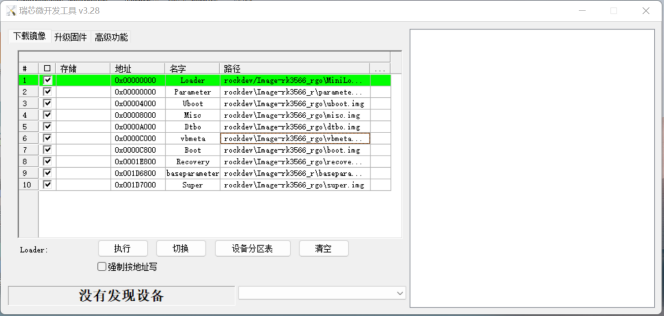
Quell-Flashtool-Oberfläche - Originalabbildung;PDF-Seite 18 (EN).
Android14 benötigt DriverAssitant V5.1.1. Quelle nennt Windows AndroidTool_Release_v3.28 und Linux_Upgrade_Tool_v2.30 und empfiehlt aktuelle Synchronisation; keine verifizierten aktuellen Versionen. Vollbuild erzeugt ersten Baum; zweiten Teilumfang oder komplettes update.img flashen.
RKTools/windows/AndroidTool/AndroidTool_Release_v3.28
RKTools/linux/Linux_Upgrade_Tool/Linux_Upgrade_Tool_v2.30
rockdev/Image-rk3562_u/
├── boot-debug.img
├── boot.img
├── config.cfg
├── dtbo.img
├── MiniLoaderAll.bin
├── misc.img
├── parameter.txt
├── pcba_small_misc.img
├── pcba_whole_misc.img
├── recovery.img
├── resource.img
├── super.img
├── uboot.img
├── update.img
└── vbmeta.img
rockdev/Image-rk3562_u/
├── boot.img
├── dtbo.img
├── MiniLoaderAll.bin
├── misc.img
├── parameter.txt
├── recovery.img
├── super.img
├── uboot.img
└── vbmeta.img
| Datei | Bedeutung |
|---|---|
| boot.img | ramdisk, Kernel, DTB |
| boot-debug.img | Root-Operationen auf user-Firmware |
| dtbo.img | Device Tree Overlays; siehe DTBO |
| config.cfg | Importiert Flashauswahl ins Tool |
| MiniLoaderAll.bin | Erststufenloader |
| misc.img | recovery-wipe-Startflags; danach Recovery |
| parameter.txt | Partitionsinformationen |
| pcba_small_misc.img | PCBA-Flags; vereinfachter Modus |
| pcba_whole_misc.img | PCBA-Flags; vollständiger Modus |
| recovery.img | Recovery-ramdisk, Kernel, DTB |
| super.img | CN:odm/product/vendor/system/system_ext; EN nur odm/vendor/system |
| trust.img | BL31/BL32; bei RK3566/RK3568 nicht erzeugt/geflasht |
| uboot.img | U-Boot-Firmware |
| vbmeta.img | AVB-Prüfmetadaten |
| update.img | Komplettpaket benötigter Flashimages |
Quelle verlangt GKI für Android14-GMS/EDLA; siehe RKDocs/android/Rockchip_Developer_Guide_Android14_GKI_CN.pdf. Historische Zertifizierungsaussage.
Dynamische Partitionen, fastbootd und GSI
Neue R-Geräte verwenden dynamische statt einzelner physischer system/vendor/odm/product/system_ext-Partitionen; super.img flashen. Einzelne logische Images aus out/ über fastbootd mit ausreichend aktuellem adb/fastboot. SDK-Tools:RKTools/linux/Linux_adb_fastboot (Linux_x86), RKTools/windows/adb_fastboot (Windows_x86). fastbootd zeigt Gerätedaten; nichtdynamische Partitionen im Bootloader flashen.
adb reboot fastboot
fastboot flash vendor vendor.img
fastboot flash system system.img
fastboot flash odm odm.img

# Non-dynamic partitions
adb reboot bootloader
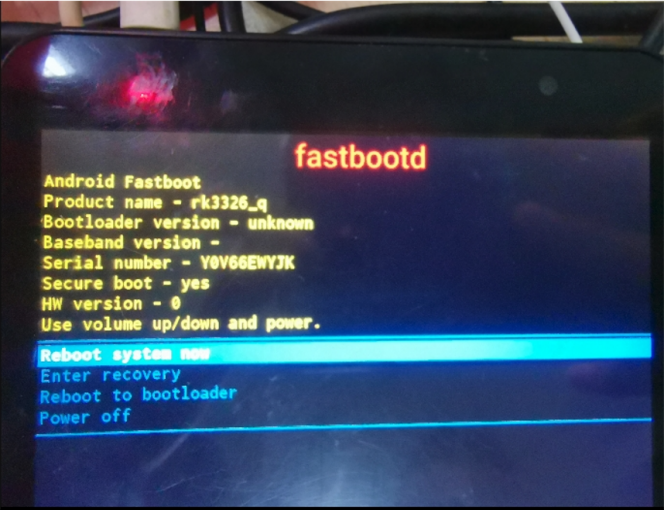
fastbootd-Geräteanzeige - Originalabbildung;PDF-Seite 20 (EN).
GSI:bei Bedarf entsperren, fastbootd starten, GSI-system.img und Firmware-misc.img flashen; Recovery setzt auf Werkseinstellungen zurück. Entsperren, misc und product-Löschen können Daten zerstören:Backup/Zielprüfung zuerst. Bei programmiertem AVB-Key gesonderte Entsperranleitung beachten. Bei Platzmangel erlaubt die Quelle optional Löschen der logischen product-Partition vor GSI.
adb reboot bootloader
fastboot oem at-unlock-vboot
fastboot flash misc misc.img
fastboot reboot fastboot
# Optional; deletes the logical product partition
fastboot delete-logical-partition product
fastboot flash system system.img
fastboot reboot
DSU (Dynamic System Updates) ist eine weitere standardmäßig unterstützte GSI-Methode der beschriebenen Plattform. Hoher Speicherbedarf; bei≤1GB DDR nicht empfohlen. Referenz:https://source.android.com/devices/tech/ota/dynamic-system-updates. VTS benötigt boot-debug.img in boot; CTS-ON-GSI nicht. Tests mit offiziellem Google-GSI mit Endung -signed.
DTBO
Android10+ unterstützt Device Tree Overlays; dtbo.img ermöglicht Produktkompatibilität. PRODUCT_DTBO_TEMPLATE finden/setzen und Knoten ändern. DTS benötigt Aliase, sonst schlägt Overlay fehl. Quellpfad:rk388; CN rk3588_u, EN rk3588_t. Abweichungen erhalten; tatsächliche Produktvorlage wählen.
get_build_var PRODUCT_DTBO_TEMPLATE
# Source example
PRODUCT_DTBO_TEMPLATE := $(LOCAL_PATH)/dt-overlay.in
# CN illustrative path: device/rockchip/rk388/rk3588_u/dt-overlay.in
/dts-v1/;
/plugin/;
&chosen {
bootargs_ext = "androidboot.boot_devices=${_boot_device}";
};
&firmware_android {
vbmeta {
status = "disabled";
};
fstab {
status = "disabled";
};
};
&reboot_mode {
mode-bootloader = <0x5242C309>;
mode-charge = <0x5242C30B>;
mode-fastboot = <0x5242C303>;
mode-loader = <0x5242C301>;
mode-normal = <0x5242C300>;
mode-recovery = <0x5242C303>;
};
fstab und Partitionsparameter
PRODUCT_FSTAB_TEMPLATE finden/setzen, Mounts, swap_zram oder Data-Dateisystem ändern. Android14 erzeugt parameter.txt aus Vorlage/Konfiguration; ohne Vorlage wird vorhandenes parameter.txt gesucht. Zum Umgehen des Generators Datei im Produkt-device ablegen, etwa device/rockchip/rk3326/rk3326_u/parameter.txt.
get_build_var PRODUCT_FSTAB_TEMPLATE
PRODUCT_FSTAB_TEMPLATE := device/rockchip/common/scripts/fstab_tools/fstab.in
get_build_var PRODUCT_PARAMETER_TEMPLATE
PRODUCT_PARAMETER_TEMPLATE := device/rockchip/common/scripts/parameter_tools/parameter.in
BOARD_SUPER_PARTITION_SIZE := 2688548864
BOARD_DTBOIMG_PARTITION_SIZE := xxxx
BOARD_BOOTIMAGE_PARTITION_SIZE := xxxxx
BOARD_CACHEIMAGE_PARTITION_SIZE := xxxx
Eigenständiges Parameterbeispiel unten. Bei OTA-Hauptversionswechsel laut Quelle vorheriges parameter.txt behalten. Platzhaltergrößen oben durch geprüfte Zielwerte ersetzen.
parameter_tools --input device/rockchip/common/scripts/parameter_tools/parameter.in --firmware-version 14.0 --machine-model rk3326 --manufacturer rockchip --machine rk3326_u --partition-list uboot_a:4096K,trust_a:4M,misc:4M,dtbo_a:4M,vbmeta_a:4M,boot_a:33554432,backup:300M,security:4M,cache:300M,metadata:4096,frp:512K,super:2G --output parameter_new.txt
Neue Partition:BOARD_WITH_SPECIAL_PARTITIONS im Produkt-BoardConfig.mk setzen (z.B.baseparameter:1M,logo:16M), in RebuildParameter.mk ergänzen.
device/rockchip/rk356x/rk3566_u/BoardConfig.mk
+++ b/BoardConfig.mk
@@ -494,4 +494,11 @@ ifeq ($(strip $(BOARD_TWRP_ENABLE)), true)
+BOARD_WITH_SPECIAL_PARTITIONS := baseparameter:1M
device/rockchip/common/build/rockchip/RebuildParameter.mk
+ifneq ($(strip $(BOARD_WITH_SPECIAL_PARTITIONS)), )
+partition_list := $(partition_list),$(BOARD_WITH_SPECIAL_PARTITIONS)
+endif
Produkt-Lunch ergänzen
Für rk3562_new_u Makefile und user/userdebug in device/rockchip/rk3562/AndroidProducts.mk ergänzen. rk3562_u nach device/rockchip/rk3562/rk3562_new_u kopieren und dort alle rk3562_u durch rk3562_new_u ersetzen.
--- a/AndroidProducts.mk
+++ b/AndroidProducts.mk
@@ -17,10 +17,14 @@
PRODUCT_MAKEFILES := \
$(LOCAL_DIR)/rk3562_u/rk3562_u.mk \
+ $(LOCAL_DIR)/rk3562_new_u/rk3562_new_u.mk \
COMMON_LUNCH_CHOICES := \
rk3562_u-userdebug \
rk3562_u-user \
+ rk3562_new_u-userdebug \
+ rk3562_new_u-user \
Produkt-DTS-Referenzen
DTS nach Chip, PMIC und Hardwaretopologie auswählen. RK3528 steht hier, aber nicht in der SDK-Supporttabelle; Referenzzeile ist keine neue Supportzusage. RK3588-Single-PMIC:CN rk3588-evb7-v11, EN rk3588-evb4-lp7-v10; beide erhalten. Industrie-RK3399-DTS hier ohne v13, Buildtabelle mit v13:prüfen.
| SoC | PMIC | Typ | Modell | DTS |
|---|---|---|---|---|
| RK3588 | Dual-PMIC:RK806 ×2 | Entwicklungsboard | RK3588 EVB1 | rk3588-evb1-lp4-v10 |
| RK3588 | Single-PMIC:RK806+RK860 | Entwicklungsboard | RK3588-Hardwarereferenz | CN:rk3588-evb7-v11; EN:rk3588-evb4-lp7-v10 |
| RK3588S | Dual-PMIC:RK806 ×2 | Entwicklungsboard | RK3588S EVB1 | rk3588s-evb1-lp4x-v10 |
| RK3588S | Single-PMIC:RK806+RK860 | Tablet | Tablet-Hardwarereferenz | rk3588s-tablet-v11 |
| RK3588S | Dual-PMIC:RK806 ×2 | Tablet | Prototyp | rk3588s-tablet-v10 |
| RK3588 | Single-PMIC:RK860 | Box-EVB | RK3588_NVR_DEMO1_LP4X | rk3588-nvr-demo-v10-android |
| RK3566 | RK817 | Tablet | Prototyp | rk3566-rk817-tablet |
| RK3566 | RK809 | Entwicklungsboard | RK3566 EVB2 | rk3566-evb2-lp4x-v10 |
| RK3566 | Diskret | Entwicklungsboard | RK3566 BOX DEMO | rk3566-box-demo-v10 |
| RK3568 | RK809 | Entwicklungsboard | RK3568 EVB1 | rk3568-evb1-ddr4-v10 |
| RK3562 | RK817 | Entwicklungsboard | RK3562 EVB1 | rk3562-evb1-lp4x-v10 |
| RK3562 | RK809 | Entwicklungsboard | RK3562 EVB2 | rk3562-evb2-ddr4-v10 |
| RK3562 | RK817 | Tablet | Prototyp | rk3562-rk817-tablet-v10 |
| RK3528 | Diskret | BOX | RK3528 EVB1 | rk3528-evb1-ddr4-v10 |
| RK3326 | RK817 | Entwicklungsboard | EVB | rk3326-evb-lp3-v10-avb |
| PX30 | RK809 | Entwicklungsboard | EVB | px30-mini-evb-ddr3-v11-avb |
| RK3326 | RK817 | Tablet | Prototyp | rk3326-863-lp3-v10-rkisp1 |
| RK3326 | RK809 | KI-Sprache | EVB | rk3326-evb-ai-va-v12 |
| RK3399 | RK808 | Entwicklungsboard | Excavator | rk3399-sapphire-excavator-edp-avb |
| RK3399 | RK809 | Entwicklungsboard | Industrieboard | rk3399-evb-ind-lpddr4-android-avb |
Patchbenachrichtigungen
Wichtige Patches:https://redmine.rock-chips.com/projects/rockchip_patch/issues. Anmeldung mit registriertem Rockchip-Redmine-Konto → My account → alle Benachrichtigungen ausgewählter Projekte → Patchprojekt auswählen → Save. Meldungen gehen an registrierte E-Mail. Hier keine Anmeldung/Abonnementänderung durchgeführt.
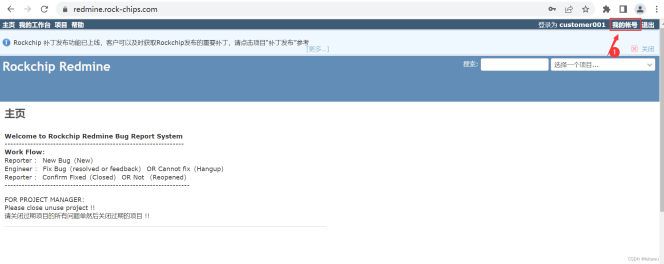
My account öffnen - Originalabbildung;PDF-Seite 26 (EN).
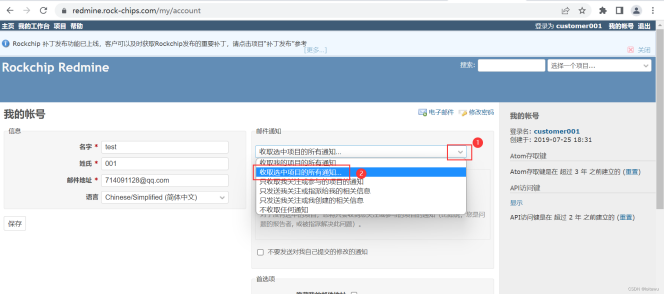
Benachrichtigungsumfang wählen - Originalabbildung;PDF-Seite 26 (EN).
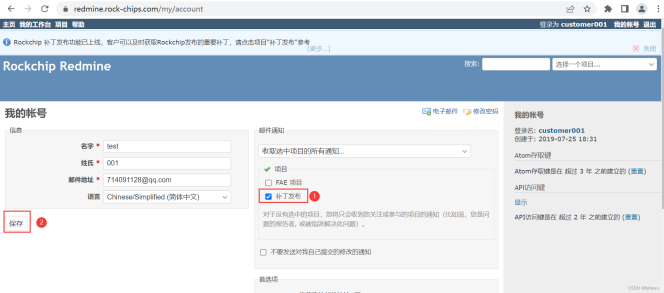
Patchprojekt wählen und speichern - Originalabbildung;PDF-Seite 27 (EN).
Dokumentation und Peripherie
Quelle nennt https://redmine.rockchip.com.cn/projects/fae/documents für aktualisierte DDR/EMMC/NAND-FLASH/WIFI/3G/CAMERA-Listen. Camera-IQ- und RKNN-Toolkit2-SDK-Dokumente liegen unten. RKDocs zeigt den SDK-Dokumentbestand; Sprachsuffixe sind Dateikennungen, keine Behauptung über genutzte Übersetzungsquellen.
external/camera_engine_rkaiq/rkisp2x_tuner/doc/
├── Rockchip_Color_Optimization_Guide_ISP2x_CN_v2.0.0.pdf
├── Rockchip_IQ_Tools_Guide_ISP2x_CN_v2.0.0.pdf
└── Rockchip_Tuning_Guide_ISP21_CN_v2.0.0.pdf
hardware/rockchip/rknn-toolkit2/doc/
RKDocs/
├── android
│ ├── Android11 异显开发说明.zip
│ ├── audio
│ │ └── Rockchip_Developer_Guide_Android_Multi_Audio_CN.pdf
│ ├── bt
│ │ └── Rockchip_Introduction_Android9.0_BT_Configuration_CN.pdf
│ ├── patches
│ │ └── root
│ │ ├── android11_root.pdf
│ │ └── RootChecker.apk
│ ├── Rockchip_Android14_GKI_Developer_Guide_CN.pdf
│ ├── Rockchip_Android14_SDK_Developer_Guide_CN.pdf
│ ├── Rockchip_Android14_SDK_Developer_Guide_EN.pdf
│ ├── Rockchip_Android_Remote_key_Provisioning_Guide.pdf
│ ├── Rockchip_Developer_Guide_Android11_Optimization_CN.pdf
│ ├── Rockchip_Developer_Guide_Android_AB_System_Upgrading_CN.pdf
│ ├── Rockchip_Developer_Guide_Android_Recovery_CN.pdf
│ ├── Rockchip_Developer_Guide_Android_SELinux(Sepolicy)CN.pdf
│ ├── Rockchip_Developer_Guide_PCBA_Test_Tool_V1.3_CN&EN.pdf
│ ├── Rockchip_Firmware_Upgrade_Failed_Analyze_Method_CN.pdf
│ ├── Rockchip_Introduction_Android_Application_Preinstallation_CN&EN.pdf
│ ├── Rockchip_Introduction_Android_Boot_Video_CN.pdf
│ ├── Rockchip_Introduction_Android_BOX_Display_Framework_Configuration_CN.pdf
│ ├── Rockchip_Introduction_Android_Factory_Reset_Protection_CN&EN.pdf
│ ├── Rockchip_Introduction_Android_Log_System.pdf
│ ├── Rockchip_Introduction_Android_Performance_Mode_CN&EN.pdf
│ ├──Rockchip_Introduction_Android_Power_On_Off_Animation_and_Tone_Customization_CN&EN.pdf
│ ├── Rockchip_Introduction_Android_Samba_CN.pdf
│ ├── Rockchip_Introduction_Android_Widevine_Project_Start_Preparation_CN.pdf
│ ├── Rockchip_Introduction_Box_Media_Application_CN&EN.pdf
│ ├── Rockchip-Parameter-File-Format-Version1.4-CN.pdf
│ ├── Rockchip_User_Guide_Android_GMS_Configuration_CN.pdf
│ ├── Rockchip_User_Guide_Android_GMS_Configuration_EN.pdf
│ ├── Rockchip_User_Guide_Box_FactoryTestTool_V3.0_CN.pdf
│ ├── Rockchip_User_Guide_Dr.G_CN&EN.pdf
│ ├── Rockchip_User_Guide_Magisk_Installation_EN.pdf
│ ├── video
│ │ └── Rockchip_Android_Multimedia_FAQ_CN.pdf
│ └── wifi
│ ├── Rockchip_Introduction_REALTEK_WIFI_Driver_Porting_CN&EN.pdf
│ └── Rockchip_Introduction_WIFI_Configuration_CN&EN.pdf
└── common
├── Audio
│ ├── Rockchip_Developer_Guide_Android_EQ_DRC_CN.pdf
│ ├── Rockchip_Developer_Guide_Android_Multi_Audio_CN.pdf
│ ├──Rockchip_Developer_Guide_Audio_Call_3A_Algorithm_Integration_and_Parameter_Debugging_CN.pdf
│ ├── Rockchip_Developer_Guide_Audio_CN.pdf
│ └── Rockchip_Developer_Guide_RK817_RK809_Codec_CN.pdf
├── camera
│ ├── common
│ │ └── Camera_External_FAQ_v1.0 .pdf
│ ├── HAL1
│ │ ├── README_CN.txt
│ │ ├── README_EN.txt
│ │ ├── RK312x_Camera_User_Manual_v1.4(3288&3368).pdf
│ │ ├── RK_ISP10_Camera_User_Manual_v2.3.pdf
│ │ ├── RKISPV1_Camera_Module_AVL_v1.7.pdf
│ │ ├── Rockchip_Camera_AVL_v2.0_Package_20180515.7z
│ │ ├── Rockchip_Introduction_RKISPV1_Camera_Driver_Debugging_Method_CN.pdf
│ │ ├── Rockchip_Introduction_RKISPV1_Camera_FAQ_CN.pdf
│ │ ├── Rockchip SOFIA 3G-R_PMB8018(x3_C3230RK)Camera_Module_AVL_v1.6_20160226.pdf
│ │ └── Rockchip_Trouble_Shooting_Android_CameraHAL1_CN_EN.pdf
│ ├── HAL3
│ │ ├── camera_engine_rkisp_user_manual_v2.2.pdf
│ │ ├── camera_hal3_user_manual_v2.3.pdf
│ │ ├── README_CN.txt
│ │ ├── RKCIF_Driver_User_Manual_v1.0.pdf
│ │ ├── RKISP1_IQ_Parameters_User_Guide_v1.2.pdf
│ │ ├── RKISP_Driver_User_Manual_v1.3.pdf
│ │ ├── Rockchip_Color_Optimization_Guide_ISP
│ │ │ ├── ISP21
│ │ │ │ └── CN
│ │ │ │ └── Rockchip_Color_Optimization_Guide_ISP21_CN_v2.0.1.pdf
│ │ │ ├── ISP30
│ │ │ │ └── CN
│ │ │ │ └── Rockchip_Color_Optimization_Guide_ISP30_CN_v3.0.0.pdf
│ │ │ └── ISP32-lite
│ │ │ └── CN
│ │ │ └── Rockchip_Color_Optimization_Guide_ISP32_Lite_CN_v3.1.0.pdf
│ │ ├── Rockchip_Development_Guide_3A_ISP
│ │ │ └── ISP30
│ │ │ └── CN
│ │ │ └── Rockchip_Development_Guide_3A_ISP30_v1.1.0.pdf
│ │ ├── Rockchip_Development_Guide_ISP
│ │ │ ├── ISP21
│ │ │ │ └── CN
│ │ │ │ └── Rockchip_Development_Guide_ISP21_CN_v2.1.0.pdf
│ │ │ ├── ISP30
│ │ │ │ └── CN
│ │ │ │ └── Rockchip_Development_Guide_ISP30_CN_v1.2.3.pdf
│ │ │ └── ISP32-lite
│ │ │ └── CN
│ │ │ └── Rockchip_Development_Guide_ISP32_Lite_CN_v1.0.0.pdf
│ │ ├── Rockchip_Driver_Guide_VI
│ │ │ ├── CN
│ │ │ │ └── Rockchip_Driver_Guide_VI_CN_v1.1.4.pdf
│ │ │ └── EN
│ │ │ └── Rockchip_Driver_Guide_VI_EN_v1.0.7.pdf
│ │ ├── Rockchip_IQ_Tools_Guide_ISP
│ │ │ ├── ISP21
│ │ │ │ └── Rockchip_IQ_Tools_Guide_ISP2x_CN_v2.0.3.pdf
│ │ │ ├── ISP30
│ │ │ │ └── Rockchip_IQ_Tools_Guide_ISP21_ISP30_CN_v2.0.4.pdf
│ │ │ └── ISP32-lite
│ │ │ └── CN
│ │ │ └── Rockchip_IQ_Tools_Guide_v2.0.7_CN.pdf
│ │ ├── Rockchip_Trouble_Shooting_CameraHAL3_CN_EN.pdf
│ │ ├── Rockchip_Tuning_Guide_ISP
│ │ │ ├── ISP21
│ │ │ │ └── CN
│ │ │ │ └── Rockchip_Tuning_Guide_ISP21_CN_v2.1.0.pdf
│ │ │ ├── ISP30
│ │ │ │ └── CN
│ │ │ │ └── Rockchip_Tuning_Guide_ISP30_CN_v1.1.0.pdf
│ │ │ └── ISP32-lite
│ │ │ └── CN
│ │ │ └── Rockchip_Tuning_Guide_ISP32-lite_CN_v1.0.0.pdf
│ │ └── USB_UVC_Integrated_Cameras.pdf
│ ├── README.txt
│ └── vehicle
│ └── Rockchip_Android_Fast_Reverse_Image_System_Developer_Guide_CN_V1.0.3.pdf
├── Can
│ ├── Rockchip_Developer_Guide_Can_CN.pdf
│ └── Rockchip_Developer_Guide_CAN_FD_CN.pdf
├── CLK
│ ├── Rockchip_Developer_Guide_Clock_CN.pdf
│ ├── Rockchip_Developer_Guide_Gpio_Output_Clocks_CN.pdf
│ ├── Rockchip_Develop_Guide_Pll_Ssmod_Clock_CN.pdf
│ └── Rockchip_RK3399_Developer_Guide_Clock_CN.pdf
├── CRU
│ ├── Rockchip_Developer_Guide_Linux3.10_Clock_CN.pdf
│ ├── Rockchip_Developer_Guide_Linux4.4_4.19_Clock_CN.pdf
│ ├── Rockchip_Develop_Guide_Pll_Ssmod_Clock_CN.pdf
│ ├── Rockchip_RK3399_Developer_Guide_Clock_CN.pdf
│ └── Rockchip_RK3399_Developer_Guide_Linux4.4_Clock_CN.pdf
├── CRYPTO
│ ├── Rockchip_Developer_Guide_Crypto_HWRNG_CN.pdf
│ └── Rockchip_Developer_Guide_Crypto_HWRNG_EN.pdf
├── DDR
│ ├── DDR_bandwidth_statistics_tool
│ │ ├── rk-msch-probe-for-user-32bit
│ │ ├── rk-msch-probe-for-user-64bit
│ │ └── Rockchip_Introduction_DDR_Bandwidth_Tool_CN.pdf
│ ├── Rockchip-Developer-Guide-DDR-CN.pdf
│ ├── Rockchip-Developer-Guide-DDR-EN.pdf
│ ├── Rockchip-Developer-Guide-DDR-Problem-Solution-CN.pdf
│ ├── Rockchip-Developer-Guide-DDR-Problem-Solution-EN.pdf
│ ├── Rockchip-Developer-Guide-DDR-Verification-Process-CN.pdf
│ ├── Rockchip_Developer_Guide_DDR_Verification_Process_EN.pdf
│ ├── Rockchip_Developer_Guide_HAL_DDR_ECC_CN.pdf
│ └── Rockchip-User-Guide-DDR-DQ-Eye-Tool-CN.pdf
├── debug
│ ├── RK3399-LOG-EXPLANATION.pdf
│ ├── Rockchip_Developer_Guide_DS5_CN.pdf
│ ├── Rockchip_Quick_Start_Linux_Perf.pdf
│ ├── Rockchip_Quick_Start_Linux_Streamline.pdf
│ ├── Rockchip_Quick_Start_Linux_Systrace.pdf
│ ├── Rockchip_RK3399_JTAG_Configuration_CN.pdf
│ └── Rockchip_User_Guide_J-Link_CN.pdf
├── display
│ ├── Rockchip_BT656_TX_AND_BT1120_TX_Developer_Guide_CN.pdf
│ ├── Rockchip_Developer_Guide_Baseparameter_Format_Define_And_Use_CN.pdf
│ ├── Rockchip_Developer_Guide_DRM_Display_Driver_CN.pdf
│ ├── Rockchip_Developer_Guide_DRM_Panel_Porting_CN&EN.pdf
│ ├── Rockchip_Developer_Guide_DRM_Panel_Porting_CN.pdf
│ ├── Rockchip_Developer_Guide_Dual_Display_Rotation_Direction_Debugging_CN.pdf
│ ├── Rockchip_Developer_Guide_HDMI_Based_on_DRM_Framework_CN&EN.pdf
│ ├── Rockchip_Developer_Guide_HDMI-CEC_CN.pdf
│ ├── Rockchip_Developer_Guide_HDMI_CN.pdf
│ ├── Rockchip_Develop_Guide_DRM_Direct_Show_CN.pdf
│ ├── Rockchip_Display_Issues_FAQ_V1.1.pdf
│ ├── Rockchip_DRM_RK628_Porting_Guide_CN.pdf
│ ├── Rockchip FAQ DRM Hardware Composer V1.00-20181213.pdf
│ ├── Rockchip_Introduction_DisplayAdjust_APK_CN.pdf
│ ├── Rockchip_Introduction_DRM_Integration_Helper_CN.pdf
│ ├── Rockchip_RK3588_Developer_Guide_DisplayPort_CN.pdf
│ ├── Rockchip_RK3588_Developer_Guide_MIPI_DSI2_CN.pdf
│ ├── Rockchip_RK3588_Developer_Guide_Vsync_Adjust_CN.pdf
│ ├── Rockchip_RK3588_User_Guide_DP_CN.pdf
│ ├── Rockchip_RK3588_User_Guide_eDP_CN.pdf
│ └── Rockchip_Trouble_Shooting_Graphics
├── DVFS
│ ├── Rockchip_Developer_Guide_CPUFreq_CN.pdf
│ ├── Rockchip_Developer_Guide_CPUFreq_EN.pdf
│ ├── Rockchip_Developer_Guide_Devfreq_CN.pdf
│ ├── Rockchip_Developer_Guide_Devfreq_EN.pdf
│ ├── Rockchip_Developer_Guide_Linux4.4_CPUFreq_CN.pdf
│ └── Rockchip_Developer_Guide_Linux4.4_Devfreq_CN.pdf
├── Ebook
│ ├── Rockchip_RK3566_Introduction_EBOOK_Display_Mode_CN.pdf
│ └── Rockchip_RK3566_Introduction_EBOOK_Sleep_Mode_CN.pdf
├── GMAC
│ ├── Rockchip_Developer_Guide_Ethernet_CN.pdf
│ ├── Rockchip_Developer_Guide_Linux_GMAC_CN.pdf
│ ├── Rockchip_Developer_Guide_Linux_GMAC_Mode_Configuration_CN.pdf
│ ├── Rockchip_Developer_Guide_Linux_GMAC_RGMII_Delayline_CN.pdf
│ └── Rockchip_Developer_Guide_Linux_GMAC_RGMII_Delayline_EN.pdf
├── hdmi-in
│ ├── apk
│ │ ├── HdmiInDemo_based_on_CameraHal1_2020.06.11_v1.2.tar.gz
│ │ └── rkCamera2_based_on_CameraHal3_V1.3.tar.gz
│ ├── Rockchip_Developer_Guide_HDMI_IN_Based_On_CameraHal1_CN.pdf
│ ├── Rockchip_Developer_Guide_HDMI_IN_Based_On_CameraHal3_CN.pdf
│ └── Rockchip_Developer_Guide_HDMI_RX_CN.pdf
├── I2C
│ ├── Rockchip_Developer_Guide_I2C_CN.pdf
│ └── Rockchip_Developer_Guide_I2C_EN.pdf
├── IO-Domain
│ ├── Rockchip_Developer_Guide_Linux_IO_DOMAIN_CN.pdf
│ ├── Rockchip_PX30_Introduction_IO_Power_Domains_Configuration.pdf
│ ├── Rockchip_RK3288_Introduction_IO_Power_Domains_Configuration.pdf
│ ├── Rockchip_RK3326_Introduction_IO_Power_Domains_Configuration.pdf
│ ├── Rockchip_RK3399_Introduction_IO_Power_Domains_Configuration.pdf
│ ├── Rockchip_RK3399Pro_Introduction_IO_Power_Domains_Configuration.pdf
│ └── Rockchip_RK356X_Introduction_IO_Power_Domains_Configuration.pdf
├── IOMMU
│ ├── Rockchip_Developer_Guide_Linux_IOMMU_CN.pdf
│ └── Rockchip_Developer_Guide_Linux_IOMMU_EN.pdf
├── Leds
│ └── Rockchip_Introduction_Leds_GPIO_Configuration_for_Linux4.4_CN.pdf
├── MCU
│ ├── Rockchip_RK3399_Developer_Guide_MCU_CN.pdf
│ └── Rockchip_RK3399_Developer_Guide_MCU_EN.pdf
├── Memory
│ └── Rockchip_Developer_Guide_Linux_CMA_CN.pdf
├── MMC
│ ├── Rockchip_Developer_Guide_SD_Boot_CN.pdf
│ └── Rockchip_Developer_Guide_SDMMC_SDIO_eMMC_CN.pdf
├── mobile-net
│ ├── Rockchip_Introduction_3G_Data_Card_USB_File_Conversion_CN.pdf
│ ├── Rockchip_Introduction_3G_Dongle_Configuration_CN&EN.pdf
│ └── Rockchip_Introduction_4G_Module_Configuration_CN&EN.pdf
├── MPP
│ ├── Rockchip_Developer_Guide_MPP_CN.pdf
│ └── Rockchip_Developer_Guide_MPP_EN.pdf
├── NVM
│ ├── Rockchip_Application_Notes_Storage_CN.pdf
│ ├── Rockchip_Developer_FAQ_Storage_CN.pdf
│ ├── Rockchip_Developer_Guide_OTP_CN.pdf
│ ├── Rockchip_Developer_Guide_OTP_EN.pdf
│ ├── Rockchip_Developer_Guide_SATA_CN.pdf
│ ├── Rockchip_Introduction_Partition_CN.pdf
│ ├── Rockchip_Introduction_Partition_EN.pdf
│ └── Rockchip_RK356X_Developer_Guide_SATA_CN.pdf
├── PCie
│ ├── Rockchip-Developer-Guide-linux4.4-PCIe.pdf
│ ├── Rockchip_Developer_Guide_PCIe_CN.pdf
│ ├── Rockchip_PCIe_Virtualization_Developer_Guide_CN.pdf
│ └── Rockchip_RK3399_Developer_Guide_PCIe_CN.pdf
├── perf
│ ├── perf使用说明.pdf
│ ├── Rockchip_Developer_FAQ_FileSystem_CN.pdf
│ ├── Rockchip_Optimize_Tutorial_Linux_IO_CN.pdf
│ ├── Rockchip_Quick_Start_Linux_Performance_Analyse_CN.pdf
│ └── systrace使用说明.pdf
├── PIN-Ctrl
│ ├── Rockchip_Developer_Guide_Linux_Pinctrl_CN.pdf
│ └── Rockchip_Developer_Guide_Linux_Pinctrl_EN.pdf
├── PMIC
│ ├── Rockchip_Developer_Guide_FreeRTOS_PMIC_CHARGER_POWERKEY_CN.pdf
│ ├── Rockchip_Developer_Guide_Power_Discrete_DCDC_EN.pdf
│ ├── Rockchip_Developer_Guide_RK817_RK809_Fuel_Gauge_CN&EN.pdf
│ ├── Rockchip_RK805_Developer_Guide_CN.pdf
│ ├── Rockchip_RK806_Developer_Guide_CN.pdf
│ ├── Rockchip_RK808_Developer_Guide_CN.pdf
│ ├── Rockchip_RK809_Developer_Guide_CN.pdf
│ ├── Rockchip_RK816_Developer_Guide_CN.pdf
│ ├── Rockchip_RK817_Developer_Guide_CN.pdf
│ ├── Rockchip_RK818_Developer_Guide_CN.pdf
│ ├── Rockchip_RK818_RK816_Developer_Guide_Fuel_Gauge_CN.pdf
│ └── Rockchip_RK818_RK816_Introduction_Fuel_Gauge_Log_CN.pdf
├── power
│ ├── Rockchip_Developer_Guide_Power_Analysis_EN.pdf
│ └── Rockchip_Developer_Guide_Sleep_and_Resume_CN.pdf
├── PWM
│ ├── Rockchip_Developer_Guide_Linux_PWM_CN.pdf
│ ├── Rockchip_Developer_Guide_Linux_PWM_EN.pdf
│ └── Rockchip_Developer_Guide_PWM_IR_CN.pdf
├── RGA
│ ├── Rockchip_Developer_Guide_RGA_CN.pdf
│ ├── Rockchip_Developer_Guide_RGA_EN.pdf
│ ├── Rockchip_FAQ_RGA_CN.pdf
│ └── Rockchip_FAQ_RGA_EN.pdf
├── RK628
│ ├── Rockchip_RK628D_Application_Notes_CN.pdf
│ └── Rockchip_RK628D_For_All_Porting_Guide_CN.pdf
├── RKTools manuals
│ ├── RKIQTool_User_Manual_v1.5-CH.pdf
│ ├── RKIQTool_User_Manual_v1.5-EN.pdf
│ ├── RK_Platform_apache_tomcat_ota_Server_Setup_Introduction.rar
│ ├── Rockchip_Box_Factory_Test_Tool_V2.0.rar
│ ├── Rockchip_Developer_Guide_Linux_Nand_Flash_Open_Source_Solution_CN.pdf
│ ├── Rockchip_Introduction_Image_Upgrading_Failure_Analysis_CN.pdf
│ ├── Rockchip_Introduction_MP_Tool_Upgrading_and_Related_Issues_Debugging_CN.pdf
│ ├── Rockchip_Introduction_REPO_Mirror_Server_Build_and_Management_CN.pdf
│ ├── Rockchip_Introduction_Stresstest_for_VR_CN.pdf
│ ├── Rockchip_Introduction_WNpctool_Write_Tool_CN.pdf
│ ├── Rockchip_User_Guide_Box_Factory_Test_Tool_CN.pdf
│ ├── Rockchip_User_Guide_Keybox_Burning_EN.pdf
│ ├── Rockchip_User_Guide_KeyWrite_CN.pdf
│ ├── Rockchip_User_Guide_MP_Flashing_v1.2_CN.pdf
│ ├── Rockchip_User_Guide_Production_For_Firmware_Download_CN.pdf
│ ├── Rockchip_User_Guide_RKDevInfoWriteTool_CN.pdf
│ ├── Rockchip_User_Guide_RKDevInfoWriteTool_EN.pdf
│ ├── Rockchip_User_Guide_RK_Platform_MP_Upgrading_CN.pdf
│ ├── Rockchip_User_Manual_Android_Development_Tool_CN.pdf
│ ├── Rockchip_User_Manual_RKIQTool_CN.pdf
│ ├── Rockchip_User_Manual_RKIQTool_EN.pdf
│ ├── Rockchip_User_Manual_RKUpgrade_Dll_CN.pdf
│ └── SecureBootTool_UserManual.pdf
├── SARADC
│ ├── Rockchip_Developer_Guide_Linux_SARADC_CN.pdf
│ └── Rockchip_Developer_Guide_Linux_SARADC_EN.pdf
├── security
│ ├── patch
│ │ └── u-boot
│ │ └── 0001-avb-add-embedded-key.patch
│ ├── RK3399_Efuse_Operation_Instructions_V1.00_EN.pdf
│ ├── RK356X_SecurityBoot_And_AVB_instructions_CN.pdf
│ ├── RK356X_SecurityBoot_And_AVB_instructions_EN.pdf
│ ├── RK3588_SecurityBoot_And_AVB_instructions_CN.pdf
│ ├── RK3588_SecurityBoot_And_AVB_instructions_EN.pdf
│ ├── Rockchip_Developer_Guide_Crypto_HWRNG_CN.pdf
│ ├── Rockchip_Developer_Guide_Secure_Boot_Application_Note_EN.pdf
│ ├── Rockchip_Developer_Guide_Secure_Boot_for_UBoot_Next_Dev_CN.pdf
│ ├── Rockchip_Developer_Guide_Secure_Boot_for_UBoot_Next_Dev_EN.pdf
│ ├── Rockchip_Developer_Guide_TEE_SDK_CN.pdf
│ ├── Rockchip_RK3399_User_Guide_SecurityBoot_And_AVB_CN.pdf
│ └── Rockchip Vendor Storage Application Note.pdf
├── Sensors
│ └── Rockchip_Developer_Guide_Sensors_CN.pdf
├── SPI
│ ├── Rockchip_Developer_Guide_Linux_SPI_CN.pdf
│ └── Rockchip_Developer_Guide_Linux_SPI_EN.pdf
├── Thermal
│ ├── Rockchip_Developer_Guide_Thermal_CN.pdf
│ └── Rockchip_Developer_Guide_Thermal_EN.pdf
├── TRUST
│ ├── Rockchip_Developer_Guide_Trust_CN.pdf
│ ├── Rockchip_Developer_Guide_Trust_EN.pdf
│ └── Rockchip_RK3588_Developer_Guide_System_Suspend_CN.pdf
├── Tutorial
│ ├── RK3399-CPUINFO.pdf
│ ├── RK3399-LOG-EXPLANATION.pdf
│ ├── Rockchip_Developer_FAQ_FileSystem_CN.pdf
│ ├── Rockchip_Introduction_Browser_FAQ_CN.pdf
│ └── Rockchip_Trouble_Shooting_Firmware_Upgrade_Issue_CN.pdf
├── UART
│ ├── Rockchip-Developer-Guide-RT-Thread-UART.pdf
│ ├── Rockchip_Developer_Guide_UART_CN.pdf
│ ├── Rockchip_Developer_Guide_UART_EN.pdf
│ └── Rockchip_Developer_Guide_UART_FAQ_CN.pdf
├── u-boot
│ ├── Rockchip-Developer-Guide-Linux-AB-System.pdf
│ ├── Rockchip-Developer-Guide-Uboot-mmc-device-driver-analysis.pdf
│ └── Rockchip_Developer_Guide_UBoot_Nextdev_CN.pdf
├── usb
│ ├── Rockchip_Developer_Guide_Linux_USB_Initialization_Log_Analysis_CN_V1.1.1.pdf
│ ├── Rockchip_Developer_Guide_Linux_USB_Performance_Analysis_CN_V1.1.1.pdf
│ ├── Rockchip_Developer_Guide_Linux_USB_PHY_CN.pdf
│ ├── Rockchip_Developer_Guide_USB_CN.pdf
│ ├── Rockchip_Developer_Guide_USB_EN.pdf
│ ├── Rockchip_Developer_Guide_USB_FFS_Test_Demo_CN.pdf
│ ├── Rockchip_Developer_Guide_USB_FFS_Test_Demo_CN_V1.2.1.pdf
│ ├── Rockchip_Developer_Guide_USB_Gadget_UAC_CN.pdf
│ ├── Rockchip_Developer_Guide_USB_Gadget_UAC_CN_V1.1.1.pdf
│ ├── Rockchip_Developer_Guide_USB_SQ_Test_CN.pdf
│ ├── Rockchip_Introduction_USB_SQ_Tool_CN.pdf
│ ├── Rockchip_RK3399_Developer_Guide_USB_CN.pdf
│ ├── Rockchip_RK356x_Developer_Guide_USB_CN.pdf
│ ├── Rockchip_RK356X_User_Guide_USB_CN.pdf
│ ├── Rockchip_RK3588_Developer_Guide_USB_CN.pdf
│ └── Rockchip_User_Guide_USB_PHY_Tuning_CN.pdf
└── watchdog
├── Rockchip_Developer_Guide_Linux_WDT_CN.pdf
└── Rockchip_Developer_Guide_Linux_WDT_EN.pdf
StressTest
Im Gerätekalkulator83991906= eingeben für StressTest. Modultests:Kamera öffnen/schließen, Fotos/Wechsel; Bluetooth/Wi-Fi ein/aus. ping/iperf nur geplant. Weitere Tests:Flugmodus, Suspend/Resume, Video-Dauerlauf, Neustart, Werksreset-Dauerlauf, ARM/GPU/DDR-Frequenzwechsel. Werksreset löscht Nutzerdaten:Testgerät/Backup verwenden. SDK-Testfunktionen, keine hier durchgeführten ArmSoM-Tests.
PCBA und DeviceTest
PCBA erkennt Fertigungsfehler:LCD, Wi-Fi, Bluetooth, DDR/EMMC, SD, USB HOST, Tasten, Lautsprecher/Kopfhörer-Codec. Automatisch:Wi-Fi, DDR/EMMC, Ethernet; manuell:Tasten, SD, USB HOST, Codec. Ethernet erscheint nur in automatischer Gruppe, nicht erster Liste; quellentreu erhalten. Referenz:RKDocs/android/Rockchip_Developer_Guide_PCBA_Test_Tool_CN&EN.pdf_V1.1_20171222.pdf.
DeviceTest prüft Peripherie nach Endmontage; Kalkulatorcode000.=. TEST CHECKED prüft gewählte Punkte nacheinander; pass/failed markieren. Rot bedeutet Fehler, Rest bestanden; entsprechend reparieren. Anpassungsquellen beim FAE anfordern.
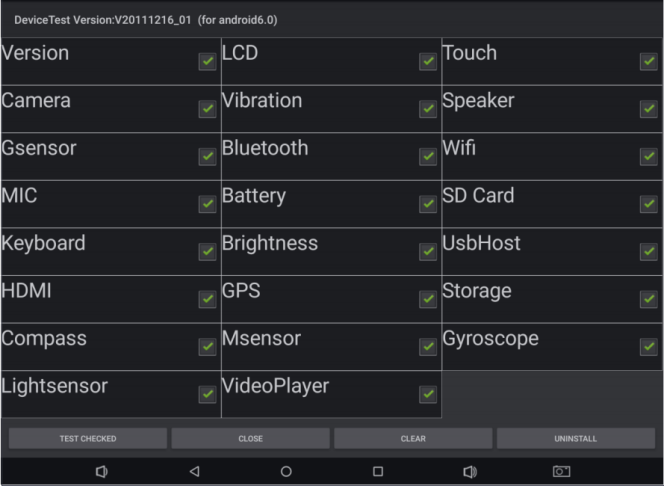
DeviceTest-Auswahl/Ergebnisse - Originalabbildung;PDF-Seite 36 (EN).
Hosttools
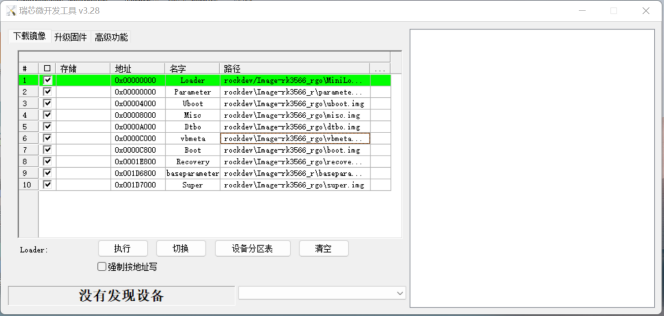
Windows-Flashtool - Originalabbildung;PDF-Seite 37 (EN).
| Tool/Zweck | Quellpaket/Pfad |
|---|---|
| USB-ADB-/Flashtreiber | RKTools/windows/DriverAssitant_v5.1.1.zip |
| Windows-Flashen | RKTools/windows/AndroidTool/AndroidTool_Release_v3.28.zip |
| Linux-Flashen | RKTools/linux/Linux_Upgrade_Tool/Linux_Upgrade_Tool_v2.30.zip |
| SD-Upgrade-/Boot-/PCBA-Medium | RKTools/windows/SDDiskTool_v1.74.zip |
| Gerätekennungen schreiben; entpacken/installieren, als Administrator | RKTools/windows/RKDevInfoWriteTool-1.3.0.7z |
| DDR-Verbindungs-/Lötfehlertest | RKTools/windows/Rockchip_Platform_DDR_Test_Tool_V1.38_Release_Annoucement_CN.7z RKTools/windows/Rockchip_Platform_DDR_Test_Tool_V1.38_Release_Annoucement_EN.7z |
| efuse-Programmierung:RK3288W/RK3368/RK3399 | RKTools/windows/efuse_v1.37.rar |
| efuse/OTP-Firmwaresignierung | RKTools/windows/SecureBootTool_v1.94.zip |
| Werkseitiges Massenflashen | RKTools/windows/FactoryTool-1.72.9.7z |
| Vorbelegtes userdata-Paket | RKTools/windows/OemTool_v1.3.rar |
| Camera-ISP-Bildabstimmung | external/camera_engine_rkaiq/rkisp2x_tuner |
Kennungstool-Handbuch:RKDocs/common/RKTools manuals/Rockchip_User_Guide_RKDevInfoWriteTool_CN.pdf. efuse/OTP kann irreversibel sein:Chip, Schlüssel und Programmierplan prüfen. Linux-Hilfe unten stammt aus v2.26 trotz Paket v2.30; Befehle/Optionen samt BlokcLen-Tippfehler erhalten. Keine Lösch-/Schreib-/Fuse-Aktion ausgeführt.
Linux_Upgrade_Tool_v2.26$ sudo ./upgrade_tool -h
Program Data in /home/wlq/.config/upgrade_tool
---------------------Tool Usage ---------------------
Help: H
Quit: Q
Version: V
Clear Screen: CS
------------------Upgrade Command ------------------
ChooseDevice: CD
ListDevice: LD
SwitchDevice: SD
UpgradeFirmware: UF <Firmware> [-noreset]
UpgradeLoader: UL <Loader> [-noreset]
DownloadImage: DI <-p|-b|-k|-s|-r|-m|-u|-t|-re image>
DownloadBoot: DB <Loader>
EraseFlash: EF <Loader|firmware> [DirectLBA]
PartitionList: PL
WriteSN: SN <serial number>
ReadSN: RSN
----------------Professional Command -----------------
TestDevice: TD
ResetDevice: RD [subcode]
ResetPipe: RP [pipe]
ReadCapability: RCB
ReadFlashID: RID
ReadFlashInfo: RFI
ReadChipInfo: RCI
ReadSector: RS <BeginSec> <SectorLen> [-decode] [File]
WriteSector: WS <BeginSec> <File>
ReadLBA: RL <BeginSec> <SectorLen> [File]
WriteLBA: WL <BeginSec> <File>
EraseLBA: EL <BeginSec> <EraseCount>
EraseBlock: EB <CS> <BeginBlock> <BlokcLen> [--Force]
-------------------------------------------------------
ADB-Verbindung und Befehle
ADB steuert Gerät/Emulator:Shell, Portmapping, Dateien, APK-Installation. Quelle nennt PC Client und Gerät Server; Netzwerk-ADB über LAN (CN ausdrücklich dasselbe LAN) versus USB. Quellbeschränkungen:OTG, ein Client/ein Gerät; keine allgemeine Aussage über jede ADB-Implementierung. Android starten, Computerverbindung/USB-Debugging in Entwickleroptionen aktivieren, OTG verbinden, adb shell/adb devices ausführen; Seriennummer bestätigt Verbindung.
| Aktion | Syntax/Beispiel | Bedeutung |
|---|---|---|
| Geräteliste | adb devices | Seriennummer/IP:Port und Zustand |
| Installieren/Neuinstallieren | adb install <apk-path> adb install “F:\WishTV\WishTV.apk” adb install -r “F:\WishTV\WishTV.apk” |
Lokales APK; -r Neuinstallation |
| Deinstallieren | adb uninstall <package> adb uninstall com.wishtv |
Paket vollständig entfernen |
| APK-Datei löschen | adb shell rm <filepath> adb shell rm “system/app/WishTV.apk” |
Löscht Gerätedatei; destruktives Beispiel |
| Geräteshell | adb shell | Geräte-/Emulator-Kommandozeile |
| Hochladen | adb push <local-path> <remote-path> adb push “F:\WishTV\WishTV.apk” “system/app” |
Datei/Ordner aufs Gerät; EN lässt Syntaxargumente aus |
| Herunterladen | adb pull <remote-path> <local-path> adb pull system/app/Contacts.apk F:\ |
Vom Gerät zum PC kopieren |
| Fehlerbericht | adb bugreport | Enthält dumpsys/dumpstate/logcat |
| Systemeigenschaften | adb shell getprop | Gerätesystemdaten anzeigen |
Typografische PDF-Anführungszeichen/Striche zu ASCII normalisiert. Root-/Systemschreiben hängt von Firmwareberechtigungen ab; Beispiele erteilen keine Rechte und garantieren kein beschreibbares system.
Logcat
Android schreibt Debugdaten in Puffer; logcat zeigt sie, Filter begrenzen Umfang. Syntax:[adb] logcat [
adb shell
logcat
logcat *:W
logcat ActivityManager:I MyApp:D *:S
logcat WishTV:* *:S
logcat -s WishTV
logcat WishTV:I *:S
Procrank-Speichersnapshots
Procrank zeigt Prozessspeicher in Geräteshell. USS gehört ausschließlich dem Prozess und wird bei Ende frei; VSS/RSS enthalten Shared Libraries und zeigen allein keinen exklusiven Besitz. PSS teilt gemeinsamen Speicher proportional. Vorher su; Standard-PSS-Sortierung, -v sortiert VSS absteigend.
| Metrik | Bedeutung |
|---|---|
| VSS | Virtual Set Size, virtueller Speicher inkl.Shared Libraries |
| RSS | Resident Set Size, physischer Speicher inkl.Shared Libraries |
| PSS | Proportional Set Size, anteilig geteilter Speicher |
| USS | Unique Set Size, exklusiver physischer Speicher |
| Option | Bedeutung |
|---|---|
| -v | VSS |
| -r | RSS |
| -p | PSS |
| -u | USS |
| -R | Auf-/absteigend umkehren |
| -w | Nur Working-Set-Statistik |
| -W | Working-Set-Statistik zurücksetzen |
| -h | Hilfe |
su
procrank [ -W ] [ -v | -r | -p | -u | -h ]
procrank
procrank -v
procrank | grep [cmdline | PID]
procrank | grep "com.android.systemui"
procrank | grep 3396
cmdline ist Appname, PID Prozess-ID. Für mögliche Lecks wiederholt Snapshots aufnehmen und USS vergleichen. Nach ADB-Verbindung ./test.sh unten starten; Trend ist Hinweis, allein kein Leckbeweis.
#!/bin/bash
while true;do
    adb shell procrank | grep "com.android.systemui"
    sleep 1
done
Dumpsys
Dumpsys meldet Binder-Dienste in Geräteshell, sofern in ServiceManager registriert und dump implementiert. -help Hilfe, -l Liste; vollständiger, case-sensitiver Dienstname, ggf.Appname ergänzen.
dumpsys -help
dumpsys -l
dumpsys [servicename]
dumpsys SurfaceFlinger
dumpsys [servicename] [application-name]
dumpsys meminfo com.android.systemui
Letzte Logs und FIQ
Zwei ramoops-DTS-Knoten ergänzen. /sys/fs/pstore:dmesg-ramoops-0 letzter Panic; pmsg-ramoops-0 frühere Android/Userspace-Logs; ftrace-ramoops-0 Funktionstraces; console-ramoops-0 letzter Kernelstartlog oberhalb Standard-Loglevel. logcat -L liest/parst pmsg.
ramoops_mem: ramoops_mem {
reg = <0x0 0x110000 0x0 0xf0000>;
reg-names = "ramoops_mem";
};
ramoops {
compatible = "ramoops";
record-size = <0x0 0x20000>;
console-size = <0x0 0x80000>;
ftrace-size = <0x0 0x00000>;
pmsg-size = <0x0 0x50000>;
memory-region = <&ramoops_mem>;
};
cd /sys/fs/pstore
ls
cat dmesg-ramoops-0
cat console-ramoops-0
logcat -L
cat ftrace-ramoops-0
Bei Absturz/Hänger fiq in serieller Konsole, dann help für Zustandsbefehle. reboot/reset ändern Gerätezustand; gezielt verwenden.
127|console:/ $ fiq
debug> help
FIQ Debugger commands:
pc PC status
regs Register dump
allregs Extended Register dump
bt Stack trace
reboot [<c>] Reboot with command <c>
reset [<c>] Hard reset with command <c>
irqs Interupt status
kmsg Kernel log
version Kernel version
sleep Allow sleep while in FIQ
nosleep Disable sleep while in FIQ
console Switch terminal to console
cpu Current CPU
cpu <number> Switch to CPU<number>
ps Process list
sysrq sysrq options
sysrq <param> Execute sysrq with <param>
FAQ:Versionen und Synchronisation
Android14.0:Kernel6.1/U-Boot next-dev. SDK kombiniert AOSP/RK; RK-XML unter .repo/manifests/include, AOSP in .repo/manifests/default.xml. Beide revision-Werte melden; Beispiele android-14.0-mid-rkr1/android-14.0.0_r11. git tag zeigt Repositorytags; RK zählt android-14.0-mid-rkrxx hoch. „Aktuell RKR1“ ist historisch.
vim .repo/manifests/include/rk_checkout_from_aosp.xml
<project groups="pdk" name="platform/build" path="build/make" remote="rk" revision="refs/tags/android-14.0-mid-rkr1">
vim .repo/manifests/default.xml
<default revision="refs/tags/android-14.0.0_r11"...>
# In kernel-6.1
git tag
# example result: android-14.0-mid-rkr1
Vollständigkeit:gepinntes lokales Manifest exportieren und mit Release unter .repo/manifests/commit/ vergleichen. CN nennt RKR1, EN RKR6; beide Dateinamen rkr1, später beide Referenz RKR6. Widerspruch erhalten; tatsächlichen Zielrelease vergleichen.
.repo/repo/repo manifest -r -o release_manifest_rkr1_local.xml
# Compare with .repo/manifests/commit/commit_release_rkr1.xml
Bootlogos und reine64-Bit-Builds
Erstes/zweites Bootlogo:kernel-6.1/logo.bmp/logo_kernel.bmp. Gleichnamige BMP ersetzen, Kernel neu bauen; in boot.img gepackt. Quelle:unter8MB,8/16/24/32-Bit-BMP. Android14-GMS/EDLA verlangt laut Quelle nur64-Bit zur Speicherreduktion; rk3562_ugo-Beispiel unten.
diff --git a/rk3562_ugo/BoardConfig.mk b/rk3562_ugo/BoardConfig.mk
index c06433e..dc9cc50 100644
--- a/rk3562_ugo/BoardConfig.mk
+++ b/rk3562_ugo/BoardConfig.mk
@@ -18,3 +18,11 @@ PRODUCT_KERNEL_DTS := rk3562-rk817-tablet-v10
CAMERA_SUPPORT_AUTOFOCUS := true
BOARD_BUILD_GKI := true
include device/rockchip/rk3562/BoardConfig.mk
+
+DEVICE_IS_64BIT_ONLY := true
+
+TARGET_2ND_ARCH :=
+TARGET_2ND_ARCH_VARIANT :=
+TARGET_2ND_CPU_ABI :=
+TARGET_2ND_CPU_ABI2 :=
+TARGET_2ND_CPU_VARIANT :=
Laden und Ladebilder
Ausgeschaltetes Laden/Vorladung in DTS. uboot-charge-on/android-charge-on schließen einander aus. uboot-low-power-voltage ist Bootschwelle, screen-on-voltage Displayschwelle. BMP gleichnamig/gleichformatiert ersetzen. Fehlende Bilder in resource.img packen, dann boot.img und rockdev/boot.img flashen. Quelle mischt kernel-6.1/kernel und ./mkiamge.sh; reale Pfade/Skripte prüfen.
charge-animation {
compatible = "rockchip,uboot-charge";
rockchip,uboot-charge-on = <1>;
rockchip,android-charge-on = <0>;
rockchip,uboot-low-power-voltage = <3400>;
rockchip,screen-on-voltage = <3500>;
status = "okay";
};
u-boot/tools/images/
├── battery_0.bmp
├── battery_1.bmp
├── battery_2.bmp
├── battery_3.bmp
├── battery_4.bmp
├── battery_5.bmp
└── battery_fail.bmp
cd u-boot
./scripts/pack_resource.sh ../kernel-6.1/resource.img
cp resource.img ../kernel/resource.img
# Source spelling, executed from Android root:
./mkiamge.sh
HDMI, Modem, Wi-Fi und Rotation
HDMI IN/RM3104G standardmäßig aus; Einstellungen unten. Wi-Fi bleibt im Schlaf verbunden; def_wifi_sleep_policy2→0 im Quell-rk3566_rgo-Overlay trennt. persist.wifi.sleep.delay.ms:standard15Minuten,0 sofort nach Display-Aus. rgo ist historischer Quellpfad, kein hier abgeleitetes Android14-Ziel.
# device/rockchip/rk3588/BoardConfig.mk
BOARD_HDMI_IN_SUPPORT := true
# device/rockchip/common/BoardConfig.mk
BOARD_HAS_RK_4G_MODEM ?= true
--- a/rk3566_rgo/overlay/frameworks/base/packages/SettingsProvider/res/values/defaults.xml
+++ b/rk3566_rgo/overlay/frameworks/base/packages/SettingsProvider/res/values/defaults.xml
@@ -24,5 +24,5 @@
You can configure persist.wifi.sleep.delay.ms to delay closing wifi.
The default is 15 minutes, 0 means that the wifi is turned off
immediately after the screen is off. -->
- <integer name="def_wifi_sleep_policy">2</integer>
+ <integer name="def_wifi_sleep_policy">0</integer>
</resources>
Recovery:0/90/180/270°, Standard0; device/rockchip/common/BoardConfig.mk:ROTATION_NONE/RIGHT/DOWN/LEFT entsprechend. SurfaceFlinger ebenfalls0/90/180/270.
TARGET_RECOVERY_DEFAULT_ROTATION ?= ROTATION_NONE
SF_PRIMARY_DISPLAY_ORIENTATION ?= 0
AOSP-Remotemirrors
Nach repo init/Entpacken aosp fetch in .repo/manifests/remote.xml ändern:Quellbeispiel China Tsinghua, Ausland Google. Ursprünglich fetch=”./” review=”https://10.10.10.29”. „< remote“/abschließendes Semikolon aus PDF unten korrigiert; Verfügbarkeit/Berechtigung separat prüfen.
<remote name="aosp" fetch="./" review="https://10.10.10.29" />
<!-- Alternative A -->
<remote name="aosp" fetch="https://aosp.tuna.tsinghua.edu.cn" />
<!-- Alternative B -->
<remote name="aosp" fetch="https://android.googlesource.com" />
Data-Leistung und EXT4
Quelle empfiehlt fsync_mode=nobarrier bei Batterieprodukten für Tempo, warnt ohne Batterie vor Datenverlust bei Stromausfall. Batterie beseitigt nicht alle Risiken; Versorgung/Backups validieren. Beide fstab.in/fstab_go.in-Patches erhalten; letzterer enthält vermutlich falsches resgid=1065i:nicht blind anwenden. PDF-Umbrüche verbunden, Literal markiert erhalten.
cd device/rockchip/common
diff --git a/scripts/fstab_tools/fstab.in b/scripts/fstab_tools/fstab.in
index 2ec6c265..c890cc84 100755
--- a/scripts/fstab_tools/fstab.in
+++ b/scripts/fstab_tools/fstab.in
@@ -23,6 +23,6 @@ ${_block_prefix}odm /odm ext4 ro,barrier=1 ${_flags},first_stage_mount
# For sdmmc
/devices/platform/${_sdmmc_device}/mmc_host* auto auto defaults voldmanaged=sdcard1:auto
# Full disk encryption has less effect on rk3326, so default to enable this.
-/dev/block/by-name/userdata /data f2fs noatime,nosuid,nodev,discard,reserve_root=32768,resgid=1065 latemount,wait,check,fileencryption=aes-256-xts:aes-256-cts:v2+inlinecrypt_optimized,keydirectory=/metadata/vold/metadata_encryption,quota,formattable,reservedsize=128M,checkpoint=fs
+/dev/block/by-name/userdata /data f2fs noatime,nosuid,nodev,discard,reserve_root=32768,resgid=1065,fsync_mode=nobarrier latemount,wait,check,fileencryption=aes-256-xts:aes-256-cts:v2+inlinecrypt_optimized,keydirectory=/metadata/vold/metadata_encryption,quota,formattable,reservedsize=128M,checkpoint=fs
# for ext4
#/dev/block/by-name/userdata /data ext4 discard,noatime,nosuid,nodev,noauto_da_alloc,data=ordered,user_xattr,barrier=1 latemount,wait,formattable,check,fileencryption=software,quota,reservedsize=128M,checkpoint=block
diff --git a/scripts/fstab_tools/fstab_go.in b/scripts/fstab_tools/fstab_go.in
index 582557f2..05c7653c 100755
--- a/scripts/fstab_tools/fstab_go.in
+++ b/scripts/fstab_tools/fstab_go.in
@@ -17,6 +17,6 @@ ${_block_prefix}odm /odm ext4 ro,barrier=1 ${_flags},first_stage_mount
# For sdmmc
/devices/platform/${_sdmmc_device}/mmc_host* auto auto defaults voldmanaged=sdcard1:auto
# Full disk encryption has less effect on rk3326, so default to enable this.
-/dev/block/by-name/userdata /data f2fs noatime,nosuid,nodev,discard,reserve_root=32768,resgid=1065 latemount,wait,check,fileencryption=aes-256-xts:aes-256-cts:v2+inlinecrypt_optimized,keydirectory=/metadata/vold/metadata_encryption,quota,formattable,reservedsize=128M,checkpoint=fs
+/dev/block/by-name/userdata /data f2fs noatime,nosuid,nodev,discard,reserve_root=32768,resgid=1065i,fsync_mode=nobarrier latemount,wait,check,fileencryption=aes-256-xts:aes-256-cts:v2+inlinecrypt_optimized,keydirectory=/metadata/vold/metadata_encryption,quota,formattable,reservedsize=128M,checkpoint=fs
# for ext4
#/dev/block/by-name/userdata /data ext4 discard,noatime,nosuid,nodev,noauto_da_alloc,data=ordered,user_xattr,barrier=1 latemount,wait,formattable,check,fileencryption=software,quota,reservedsize=128M,checkpoint=block
data standardmäßig f2fs; Quelle schlägt EXT4 ohne Batterie zur Risikoreduktion vor, nicht als Garantie. rk3566r-Beispiel ändert Android-fstab und recovery.fstab; Umstellung kann Formatierung verlangen, Migration/Backup planen. Quellkontext first_stage ist bereits unvollständig, nicht erfunden ergänzt.
device/rockchip/common$ git diff
diff --git a/scripts/fstab_tools/fstab.in b/scripts/fstab_tools/fstab.in
index 6e78b00..a658332 100755
--- a/scripts/fstab_tools/fstab.in
+++ b/scripts/fstab_tools/fstab.in
@@ -20,6 +20,6 @@ ${_block_prefix}system_ext /system_ext ext4 ro,barrier=1 ${_flags},first_stage_
# For sdmmc
/devices/platform/${_sdmmc_device}/mmc_host* auto auto defaults voldmanaged=sdcard1:auto
# Full disk encryption has less effect on rk3326, so default to enable this.
-/dev/block/by-name/userdata /data f2fs noatime,nosuid,nodev,discard,reserve_root=32768,resgid=1065 latemount,wait,check,fileencryption=aes-256-xts:aes-256-cts:v2+inlinecrypt_optimized,quota,formattable,reservedsize=128M,checkpoint=fs
+#/dev/block/by-name/userdata /data f2fs noatime,nosuid,nodev,discard,reserve_root=32768,resgid=1065 latemount,wait,check,fileencryption=aes-256-xts:aes-256-cts:v2+inlinecrypt_optimized,quota,formattable,reservedsize=128M,checkpoint=fs
# for ext4
-#/dev/block/by-name/userdata /data ext4 discard,noatime,nosuid,nodev,noauto_da_alloc,data=ordered,user_xattr,barrier=1 latemount,wait,formattable,check,fileencryption=software,quota,reservedsize=128M,checkpoint=block
+/dev/block/by-name/userdata /data ext4 discard,noatime,nosuid,nodev,noauto_da_alloc,data=ordered,user_xattr,barrier=1 latemount,wait,formattable,check,fileencryption=software,quota,reservedsize=128M,checkpoint=block
device/rockchip/rk356x$ git diff
diff --git a/rk3566_r/recovery.fstab b/rk3566_r/recovery.fstab
index 7532217..cf789ac 100755
--- a/rk3566_r/recovery.fstab
+++ b/rk3566_r/recovery.fstab
@@ -7,7 +7,7 @@
/dev/block/by-name/odm /odm ext4 defaults defaults
/dev/block/by-name/cache /cache ext4 defaults defaults
/dev/block/by-name/metadata /metadata ext4 defaults defaults
-/dev/block/by-name/userdata /data f2fs defaults defaults
+/dev/block/by-name/userdata /data ext4 defaults defaults
/dev/block/by-name/cust /cust ext4 defaults defaults
/dev/block/by-name/custom /custom ext4 defaults defaults
/dev/block/by-name/radical_update /radical_update ext4 defaults defaults
Animation, App-Leistung und GPU-Diagnose
Animation/Töne:RKDocs/android/Rockchip_Introduction_Android_Power_On_Off_Animation_and_Tone_Customization_CN&EN.pdf. Beschleunigte Pakete in device/rockchip/rk3xxx/package_performance.xml; Namen mit aapt dump badging (file_path.apk), mode1 an/0 aus; Datei wird eingepackt. Antutu-Original unten enthält XML-Abstands-/Backslashfehler und doppelte full-Zeile; nachvollziehbar erhalten, keine fertige XML-Datei. GPU:RKDocs/android/Rockchip_User_Guide_Dr.G_CN&EN.pdf.
< app package="com.antutu.ABenchMark"mode="1"/>
< app package="com.antutu.benchmark.full"mode="1"\/>
< app package="com.antutu.benchmark.full"mode="1"\/>
OTP/efuse und Programmierstatus
| Typ | Quell-Chipliste |
|---|---|
| OTP | RK3326, PX30, RK3566, RK3568, RK3588 |
| EFUSE | RK3288, RK3368, RK3399 |
EN ergänzt OTP RK3568S, CN nicht; ungeprüfter Quellunterschied, nicht zu anderem Chip umbenannt. Referenz:RKDocs/common/security/Rockchip-Secure-Boot-Application-Note-V1.9.pdf. cmdline fuse.programmed:1 signierte Firmware/programmiertes Hardware;0 signiert/unprogrammiert. Fehlt es, kann Firmware unsigniert oder Miniloader zu alt sein; kein Beweis für unprogrammiertes Hardware.
SELinux und Startkonsistenzwarnung
BOARD_SELINUX_ENFORCING=false deaktiviert Enforcement,true aktiviert; Abschalten schwächt Schutz, keine Produktionsempfehlung. Internal-problem-Warnung:abweichende system/boot/vendor-Fingerprints oder IO-Debugconfig. Ohne Debugbedarf normale Kernelkonfiguration bauen. Quellpatch versteckt Warnung, behebt aber keine Inkonsistenz; if (0 && …) ist ungültiges Java, nur als Quellfehler erhalten. Ursache beheben und Debugänderungen prüfen.
device/rockchip/common$
--- a/BoardConfig.mk
+++ b/BoardConfig.mk
@@ -67,7 +67,7 @@ endif
# Enable android verified boot 2.0
BOARD_AVB_ENABLE ?= false
-BOARD_SELINUX_ENFORCING ?= false
+BOARD_SELINUX_ENFORCING ?= true
diff --git a/services/core/java/com/android/server/wm/ActivityTaskManagerService.java b/services/core/java/com/android/server/wm/ActivityTaskManagerService.java
index 595c340..d4e495a 100644
--- a/services/core/java/com/android/server/wm/ActivityTaskManagerService.java
+++ b/services/core/java/com/android/server/wm/ActivityTaskManagerService.java
@@ -6555,7 +6555,7 @@ public class ActivityTaskManagerService extends
IActivityTaskManager.Stub {
} catch (RemoteException e) {
}
- if (!Build.isBuildConsistent()) {
+ if (0 && !Build.isBuildConsistent()) {
Slog.e(TAG, "Build fingerprint is not consistent, warning user");
mUiHandler.post(() -> {
if (mShowDialogs) {
Ethernet, AVB und IO-Debugging
Etherneteinstellungen standardmäßig verborgen; BOARD_HS_ETHERNET=true ergänzen. AVB:RKDocs/common/security/RK356X_SecurityBoot_And_AVB_instructions_CN.pdf. IO benötigt standardmäßig deaktiviertes DEVMEM. Kontrollierter Debugbuild:„# CONFIG_DEVMEM is not set“ aus mkcombinedroot/configs/android-14.config bzw.android-14-go.config entfernen; Android zusätzlich beide kernel/configs-Patches unten. Physischer Direktzugriff schwächt Isolation;nicht pauschal produktiv aktivieren.
--- a/BoardConfig.mk
+++ b/BoardConfig.mk
@@ -146,3 +146,6 @@ endif
ifeq ($(strip $(BOARD_USES_AB_IMAGE)), true)
DEVICE_MANIFEST_FILE := device/rockchip/$(TARGET_BOARD_PLATFORM)/manifest_ab.xml
endif
+# for ethernet
+BOARD_HS_ETHERNET := true
cd rk3562_Android14.0/kernel/configs
diff --git a/android-6.1/android-base.config b/android-6.1/android-base.config
index 5de76f0..6dcdf86 100644
--- a/android-6.1/android-base.config
+++ b/android-6.1/android-base.config
@@ -2,7 +2,6 @@
# CONFIG_ANDROID_LOW_MEMORY_KILLER is not set
# CONFIG_ANDROID_PARANOID_NETWORK is not set
# CONFIG_BPFILTER is not set
-# CONFIG_DEVMEM is not set
# CONFIG_FHANDLE is not set
# CONFIG_FW_CACHE is not set
# CONFIG_IP6_NF_NAT is not set
wlq@sys2206:~/rk3562_Android14.0/kernel/configs$ git diff
diff --git a/u/android-6.1/android-base.config b/u/android-6.1/android-base.config
index 29b9e98..c1b21cf 100644
--- a/u/android-6.1/android-base.config
+++ b/u/android-6.1/android-base.config
@@ -2,7 +2,6 @@
# CONFIG_ANDROID_LOW_MEMORY_KILLER is not set
# CONFIG_ANDROID_PARANOID_NETWORK is not set
# CONFIG_BPFILTER is not set
-# CONFIG_DEVMEM is not set
# CONFIG_FHANDLE is not set
# CONFIG_FW_CACHE is not set
# CONFIG_IP6_NF_NAT is not set
SN, LZ4 und weitere Funktionen
SN beginnt mit Buchstaben,maximal14Byte. Kernel-LZ4-Fehler kann alte Hostversion bedeuten; Quelle verlangt1.8.3+, prüfen mit lz4 -v. Vorgeschlagenes Ersetzen von /usr/bin/lz4 durch Android-Binary verändert Systemtool; Kompatibilität/Wiederherstellung prüfen. Ausgabe enthält auch refusing to read from a console.
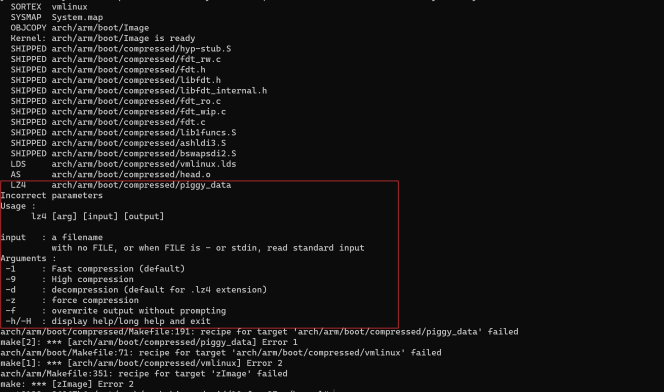
LZ4-Buildfehler - Originalabbildung;PDF-Seite 56 (EN).
wlq@ubuntu:~$ lz4 -v
*** LZ4 command line interface 64-bits v1.8.3, by Yann Collet ***
refusing to read from a console
sudo cp out/host/linux-x86/bin/lz4 /usr/bin/lz4
| Funktion | Referenz |
|---|---|
| Samba | RKDocs/android/Rockchip_Introduction_Android_Samba_CN.pdf |
| NFS-Boot | RKDocs/android/patches/customized_functions/nfs_boot_patch_v1.1.0.zip |
| Unabhängige Displays/Touch | RKDocs/android/patches/customized_functions/Android11异显开发说明.zip |
| Getrennter Displayton | RKDocs/android/patches/customized_functions/Dual_Audio_v1.0.zip |
RK3528-DDR4BIT-PCB-Loaderbeispiel ändert nur FlashData auf4BIT unten; ergänzt RK3528 nicht zur SDK-Supporttabelle.
diff --git a/RKBOOT/RK3528MINIALL.ini b/RKBOOT/RK3528MINIALL.ini
index a7e3779..6a952cf 100644
--- a/RKBOOT/RK3528MINIALL.ini
+++ b/RKBOOT/RK3528MINIALL.ini
@@ -14,7 +14,7 @@ Path1=bin/rk35/rk3528_usbplug_v1.03.bin
NUM=2
LOADER1=FlashData
LOADER2=FlashBoot
-FlashData=bin/rk35/rk3528_ddr_1056MHz_v1.05.bin
+FlashData=bin/rk35/rk3528_ddr_1056MHz_4BIT_PCB_v1.05.bin
Anhang A:historische Buildumgebung
Anhang stammt aus älterer AOSP-Anleitung, auch im CN-PDF englisch. Ubuntu14.04/15.04,JDK8,Mac sind historisch, keine geprüften Android14-Hostanforderungen; GKI verlangt separat Ubuntu20.04+. Alte Paketbefehle sind keine aktuelle Installationsempfehlung. Quelle nennt Linux/Mac statt Windows, verweist auf Life of a Patch; $ sind Prompts, Click-to-copy/Dreifachklick Quell-Webhinweise, keine Artikelfunktion.
Zuerst Branch wählen; Anforderungen hängen davon ab. Build Numbers listet Branches, master-Beispiel ohne Branchangabe. Linux-Anleitung gilt laut Quelle für alle/master; historische Tests Ubuntu LTS14.04/Debian testing, andere Distributionen können Tools besitzen. Gingerbread2.3.x+ benötigt64-Bit, ältere Versionen konnten32-Bit. Requirements nennt vollständige Ubuntu/Mac-Voraussetzungen. AOSP-master enthält OpenJDK in prebuilts/jdk/; ältere Branches benötigen separate passende JDK-Installation.
Historische Ubuntu≥15.04-Befehle installieren OpenJDK8. Für14.04 laut Quelle keine unterstützten Pakete,15.04 funktionierten,15.10/16.04 mit Verfahren nicht.64-Bit-.deb von old-releases.ubuntu.com mit SHA256 prüfen; hier nicht heruntergeladen.
sudo apt-get update
sudo apt-get install openjdk-8-jdk
| Paket | SHA256 |
|---|---|
| openjdk-8-jre-headless_8u45-b14-1_amd64.deb | 0f5aba8db39088283b51e00054813063173a4d8809f70033976f83e214ab56c0 |
| openjdk-8-jre_8u45-b14-1_amd64.deb | 9ef76c4562d39432b69baf6c18f199707c5c56a5b4566847df908b7d74e15849 |
| openjdk-8-jdk_8u45-b14-1_amd64.deb | 6e47215cf6205aa829e6a0a64985075bd29d1f428a4006a80c9db371c2fc3c4c |
dpkg je Paket, fehlende Abhängigkeiten mit apt-get -f install. Optional java/javac per update-alternatives wählen. Im PDF verklebte Befehle unten getrennt. Bei Java-Versionsfehlern verweist Quelle auf Wrong Java version.
sha256sum {downloaded.deb file}
sudo apt-get update
sudo dpkg -i {downloaded.deb file}
sudo apt-get -f install
sudo update-alternatives --config java
sudo update-alternatives --config javac
Historische64-Bit-Ubuntu14.04-Abhängigkeiten unten. CN ergänzt libssl-dev/liblz4-tool/python-dev, die EN fehlen. SELinux-Analyse:python-networkx; ART-Hosttests mit LDAP:libnss-sss:i386.
sudo apt-get install git-core gnupg flex bison gperf build-essential zip curl zlib1g-dev gcc-multilib g++-multilib libc6-dev-i386 lib32ncurses5-dev x11proto-core-dev libx11-dev lib32z-dev ccache libgl1-mesa-dev libxml2-utils xsltproc unzip python-pyelftools python3-pyelftools device-tree-compiler libfdt-dev libfdt1 libssl-dev liblz4-tool python-dev
Historische GNU/Linux-USB-Regel erteilt benanntem Nutzer Zugriff. Als root /etc/udev/rules.d/51-android.rules anlegen,
# adb protocol on passion (Rockchip products)
SUBSYSTEM=="usb", ATTR{idVendor}=="2207", ATTR{idProduct}=="0010", MODE="0600", OWNER="<username>"
Anhang B:SSH-Schlüssel
B-1:RSA-Schlüssel erzeugen, user@host durch E-Mail ersetzen. id_rsa/Passphrase geheim halten, nur id_rsa.pub an SDK-Administrator geben. Screenshots sind Quellenbeispiele, keine hier erzeugten Schlüssel.
ssh-keygen -t rsa -C "user@host"
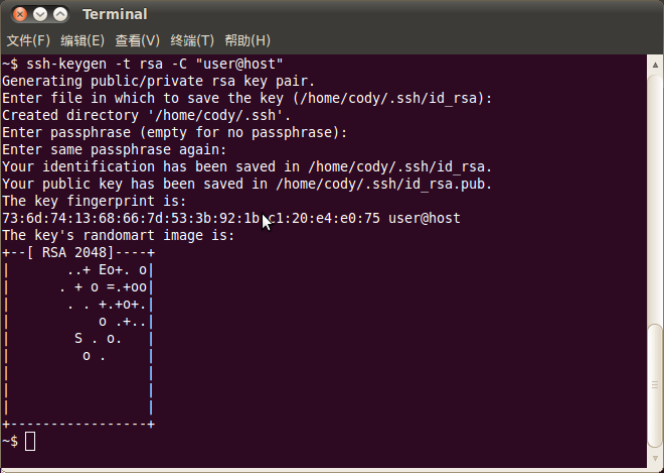
RSA-Schlüsselerzeugung - Originalabbildung;PDF-Seite 60 (EN).

Erzeugte Schlüsseldateinamen - Originalabbildung;PDF-Seite 60 (EN).
B-2:keychain installieren, eval-Zeile in ~/.bashrc ergänzen, neu anmelden und ggf.Passphrase eingeben. id_rsa ist Privatdatei. Für gewöhnliche Schlüsselnutzung sudo/root vermeiden, sofern Eigentümer-/Agentfolgen unklar.
sudo aptitude install keychain
vim ~/.bashrc
# Add to ~/.bashrc:
eval `keychain --eval ~/.ssh/id_rsa`
B-3:Quelle verwendet dieselbe Identität auf mehreren autorisierten Rechnern durch sichere Kopie von id_rsa nach ~/.ssh/id_rsa. Ein Privatcredential wird vervielfältigt;nicht an Dritte/unvertrauenswürdige Rechner geben. Falscher Schlüssel erzeugt Fehler, korrekter erlaubt Clone. Bei Quellfehler „Agent admitted failture to sign using the key“ ssh-add ~/.ssh/id_rsa ausführen.
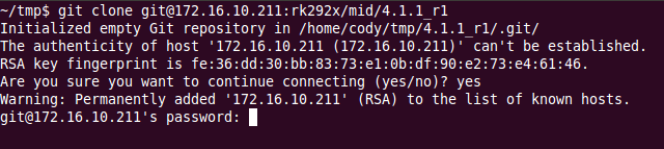
Falsche Identität/Authentifizierungsfehler - Originalabbildung;PDF-Seite 61 (EN).
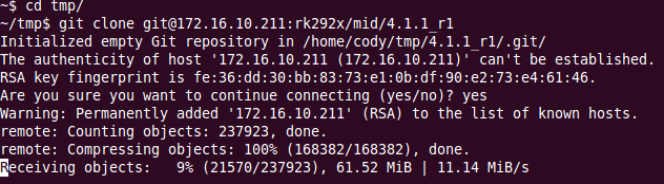
Clone mit korrekter Identität - Originalabbildung;PDF-Seite 61 (EN).
ssh-add ~/.ssh/id_rsa
B-4:man ssh_config. Quelle kopiert System-ssh_config nach ~/.ssh/config und setzt IdentityFile ~/.ssh1/id_rsa zum Identitätswechsel. Bestehende Nutzerkonfiguration vorher sichern; Kopie würde Einstellungen überschreiben.
man ssh_config
cp /etc/ssh/ssh_config ~/.ssh/config
vi .ssh/config
# Relevant ssh_config directive:
IdentityFile ~/.ssh1/id_rsa
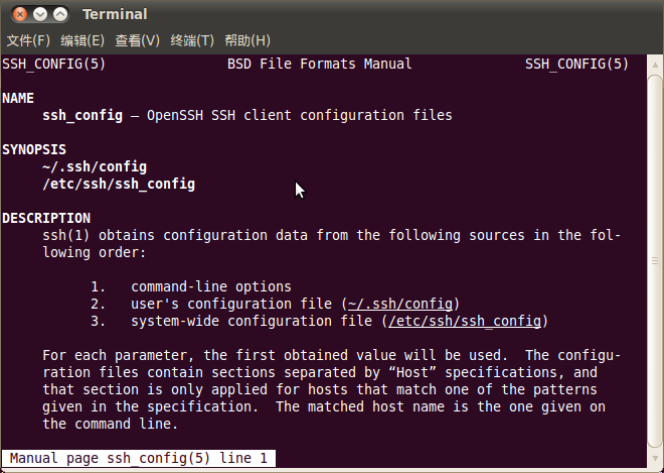
ssh_config-Handbuch - Originalabbildung;PDF-Seite 62 (EN).
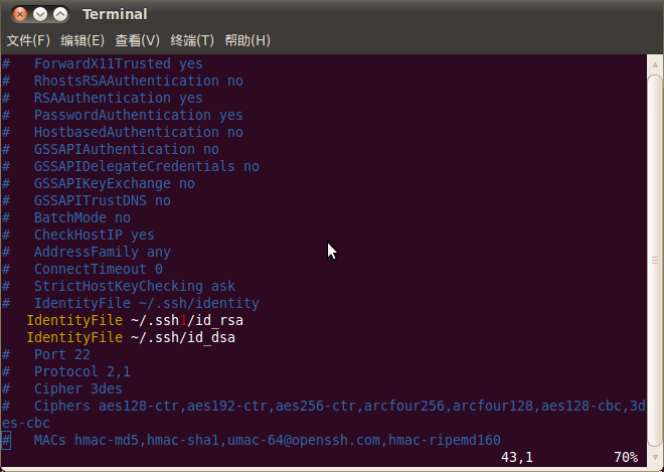
Alternatives IdentityFile - Originalabbildung;PDF-Seite 62 (EN).
B-5:Server kann Downloads/IPs je Schlüssel überwachen und bei Auffälligkeiten sperren. Privatkey schützen, nicht an Dritte weiterautorisieren. B-6:Public-Key-Datei an fae@rock-chips.com zur SDK-Zugriffsbeantragung senden. Hier keine E-Mail, Schlüsselerzeugung oder Anfrage ausgeführt.