
Platform reference: CN/EN V1.0.3, RK-YH-YF-A18. Source scope: RK3588/Linux5.10; RK3576/Linux6.1; RK3568/Linux5.10 or4.19; RK3506/Linux6.1. Verify actual ArmSoM Ethernet, PHY, BSP and real-time patches; no hardware testing or universal support claim. ZH uses Chinese figures; EN/RU/DE English figures. Performance values are vendor examples, not ArmSoM measurements.
Source ambiguities retained: alias -p 0 0 is annotated as changing to1; ec_stmmac.ko is copied to /userdata/ but insmod uses /userdata/ethercat_out/; the final stmmac while line lacks a complete body/terminator. Repeated diff headers and placeholder paths are preserved, not directly applicable patches. [] required/<> optional is the source convention. Preempt-RT hard-real-time assurance is only the source description; actual systems need worst-case-latency validation. Motor control involves motion risks; no examples executed.
1. Overview
IgH EtherCAT is an open-source EtherCAT master station designed to run on Linux systems. The IgH EtherCAT master communicates with EtherCAT slave devices by constructing a Linux character device, allowing applications to access the EtherCAT master module through the character device. The IgH EtherCAT development package includes EtherCAT tools, which provide various commands that can be executed at the Linux application level. These commands enable direct access to and configuration of slave devices, such as setting slave addresses, displaying bus configurations, displaying PDO data, and reading and writing SDO parameters.
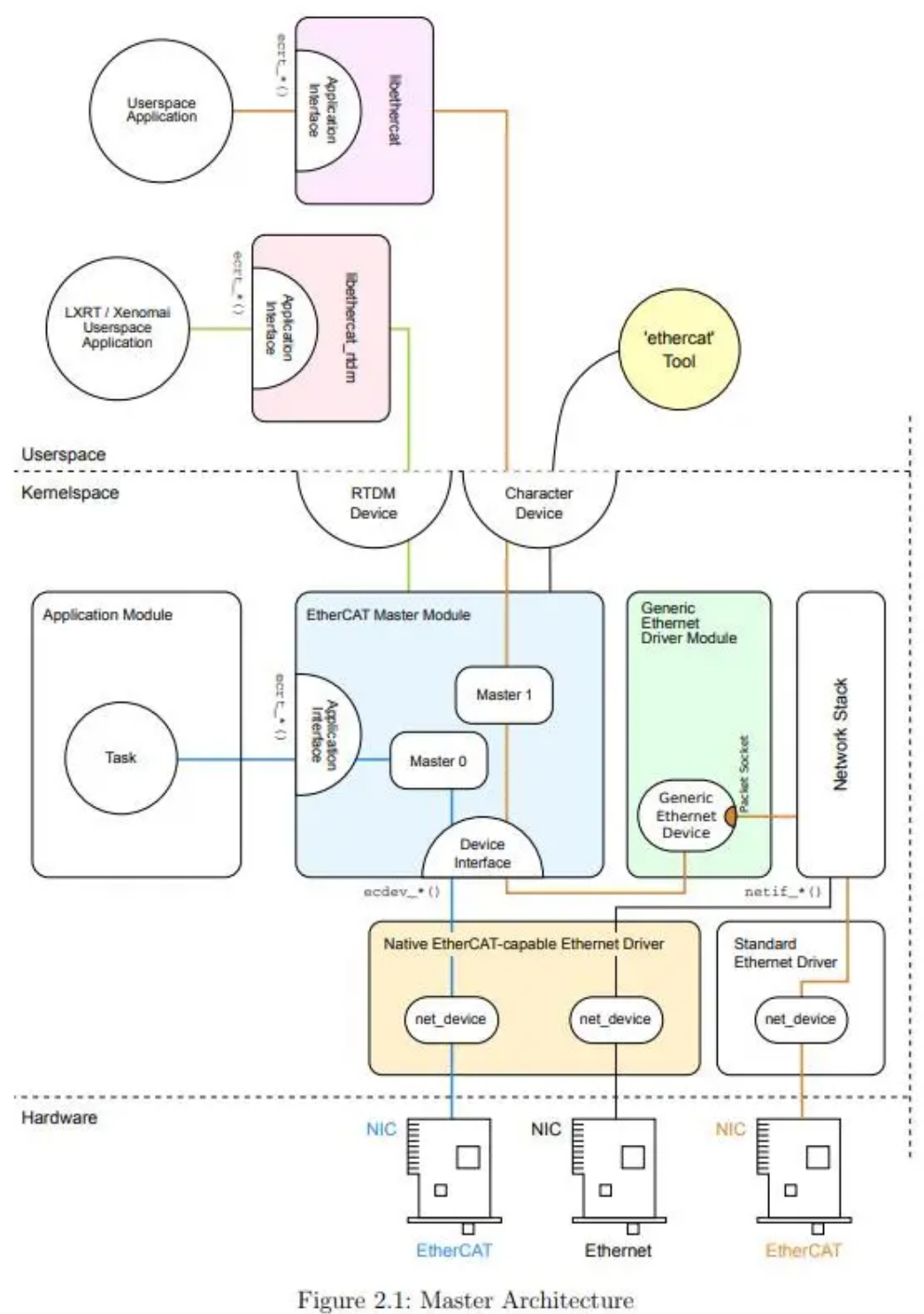
For more details, please refer to the official website of IgH: IgH EtherCAT Documentation
2. Introduction to EtherCAT IgH Software Environment
EtherCAT is generally divided into four parts: kernel, driver, user-space, and EtherCAT application. We will provide pre-compiled bin files:
| Is Pre- compiled | Included Files | Function | |
|---|---|---|---|
| Driver | Y | phylink.ko, pcs-xpcs.ko, ec_master.ko, ec_stmmac.ko | Provide a real-time driver environment |
| User-Space | Y | ethercat, libethercat.so | ethercat is the debugging tool for EtherCAT IgH, libethercat.so provides the calling interface for user-level applications |
| EtherCAT Application | N | libmadht1505ba1.so, rk_test, etc. | Upper-layer applications |
2.1 Kernel
EtherCAT IgH requires high real-time performance, and Preempt-RT is a Linux kernel optimized for real-time performance. Compared to the standard Linux kernel, Preempt-RT has the following advantages:
-
Real-time performance: Preempt-RT offers more reliable and precise real-time performance. It employs real-time scheduling strategies and mechanisms that allow tasks to be executed according to strict time requirements, making it suitable for applications that require high predictability and low latency, such as industrial automation and robotic control.
-
Hard real-time capability: Preempt-RT has hard real-time capabilities, meaning it can ensure that tasks are completed within a specified time frame without interference from other tasks or interrupts. This is crucial for applications that require strict time constraints, such as aerospace and medical equipment.
-
Task scheduling: Preempt-RT uses more efficient and optimized task scheduling algorithms, such as priority-based real-time scheduling algorithms, to ensure that high-priority tasks are responded to and completed in a timely manner without being affected by low-priority tasks.
-
Interrupt handling: Preempt-RT has been optimized for interrupt handling, resulting in shorter interrupt response times and faster reaction to external events.
-
Kernel timers: Preempt-RT provides more accurate and configurable kernel timers, enabling microsecond-level timing precision suitable for applications with extremely high time requirements.
-
Real-time extensions: Preempt-RT offers real-time extension mechanisms that allow users to easily customize and extend the kernel to meet the requirements of specific applications. In summary, Preempt-RT excels in real-time performance, reliability, and precision compared to the standard Linux kernel and is widely used in applications with high real-time performance requirements. Rockchip provides the Preempt-RT patch that comes with the SDK.
2.2 User Space
The user space primarily consists of two files, ethercat and libethercat.so. One is the EtherCAT IgH debugging tool, and the other is the EtherCAT IgH dynamic library, which provides an interface for the user level. About the user space, please refer the IgH source code from https://gitlab.com/etherlab.org/ethercat/-/tree/master? ref_type=heads, and after compilation, it generates the ethercat binary file, libethercat.so, and some examples, etc. The user space components can also use pre-compiled EtherCAT IgH binary files and libethercat.so.
| User Space | Function | Storage Path |
|---|---|---|
| libethercat.so | Implementation of the EtherCAT standard, providing an interface to applications | SDK/external/rk_ethercat_release/ethercat_igh/lib/ |
| ethercat | Ethercat is the EtherCAT IgH debugging tool | SDK/external/rk_ethercat_release/ethercat_igh/bin/ |
2.3 Driver
The driver primarily consists of ec_master.ko and several kernel modules optimized by RK.
| Driver | Detailed Function |
|---|---|
| ec_master.ko | ec_master.ko is a Linux kernel module that supports the functionality of EtherCAT Master. This module is responsible for managing communication on the EtherCAT bus, implementing data exchange and synchronization between the master and slave stations. |
| ec_stmmac.ko | stmmac is a real-time optimized network driver for the underlying network interface by RK. |
| pcs-xpcs.ko | Used to support the functionality of EtherCAT network cards. |
| phylink.ko | Used for managing communication between the physical layer and link layer of network interfaces, as well as settings and status management related to the physical medium. |
2.4 EtherCAT IgH Application
The EtherCAT IgH application needs to be implemented based on the actual servo drives used, and This part is not universal. The reference example provided by RK uses the following supporting components:
| Component | Name |
|---|---|
| Master | RK3588/RK3576/RK3568 Development Boards |
| Slave Driver | Panasonic MADHT1505BA1 |
| Servo Motor | Panasonic MDMS012S1U |
| Connection | Power and Encoder Cables |
3. EtherCAT IgH Software Compilation and Deployment
3.1 Kernel
3.1.1 Step One: Add Preempt-RT Patch
Choose the Preempt-RT kernel solution and add the patch according to the reference document: SDK/docs/Patches/Real-Time-Performance/README.md
3.1.2 Step Two: Enable Corresponding Kernel Configuration
3.1.2.1 5.10 Kernel (Taking RK3568 as an Example)
#修改内核配置 把stmmac驱动设置为模块编译
--- a/arch/arm64/configs/rockchip_linux_defconfig
+++ b/arch/arm64/configs/rockchip_linux_defconfig
@@ -202,7 +202,7 @@ CONFIG_R8168=y
 # CONFIG_NET_VENDOR_SILAN is not set
 # CONFIG_NET_VENDOR_SIS is not set
 # CONFIG_NET_VENDOR_SMSC is not set
-CONFIG_STMMAC_ETH=y
+CONFIG_STMMAC_ETH=m
 # CONFIG_NET_VENDOR_SUN is not set
 # CONFIG_NET_VENDOR_SYNOPSYS is not set
 # CONFIG_NET_VENDOR_TEHUTI is not set

#把cpu休眠关闭(这⾥也可以通过关闭CONFIG_ARM_PSCI_CPUIDLE来阻⽌cpu休眠)
--- a/arch/arm64/boot/dts/rockchip/rk3568.dtsi
+++ b/arch/arm64/boot/dts/rockchip/rk3568.dtsi
index 778752440303..dba79303e34b 100644
--- a/arch/arm64/boot/dts/rockchip/rk3568.dtsi
+++ b/arch/arm64/boot/dts/rockchip/rk3568.dtsi
@@ -74,7 +74,7 @@
                        enable-method = "psci";
                        clocks = <&scmi_clk 0>;
                        operating-points-v2 = <&cpu0_opp_table>;
-                       cpu-idle-states = <&CPU_SLEEP>;
+                       //cpu-idle-states = <&CPU_SLEEP>;
                        #cooling-cells = <2>;
                        dynamic-power-coefficient = <187>;
                };
@@ -86,7 +86,7 @@
                        enable-method = "psci";
                        clocks = <&scmi_clk 0>;
                        operating-points-v2 = <&cpu0_opp_table>;
-                       cpu-idle-states = <&CPU_SLEEP>;
+                       //cpu-idle-states = <&CPU_SLEEP>;
                };

                cpu2: cpu@200 {
@@ -96,7 +96,7 @@
                        enable-method = "psci";
                        clocks = <&scmi_clk 0>;
                        operating-points-v2 = <&cpu0_opp_table>;
-                       cpu-idle-states = <&CPU_SLEEP>;
+                       //cpu-idle-states = <&CPU_SLEEP>;
                };

                cpu3: cpu@300 {
@@ -106,7 +106,7 @@
                        enable-method = "psci";
                        clocks = <&scmi_clk 0>;
                        operating-points-v2 = <&cpu0_opp_table>;
-                       cpu-idle-states = <&CPU_SLEEP>;
+                       //cpu-idle-states = <&CPU_SLEEP>;
                };

                idle-states {

#隔离cpu核⼼
--- a/arch/arm64/boot/dts/rockchip/rk3568-linux.dtsi
+++ b/arch/arm64/boot/dts/rockchip/rk3568-linux.dtsi
@@ -13,7 +13,7 @@
        };

        chosen: chosen {
-               bootargs = "earlycon=uart8250,mmio32,0xfe660000 console=ttyFIQ0 root=PARTUUID=614e0000-0000 rw rootwait";
+               bootargs = "earlycon=uart8250,mmio32,0xfe660000 console=ttyFIQ0 root=PARTUUID=614e0000-0000 isolcpus=3 nohz_full=3 rw rootwait";
        };

        fiq-debugger {
diff --git a/arch/arm64/configs/rockchip_linux_defconfig b/arch/arm64/configs/rockchip_linux_defconfig
index 1a342fe17a5d..1d3a939659b1 100644
--- a/arch/arm64/configs/rockchip_linux_defconfig
+++ b/arch/arm64/configs/rockchip_linux_defconfig
@@ -649,3 +649,4 @@ CONFIG_RCU_CPU_STALL_TIMEOUT=60
 CONFIG_FUNCTION_TRACER=y
 CONFIG_BLK_DEV_IO_TRACE=y
 CONFIG_LKDTM=y
+CONFIG_NO_HZ_FULL=y
3.1.2.2 6.1 Kernel (Take RK3576 as an Example)
#修改内核配置 把stmmac驱动设置为模块编译:
--- a/arch/arm64/configs/rockchip_linux_defconfig
+++ b/arch/arm64/configs/rockchip_linux_defconfig
@@ -197,7 +197,7 @@ CONFIG_R8168=y
 # CONFIG_NET_VENDOR_SILAN is not set
 # CONFIG_NET_VENDOR_SIS is not set
 # CONFIG_NET_VENDOR_SMSC is not set
-CONFIG_STMMAC_ETH=y
+CONFIG_STMMAC_ETH=m
 # CONFIG_NET_VENDOR_SUN is not set
 # CONFIG_NET_VENDOR_SYNOPSYS is not set
 # CONFIG_NET_VENDOR_TEHUTI is not set

 --- a/arch/arm64/configs/rockchip_rt.config
+++ b/arch/arm64/configs/rockchip_rt.config
@@ -22,3 +22,4 @@ CONFIG_JUMP_LABEL=y
 CONFIG_HZ_PERIODIC=y
 CONFIG_HZ_1000=y
 CONFIG_PREEMPT_RT=y
+# CONFIG_DEBUG_PREEMPT is not set

#隔离cpu
--- a/arch/arm64/boot/dts/rockchip/rk3576-linux.dtsi
+++ b/arch/arm64/boot/dts/rockchip/rk3576-linux.dtsi
@@ -6,7 +6,7 @@

 / {
        chosen: chosen {
-               bootargs = "earlycon=uart8250,mmio32,0x2ad40000 console=ttyFIQ0 clk_gate.always_on=1 pm_domains.always_on=1 root=PARTUUID=614e0000-0000 rw rootwait rcupdate.rcu_expedited=1 rcu_nocbs=all";
+               bootargs = "earlycon=uart8250,mmio32,0x2ad40000 console=ttyFIQ0 clk_gate.always_on=1 pm_domains.always_on=1 root=PARTUUID=614e0000-0000 isolcpus=7 nohz_full=7 rw rootwait rcupdate.rcu_expedited=1 rcu_nocbs=all";
        };

        fiq_debugger: fiq-debugger {
3.1.2.3 6.1 Kernel (RK3506)
diff --git a/arch/arm/configs/rk3506_defconfig b/arch/arm/configs/rk3506_defconfig
index e6d3ba608a77..3029973ade8c 100644
--- a/arch/arm/configs/rk3506_defconfig
+++ b/arch/arm/configs/rk3506_defconfig
@@ -2,6 +2,7 @@
 CONFIG_KERNEL_XZ=y
 CONFIG_DEFAULT_HOSTNAME="localhost"
 CONFIG_SYSVIPC=y
+CONFIG_NO_HZ_FULL=y
 CONFIG_NO_HZ=y
 CONFIG_HIGH_RES_TIMERS=y
 CONFIG_PREEMPT=y
@@ -119,12 +120,13 @@ CONFIG_NETDEVICES=y
 # CONFIG_NET_VENDOR_SOLARFLARE is not set
 # CONFIG_NET_VENDOR_SMSC is not set
 # CONFIG_NET_VENDOR_SOCIONEXT is not set
-CONFIG_STMMAC_ETH=y
+CONFIG_STMMAC_ETH=m
 # CONFIG_DWMAC_GENERIC is not set
 # CONFIG_NET_VENDOR_SYNOPSYS is not set
 # CONFIG_NET_VENDOR_VIA is not set
 # CONFIG_NET_VENDOR_WIZNET is not set
 # CONFIG_NET_VENDOR_XILINX is not set
+CONFIG_PHYLIB=y
 CONFIG_MOTORCOMM_PHY=y
 CONFIG_PPP=y
 # CONFIG_WLAN is not set
3.1.2.4 Dual network port support
If the device integrates dual GMAC network ports and needs to be configured as an EtherCAT master and a standard Ethernet interface respectively, the following configuration can be referred to:
gmac0⽤于ethercat,gmac1⽤于默认以太⽹:
    gmac0: ethernet@fe2a0000 {
-       compatible = "rockchip,rk3568-gmac", "snps,dwmac-4.20a";
+       compatible = "rockchip,rk3568-gmac-ethercat", "snps,dwmac-4.20a";
        reg = <0x0 0xfe2a0000 0x0 0x10000>;
3.1.3 Step Three: Compile the Real-Time Kernel
Then, generate the real-time kernel based on the rt-linux README.md.
3.2 User Space
The method for compiling the source code in a Linux environment is as follows:
#进⼊源码⽬录
cd source

#指定编译链路径(编译链在SDK中有提供)
export PATH=SDK/prebuilts/gcc/linux-x86/(arch)/gcc-arm-10.3-2021.07-x86_64-(arch)-none-linux-gnu/bin:$PATH

#配置,指定内核⽬录,选择SDK下的kernel-6.1或者kernel-5.10,这⾥使⽤kernel-6.1。
./bootstrap
./configure --prefix=(编译后你需要存放的⽬录) --host=(arch)-none-linux-gnu --with-linux-dir=SDK/kernel-6.1 --enable-8139too=no --enable-stmmac=yes --enable-generic=no --enable-wildcards=yes

#编译
make -j8
make install systemdsystemunitdir=(编译后你需要存放的⽬录,和configure命令上的prefix下跟的参数需要⼀
直)

#部署,从你指定的输出⽬录中拷⻉⽂件到开发板上
cp libethercat.so*  /usr/lib/(开发板上)
cp ethercat  /usr/bin/(开发板上)
3.3 Driver
cp phylink.ko /userdata/(开发板上)  内核编译
cp pcs-xpcs.ko /userdata/(开发板上) 内核编译
cp ec_master.ko /userdata/(开发板上)
cp ec_stmmac.ko /userdata/(开发板上)

#加载驱动
insmod /userdata/phylink.ko
insmod /userdata/pcs-xpcs.ko
insmod /userdata/ec_master.ko main_devices=62:36:B8:01:5B:59(这个是你的⽹⼝的物理地址,可以通过
ifconfig命令查看,如果mac地址没有给对,ethercat ⽆法使⽤)
insmod /userdata/ethercat_out/ec_stmmac.ko

#调整soc为性能模式
echo performance | tee $(find /sys/ -name *governor)
Note: If it fails to work properly, the following log will appear when loading ko:
[  585.900540] rk_gmac-dwmac fe1c0000.ethernet: stmmac_dvr_probe: ecdev: 0x0
[  585.927904] rk_gmac-dwmac fe1c0000.ethernet eth0: Register MEM_TYPE_PAGE_POOL RxQ-0
[  585.931176] rk_gmac-dwmac fe1c0000.ethernet eth0: yt8521_config_init done, phy addr: 0,
chip mode = 0, polling mode = 2
[  585.933386] rk_gmac-dwmac fe1c0000.ethernet eth0: PHY [stmmac-1:00] driver [YT8521
Ethernet] (irq=POLL)
[  585.934039] dwmac4: Master AXI performs any burst length
[  585.934057] rk_gmac-dwmac fe1c0000.ethernet eth0: No Safety Features support found
[  585.934075] rk_gmac-dwmac fe1c0000.ethernet eth0: IEEE 1588-2008 Advanced Timestamp
supported
[  585.934469] rk_gmac-dwmac fe1c0000.ethernet eth0: registered PTP clock
[  585.938567] rk_gmac-dwmac fe1c0000.ethernet eth0: FPE workqueue start
The mac address is incorrect. Please check the mac address.
3.4 EtherCAT IgH Application
The EtherCAT IgH application needs to be written based on the specific server, requiring the use of the EtherCAT IgH tools compiled in user space to obtain some configuration information of the servo drivers, and then complete the development of the application code. For more details, please refer to the section “EtherCAT IgH Application Developer Guide” below.
4. EtherCAT IgH Tools Introduction
EtherCAT IgH tools can be checked by ethercat –help command, these tools can display various information about the slaves connected to the master station. These tools can help the development of master station applications. Below are several commonly used commands and parameters, where [ ] is required parameters and < > is optional parameters.
#设置别名地址(下⾯的例⼦代表设置位置0的别名修改为1)
ethercat alias -p 0 0

#设置别名地址(下⾯的例⼦代表别名0的别名修改为1)
ethercat alias -a 0 1

#以c语⾔的形式输出pdo信息
ethercat cstruct

#输出识别到的从站
ethercat slaves
0  0(别名)):0(位置)  PREOP  +  MADHT1505BA1

#输出pdo信息
ethercat pdos
For additional tools, please refer to the official documentation https://docs.etherlab.org/ethercat/1.5/doxyge n/index.html.
5. EtherCAT IgH Application Development Reference
After powering up the master and slave stations of the development board, and connecting the servo motor to the slave station, load the driver on the development board and use the following commands to check if the communication is normal:
#输出识别到的从站
ethercat slaves

#如果通讯成功,就会显⽰出识别到的从站位置信息,别名和型号,如下:
0  0(别名)):0(位置)  PREOP  +  MADHT1505BA1

#输出pdo信息,这些pdo信息只是默认的,具体要根据需求,参考伺服驱动器⼿册来编写
ethercat pdos

#以c语⾔的形式输出pdo信息
ethercat cstruct
With the basic information obtained above, you can write a simple EtherCAT IgH application, which can refer to the code in ethercat_igh\examples\dc_user\main.c . Replace the PDO information obtained by ethercat cstruct with the el3102_pdo_entries and el4102_pdos in the official example to perform a simple initialization. The main process is as follows:
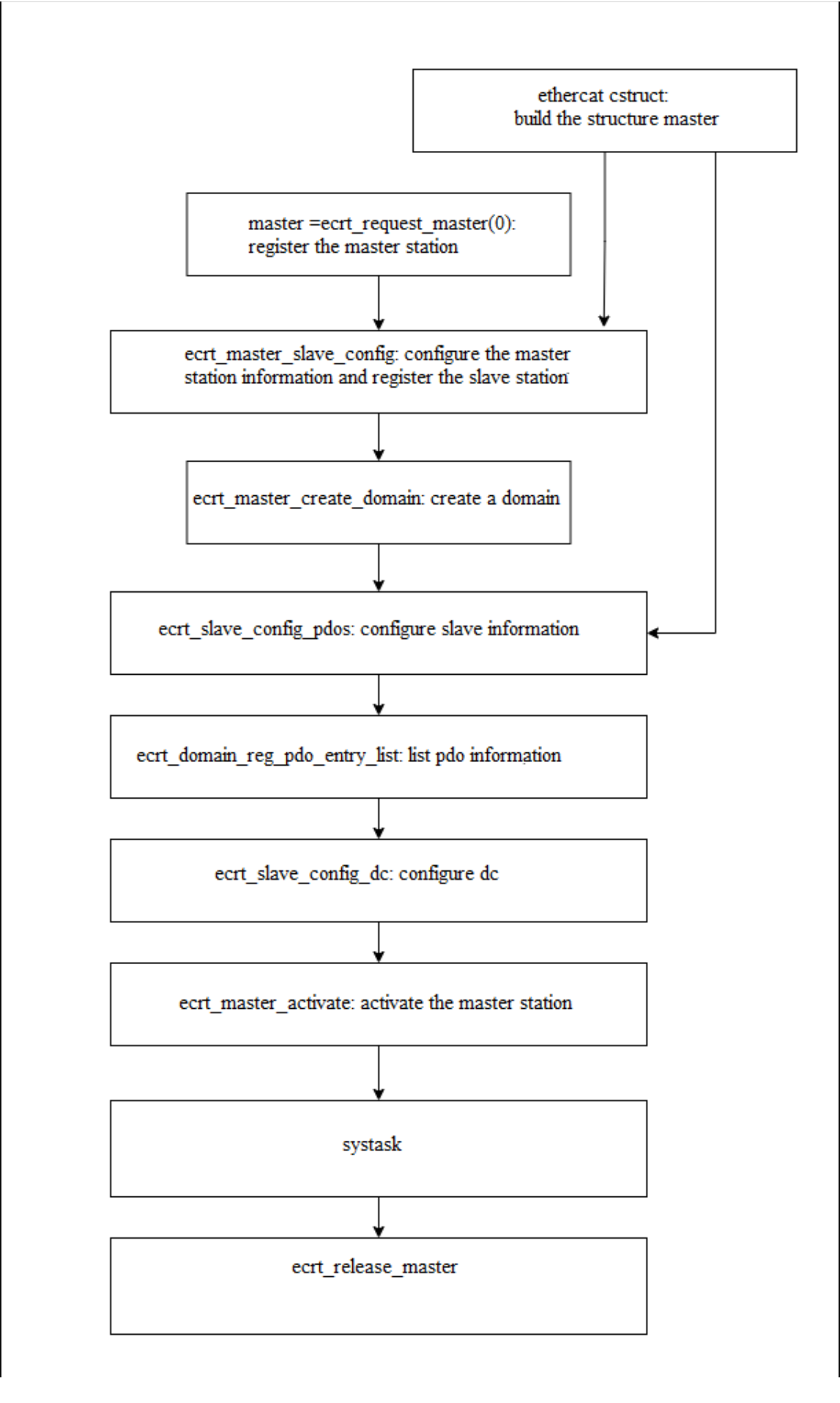
Here is an example of a self-developed demo by RK as a reference: Below is the topology diagram of the RK self-developed demo:
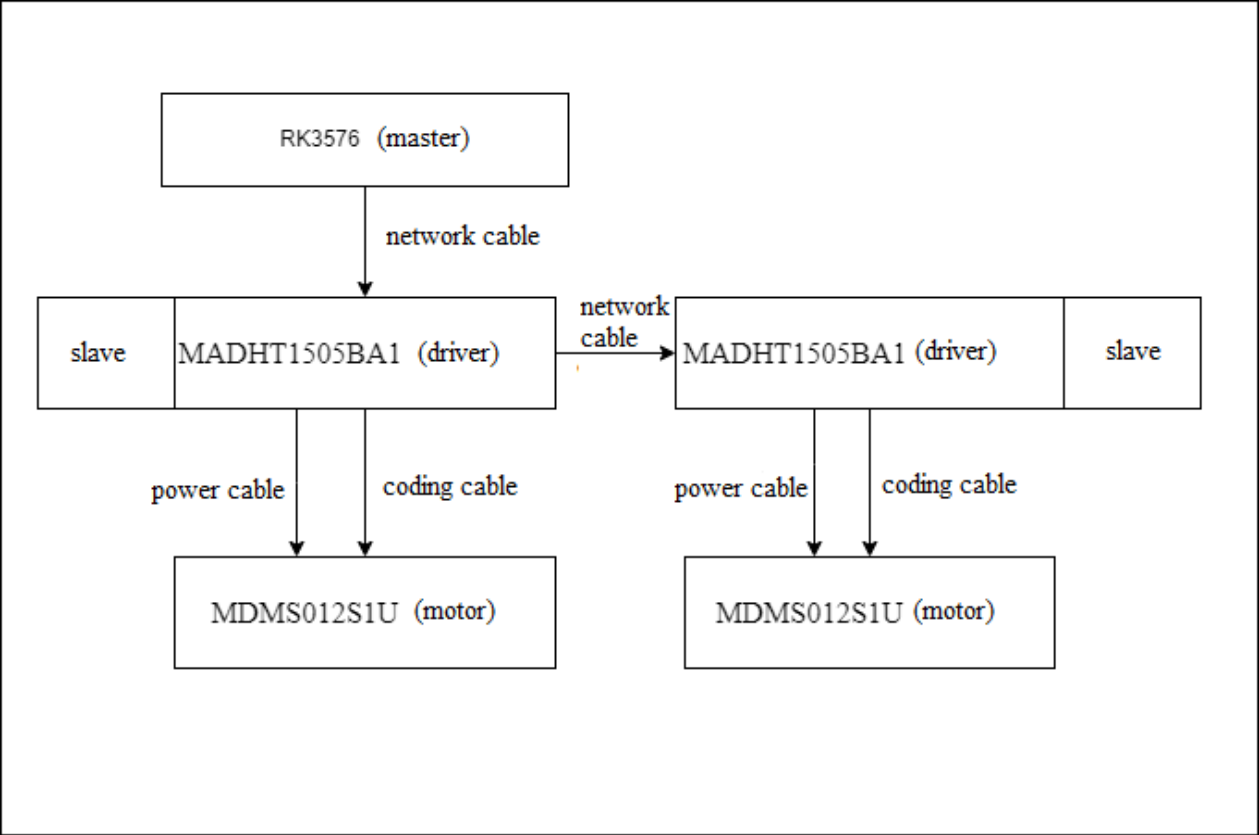
The master station is connected to one MADHT1505BA1 via an Ethernet cable, and the MADHT1505BA1 is connected to another MADHT1505BA1 via an Ethernet cable, with the motors connected to the drive MADHT1505BA1 using power cables and encoder cables. You can obtain the application of the RK self-developed demo from the following location:
SDK/external/rk_ethercat_release/demo
This can be used as a reference for writing your own customize applications. We also provide some demo designs for motor control UI, which can be used together with the above motor test programs. For details, please refer to:
SDK/app/lvgl_demo/motor_demo
6. TSN
Currently, only RK3576/RK3588 support the TSN function. The driver code submission point needs to include the following submissions:
commit f6349faa5303de458a0b9dc23eba1baf5d3e2fd1 (HEAD -> last, origin/master, origin/HEAD)
Author: ZiHan Huang <zack.huang@rock-chips.com>
Date:   Tue Jul 22 16:37:07 2025 +0800

    Support dual network ports

    Change-Id: I719e2271d3417c1dc3ba95dca0b0207edfc47615
    Signed-off-by: ZiHan Huang <zack.huang@rock-chips.com>
Passes on function does not support in the queue is 0, so it is necessary to open the queue in the drive device tree file 1, example: the arch/arm64 / boot/dts/rockchip/rk3576 dtsi
gmac0: ethernet@2a220000 {
    ...
    gmac0_mtl_rx_setup: rx-queues-config {
        snps,rx-queues-to-use = <2>;
        queue0 {};
        queue1 {};
    };

    gmac0_mtl_tx_setup: tx-queues-config {
        snps,tx-queues-to-use = <2>;
        queue0 {};
        queue1 {};
    };
};
For modifications to the upper-layer application, please refer to: Source Code directory /demo/ec_master_test_RK3568_MADHT1505BA1.c. Among them, two methods, est and tbs, can be selected to implement the TSN function. est: Using the est_qopt configuration parameter, entry represents the gated list of the sending queue, gate_mask=0x2 (binary 10), interval=800000 indicates that queue 1 is open and queue 0 is closed at this time, with a duration of 800us, while gate_mask=0x1 (binary 01) If interval=200000, it indicates that queue 1 is closed and queue 0 is open at this time, with a duration of 200us. cycle_time represents the duration of all entries, that is, the time during which the gated list loop is executed. In the following example, cycle_time is 1ms. “base_time” indicates the point in time when the first entry is executed for the first time. enable=1 indicates that the est function is enabled; The above parameters can be configured by users according to their actual needs. Among them, est_qopt.base_time = TIMESPEC2NS(wakeupTime) + est_qopt.cycle_time + 200000, where 200us must be consistent with entries[1].interval It indicates that the time point of the first data packet sending is 200us after the sleep cycletime, and then the data packets are sent periodically through the cycle_time in the gated list.
 diff --git a/demo/ec_master_test_RK3568_MADHT1505BA1.c b/demo/ec_master_test_RK3568_MADHT1505BA1.c
index 5bd3cef..d2d5559 100644
--- a/demo/ec_master_test_RK3568_MADHT1505BA1.c
+++ b/demo/ec_master_test_RK3568_MADHT1505BA1.c
@@ -22,7 +22,7 @@
 // Application parameters
 // #define FREQUENCY 250
 #define FREQUENCY 1000
-#define CLOCK_TO_USE CLOCK_MONOTONIC
+#define CLOCK_TO_USE CLOCK_REALTIME
 #define MEASURE_TIMING  1
 #define TARGET_VELOCITY        1124000 /*target velocity*/
@@ -418,14 +418,30 @@ void cyclic_task_velocity_mode()
              latency_min_ns = 0, latency_max_ns = 0,
              period_min_ns = 0, period_max_ns = 0,
              exec_min_ns = 0, exec_max_ns = 0;
+
+    ec_est_sched_entry_t est_entries[2];
+    ec_est_qopt_offload_t est_qopt;

     period_max_ns = 0;
     period_min_ns = 0xffffffff;
     latency_max_ns = 0;
     latency_min_ns = 0xffffffff;
+
+    est_entries[0].gate_mask = 0x2;
+    est_entries[0].interval = 800000;
+    est_entries[1].gate_mask = 0x1;
+    est_entries[1].interval = 200000;
+    est_qopt.num_entries = 2;
+    est_qopt.enable = 1;
+    est_qopt.entries = est_entries;
+    est_qopt.cycle_time = TIMESPEC2NS(cycletime);

     clock_gettime(CLOCK_TO_USE, &lastStartTime);
     clock_gettime(CLOCK_TO_USE, &wakeupTime);
+
+    est_qopt.base_time = TIMESPEC2NS(wakeupTime) + est_qopt.cycle_time + 200000;
+    ecrt_master_set_est(master, &est_qopt);
+
     while(app_run) {
         wakeupTime = timespec_add(wakeupTime, cycletime);
         clock_nanosleep(CLOCK_TO_USE, TIMER_ABSTIME, &wakeupTime, NULL);
tbs: Use the tbs_qopt configuration parameter. enable=1 indicates that the tbs function is enabled, and queue=1 indicates that the tbs of queue 1 is enabled. The queue will send data packets at the corresponding time point based on the app time set by ecrt_master_application_time. Among them, ecrt_master_application_time(master, TIMESPEC2NS(wakeupTime) + 200000), where 200us refers to sending data packets after 200us, and users can configure it by themselves. Set this time after each cycle of sleep to achieve periodic data packet sending.
 diff --git a/demo/ec_master_test_RK3568_MADHT1505BA1.c b/demo/ec_master_test_RK3568_MADHT1505BA1.c
index 5bd3cef..46b3588 100644
--- a/demo/ec_master_test_RK3568_MADHT1505BA1.c
+++ b/demo/ec_master_test_RK3568_MADHT1505BA1.c
@@ -22,7 +22,7 @@
 // Application parameters
 // #define FREQUENCY 250
 #define FREQUENCY 1000
-#define CLOCK_TO_USE CLOCK_MONOTONIC
+#define CLOCK_TO_USE CLOCK_REALTIME
 #define MEASURE_TIMING  1
 #define TARGET_VELOCITY        1124000 /*target velocity*/
@@ -419,13 +419,21 @@ void cyclic_task_velocity_mode()
              period_min_ns = 0, period_max_ns = 0,
              exec_min_ns = 0, exec_max_ns = 0;

+    ec_tbs_qopt_offload_t tbs_qopt;
+
     period_max_ns = 0;
     period_min_ns = 0xffffffff;
     latency_max_ns = 0;
     latency_min_ns = 0xffffffff;
+
+    tbs_qopt.enable = 1;
+    tbs_qopt.queue = 1;

     clock_gettime(CLOCK_TO_USE, &lastStartTime);
     clock_gettime(CLOCK_TO_USE, &wakeupTime);
+
+    ecrt_master_set_tbs(master, &tbs_qopt);
+
     while(app_run) {
         wakeupTime = timespec_add(wakeupTime, cycletime);
         clock_nanosleep(CLOCK_TO_USE, TIMER_ABSTIME, &wakeupTime, NULL);
@@ -435,7 +443,7 @@ void cyclic_task_velocity_mode()
         // It is a good idea to use the target time (not the measured time) as
         // application time, because it is more stable.
         //
-        ecrt_master_application_time(master, TIMESPEC2NS(wakeupTime));
+        ecrt_master_application_time(master, TIMESPEC2NS(wakeupTime) + 200000);

         /*Receive process data*/
         ecrt_master_receive(master);
In addition, the application layer also needs to synchronize the system time and the gmac ptp time. The following command is used: ptp0 indicates gmac0.
phc2sys -s /dev/ptp0 -c CLOCK_REALTIME -O 0
7. Performance
7.1 Test Method
Please refer to the cyclic_task_velocity_mode function in the code SDK/external/rk_ethercat_release/demo/ec_master_test_RK3568_MADHT1505BA1.c, which implements the calculation of the maximum and minimum values spent in a cycle.
static int clean_cycle = 0;//5 * 60 * FREQUENCY;
void cyclic_task_velocity_mode()
{
    static unsigned int timeout_error = 0;
    struct timespec wakeupTime, time;
    uint16_t    status;
    int8_t      opmode;
    int32_t     cur_velocity;
    bool        print = false;

    struct timespec startTime, endTime, lastStartTime = {};
    uint32_t period_ns = 0, exec_ns = 0, latency_ns = 0,
             latency_min_ns = 0, latency_max_ns = 0,
             period_min_ns = 0, period_max_ns = 0,
             exec_min_ns = 0, exec_max_ns = 0;

    period_max_ns = 0;
    period_min_ns = 0xffffffff;
    latency_max_ns = 0;
    latency_min_ns = 0xffffffff;

    clock_gettime(CLOCK_TO_USE, &lastStartTime);
    clock_gettime(CLOCK_TO_USE, &wakeupTime);
    while(app_run) {//这⾥会⼀直在循环
        wakeupTime = timespec_add(wakeupTime, cycletime);
        clock_nanosleep(CLOCK_TO_USE, TIMER_ABSTIME, &wakeupTime, NULL);

        // Write application time to master
        //
        // It is a good idea to use the target time (not the measured time) as
        // application time, because it is more stable.
        //
        ecrt_master_application_time(master, TIMESPEC2NS(wakeupTime));

        /*Receive process data*/
        ecrt_master_receive(master);
        ecrt_domain_process(domain);
        // check process data state (optional)
        check_domain_state();

        if (counter) {
            counter--;
        }else {
            counter = FREQUENCY;
            check_master_state();
            check_slave_config_states();
            /*Check process data state(optional)*/

            EC_WRITE_U16(domain_pd + control_word, 0x80);
            // EC_WRITE_U8(domain_pd + modes_of_operation, 9);
            /*Read inputs*/
            status = EC_READ_U16(domain_pd + status_word);
            opmode = EC_READ_U8(domain_pd + modes_of_operation_display);
            cur_velocity = EC_READ_S32(domain_pd + current_velocity);
            printf_debug("madht:  act velocity = %d ,  status = 0x%x, opmode = 0x%x\n",
cur_velocity,  status, opmode);
            if( (status & 0x004f) == 0x0040) {
                printf_debug("0x06\n");
                EC_WRITE_U16(domain_pd + control_word, 0x0006);
                EC_WRITE_U8(domain_pd + modes_of_operation, 9);
            }

            else if( (status & 0x006f) == 0x0021) {
                printf_debug("0x07\n");
                EC_WRITE_U16(domain_pd + control_word, 0x0007);
            }

            else if( (status & 0x006f) == 0x0023) {
                printf_debug("0x0f\n");
                EC_WRITE_U16(domain_pd + control_word, 0x000f);
                EC_WRITE_S32(domain_pd + target_velocity, TARGET_VELOCITY);
            }

            //operation enabled
            else if( (status & 0x006f) == 0x0027) {
                printf_debug("0x1f\n");
                EC_WRITE_U16(domain_pd + control_word, 0x001f);
            }
        }

        clock_gettime(CLOCK_TO_USE, &time);
        ecrt_master_sync_reference_clock_to(master, TIMESPEC2NS(time));
        ecrt_master_sync_slave_clocks(master);
        // send process data
        ecrt_domain_queue(domain);
        ecrt_master_send(master);

        clock_gettime(CLOCK_TO_USE, &startTime);
        latency_ns = DIFF_NS(wakeupTime, startTime);
        period_ns = DIFF_NS(lastStartTime, startTime);
        //exec_ns = DIFF_NS(lastStartTime, endTime);
    /* clean */
        if (clean_cycle >= (5 * 60 * 1000)) {
            clean_cycle = 0;
            period_max_ns = 0;
            period_min_ns = 0xffffffff;
            latency_max_ns = 0;
            latency_min_ns = 0xffffffff;
        }

//计算抖动最⼤最⼩值
        if (latency_ns > latency_max_ns) {
            latency_max_ns = latency_ns;
        }
        if (latency_ns < latency_min_ns) {
            latency_min_ns = latency_ns;
        }

        if (period_ns > period_max_ns) {
            period_max_ns = period_ns;
            print = true;
        }
        if (period_ns < period_min_ns) {
            period_min_ns = period_ns;
            print = true;
        }

        clean_cycle++;
        lastStartTime = startTime;
        // output timing stats
        if (print) {
            printf("period     %10u ... %10u\n",
                    period_min_ns, period_max_ns);
        //printf("exec       %10u ... %10u\n",
        //        exec_min_ns, exec_max_ns);
        printf("latency    %10u ... %10u\n",
                latency_min_ns, latency_max_ns);
        }
        print = false;
    }
}
Assuming the cycle is 1ms, the maximum jitter is the maximum value minus the minimum value, which can be used to assess the real-time performance of the master station. Note: Since the TSN function is implemented by controlling the sending time of the hardware queue, when the tx function in the driver finishes and returns directly, the data packet will not be sent out immediately at this time. Therefore, when using TSN, if the application layer immediately acquires the time to calculate the jitter time after sending the function, there will be a relatively large error. If you need to display relatively accurate jitter on the log, the following patch code needs to be added to devices/stmmac/stmmac_main-6.1- ethercat.c. If the waveform of txen is observed using an oscilloscope, this patch is not required and it will be more accurate.
diff --git a/devices/stmmac/stmmac_main-6.1-ethercat.c b/devices/stmmac/stmmac_main-6.1-ethercat.c
index d04856a..904c1eb 100644
--- a/devices/stmmac/stmmac_main-6.1-ethercat.c
+++ b/devices/stmmac/stmmac_main-6.1-ethercat.c
@@ -4628,6 +4628,11 @@ static netdev_tx_t stmmac_xmit(struct sk_buff *skb, struct net_device *dev)
        if (!priv->ecdev)
                stmmac_tx_timer_arm(priv, queue);

+       if (priv->ecdev && skb->tstamp) {
+               if ((priv->plat->est && priv->plat->est->enable) || (tx_q->tbs & STMMAC_TBS_EN))
+                       while(((readl(priv->ioaddr + 0x0114) & GENMASK(18,17)) >> 17) != 0x3)
+       }
+
        return NETDEV_TX_OK;

 dma_map_err:
7.2 Test Data
Within a 1ms control cycle, the performance data for each supported platform is as follows:
| SOC | Cycle | Jitter Delay | Jitter Delay(TSN) |
|---|---|---|---|
| Rockchip RK3588 | 1ms | 15us | 1us |
| Rockchip RK3576 | 1ms | 30us | 1us |
| Rockchip RK3568 | 1ms | 50us | N/A |
| Rockchip RK3506 | 1ms | 100us | N/A |