
Platform reference: CN/EN V1.7.5, RK-KF-YF-937. This document describes RKIPC application development. Source scope: RV1126/RV1109 Linux4.19; RK3588 Linux5.10/6.1; RV1103/RV1106/RV1103B Linux5.10; RK3576/RV1126B Linux6.1. Verify the actual ArmSoM SoC, BSP, camera/ISP and media libraries; no hardware validation or universal board-support claim. Chinese uses Chinese figures; EN/RU/DE use English figures.
Source ambiguities: media-library dependencies in the rkmedia/rockit product rows appear swapped; rk_event_ri_set_position_y is described as X; frame_rate/frame_rate_in input/output descriptions need verification; MAX_SCENARIO_NUM=2 nevertheless uses scenario2, retained as written. CN audo_gain_enabled differs from EN auto_gain_enabled; all code follows CN pending BSP verification. Original identifiers deivce_name/is_presistent_text/muliti remain unchanged. password=YWRtaW4= is Base64, not secure encryption. Cloud keys are source examples only; replace and protect production credentials. Reset, upgrade and media changes may interrupt services; none executed.
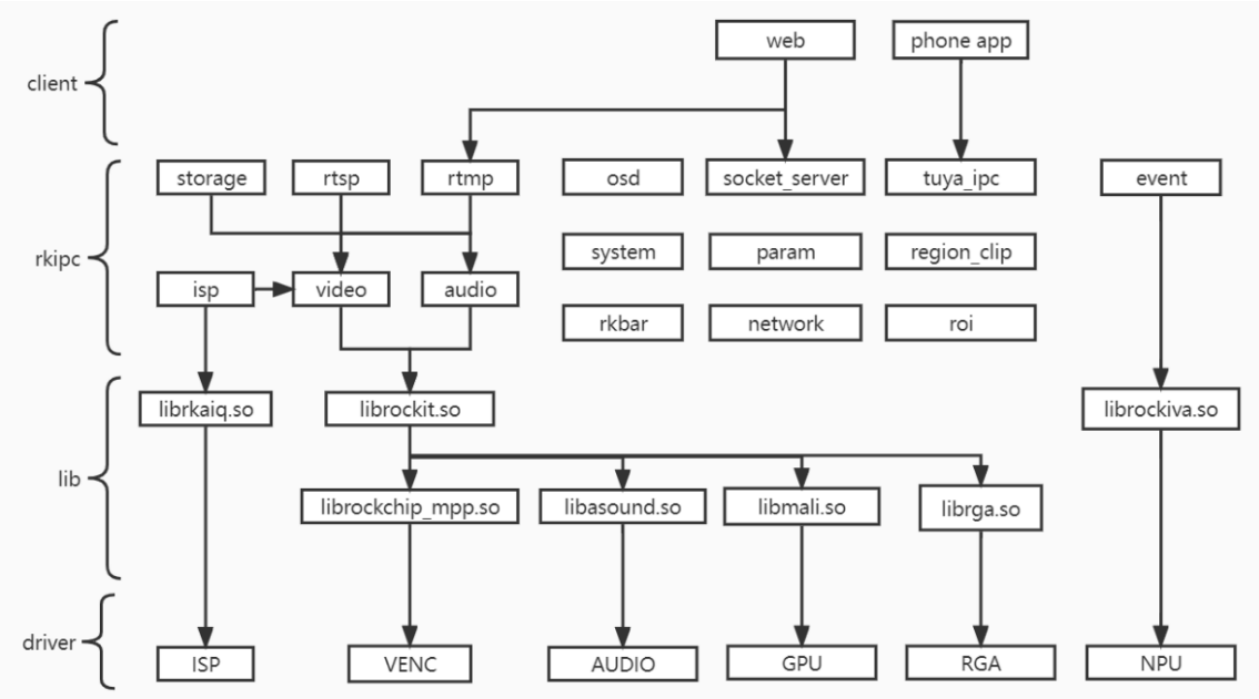
1. Overall Framework
2. Types of Product
| Source Directory | External Dependencies | Functionality |
|---|---|---|
| rv1103_ipc | rockit, rkaiq | IPC product for RV1103/RV1103B platform, supports web and rtsp/rtmp preview, dynamic parameter modification, and wrapping is enabled by default. |
| rv1106_ipc | rockit, rkaiq | IPC product for RV1106/RV1103B platform, supports web and rtsp/rtmp preview, dynamic parameter modification, with wrapping disabled. |
| rv1106_battery_ipc_client | rockit, rkaiq | Battery-powered product for RV1103/RV1106 platforms, supports web and rtsp/rtmp preview, dynamic parameter modification, serves as a client for quick dual-process booting. |
| rv1106_battery_ipc_tuya | rockit, rkaiq | Battery-powered product for RV1103/RV1106 platforms, supports preview via Tuya mobile app, with sleep&wake functionality. |
| rv1106_dual_ipc | rockit, rkaiq | Binocular camera stitching product for RV1103/RV1106/RV1103B platforms, supports web and rtsp/rtmp preview, dynamic parameter modification. |
| rv1106_aiisp | rockit, rkaiq | IPC product for RV1103/RV1106/RV1103B platforms,based on aiisp, supports web and rtsp/rtmp preview, dynamic parameter modification. |
| rk3588_ipc | rockit, rkaiq | Single camera IPC product for the RK3588 platform, supports web and rtsp/rtmp preview, dynamic parameter modification. |
| rk3588_muliti_ipc | rockit, rkaiq | Multi cameras IPC product for RK3588 platform, supports web and rtsp/rtmp preview, dynamic parameter modification. |
| rv1126_ipc_rkmedia | rockit, rkaiq | IPC product for RV1126/RV1109 platforms, based on rkmedia, supports web and rtsp/rtmp preview, dynamic parameter modification. |
| rv1126_ipc_rockit | easymedia, rkaiq | IPC product for RV1126/RV1109 platforms,based on rockit, supports web and rtsp/rtmp preview, dynamic parameter modification. |
| rv1126_battery_ipc | rockit, rkaiq | Battery-powered product for RV1126/RV1109 platforms, supports preview via Tuya mobile app, with sleep&wake functionality. |
| rv1126_dual_ipc | rockit, rkaiq | Binocular camera stitching product for RV1126/RV1109 platforms, supports web and rtsp/rtmp preview, dynamic parameter modification. |
| rv1126_snapshot | easymedia, rkaiq | Snapshot-type product for RV1126/RV1109 platforms, supports offline frames, local image/video capture, screen display. |
| rv1126_aiisp | rockit, rkaiq | IPC product for RV1126/RV1109 platforms,based on aiisp, supports web and rtsp/rtmp preview, dynamic parameter modification. |
| rk3576_ipc | rockit, rkaiq | Single camera IPC product for the RK3576 platform, supports web and rtsp/rtmp preview, dynamic parameter modification. |
| rk3576_muliti_ipc | rockit, rkaiq | Multi cameras IPC product for RK3576 platform, supports web and rtsp/rtmp preview, dynamic parameter modification. |
| Source Directory | External Dependencies | Functionality |
|---|---|---|
| rk3576_dv | rockit, rkaiq | For sports DV products on the RK3576 platform, it supports local photography/recording, decoding playback, and screen display. |
| rv1126b_ipc | rockit, rkaiq | Single camera IPC product for the RV1126B platform, supports web and rtsp/rtmp preview, dynamic parameter modification. |
| rv1126b_dual_ipc | rockit, rkaiq | Multi cameras IPC product for RV1126B platform, supports web and rtsp/rtmp preview, dynamic parameter modification. |
| rv1126b_dv | rockit, rkaiq | For sports DV products on the RV1126B platform, it supports local photography/recording, decoding playback, and screen display. |
2.1 RV1103 IPC
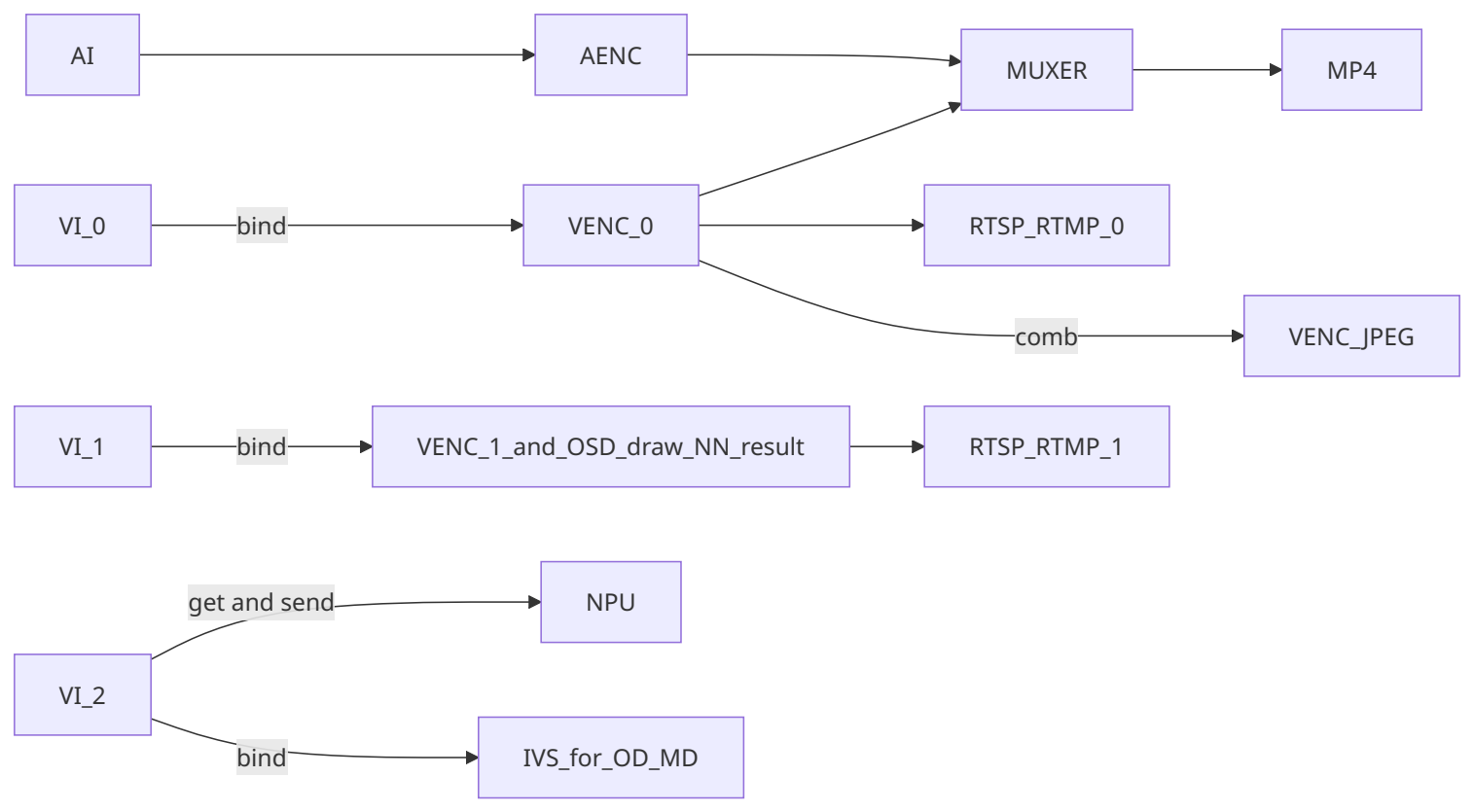
2.2 RV1106 IPC
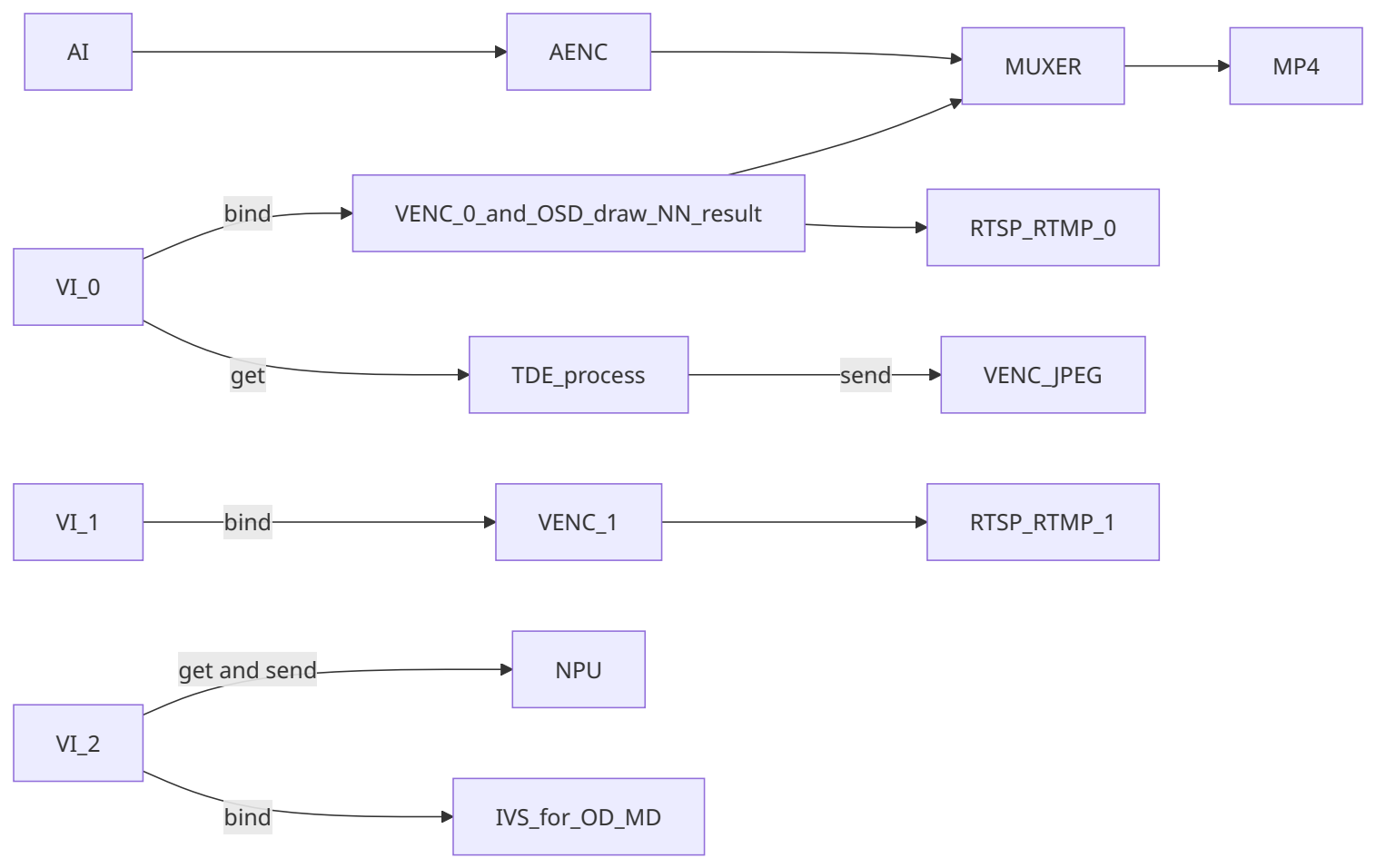
2.3 RV1106 Battery IPC Client
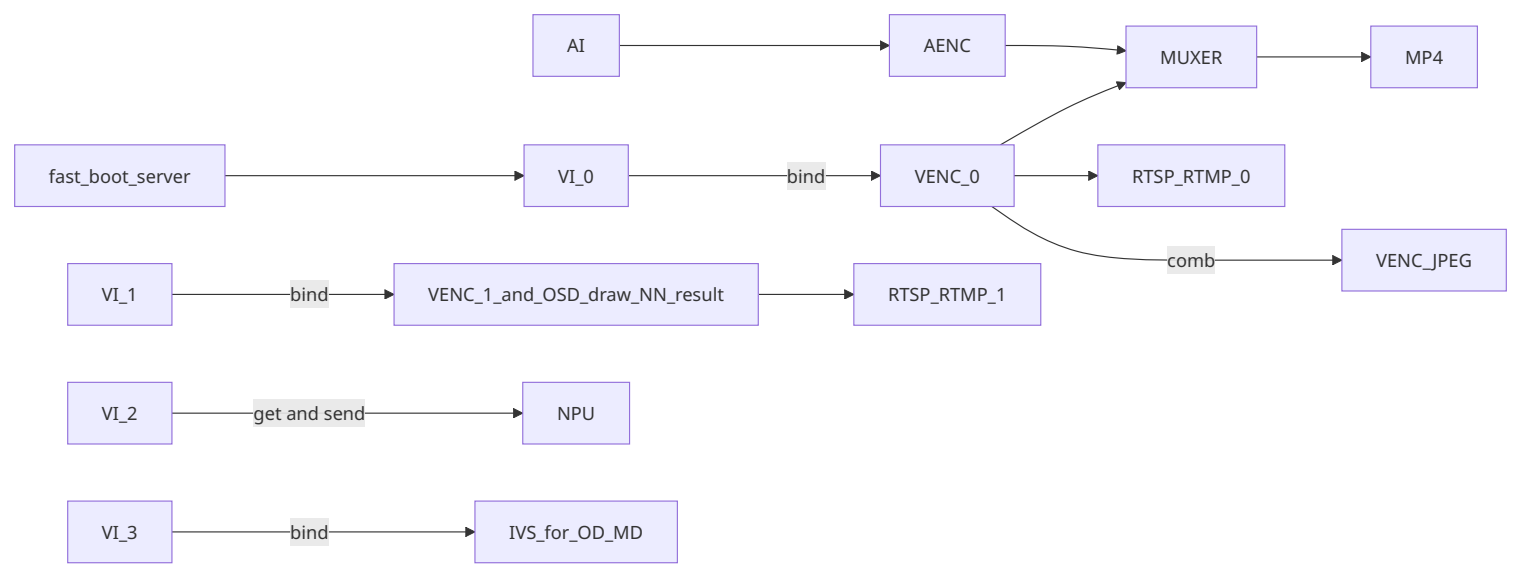
2.4 RV1106 Battery IPC Tuya
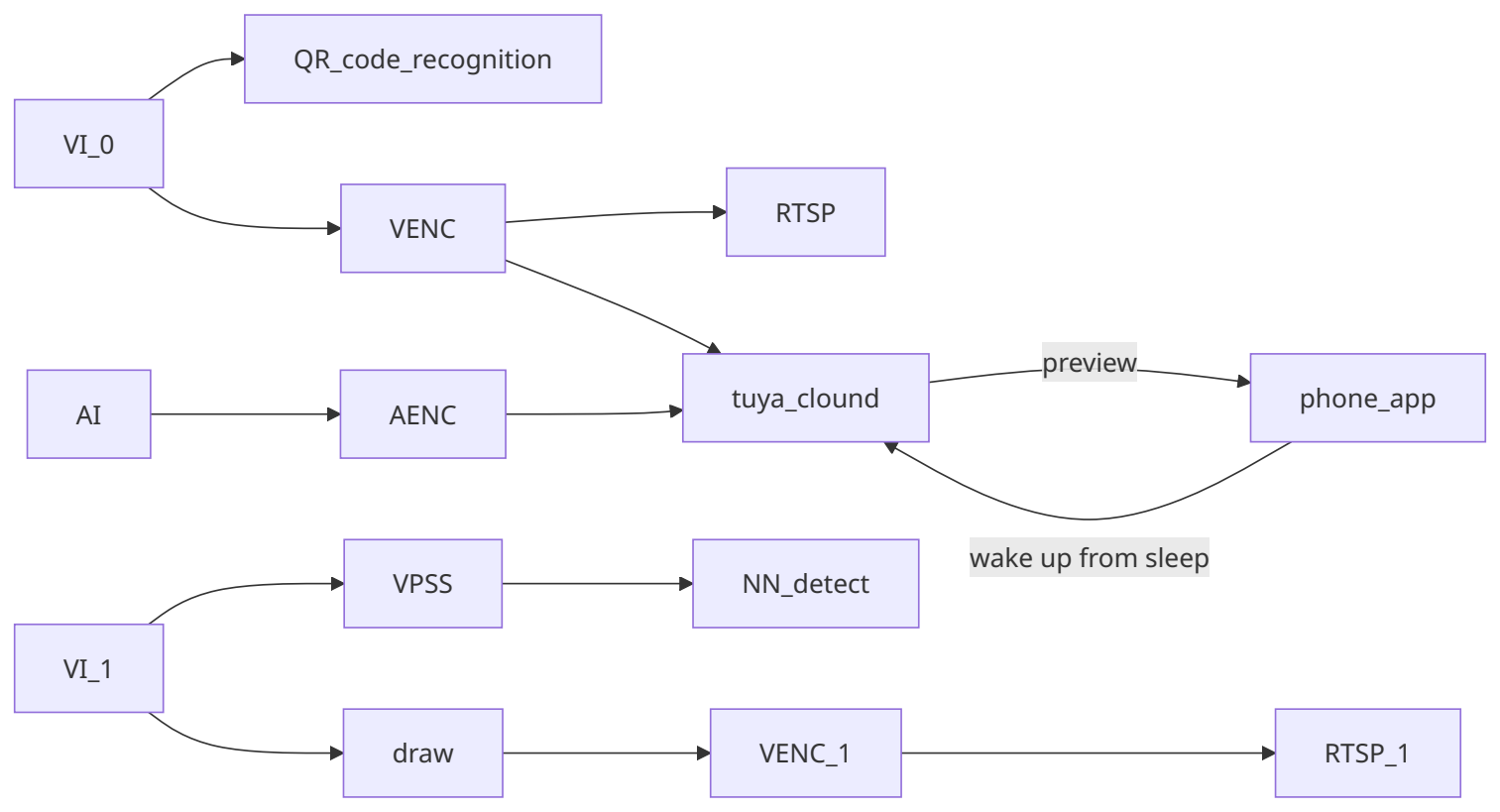
2.5 RV1106 Dual-IPC
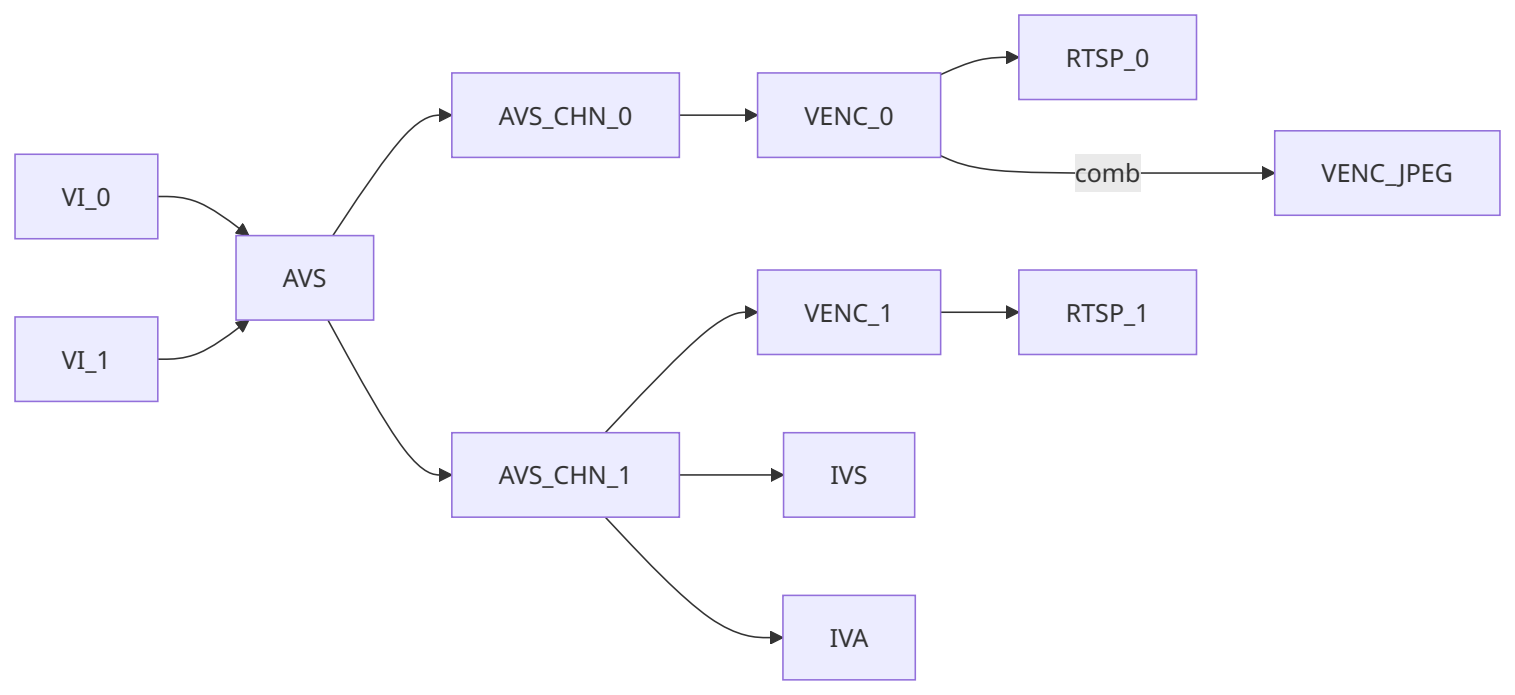
2.6 RV1106 AIISP
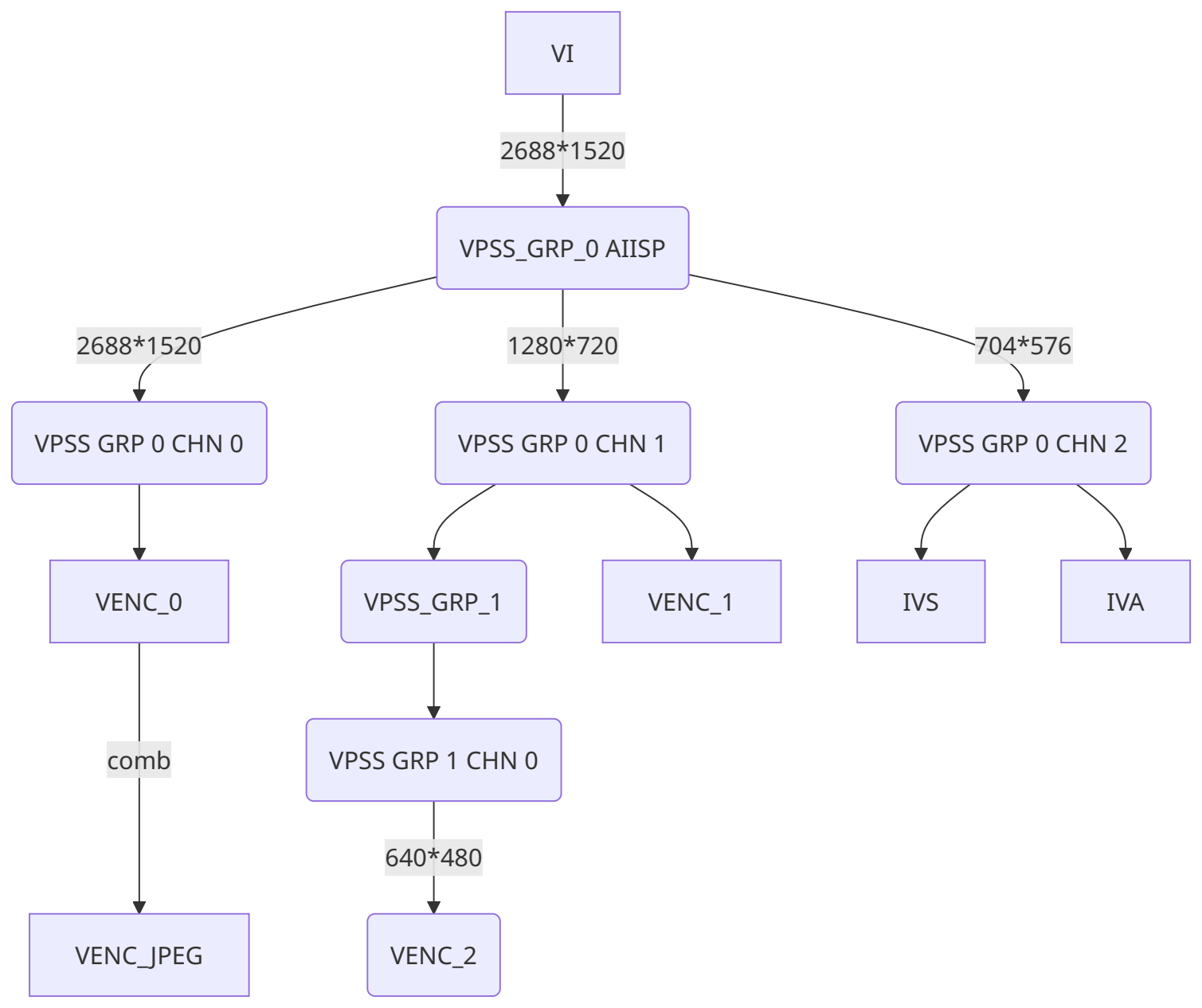
2.7 RK3588 IPC
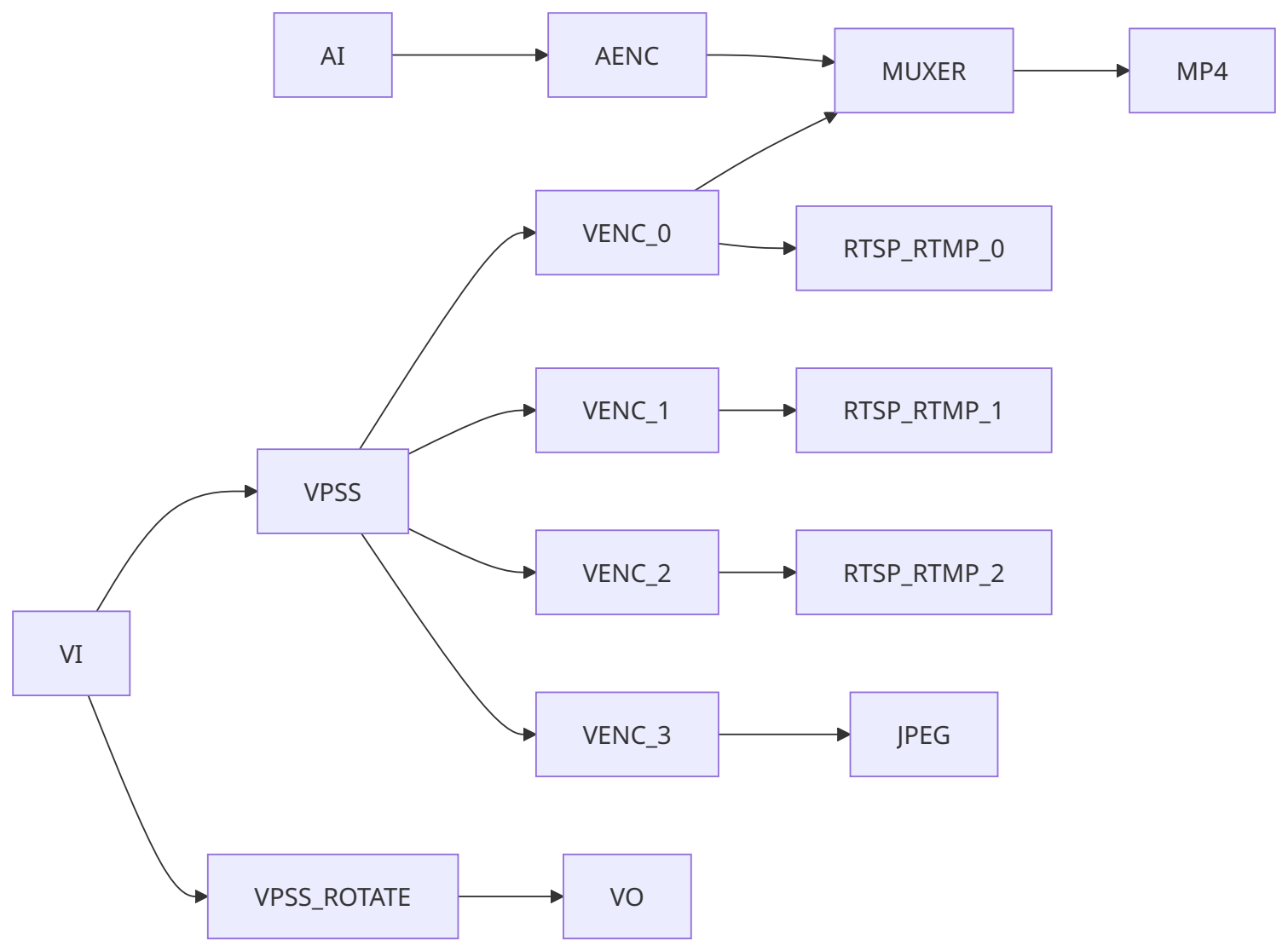
2.8 RK3588 Multi-IPC
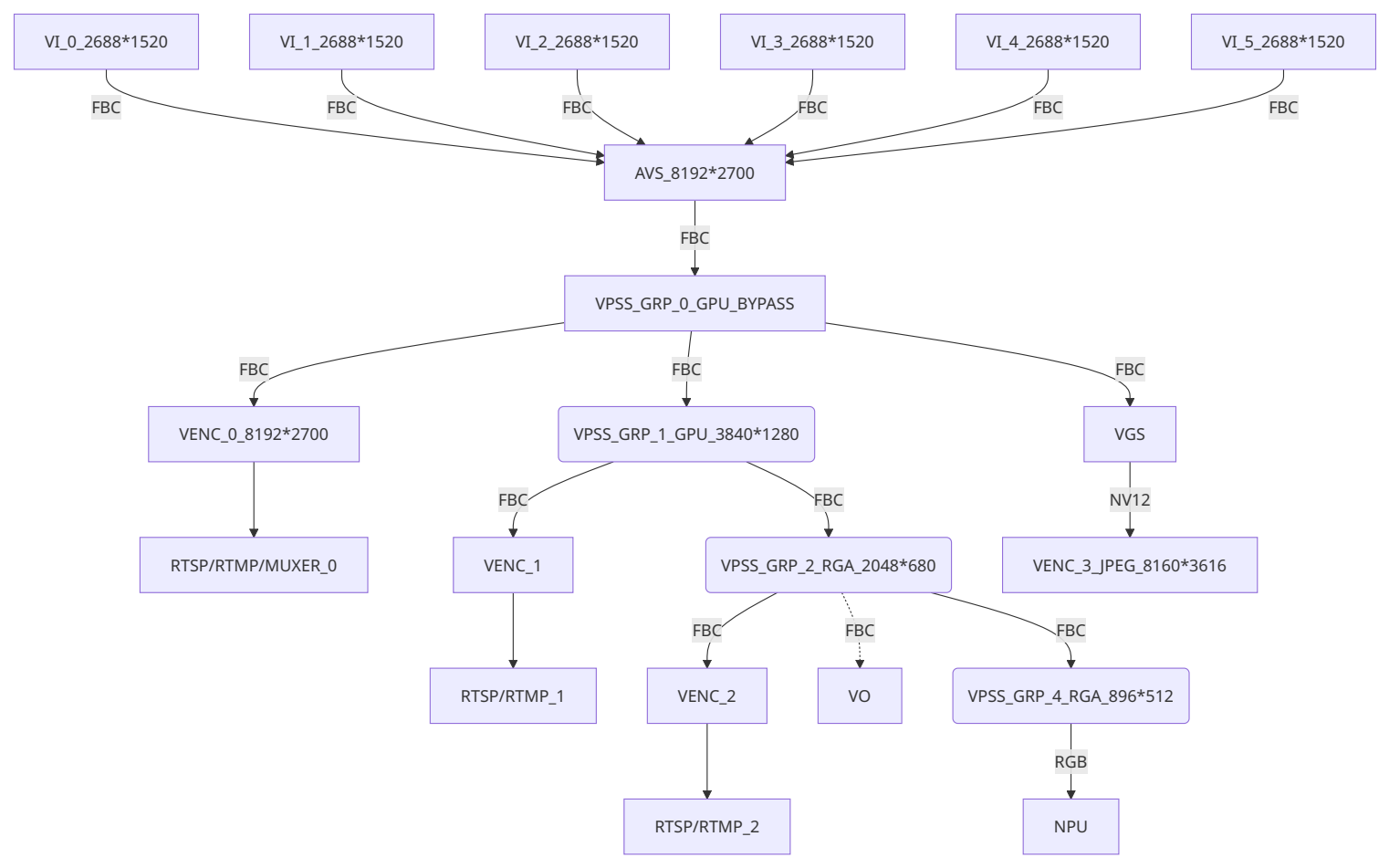
2.9 RV1126 IPC Rkmedia
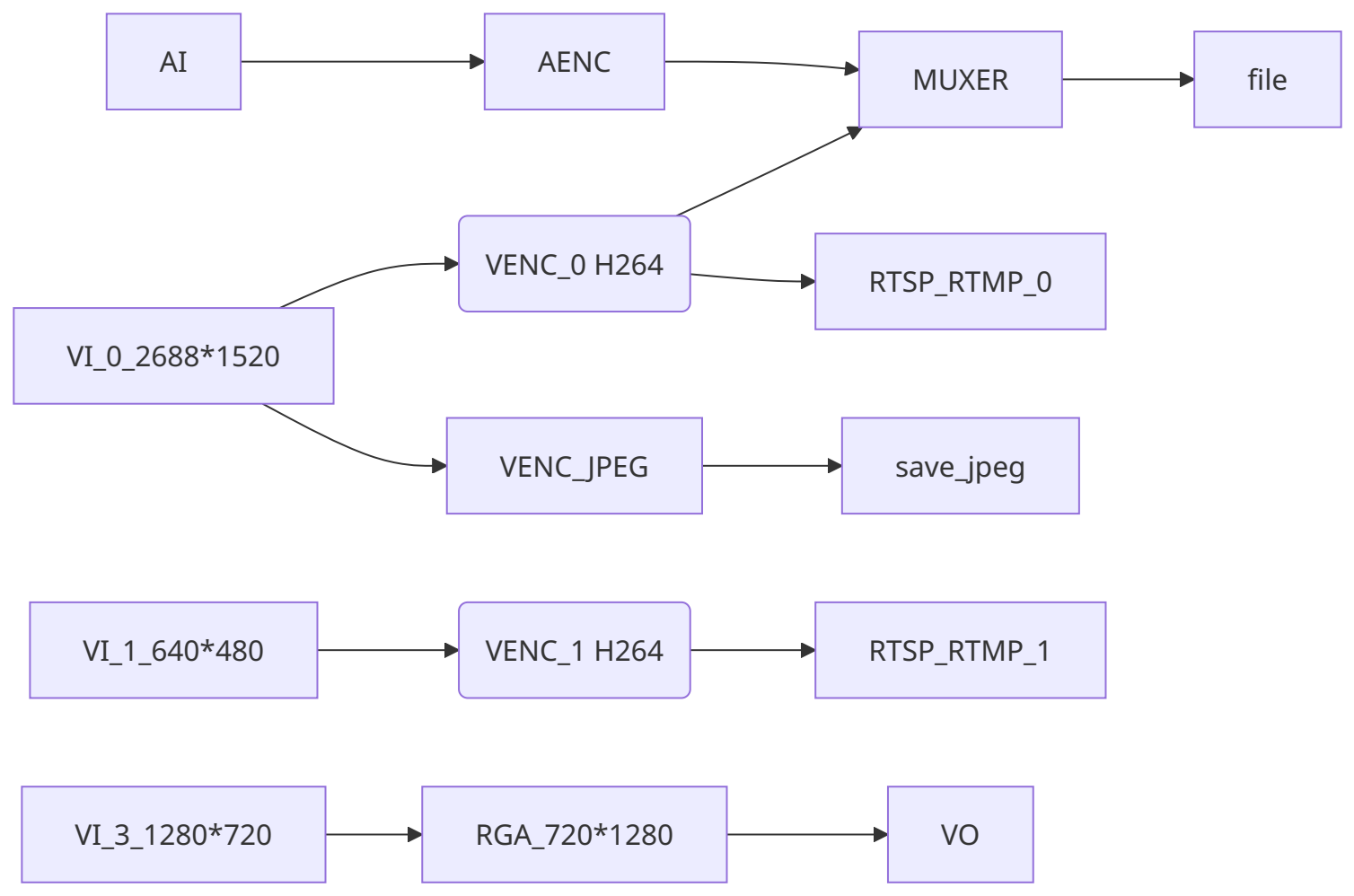
2.10 RV1126 IPC Rockit
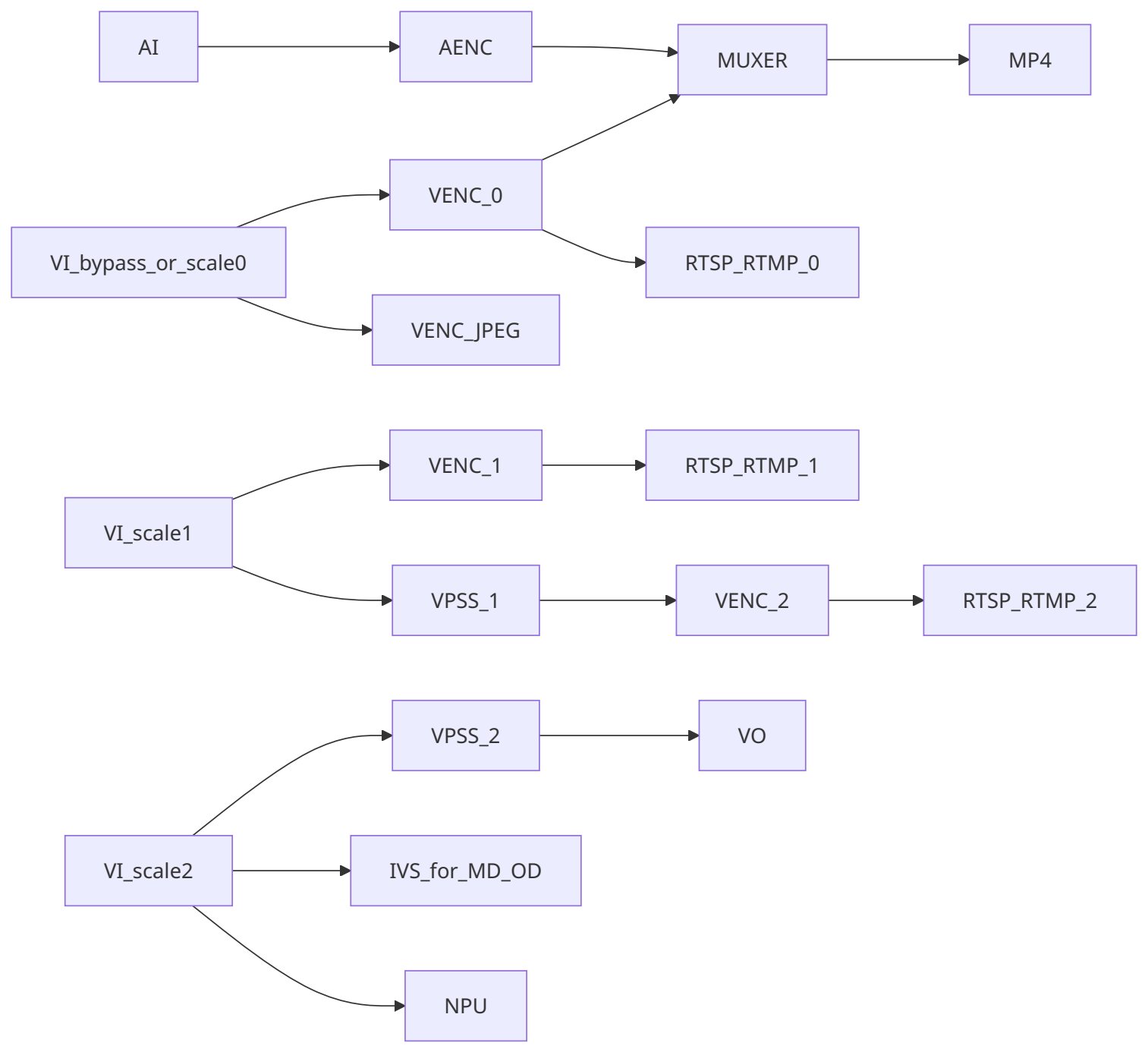
2.11 RV1126 Battery IPC
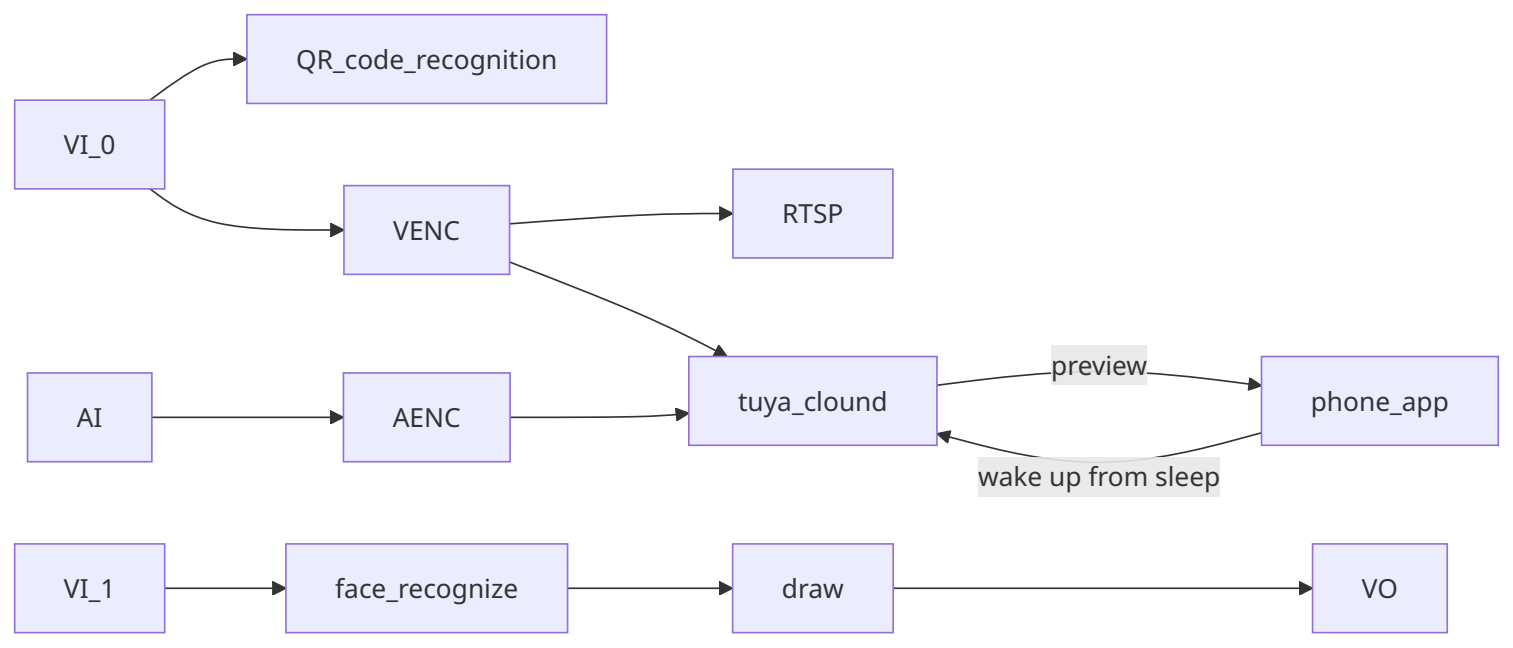
2.12 RV1126 Dual-IPC
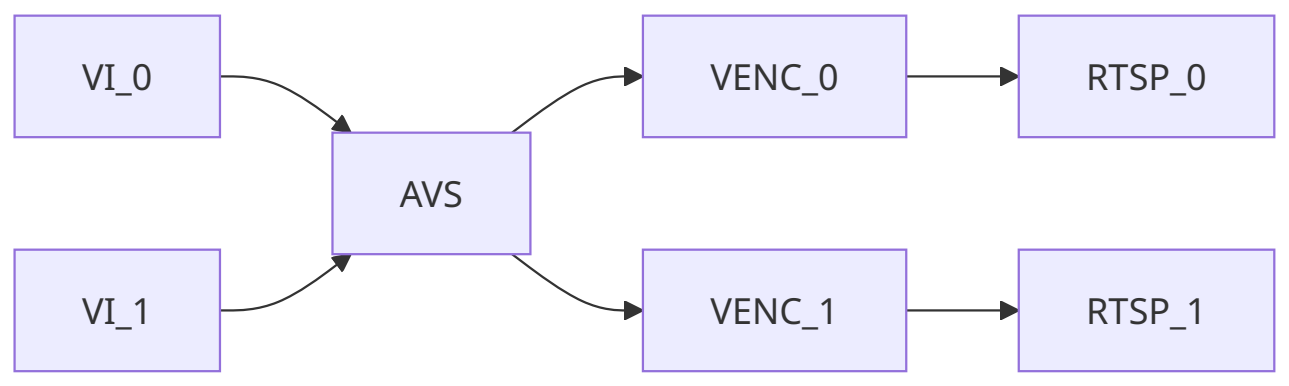
2.13 RV1126 Snapshot
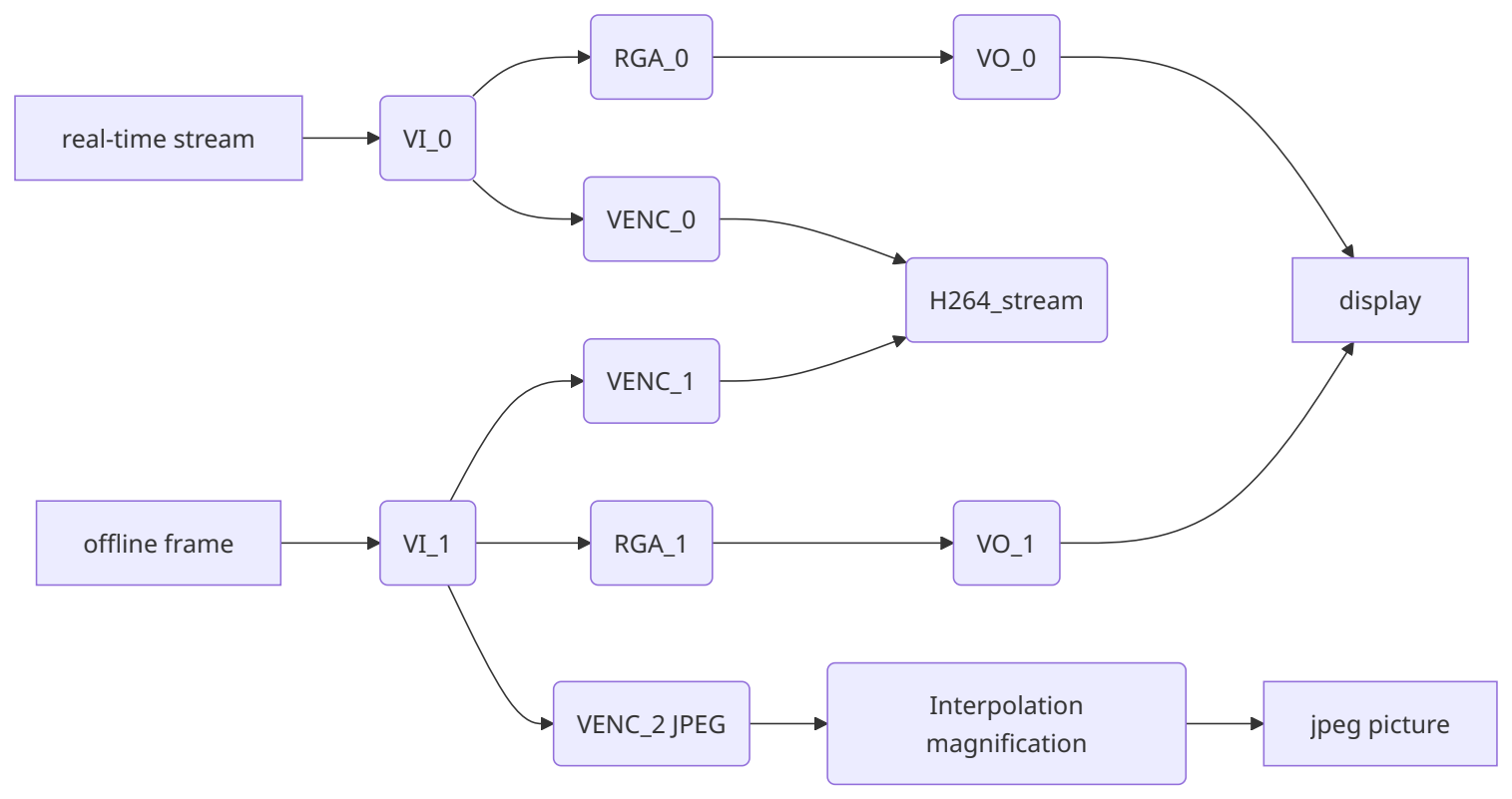
2.14 RV1126 AIISP
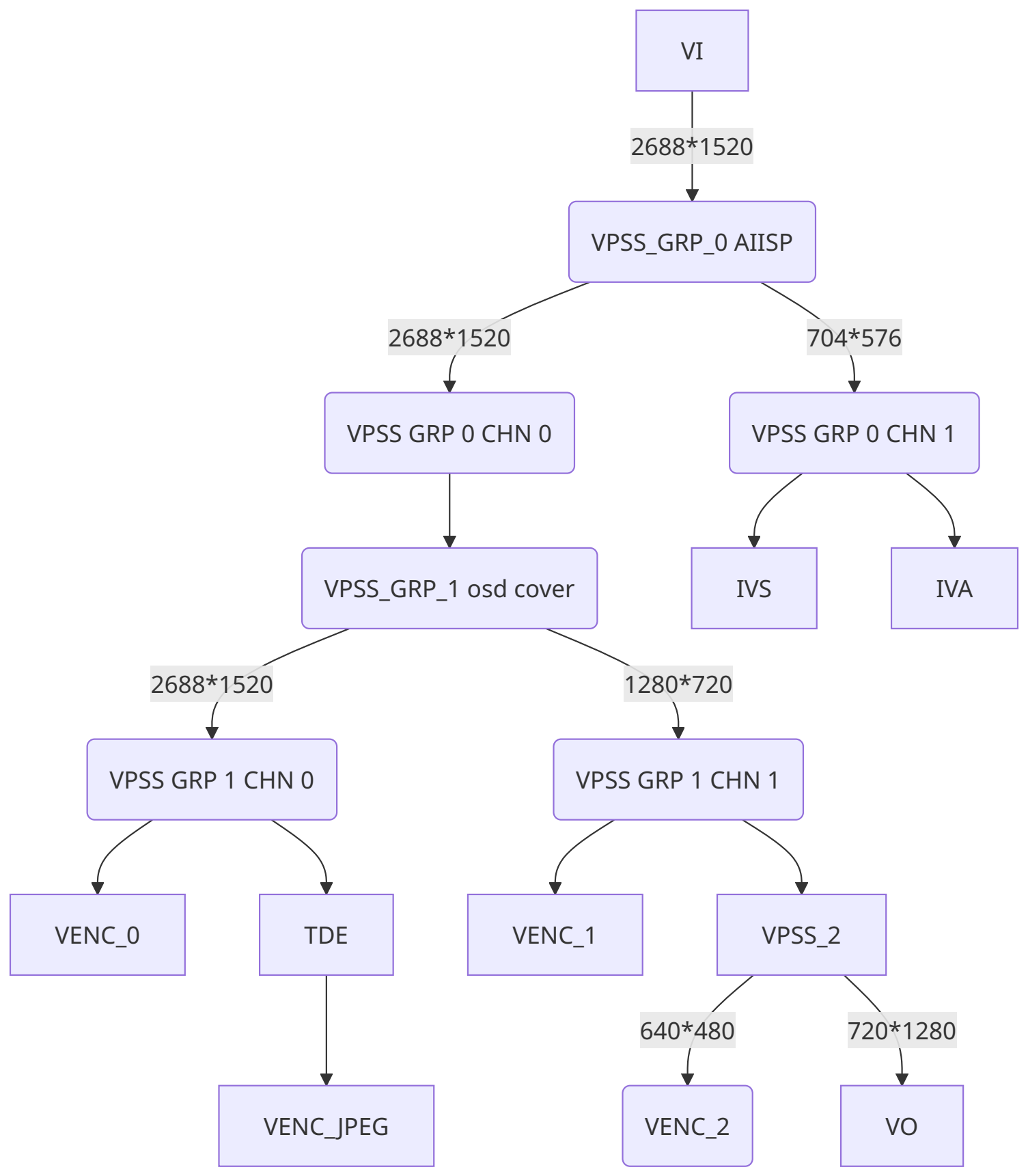
2.15 RK3576 IPC
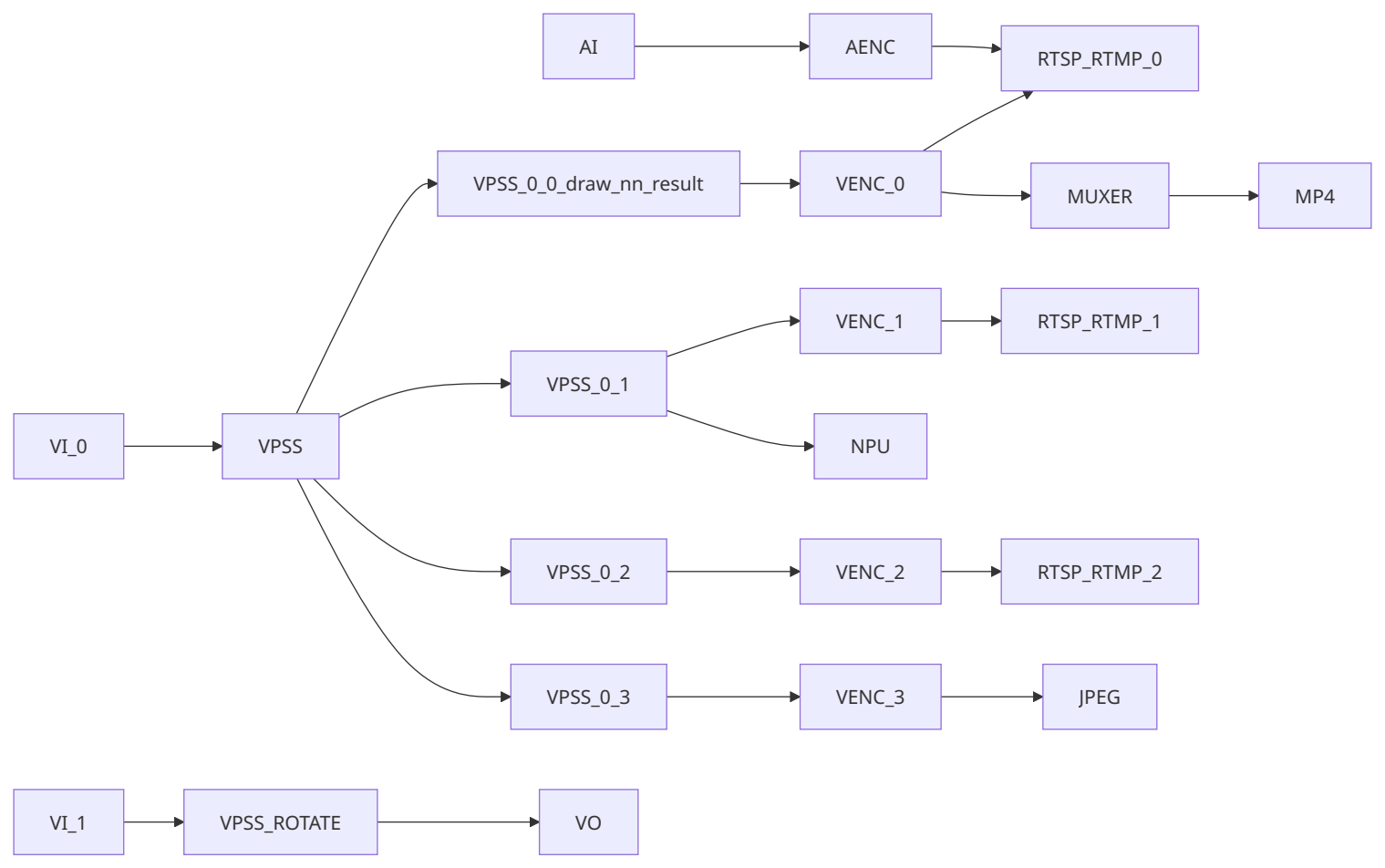
2.16 RK3576 Multi-IPC
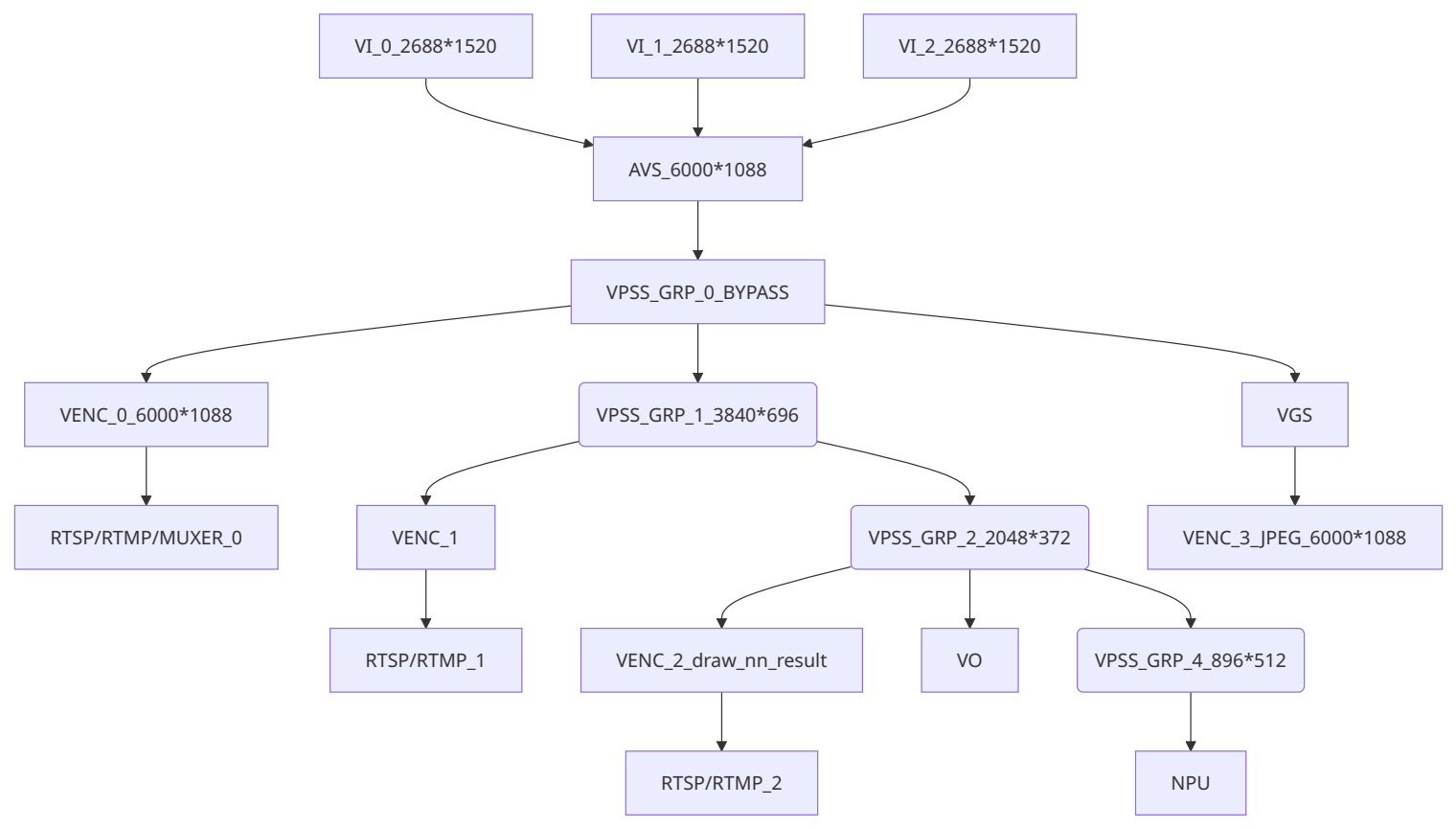
2.17 RK3576 DV
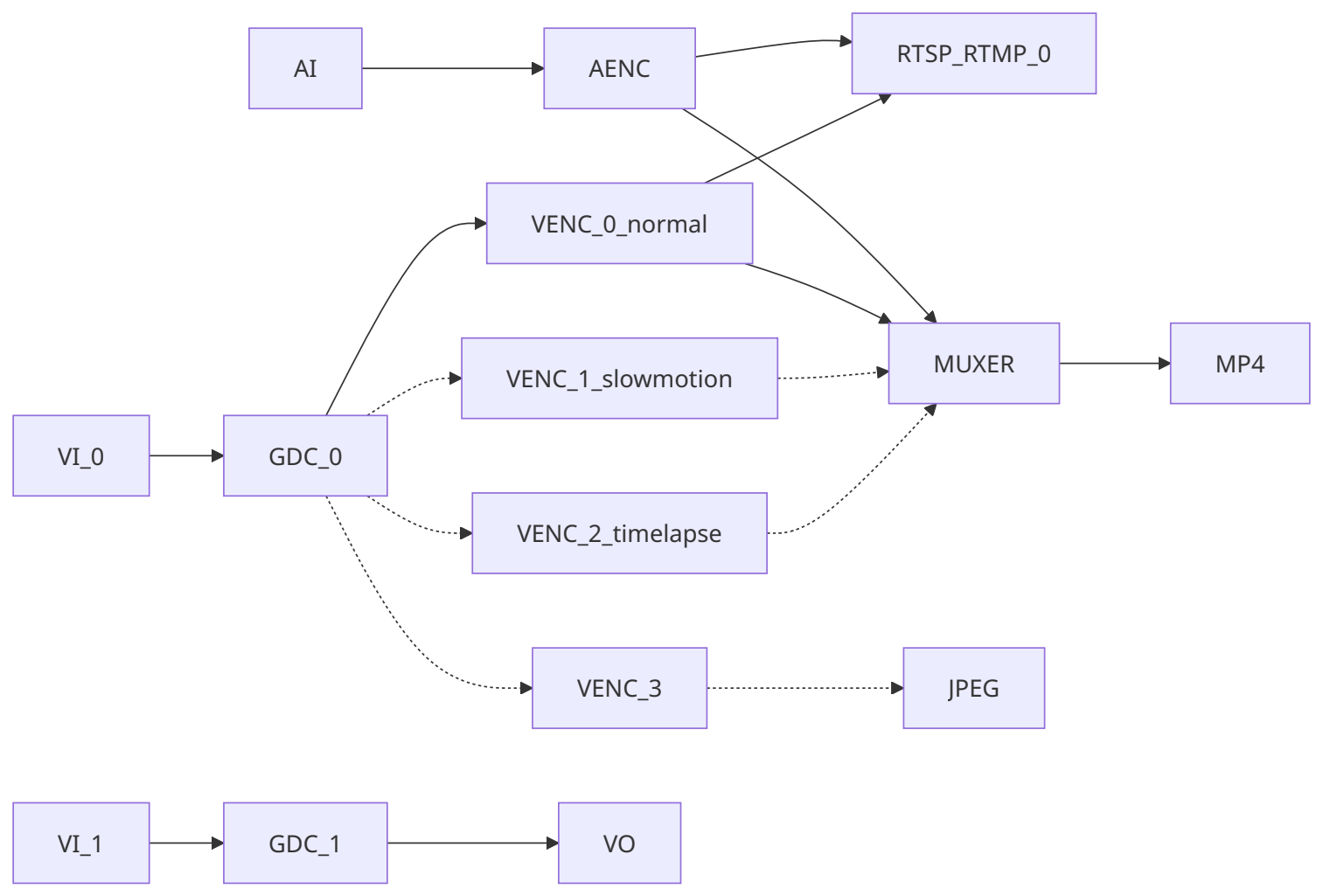
2.18 RV1126B IPC
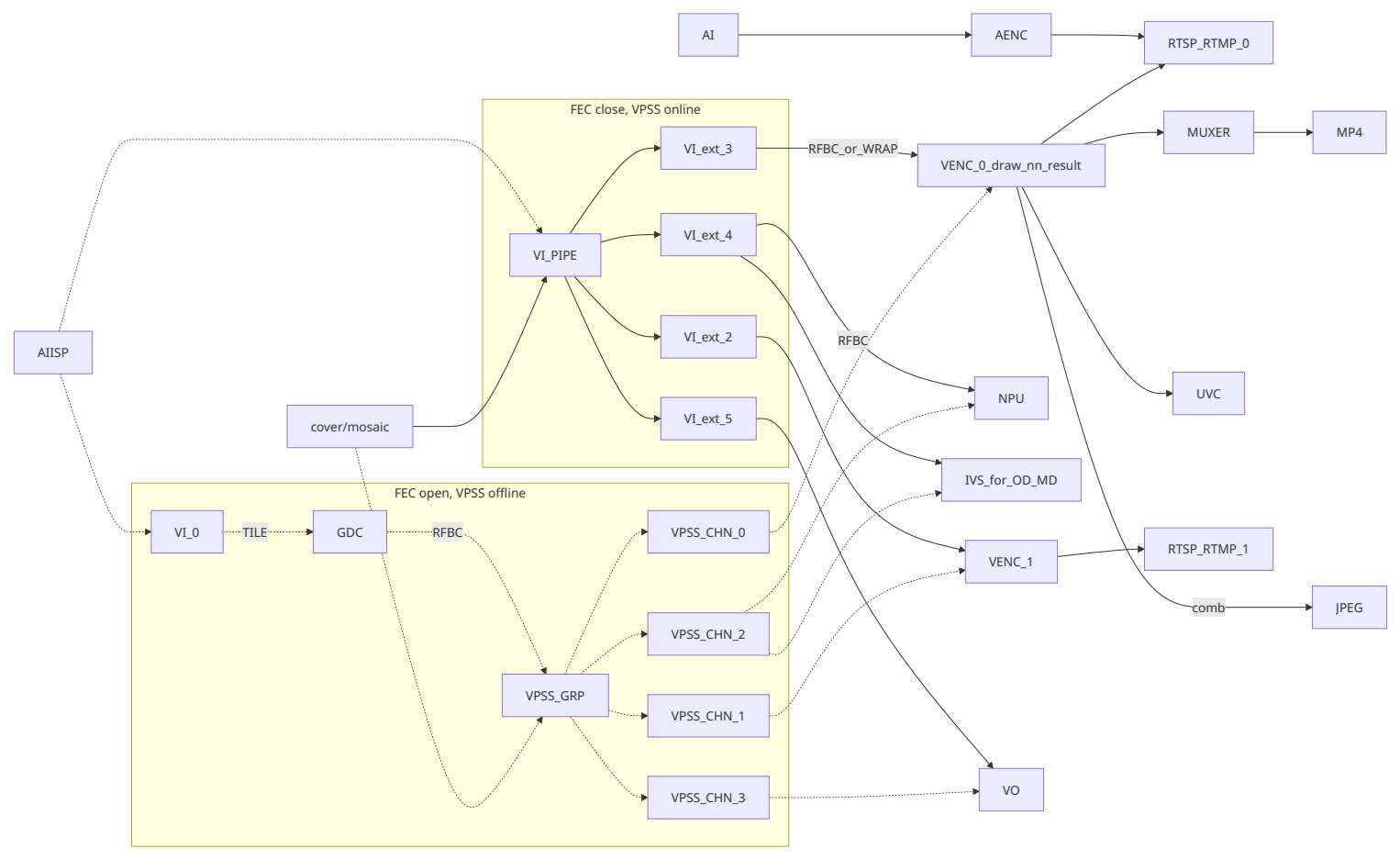
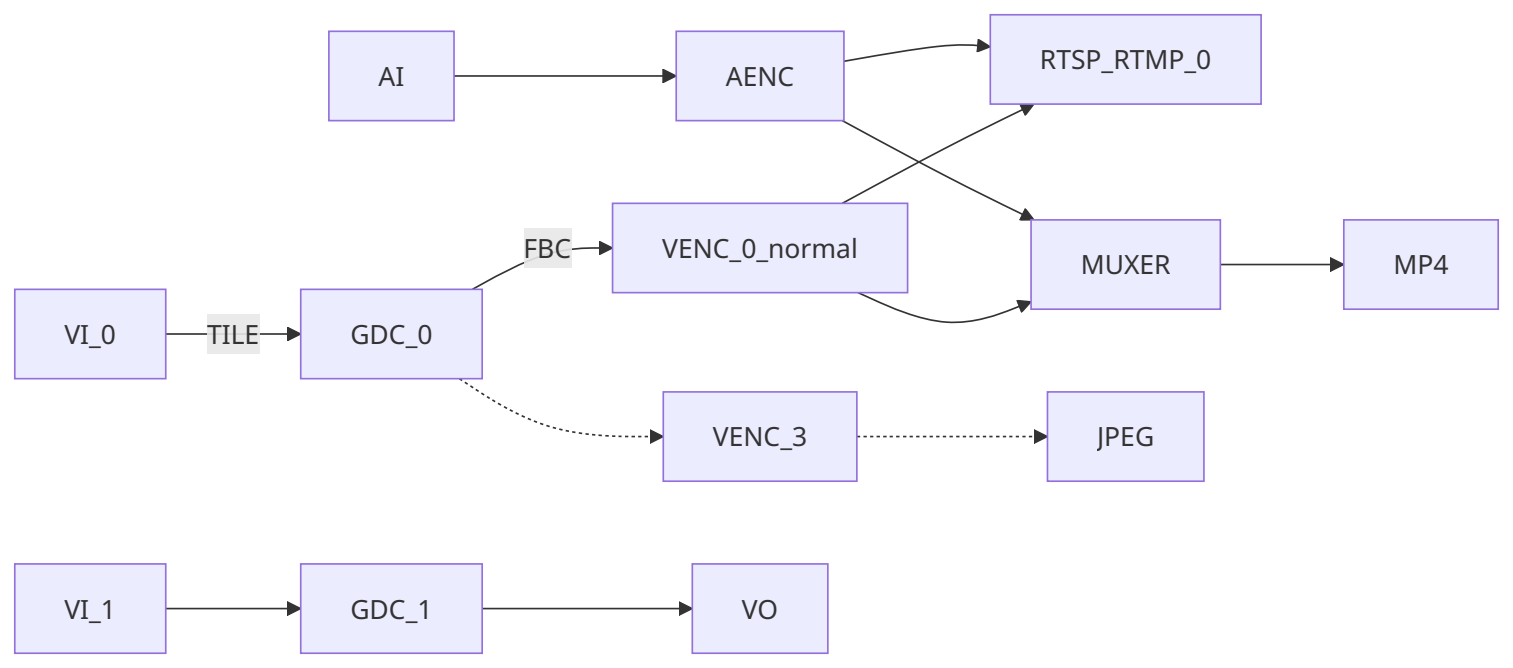
It is “FEC close” by default, when isp.0.enhancement: distortion_correction=FEC, it will follow a different data flow.
2.19 RV1126B Dual-IPC
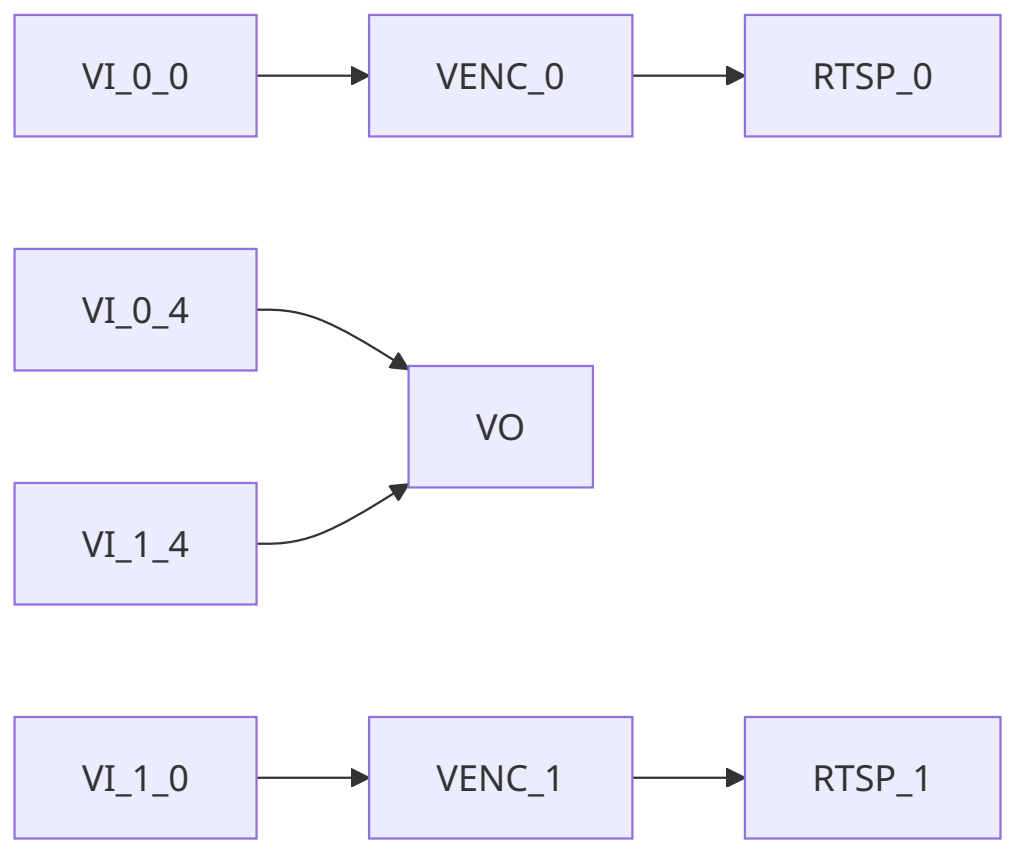
2.20 RV1126B DV
3. Code Structure
├── CMakeLists.txt
├── common # 通⽤模块
│   ├── audio # ⾳频处理模块
│   ├── common.h # ⼀些通⽤函数功能
│   ├── event # 事件处理模块
│   ├── isp # 图像处理模块
│   ├── log.h # ⽇志管理
│   ├── network # ⽹络模块
│   ├── osd # OSD模块
│   │   ├── image.bmp # logo图⽚
│   │   └── SourceHanSansEN.ttf # 字体库
│   ├── param # 参数管理模块
│   ├── region_clip # 区域裁剪模块
│   ├── rockiva # 周界算法模块,⼈脸⼈形识别
│   ├── roi # 感兴趣区域模块
│   ├── rtmp # rtmp推流模块
│   ├── rtsp # rtsp推流模块
│   ├── socket_server # socket服务端
│   ├── storage # 存储模块
│   └── system # 系统管理模块
│   └── tuya_ipc # 涂鸦IPC模块
├── format.sh # 格式化脚本
├── lib # 存放32/64位版本,不同⼯具链的预编译库
│   ├── aarch64-rockchip1031-linux-gnu
│   └── arm-rockchip830-linux-gnueabihf
│   └── arm-rockchip830-linux-uclibcgnueabihf
├── LICENSE # 版权声明
└── src
    ├── rk3576_ipc
    ├── rk3576_multi_ipc
    ├── rk3588_ipc
    │   ├── CMakeLists.txt
    │   ├── main.c
    │   ├── rkipc.ini # 参数⽂件
    │   ├── RkLunch.sh # 初始化脚本
    │   ├── RkLunch-stop.sh # 反初始化脚本
    │   └── video # 视频业务逻辑
    │       ├── video.c
    │       └── video.h
    ├── rk3588_multi_ipc
    ├── rv1103_ipc
    ├── rv1106_aiisp_ipc
    ├── rv1106_battery_ipc_client
    ├── rv1106_battery_ipc_tuya
    ├── rv1106_dual_ipc
    ├── rv1106_ipc
    ├── rv1106_v4l2_drm
    ├── rv1106_wakeup_ipc
    ├── rv1126_aiisp_ipc
    ├── rv1126_battery_ipc
    ├── rv1126_dual_ipc
    ├── rv1126_ipc_rkmedia
    ├── rv1126_ipc_rockit
    └── rv1126_snapshot
4. Development Rules
-
Pure C Code Implementation.
-
Modular Design: Keep the main function concise, calling the init and deinit functions of various modules. Modules manage their own functionality, and differentiated parts are implemented through registered callback functions.
-
Use iniparser to manage parameters: Avoid complex packages; modules decide when and how to read/write parameters in the ini file.
-
Use common/log.h to output log.
-
Maximize Reusability: Whenever possible, place reusable code in the common directory. If platform differences and business logic prevent reusability, each src directory should have its own copy to avoid excessive platform-specific macro checks.
-
Prioritize Source Code Compilation: First use source code compilation, then static libraries, and finally dynamic libraries.
5. New Parameter Development Process
Web Front-end → Web Back-end → RKIPC → Lower-level Modules → Parameter Saving Taking hue as an example, the front-end has been basically implemented and does not need to be modified. In the app/ipcweb-backend/src/image_api.cpp of the web back-end, a JSON string like “iHue”:50 will be received. Next, use the pre-existing functions in app/ipcweb-backend/src/socket_client to make a remote call to RKIPC. In RKIPC, corresponding functions need to be packaged in app/rkipc/src/server to apply and save the settings. It is recommended to add functions in pairs (get/set). RKIPC is primarily used to package functions for external calls and for initialization. Here are some examples:
5.1 Adding the hue Field to the ini File
[isp.0.adjustment]
hue = 50
5.2 Adding set/get Function to ISP Module
diff --git a/src/isp/isp.c b/src/isp/isp.c
index e59fdd3..7877ae9 100644
--- a/src/isp/isp.c
+++ b/src/isp/isp.c
@@ -165,6 +165,22 @@ int rk_isp_set_sharpness(int cam_id, int value) {
   return ret;
 }

+int rk_isp_get_hue(int cam_id, int *value) {
+  RK_ISP_CHECK_CAMERA_ID(cam_id);
+  int ret = rk_aiq_uapi_getHue(g_aiq_ctx[cam_id], value);
+  *value = (int)(*value / 2.55);
+
+  return ret;
+}
+
+int rk_isp_set_hue(int cam_id, int value) {
+  RK_ISP_CHECK_CAMERA_ID(cam_id);
+  int ret = rk_aiq_uapi_setHue(g_aiq_ctx[cam_id], (int)(value * 2.55)); // value[0,255]
+  rk_param_set_int("isp.0.adjustment:hue", value);
+
+  return ret;
+}
+
 // exposure
 // night_to_day
 // blc
@@ -180,6 +196,7 @@ int rk_isp_set_from_ini(int cam_id) {
   rk_isp_set_brightness(cam_id, iniparser_getint(g_ini_d_, "isp.0.adjustment:brightness", 50));
   rk_isp_set_saturation(cam_id, iniparser_getint(g_ini_d_, "isp.0.adjustment:saturation", 50));
   rk_isp_set_sharpness(cam_id, iniparser_getint(g_ini_d_, "isp.0.adjustment:sharpness", 50));
+  rk_isp_set_hue(cam_id, iniparser_getint(g_ini_d_, "isp.0.adjustment:hue", 50));
   LOG_INFO("end\n");

   return ret;
diff --git a/src/isp/isp.h b/src/isp/isp.h
index e77c9fc..0d3835a 100644
--- a/src/isp/isp.h
+++ b/src/isp/isp.h
@@ -9,4 +9,6 @@ int rk_isp_get_saturation(int cam_id, int *value);
 int rk_isp_set_saturation(int cam_id, int value);
 int rk_isp_get_sharpness(int cam_id, int *value);
 int rk_isp_set_sharpness(int cam_id, int value);
+int rk_isp_get_hue(int cam_id, int *value);
+int rk_isp_set_hue(int cam_id, int value);
 // exposure
5.3 Package Socket Functions in the Server Module
diff --git a/src/server/server.c b/src/server/server.c
index 6613b90..52692c9 100644
--- a/src/server/server.c
+++ b/src/server/server.c
@@ -236,6 +236,40 @@ int ser_rk_isp_set_sharpness(int fd) {
   return 0;
 }

+int ser_rk_isp_get_hue(int fd) {
+  int err = 0;
+  int cam_id;
+  int value;
+
+  if (sock_read(fd, &cam_id, sizeof(cam_id)) == SOCKERR_CLOSED)
+    return -1;
+  err = rk_isp_get_hue(cam_id, &value);
+  LOG_DEBUG("value is %d\n", value);
+  if (sock_write(fd, &value, sizeof(value)) == SOCKERR_CLOSED)
+    return -1;
+  if (sock_write(fd, &err, sizeof(int)) == SOCKERR_CLOSED)
+    return -1;
+
+  return 0;
+}
+
+int ser_rk_isp_set_hue(int fd) {
+  int err = 0;
+  int cam_id;
+  int value;
+
+  if (sock_read(fd, &cam_id, sizeof(cam_id)) == SOCKERR_CLOSED)
+    return -1;
+  if (sock_read(fd, &value, sizeof(value)) == SOCKERR_CLOSED)
+    return -1;
+  LOG_DEBUG("value is %d\n", value);
+  err = rk_isp_set_hue(cam_id, value);
+  if (sock_write(fd, &err, sizeof(int)) == SOCKERR_CLOSED)
+    return -1;
+
+  return 0;
+}
+
 static const struct FunMap map[] = {
     {(char *)"rk_isp_set", &ser_rk_isp_set},
     {(char *)"rk_video_set", &ser_rk_video_set},
@@ -247,7 +281,9 @@ static const struct FunMap map[] = {
     {(char *)"rk_isp_get_saturation", &ser_rk_isp_get_saturation},
     {(char *)"rk_isp_set_saturation", &ser_rk_isp_set_saturation},
     {(char *)"rk_isp_get_sharpness", &ser_rk_isp_get_sharpness},
-    {(char *)"rk_isp_set_sharpness", &ser_rk_isp_set_sharpness}
+    {(char *)"rk_isp_set_sharpness", &ser_rk_isp_set_sharpness},
+    {(char *)"rk_isp_get_hue", &ser_rk_isp_get_hue},
+    {(char *)"rk_isp_set_hue", &ser_rk_isp_set_hue}
 };

 static void *rec_thread(void *arg) {
5.4 Add Related Judgments to the Web Back-end
The ipcweb-backend is mainly used to judge the data incoming from the web front end, and then Get/Set data, the modification is as follows:
diff --git a/src/image_api.cpp b/src/image_api.cpp
index 475e17d..edac2de 100644
--- a/src/image_api.cpp
+++ b/src/image_api.cpp
@@ -20,15 +20,17 @@ nlohmann::json image_specific_resource_get(std::string string) {
       nlohmann::json::object(); /* one of all the same resources */
   minilog_debug("%s: string is %s\n", __func__, string.c_str());
   if (!string.compare(PATH_IMAGE_ADJUSTMENT)) {
-    int brightness, contrast, saturation, sharpness;
+    int brightness, contrast, saturation, sharpness, hue;
     rk_isp_get_brightness(0, &brightness);
     rk_isp_get_contrast(0, &contrast);
     rk_isp_get_saturation(0, &saturation);
     rk_isp_get_sharpness(0, &sharpness);
+    rk_isp_get_hue(0, &hue);
     specific_resource.emplace("iBrightness", brightness);
     specific_resource.emplace("iContrast", contrast);
     specific_resource.emplace("iSaturation", saturation);
     specific_resource.emplace("iSharpness", sharpness);
+    specific_resource.emplace("iHue", hue);
   } else if (!string.compare(PATH_IMAGE_EXPOSURE)) {

   } else if (!string.compare(PATH_IMAGE_NIGHT_TO_DAY)) {
@@ -84,6 +86,10 @@ void image_specific_resource_set(std::string string, nlohmann::json data) {
       value = atoi(data.at("iSharpness").dump().c_str());
       rk_isp_set_sharpness(0, value);
     }
+    if (data.dump().find("iHue") != data.dump().npos) {
+      value = atoi(data.at("iHue").dump().c_str());
+      rk_isp_set_hue(0, value);
+    }
   } else if (!string.compare(PATH_IMAGE_EXPOSURE)) {

   } else if (!string.compare(PATH_IMAGE_NIGHT_TO_DAY)) {
diff --git a/src/socket_client/client.cpp b/src/socket_client/client.cpp
index 448e847..7f84b4f 100644
--- a/src/socket_client/client.cpp
+++ b/src/socket_client/client.cpp
@@ -182,4 +182,36 @@ int rk_isp_set_sharpness(int cam_id, int value) {
   cli_end(fd);

   return ret;
 }
+
+int rk_isp_get_hue(int cam_id, int *value) {
+  int fd;
+  int ret = 0;
+
+  fd = cli_begin((char *)__func__);
+  /* Transmission parameters */
+  sock_write(fd, &cam_id, sizeof(cam_id));
+  sock_read(fd, value, sizeof(value));
+
+  sock_read(fd, &ret, sizeof(ret));
+  /* End transmission parameters */
+  cli_end(fd);
+
+  return ret;
+}
+
+int rk_isp_set_hue(int cam_id, int value) {
+  int fd;
+  int ret = 0;
+
+  fd = cli_begin((char *)__func__);
+  /* Transmission parameters */
+  sock_write(fd, &cam_id, sizeof(cam_id));
+  sock_write(fd, &value, sizeof(value));
+
+  sock_read(fd, &ret, sizeof(ret));
+  /* End transmission parameters */
+  cli_end(fd);
+
+  return ret;
+}
diff --git a/src/socket_client/client.h b/src/socket_client/client.h
index 11fdd1c..0c09913 100644
--- a/src/socket_client/client.h
+++ b/src/socket_client/client.h
@@ -8,4 +8,6 @@ int rk_isp_set_brightness(int cam_id, int value);
 int rk_isp_get_saturation(int cam_id, int *value);
 int rk_isp_set_saturation(int cam_id, int value);
 int rk_isp_get_sharpness(int cam_id, int *value);
 int rk_isp_set_sharpness(int cam_id, int value);
+int rk_isp_get_hue(int cam_id, int *value);
+int rk_isp_set_hue(int cam_id, int value);
\ No newline at end of file
5.5 Add Related Judgments to the Web Front End
Modify html and ts files in the web front end , and add option layout and get/set. The code can refer to the html and ts in app/ipcweb-ng/src/app/config/shared/isp, the main content are as follows:
<form class="form" [formGroup]="imageForm">
      <div id=ispGrp role="tablist">
        <div class="card" *ngFor="let cardTitle of cardList">
          <div id="ispGrp1Header" class="card-header" (click)="onSelectCard(cardTitle)">
            <label>{{ groupNameDict[cardTitle] | translate }}</label>
          </div>
          <div class="card-body card-block form-group" [id]="cardTitle"
[formGroupName]="groupNameDict[cardTitle]">
            <ng-container *ngIf="capDict[cardTitle][layoutKey]">
              <ng-container *ngFor="let layoutItem of capDict[cardTitle][layoutKey]
[cardTitle]">
                <div class="form-row my-1" *ngIf="checkType(capDict[cardTitle]
[pageLayoutKey][layoutItem], 'range')">
                  <label class="col-3">{{ transferControlName(layoutItem) | translate }}
</label>
                  <input class="col-6 custom-range" [formControlName]="layoutItem"
type="range" (ngModelChange)="onRangeChange($event, cardTitle, layoutItem)"
(mouseup)="onSubmitPart(cardTitle, layoutItem, 'range')" [min]="getRange(capDict[cardTitle]
[pageLayoutKey][layoutItem], 'min')" [max]="getRange(capDict[cardTitle][pageLayoutKey]
[layoutItem], 'max')" [step]="getRange(capDict[cardTitle][pageLayoutKey][layoutItem],
'step')">
                  <input class="col-2 form-control" [formControlName]="layoutItem"
type="number" (ngModelChange)="onRangeChange($event, cardTitle, layoutItem)"
(blur)="onSubmitPart(cardTitle, layoutItem, 'number')" [id]="layoutItem">
                  <label class="alarm-tip pat1"
*ngIf="imageForm.get(groupNameDict[cardTitle]).get(layoutItem).errors?.min ||
imageForm.get(groupNameDict[cardTitle]).get(layoutItem).errors?.max ||
imageForm.get(groupNameDict[cardTitle]).get(layoutItem).errors?.isNumberJudge">{{'ranges' |
translate}}({{getRange(capDict[cardTitle][pageLayoutKey][layoutItem], 'min')}}~
{{getRange(capDict[cardTitle][pageLayoutKey][layoutItem], 'max')}})</label>
                </div>
                <div class="form-row my-1" *ngIf="checkType(capDict[cardTitle]
[pageLayoutKey][layoutItem], 'options') && isItemEnable(layoutItem)">
                  <label class="col-3 form-group-text mt-1">{{
transferControlName(layoutItem) | translate }}</label>
                  <select class="custom-select col-md-8" [formControlName]="layoutItem"
(ngModelChange)="updateDynamicCap(cardTitle, layoutItem, $event)" [id]="layoutItem">
                    <option *ngFor="let opItem of htmlOptionFilter(layoutItem,
capDict[cardTitle][pageLayoutKey][layoutItem]['options'])" [value]="opItem">{{
htmlOptionTransfer(layoutItem, opItem) | translate }}</option>
                  </select>
                </div>
                <div class="form-row my-1" *ngIf="checkType(capDict[cardTitle]
[pageLayoutKey][layoutItem], 'input') && capDict[cardTitle][pageLayoutKey][layoutItem]
['input']==='time'">
                  <label class="col-3">{{ transferControlName(layoutItem) | translate }}
</label>
                  <input type="time" step=1 [formControlName]="layoutItem"
(blur)="onSubmitPart(cardTitle, layoutItem, 'time')" [id]="layoutItem">
                </div>
              </ng-container>
            </ng-container>
          </div>
        </div>
      </div>
    </form>
imageForm = this.fb.group({
    id: [''],
    imageAdjustment: this.fb.group({
      iBrightness: [''],
      iContrast: [''],
      iSaturation: [''],
      iSharpness: [''],
      iHue: ['']
    })
});

get imageAdjustment(): FormGroup {
    return this.imageForm.get('imageAdjustment') as FormGroup;
}

submitOne(groupName: string, isReboot: boolean = false, isAppRestart = false) {
    if (!this.isInit || this.lock.checkLock('submitOne')) {
      return;
    }
    this.lock.lock('submitOne');
    this.pfs.formatInt(this.imageForm.value[groupName]);
    const path = this.group2path[groupName];
    this.cfgService.setImageInterfacePart(this.imageForm.value[groupName], path,
this.imageForm.value['id']).subscribe(
      res => {
        this.resError.analyseRes(res, 'saveFail');
        this.setAlarmTip(res, groupName);
        this.imageForm.get(groupName).patchValue(res);
        if (isReboot) {
          this.tips.setCTPara('restart');
        } else if (isAppRestart) {
          this.tips.setRbTip('appRestart');
        } else {
          this.tips.showSaveSuccess();
        }
        this.lock.unlock('submitOne');
      },
      err => {
        if (isReboot) {
          this.tips.setCTPara('close');
        }
        this.tips.showSaveFail();
        this.lock.unlock('submitOne');
      }
    );
  }
6. Module API Introduction
6.1 Network Module
| Function Name | Functionality |
|---|---|
| rk_network_init | Initialize network module |
| rk_network_deinit | Deinitialize network module |
| rk_network_ipv4_set | Set IPv4 configuration |
| rk_network_ipv4_get | Get IPv4 configuration |
| rk_network_dns_get | Get current wired network DNS |
| rk_network_dns_set | Set current wired network DNS |
| rk_network_get_mac | Get device MAC address |
| rk_network_set_mac | Set device MAC address |
| Function Name | Functionality |
|---|---|
| rk_network_nicspeed_get | Get NIC speed |
| rk_network_nicspeed_set | Set NIC speed |
| rk_network_nicspeed_support_get | Get supported NIC speeds |
| rk_ethernet_power_set | Turn on/off Ethernet |
| rk_nic_state_get | Get current NIC state |
| rk_wifi_power_get | Get current Wi-Fi state |
| rk_wifi_power_set | Turn on/off Wi-Fi |
| rk_wifi_scan_wifi | Scan Wi-Fi immediately |
| rk_wifi_get_list | Get Wi-Fi network list |
| rk_wifi_connect_with_ssid | Connect to Wi-Fi network with SSID |
| rk_wifi_forget_with_ssid | Forget Wi-Fi network with SSID |
6.2 Packaged Module
| Function Name | Functionality |
|---|---|
| rkmuxer_init | Initialize muxer module |
| rkmuxer_deinit | Deinitialize muxer module |
| rkmuxer_write_video_frame | Write video frame |
| rkmuxer_write_audio_frame | Write audio frame |
6.3 Storage Module
| Function Name | Functionality |
|---|---|
| rk_storage_init | Initialize storage module |
| rk_storage_deinit | Deinitialize storage module |
| rk_storage_write_video_frame | Write video frame |
| rk_storage_write_audio_frame | Write audio frame |
| rk_storage_record_start | Start recording |
| rk_storage_record_stop | Stop recording |
| rk_storage_record_status_get | Get recording status |
6.4 OSD Module
Due to differences in OSD implementation between rkmedia and rockit libraries, and to abstract the OSD module’s business logic and decouple it from the video module, a callback registration approach is used. By registering relevant functions, different implementations can be used while maintaining consistent upper- level logic.
| Function Name | Functionality |
|---|---|
| rk_osd_cover_create_callback_register | Register callback for creating a cover |
| rk_osd_cover_destroy_callback_register | Register callback for destroying a cover |
| rk_osd_bmp_create_callback_register | Register callback for creating a BMP |
| rk_osd_bmp_destroy_callback_register | Register callback for destroying a BMP |
| rk_osd_bmp_change_callback_register | Register callback for changing a BMP |
| rk_osd_init | Initialize OSD module |
| rk_osd_deinit | Deinitialize OSD module |
| rk_osd_restart | Restart OSD module |
| fill_image | Fill image |
| fill_text | Generate and fill text image |
| generate_date_time | Generate wide character timestamp |
| rk_osd_get_font_size | Get font size |
| rk_osd_set_font_size | Set font size |
| rk_osd_get_font_color | Get font color |
| rk_osd_set_font_color | Set font color |
| rk_osd_get_font_path | Get font file path |
| rk_osd_set_font_path | Set font file path |
| rk_osd_get_enabled | Get enable state |
| rk_osd_set_enabled | Set enable state |
| rk_osd_get_position_x | Get X position |
| rk_osd_set_position_x | Set X position |
| rk_osd_get_position_y | Get Y position |
| rk_osd_set_position_y | Set Y position |
| rk_osd_get_height | Get height |
| rk_osd_set_height | Set height |
| rk_osd_get_width | Get width |
| rk_osd_set_width | Set width |
| rk_osd_get_display_text | Get display text |
| Function Name | Functionality |
|---|---|
| rk_osd_set_display_text | Set display text |
| rk_osd_get_image_path | Get image file path |
| rk_osd_set_image_path | Set image file path |
6.5 System Module
Currently, the initial INI file is /usr/share/rkipc.ini by default. When there is no rkipc.ini in /userdata, the booting script will copy it there. During a factory reset, /usr/share/rkipc.ini will be copied to /userdata/rkipc.ini.
| Function Name | Functionality |
|---|---|
| rk_system_init | Initialize system module |
| rk_system_deinit | Deinitialize system module |
| rk_system_reboot | Reboot |
| rk_system_factory_reset | Factory reset |
| rk_system_export_log | Export logs |
| rk_system_export_db | Export configuration files |
| rk_system_import_db | Import configuration files |
| rk_system_upgrade | System upgrade |
| rk_system_get_user_num | Get user count |
| rk_system_set_user_num | Set user count |
| rk_system_get_user_level | Get user permission level |
| rk_system_set_user_level | Set user permission level |
| rk_system_get_user_name | Get username |
| rk_system_set_user_name | Set username |
| rk_system_get_password | Get password (encrypted) |
| rk_system_set_password | Set password (encrypted) |
| rk_system_add_user | Add user |
| rk_system_del_user | Delete user |
6.6 Event Module
Currently only supported for rv1126_ipc_rkmedia.
| Function Name | Functionality |
|---|---|
| rk_event_init | Initialize event module |
| rk_event_deinit | Deinitialize event module |
| rk_event_ri_get_enabled | Get region intrusion enable status |
| rk_event_ri_set_enabled | Set region intrusion enable status |
| rk_event_ri_get_position_x | Get region intrusion X coordinate |
| rk_event_ri_set_position_x | Set region intrusion X coordinate |
| rk_event_ri_get_position_y | Get region intrusion Y coordinate |
| rk_event_ri_set_position_y | Set region intrusion Y coordinate |
| rk_event_ri_get_width | Get region intrusion width |
| rk_event_ri_set_width | Set region intrusion width |
| rk_event_ri_get_height | Get region intrusion height |
| rk_event_ri_set_height | Set region intrusion height |
| rk_event_ri_get_proportion | Get region intrusion proportion |
| rk_event_ri_set_proportion | Set region intrusion proportion |
| rk_event_ri_get_sensitivity_level | Get region intrusion sensitivity level |
| rk_event_ri_set_sensitivity_level | Set region intrusion sensitivity level |
| rk_event_ri_get_time_threshold | Get region intrusion time threshold |
| rk_event_ri_set_time_threshold | Set region intrusion time threshold |
6.7 RTMP Streaming Module
| Function Name | Functionality |
|---|---|
| rk_rtmp_init | Initialize RTMP module |
| rk_rtmp_deinit | Deinitialize RTMP module |
| rk_rtmp_write_video_frame | Write video frame |
| rk_rtmp_write_audio_frame | Write audio frame |
6.8 RTSP Streaming Module
| Function Name | Functionality |
|---|---|
| create_rtsp_demo | Create handle |
| rtsp_new_session | Create session based on URL |
| rtsp_set_video | Set video stream format |
| rtsp_set_audio | Set audio stream format |
| rtsp_sync_video_ts | Synchronize video timestamps |
| rtsp_sync_audio_ts | Synchronize audio timestamps |
| rtsp_del_session | Delete session |
| rtsp_del_demo | Delete handle |
| rtsp_tx_video | Transmit video frame |
| rtsp_tx_audio | Transmit audio frame |
| rtsp_do_event | Execute operation |
6.9 ISP Module
| Function Name | Functionality |
|---|---|
| rk_isp_init | Initialize single camera |
| rk_isp_deinit | Deinitialize single camera |
| rk_isp_group_init | Initialize multi-camera |
| rk_isp_group_deinit | Deinitialize multi-camera |
| rk_isp_set_frame_rate | Set frame rate |
| rk_isp_get_contrast | Get contrast |
| rk_isp_set_contrast | Set contrast |
| rk_isp_get_brightness | Get brightness |
| rk_isp_set_brightness | Set brightness |
| rk_isp_get_saturation | Get saturation |
| rk_isp_set_saturation | Set saturation |
| rk_isp_get_sharpness | Get sharpness |
| rk_isp_set_sharpness | Set sharpness |
| rk_isp_get_hue | Get hue |
| rk_isp_set_hue | Set hue |
| rk_isp_get_exposure_mode | Get exposure mode |
| rk_isp_set_exposure_mode | Set exposure mode |
| rk_isp_get_gain_mode | Get gain mode |
| rk_isp_set_gain_mode | Set gain mode |
| rk_isp_get_exposure_time | Get exposure time |
| rk_isp_set_exposure_time | Set exposure time |
| rk_isp_get_exposure_gain | Get exposure gain |
| rk_isp_set_exposure_gain | Set exposure gain |
| rk_isp_get_hdr | Get HDR mode |
| rk_isp_set_hdr | Set HDR mode |
| rk_isp_get_blc_region | Get backlight mode |
| Function Name | Functionality |
|---|---|
| rk_isp_set_blc_region | Set backlight mode |
| rk_isp_get_hlc | Get highlight suppression mode |
| rk_isp_set_hlc | Set highlight suppression mode |
| rk_isp_get_hdr_level | Get HDR level |
| rk_isp_set_hdr_level | Set HDR level |
| rk_isp_get_blc_strength | Get backlight strength |
| rk_isp_set_blc_strength | Set backlight strength |
| rk_isp_get_hlc_level | Get highlight suppression level |
| rk_isp_set_hlc_level | Set highlight suppression level |
| rk_isp_get_dark_boost_level | Get dark area enhancement level |
| rk_isp_set_dark_boost_level | Set dark area enhancement level |
| rk_isp_get_white_blance_style | Get white balance mode |
| rk_isp_set_white_blance_style | Set white balance mode |
| rk_isp_get_white_blance_red | Get white balance R gain |
| rk_isp_set_white_blance_red | Set white balance R gain |
| rk_isp_get_white_blance_green | Get white balance G gain |
| rk_isp_set_white_blance_green | Set white balance G gain |
| rk_isp_get_white_blance_blue | Get white balance B gain |
| rk_isp_set_white_blance_blue | Set white balance B gain |
| rk_isp_get_noise_reduce_mode | Get noise reduction mode |
| rk_isp_set_noise_reduce_mode | Set noise reduction mode |
| rk_isp_get_dehaze | Get dehaze mode |
| rk_isp_set_dehaze | Set dehaze mode |
| rk_isp_get_gray_scale_mode | Get grayscale range |
| rk_isp_set_gray_scale_mode | Set grayscale range |
| rk_isp_get_distortion_correction | Get distortion correction mode |
| rk_isp_set_distortion_correction | Set distortion correction mode |
| rk_isp_get_spatial_denoise_level | Get spatial denoise level |
| Function Name | Functionality |
|---|---|
| rk_isp_set_spatial_denoise_level | Set spatial denoise level |
| rk_isp_get_temporal_denoise_level | Get temporal denoise level |
| rk_isp_set_temporal_denoise_level | Set temporal denoise level |
| rk_isp_get_dehaze_level | Get dehaze level |
| rk_isp_set_dehaze_level | Set dehaze level |
| rk_isp_get_ldch_level | Get LDCH level |
| rk_isp_set_ldch_level | Set LDCH level |
| rk_isp_get_power_line_frequency_mode | Get power line frequency mode |
| rk_isp_set_power_line_frequency_mode | Set power line frequency mode |
| rk_isp_get_image_flip | Get image flip |
| rk_isp_set_image_flip | Set image flip |
| rk_isp_get_af_mode | Get auto-focus mode |
| rk_isp_set_af_mode | Set auto-focus mode |
| rk_isp_get_zoom_level | Get zoom level |
| rk_isp_set_zoom_level | Set zoom level |
| rk_isp_af_zoom_in | Zoom in |
| rk_isp_af_zoom_out | Zoom out |
| rk_isp_af_focus_in | Focus in |
| rk_isp_af_focus_out | Focus out |
6.10 Audio Module
| Function Name | Functionality |
|---|---|
| rkipc_audio_init | Initialize audio module |
| rkipc_audio_deinit | Deinitialize audio module |
| rk_audio_restart | Restart audio module |
| rk_audio_get_bit_rate | Get bit rate |
| rk_audio_set_bit_rate | Set bit rate |
| rk_audio_get_sample_rate | Get sample rate |
| rk_audio_set_sample_rate | Set sample rate |
| rk_audio_get_volume | Get volume |
| rk_audio_set_volume | Set volume |
| rk_audio_get_enable_vqe | Get audio 3A algorithm enable status |
| rk_audio_set_enable_vqe | Set audio 3A algorithm enable status |
| rk_audio_get_encode_type | Get encoding type |
| rk_audio_set_encode_type | Set encoding type |
6.11 Video Module
| Function Name | Functionality |
|---|---|
| rk_video_init | Initialize video module |
| rk_video_deinit | Deinitialize video module |
| rk_video_restart | Restart video module |
| rk_video_get_gop | Get I-frame interval |
| rk_video_set_gop | Set I-frame interval |
| rk_video_get_max_rate | Get maximum bitrate |
| rk_video_set_max_rate | Set maximum bitrate |
| rk_video_get_RC_mode | Get rate control mode |
| rk_video_set_RC_mode | Set rate control mode |
| rk_video_get_output_data_type | Get encoding type |
| rk_video_set_output_data_type | Set encoding type |
| rk_video_get_rc_quality | Get rate control quality |
| rk_video_set_rc_quality | Set rate control quality |
| rk_video_get_smart | Get smart encoding status |
| rk_video_set_smart | Set smart encoding status |
| rk_video_get_gop_mode | Get GOP mode |
| rk_video_set_gop_mode | Set GOP mode |
| rk_video_get_stream_type | Get stream name |
| rk_video_set_stream_type | Set stream name |
| rk_video_get_h264_profile | Get H.264 profile |
| rk_video_set_h264_profile | Set H.264 profile |
| rk_video_get_resolution | Get resolution |
| rk_video_set_resolution | Set resolution |
| rk_video_get_frame_rate | Get input frame rate |
| rk_video_set_frame_rate | Set input frame rate |
| rk_video_get_frame_rate_in | Get output frame rate |
| Function Name | Functionality |
|---|---|
| rk_video_set_frame_rate_in | Set output frame rate |
| rk_video_get_rotation | Get rotation angle |
| rk_video_set_rotation | Set rotation angle |
| rk_video_get_smartp_viridrlen | Get smartP virtual I-frame length |
| rk_video_set_smartp_viridrlen | Set smartP virtual I-frame length |
6.11.1 IVS Module
| Function Name | Functionality |
|---|---|
| rk_video_get_md_switch | Get motion detection switch status |
| rk_video_set_md_switch | Set motion detection switch status |
| rk_video_get_md_sensebility | Get motion detection sensitivity |
| rk_video_set_md_sensebility | Set motion detection sensitivity |
| rk_video_get_od_switch | Get privacy mask switch status |
| rk_video_set_od_switch | Set privacy mask switch status |
6.11.2 JPEG Module
| Function Name | Functionality |
|---|---|
| rk_video_get_enable_cycle_snapshot | Get timed snapshot switch status |
| rk_video_set_enable_cycle_snapshot | Set timed snapshot switch status |
| rk_video_get_image_quality | Get image quality |
| rk_video_set_image_quality | Set image quality |
| rk_video_get_snapshot_interval_ms | Get snapshot interval |
| rk_video_set_snapshot_interval_ms | Set snapshot interval |
| rk_video_get_jpeg_resolution | Get JPEG resolution |
| rk_video_set_jpeg_resolution | Set JPEG resolution |
| rk_take_photo | Capture a photo |
6.12 Parameter Management Module
| Function Name | Functionality |
|---|---|
| rk_param_get_int | Get integer parameter |
| rk_param_set_int | Set integer parameter |
| rk_param_get_string | Get string parameter |
| rk_param_set_string | Set string parameter |
| rk_param_save | Save current parameters to a file |
| rk_param_init | Initialize from specified ini file |
| rk_param_deinit | Deinitialize |
| rk_param_reload | Reload parameters without saving current settings |
6.13 Playback and display module
| Function Name | Functionality |
|---|---|
| rk_player_create | Create playback module |
| rk_player_destroy | Destroy playback module |
| rk_player_play | Start playing |
| rk_player_pause | Pause playing |
| rk_player_stop | Stop playing |
| rk_player_set_file | Set the file to play |
| rk_player_get_photo | Parse a JPEG image |
| rk_player_release_photo | Frees the resources used to parse JPEG |
| rk_player_video_seek | Set the time from which the video starts playing |
| rk_player_get_video_duration | Get the total duration of the video |
| rk_player_get_video_position | Get the current position of the video |
| rk_player_audio_seek | Set the time from which the audio starts playing |
| rk_player_get_audio_duration | Get the total duration of the audio |
| rk_player_get_audio_position | Get the current position of the audio |
6.14 UVC Module
The important script is located at: common\uvc\rkipc_usb_config.sh, By default, only one UVC is run, and only one resolution and format are supported. If multiple channels and formats are required. Please refer to the following judgment in the script and add them yourself.
#uvc config init
uvc_device_config uvc.gs1 "UVC RGB" $FORMAT $WIDTH $HEIGHT
if [ $UVC_MULTI = ONE ];then
   uvc_device_config uvc.gs2 "RK UVC" "H.264" "1920" "1080"
elif [ $UVC_MULTI = TWO ];then
   uvc_device_config uvc.gs2 "RK UVC 1" "H.264" "1920" "1080"
   uvc_device_config uvc.gs3 "RK UVC 2" "H.264" "1920" "1080"
fi
Main code:
uint32_t flags = UVC_CONTROL_LOOP_ONCE;
int open_uvc(int width, int height, int fcc, int fps) {
    LOG_INFO("open uvc %dx%d %d %d\n", width, height, fcc, fps);
    return 0;
}

void close_uvc(void) { LOG_INFO("close_uvc"); }

// init
system("/etc/init.d/S50usbdevice stop"); // stop old usb device
sleep(2); // wait old usb change
system("rkipc_usb_config.sh -f H.264 -w 1920 -h 1080");
sleep(1);
uvc_formats_init(output_data_type, width, height);
register_uvc_open_camera(open_uvc);
register_uvc_close_camera(close_uvc);
uvc_control_run(flags);

// send frame, in video.c
while (g_video_run_) {
    ret = RK_MPI_VENC_GetStream(VIDEO_PIPE_0, &stFrame, 2500);
    if (ret == RK_SUCCESS) {
        void *data = RK_MPI_MB_Handle2VirAddr(stFrame.pstPack->pMbBlk);
        uvc_read_camera_buffer(data, -1, stFrame.pstPack->u32Len, NULL, 0);
        RK_MPI_VENC_ReleaseStream(VIDEO_PIPE_0, &stFrame);
    }
}
uvc_read_camera_buffer(data, -1, stFrame.pstPack->u32Len, NULL, 0);

// deinit
uvc_control_join(flags);
uvc_formats_deinit();
7. ini Parameter Introduction
Note: Due to variations in product types and definitions, some parameters may be specific to certain products, and the meanings of some parameters may differ. This section is provided for reference only; please refer to comments in the actual ini file for accurate information.
7.1 Audio Module
[audio.0]
enable = 1 ; 是否使能⾳频功能
card_name = hw:0,0 ; 声卡名称
encode_type = G711A ; 编码类型
format = S16 ; 格式
sample_rate = 8000 ; 采样率
channels = 1 ; 声道数
frame_size = 1152 ; 采样⼤⼩
bit_rate = 16000 ; ⽐特率
input = mic_in ; 输⼊类型,⽬前仅⽀持mic_in
volume = 50 ; 输⼊⾳量
enable_aed = 0 ; 是否使能声⾳检测
enable_bcd = 0 ; 是否使能哭声检测
enable_vqe = 1 ; 是否使能⾳频3A算法
vqe_cfg = /oem/usr/share/vqefiles/config_aivqe.json ; ⾳频3A算法配置⽂件路径
7.2 Video Module
The video.source section is used to control some data streams and module functionalities, as well as features that are applied to all streams, such as rotation. The video.x sections contain detailed parameters for each module, depending on the application scenario.
[video.source]
enable_aiq = 1 ; 是否使能aiq功能
enable_vo = 0 ; 是否使能屏幕显⽰功能
vo_dev_id = 3 ; VO设备ID,0代表hdmi, 3代表mipi,不同平台可能有差异
enable_jpeg = 1 ; 是否使能jpeg拍照功能
enable_venc_0 = 1 ; 是否开启第⼀路码流
enable_venc_1 = 1 ; 是否开启第⼆路码流
enable_venc_2 = 0 ; 是否开启第三路码流
enable_npu = 1 ; 是否使能npu算法
npu_fps = 10 ; npu算法输⼊帧率
enable_wrap = 1 ; 是否使能卷绕功能
buffer_line = 720 ; 卷绕的⾏数,默认为⾼度⼀半,半帧卷绕
enable_rtsp = 1 ; 是否使能rtsp预览
enable_rtmp = 1 ; 是否使能rtmp预览
rotation = 0 ; 旋转⻆度,可选值为0、90、180、270

[video.0]
buffer_size = 1843200 ; 输出buffer⼤⼩,建议值为 w * h / 2
buffer_count = 4 ; 输出buffer个数
enable_refer_buffer_share = 1 ; 是否开启参考帧和重构帧共享
stream_type = mainStream ; 码流名称,供web判断使⽤
video_type = compositeStream ; 码流类型,供web判断使⽤
max_width = 2560 ; 主码流的最⼤宽度,⽤于预先按最⼤分辨率申请buffer
max_height = 1440 ; 主码流的最⼤⾼度,⽤于预先按最⼤分辨率申请buffer
width = 2560
height = 1440
rc_mode = VBR ; 码率控制类型
rc_quality = highest ; 码率控制质量
src_frame_rate_den = 1 ; 输⼊帧率分⺟
src_frame_rate_num = 25 ; 输⼊帧率分⼦
dst_frame_rate_den = 1 ; 输出帧率分⺟
dst_frame_rate_num = 25 ; 输出帧率分⼦
mid_rate = 2048 ; 中间码率,详细请参考rockit⽂档说明
max_rate = 3072 ; 最⼤码率,详细请参考rockit⽂档说明
min_rate = 200 ; 最⼩码率,详细请参考rockit⽂档说明
output_data_type = H.265 ; 视频编码类型
smart = open ; 是否开启智能编码,注意不是smartp
h264_profile = high ; h264的profile
gop = 50 ; I帧间隔
smartp_viridrlen = 25 ; smartP的虚拟I帧⻓度
gop_mode = normalP ; gop模式
stream_smooth = 50 ; 码流平滑度,⽬前未使⽤
; 以下为编码⾼级参数,请按需添加,具体说明请查阅rockit和mpp⽂档
enable_motion_deblur = 1
motion_deblur_strength = 0
enable_motion_static_switch = 0
frame_min_i_qp = 25
frame_min_qp = 26
frame_max_i_qp = 45
frame_max_qp = 48
enable_debreath_effect = 0
debreath_effect_strength = 16
scalinglist = 1
thrd_i = 0,0,0,0,3,3,5,5,8,8,8,15,15,20,25,25
thrd_p = 0,0,0,0,3,3,5,5,8,8,8,15,15,20,25,25
aq_step_i = -8,-7,-6,-5,-4,-3,-2,-1,0,1,2,3,4,7,8,9
aq_step_p = -8,-7,-6,-5,-4,-3,-2,-1,0,1,2,3,4,7,8,9
qbias_enable = 1
qbias_i = 171
qbias_p = 85
flt_str_i = 2
flt_str_p = 2
cu_dqp = 1
anti_ring = 3
anti_line = 3
lambda = 4
lambda_i = 7
atf_str = 2
tmvp_en = 0
static_frm_num = 5
madp16_th = 15
skip16_wgt = 6
skip32_wgt = 6
qbias_arr = 3,6,13,144,144,144,144,3,6,13,144,144,171,144,85,85,85,85
aq_rnge_arr = 8,8,12,12,12,8,8,12,12,12
lgt_chg_lvl = 0

[video.1]
input_buffer_count = 1 ; 输⼊buffer个数,RV1106⽐较特殊,卷绕模式下,⼦码流⽀持单个buffer
7.2.1 IVS Module
[ivs]
smear = 0 ; 详细请参考rockit⽂档说明
weightp = 0 ; 详细请参考rockit⽂档说明
md = 1 ; 移动侦测
od = 1 ; 遮挡检测
md_sensibility = 3 ; 移动侦测灵敏度,可选值: 1 2 3
7.2.2 JPEG Module
[video.jpeg]
width = 1920 ; jpeg的宽度,卷绕模式下⽆效
height = 1080 ; jpeg的⾼度,卷绕模式下⽆效
jpeg_buffer_size = 1048576 ; 1024KB
jpeg_qfactor = 70 ; jpeg图像质量
enable_cycle_snapshot = 0 ; 使能定时抓拍
snapshot_interval_ms = 1000 ; 定时抓拍间隔,单位为毫秒
7.3 ISP Module
In isp.0 , 0 represents the scenario number, scenario_id = cam_id * MAX_SCENARIO_NUM + current_scenario_id. For example, when MAX_SCENARIO_NUM is 2, the scene 2 for camera 0 has the scenario_id of 02+2=2 , and the scene 1 for camera 2 has the scenario_id of 22+1=5 . init_from_ini is mainly used for IQ Tuning. When the value is 0, the parameters from the ini file won’t override IQ parameters during initialization. The actual effect is based on IQ file parameters.
[isp]
scenario = normal ; normal or custom1
init_from_ini = 1 ; 是否使⽤ini参数覆盖IQ参数进⾏初始化
normal_scene = day ; 对应IQ⽂件中第⼀个场景的sub_scene字段
custom1_scene = night ; 对应IQ⽂件中第⼆个场景的sub_scene字段
ircut_open_gpio = 71 ; gpio2 RK_PA7 (N=X*32+Y*8+Z; X:gpioX, Y:0/1/2/...(RK_PA/B/C/...)Z:RK_PYZ)
ircut_close_gpio = 70 ; gpio2 RK_PA6

; isp.0
[isp.0.adjustment]
contrast    = 50 ; 对⽐度
brightness  = 50 ; 亮度
saturation  = 50 ; 饱和度
sharpness  = 50 ; 锐度
fps = 25 ; 帧率
hue = 50 ; ⾊调

[isp.0.exposure]
iris_type = auto
exposure_mode = auto ; 曝光模式
gain_mode = auto ; 曝光增益模式
auto_iris_level = 5
auto_exposure_enabled = 1
audo_gain_enabled = 1
exposure_time = 1/6 ; 曝光时间
exposure_gain = 1 ; 曝光增益

[isp.0.night_to_day]
night_to_day = day ; ⽇夜模式
night_to_day_filter_level = 5 ; ⽇夜转换灵敏度,暂未使⽤
night_to_day_filter_time = 5 ; ⽇夜转换过滤时间,暂未使⽤
dawn_time = 07:00:00 ; ⽇出时间,暂未使⽤
dusk_time = 18:00:00 ; ⽇落时间,暂未使⽤
ircut_filter_action = day ; ircut触发状态,暂未使⽤
over_exposure_suppress = open ; 防补光过曝,暂未使⽤
over_exposure_suppress_type = auto ; 防补光过曝模式,暂未使⽤
fill_light_mode = IR ; 补光灯类型,红外IR或LED
brightness_adjustment_mode = auto ; 亮度调节模式,暂未使⽤
light_brightness = 1 ; 补光灯亮度
distance_level = 1 ; 距离等级,暂未使⽤

[isp.0.blc]
blc_region = close ; 背光补偿
blc_strength = 1 ; 背光补偿强度
wdr = close ; 宽动态模式,暂未使⽤
wdr_level = 0 ; 宽动态强度,暂未使⽤
hdr = close ; ⾼动态模式
hdr_level = 50 ; ⾼动态强度
hlc = close ; 强光抑制
hlc_level = 0 ; 强光抑制强度
dark_boost_level = 1 ; 暗区增强级别
position_x = 0 ; 背光补偿区域x坐标
position_y = 0 ; 背光补偿区域y坐标
blc_region_width = 120 ; 背光补偿区域宽度
blc_region_high = 92 ; 背光补偿区域⾼度

[isp.0.white_blance]
white_blance_style = autoWhiteBalance ; ⽩平衡类型
white_blance_red = 50 ; ⽩平衡红⾊分量
white_blance_green = 50 ; ⽩平衡绿⾊分量
white_blance_blue = 50 ; ⽩平衡蓝⾊分量
[isp.0.enhancement]
noise_reduce_mode = close ; 降噪模式
denoise_level = 50 ; 降噪等级
spatial_denoise_level = 50 ; 空域降噪等级
temporal_denoise_level = 50 ; 时域降噪等级
dehaze = close ; 去雾模式
dehaze_level = 0 ; 去雾等级
dis = close ; 电⼦防抖,暂未使⽤
gray_scale_mode = [0-255] ; 灰度范围
image_rotation = close ; 图像旋转⻆,暂未使⽤
distortion_correction = close ; 畸变矫正
ldch_level = 0 ; 横向镜头畸变校正

[isp.0.video_adjustment]
image_flip = close ; 镜像功能
scene_mode = indoor ; 场景模式,室内或室外
power_line_frequency_mode = PAL(50HZ) ; 视频制式

[isp.0.auto_focus]
af_mode = semi-auto ; ⾃动对焦模式
zoom_level = 0 ; 放⼤/缩⼩级别
focus_level = 0 ; 聚焦/失焦级别
7.4 Storage Module
[storage]
mount_path = /userdata ; 存储路径
free_size_del_min = 500 ; 剩余空间⼩于此值,则开始⾃动删除⽂件,单位为MB
free_size_del_max = 1000 ; 剩余空间⼤于此值,则停⽌⾃动删除⽂件,单位为MB
num_limit_enable = 1; 是否通过⽂件数量来限制,优先级⾼于剩余空间的限制

[storage.0]
enable = 0 ; 是否使能对应码流录像
folder_name = video0 ; ⽂件夹名称
file_format = mp4 ; ⽂件格式,例如mp4,flv,ts
file_duration = 60 ; ⽂件时⻓,单位为秒
video_quota = 30 ; 视频配额,暂未使⽤
file_max_num = 300 ; 最⼤⽂件数量
7.5 Device Information Module
Used to store some device information, which is generally unchanged.
[system.device_info]
deivce_name = RK IP Camera
telecontrol_id = 88
model = RK-003
serial_number = RK-003-A
firmware_version = V0.2.6 build 202108
encoder_version = V1.0 build 202108
web_version = V2.12.2 build 202108
plugin_version = V1.0.0.0
channels_number = 1
hard_disks_number = 1
alarm_inputs_number = 0
alarm_outputs_number = 0
firmware_version_info = CP-3-B
manufacturer = Rockchip
hardware_id = c3d9b8674f4b94f6
user_num = 1
7.6 Capability Set Module
This capability set is provided for use by the web frontend. If you need to modify options and ranges for parameters on the web page, you can manually convert them into JSON format, add them, and then split them apart before filling them into the INI file. Due to the default limit of 1024 characters per line in the INI file, it may need to be split.
[capability.video]
0 = {"disabled":[{"name":"sStreamType","options":{"subStream":{"sSmart":"close"},"thirdStream":{"sSmart":"close"}},"type":"disabled/limit"},{"name":"sSmart","options":{"open":{"iGOP":null,"iStreamSmooth":null,"sH264Profile":null,"sRCMode":null,"sRCQuality":null,"sSVC":null}},"type":"disabled"},{"name":"sRCMode","options":{"CBR":{"sRCQuality":null}},"type":"disabled"},{"name":"sOutputDataType","options":{"H.265":{"sH264Profile":null}},"type":"disabled"},{"name":"unspport","options":{"iStreamSmooth":null,"sVideoType":null},"type":"disabled"}],"dynamic":{"sSmart":{"open":{"iMinRate":{"dynamicRange":{"max":"iMaxRate","maxRate":1,"min":"iMaxRate","minRate":0.125},"type":"dynamicRange"}}},"sStreamType":{"mainStream":{"iMaxRate":{"options":
[256,512,1024,2048,3072,4096,6144],"type":"options"},"sResolution":{"options":
["2560*1440","1920*1080","1280*720"],"type":"options"}},"subStream":{"iMaxRate"
1 = :{"options":[128,256,512],"type":"options"},"sResolution":{"options":
["704*576","640*480","352*288","320*240"],"type":"options"}},"thirdStream":{"iMaxRate":{"options":[256,512],"type":"options"},"sResolution":{"options":
["416*416"],"type":"options"}}}},"layout":{"encoder":
["sStreamType","sVideoType","sResolution","sRCMode","sRCQuality","sFrameRate","sOutputDataType","sSmart","sH264Profile","sSVC","iMaxRate","iMinRate","iGOP","iStreamSmooth"]},"static":{"iGOP":{"range":{"max":400,"min":1},"type":"range"},"iStreamSmooth":{"range":{"max":100,"min":1,"step":1},"type":"range"},"sFrameRate":{"dynamicRange":{"max":"sFrameRateIn","maxRate":1},"options":
["1/2","1","2","4","6","8","10","12","14","16","18","20","25","30"],"type":"options/dynamicRange"},"sH264Profile":{"options":
["high","main","baseline"],"type":"options"},"sOutputDataType":{"options"
2 = :["H.264","H.265"],"type":"options"},"sRCMode":{"options":
["CBR","VBR"],"type":"options"},"sRCQuality":{"options":
["lowest","lower","low","medium","high","higher","highest"],"type":"options"},"sSVC":{"options":["open","close"],"type":"options"},"sSmart":{"options":
["open","close"],"type":"options"},"sStreamType":{"options":
["mainStream","subStream","thirdStream"],"type":"options"},"sVideoType":{"options":
["videoStream","compositeStream"],"type":"options"}}}
[capability.image_adjustment]
0 = {"layout":{"image_adjustment":
["iBrightness","iContrast","iSaturation","iSharpness","iHue"]},"static":{"iBrightness":{"range":{"max":100,"min":0,"step":1},"type":"range"},"iContrast":{"range":{"max":100,"min":0,"step":1},"type":"range"},"iHue":{"range":{"max":100,"min":0,"step":1},"type":"range"},"iSaturation":{"range":{"max":100,"min":0,"step":1},"type":"range"},"iSharpness":{"range":{"max":100,"min":0,"step":1},"type":"range"}}}

[capability.image_blc]
0 = {"disabled":[{"name":"sHLC","options":{"open":{"sBLCRegion":null}},"type":"disabled"},{"name":"sBLCRegion","options":{"open":{"iDarkBoostLevel":null,"iHLCLevel":null,"sHLC":null}},"type":"disabled"}],"dynamic":{"sBLCRegion":{"open":{"iBLCStrength":{"range":{"max":100,"min":0,"step":1},"type":"range"}}},"sHDR":{"HDR2":{"iHDRLevel":{"range":{"max":100,"min":1,"step":1},"type":"range"}},"close":{"sBLCRegion":{"options":
["close","open"],"type":"options"},"sHLC":{"options"
1 = :["close","open"],"type":"options"}}},"sHLC":{"open":{"iDarkBoostLevel":{"range":{"max":100,"min":0,"step":1},"type":"range"},"iHLCLevel":{"range":{"max":100,"min":0,"step":1},"type":"range"}}},"sWDR":{"open":{"iWDRLevel":{"range":{"max":100,"min":0,"step":1},"type":"range"}}}},"layout":{"image_blc":
["sHDR","iHDRLevel","sBLCRegion","iBLCStrength","sHLC","iHLCLevel"]},"static":{"sHDR":{"options":["close","HDR2"],"type":"options"}}}

[capability.image_enhancement]
0 = {"dynamic":{"sDehaze":{"open":{"iDehazeLevel":{"range":{"max":10,"min":0,"step":1},"type":"range"}}},"sDistortionCorrection":{"FEC":{"iFecLevel":{"range":{"max":100,"min":0,"step":1},"type":"range"}},"LDCH":{"iLdchLevel":{"range":{"max":100,"min":0,"step":1},"type":"range"}}},"sNoiseReduceMode":{"2dnr":{"iSpatialDenoiseLevel":{"range":{"max":100,"min":0,"step":1},"type":"range"}},"3dnr":{"iTemporalDenoiseLevel":{"range":{"max":100,"min":0,"step":1},"type":"range"}},"mixnr":{"iSpatialDenoiseLevel":{"range":{"max":100,"min":0,"step":1},"type":"range"},"iTemporalDenoiseLevel":{"range":{"max":100,"min":0,"step":1},"type":"range"}}}},"layout"
1 = :{"image_enhancement":
["sNoiseReduceMode","iSpatialDenoiseLevel","iTemporalDenoiseLevel","sDehaze","iDehazeLevel","sGrayScaleMode","sDistortionCorrection","iLdchLevel","iFecLevel","iImageRotation"]},"static":{"iImageRotation":{"options":[0,90,270],"type":"options"},"sDIS":{"options":
["open","close"],"type":"options"},"sDehaze":{"options":
["open","close","auto"],"type":"options"},"sDistortionCorrection":{"options":
["LDCH","close"],"type":"options"},"sFEC":{"options":
["open","close"],"type":"options"},"sGrayScaleMode":{"options":["[0-255]","[16-235]"],"type":"options"},"sNoiseReduceMode":{"options":
["close","2dnr","3dnr","mixnr"],"type":"options"}}}

[capability.image_exposure]
0 = {"dynamic":{"sExposureMode":{"auto":{"iAutoIrisLevel":{"range":{"max":100,"min":0,"step":1},"type":"range"}},"manual":{"sExposureTime":{"options":
["1","1/3","1/6","1/12","1/25","1/50","1/100","1/150","1/200","1/250","1/500","1/750","1/1000","1/2000","1/4000","1/10000","1/100000"],"type":"options"},"sGainMode":{"options":
["auto","manual"],"type":"options"}}},"sGainMode":{"manual":{"iExposureGain":{"range":{"max":100,"min":1,"step":1},"type":"range"}}}},"layout":{"image_exposure":
["sExposureMode","sExposureTime","sGainMode","iExposureGain"]},"static":{"sExposureMode":{"options":["auto","manual"],"type":"options"}}}

[capability.image_night_to_day]
0 = {"disabled":[{"name":"sNightToDay","options":{"day":{"iLightBrightness":null,"sFillLightMode":null},"night":{"iDarkBoostLevel":null,"iHDRLevel":null,"iHLCLevel":null,"sHDR":null,"sHLC":"close"}},"type":"disabled"}],"dynamic":{"sNightToDay":{"auto":{"iNightToDayFilterLevel":{"options":
[0,1,2,3,4,5,6,7],"type":"options"},"iNightToDayFilterTime":{"range":{"max":10,"min":3,"step":1},"type":"range"}},"schedule":{"sDawnTime":{"input":"time","type":"input"},"sDuskTime":{"input":"time","type":"input"}}},"sOverexposeSuppress":{"open"
1 = :{"sOverexposeSuppressType":{"options":
["auto","manual"],"type":"options"}}},"sOverexposeSuppressType":{"manual":{"iDistanceLevel":{"range":{"max":100,"min":0,"step":1},"type":"range"}}}},"layout":{"image_night_to_day":
["sNightToDay","iNightToDayFilterLevel","iNightToDayFilterTime","sDawnTime","sDuskTime","sFillLightMode","iLightBrightness"]},"static":{"iLightBrightness":{"range":{"max":100,"min":0,"step":10},"type":"range"},"sNightToDay":{"options":
["day","night"],"type":"options"},"sFillLightMode":{"type":"options","options":["IR"]}}}

[capability.image_video_adjustment]
0 = {"layout":{"image_video_adjustment":["sPowerLineFrequencyMode","sImageFlip"]},"static":{"sImageFlip":{"options":
["close","flip","mirror","centrosymmetric"],"type":"options"},"sPowerLineFrequencyMode":{"options":["PAL(50HZ)","NTSC(60HZ)"],"type":"options"},"sSceneMode":{"options":
["indoor","outdoor"],"type":"options"}}}

[capability.image_white_blance]
0 = {"dynamic":{"sWhiteBlanceStyle":{"manualWhiteBalance":{"iWhiteBalanceBlue":{"range":{"max":100,"min":0,"step":1},"type":"range"},"iWhiteBalanceGreen":{"range":{"max":100,"min":0,"step":1},"type":"range"},"iWhiteBalanceRed":{"range":{"max":100,"min":0,"step":1},"type":"range"}}}},"layout":{"image_white_blance":
["sWhiteBlanceStyle","iWhiteBalanceRed","iWhiteBalanceGreen","iWhiteBalanceBlue"]},"static":{"sWhiteBlanceStyle":{"options":
["manualWhiteBalance","autoWhiteBalance","lockingWhiteBalance","fluorescentLamp","incandescent","warmLight","naturalLight"],"type":"options"}}}
7.7 User Module
[user.0]
user_name = admin ; ⽤⼾名
password = YWRtaW4= ; 加密后的⽤⼾密码
user_level = 1 ; ⽤⼾等级,administrator=0 operator=1 user=2
7.8 OSD Module
[osd.common]
enable_osd = 1 ; 是否使能osd模块
is_presistent_text = 1
attribute = transparent/not-flashing ; 是否透明和闪烁,暂未使⽤
font_size = 32 ; 字体⼤⼩
font_color_mode = customize ; 字体颜⾊模式
font_color = fff799 ; 字体颜⾊
alignment = customize ; 对⻬模式
boundary = 0 ; 对⻬边界
font_path = /oem/usr/share/SourceHanSansEN.ttf ; 字库路径
normalized_screen_width = 704 ; web前端归⼀化宽度
normalized_screen_height = 480 ; web前端归⼀化⾼度

[osd.0]
type = channelName ; OSD区域类型为通道名称
enabled = 0 ; 是否使能此OSD区域
position_x = 1104 ; OSD区域x坐标
position_y = 640 ; OSD区域y坐标
display_text = Camera 01 ; 显⽰⽂本内容

[osd.1]
type = dateTime ; OSD区域类型为时间戳
enabled = 1
position_x = 16
position_y = 16
date_style = CHR-YYYY-MM-DD ; ⽇期格式
time_style = 24hour ; 24/12⼩时制
display_week_enabled = 0 ; 是否显⽰星期

[osd.2]
type = character ; OSD区域类型为⾃定义⽂本
enabled = 0
position_x = 0
position_y = 0
display_text = null

[osd.3]
type = character
enabled = 0
position_x = 0
position_y = 0
display_text = null

[osd.4]
type = privacyMask ; OSD区域类型为隐私遮盖
enabled = 0
position_x = 0
position_y = 0
width = 0
height = 0
[osd.5]
type = privacyMask
enabled = 0
position_x = 0
position_y = 0
width = 0
height = 0

[osd.6]
type = image ; OSD区域类型为图⽚
enabled = 0
position_x = 16
position_y = 640
image_path = /usr/share/image.bmp ; 图⽚路径
7.9 Event Module
Currently only supported for rv1126_ipc_rkmedia.
[event.regional_invasion]
enabled = 1 ; 是否使能区域⼊侵
position_x = 0
position_y = 0
width = 700
height = 560
proportion = 1 ; 区域占⽐阈值,1~100
sensitivity_level = 90 ; 灵敏度,1~100
time_threshold = 1 ; 时间阈值,单位为秒
7.10 ROI Module
[roi.0]
stream_type = mainStream ; 码流类型
id = 1 ; 区域id
enabled = 0
name = test ; 区域⾃定义名称
position_x = 0
position_y = 0
width = 0
height = 0
quality_level = 3 ; ROI提升等级
7.11 Region Clip Module
[region_clip.1]
enabled = 0
position_x = 0
position_y = 0
width = 640
height = 480
7.12 Tuya Cloud Platform Module
[tuya]
enable = 0 ; 是否使能涂鸦云平台功能
use_ini_key = 0 ; 是否使⽤ini内的设备三元组
product_key = 4wrrx6gmxh1czhcv
uuid = tuya943c2c4f36a4217c
auth_key = WZUXGSw3Mf0D8C1699rD0Tqi4JUO1M3B
7.13 AVS Splicing Module
Note: Currently specific to RK3588, some options are consistent with the [video.source] module.
[avs]
format = 1 ; 是否为压缩格式,0 is nv12, 1 is fbc
sensor_num = 6 ; 摄像头个数
source_width = 2560 ; 每个摄像头宽度
source_height = 1520 ; 每个摄像头⾼度
; avs 2:5088*1520 4:5440*2700 6:8192*2700
avs_width = 8192 ; 拼接后宽度
avs_height = 2700 ; 拼接后⾼度
avs_mode = 0 ; avs拼接模式,0为融合拼接, 1为垂直⾮融合拼接, 2为⽔平⾮融合拼接, 3为⽥字形⾮融合拼接
sync = 1 ; avs同步模式,要求所有帧序列号同步
param_source = 0 ; 参数来源, 0 is CALIB, 1 is LUT, 2 is xml to lut
calib_file_path = /oem/usr/share/avs_calib/calib_file.pto ; pto⽂件路径
mesh_alpha_path = /oem/usr/share/avs_calib/ ; ⽣成的mesh表存放路径
middle_lut_path = /oem/usr/share/middle_lut/ ; middle_lut⽂件路径
projection_mode = 0 ; 0为等距柱⾯投影, 1为直线投影, 2为柱⾯投影, 3为⽴⽅体投影
center_x = 4096 ; 投影中⼼在输出图中的位置。⼀般设置为输出图像的中⼼点,表⽰投影中⼼和输出图像中⼼点重合。
center_y = 1800
fov_x = 36000 ; 拼接输出区域的视场⻆
fov_y = 8500
ori_rotation_roll = 0 ; 拼接输出起始旋转⻆度属性
ori_rotation_pitch = 0
ori_rotation_yaw = 0
rotation_roll = 0 ; 拼接输出旋转属性
rotation_pitch = 0
rotation_yaw = 0
enable_jpeg = 0
enable_venc_0 = 1
enable_venc_1 = 1
enable_venc_2 = 1
enable_vo = 0
vo_dev_id = 3 ; 0 is hdmi, 3 is mipi
enable_npu = 1
7.14 Network Module
[network.ntp]
enable = 1 ; 是否使能⽹络时间同步
refresh_time_s = 60 ; ntp刷新时间,单位秒
ntp_server = 119.28.183.184 ; ntp服务器地址
7.15 Playback and display module
[display]
dev_id = 1 ; 显⽰设备id
layer_id = 5 ; 显⽰图层id
width = 240 ; 显⽰设备宽
height = 320 ; 显⽰设备⾼
fps = 30 ; 显⽰帧率
intf_type = LCD ; 显⽰设备类型
play_chn_id = 1 ; 播放通道id
play_chn_priority = 2 ; 播放通道的优先级,⾼优先级的通道会覆盖低优先级通道
Localized explanations of original ini comments
audio.0
enable enables audio; card_name is the sound-card name, encode_type the encoding, format the sample format, sample_rate sampling rate, channels channel count, frame_size sample size and bit_rate bitrate. input currently supports mic_in only. volume is input volume; enable_aed detects sound, enable_bcd crying, enable_vqe enables audio 3A and vqe_cfg locates its configuration.
video.source
enable_aiq enables AIQ; enable_vo display. vo_dev_id: 0 HDMI, 3 MIPI, platform-dependent. enable_jpeg enables capture; enable_venc_0/1/2 the first/second/third stream. enable_npu enables NPU, npu_fps its input rate. enable_wrap enables wrapping; buffer_line is line count, default half-height (half-frame wrap). enable_rtsp/rtmp enable preview; rotation accepts 0/90/180/270.
video.0 / video.1
buffer_size is output-buffer size (recommended w*h/2), buffer_count its count. enable_refer_buffer_share shares reference/reconstruction frames. stream_type/video_type identify stream name/type to the web interface. max_width/max_height allocate the main-stream buffer; width/height set dimensions. rc_mode/rc_quality set bitrate control and quality; src_frame_rate_den/num are input-rate denominator/numerator, dst_frame_rate_den/num output. mid/max/min_rate refer to Rockit. output_data_type is video encoding, smart is smart encoding, not smartp; h264_profile is the H.264 profile. gop is I-frame interval; smartp_viridrlen virtual I-frame length; gop_mode GOP mode. stream_smooth is currently unused. Advanced coding parameters below it are added as needed: see Rockit/MPP. video.1 input_buffer_count is RV1106-specific and supports one buffer in wrap mode.
ivs / video.jpeg
smear/weightp: see Rockit. md detects motion, od occlusion; md_sensibility accepts 1/2/3. JPEG width/height are ineffective in wrap mode; jpeg_buffer_size=1048576 is labelled 1024KB. jpeg_qfactor is quality, enable_cycle_snapshot periodic capture and snapshot_interval_ms its interval in milliseconds.
isp
scenario: normal/custom1. init_from_ini overrides IQ initialization using ini. normal_scene/custom1_scene correspond to the first/second IQ scene sub_scene. IR-cut GPIO numbering is N=X32+Y8+Z: X=gpioX, Y=0/1/2/… for RK_PA/B/C/…, Z=RK_PYZ; open GPIO71=gpio2 RK_PA7, close GPIO70=gpio2 RK_PA6.
isp.0.adjustment / exposure
contrast, brightness, saturation, sharpness, fps and hue mean contrast, brightness, saturation, sharpness, frame rate and hue. exposure_mode/gain_mode are exposure/gain modes; exposure_time/exposure_gain are exposure time/gain.
isp.0.night_to_day
night_to_day selects day/night mode. Currently unused: night_to_day_filter_level sensitivity, night_to_day_filter_time filter time, dawn_time/dusk_time dawn/dusk, ircut_filter_action trigger state, over_exposure_suppress suppression and over_exposure_suppress_type its mode, brightness_adjustment_mode and distance_level. fill_light_mode: IR infrared or LED; light_brightness is fill-light brightness.
isp.0.blc / white_blance
blc_region/blc_strength control backlight compensation/strength. wdr/wdr_level mean wide dynamic range mode/strength and are unused; hdr/hdr_level mean high dynamic range mode/strength. hlc/hlc_level suppress highlights; dark_boost_level enhances dark areas. position_x/y and blc_region_width/high define backlight region coordinates and dimensions. white_blance_style selects white balance; white_blance_red/green/blue are its R/G/B components.
isp.0.enhancement / video_adjustment / auto_focus
noise_reduce_mode and denoise_level select noise reduction/level; spatial/temporal_denoise_level its spatial/temporal levels. dehaze/dehaze_level remove haze. dis (digital stabilization) and image_rotation are unused. gray_scale_mode is gray range; distortion_correction corrects distortion; ldch_level is lateral distortion correction. image_flip mirrors/flips; scene_mode is indoor/outdoor; power_line_frequency_mode sets video mains frequency. af_mode is autofocus mode; zoom_level enlargement/reduction; focus_level focus level.
storage / storage.0
mount_path is storage location. Below free_size_del_min automatic deletion starts; above free_size_del_max it stops (MB). num_limit_enable limits file count with priority over free-space limits. storage.0 enable records that stream; folder_name directory; file_format mp4/flv/ts; file_duration seconds; video_quota unused; file_max_num maximum file count.
user.0 / osd
user_name/password are username/password; user_level: administrator0/operator1/user2. enable_osd enables OSD. attribute transparency/blinking is unused. font_size, font_color_mode, font_color, alignment, boundary and font_path control font size/color mode/color/alignment/boundary/font file. normalized_screen_width/height are web-normalized dimensions. osd.N type: channelName, dateTime, character, privacyMask or image. enabled enables the region; position_x/y set location; display_text is text. date_style is date format, time_style 24/12h, display_week_enabled displays weekday; image_path locates the image.
event.regional_invasion / roi.0 / tuya
enabled enables intrusion events; proportion is area threshold1–100, sensitivity_level sensitivity1–100, time_threshold seconds. ROI stream_type identifies stream, id region ID, name custom name, quality_level quality enhancement. Tuya enable enables cloud; use_ini_key chooses the device credential triplet from ini.
avs
format:0 nv12/1 fbc; sensor_num camera count; source_width/height per-camera dimensions; avs_width/height stitched dimensions. avs_mode:0 blended,1 vertical unblended,2 horizontal unblended,3 2×2 unblended. sync requires synchronized frame sequence numbers. CN param_source:0 CALIB/1 LUT/2 XML-to-LUT; EN instead says0 LUT/1 CALIB—unresolved source conflict. calib_file_path is PTO, mesh_alpha_path generated meshes, middle_lut_path intermediate LUT. projection_mode:0 equidistant cylindrical/1 rectilinear/2 cylindrical/3 cubic. center_x/y are output projection center, usually image center. fov_x/y field of view; ori_rotation_* initial rotation; rotation_* output rotation.
network.ntp / display
NTP enable enables network time synchronization; refresh_time_s seconds; ntp_server server address. display dev_id/layer_id identify device/layer; width/height dimensions; fps frame rate; intf_type device type; play_chn_id playback channel; play_chn_priority higher priority overlays a lower-priority channel.
Additional source-code concern: rk_isp_get_hue(int cam_id, int value) uses sock_read(fd, value, sizeof(value)), reading the pointer size. It has not been changed to sizeof(value); verify the protocol and target architecture. Code-tree comments identify common audio/event/ISP/log/network/OSD/parameter/RTMP/RTSP/socket/storage/system/Tuya modules, general utility functions, font files, packaged recognition algorithms, toolchain variants and licenses. rkipc.ini contains parameters, RkLunch.sh initializes, RkLunch-stop.sh deinitializes, and video contains video business logic.