
Complete technical content from Chinese/English V1.16.1 originals (64/69 pages). This ArmSoM platform reference requires matching the exact SoC, SDK/BSP, OP-TEE V1/V2, U-Boot, kernel and libraries; it does not imply support for all boards. Source Android, driver and firmware requirements are retained. No ArmSoM hardware testing was performed; performance data, commands and output are vendor examples.
OTP programming, key changes, lifecycle and security-level settings may be irreversible or prevent boot/data access. Verify the chip and matching software, then validate on dedicated test devices. No programming, locking, key or security configuration operation was executed. The source overview of Android and threats reflects its historical context, not a current claim about every Android device.
Source differences requiring verification: (1) For rk_rsa_sign salt_len, Chinese p50 says “if absent”; English p55 says “if it is 0”. Both then specify the digest length. These conditions differ; both are retained and the actual SDK implementation must determine behavior. (2) The signing example names RK3588/Android12 in Chinese, versus generic arm64/OP-TEE V2/Android12 in English. The Chinese specific platform is retained without expanding applicability. (3) The Chinese REE FS rollback section calls only REE FS TA storage plaintext; English also describes Secure Storage as plaintext. This article follows Chinese and does not characterize secure storage as plaintext. (4) The trusted-key prose says key_ctl, the installation package is keyutils, and examples call keyctl; source names remain distinguished. (5) The crypto_aes table says AED in the original; this source spelling is marked, not an API renaming.
ArmSoM Docs · OP-TEE · GlobalPlatform
1 Reading Guide
The following steps describes the document structure and how to use TEE on Rockchip SoCs. It can be used as a guide for developers.
-
Understand the basics of TEE, See Introduction to TrustZone section.
-
Confirm requirements and config functions Confirm OP-TEE version, See OP-TEE Version Description section. Strong and weak security level configuration, See Solution of optional strong or weak security levels section. TA signature key, See TA Signature section. Additional protection mechanism of TA, See Built-in TA into secure storage, Encrypt TA, REE FS TA anti-rollback sections. Secure storage and performance test, See secure storage section. OTP description, See OTP description section.
-
Set up the TEE environment. Configure the secure-storage file system as described in Secure Storage and Parameter.txt. Enable the TEE firmware as described in TEE Firmware. Enable TEE in U-Boot as described in TEE Driver in U-Boot, and enable TEE in the kernel as described in TEE Linux Kernel Driver.
-
Test CA/TA Confirm the environment and project directory, See TEE library, Environment, Android, Linux sections. Understand the demo provided by RK and compile it, See CA/TA demo, Android, Linux sections. Install library and CA TA demo, See Android, Linux sections. Test demo, See Android, Linux sections.
-
Develop CA/TA Understand TA debugging methods, See TA debugging methods section. Refer to demo and TA API to develop CA/TA, See CA/TA demo, TA API description sections.
2 Introduction to TrustZone
2.1 What is TrustZone
ARM TrustZone technology is a system wide security method for a large number of applications on high- performance computing platforms, including secure payment, digital rights management (DRM), enterprise services and web-based services. TrustZone Technology and Cortex TM- A Processor is tightly integrated and expanded in the system through AMBA-AXI bus and specific TrustZone system IP block. This system approach means that peripherals such as secure memory, encryption blocks, keyboards, and screens can be protected from software attacks. The devices developed according to the recommendations of the TrustZone Ready Program and utilizing the TrustZone technology provide a platform that can support a fully trusted execution environment (TEE) as well as security aware applications and security services. The latest devices such as smart phones and tablets provide consumers with a high-value experience based on an extended service set. Mobile devices have developed into an open software platform that can download various large-scale applications from the Internet. These applications are usually verified by the device OEM to ensure quality, but not all functions can be tested, and attackers are constantly creating more and more malicious code targeting such devices. At the same time, the demand for mobile devices to handle important services is increasing. From being able to pay, download and watch the latest Hollywood blockbusters in a specific period of time to being able to pay bills and manage bank accounts remotely through mobile phones, all these indicate that new business models have begun to emerge. These development trends have made mobile phones likely to become the next software attack target of malware, Trojan horses, rootkits and other viruses. However, by applying advanced security technology based on ARM TrustZone technology and integrating SecurCore TM Anti tamper elements can be used to develop devices that can provide an open operating environment with rich functions and powerful security solutions. The trusted application adopts the SoC (running trusted execution environment) based on TrustZone technology, which is separated from the main OS to prevent software/malware attacks. TrustZone can be switched to safe mode to provide isolation supported by hardware. Trusted applications are usually containable, such as allowing trusted applications from different payment companies to coexist on one device. The processor supports ARM TrustZone technology, which is the basic function of all Cortex - A processors, and is introduced through the security extension of ARM architecture. These extensions provide a consistent programmer model across vendors, platforms, and applications, while providing a real hardware supported security environment.
2.2 Architecture
2.2.1 Hardware architecture
The TrustZone hardware architecture is designed to provide a security framework that enables devices to withstand the many specific threats they will encounter. TrustZone technology provides an infrastructure that allows SoC designers to choose from a large number of components that can implement specific functions in a secure environment, without providing a fixed and unchanging security solution. The main security goal of the architecture is to support the construction of a programmable environment to prevent specific attacks on the confidentiality and integrity of assets. Platforms with these features can be used to build a wide range of security solutions, which are time-consuming and laborious to build using traditional methods.
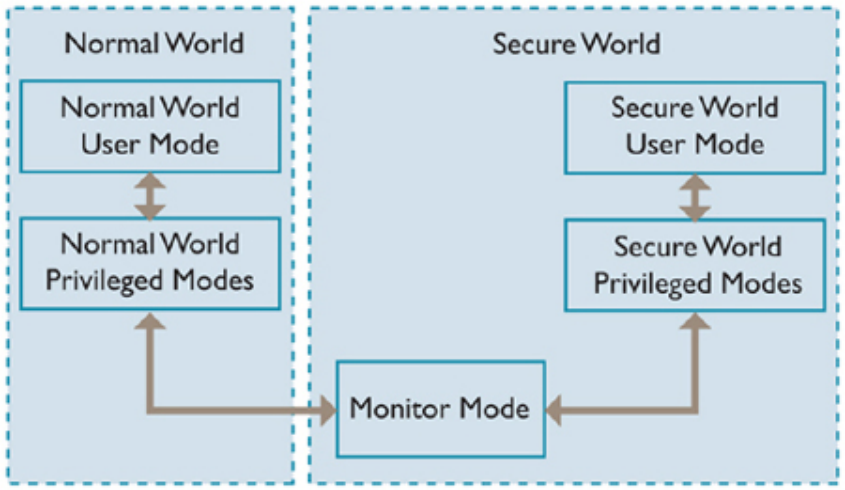
Figure 1: English source page 11
System security can be ensured by isolating all SoC hardware and software resources so that they are located in two areas (a secure area for security subsystems and a normal area for storing all other content). AMBA3 AXI supporting TrustZone TM , The hardware logic in the bus construction can ensure that normal area components cannot access security area resources, thus building a strong boundary between the two areas. The design of placing sensitive resources in a secure area, as well as running software reliably in a secure processor core, ensures that assets can withstand numerous potential attacks, including those that are often difficult to protect (for example, entering passwords using a keyboard or touch screen). By isolating security sensitive peripherals in the hardware, designers can limit the number of subsystems that need to pass the security assessment, thus saving costs when submitting security certification equipment. The second aspect of the TrustZone hardware architecture is the extension implemented in some ARM processor cores. With these additional extensions, a single physical processor core can safely and effectively execute code from both the normal area and the security area in a time slice manner. In this way, a dedicated security processor core is not required, which saves chip area and energy, and allows high-performance security software to run together with the general regional operating environment. After changing the currently running virtual processor, the two virtual processors perform context switching through the new processor mode (called monitor mode). The mechanisms used by the physical processor to enter the monitor mode from the normal area are closely controlled, and these mechanisms are always regarded as exceptions of the monitor mode software. The items to be monitored can be triggered by the software executing special instructions (security monitor call (SMC) instructions), or by a subset of the hardware exception mechanism. IRQ, FIQ, external data abort, and external prefetch abort exceptions can be configured to switch the processor to monitor mode. The software executed in the monitor mode is implementation defined, but it usually saves the state of the current area and restores the state of the area location to which it will switch. It then performs the operation returned from the exception to restart the processing in the restored area. The last aspect of the TrustZone hardware architecture is the security aware debugging infrastructure, which can control the access to security zone debugging without weakening the debugging visualization of common zones.
2.2.2 Software architecture
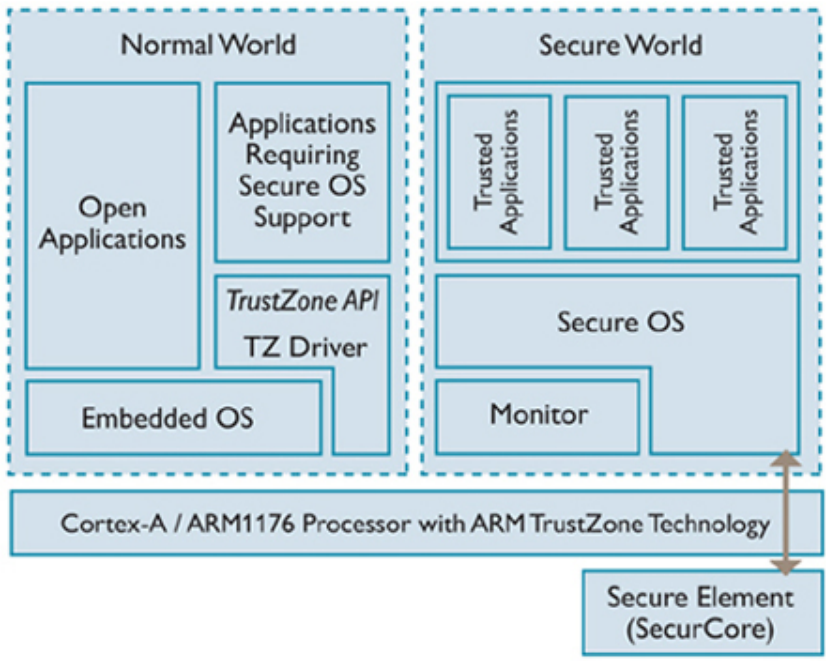
Figure 2: English source page 12
Implementing security zones in SoC hardware requires that certain security software be run in them and that sensitive assets stored in them be utilized. There may be many software architectures that can be implemented by the security zone software stack on the processor core that supports TrustZone. The most advanced software architecture is the dedicated security zone operating system; The simplest is the synchronized code base placed in the security zone. There are many intermediate options between these two extreme architectures. A dedicated security kernel can be a complex but powerful design. It can simulate the concurrent execution of multiple independent security zone applications, the runtime download of new security applications, and security zone tasks that are completely independent of the general zone environment. These designs are very similar to the software stack you will see in the SoC, which uses two separate physical processors in an asymmetric multiprocessing (AMP) configuration. The software running on each virtual processor is an independent operating system, and each region uses hardware interrupts to preempt the currently running region and obtain processor time. A tightly integrated design using communication protocols that associate secure area tasks with normal area threats that request them can provide many advantages of symmetric multiprocessing (SMP) designs. For example, in these designs, a security zone application can inherit the priority of common zone tasks it supports. This will result in some form of soft real-time response to the media application. Security extension is an open component of ARM architecture, so any developer can create a customized security zone software environment to meet its requirements.
2.2.3 TrustZone and TEE
Applications such as payment, online banking, content protection, and enterprise authentication can improve their integrity, functionality, and user experience by leveraging three key elements provided by TrustZone technology enhanced devices:
-
Software secure execution environment to prevent malware attacks from rich operating systems
-
The hardware trust root can check the integrity of data and applications in the rich operation field to ensure that the security environment is not damaged
-
Access security peripherals on demand, such as memory, keyboard/touch screen, and even monitor The device based on ARM TrustZone technology is combined with open APIs to provide a trusted execution environment (TEE). Developers need a new type of software to achieve its functions and consistency: this software is a trusted application. A typical trusted application can contain part of the code in both the normal area and the security area, for example, handling critical storage and manipulation. TEE also provides isolation from other trusted applications, enabling multiple trusted services to coexist.
The standardization of TEE API (managed by GlobalPlatform) will enable service providers, operators and OEMs to market interoperable trusted applications and services. ARM TrustZone technology does not require separate security hardware to verify the integrity of devices or users. It does this by providing a true hardware trust root in the main handset chipset. In order to ensure the integrity of the application, TrustZone also provides a secure execution environment (i.e., trust execution environment (TEE)), in which only trusted applications can run, so as to prevent attacks in the form of hackers/viruses/malware. The TrustZone hardware provides isolation between TEE and software attack media. Hardware isolation can be extended to protect data input and output from physical peripherals (including keyboard/touch screen, etc.). With these key functions, the chipset using TrustZone technology provides many opportunities to redefine the services that users can access (more and better services), how to access services (faster and easier), and where to access services (anytime, anywhere). On most Android devices, the Android Boot loader does not verify the authenticity of the device kernel. Users who want to further control their devices may install the cracked Android kernel to root their devices. The cracked kernel allows super users to access all data files, applications and resources. Once the kernel is broken, the service will be rejected. If the kernel contains malware, the security of enterprise data will be compromised. Secure Boot can effectively prevent the above problems. Secure Boot is a security mechanism that can prevent unauthorized boot loaders and kernels from being loaded during startup. Firmware images (such as operating systems and system components) that are encrypted and signed by a trusted, known authority are considered authorized firmware. The security boot component can form the first line of defense to prevent malicious software from attacking the device.
3 TEE Environment
3.1 OP-TEE Version Description
Android 7.1 and higher SDKs in Rockchip platform support TEE environment by default, TEE environment is not supported by default in versions earlier than Android 7.1 Linux SDK does not enable TEE environment by default, But you can refer to the following chapters to manually configure the TEE environment. The TEE solution on Rockchip platform is OP-TEE, and the TEE API conforms to the GlobalPlatform standard. At present, there are two versions of OP-TEE running on the rockchip platform, OP-TEE V1 and OP-TEE V2.
-
OP-TEE V1: RK312x, RK322x, RK3288, RK3328, RK322xh, RK3368, RK3399, RK3399Pro
-
OP-TEE V2: RK3326/PX30, RK3358, RK3308, RK1808, RV1109/RV1126, RK3566/RK3568, RK3588, RK3528, RK3562, RV1106 and subsequent new platforms TEE library files, TA files, and TEE firmware is different between the two versions, Select TEE components according to the specific platform. Platforms that are not listed in the OP-TEE V1 list can be considered platforms that adopt OP-TEE V2.
3.2 Parameter.txt
OP-TEE supports multiple secure storage file systems, as detailed in the “Secure Storage” section. Security partition is one of them. To use security partition, it is necessary to confirm that the partition is defined in the parameter.txt file which records the location and size information of each image. Security partition can be set by adding 0x00002000@0x000xxxxx(security) in parameter.txt, 0x00002000 indicates the size of 4M, 0x000xxxxx indicates the starting address, modify according to the actual parameter.txt. The partition is generally defined by default; adjust it to the actual parameter.txt layout.
3.3 TEE firmware
TEE firmware is also called the TEE binary or Secure OS firmware; on 64-bit platforms it is also called BL32. According to this source edition, the TEE Secure OS source is not open by default. The TEE binary is located under u-boot/tools/rk_tools/bin or rkbin/bin.
- The TEE binary of ARMv7 platform is packaged into trust.img by the tool u-boot/tools/loaderimage , The name of TEE binary is as follows:
<platform>_tee_[ta]_<version>.bin
such as: rkbin/bin/rk35/rk3506_tee_v1.26.bin
such as: rkbin/bin/rk35/rk3506_tee_ta_v1.00.bin
The name with [ta] support running user TA application, the name without [ta] do not support running user TA application. During U-Boot compilation,TOS.ini is used by default for firmware package, If config has defined CONFIG_TRUST_INI, Packaging firmware using the ini files. Taking RK3506 as an example, RK3506TOS.Ini is used by default for firmware packaging during compilation. RK3506TOS.Ini points to firmware without ta, so RK3506 does not support running User TA by default. If developers need to run User TA, they need to define CONFIG_TRUST_INI=”RK3506TOS_TA.ini” in the config, which points to firmware with ta. The RK3506 quick start solution defaults to running TEE but not U-Boot, U-Boot cannot automatically reserve secure memory for TEE, So when using firmware with ta, it is necessary to add the following configuration under the reserved_memory node in the Kernel dts file, in order to reserve secure memory for TEE.
trust@1 {
    reg = <0x3c00000 0x140000>;
};
For other platforms, U-Boot automatically reserves secure memory for TEE, without the need for additional configuration of Kernel dts.
- On ARMv8 platforms,
u-boot/tools/trust_mergerpackages BL31/BL32 and other binaries intotrust.img. TEE binaries use the following names:
<platform>_bl32_<version>.bin
such as: rkbin/bin/rk35/rk3588_bl32_v1.18.bin
-
If [BL32_OPTION] SEC=0 in rkbin/RKTRUST/.ini, It needs to be changed to SEC=1, Otherwise trust.img will not contain Secure OS and cannot run TEE services.
-
RK3566/RK3568, RK3588, RK3528, RK3562, RV1106, and subsequent new platforms will package the TEE binary into uboot.img without generating trust.img firmware. The following print indicates that the OPTEE V1 platform TEE firmware has been run.
INF [0x0] TEE-CORE:init_primary_helper:337: Initializing (1.1.0-278-gef70f120a #9 Fri Sep 17
09:39:24 UTC 2021 aarch64)
INF [0x0] TEE-CORE:init_primary_helper:338: Release version: 1.2
INF [0x0] TEE-CORE:init_teecore:83: teecore inits done
INFO:    BL31: Preparing for EL3 exit to normal world
INFO:    Entry point address = 0x200000
INFO:    SPSR = 0x3c9
The following print indicates that the OPTEE V2 platform TEE firmware has been run.
I/TC: OP-TEE version: 3.13.0-897-g5813e173a
I/TC: OP-TEE memory: TEEOS 0x200000 TA 0xc00000 SHM 0x200000
I/TC: Primary CPU initializing
I/TC: Primary CPU switching to normal world boot
INFO:    BL31: Preparing for EL3 exit to normal world
INFO:    Entry point address = 0x200000
INFO:    SPSR = 0x3c9
3.4 TEE driver in U-Boot
At present, some safe operations need to be performed at the U-Boot level, For example, OP-TEE must be used to read some secure data.The OP-TEE Client code is implemented in U-Boot, U-Boot can communicate with OP-TEE through this interface. OP-TEE Client driver is under lib/optee_client, API conforms to GP specification.
3.4.1 Macro Definition
CONFIG_OPTEE_CLIENT , OP-TEE function main config. CONFIG_OPTEE_V1 , set by OP-TEE V1 platform. CONFIG_OPTEE_V2 , set by OP-TEE V2 platform. CONFIG_OPTEE_ALWAYS_USE_SECURITY_PARTITION , The secure storage area will be selected according to the hardware if this macro is not enabled, use rpmb if device use EMMC, use security partition if device use NAND. After the macro is enabled, data is fixed store in the security partition, Not store in rpmb . The scope of this macro is the U-Boot stage, It do not affect the kernel and UserSpace. RPMB has higher security and stability than security partition, but less convenience than security partition. If the device is replaced with another device’s EMMC to this device, or if the CPU is replaced, all you need to do is use the burning tool to erase the flash and reburn the firmware when using security partitions, the burning tool cannot clear rpmb data and special firmware is needed to clear rpmb data when using rpmb. Please weigh the convenience and security of whether to enable this macro. Some platforms will default to enabling this macro, If you have high security requirements, you can remove this macro yourself.
3.4.2 Shared Memory
When U-Boot communicates with OP-TEE, the data must be stored in shared memory, You can use the TEEC_AllocateSharedMemory() to request shared memory, the shared memory size of each platform is different, and it is recommended that it should not exceed 1M, If it exceeds, it is recommended to split the data and transfer it for many times, Release shared memory by call TEEC_ReleaseSharedMemory() .
3.4.3 Secure Storage Test
3.4.3.1 Test method
Follow the steps below to perform the secure storage test. This test case will test the read/write function of secure storage, The test case will automatically check the hardware, the rpmb and security partition will be tested when the hardware uses emmc, Only security partition will be tested when the hardware uses nand. It is necessary to confirm that the U-Boot has turned on CONFIG_SUPPORT_EMMC_RPMB when the hardware uses emmc.
-
Enter the U-Boot command line: Device serial port connecting to PC, press ctrl+c in PC, Start device, It will stop at uboot.
-
Run: The following command starts the test.
=> mmc testsecurestorage
3.4.3.2 Troubleshooting
"TEEC: Could not find device"
The emmc or nand device is not found. Please check the driver in the U-Boot or the hardware.
"TEEC: Could not find security partition"
When the security partition is used for secure storage, the encrypted data will be stored in this partition. Please check whether the security partition is defined in parameter.txt
"TEEC: verify [%d] fail, cleanning ...."
When the security partition is used for secure storage for the first time, or the security partition data is illegally tampered, the security partition will be completely cleared.
"TEEC: Not enough space available in secure storage !"
There is insufficient secure-storage space. Check whether the stored data is too large, whether there are too many files, or whether a large amount of previously stored data has not been deleted.
INF [0x0] TEE-CORE:storage_read_obj:201: Warning! head data not find!
ERR [0x0] TEE-CORE:storage_read_obj:210: cpu or emmc was replaced!
During U-Boot startup, key data will be stored by calling TEE, Key data is encrypted by TEE and stored in security partition or rpmb, And the encryption key is bound to the CPU; If the CPU is replaced, key data cannot be decrypted normally, resulting in U-Boot startup failure; If the emmc is replaced and used before, Old data exists in the security partition or rpmb, This error will also occur which causing U-Boot start fail; The solution is to clear the old data in the security partition or rpmb, format emmc directly if the security partition is used, If you use rpmb, you need to contact technical support to provide special firmware to clear the old data in rpmb.
“optee check api revision fail”
The U-Boot version does not match the TEE version, the U-Boot version is higher than the TEE version, The solution is as follows (choose one) :
-
Revert U-Boot to cf13b78438 (tag: android-10.0-mid-rkr9) rockchip: spl: add rollback index check with otp.
-
Revert the following commit: 396e3049bd rochchip: board: only map op-tee share memory as dcache enabled 7a349fdcbd lib: optee_client: add optee initialize flag 74eb602743 lib: optee_client: update to new optee msg for optee v1 platform 102dfafc4a rochchip: board: map op-tee memory as dcache enabled Normally, the versions of Uboot and OP-TEE in released SDK are matched.
"optee api revision mismatch with u-boot/kernel, panic"
If the message appears during U-Boot startup, the U-Boot and TEE versions do not match and U-Boot is older than TEE. Upgrade U-Boot to 396e3049bd (tag: android-10.0-mid-rkr11, tag: android-10.0-mid-rkr10) rochchip: board: only map op-tee share memory as dcache enabled or later.
If printed during Android startup, upgrade android/vendor/rockchip/common to 8bc7bf97 (tag: android-10.0-mid-rkr10) vpu: librockit: add Rockit MetadataRetriever or later.
If printed during Linux startup, upgrade linux/external/security/bin to f59085c optee_v1: lib: arm&arm64: update binary and library or later. Released SDK components normally match.
3.4.4 U-Boot Run User TA
Some developer need to run their TA in the U-Boot, which can be referred to in this chapter.
- Confirm if the feature is included. If not, please update the U-Boot code.
436fc6d8486 lib: optee_clientApi: support load user ta for optee v1
4d4c5043204 lib: optee_clientApi: add user ta test demo
b122ee17db0 lib: optee_clientApi: support load user ta
deb4d4879d5 lib: optee_clientApi: support pack TA to image
-
Developer copy TA files to u-boot/lib/optee_clientApi/userta, This directory supports storing multiple TA files, and by default, rktest TA files are already stored for testing.
-
Execute the following command to package the TA file and generate the userta.img firmware.
cd lib/optee_clientApi
./tabinary_to_img.py --tadir ./userta --out ./userta/userta.img
-
Modify parameter.txt to add a new userta partition, with a partition size greater than the userta.img firmware size.
-
Use the burning tool to burn parameter.txt and userta.img.
-
U-Boot can call trusty_oem_user_ta_transfer and trusty_oem_user_ta_storage to test rktest ta. Developer can refer to these two functions and call their own TA.
3.5 TEE driver in kernel
TEE kernel driver under security/optee_linuxdriver/ or drivers/tee/
3.5.1 OP-TEE V1
The driver of the chips using OP-TEE V1 is located at security/optee_linuxdriver/ , All are enabled by default. The method to enable is as follows: Add the following configurations in config:
CONFIG_TEE_SUPPORT=y
At present, we will gradually abandon the TEE kernel driver of OP-TEE V1, OP-TEE V1 platform will use the TEE kernel driver of OP-TEE V2. If version>=v2.00 in the TEE binary file name in the rkbin/bin directory, you also need to enable the TEE kernel driver of OP-TEE V2. Android 10 and above and Linux released after August 2020 use the TEE kernel driver of OP-TEE V2 by default.
3.5.2 OP-TEE V2
The driver of the chips using OP-TEE V2 is located at drivers/tee/ , the method to enable is as follows: Confirm that the following nodes have been added to the platform dtsi file:
firmware {
    optee: optee {
        compatible = "linaro,optee-tz";
        method = "smc";
        #status = "disabled";
    };
};
This node is added to all platforms by default, However, some platforms will set status = “disabled”, Just remove status = “disabled” if you want to enable the optee driver. Add the following two configurations in config:
CONFIG_TEE=y
CONFIG_OPTEE=y
3.5.3 Confirm TEE drive is enabled
If the /dev/opteearmtz00 node appears, it indicates that the TEE kernel driver of optee v1 is enabled. If the /dev/tee0 and /dev/teepriv0 node appears, it indicates that the TEE kernel driver of optee v2 is enabled.
3.6 Enabling the Trusted Key Feature
The trusted key is a secure key management mechanism provided by the Linux kernel. It leverages a Trusted Execution Environment (TPM or TEE) to protect keys, ensuring that their contents are never exposed in normal memory or user space.
3.6.1 Enabling Kernel Trusted Key Support
Add the following configurations in your kernel config:
CONFIG_TRUSTED_KEYS=y
CONFIG_TRUSTED_KEYS_TEE=y
3.6.2 Enabling Trusted Key in OP-TEE OS
- This feature requires BL32 support to be enabled. The currently supported chip platforms and BL32 versions are as follows:
| Chip platform | Version |
|---|---|
| RK3588 | >= rk3588_bl32_v1.21.bin |
- Verify that the feature is enabled. If the trusted_key backend in TEE is active, you should see the following messages:
root@linaro-alip:/# dmesg | grep trusted
[    1.814593] Initialise system trusted keyrings
[    2.456306] Key type trusted registered
3.6.3 Using the Feature
On an Ubuntu platform, you need to install the keyutils tool first:
sudo apt-get install keyutils
Test adding a key with the following commands:
root@linaro-alip:/# keyctl add trusted test_key "new 32" @u
1028348999
root@linaro-alip:/#
root@linaro-alip:/# keyctl list @u
1 key in keyring:
1028348999: --alswrv     0     0 trusted: test_key
root@linaro-alip:/#
root@linaro-alip:/# keyctl unlink 1028348999 @u
root@linaro-alip:/#
3.7 TEE Library
Android TEE environment components are in the Android project directory vendor/rockchip/common/security or hardware/rockchip/optee (Including OP-TEE V1 and OP-TEE V2) : Select the OP-TEE V1 or V2 files appropriate to the platform.
-
lib: Includes tee-supplicant, libteec.so and keymaster/gatekeeper library compiled from 32bit and 64bit platforms.
-
ta: Store the compiled keymaster/gatekeeper TA file. Linux TEE environment components are in the Linux project directory external/security/bin (Including OP-TEE V1 and OP-TEE V2) : Select the OP-TEE V1 or V2 files appropriate to the platform.
-
lib: Contains tee-supplicant, libteec.so and other CA-related libraries built for 32-bit and 64-bit platforms.
-
ta: Store the compiled TA file.
4 CA/TA Development And Test
4.1 Environment
- If the compilation reports an error: No module named Crypto.Signature , The reason is Python algorithm library is not installed on the development computer, Execute the following command:
pip uninstall Crypto
pip uninstall pycrypto
pip install pycrypto
- If the build reports
ModuleNotFoundError: No module named 'Cryptodome', install the Python package on the development host:pip3 install [--user] pycryptodomex.
4.2 CA/TA demo
RK provides a series of CA/TA demo, The purpose is to: Provide reference for developers Directly used to test TEE environment The source code of CA/TA demo is in the Android project external/rk_tee_user , Or Linux project external/security/rk_tee_user . CA/TA demo contains “rktest” and “xtest”, “xtest” is only available in Android project external/rk_tee_user/v2 , “xtest” is the open-source test code of OPTEE, Including more complete test items. Generally, if it is used to test TEE environment or reference development, “rktest” can basically meet. The following describes the functions of rktest.
The CA name of the rktest demo is “rktest”, TA named “1db57234-dacd-462d-9bb1ae79de44e2a5.ta” or “1db57234-dacd-462d-9bb1-ae79de44e2a5.ta”.When running the CA program, you need to enter parameters to select the corresponding functions. Enter CA program name+space+any character, The available parameters will be prompted. The test functions implemented by rktest are shown in the following table. Note: The test program only involves some commonly used functions and does not cover all functions supported by OPTEE.
| Parameter | Function | Note |
|---|---|---|
| transfer_data | Transfer parameters between CA and TA | |
| storage | Test secure storage | Before testing, ensure the kernel nodes exist: /dev/block/by-name/security for the security partition; rpmb requires /dev/block/mmcblk%u, /dev/block/mmcblk%urpmb, and /sys/class/mmc_host/mmc%u/mmc%u:0001/cid, where %u is 0, 1, or 2. Link any missing node to the corresponding node. |
| storage_speed | Test secure-storage performance | |
| property | Retrieve property | |
| crypto_sha | Test SHA | |
| crypto_aes | Test AED (spelling in the Chinese source) | |
| crypto_rsa | RSA encryption/decryption and signing/verification | |
| secstor_ta | Embed TA in secure storage | Read the section on embedding TA in secure storage and understand the mechanism before testing. |
| otp_read | Read OEM_S_OTP | OTP tests are hidden by default. Enable them with the definition in /host/rk_test/main.c. See the OTP section for OTP properties. |
| otp_write | Write OEM_S_OTP | |
| otp_size | Total size of OEM_S_OTP | |
| otp_ns_read | Read OEM_NS_OTP | |
| otp_ns_write | Write OEM_NS_OTP | |
| trng | Retrieve trng data | |
| socket | Socket communication between CA and TA |
Execute the test program. The command is as follows:
# rktest transfer_data
# rktest [command]
The successful execution of CA program prompts PASS, and the failure prompts Fail.
4.3 Android
4.3.1 Directory Introduction
TEE CA/TA development environment locate in Android project directory external/rk_tee_user :
-
Android.mk: Decide the compilation tool and the CA file to be compiled.
-
host: CA source files.
-
ta: TA source files.
-
export*: The environment which TA compilation depends on.
4.3.2 Compile
If there are only v1/ v2/ directories under external/rk_tee_user , It indicates that the master branch has been merged into the develop-next branch, The master branch will be discarded, Merge point is master branch 492f1cbf testapp: support new OP-TEE MSG , Execute the following command to start compiling.
#OP-TEE V1平台进⼊v1⽬录
cd external/rk_tee_user/v1
#OP-TEE V2平台进⼊v2⽬录
cd external/rk_tee_user/v2
rm -rf out/
./build.sh ta
mm
If there are no v1/ v2/ directories under external/rk_tee_user , It indicates that two branches are still used, please switch to the master branch for OP-TEE V1 platform, please switch to the develop-next branch for OP-TEE V2 platform, Execute the following command to start compiling.
cd external/rk_tee_user/
rm -rf out/
./build.sh ta (git log包含“Android.mk: remove build ta from android”则执⾏,否则不执⾏)
mm
The execution program will be obtained after successful compilation, The execution program contains CA (Client Application, run on normal world) and TA (Trust Application, run on secure world) . CA is a Android execution file, which is generated in the Android project out directory after compilation. TA is a file with the file name uuid.ta, Generated in one of the directories rk_tee_user/ta, rk_tee_user/out/ta, rk_tee_user/v1/out/ta, rk_tee_user/v2/out/ta.
4.3.3 Run
-
Enter the device by using adb shell
-
Install TEE library files, CA and TA into the device. For Android 7: push libteec.so into /system/lib or /system/lib64 ; push tee-supplicant and CA into /system/bin; create /system/lib/optee_armtz directory, push TA into /system/lib/optee_armtz. For Android 8 and later: push libteec.so into /vendor/lib or /vendor/lib64 ; push tee-supplicant and CA into /vendor/bin ; create /vendor/lib/optee_armtz directory, push TA into /vendor/lib/optee_armtz. (If tee-supplicant starts automatically after startup, tee-supplicant and libteec.so do not need to push any more. These two files already exist in the system; libteec.so and tee-supplicant should distinguish OP-TEE V1 from OP-TEE V2, Distinguish between 32-bit and 64-bit; After push, check whether the tee-supplicant and CA programs have execution permissions. )
-
If the tee-supplicant is not automatically run when the machine is turned on, you need to manually run tee-supplicant in the background with root permission:
# tee-supplicant &
If print tee_supp_rk_fs_init: unsupported , It means security partition is not defined in parameter.txt, Please refer to “parameter.txt” Section for details, If the developer only uses the rpmb or REE file system for secure storage, the error print can be ignored.
- run CA/TA, test TEE functions. rktest can be used to directly test the basic functions of TEE, execute:
# rktest [command]
- If rktest run successfully, Then TEE environment is normal, TEE development is available. please check the drive and components if error occurs. It may also be caused by the mismatch between the rk_tee_user version and the TEE OS version, The following are common matching relationships: OP-TEE V1: version >= v2.00 of TEE binary name under rkbin/bin directory, match 492f1cbf testapp: support new OP-TEE MSG version < v2.00 of TEE binary name under rkbin/bin directory, match e8d7215d Android.mk: support build in android R or match 466515ec add tools for user to resign TA OP-TEE V2:
TEE startup output “OP-TEE version: 3.13.0” corresponds to a566557 - v2: update to keep up with v3.13.0 of optee_test.
TEE startup output “OP-TEE version: 3.6.0” corresponds to 1aa969e2 Android.mk: support build in android R.
TEE startup output “OP-TEE version: 3.3.0” corresponds to aa0a0c00 Android.mk: remove build ta from android.
TEE startup serial output “OP-TEE version: 2.5.0” corresponds to 1ec9913a add tools for user to resign TA.
4.3.4 Step By Step
Here is an example of the arm64 platform using OP-TEE V2 on Android 12
//编译CA TA
cd /home1/xxxx/rk_android_12
source build/envsetup.sh
lunch rk3568_s-userdebug
cd /home1/xxxx/rk_android_12/external/rk_tee_user/v2
./build.sh ta
mm

//推送TEE库⽂件和CA TA到设备
adb root && adb remount
adb push Y:\rk_android_12\hardware\rockchip\optee\v2\arm64\libteec.so /vendor/lib64
adb push Y:\rk_android_12\hardware\rockchip\optee\v2\arm64\tee-supplicant /vendor/bin
adb push Y:\rk_android_12\out\target\product\rk3568_s\vendor\bin\rktest /vendor/bin
adb push Y:\rk_android_12\external\rk_tee_user\v2\out\ta\rk_test\1db57234-dacd-462d-9bb1-ae79de44e2a5.ta /vendor/lib/optee_armtz

//运⾏CA TA
# tee-supplicant &  //若tee-supplicant已经运⾏,可以忽略本步骤,安卓平台⼀般默认已经有运⾏
# rktest transfer_data
4.3.5 Develop CA/TA
Refer to the CA and TA Makefiles. Replace the UUID in the header file with a newly generated UUID; uuidgen can generate it. The header user_ta_header_defines.h under each TA’s include directory defines heap and stack sizes: 32KB for the heap (TA_DATA_SIZE) and 2KB for the stack (TA_STACK_SIZE). Normally these should not be changed. If they cannot meet requirements, increase them as necessary, but do not exceed 1MB for the heap or 64KB for the stack.
#define TA_STACK_SIZE               (2 * 1024)
#define TA_DATA_SIZE                (32 * 1024)
4.4 Linux
4.4.1 Directory Introduction
TEE CA/TA development environment locate in Linux project directory external/security/rk_tee_user :
-
build.sh: Compile script, please refer to the notes in the script for compilation instructions.
-
Makefile: Decide the compilation tool and the CA file to be compiled.
-
host: Contains the CA source files and corresponding Makefile.
-
ta: TA source files.
-
export*: The environment which TA compilation depends on.
4.4.2 Compile
If there are only v1/ v2/ directories under external/security/rk_tee_user , It indicates that the master branch has been merged into the develop-next branch, The master branch will be discarded, Merge point is master branch 492f1cbf testapp: support new OP-TEE MSG , Execute the following command to start compiling.
#OP-TEE V1平台进⼊v1⽬录
cd external/security/rk_tee_user/v1
#OP-TEE V2平台进⼊v2⽬录
cd external/security/rk_tee_user/v2
rm -rf out/
./build.sh 3232 (32位平台执⾏,CA 32bits,TA 32bits)
./build.sh 6432 (64位平台执⾏,CA 64bits,TA 32bits)
If there are no v1/ v2/ directories under external/security/rk_tee_user , It indicates that two branches are still used, please switch to the master branch for OP-TEE V1 platform, please switch to the develop-next branch for OP-TEE V2 platform, Execute the following command to start compiling.
cd external/security/rk_tee_user/
rm -rf out/
./build.sh 3232 (32位平台执⾏,CA 32bits,TA 32bits)
./build.sh 6432 (64位平台执⾏,CA 64bits,TA 32bits)
The execution program will be obtained after successful compilation, The execution program contains CA (Client Application, run on normal world) and TA (Trust Application, run on secure world) . CA is a Linux execution file, which is generated in one of the directories rk_tee_user/out, rk_tee_user/v1/out, rk_tee_user/v2/out. TA is a file with the file name uuid.ta, Generated in one of the directories rk_tee_user/ta, rk_tee_user/out/ta, rk_tee_user/v1/out/ta, rk_tee_user/v2/out/ta.
4.4.3 Run
-
Enter the device by using adb shell.
-
Install TEE library files, CA and TA into the device. push libteec.so* into /lib or /lib64; push tee-supplicant and CA into /usr/bin; create /lib/optee_armtz directory, push TA into /lib/optee_armtz. (If tee-supplicant starts automatically after startup, tee-supplicant and libteec.so do not need to push again. These two files already exist in the system; libteec.so and tee-supplicant should distinguish OP-TEE V1 from OP-TEE V2, Distinguish between 32-bit and 64-bit; After push, check whether the tee-supplicant and CA programs have execution permissions.)
-
Other steps are the same as Android platform. See the “Android” chapter above.
4.4.4 Step By Step
Here is an example of the arm64 platform using OP-TEE V2 on Linux
//编译CA TA
cd /home1/xxxx/rk_px30_linux/external/security/rk_tee_user/v2
rm -rf out/
./build.sh 6432

//设备上创建optee_armtz⽬录,⽤于存放TA⽂件
# mkdir -p /lib/optee_armtz

//推送TEE库⽂件和CA TA到设备
adb push Y:\rk_px30_linux\external\security\bin\optee_v2\lib\arm64\libteec.so /lib64
adb push Y:\rk_px30_linux\external\security\bin\optee_v2\lib\arm64\libteec.so.1 /lib64
adb push Y:\rk_px30_linux\external\security\bin\optee_v2\lib\arm64\tee-supplicant /usr/bin
adb push Y:\rk_px30_linux\external\security\rk_tee_user\v2\out\rk_test\rktest /usr/bin
adb push Y:\rk_px30_linux\external\security\rk_tee_user\v2\out\ta\rk_test\1db57234-dacd-462d-9bb1-ae79de44e2a5.ta /lib/optee_armtz

//添加可执⾏权限
# chmod +x /usr/bin/tee-supplicant
# chmod +x /usr/bin/rktest

//运⾏CA TA
# tee-supplicant &  //若tee-supplicant已经运⾏,可以忽略本步骤
# rktest transfer_data
4.4.5 Develop CA/TA
Refer to the CA and TA Makefiles. Replace the UUID in the header file with a newly generated UUID; uuidgen can generate it. The header user_ta_header_defines.h under each TA’s include directory defines heap and stack sizes: 32KB for the heap (TA_DATA_SIZE) and 2KB for the stack (TA_STACK_SIZE). Normally these should not be changed. If they cannot meet requirements, increase them as necessary, but do not exceed 1MB for the heap or 64KB for the stack.
#define TA_STACK_SIZE               (2 * 1024)
#define TA_DATA_SIZE                (32 * 1024)
4.5 rk_tee_service
4.5.1 Introduction
rk_tee_service is a security service developed based on TEE, which provides common security functions for developers. The simple and clear external interface greatly facilitates developers’ use. rk_tee_service is essentially a CA TA application, Therefore, test the TEE environment is normal before using rk_tee_service. Follow the Running and Testing the TEE Environment section before using rk_tee_service.
Developers can directly call rk_tee_service to encrypt and decrypt sensitive data. Encryption and decryption take place on the TA side. The encryption/decryption key is derived by TEE using the unique key HUK inside the device hardware, Therefore, the encryption and decryption keys of each device are different, Copying the sensitive data of device A to device B cannot be decrypted normally to ensure that the sensitive data will not be stolen. Due to the size of shared memory, it is recommended that the size of data encrypted and decrypted at a single time should not exceed 1M. It is recommended to encrypt and decrypt big data in multiple times. At present, the OP-TEE V2 platform supports this function, while the OP-TEE V1 platform does not.
4.5.2 Component
Currently, it supports Linux platform and Android platform (Android 12 and higher).
| Component | Android directory | Linux directory |
|---|---|---|
| librk_tee_service.so | hardware/rockchip/optee/v2/arm hardware/rockchip/optee/v2/arm64 |
external/security/bin/optee_v2/lib/arm external/security/bin/optee_v2/lib/arm64 |
| rk_tee_service.h | hardware/rockchip/optee/v2/include | external/security/bin/optee_v2/include |
| 4367fd45-4469-42a6-925d-3857b952704a.ta | hardware/rockchip/optee/v2/ta | external/security/bin/optee_v2/ta |
The Userspace application can directly call librk_tee_service.so, Parameter of function please refer to rk_tee_service.h, Push 4367fd45-4469-42a6-925d-3857b952704a.ta into /lib/optee_armtz for Linux platform , Push 4367fd45-4469-42a6-925d-3857b952704a.ta into /vendor/lib/optee_armtz for Android platform.
4.5.3 Demo
#include <stdio.h>
#include <stdlib.h>
#include <string.h>
#include "rk_tee_service.h"

int main(int argc, char *argv[])
{
    unsigned char plain[256];
    unsigned int plain_len;
    unsigned char cipher[256];
    unsigned int cipher_len;
    int res;

    memset((void *)plain, 0xab, sizeof(plain));
    cipher_len = 256;
    res = rk_encrypt_data(plain, sizeof(plain), cipher, &cipher_len);
    printf("res=0x%x cipher_len=%d\n", res, cipher_len);

    memset((void *)plain, 0, sizeof(plain));
    plain_len = 256;
    res = rk_decrypt_data(cipher, cipher_len, plain, &plain_len);
    printf("res=0x%x plain_len=%d\n", res, plain_len);

    return 0;
}
4.6 Test xtest
Xtest is an open-source testing code for OPTEE, which includes relatively complete testing items. Customers can refer to this chapter to test xtest. Here is an example of the arm64 platform using OP-TEE V2 on Android 13:
//编译CA TA
cd /home1/xxxx/rk_android_13
source build/envsetup.sh
lunch rk3568_t-userdebug
cd /home1/xxxx/rk_android_13/external/rk_tee_user/v2
./build.sh ta
mm

//设备上创建plugins⽬录
# mkdir -p /vendor/lib64/tee-supplicant/plugins/

//推送TEE库⽂件和CA TA到设备
adb root && adb remount
adb push Y:\rk_android_13\hardware\rockchip\optee\v2\arm64\libteec.so /vendor/lib64
adb push Y:\rk_android_13\hardware\rockchip\optee\v2\arm64\tee-supplicant /vendor/bin
adb push Y:\rk_android_13\out\target\product\rk3568_t\vendor\bin\xtest /vendor/bin
adb push Y:\rk_android_13\external\rk_tee_user\v2\out\ta\crypt\cb3e5ba0-adf1-11e0-998b-0002a5d5c51b.ta /vendor/lib/optee_armtz
adb push Y:\rk_android_13\external\rk_tee_user\v2\out\ta\concurrent\e13010e0-2ae1-11e5-896a-0002a5d5c51b.ta /vendor/lib/optee_armtz
adb push Y:\rk_android_13\external\rk_tee_user\v2\out\ta\create_fail_test\c3f6e2c0-3548-11e1-b86c-0800200c9a66.ta /vendor/lib/optee_armtz
adb push Y:\rk_android_13\external\rk_tee_user\v2\out\ta\rpc_test\d17f73a0-36ef-11e1-984a-0002a5d5c51b.ta /vendor/lib/optee_armtz
adb push Y:\rk_android_13\external\rk_tee_user\v2\out\ta\sims\e6a33ed4-562b-463a-bb7e-ff5e15a493c8.ta /vendor/lib/optee_armtz
adb push Y:\rk_android_13\external\rk_tee_user\v2\out\ta\concurrent_large\5ce0c432-0ab0-40e5-a056-782ca0e6aba2.ta /vendor/lib/optee_armtz
adb push Y:\rk_android_13\external\rk_tee_user\v2\out\ta\miss\528938ce-fc59-11e8-8eb2-f2801f1b9fd1.ta /vendor/lib/optee_armtz
adb push Y:\rk_android_13\external\rk_tee_user\v2\out\ta\socket\873bcd08-c2c3-11e6-a937-d0bf9c45c61c.ta /vendor/lib/optee_armtz
adb push Y:\rk_android_13\external\rk_tee_user\v2\out\ta\sims_keepalive\a4c04d50-f180-11e8-8eb2-f2801f1b9fd1.ta /vendor/lib/optee_armtz
adb push Y:\rk_android_13\external\rk_tee_user\v2\out\ta\os_test\5b9e0e40-2636-11e1-ad9e-0002a5d5c51b.ta /vendor/lib/optee_armtz
adb push Y:\rk_android_13\external\rk_tee_user\v2\out\ta\os_test_lib\ffd2bded-ab7d-4988-95ee-e4962fff7154.ta /vendor/lib/optee_armtz
adb push Y:\rk_android_13\external\rk_tee_user\v2\out\ta\os_test_lib_dl\b3091a65-9751-4784-abf7-0298a7cc35ba.ta /vendor/lib/optee_armtz
//测试安全存储,security空间有限会导致测试失败,删除parameter.txt中security分区,
//uboot不要定义CONFIG_OPTEE_ALWAYS_USE_SECURITY_PARTITION,默认使⽤安卓⽂件系统可以测试通过
adb push Y:\rk_android_13\external\rk_tee_user\v2\out\ta\storage\b689f2a7-8adf-477a-9f99-32e90c0ad0a2.ta /vendor/lib/optee_armtz
adb push Y:\rk_android_13\external\rk_tee_user\v2\out\ta\storage2\731e279e-aafb-4575-a771-38caa6f0cca6.ta /vendor/lib/optee_armtz
adb push Y:\rk_android_13\external\rk_tee_user\v2\out\ta\storage_benchmark\f157cda0-550c-11e5-a6fa-0002a5d5c51b.ta /vendor/lib/optee_armtz
adb push Y:\rk_android_13\external\rk_tee_user\v2\out\ta\supp_plugin\380231ac-fb99-47ad-a689-9e017eb6e78a.ta /vendor/lib/optee_armtz
adb push Y:\rk_android_13\out\target\product\rk3568_t\vendor\lib64\tee-supplicant\plugins\f07bfc66-958c-4a15-99c0-260e4e7375dd.plugin.so /vendor/lib64/tee-supplicant/plugins/
adb push Y:\rk_android_13\hardware\rockchip\optee\v2\arm64\libckteec.so /vendor/lib64
adb push Y:\rk_android_13\external\rk_tee_user\v2\export-ta_arm32\ta\fd02c9da-306c-48c7-a49c-bbd827ae86ee.ta /vendor/lib/optee_armtz

//运⾏xtest
# tee-supplicant &  //若tee-supplicant已经运⾏,可以忽略本步骤,安卓平台⼀般默认已经有运⾏
# xtest
Here is an example of the arm64 platform using OP-TEE V2 on Linux:
//编译CA TA
cd /home1/xxxx/rk_px30_linux/external/security/rk_tee_user/v2
rm -rf out/
./build.sh 6432

//设备上创建optee_armtz⽬录,⽤于存放TA⽂件
# mkdir -p /lib/optee_armtz
//设备上创建plugins⽬录
# mkdir -p /usr/lib/tee-supplicant/plugins/

//推送TEE库⽂件和CA TA到设备
adb push Y:\rk_px30_linux\external\security\bin\optee_v2\lib\arm64\libteec.so /lib64
adb push Y:\rk_px30_linux\external\security\bin\optee_v2\lib\arm64\libteec.so.1 /lib64
adb push Y:\rk_px30_linux\external\security\bin\optee_v2\lib\arm64\tee-supplicant /usr/bin
adb push Y:\rk_px30_linux\external\security\rk_tee_user\v2\out\xtest\xtest /usr/bin
adb push Y:\rk_px30_linux\external\security\rk_tee_user\v2\out\ta\crypt\cb3e5ba0-adf1-11e0-998b-0002a5d5c51b.ta /lib/optee_armtz
adb push Y:\rk_px30_linux\external\security\rk_tee_user\v2\out\ta\concurrent\e13010e0-2ae1-11e5-896a-0002a5d5c51b.ta /lib/optee_armtz
adb push Y:\rk_px30_linux\external\security\rk_tee_user\v2\out\ta\create_fail_test\c3f6e2c0-3548-11e1-b86c-0800200c9a66.ta /lib/optee_armtz
adb push Y:\rk_px30_linux\external\security\rk_tee_user\v2\out\ta\rpc_test\d17f73a0-36ef-11e1-984a-0002a5d5c51b.ta /lib/optee_armtz
adb push Y:\rk_px30_linux\external\security\rk_tee_user\v2\out\ta\sims\e6a33ed4-562b-463a-bb7e-ff5e15a493c8.ta /lib/optee_armtz
adb push Y:\rk_px30_linux\external\security\rk_tee_user\v2\out\ta\concurrent_large\5ce0c432-0ab0-40e5-a056-782ca0e6aba2.ta /lib/optee_armtz
adb push Y:\rk_px30_linux\external\security\rk_tee_user\v2\out\ta\miss\528938ce-fc59-11e8-8eb2-f2801f1b9fd1.ta /lib/optee_armtz
adb push Y:\rk_px30_linux\external\security\rk_tee_user\v2\out\ta\socket\873bcd08-c2c3-11e6-a937-d0bf9c45c61c.ta /lib/optee_armtz
adb push Y:\rk_px30_linux\external\security\rk_tee_user\v2\out\ta\sims_keepalive\a4c04d50-f180-11e8-8eb2-f2801f1b9fd1.ta /lib/optee_armtz
adb push Y:\rk_px30_linux\external\security\rk_tee_user\v2\out\ta\os_test\5b9e0e40-2636-11e1-ad9e-0002a5d5c51b.ta /lib/optee_armtz
adb push Y:\rk_px30_linux\external\security\rk_tee_user\v2\out\ta\os_test_lib\ffd2bded-ab7d-4988-95ee-e4962fff7154.ta /lib/optee_armtz
adb push Y:\rk_px30_linux\external\security\rk_tee_user\v2\out\ta\os_test_lib_dl\b3091a65-9751-4784-abf7-0298a7cc35ba.ta /lib/optee_armtz
//测试安全存储,security空间有限会导致测试失败,删除parameter.txt中security分区,
//uboot不要定义CONFIG_OPTEE_ALWAYS_USE_SECURITY_PARTITION,默认使⽤安卓⽂件系统可以测试通过
adb push Y:\rk_px30_linux\external\security\rk_tee_user\v2\out\ta\storage\b689f2a7-8adf-477a-9f99-32e90c0ad0a2.ta /lib/optee_armtz
adb push Y:\rk_px30_linux\external\security\rk_tee_user\v2\out\ta\storage2\731e279e-aafb-4575-a771-38caa6f0cca6.ta /lib/optee_armtz
adb push Y:\rk_px30_linux\external\security\rk_tee_user\v2\out\ta\storage_benchmark\f157cda0-550c-11e5-a6fa-0002a5d5c51b.ta /lib/optee_armtz
adb push Y:\rk_px30_linux\external\security\rk_tee_user\v2\out\ta\supp_plugin\380231ac-fb99-47ad-a689-9e017eb6e78a.ta /lib/optee_armtz
adb push Y:\rk_px30_linux\external\security\rk_tee_user\v2\out\supp_plugin\f07bfc66-958c-4a15-99c0-260e4e7375dd.plugin /usr/lib/tee-supplicant/plugins/
adb push Y:\rk_px30_linux\external\security\bin\optee_v2\lib\arm64\libckteec.so.0 /lib64
adb push  Y:\rk_px30_linux\external\security\rk_tee_user\v2\export-ta_arm32\ta\fd02c9da-306c-48c7-a49c-bbd827ae86ee.ta /lib/optee_armtz

//添加可执⾏权限
# chmod +x /usr/bin/tee-supplicant
# chmod +x /usr/bin/xtest

//运⾏CA TA
# tee-supplicant &  //若tee-supplicant已经运⾏,可以忽略本步骤
# xtest
5 TA Signature
5.1 Principle
When compiling TA, the compile script will automatically use the key in the export-user_ta/keys directory or export-ta_arm32/keys directory of the rk_tee_user project to sign TA application. The key is 2048 bits RSA key in pem format. Finally, the TA file in .ta format is generated. There is an RSA public key stored in the TEE binary. When the TA is loaded and run, the TEE OS will use the public key to verify the validity of the TA. Only after the verification is passed, the TA application can run normally.
5.2 Replace the public key
To prevent developer A’s TA application from running on developer B’s board, it is recommended to replace the public key. Developers can replace public keys in TEE binary with tools in the rk_tee_user project tools/ directory. Linux:
./change_puk --teebin <TEE binary>
This command automatically generates a 2048 bits RSA key oemkey.pem in the current directory, and replaces the original public key in the TEE binary with the public key in this key.
./change_puk --teebin <TEE binary> --key oemkey.pem
Replace the original public key in the TEE binary with the public key specified by the developer. The key length must be 2048 bits. Windows: Open Windows_change_puk.exe and click “Generate oemkey.pem” to generate and save keys. Select the key and TEE binary you just generated, and click “Modify Public Key”. (Since Windows_change_puk.exe invokes the BouncyCastle.Crypto.dll third-party library, make sure BouncyCastle.Crypto.dll is in the same directory as Windows_change_puk.exe) After the public key is replaced, the developer needs to use the new TEE binary to replace the original TEE binary in the rkbin/ directory, recompile the U-Boot, and burn the new trust.img firmware. Part of the platforms have no trust.img because trust.img is packaged into uboot.img , so uboot.img is burned instead.
Rename the generated or specified key to oem_privkey.pem, replace the key in rk_tee_user/export-user_ta/keys or export-ta_arm32/keys, then rebuild CA/TA. The resulting TA loads with the new-public-key TEE binary; TAs not signed with the correct private key are rejected.
5.3 TA Signature Step By Step
This example uses the RK3588 platform with Android 12.
cd /home1/xxxx/rk_android_12/external/rk_tee_user/v2/tools/change_puk_tool-release/change_puk_linux

chmod +x change_puk

./change_puk --teebin /home1/xxxx/rk_android_12/rkbin/bin/rk35/rk3588_bl32_v1.17.bin

cp oem_privkey.pem /home1/xxxx/rk_android_12/external/rk_tee_user/v2/export-ta_arm32/keys/

cp oem_privkey.pem /home1/xxxx/rk_android_12/external/rk_tee_user/v2/export-ta_arm64/keys/

//重新编译烧写uboot固件,重新编译CA TA应⽤
6 Built-in TA into secure storage
In normal cases, TA files are stored in plaintext in an non-secure file system after TA development. Some OEM that have high security requirements do not want TA files to be exposed in plaintext. To meet the OEM’ requirements, OP-TEE V2 supports built-in TA files to secure storage (OP-TEE V1 does not support this).
6.1 Principle
The CA side reads TA files in the non-secure file system and sends TA data to the OP-TEE OS. After receiving TA data, the OP-TEE OS verifies the validity of TA. If TA is legal, it randomly generates TA encryption key and encrypts TA data with TA encryption key. Then the ciphertext TA data and TA encryption key are securely stored (If security partition is defined, it is stored in the security partition; if not defined, it is stored in the Android or Linux file system). The key used for secure storage is derived from the unique key of the hardware, which is different for each device. Finally, the developer needs to delete TA files in the non-secure file system to prevent the plaintext TA from being exposed. After the above step is complete, the CA can call the TA application normally. When the CA calls the TA in the secure storage, the OP-TEE OS searches for the TA in the secure storage according to the incoming uuid. If the TA is found, the OP-TEE OS decrypts and loads the TA; if the TA is not found in secure storage, the TA will be searched in the non-secure file system.
6.2 Reference implementation
Here is the CA-side code that lets you read the TA file and send the TA data to the OP-TEE OS using the install_ta function.
static void install_ta(void *buf, size_t blen)
{
    TEEC_Result res = TEEC_ERROR_GENERIC;
    uint32_t err_origin = 0;
    TEEC_UUID uuid = PTA_SECSTOR_TA_MGMT_UUID;
    TEEC_Operation op;
    TEEC_Context ctx = { };
    TEEC_Session sess = { };
    int i = 0;

    res = TEEC_InitializeContext(NULL, &ctx);
    if (res != TEEC_SUCCESS) {
        printf("TEEC_InitializeContext failed with code 0x%x\n", res);
        goto exit;
    }

    res = TEEC_OpenSession(&ctx, &sess, &uuid,
                   TEEC_LOGIN_PUBLIC, NULL, NULL, &err_origin);
    if (res != TEEC_SUCCESS) {
        printf("TEEC_Opensession failed with code 0x%x origin 0x%x\n",
               res, err_origin);
        goto exit;
    }

    memset(&op, 0, sizeof(op));
    op.paramTypes = TEEC_PARAM_TYPES(TEEC_MEMREF_TEMP_INPUT, TEEC_NONE,
                     TEEC_NONE, TEEC_NONE);
    op.params[0].tmpref.buffer = buf;
    op.params[0].tmpref.size = blen;

    res = TEEC_InvokeCommand(&sess, PTA_SECSTOR_TA_MGMT_BOOTSTRAP, &op,
                 &err_origin);
    if (res != TEEC_SUCCESS) {
        printf("TEEC_InvokeCommand failed with code 0x%x origin 0x%x\n",
               res, err_origin);
        goto exit;
    }
    printf("Installing TAs done\n");

exit:
    TEEC_CloseSession(&sess);
    TEEC_FinalizeContext(&ctx);

    return;
}
7 Encrypt TA
Section in the previous chapter Built-in TA to secure storage introduce one way to avoid exposing clear TA file, but the built-in TA will take up secure storage space, If the secure storage data is abnormal, the built-in TA cannot be used, and TA’s secret key is randomly generated, not the developers own encryption key, this chapter introduces another kind of encryption method of TA (OP-TEE V2 support, OP-TEE V1 is not currently supported).
7.1 Method of encrypting TA
If the TA source code is available, enable CFG_ENCRYPT_TA in export-ta_arm32/mk/link.mk and set TA_ENC_KEY to your own encryption key. With this macro enabled, the build script automatically signs and encrypts the TA. If only the TA binary is available, use the tools under tools/ in the rk_tee_user project to encrypt it. Command to encrypt a plaintext TA:
python3 ta_encrypt_tool.py --key oem_privkey.pem --in 1db57234-dacd-462d-9bb1-ae79de44e2a5.ta --enc_key 'b64d239b1f3c7d3b06506229cd8ff7c8af2bb4db2168621ac62c84948468c4f4'
Command to re-encrypt ciphertext TA:
python3 ta_encrypt_tool.py --key oem_privkey.pem --in 1db57234-dacd-462d-9bb1-ae79de44e2a5.ta --ori_enc_key 'b64d239b1f3c7d3b06506229cd8ff7c8af2bb4db2168621ac62c84948468c4f4' --enc_key 'c74d239b1f3c7d3b06506229cd8ff7c8af2bb4db2168621ac62c84948468c4f4'
Tool parameter description: –key Point to the user’s private asymmetric key file used for signing TA. –in Point to TA file. –enc_key The user’s private symmetric key used to encrypt TA. –ori_enc_key The original symmetric key used to encrypt TA.
7.2 Burn TA encryption key
The developer uses the RKDevInfoWriteTool tool (version no less than 1.2.8) in the RKTools directory of the SDK project to write TA encryption key. Before use, the developer needs to create a new key file, open the file in hexadecimal format, edit the developer’s 32-byte encryption key in the file, open the RKDevInfoWriteTool tool, select “TA encryption key”, and click the button to select the key file created by the developer. After the device enters the LOADER mode, click the “Write” (“写入”) button to write the key. The key will be written to the device OTP (the OTP area cannot be changed once written, so the key can only be written once on device). To prevent TA encryption key disclosure, the tool does not support reading TA encryption key.
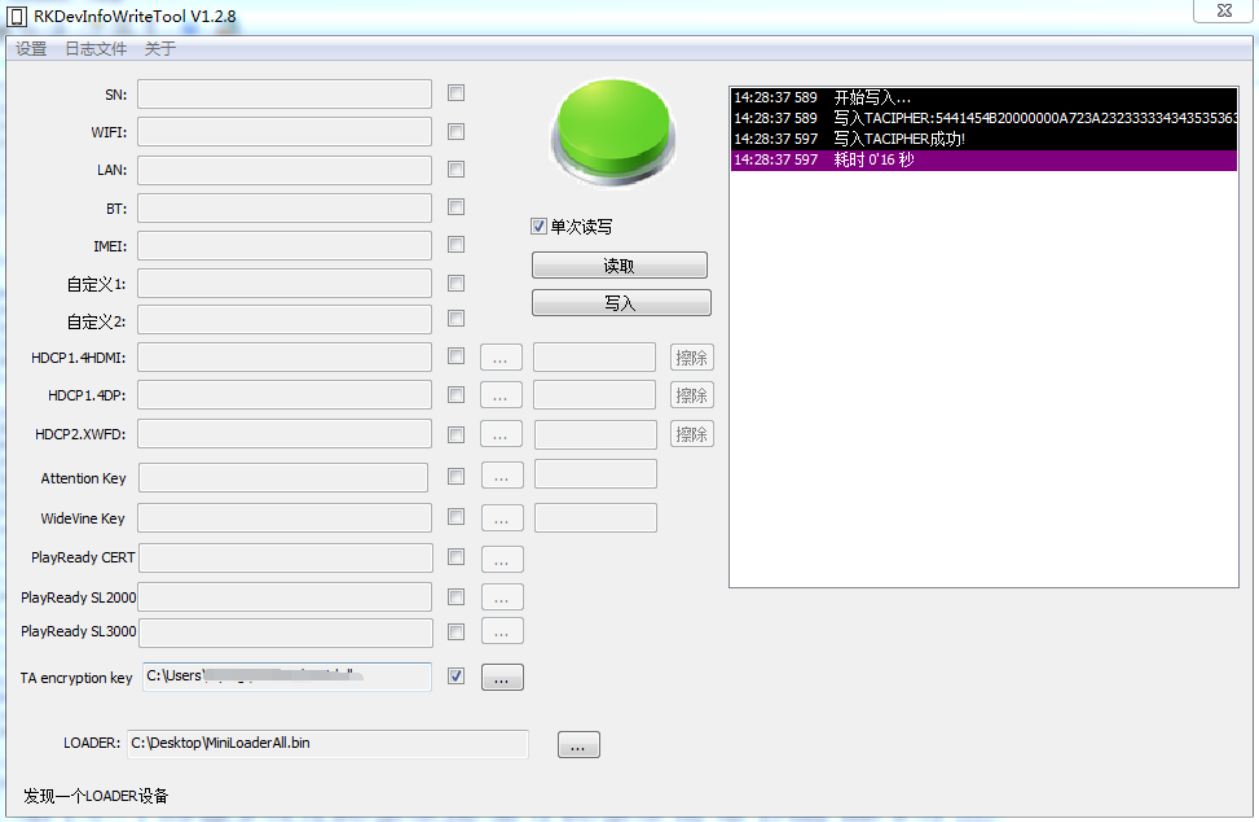
Figure 3: English source page 37
7.3 Decrypt and run the TA
The use of encrypted TA and plaintext TA is exactly the same. OP-TEE OS will automatically recognize that TA is encrypted when loading TA, and OP-TEE OS will automatically read TA encryption key in OTP and decrypt and run TA. This process is automatically completed by OP-TEE OS.
7.4 Soft TA encryption key
If developers do not want to add extra steps to burn the TA encryption key to the device OTP, they can use the Soft TA encryption key, which is a symmetric key built into the TEE binary. If the developer has burned the TA encryption key to the device OTP, the OP-TEE OS will prioritize using the TA encryption key in the OTP to decrypt and run the TA, ensuring high security.
If the developer does not burn the TA encryption key to the device OTP, the OP-TEE OS will use the Soft TA encryption key to decrypt and run the TA, resulting in lower security. Developers need to use tools to replace the Soft TA encryption key in the TEE binary. The required tools can be found in the rk_tee_user project tools/ directory. Command to replace the default Soft TA encryption key in TEE binary:
./change_ta_enc_key --teebin <TEE binary> --takey 'b64d239b1f3c7d3b06506229cd8ff7c8af2bb4db2168621ac62c84948468c4f4'
Tool parameter description: –teebin Provide the TEE binary firmware path. –takey 32 bytes private key for developers, which must be consistent with the key used to encrypt TA.
8 REE FS TA anti-rollback
As described in Built-in TA into Secure Storage, OP-TEE V2 supports plaintext TAs in the non-secure REE FS and TAs in Secure Storage. For a plaintext TA in REE FS, OP-TEE V2 supports anti-rollback to prevent its version being downgraded from the non-secure REE environment.
8.1 TA anti-rollback usage
The TA anti-rollback function of REE FS is always enabled. Developers can use the anti-rollback function by defining the TA version number in the Makefile. If CFG_TA_VERSION is never defined in TA’s Makefile, the system recognizes TA’s version number as 0 and allows TA with the same version number to run. If the Makefile of TA defines that the current CFG_TA_VERSION is greater than 0, as shown in the following example, the rollback of TA version is prevented.
# unsigned integer format
CFG_TA_VERSION=1
9 Solution of optional strong or weak security levels
9.1 Scope
Solution applies to: RK3588, RK3528, RK3562 and subsequent new platforms.
9.2 Notes
Before using this solution, you should be aware of the following. Before downloading the firmware for the first time, confirm that the configuration items of uboot CONFIG_OPTEE_SECURITY_LEVEL configured as required. It only supports configuration once and cannot be modified later. The SDK is security level 0 as defaults. If the development board has already burned the leve0 firmware, burning the leve1 or level 2 firmware may not start properly. Therefore, it is recommended to test with a new device after changing the CONFIG_OPTEE_SECURITY_LEVEL . If using strong-security solution 1, first program OEM HUK using RKDevInfoWriteTool V1.3.5 or later.
9.3 Solution description
The solution supports the configuration of the security level of OP-TEE by the developer, and the protection strength of eMMC/Secure Storage is different for each security levels.
| Security scheme | Description | CONFIG_OPTEE_SECURITY_LEVEL (U-Boot) |
|---|---|---|
| Strong security 2 | The controller is strongly bound to eMMC/secure-storage data. Replacing the controller also requires replacing eMMC and erasing other secure-storage data. | 2 |
| Strong security 1 | The controller is weakly bound to eMMC/secure-storage data. Protection keys derive from the developer-defined OEM HUK. After replacing the controller, the existing eMMC and data remain usable if the same OEM HUK is programmed. | 1 |
| Weak security | The controller is not bound to eMMC/secure-storage data. After replacing it, the existing eMMC and other secure-storage data remain usable. | 0 or not configured |
The difference between the above security levels is due to the difference between eMMC and Secure Storage related keys. The keys related to this solution are described below. HUK: for deriving RPMB Key, Secure Storage Key and other keys. Different HUK for different security levels. See figures below for details. Hard HUK is derived from the Device Root Key. Unique key in chips. Device Root Key was burned into secure OTP when chip is manufactured. OEM HUK is defined by developer and burned into secure OTP by developer. Soft HUK is defined by Rockchip and all chips have the same soft HUK. It is stored in firmware. RPMB Key: the storage protection key of the eMMC chip. Secure Storage Key: the key for secure storage. Other Key: other keys used in OP-TEE.
强安全⽅案2

                                  /------> RPMB Key
Device Root Key ---> Hard HUK ------> Secure Storage Key
                                  \------> Other Key
强安全⽅案1

Device Root Key ---> Hard HUK ------> Other Key

                      /------> RPMB Key
OEM HUK --------------
                      \------> Secure Storage Key

弱安全⽅案

Device Root Key ---> Hard HUK ------> Other Key

                      /------> RPMB Key
Soft HUK --------------
                      \------> Secure Storage Key
10 TA debugging methods
10.1 OP-TEE v1 platforms
When TA encounters a serious error condition, it prints diagnostic information as follows.
user TA data-abort at address 0x2a

 esr 0x92000021  ttbr0 0x400000852fc00   ttbr1 0x00000000   cidr 0x0

 cpu #4          cpsr 0x20000130

#32位平台打印r0-r12, sp, lr, pc(402000a0)
#64位平台打印x0-x30, sp_el0, elr(00000000402000a0)

Status of TA 8cccf200-2450-11e4-abe20002a5d5c52c (0x85109b0) (active)
- load addr : 0x40200000    ctx-idr: 4
- code area : 0x9200000 2097152
- stack: 0x9400000 stack:2048
TEEC_InvokeCommand failed with code 0xffff3024 origin 0x3
The pc or elr in the error condition is the virtual address that caused the exception. The load addr is the virtual address of the TA running in memory. We can know the offset of the exception code in the TA is, elr - load addr = 0x402000a0 - 0x40200000 = 0xa0. In the compiled directory, there is a file named by uuid.dmp in the same directory as the TA. The uuid.dmp is a disassembly file of the TA, which identifies the offset address of each function in the TA. Search for a0 in the uuid.dmp , as follows, where testapp_ta.c:97 indicates that the exception code is on line 97 of testapp_ta.c . The instruction at the exception offset is a0: 681b ldr r3, [r3, #0].
/home/xxx/android/vendor/optee_test/ta/testapp/testapp_ta.c:97
      98:   6823        ldr r3, [r4, #0]
      9a:   2202        movs    r2, #2
      9c:   2161        movs    r1, #97 ; 0x61
9e:   4820        ldr r0, [pc, #128]  ; (120 <TA_InvokeCommandEntryPoint+0xa0>)
a0:   681b        ldr r3, [r3, #0]
a2:   4478        add r0, pc
a4:   3033        adds    r0, #51 ; 0x33
a6:   9301        str r3, [sp, #4]
a8:   4b1e        ldr r3, [pc, #120]  ; (124 <TA_InvokeCommandEntryPoint+0xa4>)
aa:   447b        add r3, pc
ac:   9300        str r3, [sp, #0]
ae:   2301        movs    r3, #1
b0:   f002 fbc0   bl  2834 <trace_printf>
10.2 OP-TEE v2 platforms
When TA encounters a serious error condition, it prints diagnostic information as follows.
E/TC:? 0 User mode data-abort at address 0x2a (translation fault)
E/TC:? 0  esr 0x92000005  ttbr0 0x20000084a7020   ttbr1 0x00000000   cidr 0x0
E/TC:? 0  cpu #1          cpsr 0x20000130

#32位平台打印r0-r12, sp, lr, pc(c00870a4)
#64位平台打印x0-x30, sp_el0, elr(00000000c00870a4)

E/LD:  region  0: va 0xc0004000 pa 0x08600000 size 0x002000 flags rw-s (ldelf)
E/LD:  region  1: va 0xc0006000 pa 0x08602000 size 0x008000 flags r-xs (ldelf)
E/LD:  region  2: va 0xc000e000 pa 0x0860a000 size 0x001000 flags rw-s (ldelf)
E/LD:  region  3: va 0xc000f000 pa 0x0860b000 size 0x004000 flags rw-s (ldelf)
E/LD:  region  4: va 0xc0013000 pa 0x0860f000 size 0x001000 flags r--s
E/LD:  region  5: va 0xc0014000 pa 0x08625000 size 0x001000 flags rw-s (stack)
E/LD:  region  6: va 0xc0015000 pa 0x09201000 size 0x002000 flags rw-- (param)
E/LD:  region  7: va 0xc0087000 pa 0x00001000 size 0x009000 flags r-xs [0]
E/LD:  region  8: va 0xc0090000 pa 0x0000a000 size 0x00c000 flags rw-s [0]
E/LD:   [0] 8cccf200-2450-11e4-abe2-0002a5d5c52c @ 0xc0087000
E/LD:  Call stack:
E/LD:   0xc00870a4
E/LD:   0xc0088b21
E/LD:   0xc008d507
E/LD:   0xc008716c
In the exception output, pc or elr is the address at which the exception occurred. Region 0 through region 8 identify TA segments in memory. The exception address 0xc00870a4 is in region 7, so elr - region 7 : va = 0xc00870a4 - 0xc0087000 = 0xa4 is the offset of the failing instruction within the TA. The uuid.dmp file beside the TA is its disassembly, recording function offsets. Search for a4: a4: 681b ldr r3, [r3, #0] is the instruction at the exception offset, and testapp_ta.c:101 identifies line 101 of testapp_ta.c.
/home/xxx/rk_px30_linux/external/optee_test/ta/testapp/testapp_ta.c:101
      9c:   6823        ldr r3, [r4, #0]
      9e:   2202        movs    r2, #2
      a0:   4d28        ldr r5, [pc, #160]  ; (144 <TA_InvokeCommandEntryPoint+0xc4>)
a2:   4e29        ldr r6, [pc, #164]  ; (148 <TA_InvokeCommandEntryPoint+0xc8>)
a4:   681b        ldr r3, [r3, #0]
a6:   447d        add r5, pc
a8:   447e        add r6, pc
aa:   3533        adds    r5, #51 ; 0x33
ac:   4628        mov r0, r5
ae:   9600        str r6, [sp, #0]
b0:   9301        str r3, [sp, #4]
b2:   2301        movs    r3, #1
b4:   f000 f912   bl  2dc <trace_printf>
10.3 Call stack
To view the entire function call stack as well as the exception address, OP-TEE V2 provides export-ta_arm32/scripts/symbolize.py. OP-TEE V1 does not support this script. Step 1: configure the compiler path required by the script to match your local compiler installation.
#32位TA执⾏
export PATH=/home1/hisping/rk_px30_linux/prebuilts/gcc/linux-x86/arm/gcc-linaro-6.3.1-2017.05-x86_64_arm-linux-gnueabihf/bin:$PATH
export CROSS_COMPILE=arm-linux-gnueabihf-

#64位TA执⾏
export PATH=/home1/hisping/rk_px30_linux/prebuilts/gcc/linux-x86/aarch64/gcc-linaro-6.3.1-2017.05-x86_64_aarch64-linux-gnu/bin:$PATH
export CROSS_COMPILE=aarch64-linux-gnu-
Step 2, execute the script and -d parameter points to the TA compiled directory.
./export-ta_arm32/scripts/symbolize.py -d out/ta/testapp/
Step 3: the script waits for exception output. Copy and paste the exception log to obtain the following result; Call stack is the function call stack.
I/TA: Hello Test App!
E/TC:? 0
E/TC:? 0 User mode data-abort at address 0x2a (translation fault)
E/TC:? 0  esr 0x92000005  ttbr0 0x20000084a7020   ttbr1 0x00000000   cidr 0x0
E/TC:? 0  cpu #1          cpsr 0x20000130
E/TC:? 0  x0  00000000000069ee x1  0000000000000062
E/TC:? 0  x2  0000000000000002 x3  000000000000002a
E/TC:? 0  x4  00000000c0014f30 x5  00000000c0014f40
E/TC:? 0  x6  00000000c0074080 x7  00000000c0074308
E/TC:? 0  x8  00000000c00742e8 x9  00000000c0014f30
E/TC:? 0  x10 0000000000000065 x11 00000000c007f2d8
E/TC:? 0  x12 0000000000000773 x13 00000000c0014f00
E/TC:? 0  x14 00000000c006cb0d x15 0000000000000000
E/TC:? 0  x16 0000000000000000 x17 0000000000000000
E/TC:? 0  x18 0000000000000000 x19 0000000000000000
E/TC:? 0  x20 0000000000000000 x21 0000000000000000
E/TC:? 0  x22 0000000000000000 x23 0000000000000000
E/TC:? 0  x24 0000000000000000 x25 0000000000000000
E/TC:? 0  x26 0000000000000000 x27 0000000000000000
E/TC:? 0  x28 0000000000000000 x29 0000000000000000
E/TC:? 0  x30 0000000000000000 elr 00000000c006b0a4
E/TC:? 0  sp_el0 00000000c0014f80
E/LD:  Status of TA 8cccf200-2450-11e4-abe2-0002a5d5c52c
E/LD:   arch: arm
E/LD:  region  0: va 0xc0004000 pa 0x08600000 size 0x002000 flags rw-s (ldelf)
E/LD:  region  1: va 0xc0006000 pa 0x08602000 size 0x008000 flags r-xs (ldelf)
E/LD:  region  2: va 0xc000e000 pa 0x0860a000 size 0x001000 flags rw-s (ldelf)
E/LD:  region  3: va 0xc000f000 pa 0x0860b000 size 0x004000 flags rw-s (ldelf)
E/LD:  region  4: va 0xc0013000 pa 0x0860f000 size 0x001000 flags r--s
E/LD:  region  5: va 0xc0014000 pa 0x08625000 size 0x001000 flags rw-s (stack)
E/LD:  region  6: va 0xc0015000 pa 0x09201000 size 0x002000 flags rw-- (param)
E/LD:  region  7: va 0xc006b000 pa 0x00001000 size 0x009000 flags r-xs [0] .ta_head .text
.rodata .ARM.extab .ARM.exidx .dynsym .dynstr .hash
E/LD:  region  8: va 0xc0074000 pa 0x0000a000 size 0x00c000 flags rw-s [0] .dynamic .got
.rel.got .data .bss .rel.dyn
E/LD:   [0] 8cccf200-2450-11e4-abe2-0002a5d5c52c @ 0xc006b000 (out/ta/testapp/8cccf200-2450-
11e4-abe2-0002a5d5c52c.elf)
E/LD:  Call stack:
E/LD:   0xc006b0a4 TA_InvokeCommandEntryPoint at ta/testapp/testapp_ta.c:98
E/LD:   0xc006cb0d entry_invoke_command at
/home/zhangzj/secure/optee_3.6.0/optee_os/lib/libutee/arch/arm/user_ta_entry.c:357
E/LD:   0xc00714f3 __ta_entry_c at export-ta_arm32/src/user_ta_header.c:48
E/LD:   0xc006b158 __ta_entry at export-ta_arm32/src/ta_entry_a32.S:20
11 Memory description
11.1 OP-TEE V1
| Platform | TEE_RAM | TA_RAM | SHMEM |
|---|---|---|---|
| RK312x | 1M | 12M | 1M |
| RK322x | 1M | 12M | 2M |
| RK3288 | 1M | 12M | 2M |
| RK3368 | 2M | 24M | 4M |
| RK3328/RK322xH | 2M | 24M | 4M |
| RK3399/RK3399Pro | 2M | 24M | 4M |
Note: The secure OS runs in TEE_RAM. The TA runs in TA_RAM. SHMEM is the shared memory.
11.2 OP-TEE V2
| Platform | TEE_RAM | TA_RAM | SHMEM |
|---|---|---|---|
| RK3326/PX30 | 2M | 4M | 2M |
| RK3358 | 2M | 4M | 2M |
| RK3308 | 2M | 1M | 1M |
| RK1808 | 2M | 1M | 1M |
| RV1109/RV1126 | 760K | 1M | 512K |
| RK3566/RK3568 | 2M | 12M | 2M |
| RK3588 | 2M | 12M | 2M |
| RK3528 | 2M | 4M | 2M |
| RK3562 | 2M | 4M | 2M |
| RV1106 | 1M | 1M | 512K |
Note: The secure OS runs in TEE_RAM. The TA runs in TA_RAM. SHMEM is the shared memory. OP-TEE OS supports printing secure memory info, and developers can view the following information in the startup log.
I/TC: OP-TEE memory: TEEOS 0x200000 TA 0xc00000 SHM 0x200000
I/TC: Primary CPU initializing
I/TC: Primary CPU switching to normal world boot
If the size of the startup log printing does not match the above list, the printing shall prevail.
12 Secure Storage
12.1 Partition
- Secure storage is one of the important functions of OP-TEE OS. It generally used to store private user data. Data is encrypted by OP-TEE OS and then stored in the security partition or rpmb partition or Android/Linux file system. There are three types of TEE secure storage: The first, set storageID=TEE_STORAGE_PRIVATE_RPMB in TA code, then emmc rpmb is used for secure storage. The rpmb size varies for each emmc model, typically 4M. The second, define security partition in parameter.txt and set storageID=TEE_STORAGE_PRIVATE_REE in TA code, then secure storage is stored in the security partition, which is currently available at 512k.
The third, there is no security partition defined in parameter.txt and set storageID=TEE_STORAGE_PRIVATE_REE in TA code, then secure storage is stored in the Android/Linux file system /metadata/tee or /data/vendor/tee or /data/tee directory (please confirm that tee-supplicant has permission to access this directory), and the total space is not limited. The disadvantage is that the device needs to use emmc and uboot cannot define CONFIG_OPTEE_ALWAYS_USE_SECURITY_PARTITION, The security data in the uboot stage should be stored in the EMMC rpmb by default.
-
Secure storage on the Uboot side, please refer to the “TEE Driver in U-Boot” section.
-
Ensure that the device does not lose power while writing secure-storage data. The source reports power-loss protection tests, but does not guarantee file-system integrity. Developers should therefore reduce writes of important data and maintain stable conditions during secure-data operations. In theory, RPMB provides better power-loss protection than security and the Android/Linux file system.
12.2 Performance testing
Original-source test environment: OP-TEE V1, RK3399 in Linux platform, CPU fixed frequency to 1200000, DDR fixed frequency to 200000000.
| Storage area | Data size | Create file | Write | Read | Delete file |
|---|---|---|---|---|---|
| Linux file system | 30K | 16ms | 67ms | 61ms | 19ms |
| Linux file system | 4K | 17ms | 23ms | 13ms | 7ms |
| Linux file system | 1K | 18ms | 16ms | 7ms | 6ms |
| Linux file system | 32 | 23ms | 16ms | 7ms | 7ms |
| security partition | 30K | 97ms | 181ms | 54ms | 277ms |
| security partition | 4K | 101ms | 74ms | 14ms | 101ms |
| security partition | 1K | 104ms | 56ms | 7ms | 64ms |
| security partition | 32 | 103ms | 55ms | 7ms | 73ms |
| rpmb partition | 30K | 20ms | 233ms | 10ms | 7ms |
| rpmb partition | 4K | 20ms | 36ms | 3ms | 6ms |
| rpmb partition | 1K | 22ms | 14ms | 2ms | 6ms |
| rpmb partition | 32 | 27ms | 8ms | 2ms | 6ms |
Original-source test environment: OP-TEE V2, RK356x in Linux platform, CPU fixed frequency to 1416000, DDR fixed frequency to 324000000.
| Storage area | Data size | Create file | Write | Read | Delete file |
|---|---|---|---|---|---|
| Linux file system | 30K | 17ms | 28ms | 3ms | 8ms |
| Linux file system | 4K | 17ms | 11ms | 1ms | 8ms |
| Linux file system | 1K | 18ms | 9ms | 1ms | 8ms |
| Linux file system | 32 | 19ms | 8ms | 1ms | 7ms |
| security partition | 30K | 12ms | 12ms | 4ms | 12ms |
| security partition | 4K | 12ms | 3ms | 1ms | 11ms |
| security partition | 1K | 13ms | 2ms | 1ms | 11ms |
| security partition | 32 | 15ms | 3ms | 1ms | 14ms |
| rpmb partition | 30K | 23ms | 287ms | 16ms | 5ms |
| rpmb partition | 4K | 24ms | 50ms | 7ms | 6ms |
| rpmb partition | 1K | 23ms | 22ms | 5ms | 6ms |
| rpmb partition | 32 | 30ms | 12ms | 5ms | 5ms |
13 OTP description
OTP is One Time Programmable Memory. The OTP region supports multiple reads but only written once. Multiple different OEM Zone areas are reserved in Secure OTP to meet users’ different usage needs.
| OTP type | Description | Supported platforms |
|---|---|---|
| OEM Cipher Key |
This OEM Zone stores a user key that cannot be changed after programming. The programmed key can then be used for encryption/decryption. | rv1126, rv1109, rk3566, rk3568, rk3588, rk3576, rk3528, rk3562, rv1106, rv1103, rv1106b, rv1103b, rk3506, rv1126b |
| Protected OEM Zone |
Only valid Trusted Applications (TA) running in OP-TEE OS can access this OEM Zone. The non-secure world cannot read/write it directly. Example: rk_test. | rk3308, px30, rk3326, rk3358, rk3566, rk3568, rk3588, rv1126, rv1109, rk3528, rk3562, rv1106, rv1103, rk3576, rv1106b, rv1103b, rk3506, rv1126b |
| Non- Protected OEM Zone |
Accessible from U-Boot and UserSpace; data is exposed in non-secure-world memory. | rk3308, px30, rk3326, rk3358, rk3566, rk3568, rk3588, rv1106, rv1103, rk3528, rk3562, rk3576, rv1106b, rv1103b, rk3506 |
For more details, please refer to the document “Rockchip_Developer_Guide_OTP_EN.pdf”
14 TA API description
14.1 Overview
RK provides the following APIs for two purposes: For developers to refer to how to use the TEE Internal APIs For developers to use the APIs directly
14.2 API return value
The return value of APIs are: TEE_SUCCESS: if the function executes successfully TEE_ERROR_BAD_PARAMETERS: if the parameter is wrong Others: see tee_api_defines.h
14.3 API description
14.3.1 Crypto API
14.3.1.1 rk_crypto_malloc_ctx
crypto_ctx_t *rk_crypto_malloc_ctx(void);
Description Request a crypto operation handle resource. Parameters None.
14.3.1.2 rk_crypto_free_ctx
void rk_crypto_free_ctx(crypto_ctx_t **ctx);
Description Release the crypto operation handle. It should be executed to release resources after algorithm is done. Parameters ctx: crypto context
14.3.1.3 rk_hash_crypto
TEE_Result rk_hash_crypto(uint8_t *in, uint8_t *out, uint32_t in_len,
                          uint32_t out_len, uint32_t algo);
Description The hash digest algorithm. If you need to input message multiple times, you can use the rk_hash_begin/update/finish interface. Parameters in: input data in_len: the length of input out: output data out_len: the length of output
algo: algorithm type; supports TEE_ALG_MD5, TEE_ALG_SHA1, TEE_ALG_SHA224, TEE_ALG_SHA256,
TEE_ALG_SHA384, TEE_ALG_SHA512
14.3.1.4 rk_hash_begin
TEE_Result rk_hash_begin(crypto_ctx_t *ctx, uint32_t algo);
Description The hash digest algorithm for multiple, initialization operation. Parameters ctx: crypto context
algo: algorithm type; supports TEE_ALG_MD5, TEE_ALG_SHA1, TEE_ALG_SHA224, TEE_ALG_SHA256,
TEE_ALG_SHA384, TEE_ALG_SHA512
14.3.1.5 rk_hash_update
TEE_Result rk_hash_update(crypto_ctx_t *ctx, uint8_t *in, uint32_t in_len);
Description The hash digest algorithm for multiple, calculates digest of the data input. Parameters ctx: crypto context in: input data in_len: the length of input
14.3.1.6 rk_hash_finish
TEE_Result rk_hash_finish(crypto_ctx_t *ctx, uint8_t *in, uint8_t *out,
                          uint32_t in_len, uint32_t *out_len);
Description The hash digest algorithm for multiple, calculates the digest of the last part and output the digest. Parameters ctx: crypto context in: input data in_len: the length of input out: output data out_len: the length of output
14.3.1.7 rk_cipher_crypto
TEE_Result rk_cipher_crypto(uint8_t *in, uint8_t *out, uint32_t len,
                            uint8_t *key, uint32_t key_len, uint8_t *iv,
                            uint32_t algo, TEE_OperationMode mode);
Description Symmetric encryption/decryption algorithm interface. If you need to input data multiple times, you can use the rk_cipher_begin/update/finish interface. Parameters in: input data len: the length of input out: output data key: the key used for cipher key_len: the length of key, different algo may supports different key lengths iv: initialization vector algo: algorithm type, support the following(OP-TEE V1 does not support the SM algorithm)
TEE_ALG_AES_ECB_NOPAD
TEE_ALG_AES_CBC_NOPAD
TEE_ALG_AES_CTR
TEE_ALG_AES_CTS
TEE_ALG_AES_XTS
TEE_ALG_SM4_ECB_NOPAD
TEE_ALG_SM4_CBC_NOPAD
TEE_ALG_SM4_CTR
TEE_ALG_DES_ECB_NOPAD
TEE_ALG_DES_CBC_NOPAD
TEE_ALG_DES3_ECB_NOPAD
TEE_ALG_DES3_CBC_NOPAD
mode: encryption or decryption mode.
14.3.1.8 rk_set_padding
TEE_Result rk_set_padding(crypto_ctx_t *ctx, int padding);
Description Sets the padding mode for encrypted/decrypted data. Parameters ctx: crypto context padding: see rk_padding_t for supported modes
14.3.1.9 rk_cipher_begin
TEE_Result rk_cipher_begin(crypto_ctx_t *ctx, uint8_t *key, uint32_t key_len,
                           uint8_t *iv, uint32_t algo, TEE_OperationMode mode);
Description The initialization operation of the symmetric encryption/decryption algorithm for multiple. Parameters ctx: crypto context key: the key used for cipher key_len: the length of key, different algo may supports different key lengths iv: initialization vector algo: algorithm type, support the following(OP-TEE V1 does not support the SM algorithm)
TEE_ALG_AES_ECB_NOPAD
TEE_ALG_AES_CBC_NOPAD
TEE_ALG_AES_CTR
TEE_ALG_AES_CTS
TEE_ALG_AES_XTS
TEE_ALG_SM4_ECB_NOPAD
TEE_ALG_SM4_CBC_NOPAD
TEE_ALG_SM4_CTR
TEE_ALG_DES_ECB_NOPAD
TEE_ALG_DES_CBC_NOPAD
TEE_ALG_DES3_ECB_NOPAD
TEE_ALG_DES3_CBC_NOPAD
mode: encryption or decryption mode.
14.3.1.10 rk_cipher_update
TEE_Result rk_cipher_update(crypto_ctx_t *ctx, uint8_t *in, uint8_t *out,
                            uint32_t in_len, uint32_t *out_len);
Description Encrypt/decrypt the input data of symmetric encryption/decryption algorithm for multiple. Parameters ctx: crypto context in: input data in_len: the length of input out: output data out_len: the length of output
14.3.1.11 rk_cipher_finish
TEE_Result rk_cipher_finish(crypto_ctx_t *ctx, uint8_t *out, uint32_t *out_len);
Description Finish the encryption/decryption operation of symmetric encryption/decryption algorithm for multiple. Parameters ctx: crypto context out: output data out_len: the length of output
14.3.1.12 rk_ae_begin
TEE_Result rk_ae_begin(crypto_ctx_t *ctx, uint8_t *key, uint32_t key_len,
                       uint8_t *iv, uint32_t iv_len,
                       uint32_t add_len, uint32_t tag_len,
                       uint32_t payload_len, uint32_t algo, TEE_OperationMode mode);
Description Initialization operations of AES-CCM or AES-GCM algorithms. Parameters ctx: crypto context key: the key for calculation key_len: the length of key, supports 16, 24, 32 iv: initialization vector iv_len: the length of iv add_len: the ADD length of the AES-CCM tag_len: the tag length(bit), AES-GCM supports 128, 120, 112, 104, 96, and AES-CCM supports 128, 112, 96, 80, 64, 48, 32 payload_len: the payload length of the AES-CCM algo: algorithm type, support TEE_ALG_AES_GCM, TEE_ALG_AES_CCM mode: encryption or decryption mode
14.3.1.13 rk_ae_update
TEE_Result rk_ae_update(crypto_ctx_t *ctx, uint8_t *in, uint8_t *out,
                        uint32_t in_len, uint32_t *out_len,
                        rk_ae_update_type_t is_aad);
Description Encrypts/decrypts the input data for AES-CCM or AES-GCM algorithms. Parameters ctx: crypto context in: input data in_len: the length of input out: output data out_len: the length of output is_add: identifies whether there is AAD(Additional Authentication Data)
14.3.1.14 rk_ae_finish
TEE_Result rk_ae_finish(crypto_ctx_t *ctx, uint8_t *in, uint8_t *out,
                        uint8_t *tag, uint32_t in_len,
                        uint32_t *out_len, uint32_t *tag_len);
Description Complete the encryption/decryption operation for AES-CCM or AES-GCM algorithms. Parameters ctx: crypto context in: the last input data in_len: the length of the last input data out: output data out_len: the length of output tag: output tag tag_len: the length of tag
14.3.1.15 rk_gen_rsa_key
TEE_Result rk_gen_rsa_key(rsa_key_t *rsa_key, uint32_t key_len,
                          uint64_t public_exponent);
Description Randomly generate RSA key pairs. Parameters rsa_key: the output RSA key pairs key_len: the length of RSA keys (byte), supports 32, 64, 96, 128, 192, 256, 384, 512 public_exponent: public exponent, supports 3, 65537
14.3.1.16 rk_rsa_crypto
TEE_Result rk_rsa_crypto(uint8_t *in, uint8_t *out, uint32_t len,
                         rsa_key_t *key, uint32_t algo, TEE_OperationMode mode);
Description RSA encryption/decryption algorithms. You can also use the rk_rsa_begin/finish interface. Parameters in: input data
len: the length of input out: output data key: the RSA key algo: the padding mode of RSA, supports:
TEE_ALG_RSAES_PKCS1_V1_5
TEE_ALG_RSAES_PKCS1_OAEP_MGF1_SHA1
TEE_ALG_RSAES_PKCS1_OAEP_MGF1_SHA224
TEE_ALG_RSAES_PKCS1_OAEP_MGF1_SHA256
TEE_ALG_RSAES_PKCS1_OAEP_MGF1_SHA384
TEE_ALG_RSAES_PKCS1_OAEP_MGF1_SHA512
TEE_ALG_RSA_NOPAD
mode: the mode of RSA, supports TEE_MODE_ENCRYPT and TEE_MODE_DECRYPT
14.3.1.17 rk_rsa_sign
TEE_Result rk_rsa_sign(uint8_t *digest, uint8_t *signature, uint32_t digest_len,
                       uint32_t *signature_len, rsa_key_t *key,
                       uint32_t salt_len, uint32_t algo, TEE_OperationMode mode);
Description RSA sign/verify algorithm. You can also use the rk_rsa_begin/finish interface. Parameters digest: digest value signature: the output value of sign, or the input value to be verified digest_len: the length of digest signature_len: the length of signature key: RSA key salt_len: the length of salt, it is optional, if it is 0 then the salt length is equal to the digest length algo: algorithm, see GPD_TEE_Internal_Core_API_Specification, Table 6-4 for details mode: the mode of RSA, supports TEE_MODE_SIGN and TEE_MODE_VERIFY
14.3.1.18 rk_set_sign_mode
TEE_Result rk_set_sign_mode(crypto_ctx_t *ctx, unsigned int mode);
Description Set the RSA sign mode, sign data or sign digest. Parameters
ctx: crypto context mode: SIGN_DATA for signing data and SIGN_DIGEST for signing digest
14.3.1.19 rk_rsa_begin
TEE_Result rk_rsa_begin(crypto_ctx_t *ctx, rsa_key_t *key,
                        uint32_t algo, TEE_OperationMode mode);
Description: Initialize RSA encryption, decryption, signing or verification. Parameters: ctx: operation context; key: RSA key; algo: algorithm padding mode, with permitted algorithms depending on mode (see GPD_TEE_Internal_Core_API_Specification, Table 6-4); mode: supports TEE_MODE_ENCRYPT, TEE_MODE_DECRYPT, TEE_MODE_SIGN and TEE_MODE_VERIFY.
14.3.1.20 rk_rsa_finish
TEE_Result rk_rsa_finish(crypto_ctx_t *ctx, uint8_t *in, uint8_t *out,
                         uint32_t in_len, uint32_t *out_len, uint32_t salt_len);
Description RSA algorithm executed after rk_rsa_begin . Parameters ctx: crypto context in: input data in_len: the length of input out: output data out_len: the length of output salt_len: the length of salt, it is optional
14.3.1.21 rk_gen_ec_key
TEE_Result rk_gen_ec_key(ec_key_t *ec_key, uint32_t key_len, uint32_t curve);
Description: Randomly generate an ECC public/private key pair.
Parameters: ec_key: generated ECC public/private key pair; key_len: key length in bits, supporting 192, 224, 256, 384 and 521; curve: ECC curve, see tee_api_defines.h for supported curves.
14.3.1.22 rk_ecdh_genkey
TEE_Result rk_ecdh_genkey(uint8_t *private, uint8_t *publicx, uint32_t *publicy,
                          uint32_t algo,  uint32_t curve,
                          uint32_t keysize, uint8_t *out);
Description Perform ECDH to negotiate symmetric key. Parameters private: ECC private key publicx: X-coordinate of ECC public key publicy: Y-coordinate of ECC public key
algo: supports TEE_ALG_ECDH_P192, TEE_ALG_ECDH_P224, TEE_ALG_ECDH_P256, TEE_ALG_ECDH_P384,
TEE_ALG_ECDH_P521
curve: ECC curve; supports TEE_ECC_CURVE_NIST_P192, TEE_ECC_CURVE_NIST_P224,
TEE_ECC_CURVE_NIST_P256, TEE_ECC_CURVE_NIST_P384, TEE_ECC_CURVE_NIST_P521. keysize: key length in bits, supporting 192, 224, 256, 384 and 521. out: the derived symmetric key.
14.3.1.23 rk_ecdsa_sign
TEE_Result rk_ecdsa_sign(uint8_t *digest, uint8_t *signature,
                         uint32_t digest_len, uint32_t *signature_len,
                         ec_key_t *key, uint32_t algo, TEE_OperationMode mode);
Description ECDSA sign/verify algorithm. You can also use the rk_ecdsa_begin/finish interface. Parameters digest: input digest signature: output signature, or input signature for verified digest_len: the length of digest signature_len: the length of signature key: ECC key
algo: supports TEE_ALG_ECDSA_P224, TEE_ALG_ECDSA_P256, TEE_ALG_ECDSA_P384 and TEE_ALG_ECDSA_P521. mode: supports TEE_MODE_SIGN and TEE_MODE_VERIFY.
14.3.1.24 rk_ecdsa_begin
TEE_Result rk_ecdsa_begin(crypto_ctx_t *ctx, ec_key_t *key,
                          uint32_t algo,TEE_OperationMode mode);
Description: Initialize ECDSA signing or verification. Parameters: ctx: operation context; key: ECC key; algo: supports TEE_ALG_ECDSA_P224, TEE_ALG_ECDSA_P256, TEE_ALG_ECDSA_P384 and TEE_ALG_ECDSA_P521; mode: supports TEE_MODE_SIGN and TEE_MODE_VERIFY.
14.3.1.25 rk_ecdsa_finish
TEE_Result rk_ecdsa_finish(crypto_ctx_t *ctx, uint8_t *in, uint8_t *out,
                           uint32_t in_len, uint32_t *out_len);
Description ECDSA signs the input digest, or verifies the input digest and signature. Parameters ctx: crypto context in: input digest out: output signature, or input signature for verified in_len: the length of input out_len: the length of output
14.3.1.26 rk_sm2_pke
TEE_Result rk_sm2_pke(uint8_t *in, uint32_t in_len, uint8_t *out,
                      uint32_t *out_len, ec_key_t *key,
                      uint32_t algo, TEE_OperationMode mode);
Description SM2 encryption/decryption. OP-TEE V1 does not support this interface.
Parameters in: input data in_len: the length of input out: output data out_len: the length of output key: SM2 key algo: algorithm, supports TEE_ALG_SM2_PKE mode: mode, supports TEE_MODE_ENCRYPT and TEE_MODE_DECRYPT
14.3.1.27 rk_sm2_dsa_sm3
TEE_Result rk_sm2_dsa_sm3(uint8_t *digest, uint32_t digest_len,
                          uint8_t *signature, uint32_t *signature_len,
                          ec_key_t *key, uint32_t algo, TEE_OperationMode mode);
Description SM2 sign/verify. OP-TEE V1 does not support this interface. Parameters digest: SM3 digest digest_len: the length of SM3 digest, fixed to 32 signature: output signature, or input signature for verified signature_len: the length of signature key: SM2 key algo: algorithm, supports TEE_ALG_SM2_DSA_SM3 mode: mode, supports TEE_MODE_SIGN and TEE_MODE_VERIFY
14.3.1.28 rk_sm2_kep_genkey
TEE_Result rk_sm2_kep_genkey(rk_sm2_kep_parms *kep_parms, uint8_t *share_key,
                             uint32_t share_key_len, uint8_t *conf_out);
Description ECDH algorithm based on SM2. OP-TEE V1 does not support this interface. Parameters kep_parms: SM2 key information, contains the private key of A and the public key of B share_key: output symmetric key share_key_len: the length of share_key conf_out: information for validation
14.3.1.29 rk_mac_crypto
TEE_Result rk_mac_crypto(uint8_t *in, uint8_t *out, uint32_t in_len,
                         uint32_t *out_len, uint8_t *key, uint32_t key_len,
                         uint8_t *iv, uint32_t algo);
Description MAC calculation. You can use the rk_mac_begin/update/finish interface for multiple calculations. Parameters in: input data in_len: the length of input out: output data out_len: the length of output key: MAC key key_len: the length of key iv: initialization vector
algo: MAC algorithm (OP-TEE V1 does not support SM), TEE_ALG_HMAC_MD5, TEE_ALG_HMAC_SHA1,
TEE_ALG_HMAC_SHA256, TEE_ALG_AES_CMAC, TEE_ALG_HMAC_SM3
14.3.1.30 rk_mac_begin
TEE_Result rk_mac_begin(crypto_ctx_t *ctx, uint8_t *key, uint32_t key_len,
                        uint8_t *iv, uint32_t algo);
Description Initialization operation for MAC multiple calculation. Parameters ctx: crypto context key: MAC key key_len: the length of key iv: initialization vector
algo: MAC algorithm (OP-TEE V1 does not support SM), TEE_ALG_HMAC_MD5, TEE_ALG_HMAC_SHA1,
TEE_ALG_HMAC_SHA256, TEE_ALG_AES_CMAC, TEE_ALG_HMAC_SM3
14.3.1.31 rk_mac_update
TEE_Result rk_mac_update(crypto_ctx_t *ctx, uint8_t *in, uint32_t in_len);
Description
For incremental MAC calculation, accumulate input data to calculate the MAC. Parameters: ctx: operation context; in: input data; in_len: input data length.
14.3.1.32 rk_mac_finish
TEE_Result rk_mac_finish(crypto_ctx_t *ctx, uint8_t *in, uint8_t *mac,
                         uint32_t in_len, uint32_t *mac_len, rk_mac_mode_t mode);
Description Input the last part of data and calculate the MAC or Verify the MAC. Parameters ctx: crypto context in: the last part of input data in_len: the length of in mac: mode=RK_MAC_SIGN - output calculate MAC value; mode=RK_MAC_VERIFY - input MAC value that is verified mac_len: the length of mac mode: see mac
14.3.1.33 rk_hkdf_genkey
TEE_Result rk_hkdf_genkey(uint8_t *ikm, uint32_t ikm_len,
                          uint8_t *salt, uint32_t salt_len,
                          uint32_t *info, uint32_t info_len,
                          uint32_t algo, uint32_t okm_len, uint8_t *okm);
Description HKDF key derivation. Parameters ikm: input password ikm_len: the length of ikm salt: input salt salt_len: the length of salt info: input info info_len: the length of info
algo: supports TEE_ALG_HKDF_MD5_DERIVE_KEY, TEE_ALG_HKDF_SHA1_DERIVE_KEY,
TEE_ALG_HKDF_SHA224_DERIVE_KEY, TEE_ALG_HKDF_SHA256_DERIVE_KEY, TEE_ALG_HKDF_SHA384_DERIVE_KEY, TEE_ALG_HKDF_SHA512_DERIVE_KEY. okm_len: requested derived-key length; okm: derived key.
14.3.1.34 rk_pkcs5_pbkdf2_hmac
TEE_Result rk_pkcs5_pbkdf2_hmac(uint8_t *password, uint32_t password_len,
                                uint8_t *salt, uint32_t salt_len,
                                uint32_t iterations, uint32_t algo,
                                uint32_t key_len, uint8_t *out_key);
Description Key derivation by specifying the salt, iteration count and the password. Parameters password: input password password_len: the length of password salt: input salt salt_len: the length of salt iterations: input iteration count algo: algorithm, supports TEE_ALG_PBKDF2_HMAC_SHA1_DERIVE_KEY key_len: the length of key out_key: output key
14.3.2 HW Crypto API
14.3.2.1 rk_user_ta_cipher
TEE_Result rk_user_ta_cipher(rk_cipher_config *config, uint8_t *src, uint32_t len)
Description User TA use hardware Crypto for encryption and decryption. Parameters config: Algorithm parameters, used to configure algorithm type, algorithm mode, key, etc src: Input and output data len: Data length Source code The reference code is located in the rk_tee_user project.
14.3.2.2 rk_keylad_hmac
TEE_Result rk_keylad_hmac(uint32_t algo, enum RK_OEM_OTP_KEYID otp_keyid,
                          uint32_t key_len, uint8_t *msg, uint32_t msg_len,
                          uint8_t *mac, uint32_t *mac_len)
Description User TA uses the specified key in OTP and calls the hardware Crypto for HMAC calculation. Please reference to OTP API to burn the key before calling this interface. Only supported by some platforms, if the interface is not supported, TEE_ERROR_NOT_SUPPORTED is returned. Parameters algo: Algorithm type otp_keyid: Key index in OTP key_len: Key length msg: Input message msg_len: Length of input message mac: Output data mac_len: Length of output data Source code The reference code is located in the rk_tee_user project.
14.3.2.3 rk_keylad_cipher
TEE_Result rk_keylad_cipher(enum RK_OEM_OTP_KEYID otp_keyid,
                            rk_cipher_config *config,
                            uint8_t *src, uint32_t len);
Description User TA uses the specified key in OTP and calls the hardware Crypto for encryption and decryption. Please reference to OTP API to burn the key before calling this interface. Only supported by some platforms, if the interface is not supported, TEE_ERROR_NOT_SUPPORTED is returned. Parameters otp_keyid: Key index in OTP config: Algorithm parameters, used to configure algorithm type, algorithm mode, key length, etc src: Input and output data len: Data length Source code:
Reference code is located in the rk_tee_user project.
14.3.3 TRNG API
14.3.3.1 rk_get_trng
TEE_Result rk_get_trng(uint8_t *buffer, uint32_t size);
Description: User TA obtains hardware-generated random numbers. Only some platforms support this interface; unsupported platforms return TEE_ERROR_NOT_SUPPORTED. Parameters: buffer: output hardware random data; its allocated memory must be at least size bytes; size: requested random-data length. Source code: reference code is in the rk_tee_user project.
14.3.4 Derive Key API
14.3.4.1 rk_derive_ta_unique_key
TEE_Result rk_derive_ta_unique_key(uint8_t *extra, uint16_t extra_size, uint8_t *key,
uint16_t key_size)
Description: User TA obtains a key derived from the hardware unique key. Each chip receives a hardware unique key during production, so keys derived from it are unique. OP-TEE V1 does not support this interface; OP-TEE V1 can use TEE_DerivekeyFromHard instead. Parameters: extra: input data for deriving different keys; extra_size: input data length; key: derived key; key_size: key length. Source code: reference code is in the rk_tee_user project.
14.3.5 OTP API
14.3.5.1 rk_otp_size
TEE_Result rk_otp_size(uint32_t *otp_size);
Description User TA gets the total size of the Protected OEM Zone in secure OTP. Parameters otp_size: return OTP size Source code The reference code is located in the rk_tee_user project. Please refer to the “Protected OEM Zone” section in 《Rockchip_Developer_Guide_OTP_EN.pdf》for details.
14.3.5.2 rk_otp_read
TEE_Result rk_otp_read(uint32_t offset, uint8_t *data, uint32_t len);
Description: User TA reads data from the Protected OEM Zone in secure OTP. Parameters: offset: position offset within the OTP area to read; data: returned OTP data, with allocated space no smaller than len; len: requested read length. Source code: reference code is in the rk_tee_user project. See the Protected OEM Zone section of Rockchip_Developer_Guide_OTP_EN.pdf for details.
14.3.5.3 rk_otp_write
TEE_Result rk_otp_write(uint32_t offset, uint8_t *data, uint32_t len);
Description: User TA writes data to the Protected OEM Zone in secure OTP. Parameters: offset: position offset within the OTP area to write.
data: data to write to OTP; len: data length. Source code: reference code is in the rk_tee_user project. See the Protected OEM Zone section of Rockchip_Developer_Guide_OTP_EN.pdf for details.
14.3.5.4 rk_write_oem_otp_key
TEE_Result rk_write_oem_otp_key(enum RK_OEM_OTP_KEYID key_id,
                                uint8_t *key, uint32_t key_len)
Description User TA burns the key to OTP. Parameters key_id: Key index key: Key to be written into OTP key_len: Length of key Source code The reference code is located in the rk_tee_user project. Please refer to the “OEM Cipher Key” section in 《Rockchip_Developer_Guide_OTP_EN.pdf》for details.
14.3.5.5 rk_is_oem_otp_key_written
TEE_Result rk_is_oem_otp_key_written(enum RK_OEM_OTP_KEYID key_id, bool *is_written)
Description User TA checks if the key has been burned. When the key is locked, this interface will return TEE_ERROR_ACCESS_DENIED error code. Parameters key_id: Key index is_written: 0 not burned, 1 burned Source code The reference code is located in the rk_tee_user project. Please refer to the “OEM Cipher Key” section in 《Rockchip_Developer_Guide_OTP_EN.pdf》for details.
14.3.5.6 rk_oem_otp_key_set_read_lock
TEE_Result rk_oem_otp_key_set_read_lock(enum RK_OEM_OTP_KEYID key_id)
Description User TA locks the key. Once the key is locked, the CPU will not be able to access it, meaning that the software has no right to read or write the key and can only read and use it through hardware Crypto. Only some platforms support lock key. Parameters key_id: Key index Source code The reference code is located in the rk_tee_user project. Please refer to the “OEM Cipher Key” section in 《Rockchip_Developer_Guide_OTP_EN.pdf》for details.
15 PTA description
15.1 Overview
PTA is an application embedded within TEE OS, also known as internal TA. PTA provides APIs to developers for two purposes: Implement features not available in TEE Internal API For developers to refer to calling methods or directly using APIs
15.2 PTA function
15.2.1 Secure Storage
This function is used to store important data, which is encrypted by TEE OS and stored in security partitions, rpmb partitions, and Android/Linux file systems. By default, User TA calls TEE Internal API for secure storage, but U-Boot also needs to store critical data. Therefore, PTA has opened a secure storage interface for it, and the storage area can be selected through parameters within the interface.
15.2.2 OTP R&W
OTP is a one-time storage device that cannot be changed after data is written. The TEE Internal API does not have OTP interfaces, so the PTA implements OTP read and write functions and provides interfaces to the outside world. The PTA OTP interface can be used to program the following data:
| OTP data | Purpose |
|---|---|
| Secure Boot Public Hash | Validate the public key during Secure Boot |
| AVB Attribute Hash | Validate the attribute certificate in the AVB process |
| OEM Cipher Key | Encryption/decryption key for hardware Crypto |
| Non-Protected OEM Zone | Non-sensitive OEM data accessible to the non-secure world |
| Protected OEM Zone | Sensitive OEM data accessible only to the secure world |
| TA Encrypt Key | Decrypt an encrypted TA when TEE OS loads it |
| OEM Encrypt Data | Board-copy protection |
| OEM HUK | OEM hardware-unique key; see the section on selecting strong/weak security |
15.2.3 Hardware Crypto
The TEE Internal API provides software encryption and decryption functions by default, Hardware Crypto encryption and decryption functions are implemented through PTA and provide interfaces to the outside world. The PTA Crypto interface supports DES, TDES, AES, SM4 symmetric encryption and decryption algorithms, and supports the use of specified keys in OTP. The PTA Crypto interface supports HMAC algorithm and allows the use of keys specified in OTP.
15.2.4 Hardware random number
The TEE Internal API does not have a true random number interface, so the PTA implements the function of obtaining true random numbers and provides an interface to the outside world. The PTA TRNG interface supports obtaining true random numbers of any length, which are generated by hardware and meet the requirements of true random numbers.
15.2.5 Hardware unique key derivation
The TEE Internal API does not have a hardware unique key derivation interface, so this function is implemented in PTA and an interface is provided to the outside world. HUK is injected during the production of each chip, HUK is a random number generated by a true random number device, ensuring that the HUK of each chip is different,The key derived from HUK has uniqueness.
15.3 Call PTA method
The source code of U-Boot calling interface refers to u-boot/lib/optee_clientApi, The interface description refers to the Optee Client chapter in the Rockchip_Developer_Guide_UBoot_Nextdev_EN . The source code for UserSpace calling the interface refers to librkcrypto, The interface description refers to Rockchip_Developer_Guide_Crypto_HWRNG_EN.pdf . For User TA, see rk_tee_user for interface source code and the TA API Description section of this document for interface documentation.
16 Reference
ARM TrustZone: https://developer.arm.com/ip-products/security-ip/trustzone GlobalPlatform: https://globalplatform.org/ This website can download CA development API reference documents: TEE Client API Specification TA development API reference document: TEE Internal Core API Specification And other architecture reference documents.