
Complete technical content from the Chinese and English V1.2.0 originals (17 pages each). This ArmSoM platform reference requires checking the SoC OTP/TEE capabilities and matching U-Boot, rk_tee_user and SDK/BSP. No universal kernel version is specified and support is not implied for every ArmSoM board. Platforms are listed per solution. No ArmSoM hardware validation was performed; commands and outputs are vendor examples.
OTP programming and key locking may be irreversible; errors can prevent boot or make data unrecoverable. Publication is not authorization to execute. Validate on dedicated test boards and prepare key-management, recovery and production procedures. No programming, locking or security-configuration command was run. The source §4.4 introduction says mid-level although located in the high-level chapter; this source issue is retained. Tool screenshots in the English PDF also contain Chinese UI labels.
1 Overview
Rockchip chips provide anti-copy-board technology to protect customer firmware, private data and core code. It prevents unauthorized copying and use of firmware/private data and associated commercial loss. Three solutions are described: low-level, mid-level and high-level. Customers may choose any one.
2 Low-level solution
2.1 Principle
Rockchip programs a unique CPUID into each chip OTP during manufacture. Read CPUID and encrypt it with a symmetric Key to obtain ENC-CPUID, which can be stored in vendor storage. After boot, read ENC-CPUID from vendor storage, decrypt it to DEC-CPUID and compare it with CPUID. A mismatch indicates an unauthorized device, which is restarted to prevent copying.
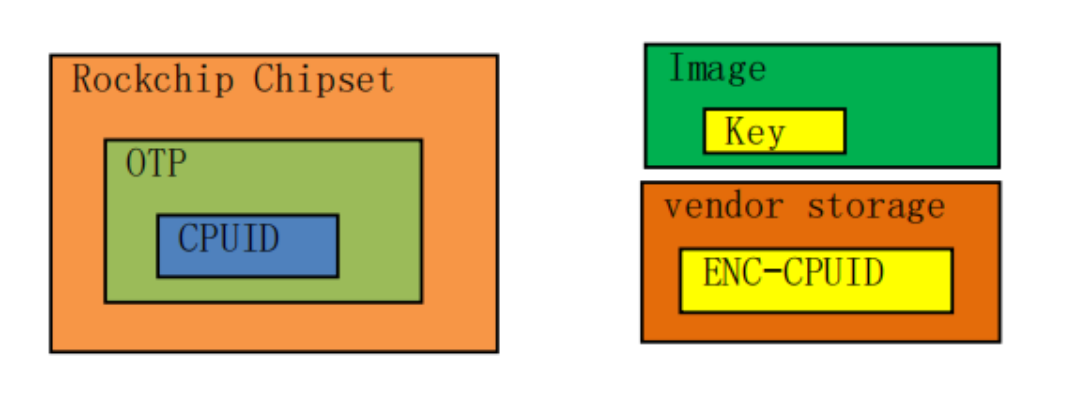
Figure 1: technical diagram/tool screenshot, English source page 4
Security depends on protecting Key. Avoid embedding the plaintext key directly in code; the source recommends obfuscating it before embedding to make disassembly-based recovery harder. ENC-CPUID resides in vendor storage; erasing flash clears that partition and loses ENC-CPUID, so it must be programmed again after erasure.
2.2 Supported platforms
The source states that platforms with on-chip OTP support this solution. Check /sys/bus/nvmem/devices/rockchip-otp0/nvmem: existence of the node is the source criterion for support.
2.3 Usage steps
Steps for the low-level solution:
-
Generate a private symmetric Key, read CPUID from OTP, and encrypt CPUID using Key and AES to obtain ENC-CPUID.
-
Write ENC-CPUID to vendor storage. Obfuscate Key to improve protection and embed the obfuscated key in application code.
-
At runtime, the application reads ENC-CPUID from vendor storage, decrypts it with Key to DEC-CPUID, and reads CPUID.
-
Compare DEC-CPUID and CPUID. Depending on the result, continue normal execution or immediately restart.
2.4 Complete flowchart
Complete flowchart of the low-level solution:
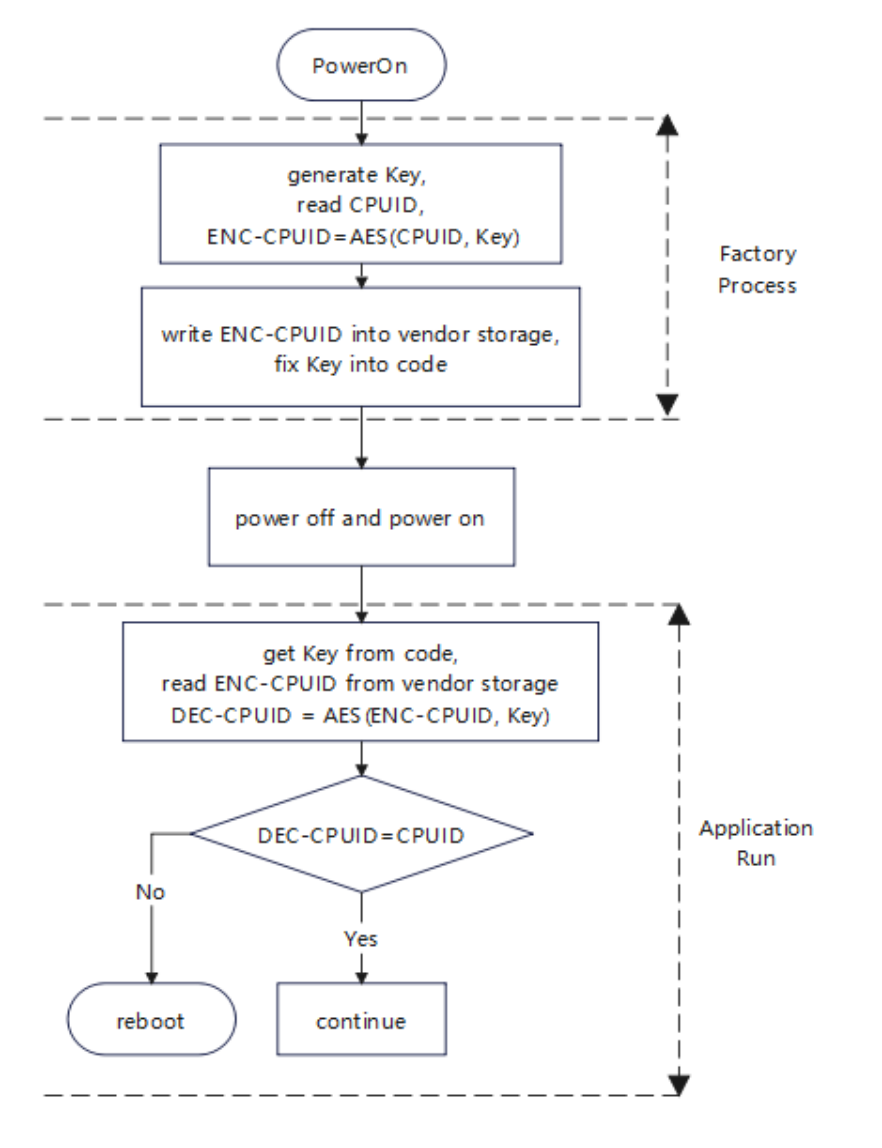
Figure 2: technical diagram/tool screenshot, English source page 6
2.5 Reference example
- Program ENC-CPUID using BoardProofTool. Hold recovery during power-on to enter Loader mode. Create low.bin, edit it in hexadecimal and insert a 32-byte key. Open BoardProofTool.exe, click the key selector (密钥), choose low.bin and click Execute (执行).
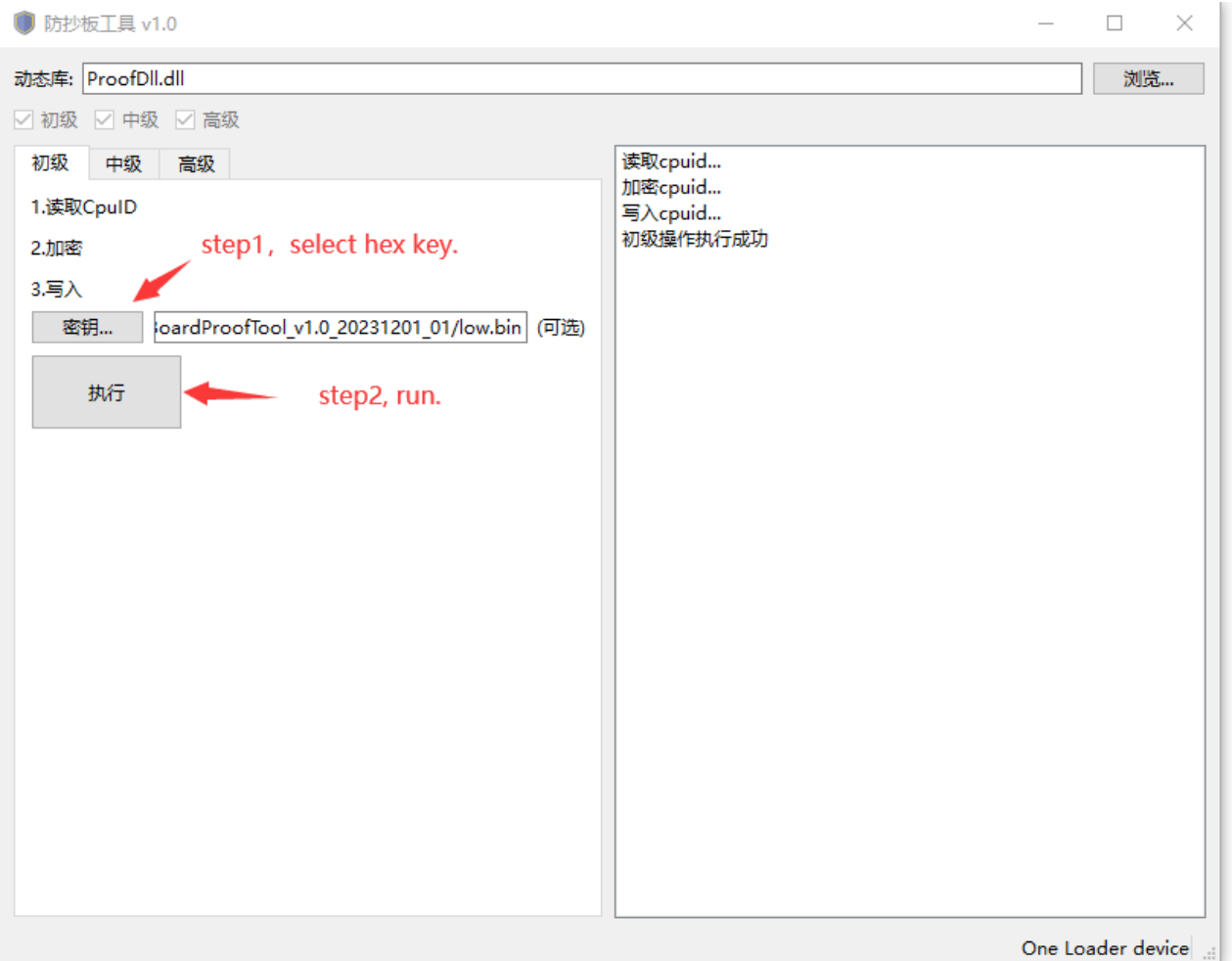
Figure 3: technical diagram/tool screenshot, English source page 7
BoardProofTool calls U-Boot rkusb_do_read_otp to read CPUID, automatically encrypts it with the key to ENC-CPUID, and calls U-Boot vendor_storage_write to store ENC-CPUID.
- Program ENC-CPUID from userspace with rk_anti_copy_board. Sources are in rk_tee_user/v2/host/rk_anti_copy_board. Android build commands:
cd /home1/xxxx/rk_android_13
source build/envsetup.sh
lunch rk3568_t-userdebug
cd /home1/xxxx/rk_android_13/external/rk_tee_user/v2
./build.sh ta
mm

//copy to device
adb push Y:\rk_android_13\out\target\product\rk3568_t\vendor\bin\rk_anti_copy_board /vendor/bin
Linux build commands:
cd /home1/xxxx/rk_px30_linux/external/security/rk_tee_user/v2
rm -rf out/
./build.sh 6432

//copy to device
adb push Y:\rk_px30_linux\external\security\rk_tee_user\v2\out\rk_anti_copy_board\rk_anti_copy_board /usr/bin
Test command:
root@RK3588:/# rk_anti_copy_board low_gen
generate enc_cpuid success!
- Verify device authorization from userspace with rk_anti_copy_board. Test command:
root@RK3588:/# rk_anti_copy_board low_verify
verify success!
3 Mid-level solution
3.1 Principle
OTP reserves space for customer anti-copy data. Generate private DATA and MAC and choose a function func such that MAC = func(DATA). Program DATA into OTP and embed MAC in trusted-application (TA) code. After boot, invoke the TA to read DATA from OTP and check whether DATA and MAC obey the selected relationship. A mismatch indicates an unauthorized device and triggers restart.
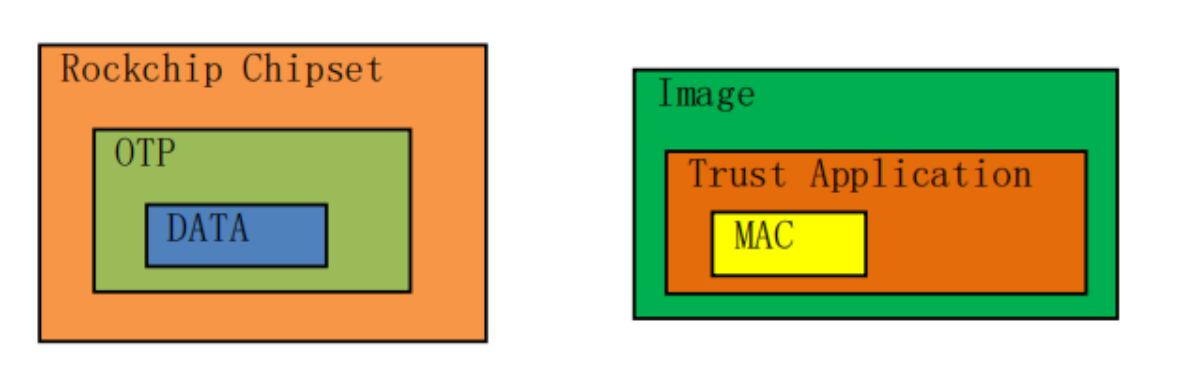
Figure 4: technical diagram/tool screenshot, English source page 8
Security depends on protecting DATA. The kernel cannot read it; only a trusted application can. Follow the TA-signature chapter of Rockchip_Developer_Guide_TEE_SDK_CN.md and sign the TA with your own key to prevent unauthorized TAs from leaking DATA.
3.2 Supported platforms
RV1109, RV1126, RK3566, RK3568, RK3588, RK3528, RK3562, RV1106, RK3576, RV1103B, RK3506, RV1126B
3.3 Usage steps
Steps for the mid-level solution:
-
Generate private DATA, select func and calculate MAC = func(DATA).
-
Program DATA into OTP, develop a TA and embed MAC in its code.
-
The running app calls the TA. The TA reads DATA from OTP, checks DATA against MAC and returns the match result.
-
The app continues normally or immediately restarts according to the match result.
3.4 Complete flowchart
Complete flowchart of the mid-level solution:
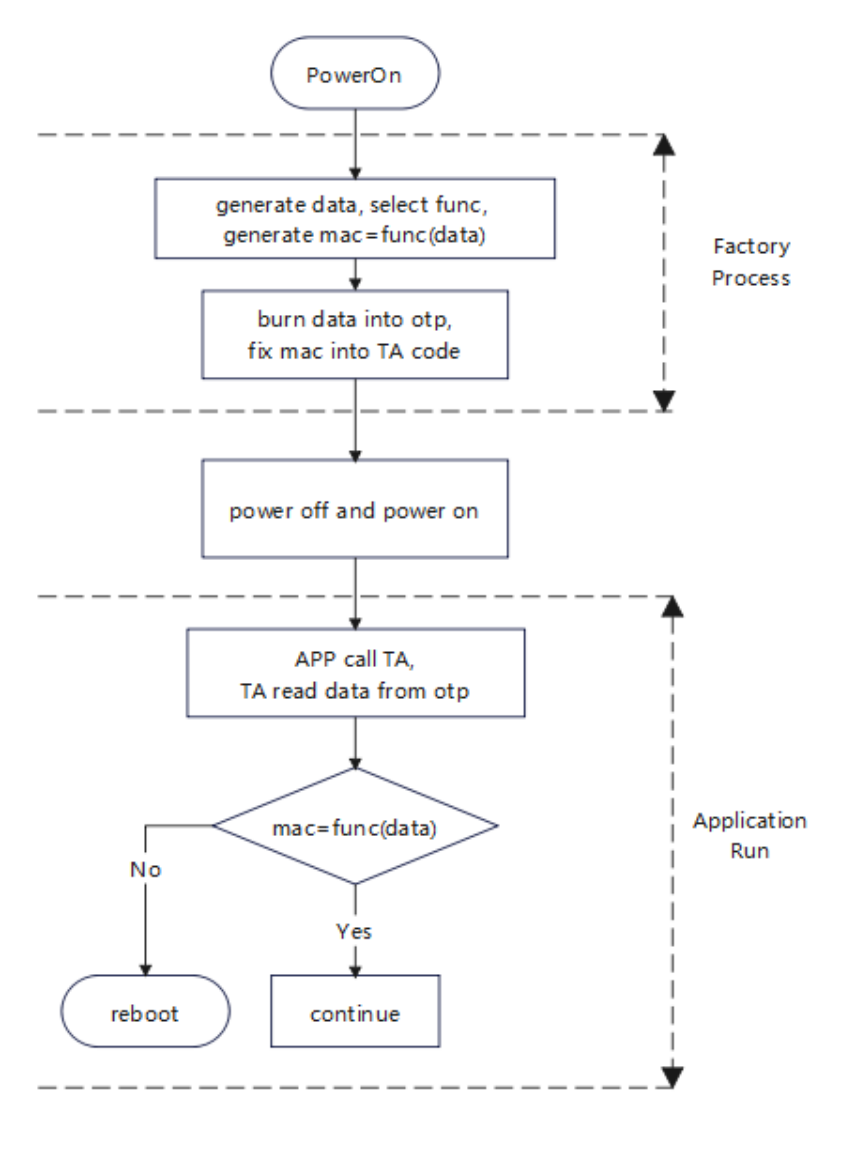
Figure 5: technical diagram/tool screenshot, English source page 10
3.5 Reference example
- Program DATA into OTP with BoardProofTool. Hold recovery during power-on to enter Loader. Create mid.bin in a hex editor containing 16 bytes of private anti-copy data. Select the data file (数据) in BoardProofTool.exe and execute (执行). OTP is one-time programmable: each device can have this private data written only once.
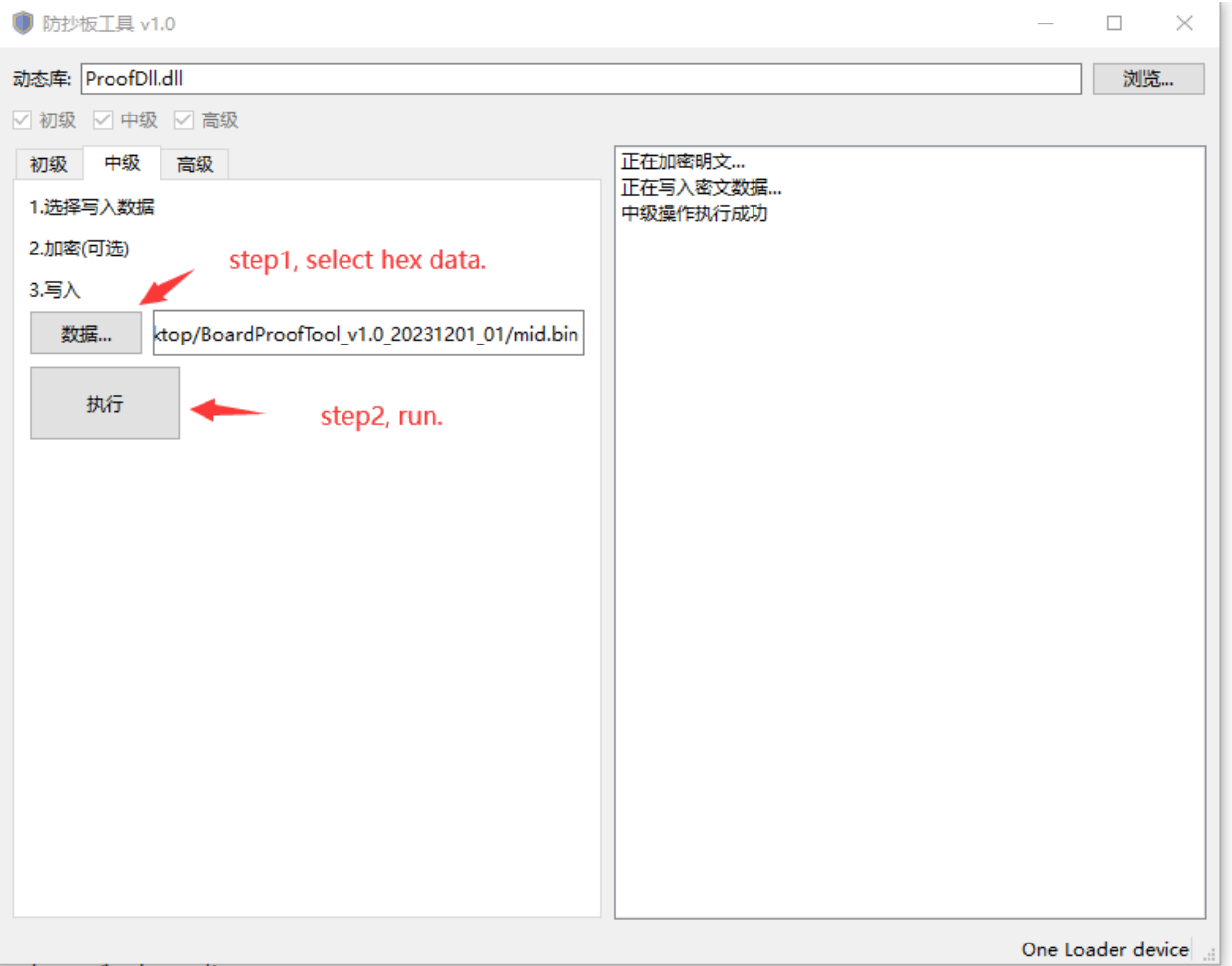
Figure 6: technical diagram/tool screenshot, English source page 11
- Program DATA into OTP from userspace with rk_anti_copy_board. Sources are in rk_tee_user/v2/host/rk_anti_copy_board. Android build commands:
cd /home1/xxxx/rk_android_13
source build/envsetup.sh
lunch rk3568_t-userdebug
cd /home1/xxxx/rk_android_13/external/rk_tee_user/v2
./build.sh ta
mm

//copy to device
adb push Y:\rk_android_13\hardware\rockchip\optee\v2\arm64\libteec.so /vendor/lib64
adb push Y:\rk_android_13\hardware\rockchip\optee\v2\arm64\tee-supplicant /vendor/bin
adb push Y:\rk_android_13\external\rk_tee_user\v2\out\ta\rk_anti_copy_board\3d4fc699-2065-7bb9-33c7-b6529b43c91a.ta /vendor/lib/optee_armtz
adb push Y:\rk_android_13\out\target\product\rk3568_t\vendor\bin\rk_anti_copy_board /vendor/bin
Linux build commands:
cd /home1/xxxx/rk_px30_linux/external/security/rk_tee_user/v2
rm -rf out/
./build.sh 6432

//copy to device
adb push Y:\rk_px30_linux\external\security\bin\optee_v2\lib\arm64\libteec.so.1 /lib64
adb push Y:\rk_px30_linux\external\security\bin\optee_v2\lib\arm64\tee-supplicant /usr/bin
adb push Y:\rk_px30_linux\external\security\rk_tee_user\v2\out\ta\rk_anti_copy_board\3d4fc699-2065-7bb9-33c7-b6529b43c91a.ta /lib/optee_armtz
adb push Y:\rk_px30_linux\external\security\rk_tee_user\v2\out\rk_anti_copy_board\rk_anti_copy_board /usr/bin
Test command:
root@RK3588:/# rk_anti_copy_board mid_gen
save data into OTP success!
- Verify device authorization from userspace with rk_anti_copy_board. Test command:
root@RK3588:/# tee-supplicant &
root@RK3588:/# rk_anti_copy_board mid_verify
I/TA: Hello!
I/TA: verify success!
I/TA: Goodbye!
4 High-level solution
4.1 Principle
OTP reserves space for customer private keys; see OEM Cipher Key in Rockchip_Developer_Guide_OTP_CN.md. This solution relies on an OEM Cipher Key programmed during factory production. To prevent disclosure, the system exposes a programming interface but no read interface. Some platforms also support Hardware Read locking: after locking, the CPU cannot read the key. Choose plaintext data and encrypt it with the private OEM Cipher Key using AES to obtain enc-data. Store enc-data at a specified flash location or embed it in code; configure plaintext data in the app. After boot, decrypt enc-data with OEM Cipher Key to dec-data and compare it with data. Tampering with data/enc-data or copying flash firmware to an unauthorized chip causes a mismatch; the device is then considered unauthorized and restarted.
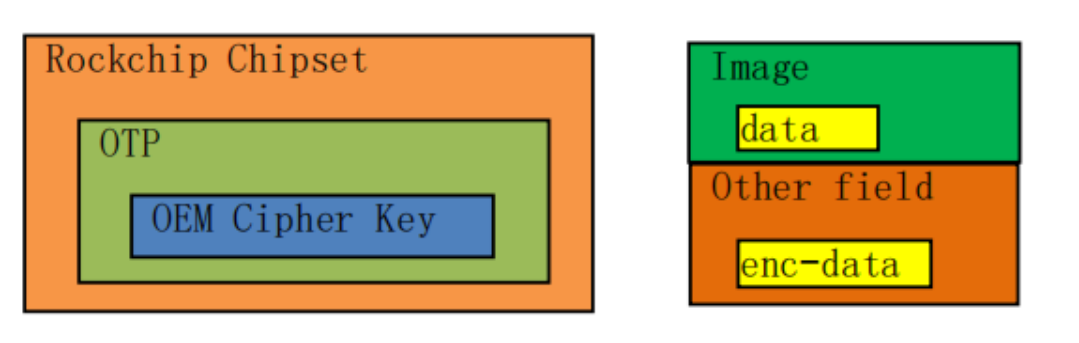
Figure 7: technical diagram/tool screenshot, English source page 13
Advantage: after locking OEM Cipher Key, the CPU cannot read it, improving confidentiality, integrity and tamper resistance.
4.2 Supported platforms
RV1109, RV1126, RK3566, RK3568, RK3588, RK3528, RK3562, RV1106, RK3576, RV1103B, RK3506, RV1126B. Key locking is supported on RK3588, RK3528, RK3562, RK3576, RK3506 and RV1126B.
4.3 Usage steps
Steps for the high-level solution:
-
Generate a private OEM Cipher Key, program it into OTP and lock it.
-
Configure plaintext data in the app code.
-
In the app, encrypt data with OEM Cipher Key to enc-data and store it at a specified flash location or embed it in code.
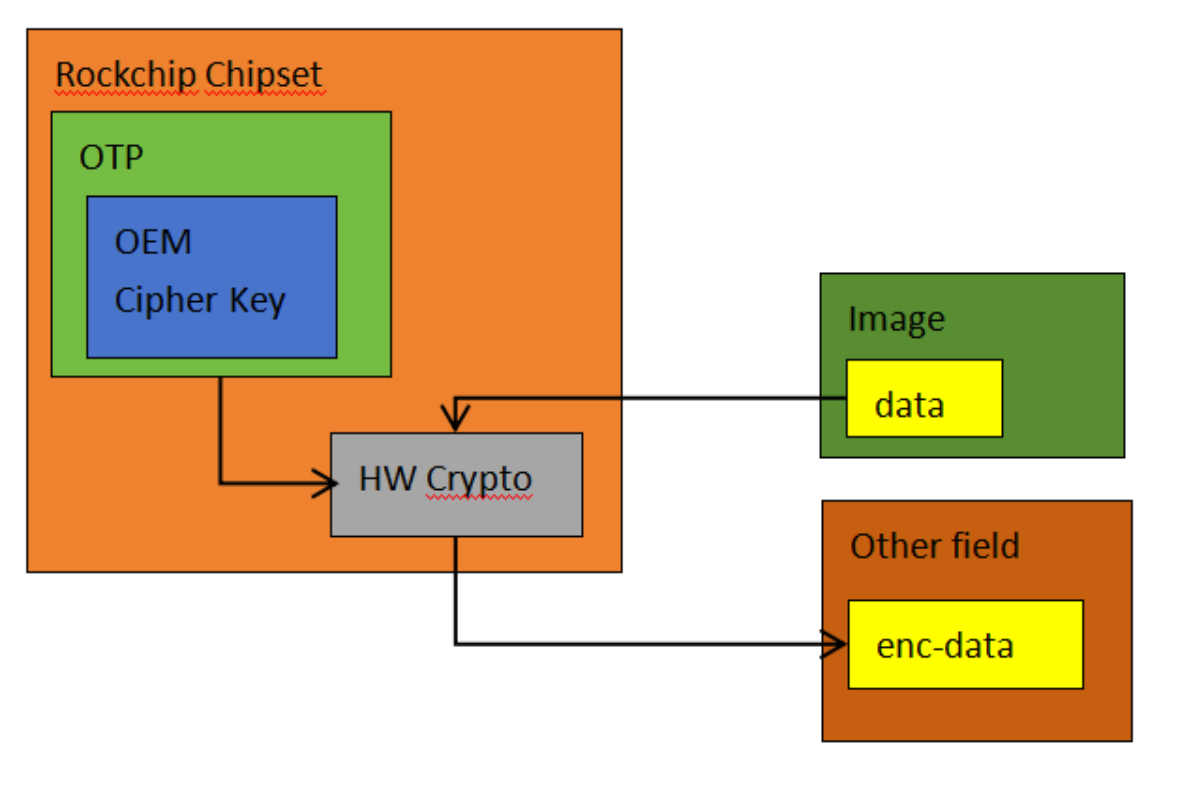
Figure 8: technical diagram/tool screenshot, English source page 14
- After boot, the app decrypts flash enc-data with OEM Cipher Key to dec-data and compares it with plaintext data in its code. Continue normally or immediately restart according to the result.
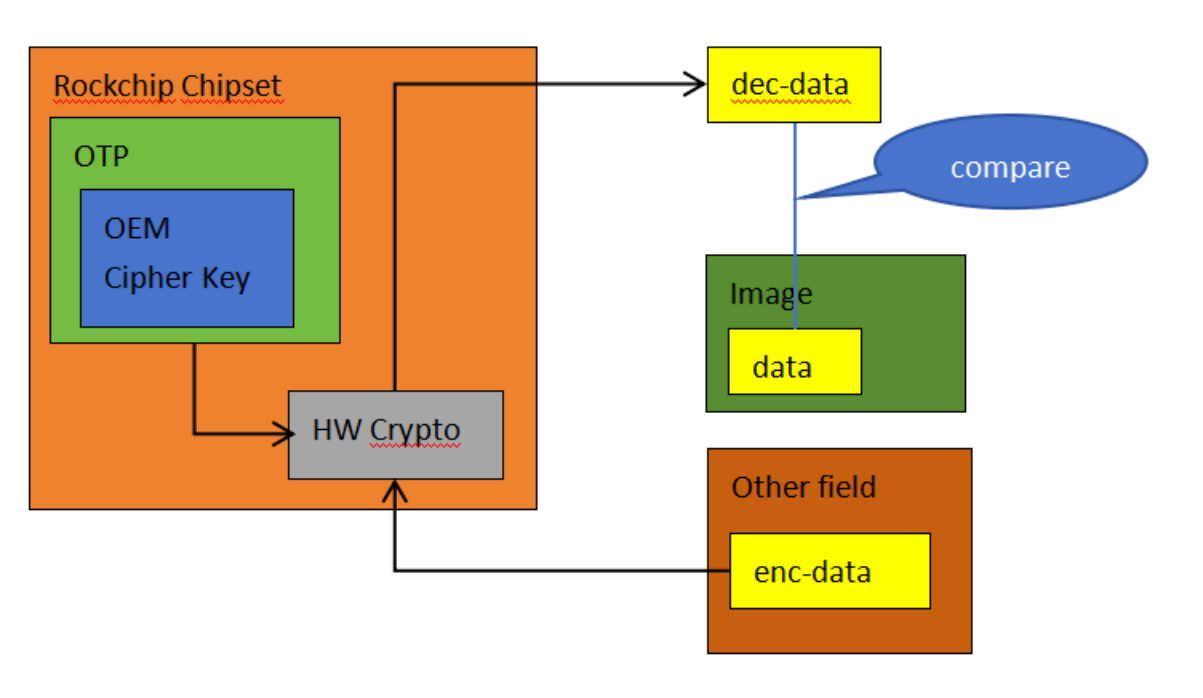
Figure 9: technical diagram/tool screenshot, English source page 14
4.4 Complete flowchart
Complete flowchart of the mid-level (source wording in the high-level chapter) solution:
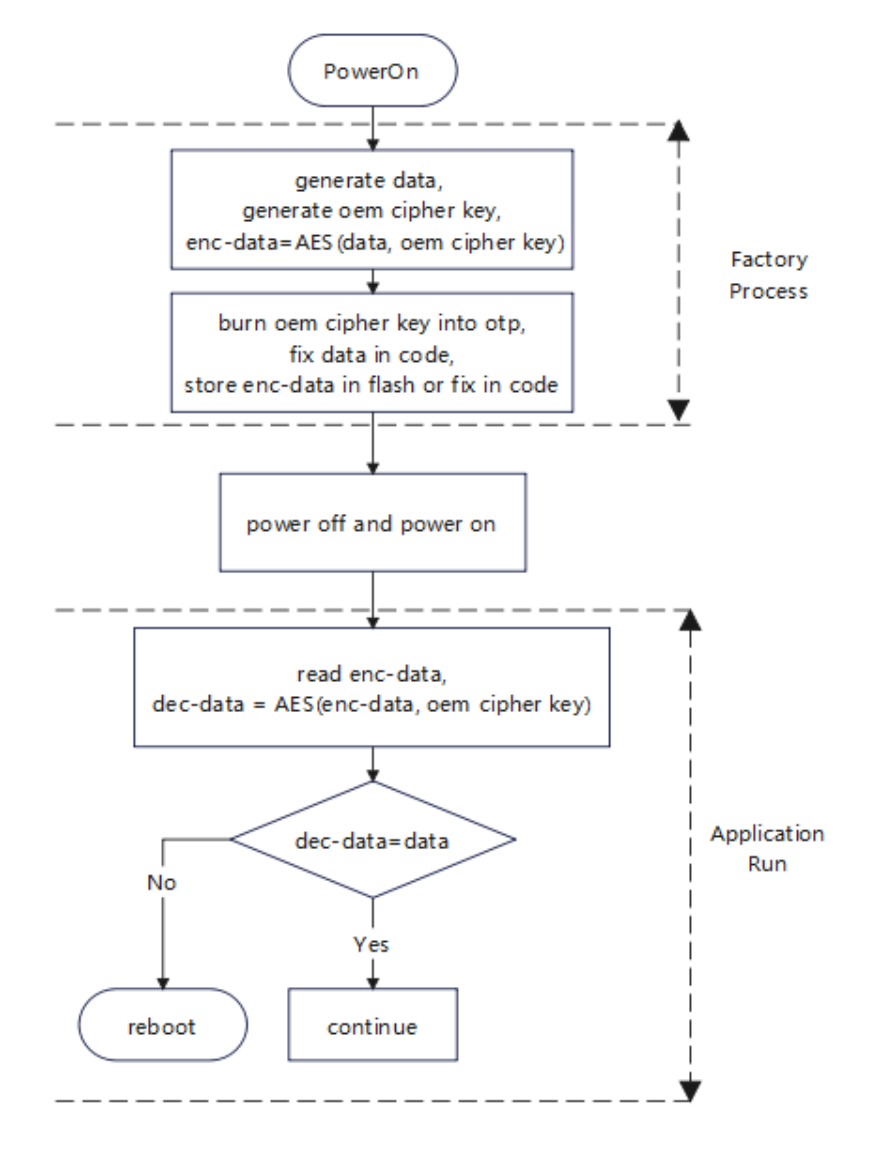
Figure 10: technical diagram/tool screenshot, English source page 15
4.5 Reference example
- Program OEM Cipher Key with BoardProofTool. Hold recovery during power-on to enter Loader. Create high.bin in a hex editor with a 16-byte private OEM Cipher Key (24 or 32 bytes are also supported). In BoardProofTool.exe choose Key Index, select high.bin through the key control (密钥), and execute (执行). OTP is one-time programmable: each device can program a private OEM Cipher Key only once for the same Key Index.
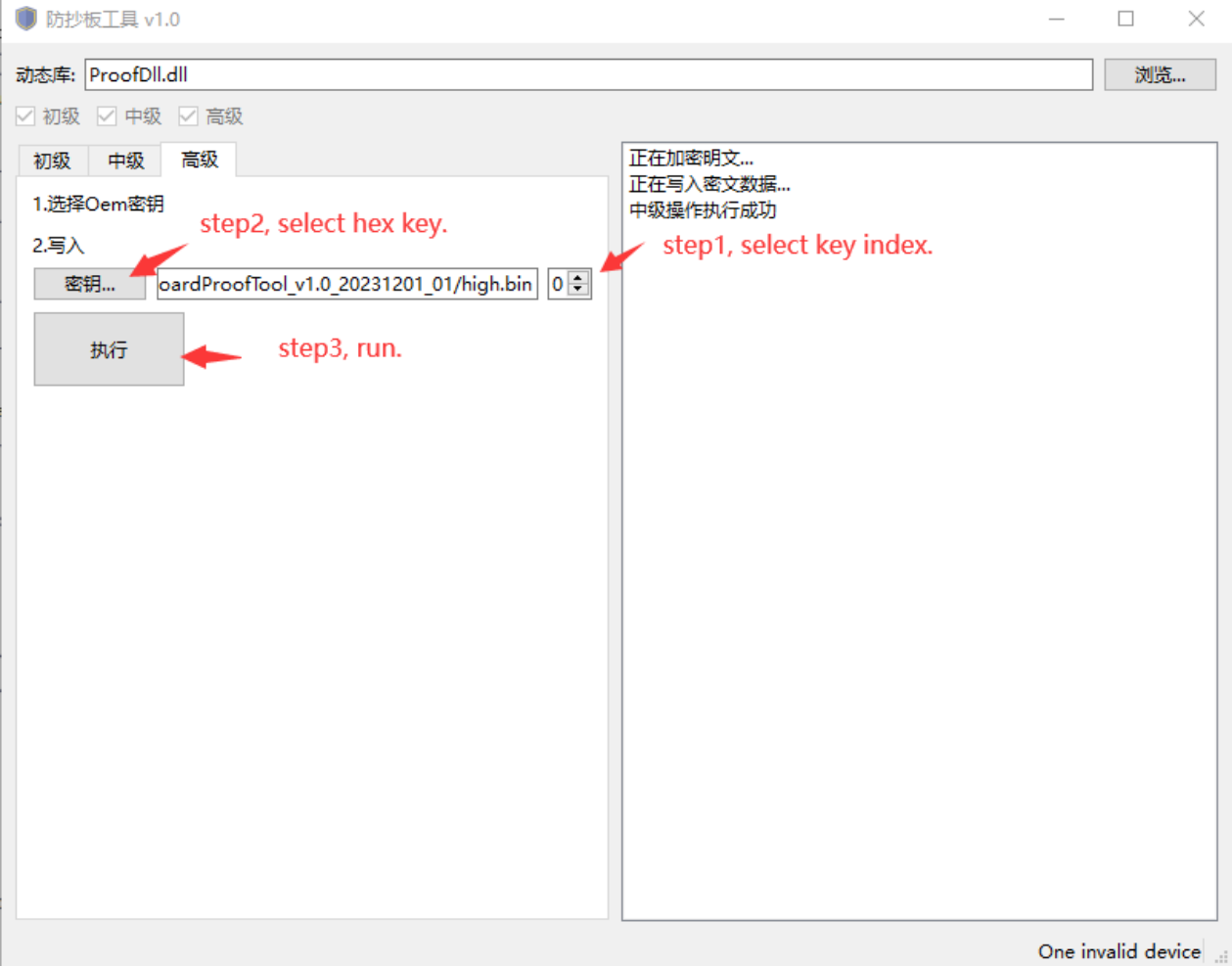
Figure 11: technical diagram/tool screenshot, English source page 16
- Program OEM Cipher Key from userspace using rk_anti_copy_board. Sources are in rk_tee_user/v2/host/rk_anti_copy_board. Build as for the low-level solution; the procedure is not repeated. Test command:
root@RK3588:/# rk_anti_copy_board high_gen
- Verify device authorization from userspace with rk_anti_copy_board. Test command:
root@RK3588:/# rk_anti_copy_board high_verify
4.6 Solution extensions
Extend OEM Cipher Key use as needed. For example, encrypt critical data at rest and decrypt it after boot when needed. Core code can also be encrypted with OEM Cipher Key, then decrypted before execution after boot.
5 Extended security
Combine anti-copy protection with the following security technologies to further reduce copying risk and improve system security.
- Secure Boot: validate firmware at startup, ensure running firmware is unmodified, and prevent unauthorized programs. See Secure Boot documentation for the flow and application steps.
- Firmware encryption: encrypt firmware before programming and decrypt it only during boot, preventing unauthorized access to plaintext flash firmware and disassembly analysis.