
This complete technical reference follows Rockchip V1.0.0. The source scope is RK3588, Linux 5.10, Android12/Android13. It is an ArmSoM platform reference: verify the actual board, SoC, SDK/BSP branch, kernel and peripheral configuration. No board-level hardware validation has been performed; support on every ArmSoM board is not implied.
Chinese follows the 19-page Chinese PDF; English follows the 21-page English PDF and Russian fully translates its technical text. Chinese uses Chinese-source figures; English and Russian use English-PDF figures, including any Chinese UI labels present in those originals. Source conflicts and extraction repairs are recorded in the editorial notes. Code comments and output retain their source language.
Operational risk: key/firmware programming changes device storage and authentication state. Hexadecimal keys are source examples, not production keys; obtain legitimate HDCP keys under the applicable licensing terms. No programming, OTP, authentication or playback tests were performed, and no private keys are included. Source encryption descriptions do not replace SDK-specific or licensing requirements.
Official resources: ArmSoM、Rockchip Linux。
| SoC | Kernel | Android |
|---|---|---|
| RK3588 | Linux 5.10 | Android12 / Android13 |
1. HDCP Overview
The RK3588 platform supports HDCP1.4 and HDCP2.3 for HDMITX, HDMIRX, and DPTX respectively.
The RK3588 platform has two independent HDCP2.3 controllers (hdcp0 and hdcp1), each of which has 3 Ports:
hdcp0: DPTX0 and DPTX1
hdcp1: HDMIRX, HDMITX0, and HDMITX1
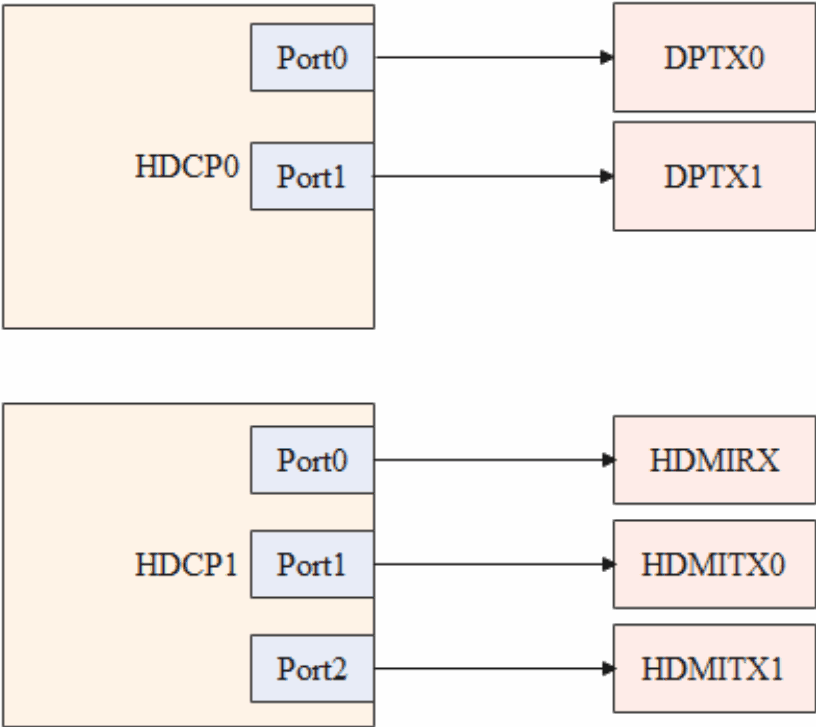
Editable transcription of the figure:
| Controller | Port | Interface |
|---|---|---|
| HDCP0 | Port0 | DPTX0 |
| HDCP0 | Port1 | DPTX1 |
| HDCP1 | Port0 | HDMIRX |
| HDCP1 | Port1 | HDMITX0 |
| HDCP1 | Port2 | HDMITX1 |
HDCP1.4 or HDCP2.3 keys must be purchased by customers directly from the HDCP official website and RK3588 does not have built-in HDCP keys.
2. HDCP Tool Instruction
2.1 HDCP Support for Different Flashing Modes
1. RK provides the corresponding KEY conversion tool and flashing tool, which can be obtained from the SDK:
Key Splitting and Conversion Tool:
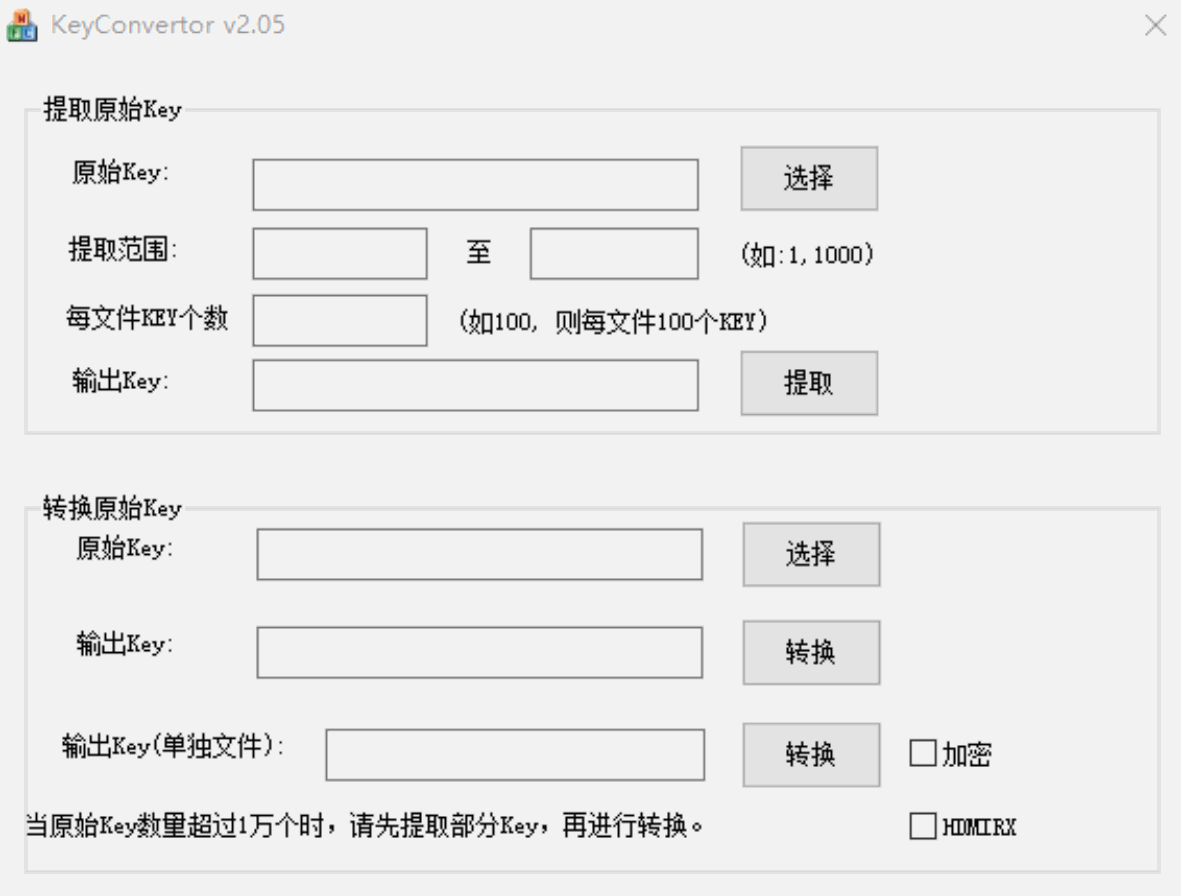
The RKTools/windows/Rockchip_HdcpKey_Writer_V1.0.1.7z toolkit contains split and conversion tools for KeyConvertor key. Updating to KeyConvertor-V2.0.5 allows splitting into a single bin file with one key.
Key Flashing Tool:
RKTools/windows/Rockchip_HdcpKey_Writer_V1.0.1.7z
2. RK provides an encrypted flashing library libhdcp.so. Customers can develop corresponding flashing tools based on their specific requirements. The libhdcp.so library can be obtained via Redmine.
2.2 Differences Between the Two HDCP Flashing Modes
1. The RK-provided flashing tool applies an additional AES encryption on top of the KEY’s SEED encryption, then writes it into the Vendor Storage.
2. The encrypted flashing library libhdcp.so only supports SEED encryption.
2.3 Encrypted Flashing Library libhdcp.so Interface
enum HDCP_KEY_ID {
    HDCP1X_KEY_HDMITX_RK33 = 0,
    HDCP1X_KEY_HDMITX_RK3588,
    HDCP1X_KEY_HDMIRX_RK3588,
    HDCP1X_KEY_HDMIRX_RK628,
    HDCP1X_KEY_DP_RK3588,
    HDCP2X_KEY_HDMIRX_RK3588,
    HDCP2X_KEY_RKIV_RK3588,
};
/*
 * Encrypt the key, but is not written to vendor
 *
 * id: HDCP KEY type
 * keyin: HDCP1.x 308 Byte raw Key, HDCP2.x 1000 Byte Key
 * keyin_size: HDCP1.x 308, HDCP2.x 1000
 * keyout: The encrypted key
 * keyout_size: HDCP1.x 314, HDCP2.x 1000
 */
int hdcp_key_process(enum HDCP_KEY_ID id, uint8_t *keyin, int keyin_size, uint8_t *keyout,
int keyout_size);
/*
 * Encrypt key and write it to vendor
 *
 * id: HDCP KEY type
 * keyin: HDCP1.x 308 Byte raw Key, HDCP2.x 1000 Byte Key
 * keyin_size: HDCP1.x 308, HDCP2.x 1000
 */
int hdcp_key_process_and_write(enum HDCP_KEY_ID id, uint8_t *keyin, int keyin_size);
/*
 * Write key to vendor
 *
 * id: HDCP KEY type
 * key: HDCP1.x 308 Byte raw Key, HDCP2.x 1000 Byte Key
 * size: key size
 */
int hdcp_key_write(enum HDCP_KEY_ID id, uint8_t *key, int size);
/*
 * Read key from vendor
 *
 * id: HDCP KEY type
 * key: HDCP1.x 314 Byte Key, HDCP2.x 1000 Byte Key
 * len: key length
 */
int hdcp_key_read(enum HDCP_KEY_ID id, uint8_t *key, int *len);
/*
 * Write rkiv to vendor
 *
 * rkiv: rkiv
 * len: must be 16
 */
int hdcp_rkiv_write(uint8_t *rkiv, int len);
2.4 HDCP 1.4 Key Encryption
A HDCP 1.4 KEY consists of 308 bytes, as follows: 8 Bytes KSV: 5 Bytes KSV + 3 Bytes 0x0; 280 Bytes DPK; 20 Bytes SHA.
SEED encryption only encrypts the DPK with 280 bytes.
2.5 HDCP 2.3 Firmware Packaging Instruction
The DWC_HDCP2_BASE_ESM_Firmware packaging tool is not included in the SDK, so it requires requesting via Redmine or email from RK.
1. Separate HDMIRX Firmware and Key
Place the RX KEY in the root directory of the packaging tool and the tools directory:
DWC_HDCP2_BASE_ESM_Firmware$
cp ../hdcp_receivers.bin .
cp ../hdcp_receivers.bin tools/
Execute build_rockchip_fw.sh script, and select option 1 - build firmware for both HDMIRX and HDMITX, to generate the ./firmware/hdpc2_hdmi.fw firmware:
1 -build firmware for both HDMIRX and HDMITX
2 -build firmware for HDMITX only
3 -build firmware for DP
Choose the fw type: 1
2. HDMIRX + HDMITX Firmware and Key
Place the RX + TX KEY in the root directory of the packaging tool and the tools directory:
DWC_HDCP2_BASE_ESM_Firmware$
cp ../hdcp_receivers.bin .
cp ../hdcp_receivers.bin tools/
cp ../hdcp_transmitter.bin .
cp ../hdcp_transmitter.bin tools/
Execute the build_rockchip_fw.sh script, and select 1 - build firmware for both HDMIRX and HDMITX, to generate the ./firmware/hdpc2_dp.fw firmware:
1 -build firmware for both HDMIRX and HDMITX
2 -build firmware for HDMITX only
3 -build firmware for DP
Choose the fw type: 1
3. HDMITX Firmware
Place the TX KEY in the root directory of the packaging tool and the tools directory:
DWC_HDCP2_BASE_ESM_Firmware$
cp ../hdcp_transmitter.bin .
cp ../hdcp_transmitter.bin tools/
Execute build_rockchip_fw.sh script, and select 2 - build firmware for HDMITX only, to generate ./firmware/hdpc2_hdmi.fw firmware:
1 -build firmware for both HDMIRX and HDMITX
2 -build firmware for HDMITX only
3 -build firmware for DP
Choose the fw type: 2
4. DPTX Firmware
Place the TX KEY in the root directory of the packaging tool and the tools directory:
DWC_HDCP2_BASE_ESM_Firmware$
cp ../hdcp_transmitter.bin .
cp ../hdcp_transmitter.bin tools/
Execute the build_rockchip_fw.sh script, and select 3 - build firmware for DP, to generate the ./firmware/hdpc2_hdmi.fw firmware:
1 -build firmware for both HDMIRX and HDMITX
2 -build firmware for HDMITX only
3 -build firmware for DP
Choose the fw type: 3
2.6 Firmware and RX KEY Encryption (Optional, not mandatory)
Firmware and RX KEY are encrypted by default using PKf/ DUK. Subsequently, after the HDCP controller loads the Firmware and RX KEY, they are decrypted using PKf/ DUK. The PKf/ DUK is flashed into the OTP at the time of chip production.
To ensure the uniqueness of each customer’s Firmware and RX KEY, the Firmware and RX KEY can be encrypted with an additional layer of AES encryption using the key RKIV during packaging. After the HDCP2 service loads the Firmware and RX KEY, it first performs AES decryption, then transfers the data to the HDCP controller for Kf/ DUK decryption. Specific configurations are as follows:
1. firmware.aic.nouart configuration of the 16-byte RKIV: The RKIV acts as the encryption key, user- definable but must maintain a length of exactly 16 bytes:
--- a/DWC_HDCP2_BASE_ESM_Firmware/firmware/firmware.aic.nouart
+++ b/DWC_HDCP2_BASE_ESM_Firmware/firmware/firmware.aic.nouart
@@ -2,6 +2,7 @@ PKf = 0x00112233445566778899aabbccddeeff
 DUK = 0xffeeddccbbaa99887766554433221100
 IK = 0xffeeddccbbaa99887766554433221100
 IVc = 0xdeadbeeffedcba9876543210
+RKIV = 0x00112233445566778899aabbccddeeff
 BBRcode = 6144
 BBRdwb = 3072
 CLL = 64
2. Call the libhdcp.so library interface to flash RKIV into the vendor storage:
int main(void)
{
    uint8_t rkiv[] = {0x00, 0x11, 0x22, 0x33, 0x44, 0x55, 0x66, 0x77,
                      0x88, 0x99, 0xaa, 0xbb, 0xcc, 0xdd, 0xee, 0xff};
    hdcp_rkiv_write(rkiv, 16);
    return 0;
}
3. If flashing the HDCP2x RX KEY, need to reflash RKIV again.
4. hdcp2_tx_rx must be updated to version 3.4 or higher.
rk3588_t:/ # logcat | grep HDCP2
03-16 07:36:03.988 347 347 D HDCP2 : hdcp2 version v3.4
03-16 07:36:03.988 347 347 D HDCP2 : HDCP Port: 1
03-16 07:36:03.991 347 347 D HDCP2 : Firmware: [1]
3. HDCP1.4 Configuration and Description
3.1 HDMIRX
3.1.1 dts Configuration
Only support HDCP 1.4:
&hdmirx_ctrler {
    status = "okay";
    hdcp1x-enable;
};
Enabling HDCP2.3 also enables HDCP1.4 by default:
&hdmirx_ctrler {
    status = "okay";
    hdcp2x-enable;
};
3.1.2 Key Flashing
3.1.2.1 RK Tool Flashing
Key Split and Conversion Tool obtained from SDK:
The RKTools/windows/Rockchip_HdcpKey_Writer_V1.0.1.7z toolkit contains split and conversion tools for KeyConvertor key. Updating to KeyConvertor-V2.0.5 allows splitting into a single bin file with one key.
Key flashing tool obtained from SDK:
RKTools/windows/Rockchip_HdcpKey_Writer_V1.0.1.7z
First, use the Key Splitting and Conversion Tool to extract specific Keys from the original Key file, then convert the Key into a .skf-suffixed flashing Key.
If not using the tools provided by RK to flash/write, the Key needs to be split into individual files containing one Key each. This can be achieved by entering 1 in the “Number of Keys per file” field during extraction, then clicking Extract to generate individual Key files. No conversion to the .skf format is required.
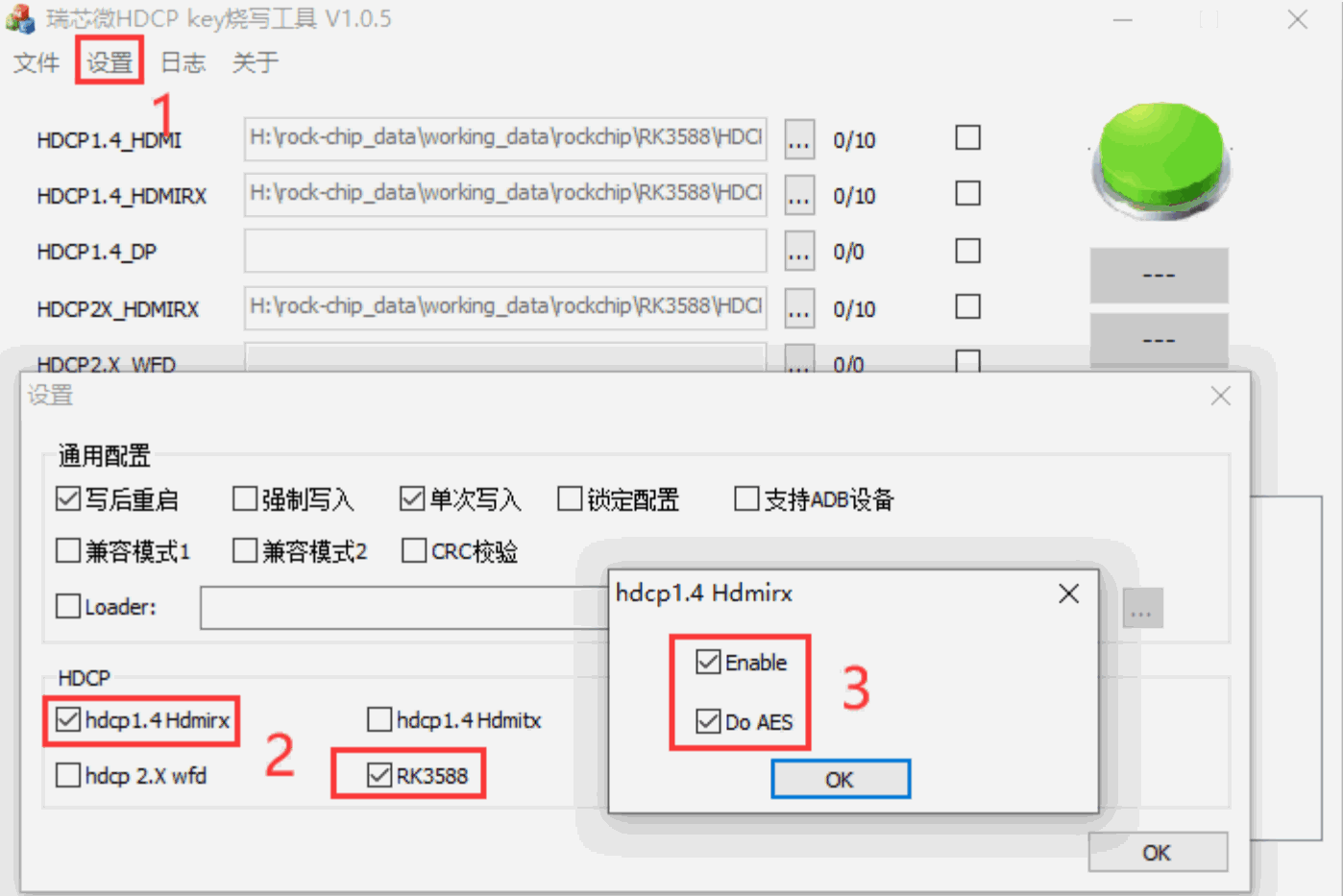
The device enters Loader mode, and the flashing tool selects the “hdcp1.4Hdmirx” and “RK3588” options. The RK3588 HDCP1.4 Key has added AES encryption, so “Do AES” is an optional feature. If unselected, only SEED encryption is applied. Selecting it will perform AES encryption on top of SEED encryption for enhanced security. Then import the above .skf file and click write to complete the Key flashing process.
Note: The tool automatically jumps to the next Key after completing one Key.
3.1.2.2 Customer Self-developed Tool Flashing
You can develop your own application to invoke the libhdcp.so interface, encrypt the KEY, and flash-write to the Vendor Storage.
3.2 HDMITX
HDMI TX HDCP 1.4 does not require special configuration for dts, and the driver is registered by default.
To use normally, the KEY must first be split and converted. The tools and methods used are the same as those for HDMIRX, referring to Section 3.1.2.1.
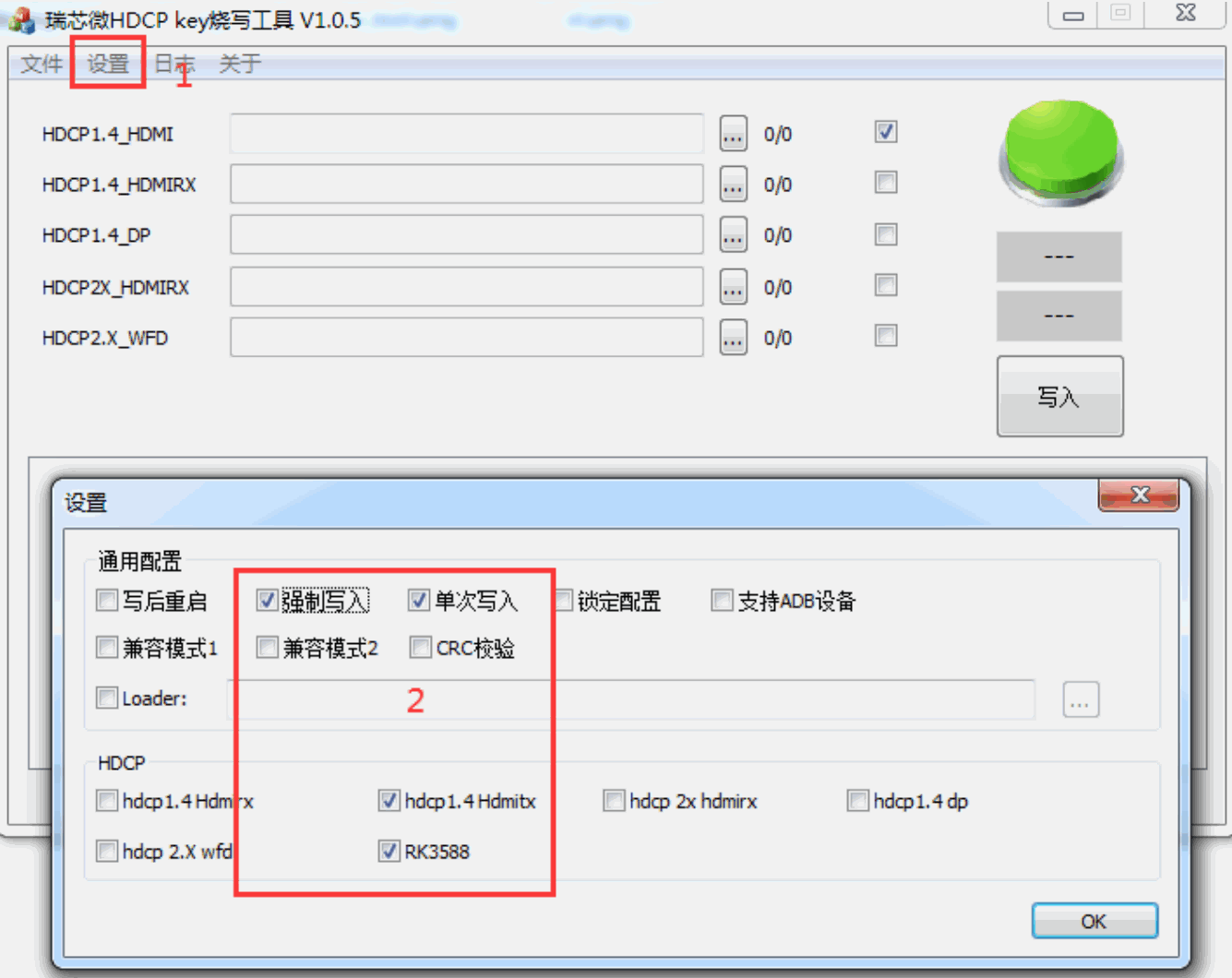
Flashing the KEY uses the same tool as RX. The device enters Loader mode, then click “Settings” in the flashing tool and check the options: “hdcp1.4 Hdmitx”, “RK3588”, “Force Write”, “Single Write”. Afterwards, import the converted .skf file and click “Write” to complete the KEY flashing process.
Note: After completing a Key, the tool automatically jumps to the next Key.
3.3 DPTX
3.3.1 dts Configuration
The DPTX driver natively supports HDCP1.4, and no additional dts configuration is required.
3.3.2 Key Flashing
Key Splitting and Conversion Tool is consistent with HDMI RX, referring to Section 3.1.2.1.
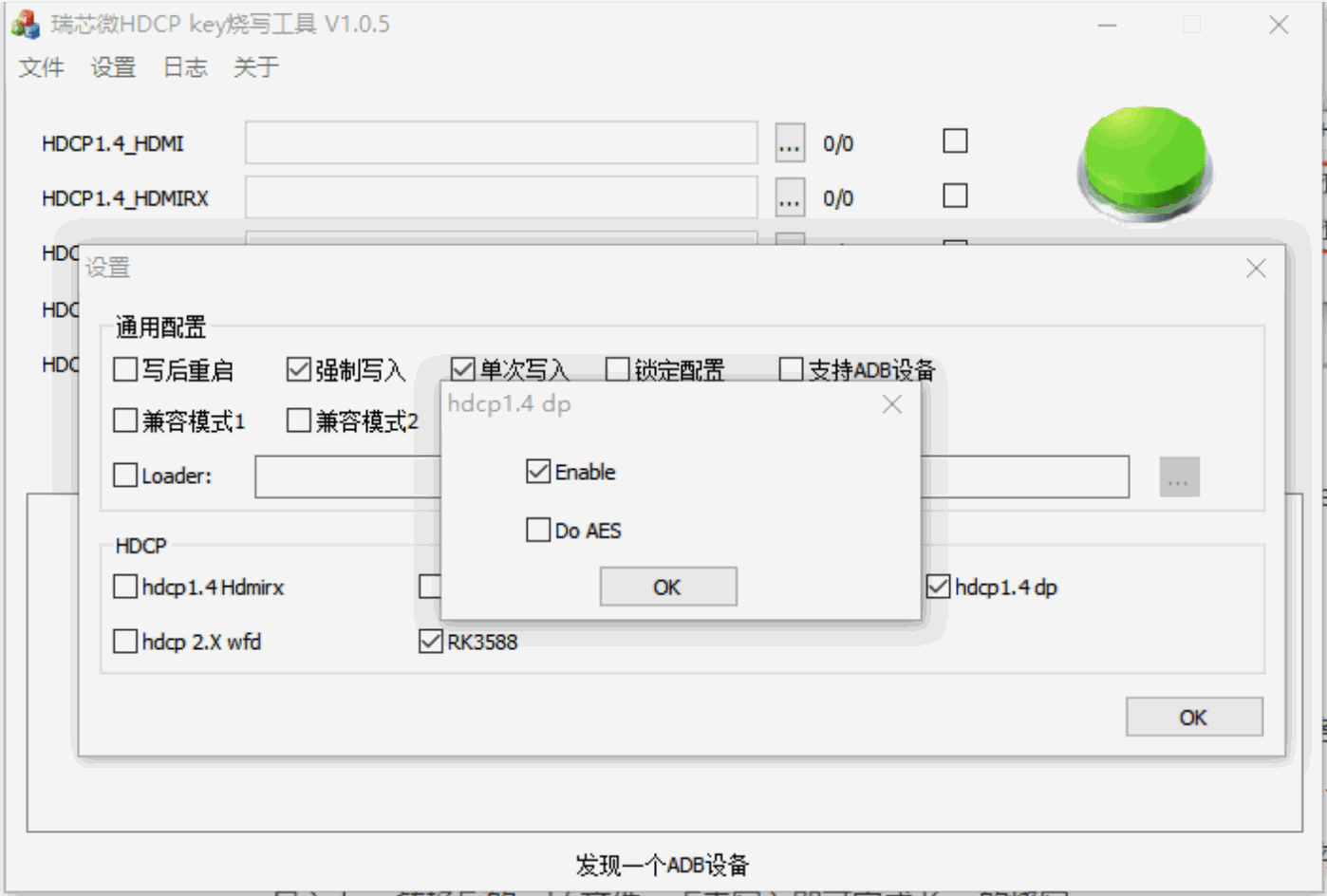
The tools used for flashing the KEY are the same as those for HDMI RX. The device enters Loader mode. The flashing tool clicks Settings and selects the options “hdcp1.4 dp”, “RK3588”, “Force Write”, and “Single Write”. Then import the converted .skf file of the key and click Write to complete the flashing process. Additionally, similar as the RK3588 HDCP1.4 Key, AES encryption has been added, so the “Do AES” option is optional. If unselected, only SEED encryption is applied. If selected, AES encryption is performed on top of the SEED encryption.
4. HDCP2.3 Configuration and Description
4.1 HDMIRX
4.1.1 dts Configuration
Enabling HDCP2.3 will also enable HDCP1.4 by default:
&hdcp1 {
    status = "okay";
};
&hdmirx_ctrler {
    status = "okay";
    hdcp2x-enable;
};
4.1.2 Packaging Firmware and Boot Services
Decompress DWC_HDCP2_BASE_ESM_Firmware into a Linux environment, then copy hdcp_receivers.bin to the root directory and tools/ directory. If HDMI TX support is also required, hdcp_transmitter.bin can be copied to the same directories as well.
DWC_HDCP2_BASE_ESM_Firmware$
cp ../hdcp_receivers.bin .
cp ../hdcp_receivers.bin tools/
Package Firmware and RX KEY, and execute the build_rockchip_fw.sh script
DWC_HDCP2_BASE_ESM_Firmware$ ./build_rockchip_fw.sh
The packaging process will have several steps that prompt for input:
1. Select the firmware type for packaging, choose: 1 -build firmware for both HDMIRX and HDMITX, generating the ./firmware/hdpc2_hdmi.fw firmware.
1 -build firmware for both HDMIRX and HDMITX
2 -build firmware for HDMITX only
3 -build firmware for DP
Choose the fw type: 1
2. The number of RX KEYs to be created should be determined based on requirements, such as 10 or 100, etc. Generate individual KEYs and store them in the fw_hdcp_receivers_*.bin file under the ./rxkeys/hdcpkeys?-?/ directory. If customers use their own tools for flashing, the fw_hdcp_receivers_*.bin file can be directly flashed.
Create Rx Key Number:
10
......
Create 10 keys to tools/rxkeys/hdcpkeys1-10/
3. If RK’s tools are used to flash the KEY, the files must be packaged into a .skf format and stored in the ./rxkeys/hdcpkeys?-?/ directory. If RK’s tool is not needed for flashing, you can select ‘n’ here.
Do want to pack these keys to .skf file? [y/n]:
y
10 file packed to ./rxkeys/hdcpkeys1-10/hdcprxkeys1-10.skf
HDCP2.3 Receiver Key Flashing
1. Place hdcp2_hdmi.fw into the device/rockchip/rk3588/ project directory, which will be copied to vendor/firmware/hdcp2_hdmi.fw during compilation.
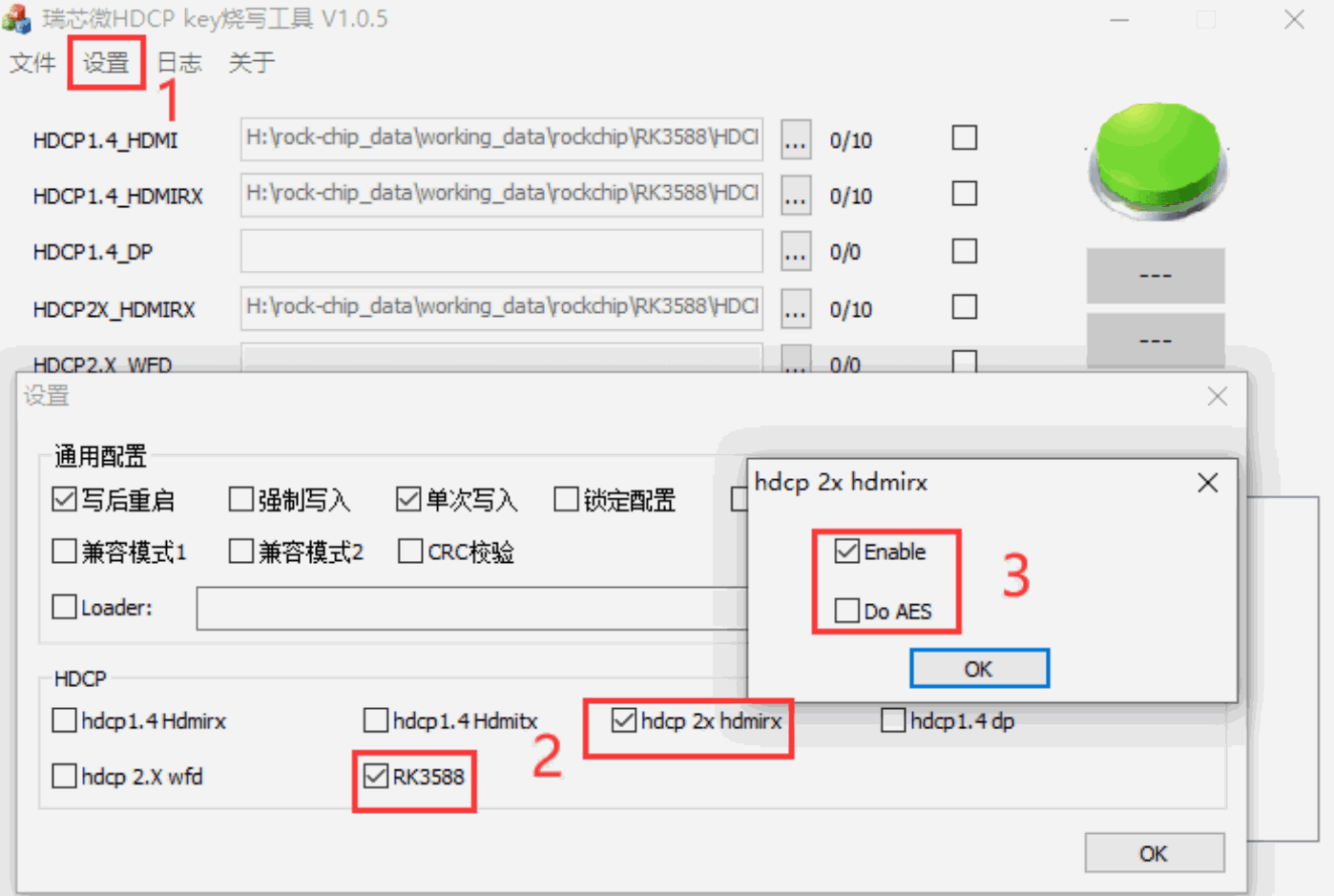
2. Use the RKDevInfoTool.exe tool, select HDCP2X_HDMIRX to import the generated hdcprxkeys1-10.skf, and enter Loader mode for flashing. After flashing one Key, the tool will automatically proceed to the next Key awaiting flashing.
3. The HDCP2.3 Key does not require AES encryption, so only “RK3588” and “hdcp2x hdmirx” need to be selected here.
hdcp2_rx_tx service
Automatically load services at startup. If authentication exceptions occur, you can use logcat | grep HDCP2 to view the corresponding logs.
4.2 HDMITX
4.2.1 dts Configuration
The HDMITX and HDMIRX share a common HDCP module. Enabling HDCP 2.3 will also enable HDCP 1.4 by default:
&hdcp1 {
    status = "okay";
};
Enabling HDMI refers to《Rockchip_Developer_Guide_HDMI_CN》.
4.2.2 Packaging Firmware and Boot Services
Unzip DWC_HDCP2_BASE_ESM_Firmware into a Linux environment, then copy hdcp_transmitter.bin to the root directory and the tools/ directory. If HDMI RX support is also required, hdcp_receivers.bin should also be copied to the same directories.
DWC_HDCP2_BASE_ESM_Firmware$
cp ../hdcp_receivers.bin .
cp ../hdcp_receivers.bin tools/
Package Firmware and TX KEY, and execute build_rockchip_fw.sh script.
DWC_HDCP2_BASE_ESM_Firmware$ ./build_rockchip_fw.sh
The packaging process will have several steps that prompt for input:
Select firmware type for packaging. If supporting both HDMI TX/RX, choose: 1 -build firmware for both HDMIRX and HDMITX. If supporting HDMITX only, choose: 2 -build firmware for HDMITX only. The final generated firmware will be ./firmware/hdpc2_hdmi.fw.
1 -build firmware for both HDMIRX and HDMITX
2 -build firmware for HDMITX only
3 -build firmware for DP
Choose the fw type: 2
hdcp2_rx_tx service
Automatically load services at startup. If authentication exceptions occur, you can use logcat | grep HDCP2 to view the corresponding logs.
4.3 DPTX
4.3.1 dts Configuration
DPTX uses the HDCP0 module to enable HDCP2.3 functionality:
&hdcp0 {
    status = "okay";
};
Enabling HDCP2.3 will also enable HDCP1.4 by default.
4.3.2 Packaging Firmware and Boot Services
Unzip DWC_HDCP2_BASE_ESM_Firmware to a Linux environment, then copy hdcp_transmitter.bin to the root directory and tools/ directory.
DWC_HDCP2_BASE_ESM_Firmware$
cp ../hdcp_receivers.bin .
cp ../hdcp_receivers.bin tools/
Package Firmware and TX KEY, and execute build_rockchip_fw.sh script.
DWC_HDCP2_BASE_ESM_Firmware$ ./build_rockchip_fw.sh
The packaging process will prompt for input:
Select the firmware packaging type: 3 - build firmware for DP, to generate ./firmware/hdpc2_dp.fw firmware.
1 -build firmware for both HDMIRX and HDMITX
2 -build firmware for HDMITX only
3 -build firmware for DP
Choose the fw type: 3
For Android systems, to copy hdcp2_dp.fw to /vendor/firmware/hdcp2_dp.fw, the following patch can be added under hardware/rockchip/hdcp2:
diff --git a/device.mk b/device.mk
index 6d6c328..d7ba0a2 100644
--- a/device.mk
+++ b/device.mk
@@ -82,6 +82,12 @@ ifeq ($(strip $(USE_PRODUCT_HDCP2_HDMI_FW)), true)
         $(LOCAL_PATH)/hdcp2_hdmi.fw:vendor/firmware/hdcp2_hdmi.fw
 endif
+USE_PRODUCT_HDCP2_DP_FW := $(shell test -f $(LOCAL_PATH)/hdcp2_dp.fw && echo true)
+ifeq ($(strip $(USE_PRODUCT_HDCP2_DP_FW)), true)
+ PRODUCT_COPY_FILES += \
+ $(LOCAL_PATH)/hdcp2_dp.fw:vendor/firmware/hdcp2_dp.fw
+endif
+
 #
 # add Rockchip properties here
 #
Place hdcp2_dp.fw into the device/rockchip/rk3588/ project directory. It will be copied to /vendor/firmware/hdcp2_dp.fw during compilation.
For Linux systems, copy hdcp2_dp.fw to /system/etc/firmware/hdcp2_dp.fw.
hdcp2_rx_tx service
For Android systems, the following patches should be added under the hardware/rockchip/hdcp2:
diff --git a/init.hdcp2-host.rc b/init.hdcp2-host.rc
index 5a9bee8..57eef7e 100644
--- a/init.hdcp2-host.rc
+++ b/init.hdcp2-host.rc
@@ -1,7 +1,14 @@
 #on early-boot
 on post-fs
+ start hdcp2_dp
     start hdcp2_hdmi
+service hdcp2_dp /vendor/bin/hdcp2_tx_rx 0
+ class core
+ oneshot
+ disabled
+ group root system net_admin net_bt
+ capabilities DAC_OVERRIDE
 service hdcp2_hdmi /vendor/bin/hdcp2_tx_rx 1
     class core
The service can be automatically loaded at system startup. If authentication anomalies occur, you can use logcat | grep HDCP2 to view the corresponding logs.
5. HDCP Status Check
5.1 HDMIRX
cat /sys/class/misc/hdmirx_hdcp/status
HDCP Disable: HDCP is not enabled
HDCP1.4: Authenticated start: during authentication process
HDCP1.4: Authentication success: Authentication successful
HDCP1.4: Authentication failed: Authentication failed
HDCP1.4: Unknown status: Unknown status
HDCP Disable: HDCP is not enabled
HDCP2.3: Authentication success: Authentication successful
HDCP2.3: Authenticated failed: Authentication failed
HDCP2.3: No dectypted: Source end did not enable HDCP2.x
Source has not enabled HDCP encryption or has not connected to a signal source:
HDCP2.3: No dectypted
HDCP1.4: Unknown status
5.2 HDMITX
The HDMITX status needs to be checked via the DRM PROPERTY. An example of viewing properties using the
modetest -c command:
---------------------------------------------------------------------
Content Protection:
                flags: enum
                enums: Undesired=0 Desired=1 Enabled=2
                value: 2
Undesired: Disable HDCP.
Desired: Enable HDCP.
Enabled: HDCP has been enabled and authenticated successfully.
---------------------------------------------------------------------
HDCP Content Type:
                flags: enum
                enums: HDCP Type0=0 HDCP Type1=1
                value: 0
HDCP Type0: If either HDCP 1.4 or HDCP 2.3 authentication succeeds at any level, normal
video output is permitted.
HDCP Type1: Must be successfully authenticated with HDCP2.3 to output a normal display.
Note: The current version of the driver does not actually support this feature. By default,
any level of successful authentication can output normally, so no configuration is required.
---------------------------------------------------------------------
hdcp_encrypted:
                flags: range
                values: 0 2
                value: 2
HDCP Authentication Level:
    0: HDCP unauthorized.
    1: hdcp1.4.
    2: hdcp2.3.
---------------------------------------------------------------------
5.3 DPTX
The viewing method is the same as HDMITX.
6. Common Issues Analysis
6.1 hdcp2_tx_rx Initialization Failure
View log:
logcat | grep HDCP
Failed to open firmware file [vendor/firmware/hdcp2_hdmi.fw] // indicating the firmware was
not imported
Failed to open firmware driver /dev/hl_dev1 // indicating the hdcp driver is not loaded. The
DTS needs to enable the corresponding hdcp1 node.
07-14 10:53:17.033 2042 2042 D HDCP2 : hdcp2 version v3.0
07-14 10:53:17.033 2042 2042 D HDCP2 : HDCP Port: 1
07-14 10:53:17.034 2042 2042 D HDCP2 : Firmware: [1]
07-14 10:53:17.034 2042 2042 D HDCP2 : 223664 bytes
07-14 10:53:17.034 2042 2042 D HDCP2 : check rx key ok
07-14 10:53:17.034 2042 2042 D HDCP2 : rxkey read from vendor success, rxkey_len = 1000
07-14 10:53:17.034 2042 2042 D HDCP2 : Host Library version V0201
07-14 10:53:17.035 2042 2042 D HDCP2 : Exiting with err=1
If the program exits directly without any error messages, you can manually execute it to check the corresponding error:
console:/ # ./vendor/bin/hdcp2_tx_rx 1 &
[1] 2799
console:/ # device name = /dev/hl_dev1
<INFO> [external/hdcp/host_library/core_lib/host_lib_core.c:1199] [PID:2799] hlInst->driver->instance [0xee2401d0]
<INFO> [external/hdcp/host_library/core_lib/host_lib_core.c:1200] [PID:2799] hlInst->driver
[0xff8088f0:223664]
<WARN> [external/hdcp/host_library/core_lib/host_lib_core.c:1206] [PID:2799] Error in
file:external/hdcp/host_library/core_lib/host_lib_core.c, functio]
<ERROR> [external/hdcp/host_library/core_lib/host_lib_core.c:137] [PID:2799]
hostlib_init_mem failed
Failed HLC_Initialize, error -6
The logs of this type are caused by firmware packaging issues, which may be due to incorrect
KEY, improper DUK/PKf configuration, or incorrect packaging method. Refer to [HDCP 2.3
Firmware Packaging Instruction].
HLC_HDCPRX_LoadRxDwb failed // Indicates RX KEY is incorrect
6.2 HDMIRX Black Screen or Green Screen Unrecoverable After Unplug-and-Plug
First confirm whether the hdcp2x-enable in the dts is enabled. Check the value by running cat /sys/class/misc/hdmirx_hdcp/enable to see if it is set to 2.
If hdcp2x-enable is enabled, the hdcp2_tx_rx service must be loaded, otherwise, it may result in black screen or green screen. You can confirm this by executing logcat | grep HDCP2 .
If hdcp2_tx_rx has already been loaded, it is necessary to confirm whether it exited abnormally. Also use logcat | grep HDCP2 to verify.
echo 0 > /sys/class/misc/hdmirx_hdcp/enable resumes normal operation afterward, confirming the issue mentioned above.
6.3 Simultaneously enabling HDCP2.3 on HDMITX + HDMIRX, when unplugging RX, TX flashes a distorted screen
Because HDMIRX and HDMITX share the HDCP2.3 controller, unplugging RX during preview will reset the controller, causing an HDCP2.3 controller abnormality. Upon detecting the controller abnormality, hdcp2_tx_rx will reinitialize and perform re-authentication, resulting in a short screen artifact. It is recommended not to enable HDCP2.3 for both TX and RX simultaneously.