
Based on Rockchip RK-YH-YF-921, Chinese and English V1.2.1 (2024-01-16), retaining technical chapters 1–12. Chinese is the baseline; English additions and discrepancies are identified below. This ArmSoM platform reference requires checking the actual SoC, board, SDK/BSP, kernel and peripherals. No commands or hardware tests were executed. Code blocks preserve source commands, comments and gst-inspect output; their defaults and ranges describe the source version.
| System | GStreamer version |
|---|---|
| Buildroot | 1.22.x |
| Debian 10 (Buster) | 1.14.4 |
| Debian 11 (Bullseye) | 1.18.5 |
| Yocto | 1.20.x |
1. Introduction to Gstreamer
GStreamer is an open source multimedia framework. Currently, the multimedia of all Linux SDK (except IPC) mainly uses GStreamer to connect apps and codec components. Using the powerful features of the GStreamer plug-in, the written GStreamer plug-in is adapted to Rockchip hardware, so that the app can use hardware codec for acceleration.
1.1 GStreamer video codec adaptation scheme
As shown in the figure below, take video playback as an example to illustrate the basic process of video encoding, decoding and display on the Rockchip platform:
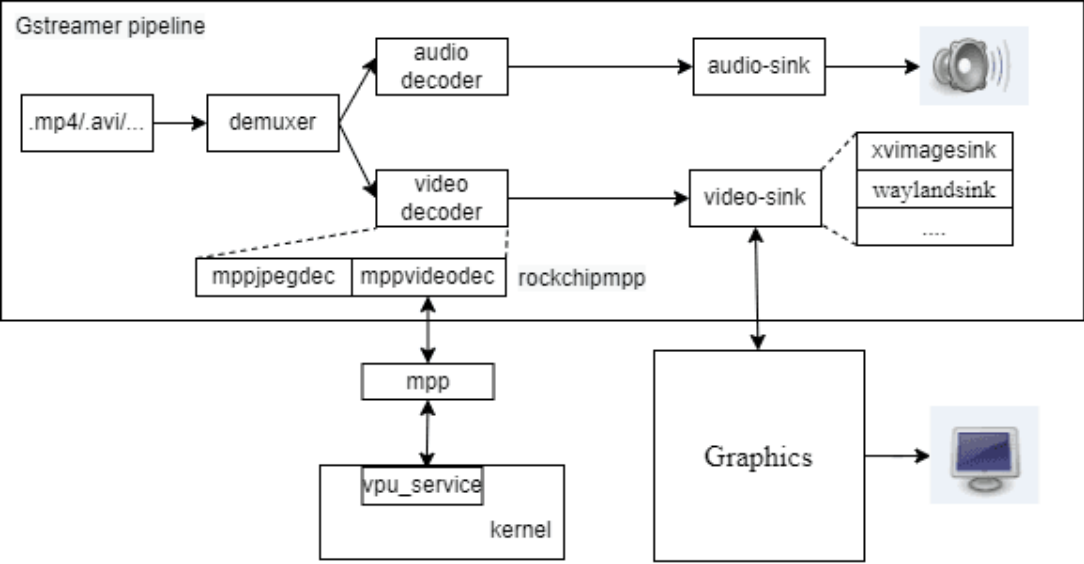
The video file (such as mp4) is first decapsulated into video (such as h264, h265 encoding) and audio stream by demuxer, and the video stream is decoded by video decoder (such as mppvideodec and mppjpegdec); the audio stream is decoded by audio decoder, and finally the decoded video data is sent to display through the display plug-in (such as xvimagesink, waylandsink, etc.), and the decoded audio data is sent to the sound card to play the sound through the audio playback plug-in (alsasink, etc.). The Rockchip platform implements hardware acceleration for video encoding and decoding through the rockchipmpp plug-in, including decoding plug-ins: mppvideodec and mppjpegdec; encoding plug-ins: mpph264enc, mppvp8enc, mppjpegenc, etc. GStreamer will call the rockchipmpp plug-in first in the video decoding stage. The general process is as follows: plug-ins such as mppvideodec call the API provided by MPP, and MPP is the video codec middleware of the Rockchip platform and will call the vpu driver (vpu_service). The hardware codec function can also be tested directly through the test demo provided by MPP (such as mpi_dec_test\mpi_enc_test…). The decoded video data is sent to the display device through display plug-ins (such as xvimagesink, waylandsink, etc.) for display. Different display plug-ins call different display architecture API to connect with different display architectures. For example, xvimagesink will call the API of X11 to connect to the X11 display architecture, and waylandsink calls the API of Wayland connects to the Wayland display architecture, etc.
Display related specific refer to SDK Documentation Rockchip_Developer_Guide_Linux_Graphics_EN.pdf MPP source code refer to <SDK>/external/mpp/ ,MPP related documentation refer to <SDK>/docs/Linux/Multimedia/Rockchip_Developer_Guide_MPP_EN.pdf test demo refer to: <SDK>/external/mpp/test
2. Source Code and Build
2.1 Path of the Source Code
Buildroot: The source code of Gstreamer and related plug-ins can be downloaded from the network, and then apply the patches provided by RK. For details, please refer to <SDK>/buildroot/package/gstreamer1/ . Debian: Search in Debian Repository to download the source code in Debian, and apply the patches provided by Rockchip, version 1.14.4 for debian10 and version 1.18.5 for debian11. Gstreamer-rockchip: The source code of the MPP plugin and rkximagesink is in the directory: <SDK>/external/gstreamer-rockchip , Buildroot and Debian share the same repository.
2.2 Build
Buildroot: Enable related macros (which are enabled by default) and build them in the SDK root directory directly. All the macros are packaged in <SDK>/buildroot/configs/rockchip/*_gst.config , include them in target configuration. It supported to select building versions, such as BR2_PACKAGE_GSTREAMER1_18 and BR2_PACKAGE_GSTREAMER1_20 .
BR2_PACKAGE_MPP=y
BR2_PACKAGE_MPP_ALLOCATOR_DRM=y
BR2_PACKAGE_GSTREAMER1_ROCKCHIP=y
BR2_PACKAGE_LINUX_RGA=y
BR2_PACKAGE_CA_CERTIFICATES=y
BR2_PACKAGE_LIBSOUP_SSL=y
BR2_PACKAGE_GSTREAMER1=y
BR2_PACKAGE_GST1_PLUGINS_BASE=y
BR2_PACKAGE_GST1_PLUGINS_BASE_PLUGIN_ALSA=y
BR2_PACKAGE_GST1_PLUGINS_BASE_PLUGIN_VIDEOCONVERT=y
BR2_PACKAGE_GST1_PLUGINS_BASE_PLUGIN_VIDEOTESTSRC=y
BR2_PACKAGE_GST1_PLUGINS_GOOD=y
BR2_PACKAGE_GST1_PLUGINS_GOOD_PLUGIN_AUDIOPARSERS=y
BR2_PACKAGE_GST1_PLUGINS_GOOD_PLUGIN_AUTODETECT=y
BR2_PACKAGE_GST1_PLUGINS_GOOD_PLUGIN_DEINTERLACE=y
BR2_PACKAGE_GST1_PLUGINS_GOOD_PLUGIN_FLV=y
BR2_PACKAGE_GST1_PLUGINS_GOOD_PLUGIN_GDKPIXBUF=y
BR2_PACKAGE_GST1_PLUGINS_GOOD_PLUGIN_MATROSKA=y
BR2_PACKAGE_GST1_PLUGINS_GOOD_PLUGIN_MPG123=y
BR2_PACKAGE_GST1_PLUGINS_GOOD_PLUGIN_SOUPHTTPSRC=y
BR2_PACKAGE_GST1_PLUGINS_BAD=y
BR2_PACKAGE_GST1_PLUGINS_BAD_PLUGIN_DVBSUBOVERLAY=y
BR2_PACKAGE_GST1_PLUGINS_BAD_PLUGIN_DVDSPU=y
BR2_PACKAGE_GST1_PLUGINS_BAD_PLUGIN_JPEGFORMAT=y
BR2_PACKAGE_GST1_PLUGINS_BAD_PLUGIN_KMS=y
BR2_PACKAGE_GST1_PLUGINS_BAD_PLUGIN_MPEGDEMUX=y
BR2_PACKAGE_GST1_PLUGINS_BAD_PLUGIN_MPEG2ENC=y
BR2_PACKAGE_GST1_PLUGINS_BAD_PLUGIN_VIDEOPARSERS=y
BR2_PACKAGE_GST1_PLUGINS_BAD_PLUGIN_ADPCMDEC=y
BR2_PACKAGE_GST1_PLUGINS_BAD_PLUGIN_ADPCMENC=y
BR2_PACKAGE_GST1_PLUGINS_BAD_PLUGIN_FAAD=y
BR2_PACKAGE_GST1_PLUGINS_UGLY=y
BR2_PACKAGE_GST1_PLUGINS_UGLY_PLUGIN_ASFDEMUX=y
BR2_PACKAGE_GST1_PLUGINS_UGLY_PLUGIN_DVDLPCMDEC=y
BR2_PACKAGE_GST1_PLUGINS_UGLY_PLUGIN_DVDSUB=y
BR2_PACKAGE_GST1_PLUGINS_UGLY_PLUGIN_MPEG2DEC=y
...
The complete list of plugins can be found in menuconfig->Target packages->Audio and video applications->gstreamer 1.x. Debian: The source code should be placed on the board, and make sure that the debian directory exists in the root directory of the source code. Enter the source root directory and execute:
# 1 Update software sources
apt update
# 2 Install dependent libraries
apt build-dep .
# 3 Optional: start building the deb installation package
dpkg-buildpackage -b -d -uc -us
# After the building is completed, the deb installation package will be generated
in the upper directory, which can be installed by using dpkg -i xxx.deb.
# 3 Optional: build and install
meson build && ninja -C build install
It is generally recommended to use the first way to build the deb installation package, which can ensure that the options such as compilation and installation are unified. Note: Some compilation options depend on the macro definitions in header files such as video- format.h , so you need to install the libgstreamer-plugins-base1.0-dev package first to ensure the headers such as video-format.h to the latest and ensure that certain features are turned on. If some plugins are missing, check the compilation script and log, install all the dependencies of target plugin, and make sure target plugin is included in debian/*.install, then rebuild.
3. Commonly Used Commands
gst-launch-1.0 Gstreamer launcher for quickly building pipelines, examples are as follows:
# Generate a video by videotestsrc, and display it through xvimagesink
gst-launch-1.0 videotestsrc ! xvimagesink
gst-play-1.0 Gstreamer player, used to play various streaming media, examples are as follows:
  # Play test.mp4 and display it through xvimagesink
  gst-play-1.0 test.mp4 --videosink=xvimagesink
  # Commonly used command options
--flags          # bit0: video, bit1: audio, bit2: subtitle, such as --flags=1
means only video is played
  --videosink    # specify videosink
  --audiosink    # specify audiosink
  --use-playbin3 # use playbin3, otherwise use playbin2
gst-inspect-1.0 A finder to list all plugins or detailed information of a plugin, for example:
# Without any parameters, list all plugins
gst-inspect-1.0
# List all information about the xvimagesink plugin
gst-inspect-1.0 xvimagesink
gst-discoverer-1.0 A discoverer command, analyze the stream format of the uri, and check if there is any missing plugins, examples are as follows:
# analyze local file
gst-discoverer-1.0 test.mp4
# analyze rtsp streaming
gst-discoverer-1.0 rtsp://127.0.0.1:8554/
Enable log function
  #Set environment variables
  export GST_DEBUG=2
  #Or specified before the command, and invalid after the end of the command
  GST_DEBUG=2 gst-play-1.0 ...

  #Specify different log levels for different modules, support wildcards,
fpsdisplaysink is specified as DEBUG (5), xvimage* is specified as FIXME (3),
others are specified as WARNING (2)
  GST_DEBUG=2,fpsdisplaysink:5,xvimage*:3
The log levels are divided into ERROR(1), WARNING(2), FIXME(3), INFO(4), DEBUG(5), LOG(6), TRACE(7) and so on.
4. Plugins
This chapter mainly introduces the plugins developed by Rockchip or commonly used. More plugin instructions refer to the official online documentation. Gstreamer’s plugins fall into three main categories: Source, transmiter , and Sink. Source plugins only generate data, but do not receive data, such as filesrc for reading files, videotestsrc for generating specified images, etc. The transmiter receives the data, performs some processing on the data, and then sends it to the downstream, such as some demuer, codecs, fileter, etc. Sink plugins only receive data, but do not generate data, such as filesink for saving files, waylandsink for rendering images, etc. The plugins are classified into gst-plugins-base, gst-plugins-bad, gst-plugins-good, gst-plugins- ugly, etc. Some commonly used plug-ins, plug-in properties, and typical pipeline examples are described below. The complete list of plugins and plugin descriptions can be viewed directly by the gst- inspect-1.0 command.
4.1 gstreamer-rockchip
Source code path is <SDK>/external/gstreamer-rockchip 。
4.1.1 kmssrc
Get image data from specified object. Source code path is <SDK>/external/gstreamer-rockchip/gst/kmssrc 。 Example pipelines
# Get and render image
gst-launch-1.0 kmssrc ! waylandsink
# Get and render image with specified framerate
gst-launch-1.0 kmssrc sync-fb=0 ! 'video/x-raw,framerate=10/1' ! fpsdisplaysink
video-sink=fakesink
# Get and encode image
gst-launch-1.0 kmssrc sync-fb=0 ! mpph264enc ! h264parse ! filesink
location=/tmp/out.h264
Properties connector-id
Get image data from specified connector, check the id by modetest -c.
connector-id        : DRM connector ID (0 = unspecified)
                      flags: readable, writable
                      Unsigned Integer. Range: 0 - 2147483647 Default: 0
crtc-id Get image data from specified crtc, check the id by modetest -p.
crtc-id             : DRM crtc ID (0 = unspecified)
                      flags: readable, writable
                      Unsigned Integer. Range: 0 - 2147483647 Default: 0
encoder-id Get image data from specified encoder, check the id by modetest -e.
encoder-id          : DRM encoder ID (0 = unspecified)
                      flags: readable, writable
                      Unsigned Integer. Range: 0 - 2147483647 Default: 0
fb-id Get image data from specified fb, check the id by modetest -p.
fb-id               : DRM FB ID (0 = unspecified)
                      flags: readable, writable
                      Unsigned Integer. Range: 0 - 2147483647 Default: 0
plane-id Get image data from specified plane, check the id by modetest -p.
plane-id            : DRM plane ID (0 = unspecified)
                      flags: readable, writable
                      Unsigned Integer. Range: 0 - 2147483647 Default: 0
dma-feature
dma-feature         : Enable GST DMA feature
                      flags: readable, writable
                      Boolean. Default: false
framerate-limit
framerate-limit     : Limited framerate
                      flags: readable, writable
                      Unsigned Integer. Range: 0 - 2147483647 Default: 120
num-buffers
num-buffers         : Number of buffers to output before sending EOS (-1 =
unlimited)
                      flags: readable, writable
                      Integer. Range: -1 - 2147483647 Default: -1
sync-fb
sync-fb             : Sync with FB flip
                      flags: readable, writable
                      Boolean. Default: true
sync-vblank
sync-vblank         : Sync with vblank
                      flags: readable, writable
                      Boolean. Default: true
4.1.2 mppvideodec
Call the MPP APIs to decode. Support H263, H264, H265, AV1, VP8, VP9, MPEG. Different platforms have different decoding capabilities, see Datasheet for details. Source code path is <SDK>/external/gstreamer-rockchip/gst/rockchipmpp/ 。 Example pipelines
# mppvideodec has the highest rank, it will be automatically selected.
gst-play-1.0 test.mp4
# or create the pipeline menually
gst-launch-1.0 filesrc location=test.mp4 ! parsebin ! mppvideodec ! waylandsink
Properties arm-afbc Try to use ARM AFBC to get better performance, but not work for all sinks.
arm-afbc            : Prefer ARM AFBC compressed format
                      flags: readable, writable
                      Boolean. Default: false
crop-rectangle
crop-rectangle      : The crop rectangle ('<x, y, width, height>')
                      flags: writable
                      Default: "<  >"
                      GstValueArray of GValues of type "gint" Write only
dma-feature
dma-feature         : Enable GST DMA feature
                      flags: readable, writable
                      Boolean. Default: false
fast-mode
fast-mode           : Enable MPP fast decode mode
                      flags: readable, writable
                      Boolean. Default: true
ignore-error
ignore-error        : Ignore MPP decode errors
                      flags: readable, writable
                      Boolean. Default: true
format Convert by RGA. Enable BR2_PREFER_ROCKCHIP_RGA in menuconfig and unset GST_MPP_NO_RGA in environment variables.
format              : Prefered output format
                      flags: readable, writable
                      Enum "GstMppVideoDecFormat" Default: 0, "auto"
                         (0): auto             - Auto
                         (23): NV12             - NV12
                         (24): NV21             - NV21
                         (2): I420             - I420
                         (3): YV12             - YV12
                         (51): NV16             - NV16
                         (60): NV61             - NV61
                         (30): BGR16            - BGR565
                         (15): RGB              - RGB
                         (16): BGR              - BGR
                         (11): RGBA             - RGBA8888
                         (12): BGRA             - BGRA8888
                         (7): RGBx             - RGBX8888
                         (8): BGRx             - BGRX8888
width Scale by RGA. Enable BR2_PREFER_ROCKCHIP_RGA in menuconfig and unset GST_MPP_NO_RGA in environment variables.
width               : Width (0 = original)
                      flags: readable, writable
                      Unsigned Integer. Range: 0 - 2147483647 Default: 0
height Scale by RGA. Enable BR2_PREFER_ROCKCHIP_RGA in menuconfig and unset GST_MPP_NO_RGA in environment variables.
height              : Height (0 = original)
                      flags: readable, writable
                      Unsigned Integer. Range: 0 - 2147483647 Default: 0
rotation Rotate by RGA. Enable BR2_PREFER_ROCKCHIP_RGA in menuconfig and unset GST_MPP_NO_RGA in environment variables.
rotation            : Rotation
                      flags: readable, writable
                      Enum "GstMppDecRotation" Default: 0, "0"
                         (0): 0                - Rotate 0
                         (90): 90               - Rotate 90
                         (180): 180              - Rotate 180
                         (270): 270              - Rotate 270
4.1.3 mppjpegdec
Call the MPP APIs to decode jpeg. Different platforms have different decoding capabilities, see Datasheet for details. Source code path is <SDK>/external/gstreamer-rockchip/gst/rockchipmpp/ 。 Example pipelines
gst-launch-1.0 filesrc location=nv12.jpg ! parsebin ! mppjpegdec ! filesink
location=nv12.yuv
Properties crop-rectangle
crop-rectangle      : The crop rectangle ('<x, y, width, height>')
                      flags: writable
                      Default: "<  >"
                      GstValueArray of GValues of type "gint" Write only
dma-feature
dma-feature         : Enable GST DMA feature
                      flags: readable, writable
                      Boolean. Default: false
fast-mode
fast-mode           : Enable MPP fast decode mode
                      flags: readable, writable
                      Boolean. Default: true
ignore-error
ignore-error        : Ignore MPP decode errors
                      flags: readable, writable
                      Boolean. Default: true
format Convert by RGA. Enable BR2_PREFER_ROCKCHIP_RGA in menuconfig and unset GST_MPP_NO_RGA in environment variables.
format              : Prefered output format
                      flags: readable, writable
                      Enum "GstMppVideoDecFormat" Default: 0, "auto"
                         (0): auto             - Auto
                         (23): NV12             - NV12
                         (24): NV21             - NV21
                         (2): I420             - I420
                         (3): YV12             - YV12
                         (51): NV16             - NV16
                         (60): NV61             - NV61
                         (30): BGR16            - BGR565
                         (15): RGB              - RGB
                         (16): BGR              - BGR
                         (11): RGBA             - RGBA8888
                         (12): BGRA             - BGRA8888
                         (7): RGBx             - RGBX8888
                         (8): BGRx             - BGRX8888
width Scale by RGA. Enable BR2_PREFER_ROCKCHIP_RGA in menuconfig and unset GST_MPP_NO_RGA in environment variables.
width               : Width (0 = original)
                      flags: readable, writable
                      Unsigned Integer. Range: 0 - 2147483647 Default: 0
height Scale by RGA. Enable BR2_PREFER_ROCKCHIP_RGA in menuconfig and unset GST_MPP_NO_RGA in environment variables.
height              : Height (0 = original)
                      flags: readable, writable
                      Unsigned Integer. Range: 0 - 2147483647 Default: 0
rotation Rotate by RGA. Enable BR2_PREFER_ROCKCHIP_RGA in menuconfig and unset GST_MPP_NO_RGA in environment variables.
rotation            : Rotation
                      flags: readable, writable
                      Enum "GstMppDecRotation" Default: 0, "0"
                         (0): 0                - Rotate 0
                         (90): 90               - Rotate 90
                         (180): 180              - Rotate 180
                         (270): 270              - Rotate 270
4.1.4 mpph264enc/mpph265enc/mppvp8enc
Call the MPP APIs to encode. Support H264, H265, VP8. Different platforms have different decoding capabilities, see Datasheet for details. Source code path is <SDK>/external/gstreamer-rockchip/gst/rockchipmpp/ 。 Example pipelines
# Encode 10s long 640x320@NV12 raw to H264 and package to MP4 file.
gst-launch-1.0 videotestsrc num-buffers=600 ! video/x-
raw,format=NV12,width=640,height=320,framerate=60/1 ! mpph264enc ! h264parse !
qtmux ! filesink location=h264.mp4
# Encode 10s long 640x320@NV12 raw to H265 and package to MP4 file.
gst-launch-1.0 videotestsrc num-buffers=600 ! video/x-
raw,format=NV12,width=640,height=320,framerate=60/1 ! mpph265enc ! h265parse !
qtmux ! filesink location=h265.mp4
# Encode 10s long 640x320@NV12 raw to VP8 and package to MP4 file.
gst-launch-1.0 videotestsrc num-buffers=600 ! video/x-
raw,format=NV12,width=640,height=320,framerate=60/1 ! mppvp8enc ! qtmux !
filesink location=vp8.mp4
Properties arm-afbc
arm-afbc            : Input is ARM AFBC compressed format
                      flags: readable, writable
                      Boolean. Default: false
bps
bps                 : Target BPS (0 = auto calculate)
                      flags: readable, writable
                      Unsigned Integer. Range: 0 - 2147483647 Default: 0
bps-max
bps-max             : Max BPS (0 = auto calculate)
                      flags: readable, writable
                      Unsigned Integer. Range: 0 - 2147483647 Default: 0
bps-min
bps-min             : Min BPS (0 = auto calculate)
                      flags: readable, writable
                      Unsigned Integer. Range: 0 - 2147483647 Default: 0
gop
gop                 : Group of pictures starting with I frame (-1 = FPS, 1 = all
I frames)
                      flags: readable, writable
                      Integer. Range: -1 - 2147483647 Default: -1
qp-init
qp-init             : Initial QP (lower value means higher quality)
                      flags: readable, writable
                      Unsigned Integer. Range: 0 - 51 Default: 26
qp-max
qp-max              : Max QP (0 = default)
                      flags: readable, writable
                      Unsigned Integer. Range: 0 - 51 Default: 0
qp-max-i
qp-max-i            : Max Intra QP (0 = default)
                      flags: readable, writable
                      Unsigned Integer. Range: 0 - 51 Default: 0
qp-min
qp-min              : Min QP (0 = default)
                      flags: readable, writable
                      Unsigned Integer. Range: 0 - 51 Default: 0
qp-min-i
qp-min-i            : Min Intra QP (0 = default)
                      flags: readable, writable
                      Unsigned Integer. Range: 0 - 51 Default: 0
rc-mode
rc-mode             : RC mode
                      flags: readable, writable
                      Enum "GstMppEncRcMode" Default: 1, "cbr"
                         (0): vbr              - Variable bitrate
                         (1): cbr              - Constant bitrate
                         (2): fixqp            - Fixed QP
width
Scale by RGA. Enable BR2_PREFER_ROCKCHIP_RGA in menuconfig and unset GST_MPP_NO_RGA in environment variables.
width               : Width (0 = original)
                      flags: readable, writable
                      Unsigned Integer. Range: 0 - 2147483647 Default: 0
height Scale by RGA. Enable BR2_PREFER_ROCKCHIP_RGA in menuconfig and unset GST_MPP_NO_RGA in environment variables.
height              : Height (0 = original)
                      flags: readable, writable
                      Unsigned Integer. Range: 0 - 2147483647 Default: 0
rotation Rotate by RGA. Enable BR2_PREFER_ROCKCHIP_RGA in menuconfig and unset GST_MPP_NO_RGA in environment variables.
rotation            : Rotation
                      flags: readable, writable
                      Enum "GstMppEncRotation" Default: 0, "0"
                         (0): 0                - Rotate 0
                         (90): 90               - Rotate 90
                         (180): 180              - Rotate 180
                         (270): 270              - Rotate 270
4.1.5 mppjpegenc
Call the MPP APIs to encode jpeg. Different platforms have different decoding capabilities, see Datasheet for details. Source code path is <SDK>/external/gstreamer-rockchip/gst/rockchipmpp/ 。 Example pipelines
# Encode 640x320@NV12 raw to jpeg file.
gst-launch-1.0 videotestsrc num-buffers=1 ! video/x-
raw,format=NV12,width=640,height=320,framerate=60/1 ! mppjpegenc ! filesink
location=nv12.jpg
Properties arm-afbc
arm-afbc            : Input is ARM AFBC compressed format
                      flags: readable, writable
                      Boolean. Default: false
bps
bps                 : Target BPS (0 = auto calculate)
                      flags: readable, writable
                      Unsigned Integer. Range: 0 - 2147483647 Default: 0
bps-max
bps-max             : Max BPS (0 = auto calculate)
                      flags: readable, writable
                      Unsigned Integer. Range: 0 - 2147483647 Default: 0
bps-min
bps-min             : Min BPS (0 = auto calculate)
                      flags: readable, writable
                      Unsigned Integer. Range: 0 - 2147483647 Default: 0
q-factor
q-factor            : Quality Factor
                      flags: readable, writable
                      Unsigned Integer. Range: 1 - 99 Default: 80
qf-max
qf-max              : Max Quality Factor
                      flags: readable, writable
                      Unsigned Integer. Range: 1 - 99 Default: 99
qf-min
qf-min              : Min Quality Factor
                      flags: readable, writable
                      Unsigned Integer. Range: 1 - 99 Default: 1
rc-mode
rc-mode             : RC mode
                      flags: readable, writable
                      Enum "GstMppEncRcMode" Default: 1, "cbr"
                         (0): vbr              - Variable bitrate
                         (1): cbr              - Constant bitrate
                         (2): fixqp            - Fixed QP
width Scale by RGA. Enable BR2_PREFER_ROCKCHIP_RGA in menuconfig and unset GST_MPP_NO_RGA in environment variables.
width               : Width (0 = original)
                      flags: readable, writable
                      Unsigned Integer. Range: 0 - 2147483647 Default: 0
height Scale by RGA. Enable BR2_PREFER_ROCKCHIP_RGA in menuconfig and unset GST_MPP_NO_RGA in environment variables.
height              : Height (0 = original)
                      flags: readable, writable
                      Unsigned Integer. Range: 0 - 2147483647 Default: 0
rotation Rotate by RGA. Enable BR2_PREFER_ROCKCHIP_RGA in menuconfig and unset GST_MPP_NO_RGA in environment variables.
rotation            : Rotation
                      flags: readable, writable
                      Enum "GstMppEncRotation" Default: 0, "0"
                         (0): 0                - Rotate 0
                         (90): 90               - Rotate 90
                         (180): 180              - Rotate 180
                         (270): 270              - Rotate 270
4.1.6 rkximagesink
Call the X APIs to draw a window and render the image by DRM APIs. Used for zero-copy rendering, occupy a hardware layer of VOP. Source code path is <SDK>/external/gstreamer-rockchip/gst/rkximage/ 。 Example pipelines
gst-launch-1.0 videotestsrc ! rkximagesink
Properties connector-id Render the image data to specified connector, check the id by modetest -c.
connector-id        : DRM connector id
                      flags: readable, writable
                      Integer. Range: -1 - 2147483647 Default: -1
plane-id Render the image data to specified plane, check the id by modetest -p.
plane-id            : DRM plane id
                      flags: readable, writable
                      Integer. Range: -1 - 2147483647 Default: -1
sync
sync                : Sync on the clock
                      flags: readable, writable
                      Boolean. Default: true
4.2 core elements
4.2.1 fakesink
Black hole for data. Example pipelines
gst-launch-1.0 filesrc location=/tmp/test ! fakesink
gst-play-1.0 /oem/SampleVideo_1280x720_5mb.mp4 --audiosink=fakesink
4.2.2 filesrc
Read from arbitrary point in a file Example pipelines
gst-launch-1.0 filesrc location=/tmp/test ! filesink location=/tmp/test2
gst-launch-1.0 filesrc location=nv12_640x320.yuv blocksize=307200 ! video/x-
raw,format=NV12,width=640,height=320 ! mpph264enc ! filesink location=out.h264
Properties blocksize
blocksize           : Size in bytes to read per buffer (-1 = default)
                      flags: readable, writable
                      Unsigned Integer. Range: 0 - 4294967295 Default: 4096
location
location            : Location of the file to read
                      flags: readable, writable, changeable only in NULL or READY
state
                      String. Default: null
num-buffers
num-buffers         : Number of buffers to output before sending EOS (-1 =
unlimited)
                      flags: readable, writable
                      Integer. Range: -1 - 2147483647 Default: -1
4.2.3 filesink
Write stream to a file. Example pipelines
gst-launch-1.0 filesrc location=/tmp/test ! filesink location=/tmp/test2
Properties blocksize
blocksize           : Size in bytes to pull per buffer (0 = default)
                      flags: readable, writable
                      Unsigned Integer. Range: 0 - 4294967295 Default: 4096
location
location            : Location of the file to write
                      flags: readable, writable
                      String. Default: null
4.3 gst1-plugins-base
4.3.1 appsrc
Allow the application to feed buffers to a pipeline, the coding examples refer to gst-plugins- base-<version>/tests/examples/app/ .
4.3.2 appsink
Allow the application to get access to raw buffer, the coding examples refer to gst-plugins- base-<version>/tests/examples/app/ .
4.3.3 decodebin/decodebin3
Autoplug and decode to raw media. Example pipelines
gst-launch-1.0 filesrc location=/oem/SampleVideo_1280x720_5mb.mp4 ! decodebin !
waylandsink
gst-launch-1.0 filesrc location=/oem/SampleVideo_1280x720_5mb.mp4 ! decodebin
name=d d. ! waylandsink d. ! pulsesink
4.3.4 playbin/playbin3
Autoplug and play media from an uri. Example pipelines
gst-launch-1.0 playbin uri=file:///oem/SampleVideo_1280x720_5mb.mp4
# select sinks menually, enable video and audio
gst-launch-1.0 playbin uri=file:///oem/SampleVideo_1280x720_5mb.mp4
videosink=waylandsink audiosink=pulsesink flags=3
Properties audio-sink
audio-sink          : the audio output element to use (NULL = default sink)
                      flags: readable, writable
                      Object of type "GstElement"
flags
flags               : Flags to control behaviour
                      flags: readable, writable
                      Flags "GstPlayFlags" Default: 0x00000617, "soft-
colorbalance+deinterlace+soft-volume+text+audio+video"
                         (0x00000001): video            - Render the video stream
                         (0x00000002): audio            - Render the audio stream
                         (0x00000004): text             - Render subtitles
                         (0x00000008): vis              - Render visualisation
when no video is present
                         (0x00000010): soft-volume      - Use software volume
                         (0x00000020): native-audio     - Only use native audio
formats
                         (0x00000040): native-video     - Only use native video
formats
                         (0x00000080): download         - Attempt progressive
download buffering
                         (0x00000100): buffering        - Buffer demuxed/parsed
data
                         (0x00000200): deinterlace      - Deinterlace video if
necessary
                         (0x00000400): soft-colorbalance - Use software color
balance
                         (0x00000800): force-filters    - Force audio/video
filter(s) to be applied
                         (0x00001000): force-sw-decoders - Force only software-
based decoders (no effect for playbin3)
video-sink
video-sink          : the video output element to use (NULL = default sink)
                      flags: readable, writable
                      Object of type "GstElement"
4.3.5 uridecodebin/uridecodebin3
Autoplug and decode an URI to raw media. Example pipelines
gst-launch-1.0 uridecodebin uri=file:///oem/SampleVideo_1280x720_5mb.mp4 !
waylandsink
gst-launch-1.0 uridecodebin uri=file:///oem/SampleVideo_1280x720_5mb.mp4 name=d
d. ! waylandsink d. ! pulsesink
Properties uri
uri                 : URI to decode
                      flags: readable, writable
                      String. Default: null
4.3.6 videoconvert
Converts video from one colorspace to another. Support RGA 2D accel. Different platforms RGA have different capabilities, see Datasheet for details. Enbale BR2_PREFER_ROCKCHIP_RGA in menuconfig, and export GST_VIDEO_CONVERT_USE_RGA=1. Example pipelines
# uncomment these two variables in /etc/profile.d/gst.sh, or export manually
export GST_VIDEO_CONVERT_USE_RGA=1
export GST_VIDEO_FLIP_USE_RGA=1
gst-launch-1.0 videotestsrc ! video/x-raw,format=NV12 ! videoconvert ! video/x-
raw,format=BGRA ! waylandsink
4.3.7 videoscale
Resizes video. Support RGA 2D accel. Different platforms RGA have different capabilities, see Datasheet for details. Enbale BR2_PREFER_ROCKCHIP_RGA in menuconfig, and export GST_VIDEO_CONVERT_USE_RGA=1. Example pipelines
# uncomment these two variables in /etc/profile.d/gst.sh, or export manually
export GST_VIDEO_CONVERT_USE_RGA=1
export GST_VIDEO_FLIP_USE_RGA=1
gst-launch-1.0 videotestsrc ! video/x-raw,width=640,height=320 ! videoscale !
video/x-raw,width=1280,height=720 ! waylandsink
4.3.8 videotestsrc
Creates a test video stream. Example pipelines
  # create a default stream
  gst-launch-1.0 videotestsrc ! xvimagesink
  # create a 1920x1080@NV12 stream
  gst-launch-1.0 videotestsrc ! "video/x-raw,width=1920,height=1080,format=
(string)NV12" ! xvimagesink
4.3.9 xvimagesink
A Xv based videosink. Example pipelines
gst-launch-1.0 videotestsrc ! xvimagesink
4.4 gst1-plugins-good
4.4.1 v4l2src
Reads frames from a Video4Linux2 device. Example pipelines
gst-launch-1.0 v4l2src ! video/x-raw,width=1920,height=1080,format=NV12 !
waylandsink
Properties device
device              : Device location
                      flags: readable, writable
                      String. Default: "/dev/video-camera0"
min-buffers
min-buffers         : Override the driver's min buffers (0 means auto)
                      flags: readable, writable
                      Unsigned Integer. Range: 0 - 64 Default: 0
num-buffers
num-buffers         : Number of buffers to output before sending EOS (-1 =
unlimited)
                      flags: readable, writable
                      Integer. Range: -1 - 2147483647 Default: -1
4.4.2 rtspsrc
Receive data over the network via RTSP (RFC 2326). Example pipelines
gst-launch-1.0 rtspsrc location=rtsp://192.168.1.105:8554/ ! rtph264depay !
h264parse ! mppvideodec ! waylandsink
Properties location
location            : Location of the RTSP url to read
                      flags: readable, writable
                      String. Default: null
4.4.3 videoflip
Flips and rotates video. Support RGA 2D accel. Different platforms RGA have different capabilities, see Datasheet for details. Enbale BR2_PREFER_ROCKCHIP_RGA in menuconfig, and export GST_VIDEO_FLIP_USE_RGA=1. Example pipelines
# uncomment these two variables in /etc/profile.d/gst.sh, or export manually
export GST_VIDEO_CONVERT_USE_RGA=1
export GST_VIDEO_FLIP_USE_RGA=1
gst-launch-1.0 videotestsrc ! videoflip video-direction=90r ! waylandsink
Properties video-direction
video-direction     : Video direction: rotation and flipping
                      flags: readable, writable, controllable, changeable in
NULL, READY, PAUSED or PLAYING state
                      Enum "GstVideoOrientationMethod" Default: 0, "identity"
                         (0): identity         - GST_VIDEO_ORIENTATION_IDENTITY
                         (1): 90r              - GST_VIDEO_ORIENTATION_90R
                         (2): 180              - GST_VIDEO_ORIENTATION_180
                         (3): 90l              - GST_VIDEO_ORIENTATION_90L
                         (4): horiz            - GST_VIDEO_ORIENTATION_HORIZ
                         (5): vert             - GST_VIDEO_ORIENTATION_VERT
                         (6): ul-lr            - GST_VIDEO_ORIENTATION_UL_LR
                         (7): ur-ll            - GST_VIDEO_ORIENTATION_UR_LL
                         (8): auto             - GST_VIDEO_ORIENTATION_AUTO
                         (9): custom           - GST_VIDEO_ORIENTATION_CUSTOM
4.5 gst1-plugins-bad
4.5.1 kmssink
Video sink using the Linux kernel mode setting API. Example pipelines
gst-launch-1.0 videotestsrc ! kmssink
Properties connector-id
connector-id        : DRM connector id
                      flags: readable, writable
                      Integer. Range: -1 - 2147483647 Default: -1
fullscreen
fullscreen          : Force showing fullscreen
                      flags: readable, writable
                      Boolean. Default: false
hdr-enable
hdr-enable          : Enable HDR
                      flags: readable, writable
                      Boolean. Default: true
plane-id
plane-id            : DRM plane id
                      flags: readable, writable
                      Integer. Range: -1 - 2147483647 Default: -1
render-rectangle
render-rectangle    : The render rectangle ('<x, y, width, height>')
                      flags: writable
                      Default: "<  >"
                      GstValueArray of GValues of type "gint" Write only
sync
sync                : Sync on the clock
                      flags: readable, writable
                      Boolean. Default: true
sync-mode
sync-mode           : Prefered frame syncing mode
                      flags: readable, writable
                      Enum "GstKMSSyncMode" Default: 0, "auto"
                         (0): auto             - Sync with page flip or vblank
event
                         (1): flip             - Sync with page flip event
                         (2): vblank           - Sync with vblank event
                         (3): none             - Ignore syncing
4.5.2 waylandsink
Output to wayland surface. Example pipelines
gst-launch-1.0 videotestsrc ! waylandsink
Properties fullscreen
fullscreen          : Whether the surface should be made fullscreen
                      flags: readable, writable
                      Boolean. Default: false
layer
layer               : Wayland window layer
                      flags: readable, writable
                      Enum "GstWlWindowLayer" Default: 1, "normal"
                         (0): top              - Top
                         (1): normal           - Normal
                         (2): bottom           - Bottom
render-rectangle
render-rectangle    : The render rectangle ('<x, y, width, height>')
                      flags: writable
                      Default: "<  >"
                      GstValueArray of GValues of type "gint" Write only
rotate-method
rotate-method       : rotate method
                      flags: readable, writable
                      Enum "GstVideoOrientationMethod" Default: 0, "identity"
                         (0): identity         - GST_VIDEO_ORIENTATION_IDENTITY
                         (1): 90r              - GST_VIDEO_ORIENTATION_90R
                         (2): 180              - GST_VIDEO_ORIENTATION_180
                         (3): 90l              - GST_VIDEO_ORIENTATION_90L
                         (4): horiz            - GST_VIDEO_ORIENTATION_HORIZ
                         (5): vert             - GST_VIDEO_ORIENTATION_VERT
                         (6): ul-lr            - GST_VIDEO_ORIENTATION_UL_LR
                         (7): ur-ll            - GST_VIDEO_ORIENTATION_UR_LL
                         (8): auto             - GST_VIDEO_ORIENTATION_AUTO
                         (9): custom           - GST_VIDEO_ORIENTATION_CUSTOM
sync
sync                : Sync on the clock
                      flags: readable, writable
                      Boolean. Default: true
4.5.3 fpsdisplaysink
Shows the current frame-rate and drop-rate of the videosink as overlay or text on stdout. Example pipelines
  # debug level TRACE(7) for avg-rate per second, debug level DEBUG(5) for
min/max rate.
  GST_DEBUG=fpsdisplaysink:7 gst-play-1.0 --flags=3 --videosink="fpsdisplaysink
video-sink=xvimagesink signal-fps-measurements=true text-overlay=false
sync=false"
Properties signal-fps-measurements
signal-fps-measurements: If the fps-measurements signal should be emitted.
                      flags: readable, writable
                      Boolean. Default: false
sync
sync                : Sync on the clock (if the internally used sink doesn't have
this property it will be ignored
                      flags: readable, writable
                      Boolean. Default: true
text-overlay
text-overlay        : Whether to use text-overlay
                      flags: readable, writable
                      Boolean. Default: true
video-sink
video-sink          : Video sink to use (Must only be called on NULL state)
                      flags: readable, writable
                      Object of type "GstElement"
5. Rockchip MPP plugins
The decode/encode plugins is based on MPP, the base class of decode plugin is GstVideoDecoder class, the base class of encode plugin is GstVideoEncoder class. The path of source code is <SDK>/external/gstreamer-rockchip/gst/rockchipmpp . The formats in support for decoder are JPEG, MPEG, VP8, VP9, H264, H265 1 . The formats in support for encoder are JPEG, H264, H265, VP8.
5.1 gstmppdec
The path of source code is gstreamer-rockchip/gst/rockchipmpp, include mppvideodec, mppjpegdec, the following will take mppvideodec as an example for description.
gstreamer-rockchip/gst/rockchipmpp/
├── gstmppdec.c
├── gstmppdec.h
├── gstmppjpegdec.c
├── gstmppjpegdec.h
├── gstmppvideodec.c
├── gstmppvideodec.h
……
5.1.1 Description of Major Functions
gst_mpp_dec_start: Create MPP and Allocator。 gst_mpp_dec_set_format: Init the MPP, setup codec type and format, configure the properties such as Fast Mode, Ignore Error.
gst_mpp_dec_handle_frame: Get the mpp packet from MPP by get_mpp_packet, send to MPP by send_mpp_packet after filling all the data. gst_mpp_dec_loop: Get the decoded frame by poll_mpp_frame, and push to next plugin. gst_mpp_dec_rga_convert: If customers need to do some operation such as format convert, rotate, scale, crop, push to next plugin after all operations are completed by RGA 2 .
5.1.2 Description of Major Properties
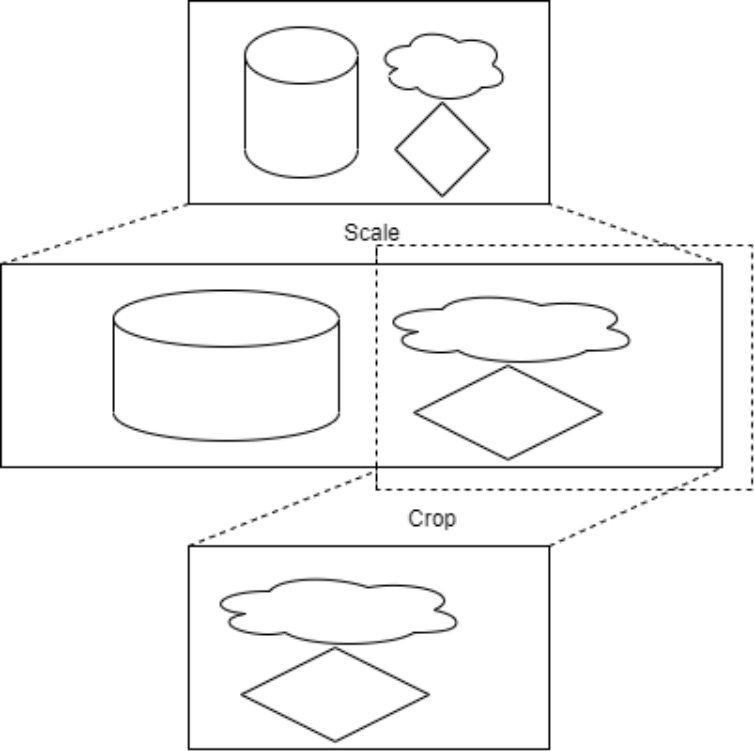
rotation: Angle of rotation, 0°, 90°, 180°, 270° are avaliable. width: Zero for no scaling. height: Zero for no scaling. crop-rectangle: Specified the crop range by <x, y, w, h>, which means start from the <x, y>, cropping a w*h image to next plugin. It should be noted that scaling has a higher priority than cropping, so cropping parameters should be calculated based on the scaled width and height, as shown in the figure for the processing logic when specifying crop- rectangle=‘<1920,0,1920,1080>’ width=3840 height=1080 :
arm-afbc: ARM Frame Buffer Compression, disabled by default, some platform such as RK3399 do not support AFBC. Enable it the DDR bandwidth occupation can be reduced, and the decoding efficiency of some chips will be significantly improved. format: Output format. If it is not 0-“auto”, the format will be converted. fast-mode: Enable MPP fast mode. For example, on the RK3588 platform, part of the decoding process can be parallelized to improve decoding efficiency. Enbaled by default. ignore-error: Ignore error of MPP decoder, force output the decoded frame. Enabled by default.
5.2 gstmppenc
The path of source code is gstreamer-rockchip/gst/rockchipmpp, include mpph264enc, mppvp8enc, mppjpegenc, etc. The following will take mpph264enc as an example for description.
gstreamer-rockchip/gst/rockchipmpp/
├── gstmppenc.c
├── gstmppenc.h
├── gstmppjpegenc.c
├── gstmppjpegenc.h
├── gstmpph264enc.c
├── gstmpph264enc.h
……
5.2.1 Description of Major Functions
gst_mpp_enc_start: Create MPP, setup codec type and format。 gst_mpp_enc_apply_properties: Configure the properties such as gop, bps. gst_mpp_enc_handle_frame: Get the buffer from last plugin and store it. gst_mpp_rga_convert: If any operation such as rotate, scale is in need, will complete it via RGA 3 before storing the buffer. gst_mpp_enc_loop: Get the oldest frame in queue, send it to MPP by encode_put_frame, and get packet back by encode_get_packet, then push the packet to next plugin.
5.2.2 Description of Major Properties
width: Zero for no scaling. height: Zero for no scaling. rc-mode: Bit rate control mode, support VBR, CBR and Fixed QP. bps: Target bit rate, ignored in Fixed QP mode. bps-max: Max bit rate, ignored in Fixed QP mode. bps-min: Min bit rate, ignored in Fixed QP mode. gop: Group Of Picture, the interval of two I frames. 0 indicates that there is only one I frame, other frames are P frames, 1 means all I frames, 2 means the sequence is I P I P I P… . Gop is equal to framerate by default. level: Indicates the level_idc parameter in SPS. profile: Indicates the profile_idc parameter in SPS. rotation: Angle of rotation, 0°, 90°, 180°, 270° are avaliable.
6. Environment Variables
Common environment variables are sorted into /etc/profile.d/gst.sh. For detailed instructions, you can directly view the comments in the script.
# Convert to NV12(using RGA) when output format is NV12_10.
export GST_MPP_DEC_DISABLE_NV12_10=1
# Convert to NV12(using RGA) when output format is NV16_10.
export GST_MPP_DEC_DISABLE_NV16_10=1
# Convert to NV12(using RGA) when output format is not NV12.
export GST_MPP_VIDEODEC_DEFAULT_FORMAT=NV12
# Try to use ARM AFBC to get better performance, but not work for all sinks.
export GST_MPP_VIDEODEC_DEFAULT_ARM_AFBC=1
# Preferred formats for V4L2
export GST_V4L2_PREFERRED_FOURCC=NV12:YU12:NV16:YUY2
# Preferred formats for videoconvert
export GST_VIDEO_CONVERT_PREFERRED_FORMAT=NV12:NV16:I420:YUY2
# Max resolution for v4l2src
export GST_V4L2SRC_MAX_RESOLUTION=3840x2160
# Min buffers for V4L2 plugins
export GST_V4L2_MIN_BUFS=64
# Try RGA 2D accel in videoconvert, videoscale and videoflip.
# NOTE: Might not success, and might behave different from the official plugin.
export GST_VIDEO_CONVERT_USE_RGA=1
export GST_VIDEO_FLIP_USE_RGA=1
...
7. Command Examples
7.1 Video Playback
gst-play-1.0 --flags=3 --videosink="fpsdisplaysink video-sink=xvimagesink signal-
fps-measurements=true text-overlay=false sync=false" --audiosink="alsasink
device=hw:0,0" test.mp4
7.2 Multiple Video Playback
# Use the render-rectangle of waylandsink for different rendering positions
gst-launch-1.0 filesrc location=/usr/local/test.mp4 ! parsebin ! mppvideodec !
waylandsink render-rectangle='<0,0,400,400>' &
gst-launch-1.0 filesrc location=/usr/local/test.mp4 ! parsebin ! mppvideodec !
waylandsink render-rectangle='<0,500,400,400>' &
gst-launch-1.0 filesrc location=/usr/local/test.mp4 ! parsebin ! mppvideodec !
waylandsink render-rectangle='<0,1000,400,400>' &
7.3 Encode and Preview
Use tee plugin, copy the data of camera capture, the first way send to mpph264enc for encoding, and then save to file by filesink, the second way send to autovideosink for display rendering. It shoud be noted that add the queue plugin after the tee plugin, which can buffering the data, avoid stream blocking.
gst-launch-1.0 v4l2src ! 'video/x-raw,format=NV12' ! tee name=tv ! queue !
mpph264enc ! 'video/x-h264' ! h264parse ! 'video/x-h264' ! filesink
location=/data/out.h264 tv. ! queue ! autovideosink
7.4 Split Stream
Some plugins such as qtdemux, will generate not only one source pad, such as audio pads, video pads, subtitle pads. You can named the plugin, and then get the target stream. As the following example, named the qtdemux to qt, then qt.audio_0 is the first audio stream, qt.video_0 is the first video stream, save these two streams to different files. And the queue plugin is needed too. The different plugins have different name style for their pads, you can check it via gst-inspect command, or directly use like qt. ! queue ! mppvideodec in your pipeline, the gstreamer framework will negotiate the caps with next plugin.
gst-launch-1.0 filesrc location=test.mp4 ! qtdemux name=qt qt.audio_0 ! queue !
filesink location=audio.bin qt.video_0 ! queue ! filesink location=video.bin
8. AFBC
AFBC stands for ARM Frame Buffer Compression, which is a compression format used to save bandwidth. Currently, the encoding formats of AFBC supported by the mppvideodec plugin are: H264, H265, VP9, and the supported color formats are NV12, NV12 10bit, NV16. The way to open is as follows:
# Enable global AFBC,applicable to situations where mppvideodec cannot be
directly operated using some command like gst-play-1.0
export GST_MPP_VIDEODEC_DEFAULT_ARM_AFBC=1
# Enable afbc for current pipeline
gst-launch-1.0 filesrc location=/test.mp4 ! parsebin ! mppvideodec arm-afbc=true
! waylandsink
The waylandsink and xvimagesink support rendering AFBC format, or using kmssink/rkximagesink specufied Cluster plane for display, this method requires an exclusive plane. The examples are as follows:
# GST_DEBUG=*mpp*:4 enable the log of mpp plugin, you can use the log to check if
the AFBC is enabled successfully, if "AFBC" is not printed, it may be
unsuccessfully opened or the format does not in support
GST_DEBUG=*mpp*:4 gst-play-1.0 --flags=3 --videosink=waylandsink test.mp4
GST_DEBUG=*mpp*:4 gst-play-1.0 --flags=3 --videosink="kmssink plane-id=101"
...
0:00:00.256819945 29143   0x7f70008700 INFO                  mppdec
gstmppdec.c:465:gst_mpp_dec_apply_info_change:<mppvideodec0> applying NV12(AFBC)
1920x1080 (1920x1104)
...
8.1 AFBC dump the decoded data
If you wants to check whether the hardware decoded data is correct in GStreamer, can dump the decoded data (usually NV12 and other format images) in the following way:
- Turn on the MPP log function
export mpp_debug=0x400
Then there will be decoded data of MPP’s own dump in the /data directory. This is the dump debugging function that comes with MPP. Dump is not supported when AFBC is enabled; when AFBC is not enabled, the dumped data is generally in NV12 format, which can be viewed using rawplayer (or other raw data players).
- Use GStreamer’s plugin filesink dump to the decoded data. This method supports dump regardless of whether AFBC is turned on or not. The usage is as follows:
gst-launch-1.0 uridecodebin uri=file://xxx ! filesink location=xxx.yuv
The decoded AFBC data is in the xxx.yuv file. Because AFBC is turned on, the dumped image needs to be decompressed before it can be viewed using rawplayer (or other raw data players). The decompression command (the decompression software afbcDec should be obtained from the relevant person in charge):
./afbcDec filename w h format afbcmode
#eg: ./afbcDec 178_Surfa_id-26_1088x1824_z-0.bin 1088 1824 0 1
# 0=RGBA,1=NV12,2=RGB888, afbcmode 0=afbc, 1=afbc|YTR
The image format output by afbcDec is ARGB. If you want to check whether each frame of the video is correct, you also need to divide the file dumped by filesink into frames: because the above decompression software can only transfer one frame of data, but all the frames of the dumped video are in the same file. An example of spliting the frames is as follows:
# GST_DEBUG view the size of each frame
GST_DEBUG=filesink:6 gst-launch-1.0 uridecodebin uri=file://xxx ! filesink
location=xxx.yuv

0:00:01.224149631 14266   0x7f7c00ab00 DEBUG  filesink
gstfilesink.c:769:gst_file_sink_flush_buffer:<filesink0> Flushing out buffer of
size 1390080
# Use the split command to split frames
split -b 1390080 -a 5 -d  xxx.yuv dump_frame
9. Subtitle
When subtitles are turned on, there will be lags. Usually, subtitle synthesis requires intercept some images from the video and convert them to RGB, and then synthesize subtitles and then convert them back to the source format before sending them for display. That is, the time- consuming of decoding also needs to consider the time-consuming of subtitle synthesis. , causing the overall frame rate to drop. Use the gst-play-1.0 command to test and subtitles can be turned off with –flags=3 . Subtitles should be implemented independently of the video layer using frameworks such as QT.
10. Layers Assignment
When using rkximagesink or kmssink, it is required to have a exclusive hardware layer, and the plug-in will automatically find the layer to play, but the automatically found layer may not meet the requirements, so you have to manually specify the layer, the way is as follows:
gst-play-1.0 --flags=3 test.mp4 --videosink="kmssink plane-id=117"
The 117 is the ID of the target layer, which can be confirmed through the /sys/kernel/debug/dri/0/state node. You can use the following command to list all layers:
root@linaro-alip:/# cat /sys/kernel/debug/dri/0/state | grep "plane\["
plane[57]: Smart1-win0
plane[71]: Cluster1-win0
plane[87]: Smart0-win0
plane[101]: Cluster0-win0
plane[117]: Esmart1-win0
plane[131]: Esmart0-win0
# You can also use cat /sys/kernel/debug/dri/0/state directly to list complete
information
The plane[xx] is the plane-id. Usually, different layers support different formats. For example, Cluster supports AFBC, but Esmart does not support AFBC. Please refer to the datasheet or TRM for details. If the node is not exist, you can list it with modetest -p.
11. Analyzing Gstreamer Pipeline
Gstreamer provides a way to dump pipeline status to dot files for analysis. The commands are as follows:
# Execute thess cmds in DUT
# Enable dump dot files
$ export GST_DEBUG_DUMP_DOT_DIR=/tmp
# Run your tests
$ gst-play-1.0 test.mp4
# Check if the dot files are dumped successfully
$ ls -alF /tmp/*.dot
-rw-rw-r-- 1 root root 49141 1  16 10:35 /tmp/0.00.00.385340438-gst-play.async-
done.dot
# Execute thess cmds in PC
$ adb pull /tmp/0.00.00.385340438-gst-play.async-done.dot .
$ dot 0.00.00.385340438-gst-play.async-done.dot -Tpng > out.png
The out.png will show the overall status of the gstreamer pipeline. There may be multiple dot files for pipeline at different times in the dot directory, which can be converted one by one for analysis. The command dot is located in graphviz package, the download link is https://www.graphviz.or g/download/.
12. FAQ
12.1 There is no lagging when playing 4K 30FPS, but there is lagging when playing 4K 60FPS
Due to system load, DDR bandwidth and other issues, 4K 60FPS may not be achieved. You can try to enable AFBC, refer to the AFBC chapter. In addition, the synchronization function of subtitles and sink can be turned off, such as gst-play-1.0 test.mp4 –flags=3 – videosink=”waylandsink sync=false” , when the frame rate cannot reach 60FPS, turning on sync will cause the video frame timestamps do not align with clocks resulting in obvious frame drop.
12.2 There is relatively lagging when playing some sources, and the CPU usage is very high
Currently hard decode supports H264, H265, VP8, VP9, MPEG. You can turn on DEBUG through echo 0x100 > /sys/module/rk_vcodec/parameters/mpp_dev_debug to see if the serial port or dmesg has decoded printing. If not, it may be a format not supported by the hard decode.
12.3 Some sources cannot be played, LOG is lagging and the progress is not printed or the progress is always 0
You can try to use playbin3, like gst-play-1.0 –flags=3 –use-playbin3 test.mp4 .
12.4 Flickering when playing 4K video after AFBC is turned on
First make sure to turn on performance mode, echo performance | tee $(find /sys/ -name *governor) . Then, confirm whether there is obvious scaling in the vertical direction, such as using the vertical screen to play the horizontal video, in this case, the AFBC performance is not as good as the non-AFBC performance.
12.5 Play with pictures but no sound
You can manually specify the audiosink, such as gst-play-1.0 –flags=3 test.mp4 – audiosink=”alsasink device=hw:0,0” . It is recommended to make sure it can work using basic testing tools such as aplay and then use gstreamer to test.
12.6 When running the decompression command afbcDec, an error is reported: the library libgraphic_lsf.so is missing
Find the relevant person in charge to obtain libgraphic_lsf.so, and push the missing libgraphic_lsf.so library to the /usr/lib/ directory.
12.7 v4l2src frame droped
-
Enable performance mode,
echo performance | tee $(find /sys/ -name *governor) -
Use v4l2-ctl for fps measurement, the command is v4l2-ctl -d /dev/video0 –set-fmt- video=width=1920,height=1080,pixelformat=NV12 –stream-mmap=3 –stream-skip=1 – stream-poll , the node /dev/video0 and format should be modified as required.
-
If the result of v4l2-ctl fps measurement is as expected, but the result of the v4l2src plug-in is not, you can try the min-buffers propety of v4l2src, gst-launch-1.0 v4l2src min- buffers=64 ! video/x-raw,width=1920,height=1080,format=NV12 ! waylandsink .
-
Try to use the queue plug-in:
# min-threshold-time in ns, it is 5s here
gst-launch-1.0 v4l2src ! queue max-size-buffers=0 max-size-time=0 max-size-
bytes=0 min-threshold-time=5000000000 ! autovideosink
- Try to specify the ts-offset to videosink:
# ts-offset in ns, it is 0.5s here
gst-launch-1.0 v4l2src ! queue max-size-bytes=1000000000 max-size-buffers=0 max-
size-time=0 ! autovideosink ts-offset=500000000
- Force enable v4l2src buffer copy:
gst1-plugins-good $ git diff
diff --git a/sys/v4l2/gstv4l2object.c b/sys/v4l2/gstv4l2object.c
index 2fb9091b..efa94561 100644
@@ -4792,6 +4794,7 @@ gst_v4l2_object_decide_allocation (GstV4l2Object * obj,
GstQuery * query)
  /* We can't share our own pool, if it exceed V4L2 capacity */
  if (min + obj->min_buffers + 1 > VIDEO_MAX_FRAME)
    can_share_own_pool = FALSE;
+  can_share_own_pool = FALSE;

  /* select a pool */
  switch (obj->mode) {
12.8 v4l2src negotiation failed
v4l2-ctl -d /dev/video0 –list-formats-ext list all formats and resolution, the node /dev/video0 should be modified as required. If the camera support YUV(such as NV12, NV16),RGB(such as BGRA, BGRx) output, you can use videosink, videoencoder to handle the output of camera. If the camare support JPEG output, you should use mppjpegdec to decode the output of camera first. If the camera output does not match the format supported by the later plug-in, you can add the videoconvert plug-in between the two plug-ins for format conversion.
12.9 v4l2src with HDMIIN
The v4l2src plug-in is usually used to read HDMIIN (or HDMIRX) stream data. The usage is the same as the camera. You can find hdmirx node by grep ‘’ /sys/class/video4linux/*/name .
12.10 v4l2src cannot catch frame over 4K
It has been limited in script, edit /etc/profile.d/gst.sh, modify the export GST_V4L2SRC_MAX_RESOLUTION=3840x2160 . The original file in buildroot is <SDK>/buildroot/package/gstreamer1/gstremaer1/gst.sh , in debian is <SDK>/debian/overlay/etc/profile.d/gst.sh .
-
Only the formats supported by the plug-in are listed here. Please check the relevant datasheet if the specific chip supports it.
-
At present, some platforms such as RK3588, RGA function is abnormal, so it is not recommended to use it.
-
At present, some platforms such as RK3588, RGA function is abnormal, so it is not recommended to use it.
Source reconciliation and Chinese-baseline additions
- Buildroot configuration differs: Chinese specifies
<SDK>/buildroot/configs/rockchip/multimedia/gst/; English specifies<SDK>/buildroot/configs/rockchip/*_gst.configand addsBR2_PACKAGE_GSTREAMER1_18/BR2_PACKAGE_GSTREAMER1_20. Check the actual SDK tree. Chinese says Debian patches can be obtained from developers through channels such as Redmine. - Chinese distinguishes Source, Filter and Sink. The core supplies basic classes and element definitions with almost no multimedia processing; plugins perform that processing. The source notes that the newer GitLab tree combines core and plugin libraries as subprojects.
- Chinese chapter 5 additionally lists AV1, which English chapter 4 also lists but English chapter 5 omits. Actual chip support requires its datasheet. Chinese specifies
gop=-1by default: derive GOP from the frame rate, giving one I-frame per second. Decoder rotation defaults to 0°, width/height to 0, and output format to 0/auto. - Encoder
arm-afbcmust be enabled when upstream input is AFBC-compressed.bps,bps-max,bps-minare the resulting bitrate and its bounds;qp-initand JPEGq-factoraffect quality and bitrate. Encoder width/height describe input dimensions; a mismatch invokes RGA scaling, and rotation affects the input buffer. Decoder width/height/format specify output dimensions/format. AFBC reduces bandwidth and can be consumed by capable modules such as VOP. kmssrc dma-featureoutputs DMA buffers, whereas the Chinese decoder property description says input DMA buffers.framerate-limitcaps the rate;num-buffersemits EOS after the requested count.sync-fbfollows FB flips andsync-vblankfollows vblank. Decodercrop-rectangleselects the crop;fast-modeimproves supported platforms/formats;ignore-errorignores MPP-reported errors.- For raw YUV input to an encoder,
filesrc blocksizemust match the frame size: the default 4096 is usually smaller than a frame and can cause an encoder error.locationaccepts an absolute or relative path;num-bufferslimits the frame count.filesink blocksizeis the block/frame size andlocationis the save path.fakesinkdiscards all data and can be used to disable audio. appsrcimports external data, for example after an application decrypts a private encrypted stream.appsinkexports data, for example decoded frames for algorithm processing. These are chiefly coding interfaces rather than useful standalone command-line elements. They can be paired: extract with appsink, process, then reinsert with appsrc. Examples are ingst-plugins-base-<version>/tests/examples/app/.decodebinselects decoders and creates separate paths for audio, video and subtitles when present.playbinintegrates decodebin and automatically chooses suitable sinks.uridecodebinintegrates decodebin and selects a source from the URI. Chinese listsfile://,rtps://,http://;rtps://is retained as source spelling, to be checked against the intended RTSP URI.audio-sinkselects e.g. alsasink or pulsesink;video-sinkselects e.g. waylandsink or kmssink;flagscontrols which media are rendered.videotestsrcgenerates different formats and resolutions. Chinese describes xvimagesink and waylandsink as GPU-composited output; kmssink requires an exclusive hardware plane. Some platforms have no RGA: consult the datasheet before enabling acceleration.v4l2src deviceselects the node,min-bufferssets the minimum driver buffering, andnum-bufferslimits output frames.rtspsrc locationis the stream URL.video-directionsets orientation. Sinkconnector-id,plane-id,render-rectangle,fullscreen,hdr-enable,sync-mode,layer,rotate-methodandsyncselect connector, plane, output region, full screen, HDR, frame synchronization mode, stacking layer, rotation and clock synchronization respectively.signal-fps-measurementsenables the measurement signal;text-overlayoverlays the rate;fpsdisplaysink video-sinkchooses the actual renderer and forwards images to it.- The RGA warnings describe the supplied source version, not current validation of all SDKs. The path
gstremaer1/gst.shretains the source spelling. Chinese usesmppvidedeconce where English usesmppvideodec; verify identifiers against the SDK. PDF line wraps in command blocks are not shell execution boundaries.