
Anwendbarkeit auf ArmSoM und Geltungsbereich der Quelle
Plattformreferenz zur Anpassung von ArmSoM-Systemen auf Grundlage der chinesischen und englischen Version V1.0.0. Keine Kombination aus Board, SDK/BSP, Kernel und Verdrahtung wurde hier an Hardware geprüft. Der nachstehende Geltungsbereich der Quelle bedeutet nicht, dass jedes ArmSoM-Board oder jeder Kernel diese Funktionen unterstützt. Prüfen Sie den genauen SoC, den Board-Schaltplan, das SDK/BSP, den Kernel-Treiber und das Pinmux. Befehle, Patches, Protokolle und Messwerte sind Beispiele aus der Quelle und keine ArmSoM-Testergebnisse.
Die chinesischen Abbildungen stammen aus dem chinesischen PDF; die englischen, russischen und hier verwendeten deutschen Abbildungen stammen aus dem englischen PDF.
| SoC-Geltungsbereich der Quelle | Kernel-Geltungsbereich der Quelle |
|---|---|
| Alle Chips | Alle Versionen |
Diese Lösung verbindet zwei APs oder den MAC eines AP mit dem MAC eines Switches direkt ohne PHY. Bei einer solchen Verbindung zweier APs können zwei PHYs entfallen. Beschrieben werden sowohl RMII- als auch RGMII-Verbindungen.
Redaktionelle Hinweise · ArmSoM-Dokumentation · Rockchip Linux
1. Reduced Media Independent Interface
1.1 Hardwareverbindung
Die direkte RMII-Verbindung ist nachfolgend dargestellt. RX_ERR muss dabei mit Masse verbunden werden.
MAC0 --RMII-- MAC1
TXD[1:0] -------- RXD[1:0]
TX_EN -------- RX_DV
REF_CLK -------- REF_CLK
RXD[1:0] -------- TXD[1:0]
RX_DV -------- TX_EN
RX_ERR -------- GND
GND -------- RX_ERR
1.2 Softwarekonfiguration
Am Beispiel von PX30 und RV1126: Der RV1126 gibt einen 50M-Referenztakt aus; der PX30 wird für einen externen Takteingang konfiguriert.
Taktausgabe des rv1126:
Dieser Patch gilt für den Linux-Kernel 4.19.
diff --git a/arch/arm/boot/dts/rv1126-evb-v10.dtsi b/arch/arm/boot/dts/rv1126-evb-v10.dtsi
index 396ef1516054..a384e657ebac 100644
--- a/arch/arm/boot/dts/rv1126-evb-v10.dtsi
+++ b/arch/arm/boot/dts/rv1126-evb-v10.dtsi
@@ -568,26 +568,21 @@
 };
 &gmac {
- phy-mode = "rgmii";
- clock_in_out = "input";
+ phy-mode = "rmii";
+ clock_in_out = "output";
- snps,reset-gpio = <&gpio3 RK_PA0 GPIO_ACTIVE_LOW>;
- snps,reset-active-low;
- /* Reset time is 20ms, 100ms for rtl8211f */
- snps,reset-delays-us = <0 20000 100000>;
-
- assigned-clocks = <&cru CLK_GMAC_SRC>, <&cru CLK_GMAC_TX_RX>, <&cruCLK_GMAC_ETHERNET_OUT>;
- assigned-clock-parents = <&cru CLK_GMAC_SRC_M1>, <&cru RGMII_MODE_CLK>;
- assigned-clock-rates = <125000000>, <0>, <25000000>;
+ assigned-clocks = <&cru CLK_GMAC_SRC_M1>, <&cru CLK_GMAC_SRC>, <&cruCLK_GMAC_TX_RX>;
+ assigned-clock-rates = <0>, <50000000>;
+ assigned-clock-parents = <&cru CLK_GMAC_RGMII_M1>, <&cru CLK_GMAC_SRC_M1>, <&cruRMII_MODE_CLK>;
        pinctrl-names = "default";
- pinctrl-0 = <&rgmiim1_pins &clk_out_ethernetm1_pins>;
-
- tx_delay = <0x2a>;
- rx_delay = <0x1a>;
+ pinctrl-0 = <&rmiim1_pins &gmac_clk_m1_drv_level0_pins>;
- phy-handle = <&phy>;
        status = "okay";
+ fixed-link {
+ speed = <100>;
+ full-duplex;
+ };
 };
 &i2c0 {
Takteingang des px30:
Diese Änderung ist für den Linux-Kernel 4.4 vorgesehen.
diff --git a/arch/arm64/boot/dts/rockchip/px30-evb-ddr3-v10-linux.dts b/arch/arm64/boot/dts/rockchip/px30-evb-ddr3-v10-linux.dts
index 7693764a0dbe..6f548808e3ec 100644
--- a/arch/arm64/boot/dts/rockchip/px30-evb-ddr3-v10-linux.dts
+++ b/arch/arm64/boot/dts/rockchip/px30-evb-ddr3-v10-linux.dts
@@ -326,11 +326,17 @@
 &gmac {
        phy-supply = <&vcc_phy>;
- clock_in_out = "output";
- snps,reset-gpio = <&gpio2 13 GPIO_ACTIVE_LOW>;
- snps,reset-active-low;
- snps,reset-delays-us = <0 50000 50000>;
+ clock_in_out = "input";
+ assigned-clocks = <&cru SCLK_GMAC>;
+ assigned-clock-parents = <&gmac_clkin>;
+ pinctrl-names = "default";
+ pinctrl-0 = <&rmii_pins &mac_refclk>;
        status = "okay";
+
+ fixed-link {
+ speed = <100>;
+ full-duplex;
+ };
 };
&gpu {
diff --git a/arch/arm64/configs/px30_linux_defconfig b/arch/arm64/configs/px30_linux_defconfig
index b73d05c8ad26..486e971c2d90 100644
--- a/arch/arm64/configs/px30_linux_defconfig
+++ b/arch/arm64/configs/px30_linux_defconfig
@@ -136,6 +136,7 @@ CONFIG_STMMAC_ETH=y
 # CONFIG_NET_VENDOR_VIA is not set
 # CONFIG_NET_VENDOR_WIZNET is not set
 CONFIG_ROCKCHIP_PHY=y
+CONFIG_FIXED_PHY=y
 CONFIG_USB_RTL8150=y
 CONFIG_USB_RTL8152=y
 CONFIG_USB_NET_CDC_MBIM=y
1.3 Testergebnisse
Testergebnisse aus der Quelle am Beispiel von PX30 und RV1126.
1.3.1 TCP-Test
RV1126 -> PX30
[root@RV1126_RV1109:/]# iperf -c 192.168.1.101 -i 1 -t 10
------------------------------------------------------------
Client connecting to 192.168.1.101, TCP port 5001
TCP window size: 43.8 KByte (default)
------------------------------------------------------------
[ 3] local 192.168.1.100 port 48618 connected with 192.168.1.101 port 5001
[ ID] Interval Transfer Bandwidth
[ 3] 0.0- 1.0 sec 11.6 MBytes 97.5 Mbits/sec
[ 3] 1.0- 2.0 sec 11.0 MBytes 94.3 Mbits/sec
[ 3] 2.0- 3.0 sec 11.1 MBytes 93.3 Mbits/sec
[ 3] 3.0- 4.0 sec 11.3 MBytes 93.3 Mbits/sec
[ 3] 4.0- 5.0 sec 11.2 MBytes 94.4 Mbits/sec
[ 3] 5.0- 6.0 sec 11.3 MBytes 94.3 Mbits/sec
[ 3] 6.0- 7.0 sec 11.2 MBytes 94.3 Mbits/sec
[ 3] 7.0- 8.0 sec 11.3 MBytes 93.3 Mbits/sec
[ 3] 8.0- 9.0 sec 11.1 MBytes 94.3 Mbits/sec
[ 3] 9.0-10.0 sec 11.2 MBytes 93.3 Mbits/sec
[ 3] 0.0-10.0 sec 112 MBytes 94.0 Mbits/sec
PX30 -> RV1126
[root@px30_64:/]# iperf -c 192.168.1.100 -i 1 -t 10
------------------------------------------------------------
Client connecting to 192.168.1.100, TCP port 5001
TCP window size: 45.0 KByte (default)
------------------------------------------------------------
[ 3] local 192.168.1.101 port 52690 connected with 192.168.1.100 port 5001
[ ID] Interval Transfer Bandwidth
[ 3] 0.0- 1.0 sec 11.5 MBytes 96.5 Mbits/sec
[ 3] 1.0- 2.0 sec 11.2 MBytes 94.4 Mbits/sec
[ 3] 2.0- 3.0 sec 11.4 MBytes 95.4 Mbits/sec
[ 3] 3.0- 4.0 sec 11.1 MBytes 93.3 Mbits/sec
[ 3] 4.0- 5.0 sec 11.2 MBytes 94.4 Mbits/sec
[ 3] 5.0- 6.0 sec 11.1 MBytes 93.3 Mbits/sec
[ 3] 6.0- 7.0 sec 11.4 MBytes 95.4 Mbits/sec
[ 3] 7.0- 8.0 sec 11.2 MBytes 94.4 Mbits/sec
[ 3] 8.0- 9.0 sec 11.1 MBytes 93.3 Mbits/sec
[ 3] 9.0-10.0 sec 11.2 MBytes 94.4 Mbits/sec
[ 3] 0.0-10.0 sec 113 MBytes 94.4 Mbits/sec
1.3.2 UDP-Test
RV1126 -> PX30
[root@RV1126_RV1109:/]# iperf -c 192.168.1.101 -i 1 -t 10 -u -b 100M
------------------------------------------------------------
Client connecting to 192.168.1.101, UDP port 5001
Sending 1470 byte datagrams, IPG target: 112.15 us (kalman adjust)
UDP buffer size: 160 KByte (default)
------------------------------------------------------------
[ 3] local 192.168.1.100 port 48888 connected with 192.168.1.101 port 5001
[ ID] Interval Transfer Bandwidth
[ 3] 0.0- 1.0 sec 11.5 MBytes 96.3 Mbits/sec
[ 3] 1.0- 2.0 sec 11.4 MBytes 95.7 Mbits/sec
[ 3] 2.0- 3.0 sec 11.4 MBytes 95.9 Mbits/sec
[ 3] 3.0- 4.0 sec 11.4 MBytes 95.5 Mbits/sec
[ 3] 4.0- 5.0 sec 11.4 MBytes 95.6 Mbits/sec
[ 3] 5.0- 6.0 sec 11.4 MBytes 95.6 Mbits/sec
[ 3] 6.0- 7.0 sec 11.4 MBytes 95.6 Mbits/sec
[ 3] 7.0- 8.0 sec 11.4 MBytes 96.0 Mbits/sec
[ 3] 8.0- 9.0 sec 11.4 MBytes 95.7 Mbits/sec
[ 3] 9.0-10.0 sec 11.4 MBytes 95.6 Mbits/sec
[ 3] 0.0-10.0 sec 114 MBytes 95.7 Mbits/sec
[ 3] Sent 81437 datagrams
[ 3] Server Report:
[ 3] 0.0-10.0 sec 114 MBytes 95.7 Mbits/sec 0.000 ms 0/81437 (0%)
PX30 -> RV1126
[root@px30_64:/]# iperf -c 192.168.1.100 -i 1 -t 10 -u -b 100M
------------------------------------------------------------
Client connecting to 192.168.1.100, UDP port 5001
Sending 1470 byte datagrams, IPG target: 112.15 us (kalman adjust)
UDP buffer size: 208 KByte (default)
------------------------------------------------------------
[ 3] local 192.168.1.101 port 41144 connected with 192.168.1.100 port 5001
[ ID] Interval Transfer Bandwidth
[ 3] 0.0- 1.0 sec 11.3 MBytes 95.0 Mbits/sec
[ 3] 1.0- 2.0 sec 11.4 MBytes 95.6 Mbits/sec
[ 3] 2.0- 3.0 sec 11.4 MBytes 95.6 Mbits/sec
[ 3] 3.0- 4.0 sec 11.3 MBytes 95.0 Mbits/sec
[ 3] 4.0- 5.0 sec 11.4 MBytes 96.0 Mbits/sec
[ 3] 5.0- 6.0 sec 11.2 MBytes 94.3 Mbits/sec
[ 3] 6.0- 7.0 sec 11.4 MBytes 95.6 Mbits/sec
[ 3] 7.0- 8.0 sec 11.4 MBytes 95.6 Mbits/sec
[ 3] 8.0- 9.0 sec 11.4 MBytes 95.7 Mbits/sec
[ 3] 0.0-10.0 sec 114 MBytes 95.4 Mbits/sec
[ 3] Sent 81133 datagrams
[ 3] Server Report:
[ 3] 0.0-10.0 sec 114 MBytes 95.4 Mbits/sec 0.000 ms 0/81133 (0%)
1.3.3 PING-Test
RV1126 -> PX30
[root@RV1126_RV1109:/]# ping -s 65500 192.168.1.101 -c 100
PING 192.168.1.101 (192.168.1.101) 65500(65528) bytes of data.
65508 bytes from 192.168.1.101: icmp_seq=1 ttl=64 time=12.5 ms
65508 bytes from 192.168.1.101: icmp_seq=2 ttl=64 time=13.1 ms
65508 bytes from 192.168.1.101: icmp_seq=3 ttl=64 time=50.8 ms
65508 bytes from 192.168.1.101: icmp_seq=4 ttl=64 time=12.5 ms
65508 bytes from 192.168.1.101: icmp_seq=5 ttl=64 time=12.6 ms
65508 bytes from 192.168.1.101: icmp_seq=6 ttl=64 time=12.5 ms
.............................................................
65508 bytes from 192.168.1.101: icmp_seq=95 ttl=64 time=12.7 ms
65508 bytes from 192.168.1.101: icmp_seq=96 ttl=64 time=12.5 ms
65508 bytes from 192.168.1.101: icmp_seq=97 ttl=64 time=12.6 ms
65508 bytes from 192.168.1.101: icmp_seq=98 ttl=64 time=14.5 ms
65508 bytes from 192.168.1.101: icmp_seq=99 ttl=64 time=46.6 ms
65508 bytes from 192.168.1.101: icmp_seq=100 ttl=64 time=12.9 ms
--- 192.168.1.101 ping statistics ---
100 packets transmitted, 100 received, 0% packet loss, time 99155ms
rtt min/avg/max/mdev = 12.369/15.634/15.890/0.572 ms
PX30 -> RV1126
[root@px30_64:/]# ping -s 65500 192.168.1.100 -c 100
PING 192.168.1.100 (192.168.1.100) 65500(65528) bytes of data.
65508 bytes from 192.168.1.100: icmp_seq=1 ttl=64 time=12.8 ms
65508 bytes from 192.168.1.100: icmp_seq=2 ttl=64 time=12.9 ms
65508 bytes from 192.168.1.100: icmp_seq=3 ttl=64 time=12.5 ms
65508 bytes from 192.168.1.100: icmp_seq=4 ttl=64 time=12.8 ms
65508 bytes from 192.168.1.100: icmp_seq=5 ttl=64 time=12.4 ms
65508 bytes from 192.168.1.100: icmp_seq=6 ttl=64 time=13.1 ms
65508 bytes from 192.168.1.100: icmp_seq=7 ttl=64 time=12.3 ms
65508 bytes from 192.168.1.100: icmp_seq=8 ttl=64 time=12.6 ms
.............................................................
65508 bytes from 192.168.1.100: icmp_seq=95 ttl=64 time=12.3 ms
65508 bytes from 192.168.1.100: icmp_seq=96 ttl=64 time=13.0 ms
65508 bytes from 192.168.1.100: icmp_seq=97 ttl=64 time=12.7 ms
65508 bytes from 192.168.1.100: icmp_seq=98 ttl=64 time=12.6 ms
65508 bytes from 192.168.1.100: icmp_seq=99 ttl=64 time=12.8 ms
65508 bytes from 192.168.1.100: icmp_seq=100 ttl=64 time=12.6 ms
--- 192.168.1.100 ping statistics ---
100 packets transmitted, 100 received, 0% packet loss, time 99184ms
rtt min/avg/max/mdev = 12.177/12.748/14.039/0.384 ms
2. RGMII
2.1 Hardwareverbindungen
Die direkte RGMII-Verbindung ist nachfolgend dargestellt.
MAC0 --RGMII-- MAC1
TXD[3:0] --------- RXD[3:0]
TX_EN --------- RX_DV
TX_CLK --------- RX_CLK
RXD[3:0] --------- TXD[3:0]
RX_DV --------- TX_EN
RX_CLK --------- TX_CLK
2.2 Softwarekonfiguration
Bei einer direkten Verbindung zweier RK3399 muss beispielsweise ein 125M-TXC-Takt ausgegeben und dazu der Taktausgabemodus konfiguriert werden. Dieser Patch gilt für den Linux-Kernel 4.4.
diff --git a/arch/arm64/boot/dts/rockchip/rk3399-sapphire.dtsi b/arch/arm64/boot/dts/rockchip/rk3399-sapphire.dtsi
index a4076b888f7d..27a853b48c8a 100644
--- a/arch/arm64/boot/dts/rockchip/rk3399-sapphire.dtsi
+++ b/arch/arm64/boot/dts/rockchip/rk3399-sapphire.dtsi
@@ -216,17 +216,23 @@
 &gmac {
        phy-supply = <&vcc_phy>;
        phy-mode = "rgmii";
- clock_in_out = "input";
+ clock_in_out = "output";
        snps,reset-gpio = <&gpio3 15 GPIO_ACTIVE_LOW>;
        snps,reset-active-low;
        snps,reset-delays-us = <0 10000 50000>;
        assigned-clocks = <&cru SCLK_RMII_SRC>;
- assigned-clock-parents = <&clkin_gmac>;
+ assigned-clock-parents = <&cru SCLK_MAC>;
+ assigned-clock-rates = <125000000>;
        pinctrl-names = "default";
        pinctrl-0 = <&rgmii_pins>;
        tx_delay = <0x28>;
        rx_delay = <0x11>;
        status = "okay";
+
+ fixed-link {
+ speed = <1000>;
+ full-duplex;
+ }
 };
2.3 Konfiguration der Verzögerungsleitung
Bei RGMII-Schnittstellen muss die Verzögerungsleitung konfiguriert werden. Üblicherweise wird dieses Zeitfenster mithilfe des PHY durchlaufen. Im MAC-to-MAC-Modus gibt es jedoch keinen PHY; deshalb wird die TX-Verzögerung hier mit einem Oszilloskop gemessen. Deaktivieren Sie die RX-Verzögerung beider MACs und stellen Sie die TX-Verzögerung so ein, dass eine Verzögerung zwischen 1.5 und 2ns entsteht.
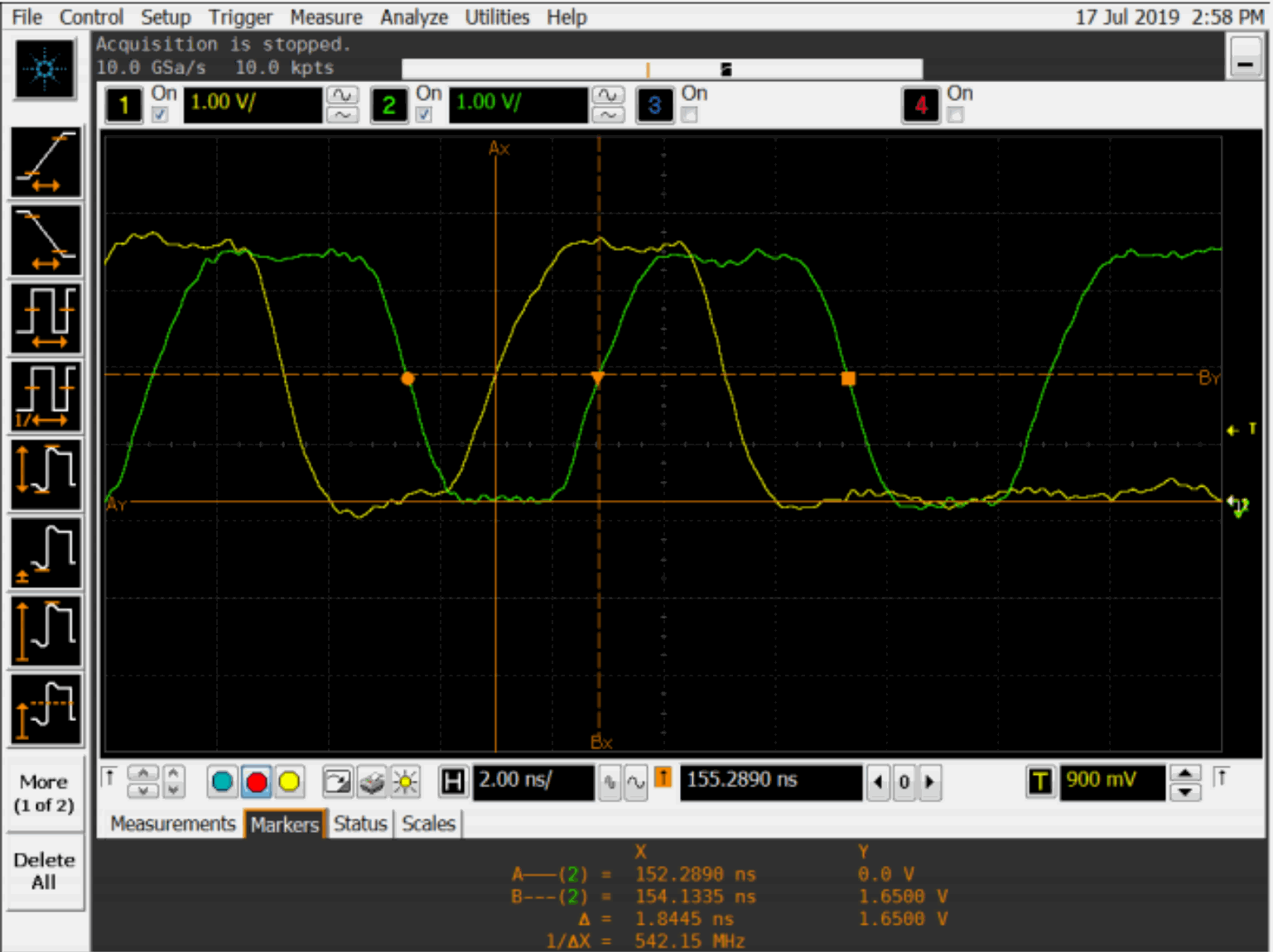
Phasenverlauf von TXC/TXD bei MAC-to-MAC — Quelle: englisches PDF, S.11.