
VendorStorage suits small identity, calibration and manufacturing records, but a successful API call does not necessarily prove persistence. First distinguish real media access, a GKI RAM copy and an Android service’s file cache.
This ArmSoM guide reorganizes the supplied Android 16 AIDL V2 example. A matching SDK implementation of that newer service was not obtained and compiled in this work; its names are integration leads to verify against your branch. For older APIs, consult the existing Vendor Storage V1.3 article.
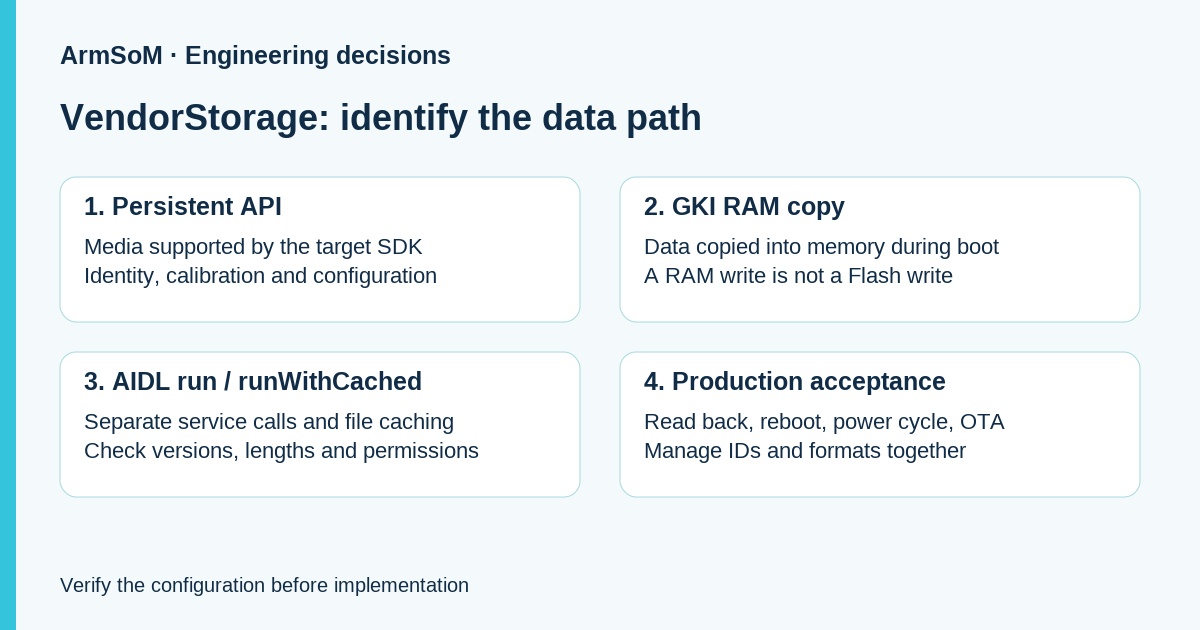
1. Select the correct data path
| Environment | Typical entry point | Establish first |
|---|---|---|
| U-Boot | vendor_storage_read() / vendor_storage_write() |
Initialization, boot medium and branch layout |
| Non-GKI kernel | rk_vendor_read() / rk_vendor_write() |
Registered backend and error handling |
| GKI RAM module | ram_vendor_storage |
Whether it is a boot snapshot and whether writes reach media |
| Linux userspace | /dev/vendor_storage and ioctl |
Kernel ABI, size limits and permissions |
| Android AIDL service | IVendorStorage, libvendor_storage |
Version, VINTF, media support and SELinux |
| AIDL file cache | runWithCached() |
File path and lifecycle, distinct from VendorStorage NVM |
The Rockchip develop-6.1 implementation is a reference for an older kernel path. It does not prove the existence or identical media support of an Android 16 AIDL service.
2. Structure and IDs: this is not a filesystem
VendorStorage commonly contains a header, an entry index and payloads. Versioning, integrity information and redundant copies help select valid contents. Region size, slot count, offsets and capacity depend on media and SDK: do not transfer an eMMC layout to UFS, SPI NOR or NAND, or overwrite sectors that merely appear unused.
The supplied branch describes 156–256 as customer IDs. Earlier documentation does not define every range identically. Confirm the target headers and vendor agreement before maintaining a project allocation table.
| Data | Design rule |
|---|---|
| Serial numbers, MACs, calibration | Use assigned IDs and preserve factory data |
| Custom configuration | Define format version, size, byte order and integrity rules |
| Strings | Specify terminator semantics and honor returned length |
| Binary records | Do not infer size with strlen() or print as strings |
| Keys or DRM material | Use the relevant security design; ordinary VendorStorage is not automatically confidential or isolated |
Plan format migration. An older image must reject or safely interpret a newer record rather than reading it with an obsolete structure size.
3. Check four layers of Android service integration
Confirm source presence, interface version, packaging and device accessibility:
export SDK_ROOT=/path/to/android-sdk
rg -n 'BOARD_VENDOR_STORAGE_SERVICE|IVendorStorage|runWithCached' \
  "$SDK_ROOT/vendor/rockchip" "$SDK_ROOT/device/rockchip"
rg -n 'vendorstorage-V2-ndk|libvendor_storage|AidlVendorStorageClient' \
  "$SDK_ROOT/vendor/rockchip"
adb shell ls -l /vendor/bin/hw/rockchip.aidl.vendorstorage-service
adb shell service check rockchip.aidl.vendorstorage.IVendorStorage/default
adb shell ls -l /dev/vendor_storage
These are searches and read-only queries. A missing service can mean packaging, VINTF declaration, a different instance name or a different architecture—not damaged storage. The supplied example uses these components:
| Component | Example name | Role |
|---|---|---|
| Service | rockchip.aidl.vendorstorage-service |
Handles Binder requests |
| Instance | rockchip.aidl.vendorstorage.IVendorStorage/default |
Discovery and VINTF declaration |
| Backend library | libvendor_storage |
Media access |
| NDK interface | rockchip.aidl.vendorstorage-V2-ndk |
Matches the frozen AIDL version |
| Example client | AidlVendorStorageClient |
Development inspection |
The source SDK uses this integration flag. It only works if the target build rules consume it:
BOARD_VENDOR_STORAGE_SERVICE := true
Check init, compatibility matrices, SEPolicy and libraries as well. disabled and oneshot can be normal lazy-HAL behavior; do not force permanent residency merely because the process is not always visible. Avoid packaging competing implementations of the same instance.
4. Binder success is not the complete response
The supplied interface contains:
VendorStorageResponse run(in VendorStorageRequest request);
VendorStorageResponse runWithCached(in VendorStorageRequest request, String cachePath);
Requests contain id, cmd, buf and buf_size. The example initializes with CMD_INIT before reading or writing, and has operation-specific response semantics. Check each layer:
- The service is declared and obtainable, with bounded waiting and failure handling.
- The Binder transaction succeeds; a non-null proxy alone is insufficient.
buf_sizeis nonnegative and within both the actual vector and caller capacity.CMD_READreturns the expected record; handle short reads explicitly.CMD_WRITEandCMD_INITsuccess formats match the target version. The supplied example uses one zero-valued byte; do not assume that contract in another release.
Do not use registerCallback() as a substitute for a synchronous response. Match generated interfaces, service and test client rather than copying an isolated .so across versions.
5. Validate an allocated customer ID
The following is the source CLI’s read-only example. Inspect its usage first; read ID 156 only if it is an assigned, nonsensitive test record in your project. Follow your branch’s help if the syntax differs.
adb shell AidlVendorStorageClient
adb shell AidlVendorStorageClient r156
For writes, use an isolated test device, an allocated ID and the branch’s supported API. Save the previous value, write a short versioned record, read and compare bytes, reboot and read, power-cycle and read, then restore the original. Record return codes and lengths at every step. Never use factory MAC, serial, calibration or security fields for trial writes.
| Symptom | First investigation |
|---|---|
| Readable now, lost after reboot | RAM backend or temporary cache |
| Survives warm reboot, not power loss | Persistent path, write completion and media behavior |
| Truncated content | Client buffer, entry capacity and length semantics |
| Works from shell, fails in the app | Service discovery, domains and SELinux denial logs |
| Changes after OTA | Layout, migration or an updater overwriting manufacturing data |
6. Cache lifecycle, permissions and U-Boot handoff
A runWithCached() file does not acquire manufacturing-data persistence merely by living under /data. Define factory reset, userdata erase, app reinstall and OTA separately. The service must constrain cache paths; applications should not gain arbitrary system-file access.
Grant only necessary service and data access to the business domain, not blanket write access to shell or all apps. If U-Boot and Android share fields, compare layout, IDs and initialization on both sides:
rg -n 'vendor_storage_init|vendor_storage_read|vendor_storage_write' u-boot
rg -n 'rk_vendor_read|rk_vendor_write|ram_vendor_storage' kernel*
Deliver an ID registry, format versions, supported media, service version, permission policy and power-loss/OTA records. The unloaded diagrams in the screenshot are replaced with an original flow diagram; unavailable source and parameters are not invented. Supplied article
Products and further reading
Start an ArmSoM evaluation with the RK3588-based Sige7, AIM7 or LM7, or the RK3576-based CM5 and Sige5. Check interfaces and available images in the Sige7, CM5 and Sige5 documentation. These links support product selection; they do not certify every SDK combination discussed here.