
Platform reference for the RKNN2 V2.5.0 RV1103/RV1103B/RV1106/RV1106B quickstart, using the matching board SDK, RKNPU2 driver and librknnmrt.so. No corresponding ArmSoM board has been confirmed. The source Linux 5.10.160 log and inference outputs are examples, not ArmSoM hardware tests. Check power, connections and drivers against the actual board BSP.
Source: local Chinese and English V2.5.0 PDFs. Chinese uses the Chinese text and figures; English, Russian and German use the English source. All technical chapters, commands and tables are retained; PDF line wraps and directory-tree indentation are restored. An older driver in a sample log is not the recommended version; see the source recommendation below. Check unpinned downloads and pip installations against the actual SDK.
RV1103/RV1106 RKNN quickstart 1: deployment flow, platforms and repositories
RV1103/RV1106 RKNN quickstart 2: hardware connections and device checks
RV1103/RV1106 RKNN quickstart 3: host environment and Mini Runtime
RV1103/RV1106 RKNN quickstart 4: YOLOv5 conversion, Python and C deployment
RV1103/RV1106 RKNN quickstart 5: Docker, first-run issues and references
4. Run the First General Model
This chapter uses RV1106 and YOLOv5 as examples to complete model acquisition, RKNN model conversion, Python on-board inference, and C/C++ board-side deployment.
Note: Parameters and usage may differ between Model Zoo examples. Follow the README.md in the corresponding example directory.
4.1 Obtain the Example and Model
RKNN Model Zoo provides example code for common models. The project directory structure is as follows:
rknn_model_zoo
├── 3rdparty # Third-party libraries
├── datasets # Datasets
├── examples # Example code
├── utils # Common utilities, such as file operations and drawing
├── build-android.sh # Build script for Android development boards
├── build-linux.sh # Build script for Linux development boards
└── ...
Taking YOLOv5 as an example:
rknn_model_zoo
├── examples
│   └── yolov5
│       ├── cpp # C/C++ example code
│       ├── model # Models, test images, and other files
│       ├── python # Model conversion script and Python example code
│       └── README.md
└── ...
Switch to the model directory and run download_model.sh to download the YOLOv5 ONNX model:
cd Projects/rknn_model_zoo/examples/yolov5/model

# Download the yolov5 ONNX model
# Example download result: model/yolov5s_relu.onnx
./download_model.sh
4.2 Convert the Model
Switch to the YOLOv5 Python example directory and use convert.py to convert the ONNX model to an RKNN model:
cd Projects/rknn_model_zoo/examples/yolov5/python

# Usage: python convert.py model_path [rv1103|rv1103b|rv1106|rv1106b] [i8/fp] [output_path]
python convert.py ../model/yolov5s_relu.onnx rv1106 i8 ../model/yolov5s_relu.rknn
Note: RKNN models generated for RV1103/RV1106 cannot be shared with RV1103B/RV1106B. When using another development board, modify the platform parameter in the command accordingly.
4.3 Run the RKNN Python Demo
The RKNN Python Demo can run the converted YOLOv5 RKNN model on the board through on- board debugging:
cd Projects/rknn_model_zoo/examples/yolov5/python

# Usage: python yolov5.py --model_path {rknn_model} --target {target_platform} --img_show
# --img_show displays the result image
python yolov5.py --model_path ../model/yolov5s_relu.rknn --target rv1106 --img_show
If you want to run the original ONNX model on the computer first, execute:
python yolov5.py --model_path ../model/yolov5s_relu.onnx --img_show
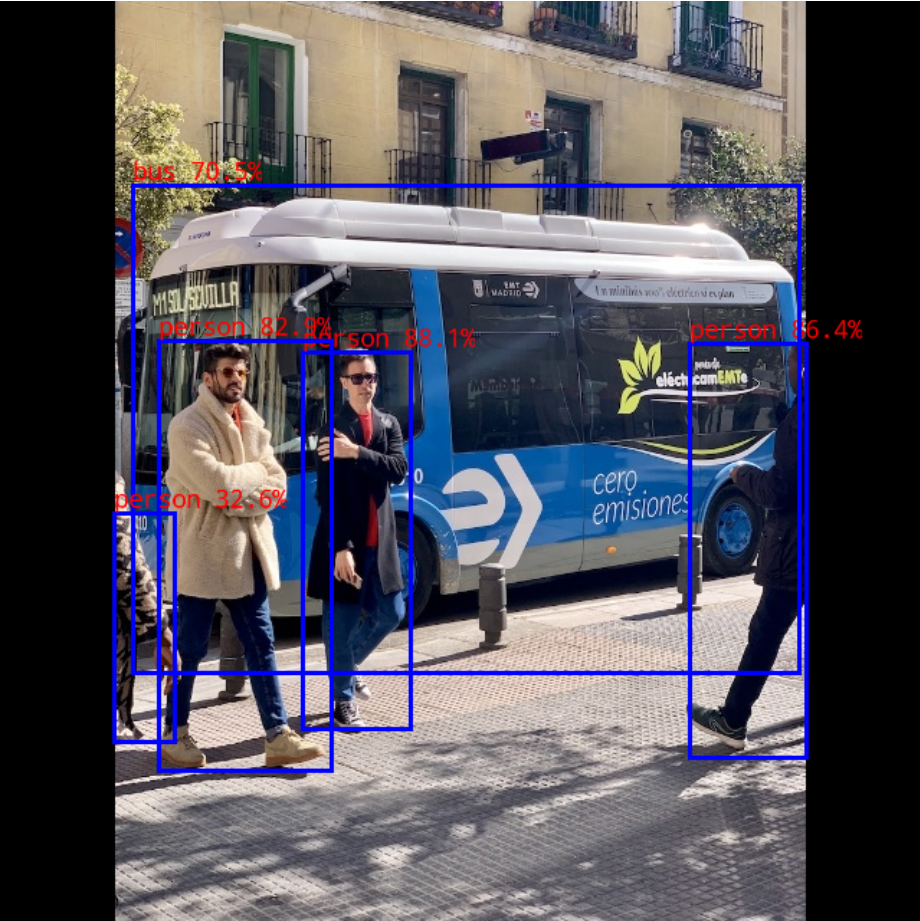
The default input image is model/bus.jpg . The output is shown below:
English source figure · PDF 22
Figure 4-1 RKNN Python Demo output image
If the Python Demo completes inference successfully, the basic model conversion, ADB connection, rknn_server , and board-side Mini Runtime path has been verified.
4.4 Compile and Deploy the RKNN C Demo
The Python Demo and C Demo use the same converted RKNN model, so Sections 4.1 and 4.2 do not need to be repeated.
To run the complete RKNN C Demo, compile the C/C++ source code into an executable, then push the executable, model, test image, and dependency libraries to the board.
4.4.1 Compilation
Take RV1106 running Linux with the armhf architecture as an example. RV1103/RV1103B are also Linux development boards.
Before running build-linux.sh , specify the local GCC cross-compiler path. Add the following line at the beginning of build-linux.sh :
GCC_COMPILER=Projects/arm-rockchip831-linux-uclibcgnueabihf/bin/arm-rockchip831-linux-uclibcgnueabihf
Then compile:
cd Projects/rknn_model_zoo

# Usage: ./build-linux.sh -t <target> -a <arch> -d <build_demo_name> [-b <build_type>] [-m]
# -t : target (rv1103/rv1106); rv1103b/rv1106b and rv1103/rv1106 can share code other than models
# -a : arch (aarch64/armhf)
# -d : demo name, corresponding to a subdirectory under examples, such as yolov5 or mobilenet
# -b : build_type(Debug/Release)
# -m : enable address sanitizer; build_type must be set to Debug
./build-linux.sh -t rv1106 -a armhf -d yolov5
4.4.2 Push Files to the Board
After compilation, an install folder is generated under rknn_model_zoo . It contains the executable, dependency libraries, model, and test image. The directory structure is similar to the following:
install
└── rv1106_linux_armhf
    └── rknn_yolov5_demo
        ├── lib
        ├── model
        └── rknn_yolov5_demo
Push the entire Demo directory to the board:
cd Projects/rknn_model_zoo

# For different models and platforms, select the corresponding path under install
adb push install/rv1106_linux_armhf/rknn_yolov5_demo /data/
4.5 Run on the Board and Verify the Output
Enter the board and run the executable:
adb shell

cd /data/rknn_yolov5_demo/

# Set the dependency library environment
export LD_LIBRARY_PATH=/data/rknn_yolov5_demo/lib

# Usage: ./rknn_yolov5_demo <model_path> <input_path>
./rknn_yolov5_demo model/yolov5s_relu.rknn model/bus.jpg
By default, the output image is saved as rknn_yolov5_demo/out.png . Run the following command on the computer to pull the result:
adb pull /data/rknn_yolov5_demo/out.png .
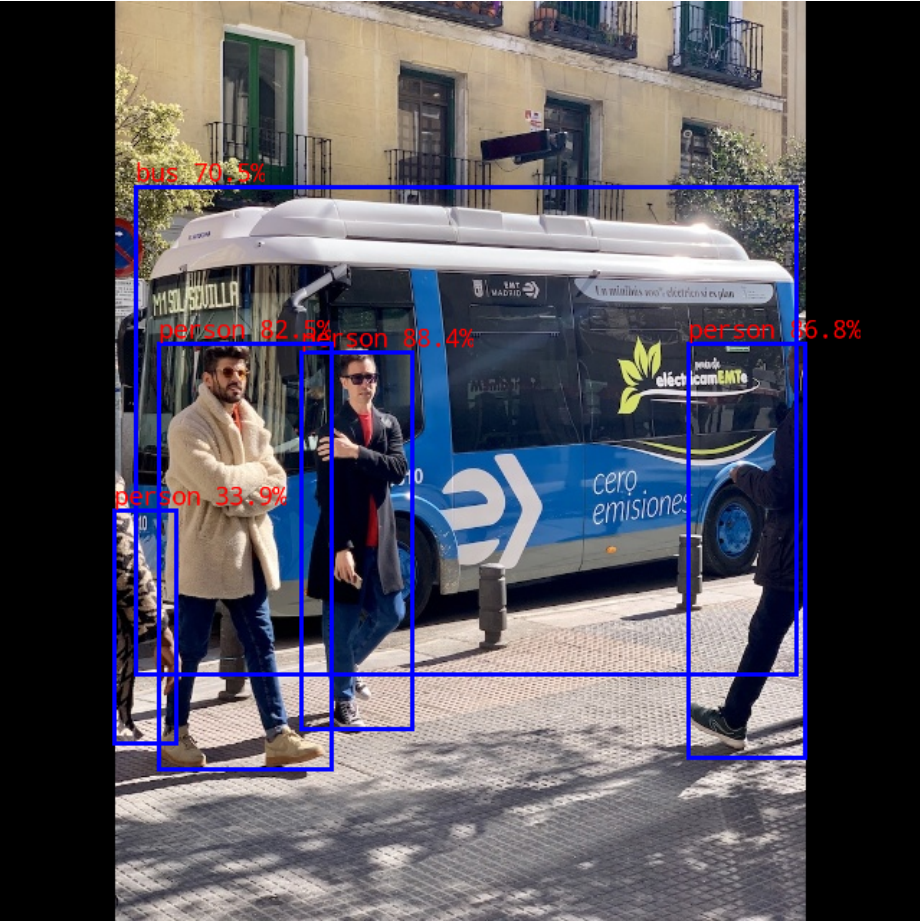
The output image is shown below:
English source figure · PDF 25
Figure 4-2 RKNN C Demo output image
If out.png can be generated and pulled successfully, the first verification of C/C++ compilation, file deployment, Mini Runtime loading, and board-side inference is complete.
4.6 Dataset Accuracy Evaluation (Optional)
The rknn_model_zoo/datasets directory is used to store datasets for accuracy evaluation. For YOLOv5, download the COCO validation dataset first.
cd Projects/rknn_model_zoo/datasets/COCO

# Download the val2017 dataset
python download_eval_dataset.py
To perform dataset accuracy evaluation, install pycocotools and specify the evaluation mode and dataset path using –coco_map_test and –img_folder :
pip install pycocotools

cd Projects/rknn_model_zoo/examples/yolov5/python

python yolov5.py \
    --model_path ../model/yolov5s_relu.rknn \
    --target rv1106 \
    --img_folder ../../../datasets/COCO/val2017 \
    --coco_map_test