
Complete technical content of Chinese RK-PC-YF-310 V1.0.2. The overview lists Linux4.19/5.10; the body also covers Linux4.4 and Android7.1–12+ branches. “All chips” in the source does not establish support for every ArmSoM board. Match SoC, SDK/BSP, kernel and media components; platform reference only, without hardware testing. No English PDF is supplied, so all translations retain identified Chinese-source figures. Specifications/performance are source values, not ArmSoM measurements.
1 General media
1.1 Playback failure
1.1.1 Specifications
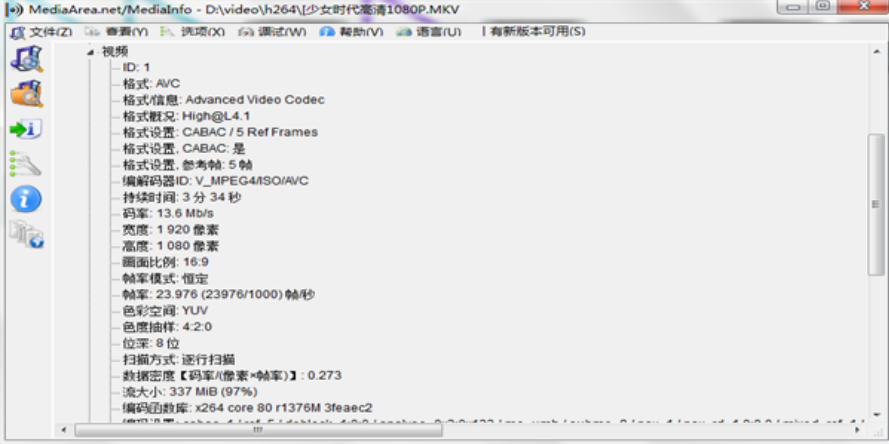
Use MediaInfo on Windows/Linux to inspect codec, resolution, bitrate, scan type and bit depth. Compare the Datasheet/Codec Benchmark, necessary references for chip capability; obtain them from the supplier if missing.
Source figure 1, PDF page 3 (Chinese PDF)
1.1.2 Format licensing
The source says its platform omits audio mlp, ac3, eac3, dts, dsp, heaac and other Dolby-related formats, and video divx, xvid, rmvb, vp6, vc1, svq and ISO Blu-ray for licensing reasons. This describes the source SDK, not present-day legal advice.
1.2 Capability tables
Source-rated values follow. Heavy CPU/DDR load can reduce actual performance; these are not universal concurrency guarantees.
1.2.1 Decoding
| SoC | H264 | H265 | VP9 | JPEG |
|---|---|---|---|---|
| RK3588 | 7680x4320@30f | 7680x4320@60f | 7680x4320@60f | 1920x1080@280f |
| RK3576 | 4096x2304@60f | 4096x2304@60f | 4096x2304@60f | 3840x2160@90f |
| RK3562 | 1920x1080@60f | 4096x2304@30f | 4096x2304@30f | 1920x1080@60f |
| RK3528 | 4096x2304@30f | 4096x2304@60f | 4096x2304@60f | 1920x1080@120f |
| RK356X | 4096x2304@30f | 4096x2304@60f | 4096x2304@60f | 1920x1080@80f |
| RK3399 | 4096x2304@30f | 4096x2304@60f | 4096x2304@60f | 1920x1080@30f |
| RK3328 | 4096x2304@30f | 4096x2304@60f | 4096x2304@60f | 1920x1080@30f |
| RK3288 | 3840x2160@30f | 4096x2304@60f | N/A | 1920x1080@30f |
| RK3358/PX5 | 4096x2160@25f | 4096x2304@60f | N/A | 1920x1080@30f |
| RK3326/PX30 | 1920x1080@60f | 1920x1080@60f | N/A | 1920x1080@30f |
| RK312X | 1920x1080@60f | 1920x1080@60f | N/A | 1920x1080@30f |
Notes: RK3588 also supports AVS2 7680x4320@60f and AV1 3840x2160@60f; RK3528 supports AVS2 4096x2160@60f. RK3562 lacks mpeg1/2/4, vp8 and h263; other listed chips support them up to1080P. The decoding row RK3358/PX5 differs from encoding RK3368/PX5; retained for verification.
1.2.2 Encoding
| SoC | H264 | H265 | VP8 | JPEG |
|---|---|---|---|---|
| RK3588 | 7680x4320@30f | 7680x4320@30f | 1920x1080@30f | 3840x2160@30f |
| RK3576 | 3840x2160@60f | 3840x2160@60f | N/A | 3840x2160@160f |
| RK3562 | 1920x1080@30f | N/A | N/A | N/A |
| RK3528 | 1920x1080@60f | 1920x1080@60f | N/A | 3840x2160@30f |
| RK356X | 1920x1080@60f | 1920x1080@60f | 1920x1080@30f | 1920x1080@60f |
| RK3399 | 1920x1080@30f | N/A | 1920x1080@30f | 1920x1080@30f |
| RK3328 | 1920x1080@30f | 1920x1080@30f | 1920x1080@30f | 1920x1080@30f |
| RK3288 | 1920x1080@30f | N/A | 1920x1080@30f | 1920x1080@30f |
| RK3368/PX5 | 1920x1080@30f | N/A | 1920x1080@30f | 1920x1080@30f |
| RK3326/PX30 | 1920x1080@30f | N/A | 1920x1080@30f | 1920x1080@30f |
| RK312X | 1920x1080@30f | N/A | 1920x1080@30f | 1920x1080@30f |
1.3 VPU frequency
VPU is the hardware video unit. Increasing VPU/DDR may help bottlenecks, but excessive clocks affect stability; test before integration. DDR reference: SDK RKDocs/common/DDR/Rockchip-Developer-Guide-DDR/.
1.3.1 Query
Use cat /d/clk/clk_summary and these nodes:
| SoC | h264_dec | h265_dec | vp9_dec | jpeg_dec | h264_enc | h265_enc |
|---|---|---|---|---|---|---|
| RK3588 | rkvdec | rkvdec | rkvdec | jpeg_decoder | rkvenc | rkvenc |
| RK3576 | rkvdec | rkvdec | rkvdec | jpeg | vepu | vepu |
| RK3562 | rkvdec | rkvdec | rkvdec | jdec | rkvenc | × |
| RK3528 | rkvdec | rkvdec | rkvdec | jpeg_decoder | rkvenc | rkvenc |
| RK356X | rkvdec | rkvdec | rkvdec | jdec | rkvenc | rkvenc |
| RK3399 | vdu | vdu | vdu | vcodec | vcodec | × |
| RK3328 | rkvdec | rkvdec | rkvdec | vpu | h264 | h265 |
| RK3288 | vcodec | hevc | × | × | vcodec | × |
| RK3368/PX5 | video | video | × | video | video | × |
| RK3326/PX30 | vpu | vpu | × | vpu | vpu | × |
| RK312X | vdpu | vdpu | × | vdpu | vdpu | × |
cat /d/clk/clk_summary | grep rkvdec // <aclk_rkvdec0> <aclk_rkvdec1>
cat /d/clk/clk_summary | grep vcodec // <aclk_vcodec>
cat /d/clk/clk_summary | grep h265 // <aclk_h265>
Above: RK3588 H264 decode, RK3288 H264 decode, RK3328 H265 encode. Source // annotations are not shell comments; execute only command portions.
1.3.2 Change
Linux4.4(Android7.1–9.0)500M example; per-IP frequency is not supported.
--- a/drivers/video/rockchip/vcodec/vcodec_service.c
+++ b/drivers/video/rockchip/vcodec/vcodec_service.c
@@ -2307,6 +2307,7 @@ static void vcodec_set_freq_default(struct vpu_service_info
*pservice,
{
enum VPU_FREQ curr = atomic_read(&pservice->freq_status);
+ reg->freq = VPU_FREQ_500M;
if (curr == reg->freq)
return;
Linux4.19/5.10(Android10+) uses DTSI or temporary nodes. The source intro says RK3399 “above4K” but the threshold is1920x1088=2088960, with extra commas in DTS. Preserve and check against SDK. normal-rates applies below the threshold, advanced-rates above.
<rk3399.dtsi>
rkvdec: rkvdec@ff660000{
clock-names = "aclk_vcodec", "hclk_vcodec",
"clk_cabac", "clk_core",;
rockchip,normal-rates = <297000000>, <0>,
<297000000>, <297000000>, ;
rockchip,advanced-rates = <500000000>, <0>,
<500000000>, <500000000>;
rockchip,default-max-load = <2088960>; // 1920x1088
};
echo 500000000 > /proc/mpp_service/rkvdec/aclk
echo 500000000 > /proc/mpp_service/rkvdec/clk_core
echo 500000000 > /proc/mpp_service/rkvdec/clk_cabac
1.4 Capture input/output
Save data to isolate corrupt/green frames. MediaCodec applications save encoder/decoder input before queueInputBuffer; read encoded output after dequeueOutputBuffer, and decoded output only without Surface. Prepare framework directory, then select by version:
setenforce 0
mkdir /data/video/
Android12+ Codec2:
setprop vendor.dump.c2.log 0x000000f0
Android11 and earlier OMX:
// 解码 dec_in*.bin
setprop vendor.omx.vdec.debug 0x01000000
setprop record_omx_dec_in 1
// 编码 enc_in*.bin enc_out*.bin
setprop vendor.omx.venc.debug 0x03000000
setprop record_omx_enc_in 1
setprop record_omx_enc_out 1
If /data/video/ stays empty, use lower-level library switches:
setenforce 0
mkdir /data/video/
setprop mpp_dump_in /data/video/mpp_dec_in.bin
setprop mpp_dump_out /data/video/mpp_dec_out.bin
setprop vendor.mpp_dump_in /data/video/mpp_dec_in.bin
setprop vendor.mpp_dump_out /data/video/mpp_dec_out.bin
setprop mpp_debug 0x600 && setprop vendor.mpp_debug 0x600
1.5 Concurrent streams
Convert RK3399 H264 4096x2304@30fps to1080P@30fps:
(4096x2304x30) / (1920x1088x30) = 4.5
Round down to4; overhead increases with stream count. The source claims4 under all conditions using extreme high-bitrate material, but system load still matters; this is not an ArmSoM guarantee. rkvdec on RK3588/RK356X/RK3399/RK3328 may exceed the estimate for ordinary non-high-bitrate H264/H265/VP9, e.g.RK3399 may reach8. Evaluate(1)kernel frame time,(2)VPU/DDR clocks,(3)VPU changes per1.3,(4)DDR tuning.
echo 0x0100 > /sys/module/rk_vcodec/parameters/mpp_dev_debug
cat /proc/kmsg
Above4.19/5.10(Android10+); for4.4(Android7.1–9.0):
echo 0x0100 > /sys/module/rk_vcodec/parameters/debug
cat /proc/kmsg
Eight30fps streams allow1000/(8*30)≈4.16ms; ignoring pipeline losses, target under4ms/frame. If insufficient, assess clock headroom and retest.
/* VPU 频率 */
$ cat /d/clk/clk_summary | grep vdu <aclk_vdu> rk3399
$ cat /d/clk/clk_summary | grep rkvdec <aclk_rkvdec> rk3588\rk3328\rk356x
/* DDR 频率 */
$ cat /sys/class/devfreq/dmc/cur_freq
echo performance > /sys/class/devfreq/dmc/governor
1.6 High CPU
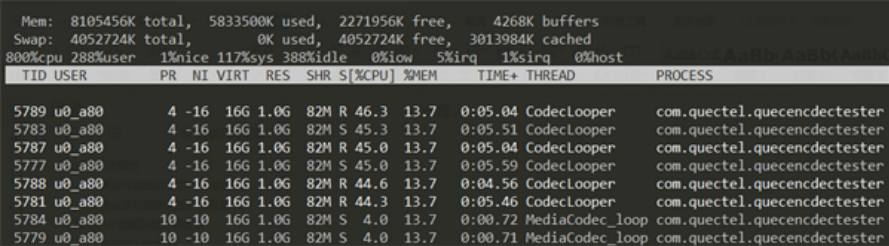
Reads/writes consume CPU too. Narrow process→thread→function. Run adb shell busybox top; source com.quectel.quecencdectester uses47.8%. Inspect threads; application threads require application analysis, framework threads go to Redmine. The source’s multistream CodecLooper dominates CPU.
adb shell busybox top
top -H -p $(pidof com.quectel.quecencdectester)

Source figure 1, PDF page 9 (Chinese PDF)
Source figure 2, PDF page 9 (Chinese PDF)
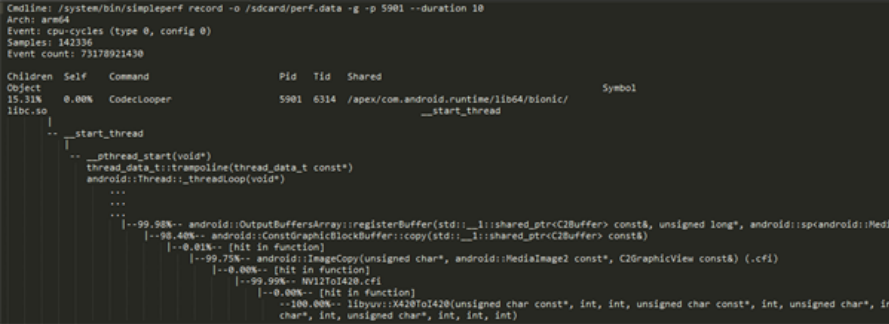
Android Studio TraceView/Systrace are options; the source uses SDK simpleperf for functions. Record PID1349 for10seconds, then report:
simpleperf record -o /sdcard/perf.data -g -p 1349 --duration 10
simpleperf report -i /sdcard/perf.data -g caller > /sdcard/perfdata
Source figure 1, PDF page 10 (Chinese PDF)
Source CodecLooper uses15.31%, mainly libyuv::X420ToI420. BufferMode copies framework DMA output to the application, which cannot directly consume it. Section2.5 replaces CPU copy with RGA. Apply the same analysis elsewhere.
1.7 Memory leaks
Available memory shrinks until OOM/reboot. Compare meminfo before/after; continually growing process RSS/PSS suggests leakage.
dumpsys meminfo
showmap $(pidof xxx)
showmap lists mappings; RSS/PSS are inK. dmabuf uses ION/DRM/dmaBufferHeap for zero-copy decode/display; check allocation/release at initialization, destruction and info-change. malloc comes from alloc/malloc and supports Malloc Debug. /dmabuf denotes DMA; malloc or anon:scudo denotes malloc.

Source figure 1, PDF page 11 (Chinese PDF)
Malloc Debug diagnoses native leaks, corruption and frees; see bionic/libc/malloc_debug/README.md. myTest example:
adb shell stop
adb shell setprop libc.debug.malloc.program myTest
adb shell setprop libc.debug.malloc.options backtrace
adb shell start
#开始测试复现问题...
kill -9 $(pidof myTest)
Source snapshot /data/local/tmp/backtrace_heap.3302.txt uses PID3302, while parsing example uses3378; use the actual file. $(OUT) is source notation; verify execution context. Fix the leak from out_heap stacks.
python development/scripts/native_heapdump_viewer.py --symbols $(OUT)/symbols backtrace_heap.3378.txt > out_heap.txt
1.8 Hardware JPEG demo
Native MediaCodec lacks JPEG; use hardware/rockchip/libhwjpeg wrapping MPP JPEG. MpiJpegEncoder encodes,MpiJpegDecoder decodes,including images/MJPEG. src implementation,inc headers,test examples; see readme.txt.
2 Codec issues
2.1 Stutter/A-V sync
Collect displayFPS and kernel frame time:
setprop debug.sf.fps 1
logcat -c ;logcat | grep mFps
Kernel timing commands in1.5:4.19/5.10 uses mpp_dev_debug,4.4 uses debug.
- Verify hardware decoding: apps may use software. Check Logcat format/specifications and player settings. Hardware kernel timing logs indicate hardware decoding; absence suggests software in the source workflow.
- Separate decoding/display: for supported sources, under33ms at30fps or16ms at60fps with stutter points first to composition.
- Check display refresh: incorrect DTS reduces HWC efficiency; typically60fps:
clock-frequency = (hactive + hback-porch + hfront-porch + hsync-len) * (vactive + vback-porch + vfrontporch + vsync-len) * fps
The formula’s vfrontporch differs from common vfront-porch; verify binding. With correct refresh, check rotation, too many Surface layers and unsupported formats. Collect composition/HWC logs for engineers:
dumpsys SurfaceFlinger
adb shell "setprop sys.hwc.log 51"
adb shell "logcat -c ;logcat" > hwc
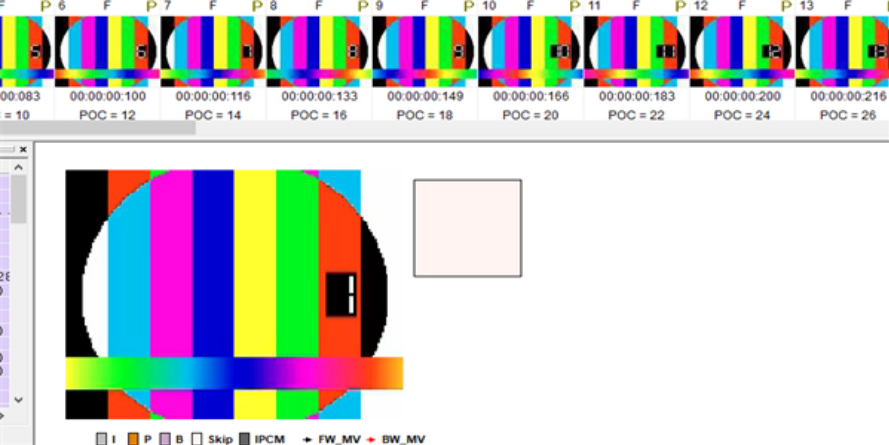
The source’s curly closing quote is restored to ASCII.4)For error frame logs, check input frame loss. Dump per1.4(source incorrectly says chapter4); H264 tools:eseye/Vega H264 Analyzer,H265:HEVCAnalyzer. Check preview and POC; if input is valid but hardware decoding fails, submit source and full Logcat.
Source figure 1, PDF page 13 (Chinese PDF)
2.2 Blurred/mosaic recording
Lossy compression loses original data. Low local quality often relates toQP1–51; smaller means higher quality. Without QP limits, higher bitrate generally lowersQP.
- Inspect per-frameQP with eseye/Vega; source example16–29. Blocks above40 may blur; tune bitrate/strategy. NormalQP with mosaics requires input capture.
- No universal bitrate table: actual≥target with highQP may mean target too low—increase it. Actual<target with highQP:check BITRATE_MODE_VBR. Actual far above target:manually tuneQP.
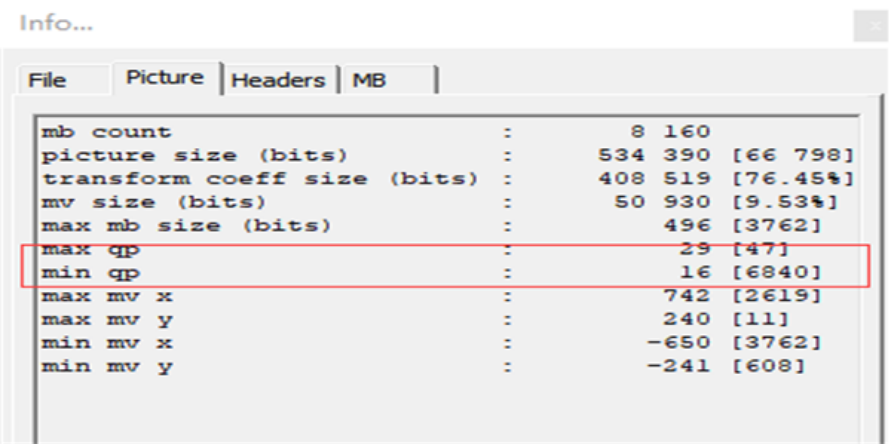
Source figure 1, PDF page 14 (Chinese PDF)
- Try high profile instead of baseline; CABAC improves compression/quality at equal bitrate. Android12+ supportsQP limits,Max≤40 may help; qp-i-min is I minimum,qp-p-max P maximum. Limits may overshoot bitrate; monitor output. Android11 and earlier modifyMPP.
format->setInt32("video-qp-i-min", 10);
format->setInt32("video-qp-i-max", 40);
format->setInt32("video-qp-p-min", 10);
format->setInt32("video-qp-p-max", 40);
diff --git a/mpp/legacy/vpu_api_legacy.cpp b/mpp/legacy/vpu_api_legacy.cpp
index 33d08ccb..b937f0bc 100644
--- a/mpp/legacy/vpu_api_legacy.cpp
+++ b/mpp/legacy/vpu_api_legacy.cpp
@@ -173,9 +173,9 @@ static MPP_RET vpu_api_set_enc_cfg(MppCtx mpp_ctx, MppApi
*mpi, MppEncCfg enc_cf
mpp_enc_cfg_set_s32(enc_cfg, "h264:cabac_idc", 0);
mpp_enc_cfg_set_s32(enc_cfg, "h264:qp_init", is_fix_qp ? qp : -1);
mpp_enc_cfg_set_s32(enc_cfg, "h264:qp_min", is_fix_qp ? qp : 10);
- mpp_enc_cfg_set_s32(enc_cfg, "h264:qp_max", is_fix_qp ? qp : 51);
+ mpp_enc_cfg_set_s32(enc_cfg, "h264:qp_max", is_fix_qp ? qp : 40);
mpp_enc_cfg_set_s32(enc_cfg, "h264:qp_min_i", 10);
- mpp_enc_cfg_set_s32(enc_cfg, "h264:qp_max_i", 51);
+ mpp_enc_cfg_set_s32(enc_cfg, "h264:qp_max_i", 40);
mpp_enc_cfg_set_s32(enc_cfg, "h264:qp_step", 4);
mpp_enc_cfg_set_s32(enc_cfg, "h264:qp_delta_ip", 3);
} break;
2.3 MediaCodec bitrate overshoot
From Android12, a1080P target of1Mbps may produce over4Mbps because mediaformatshaping corrects unreasonableQP/bitrate. VQApply uses width,height,bpp and target,usually raising the rate above width×height×bpp. Disable shaping with the property or change its frameworks/av default.
D VQApply : minquality/target bitrate raised from 1258291 to 4727808 bps
setprop debug.stagefright.enableshaping 0
diff --git a/media/libstagefright/MediaCodec.cpp
b/media/libstagefright/MediaCodec.cpp
index 382324a91c..dd1dfa062f 100644
--- a/media/libstagefright/MediaCodec.cpp
+++ b/media/libstagefright/MediaCodec.cpp
@@ -2054,7 +2054,7 @@ status_t
MediaCodec::setOnFirstTunnelFrameReadyNotification(const sp<AMessage> &
* MediaFormat Shaping forward declarations
* including the property name we use for control.
*/
-static int enableMediaFormatShapingDefault = 1;
+static int enableMediaFormatShapingDefault = 0;
static const char enableMediaFormatShapingProperty[] =
"debug.stagefright.enableshaping";
static void mapFormat(AString componentName, const sp<AMessage> &format, const
char *kind,
bool reverse);
2.4 Codec initialization failure
During playback,recording,screen capture or photography,mpp hal xxx init failed usually means a disabled DTS node. jpegd identifies JPEG decoding; vdpu is the node to inspect. Check /proc/mpp_service and consult rk3588-evb.dtsi or rk3399-android.dtsi.
ls -al /proc/mpp_service/
&mpp_srv {
status = "okay";
};
&vdpu {
status = "okay";
};
E hal_h264e_vepu541: hal_h264e_vepu541_init mpp_dev_init failed. ret: -1
E mpp_enc_hal: mpp_enc_hal_init hal hal_h264e init failed ret -1
E mpp_enc_hal: mpp_enc_hal_init could not found coding type 7
h264e identifies H.264 encoding failure; enable vepu:
&mpp_srv {
status = "okay";
};
&vepu {
status = "okay";
};
2.5 BufferMode efficiency
Without a Surface,the app needs output buffers but framework dmaBuffer cannot be handed directly to it:an extra CPU copy increases frame time and CPU use,especially under existing load. SurfaceMode passes dmaBuffer directly between decode/display,providing zero-copy. Replacing CPU copying with RGA can reduce load and processing time; see 418670.
3 Application issues
3.1 Kodi/bilibili misses hardware decoding
On Android12+,ijkmedia selects hardware names beginning OMX.,missing Codec2 c2.rk.avc.decoder. A temporary OMX.c2.rk.avc.decoder alias provides compatibility. Custom apps may also be affected; inspect IJKMEDIA logs. Ultimately fix ijkmedia selection; the source says the temporary patch is not integrated into the release. See 396998.
3.2 WebView failure/white edge
AFBC on RK3566/3568/3588/3528 adds four top rows above1080P. ImageReader/NdkImageReader must honor crop after acquiring Surface buffers or a white edge appears. First,the default zero-origin check rejects the buffer; remove its return in frameworks/av:
E NdkImageReader: Crop left top corner [0, 4] not at origin
diff --git a/media/ndk/NdkImageReader.cpp b/media/ndk/NdkImageReader.cpp
index 067c8f4ae5..6df40cc975 100644
--- a/media/ndk/NdkImageReader.cpp
+++ b/media/ndk/NdkImageReader.cpp
@@ -455,7 +455,7 @@ AImageReader::acquireImageLocked(/*out*/AImage** image,
/*out*/int* acquireFence
Point lt = buffer->mCrop.leftTop();
if (lt.x != 0 || lt.y != 0) {
ALOGE("Crop left top corner [%d, %d] not at origin", lt.x, lt.y);
- return AMEDIA_ERROR_UNKNOWN;
+ // return AMEDIA_ERROR_UNKNOWN;
}
The edge may remain after removing the check. Local players control source crop; WebView obtains GraphicBuffer through getHardwareBuffer and must handle crop in app code. The framework cannot currently fix it. Disable FBC at possible performance cost. Android11/earlier:hardware/rockchip/omx_il:
diff --git a/osal/Rockchip_OSAL_Android.cpp b/osal/Rockchip_OSAL_Android.cpp
index 5950cd0..ac599cf 100755
--- a/osal/Rockchip_OSAL_Android.cpp
+++ b/osal/Rockchip_OSAL_Android.cpp
@@ -317,6 +317,7 @@ OMX_BOOL Rockchip_OSAL_Check_Use_FBCMode(OMX_VIDEO_CODINGTYPE
codecId, int32_t d
OMX_U32 pValue;
OMX_U32 width, height;
+ return OMX_FALSE;
if (pPort->bufferProcessType != BUFFER_SHARE) {
return OMX_FALSE;
}
Android12+:vendor/rockchip/hardware/interfaces/codec2:
diff --git a/component/osal/C2RKChipCapDef.cpp
b/component/osal/C2RKChipCapDef.cpp
index 78659ab..b66fb31 100644
--- a/component/osal/C2RKChipCapDef.cpp
+++ b/component/osal/C2RKChipCapDef.cpp
@@ -297,6 +297,7 @@ uint32_t C2RKChipCapDef::getGrallocVersion() {
uint32_t C2RKChipCapDef::getFbcOutputMode(MppCodingType codecId) {
uint32_t fbcMode = 0;
+ return 0;
for (int i = 0; i < mChipCapInfo->fbcCapNum; i++) {
if (mChipCapInfo->fbcCaps[i].codecId == codecId) {
3.3 iQiyi endurance-playback crash
On Android10+,ads may set MediaPlayer Surface late:BufferMode becomes SurfaceChange,requiring new buffers and release of old ones. Nonzero references retain old DMA buffers,causing lowmem and crashes. Confirm a continually increasing number of VPU-attached DMA buffers. Patch 423914.
cat /d/dma_buf/bufinfo
3.4 Live thumbnail failure
MediaMetadataRetriever fails during playback because thumbnails are disabled to save bandwidth and prevent background work disturbing foreground playback. Android12+ exposes the property below,also usable in system prop files. Earlier versions require an updated library via the Redmine engineering channel.
MediaMetadataRetrieverJNI( 1574): getFrameAtTime: videoFrame is a NULL pointer
setprop rt_retriever_enable 1
3.5 RK356X green recording/RGA error
E/rga_mm ( 0): RGA_MMU unsupported Memory larger than 4G!
E/rga_mm ( 0): scheduler core[4] unsupported mm_flag[0x0]!
E/rga_mm ( 0): rga_mm_map_buffer map dma_buf error!
E/rga_mm ( 0): job buffer map failed!
E/rga_mm ( 0): src channel map job buffer failed!
E/rga_mm ( 0): failed to map buffer
RGA2 only addresses32bits,so buffers must be below4G. RK356X encoding needs aligned buffers;Codec uses RGA preprocessing. src/dst above4G fails;Gralloc ultimately allocates them.
- Allocate dst with GraphicBufferAllocator and GRALLOC_USAGE_WITHIN_4G.
- src comes from Surface,the BufferQueue producer;Codec is consumer. Consumer usage affects producer allocation. GRALLOC_USAGE_HW_VIDEO_ENCODER identifies hardware encoding;Gralloc must allocate below4G when this usage and RK356X apply. See 425094.
3.6 Disable media formats
MediaPlayer can exclude formats through configuration. The prose names RK3588 with VC1/VP9 and AAC/MP3 disabled,but the patch targets RK3566/RK3567/RK3568;verify the actual SDK. The source regional VP9 copyright statement is not treated as a legal determination. Modify device/rockchip/common:
diff --git a/rt_video_config.xml b/rt_video_config.xml
index 067b81a8..46ec980b 100644
--- a/rt_video_config.xml
+++ b/rt_video_config.xml
@@ -224,6 +224,7 @@
<chip name="RK3566,RK3567,RK3568">
<include
name="mpeg1,mpeg2,mpeg4,vp8,h264_8k_10bit_high422,hevc_8k_10bit"/>
<include name="vp9_4k_10bit"/>
+ <forbid name="vc1,vp9"/>
</chip>
<chip name="RK3528">
diff --git a/rt_audio_config.xml b/rt_audio_config.xml
index 182e2a83..af645673 100644
--- a/rt_audio_config.xml
+++ b/rt_audio_config.xml
@@ -34,4 +34,10 @@
<formats>
</formats>
</bitstream>
+ <forbid>
+ <formats>
+ <format>AAC</format>
+ <format>MP3</format>
+ </formats>
+ </forbid>
</sound>
For verification update /system/etc/rt_audio_config.xml and rt_video_config.xml,then restart playback. Other selectable exclusions:
Video: mpeg1, mpeg2, h263, mpeg4, wmv1, wmv2, wmv3, h264, vp8, vp9, hevc, vc1, avs, avs+, avs2, flv1, av1
Audio: AAC, APE, MP3, WMALOSSLESS, WMAPRO, WMAV1, WMAV2, ADPCM_IMA_QT, VORBIS, PCM_S16LE, PCM_S24LE, FLAC, MP1, MP2, AMR_WB, AMR_NB
3.7 Reddish Camera4K playback
Camera/CameraRecorder4K recordings may look reddish/vivid because Android defaults to BT2020 by resolution when colorAspect is absent,and HDR-capable devices then enableHDR. The source describes vividness as display gain. If unwanted,change the default toBT709 in frameworks/av setDefaultCodecColorAspectsIfNeeded;the exact threshold is in the code:
diff --git a/media/libstagefright/foundation/ColorUtils.cpp
b/media/libstagefright/foundation/ColorUtils.cpp
index fa722b5572..f253b68780 100644
--- a/media/libstagefright/foundation/ColorUtils.cpp
+++ b/media/libstagefright/foundation/ColorUtils.cpp
@@ -377,8 +377,8 @@ void ColorUtils::setDefaultCodecColorAspectsIfNeeded(
// Default to BT2020, BT709 or BT601 based on size. Allow 2.35:1 aspect
ratio. Limit BT601
// to PAL or smaller, BT2020 to 4K or larger, leaving BT709 for all
resolutions in between.
if (width >= 3840 || height >= 3840 || width * (int64_t)height >= 3840 *
1634) {
- primaries = ColorAspects::PrimariesBT2020;
- coeffs = ColorAspects::MatrixBT2020;
+ primaries = ColorAspects::PrimariesBT709_5;
+ coeffs = ColorAspects::MatrixBT709_5;
} else if ((width <= 720 && height > 480 && height <= 576)
|| (height <= 720 && width > 480 && width <= 576)) {
primaries = ColorAspects::PrimariesBT601_6_625;
3.8 Black frame between videos
Default still-frame mode keeps the previous final frame until the next first frame. Black-frame mode injects a black Surface frame when playback ends. Android MediaPlayer applications can enable this property or include it in system prop files.
setprop media.rockit.video.black_frame 1
References
ArmSoM documentation. Redmine links are source patch references and may require authorized login; patches have not been obtained or hardware-validated here.