
Based on Chinese source RK-SM-YF-E12 V1.0.0, this article covers all decoder and encoder extensions. The source uses Codec2 on Android 12 or later and lists Linux 4.19, 5.10 and 6.1; tunneling additionally requires kernel ≥ 5.10. Its “all chips” statement describes the platform, not verified support on every ArmSoM board. Match the SoC, Android BSP, drivers and interfaces. No hardware validation was performed; performance figures are source claims. The sole technical diagram already has English labels and is retained in all four languages.
1 Decoder extensions
1.1 Low-latency decoding
Output pictures quickly for real-time operation by enabling fast internal frame parsing and ignoring reference order. This suits latency-sensitive casting and live streaming. The mode is “one input, one output” and is unsuitable for B-frame streams: their forward/backward references can cause out-of-order output.
mediaFormat.setInteger("low-latency", 1);
c2_info("enable lowLatency, enable mpp fast-out mode");
The preceding log confirms activation.
1.2 Multimedia tunneling
The decoder establishes a direct tunnel to the display driver, bypassing Android SurfaceFlinger. High-bitrate/high-frame-rate playback avoids display-framework overhead and frees resources; low-latency output synchronizes directly to the VOP. See Android multimedia tunneling.
Patch configuration
Kernel ≥ 5.10 is required. First enable rkvtunnel in the board DTS:
diff --git a/arch/arm64/boot/dts/rockchip/rk3588s-evb1-lp4x.dtsi b/arch/arm64/boot/dts/rockchip/rk3588s-evb1-lp4x.dtsi
index 8c1d0f37b8a3..8bd65c9ed85b 100644
--- a/arch/arm64/boot/dts/rockchip/rk3588s-evb1-lp4x.dtsi
+++ b/arch/arm64/boot/dts/rockchip/rk3588s-evb1-lp4x.dtsi
@@ -846,6 +846,10 @@ &usbhost_dwc3_0 {
     status = "disabled";
 };
+&rkvtunnel {
+    status = "okay";
+};
+
 /* vp0 & vp3 are not used on this board */
 &vp0 {
     /delete-property/ rockchip,plane-mask;
Next declare tunneled-playback capability in media_codecs.xml. This RK3588 AVC example must be adapted to the corresponding chip and decoder.
~/3_android_14/vendor/rockchip/common/vpu/etc$ git diff .
diff --git a/vpu/etc/media_codecs_c2_rk3588.xml b/vpu/etc/media_codecs_c2_rk3588.xml
index 28c1f947..d01da2d5 100644
--- a/vpu/etc/media_codecs_c2_rk3588.xml
+++ b/vpu/etc/media_codecs_c2_rk3588.xml
@@ -20,6 +20,7 @@
 </Settings>
 <Decoders>
     <MediaCodec name="c2.rk.avc.decoder" type="video/avc">
+        <Feature name="tunneled-playback" required="true"/>
         <Alias name="OMX.rk.video_decoder.avc" />
         <Limit name="size" min="64x64" max="7680x4320" />
         <Limit name="alignment" value="2x2" />
Application
Listed synchronization modes are AUDIO_HW_SYNC, HW_AV_SYNC and REALTIME; the first two depend on the system tuner driver. The implementation described supports only real-time rendering: prioritize latency and display each decoded output immediately. Pseudocode:
// 1. get tunneled codec name
format.setFeatureEnabled(MediaCodecInfo.CodecCapabilities.FEATURE_TunneledPlayback, true);
MediaCodecList mcl = new MediaCodecList(MediaCodecList.ALL_CODECS);
String codecName = mcl.findDecoderForFormat(format);
// 2. start tunneled video playback
MediaCodec mCodec = MediaCodec.createByCodecName(codecName);
mCodec.configure(format, mSurface, null, 0);
mCodec.start();
while (!isEOS) {
    int inIndex = mCodec.dequeueInputBuffer(0);
    if (inIndex >= 0) {
        ByteBuffer buffer = mCodec.getInputBuffer(inIndex);
        int sampleSize = mExtractor.readSampleData(buffer, 0);
        if (sampleSize > 0) {
            mCodec.queueInputBuffer(inIndex, 0, sampleSize,
                mExtractor.getSampleTime(), 0);
            mExtractor.advance();
        } else {
            mCodec.queueInputBuffer(inIndex, 0, 0,
                0, MediaCodec.BUFFER_FLAG_END_OF_STREAM);
            isEOS = true;
        }
    }
}
mCodec.stop();
mCodec.release();
1.3 Ignore H264 frame-sequence continuity checks
Real-time conferencing or surveillance streams may lose frames or packets. By default, discontinuous POC marks the entire GOP erroneous and discards its error frames until the next keyframe. Hardware error correction can sometimes recover mild loss, allowing the check to be disabled. Severe loss still causes corruption. POC checking is standard decoding behavior, so this is an explicit user option. For stuttering caused by mild loss, use the setting below and confirm its log.
mediaFormat.setInteger("vendor.disable-dpb-check.value", 1);
c2_info("disable poc discontinuous check");
2 Encoder extensions
2.1 Temporal scalable coding (TSVC)
SVC divides video into layers combined for different quality levels, adding detail such as resolution or motion smoothness. Decode the base layer on poor networks and enhancement layers on good networks. Errors can be handled by progressively reducing resolution and frame rate; the source claims tolerance of 20% packet loss. Its statement that lower layers use higher-layer information for error detection/correction is retained as a source description, not independently verified. SVC is used in surveillance and conferencing, including Tencent Rooms and Microsoft Teams. Rockchip implements TSVC with 2–4 layers; the example selects three. Verify through logs or the generated bitstream.
mediaFormat->setString("ts-schema", "android.generic.3");
c2_info("setupTemporalLayers: layers %d", layerCount);
2.2 QP range
QP ranges from 1 to 51. A lower QP generally improves quality at higher bitrate; a higher QP lowers both. Balance quality and file size. The example uses 10–40 for I frames and 10–30 for P frames; verify by log or bitstream.
mediaFormat->setInt32("video-qp-i-min", 10);
mediaFormat->setInt32("video-qp-i-max", 40);
mediaFormat->setInt32("video-qp-p-min", 10);
mediaFormat->setInt32("video-qp-p-max", 30);
c2_info("setupQp: qpInit %d i %d-%d p %d-%d", qpInit, iMin, iMax, pMin, pMax);
2.3 Rotation
Supported angles are 90, 180 and 270 degrees. This example rotates the output 90 degrees clockwise; confirm through the log.
mediaFormat->setInt32("rotation", 90);
c2_info("setupRotation: degrees %d", degrees);
2.4 Scaling
The encoder hardware itself does not perform this scaling. RGA preprocesses the input, potentially slightly increasing encoding time. Example for 720P output:
mediaFormat->setInt32("vendor.input-scalar.width", 1280);
mediaFormat->setInt32("vendor.input-scalar.height", 720);
c2_info("setupBaseCodec: coding %s w %d h %d hor %d ver %d",
        toStr_Coding(mCodingType), mSize->width, mSize->height, mHorStride,
        mVerStride);
2.5 Multiple slices
The source describes macroblocks (MB) as the minimum H264/H265 coding unit: consecutive MBs form a slice producing one NALU. By default a frame occupies one slice. A slice holds all or part of a frame and can be divided by MB count or cumulative bytes. Each adds its own header, so finer splitting increases bitrate. Check this macroblock terminology against the actual codec standard.
Uses include: (1) MTU limits, such as 1500-byte packets; (2) concurrent slice encoding on multicore encoders such as RK3588; (3) smaller correction regions and lower cost under network loss. Byte-based splitting is supported by default:
mediaFormat->setInt32("vendor.slice-size.value", 1500);
c2_info("setupSliceSize: slice-size %d", c2Size->value);
2.6 Re-encoding oversized frames
Large frames burden the network; this option smooths bitrate, but more retries can increase per-frame time. The source says “at most three retries” yet uses 1500 in code. This conflict is preserved; check the SDK rather than treating it as a verified three-retry setting.
mediaFormat->setInt32("vendor.reenc-times.value", 1500);
c2_info("setupReencTimes: reenc-times %d", reencTime->value);
2.7 Smart encoding on RK3576/RK3588
Designed to save bandwidth and improve quality:
- 1.0 adapts quantization using inter/intra-frame complexity, ROI share and minimum/maximum bitrate.
- 2.0 adds richer statistics and steadier rate control for static, weakly textured scenes.
- 3.0 uses neural networks to identify ROI and enhance quality.
The source limits support to RK3576/RK3588. MediaCodec parameters expose 1.0 and 2.0; claimed bitrate improvements are 21%+, 85%+ and 90%+ for large-motion, small-motion and static scenes. These are not ArmSoM measurements. The example prioritizes quality in motion scenes.
mediaFormat->setInt32("vendor.super-encoding-mode.value", 1);
// 设置值:
// 1 ===== 普通运动场景,画质优先,追求更高的 psnr 和 vmaf 值
// 2 ===== 普通运动场景,码率优先,追求更高的视频压缩率
// 3 ===== IPC 相对静止场景,画质优先,追求更高的 psnr 和 vmaf 值
// 4 ===== IPC 相对静止场景,码率优先,追求更高的视频压缩率
c2_info("setupSuperMode: setup super mode %d", superMode);
Modes 1/2 prioritize quality/bitrate for ordinary motion; modes 3/4 prioritize quality/bitrate for relatively static IPC scenes. Quality priority targets higher PSNR/VMAF; bitrate priority targets greater compression.
2.8 Microsoft MVCT protocol certification
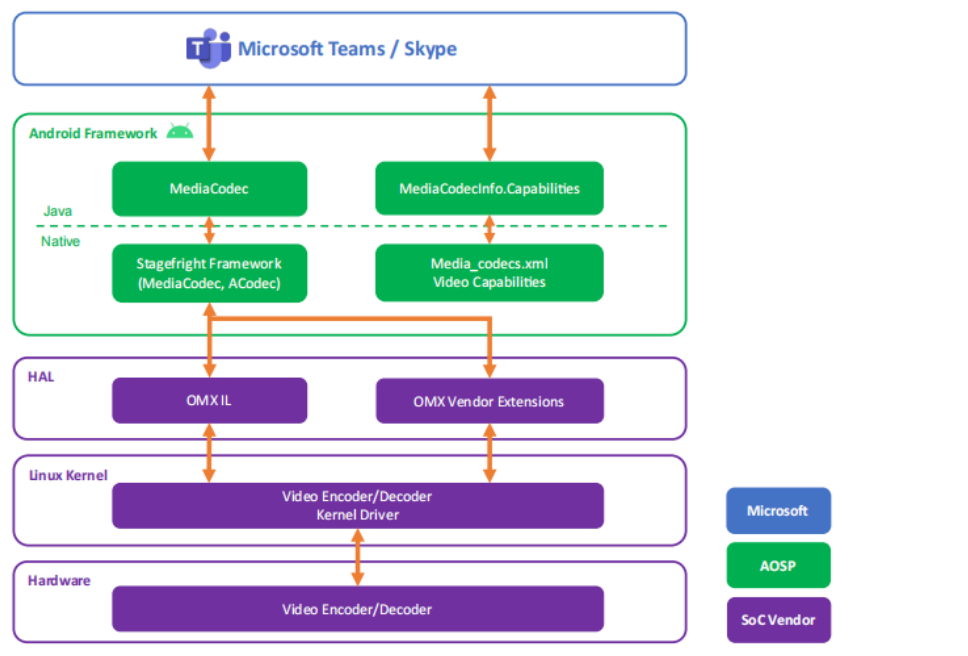
MVCT extension architecture (English figure in the Chinese PDF)
MVCT (Microsoft Codec Validation Tool) is the codec-protocol part of Teams certification, covering TSVC, long/short reference frames, per-frame QP, multiple slices and dynamic bitrate/resolution. Certification is demanding and lengthy, with media, camera and audio requirements:
- MVCT: implement extensions, add encoded prefix NAL information and pass the full suite.
- VCT: stress-test concurrent codecs and displays while maintaining normal performance, CPU usage and memory consumption.
- Hardware certification: audio, cameras, optics and related hardware.
The source states that RK3588, RK3399 and PX30 support the protocols and relevant Teams devices, with RK3588 included among Microsoft-recommended domestic chips. This does not certify an ArmSoM product. The source also spells it MCVT; its tool link is retained.