
This guide follows the bilingual Dr.G V1.5 source for the listed Rockchip Android 7.1/8.1/9.0 platforms with kernel 4.4. ArmSoM boards and newer BSPs were not tested: verify the SoC, kernel, 32-bit runtime libraries, tool and drivers. All captured results are manufacturer examples, not ArmSoM measurements. The bilingual PDF shares one set of terminal images, retained in all four languages; no separate English set was supplied. Conflicts between commands and descriptions are identified where they occur rather than silently corrected. See ArmSoM documentation.
1 Main functions
Dr.G combines scripts and applications from routine display debugging into an automatic diagnostic tool: system information/log collection, frequency queries/settings, bus-priority queries/settings, RGA/GPU/VOP automatic tests and automatic log analysis. Readers can investigate some issues themselves. Collecting logs and system state reduces preliminary exchanges and code synchronization between customers and developers.
2 Platform dependencies
2.1 Supported platforms
The source targets kernel 4.4. Listed platforms and Android versions follow; the help command is:
| SoC | Android |
|---|---|
| RK3368 | 7.1, 8.1, 9.0 |
| RK3288 | 7.1, 8.1, 9.0 |
| RK3399 | 7.1, 8.1, 9.0 |
| RK3328 | 8.1, 9.0 |
| RK3126C | 8.1, 9.0 |
| RK3326 | 8.1, 9.0 |
dr-g -h
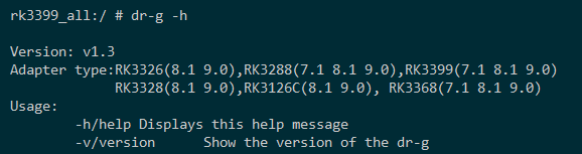
Help command (PDF 6)
2.2 Android dependencies
For compatibility across platforms, Dr.G is a 32-bit binary, recommended under /system/bin. If a library is missing, such as librga.so not found, copy the corresponding .so from /vendor/lib/ to /system/lib/; the source’s push script performs this automatically.

librga dependency error (PDF 6)
2.3 Executable archives
| Archive | Android |
|---|---|
dr-g-release_for_Android_7.1_v1.5.tar.gz |
7.1 |
dr-g-release_for_Android_8.1_v1.5.tar.gz |
8.1 |
dr-g-release_for_Android_9.0_v1.5.tar.gz |
9.0 |
Extract the matching archive, ensure ADB connectivity and working adb root, adb remount and adb shell, then execute only_push_dr-g.bat to install on the target board and diagnose there.
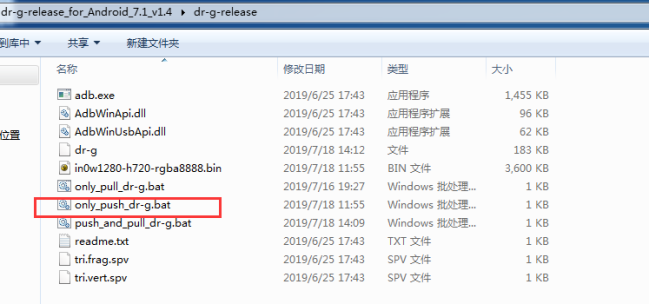
Installation script (PDF 7)
3 Usage
3.1 System information and log capture
3.1.1 Command
dr-g -dump-info
Collects manifest.xml, commit_id.xml, build.prop, anr_trace, logcat, dmesg, I/O priorities, CPU/GPU/DDR current frequencies/voltages and maximum frequencies, vop_clk_summary, current fence state, dumpsys SurfaceFlinger, and current processes from ps. Produces /data/dr-g-file/dumpInfo.tar.
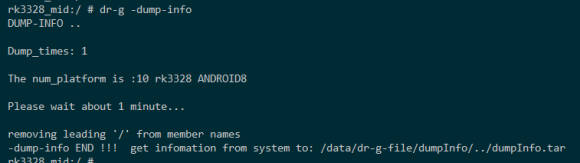
System information example (PDF 8)
3.1.2 Scripts
Double-click push_and_pull_dr-g.bat to collect information and save dumpInfo.tar in a time-named directory under the current path. Use only_push_dr-g.bat only to install the tool for other functions, or only_pull_dr-g.bat only to retrieve the archive.

One-step capture (PDF 9)
3.2 Frequency queries and settings
3.2.1 Maximum performance mode
dr-g -sys-set perf
Sets CPU, GPU and DDR to their highest frequencies and disables thermal control, printing the new frequencies for application-performance debugging. The source explicitly disables thermal control; check cooling in a controlled debug environment.
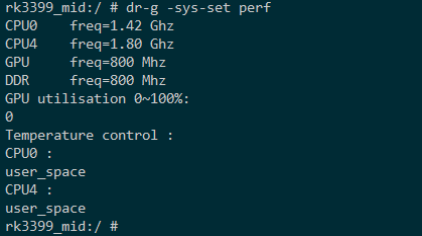
Maximum frequencies (PDF 9)
3.2.2 Current frequencies
dr-g -sys-set info
Prints current CPU/GPU/DDR frequencies and thermal-control state for application debugging.
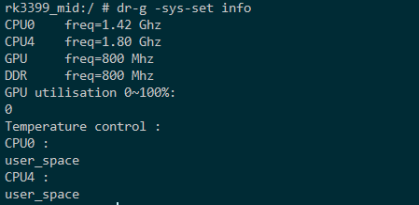
Frequency query (PDF 10)
3.2.3 Set GPU levels
dr-g -sys-set gpu low
dr-g -sys-set gpu mid
dr-g -sys-set gpu high
For GPU bottleneck diagnosis, these commands set CPU and DDR to maximum frequency and select the low, middle or high GPU entry in the frequency table to compare application behavior.
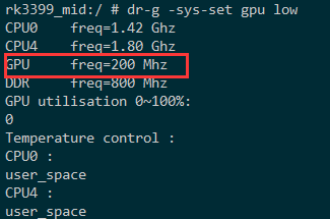
GPU low (PDF 11)
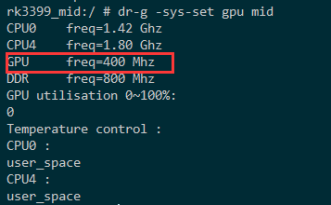
GPU middle (PDF 11)
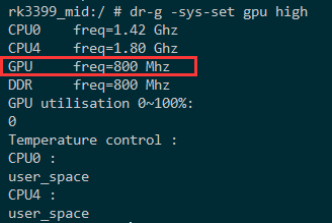
GPU high (PDF 11)
3.2.4 Set CPU levels
dr-g -sys-set cpu low
dr-g -sys-set cpu mid
dr-g -sys-set cpu high
For CPU bottleneck diagnosis, these commands set GPU and DDR to maximum frequency and select the low, middle or high CPU entry in the frequency table to compare application behavior.
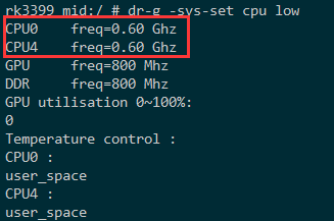
CPU low (PDF 12)
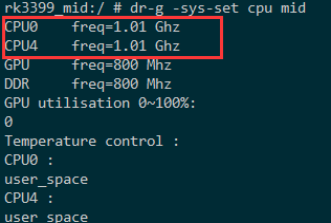
CPU middle (PDF 12)
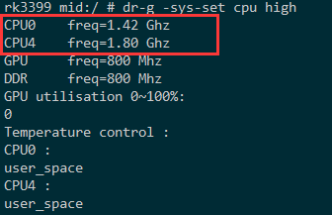
CPU high (PDF 12)
3.2.5 Set DDR levels
dr-g -sys-set ddr low
dr-g -sys-set ddr mid
dr-g -sys-set ddr high
For DDR bottleneck diagnosis, these commands set CPU and GPU to maximum frequency and select the low, middle or high DDR entry in the frequency table to compare application behavior.
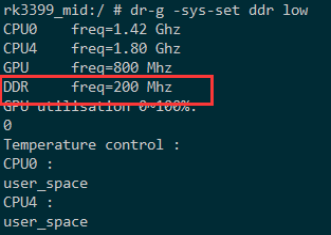
DDR low (PDF 13)
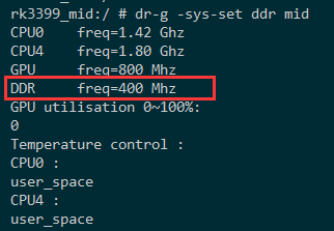
DDR middle (PDF 13)
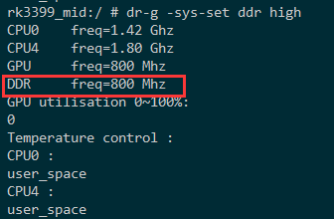
DDR high (PDF 14)
3.2.6 Restore frequency scaling
dr-g -sys-set reset
Restores system frequency scaling for CPU, DDR and GPU and re-enables thermal control.
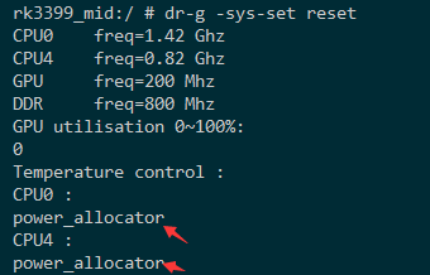
Restore scaling (PDF 14)
3.3 Bus priority
3.3.1 Query
dr-g -io-qos get
Prints bus priorities and a numbered name table for subsequent settings.
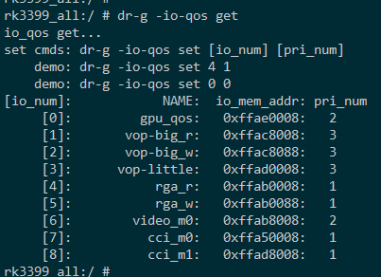
I/O priorities (PDF 15)
3.3.2 Set
Select the corresponding table item; pri_num is 0~3. Success prints io_qos set SUCCESS !!!.
dr-g -io-qos set
dr-g -io-qos set 4 1
dr-g -io-qos set 1 2
dr-g -io-qos set 0 1
The first examples set item [4] to 1 and [1] to 2. The third command set 0 1 conflicts with both source comments saying item [0] is set to 0. Both are retained; verify against the actual tool help before execution.
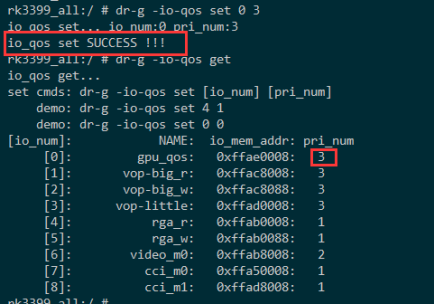
Set I/O priority (PDF 16)
3.4 RGA automatic tests
3.4.1 Information
dr-g -rga info
Prints RGA version, supported hardware formats, scaling factors and maximum input/output resolution.

RGA information (PDF 16)
3.4.2 Self-test
dr-g -rga test
Tests conversion, scaling, rotation and composition in supported formats, comparing result CRCs with saved CRCs. The source treats mismatches as an indication of a system RGA problem.
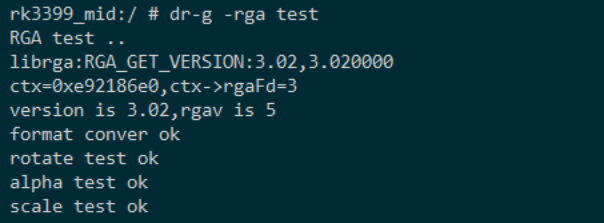
RGA self-test (PDF 17)
3.4.3 Efficiency
dr-g -rga perf
Uses DDR frequency and RGA aclk to calculate theoretical times for 720p, 1080p and 4k, then compares measured times against expectations.
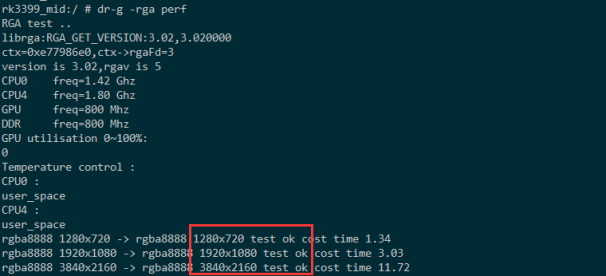
RGA efficiency (PDF 17)
3.4.4 Demo
Parameters select RGA operations; source and destination data are in the data directory. The parameter string after -rga demo must be contiguous, without spaces.
dr-g -rga demo
dr-g -rga demo sw1280sh720sf0dw1280dh720df0rt2sx0sy0dx0dy0
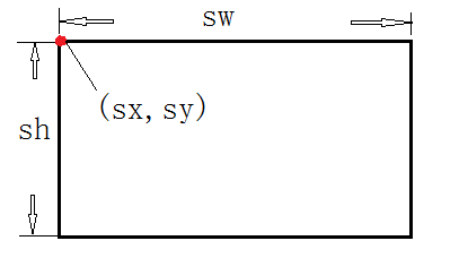
RGA source data (PDF 18)
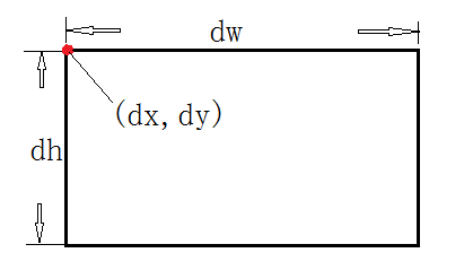
RGA destination data (PDF 18)
Parameter tables (the source spelling alpah and blit values 105/405 are preserved without inferring their radix):
| alpah | blit | Formula |
|---|---|---|
| bd1 | 105 | src + dst*(1-alpha) |
| bd2 | 405 | src*alpha + dst*(1-alpha) |
| Parameter | Rotation |
|---|---|
| rt1 | rotate 90 |
| rt2 | rotate180 |
| rt3 | rotate270 |
| rt4 | mirrorH |
| rt5 | mirrorV |
| Parameter | Format |
|---|---|
| sf0 | RGBA8888 |
| sf1 | RGBX8888 |
| sf2 | BGRA8888 |
| sf3 | RGB888 |
| sf4 | RGB565 |
| sf5 | NV12 |
| sf6 | NV21 |
| sf7 | YV12 |
| sf8 | YV21 |
| sf9 | NV16 |
| sf10 | NV61 |
| sf11 | YV16 |
| sf12 | YV61 |
The example rotates /data/in0w1280-h720-rgba8888.bin by 180° into /data/out0w1280-h720-rgba8888.bin. Pull the raw data for inspection with a viewer. The screenshot shows the corresponding out0w1280-h720-rgba8888.bin path.

RGA output log (PDF 19)

RGA rotation result (PDF 20)
3.5 GPU automatic tests
3.5.1 Maximum load
dr-g -gpu max-load
dr-g -gpu max-load 100
dr-g -gpu max-load-bg
Append a duration in seconds: 100 runs for 100 seconds at approximately 100% load, for aging or system-load tests. max-load-bg runs in the background without changing the foreground image; other behavior matches max-load. Some source lines split max-load into max -load; the continuous example on the same page establishes the joined parameter.
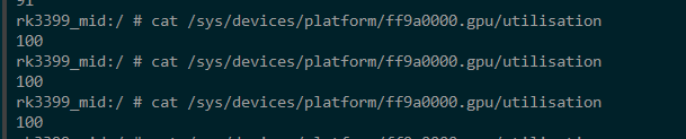
GPU maximum load (PDF 20)
3.5.2 Maximum frame rate
dr-g -gpu max-fps
The shell prints the GPU application’s maximum frame rate in the current system. The source equates it to display refresh and advises checking configuration if it differs greatly from 60fps. This is the source’s test context, not a requirement that every display use 60Hz.
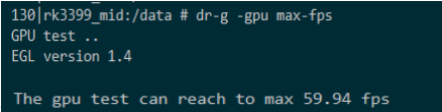
GPU maximum frame rate (PDF 21)
3.5.3 Performance
dr-g -sys-set perf
dr-g -gpu perf
Before testing set CPU/DDR/GPU to maximum frequency. The test prints elapsed and platform reference times; the source regards a time more than 10% above reference as underutilized GPU performance.

GPU performance (PDF 21)
3.5.4 GLES version support
dr-g -gpu gles11
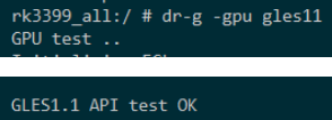
GLES 1.1 (PDF 22)
dr-g -gpu gles20
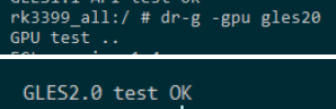
GLES 2.0 (PDF 22)
dr-g -gpu gles30

GLES 3.0 (PDF 22)
After execution the shell prints EGL information for GLES 1.1, 2.0 and 3.0. The gles11 paragraph says “GLES1.0” succeeded, conflicting with the 1.1 heading and command. This is a source discrepancy to check against actual output.
3.5.5 OpenCL
dr-g -cl
The source typesets dr-g –cl with a long dash; the terminal screenshot establishes ASCII -cl. OpenCL test OK ! indicates that the platform passes the source’s OpenCL support test.

OpenCL test (PDF 23)
3.5.6 Vulkan
dr-g -vk info
Prints Vulkan version, supported extensions and features.
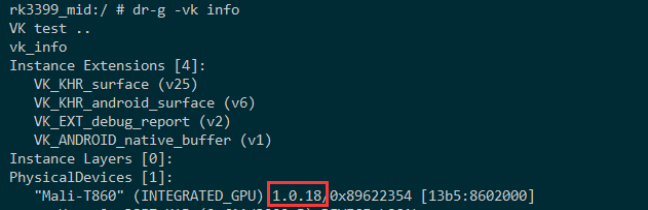
Vulkan information (PDF 23)
dr-g -vk test
Draws a simple triangle. A visible triangle plus vulkan test ok indicates that the Vulkan driver environment passes this test.
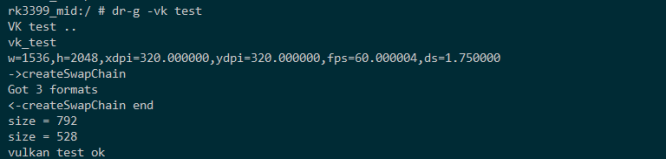
Vulkan test result (PDF 23)
3.6 VOP automatic tests
3.6.1 Maximum DDR load
dr-g -vop -c chip-type
Configures VOP and increases DDR load to test correct image output under preset DDR conditions. chip-type: rk3399, rk3326, rk3368, rk3328, rk3288, rk3128, rk3188. This parameter list differs from §2.1; it does not establish broader platform support.

VOP maximum load (PDF 24)
3.6.2 VOP demo
Parameters configure image output for a chosen win_id, aiding panel debugging. Syntax and example:
dr-g -vop -w <win_id>@<crtc_id>:<src_left>,<src_top>,<src_w>,<src_h>:<dst_left>,<dst_top>,<dst_w>,<dst_h>[#zpos][@<format>]
dr-g -vop -w 0@0:0,0,1536,2048:0,0,1536,2048#1@AR24 -f 1536x2048@AR24
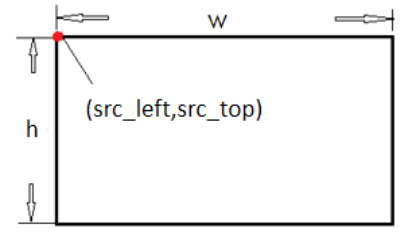
VOP source (PDF 25)
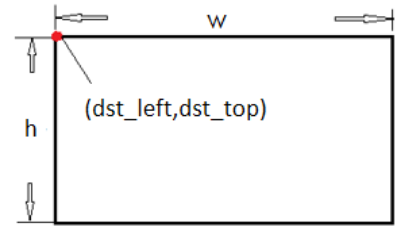
VOP destination (PDF 25)
3.7 Automatic log detection
3.7.1 Current logs
dr-g -log-ans
Matches current logcat data against predefined error rules, raising a warning and suggesting changes on a match. Preparing rules in advance lets the tool print the relevant line directly and reduces manual searching through complex logs.
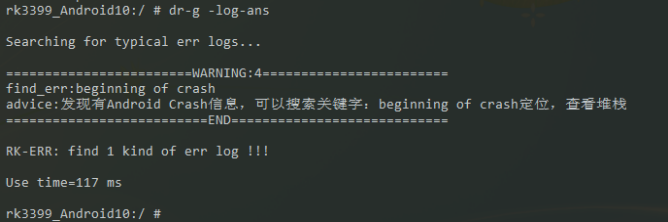
Log analysis (PDF 26)
3.7.2 XML rules
log_id is the rule log ID; match_str is the matching string; advice is the suggested action.
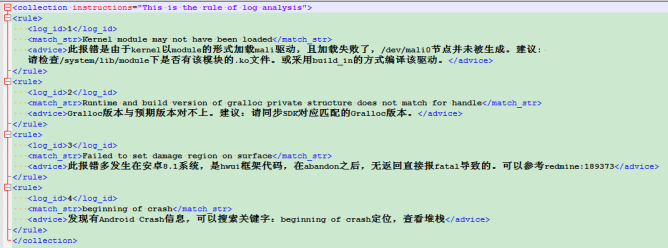
Original XML rules (PDF 26)
<collection instructions="This is the rule of log analysis">
<rule>
  <log_id>1</log_id>
  <match_str>Kernel module may not have been loaded</match_str>
  <advice>此报错是由于kernel以module的形式加载mali驱动,且加载失败了,/dev/mali0节点并未被生成。建议:检查/system/lib/module下是否有该模块的.ko文件。或采用build_in的方式编译该驱动。</advice>
</rule>
<rule>
  <log_id>2</log_id>
  <match_str>Runtime and build version of gralloc private structure does not match for handle</match_str>
  <advice>Gralloc版本与预期版本对不上。建议:请同步SDK对应匹配的Gralloc版本。</advice>
</rule>
<rule>
  <log_id>3</log_id>
  <match_str>Failed to set damage region on surface</match_str>
  <advice>此报错多发生在安卓8.1系统,是hwui框架代码,在abandon之后,无返回直接报fatal导致的。可以参考redmine:189373</advice>
</rule>
<rule>
  <log_id>4</log_id>
  <match_str>beginning of crash</match_str>
  <advice>发现有Android Crash信息,可以搜索关键字:beginning of crash定位,查看堆栈</advice>
</rule>
</collection>
The screenshot XML is transcribed as copyable text, retaining original Chinese advice fields. Rules advise: check Mali module or build it in; synchronize SDK-matching Gralloc; for Android8.1 hwui fatal after abandon see redmine:189373; search beginning of crash for the stack.