
This article uses Chinese RK-YH-YF-237 V3.0 (77 pages, through Android 14) as the common baseline. English RK-YH-YF-251 V1.3 (16 pages, through Android 11) is checked for historical differences; English-only material is preserved separately. Rules and schedules describe these source versions, not necessarily current Google policy, and do not imply GMS/EDLA certification of ArmSoM products. Verify the ArmSoM board, SoC, Android SDK/BSP, kernel and licensing eligibility. No commands, key provisioning or certification tests were performed. The old English source has no technical figures; the sole technical screenshot is explicitly sourced from Chinese. See official ArmSoM documentation.
1 Terminology
| Term | Source definition |
|---|---|
| GMS (Google Mobile Service) | Google mobile services, including the Google service framework, Play Store, Chrome and other applications. |
| MADA (Mobile Application Distribution Agreement) | Primarily phones/tablets meeting all CDD requirements for handheld/tablet types; screen 3.3–18 inches and a battery are required. |
| EDLA (Enterprise Device Licensing Agreement) | Similar to MADA, relaxing display/battery restrictions for 18–70-inch or batteryless devices; memory must exceed 2G and products must not target consumers directly. |
| 3PL | Third-party laboratories assist Google certification against CDD, GMS Requirements and regional requirements, e.g. Foxconn, Harman, Wind River and Pegatron; contact directly or through sales. |
| Google Partner | Signing MADA/EDLA and becoming a Partner enables Partner-document access and 3PL test applications. |
| EEA | Devices sold in the EU require EEA GMS certification; configure the code’s EEA type for the circumstances and EMADA agreement. |
| xTS | Run the corresponding binary to enter xTS-tradefed, then issue test/retry commands. |
| retry | Continue from existing results with the same Fingerprint. l r lists results; the first column is session id. Use run retry --retry session_id, without extras such as --retry-type. |
| Single test | Individual cases for debugging; results and logs go to results and logs. |
2 Hardware requirements
- A real hardware RTC, not a virtual one, and
/sys/class/rtc/rtc0/are required. - An internal or USB microphone is required; a USB-only microphone must be configured as built-in. Verify recording before testing.
- BLE is required for Nearby Share on Android 11+.
- Any Type-C port must support OTG or GTS Interactive fails; confirm during hardware design.
- Feature changes require full recertification; do not change features after certification.
Source report/log paths follow. ASSUMPTION_FAILURE indicates a skipped case treated as Pass; the source says Google counts only FAILURE.
android-cts/logs/2023.05.04_14.13.15/inv_17873629097171453434/host_log_***.txt
android-cts/logs/2023.05.04_14.13.15/inv_17873629097171453434/device_logcat_test_PH0BEXGDPG_***.txt
3 Version requirements
3.1 Android 13
Android 13+ new devices require at least 2Gb DDR; smaller devices, including Go, cannot certify. RKP is added. The source mixes Gb/GB/G capacity notation; retained here and must be checked against the applicable specification.
3.2 Android 14
Android 14+ with 3Gb DDR can apply for Go GMS. Device ID Attestation is added. New-device GMS/EDLA supports only 64Bit; example:
# device/rockchip/rk3588/rk3588s_u/BoardConfig.mk
DEVICE_IS_64BIT_ONLY := true
4 Before testing
Using Google mobile services requires GMS/EDLA certification and eligibility. With MADA/EDLA, ask the Google contact about Partner/account access, apply through Google or 3PL, configure and self-test all xTS. Without eligibility, contact an ODM MADA-qualified company. Most external source links require MADA/EDLA access. Running these commands alone does not grant certification.
The source restricts DDR of 2G or less to Android Go, while Android 13+ prohibits below 2G. Select lunch *go, e.g.:
lunch rk3326_rgo-user
PX30 is the industrial RK3326 variant with similar functions, while Google records only RK3326; the source therefore applies as RK3326. RK3568 belongs to RK356x and may use RK3566/RK3568; RK3562 is different and must not apply as RK356x. PX30 example:
- Match RK3326 in the sub-license application.
- For PX30-2GB DDR build with
lunch rk3326_rgo-user. - Before one-step
./build.sh -UCA, change the makefile:
# device/rockchip/rk3326/BoardConfig.mk
PRODUCT_UBOOT_CONFIG := px30
EDLA commonly uses USB cameras rather than built-in MIPI cameras. 3PL does not prescribe a model, but CTS is strict; see Appendix A for previously certified sensors.
5 Applications before testing
Apply early to avoid delays:
- 3PL sub-license (Keymaster & Optee).
- 3PL keybox (Attestation key).
- 3PL GTS
APE_API_KEY(GTS). - A Google account of the
android-partner-api@company.comform and RKP (RKP).
6 Approval windows
Check platform support in GMS Express/GO Ready Chipset and first-certification Android deadlines in GMS approval windows. Historical example: Android 12L AOSP released 2022-03-07, GMS closed 2023-02-28 and EDLA closed 2023-12-31. These are not current application deadlines.
7 Certification schedule
Source estimates: ordinary tablet hardware is relatively simple; after a stable SDK and a complete device without obvious crashes, issue resolution takes roughly 3–4 weeks. Android 13+ uses GKI. Driver interfaces outside the default ABI list must be submitted to Google; review/merge usually takes 3–4 days, the monthly cutoff is the 15th, and signed boot.img arrives at month end. Submitting after the 15th may require about 40 days for a release. Tests can temporarily use Google daily PAB boot.img. Android 13+ RKP is complex and needs Google assistance; apply early.
EDLA has more complex hardware/drivers; GKI may add 4–6 weeks. Test complete devices, using the largest screen when multiple sizes are offered. The source estimates about five days for parallel tests without crashes. Table durations without explicit units remain as printed:
| Test | Suggested devices | Duration |
|---|---|---|
| CTS | 3+ | 2–4 days |
| CTS-ON-GSI | 2 | 2 |
| VTS | 1 | 1 |
| CTS-Verifier | 1 | 1 |
| GTS | 1 | 2 |
| GTS-Verifier | 1 | 1 |
| APTS | 1 | 1 |
| STS | 1 | 1 |
8 Obtain Google packages
Integrate GMS, mainline and prebuilts. Patches required by mainline documentation must exist in the SDK or compilation fails. Latest mainline: Release Tracker; packages/SDK patches: Release notes; GMS validity/download: GMS download.
| Package | Directory |
|---|---|
| GMS | vendor/partner_gms |
| mainline | vendor/partner_modules |
| prebuilts | Replace the entire prebuilts/module_sdk directory with the files matching mainline |
Query GMS version:
getprop | grep ro.com.google.gmsversion

/vendor/partner_gms/products/gms_package_version.mk: GMS_PACKAGE_VERSION_ID := 13_202310
/vendor/partner_gms/products/gms.mk: ro.com.google.gmsversion=$(GMS_PACKAGE_VERSION_ID)
Customers without MADA/EDLA cannot download directly and Rockchip cannot provide the packages; obtain them through 3PL. Qualified customers are advised to use Express (§11), whose synchronized packages meet the source’s GMS Express Plus requirements. For manual downloads extract GMS to vendor/partner_gms. Android 11+ mainline has instructions rather than a ready archive; use repo per the Drive instructions, e.g.:
# 下载 manifest 文件
repo init -u https://partner-android.googlesource.com/platform/manifest -b r-aml-prebuilt-release
# 开始同步,同步前,请先检查 .repo/manifests/default.xml 中是否有内容
repo sync -c -j8
Tests normally require the latest Approved release. Find its git tag in Release Summary; the source example is mainline_m_2020_dec_preload_5. Change the manifest default revision to that tag:
diff --git a/default.xml b/default.xml
index 7be1f37..01ccba9 100644
--- a/default.xml
+++ b/default.xml
@@ -4,7 +4,7 @@
   <remote  name="ohd"
            fetch=".."
            review="https://partner-android-review.googlesource.com/" />
-  <default revision="r-aml-prebuilt-release"
+  <default revision="refs/tags/mainline_m_2020_dec_preload_5"
            remote="ohd" />
   <!-- Google-signed Mainline prebuilt module projects !-->
Android 12+ prebuilts must match mainline or compilation fails. Example: both use T1003604/mainline_m_2022_feb_preload_5.
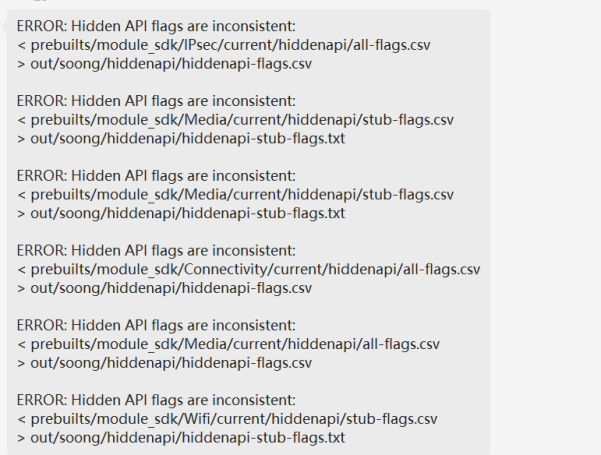
Build-error example for mismatched mainline/prebuilts, Chinese PDF p.9; no English counterpart.
9 Obtain test packages
The source generally requires the latest Google test packages, updated quarterly in February/May/August/November; see its version table. Links are in Appendix B; Rockchip security-patch FTP GMS-Test-Suite/xTS may have older copies. MADA/EDLA modules follow. PAB daily builds provide Google/test packages for checking whether failures are already fixed.
| Module | Firmware | Notes |
|---|---|---|
| CTS | user | — |
| CTS-ON-GSI | user | Google-signed system.img |
| GTS | user | — |
| STS | userdebug | Updated first Wednesday monthly |
| VTS | user | Google-signed system.img and firmware vendor_boot-debug.img |
| CTS-Verifier | user | — |
| GTS-Verifier | user | Android 13 only |
| GTS Interactive | user | Android 13+; android-gts-11-R2 or later |
| Checklist | user | EDLA also requires it |
| BTS | user | — |
| GOATS | userdebug | Go on Android 11 and earlier |
| APTS | userdebug | Go on Android 12 and later |
10 GMS firmware configuration
Logs, configuration fragments, paths and commands below are source examples, not results from this task. Chinese code comments remain; operations are explained in each language. Fragments are not expanded into complete scripts.
10.1 Configuration checker
Android 12+ checks configuration after lunch; all items must Pass before certification. Set BOARD_WIDEVINE_OEMCRYPTO_LEVEL for the product; verify APK permissions for PRODUCT_HAVE_RKAPPS.
source build/envsetup.sh
lunch rk3588s_t-user
source device/rockchip/common/scripts/check_gms_env.sh
If configured u-boot macros still fail, compile u-boot first. For the missing .config example run ./make.sh rk3588 in Android_SDK/u-boot, then recheck; resolve other failures below until all Pass.
Android_SDK$ source device/rockchip/common/scripts/check_gms_env.sh
grep: u-boot/.config: No such file or directory
 [Failed] "CONFIG_ANDROID_AB=y" Check Failed! Expect "CONFIG_ANDROID_AB=y"
 "Android 11+ MUST enable A/B update."
grep: u-boot/.config: No such file or directory
 [Failed] "CONFIG_ANDROID_WRITE_KEYBOX=y" Check Failed! Expect "CONFIG_ANDROID_WRITE_KEYBOX=y"
 "Attestation key MUST be enabled."

grep: u-boot/.config: No such file or directory
 [Failed] "CONFIG_ANDROID_KEYMASTER_CA=y" Check Failed! Expect "CONFIG_ANDROID_KEYMASTER_CA=y"
 "Keymaster in uboot MUST be enabled."
grep: u-boot/.config: No such file or directory
 [Failed] "CONFIG_OPTEE_CLIENT=y" Check Failed! Expect "CONFIG_OPTEE_CLIENT=y"
 "Optee MUST be enabled."
解决方法:Android_SDK/u-boot$ ./make.sh rk3588
10.2 Kernel compilation
Use Clang, ./build.sh -CK, or VTS KernelVersionTest#IsClang fails. Source fragment:
vts_kernel_toolchain
KernelVersionTest#IsClang
相关逻辑:Android_SDK/build.sh
if [ "$BUILD_KERNEL_WITH_CLANG" = true ] ; then
if [ "$KERNEL_ARCH" = "arm64" ]; then
    ADDON_ARGS="CROSS_COMPILE=aarch64-linux-gnu- LLVM=1 LLVM_IAS=1"
else
    ADDON_ARGS="CC=clang LD=ld.lld"
Go replaces android-10.config with android-10-go.config; Android 11 changes 10 to 11, Android 13 uses android-13.config. Omit absent rkxxxx.config. Check later settings in device/rockchip/rkxxxx/BoardConfig.mk.
make ARCH=arm64 rockchip_defconfig android-10-go.config rk3326.config
make ARCH=arm64 rockchip_defconfig android-11-go.config rk3326.config
10.3 EEA
Configure only EU EEA devices; otherwise leave blank. Replace type1 with the actual EEA type.
BUILD_WITH_EEA := true
BUILD_WITH_EEA_TYPE := type1 (根据自己的EEA类型配置)
10.4 Enable GMS
Only radio/4G devices set MARKET_ALL true; otherwise false. User RKAPPS false removes stress tools, otherwise boot fails.
device/rockchip/rk3588/BoardConfig.mk
BUILD_WITH_GOOGLE_MARKET := true
# 含radio的设备(即带有4G通讯功能)请配置以下配置,其余设备保持false
BUILD_WITH_GOOGLE_MARKET_ALL := true
# 编译user固件时,请把下面的宏设成false,RK的压力测试工具将会移除,否则无法正常启动。
PRODUCT_HAVE_RKAPPS := false
Add this for 2G Go (Android13+ excludes below2Gb), query the mk after source/lunch. gms-mandatory means vendor/partner_gms/products/gms-mandatory.mk; without Express the default is gms.mk.
Android_SDK/device/rockchip/common$ git diff modules/gms.mk
   TMP_GMS_VAR := gms
   TMP_MAINLINE_VAR := mainline_modules
   ifeq ($(strip $(BUILD_WITH_GO_OPT)),true)
     # 2G A Go
- #TMP_GMS_VAR := $(TMP_GMS_VAR)_go_2gb
+ TMP_GMS_VAR := $(TMP_GMS_VAR)_go_2gb
Android_SDK$ get_build_var TMP_GMS_VAR
gms-mandatory ##
vendor/partner_gms/products/gms-mandatory.mk
10.5 Hardware features
Confirm with hardware/driver engineers and remove features for absent hardware such as gyroscopes/BLE. Android11+ Nearby Share requires BLE. Use macros where possible, otherwise remove feature.xml from frameworks/native/data/etc/.
BOARD_GRAVITY_SENSOR_SUPPORT := true
BOARD_COMPASS_SENSOR_SUPPORT := true
Example removing BLE (does not override mandatory BLE requirements):
BOARD_BLUETOOTH_LE_SUPPORT := false
USB camera features:
android.hardware.camera.any
android.hardware.camera.external
Even without GPS retain these for network location:
android.hardware.location
android.hardware.location.network
If pm list features | grep sensor is empty remove the sensor service. The generated manifest is /vendor/etc/vintf/manifest.xml.
device/rockchip/common/device.mk:
-# Sensor HAL
-PRODUCT_PACKAGES += \
- android.hardware.sensors@1.0-service \
- android.hardware.sensors@1.0-impl \
- sensors.$(TARGET_BOARD_HARDWARE)
device/rockchip/common/manifests/manifest_level_33.xml:
- <hal format="hidl">
- <name>android.hardware.sensors</name>
- <transport>hwbinder</transport>
- <version>1.0</version>
- <interface>
- <name>ISensors</name>
- <instance>default</instance>
- </interface>
- </hal>
注:上述manifests配置文件生成目录/vendor/etc/vintf/manifest.xml
10.6 FRP
Enable FRP; see RKDocs/android/Rockchip_Introduction_Android_Factory_Reset_Protection_CN&EN.pdf.
BUILD_WITH_GOOGLE_FRP := true
10.7 AVB and A/B
GMS needs AVB; see RKDocs/android/Rockchip_Introduction_Android_Verify_Boot_CN&EN.pdf. SDK debug defaults disable AVB/unlock bootloader and may show uncertified even after certification. Before production apply the uboot patch to lock during key writing. Avoid during debugging or different firmware may not boot. Never lock without AVB.
BOARD_AVB_ENABLE := true ## 若没有启用AVB则不能锁定机器,否则会导致机器无法开机

RKDocs/android/patches/gms/0001-libavb-Lock-the-device-when-the-device-init-or-write.patch
Android11+ enables virtual A/B, adding the include block if missing:
BOARD_USES_AB_IMAGE := true
BOARD_ROCKCHIP_VIRTUAL_AB_ENABLE := true
# 下面这段在配置时如果没有,请一起添加
ifeq ($(strip $(BOARD_USES_AB_IMAGE)), true)
  include device/rockchip/common/BoardConfig_AB.mk
  TARGET_RECOVERY_FSTAB := device/rockchip/rk356x/rk3566_rgo/recovery.fstab_AB
endif
Android13 GKI needs compressed virtual A/B:
BOARD_ROCKCHIP_VIRTUAL_AB_COMPRESSION := true
If partitions are too small, set sizes manually; overlay follows the BoardConfig_AB.mk include.
Android_SDK/device/rockchip/rk3588$ git diff rk3588_s/BoardConfig.mk
ifeq ($(strip $(BOARD_USES_AB_IMAGE)), true)
  include device/rockchip/common/BoardConfig_AB.mk
  TARGET_RECOVERY_FSTAB := device/rockchip/rk356x/rk3566_rgo/recovery.fstab_AB
endif
+ # 以下这段overlay必须要放到`include device/rockchip/common/BoardConfig_AB.mk`之后
+BOARD_SUPER_PARTITION_SIZE := 4294967296
+BOARD_ROCKCHIP_DYNAMIC_PARTITIONS_SIZE := $(shell expr $(BOARD_SUPER_PARTITION_SIZE) - 4194304)
Enable A/B in RK3566/RK3568 u-boot too:
Android_SDK/u-boot$ git diff configs/rk3568_defconfig
+CONFIG_ANDROID_AB=y
 CONFIG_OPTEE_CLIENT=y
 CONFIG_OPTEE_V2=y
Query AVB/A-B and see the disabled-AVB failure example:
pm list features | grep android.software.verified_boot
ls -l /dev/block/by-name/
CtsSecurityTestCases
android.security.cts.VerifiedBootTest#testVerifiedBootSupport
测试报错:java.lang.AssertionError: Verified boot must be supported on the device
fastboot oem at-lock-vboot without AVB prevents boot. Source recovery: (1) RKDevTool.exe→Advanced→Erase all→reboot (data lost); (2) boot UART CTRL+C for cmdline, serial fastboot usb 0, then fastboot oem at-unlock-vboot through adb port.
报错信息:Hit key to stop autoboot('CTRL+C'): 0
        ANDROID: reboot reason: "(none)"
        Vboot=0, AVB images, AVB verify
        read_is_device_unlocked() ops returned that device is LOCKED
        avb_slot_verify.c:763: ERROR: vbmeta: Error verifying vbmeta image: OK_NOT_SIGNED
        AVB verify failed ## AVB校验失败
        Android boot failed, error -1.
10.8 SELinux
For functional issues see RKDocs/android/Rockchip_Developer_Guide_Android_SELinux(Sepolicy)_CN.pdf. Before Android12+ certification repeatedly scan userdebug as the tool README.md describes. Add results to BOARD_SEPOLICY_DIRS files, e.g. device/rockchip/rk3399/sepolicy_vendor/genfs_contexts.
device/rockchip/common/BoardConfig.mk:
BOARD_SELINUX_ENFORCING ?= true

RKTools/linux/Android_Devices_SELinux_Tool

console:/ $ chmod +x ./data/local/rockchip_selinux_tools
console:/ $ ./data/local/rockchip_selinux_tools
Please USE the following cmd to confirm which files need to be update!
get_build_var BOARD_SEPOLICY_DIRS ## 工程source和lunch后执行该命令
Add the following result to file: [genfs_contexts]
----------------------------------------------------- ## 将下面扫描结果添加到genfs_contexts
genfscon sysfs /devices/platform/av1d-master/wakeup u:object_r:sysfs_wakeup:s0
genfscon sysfs /devices/platform/es8388-sound/extcon u:object_r:sysfs_extcon:s0

Android_SDK$ get_build_var BOARD_SEPOLICY_DIRS
device/rockchip/common/sepolicy/vendor device/rockchip/rk3399/sepolicy_vendor
....
Verify with cat /vendor/etc/selinux/vendor_sepolicy.cil. Modify /device/rockchip, never /system/sepolicy. Do not change user adb-root ro.debuggable, or adbd may hang, block tests and lose logs/reports. Logs and cases requiring scans:
I init : starting service 'adbd'...
I init : Created socket '/dev/socket/adbd', mode 660, user 1000, group 1000
W adbd : type=1400 audit(0.0:27602): avc: denied { setcurrent } for scontext=u:r:adbd:s0 tcontext=u:r:adbd:s0 tclass=process permissive=0
F adbd : main.cpp:162] Could not set SELinux context
I init : Service 'adbd' (pid 10075) received signal 6
I init : Sending signal 9 to service 'adbd' (pid 10075) process group...
E init : process with updatable components 'adbd' exited 4 times in 4 minutes

netd_integration_test
NetdSELinuxTest#CheckProperMTULabels
SuspendSepolicyTests
SuspendSepolicyTests#SuspendSepolicyTests
CtsSecurityHostTestCases
android.security.cts.SELinuxHostTest#testNoBugreportDenials ## 需要打开宏
BOARD_SELINUX_ENFORCING ?= true
10.9 Fixed Fingerprint (optional)
Fix the fingerprint before testing so firmware changes still allow retry; choose the digit string.
Android_SDK/device/rockchip/common$ git diff prebuild.mk
 -include $(TARGET_DEVICE_DIR)/prebuild.mk
+ROCKCHIP_BUILD_NUMBER := 202001 (写一串数字即可,自己定)
10.10 Security Patch level
Obtain patches from Partner_Security_Bulletin or Rockchip security FTP; query getprop | grep ro.build.version.security_patch. Guide: FTP /GMS-Test-Suite/xTS/tools/Rockchip_Android_Security_Patch_Guide.pdf. Source validity is generally three months; check the approval window.
GtsOsTestCases
com.google.android.os.gts.SecurityPatchTest#testSecurityPatchDate
报错信息:ro.build.version.security_patch should be "2023-03" or later. Found "2022-07-05"
| Android | Security branch |
|---|---|
| 12 / 12L | android12-security-release |
| 13 | android13-security-release |
| 14 | android14-security-release |
Apply patches chronologically then update the level to match; changing only the date is insufficient. Use year-month-day or empty --rollback_index breaks vbmeta.img. Source values, full error and build chain follow.
build/make/core/version_defaults.mk
PLATFORM_SECURITY_PATCH := 2020-03-05

[ 99% 8801/8803] Target vbmeta image: out/target/product/rk3588_t/vbmeta.img
FAILED: out/target/product/rk3588_t/vbmeta.img
usage: avbtool make_vbmeta_image [-h] [--output OUTPUT]
                               [--padding_size NUMBER]
                               [--algorithm ALGORITHM] [--key KEY]
                               [--signing_helper APP]
                               [--signing_helper_with_files APP]
                               [--public_key_metadata KEY_METADATA]
                               [--rollback_index ROLLBACK_INDEX]
                               [--rollback_index_location ROLLBACK_INDEX_LOCATION]
                               [--append_to_release_string STR]
                               [--prop KEY:VALUE]
                               [--prop_from_file KEY:PATH]
                               [--kernel_cmdline CMDLINE]
                               [--setup_rootfs_from_kernel IMAGE]
                               [--include_descriptors_from_image IMAGE]
                               [--print_required_libavb_version]
                               [--chain_partition PART_NAME:ROLLBACK_SLOT:KEY_PATH]
                               [--flags FLAGS]
                               [--set_hashtree_disabled_flag]
avbtool make_vbmeta_image: error: argument --rollback_index: expected one argument

build/make/core/version_util.mk:
ifndef PLATFORM_SECURITY_PATCH_TIMESTAMP
  # Used to indicate the matching timestamp for the security patch string in PLATFORM_SECURITY_PATCH.
  PLATFORM_SECURITY_PATCH_TIMESTAMP := $(shell date -d 'TZ="GMT" $(PLATFORM_SECURITY_PATCH)' +%s)
endif
device/rockchip/common/modules/avb.mk:
BOARD_AVB_ROLLBACK_INDEX ?= $(PLATFORM_SECURITY_PATCH_TIMESTAMP)
build/make/core/Makefile:
ifdef BOARD_AVB_ROLLBACK_INDEX
  BOARD_AVB_MAKE_VBMETA_IMAGE_ARGS += --rollback_index $(BOARD_AVB_ROLLBACK_INDEX)
endif

define build-vbmetaimage-target
  $(call pretty,"Target vbmeta image: $(INSTALLED_VBMETAIMAGE_TARGET)")
  $(hide) mkdir -p $(AVB_CHAIN_KEY_DIR)
  $(call extract-avb-chain-public-keys, $(AVB_CHAIN_KEY_DIR))
  $(hide) $(AVBTOOL) make_vbmeta_image \
    $(INTERNAL_AVB_MAKE_VBMETA_IMAGE_ARGS) \
    $(PRIVATE_AVB_VBMETA_SIGNING_ARGS) \
    $(BOARD_AVB_MAKE_VBMETA_IMAGE_ARGS) \
    --output $@
  $(hide) rm -rf $(AVB_CHAIN_KEY_DIR)
endef
10.11 Widevine
The source lists L1 for RK3588/RK3399/RK356x; L3 normally suffices for tablets. Ask Rockchip for current L1 support/patches, not universal board certification. Key packer: FTP GMS-Test-Suite/xTS/tools/rkpacker2.
BOARD_WIDEVINE_OEMCRYPTO_LEVEL := 3
10.12 Keymaster & Optee
Sub-license Trust OS: Optee V2 for RK3326/RK3562/RK356x/RK3588, V1 for others.
PRODUCT_HAVE_OPTEE := true
10.13 Attestation key / Google keybox
Apply for Google keybox through 3PL before testing, pack with rkpacker and program it. Tools: RKTools/linux/Linux_AttestationKeyboxPack_Tool.rar, RKTools/windows/KeyBoxWrite_v1.53.zip, also FTP GMS-Test-Suite/xTS/tools/KeyBoxWrite_v1.53.zip. See RKDocs/common/RKTools manuals/Rockchip_User_Guide_Keybox_Burning_EN.pdf. Enable uboot writing before build; 3566/3568 below, omit last macro on RK3399.
Android_SDK/u-boot$ git diff configs/rk3568_defconfig
 CONFIG_OPTEE_CLIENT=y
 CONFIG_OPTEE_V2=y
+CONFIG_ANDROID_WRITE_KEYBOX=y
+CONFIG_ANDROID_KEYMASTER_CA=y
+CONFIG_OPTEE_ALWAYS_USE_SECURITY_PARTITION=y ## RK3399不配置该宏
Keys in eMMC security survive reflashing, not Flash erase. Production check: uboot FTP patch /GMS-Test-Suite/Exp+/Attestation key, then ro.boot.deviceid. Test keys span Android/SoC, but production requires project keyboxes. Program in bootloader, wait about8s after completion before power-off. uboot at least2022-03, serial ret=0 means success. Android14+ boot logcat: keybox/Device ID yes provisioned, no unprovisioned.
write_key key_file=PrivateKey.RSA ret=0 ## 0表示烧写完成
write_key key_file=PrivateKey.EC ret=0
或
write attestation key: RSA ret_rsa=0

Provision google keybox:no,ID attestation:no ## yes表示已烧,no表示未烧
New suites need both attestations or reports are incomplete/unuploadable. Confirm application materials with3PL: one-case report (source GtsEdiHostTestCases), device-information template and txt with one Device ID per line, one ID per device.
W/ApkInstrumentationPreparer: Target preparation step
com.android.compatibility.common.deviceinfo.KeystoreAttestationDeviceInfo#testCollectDeviceInfo failed.
junit.framework.AssertionFailedError: KeystoreAttestationDeviceInfo collection
completed. expected:<COMPLETED> but was:<FAILED>
IDs must be unique,1–32 characters, only [a-z][A-Z][0-9][_][-][.], no whitespace. Use Unix ASCII, meaningful filename with the same characters, e.g. Make_Model_Date_Quantity.txt; IDs only, no comments, headers or other content, one per line, no duplicates, blank lines or spaces.
100000 keyboxes may exhaust memory. Split into4, count </Keybox>, set NumberOfKeyboxes; remove content after final </Certificate></CertificateChain></Key></Keybox>, append </AndroidAttestation>, repack. Source100 and4 are example counts, replace with actual counts.
$ chmod +x rkpacker
$ ./rkpacker attest_keyboxes.output -o keybox.kdb
55488 Data File Type : KEYBOX
Output File : keybox.kdb
Data File Num : 1
Total Key Num : 100000
out of memory at line 1
gzip -cdk 2023-01-01_***.output.gz > attest_keyboxes.output
split -n 4 attest_keyboxes.output --additional-suffix=.xml
cat xaa.xml | grep -w "</Keybox>" | wc -l
rkpacker xaa.xml -o keybox.kdb
<?xml version="1.0"?>
<AndroidAttestation>
<NumberOfKeyboxes>4</NumberOfKeyboxes>
<Keybox DeviceID="BW10RS23090001"><Key algorithm="ecdsa"><PrivateKey format="pem">......
......
-----END CERTIFICATE-----
</Certificate></CertificateChain></Key></Keybox>
</AndroidAttestation>
For missing libcrypto copy FTP /GMS-Test-Suite/xTS/tools/libcrypto.so.1.0.0 to Ubuntu /usr/lib/x86_64-linux-gnu/libcrypto.so.1.0.0. Cases below need a key and fastboot oem at-lock-vboot; source suggests erase/reflash/relock for persistent failure, losing data/keys, so use authorized procedures.
报错信息:error while loading shared libraries: libcrypto.so.1.0.0: cannot open
shared object file: No such file or directory

CtsAppSecurityHostTestCases
CtsDevicePolicyManagerTestCases
CtsKeystorePerformanceTestCases
CtsKeystoreTestCases
VtsAidlKeyMintTargetTest
10.14 Android13 RKP
Android13+ extracts device information before testing, uploads via android-partner-api@company.com. See RKDocs/android/Rockchip_Android_Remote_key_Provisioning_Guide.pdf; missing-upload failures below.
GtsGmscoreHostTestCases
com.google.android.gts.security.AttestationRootHostTest#testEcAttestationChainRemProvLength
com.google.android.gts.security.AttestationRootHostTest#testRsaAttestationChainRemProvLength
或
GtsGmscoreHostTestCases
com.google.android.gts.security.AttestationRootHostTest#testEcAttestationChainRemProvLengthTee
com.google.android.gts.security.AttestationRootHostTest#testRsaAttestationChainRemProvLengthTee
Device tool /vendor/bin/rockchip_rkp_factory_extraction_tool. Write SN first; unchanged SN needs no new CSR. Combined key/CSR: RKTools/windows/KeyboxWriter-v1.55.7z; separate: FTP GMS-Test-Suite/xTS/tools/KeyBoxWrite_v1.53.zip. Source account lead time at least1–2weeks; apply early.
10.15 Android14 Device ID Attestation
Android14+ also programs Device ID Attestation once, immutable; erase with RKDevTool.exe before rewriting. See RKDocs/android/Rockchip_User_Guide_Android_Device_ID_Attestation_Flash_CN.pdf; FTP tool /GMS-Test-Suite/xTS/tools/RKDevInfoWriteTool-V1.2.1.7z. SN must precede both attestations or RKP fails. Two features and missing-data failures follow.
10:54:48:013 ReadRkp[15]: reading sn from device fail

pm list features | grep android.software.device_id_attestation
pm list features | grep android.hardware.device_unique_attestation

CtsKeystoreTestCases
android.keystore.cts.KeyAttestationTest#testRsaAttestation
android.keystore.cts.KeyAttestationTest#testEcAttestation
android.keystore.cts.DeviceOwnerKeyManagementTest#testAllVariationsOfDeviceIdAttestation
报错信息:java.lang.UnsupportedOperationException: Device does not support Device ID attestation.
10.16 GKI
GKI is required from Android12 with Linux5.4 or later; the source covers RK3588 Android12 and all Android13. See RKDocs/android/Rockchip_Developer_Guide_GKI_CN.pdf and AppendixB. Use Google Release boot.img and the source boot partition size64Mb; code67108864 is retained. Check vendor_boot.
BOARD_BUILD_GKI := true

device/rockchip/common/build/rockchip/Partitions.mk:
  ifeq ($(BOARD_BUILD_GKI),true)
    BOARD_BOOTIMAGE_PARTITION_SIZE ?= 67108864
    BOARD_VENDOR_BOOTIMAGE_PARTITION_SIZE ?= 41943040
ls -l /dev/block/by-name/vendor_boot*
CtsHardwareTestCases
android.hardware.input.cts.tests.SonyDualSenseBluetoothTest#testAllKeys
vts_fs_test
fs#ErofsSupported
VtsBootconfigTest
VtsBootconfigTest#ProcCmdlineAndroidbootTest
10.17 Kernel versions
Android12: RK3326,RK356x,RK3399,RK3288 use4.19, not5.10; RK3588 uses5.10, not4.19. All Android13 use kernel-5.10. Check the directory before editing.
10.18 Incremental FS
Only Android12 needs this step, requiringV2. kernel-4.19 avoids merging it for older compatibility; modules have user/userdebug directories. Kernel changes may invalidate ko: rebuild using base.txt and patches. Without pre-Android12 compatibility, build it in and omit ko.
vendor/rockchip/common/modular_kernel/4.19$ tree user*
user
`-- incrementalfs.ko
userdebug
`-- incrementalfs.ko
0 directories, 2 files

$ adb shell lsmod
Module Size Used by
bcmdhd 1150976 0
incrementalfs 77824 0

vendor/rockchip/common/modular_kernel/4.19/incrementalfs_patch

git log fs/incfs/

cat kernel-4.19/.config | grep CONFIG_INCREMENTAL_FS
# CONFIG_INCREMENTAL_FS is not set
Check /sys/fs/incremental-fs/features/v2 or pm list features | grep incremental; feature and failure follow.
feature:android.software.incremental_delivery=2

GtsIncrementalInstallProxyHostTestCases
com.google.android.packageinstallerv2proxy.host.gts.ConcurrentInstallationHostTest#testConcurrentInstallWithOneFailure
报错信息:java.lang.AssertionError: expected:<SUCCESS> but was:<FAILURE>
关键打印:[incfs] Feature is not enabled
I InstallationHelper: Commit
I IncrementalService: createStorage: /data/app/vmdl1270450043.tmp | 5
W incfs : [incfs] Feature is not enabled
E IncrementalService: Vold::mountIncFs() failed: Status(-8,
EX_SERVICE_SPECIFIC): '-95: '
E InstallationHelper: Installation Failed. Error Code: 6, message:
INSTALL_FAILED_MEDIA_UNAVAILABLE: Couldn't create incremental storage at
/data/app/vmdl1270450043.tmp
10.19 Signing
See build/target/product/security/README. Generate media/platform/shared/testkey, each pem,pk8,x509.pem:12 files. Leave password empty or decryption fails. OTA_KEY_DIR in device/rockchip/common/mkimage.sh is device/rockchip/common/security. Replace build/target/product/security for Android11/12/14, device/rockchip/common/security for Android13.
build/target/product/security/README

  development/tools/make_key testkey '/C=CN/ST=Fujian/L=Fuzhou/O=Rockchip/OU=Rockchip/CN=Rockchip/emailAddress=gms@rock-chips.com'
  生成:testkey.pk8 testkey.x509.pem ## 文件在根目录下
  openssl pkcs8 -inform DER -nocrypt -in testkey.pk8 -out testkey.pem
  生成:testkey.pem

# Android 13替换到如下目录
device/rockchip/common/security/
# Android 14替换到如下目录
build/target/product/security/

Enter password for 'testkey' (blank for none; password will be visible):
 ## 不设密码直接回⻋Enter
报错信息:Error decrypting key
139:error:0D0680A8:asn1 encoding routines:asn1_check_tlen:wrong
tag:../crypto/asn1/tasn_dec.c:1149:
139:error:0D06C03A:asn1 encoding routines:asn1_d2i_ex_primitive:nested asn1
error:../crypto/asn1/tasn_dec.c:713:
139:error:0D08303A:asn1 encoding routines:asn1_template_noexp_d2i:nested asn1
error:../crypto/asn1/tasn_dec.c:646:Field=version, Type=PKCS8_PRIV_KEY_INFO
BTS compromised-key checking includes framework-res; replace platform.pk8 and x509.pem. The three Bluetooth certificate locations below must match.
Blocked app /system/framework/framework-res.apk
报错信息:This build contains pre-installed "android" at
/system/framework/framework-res.apk which has been signed by a certificate that
is known to be compromised and should be replaced.

device/rockchip/common/security/bluetooth.x509.pem
packages/modules/Bluetooth/android/app/certs/com.android.bluetooth.x509.pem
vendor/partner_modules/build/certificates/bluetooth.x509.pem
10.20 Apex signing
Regular GMS also requires replacement. btservices is in packages/modules/Bluetooth/apex. For i18n first source/lunch, then commands below; make clean afterwards. AlgorithmSHA256_RSA4096. If failure persists reopen terminal and check /tmp/ApexSignatureVerificationTest*** cache.
CtsAppSecurityHostTestCases
android.appsecurity.cts.ApexSignatureVerificationTest#testApexPubKeyIsNotWellKnownKey
报错信息:java.lang.AssertionError: must not use well known pubkey
        Expected: must not match well known key
         but: was
</tmp/ApexSignatureVerificationTest13030241211815479418/tests-apex_com.android.btservices874024/apex_pubkey>
GtsApexSignatureVerificationTest
android.appsecurity.cts.ApexSignatureVerificationTest#testApexPubKeyIsNotWellKnownKey
报错信息:1. com.rockchip.hardware.sensors must not use well known pubkey

          expected to be false
        7. com.android.rkpd must not use well known pubkey
          expected to be false
解决方法:根据报错信息替换apex_com.android.btservices签名(SDK目录
packages/modules/Bluetooth/apex)
GtsPackageSignatureTest
android.security.cts.PackageSignatureTest#testPackageSignatures
报错信息:These packages should not be signed with a well known key:
[com.android.bluetooth, com.android.btservices, com.android.i18n,
com.android.rkpd, com.android.runtime, com.android.uwb,
com.android.uwb.resources, com.android.virt, com.android.vndk.v34,
com.rockchip.hardware.sensors]

cd libcore/apex/
rm com.android.i18n.pem com.android.i18n.avbpubkey
openssl genrsa -out com.android.i18n.pem 4096 ## 注意换行
avbtool extract_public_key --key com.android.i18n.pem --output com.android.i18n.avbpubkey

报错信息:avbtool: Adding hashtree_footer failed: Key is wrong size for algorithm SHA256_RSA4096.
Signing paths: i18n Android13/12 packages/modules/RuntimeI18n/apex, Android11 libcore/apex; runtime always bionic/apex; art not required on13/12, art/build/apex on11. The source table also has an empty btservices row although prose says three modules.
10.21 Preinstalled applications
User builds check application permissions. Without Express macro the error below appears: remove checks only after confirming standard API/permission compliance. During debugging change enforce to log. If user has no adb, use boot-debug.img for boot (A/B boot_a/boot_b); GKI uses vendor_boot-debug.img for vendor_boot_a/vendor_boot_b.
error: Please note that all your apps MUST be able to get permissions, Otherwise android cannot boot!

Android_SDK/device/rockchip/common$ git diff modules/gms.mk
   ifeq ($(strip $(TARGET_BUILD_VARIANT)), user)
     ifneq ($(strip $(BUILD_WITH_GOOGLE_GMS_EXPRESS)),true)
       $(warning ****************************************)
- $(error Please note that all your apps MUST be able to get permissions, Otherwise android cannot boot!)
       $(warning After confirming your apps, please remove the above error line!)
       $(warning ****************************************)

device/rockchip/common/modules/gms.mk:
# Enforce privapp-permissions whitelist only for user build.
PRODUCT_PROPERTY_OVERRIDES += \
    ro.control_privapp_permissions=enforce --> 改为
ro.control_privapp_permissions=log
Search not in privapp-permissions allowlist; add permission in the APK partition. system_ext Wallpaper example follows. Do not include RKDeviceTest,Lightning,StressTest,RKUpdateService.
W PackageManager: Privileged permission
android.permission.READ_WALLPAPER_INTERNAL for package
com.google.android.apps.wallpaper (/system_ext/priv-app/WallpaperGoogle) not in
privapp-permissions allowlist
W PackageManager: Privileged permission
android.permission.SET_WALLPAPER_COMPONENT for package
com.google.android.apps.wallpaper (/system_ext/priv-app/WallpaperGoogle) not in
privapp-permissions allowlist
W PackageManager: Privileged permission
android.permission.CHANGE_OVERLAY_PACKAGES for package
com.google.android.apps.wallpaper (/system_ext/priv-app/WallpaperGoogle) not in
privapp-permissions allowlist
W PackageManager: Privileged permission android.permission.WRITE_SECURE_SETTINGS
for package com.google.android.apps.wallpaper (/system_ext/priv-app/WallpaperGoogle) not in privapp-permissions allowlist

Android_SDK/vendor/partner_gms$ git diff etc/permissions/privapp-permissions-google-system-ext.xml
+ <privapp-permissions package="com.google.android.apps.wallpaper">
+ <permission name="android.permission.READ_WALLPAPER_INTERNAL"/>
+ <permission name="android.permission.SET_WALLPAPER_COMPONENT"/>
+ <permission name="android.permission.CHANGE_OVERLAY_PACKAGES"/>
+ <permission name="android.permission.WRITE_SECURE_SETTINGS"/>
+ </privapp-permissions>
 </permissions>
10.22 Pre-checks
Safe mode: hold volume-down during boot animation or long-press Restart. Lockdown: set a password, Settings→Security & location→Lock-screen preferences→Show lockdown option. Encryption: Settings→Security→More security→Encryption & credentials→Encrypt tablet.
11 GMS Express
GMS Express provides monthly security updates. The table preserves source Regular/Go support; asterisks are undefined, not evidence of availability.
| Chip | Android12 Regular/Go | Android13 Regular/Go | Android14 Regular/Go |
|---|---|---|---|
| RK3288 | Y/N | */N | N/N |
| RK3326 | Y/Y | */Y | * |
| RK3399 | Y/N | */N | */N |
| RK3562 | N/N | Y/Y | Y/Y |
| RK3566 | Y/Y | Y/Y | Y/Y |
| RK3576 | N/N | N/N | */N |
| RK3588 | Y/N | Y/N | Y/N |
11.1 Application and maintenance
MADA and applicable Go addendum qualification are required; EDLA projects use the special configuration below. Express includes monthly security patches,GMS and important AOSP baseline changes; notify customers and OTA-update end devices or Rockchip ceases corresponding support. Express SDK differs: apply through Rockchip sales with qualification evidence.
11.2 SDK and configuration
From Android10 code is shared: switch manifest without downloading everything again. Filename case below is retained.
repo init -m Android10_Express.xml
# Android 11请使用Android 11的xml
repo init -m Android11_Express.xml
# Android 12请使用Android 12的xml
repo init -m Android12_express.xml
# Android 13请使用Android 13的xml
repo init -m Android13_Express.xml
# Android 14请使用Android 14的xml
repo init -m Android14_Express.xml

repo init --repo-url=ssh://git@www.rockchip.com.cn:2222/repo-release/tools/repo.git -u ssh://git@www.rockchip.com.cn:2222/Android_Qt/manifests.git -m Android10_Express.xml
# Android 11
repo init --repo-url=ssh://git@www.rockchip.com.cn:2222/repo-release/tools/repo.git -u ssh://git@www.rockchip.com.cn:2222/Android_R/manifests.git -m Android11_Express.xml
# Android 12
repo init --repo-url=ssh://git@www.rockchip.com.cn:2222/repo-release/tools/repo.git -u ssh://git@www.rockchip.com.cn:2222/Android_S/manifests.git -m Android12_express.xml
# Android 13
repo init --repo-url https://gerrit.rock-chips.com:8443/repo-release/tools/repo -u https://gerrit.rock-chips.com:8443/Android_T/manifests.git -m Android13_Express.xml
# Android 14
repo init --repo-url https://gerrit.rock-chips.com:8443/repo-release/tools/repo -u https://gerrit.rock-chips.com:8443/Android_U/manifests.git -m Android14_Express.xml

BUILD_WITH_GOOGLE_GMS_EXPRESS := true
The macro removes RK apps; add your applications. GMSEXPRESS_BUILD controls features, baseline ExpPlus. Recheck Google Exp+ requirements after customization before changing PLUS. Source mentions possible subsidies: consult3PL; not EDLA, not a promise.
Android_SDK/vendor/rockchip/common$ git diff gms-express.xml
  <!-- These are configurations that should exist on GMS Express devices. -->
  <config>
- <feature name="com.google.android.feature.GMSEXPRESS_BUILD " />
+ <feature name="com.google.android.feature.GMSEXPRESS_PLUS_BUILD" />
  </config>
EDLA cannot use Express, but true macro enables form-factor features in gms-express.xml. Batteryless devices need FTP GMS-Test-Suite/Exp+/batteryless.diff. Each name below has com.google.android.feature. prefix: batteryless other_form_factor,batteryless_device; battery with display over18in other_form_factor,large_display; batteryless over18in all three; batteryless separate display other_form_factor,batteryless_device,headless_device.
Android_SDK/vendor/rockchip/common$ git diff gms-express.xml
  <!-- These are configurations that should exist on GMS Express devices. -->
  <config>
- <feature name="com.google.android.feature.GMSEXPRESS_BUILD " />
+ <feature name="com.google.android.feature.ENTERPRISE_DEVICE" />
+ <feature name="com.google.android.feature.batteryless_device"/>
  </config>
12 Host configuration
12.1 Ubuntu host environment
The source requires an Ubuntu host, not Windows, with Java, Python, adb, fastboot and aapt configured. The Rockchip security-patch FTP and access details printed in the source follow; they are not newly verified credentials or an availability guarantee. Android 12+ common fixes and tools are under GMS-Test-Suite/Exp+.
| Address | Account | Password |
|---|---|---|
| ftp://ftp.rock-chips.com | xzj-guest | V3qTwMQ4YV |
The source recommends unpacking Android_O_cts_env.tar.gz from FTP and adding these variables to ~/.bashrc, or saving them as env and running source env before testing. Replace Your_Name. Then update adb, aapt and fastboot as in §12.2; versions below the minimum cause test problems.
export JAVA_HOME=/home/Your_Name/Software/jdk1.8.0_77 ## 注意替换Your_Name
export JRE_HOME=${JAVA_HOME}/jre
export CLASSPATH=.:${JAVA_HOME}/lib:${JRE_HOME}/lib
export PATH=${JAVA_HOME}/bin:$PATH
export PATH=/home/Your_Name/Software/android-sdk-linux/tools:$PATH
export PATH=/home/Your_Name/Software/android-sdk-linux/platform-tools:$PATH
export PATH=/home/Your_Name/Software/android-sdk-linux/build-tools/19.0.0:$PATH

$ aapt version
$ adb --version
$ fastboot --version
$ java --version
| Android release | Minimum adb | Minimum fastboot |
|---|---|---|
| Android 10.0 | 29.0.6+ | 29.0.6+ |
| Android 11.0 | 30 | 30 |
| Android 12.0 | 31 | 31 |
| Android 12.1 (Android 12L) | 31 | 31 |
| Android 13 | 33 | 33 |
If aapt is unavailable, install the C++ compatibility libraries; otherwise CtsDeqpTestCases may fail. Then install Python development, Protocol Buffer and virtual-environment tools. Python 3 may also need the final package.
$ sudo apt-get install lib32stdc++6 lib32z1
$ sudo apt-get install python-dev
$ sudo apt-get install python-protobuf
$ sudo apt-get install protobuf-compiler
$ sudo apt-get install python-virtualenv
$ sudo apt-get install python-pip
$ sudo apt install virtualenv
12.2 Host environment troubleshooting
1. Virtual environment cannot be created. If VTS cannot create it, the source suggests pointing pip at pip2 and installing virtualenv with pip. These are historical environment operations and were not executed here.
$ sudo apt autoremove python-virtualenv
$ sudo apt autoremove virtualenv
$ sudo ln -sf ~/.local/bin/pip2 /usr/bin/pip
$ pip install --user virtualenv
2. Update adb, aapt and fastboot. Replace them with SDK tools; see Rockchip_Android_*_development_guide_V*_CN.pdf. For adb, locate it and stop the server before replacing the corresponding binaries. The FTP archive is GMS-Test-Suite/sdk_tools.tar.gz. An old fastboot may report the following error for fastboot reboot fastboot.
$ whereis adb
adb: /home/rockchip/Software/android-sdk-linux/platform-tools/adb
$ adb kill-server
fastboot: usage: unknown reboot target fastboot
3. New test suites require aapt2. Two errors are shown below. Locate aapt, copy SDK out/host/linux-x86/bin/aapt2 to /home/rockchip/Software/sdk_tools/aapt2 on Ubuntu and run chmod 775 aapt2. The source also gives the build excerpt below, without its complete closing context.
java.io.IOException: Cannot run program "aapt2": error=2, No such file or directory
E/AaptParser: aapt2 dump badging stderr: W/ziparchive(2284292): Unable to open 'badging': No such file or directory
$ which aapt
/home/rockchip/Software/sdk_tools/aapt

prebuilts/sdk/tools/Android.bp
cc_prebuilt_binary {
    name: "aapt2",
    host_supported: true,
    prefer: true,
    target: {
        linux: {
            srcs: ["linux/bin/aapt2"],
        },
        darwin: {
            srcs: ["darwin/bin/aapt2"],
        },
        windows: {
            srcs: ["windows/bin/aapt2.exe"],
        },
    },
4. adb devices reports no permissions. Obtain the VID/PID with lsusb, add the actual values to a udev rule, reconnect the adb cable and query again. 1f3a:1001 below is the source example, not a universal value.
$ adb devices
List of devices attached
CKP0KUIQQ1 no permissions(missing udev rules? user is in the plugdev group);
see http://developer.android.com/tools/device.html

$ lsusb
Bus 002 Device 001: ID 1d6b:0003 Linux Foundation 3.0 root hub
Bus 001 Device 070: ID 1f3a:1001 Onda (unverified)
## 获取adb设备识别码1f3a:1001
Bus 001 Device 001: ID 1d6b:0002 Linux Foundation 2.0 root hub

$ sudo vim /etc/udev/rules.d/android.rules
SUBSYSTEM=="usb",ATTRS{idVendor}=="1f3a",ATTRS{idProduct}=="1001",MODE="0666"
## 添加adb设备注意替换1f3a:1001

$ adb devices
List of devices attached
CKP0KUIQQ1 device
5. fastboot devices reports no permissions. Run lsusb in fastboot mode and add its VID/PID; fastboot and adb mode use different IDs.
$ fastboot devices
no permissions(missing udev rules? user is in the plugdev group); see [......]
Android Fastboot
6. JNI error in CtsUsesNativeLibraryTest. The source remedy is a JDK update using FTP /GMS-Test-Suite/openjdk-11+28_linux-x64_bin.tar.gz. Error and verification output:
java.lang.RuntimeException: Error: A JNI error has occurred, please check your installation and try again
Exception in thread "main" java.lang.UnsupportedClassVersionError:
com/android/signapk/SignApk has been compiled by a more recent version of the Java Runtime (class file version 55.0), this version of the Java Runtime only recognizes class file versions up to 52.0

$ java --version
openjdk 11 2018-09-25
OpenJDK Runtime Environment 18.9 (build 11+28)
OpenJDK 64-Bit Server VM 18.9 (build 11+28, mixed mode)
$ whereis java
java: /usr/share/java /home/Rockchip/Software/jdk-11/bin/java
7. Ubuntu heap exhaustion. The source requires at least 16 GB of host RAM and suggests rebooting before retrying.
E/CommandScheduler: Java heap space
java.lang.OutOfMemoryError: Java heap space
${JAVA_BINARY} $RDBG_FLAG -Xmx16g -XX:+HeapDumpOnOutOfMemoryError -cp ${JAR_PATH} -DCTS_ROOT=${CTS_ROOT}
12.3 Docker test environment
As an alternative to the Ubuntu setup above, obtain the Docker container from FTP GMS-Test-Suite/xTS/tools/Docker to run tests.
13 GMS certification tests
13.1 Preparation before testing
- Flash the DUT as described in the Rockchip Android SDK release notes.
- First boot with GMS is slower; wait, select United States English in Setup Wizard, skip Wi-Fi initially, choose a US timezone, do not sign in, and reach Home.
- Then connect Wi-Fi and VPN on both the device and Ubuntu host; the host must connect directly, not through SSR.
- Do not sign in to GMS before CTS/GTS. The EEA Go
GtsRegulationComplianceTestCasessingle-test exception requires an EEA test account and a non-Google search engine such as DuckDuckGo according to the EEA document. - Set Settings → Security → Screenlock to None.
- With a physical keyboard, enable Languages & input → Physical keyboard → Show virtual keyboard.
- Tap Settings → About tablet (phone) → Build Number repeatedly to reveal Developer Options.
- Enable Developer options → Stay awake.
- Keep Settings → Location enabled.
- Set Display → Sleep to its longest interval and dim the display for long tests.
- Enable Display → Adaptive brightness (the source’s Android 13 requirement).
- Use the newer android-cts-media-version resources; see §14.
- Run
source copy_media.sh && source copy_image.shfrom the media package, or place it under/tmp/android-cts-media/android-cts-media-1.4; Android 11+ needs media-1.5. - Before VTS, verify Sensor calibration. Calibration persists, but recheck after a firmware upgrade. Keep an uncalibrated device level and stationary; flash vendor_boot-debug.img for user firmware, then use these commands.
$ adb root
adbd is already running as root
$ adb shell
console:/ $ cat /sys/class/sensor_class/accel_calibration
read error ## 未校准
console:/ $ echo 1 > /sys/class/sensor_class/accel_calibration ## 机器水平静止放置
console:/ $
console:/ $ cat /sys/class/sensor_class/accel_calibration
accel calibration: 166, -309, -177 ## 校准成功
- Place physical portrait displays vertically and landscape displays horizontally.
- Do not set a PIN screen lock before these tests (
Device must have screen lock disabled). - Confirm the SN stays unchanged after reboot; see §15.4.
- Repeat this configuration before every new test.
Note: §13.10 separately requires a PIN for some CTS-Verifier interactive tests; distinguish the test context.
13.2 Enter the test consoles
Rockchip@Rockchip-pc:~/android-cts/tools$ ./cts-tradefed ## CTS测试终端
Rockchip@Rockchip-pc:~/android-vts/tools$ ./vts-tradefed ## VTS测试终端
Rockchip@Rockchip-pc:~/android-gts/tools$ ./gts-tradefed ## GTS测试终端
Rockchip@Rockchip-pc:~/android-sts/tools$ ./sts-tradefed ## STS测试终端
Rockchip@Rockchip-pc:~/android-apts-go/tools$ ./apts-tradefed ## APTS测试终端
13.3 Sharded testing across devices
Most tests support --shard-count. The source warns that power loss or a hang on one device loses all its reports and distorts module counts. It suggests stabilizing devices, running one for ten minutes and disconnecting it to obtain a complete report, then retrying that report across multiple devices.
run cts --shard-count 3 -s SN1 -s SN2 -s SN3 ## 3台机器同时跑CTS
13.4 Exclude a module or case
run cts --exclude-filter "CtsViewTestCases"
run cts --exclude-filter "CtsViewTestCases android.view.cts.SurfaceViewSyncTests#testEmptySurfaceView"
13.5 Flash GSI
After confirming the device is unlocked, enter fastbootd and flash GSI system.img plus the firmware-built misc.img; recovery then performs a factory reset. Step 1: enter bootloader and unlock; devices with an AVB public key require the corresponding unlock documentation. Step 2: reset and enter fastbootd. Step 3: flash GSI; if space is tight, delete product, or both product_a/product_b for A/B or virtual A/B. The source procedure below was not executed.
adb reboot bootloader
fastboot oem at-unlock-vboot ## 对于烧写过avb公钥的客户,请参考对应的文档解锁。
fastboot reboot fastboot ## 此时将进入fastbootd
## (可选)对于分区空间紧张的设备,可以先执行本条命令删除product分区后再烧写GSI
fastboot delete-logical-partition product
## 对于使用A/B,虚拟A/B的设备,需要同时删除product_a/product_b
fastboot delete-logical-partition product_a
fastboot delete-logical-partition product_b
fastboot flash system system.img
## 烧misc.img恢复出厂设置(否则机器开机可能卡在加载界面),misc是固件一起编译出来的
fastboot flash misc misc.img
## VTS测试:GKI固件烧写vendor_boot-debug.img到vendor_boot分区;非GKI固件烧写boot-debug.img到boot分区
fastboot flash vendor_boot vendor_boot-debug.img
## 烧写成功后,重启
fastboot reboot
- DSU (Dynamic System Updates) is another option and is described as enabled by default. It consumes substantial memory; the source discourages use with 2G DDR or less and refers to Android documentation.
- VTS also needs boot-debug.img in boot, or vendor_boot-debug.img in vendor_boot for GKI; keep the device unlocked.
- CTS-ON-GSI does not need these debug images.
- Use official Google GSI images beginning with signed- and Release-build GKI boot images.
- If GSI will not boot, flash the appropriate debug image and collect logcat through adb/serial.
| Source version identifier | Download description |
|---|---|
| aosp-android11-gsi | Android 11 PAB GSI; search aosp_arm64-img |
| aosp-android12-gsi | Android 12 PAB GSI; search aosp_arm64-img |
| aosp-android13-gsi | Android 13 PAB GSI; search aosp_arm64-img |
| aosp-android13-gsi | Android 14 PAB GSI; search aosp_arm64-img |
The Android 14 row still says aosp-android13-gsi in the source; the inconsistency is retained rather than guessing a download version.
13.6 Lock state for VTS / CTS-ON-GSI
- CTS/GTS: use complete OEM firmware, lock before testing with
fastboot oem at-lock-vboot. - CTS-on-GSI: unlock, flash GSI, then lock for testing; the source explicitly exempts Android 13+ from relocking after GSI.
- VTS: unlock, flash boot-debug and GSI, and stay unlocked.
CTS-on-GSI must use signed- GSI with a security patch level at least as high as the SDK; otherwise relocking prevents boot. After GSI, Security Patch reflects GSI rather than the original firmware. Android 11/12 CTS and CTS-on-GSI must be locked as above or may show these failures; Android 13+ CTS-ON-GSI does not require locking.
CtsKeystoreTestCases
android.keystore.cts.KeyAttestationTest#testEcAttestation
android.keystore.cts.KeyAttestationTest#testRsaAttestation
android.keystore.cts.KeyAttestationTest#testEcAttestation_DeviceLocked
android.keystore.cts.KeyAttestationTest#testRsaAttestation_DeviceLocked

console:/ $ getprop | grep ro.boot.verifiedbootstate
[ro.boot.verifiedbootstate]: [orange] ## 属性值orange表示机器未锁定
[ro.boot.verifiedbootstate]: [green] ## 属性值green表示机器已锁定
console:/ $ getprop | grep ro.boot.vbmeta.device_state
[ro.boot.vbmeta.device_state]: [unlocked] ## 属性值unlocked表示机器未锁定
[ro.boot.vbmeta.device_state]: [locked] ## 属性值locked表示机器已锁定
13.7 VTS
Additionally flash signed AOSP system-xxx-signed.img from Google, 3PL or Rockchip FTP and boot-debug.img. With AVB enabled, packaged output is under rockdev/Image-xxx; see the GKI debug variant above.
| Test package | Run | Retry | Single test |
|---|---|---|---|
| android-vts-xxx-arm_64.zip | run vts |
run retry --retry 0 |
run vts -m module_name -t case_name |
13.8 CTS-ON-GSI
Flash signed GSI as above. The source distinguishes the current table from the package used for Android 10 and earlier:
| Test package | Run | Retry | Single test |
|---|---|---|---|
| android-cts-xxx-arm_64.zip | run cts-on-gsi |
run retry --retry 0 |
run cts-on-gsi -m module_name -t case_name |
Android 10 and earlier:
| Test package | Run | Retry | Single test |
|---|---|---|---|
| android-vts-xxx-arm_64.zip | run cts-on-gsi |
run retry --retry 0 |
run cts-on-gsi -m module_name -t case_name |
13.9 CTS
Use complete user firmware configured as above.
| Test package | Run | Retry | Single test |
|---|---|---|---|
| android-cts-_xxx-linux_x86-arm.zip | run cts |
run retry --retry 0 |
run cts -m module_name -t case_name |
13.10 CTS-Verifier
Use complete user firmware configured above. Package android-cts-verifier-xx_xx-linux_x86-arm.zip uses manual execution, retry and single testing. Apply the following in order, observing each version condition:
- Before installation:
adb shell settings put global hidden_api_policy 1
- Then install with this command:
adb install -r -g CtsVerifier.apk
- Android 10+:
adb shell appops set com.android.cts.verifier android:read_device_identifiers allow
- Android 11+:
adb shell appops set com.android.cts.verifier MANAGE_EXTERNAL_STORAGE 0
- Android 13+:
adb shell am compat enable ALLOW_TEST_API_ACCESS com.android.cts.verifier
- Android 14+:
adb shell appops set com.android.cts.verifier TURN_SCREEN_ON 0
- Set system time correctly.
- For CTS-Verifier, set a PIN in Setup Wizard after flashing; otherwise Notification Listener Test may fail because an entry is missing.
- Reports:
/storage/emulated/0/VerifierReports/.
Controls Panel tests also require a PIN beforehand.
13.11 GTS
Use fully configured user firmware. Connect VPN Wi-Fi in Setup Wizard without signing into Google. Verify the host environment and GTS key with echo $APE_API_KEY. Obtain key.json from 3PL and set its environment variable. The source covers service-account authentication failures and EDI allowlist registration.
$ vi .bashrc
export APE_API_KEY=/path/to/key.json ## 注意替换/path/to
Test failed due to failed service account authentication, please ensure service account key is installed and try again.

run gts -m GtsEdiHostTestCases
This device isn't Play Protect certified
Test failed due to unrecognized service account for this product, please submit an initial GTS report for this product with full EDI (run gts -m GtsEdiHostTestCases) at https://partner.android.com/approvals/upload-report and try again.
Send that module report (source example android-gts/results/2023.01.01_01.01.01.zip) to 3PL for upload to Google and EDI allowlisting. No submission was performed here.
| Test package | Run | Retry | Single test |
|---|---|---|---|
| android-gts-xx.zip | run gts |
run retry --retry 0 |
run gts -m module_name -t case_name |
A device without an Attestation key may show this after connecting VPN Wi-Fi in the wizard:
E/DynamiteLoaderV2Impl( 4625): gzh: Can't load code for GoogleCertificates.apk
E/GoogleCertificates( 4625): Failed to get Google certificates from remote
E/GoogleCertificates( 4625): amh: Remote load failed. No local fallback found.
D/AndroidRuntime( 4813): Shutting down VM
E/AndroidRuntime( 4813): FATAL EXCEPTION: main
E/AndroidRuntime( 4813): Process: com.google.android.apps.restore, PID: 4813
E/AndroidRuntime( 4813): java.lang.SecurityException: GoogleCertificatesRslt: module init: Remote load failed. No local fallback found. (go/gsrlt)
13.12 GTS-Verifier
The source says Android 14+ no longer tests GTS-Verifier; see GTS-Verifier.
13.13 GTS Interactive
The source describes this Android 13+ requirement as replacing manual GTS-Verifier tests; follow the on-device prompts.
| Test package | Run | Retry | Single test |
|---|---|---|---|
| android-gts-xx.zip | run gts-interactive |
run retry --retry 0 |
run gts-interactive -m module_name -t case_name |
13.14 STS
Use fully configured userdebug firmware. For failures, see the SDK Android security-patch guide. The source gives sts as the STS ZIP password. Find relevant patches in the Android security bulletin.
| Test package | Run | Retry | Single test |
|---|---|---|---|
| android-sts-xx.zip | sts-dynamic-full |
run retry --retry 0 |
run sts -m module_name -t case_name |
13.15 GOATS performance test
Use fully configured userdebug firmware. Compile the kernel with Clang and apply this source patch. Its code license header is preserved.
diff --git a/drivers/video/rockchip/rga2/Kconfig b/drivers/video/rockchip/rga2/Kconfig
index efc1ef6..3458051 100644
--- a/drivers/video/rockchip/rga2/Kconfig
+++ b/drivers/video/rockchip/rga2/Kconfig
@@ -1,5 +1,5 @@
 # SPDX-License-Identifier: GPL-2.0
-menu "RGA2"
+menu "RGA2G"
 depends on ARCH_ROCKCHIP
 config ROCKCHIP_RGA2
13.16 APTS
Use complete userdebug firmware. Android 12+ Go devices use the new APTS performance tests instead of GOATS. Supply the corresponding user-firmware fingerprint; retry is unsupported. The source fingerprint ends with user/release, preserved without adding text.
| Package | Test command | Single test |
|---|---|---|
| android-apts-go.zip | run test/approval-go --fingerprint-swap google/wembley/wembley:12/SP1A.210712.001/7539480:user/release |
run test/approval-go --test-case app-start-cold-3p |
13.17 BTS
The source records Android BTS (Build Test Suite) as required for certified devices from 2018-04-01; see the Partner document. Do not upload packaged update.img, which Google cannot parse; consult 3PL for the process. Put these images in a directory named after the fingerprint, replace : and / with ~, then ZIP it.
rockchip~rk3326_qgo~rk3326_qgo~10~QD1A.190821.014.C2~201911~user~release-keys$ ls
boot-debug.img boot.img dtbo.img misc.img recovery.img super.img vbmeta.img
Virtual-A/B GMS firmware has no recovery.img. GKI additionally needs vendor_boot.img and init_boot.img, replacing boot-debug.img with vendor_boot-debug.img.
The source reports products rejected for PHA (harmful applications) detected by BTS despite passing GMS tests. It suggests prior Google Play checks of preinstalled apps, coordinated with 3PL/TAM. No apps or firmware were uploaded here.
14 Local media-package tests
14.1 CTS local media
Local media avoids network problems and video-start delays. Obtain it following Google instructions or from FTP GMS-Test-Suite/xTS/CTS_local_media_package.
- Download media 1.5 and the online-test media package.
- Push online-test media to device sdcard.
- Extract media 1.5 to Ubuntu
/tmp/android-cts-media/android-cts-media-1.5. - Use the single-test command below with the actual path. The source extraction path differs from its command path; both are retained and must be reconciled before use.
$ adb push CtsMediaTestCases /sdcard/
run cts -m CtsMediaTestCases \
--module-arg CtsMediaTestCases:config-url:https://storage.googleapis.com/cts_media/DynamicConfig_local.json \
--module-arg CtsMediaTestCases:local-media-path:/tmp/android-cts-media-1.5
14.2 GTS local media
This likewise avoids network problems and video-start delays. Obtain it via Google instructions or FTP GMS-Test-Suite/xTS/GTS_local_media_package.
- Download GtsExoPlayerTestCases, GtsYouTubeTestCases and GtsMediaTestCases.
- Push local media to sdcard.
- Run the full command below.
- For a single test, replace the module name; the source example is WvtsDeviceTestCases.
$ adb push gts test wvmedia /sdcard/
run gts \
--module-arg GtsExoPlayerTestCases:config-url:https://storage.googleapis.com/exoplayer-test-media-1/gen-4/dynamic-config-sdcard-1.0.json \
--module-arg "GtsYouTubeTestCases:skip-media-download:true" \
--module-arg "GtsYouTubeTestCases:instrumentation-arg:media-path:=/sdcard/test" \
--module-arg "GtsMediaTestCases:instrumentation-arg:media-path:=file:///sdcard/wvmedia"

run gts -m WvtsDeviceTestCases \
--module-arg WvtsDeviceTestCases:config-url:https://storage.googleapis.com/exoplayer-test-media-1/gen-4/dynamic-config-sdcard-1.0.json \
--module-arg "WvtsDeviceTestCases:instrumentation-arg:media-path:=file:///sdcard/wvmedia"
Common failures the source tests with local media:
WvtsDeviceTestCases
com.google.android.wvts.WidevineH264PlaybackTests#testL3WithUHD60
com.google.android.wvts.WidevineH264PlaybackTests#testClearWithUHD60
com.google.android.wvts.WidevineVP9WebMPlaybackTests#testVP9WebMCencSuperFramesL3WithUHD30
com.google.android.wvts.WidevineVP9WebMPlaybackTests#testVP9WebMProfile210bitCencSuperFramesL3With1080P30
com.google.android.wvts.WidevineVP9WebMPlaybackTests#testVP9WebMCencSubSampleL3WithUHD60
Source references for §12–14 (Partner pages may require an authorized account):
- EEA choice screen
- Android 11 GSI
- Android 12 GSI
- Android 13 GSI
- Android 14 GSI
- VTS / Treble
- CTS-Verifier setup
- Partner builds
- CTS local media setup
- CTS media 1.5
- CtsMediaTestCases
- GTS media testing
- GtsExoPlayerTestCases media
- GtsYouTubeTestCases media
- GtsMediaTestCases media
The source DSU hyperlink is malformed: http://https//source.android.com/devices/tech/ota/dynamic-system-updates. It is retained as text rather than a clickable link. The Android 14 GSI table label says android13, whereas the PDF hyperlink targets android14; both are explicitly distinguished.
15 Product customization
15.1 Update the GMS bundle
The source unpacks the bundle, removes matching APKs, adds APKs to version control, then inspects local changes for manual comparison and integration. Its comment calls removal of *x86*apk “removing 32-bit applications”; this filename pattern must not be assumed to select every 32-bit application. The original command and comment are preserved for verification.
Android_SDK$ unzip -o gms-oem-U-14-202403.zip -d vendor/
Android_SDK/vendor/partner_gms$ find . -name "*x86*apk" | xargs rm -rf ## 删除32Bit应用
Android_SDK/vendor/partner_gms$ find . -name "*.apk" | xargs git add
Android_SDK/vendor/partner_gms$ git status ./ ## 查到本地修改差异,手动比对再合入
15.2 Inspect system configuration
The FTP tool /GMS-Test-Suite/xTS/tools/OverlayTools.apk displays system and application settings; select the appropriate Data Type.
am start -n cn.jcassistant.overlaytools/.MainActivity --es pkg android --es cfg config_automatic_brightness_available
15.3 Read the RKSDK version
Read the property:
getprop | grep ro.rksdk.version
device/rockchip/common/device.mk:
ro.rksdk.version=ANDROID$(PLATFORM_VERSION)_RKR5
15.4 Device serial-number naming rules
Enter bootloader mode to program the SN. The SDK tool is RKTools/windows/RKDevInfoWriteTool-1.3.0.7z. The source requires an initial letter, 7-bit ASCII, a Rockchip length limit of 6–14 bytes and the pattern ^[A-Za-z0-9]+$, excluding symbols such as . and _. The pattern itself also permits a leading digit, and the source buffer length is 33; these differences from the prose are retained. Buffer size must not be interpreted as the permitted SN length.
hardware/rockchip/drmservice/Android.mk:
# Verify sn with pattern "^[A-Za-z0-9]+$"
ifeq ($(BUILD_WITH_GOOGLE_MARKET), true)
LOCAL_CFLAGS += -DENABLE_SN_VERIFY
endif

hardware/rockchip/drmservice/drmservice.c:
#define SERIALNO_PATTERN "^[A-Za-z0-9]+$"
#define SERIALNO_BUF_LEN 33

CtsAppSecurityHostTestCases
android.appsecurity.cts.AccessSerialNumberTest#testGetSerialReturnsExpectedFormat
CtsUsbTests
com.android.cts.usb.TestUsbTest#testUsbSerialReadOnDeviceMatches
15.5 Change the system API level
Read the current API level, then use the settings below to change it. The source states that Android 14+ Rockchip platforms add GRF and require BOARD_SHIPPING_API_LEVEL; otherwise the listed test fails.
getprop | grep first_api_level
device/rockchip/rk3588/rk3588_t/rk3588_t.mk:
PRODUCT_SHIPPING_API_LEVEL := 34

build/make/core/main.mk:
ifdef PRODUCT_SHIPPING_API_LEVEL
ADDITIONAL_VENDOR_PROPERTIES += ro.product.first_api_level=$(PRODUCT_SHIPPING_API_LEVEL)
endif

device/rockchip/rk3588/BoardConfig.mk:
BOARD_SHIPPING_API_LEVEL := 34

build/make/core/main.mk:
ifdef BOARD_SHIPPING_API_LEVEL
ADDITIONAL_VENDOR_PROPERTIES += ro.board.first_api_level=$(BOARD_SHIPPING_API_LEVEL)
endif

GtsOsTestCases
com.google.android.os.gts.GoogleRequirementFreezeTest#testChipsetInfo
15.6 Match system dpi and aapt
A mismatch between ro.sf.lcd_density and PRODUCT_AAPT_PREF_CONFIG causes the failure below; they must agree and meet the Google standard referenced by the source. Calculate ideal dpi from physical screen size and the resolution from wm size, then consult the standard dpi/aapt mapping. For a calculated 200 dpi, the source chooses the nearby 213 dpi (tvdpi), which must also appear in PRODUCT_AAPT_CONFIG.
CtsThemeHostTestCases
android.theme.cts.ThemeHostTest#testThemes
FAILURE: junit.framework.AssertionFailedError: 36 failures in theme test

device/rockchip/rk3588/rk3588_t/rk3588_t.mk:
PRODUCT_PROPERTY_OVERRIDES += ro.sf.lcd_density=213
PRODUCT_AAPT_PREF_CONFIG := tvdpi

device/rockchip/common/device.mk:
PRODUCT_AAPT_CONFIG ?= normal large xlarge hdpi tvdpi xhdpi xxhdpi
15.7 Change clientidbase
Set ro.com.google.clientidbase according to your own MADA/EDLA credentials; do not use Rockchip’s android-rockchip. That value below is only the source example. The build result is out/target/product/rk3588s_t/system/build.prop.
Android_SDK/vendor/rockchip/common$ git diff gms/gms.prop
+ro.com.google.clientidbase=android-rockchip

device/rockchip/common/modules/gms.mk:
ifeq ($(strip $(BUILD_WITH_GOOGLE_MARKET)), true)
......
$(warning Please set client id with your own MADA ID!)
TARGET_SYSTEM_PROP += vendor/rockchip/common/gms/gms.prop
15.8 Change ro.product.*** properties
[ro.product.brand]: [rockchip]
[ro.product.device]: [rk3588_t]
[ro.product.manufacturer]: [rockchip]
[ro.product.model]: [rk3588_t]
[ro.product.name]: [rk3588_t]

build/make/core/product.mk:
_product_single_value_vars += \
    PRODUCT_SYSTEM_NAME \
    PRODUCT_SYSTEM_MODEL \
    PRODUCT_SYSTEM_DEVICE \
    PRODUCT_SYSTEM_BRAND \
    PRODUCT_SYSTEM_MANUFACTURER \

build/make/core/sysprop.mk:
$(if $(filter system,$(1)),\
    echo "ro.product.$(1).brand=$(PRODUCT_SYSTEM_BRAND)" >> $(2);\
    echo "ro.product.$(1).device=$(PRODUCT_SYSTEM_DEVICE)" >> $(2);\
    echo "ro.product.$(1).manufacturer=$(PRODUCT_SYSTEM_MANUFACTURER)" >> $(2);\
    echo "ro.product.$(1).model=$(PRODUCT_SYSTEM_MODEL)" >> $(2);\
    echo "ro.product.$(1).name=$(PRODUCT_SYSTEM_NAME)" >> $(2);\
,\
    echo "ro.product.$(1).brand=$(PRODUCT_BRAND)" >> $(2);\
    echo "ro.product.$(1).device=$(TARGET_DEVICE)" >> $(2);\
    echo "ro.product.$(1).manufacturer=$(PRODUCT_MANUFACTURER)" >> $(2);\
    echo "ro.product.$(1).model=$(PRODUCT_MODEL)" >> $(2);\
    echo "ro.product.$(1).name=$(TARGET_PRODUCT)" >> $(2);\ ## 工程lunch选项结果

build/make/core/product_config.mk:
TARGET_DEVICE := $(PRODUCT_DEVICE) ## 工程lunch选项结果
ifndef PRODUCT_SYSTEM_NAME
PRODUCT_SYSTEM_NAME := $(PRODUCT_NAME)
endif
ifndef PRODUCT_SYSTEM_DEVICE
PRODUCT_SYSTEM_DEVICE := $(PRODUCT_DEVICE)
endif
ifndef PRODUCT_SYSTEM_BRAND
PRODUCT_SYSTEM_BRAND := $(PRODUCT_BRAND)
endif
ifndef PRODUCT_SYSTEM_MODEL
PRODUCT_SYSTEM_MODEL := $(PRODUCT_MODEL)
endif
ifndef PRODUCT_SYSTEM_MANUFACTURER
PRODUCT_SYSTEM_MANUFACTURER := $(PRODUCT_MANUFACTURER)
endif

device/rockchip/rk3588/rk3588_t/rk3588_t.mk:
PRODUCT_NAME := rk3588_t
PRODUCT_DEVICE := rk3588_t
PRODUCT_BRAND := rockchip ## 修改PRODUCT_BRAND值
PRODUCT_MODEL := rk3588_t
PRODUCT_MANUFACTURER := rockchip

out/target/product/rk3588s_t/system/build.prop
out/target/product/rk3588s_t/vendor/build.prop
The final two paths are build outputs. These are source configuration excerpts with omitted context and original continuations/comments, not a complete standalone Makefile.
15.9 Change the build fingerprint
build/make/core/sysprop.mk:
ifeq (,$(strip $(BUILD_FINGERPRINT)))
ifdef ROCKCHIP_BUILD_NUMBER
BF_BUILD_NUMBER := $(ROCKCHIP_BUILD_NUMBER)
else
ifeq ($(strip $(HAS_BUILD_NUMBER)),false)
BF_BUILD_NUMBER := $(BUILD_USERNAME)$$($(DATE_FROM_FILE) +%m%d%H%M)
else
BF_BUILD_NUMBER := $(file <$(BUILD_NUMBER_FILE))
endif
endif
BUILD_FINGERPRINT := $(PRODUCT_BRAND)/$(TARGET_PRODUCT)/$(TARGET_DEVICE):$(PLATFORM_VERSION)/$(BUILD_ID)/$(BF_BUILD_NUMBER):$(TARGET_BUILD_VARIANT)/$(BUILD_VERSION_TAGS)
endif
To change fingerprint fields, edit their macros at the locations below. TARGET_PRODUCT and TARGET_BUILD_VARIANT come from lunch <product_name>-<build_variant>.
device/rockchip/rk3588/rk3588_t/rk3588_t.mk: PRODUCT_BRAND := rockchip
build/make/envsetup.sh: TARGET_PRODUCT=$product \
build/make/core/product_config.mk: TARGET_DEVICE := $(PRODUCT_DEVICE)
device/rockchip/rk3588/rk3588_t/rk3588_t.mk: PRODUCT_DEVICE := rk3588_t
build/make/core/version_util.mk: PLATFORM_VERSION := $(PLATFORM_VERSION_LAST_STABLE)
build/make/core/version_defaults.mk: PLATFORM_VERSION_LAST_STABLE := 13
build/make/core/build_id.mk: BUILD_ID=TQ3C.230805.001.B2
build/make/envsetup.sh: TARGET_BUILD_VARIANT=$variant \
The source requires a unique fingerprint for a GMS/EDLA-certified product, unchanged after certification. It specifies 7-bit ASCII, no spaces, and no underscore in the first PRODUCT_BRAND field; otherwise Play Store recognition fails. Its failure example follows.
CtsOsTestCases
android.os.cts.BuildVersionTest#testBuildFingerprint
Rockchip_Worship_Player/rk3399_t/rk3399_t:13/TQ2B.230505.005.A1/202303:user/release-keys
junit.framework.ComparisonFailure: expected:<Rockchip[ Worship ]Player> but was:<Rockchip[_Worship_]Player>
PRODUCT_BRAND := Rockchip_Worship_Player
15.10 Change the data filesystem
The source says GMS/EDLA does not support ext4 and requires encrypted f2fs for userdata. For Android 14 with kernel-5.15 or later, it also requires f2fs for /metadata and /data (userdata). These statements retain the source version scope and do not infer current certification rules for every Android release. Check with:
$ adb shell cat vendor/etc/fstab.rk30board | grep userdata
CtsSecurityHostTestCases
android.security.cts.MetadataEncryptionTest#testMetadataEncryptionIsEnabled
java.lang.AssertionError: Metadata encryption must be enabled
Resolution: userdata must carry encryption flags; the source says the default f2fs configuration is already encrypted. Flags follow.
fileencryption=aes-256-xts:aes-256-cts:v2+inlinecrypt_optimized,keydirectory=/metadata/vold/metadata_encryption,checkpoint=fs
fileencryption=aes-256-xts:aes-256-cts:v2+inlinecrypt_optimized: encryption algorithms and optimization.keydirectory=/metadata/vold/metadata_encryption: key-file directory.checkpoint=fs: UDC (User Data Checkpoint), supporting data-partition rollback.
If boot fails after enabling virtual A/B, keep userdata filesystem settings consistent. Source log:
DEBUG: Cmdline: /system/bin/credstore /data/misc/credstore
DEBUG: pid: 720, tid: 720, name: credstore >>> /system/bin/credstore <<<
DEBUG: uid: 1076
DEBUG: tagged_addr_ctrl: 0000000000000001 (PR_TAGGED_ADDR_ENABLE)
DEBUG: signal 6 (SIGABRT), code -1 (SI_QUEUE), fault addr --------
DEBUG: Abort message: 'Check failed: chdir(data_dir.c_str()) != -1 chdir: /data/misc/credstore: No such file or directory'
The source requires all three locations to agree (all f2fs or all ext4). Its ext4 mention concerns boot diagnosis and is not the same claim as the certification requirement above; the certification example remains f2fs.
device/rockchip/rk3588/device.mk:
BOARD_USERDATAIMAGE_FILE_SYSTEM_TYPE := f2fs

device/rockchip/rk3588/rk3588_t/recovery.fstab_AB:
/dev/block/by-name/userdata /data f2fs defaults defaults

device/rockchip/common/scripts/fstab_tools/fstab.in:
/dev/block/by-name/userdata /data f2fs noatime,nosuid,nodev,discard,reserve_root=32768,resgid=1065
15.11 Configure USB Camera as front or back
Use FRONT for a front camera and BACK for a back camera. Source patch:
Android_SDK/hardware/interfaces/camera$ git diff device/3.4/default/ExternalCameraDevice.cpp
- const uint8_t facing = ANDROID_LENS_FACING_EXTERNAL;
+ const uint8_t facing = ANDROID_LENS_FACING_FRONT; ## 后摄配置ANDROID_LENS_FACING_BACK
UPDATE(ANDROID_LENS_FACING, &facing, 1);
15.12 Configure USB Mic as an internal microphone
The device must have an internal or USB microphone. If USB Mic is the only microphone, the source requires it to be configured as internal. This section provides no further command.
15.13 Patches for batteryless devices
EDLA devices often have no battery. The source requires /GMS-Test-Suite/Exp+/batteryless.diff and references Supporting Batteryless Devices. After applying the patch and compiling the kernel, replace the module for GKI firmware:
mv kernel-5.10/drivers/power/supply/test_power.ko mkcombinedroot/vendor_ramdisk/lib/modules/test_power.ko
CtsStatsdAtomHostTestCases
android.cts.statsdatom.statsd.HostAtomTests#testFullBatteryCapacity
FAILURE: expected to be greater than: 0 but was: 0
Source resolution: make /sys/class/power_supply/***battery/charge_full greater than 0, described as setting battery_present=0. This needs reconciliation with the patch below setting CHARGE_FULL to 0; both are preserved.
CtsStatsdAtomHostTestCases
android.cts.statsdatom.statsd.HostAtomTests#testRemainingBatteryCapacity
FAILURE: expected to be greater than: 0 but was: 0
Ensure /sys/class/power_supply/test_battery/charge_counter is greater than 0.
VtsHalHealthV2_1TargetTest
PerInstance/HealthHidlTest#getHealthInfo_2_1/0_default
Expected: ((long)value.batteryFullChargeDesignCapacityUah) > (((long)100 * 1000)), actual: 100 vs 100000
batteryFullChargeDesignCapacityUah should be greater than 100 mAh, or 0 if unknown

Android_SDK/kernel-5.10/drivers/power/supply$ git diff test_power.c
-static int battery_status = POWER_SUPPLY_STATUS_DISCHARGING;
+static int battery_status = POWER_SUPPLY_STATUS_UNKNOWN;
 static int battery_health = POWER_SUPPLY_HEALTH_GOOD;
-static int battery_present = 1; /* true */
+static int battery_present = 0; /* true */
 case POWER_SUPPLY_PROP_CHARGE_FULL_DESIGN:
 case POWER_SUPPLY_PROP_CHARGE_FULL:
- val->intval = 100;
+ val->intval = 0;
The source then lists the related AIDL health-test failures below without a separate additional patch. Its hexadecimal object dump is already incomplete; the visible text is retained.
VtsHalHealthTargetTest
Health/HealthAidl#getChargeCounterUah/0_android_hardware_health_IHealth_default
FAILURE:
hardware/interfaces/health/aidl/vts/functional/VtsHalHealthTargetTest.cpp:170: Failure
Value of: value
Expected: is >= 0
Actual: -1000

Health/HealthAidl#getHealthInfo/0_android_hardware_health_IHealth_default
FAILURE:
hardware/interfaces/health/aidl/vts/functional/VtsHalHealthTargetTest.cpp:413: Failure
Value of: value
Expected: is valid health info
Actual: 200-byte object <01-01 00-00 A0-25 26-00 40-4B 4C-00 03-00 00-00 02-00 00-00 01-00 00-00

Health/BatteryTest#ConnectedAgainstStatusFromHal/0_android_hardware_health_IHealth_default
FAILURE:
hardware/interfaces/health/aidl/vts/functional/VtsHalHealthTargetTest.cpp:592: Failure
Value of: SucceedOnce(gBatteryTestTimeout, testOnce)
Actual: false (BatteryStatus is DISCHARGING and power source is connected: ac=1, usb=1, wireless=0)
Expected: true
You may want to try again later when battery_status becomes stable.

Health/BatteryTest#ConnectedAgainstStatusInHealthInfo/0_android_hardware_health_IHealth_default
FAILURE:
hardware/interfaces/health/aidl/vts/functional/VtsHalHealthTargetTest.cpp:604: Failure
Value of: SucceedOnce(gBatteryTestTimeout, testOnce)
Actual: false (BatteryStatus is DISCHARGING and power source is connected: ac=1, usb=1, wireless=0)
Expected: true
You may want to try again later when getHealthInfo becomes stable.
15.14 Update firmware and Apex signing scripts
Rockchip supplies scripts at /GMS-Test-Suite/xTS/tools/gms_certificate_tools.zip. Set PLATFORM_VERSION to the actual Android release; the source says to press Enter when prompted with Enter password for. The source procedure is reproduced only; no keys are generated or replaced.
Android_SDK/vendor$ unzip gms_certificate_tools.zip
Android_SDK/vendor$ cd gms_tools/
Android_SDK/vendor/gms_tools$ export PLATFORM_VERSION=14 ## 根据实际Android版本配置
Android_SDK/vendor/gms_tools$ ./apex_sig_gen.sh ## 提示输入密码"Enter password for"时直接Enter键
Android_SDK/vendor/gms_tools$ ./firmware_sig_gen.sh ## 提示输入密码"Enter password for"时直接Enter键

GtsApexSignatureVerificationTest
android.appsecurity.cts.ApexSignatureVerificationTest#testApexPubKeyIsNotWellKnownKey
GtsPackageSignatureTest
android.security.cts.PackageSignatureTest#testPackageSignatures
GtsPermissionTestCases
com.google.android.permission.gts.DefaultPermissionGrantPolicyTest#testDefaultGrantsWithRemoteExceptions
Links referenced in this source chapter (Partner documents may require an authorized account):
- §15.4: Android 13 CDD
- §15.5: Android requirements / GRF
- §15.6: DPI calculator
- §15.6: Android 12 CDD dpi/aapt
- §15.9: GMS fingerprint
- §15.10: Android 14 partition requirements
- §15.13: Supporting Batteryless Devices
16 Common test issues
16.1 protobuf error
Error log:
java.lang.NoSuchMethodError: 'com.google.protobuf.Parser
com.android.os.StatsLog$ConfigMetricsReportList.parser()'
at
android.media.mediaparser.cts.MediaParserHostSideTest.getAndClearReportList(MediaParserHostSideTest.java:294)
at
android.media.mediaparser.cts.MediaParserHostSideTest.setUp(MediaParserHostSideTest.java:79)
at junit.framework.TestCase.runBare(TestCase.java:140)
Solution: terminal configuration can propagate to the server over SSH. Check for this environment variable:
env | grep LC_ALL
If present, unset it and enter the xTS package again, for example:
unset LC_ALL
./cts-tradefed
16.2 Many VTS modules do not run
Error log:
xxx.config syntax error: unexpected 'newline'
Writable permissions or Windows formatting can change line endings. Test directly on Ubuntu, not WSL or a virtual machine. Extract the package using unzip on Ubuntu; do not alter it, including chmod 777 permission changes.
16.3 Setup Wizard Wi-Fi cannot always be skipped
Caused by poor performance; the source provides this patch:
patch/frameworks/base/increase_waiting_time_for_setup_wizard.diff
16.4 Certification not displayed after approval
Check Play Store → Settings → About → Play Protect certification. Typical causes are missing programmed keys or an unlocked device. The default is unlocked for development. Apply the patch before production so writing the attestation key also locks the device.
RKDocs/android/patches/gms/0001-libavb-Lock-the-device-when-the-device-init-or-write.patch
16.5 Ambient light and adaptive brightness
Integrate Turbo.apk and TurboOverlay.apk together or omit both. If omitted, remove TURBO_PRELOAD with the diff below.
CtsDisplayTestCases
android.display.cts.BrightnessTest#testGetDefaultCurve
CtsDisplayTestCases
android.display.cts.BrightnessTest#testSetAndGetPerDisplay
java.lang.AssertionError: Failed to fetch first slider event. Is the
ambient brightness sensor working?
GtsFeaturesTestCases
com.google.android.features.gts.GoogleFeaturesTest#testFeatureTurboPreload
Device Health Services was missing but the
"com.google.android.feature.TURBO_PRELOAD" feature was found.
expected to be false
Device Health Services was found but the
"com.google.android.feature.TURBO_PRELOAD" feature was not, please reach out to
your Google contact
Android_SDK/vendor/partner_gms$ git diff etc/sysconfig/Android.bp
-prebuilt_etc {
- name: "sysconfig_turbo",
- product_specific: true,
- sub_dir: "sysconfig",
- src: "turbo.xml",
- filename_from_src: true,
-}
Enable Settings → Display → Adaptive brightness (required for Android 13): config_automatic_brightness_available.
dumpsys display | grep mAutoBrightnessAvailable
The first query must return true. The mapping-strategy query below should show PhysicalMappingStrategy.
dumpsys display | grep MappingStrategy
PhysicalMappingStrategy
If empty, ensure TurboOverlay.apk is installed. Run pm list package -f | grep turbo to check Turbo.apk and TurboOverlay.apk.
package:/product/priv-app/Turbo/Turbo.apk=com.google.android.apps.turbo
package:/product/overlay/TurboOverlay.apk=com.rockchip.android.overlay.turbo
pm list features | grep com.google.android.feature.TURBO_PRELOAD
Check whether the feature is present. Arrays config_autoBrightnessLevels and config_autoBrightnessDisplayValuesNits must have equal lengths; inspect them with OverlayTools.apk or overlay lookup below.
Use either array-query method. For the six listed failures, test in bright ambient light, then retry in darker light.
am start -n cn.jcassistant.overlaytools/.MainActivity --es pkg android --es cfg config_autoBrightnessLevels
am start -n cn.jcassistant.overlaytools/.MainActivity --es pkg android --es cfg config_autoBrightnessDisplayValuesNits

cmd overlay lookup android android:array/config_autoBrightnessLevels
cmd overlay lookup android android:array/config_autoBrightnessDisplayValuesNits
## 下面6个fail项需要:先调节环境光较亮测试,再调节环境光较暗retry测试
arm64-v8a CtsDisplayTestCases
android.display.cts.BrightnessTest#testNoColorSampleData
android.display.cts.BrightnessTest#testSliderEventsReflectCurves
armeabi-v7a CtsDisplayTestCases
android.display.cts.BrightnessTest#testSetAndGetPerDisplay
android.display.cts.BrightnessTest#testBrightnessSliderTracking
android.display.cts.BrightnessTest#testNoColorSampleData
android.display.cts.BrightnessTest#testSliderEventsReflectCurves
Without an ambient-light sensor, remove android.hardware.sensor.light by configuring:
BOARD_LIGHT_SENSOR_SUPPORT := false
Turbo.apk belongs to Google Device Health Services, an optional GMS Requirements feature.
16.6 remount failure
A locked device produces these errors. Unlock it before remounting.
$ adb root
restarting adbd as root
$ adb remount
Skipping /system for remount
Skipping /vendor for remount
Skipping /product for remount
No partitions to remount
remount failed

$ adb remount
Device must be bootloader unlocked
16.7 Build failures
Configuration for a non-4G device:
BUILD_WITH_GOOGLE_MARKET_ALL := false
The branch is not the RK GMS Express branch and lacks gms-mandatory.mk:
Source method 1 keeps BUILD_WITH_GOOGLE_MARKET_ALL := true despite check_gms_env.sh failure. Method 2 copies gms.mk to gms-mandatory.mk and removes the comms-suite inclusion. Check the actual authorized branch.
device/rockchip/common/modules/gms.mk:100: error:
..."vendor/partner_gms/products/gms-mandatory.mk" does not exist.
Android_SDK/vendor/partner_gms/products$ cp gms.mk gms-mandatory.mk
Android_SDK/vendor/partner_gms/products$ git diff gms-mandatory.mk
-# GMS comms suite
-$(call inherit-product, $(ANDROID_PARTNER_GMS_HOME)/products/google_comms_suite.mk)
BOARD_SUPER_PARTITION_WARN_LIMIT: change the super partition size. The source specifies a multiple of 4Mb; verify that unit against the byte-valued configuration rather than silently converting it.
RuntimeError: sum of sizes of ['system', 'system_dlkm', 'system_ext',
'vendor', 'vendor_dlkm', 'odm', 'odm_dlkm', 'product'] is greater than
BOARD_SUPER_PARTITION_SIZE:
977747968+15765504+207147008+251867136+8318976+897024+348160+2484719616 ==
3946811392 > 3932160000 == 3932160000
[ 99% 40908/40909] Target super fs image for debug:
out/target/product/rk3588s_s/super.img
Android_SDK/device/rockchip/common$ git diff BoardConfig_AB.mk
ifeq ($(PRODUCT_USE_DYNAMIC_PARTITIONS), true)
ifneq ($(PRODUCT_RETROFIT_DYNAMIC_PARTITIONS), true)
ifeq ($(BOARD_ROCKCHIP_VIRTUAL_AB_ENABLE), true)
ifeq ($(BUILD_WITH_GO_OPT), true)
ifeq ($(strip $(TARGET_ARCH)), arm64) # arm64 go
BOARD_SUPER_PARTITION_SIZE := 2390753280
else # arm go
BOARD_SUPER_PARTITION_SIZE := 1971322880
endif
else # non-go
- BOARD_SUPER_PARTITION_SIZE := 3932160000
+ BOARD_SUPER_PARTITION_SIZE := 3963617280
endif
BOARD_ROCKCHIP_DYNAMIC_PARTITIONS_SIZE := $(shell expr $(BOARD_SUPER_PARTITION_SIZE) - 4194304)
Build error: mismatch in the <uses-library> tags between the build system and the manifest.
vendor/partner_gms/apps_go/FilesGoogle/FilesGoogle_arm64.apk )"
error: mismatch in the <uses-library> tags between the build system and the
manifest:
- required libraries in build system: []
vs. in the manifest: []
- optional libraries in build system: [org.apache.http.legacy]
vs. in the manifest: [org.apache.http.legacy,
androidx.window.extensions, androidx.window.sidecar]
- tags in the manifest
(vendor/partner_gms/apps_go/FilesGoogle/FilesGoogle_arm64.apk):
uses-library-not-required:'org.apache.http.legacy'
uses-library-not-required:'androidx.window.extensions'
uses-library-not-required:'androidx.window.sidecar'
Android_SDK/vendor/partner_gms$ git diff apps_go/FilesGoogle/Android.mk
-LOCAL_OPTIONAL_USES_LIBRARIES := org.apache.http.legacy
+LOCAL_OPTIONAL_USES_LIBRARIES := org.apache.http.legacy androidx.window.extensions androidx.window.sidecar
Android_SDK/vendor/partner_gms$ git diff apps_go/FilesGoogle/Android.mk
-LOCAL_OPTIONAL_USES_LIBRARIES := org.apache.http.legacy
+LOCAL_ENFORCE_USES_LIBRARIES := false
Build error: manifest_level_32.xml.
first_api_level=31 means Android12.0; 32 means Android12.1. Copy manifest_level_31.xml to manifest_level_32.xml.
FAILED: ninja: 'device/rockchip/common/manifests/manifest_level_32.xml',
needed by
'out/target/product/rk3588_s/gen/ETC/vendor_manifest.xml_intermediates/manifest.xml', missing and no known rule to make it
Android_SDK/device/rockchip/common/manifests$ cp manifest_level_31.xml manifest_level_32.xml
After Mainline integration: Target of symlink is not executable.
warning: Missing compilation artifacts. Dexpreopting is not working
for some system server jars
out/host/linux-x86/obj/EXECUTABLES/dexdump_intermediates/dexdump:
error: Target of symlink is not executable
out/host/linux-x86/obj/EXECUTABLES/hiddenapi_intermediates/hiddenapi:
error: Target of symlink is not executable
chmod a+x prebuilts/module_sdk/art/current/host-exports/x86_64/bin/*
chmod a+x prebuilts/module_sdk/art/go/current/host-exports/x86_64/bin/*
16.8 Network failures
These tests require VPN/IPv6. The Ubuntu host must connect directly to the VPN, not through SSR.
DashDownloadTest#download cannot use a local media package; it needs an HTTP download.
## VPN
CtsNetTestCases
android.net.cts.MultinetworkApiTest#testResNApi
libcore.java.net.InetAddressTest#test_getByName_invalid
android.net.cts.MultinetworkApiTest#testNativeDatagramTransmission
NativeDnsAsyncTest#Async_NXDOMAIN
GtsExoPlayerTestCases
com.google.android.exoplayer.gts.DashDownloadTest#download ## 该项不能使用本地媒体包
java.lang.ClassCastException: sun.net.www.protocol.file.FileURLConnection cannot
be cast to java.net.HttpURLConnection
## IPv6
CtsNetTestCases
android.net.cts.DnsTest#testDnsWorks
CtsLibcoreTestCases
libcore.java.net.InetAddressTest#test_getByName_invalid[1]
libcore.java.net.SocketTest#testSocketTestAllAddresses
16.9 CTS failures
ConfigurationContainerProto: incompatible test-package version.
Check package version: Android12L (ro.build.version.sdk=32) needs 12.1_r1, not 12_r1.
java.lang.NullPointerException: Attempt to read from field
'com.android.server.wm.nano.ConfigurationContainerProto
com.android.server.wm.nano.WindowContainerProto.configurationContainer' on a
null object reference
testGetMemoryClass: dalvik.vm.heapgrowthlimit does not meet VM memory requirements at dpi=640.
Set dalvik.vm.heapgrowthlimit to 512m according to the error; check getprop | grep dalvik.vm.heap on the serial console.
CtsAppTestCases
android.app.cts.ActivityManagerMemoryClassTest#testGetMemoryClass
AssertionFailedError: Expected to have at least 512mb of memory for
screen density 640
Android_SDK/frameworks/native/build$ git diff tablet-10in-xhdpi-2048-dalvik-heap.mk
PRODUCT_VENDOR_PROPERTIES += \
dalvik.vm.heapstartsize?=16m \
- dalvik.vm.heapgrowthlimit?=192m \
+ dalvik.vm.heapgrowthlimit?=512m \
testSensorFeatures: accelerometer hardware, software and feature declarations disagree.
With an accelerometer add android.hardware.sensor.accelerometer; without one set BOARD_GRAVITY_SENSOR_SUPPORT := false. Below are the build logic, original incomplete code excerpt and all seven sensor switches.
CtsAppTestCases
android.app.cts.SystemFeaturesTest#testSensorFeatures
java.lang.AssertionError:
PackageManager#hasSystemFeature(android.hardware.sensor.accelerometer) returns
false but SensorManager#getSensorList(1) shows sensors [Accelerometer sensor]
expected:<false> but was:<true>
hardware/rockchip/sensor/st/Android.mk
ifeq ($(BOARD_GRAVITY_SENSOR_SUPPORT), true)
LOCAL_CFLAGS += -DGRAVITY_SENSOR_SUPPORT
endif
hardware/rockchip/sensor/st/sensors.c
static const struct sensor_t sSensorList[] = {
#ifdef GRAVITY_SENSOR_SUPPORT
{ .name = "Accelerometer sensor",
.vendor = "The Android Open Source Project",
.version = 1,
.handle = SENSORS_HANDLE_BASE+ID_A,
.type = SENSOR_TYPE_ACCELEROMETER,
BOARD_GRAVITY_SENSOR_SUPPORT := false
BOARD_COMPASS_SENSOR_SUPPORT := false
BOARD_GYROSCOPE_SENSOR_SUPPORT := false
BOARD_PROXIMITY_SENSOR_SUPPORT := false
BOARD_LIGHT_SENSOR_SUPPORT := false
BOARD_PRESSURE_SENSOR_SUPPORT := false
BOARD_TEMPERATURE_SENSOR_SUPPORT := false
testGenerateKeyWhenCredentialAndBiometricEnrolled: verify normal PIN locking and unlocking before testing.
Do not disable lock screen: retain <bool name="def_lockscreen_disabled">false</bool>.
CtsBiometricsTestCases
android.server.biometrics.BiometricCryptoTests#testGenerateKeyWhenCredentialAndBiometricEnrolled
java.lang.IllegalStateException: Secure lock screen must be enabled to
create keys requiring user authentication
testManagedProfileSupported: 2G Go needs the feature, while Go with 1.5G or less does not.
CtsContentTestCases
android.content.pm.cts.FeatureTest#testManagedProfileSupported
Device should support managed profiles, but
android.software.managed_users is not enabled
Android_SDK/device/rockchip/common$ git diff device.mk
ifneq ($(strip $(BUILD_WITH_GO_OPT)),true)
PRODUCT_COPY_FILES += \
frameworks/native/data/etc/tablet_core_hardware.xml:$(TARGET_COPY_OUT_VENDOR)/etc/permissions/tablet_core_hardware.xml
+else
+ PRODUCT_COPY_FILES += \
+
frameworks/native/data/etc/android.software.managed_users.xml:$(TARGET_COPY_OUT_VENDOR)/etc/permissions/android.software.managed_users.xml
CtsDeqpTestCases: Abort: Test cannot be executed.
Configure aapt/aapt2 as in host setup; first check Mali version with getprop | grep sys.gmali.version.
CtsDeqpTestCases
dEQP-EGL.info#version
Abort: Test cannot be executed
dEQP : Writing test log into /sdcard/TestLog.qpa
dEQP : ERROR: Unable to open test log output file
'/sdcard/TestLog.qpa'.
dEQP : Failed to create activity: Failed to open test log file
'/sdcard/TestLog.qpa'
getprop | grep sys.gmali.version
setDefaultSmsApplication_notSmsCapable_unchanged: configure the config_defaultSms overlay.
CtsDevicePolicyTestCases
android.devicepolicy.cts.DefaultSmsApplicationTest#setDefaultSmsApplication_notSmsCapable_unchanged[IncludeRunOnDeviceOwnerUser]
expected: com.android.messaging
but was : com.android.bedstead.testapp.SmsApp
Android_SDK/device/rockchip/common$ git diff overlay/frameworks/base/core/res/res/values/config.xml
<resources>
+ <!-- The name of the package that will hold the SMS role by default. -->
+ <!-- Set it empty here -->
+ <string name="config_defaultSms" translatable="false"></string>
testOpenGlEsDeqpLevel: update android.software.opengles.deqp.level according to the failure.
CtsGraphicsTestCases
android.graphics.cts.OpenGlEsDeqpLevelTest#testOpenGlEsDeqpLevel
Feature android.software.opengles.deqp.level must be present and have at
least version 132383489.
pm list features | grep android.software.opengles.deqp.level
Android_SDK/frameworks/native/data/etc$ cat android.software.opengles.deqp.level-2022-03-01.xml
<permissions>
<feature name="android.software.opengles.deqp.level" version="132514561" />
</permissions>
Android_SDK/device/rockchip/common$ git diff modules/gms.mk
ifneq ($(filter true yes, $(BUILD_WITH_GOOGLE_MARKET) $(PRODUCT_USE_PREBUILT_GTVS)),)
PRODUCT_COPY_FILES += \
- frameworks/native/data/etc/android.software.opengles.deqp.level-2021-03-01.xml:$(TARGET_COPY_OUT_VENDOR)/etc/permissions/android.software.opengles.deqp.level-2020-03-01.xml
+ frameworks/native/data/etc/android.software.opengles.deqp.level-2022-03-01.xml:$(TARGET_COPY_OUT_VENDOR)/etc/permissions/android.software.opengles.deqp.level-2022-03-01.xml
testAllKeys: enable GKI on Android 13.
Enable GKI and the three listed gki_defconfig options.
CtsHardwareTestCases
android.hardware.input.cts.tests.SonyDualSenseBluetoothTest#testAllKeys
android.hardware.input.cts.tests.SonyDualSenseBluetoothTest#testVibrator
android.hardware.input.cts.tests.SonyDualSenseBluetoothTest#testAllMotions
android.hardware.input.cts.tests.SonyDualSenseUsbTest#testAllKeys
android.hardware.input.cts.tests.SonyDualSenseUsbTest#testVibrator
android.hardware.input.cts.tests.SonyDualSenseUsbTest#testAllMotions
java.lang.RuntimeException: Did not receive device added notification in
time
kernel-5.10/arch/arm64/configs/gki_defconfig
CONFIG_HID_SONY=y
CONFIG_LEDS_CLASS=y
CONFIG_NEW_LEDS=y
CtsMediaDecoderTestCases: set the declared measured frame-rate range to include actual measurements, using the failure details.
Locate c2.rk.avc.decoder at 320x240. The example 125–140 range includes 134.16 and 129.51. Output is /vendor/etc/media_codecs_performance.xml. These source measurements are not ArmSoM results.
CtsMediaDecoderTestCases
android.media.decoder.cts.VideoDecoderPerfTest#testPerf[0(c2.rk.avc.decoder:qvga)]
java.lang.AssertionError: Expected achievable frame rates for
c2.rk.avc.decoder video/avc 320x240: [600.0, 650.0].
Measured frame rate: [134.16529367461462, 129.51021865979183].
Android_SDK/vendor/rockchip/common/vpu/etc$ git diff media_codecs_performance_rk3588.xml
<MediaCodec name="c2.rk.avc.decoder" type="video/avc" update="true">
- <Limit name="measured-frame-rate-320x240" range="600-650" />
+ <Limit name="measured-frame-rate-320x240" range="125-140" />
SingleLayer_DepthTest_DepthAffectsDrawAcrossContexts_D32_FLOAT: patch /GMS-Test-Suite/Exp+/AHardwareBufferNativeTests.
CtsNativeHardwareTestCases
android.hardware.nativehardware.cts.AHardwareBufferNativeTests#SingleLayer_DepthTest_DepthAffectsDrawAcrossContexts_D32_FLOAT
android.hardware.nativehardware.cts.AHardwareBufferNativeTests#SingleLayer_DepthTest_DepthCanBeSampled_D32_FLOAT
android.hardware.nativehardware.cts.AHardwareBufferNativeTests#MultipleLayers_DepthTest_DepthCanBeSampled_D32_FLOAT
testSocketKeepaliveUnprivileged: patch /GMS-Test-Suite/Exp+/DisableKeepAliveMainlineBuild.
CtsNetTestCases
android.net.cts.ConnectivityManagerTest#testSocketKeepaliveUnprivileged
android.net.cts.ConnectivityManagerTest#testCreateTcpKeepalive
android.net.cts.ConnectivityManagerTest#testSocketKeepaliveLimitWifi
CtsHostsideNetworkTests
com.android.cts.net.HostsideVpnTests#testAutomaticOnOffKeepaliveModeNoClose
device/rockchip/common/device.mk:
PRODUCT_PACKAGES += \
RockchipTetheringNoKeepAliveOverlay \
RockchipTetheringNoKeepAliveMainlineOverlay
testPruneUnusedStaticSharedLibraries_reboot_fullMode requires a working hardware RTC.
CtsOsHostTestCases
android.os.cts.StaticSharedLibsHostTests#testPruneUnusedStaticSharedLibraries_reboot_fullMode
android.os.cts.StaticSharedLibsHostTests#testPruneUnusedStaticSharedLibraries_reboot_instantMode
java.lang.AssertionError: Library foo.bar.lib.recursive should be
uninstalled
For testProfiles/testRequestNotifications, place a discoverable BLE device such as a watch nearby.
CtsOsTestCases
android.os.cts.CompanionDeviceManagerTest#testProfiles
android.os.cts.CompanionDeviceManagerTest#testRequestNotifications
FAILURE: java.lang.AssertionError: Test requires a discoverable
bluetooth device nearby
SELinuxNeverallowRulesTest: GMS/EDLA certification must not alter permissions under /system/sepolicy; do not test with userdebug firmware.
CtsSecurityHostTestCases
android.security.cts.SELinuxNeverallowRulesTest#testNeverallowRules199
junit.framework.AssertionFailedError: The following errors were
encountered when validating the SELinuxneverallow rule:
libsepol.report_failure: neverallow violated by allow
hal_keymint_default serialno_prop:file { read getattr map open };
libsepol.check_assertions: 1 neverallow failures occurred
testNoRemovedCertificates: a Google security patch removed a CA certificate expected by the test.
The source suggests reverting the named TrustCor patch. This historical suggestion changes trust roots and must be reviewed against current security requirements; it is retained as source evidence.
CtsSecurityTestCases
android.security.cts.CertificateTest#testNoRemovedCertificates
junit.framework.AssertionFailedError: Missing CA certificates expected:
<[]> but was:<[B8:BE:6D:CB:56:F1...]>
bulletin_2023_08_preview/.../0001-Drop-TrustCor-certificates.bulletin.patch
testSystemMemoryAtom failure.
For kernel-4.19 disable the listed dmabuf options; not applicable to Android13 or later.
CtsStatsdAtomHostTestCases
android.cts.statsdatom.memory.SystemMemoryStatsTests#testSystemMemoryAtom
FAILURE: expected to be at least: 0 but was: -1
Android_SDK/kernel-4.19$ git diff arch/arm64/configs/rockchip_defconfig
-CONFIG_DMABUF_HEAPS=y
-CONFIG_DMABUF_HEAPS_SYSTEM=y
-CONFIG_DMABUF_HEAPS_CMA=y
testRestart/testMultipleActivations require a hardware RTC (not virtual) and /sys/class/rtc/rtc0/.
Add SELinux permissions for actual nodes (or inspect with Android_Devices_SELinux_Tool); ensure date -u and hwclock -r agree.
CtsStatsdHostTestCases
android.cts.statsd.metric.MetricActivationTests#testRestart
android.cts.statsd.metric.MetricActivationTests#testMultipleActivations
console:/ $ ls -laZ /sys/class/rtc/
total 0
drwxr-xr-x 2 root root u:object_r:sysfs_rtc:s0 0 2023-08-12 18:19 .
drwxr-xr-x 82 root root u:object_r:sysfs:s0 0 2023-08-12 18:19 ..
lrwxrwxrwx 1 root root u:object_r:sysfs:s0 0 2023-08-12 18:53 rtc0 ->
../../devices/platform/feaa0000.i2c/i2c-2/2-0051/rtc/rtc0
Android_SDK/device/rockchip/rk3588$ git diff sepolicy_vendor/genfs_contexts
genfscon sysfs /devices/platform/fe2e0000.mmc/mmc_host/mmc0 u:object_r:sysfs_mmc:s0
+genfscon sysfs /devices/platform/feaa0000.i2c/i2c-2/2-0051/rtc/rtc0 u:object_r:sysfs_rtc:s0
testRefreshRate fails because display frame rate is insufficient.
CtsViewTestCases
android.view.cts.DisplayRefreshRateTest#testRefreshRate
D DisplayRefreshRateTest: claimed 75.0 fps, achieved 65.0 fps
D DisplayRefreshRateTest: claimed 75.0 fps, achieved 60.63158 fps
D DisplayRefreshRateTest: claimed 75.0 fps, achieved 61.125 fps
E TestRunner: failed:
testRefreshRate(android.view.cts.DisplayRefreshRateTest)
AnrTests: do not remove the system ANR dialog or change ANR timing.
CtsWindowManagerDeviceTestCases
android.server.wm.AnrTests#slowUiThreadWithKeyEventTriggersAnr
android.server.wm.AnrTests#slowOnCreateWithKeyEventTriggersAnr
android.server.wm.AnrTests#slowOnTouchEventHandleTriggersAnr
android.server.wm.AnrTests#slowOnKeyEventHandleTriggersAnr
android.server.wm.AnrTests#embeddedWindowTriggersAnr
FAILURE: java.lang.AssertionError: Could not find anr dialog
testSystemUiVisibilityCallbackCausedByInsets: /GMS-Test-Suite/Exp+/12.1_CtsWindowManagerDeviceTestCases.
CtsWindowManagerDeviceTestCases
android.server.wm.WindowInsetsControllerTests#testSystemUiVisibilityCallbackCausedByInsets
CtsWindowManagerDeviceTestCases: set window animation parameters to 1.0.
CtsWindowManagerDeviceTestCases
android.server.wm.ActivityTransitionTests#testTaskTransitionOverride
android.server.wm.ActivityTransitionTests#testActivityTransitionDurationNoShortenAsExpected
android.server.wm.ActivityTransitionTests#testTaskTransitionOverrideDisabled
java.lang.AssertionError: Actual transition duration should be in the
range <1900, 2900> ms, actual=1012
Android_SDK/device/rockchip/rk3588$ git diff ./
--- a/overlay/frameworks/base/packages/SettingsProvider/res/values/defaults.xml
+++ b/overlay/frameworks/base/packages/SettingsProvider/res/values/defaults.xml
@@ -36,6 +36,6 @@
<integer name="def_wifi_sleep_policy">2</integer>
<!-- Decrease animation duration. -->
- <fraction name="def_window_animation_scale">50%</fraction>
- <fraction name="def_window_transition_scale">50%</fraction>
+ <fraction name="def_window_animation_scale">100%</fraction>
+ <fraction name="def_window_transition_scale">100%</fraction>
testMaxAspectRatioPreOActivity: aspect ratio is unsuitable. Switch portrait/landscape or reduce navigation_bar_height.
Original calculations: 1.9047619 = 1920/(1080-72), 1.87 = 1920/(1080-53); approximate values and parameters retained.
CtsWindowManagerSdk25TestCases
android.server.wm.AspectRatioSdk25Tests#testMaxAspectRatioPreOActivity
Expected: a value less than or equal to <1.87F>
but: <1.9047619F> was greater than <1.87F>
1.9047619 = 1920/(1080-72) 1.87 = 1920/(1080-53)
console:/ $ wm size
Physical size: 1920x1080
console:/ $ dumpsys SurfaceFlinger | grep NavigationBar
0xb400007eee0bd600: unknown | 1080 ( 0) x 72 | 1 | 1 |
0x40000000000b00 | NavigationBar0#0
Android_SDK/frameworks/base$ git diff core/res/res/values/dimens.xml
<!-- Height of the bottom navigation / system bar. -->
- <dimen name="navigation_bar_height">72dp</dimen>
+ <dimen name="navigation_bar_height">53dp</dimen>
BYOD Managed Provisioning — Camera support cross profile video capture (with extra output path): null-pointer hang.
Android_SDK/packages/apps/Camera2$ git diff src/com/android/camera/VideoModule.java
if (mIsVideoCaptureIntent) {
// if no file save is needed, we can show the post capture UI now
showCaptureResult();
- }
- if (mVideoFileDescriptor != null) {
+ }else if (mVideoFileDescriptor != null) {
saveVideo();
}
BYOD Managed Provisioning — Camera support cross profile video capture (without extra output path) failure.
Without Camera, the three listed cross-profile camera cases must not appear; the source removes Camera2.
Android_SDK/packages/apps/Camera2$ git diff src/com/android/camera/VideoModule.java
if (shouldAddToMediaStoreNow && !fail) {
- if (mIsVideoCaptureIntent) {
+ if (mIsVideoCaptureIntent && mActivity.getIntent().getExtras() != null)
{
// if no file save is needed, we can show the post capture UI now
Camera support cross profile image capture
Camera support cross profile video capture (with extra output path)
Camera support cross profile video capture (without extra output path)
Android_SDK/build/make$ git diff target/product/handheld_product.mk
- Camera2 \
Companion Device Service Test: place a discoverable BLE device such as a watch nearby.
Install the named nRF Connect APK on the companion. Open ADVERTISER, tap +, choose any Display name, ADD RECORD → Complete Local Name, check Connectable, then OK. Enable the switch and accept Advertisement duration with OK. Run Companion Device Service Test on the target. Disappearance may take 2 minutes; both Device appeared and Device disappeared dialogs are required.
com.android.cts.verifier.companion.CompanionDeviceServiceTestActivity
/GMS-Test-Suite/xTS/tools/nrfconnect_v4.24.3_itmop.com.apk
Device Suspend Tests: enter deep sleep for 2 seconds and wake successfully; disconnect ADB during testing.
com.android.cts.verifier.sensors.DeviceSuspendTestActivity#testTimestampClockSource
SensorTest: [TestExecution] Delta between clock sources too small (0mS),
device must sleep more than 2 seconds
Notification Listener Testb: set a PIN in Setup Wizard, or set a PIN then use System → Reset options → Reset app preferences.
Set a PIN in Setup Wizard after flashing, otherwise Notification Listener Test may fail to find entries.
USB Accessory Test: a Google phone is recommended as the companion device.
USB Accessory: companion selects Start accessory test companion, target USB Accessory Test; companion HOST on OTG, target DEVICE on USB; accept OK on companion. USB Device: companion selects Start device test companion, target USB Device Test; companion DEVICE on USB, target HOST on OTG; accept OK on target.
16.10 GTS failures
GtsAssistantHostTestCases: remove camera features not matching actual hardware. Before testing, open Camera, grant permission, take a photo and exit.
camera denotes rear camera, camera.any is required, camera.external is USB camera, camera.front is front camera.
GtsAssistantHostTestCases
com.google.android.assistant.gts.AssistantTest#testAssistantTakePhotoWithVoiceInteraction
com.google.android.assistant.gts.AssistantTest#testAssistantOpenRearCameraWithoutVoiceInteraction
com.google.android.assistant.gts.AssistantTest#testAssistantTakePhotoWithoutVoiceInteraction
com.google.android.assistant.gts.AssistantTest#testAssistantOpenRearCameraWithVoiceInteraction
console:/ $ pm list features | grep camera
feature:android.hardware.camera ## 后摄Camera
feature:android.hardware.camera.any ## 必须
feature:android.hardware.camera.external ## Usb Camera
feature:android.hardware.camera.front ## 前摄Camera
soundDoseReached_showsWarning: missing android.permission.MODIFY_AUDIO_SETTINGS_PRIVILEGED.
Reference: https://android-review.googlesource.com/c/platform/frameworks/base/+/1261388 . Add the missing permission to shell permissions and Manifest.
GtsAudioTestCases
com.google.android.audio.gts.SoundDoseTest#soundDoseReached_showsWarning
com.google.android.audio.gts.SoundDoseTest#momentaryExposure_showsWarning
com.android.bedstead.nene.exceptions.NeneException: Can not get required
permission
Running On User: User{id=0, name=Owner}
Permission: android.permission.MODIFY_AUDIO_SETTINGS_PRIVILEGED
Permission protection level: Permission not found
Permission state: -1
Instrumented Package: com.google.android.audio.gts
Requested Permissions:
[android.permission.QUERY_ALL_PACKAGES,
com.google.android.audio.gts.DYNAMIC_RECEIVER_NOT_EXPORTED_PERMISSION,
android.permission.REORDER_TASKS, android.permission.READ_EXTERNAL_STORAGE]
Can adopt shell permissions: true
Shell permissions:[android.permission.REQUEST_DELETE_PACKAGES,
android.permission.MANAGE_ROLLBACKS, ......
Android_SDK/frameworks/base$ git diff data/etc/privapp-permissions-platform.xml
<privapp-permissions package="com.android.shell">
+ <permission
name="android.permission.MODIFY_AUDIO_SETTINGS_PRIVILEGED"/>
<!-- Needed for test only -->
<permission name="android.permission.MODIFY_DAY_NIGHT_MODE"/>
Android_SDK/frameworks/base$ git diff packages/Shell/AndroidManifest.xml
<!-- Permission required for testing system audio effect APIs. -->
<uses-permission
android:name="android.permission.MODIFY_DEFAULT_AUDIO_EFFECTS"/>
+ <uses-permission
android:name="android.permission.MODIFY_AUDIO_SETTINGS_PRIVILEGED"/>
testTelephonyAudioAvailable: remove telephony components for non-calling, non-4G devices.
AM in the log refers to Messages.apk; source removes Google comms-suite inclusion.
GtsGmscoreHostTestCases
com.google.android.gts.audio.AudioHostTest#testTelephonyAudioAvailable
GtsNmgiarcTestCases
com.google.android.comms.MessagesTests#testMessagesVersionCheck
java.lang.RuntimeException: AM should be a privileged system app
Android_SDK/vendor/partner_gms$ git diff products/gms.mk
-# GMS comms suite
-$(call inherit-product, $(ANDROID_PARTNER_GMS_HOME)/products/google_comms_suite.mk)
testDisablingDeviceProvisioningPackage: do not integrate OobConfig.apk on Android versions above 12, as stated in the source.
GtsGmscoreHostTestCases
com.google.android.gts.provisioning.ProvisioningHostTest#testDisablingDeviceProvisioningPackage
android.content.pm.PackageManager$NameNotFoundException:
com.google.android.apps.work.oobconfig
testSerialNumberAttestation: program the Attestation key and lock the device (fastboot oem at-lock-vboot).
GtsGmscoreHostTestCases
com.google.android.gts.security.DeviceIdAttestationHostTest#testSerialNumberAttestation
junit.framework.AssertionFailedError: The verified boot key must be non-
trivial, at least 32 bytes long.
testMbaPrivilegedPermission: AndroidManifest.xml must not declare android:debuggable="true".
GtsMbaPrivilegedPermissionTestCases
com.google.android.mbaprivilegedpermission.gts.GtsDebugCertificateTest#testMbaPrivilegedPermission
java.lang.RuntimeException: Violation of the Debug certificate policy
[com.rockchip.mirror] is debuggable.
testPolicy: change the application package name according to the error.
Rename example: com.google.android.apps.customization.pixe → com.rockchip.android.apps.customization.pixel. The log says pixel, but the instruction omits its final l; verify this source discrepancy.
GtsMbaPrivilegedPermissionTestCases
com.google.android.mbaprivilegedpermission.gts.GtsPackageNamespaceTest#testPolicy
java.lang.RuntimeException: Violation of the Package Namespace
[Package Name: com.google.android.apps.customization.pixel,
Certificates:
[3cc6c5f27c0b54f96507c2a5b31c404b3dbf065a2edb093eacd41147f2480f30]] contains
Google, but not owned by Google.
testNetworkStack failure.
Method 1 integrates CaptivePortalLoginFrameworkOverlayGo.apk to set config_defaultCaptivePortalLoginPackageName; method 2 grants POST_NOTIFICATIONS by default, retaining the source certificate digest and fixed=false.
GtsNetworkStackHostTestCases
com.google.android.gts.networkstack.NetworkStackHostTest#testNetworkStack

com.google.android.networkstack.gts.NetworkStackTest#testCaptivePortalAppInstalledAndHasPostNotificationsPermission:
java.lang.AssertionError: com.google.android.go.captiveportallogin does not have
android.permission.POST_NOTIFICATIONS permission. Check that its package name
was configured in config_defaultCaptivePortalLoginPackageName (typically via
overlay). expected:<0> but was:<-1>
Android_SDK/vendor/rockchip/common/gms/CaptivePortalLoginFrameworkOverlayGo$ cat res/values/config.xml
<string name="config_defaultCaptivePortalLoginPackageName"
translatable="false">com.google.android.go.captiveportallogin</string>
Android_SDK/vendor/partner_gms$ git diff etc/default-permissions/default-permissions-google.xml
+
+ <exception
+ package="com.google.android.go.captiveportallogin"
+ sha256-cert-digest="5F:A4:22:12:AD:40:3E:22:DD:6E:FE:75:F3:F3:11:84:05:1F:EF:74:4C:0B:05:BE:5C:73:ED:F6:0B:F6:2C:1E">
+ <!-- Notifications -->
+ <permission name="android.permission.POST_NOTIFICATIONS" fixed="false"/>
+ </exception>
</exceptions>
testDefaultGrantsWithRemoteExceptions: remove the affected application permission indicated by the error.
GtsPermissionTestCases
com.google.android.permission.gts.DefaultPermissionGrantPolicyTest#testDefaultGrantsWithRemoteExceptions
java.lang.AssertionError: packageName: com.google.android.contacts {
priv app: false
targetSDK: 33
uid: 10101
persistent: false
signature: 917F8719D4C2C892DBF26BBE2BDB179FFF0E0DDBEB8FF9F31A4DD98BB4A4D25D
on system image: true
has platform signature: false
message: cannot be granted by default to package {
permission: android.permission.POST_NOTIFICATIONS
}
}
testPreloadedAppsTargetSdkVersion: update the application’s android:targetSdkVersion based on the failure.
If the effective targetSdkVersion change still fails, the source suggests updating compileSdkVersion to the latest ro.product.first_api_level; minSdkVersion ≤ targetSdkVersion ≤ compileSdkVersion. Verify this source suggestion against the actual SDK.
GtsPermissionTestCases
com.google.android.permission.gts.PreloadAppsTargetSdkVersionTest#testPreloadedAppsTargetSdkVersion
All apps preloaded on DEVICEs launching with Android 11 MUST target API
level 29 or higher.
All apps preloaded on DEVICEs launching with Android 12 or 12L MUST
target API level 30 or higher.
All apps preloaded on DEVICEs launching with Android 13 MUST target API
level 31 or higher.
com.android.launcher3 must target 30 or higher, but targets 29
minSdkVersion(lowest possible) <= targetSdkVersion <=
compileSdkVersion(latest SDK)
Android_SDK/vendor/partner_gms$ git diff apps/SearchLauncher/AndroidManifest.xml
- <uses-sdk android:targetSdkVersion="29" android:minSdkVersion="28"/>
+ <uses-sdk android:targetSdkVersion="30" android:minSdkVersion="28"/>
testSystemAppsInstalled: non-4G devices must not integrate AndroidAutoStub.apk.
GtsPlacementTestCases
com.google.android.placement.gts.InstalledAppsTest#testSystemAppsInstalled
java.lang.RuntimeException: Test failed for cases: [0]
Reasons include:
Message [0]: com.google.android.projection.gearhead should not be
installed on devices without Telephony
Android_SDK/vendor/partner_gms$ git diff products/gms.mk
# GMS mandatory core packages
PRODUCT_PACKAGES := \
- AndroidAutoStub \
testWidgetPresence: do not remove the launcher Google Search widget.
Relevant variable: QSB_ON_FIRST_SCREEN in /packages/apps/Launcher3/src_build_config/com/android/launcher3/BuildConfig.java.
GtsSearchHostTestCases
com.google.android.search.gts.GoogleSearchWidgetTest#testWidgetPresence
FAILURE: java.lang.AssertionError: Launcher from package
com.android.launcher3 does not contain search widget provided by
com.google.android.googlequicksearchbox (Google App).
testZeroTouch_zeroTouchWrapperLaunched: in Setup Wizard connect to VPN-WiFi without signing into Google. Ensure an Attestation key is programmed.
GtsSetupWizardHostTestCases
com.google.android.gts.setupwizard.SetupWizardZeroTouchTest#testZeroTouch_zeroTouchWrapperLaunched
FAILURE: junit.framework.AssertionFailedError: SetupWizard didn't launch
ZeroTouchWrapper.
On Android R+ or when com.google.android.apps.work.oobconfig is installed,
SetupWizard MUST launch ZeroTouchWrapper with intent action
com.google.android.setupwizard.ZERO_TOUCH_SETUP during normal SetupWizard flow
when WIFI/mobile data is connected.
testWidevineVersion: FTP patch /GMS-Test-Suite/Exp+/WvtsDeviceTestCases.
WvtsDeviceTestCases
com.google.android.wvts.WidevineBusinessLogicTests#testWidevineVersion
FAILURE: java.lang.AssertionError: Unknown build number with cdm version
16.1.0
16.11 STS failures
testPocBug_258188673: FTP patch /GMS-Test-Suite/Exp+/testPocBug_258188673.
StsHostTestCases
android.security.sts.Bug_258188673#testPocBug_258188673
java.lang.AssertionError: PoC exited with bad exit code.. Actual: 113
16.12 VTS failures
ProcCmdlineAndroidbootTest: enable GKI (BOARD_BUILD_GKI); stop using androidboot.*** in the kernel command line.
VtsBootconfigTest
VtsBootconfigTest#ProcCmdlineAndroidbootTest
Expected equality of these values:
cmdline.find("androidboot")
Which is: 18
cmdline.npos
Which is: 18446744073709551615
"androidboot" parameters are not allowed in the kernel cmdline for
devices using kernel version 5.10 or greater with Android S and beyond. These
parameters are to be placed in bootconfig.
audioPolicyConfigurationValidation: correct audio_policy_configuration.xml according to the error.
Set BOARD_SUPPORT_MULTIAUDIO ?= false; disable multiple audio-card output and omit audio_policy_configuration_multiaudio.xml.
VtsHalAudioV7_1TargetTest
CheckConfig#audioPolicyConfigurationValidation
1 error occurred during xml validation:
XML is not valid according to the xsd
While validating: xmlFilePath
Which is: /vendor/etc/audio_policy_configuration.xml
Against the schema: xsd
Which is: /data/local/tmp/audio_policy_configuration_V7_0.xsd
Libxml2 errors:
Error: Element 'devicePort', attribute 'type': 'AUDIO_DEVICE_OUT_HDMI_1'
is not a valid value of the union type 'extendableAudioDevice'.
BOARD_SUPPORT_MULTIAUDIO ?= false
KernelReleaseFormat: use an official Google GKI Release boot.img.
vts_generic_boot_image_test
GenericBootImageTest#KernelReleaseFormat
GenericBootImageTest#GenericRamdisk
Value of: KernelRelease::Parse(release, true ).has_value()
Actual: false
Expected: true
Kernel release '5.10.168-maybe-dirty' does not have generic kernel image
(GKI) release format. It must match this regex:
^(?P<w>\d+)[.](?P<x>\d+)[.](?P<y>\d+)-(?P<z>android\d+)-(?P<k>\d+).*$
Example: 5.4.42-android12-0-something
GkiComplianceV2/GkiComplianceV2_kernel: use an official Google GKI Release boot.img.
vts_gki_compliance_test
GkiComplianceTest#GkiComplianceV2
GkiComplianceTest#GkiComplianceV2_kernel
KernelVersionTest#AgainstPlatformRelease
The GKI image descriptor is not signed by an official key.
VtsHalSensorsV1_0TargetTest: calibrate the sensor (see pre-test preparation).
VtsHalSensorsV1_0TargetTest
PerInstance/SensorsHidlTest#AccelerometerStreamingOperationSlow/0_default
PerInstance/SensorsHidlTest#AccelerometerStreamingOperationNormal/0_default
Value of: checker.check(sensorEvents, &s)
Actual: false
Expected: true
Event @ 49513760914252 (8.6287, -0.603339, 1.13006) has norm 8.72328,
which is beyond range [8.80665, 10.8067]
echo 1 > /sys/class/sensor_class/accel_calibration
vts_kernel_net_tests: FTP patch /GMS-Test-Suite/Exp+/vts_kernel_net_tests.
vts_kernel_net_tests
vts_kernel_net_tests#vts_kernel_net_tests
testVtiRekey_IPv4_in_IPv4 (xfrm_tunnel_test.XfrmVtiTest) ... ERROR
testVtiRekey_IPv4_in_IPv6 (xfrm_tunnel_test.XfrmVtiTest) ... ERROR
testVtiRekey_IPv6_in_IPv4 (xfrm_tunnel_test.XfrmVtiTest) ... ERROR
testVtiRekey_IPv6_in_IPv6 (xfrm_tunnel_test.XfrmVtiTest) ... ERROR
Enabled/vts_virtual_ab_test: enable virtual A/B and compressed virtual A/B; ensure the property below.
ro.virtual_ab.userspace.snapshots.enabled=true
vts_libsnapshot_test
SnapshotUpdateTest#FullUpdateFlow
SnapshotUpdateTest#MergeCannotRemoveCow
vts_ota_config_test
VAB#Enabled
vts_virtual_ab_test
VirtualAbRequirementTest#EnabledOnLaunchT
build/make/target/product/virtual_ab_ota/compression.mk:
PRODUCT_VENDOR_PROPERTIES += ro.virtual_ab.userspace.snapshots.enabled=true
build/make/target/product/virtual_ab_ota/compression_with_xor.mk:
$(call inherit-product, $(SRC_TARGET_DIR)/product/virtual_ab_ota/compression.mk)
BOARD_ROCKCHIP_VIRTUAL_AB_ENABLE := true
BOARD_ROCKCHIP_VIRTUAL_AB_COMPRESSION := true
BOARD_BOOT_HEADER_VERSION := 4 ##
BOARD_BUILD_GKI := true
vts_treble_vintf_vendor_test: an empty hash means the interface must be frozen in current.txt.
In hidl-gen replace name:path with the hidl_package_root definition and the interface with the failed item. Append output to adjacent current.txt, possibly /vendor/rockchip/hardware/interfaces/current.txt; add missing entries according to errors. Source also spells idl_package_root; verify it.
vts_treble_vintf_vendor_test
DeviceManifest/SingleManifestTest#InterfacesAreReleased/0
rockchip.hardware.tv.input@1.0::ITvInput has an empty hash. This is
because it was compiled without being frozen in a corresponding current.txt
file.
hidl-gen -L hash -r rockchip.hardware:vendor/rockchip/hardware/interfaces -r android.hardware:hardware/interfaces -r android.hidl:system/libhidl/transport rockchip.hardware.tv.input@1.0::ITvInput
16.13 Checklist failures
M13 — Default Home Screen Display and M14 — Placement of Google Collections Folder require GmsSampleIntegration.apk.
vendor/partner_gms/apps/GmsSampleIntegration/res_dhs_full/xml/partner_default_layout.xml <folder title=......</folder>
Duo.apk and Meet.apk share com.google.android.apps.tachyon but have different icons. Integrate only one, otherwise two icons appear.
Android_SDK/vendor/partner_gms$ git diff products/gms.mk
PRODUCT_PACKAGES += \
Chrome \
Drive \
Gmail2 \
- Duo \
+ Meet \
The Google folder must contain Google TV (formerly Play Movies), provided by Videos.apk.
package:/product/app/Videos/Videos.apk=com.google.android.videos
Android_SDK/vendor/partner_gms$ git diff apps/GmsSampleIntegration/res_dhs_full/xml/partner_default_layout.xml
- <favorite packageName="com.google.android.videos"
className="com.google.android.youtube.videos.EntryPoint"/>
+ <favorite packageName="com.google.android.videos"
className="com.google.android.videos.GoogleTvEntryPoint"/>
<favorite packageName="com.google.android.apps.tachyon"
className="com.google.android.apps.tachyon.MainActivity"/>
- M30 — Restore Experience in the Setup Wizard:
/GMS-Test-Suite/Exp+/M30_A13_USB Data - M33 — Location Privacy: skip if no GPS.
- M53 — Safety and Emergency settings:
/GMS-Test-Suite/Exp+/M53_Emergency - M56 — Monochrome app icons:
/GMS-Test-Suite/Exp+/M56_A13_0828.zip
Android_SDK/vendor/partner_gms$ git diff products/gms.mk
PRODUCT_PACKAGES += \
GmsSampleIntegration \
- SearchLauncherQuickStep
+ SearchLauncherQuickStep \
+ WallpaperGoogle
Android_SDK/vendor/partner_gms$ git diff etc/permissions/privapp-permissions-google-system-ext.xml
+ <privapp-permissions package="com.google.android.apps.wallpaper">
+ <permission name="android.permission.READ_WALLPAPER_INTERNAL"/>
+ <permission name="android.permission.SET_WALLPAPER_COMPONENT"/>
+ <permission name="android.permission.CHANGE_OVERLAY_PACKAGES"/>
+ <permission name="android.permission.WRITE_SECURE_SETTINGS"/>
+ <permission name="android.permission.MODIFY_DAY_NIGHT_MODE"/>
+ <permission name="android.permission.BIND_WALLPAPER"/>
+ </privapp-permissions>
M58 — Code scanner: /GMS-Test-Suite/Exp+/M58_Code scanner.
Android_SDK/frameworks/base$ git diff core/res/res/values/config.xml
<!-- Default component for QR code scanner -->
- <string name="config_defaultQrCodeComponent"></string>
+ <string
name="config_defaultQrCodeComponent">com.google.android.gms/.mlkit.barcode.ui.PlatformBarcodeScanningActivityProxy</string>
Android_SDK/frameworks/base$ git diff packages/SystemUI/res/values/config.xml
<!-- The default tiles to display in QuickSettings -->
<string name="quick_settings_tiles_default" translatable="false">
-
wifi,bt,dnd,flashlight,rotation,battery,cell,airplane,night,screenrecord
+
wifi,bt,dnd,flashlight,rotation,battery,cell,qr_code_scanner,airplane,night,screenrecord
</string>
M60 — Long press on power to Assistant Education: /GMS-Test-Suite/Exp+/M60_Assistant Education. EEA-V2 SearchSelector must have no icon and cannot be disabled (see EEA configuration).
Android_SDK/packages/apps/Settings$ git diff src/com/android/settings/applications/ApplicationFeatureProviderImpl.java
keepEnabledPackages.add(euicc.packageName);
}
+
keepEnabledPackages.add("com.google.android.apps.setupwizard.searchselector");
keepEnabledPackages.addAll(getEnabledPackageAllowlist());
16.14 userdebug firmware failures
The following cases require user firmware, not userdebug.
CtsDrmTestCases
android.drm.cts.DRMTest#testForwardLockAccess
FAILURE: java.lang.RuntimeException: setDataSource failed: status =
0x80000000
CtsOsHostTestCases
android.os.cts.BuildHostTests#testIsSecureUserBuild
FAILURE: org.junit.ComparisonFailure: Must be a user build expected:
<user[debug]> but was:<user[]>
CtsOsTestCases
android.os.cts.BuildVersionTest#testBuildFingerprint
FAILURE: junit.framework.ComparisonFailure: Variant expected:<user[]>
but was:<user[debug]>
CtsPermission2TestCases
android.permission2.cts.PrivappPermissionsTest#privappPermissionsMustBeEnforced
java.lang.AssertionError: ro.control_privapp_permissions is not set to
enforce expected:<enforce> but was:<null>
CtsPermissionPolicyTestCases
android.permissionpolicy.cts.PrivappPermissionsTest#privappPermissionsMustBeEnforced
java.lang.AssertionError: ro.control_privapp_permissions is not set to
enforce expected:<enforce> but was:<null>
17 Debugging
Some cases depend on layout or DPI. Adjust DPI or switch portrait/landscape before testing.
wm density adjusts DPI; user_rotation accepts 0/1/2/3.
wm density *** ## 调节机器dpi
settings get system user_rotation
settings put system user_rotation 1 ## user_rotation值为0/1/2/3
GtsPermissionControllerHostTestCases
android.permissioncontroller.gts.PermissionControllerHostTest#testDenyAppPermissionFragment
FAILURE: java.lang.AssertionError: Expected four atoms reported
CTS creates Personal and Work modes. Remove the work profile via Personal → Settings → Passwords & accounts → Work → Remove work profile.
18 Waiver application
If the product form cannot meet a test condition, consider a Google waiver. Run the failing case alone and provide its results and logs. Capture a bugreport with:
adb bugreport
Provide the captured report, e.g. bugreport-rk3399_Android12-SQ3A.220705.003.A1-2023-05-10-04-58-08.zip. Sign in with an @***.corp-partner.google.com account and apply through IssueTracker.
19 Appendix A
The source lists these modules as known GMS/EDLA-certified examples, not ArmSoM certification:
| Module | Model |
|---|---|
| Camera | AR0230 / Sony IMS 179 |
| WiFi | AP6275P(PCIE) / ap6275S(sdio) |
The original spelling IMS 179 is retained; verify the actual sensor model.
20 Appendix B
| PAB | CTS/VTS |
|---|---|
| aosp-android11-tests-release | Android11 |
| aosp-android12-tests-release | Android12 |
| aosp-android13-tests-release | Android13 |
The appendix labels Android12 as aosp-android12-tests-release, but the PDF hyperlink targets aosp-android12L-tests-release. Both are preserved and distinguished. MADA/EDLA cells for GTSV and security patches are blank in the source; no values are invented. Partner links may require account access.
21 English V1.3 historical additions and differences
The following records belong to the2021 English source, do not override ChineseV3.0 and are not current certification requirements. Shared material is integrated above; unique version examples and conflicts are traced here.
English pp2–3 require Go at2GB or less; PX30 uses RK3326 sublicense/Android but PX30 uboot/kernel. Page4 old Widevine L1 list is RK3288/RK3399; page5 OpteeV2 lists RK3326/RK3566/RK3568, othersV1. Do not substitute these old lists for the newer main text.
English pp7–9 say security patches generally valid three months; old tool RKTools/windows/KeyBoxWrite_v1.51_0109.zip and Rockchip_User_Guide_KeyWrite_CN.pdf. Keybox material specifies one CTS case, unlike Chinese GtsEdiHostTestCases. Android11 media1.5, old path /tmp/android-cts-media/android-cts-media-1.4. These remain version-specific.
English STS uses run sts-engbuild versus Chinese sts-dynamic-full; English VTS retry is run vts –retry0. Check actual suite, do not mix. GOATS requires Clang and RGA2→RGA2G patch. English p14 BTS since2018-04-01, ZIP instead of update.img and PHA/3PL/TAM guidance are retained.
| Historical Android11 platform | Go Express | Regular Express |
|---|---|---|
| RK3326 | Ready | WIP |
| RK3566 | Ready | Ready |
| RK3368a | WIP | WIP |
| RK3288 | N/A | WIP |
| RK3399 | N/A | WIP |
Ready/WIP/N/A are historical states. The following source code is retained by English page to preserve old SDK values; overlaps retain provenance. English code comments are unchanged.
English source page2 code:
lunch rk3326_rgo-user
English source page3 code:
device/rockchip/rk3326/BoardConfig.mk
PRODUCT_UBOOT_CONFIG := px30
https://docs.partner.android.com/gms/building/integrating/gms-download
https://drive.google.com/drive/folders/1gxxMalTC99Y2SvyRDUfiDFvY_k4OzjO5
# Initialize with repo
repo init -u https://partner-android.googlesource.com/platform/manifest -b r-aml-prebuilt-release
# Starting synchronize, please check if `.repo/manifests/default.xml` exists.
repo sync -c -j8
English source page4 code:
diff --git a/default.xml b/default.xml
index 7be1f37..01ccba9 100644
--- a/default.xml
+++ b/default.xml
@@ -4,7 +4,7 @@
   <remote name="ohd"
            fetch=".."
            review="https://partner-android-review.googlesource.com/" />
- <default revision="r-aml-prebuilt-release"
+ <default revision="refs/tags/mainline_m_2020_dec_preload_5"
            remote="ohd" />
   <!-- Google-signed Mainline prebuilt module projects !-->
BOARD_WIDEVINE_OEMCRYPTO_LEVEL := 3
BUILD_WITH_EEA := true
BUILD_WITH_EEA_TYPE := type1 (Please config according to your EEA type)
English source page5 code:
BUILD_WITH_GOOGLE_MARKET := true
# Only change the following macro when your product has radio
BUILD_WITH_GOOGLE_MARKET_ALL := true
# When creating the user build, please set this macro to false to delete the
Rockchip StressTest tool, otherwise the device may not start normally.
PRODUCT_HAVE_RKAPPS := false
diff --git a/device.mk b/device.mk
index 63bb4ac..4340170 100644
--- a/device.mk
+++ b/device.mk
@@ -899,7 +899,7 @@ ifeq ($(strip $(BUILD_WITH_GOOGLE_MARKET)), true)
     OVERRIDE_TARGET_FLATTEN_APEX := true
     PRODUCT_PROPERTY_OVERRIDES += ro.apex.updatable=false
     # 2G A Go
- #TMP_GMS_VAR := $(TMP_GMS_VAR)_2gb
+ TMP_GMS_VAR := $(TMP_GMS_VAR)_2gb
   endif
   ifeq ($(strip $(BUILD_WITH_EEA)),true)
     BUILD_WITH_GOOGLE_MARKET_ALL := true
PRODUCT_HAVE_OPTEE := true
BOARD_GRAVITY_SENSOR_SUPPORT := true
BOARD_COMPASS_SENSOR_SUPPORT := true
BOARD_BLUETOOTH_LE_SUPPORT := false
BUILD_WITH_GOOGLE_FRP := true
English source page6 code:
BOARD_AVB_ENABLE := true
RKDocs/android/patches/gms/0001-libavb-Lock-the-device-when-the-device-init-or-write.patch
BOARD_USES_AB_IMAGE := true
BOARD_ROCKCHIP_VIRTUAL_AB_ENABLE := true
# Please add the following changes if it does not exist:
ifeq ($(strip $(BOARD_USES_AB_IMAGE)), true)
  include device/rockchip/common/BoardConfig_AB.mk
  TARGET_RECOVERY_FSTAB := device/rockchip/rk356x/rk3566_rgo/recovery.fstab_AB
endif
ifeq ($(strip $(BOARD_USES_AB_IMAGE)), true)
  include device/rockchip/common/BoardConfig_AB.mk
  TARGET_RECOVERY_FSTAB := device/rockchip/rk356x/rk3566_rgo/recovery.fstab_AB
endif
+ # The following overlay must be placed after `include
device/rockchip/common/BoardConfig_AB.mk`
+BOARD_SUPER_PARTITION_SIZE := 3263168512
+BOARD_ROCKCHIP_DYNAMIC_PARTITIONS_SIZE := $(shell expr $(BOARD_SUPER_PARTITION_SIZE) - 4194304)
diff --git a/configs/rk3568_defconfig b/configs/rk3568_defconfig
index b7d433a..a87e2e3 100644
--- a/configs/rk3568_defconfig
+++ b/configs/rk3568_defconfig
@@ -204,6 +204,7 @@ CONFIG_AVB_LIBAVB=y
 CONFIG_AVB_LIBAVB_AB=y
 CONFIG_AVB_LIBAVB_ATX=y
 CONFIG_AVB_LIBAVB_USER=y
+CONFIG_ANDROID_AB=y
 CONFIG_RK_AVB_LIBAVB_USER=y
 CONFIG_OPTEE_CLIENT=y
 CONFIG_OPTEE_V2=y
English source page7 code:
device/rockchip/common/BoardConfig.mk:
BOARD_SELINUX_ENFORCING ?= true
diff --git a/prebuild.mk b/prebuild.mk
index 28391f6..7f38922 100644
--- a/prebuild.mk
+++ b/prebuild.mk
@@ -4,3 +4,4 @@ $(warning You can disable this by removing this and setting
BOARD_RECORD_COMMIT_
 $(shell test -d .repo && .repo/repo/repo manifest -r -o
$(OUT_DIR)/commit_id.xml)
 -include $(TARGET_DEVICE_DIR)/prebuild.mk
+ROCKCHIP_BUILD_NUMBER := 202001 (Some numbers)
build/make:
core/version_defaults.mk
PLATFORM_SECURITY_PATCH := 2020-03-05
diff --git a/configs/rk3568_defconfig b/configs/rk3568_defconfig
index 46440b6..22831d2 100644
English source page8 code:
--- a/configs/rk3568_defconfig
+++ b/configs/rk3568_defconfig
@@ -205,6 +205,10 @@ CONFIG_AVB_LIBAVB=y
 CONFIG_AVB_LIBAVB_AB=y
 CONFIG_AVB_LIBAVB_ATX=y
 CONFIG_AVB_LIBAVB_USER=y
 CONFIG_RK_AVB_LIBAVB_USER=y
 CONFIG_OPTEE_CLIENT=y
 CONFIG_OPTEE_V2=y
+CONFIG_ANDROID_WRITE_KEYBOX=y
+CONFIG_ANDROID_KEYMASTER_CA=y
+CONFIG_OPTEE_ALWAYS_USE_SECURITY_PARTITION=y
1. A single testcase report from CTS.
2. Device information (Ask 3pl for a template).
3. A file ends with .txt and includes Device ID.
Google Requests to use Device ID to apply the key:
Device ID within the file should meet the following properties:
    1. Unique and cannot be duplicate of another Device IDs within the file
    2. Must be between 1-32 characters in length
    3. Only following characters allowed [a-z][A-Z][0-9][_][-][.]
    4. No whitespaces allowed
Device ID files have the following requirements:
    1. ASCII text file in unix format.
    2. File name should be created with the following characters [a-z][A-Z][0-
9][_][-][.] in a meaningful way (e.g. Make_Model_Date_Quantity.txt)
    3. Must only contain Device IDs. No comments, headers, or other
information
    4. One Device ID per line
    5. No duplicate Device IDs within file
    6. No blank lines
    7. No white spaces
English source page10 code:
In Ubuntu, you can add the following content to ~/.bashrc or edit the
following into a file such as env, then source env before testing:
export JAVA_HOME=/home/Your_Name/Software/jdk1.8.0_77
export JRE_HOME=${JAVA_HOME}/jre
export CLASSPATH=.:${JAVA_HOME}/lib:${JRE_HOME}/lib
export PATH=${JAVA_HOME}/bin:$PATH
export PATH=/home/Your_Name/Software/android-sdk-linux/tools:$PATH
export PATH=/home/Your_Name/Software/android-sdk-linux/platform-tools:$PATH
export PATH=/home/Your_Name/Software/android-sdk-linux/build-tools/19.0.0:$PATH
sudo apt-get install lib32stdc++6 lib32z1
$ sudo apt-get install python-dev
$ sudo apt-get install python-protobuf
$ sudo apt-get install protobuf-compiler
$ sudo apt-get install python-virtualenv
$ sudo apt-get install python-pip
$ sudo apt install virtualenv
sudo apt autoremove python-virtualenv
sudo apt autoremove virtualenv
sudo ln -sf ~/.local/bin/pip2 /usr/bin/pip
pip install --user virtualenv
English source page11 code:
Q: Replace your adb/fastboot
A: Take adb as an example, type in the terminal:
whereis adb
$ adb: /home/rockchip/Software/android-sdk-linux/platform-tools/adb
adb kill-server
After confirming the location of adb/fastboot, replace the adb/fastboot binary
run cts --shard-count 3 -s SN1 -s SN2 -s SN3
CtsKeystoreTestCases
android.keystore.cts.KeyAttestationTest#testEcAttestation
android.keystore.cts.KeyAttestationTest#testRsaAttestation
android.keystore.cts.KeyAttestationTest#testEcAttestation_DeviceLocked
android.keystore.cts.KeyAttestationTest#testRsaAttestation_DeviceLocked
English source page12 code:
adb shell settings put global hidden_api_policy 1
adb install -r -g CtsVerifier.apk
English source page13 code:
adb shell appops set com.android.cts.verifier android:read_device_identifiers allow
adb shell appops set com.android.cts.verifier MANAGE_EXTERNAL_STORAGE 0
$ vi .bashrc
export APE_API_KEY=/path/to/key.json
English source page14 code:
diff --git a/drivers/video/rockchip/rga2/Kconfig b/drivers/video/rockchip/rga2/Kconfig
index efc1ef6..3458051 100644
--- a/drivers/video/rockchip/rga2/Kconfig
+++ b/drivers/video/rockchip/rga2/Kconfig
@@ -1,5 +1,5 @@
 # SPDX-License-Identifier: GPL-2.0
-menu "RGA2"
+menu "RGA2G"
        depends on ARCH_ROCKCHIP
 config ROCKCHIP_RGA2
rockchip~rk3326_qgo~rk3326_qgo~10~QD1A.190821.014.C2~201911~user~release-keys$
ls
boot-debug.img boot.img dtbo.img misc.img recovery.img super.img
vbmeta.img
English source page15 code:
repo init -m Android10_Express.xml
# For Android 11
repo init -m Android11_Express.xml
repo init --repo-url=ssh://git@www.rockchip.com.cn:2222/repo-release/tools/repo.git -u ssh://git@www.rockchip.com.cn:2222/Android_Qt/manifests.git -m Android10_Express.xml
# Android 11
repo init --repo-url=ssh://git@www.rockchip.com.cn:2222/repo-release/tools/repo.git -u ssh://git@www.rockchip.com.cn:2222/Android_R/manifests.git -m Android11_Express.xml
BUILD_WITH_GOOGLE_GMS_EXPRESS := true
English source page16 code:
diff --git a/gms-express.xml b/gms-express.xml
index 78f4d99..de93557 100644
--- a/gms-express.xml
+++ b/gms-express.xml
@@ -16,5 +16,5 @@
  -->
  <!-- These are configurations that should exist on GMS Express devices. -->
  <config>
- <feature name="com.google.android.feature.GMSEXPRESS_BUILD " />
+ <feature name="com.google.android.feature.GMSEXPRESS_PLUS_BUILD" />
  </config>
patch/frameworks/base/increase_waiting_time_for_setup_wizard.diff
patches/gms/0001-libavb-Lock-the-device-when-the-device-init-or-write.patch
22 Source technical link index
Technical links retained by PDF page. Some require partner access; no login or operation was attempted.