
ArmSoM platform reference: full technical content of the 8-page Rockchip Android LOG System Introduction. Its filename has no language suffix, but the text is Chinese; there is no separate English source. English, Russian and German are full translations, using all four original Chinese-annotated screenshots with localized instructions. The cover says V1.1.0 while the last internal technical version is v1.2.0; this discrepancy is retained and the actual body is used. The table below states the source scope, not verified support for every ArmSoM board.
| Product | Kernel |
|---|---|
| ALL | linux-5.10 |
RK LOG system overview
RK Log is an event-triggered logging system designed to address the following needs.
-
It works in user builds. To avoid excessive logging, exception logs are generated when an exception occurs; boot records are described separately below.
-
After a kernel panic and reboot, it saves kernel information from the preceding panic.
-
Once Android has started, it captures logs for Android exceptions such as system crash, ANR, watchdog, lowmem and tombstone.
-
All logs are stored in
/data/user_de/0/com.android.shell/files/bugreports. Retrieve them through adb or copy them to a USB drive or SD card. For USB/SD copying, use the native Android Files application. Enable Developer options first, then follow the original screenshots below.
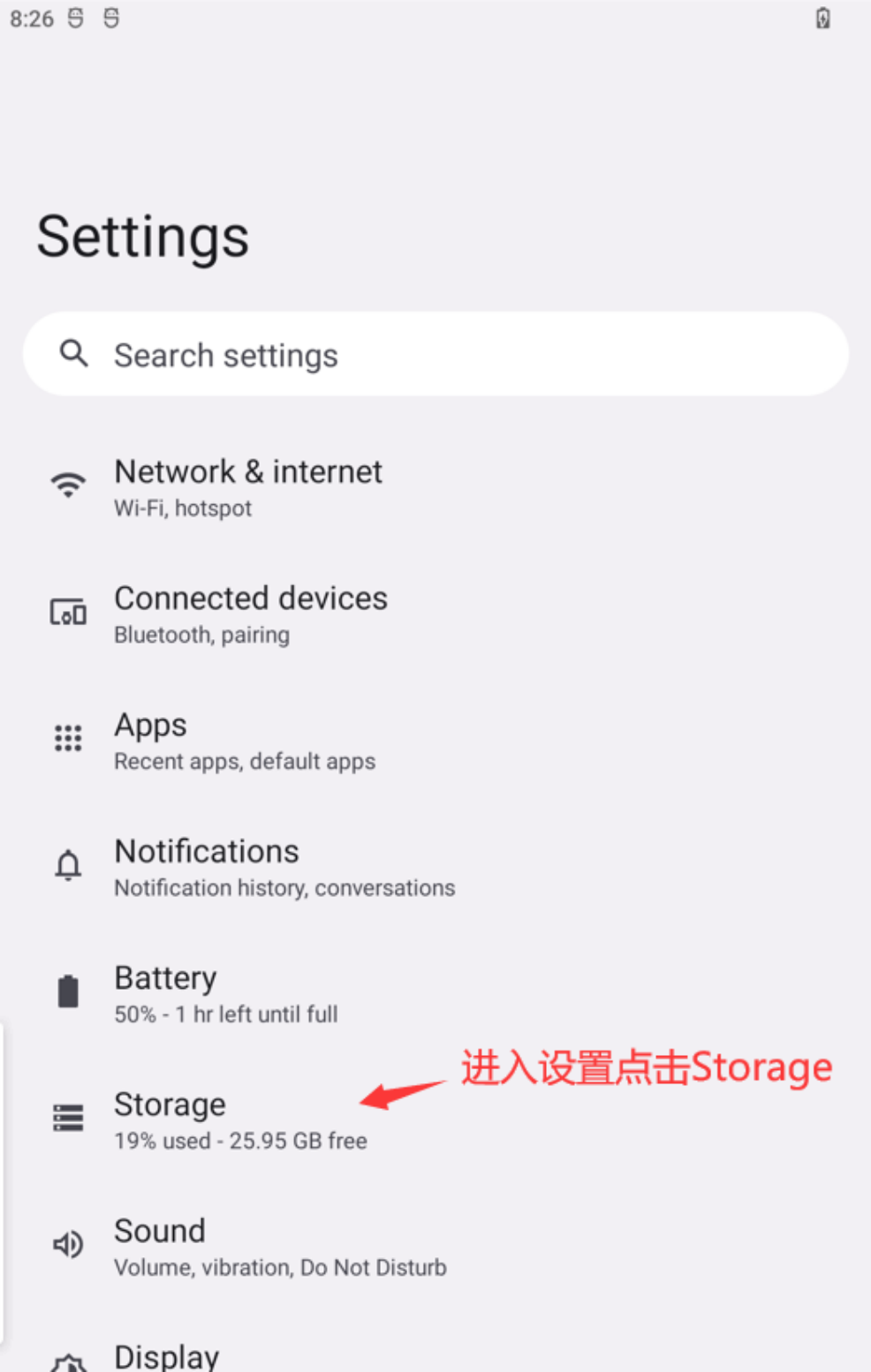
Step 1: open Settings and select Storage.
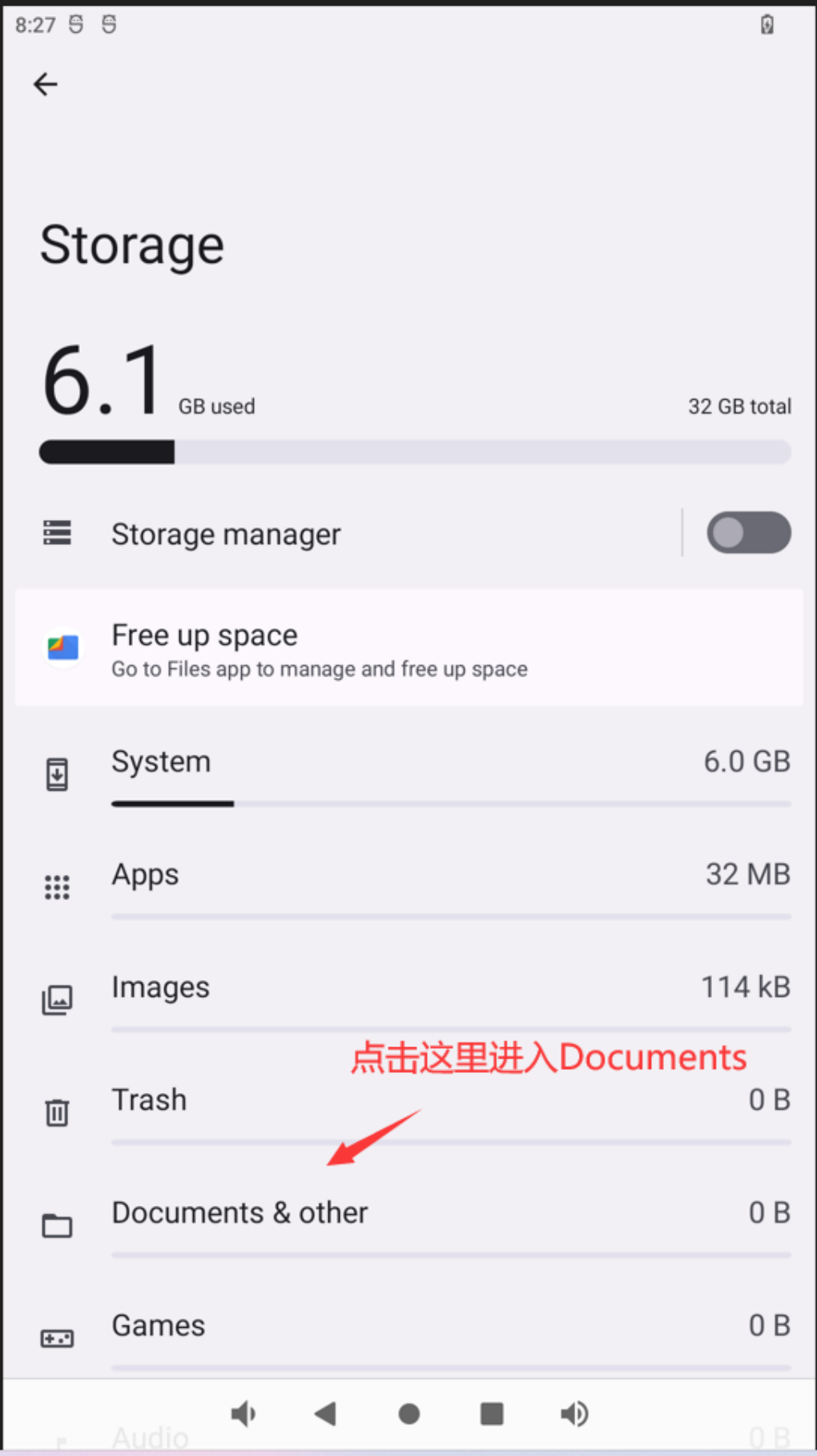
Step 2: in Storage, select Documents & other to browse documents.
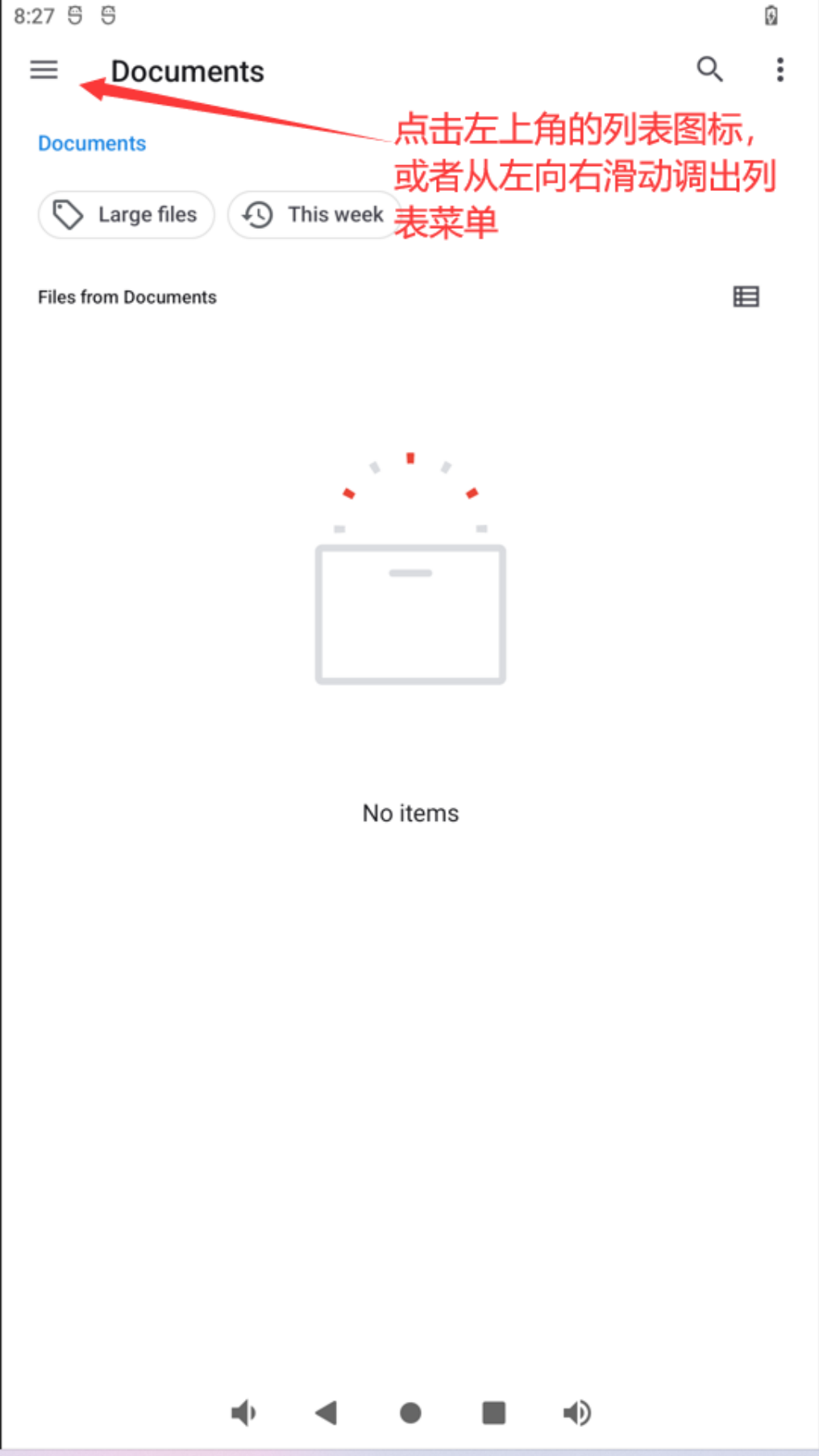
Step 3: in Documents, tap the upper-left menu button or swipe from left to right to open the menu.
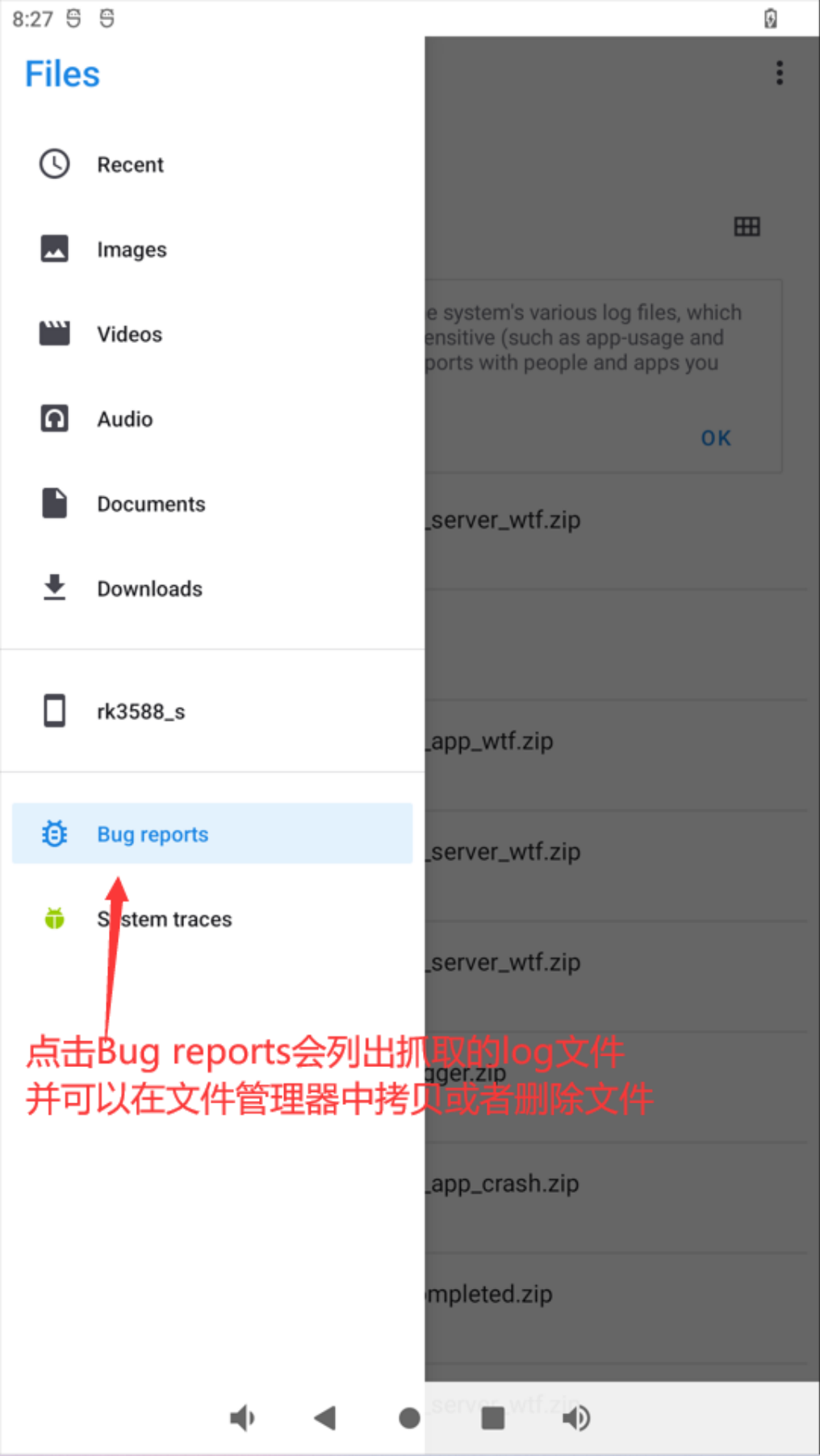
Step 4: select Bug reports to list captured logs. The file manager can copy or delete them. Verify successful export of needed logs before deleting them.
- The
bugreportssymbolic link in the root directory points to/data/user_de/0/com.android.shell/files/bugreports, so files can be retrieved directly through/bugreports/:
rk3588_s:/ $ ls bugreports -l
lrw-r--r-- 1 root root 50 2022-09-16 07:36 bugreports -> /data/user_de/0/com.android.shell/files/bugreports
Usage guide
Each exception produces a ZIP file whose name begins with a date. Sort by time to find the most recently triggered logs, for example:
rk3588_s:/ $ ls bugreports/
2023-03-14-10-04-27-SYSTEM_BOOT.zip  2023-03-14-10-04-30-TOMBSTONE.zip
2023-03-14-10-04-34-TOMBSTONE.zip  2023-03-14-10-04-39-system_app_crash.zip
Boot and Android restart
A boot log is generated when the device starts:
rk3588_s:/ $ ls bugreports/
2023-03-14-10-04-27-SYSTEM_BOOT.zip
Files dated after this file belong to the current boot session. If Android restarts, a file containing SYSTEM_RESTART in its name is generated:
rk3588_s:/ $ ls bugreports/
2023-03-14-09-12-03-SYSTEM_RESTART.zip
These filenames identify when the system booted and when Android restarted.
Kernel reboot and hangs
For the kernel, the focus is rebooting and hangs. With the RK defaults described in the source, only some situations, such as segment fault, cause a panic and reboot; hard lock, soft lock or rcu stall may leave the system hung. If a serial connection is available, use the fiq tool through it to collect more logs. Otherwise, the source recommends enabling the following options to reboot and collect logs:
+CONFIG_BOOTPARAM_HUNG_TASK_PANIC=y
+CONFIG_BOOTPARAM_SOFTLOCKUP_PANIC=y
+CONFIG_BOOTPARAM_HARDLOCKUP_PANIC=y
+CONFIG_BOOTPARAM_RCU_STALL_PANIC=y
The patches and SDK described by the source enable these options by default only in user builds. To enable them in a userdebug build, add the relevant options to arch/arm64/configs/rockchip_defconfig. Example captured exception:
rk3588_s:/ $ ls bugreports/
2022-09-24-09-58-10-kernel_panic.zip
This archive contains the detailed kernel panic log.
Android exception types
| Exception | Meaning |
|---|---|
| TOMBSTONE | Native-layer crash |
| system_server_crash | System service crash |
| system_server_anr | System service ANR |
| system_server_lowmem | Low memory |
| system_server_watchdog | system_server watchdog exception |
| SYSTEM_RESTART | Android restart |
| system_app_crash | System app force close |
| system_app_anr | System app ANR |
| system_server_wtf | Severe Android framework error; wtf means What a Terrible Failure |
| data_app_anr | ANR in a user-installed app |
| data_app_crash | Crash in a user-installed app |
| data_app_wtf | wtf in a user-installed app |
The persist.sys.rklog.level property controls which exceptions are captured. A value of 0 disables Android-layer exception logs, leaving only kernel panic exception logs. The default is 7. Definitions follow:
enum {
    DROPBOX_SYSTEM_SERVER_CRASH = 1,
    DROPBOX_SYSTEM_SERVER_ANR = 2,
    DROPBOX_SYSTEM_SERVER_LOWMEM = 3,
    DROPBOX_SYSTEM_SERVER_WATCHDOG = 4,
    DROPBOX_SYSTEM_RESTART = 5,
    DROPBOX_SYSTEM_APP_CRASH = 6,
    DROPBOX_SYSTEM_APP_ANR = 7,
    DROPBOX_SYSTEM_SERVER_WTF = 8,
    DROPBOX_SYSTEM_APP_WTF = 9,
    DROPBOX_DATA_APP_ANR = 10,
    DROPBOX_DATA_APP_CRASH =11,
    DROPBOX_DATA_APP_WTF = 12,
    DROPBOX_MAX_ENTRY,
};
persist.sys.rklog.level=7 enables DROPBOX_SYSTEM_APP_ANR and preceding dropbox entries in the enumeration: an ordered threshold, not a bitmask. Tombstone triggers by default unless persist.sys.rklog.level=0. The enumeration also contains DROPBOX_SYSTEM_APP_WTF=9, not separately listed in the source prose; its definition is retained. The exception type is included in the log filename, for example:
2022-09-24-09-58-17-SYSTEM_BOOT.zip     2022-09-24-09-58-10-kernel_panic.zip
2022-09-24-09-55-10-system_app_crash.zip   2022-09-24-09-58-24-system_app_crash.zip
2022-09-24-09-55-16-system_app_crash.zip   2022-09-24-10-01-24-system_app_crash.zip
Storage limit and cleanup
Logs reside in /data/user_de/0/com.android.shell/files/bugreports. The source limits the size of files produced by this logging system to approximately 300M. Configure it using dumpstate.max_log_size, in M; 200 means 200M. Change the default property in frameworks/native/cmds/dumpstate/dumpstate.rc. The oldest logs are deleted when the limit is exceeded. Filter logs by the date in their filenames. The source recommends clearing the directory after retrieving needed logs; first verify that exported files are complete and keep any required backup.
Repeated-exception deduplication
To avoid excessive logs from a recurring exception, the system checks whether the same exception has occurred since the current boot. If so, it waits 5 minutes before generating another log. For example, repeated identical system_server_wtf errors pointing to the same location produce only one log within 5 minutes.
Scope and precautions
These behaviors and defaults belong to the source SDK/patches and linux-5.10, not every Android or ArmSoM firmware. Panic options turn some hangs into reboots, affecting availability and potentially losing unsaved data; validate against the matching kernel. Leading + signs in the configuration block mark added patch lines, not part of the option names. Logs may contain device identifiers, application data and other sensitive information; review and protect them before export or sharing. No configuration changes, fault injection, file deletion or hardware tests were performed.