
Source:RK-SM-YF-505 V1.0.0,Chinese. This documents Rockchip SDK boot-video operation,customization and use,not ArmSoM tests or newer-SDK support. No commands executed. All figures are Chinese-source originals; no English source supplied.
1 Overview
This guide explains the operating principle, customization and use of Android boot video. For quick setup, proceed to chapter 3.
2 Boot-video operation
For quick use see §3. Native bootanimation is extended with bootvideo playback/control. Another important change processes boot-video audio in the audio service to maintain stable volume. The original flowchart is split into two image objects,shown consecutively below.
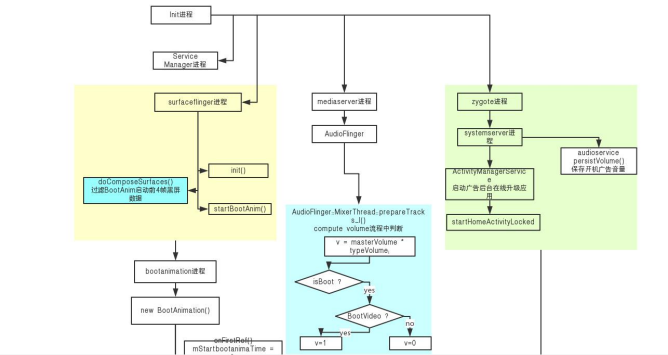
Bootvideo flow,upper part - Original source figure; PDF page 6 (CN).
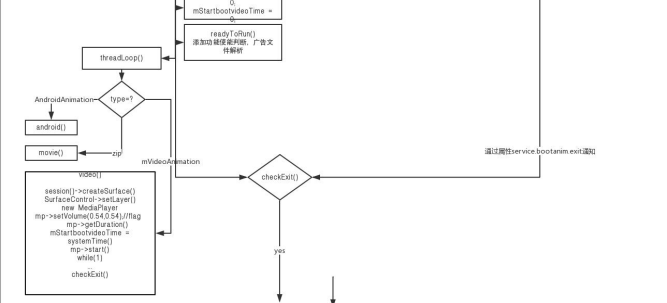
Bootvideo flow,continuation - Original source figure; PDF page 6 (CN).
3 Usage
3.1 Enable and disable
The described RKSDK already integrates boot video. Add the macro in device/rockchip/common/BoardConfig.mk:true enables,false disables. Select one setting,not both.
BOOT_VIDEO_ENABLE ?= true
BOOT_VIDEO_ENABLE ?= false
3.2 Video file location
Place prepared bootanimation.ts at device/rockchip/common/bootvideo/bootanimation.ts. The default code recognizes this filename; other supported formats may be renamed to bootanimation.ts without conversion. Renaming does not add codec support. Build copies it into the system partition’s media directory; the source screenshot shows the following output.
3.3 Build output
A successful build copies bootanimation.ts into the media directory of the system partition. The source screenshot shows this RK3328 BOX output path:
out/target/product/rk3328_box/system/media/bootanimation.ts

Build output - Original source figure; PDF page 7 (CN).
3.4 Video requirements
In principle,any video playing normally in the box’s local Media Center app is suitable. Boot starts many services under high load,however,so choose material matching chip capability and prefer hardware-decodable formats. Recommended maximum:RK3328/RK3228H 1080p;RK322x/RK312x 720p.
3.5 Property controls
| Property | Values and behavior |
|---|---|
| persist.sys.bootvideo.enable | true on;false off |
| persist.sys.bootvideo.showtime | -2 default:read video duration and play completely. -1:no timer;stop immediately at system end request. Positive integer:seconds,e.g.20 plays20s and holds last frame if video finishes earlier. Must be >0 in this mode;above120 is capped at120s. |
| persist.sys.bootvideo.vol | 1–100;maximum100 |
| persist.sys.bootvideo.delaytime | Debug playback delay ≥0 seconds;5 means5s |
4 Q&A
The source says “to be added”;no further Q&A is provided.