
Source:Rockchip Android Automotive Developer Guide, RK-KF-YF-792,V1.1.0,21 pages, Chinese only; this revision updates display configuration. All four versions use the actual Chinese-source architecture figure, whose labels are English. These are Rockchip SDK configuration examples, not ArmSoM hardware/vehicle tests. Commands and patches have not been executed. Driver-distraction rules, power policy and vehicle integration require product-specific safety validation; examples are not production approval.
Android Automotive is an Android platform running preinstalled IVI applications and optional second-/third-party Android apps. Its free/open code supplies core infotainment functions; implementers can customize products, while common Android frameworks, languages and APIs reuse the wider developer ecosystem. It is not an Android fork or parallel platform: it shares repositories/code with phones/tablets, reuses security, compatibility, tooling and infrastructure developed over more than a decade, and adds vehicle-specific requirements/features to form a full-stack infotainment platform. The guide documents its features and configuration.
| Chip | Kernel | Android |
|---|---|---|
| RK3588 | 5.10 | 12 |
| RK3588/RK3576 | 6.1 | 14 |
1 AAOS platform
Tablet SDK uses AOSP; automotive SDK uses AAOS with Google automotive UI, differentiated driver/passenger permissions, multiple displays/touch/backlights, audio zones and cluster support. Some cluster patches were supplied through Redmine. This permits a driver and multiple passengers to operate independently. Upper interfaces are standard Google APIs; reference:https://source.android.com/docs/devices/automotive. Car API includes CarSensorManager; supported APIs live in packages/services/Car/car-lib. CarService:packages/services/Car/; Car APKs:packages/apps/Car/; Vehicle HAL OEM-property interfaces:hardware/interfaces/automotive/vehicle/.
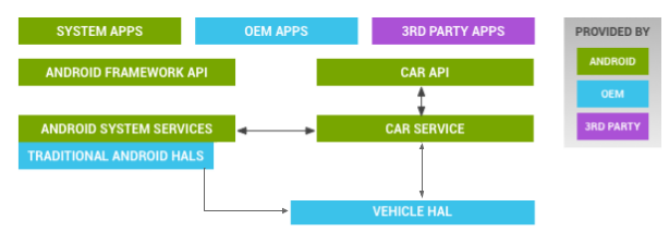
Vehicle HAL and AAOS architecture - Original source figure; PDF page 4 (CN).
2.1 Headless multiuser mode
The default SDK supports one driver and up to five passengers, each with independent display/touch control and independent apps, including the same app on different users. Enable headless-system-user mode in device/rockchip/common/car/packages_car.mk. Reference:https://source.android.google.cn/docs/devices/admin/multi-user?hl=zh-cn#android-automotive-multi-user.
PRODUCT_SYSTEM_DEFAULT_PROPERTIES += \
    ro.fw.mu.headless_system_user?=true
2.2 Enable users
Set the two CarService booleans true. The framework maximum and simultaneously running user counts are both9; this is distinct from six occupant/display zones. Paths are preserved per Android version, including the source Android14 framework path without common/.
| Configuration | Android14 | Android12 |
|---|---|---|
| CarService | device/rockchip/common/car/overlay/packages/services/Car/service/res/values/config.xml | device/rockchip/rk3588/rk3588m_car/overlay/packages/services/Car/service/res/values/config.xml |
| Framework | device/rockchip/car/overlay/frameworks/base/core/res/res/values/config.xml | device/rockchip/rk3588/rk3588m_car/overlay/frameworks/base/core/res/res/values/config.xml |
<bool name="enablePassengerSupport">true</bool>
<bool name="enableProfileUserAssignmentForMultiDisplay" translatable="false">true</bool>
<integer name="config_multiuserMaximumUsers">9</integer>
<integer name="config_multiuserMaxRunningUsers">9</integer>
2.3 Occupants and displays
Use the CarService config.xml paths above for occupant zones and display assignments. Every zone has a unique unsigned occupantZoneId. occupantType is CarOccupantZoneManager.OCCUPANT_TYPE_* (DRIVER,FRONT_PASSENGER,REAR_PASSENGER); seatRow is seat row; seatSide is left/center/right (source typo rgith), or driver/center/oppositeDriver for left/right-hand-drive neutrality. If handedness is unspecified, left-hand drive is assumed, driver on the left. DEFAULT_DISPLAY, if assigned, must always belong to the driver zone.
<string-array translatable="false" name="config_occupant_zones">
<item>occupantZoneId=0,occupantType=DRIVER,seatRow=1,seatSide=driver</item>
<!--
<item>occupantZoneId=1,occupantType=DRIVER,seatRow=1,seatSide=driver</item> -->
<item>occupantZoneId=1,occupantType=FRONT_PASSENGER,seatRow=1,seatSide=oppositeDriver</item>
<item>occupantZoneId=2,occupantType=REAR_PASSENGER,seatRow=2,seatSide=left</item>
<item>occupantZoneId=3,occupantType=REAR_PASSENGER,seatRow=2,seatSide=right</item>
<item>occupantZoneId=4,occupantType=REAR_PASSENGER,seatRow=3,seatSide=left</item>
<item>occupantZoneId=5,occupantType=REAR_PASSENGER,seatRow=3,seatSide=right</item>
</string-array>
<string-array translatable="false" name="config_occupant_display_mapping">
<item>displayPort=0,displayType=MAIN,occupantZoneId=0</item>
<item>displayPort=1,displayType=MAIN,occupantZoneId=1</item>
<!--
<item>displayPort=1,displayType=INSTRUMENT_CLUSTER,occupantZoneId=0</item> -->
<item>displayPort=2,displayType=MAIN,occupantZoneId=2</item>
<item>displayPort=3,displayType=MAIN,occupantZoneId=3</item>
<item>displayPort=4,displayType=MAIN,occupantZoneId=4</item>
<item>displayPort=5,displayType=MAIN,occupantZoneId=5</item>
</string-array>
displayPort is the unique physical port ID from dumpsys display. Optional displayUniqueId is also found there; VirtualDisplay IDs have virtual:
dumpsys display
dumpsys carservice
pm list users
dumpsys user
2.4 HWC display configuration
RK3588 has4video ports and defaults to4screens; RK3576 has3ports/3screens. RK3588 six-screen mode uses HWC stitched multidisplay, described in RKDocs/common/display/Rockchip_Developer_Guide_Android_Car_MultiDisplay_CN.pdf. Default primary DSI and extensions eDP/HDMI-A must match hardware. vendor.hwc.device.primary must name the actual primary interface, otherwise boot-animation timing and multidisplay performance suffer. Both chip examples use the same properties:
PRODUCT_PROPERTY_OVERRIDES += vendor.hwc.device.primary=DSI
PRODUCT_PROPERTY_OVERRIDES += vendor.hwc.device.extend=HDMI-A,eDP
2.5 Backlights and brightness APIs
display_settings.xml defines display IDs/backlight paths; defaults match the EVB and must be adapted for the product. Locations are listed below. identifier1 matches name to Port ID,0 to Unique ID. Obtain port:* or local:* from dumpsys display or dumpsys SurfaceFlinger; IDs must match displayPort/displayUniqueId in config_occupant_display_mapping or CarOccupantZoneService cannot find the display. backlightPath must match that screen and DTS; DSI example is /sys/class/backlight/backlight/brightness. The source port4 path edp2lvds_backligh1 lacks the t present in its later permission example; retained as a source inconsistency.
| Variant | display_settings.xml |
|---|---|
| Default | device/rockchip/common/display_settings.xml |
| RK3588 Android12 | device/rockchip/rk3588/rk3588m_car/display_settings.xml |
| RK3588 Android14 | device/rockchip/rk3588/rk3588m_u/displays/display_settings.xml |
| RK3576 Android14 | device/rockchip/rk3576/rk3576m_u/displays/display_settings.xml |
<?xml version='1.0' encoding='utf-8' standalone='yes' ?>
<display-settings>
<config identifier="1" />
<display
name="port:0"
backlightPath="/sys/class/backlight/backlight/brightness" />
<display
name="port:1"
shouldShowSystemDecors="true"
shouldShowIme="true"
forcedDensity="160"
backlightPath="/sys/class/backlight/edp2lvds_backlight0/brightness"
/>
<display
name="port:2"
shouldShowSystemDecors="true"
shouldShowIme="true"
forcedDensity="160"
backlightPath="/sys/class/backlight/dsi2lvds_backlight1/brightness"
/>
<display
name="port:3"
shouldShowSystemDecors="true"
shouldShowIme="true"
forcedDensity="160"
backlightPath="/sys/class/backlight/dp2lvds_backlight0/brightness" />
<display
name="port:4"
shouldShowSystemDecors="true"
shouldShowIme="true"
forcedDensity="160"
backlightPath="/sys/class/backlight/edp2lvds_backligh1/brightness" />
<display
name="port:5"
shouldShowSystemDecors="true"
shouldShowIme="true"
forcedDensity="160"
backlightPath="/sys/class/backlight/dp2lvds_backlight1/brightness" />
</display-settings>
Give System ownership of backlight nodes in init.rc. Other display settings are defined by Google in frameworks/base/services/core/java/com/android/server/wm/DisplayWindowSettingsProvider.java; reference:https://source.android.google.cn/docs/core/display/multi_display/recommended-practices?hl=zh-cn#windowing.
on boot
# backlight
chown system system /sys/class/backlight/backlight/brightness
chown system system /sys/class/backlight/dp2lvds_backlight0/brightness
chown system system /sys/class/backlight/dp2lvds_backlight1/brightness
chown system system /sys/class/backlight/dsi2lvds_backlight1/brightness
chown system system /sys/class/backlight/edp2lvds_backlight0/brightness
chown system system /sys/class/backlight/edp2lvds_backlight1/brightness
System-level DisplayManager APIs require system privileges and synchronize changes to ContentProvider; they behave the same with or without multiuser. The source reference is packages/apps/Car/Settings/src/com/android/car/settings/qc/BrightnessSlider.java.
DisplayManager mDisplayManager =
context.getSystemService(DisplayManager.class);
//参考代码
packages/apps/Car/Settings/src/com/android/car/settings/qc/BrightnessSlider.java
//设置亮度
float linearFloat = BrightnessSynchronizer.brightnessIntToFloat(linear);
mDisplayManager.setBrightness(displayId, linearFloat);
//获取亮度
float linearFloat = mDisplayManager.getBrightness(displayId);
int linear = BrightnessSynchronizer.brightnessFloatToInt(linearFloat);
Activity-level brightness is0–1 and affects only the current Activity, reverting to the system value on exit; multiuser does not change this. Ensure the Activity’s DisplayId is the real target; a generic Context can refer to the wrong display. Settings.System brightness is0–255 and requires system privileges; without AAOS multiuser it cannot adjust non-primary screens. Set manual mode before the value. The source identifier birghtessValue is misspelled and retained.
//获取当前Activity亮度(0-1)
float brightness = getWindow().getAttributes().screenBrightness;
//设置当前Activity亮度(0-1)
Window window = getWindow();
WindowManager.LayoutParams lp = window.getAttributes();
lp.screenBrightness = (float)brightness;
window.setAttributes(lp);
//获取当前系统亮度(0-255)
Settings.System.getIntForUser(mContext.getContentResolver(),
Settings.System.SCREEN_BRIGHTNESS, defValue, userId);
//设置当前系统亮度
//设置系统背光模式为手动调节
Settings.System.putIntForUser(mContext.getContentResolver(),
Settings.System.SCREEN_BRIGHTNESS_MODE,
Settings.System.SCREEN_BRIGHTNESS_MODE_MANUAL, userId);
//设置系统背光亮度
Settings.System.putIntForUser(mContext.getContentResolver(),
Settings.System.SCREEN_BRIGHTNESS, birghtessValue, userId);
2.6 Input/display associations
Physical ports associate input devices with displays in /vendor/etc/input-port-associations.xml. display is the display port from dumpsys display; input is the device Location from dumpsys input. Product files and RK3588 Android14 example follow. Source #comments after XML elements are not valid XML comments; retained as annotated source text, not a directly parseable XML file.
device/rockchip/rk3588/rk3588m_car/input-port-associations.xml
device/rockchip/rk3588/rk3588m_u/displays/input-port-associations.xml
device/rockchip/rk3576/rk3576m_u/displays/input-port-associations.xml
<ports>
<port display="0" input="himax-2-0048/input0" /> #DSI0 720P
<port display="1" input="ili210x-5-0041/input0" /> #EDP0 1080P
<port display="2" input="himax-6-0048/input0" /> #DSI1 720P
<port display="3" input="himax-4-0048/input0" /> #DP0 720P
<port display="241" input="ili210x-7-0041/input0" /> #EDP1 1080P
<port display="243" input="himax-8-0048/input0" /> #DP1 720P
</ports>
2.7 Audio zones
The SDK initially configures four audio zones, so only those four mapped occupants can independently play audio/video. Add more zones and actual output-device/occupant mappings for more occupants. Modify both audio_policy_configuration.xml and car_audio_configuration.xml under the version paths below. Details:Rockchip_RK3588M_Developer_Guide_Android12_Audio_CN.md.
| Variant | Directory for both XML files |
|---|---|
| RK3588 Android12 | device/rockchip/rk3588/rk3588m_car/ |
| RK3588 Android14 | device/rockchip/rk3588/rk3588m_u/audio/ |
| RK3576 Android14 | device/rockchip/rk3576/rk3576m_u/audio/ |
2.8 Hotplug
Rockchip AAOS supports display hotplug. In multiuser mode, unplugging and reconnecting an occupant display of the same interface type (HDMI/eDP/DP/MIPI etc.) preserves its previous user/configuration and restores the open application stack.
2.9 Storage
Multiuser mounts differ from single-user and FUSE makes some paths inaccessible to shell. AAOS enables FUSE passthrough at /mnt/pass_through/ to reduce repeated userspace/kernel transitions. Environment.getExternalStorageDirectory() returns /storage/emulated/{userid}, not shell-accessible in this setup; the source gives /mnt/user/userid/emulated/{userid} as the shell path. External USB storage is available to all users through MediaProvider API:mount /mnt/pass_through/{userId}/{UUID}{userId}, app path /storage/{UUID}{userId}. Preserve the source’s userid placeholder spellings and concatenation; confirm actual mounts. References:https://source.android.google.cn/docs/core/storage?hl=zh-cn and https://www.kernel.org/doc/html/latest/filesystems/fuse.html.
2.10–2.12 User permissions, preinstalls and UX restrictions
Configure user capabilities such as calls, factory reset and app installation in packages/services/Car/car_product/overlay/frameworks/base/core/res/res/xml/config_user_types.xml. Details:https://source.android.google.cn/docs/devices/admin/multi-user?hl=zh-cn#user_types. Not every system package suits every user type:allowlist preinstalled packages to reduce user-creation/startup time and memory. Configuration:packages/services/Car/car_product/build/preinstalled-packages-product-car-base.xml; reference:https://source.android.google.cn/docs/core/permissions/preinstalled-packages?hl=zh-cn#base.
The UX-restriction paragraph literally says the driver has “display enabled” while driving and no restrictions when parked/idling; other seats unrestricted. The heading concerns UX restrictions, making that wording ambiguous: do not treat it as permission for unrestricted driver interaction while moving. Configure product requirements in device/rockchip/common/car/overlay/packages/services/Car/service/res/xml/car_ux_restrictions_map.xml and validate driving safety. Reference:https://source.android.google.cn/docs/automotive/driver_distraction/guidelines?hl=zh_cn.
2.13 Disable multiuser and enable mirroring
Set ro.fw.mu.headless_system_user=false in device/rockchip/common/car/packages_car.mk and set both CarService booleans false in the Android12/14 CarService config.xml paths from §2.2. Multiple displays remain independent by default after disabling multiuser. For mirroring apply the appropriate version-specific changes below, not both versions together.
PRODUCT_SYSTEM_DEFAULT_PROPERTIES += \
    ro.fw.mu.headless_system_user?=false
<bool name="enablePassengerSupport">false</bool>
<bool name="enableProfileUserAssignmentForMultiDisplay" translatable="false">false</bool>
Android12:comment out Secondary Home’s intent filter in packages/apps/Car/Launcher/AndroidManifest.xml, then disable config_enableBottom2SystemBar in packages/apps/Car/SystemUI/res/values/config.xml.
diff --git a/AndroidManifest.xml b/AndroidManifest.xml
index c7078b89..cf3d8235 100644
--- a/AndroidManifest.xml
+++ b/AndroidManifest.xml
@@ -126,11 +126,11 @@
android:exported="true"
android:enabled="true"
android:configChanges="orientation|screenSize|smallestScreenSize|screenLayout|colorMode|density">
- <intent-filter>
+ <!--<intent-filter>
<action android:name="android.intent.action.MAIN" />
<category
android:name="android.intent.category.SECONDARY_HOME" />
<category android:name="android.intent.category.DEFAULT"
/>
- </intent-filter>
+ </intent-filter>-->
</activity>
<service
android:name=".homescreen.audio.telecom.InCallServiceImpl"
android:permission="android.permission.BIND_INCALL_SERVICE"
diff --git a/res/values/config.xml b/res/values/config.xml
index 6b2ffe1f..f8c44cfa 100644
--- a/res/values/config.xml
+++ b/res/values/config.xml
@@ -31,7 +31,7 @@
<bool name="config_enableLeftSystemBar">false</bool>
<bool name="config_enableRightSystemBar">false</bool>
<bool name="config_enableBottomSystemBar">true</bool>
- <bool name="config_enableBottom2SystemBar">true</bool>
+ <bool name="config_enableBottom2SystemBar">false</bool>
<!-- Configure the type of each system bar. Each system bar must have
a unique type. -->
<!-- STATUS_BAR = 0-->
Android14:set config_localDisplaysMirrorContent=true in packages/services/Car/car_product/overlay/frameworks/base/core/res/res/values/config.xml and remove MultiDisplaySecondaryHomeTestLauncher from packages_car.mk. The source comments the makefile entry after a continued PRODUCT_PACKAGES line; review resulting make syntax for the actual tree.
diff --git a/car_product/overlay/frameworks/base/core/res/res/values/config.xml b/car_product/overlay/frameworks/base/core/res/res/values/config.xml
index 59053739cc..c38c29eecb 100644
--- a/car_product/overlay/frameworks/base/core/res/res/values/config.xml
+++ b/car_product/overlay/frameworks/base/core/res/res/values/config.xml
@@ -23,7 +23,7 @@
<!-- The dreams feature (screensavers) is not supported in android
auto -->
<bool name="config_dreamsSupported">false</bool>
<!-- Disable local-display-mirror-content -->
- <bool name="config_localDisplaysMirrorContent">false</bool>
+ <bool name="config_localDisplaysMirrorContent">true</bool>
<!-- Enable multi-user. -->
<bool name="config_enableMultiUserUI">true</bool>
<!-- Maximum number of supported users -->
diff --git a/car/packages_car.mk b/car/packages_car.mk
index 6c820a44..afb91b85 100644
--- a/car/packages_car.mk
+++ b/car/packages_car.mk
@@ -164,7 +165,7 @@ PRODUCT_PACKAGES += \
libcarservicehelperjni \
com.android.car.procfsinspector \
com.android.permission \
- MultiDisplaySecondaryHomeTestLauncher \
+ #MultiDisplaySecondaryHomeTestLauncher \
3 Launcher implementation
AAOS differs from AOSP by defaulting to independent displays:Android14 config_localDisplaysMirrorContent=false in the framework overlay above. Every non-default display uses SecondaryLauncher. Android12 implements it in CarLauncher and runs all secondary launchers as User10; use CarOccupantManager to obtain the display’s actual user and perform operations with that UserId. Android14 uses MultiDisplaySecondaryHomeTestLauncher, already running as the user mapped by CarOccupantManager, so use the current process user. All Launcher actions must consider the current user; AOSP/AAOS app APIs generally accept UserId. Wait for User Unlock before user operations or data can become inconsistent. Code:Android14 packages/services/Car/tests/MultiDisplaySecondaryHomeTestLauncher; Android12 packages/apps/Car/Launcher.
4 SystemUI differences
Android12 has one SystemUI process; CarSystemBar creates secondary bars, enabled by config_enableBottom2SystemBar=true in packages/apps/Car/SystemUI/res/values/config.xml. Android14 creates SystemUI per user; CarSystemBar uses OverlayManager and config_enableBottomSystemBar=true in device/rockchip/common/car/overlay/packages/services/Car/car_product/rro/CarSystemUIPassengerRRO/res/values/config.xml. SystemBarConfig checks NotificationPanel:BottomSystemBar requires BottomNotificationPanelViewMediator. Code:packages/apps/Car/SystemUI/src/com/android/systemui/car/systembar/SystemBarConfigs.java.
5 Suspend and wake
VMCU generally controls automotive power/peripherals, so AAOS suspend differs from AOSP. Simulate with dumpsys car_service suspend/resume. During host suspend disable inappropriate wake sources such as heartbeat,modem,Wi-Fi and Bluetooth; in the described architecture only VMCU interrupt wakes the SoC,assuming VMCU listens for remote modem events such as remote engine start. If the AP handles that function,add a modem wake source. Adapt kernel or CarPowerManagerService.java doHandleFinish() to disable RTC/Wi-Fi/Ethernet/Bluetooth secondary-standby wake sources; restore peripherals in handleWaitForVhal() when needed.
The SDK has no power_policy.xml by default—all power is on. Define the product’s policy:https://source.android.com/docs/automotive/power/power_policy?hl=zh-cn; overview:https://source.android.google.cn/docs/automotive/power?hl=zh_cn. The source references (but does not embed) https://source.android.com/static/docs/devices/automotive/images/automotive_power_deep_sleep.png?hl=zh-cn. Android14 can suspend an individual secondary display. The API is printed as CarPowerManster.setDisplayPowerState(displayid,false/true), an apparent class-name typo; retain for source traceability and verify actual SDK API. The shell form is below.
dumpsys car_service suspend
dumpsys car_service resume
dumpsys car_service set-display-state displayid false/true
6 Move apps between displays
AAOS commonly has two or more displays but little interaction between them. Rockchip adds multifinger swipe migration of an app to another display. Code:services/core/java/com/android/server/wm/FingersDisplayAnimationEventListener.java; configuration:device/rockchip/common/car/config_three_fingers.xml, installed at /system/etc/config_three_fingers.xml. onPointerEvent calculates gestures and can be adapted.
<?xml version="1.0" encoding="utf-8"?>
<config>
<!-- option value:
OFF : don't use this feature
PARTIAL : only white app list can use
FULL : only black app list don't user
-->
<log-enable>true</log-enable>
<enable>PARTIAL</enable>
<finger-num>3</finger-num>
<min-swipe-distance-ratio>0.05</min-swipe-distance-ratio>
<effective-distance-ratio>0.5</effective-distance-ratio>
<white-app-lists>
<package>com.bilibili.bilithings</package>
<package>com.android.car.settings</package>
<package>android.rk.RockVideoPlayer</package>
</white-app-lists>
<black-app-lists>
<package>com.android.car.carlauncher</package>
<package>com.android.car.mapsplaceholder</package>
<package>com.android.systemui</package>
<package>com.android.permissioncontroller</package>
<package>com.android.car.developeroptions</package>
</black-app-lists>
<location>
<display>
<uniqueId>local:0</uniqueId>
<top>local:1</top>
<left>local:2</left>
<right>local:3</right>
<bottom>local:0</bottom>
</display>
<display>
<uniqueId>local:1</uniqueId>
<top>local:2</top>
<left>local:3</left>
<right>local:1</right>
<bottom>local:0</bottom>
</display>
<display>
<uniqueId>local:2</uniqueId>
<top>local:3</top>
<left>local:2</left>
<right>local:0</right>
<bottom>local:1</bottom>
</display>
<display>
<uniqueId>local:3</uniqueId>
<top>local:3</top>
<left>local:0</left>
<right>local:1</right>
<bottom>local:2</bottom>
</display>
</location>
</config>
| Parameter | Meaning |
|---|---|
| enable | OFF disabled; PARTIAL allowlist only (source recommendation); FULL all except denylist |
| finger-num | Number of fingers |
| min-swipe-distance-ratio | Minimum swipe fraction;0.05×1080=54 to activate |
| effective-distance-ratio | Commit threshold;0.5×1080=540, greater moves app, less returns animation |
| white-app-lists / black-app-lists | Allowlist / denylist |
| location / display | Physical arrangement / display entry |
| uniqueId | Source display UniqueId |
| top / bottom / left / right | Target UniqueId for swipe up/down/left/right |
7 Cluster
The driver occupies an additional Cluster display, configured in config_occupant_display_mapping and resolved by CarOccupantService at startup. ClusterOsDouble receives VHAL commands and renders gear,RPM,speed,coolant temperature etc.; it provides a VirtualDisplay for ClusterHomeSample so a secondary app crash does not disrupt core instrument data. Keep this app simple and stable:vehicle values plus VirtualDisplay,not complex content.
ClusterHomeSample is the default ClusterHomeService UI managing the center virtual display. Replace config_clusterHomeActivity in packages/services/Car/service/res/values/config.xml to select another APK. The source value ends in .ClusterHomeActivit (missing y); verify the actual activity name. Implement your own navigation/music/settings/phone UI based on the sample,using the VirtualDisplay and ClusterState obtained through ClusterManager. Source contacts for Cluster patches:zhijun.xie@rock-chips.com / tao.weng@rock-chips.com; no contact was made here.
<string name="config_clusterHomeActivity" translatable="false">com.android.car.cluster.home/.ClusterHomeActivit</string>
8 Remove product packages
Rockchip’s PRODUCT_REMOVE_PACKAGES macro removes unwanted PRODUCT_PACKAGES without searching every source declaration. Example:
PRODUCT_REMOVE_PACKAGES += \
    Contacts \
    Music \
    android.hardware.lights-service.rockchip
9 Vehicle HAL
VHAL defines OEM-implemented vehicle properties and metadata, including integer type and allowed change modes. Its interface reads, writes and subscribes to properties representing functions. Reference:https://source.android.google.cn/docs/automotive/vhal?hl=zh_cn. The SDK supplies native AAOS VHAL at hardware/interfaces/automotive/vehicle and Vehicle-dummy at hardware/rockchip/rvcam. Enable the latter with this patch:
#device/rockchip/common
diff --git a/car/pre_google_car.mk b/car/pre_google_car.mk
index d85f017a..228be91f 100644
--- a/car/pre_google_car.mk
+++ b/car/pre_google_car.mk
@@ -56,7 +56,7 @@ $(call inherit-product, device/rockchip/common/car/packages_generic_system.mk)
PRODUCT_PACKAGES += \
android.hardware.broadcastradio-service.default
-SOONG_CONFIG_rvcam_has_vhal := false
+SOONG_CONFIG_rvcam_has_vhal := true
ifneq ($(strip $(SOONG_CONFIG_rvcam_has_vhal)), true)
PRODUCT_PACKAGES += \
Android 14 recommends replacing HIDL HAL with AIDL HAL; Vehicle HAL therefore uses AIDL. If a product requires HIDL fallback, the source provides changes to the manifest, service package and compatibility matrices 8 and 9. This is a source patch excerpt, not a verified patch for every SDK revision:
# device/rockchip/common
diff --git a/car/manifest.xml b/car/manifest.xml
index 30a042f4..bd4a56b6 100644
--- a/car/manifest.xml
+++ b/car/manifest.xml
@@ -14,10 +14,19 @@
limitations under the License.
-->
<manifest version="1.0" type="framework">
- <hal format="aidl">
+ <!-- <hal format="aidl">
<name>android.hardware.automotive.vehicle</name>
<version>2</version>
<fqname>IVehicle/default</fqname>
+ </hal> -->
+ <hal format="hidl">
+ <name>android.hardware.automotive.vehicle</name>
+ <transport>hwbinder</transport>
+ <version>2.0</version>
+ <interface>
+ <name>IVehicle</name>
+ <regex-instance>.*</regex-instance>
+ </interface>
</hal>
<hal format="aidl">
<name>android.hardware.broadcastradio</name>
diff --git a/car/pre_google_car.mk b/car/pre_google_car.mk
index d85f017a..88adf69d 100644
--- a/car/pre_google_car.mk
+++ b/car/pre_google_car.mk
@@ -60,7 +60,8 @@ SOONG_CONFIG_rvcam_has_vhal := false
ifneq ($(strip $(SOONG_CONFIG_rvcam_has_vhal)), true)
PRODUCT_PACKAGES += \
- android.hardware.automotive.vehicle@V1-default-service
+ android.hardware.automotive.vehicle@2.0-default-service
+ # android.hardware.automotive.vehicle@V1-default-service
endif
# Car init.rc
# hardware/interfaces/compatibility_matrices
diff --git a/compatibility_matrices/compatibility_matrix.8.xml b/compatibility_matrices/compatibility_matrix.8.xml
index 5ea075a377..2f12b12869 100644
--- a/compatibility_matrices/compatibility_matrix.8.xml
+++ b/compatibility_matrices/compatibility_matrix.8.xml
@@ -92,6 +92,14 @@
<instance>default</instance>
</interface>
</hal>
+ <hal format="hidl" optional="true">
+ <name>android.hardware.automotive.vehicle</name>
+ <version>2.0</version>
+ <interface>
+ <name>IVehicle</name>
+ <regex-instance>.*</regex-instance>
+ </interface>
+ </hal>
<hal format="aidl" optional="true">
<name>android.hardware.automotive.vehicle</name>
<version>1-2</version>
diff --git a/compatibility_matrices/compatibility_matrix.9.xml b/compatibility_matrices/compatibility_matrix.9.xml
index 188746d79b..15098f814c 100644
--- a/compatibility_matrices/compatibility_matrix.9.xml
+++ b/compatibility_matrices/compatibility_matrix.9.xml
@@ -101,6 +101,14 @@
<instance>default</instance>
</interface>
</hal>
+ <hal format="hidl" optional="true">
+ <name>android.hardware.automotive.vehicle</name>
+ <version>2.0</version>
+ <interface>
+ <name>IVehicle</name>
+ <regex-instance>.*</regex-instance>
+ </interface>
+ </hal>
<hal format="aidl" optional="true">
<name>android.hardware.automotive.remoteaccess</name>
<interface>
Both VHAL implementations use the same app/HAL debugging methods. –help lists reference VHAL commands; –get reads a property such as INFO_VIN. CarService can inject property events with an optional zone, comma-separated data and delay. The final example simulates AP_POWER_STATE_REQ::SHUTDOWN_PREPARE; do not issue shutdown tests on an operating vehicle. Kitchen Sink also reads/sets Vehicle HAL properties.
dumpsys android.hardware.automotive.vehicle.IVehicle/default --help
dumpsys android.hardware.automotive.vehicle.IVehicle/default --get 0x11100100
dumpsys car_service -h
dumpsys car_service inject-vhal-event <PROPERTY_ID in Hex or Decimal> [zone] data(can be comma separated list) [-t delay_time_seconds]
dumpsys car_service inject-vhal-event 289475072 1,0
10 Vehicle-dummy
Vehicle-dummy simulates some Vehicle HAL events. Real products must integrate their own MCU/CAN hardware. Implementation:hardware/rockchip/rvcam/drivers/vehicle-dummy/vehicle_dummy_hw.c. Available nodes:
/sys/devices/platform/vehicle-dummy/ac_on
/sys/devices/platform/vehicle-dummy/auto_on
/sys/devices/platform/vehicle-dummy/defrost_left
/sys/devices/platform/vehicle-dummy/defrost_right
/sys/devices/platform/vehicle-dummy/fan_direction
/sys/devices/platform/vehicle-dummy/fan_speed
/sys/devices/platform/vehicle-dummy/gear
/sys/devices/platform/vehicle-dummy/hvac_on
/sys/devices/platform/vehicle-dummy/power_req
/sys/devices/platform/vehicle-dummy/recirc_on
/sys/devices/platform/vehicle-dummy/seat_temp_left
/sys/devices/platform/vehicle-dummy/seat_temp_right
/sys/devices/platform/vehicle-dummy/temp_left
/sys/devices/platform/vehicle-dummy/temp_right
/sys/devices/platform/vehicle-dummy/turn
Turn-signal demo:1 right,2 left,0 off.
echo 1 > /sys/devices/platform/vehicle-dummy/turn
echo 2 > /sys/devices/platform/vehicle-dummy/turn
echo 0 > /sys/devices/platform/vehicle-dummy/turn
Air direction refers to VehicleHvacFanDirection; fan speed refers to HVAC_FAN_SPEED. The source writes slash-separated alternatives below:select one integer, not the literal slash expression. Other partial simulations are documented by the Vehicle-dummy implementation.
echo 1/2/3/4/6 > /sys/devices/platform/vehicle-dummy/fan_direction
echo 1/2/3/4/5/6 > /sys/devices/platform/vehicle-dummy/fan_speed
11 AAOS audio
For Rockchip AAOS Audio zone configuration,volume adjustment,focus management and AudioControl,refer to RKDocs/common/Audio/Rockchip_Developer_Guide_AAOS_Audio_CN.pdf.