
Complete four-chapter technical edition of the Chinese RK-KF-YF-793 V1.0.0 source dated : build, enablement, parameters and troubleshooting. Its applicability table says all chips/all kernel versions; this is the historical source scope, not a current compatibility promise. Only a Chinese source exists, with no English original figures. Monospaced audio-path diagrams remain editable code, accompanied by original Chinese-PDF diagram crops; these are not claimed to be localized artwork. Legal, audience, revision and duplicate contents material is omitted, not technical parameters. No commands, recording or hardware tests were performed.
Editorial notes: page-split code/tables are joined, PDF line wraps inside UUIDs repaired, and the final character of heading 4.1 restored. The source leaves attenuate_time and all five DOA descriptions blank; they remain blank. supEnergy2 says “point 1”; fRk1/fRk2 say expansion slope and inactive; HardThreshold/PrioriRatio casing is retained rather than guessing algorithm semantics. Code comments, UUIDs, parameter names, logs and source ellipses are preserved. Security: adb root/remount and setenforce 0 are only for authorized debug devices; the latter disables SELinux enforcement, so restore policy after testing. Audio dumps may contain private recordings: restrict access and remove them when no longer needed.
1. Build
1.1 Locate the project’s BoardConfig.mk
The BoardConfig.mk location depends on the chip and the product selected with lunch. Example: chip rk3588, product rk3588_u.
# echo $TARGET_PRODUCT
# rk3588_u
Then BoardConfig.mk is at device/rockchip/rk3588/rk3588_u/BoardConfig.mk.
1.2 Add the build switch
Add the following switch to the project’s BoardConfig.mk so hardware/rockchip/audio/preprocess is built.
BOARD_USE_AUDIO_PREPROCESS := true
2. Enable
2.1 Declare the effects
Modify frameworks/av/media/libeffects/data/audio_effects.xml to declare the following effect collection.
<libraries>
    <!-- 保留已有内容, 添加下面的配置项 -->
    <library name="rkpreprocess" path="librkpreprocess.so"/>
</libraries>
<effects>
    <!-- 保留已有内容, 添加下面的配置项 -->
    <effect name="preproc_aec_normal" library="rkpreprocess" uuid="bb392ec0-8d4d-11e0-a896-0002a5d5c51b"/>
    <effect name="preproc_aec_delay" library="rkpreprocess" uuid="55fa4ede-4adb-45fe-80b9-0002a5d5c51b"/>
    <effect name="preproc_aec_array_reset" library="rkpreprocess"
uuid="49cd17f2-819f-4acd-9541-0002a5d5c51b"/>
    <effect name="preproc_bf_fast_aec" library="rkpreprocess" uuid="b5bfc822-0b26-4230-adcb-0002a5d5c51b"/>
    <effect name="preproc_bf_wakeup" library="rkpreprocess" uuid="9ed2a703-5336-4a49-9bbf-0002a5d5c51b"/>
    <effect name="preproc_bf_dereverb" library="rkpreprocess" uuid="bd266323-f95b-4c4f-ab34-0002a5d5c51b"/>
    <effect name="preproc_bf_nlp" library="rkpreprocess" uuid="53e4a6d1-4e6b-4421-afbc-0002a5d5c51b"/>
    <effect name="preproc_bf_aes" library="rkpreprocess" uuid="3ad36ef7-2f2a-42cc-afa3-0002a5d5c51b"/>
    <effect name="preproc_bf_agc" library="rkpreprocess" uuid="aa8130e0-66fc-11e0-bad0-0002a5d5c51b"/>
    <effect name="preproc_bf_anr" library="rkpreprocess" uuid="20b2732e-28e9-4b6b-968a-0002a5d5c51b"/>
    <effect name="preproc_bf_gsc" library="rkpreprocess" uuid="19d4a390-7e23-488b-8568-0002a5d5c51b"/>
    <effect name="preproc_bf_gsc_method" library="rkpreprocess" uuid="79dbccc7-d690-4ed3-be87-0002a5d5c51b"/>
    <effect name="preproc_bf_fix" library="rkpreprocess" uuid="8e8fe0d9-e335-4a75-847a-0002a5d5c51b"/>
    <effect name="preproc_bf_dtd" library="rkpreprocess" uuid="97ef38d0-9346-48d3-aeed-0002a5d5c51b"/>
    <effect name="preproc_bf_cng" library="rkpreprocess" uuid="c0c12199-fccb-45a0-a912-0002a5d5c51b"/>
    <effect name="preproc_bf_eq" library="rkpreprocess" uuid="5f4428b2-6827-4a06-842f-0002a5d5c51b"/>
    <effect name="preproc_bf_chn_select" library="rkpreprocess" uuid="874978b4-1b82-470f-be80-0002a5d5c51b"/>
    <effect name="preproc_bf_howling" library="rkpreprocess" uuid="22075603-4d9d-40a6-bfac-0002a5d5c51b"/>
    <effect name="preproc_bf_doa" library="rkpreprocess" uuid="50404545-a180-40ad-a8f4-0002a5d5c51b"/>
    <effect name="preproc_bf_wind" library="rkpreprocess" uuid="2b8fea18-547e-4af7-85c9-0002a5d5c51b"/>
    <effect name="preproc_bf_ainr" library="rkpreprocess" uuid="a2913959-f123-43bc-ad9c-0002a5d5c51b"/>
    <effect name="preproc_rx_anr" library="rkpreprocess" uuid="9b6b4c6f-9fba-453b-9f33-0002a5d5c51b"/>
    <effect name="preproc_rx_howling" library="rkpreprocess" uuid="f55efb11-dc37-4844-a160-0002a5d5c51b"/>
    <effect name="preproc_ref_hw" library="rkpreprocess" uuid="b95396ba-60ed-424d-8ec7-0002a5d5c51b"/>
    <effect name="preproc_ref_sw_dlp" library="rkpreprocess" uuid="7583028a-e283-4cb5-9c0f-0002a5d5c51b"/>
    <effect name="preproc_ref_sw_alp_playback" library="rkpreprocess"
uuid="d3cb7c9b-79a1-4a84-b26c-0002a5d5c51b"/>
    <effect name="preproc_ref_sw_alp_capture" library="rkpreprocess"
uuid="4f7f9f58-122b-4dc6-831d-0002a5d5c51b"/>
</effects>
2.2 Enable the effects
For effect details, see Rockchip_Developer_Guide_Microphone_Array_Tuning.pdf. Before enabling effects, make the following two changes:
1) Set the tinyalsa_hal recording frame length to 16 ms, rounding down.
period_size = (int)(rate * 0.016 / 4) * 4
At 48000 Hz, period_size = (int)(48000 * 0.016 / 4) * 4 = 768. At 44100 Hz, period_size = (int)(44100 * 0.016 / 4) * 4 = 704. Then update the corresponding pcm config in hardware/rockchip/audio/tinyalsa_hal/audio_hw.c.
static struct pcm_config pcm_config_in = {
    // ...
    .rate = 48000,
    .period_size = 768,
};
2) Change the MIC channel count.
After confirming the MIC channel count, update the configuration below; example: 2-channel MIC, in hardware/rockchip/audio/tinyalsa_hal/audio_hw.c.
#define PCM_CAPTURE_CHANNELS 2
A single MIC is currently handled as 2 channels.
2.2.1 AEC
effect |
Description |
|---|---|
preproc_aec_normal |
AEC module |
preproc_aec_delay |
AEC delay-estimation submodule |
preproc_aec_array_reset |
Reorder AEC input audio channels |
preproc_ref_hw |
Hardware loopback reference |
preproc_ref_sw_dlp |
Software loopback reference using DLP |
preproc_ref_sw_alp_playback |
Software loopback: buffer Aloop data |
preproc_ref_sw_alp_capture |
Software loopback: acquire Aloop data |
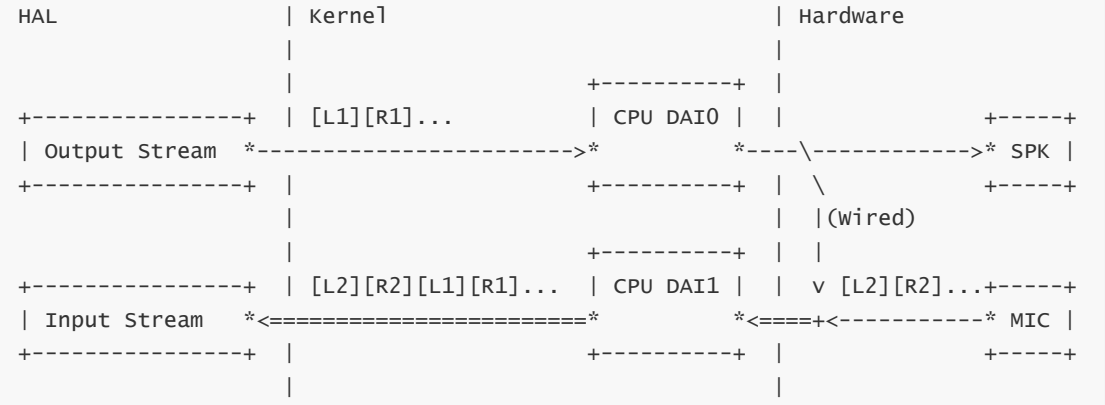
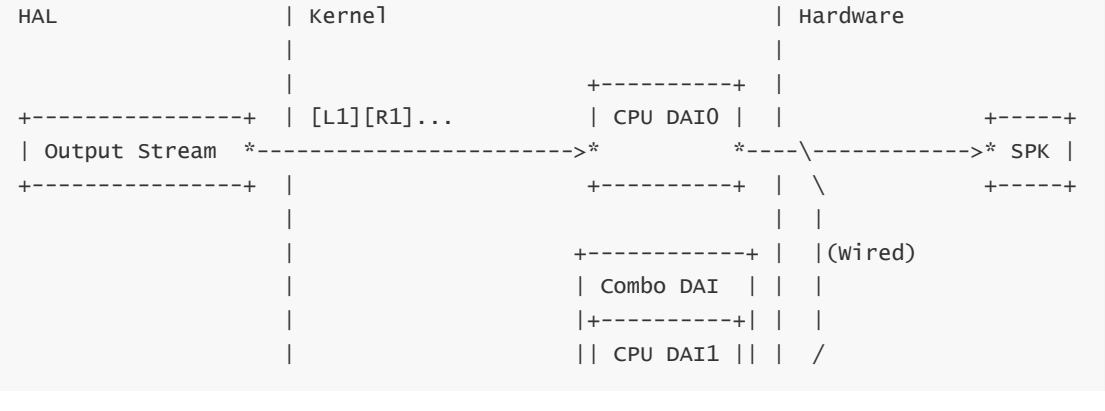
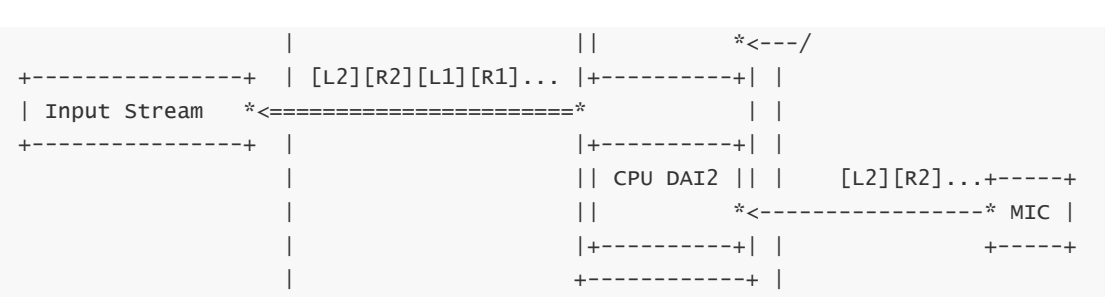
AEC needs a loopback reference signal to cancel echo, so configure it for the actual audio path or topology.
1) Hardware loopback. In the diagrams, [L1][R1]… is reference data looped from before the SPK to an audio interface (CPU DAI1); [L2][R2]… is MIC data.
HAL                 | Kernel                             | Hardware
                    |                                    |
                    |                      +----------+  |
+----------------+  | [L1][R1]...          | CPU DAI0 |  |               +-----+
| Output Stream  *------------------------>*          *----\------------>* SPK |
+----------------+  |                      +----------+  |  \            +-----+
                    |                                    |  |(Wired)
                    |                      +----------+  |  |
+----------------+  | [L2][R2][L1][R1]...  | CPU DAI1 |  |  v [L2][R2]...+-----+
| Input Stream   *<========================*          *<====+<-----------* MIC |
+----------------+  |                      +----------+  |               +-----+
                    |                                    |
HAL                 | Kernel                             | Hardware
                    |                                    |
                    |                      +----------+  |
+----------------+  | [L1][R1]...          | CPU DAI0 |  |               +-----+
| Output Stream  *------------------------>*          *----\------------>* SPK |
+----------------+  |                      +----------+  |  \            +-----+
                    |                                    |  |
                    |                     +------------+ |  |(Wired)
                    |                     | Combo DAI  | |  |
                    |                     |+----------+| |  |
                    |                     || CPU DAI1 || |  /
                    |                     ||          *<---/
+----------------+  | [L2][R2][L1][R1]... |+----------+| |
| Input Stream   *<=======================*            | |
+----------------+  |                     |+----------+| |
                    |                     || CPU DAI2 || |    [L2][R2]...+-----+
                    |                     ||          *<-----------------* MIC |
                    |                     |+----------+| |               +-----+
                    |                     +------------+ |
Change the reference channel count; example: 2 reference channels in hardware/rockchip/audio/tinyalsa_hal/audio_hw.c.
#define PCM_REFERENCE_CHANNELS 2
Modify frameworks/av/media/libeffects/data/audio_effects.xml to bind the appropriate streams to the following effects.
<!-- 如果没有声明 preprocess, 则直接添加下面的配置, 并忽略下面的注释 -->
<preprocess>
    <stream type="mic">
        <!-- 保留已有内容, 添加下面的配置项 -->
        <apply effect="preproc_aec_normal"/>
        <apply effect="preproc_ref_hw"/>
    </stream>
    <stream type="voice_communication">
        <!-- 保留已有内容, 添加下面的配置项 -->
        <apply effect="preproc_aec_normal"/>
        <apply effect="preproc_ref_hw"/>
    </stream>
</preprocess>
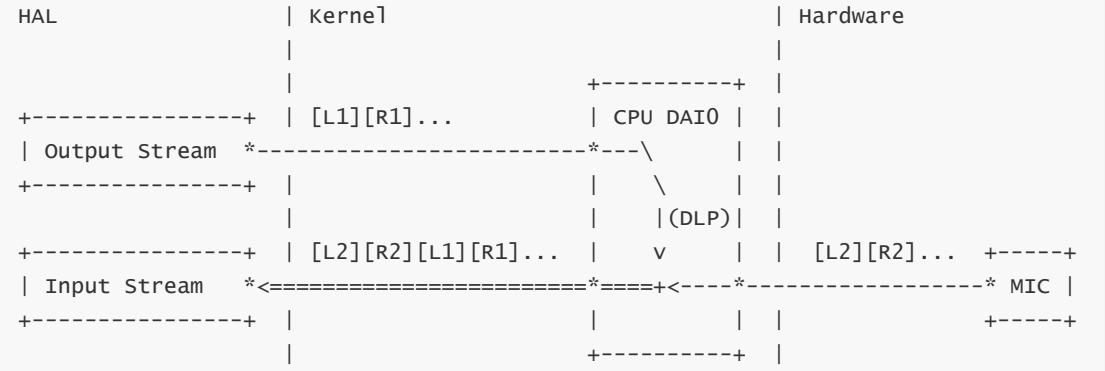
2) Software loopback using DLP applies when playback and recording use the same cpu dai. In the diagram, [L1][R1]… is reference data buffered in DLP; [L2][R2]… is MIC data.
HAL                 | Kernel                             | Hardware
                    |                                    |
                    |                      +----------+  |
+----------------+  | [L1][R1]...          | CPU DAI0 |  |
| Output Stream  *-------------------------*---\      |  |
+----------------+  |                      |    \     |  |
                    |                      |    |(DLP)|  |
+----------------+  | [L2][R2][L1][R1]...  |    v     |  |  [L2][R2]...  +-----+
| Input Stream   *<========================*====+<----*------------------* MIC |
+----------------+  |                      |          |  |               +-----+
                    |                      +----------+  |
Modify the kernel configuration to build DLP.
CONFIG_SND_SOC_ROCKCHIP_DLP_PCM
Modify the dts configuration to enable DLP on the corresponding cpu dai.
&i2s {
        rockchip,digital-loopback;
};
Possible cpu dai values include i2s0_8ch, i2s1_8ch, i2s2_2ch, i2s3_2ch, sai0 and sai1. Add the corresponding route configuration in tinyalsa_hal. Different sound-card names use different configuration files; check sound_card_config_list. If none matches, default_config.h is used. Example: 2-channel MIC + 2-channel reference.
diff --git a/tinyalsa_hal/codec_config/default_config.h
b/tinyalsa_hal/codec_config/default_config.h
index a554492..114e3d2 100755
--- a/tinyalsa_hal/codec_config/default_config.h
+++ b/tinyalsa_hal/codec_config/default_config.h
@@ -198,6 +202,10 @@ const struct config_control
default_main_mic_capture_controls[] = {
         .ctl_name = "Capture MIC Path",
         .str_val = "Main Mic",
     },
+    {
+        .ctl_name = "Software Digital Loopback Mode",
+        .str_val = "4CH: 2 Mics + 2 Loopbacks",
+    },
 };

 const struct config_control default_hands_free_mic_capture_controls[] = {
The available options are listed below; configure them for the MIC and reference channel counts.
static const char *const dlp_text[] = {
        "Disabled",
        "2CH: 1 Loopback + 1 Mic",
        "2CH: 1 Mic + 1 Loopback",
        "2CH: 1 Mic + 1 Loopback-mixed",
        "2CH: 2 Loopbacks",
        "4CH: 2 Mics + 2 Loopbacks",
        "4CH: 2 Mics + 1 Loopback-mixed",
        "4CH: 4 Loopbacks",
        "6CH: 4 Mics + 2 Loopbacks",
        "6CH: 4 Mics + 1 Loopback-mixed",
        "6CH: 6 Loopbacks",
        "8CH: 6 Mics + 2 Loopbacks",
        "8CH: 6 Mics + 1 Loopback-mixed",
        "8CH: 8 Loopbacks",
        "10CH: 8 Mics + 2 Loopbacks",
        "10CH: 8 Mics + 1 Loopback-mixed",
        "16CH: 8 Mics + 8 Loopbacks",
};
Change the reference channel count; example: 2 reference channels in hardware/rockchip/audio/tinyalsa_hal/audio_hw.c.
#define PCM_REFERENCE_CHANNELS 2
Modify frameworks/av/media/libeffects/data/audio_effects.xml to bind the appropriate streams to the following effects.
<!-- 如果没有声明 preprocess, 则直接添加下面的配置, 并忽略下面的注释 -->
<preprocess>
    <stream type="mic">
        <!-- 保留已有内容, 添加下面的配置项 -->
        <apply effect="preproc_aec_normal"/>
        <apply effect="preproc_ref_sw_dlp"/>
    </stream>
    <stream type="voice_communication">
        <!-- 保留已有内容, 添加下面的配置项 -->
        <apply effect="preproc_aec_normal"/>
        <apply effect="preproc_ref_sw_dlp"/>
    </stream>
</preprocess>
3) Software loopback using Aloop applies when playback and recording use different cpu dai interfaces. [L1][R1]… is reference data buffered in Aloop; [L2][R2]… is MIC data. MIC and reference data are combined in Step#4.
HAL                 | Kernel                             | Hardware
                    |                                    |
  <Far End In>      |                      +----------+  |
+------*---------+  | [L1][R1]...          | CPU DAI0 |  |               +-----+
| Output Stream  *------------------------>*          *----------------->* SPK |
+------*---------+  |                      +----------+  |               +-----+
       | Step#1     |                                    |
       |[L1][R1]... |                                    |
       v            |                                    |
+------*--------+   |                      +----------+  |
|               |   |                      | Aloop    |  |
|(optional pre  *------------------------->* Playback |  |
|  resampler)   |   |                      | PCM      |  |
+---------------+   |                      +----------+  |
                    |                        |#cable0    |
                    |                        |           |
                    |                        v           |
+---------------+   |                      +-*--------+  |
|               |   | Step#2               | Aloop    |  |
|(optional post *<-------------------------* Capture  |  |
|  resampler)   |   |                      | PCM      |  |
+-----*-*-------+   |                      +----------+  |
Step#4| ^ Step#3    |                                    |
<AEC> | |[L2][R2]...|                                    |
      v |           |                      +----------+  |            <Near End>
+-----*-*--------+  | Step#2'              | CPU DAI1 |  |  [L2][R2]...  +-----+
| Input Stream   *<------------------------*          *<-----------------* MIC |
+-----*----------+  |                      +----------+  |               +-----+
  <Far End Out>     |                                    |
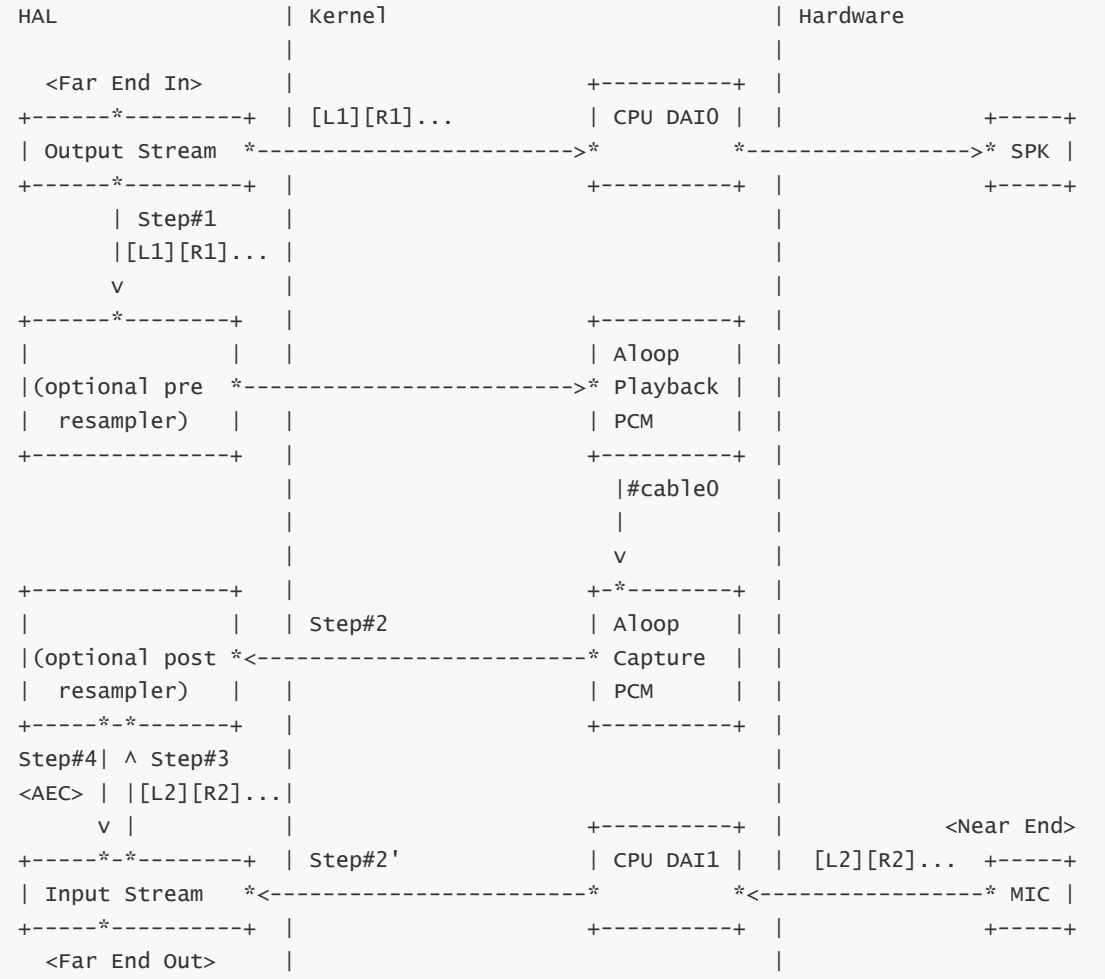
Modify the kernel configuration to build Aloop.
CONFIG_SND_DRIVERS
CONFIG_SND_ALOOP
Reference channel count: no configuration is needed because Aloop defaults to 2 channels. File: hardware/rockchip/audio/tinyalsa_hal/audio_hw.c.
#define PCM_REFERENCE_CHANNELS 0
Modify frameworks/av/media/libeffects/data/audio_effects.xml to bind the appropriate streams to the following effects.
<!-- 如果没有声明 preprocess, 则直接添加下面的配置, 并忽略下面的注释 -->
<preprocess>
    <stream type="mic">
        <!-- 保留已有内容, 添加下面的配置项 -->
        <apply effect="preproc_aec_normal"/>
        <apply effect="preproc_ref_sw_alp_capture"/>
    </stream>
    <stream type="voice_communication">
        <!-- 保留已有内容, 添加下面的配置项 -->
        <apply effect="preproc_aec_normal"/>
        <apply effect="preproc_ref_sw_alp_capture"/>
    </stream>
</preprocess>

<!-- 如果没有声明 postprocess, 则直接添加下面的配置, 并忽略下面的注释 -->
<postprocess>
    <stream type="voice_call">
        <!-- 保留已有内容, 添加下面的配置项 -->
        <apply effect="preproc_ref_sw_alp_playback"/>
    </stream>
</postprocess>
2.2.2 BF
effect |
Description |
|---|---|
preproc_bf_fast_aec |
BF linear residual-echo cancellation; further suppresses echo in the wake-up path |
preproc_bf_wakeup |
BF wake-up module |
preproc_bf_dereverb |
BF dereverberation module |
preproc_bf_nlp |
BF nonlinear residual-echo cancellation for further echo suppression in the call path (deprecated) |
preproc_bf_aes |
BF nonlinear residual-echo cancellation |
preproc_bf_agc |
BF automatic gain control |
preproc_bf_anr |
BF noise suppression |
preproc_bf_gsc |
BF beamforming post-filter for further noise suppression; enable according to actual results |
preproc_bf_gsc_method |
BF: disabled selects LMS for GSC; enabled selects RLS, which requires more computation than LMS |
preproc_bf_fix |
BF fixed-direction beam |
preproc_bf_dtd |
BF single-/double-talk detection |
preproc_bf_cng |
BF comfort-noise module |
preproc_bf_eq |
BF EQ adjustment |
preproc_bf_chn_select |
BF customized MIC expansion scenarios |
preproc_bf_howling |
BF howling suppression; enable as required by the scenario |
preproc_bf_doa |
BF sound-source localization estimates source direction; enable as required |
preproc_bf_wind |
BF wind-noise suppression; enable as required |
preproc_bf_ainr |
BF AI noise reduction; enabling it forcibly disables ANR |
To enable preproc_bf_fast_aec and preproc_bf_aes, first configure AEC. Modify frameworks/av/media/libeffects/data/audio_effects.xml to bind the streams to the effects below.
1) Recommended BF effects for wake-up:
<!-- 如果没有声明 preprocess, 则直接添加下面的配置, 并忽略下面的注释 -->
<preprocess>
    <stream type="mic">
        <!-- 保留已有内容, 添加下面的配置项 -->
        <apply effect="preproc_bf_wakeup"/>
        <apply effect="preproc_bf_fast_aec"/>
        <apply effect="preproc_bf_dtd"/>
        <apply effect="preproc_bf_agc"/>
    </stream>
    <stream type="voice_communication">
        <!-- 保留已有内容, 添加下面的配置项 -->
        <apply effect="preproc_bf_wakeup"/>
        <apply effect="preproc_bf_fast_aec"/>
        <apply effect="preproc_bf_dtd"/>
        <apply effect="preproc_bf_agc"/>
    </stream>
</preprocess>
2) Recommended BF effects for voice calls:
<!-- 如果没有声明 preprocess, 则直接添加下面的配置, 并忽略下面的注释 -->
<preprocess>
    <stream type="mic">
        <!-- 保留已有内容, 添加下面的配置项 -->
        <apply effect="preproc_bf_fast_aec"/>
        <apply effect="preproc_bf_dtd"/>
        <apply effect="preproc_bf_aes"/>
        <apply effect="preproc_bf_anr"/>
        <apply effect="preproc_bf_agc"/>
        <apply effect="preproc_bf_dereverb"/>
    </stream>
    <stream type="voice_communication">
        <!-- 保留已有内容, 添加下面的配置项 -->
        <apply effect="preproc_bf_fast_aec"/>
        <apply effect="preproc_bf_dtd"/>
        <apply effect="preproc_bf_aes"/>
        <apply effect="preproc_bf_anr"/>
        <apply effect="preproc_bf_agc"/>
        <apply effect="preproc_bf_dereverb"/>
    </stream>
</preprocess>
3) Bind other effects as needed.
2.2.3 RX
effect |
Description |
|---|---|
preproc_rx_anr |
Noise suppression; enable as required by the scenario |
preproc_rx_howling |
Howling suppression; enable as required by the scenario |
Modify frameworks/av/media/libeffects/data/audio_effects.xml to bind streams to the required effects below.
<!-- 如果没有声明 preprocess, 则直接添加下面的配置, 并忽略下面的注释 -->
<preprocess>
    <stream type="mic">
        <!-- 保留已有内容, 添加下面的配置项 -->
        <apply effect="preproc_rx_anr"/>
        <apply effect="preproc_rx_howling"/>
    </stream>
    <stream type="voice_communication">
        <!-- 保留已有内容, 添加下面的配置项 -->
        <apply effect="preproc_rx_anr"/>
        <apply effect="preproc_rx_howling"/>
    </stream>
</preprocess>
2.3 Verification
1) Check registration with AudioFlinger using dumpsys media.audio_flinger.
# dumpsys media.audio_flinger
[...]
Libraries loaded:
 [...]
 Library rkpreprocess
  path: /vendor/lib/soundfx/librkpreprocess.so
  Aloop Capture / Rockchip Electronics Co. Ltd.
    UUID: 4f7f9f58-122b-4dc6-831d-0002a5d5c51b
    TYPE: 34805d32-2e6d-4d1e-9296-0002a5d5c51b
    apiVersion: 00020000
    flags: 00820203
  Aloop Playback / Rockchip Electronics Co. Ltd.
    UUID: d3cb7c9b-79a1-4a84-b26c-0002a5d5c51b
    TYPE: 34805d32-2e6d-4d1e-9296-0002a5d5c51b
    apiVersion: 00020000
    flags: 00820204
  Digital Loopback / Rockchip Electronics Co. Ltd.
    UUID: 7583028a-e283-4cb5-9c0f-0002a5d5c51b
    TYPE: 34805d32-2e6d-4d1e-9296-0002a5d5c51b
    apiVersion: 00020000
    flags: 00820203
  HW Loopback / Rockchip Electronics Co. Ltd.
    UUID: b95396ba-60ed-424d-8ec7-0002a5d5c51b
    TYPE: 34805d32-2e6d-4d1e-9296-0002a5d5c51b
    apiVersion: 00020000
    flags: 00820203
  RX HOWLING / Rockchip Electronics Co. Ltd.
    UUID: f55efb11-dc37-4844-a160-0002a5d5c51b
    TYPE: 34805d32-2e6d-4d1e-9296-0002a5d5c51b
    apiVersion: 00020000
    flags: 00820203
  RX ANR / Rockchip Electronics Co. Ltd.
    UUID: 9b6b4c6f-9fba-453b-9f33-0002a5d5c51b
    TYPE: 34805d32-2e6d-4d1e-9296-0002a5d5c51b
    apiVersion: 00020000
    flags: 00820203
  BF AINR / Rockchip Electronics Co. Ltd.
    UUID: a2913959-f123-43bc-ad9c-0002a5d5c51b
    TYPE: 34805d32-2e6d-4d1e-9296-0002a5d5c51b
    apiVersion: 00020000
    flags: 00820203
  BF WIND / Rockchip Electronics Co. Ltd.
    UUID: 2b8fea18-547e-4af7-85c9-0002a5d5c51b
    TYPE: 34805d32-2e6d-4d1e-9296-0002a5d5c51b
    apiVersion: 00020000
    flags: 00820203
  BF DOA / Rockchip Electronics Co. Ltd.
    UUID: 50404545-a180-40ad-a8f4-0002a5d5c51b
    TYPE: 34805d32-2e6d-4d1e-9296-0002a5d5c51b
    apiVersion: 00020000
    flags: 00820203
BF HOWLING / Rockchip Electronics Co. Ltd.
  UUID: 22075603-4d9d-40a6-bfac-0002a5d5c51b
  TYPE: 34805d32-2e6d-4d1e-9296-0002a5d5c51b
  apiVersion: 00020000
  flags: 00820203
BF CHN Select / Rockchip Electronics Co. Ltd.
  UUID: 874978b4-1b82-470f-be80-0002a5d5c51b
  TYPE: 34805d32-2e6d-4d1e-9296-0002a5d5c51b
  apiVersion: 00020000
  flags: 00820203
BF EQ / Rockchip Electronics Co. Ltd.
  UUID: 5f4428b2-6827-4a06-842f-0002a5d5c51b
  TYPE: 34805d32-2e6d-4d1e-9296-0002a5d5c51b
  apiVersion: 00020000
  flags: 00820203
BF CNG / Rockchip Electronics Co. Ltd.
  UUID: c0c12199-fccb-45a0-a912-0002a5d5c51b
  TYPE: 34805d32-2e6d-4d1e-9296-0002a5d5c51b
  apiVersion: 00020000
  flags: 00820203
BF DTD / Rockchip Electronics Co. Ltd.
  UUID: 97ef38d0-9346-48d3-aeed-0002a5d5c51b
  TYPE: 34805d32-2e6d-4d1e-9296-0002a5d5c51b
  apiVersion: 00020000
  flags: 00820203
BF FIX / Rockchip Electronics Co. Ltd.
  UUID: 8e8fe0d9-e335-4a75-847a-0002a5d5c51b
  TYPE: 34805d32-2e6d-4d1e-9296-0002a5d5c51b
  apiVersion: 00020000
  flags: 00820203
BF GSC Method / Rockchip Electronics Co. Ltd.
  UUID: 79dbccc7-d690-4ed3-be87-0002a5d5c51b
  TYPE: 34805d32-2e6d-4d1e-9296-0002a5d5c51b
  apiVersion: 00020000
  flags: 00820203
BF GSC / Rockchip Electronics Co. Ltd.
  UUID: 19d4a390-7e23-488b-8568-0002a5d5c51b
  TYPE: 34805d32-2e6d-4d1e-9296-0002a5d5c51b
  apiVersion: 00020000
  flags: 00820203
BF ANR / Rockchip Electronics Co. Ltd.
  UUID: 20b2732e-28e9-4b6b-968a-0002a5d5c51b
  TYPE: 34805d32-2e6d-4d1e-9296-0002a5d5c51b
  apiVersion: 00020000
  flags: 00820203
BF AGC / Rockchip Electronics Co. Ltd.
  UUID: aa8130e0-66fc-11e0-bad0-0002a5d5c51b
  TYPE: 34805d32-2e6d-4d1e-9296-0002a5d5c51b
  apiVersion: 00020000
  flags: 00820203
BF AES / Rockchip Electronics Co. Ltd.
  UUID: 3ad36ef7-2f2a-42cc-afa3-0002a5d5c51b
  TYPE: 34805d32-2e6d-4d1e-9296-0002a5d5c51b
  apiVersion: 00020000
  flags: 00820203
BF NLP / Rockchip Electronics Co. Ltd.
  UUID: 53e4a6d1-4e6b-4421-afbc-0002a5d5c51b
  TYPE: 34805d32-2e6d-4d1e-9296-0002a5d5c51b
    apiVersion: 00020000
    flags: 00820203
  BF De-Reverberation / Rockchip Electronics Co. Ltd.
    UUID: bd266323-f95b-4c4f-ab34-0002a5d5c51b
    TYPE: 34805d32-2e6d-4d1e-9296-0002a5d5c51b
    apiVersion: 00020000
    flags: 00820203
  BF Wakeup / Rockchip Electronics Co. Ltd.
    UUID: 9ed2a703-5336-4a49-9bbf-0002a5d5c51b
    TYPE: 34805d32-2e6d-4d1e-9296-0002a5d5c51b
    apiVersion: 00020000
    flags: 00820203
  BF Fast AEC / Rockchip Electronics Co. Ltd.
    UUID: b5bfc822-0b26-4230-adcb-0002a5d5c51b
    TYPE: 34805d32-2e6d-4d1e-9296-0002a5d5c51b
    apiVersion: 00020000
    flags: 00820203
  AEC Array Reset / Rockchip Electronics Co. Ltd.
    UUID: 49cd17f2-819f-4acd-9541-0002a5d5c51b
    TYPE: 34805d32-2e6d-4d1e-9296-0002a5d5c51b
    apiVersion: 00020000
    flags: 00820203
  AEC Delay / Rockchip Electronics Co. Ltd.
    UUID: 55fa4ede-4adb-45fe-80b9-0002a5d5c51b
    TYPE: 34805d32-2e6d-4d1e-9296-0002a5d5c51b
    apiVersion: 00020000
    flags: 00820203
  AEC Normal / Rockchip Electronics Co. Ltd.
    UUID: bb392ec0-8d4d-11e0-a896-0002a5d5c51b
    TYPE: 34805d32-2e6d-4d1e-9296-0002a5d5c51b
    apiVersion: 00020000
    flags: 00820203
[...]
2) Check binding to the corresponding stream. During recording or a voice call, inspect dumpsys media.audio_flinger. Example: a voice call with Aloop software reference.
<preprocess>
    <stream type="voice_communication">
        <apply effect="preproc_aec_normal"/>
        <apply effect="preproc_bf_fast_aec"/>
        <apply effect="preproc_bf_aes"/>
        <apply effect="preproc_bf_anr"/>
        <apply effect="preproc_bf_dereverb"/>
        <apply effect="preproc_rx_anr"/>
        <apply effect="preproc_ref_sw_alp_capture"/>
    </stream>
</preprocess>

<postprocess>
    <stream type="voice_call">
        <apply effect="preproc_ref_sw_alp_playback"/>
    </stream>
</postprocess>
# dumpsys media.audio_flinger
[...]
Output thread 0xb40000784395ba60, name AudioOut_D, tid 642, type 0 (MIXER):
  I/O handle: 13
  Standby: no
  [...]
  1 Effect Chains
    1 effects for session 249
        In buffer    Out buffer                           Active tracks:
        0x78439e0000   0x7843d34000 -> 0xb400007730317020   1
        Effect ID 75:
                [...]
                - UUID: d3cb7c9b-79a1-4a84-b26c-0002a5d5c51b
                [...]
                - name: Aloop Playback
                [...]
  [...]
[...]
Input thread 0xb40000784388dc60, name AudioIn_2E, tid 6501, type 3 (RECORD):
  I/O handle: 30
  Standby: no
  [...]
  1 Effect Chains
    7 effects for session 257
        In buffer    Out buffer         Active tracks:
        nullptr   nullptr   0
        Effect ID 139:
                [...]
                - UUID: bb392ec0-8d4d-11e0-a896-0002a5d5c51b
                [...]
                - name: AEC Normal
                [...]
        Effect ID 147:
                [...]
                - UUID: b5bfc822-0b26-4230-adcb-0002a5d5c51b
                [...]
                - name: BF Fast AEC
                [...]
        Effect ID 155:
                [...]
                - UUID: 3ad36ef7-2f2a-42cc-afa3-0002a5d5c51b
                [...]
                - name: BF AES
                [...]
        Effect ID 163:
                [...]
                - UUID: 20b2732e-28e9-4b6b-968a-0002a5d5c51b
                [...]
                - name: BF ANR
                [...]
        Effect ID 171:
                [...]
                - UUID: bd266323-f95b-4c4f-ab34-0002a5d5c51b
                [...]
                - name: BF De-Reverberation
                [...]
        Effect ID 179:
                [...]
                - UUID: 9b6b4c6f-9fba-453b-9f33-0002a5d5c51b
                [...]
                - name: RX ANR
                [...]
        Effect ID 187:
                [...]
                - UUID: 4f7f9f58-122b-4dc6-831d-0002a5d5c51b
                [...]
                - name: Aloop Capture
                [...]
  [...]
[...]
3. Parameters
Defaults are in rkaudio_effect_preprocess.xml, stored in hardware/rockchip/audio/preprocess/ in the SDK and installed to /vendor/etc/ on the device.
3.1 Parameter descriptions
Refer to Rockchip_Developer_Guide_Microphone_Array_Tuning.pdf. After integration, parameters default to rkaudio_effect_preprocess.xml; the following descriptions refer to that document and XML file.
3.2 Parameter configuration
3.2.1 AEC module parameters
| Attribute | Description |
|---|---|
pos |
Reference-channel position: 0 places reference channels before MIC data; 1 places them after it. |
drop_ref_channel |
Number of reference channels not processed. |
delay_len |
With delay estimation disabled, the default hardware-reference delay point; when enabled, the initial delay-estimation point. |
look_ahead |
MIC-side buffer length. Configure only when MIC acquisition is known to lag the reference; otherwise leave at 0. |
filter_len |
Linear AEC filter length. Longer filters estimate echo more accurately but converge more slowly and require more computation. Typical values: 2/4/6/8. |
Array_list |
Audio-channel order; requires preproc_aec_array_reset. |
Delay-estimation submodule parameters (requires preproc_aec_delay).
| Attribute | Description |
|---|---|
max_frame |
Maximum estimation frame count; normally 16. |
least_delay |
Minimum estimation frame count; use 0 unless MaxFrame is particularly large. |
jump_frame |
Frames initially skipped; normally 12. |
delay_offset |
Offset in frames preventing excessive estimated delay from making MIC lag the reference; normally 1. |
mic_amp_thr |
Minimum MIC energy threshold; below it the delay estimate is not updated. Normally 50. |
ref_amp_thr |
Minimum reference energy threshold; below it the delay estimate is not updated. Normally 50. |
start_freq |
Start frequency for delay estimation. Select the main speech band and adjust to actual capture results; normally 500. |
end_freq |
End frequency for delay estimation. Select the main speech band and adjust to actual capture results; normally 4000. |
smooth_factor |
Smoothing factor, usually [0.95,1). Higher values stabilize delay estimates; lower values update faster. Normally 0.97/0.99. |
3.2.2 BF module parameters
| Attribute | Description |
|---|---|
ref_pos |
Reference-channel position: 0 places reference channels before MIC data; 1 places them after it. |
targ |
Pickup direction when preproc_bf_fix is enabled. |
drop_ref_channel |
Number of reference channels not processed. |
1) AES parameters (requires preproc_bf_aes).
| Attribute | Description |
|---|---|
beta_up |
Rise rate: larger values strengthen nonlinear suppression. Recommended: 0.001-0.01. |
beta_down |
Fall rate: larger values weaken nonlinear suppression. Recommended: 0.001-0.01. |
beta_up_low |
Low-band rise rate; behavior and range as beta_up. |
beta_down_low |
Low-band fall rate; behavior and range as beta_down. |
low_freq |
Low-frequency band division. |
high_freq |
High-frequency band division. |
thd_flag |
1 enables harmonic-distortion suppression; 0 disables it. |
hard_flag |
1 enables Hard mode, strengthening echo suppression but potentially over-suppressing speech. |
limit_ratio_0 |
Minimum residual-echo ratio in each band; recommended [1.0f, 5.0f]. Larger values strengthen echo cancellation. The three columns are the low, middle and high bands divided by low_freq and high_freq. |
limit_ratio_1 |
Residual-echo removal ratio in each band; recommended [1.0f, 3.0f]. Larger values strengthen cancellation. The three columns are low, middle and high bands divided by low_freq and high_freq. |
thd_split_freq_0 |
Harmonic-suppression bands. Set a row entirely to 0 if unused. Each row is one band: start in column 1, end in column 2; both range over [0,1/2 * sample rate]. |
thd_split_freq_1 |
Same as above. |
thd_split_freq_2 |
Same as above. |
thd_split_freq_3 |
Same as above. |
thd_sup_degree_0 |
Harmonic suppression ratios for the bands above. An all-zero band row disables its corresponding ratio row. Columns specify suppression of the relevant fundamental when it can generate the 2nd through 11th harmonic within the band. Recommended [0.001f,1.0f]; larger values strengthen suppression. |
thd_sup_degree_1 |
Same as above. |
thd_sup_degree_2 |
Same as above. |
thd_sup_degree_3 |
Same as above. |
hard_split_freq_0 |
Hard-mode bands and the band used to calculate average gain. Columns 1/2 are start/end, both in [0,1/2*sample rate]. Configure at most four Hard-mode bands; the last row defines the average-gain band used by HardThreshold below. |
hard_split_freq_1 |
Same as above. |
hard_split_freq_2 |
Same as above. |
hard_split_freq_3 |
Same as above. |
hard_split_freq_4 |
Same as above. |
hard_threshold |
Hard-mode activation thresholds: four thresholds match the four bands above. Compare average gain with the threshold; if gain is lower, Hard mode activates for that band. |
2) AGC parameters (requires preproc_bf_agc).
| Attribute | Description |
|---|---|
attack_time |
Recommended 20-600 ms. Attack time: time needed for AGC gain to rise. |
release_time |
Recommended 20-600 ms. Release time: time needed for AGC gain to fall. |
attenuate_time |
|
max_gain |
Recommended 0-50 dB. Maximum gain, also the linear-segment gain. |
max_peak |
Range 0 to -87 dB. Maximum speech energy after AGC. |
fRth0 |
Range 0 to -87 dB. Noise-gate threshold; speech below it is not amplified. |
fRth1 |
Range 0 to -87 dB. End-of-expansion energy threshold; speech above it receives max_gain. |
fRth2 |
Range 0 to -87 dB. Start-of-compression energy threshold; above it speech gain gradually falls to 0 dB. |
fRk0 |
Expansion-segment slope. |
fRk1 |
Expansion-segment slope (inactive parameter). |
fRk2 |
Expansion-segment slope (inactive parameter). |
fLineGainDb |
Linear-segment boost in dB (inactive parameter). |
swSmL0 |
Time-domain smoothing points in the expansion segment (inactive parameter). |
swSmL1 |
Time-domain smoothing points in the linear segment (inactive parameter). |
swSmL2 |
Time-domain smoothing points in the compression segment (inactive parameter). |
3) ANR parameters (requires preproc_bf_anr).
| Attribute | Description |
|---|---|
noiseFactor |
Noise-estimation level, normally [0.5f,1.5f]; larger values remove noise more thoroughly. |
swU |
Noise-estimation frame time slice, normally [2,20]. Higher values improve stationary-noise estimation but slow convergence for abrupt noise. Lower values converge faster for abrupt noise but risk speech over-suppression. |
psiMin |
Speech-presence probability threshold, [0.0f,1.0f]; larger values strengthen noise suppression. |
psiMax |
Speech-presence probability threshold, [0.0f,1.0f]; larger values strengthen noise suppression. |
fGmin |
Minimum noise-suppression value, [0.0f,1.0f]; smaller values strengthen suppression. |
supFreq1 |
Constant-frequency noise suppression point 1, [0,1/2*sample rate]; always suppresses noise at that point. |
supFreq2 |
Constant-frequency noise suppression point 2, [0,1/2*sample rate]; always suppresses noise at that point. |
supEnergy1 |
Energy threshold for constant-frequency suppression point 1, normally 100000. When frequency-bin energy exceeds it, the constant-frequency noise estimate is updated. |
supEnergy2 |
Energy threshold for constant-frequency suppression point 1, normally 100000. When frequency-bin energy exceeds it, the constant-frequency noise estimate is updated. |
interV |
Frame sampling interval, normally [2,20]. Larger values make the estimated noise more stationary, similar to swU. |
biasMin |
Noise compensation, normally [1.0f, 2.0f]; larger values strengthen suppression. |
updateFrm |
Fast-convergence length, normally 15: rapid convergence during the first 15 frames. |
nPreGammaThr |
Pure-noise probability threshold, normally (3.0f,5.0f); larger values strengthen suppression. |
nPreZetaThr |
Pure-noise probability threshold, normally (1.0f,3.0f); larger values strengthen suppression. |
sabsGammaThr0 |
Speech-absence probability threshold, normally (0.5f,1.5f); larger values strengthen suppression. |
sabsGammaThr1 |
Speech-absence probability threshold, normally (2.f,4.0f); larger values strengthen suppression. |
infSmooth |
Input-signal smoothing coefficient, (0.0f,1.0f). |
probSmooth |
Speech-presence probability smoothing coefficient, (0.0f,1.0f). |
compCoeff |
Noise compensation, normally [1.0f, 2.0f], for bands below the average noise estimate. Larger values strengthen suppression. |
prioriMin |
Minimum a priori SNR, (0.0f, 0.5f); larger values weaken noise suppression. |
postMax |
Maximum a posteriori SNR; normally 40. |
prioriRatio |
A priori SNR smoothing coefficient, (0.0f,1.0f); larger values strengthen noise suppression. |
prioriRatioLow |
A priori SNR smoothing coefficient, (0.0f,1.0f); larger values strengthen noise suppression. |
splitBand |
Band-split index, [0,32]. Below this index smooth a priori SNR with PrioriRatioLow; otherwise use PrioriRatio. |
prioriSmooth |
A priori SNR smoothing coefficient, (0.0f,1.0f); larger values strengthen noise suppression. |
tranMode |
Impulsive-noise mode: 0 disabled, 1 detection-based removal, 2 estimation-based removal. |
4) Dereverberation parameters (requires preproc_bf_dereverb).
| Attribute | Description |
|---|---|
rlsLg |
RLS filter order for wake-up dereverberation. Within limits, higher orders strengthen dereverberation and increase computation. Recommended: 4. |
curveLg |
Distribution-curve order for call dereverberation. Higher values strengthen dereverberation but increase over-suppression risk. Recommended: 10. |
delay |
RLS filter delay controls how much early reverberation is retained. Recommended: 2. |
forgetting |
RLS forgetting factor. Smaller values strengthen dereverberation but increase over-suppression risk. Recommended: 0.98-0.999. |
t60 |
Estimated reverberation time in seconds. Larger values strengthen dereverberation but increase over-suppression risk. Recommended: 0.68 for low reverberation, 1.5 for medium/high reverberation. |
coCoeff |
Mutual-coherence adjustment to prevent over-suppression. Smaller values strengthen the effect. Recommended: 2 for low reverberation, 1 for medium/high reverberation. |
5) Comfort-noise parameters (requires preproc_bf_cng).
| Attribute | Description |
|---|---|
fGain |
Recommended 0-50 dB. Applied comfort-noise amplitude ratio; default 2. |
fMpy |
Recommended 0-50 dB. White-noise random-generation amplitude; default 5. |
fSmoothAlpha |
Range 0.0f-1.0f. Comfort-noise smoothing; default 0.92. |
fSpeechGain |
Range 0.0f-1.0f. Degree of speech-texture simulation in comfort noise; default 0.3. |
6) DTD parameters (requires preproc_bf_dtd).
| Attribute | Description |
|---|---|
ksiThd_high |
Single-/double-talk decision ceiling; above it classify as single talk. |
ksiThd_low |
Decision floor; below it classify as single talk. |
7) DOA parameters (requires preproc_bf_doa).
| Attribute | Description |
|---|---|
rad |
|
start_freq |
|
end_freq |
|
lg_num |
|
lg_pitch_num |
8) EQ parameters (requires preproc_bf_eq).
| Attribute | Description |
|---|---|
shwParaLen |
Number of filter coefficients. |
filter_bank_0 |
Filter coefficients. |
filter_bank_1 |
Filter coefficients. |
filter_bank_2 |
Filter coefficients. |
filter_bank_3 |
Filter coefficients. |
filter_bank_4 |
Filter coefficients. |
3.3 Parameter tuning
Use a userdebug build and ensure the PC can connect through ADB. Run the following two commands on the PC.
adb root
adb remount
3.3.1 Update parameters
Modify rkaudio_effect_preprocess.xml and push it to the corresponding device directory.
adb push rkaudio_effect_preprocess.xml /vendor/etc/
3.3.2 Analyze output
Restart recording to check results, or restart the voice call to check the far-end output. You can also dump input/output and analyze their data streams directly.
setenforce 0
setprop vendor.audio.preproc.debug 1
Then export the following two files and analyze them with Audacity or another PC tool.
/data/misc/audioserver/preproc_input_xxxhz_xxxch.pcm
/data/misc/audioserver/preproc_output_xxxhz_xxxch.pcm
xxxhz denotes sample rate and xxxch channel count. In Audacity select File, Import, Raw Data, then set sample rate and channel count. Once results meet requirements, update rkaudio_effect_preprocess.xml in hardware/rockchip/audio/preprocess/.
4. Q&A
4.1 After adding DLP, recording with the specified MIC + reference channel count fails with an invalid-parameter error
Example: 2 MIC channels and 2 reference channels.
# tinycap /sdcard/mic.wav -D xxx -c 4 -r 48000
Unable to open PCM device (cannot set hw params: Invalid argument)
Captured 0 frames
xxx is the corresponding sound-card index shown by cat /proc/asound/cards.
4.1.1 Check route configuration
(1) Check whether the route can be set.
# tinymix -D xxx "Software Digital Loopback Mode" "4CH: 2 Mics + 2 Loopbacks"
If an error occurs, check these three points:
Invalid mixer control: Software Digital Loopback Mode
Check whether the current kernel includes DLP support; otherwise update the SDK or apply the patch.
# grep rockchip,digital-loopback -r ./sound/soc/rockchip/
./sound/soc/rockchip/rockchip_sai.c:    if (device_property_read_bool(&pdev->dev,
"rockchip,digital-loopback"))
./sound/soc/rockchip/rockchip_i2s.c:    if (device_property_read_bool(&pdev->dev,
"rockchip,digital-loopback"))
./sound/soc/rockchip/rockchip_i2s_tdm.c:        if
(device_property_read_bool(dev, "rockchip,digital-loopback")) {
Check whether DLP is enabled in the kernel.
CONFIG_SND_SOC_ROCKCHIP_DLP_PCM
Enable DLP on the corresponding cpu dai in dts.
&i2s {
        rockchip,digital-loopback;
};
cpu dai may be i2s0_8ch, i2s1_8ch, i2s2_2ch, i2s3_2ch, sai0, sai1, etc. (2) Check whether the route took effect.
# tinymix -D xxx
...
13      ENUM    1       Software Digital Loopback Mode           4CH: 2 Mics + 2
Loopbacks
...
4.1.2 Check the sound card
Check whether the codec dai driver bound in dts declares support for 4-channel capture.
// ...
demo_sound: demo-sound {
    compatible = "simple-audio-card";
    // ...
    simple-audio-card,codec {
        sound-dai = <&demo>;
    };
    // ...
};

// ...
// 或者
demo_sound: demo-sound {
    compatible = "rockchip,multicodecs-card";
    // ...
    rockchip,codec = <&demo>;
    // ...
};
struct snd_soc_dai_driver demo_dai = {
    // 没有 capture, 或者 channels_max 小于 4 channel, 则说明不支持
    .capture = {
        .channels_min = 1,
        .channels_max = 2,
    },
    // ...
};
If not, use “rockchip,multicodecs-card” and also bind an auxiliary virtual codec.
// 修改前 (例1)
#if 0
demo_sound: demo-sound {
    status = "okay";
    compatible = "simple-audio-card";
    simple-audio-card,format = "i2s";
    simple-audio-card,name = "rockchip,demo-codec";
    simple-audio-card,mclk-fs = <256>;
    simple-audio-card,cpu {
        sound-dai = <&i2s>;
    };
    simple-audio-card,codec {
        sound-dai = <&demo>;
    };
};
#endif

// 修改前 (例2)
#if 0
demo_sound: demo-sound {
    status = "okay";
    compatible = "rockchip,multicodecs-card";
    rockchip,format = "i2s";
    rockchip,card-name = "rockchip,demo-codec";
    rockchip,mclk-fs = <256>;
    rockchip,cpu = <&i2s>;
    rockchip,codec = <&demo>;
};
#endif
// 修改后
// 声明虚拟 codec 节点
demo_aux: demo-aux {
    status = "okay";
    compatible = "rockchip,dummy-codec";
    sound-name-prefix = "demo-aux";
    #sound-dai-cells = <0>;
};

// 使用 "rockchip,multicodecs-card" 绑定 codec 和虚拟 codec
demo_sound: demo-sound {
    status = "okay";
    compatible = "rockchip,multicodecs-card";
    rockchip,format = "i2s";
    rockchip,card-name = "rockchip,demo-codec";
    rockchip,mclk-fs = <256>;
    rockchip,cpu = <&i2s>;
    rockchip,codec = <&demo &demo_aux>;
};