
Complete technical content from Chinese RK-PC-YF-493 V1.0.0. Its scope table lists all Rockchip chips except MCUs and Linux4.19 or later, but the specific debugging methods mainly use Linux5.10. This is not universal kernel or ArmSoM-board support. Verify board, SoC, SDK/BSP, Host controller, V4L2/libusb and camera configuration. No hardware commands or ArmSoM tests were performed. No corresponding English PDF exists; English/Russian/German are full translations using the five Chinese-source figures.
Source issues and risks: H256 is retained as a possible codec-name typo. Raising periodic allocation to 95% or more deviates from the USB2.0 80% constraint stated in the source, may break nonperiodic devices on the same bus, and does not apply to xHCI; it is not an unvalidated general fix. High fixed CPU/DDR frequency and disabled IDLE/autosuspend increase power and heat. Bind/unbind interrupts active USB services. Back up first and verify SDK, recovery path and component ratings.
The source uvc-data.py accesses line[0]/line[1] assuming the analyzer format, without validating blank/short lines or hexadecimal syntax. Cross-line eof state and final-frame saving require real-data verification. The original algorithm is retained; no extraction was executed or validated.
1. UVC communication flow
Figure 1 shows Linux UVC communication. The left side identifies USB Device UVC modules and kernel paths; the right side shows their USB Host counterparts. This guide diagnoses Host-side UVC drivers, mainly on Rockchip Linux-5.10; the methods do not necessarily apply to every kernel and do not diagnose UVC applications. Host applications can communicate through V4L2 with the UVC driver or through libusb with the generic USB Devio driver. Rockchip supports both; the application determines which is used.
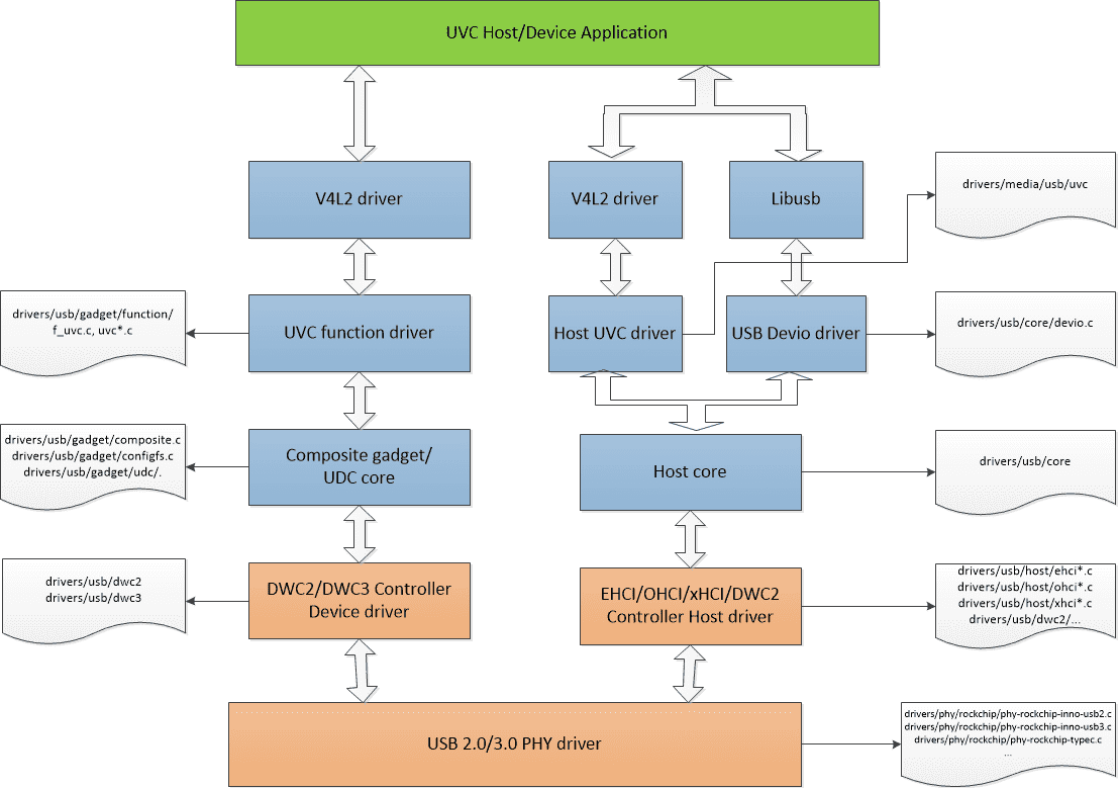
Figure 1. Linux UVC communication flow
2. Common UVC debugging tools
2.1 USB protocol analyzer
A USB protocol analyzer captures bus traffic in real time for packet and protocol analysis. Figure 2 shows a typical USB 2.0 connection: insert the analyzer between Device and Host and install the corresponding analysis software on the PC. This is the most direct and effective way to identify whether the fault is on the Device or Host side.
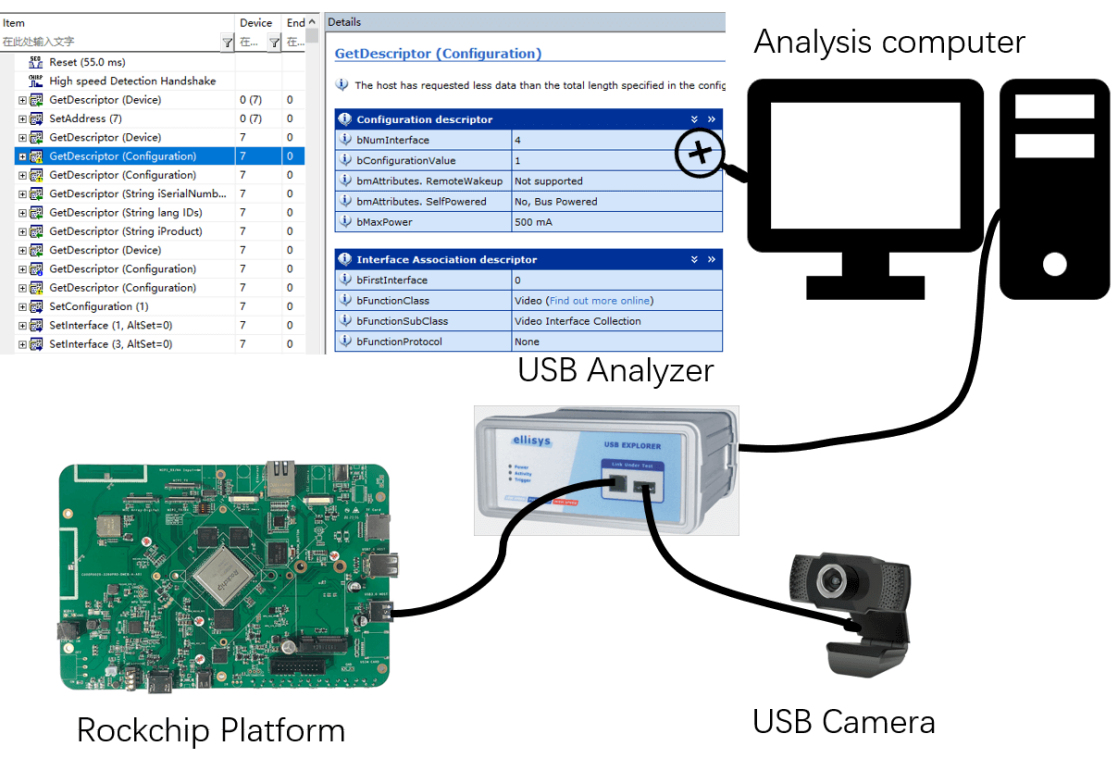
Figure 2. USB analyzer connection. An analyzer helps investigate these common UVC problems:
-
Failure to open UVC preview.
-
UVC preview latency.
-
Frozen UVC preview.
-
Frame-rate statistics and image-data decoding.
-
UVC driver loading failure. An analyzer is not suitable for these problems:
-
USB signal quality.
-
Unexpected UVC disconnection.
-
USB controller EMI errors during UVC communication. Use a high-bandwidth oscilloscope to measure USB eye diagrams, high-speed handshake signals and VBUS voltage collapse when analyzing signal problems, unexpected disconnections and EMI.
2.2 usbmon capture and analysis tools
usbmon (USB monitor) is the Linux kernel packet-capture tool. It captures exchanges between USB core and class drivers such as UVC, and between USB core and Host-controller drivers. Analyze usbmon packets using vusb-analyzer or Wireshark to understand kernel UVC processing and locate UVC/controller-driver problems. The driver is under drivers/usb/mon/. Enable it as follows:
-
Enable CONFIG_USB_MON in the kernel.
-
Mount debugfs: mount -t debugfs none_debugs /sys/kernel/debug. A busy message means debugfs is already mounted. Most Rockchip SDK releases enable usbmon by default; check with ls /sys/kernel/debug/usb/usbmon/. Download vusb-analyzer from https://vusb-analyzer.sourceforge.net/download.html. Ubuntu installation: sudo apt-get install vusb-analyzer. The following example uses a UVC peripheral on RK3588 EVB1 USB2 HOST0.
-
Check the USB bus numbers visible to usbmon. Numbers 1/2/3 etc. identify the platform buses; each USB device belongs to one bus. Number 0 captures all buses. Suffixes s/t/u select the saved format; u is normally used.
console:/sys/kernel/debug/usb/usbmon # ls
0s  1s  1u  2t  3s  3u  4t  5s  5u  6t
0u  1t  2s  2u  3t  4s  4u  5t  6s  6u
- Find the bus of the device to monitor using lsusb, distinguishing devices by vendor ID and product ID.
console:/sys/kernel/debug/usb/usbmon # lsusb
Bus 005 Device 001: ID 1d6b:0002
Bus 003 Device 001: ID 1d6b:0001
Bus 002 Device 005: ID 046d:0823
Bus 001 Device 001: ID 1d6b:0002
Bus 006 Device 001: ID 1d6b:0003
Bus 004 Device 001: ID 1d6b:0001
Bus 002 Device 001: ID 1d6b:0002
Bus 002 means bus 2. ID 046d:0823 identifies the monitored device by vendor/product ID, so that device uses bus 2.
-
Capture traffic with usbmon: cat /sys/kernel/debug/usb/usbmon/2u > /data/usbmon.mon
-
Analyze packets: vusb-analyzer usbmon.mon
2.3 v4l2-ctl
v4l2-ctl controls Linux V4L2 video devices (/dev/video*), including querying supported formats and capturing images with a specified resolution and format. The Linux UVC driver uses V4L2. If the UVC application is suspected, operate the device with v4l2-ctl to exclude application influence.
- v4l2-ctl –list-devices lists all devices, including every video device registered through V4L2.
Example:
console:/ # v4l2-ctl --list-devices
UVC Camera (046d:0823) (usb-fc800000.usb-1):
        /dev/video21
        /dev/video22
One USB camera corresponds to two devices: image/video capture and metadata capture.
- v4l2-ctl –list-formats-ext –device path/to/video_device lists supported preview formats for the specified device. Example:
console:/ # v4l2-ctl --list-formats-ext --device /dev/video21
ioctl: VIDIOC_ENUM_FMT
        Index       : 0
        Type        : Video Capture
        Pixel Format: 'YUYV'
        Name        : YUYV 4:2:2
                Size: Discrete 640x480
                        Interval: Discrete 0.033s (30.000 fps)
                        Interval: Discrete 0.042s (24.000 fps)
                        Interval: Discrete 0.050s (20.000 fps)
                        Interval: Discrete 0.067s (15.000 fps)
                        Interval: Discrete 0.100s (10.000 fps)
                        Interval: Discrete 0.133s (7.500 fps)
                        Interval: Discrete 0.200s (5.000 fps)
         ......
- v4l2-ctl –all –device path/to/video_device obtains all information about the specified device. Example:
console:/ # v4l2-ctl --all --device /dev/video21
Driver Info:
        Driver name      : uvcvideo
        Card type        : UVC Camera (046d:0823)
        Bus info         : usb-fc800000.usb-1
        Driver version   : 5.10.198
        Capabilities     : 0x84a00001
                Video Capture
                Metadata Capture
                Streaming
                Extended Pix Format
                Device Capabilities
        Device Caps      : 0x04200001
                Video Capture
                Streaming
                Extended Pix Format
        ......
- v4l2-ctl –device path/to/video_device –set-fmt-video=width=width,height=height,pixelformat=MJPG –stream-mmap –stream-to=path/to/output.jpg –stream-count=1 captures an image with the chosen resolution and format. Example: capture one 1920x1080 MJPG frame from video21 and save it under /sdcard/DCIM/.
v4l2-ctl --device /dev/video21 --set-fmt-video=width=1920,height=1080,pixelformat=MJPG --stream-mmap --stream-to=/sdcard/DCIM/output_1920.jpg --stream-count=1
- v4l2-ctl –device path/to/video_device –set-fmt-video=width=width,height=height,pixelformat=format –stream-mmap –stream-to=path/to/output –stream-count=number_of_frames_to_capture captures a stream at the specified resolution. Example 1: capture 100 frames of 1920x1080 MJPG from video21 and save them under /sdcard/DCIM/.
v4l2-ctl --device /dev/video21 --set-fmt-video=width=1920,height=1080,pixelformat=MJPG --stream-mmap --stream-to=/sdcard/DCIM/output.mjpg --stream-count=100
Example 2: continuously capture a 1920x1080 MJPG stream from video21.
v4l2-ctl --device /dev/video21 --set-fmt-video=width=1920,height=1080,pixelformat=MJPG --stream-mmap
3. Kernel UVC debugging interfaces
3.1 UVC driver debugging interface
The UVC driver is under drivers/media/usb/uvc. Its system-module interface dynamically enables trace information, disabled by default: /sys/module/uvcvideo/parameters/trace. Enable it with echo 0xffff > /sys/module/uvcvideo/parameters/trace. Messages use KERN_DEBUG and can be viewed with dmesg. To output them to the serial terminal, change printk level: echo 8 > /proc/sys/kernel/printk.
Disable trace dynamically: echo 0 > /sys/module/uvcvideo/parameters/trace. The following example shows trace when opening preview for a UVC peripheral on RK3588 USB2 HOST0:
[   60.780597][  T477] uvcvideo: uvc_v4l2_open
[   60.843298][  T477] uvcvideo: Resuming interface 2
[   60.843318][  T477] uvcvideo: Resuming interface 3
[   60.852317][  T477] uvcvideo: uvc_v4l2_release
[   60.855127][  T477] uvcvideo: uvc_v4l2_open
[   60.877415][  T477] uvcvideo: Trying format 0x47504a4d (MJPG): 2592x1944.
[   60.877525][  T477] uvcvideo: Using default frame interval 100000.0 us (10.0
fps).
[   60.910575][  T477] uvcvideo: Device requested 3060 B/frame bandwidth.
[   60.910622][  T477] uvcvideo: Selecting alternate setting 11 (3060 B/frame
bandwidth).
[   60.913504][  T477] uvcvideo: Allocated 5 URB buffers of 32x3060 bytes each.
[   60.913836][  T477] uvcvideo: uvc_v4l2_poll
[   62.010310][    C0] uvcvideo: Frame complete (EOF found).
[   62.010438][    C0] uvcvideo: frame 1 stats: 1111/763/1876 packets,
1/1111/1876 pts (early initial), 1875/1876 scr, last pts/stc/sof
223854994/228661160/514
3.2 V4L2 debugging interface
The Linux UVC driver uses V4L2 for queue buf and dequeue buf between kernel and application. V4L2 implements kernel-tracing tracepoints [1] for queue buf, dequeue buf and buf done. Enable these kernel Trace settings:
Kernel hacking  --->
    [*] Tracers  --->
        [*]   Trace process context switches and events
        [*]   Enable uprobes-based dynamic events
        [*]   Trace gpio events:
V4L2 supports these trace events:
/sys/kernel/debug/tracing/events/vb2# ls
enable  filter  vb2_buf_done  vb2_buf_queue  vb2_dqbuf  vb2_qbuf
/sys/kernel/debug/tracing/events/v4l2]# ls
enable  v4l2_dqbuf  vb2_v4l2_buf_done   vb2_v4l2_dqbuf
filter  v4l2_qbuf   vb2_v4l2_buf_queue  vb2_v4l2_qbuf
For detailed usage, see /sys/kernel/debug/tracing/README.
3.3 Dynamic USB controller reinitialization
/sys/bus/platform/drivers/[usb_controller_name]/bind, unbind. Replace [usb_controller_name] with the chip-specific USB controller name. When UVC transfer fails and cannot recover automatically, manually reinitialize the controller to investigate whether it is responsible. Example: RK3588 EVB1.
/* USB2 HOST0/1 OHCI 控制器驱动 */
console:/sys/bus/platform/drivers/ohci-platform # ls
bind  fc840000.usb  fc8c0000.usb  uevent  unbind

/* USB2 HOST0/1 EHCI 控制器驱动 */
console:/sys/bus/platform/drivers/ehci-platform # ls
bind  fc800000.usb  fc880000.usb  uevent  unbind

/* USB3 OTG1_HOST 控制器驱动 */
console:/sys/bus/platform/drivers/xhci-hcd # ls
bind  uevent  unbind  xhci-hcd.8.auto

/* USB3 OTG0/1 控制器驱动 */
console:/sys/bus/platform/drivers/dwc3 # ls
bind  fc000000.usb  fc400000.usb  uevent  unbind

执⾏如下命令,可以重新初始化 USB2 HOST0 接⼝对应的 OHCI/EHCI 控制器
echo fc840000.usb > /sys/bus/platform/drivers/ohci-platform/unbind
echo fc800000.usb > /sys/bus/platform/drivers/ehci-platform/unbind
echo fc800000.usb > /sys/bus/platform/drivers/ehci-platform/bind
echo fc840000.usb > /sys/bus/platform/drivers/ohci-platform/bind
4. UVC debugging methods
4.1 USB interrupt CPU affinity
Purpose: analyze and resolve corrupted preview or unstable UVC frame rates under high load caused by slow USB interrupt handling. Linux provides /proc/irq/[irq_num]/smp_affinity_list for CPU/interrupt affinity; it contains a decimal CPU list. CPU numbering starts at 0, such as CPU0 and CPU1. Example: bind the RK3588 EVB1 USB OTG0 interrupt to CPU1.
console:/ # cat /proc/interrupts | grep dwc
153:         77          0          0          0          0          0          0
         0     GICv3 252 Level     dwc3
console:/ # echo 1 > /proc/irq/153/smp_affinity_list
4.2 Disabling UVC autosuspend
Purpose: investigate autosuspend compatibility problems of some UVC peripherals on Rockchip. The following commands dynamically disable USB autosuspend for initial diagnosis.
for i in $(find /sys -name control | grep usb);
do echo on > $i;
echo "echo on > $i";
done;
If disabling autosuspend resolves the problem for a particular peripheral, this indicates autosuspend incompatibility on Rockchip. Modify the USB driver to add that peripheral to the autosuspend blacklist. Linux-5.10 example for VID,PID=0x05a3,0x9230:
diff --git a/drivers/usb/core/quirks.c b/drivers/usb/core/quirks.c
index 76ac5d6555ae..d799e93b9a0d 100644
--- a/drivers/usb/core/quirks.c
+++ b/drivers/usb/core/quirks.c
@@ -322,6 +322,9 @@ static const struct usb_device_id usb_quirk_list[] = {
        /* Alcor Micro Corp. Hub */
        { USB_DEVICE(0x058f, 0x9254), .driver_info = USB_QUIRK_RESET_RESUME },

+       /* HD Camera Manufacturer */
+       { USB_DEVICE(0x05a3, 0x9230), .driver_info = USB_QUIRK_AUTO_SUSPEND },
Table 1 lists UVC peripherals with known autosuspend compatibility issues. Table 1. USB Camera auto suspend blacklist.
| Vendor ID (VID) | Product ID (PID) | Manufacturer |
|---|---|---|
| 0x05a3 | 0x9230 | Microdia |
| 0x05a3 | 0x9320 | Microdia |
| 0x0c45 | 0x6321 | Sonix |
| 0x0c45 | 0x636a | Sonix |
| 0x0c45 | 0x636b | Sonix |
| 0x0c45 | 0x64ab | Sonix |
| 0x0c45 | 0x64ac | Sonix |
| 0x0e8d | 0x7668 | unknown |
| 0x2bc5 | 0x051f | MediaTek |
| 0x1e10 | 0x4000 | Point Grey Research |
| 0x15aa | 0x1555 | Gearway Electronics |
4.3 Disabling CPU IDLE
Purpose: investigate corrupted preview or unstable frame rates caused by long CPU IDLE exit latency delaying USB interrupts. RK3588 EVB1 example:
cpunum=$(cat /proc/cpuinfo | grep processor | wc -l)
for i in `seq 0 $(($cpunum-1))`
do
echo 1 > /sys/devices/system/cpu/cpu$i/cpuidle/state0/disable
echo 1 > /sys/devices/system/cpu/cpu$i/cpuidle/state1/disable
done
The state* nodes vary by platform; RK3399, for example, supports state0/1/2.
4.4 Fixed high CPU frequency
Purpose: analyze and resolve unstable UVC frame rates under high load. Set the CPU governor to performance, which keeps the CPU at its highest frequency for maximum performance.
cpunum=$(cat /proc/cpuinfo | grep processor | wc -l)
for i in `seq 0 $(($cpunum-1))`
do
echo performance > /sys/devices/system/cpu/cpu$i/cpufreq/scaling_governor
done
4.5 Fixed high DDR frequency
Purpose: investigate preview-start failures, corrupted preview or unstable frame rates caused by DDR frequency scaling. Most Rockchip platforms scale DDR to save power. Two scenarios may be affected: low DDR frequency at preview startup can intermittently cause startup failure; during preview it can cause frame-rate instability or corrupted compressed images. Two methods set the highest DDR frequency. Method 1 is mainly for debugging and holds DDR at maximum regardless of UVC activity. Method 2 suits production: DDR stays at maximum only while UVC is active, otherwise frequency remains load-dependent. Method 1: command-line configuration, using RK3588 as an example.
console:/ # cd /sys/class/devfreq/dmc
console:/sys/class/devfreq/dmc # cat max_freq
2112000000
console:/sys/class/devfreq/dmc # echo userspace > governor
console:/sys/class/devfreq/dmc # echo 2112000000 > userspace/set_freq
Method 2: modify the UVC driver to select high DDR frequency [recommended]. Linux-4.19 changes:
From 970e4749125d685dc03ea32e3ae77e6f0ab7cff7 Mon Sep 17 00:00:00 2001
From: "william.wu" <william.wu@rock-chips.com>
Date: Sat, 11 Nov 2023 15:41:10 +0800
Subject: [PATCH] media: uvcvideo: set system status to performance when stream
 on

For rockchip platforms, set performance frequency for the
memory controller when uvc stream on, and clear it after
uvc stream off. It can improve uvc streaming stability.

Signed-off-by: william.wu <william.wu@rock-chips.com>
Change-Id: I1dc0cf10c552bba2c3a0f8a1bb37d90f546eb4a3
---
 drivers/media/usb/uvc/uvc_video.c | 6 ++++++
 1 file changed, 6 insertions(+)

diff --git a/drivers/media/usb/uvc/uvc_video.c b/drivers/media/usb/uvc/uvc_video.c
index ef3832b03709..d2158c94ae47 100644
--- a/drivers/media/usb/uvc/uvc_video.c
+++ b/drivers/media/usb/uvc/uvc_video.c
@@ -25,6 +25,8 @@
 #include <media/v4l2-common.h>
 #include "uvcvideo.h"
+#include <dt-bindings/soc/rockchip-system-status.h>
+#include <soc/rockchip/rockchip-system-status.h>

 /* ------------------------------------------------------------------------
  * UVC Controls
@@ -2149,6 +2151,7 @@ int uvc_video_enable(struct uvc_streaming *stream, int
enable)
        }

        uvc_video_clock_cleanup(stream);
+       rockchip_clear_system_status(SYS_STATUS_PERFORMANCE);
        return 0;
    }

@@ -2161,6 +2164,8 @@ int uvc_video_enable(struct uvc_streaming *stream, int
enable)
    if (ret < 0)
        goto error_commit;

+   rockchip_set_system_status(SYS_STATUS_PERFORMANCE);
+
    ret = uvc_init_video(stream, GFP_KERNEL);
    if (ret < 0)
        goto error_video;
@@ -2168,6 +2173,7 @@ int uvc_video_enable(struct uvc_streaming *stream, int
enable)
    return 0;

 error_video:
+   rockchip_clear_system_status(SYS_STATUS_PERFORMANCE);
    usb_set_interface(stream->dev->udev, stream->intfnum, 0);
 error_commit:
    uvc_video_clock_cleanup(stream);
--
2.34.1
Linux-5.10 changes:
From ab0546fdd01a8a8df0f15d0c648fa73aba76d173 Mon Sep 17 00:00:00 2001
From: William Wu <william.wu@rock-chips.com>
Date: Wed, 8 Nov 2023 09:49:48 +0800
Subject: [PATCH] media: uvcvideo: set system status to performance when stream
 on

For rockchip platforms, set performance frequency for the
memory controller when uvc stream on, and clear it after
uvc stream off. It can improve uvc streaming stability.

Signed-off-by: William Wu <william.wu@rock-chips.com>
Change-Id: I1dc0cf10c552bba2c3a0f8a1bb37d90f546eb4a3
---
 drivers/media/usb/uvc/uvc_video.c | 6 ++++++
 1 file changed, 6 insertions(+)
diff --git a/drivers/media/usb/uvc/uvc_video.c b/drivers/media/usb/uvc/uvc_video.c
index 03dfe96bceba..79ffe93b19ae 100644
--- a/drivers/media/usb/uvc/uvc_video.c
+++ b/drivers/media/usb/uvc/uvc_video.c
@@ -20,6 +20,8 @@
 #include <media/v4l2-common.h>

 #include "uvcvideo.h"
+#include <dt-bindings/soc/rockchip-system-status.h>
+#include <soc/rockchip/rockchip-system-status.h>

 /* ------------------------------------------------------------------------
  * UVC Controls
@@ -2139,6 +2141,8 @@ int uvc_video_start_streaming(struct uvc_streaming *stream)
    if (ret < 0)
        goto error_commit;

+   rockchip_set_system_status(SYS_STATUS_PERFORMANCE);
+
    ret = uvc_video_start_transfer(stream, GFP_KERNEL);
    if (ret < 0)
        goto error_video;
@@ -2146,6 +2150,7 @@ int uvc_video_start_streaming(struct uvc_streaming *stream)
    return 0;

 error_video:
+   rockchip_clear_system_status(SYS_STATUS_PERFORMANCE);
    usb_set_interface(stream->dev->udev, stream->intfnum, 0);
 error_commit:
    uvc_video_clock_cleanup(stream);
@@ -2176,4 +2181,5 @@ void uvc_video_stop_streaming(struct uvc_streaming *stream)
    }

    uvc_video_clock_cleanup(stream);
+   rockchip_clear_system_status(SYS_STATUS_PERFORMANCE);
 }
--
2.34.1
4.6 Decoding UVC frames
Purpose: analyze image corruption in UVC preview or recording to distinguish Device from Host problems. Example: decode MJPG frames from a Logitech UVC Camera (idVendor=046d, idProduct=0823) supporting high-bandwidth isochronous transfer. Capture and decode as follows:
-
Use an Ellisys USB2.0 analyzer to capture USB bus traffic during MJPG preview.
-
Export and save Text as shown in Figure 3: File -> Export -> Transactions data -> Text.
-
Open the UVC txt file in an editor and locate the frame-header information according to Format of the Payload Header in the UVC specification [2]. In Figure 4, header length is 0x0C and header information is 0x8C.
-
Pass the header information to the Python script uvc-data.py to parse the txt file; the script automatically saves UVC images as .jpg files.
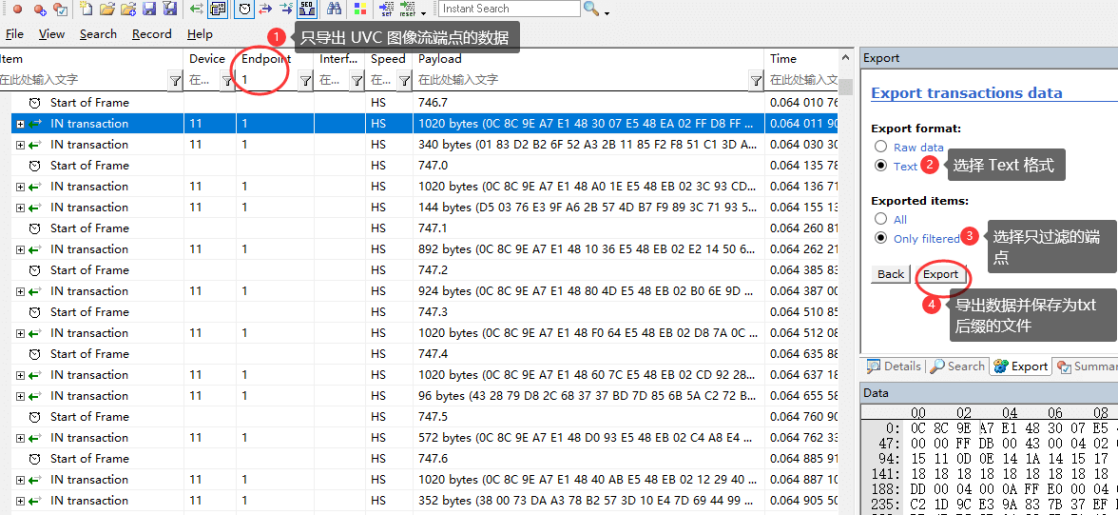
Figure 3. UVC analyzer data
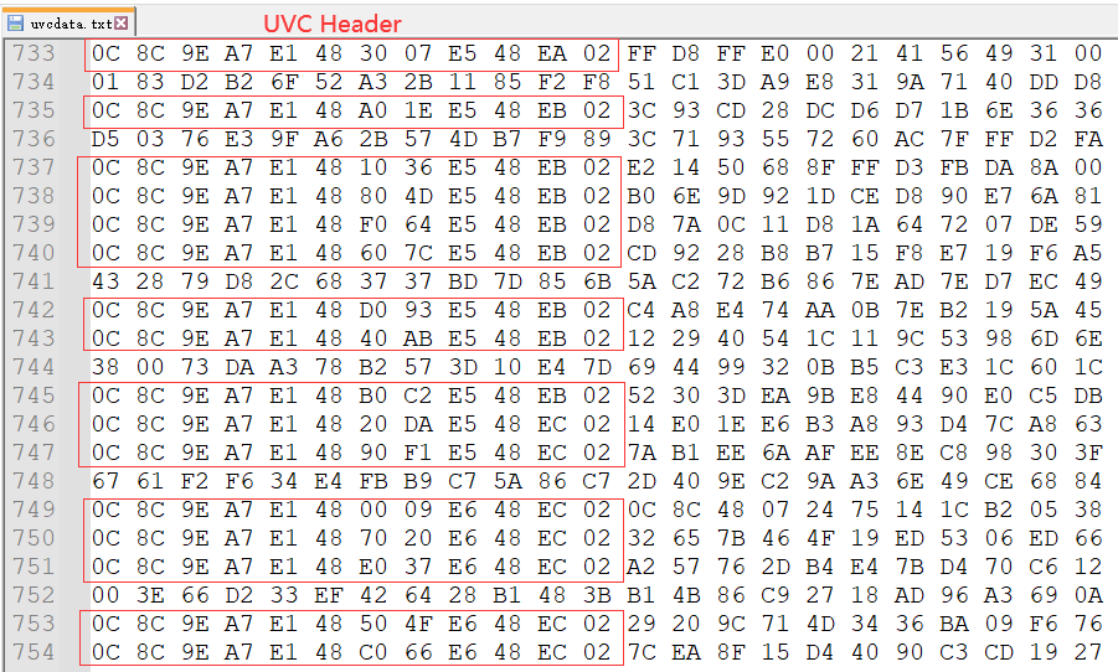
Figure 4. UVC text data. Python frame-decoding script uvc-data.py:
# -*- coding: utf-8 -*-
import argparse

parser = argparse.ArgumentParser()
parser.add_argument('--file', '-f', type=str, required=True, default='',
help='The txt format file of uvc data')
parser.add_argument('--header_len', '-l', type=str, required=True, default='',
help='Length of uvc header in bytes')
parser.add_argument('--header_info','-i', type=str, required=True, default='',
help='Information of uvc header')
parser.add_argument('--count', '-n', type=int, default=10, help='The count of images to saved')
args = parser.parse_args()

def get_photo(cnt = 0):
    src = open(args.file, 'r')
    uvc_header_len = int(args.header_len, 16)
    uvc_header_info = int(args.header_info, 16)
    uvc_header_even_frame = uvc_header_info & 0xFC
    uvc_header_even_frame_eof = uvc_header_even_frame | 0x02
    uvc_header_odd_frame = (uvc_header_info & 0xFC) | 0x01
    uvc_header_odd_frame_eof = (uvc_header_odd_frame | 0x02)
    pic = []
    num = 0
    eof = 0
    uvc_first_frame = 0
    uvc_payload_offset = 0

    print('UVC Header Length:        ', hex(uvc_header_len), 'Bytes')
    print('UVC Header EVEN Frame:    ', hex(uvc_header_even_frame))
    print('UVC Header EVEN Frame EOF:', hex(uvc_header_even_frame_eof))
    print('UVC Header ODD Frame:     ', hex(uvc_header_odd_frame))
    print('UVC Header ODD Frame EOF: ', hex(uvc_header_odd_frame_eof))

    for line in src:
        line = line.split(' ')
        data0 = int(line[0], 16)
        data1 = int(line[1], 16)

        if ((data0 == uvc_header_len) and
            ((data1 == uvc_header_even_frame) or (data1 ==
uvc_header_odd_frame))):
            uvc_payload_offset = uvc_header_len
            uvc_first_frame = 1
        elif ((data0 == uvc_header_len) and
            ((data1 == uvc_header_even_frame_eof) or
            (data1 == uvc_header_odd_frame_eof) or
            (data1 == ((uvc_header_even_frame_eof & 0x0F) | 0x10)) or
            (data1 == ((uvc_header_odd_frame_eof & 0x0F) | 0x10)))):
            uvc_payload_offset = uvc_header_len
            uvc_first_frame = 0
            eof = 1
        else:
            uvc_payload_offset = 0
            uvc_first_frame = 0
            eof = 0

        if (eof == 1 and uvc_first_frame == 1):
            path = 'photo_' + str(num) + '.jpg'
            print(path + ' Saved ' + str(len(pic)) + 'Bytes')
            dst = open(path, 'wb+')
            dst.write(bytes.fromhex(''.join(pic)))
            dst.close()
            num += 1
            pic = []
            eof = 0
            if (cnt != 0 and cnt == num):
                break
        if (len(line) > uvc_payload_offset):
            for i in range(uvc_payload_offset, len(line)):
                pic.append(line[i])

    src.close()

get_photo(args.count)
Usage example:
# 查看 uvc-data.py 使⽤⽅法
# -f: 待解析的 uvc 数据⽂本⽂件,必要参数;
# -l: 待解析的  帧头⻓度,必要参数;
# -i: 待解析的 uvc 帧头信息,必要参数;
# -n:待解析和保存的 uvc 帧图像数量;
python uvc-data.py -h
usage: uvc-data.py [-h] --file FILE --header_len HEADER_LEN --header_info
HEADER_INFO [--count COUNT]

options:
  -h, --help            show this help message and exit
  --file FILE, -f FILE  The txt format file of uvc data
  --header_len HEADER_LEN, -l HEADER_LEN
                        Length of uvc header in bytes
  --header_info HEADER_INFO, -i HEADER_INFO
                        Information of uvc header
  --count COUNT, -n COUNT
                        The count of images to saved
# 解析 uvcdata.txt,uvc 帧头⻓度为 0x0c,uvc 帧头信息为 0x8c,保存 5 张图象
python uvc-data.py -f uvcdata.txt -l 0c -i 8c -n 5
UVC Header Length:         0xc Bytes
UVC Header EVEN Frame:     0x8c
UVC Header EVEN Frame EOF: 0x8e
UVC Header ODD Frame:      0x8d
UVC Header ODD Frame EOF:  0x8f
photo_0.jpg Saved 516573Bytes
photo_1.jpg Saved 827193Bytes
photo_2.jpg Saved 827585Bytes
photo_3.jpg Saved 3120193Bytes
photo_4.jpg Saved 188340Bytes
4.7 Optimizing the UVC driver
- Increase the number of UVC URBs. Purpose: tolerate greater USB controller interrupt-response latency. Impact: URBs buffer frame data and increase preview latency. Linux-4.19 example:
diff --git a/drivers/media/usb/uvc/uvcvideo.h b/drivers/media/usb/uvc/uvcvideo.h
index 96632cc58d77..3761946af110 100644
--- a/drivers/media/usb/uvc/uvcvideo.h
+++ b/drivers/media/usb/uvc/uvcvideo.h
@@ -173,7 +173,7 @@
 #define DRIVER_VERSION         "1.1.1"

 /* Number of isochronous URBs. */
-#define UVC_URBS               5
+#define UVC_URBS               32
 /* Maximum number of packets per URB. */
 #define UVC_MAX_PACKETS                32
 /* Maximum status buffer size in bytes of interrupt URB. */
- Change UVC DMA-buffer allocation from the default usb_alloc_coherent to kmalloc to improve software reading and parsing efficiency. Impact: the USB driver must ensure DMA-buffer cache coherency. Rockchip USB drivers already support this by default; no additional software changes are required.
diff --git a/drivers/media/usb/uvc/uvc_video.c b/drivers/media/usb/uvc/uvc_video.c
index d2158c94ae47..fff3c710bc97 100644
--- a/drivers/media/usb/uvc/uvc_video.c
+++ b/drivers/media/usb/uvc/uvc_video.c
@@ -1604,7 +1604,7 @@ static void uvc_free_urb_buffers(struct uvc_streaming
*stream)
                struct uvc_urb *uvc_urb = &stream->uvc_urb[i];

                if (uvc_urb->buffer) {
-#ifndef CONFIG_DMA_NONCOHERENT
+#if 0
                        usb_free_coherent(stream->dev->udev, stream->urb_size,
                                        uvc_urb->buffer, uvc_urb->dma);
 #else
@@ -1651,7 +1651,7 @@ static int uvc_alloc_urb_buffers(struct uvc_streaming
*stream,
                        struct uvc_urb *uvc_urb = &stream->uvc_urb[i];

                        stream->urb_size = psize * npackets;
-#ifndef CONFIG_DMA_NONCOHERENT
+#if 0
                        uvc_urb->buffer = usb_alloc_coherent(
                                stream->dev->udev, stream->urb_size,
                                gfp_flags | __GFP_NOWARN, &uvc_urb->dma);
@@ -1768,7 +1768,7 @@ static int uvc_init_video_isoc(struct uvc_streaming
*stream,
                urb->context = uvc_urb;
                urb->pipe = usb_rcvisocpipe(stream->dev->udev,
                                ep->desc.bEndpointAddress);
-#ifndef CONFIG_DMA_NONCOHERENT
+#if 0
                urb->transfer_flags = URB_ISO_ASAP | URB_NO_TRANSFER_DMA_MAP;
                urb->transfer_dma = uvc_urb->dma;
 #else
@@ -1834,7 +1834,7 @@ static int uvc_init_video_bulk(struct uvc_streaming
*stream,

                usb_fill_bulk_urb(urb, stream->dev->udev, pipe, uvc_urb->buffer,
                                  size, uvc_video_complete, uvc_urb);
-#ifndef CONFIG_DMA_NONCOHERENT
+#if 0
                urb->transfer_flags = URB_NO_TRANSFER_DMA_MAP;
                urb->transfer_dma = uvc_urb->dma;
 #endif
5. Common UVC problems
5.1 Preview startup failure
Preview-start failures generally fall into five cases. Case 1: USB high-speed handshake failure. Most UVC devices operate only at high-speed or super-speed. If signal problems reduce the connection to full-speed, preview cannot work normally. Inspect USB enumeration over the serial port; a full-speed message like the following indicates handshake failure.
usb 3: new full-speed USB device number 3 using ohci-platform
usb 3: not running at top speed; connect to a high speed hub
Remedy: examine high-speed handshake signals with an oscilloscope to determine the cause, then combine hardware optimization and software PHY-register tuning. Case 2: UVC Probe Control/Commit Control bandwidth-negotiation error. Before preview, Host and Device negotiate in four stages as shown in Figure 5:
-
Host sends its desired settings to the device (PROBE).
-
Device adjusts those settings to its capabilities and returns them (PROBE).
-
If Host accepts the settings, it submits them (COMMIT).
-
Device sets format, resolution, bandwidth and other parameters according to the Host COMMIT.
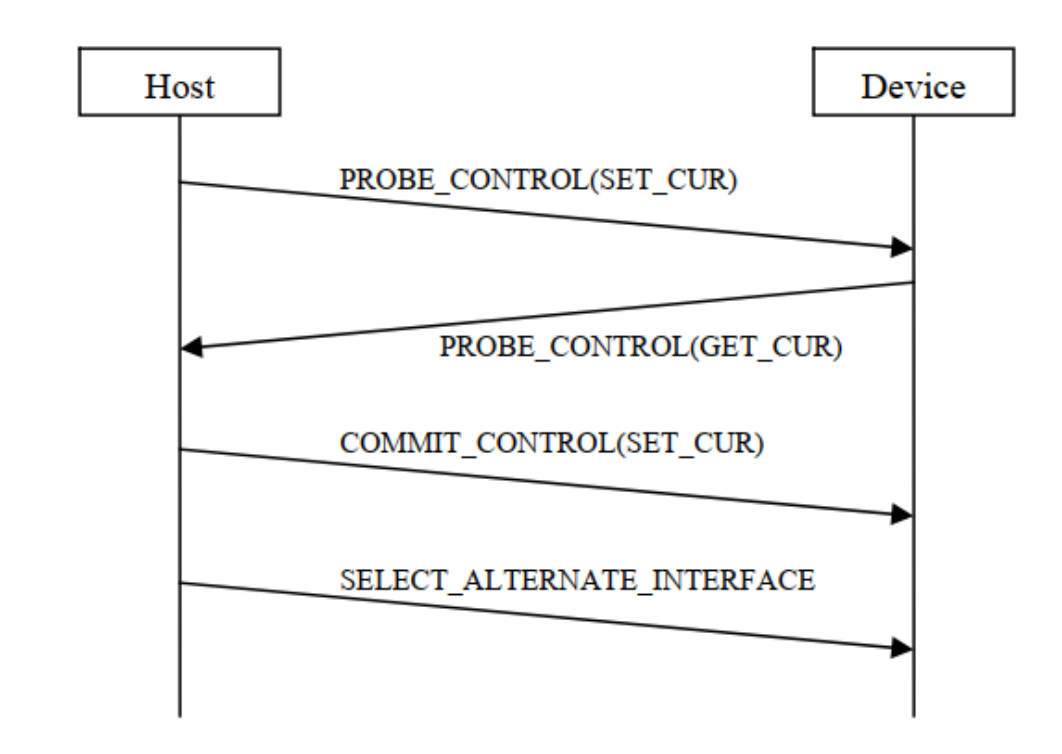
Figure 5. UVC parameter negotiation. Remedy: capture the entire enumeration and preview-start exchange using an analyzer or usbmon and verify negotiation. If Probe/Commit is confirmed as the problem, modify the corresponding driver or application logic.
Case 3: abnormal Host operation. USB 2.0 requires the Host to initiate all transactions; Device cannot send data spontaneously. If Host omits streaming-on SetInterface or sends no IN packets to the Streaming endpoint afterward, Device cannot transfer images. Remedy: capture complete USB transactions with an analyzer. Without one, monitor Host behavior using the usbmon section.
Case 4: autosuspend incompatibility. Rockchip UVC Host enables autosuspend by default to save power, but some peripherals are incompatible and preview fails. See the section on disabling UVC autosuspend.
Case 5: DDR scaling disrupts capture. Low DDR frequency raises USB-controller bus latency; exceeding the tolerance of UVC isochronous transfer may prevent preview startup. See the section on fixed high DDR frequency.
5.2 Unstable preview frame rate
Frame rate depends on USB interrupt-response time, USB bus-access latency, UVC frame-parsing time and other factors. Instability is more pronounced under high load. Remedy: use the sections on USB interrupt affinity, disabling CPU IDLE, fixed high CPU frequency and fixed high DDR frequency to improve interrupt response, bus latency and CPU performance.
5.3 Corrupted preview images
Most UVC peripherals use isochronous USB transfer: timely but unreliable, without retransmission of lost or corrupt data. An analyzer speeds diagnosis. Formats include uncompressed YUV and compressed MJPG/H264/H256 (source spelling); corruption causes differ. Case 1: corrupted uncompressed preview. The driver checks complete frame size and discards a frame whose received size differs from the theoretical size, avoiding corruption from physical-bus errors or lost frames. Therefore, signal-quality problems and delayed isochronous processing by the controller driver can initially be excluded. Analysis steps:
-
Continuously capture uncompressed-preview traffic while watching the picture. On corruption, promptly stop the analyzer, save the data and extract images with the Python script described in the frame-decoding section.
-
If captured data and decoded images are correct, the problem is on Host. Otherwise the source data sent by the peripheral is already abnormal; investigate Device.
-
On Host, prioritize USB-controller DMA-buffer cache coherency.
-
Use v4l2-ctl capture to check application involvement. Case 2: corrupted compressed preview. This is more likely because compressed-frame size varies, so the driver cannot validate the actual received size. Analysis steps:
-
Continuously capture compressed-preview traffic while observing the image. When corruption occurs, promptly stop capture, save the data and use the frame-decoding Python script to extract images.
-
If the analyzer shows obvious transmission errors such as CRC errors or incomplete packets, prioritize USB signal quality.
-
If images decoded from analyzer data are also corrupt, physical-bus data is already abnormal. Locate the associated transactions. If Host sent no IN packets across several consecutive microframes, delayed Host-controller isochronous processing may be involved. If Host transfer behavior is normal, Device source data may be faulty; investigate Device further.
-
If analyzer-decoded images are correct, investigate Host USB-controller DMA cache coherency, USB/CPU bus priority (QOS), UVC application processing and other factors.
-
Use v4l2-ctl capture to test application involvement. Remedies:
-
Signal-quality problems: measure the USB HS eye diagram and optimize hardware and driver PHY parameters according to the report [4].
-
Delayed controller isochronous processing: use the interrupt-affinity, CPU IDLE, fixed CPU-frequency and fixed DDR-frequency sections to improve USB interrupt response, bus latency and CPU performance.
-
Increase USB/CPU bus priority (QOS).
5.4 Insufficient bandwidth with multiple UVC streams
Insufficient bandwidth usually occurs when two or more USB2.0 UVC cameras share a Host port through a hub: preview fails and the kernel reports:
- USB3.0 Host error log
usb 5-1.4: Not enough bandwidth for new device state.
usb 5-1.4: Not enough bandwidth for altsetting 11
VIDIOC_STREAMON: failed: No space left on device
- USB2.0 Host error log
uvcvideo: Failed to submit URB 0 (-28).
VIDIOC_STREAMON: failed: No space left on device
Case study: RK3588 USB2.0 Host is expanded through a hub, with Logitech HD C93 and UVC Camera (046d:0823) on downstream ports. Reproduction:
# step1. 查看 UVC video 节点信息
console:/ # v4l2-ctl --list-devices
罗技⾼清⽹络摄像机 C93 (usb-fc880000.usb-1.1):
        /dev/video21
        /dev/video22

UVC Camera (046d:0823) (usb-fc880000.usb-1.4):
        /dev/video23
        /dev/video24

# step2. 两路 UVC 同时以分辨率 1920*1080 图像格式 MJPG ⽅式取流
console:/ # v4l2-ctl --device /dev/video21 --set-fmt-video=width=1920,height=1080,pixelformat=MJPG --stream-mmap &
console:/ # v4l2-ctl --device /dev/video23 --set-fmt-video=width=1920,height=1080,pixelformat=MJPG --stream-mmap &
# step3. video21 取流成功,但 video23 取流失败,串⼝提⽰log
console:/ # uvcvideo: Failed to submit URB 0 (-28).
console:/ # VIDIOC_STREAMON: failed: No space left on device
Analysis:
# 查看 UVC 设备的端点信息
console:/ # cat /sys/kernel/debug/usb/devices
# 对应 罗技⾼清⽹络摄像机 C93 设备
T:  Bus=02 Lev=02 Prnt=02 Port=00 Cnt=01 Dev#=  3 Spd=480  MxCh= 0
D:  Ver= 2.00 Cls=ef(misc ) Sub=02 Prot=01 MxPS=64 #Cfgs=  1
P:  Vendor=046d ProdID=0891 Rev= 0.19
S:  Product=罗技⾼清⽹络摄像机 C930c
S:  SerialNumber=83FBB5EE
......
I:* If#= 1 Alt= 0 #EPs= 0 Cls=0e(video) Sub=02 Prot=00 Driver=uvcvideo
I:  If#= 1 Alt= 1 #EPs= 1 Cls=0e(video) Sub=02 Prot=00 Driver=uvcvideo
E:  Ad=81(I) Atr=05(Isoc) MxPS= 192 Ivl=125us
I:  If#= 1 Alt= 2 #EPs= 1 Cls=0e(video) Sub=02 Prot=00 Driver=uvcvideo
......
I:  If#= 1 Alt=10 #EPs= 1 Cls=0e(video) Sub=02 Prot=00 Driver=uvcvideo
E:  Ad=81(I) Atr=05(Isoc) MxPS=2688 Ivl=125us
I:  If#= 1 Alt=11 #EPs= 1 Cls=0e(video) Sub=02 Prot=00 Driver=uvcvideo
E:  Ad=81(I) Atr=05(Isoc) MxPS=3072 Ivl=125us

# 对应 UVC Camera (046d:0823) 设备
T:  Bus=02 Lev=02 Prnt=02 Port=03 Cnt=02 Dev#=  4 Spd=480  MxCh= 0
D:  Ver= 2.00 Cls=ef(misc ) Sub=02 Prot=01 MxPS=64 #Cfgs=  1
P:  Vendor=046d ProdID=0823 Rev= 0.10
S:  SerialNumber=7F65EA20
......
I:* If#= 3 Alt= 0 #EPs= 0 Cls=0e(video) Sub=02 Prot=00 Driver=uvcvideo
I:  If#= 3 Alt= 1 #EPs= 1 Cls=0e(video) Sub=02 Prot=00 Driver=uvcvideo
E:  Ad=81(I) Atr=05(Isoc) MxPS= 192 Ivl=125us
......
E:  Ad=81(I) Atr=05(Isoc) MxPS=1984 Ivl=125us
I:  If#= 3 Alt=10 #EPs= 1 Cls=0e(video) Sub=02 Prot=00 Driver=uvcvideo
E:  Ad=81(I) Atr=05(Isoc) MxPS=3060 Ivl=125us
I:  If#= 3 Alt=11 #EPs= 1 Cls=0e(video) Sub=02 Prot=00 Driver=uvcvideo
E:  Ad=81(I) Atr=05(Isoc) MxPS=3060 Ivl=125us
Endpoint information shows both Logitech cameras support dynamic bandwidth. Minimum Maxpacket size is 192 bytes for both; maximum sizes are 3072 and 3060 bytes. Here Max packet size is the maximum camera payload in one USB microframe. Dynamic bandwidth changes it according to resolution and format. Enable UVC trace as described in the driver-debugging section to determine bandwidth selected at preview startup.
# 查看 UVC 设备占⽤的 USB 总线带宽信息
console:/ # echo 0xffff > /sys/module/uvcvideo/parameters/trace
console:/ # echo 8 > /proc/sys/kernel/printk
console:/ # v4l2-ctl --device /dev/video21 --set-fmt-video=width=1920,height=1080,pixelformat=MJPG --stream-mmap

# 罗技⾼清⽹络摄像机 C93 设备的 trace 关键信息如下:
uvcvideo: Selecting alternate setting 11 (3072 B/frame bandwidth).

# 同样的操作⽅法,UVC Camera (046d:0823) 设备的 trace 关键信息如下:
uvcvideo: Selecting alternate setting 11 (3060 B/frame bandwidth).
The trace shows that 1920*1080 MJPG requires 3072 B/frame for Logitech HD C93 and 3060 B/frame for camera 046d:0823. Frame here means a USB microframe of 125 microseconds. USB2.0 [5], section 5.6.4 Isochronous Transfer Bus Access Constraints, permits high-speed endpoints to allocate at most 80% of a microframe to periodic transfers. Thus the limit is 125 us * 80% = 100us; the rest is reserved for nonperiodic devices. Section 5.11.3 Calculating Bus Transaction Times states:
High-speed (Input)
Isochronous Transfer (No Handshake)
= (38 * 8 * 2.083) + (2.083 * Floor(3.167 + BitStuffTime(Data_bc))) +
Host_Delay
The Linux USB driver follows USB 2.0 requirements strictly. Its implementation is:
include/linux/usb/hcd.h
/*
 * Ceiling [nano/micro]seconds (typical) for that many bytes at high speed
 * ISO is a bit less, no ACK ... from USB 2.0 spec, 5.11.3 (and needed
 * to preallocate bandwidth)
 */
#define USB2_HOST_DELAY 5       /* nsec, guess */
#define HS_NSECS(bytes) (((55 * 8 * 2083) \
        + (2083UL * (3 + BitTime(bytes))))/1000 \
        + USB2_HOST_DELAY)
#define HS_NSECS_ISO(bytes) (((38 * 8 * 2083) \
        + (2083UL * (3 + BitTime(bytes))))/1000 \
        + USB2_HOST_DELAY)
#define HS_USECS(bytes)         NS_TO_US(HS_NSECS(bytes))
#define HS_USECS_ISO(bytes)     NS_TO_US(HS_NSECS_ISO(bytes))

drivers/usb/core/hcd.c
long usb_calc_bus_time (int speed, int is_input, int isoc, int bytecount)
{
        unsigned long   tmp;
        ......
        case USB_SPEED_HIGH:    /* ISOC or INTR */
                /* FIXME adjust for input vs output */
                if (isoc)
                        tmp = HS_NSECS_ISO (bytecount);
                else
                        tmp = HS_NSECS (bytecount);
        ......
}
Using that calculation, different ISOC Max packet sizes require these bus times:
| Max packet size (bytes/uframe) | bus time(us) |
|---|---|
| 256 | 5 |
| 640 | 13 |
| 1024 | 20 |
| 1920 | 37 |
| 3072 | 60 |
Two UVC devices streaming at high bandwidth, such as 3072bytes/uframe each, exceed the USB2.0 maximum of 100us and therefore run out of bandwidth. Method 1: optimize the UVC bandwidth-allocation policy [preferred]. Purpose: reduce a particular device’s maximum bandwidth request. Impact: uncompressed YUV frame rate may decrease. Linux-5.10 example:
diff --git a/drivers/media/usb/uvc/uvc_video.c b/drivers/media/usb/uvc/uvc_video.c
index f6373d678d25..ee798b778255 100644
--- a/drivers/media/usb/uvc/uvc_video.c
+++ b/drivers/media/usb/uvc/uvc_video.c
@@ -1845,6 +1845,7 @@ static int uvc_video_start_transfer(struct uvc_streaming *stream,
        struct usb_interface *intf = stream->intf;
        struct usb_host_endpoint *ep;
        struct uvc_urb *uvc_urb;
+       struct usb_device *udev = interface_to_usbdev(intf);
        unsigned int i;
        int ret;

@@ -1866,6 +1867,13 @@ static int uvc_video_start_transfer(struct uvc_streaming *stream,
                /* Isochronous endpoint, select the alternate setting. */
                bandwidth = stream->ctrl.dwMaxPayloadTransferSize;

+               if ((le16_to_cpu(udev->descriptor.idVendor) == 0x2bdf) &&
+                   (le16_to_cpu(udev->descriptor.idProduct) == 0x0293) &&
+                   (bandwidth > 1600)){
+                       printk("UVC_DBG: limit bandwidth from %u to 1600B\n", bandwidth);
+                       bandwidth = 1600;
+               }
+
                if (bandwidth == 0) {
                        uvc_trace(UVC_TRACE_VIDEO, "Device requested null "
                                "bandwidth, defaulting to lowest.\n");
Method 2: raise the USB periodic-transfer reservation to 95% or higher to increase available periodic bandwidth. Impact: nonperiodic devices on the same bus, such as USB storage, may no longer work normally. Restriction: not applicable to USB3.0 Host xHCI. USB2.0 Host EHCI-driver example:
diff --git a/drivers/usb/host/ehci-hcd.c b/drivers/usb/host/ehci-hcd.c
index 8aff19ff8e8f..bed879a4ab5b 100644
--- a/drivers/usb/host/ehci-hcd.c
+++ b/drivers/usb/host/ehci-hcd.c
@@ -475,7 +475,7 @@ static int ehci_init(struct usb_hcd *hcd)
         * by default set standard 80% (== 100 usec/uframe) max periodic
         * bandwidth as required by USB 2.0
         */
-       ehci->uframe_periodic_max = 100;
+       ehci->uframe_periodic_max = 125;

        /*
         * hw default: 1K periodic list heads, one per frame.
USB2.0 Host DWC2 example:
diff --git a/drivers/usb/dwc2/hcd_queue.c b/drivers/usb/dwc2/hcd_queue.c
index b2e0721a3eb8..e8b394bd9aae 100644
--- a/drivers/usb/dwc2/hcd_queue.c
+++ b/drivers/usb/dwc2/hcd_queue.c
@@ -119,7 +119,7 @@ static int dwc2_check_periodic_bandwidth(struct
dwc2_hsotg *hsotg,
                 * High speed mode
                 * Max periodic usecs is 80% x 125 usec = 100 usec
                 */
-               max_claimed_usecs = 100 - qh->host_us;
+               max_claimed_usecs = 125 - qh->host_us;
        } else {
                /*
                 * Full speed mode
5.5 Preview latency
The UVC image path is long, and latency in each module affects total preview delay. First capture the entire startup stream to locate the bottleneck on Device or Host; for Host, break down latency of individual modules. Case study: Host buffering delays a structured-light module at MJPEG 1080P. APK libuvc receives kernel images and uses memcopy into its own frame queue, asynchronous to the kernel’s 10 URBs receiving images cyclically. Slow Host 1080P software decoding and display mean that the kernel and libuvc have received and queued 6–7 frames before the first is displayed. Those buffered frames cause the delay. Remedy: improve Host software-decoding efficiency and avoid accumulated image buffering.
5.6 UVC EMI problems
EMI is usually related to USB-device hardware and can disrupt UVC, preventing preview or freezing it. Linux Host typically reports: usb usb1-port1: disabled by hub (EMI?), re-enabling… Detection works by repeatedly checking port enable in the Host controller, such as EHCI. If a port suddenly becomes disabled while the connection register still reports a device, the driver suspects EMI and logs it. This message is an important diagnostic lead, not proof that EMI caused the fault. Remedies:
-
Measure the USB eye diagram with an oscilloscope and provide the report to hardware and USB-driver engineers. Use it to adjust circuitry and PHY registers for improved signal quality and EMI behavior.
-
Measure DP/DM single-ended and differential signals. Excessive noise degrades quality and may trigger EMI. Three hardware options: (1) add a common-mode choke in series with DP/DM; (2) improve shared ground between Device and Host; (3) use a USB Host receptacle with larger DP/DM contact areas.
6. References
-
kernel/Documentation/trace/ftrace.rst
-
USB Video Class v1.1
-
Rockchip_Developer_Guide_USB_CN
-
Rockchip_Introduction_USB_SQ_Tool_CN
-
USB 2.0 Specification