
ArmSoM platform reference based on Chinese RK-PC-YF-165 V1.0.0, which lists RK1808, RK3399, RV1109, RV1126 and RK356X with Linux 4.19. Verify the actual ArmSoM board, BSP, USB Device port and UVC SDK. This does not apply to all kernels or establish support for every board. No English source was supplied; English, Russian and German are full translations using the three Chinese-PDF figures. Source case measurements are not ArmSoM test results. No commands executed or hardware tested.
Prerequisites: ConfigFS removal/relinking and bind/unbind interrupt active Gadget services. The numbered recovery procedure is source instruction text, not a directly executable shell script; verify device names and configuration first. The source patch identifier is retained; verify it in the actual SDK before use. These examples are not guaranteed for newer kernels.
1. Linux 4.19 UVC communication flow
Figure 1 shows the UVC data flow in Linux 4.19. The left side identifies USB Device UVC modules and their kernel code paths; the right side shows the USB Host equivalents. This guide concerns USB Device-side troubleshooting. Its methods are based on Rockchip Linux 4.19, do not apply to every kernel version and do not cover UVC application troubleshooting.
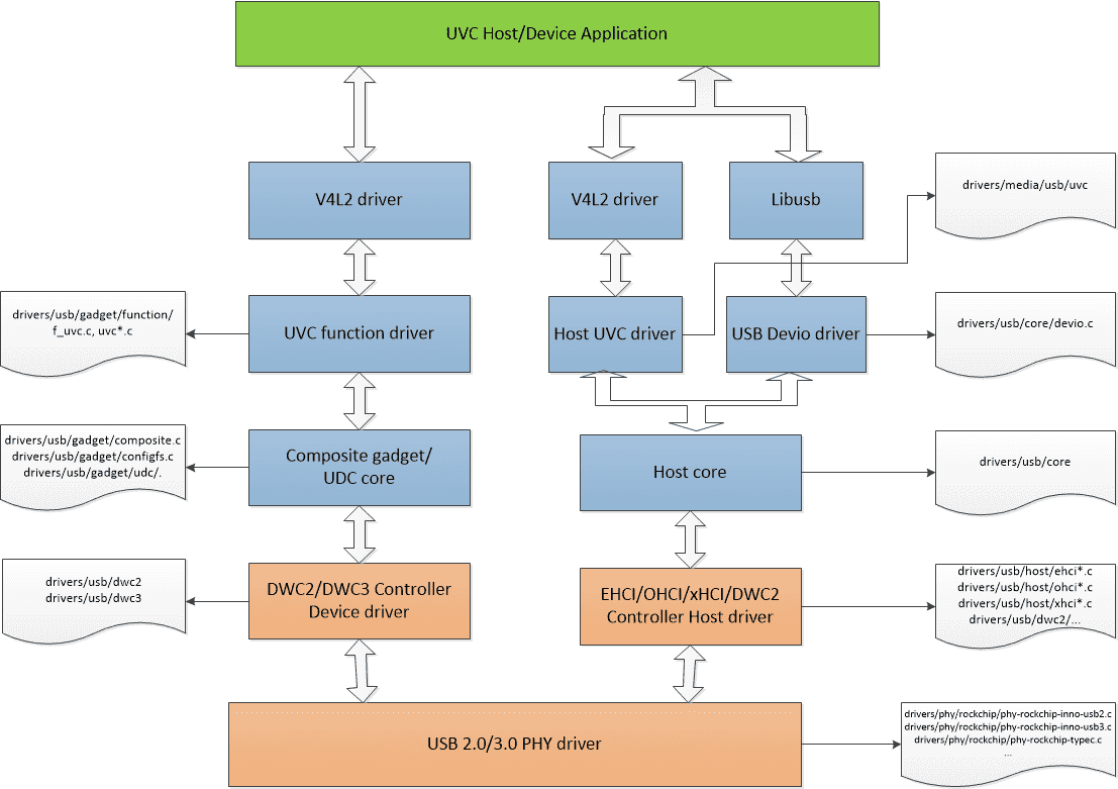
Figure 1. Linux 4.19 UVC communication flow.
2. Common UVC debugging methods
2.1 USB protocol analyzer
A USB protocol analyzer captures bus traffic in real time for packet and protocol analysis. Figure 2 shows a typical USB 2.0 connection: insert the analyzer between USB Device and Host and install its analysis software on the computer. It is the most direct and effective way to determine whether a fault originates on the Device or Host side.
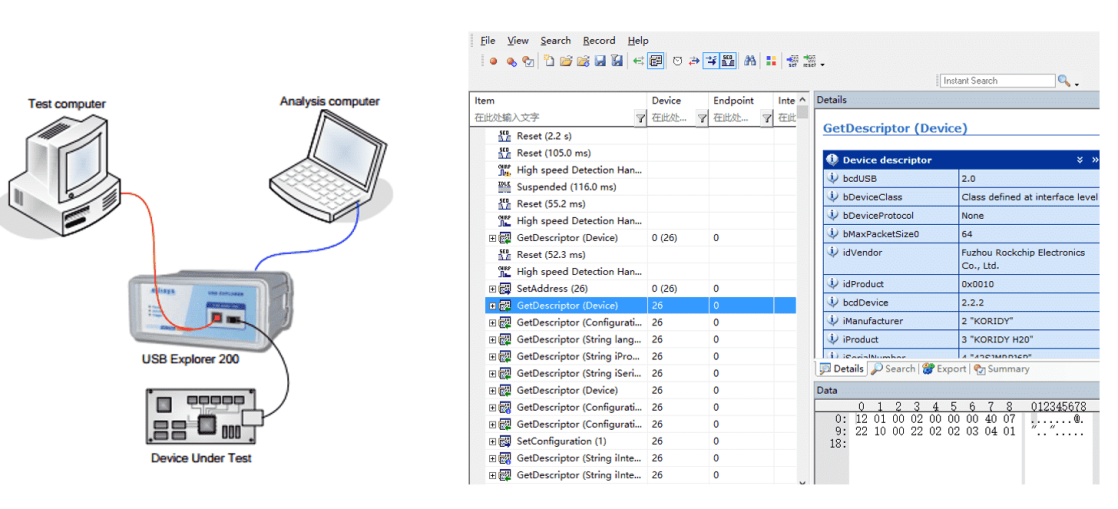
Figure 2. USB analyzer connection. An analyzer helps investigate these common UVC problems:
-
Failure to open preview.
-
Preview latency.
-
Frozen preview.
-
Frame-rate statistics and image-data decoding.
-
UVC driver loading failures.
A USB protocol analyzer is not suitable for investigating these problems:
-
USB signal quality.
-
Unexpected UVC disconnection.
-
USB-controller EMI errors during UVC communication.
Use a high-bandwidth oscilloscope to measure USB eye quality, high-speed handshake signals and VBUS voltage drops when investigating signal, disconnection and EMI problems.
2.2 USB capture and analysis tools
The tools in this section run on a computer and monitor USB bus data. They cannot replace an analyzer for observing every USB transaction, but suffice for many applications.
2.2.1 Windows tools
Bus Hound captures USB traffic and is easy to install/use, but lacks detailed, intuitive protocol decoding. Wireshark captures USB traffic and provides more detailed decoding, including UVC PROBE_CONTROL(SET_CUR) and COMMIT_CONTROL(SET_CUR). Usbview displays detailed device descriptors; source download address: www.uwe-sieber.de.
2.2.2 Linux tools
usbmon captures USB traffic; vusb-analyzer analyzes usbmon captures; lsusb displays detailed USB device descriptors.
2.2.3 macOS tools
Wireshark captures USB bus traffic.
2.3 Kernel UVC debugging interfaces
2.3.1 USB DWC2 OTG controller interface
/sys/kernel/debug/[dwc2_controller_base_addr].usb
Example: Linux 4.19 RK3328 DWC2 OTG [1].
rk3328_box:/sys/kernel/debug/ff580000.usb # ls
ep0   ep2out ep4out ep6out ep8in  ep9in  fifo    state
ep1in ep3in  ep5in  ep7in  ep8out ep9out regdump testmode
ep*in/out: endpoint status in Device mode. fifo: hardware FIFO configuration, including RXFIFO Size, NPTXFIFO Size and TXFIFO Size for each endpoint. state: interrupt MASK and Device-mode control/configuration registers. regdump: all controller register states. testmode: USB test mode, primarily for eye-diagram testing.
2.3.2 USB DWC3 OTG controller interface
/sys/kernel/debug/[dwc3_controller_base_addr].dwc3
Example: Linux 4.19 RV1109/RV1126 DWC3 OTG [1–4].
[root@RV1126_RV1109:/sys/kernel/debug/ffd00000.dwc3]# ls
ep0in   ep1in   ep2in   ep3in   ep4in   ep5in   ep6in       lsp_dump  regdump
ep0out  ep1out  ep2out  ep3out  ep4out  ep5out  link_state  mode      testmode
Common nodes: regdump prints controller registers including each endpoint TXFIFOSIZ; link_state prints the USB3 link state; mode prints the controller mode; testmode enters HighSpeed test mode for eye testing.
The DWC3 driver also implements kernel trace-framework tracepoints [5], allowing dynamic enabling and recording of key driver information. Enable these kernel tracing options:
Kernel hacking  --->
    [*] Tracers  --->
        [*]   Trace process context switches and events
        [*]   Enable uprobes-based dynamic events
        [*]   Trace gpio events
DWC3 provides these trace events:
/sys/kernel/debug/tracing/events/dwc3# ls
dwc3_alloc_request  dwc3_event              dwc3_gadget_generic_cmd  enable
dwc3_complete_trb   dwc3_free_request       dwc3_gadget_giveback     filter
dwc3_ctrl_req       dwc3_gadget_ep_cmd      dwc3_prepare_trb
dwc3_ep_dequeue     dwc3_gadget_ep_disable  dwc3_readl
dwc3_ep_queue       dwc3_gadget_ep_enable   dwc3_writel
For usage, see /sys/kernel/debug/tracing/README.
2.3.3 USB UDC core interface
UDC core tracepoints follow USB Request data flow between the UVC Function Driver and USB Controller Driver. Enable kernel tracing as described in the DWC3 subsection. UDC core supports these events:
/sys/kernel/debug/tracing/events/gadget# ls
enable                usb_ep_free_request           usb_gadget_disconnect
filter                usb_ep_queue                  usb_gadget_frame_number
usb_ep_alloc_request  usb_ep_set_halt               usb_gadget_giveback_request
usb_ep_clear_halt     usb_ep_set_maxpacket_limit    usb_gadget_set_selfpowered
usb_ep_dequeue        usb_ep_set_wedge              usb_gadget_vbus_connect
usb_ep_disable        usb_gadget_activate           usb_gadget_vbus_disconnect
usb_ep_enable         usb_gadget_clear_selfpowered  usb_gadget_vbus_draw
usb_ep_fifo_flush     usb_gadget_connect            usb_gadget_wakeup
usb_ep_fifo_status    usb_gadget_deactivate
See /sys/kernel/debug/tracing/README. Pay particular attention to request-related events usb_ep_alloc_request, usb_ep_free_request, usb_ep_queue and usb_ep_dequeue.
2.3.4 UVC driver interface
The UVC Function driver has a system-module interface for dynamically tracing control requests: /sys/module/usb_f_uvc/parameters/trace. Tracing is disabled by default. Enable it with echo 4 > /sys/module/usb_f_uvc/parameters/trace. Messages use KERN_DEBUG; read them with dmesg. The following source example captures RV1109 preview startup:
[root@RV1126_RV1109:/]# dmesg
[  426.441316] uvcvideo: setup request a1 81 value 0100 index 0003 001a
[  426.450280] uvcvideo: uvc_send_response: req len 26
[  426.450444] uvcvideo: event_setup_out 0, data len 26
[  426.451545] uvcvideo: setup request 21 01 value 0100 index 0003 001a
[  426.460862] uvcvideo: uvc_send_response: req len 26
[  426.461014] uvcvideo: event_setup_out 1, data len 26
[  426.461173] uvcvideo: setup request a1 81 value 0100 index 0003 001a
[  426.485791] uvcvideo: uvc_send_response: req len 26
[  426.486672] uvcvideo: event_setup_out 0, data len 26
[  426.487145] uvcvideo: setup request a1 83 value 0100 index 0003 001a
[  426.496529] uvcvideo: uvc_send_response: req len 26
[  426.496655] uvcvideo: event_setup_out 0, data len 26
[  426.497485] uvcvideo: setup request a1 82 value 0100 index 0003 001a
[  426.506737] uvcvideo: uvc_send_response: req len 26
[  426.507195] uvcvideo: event_setup_out 0, data len 26
2.3.5 V4L2 interface
Linux 4.19 UVC uses V4L2 for queue buf/dequeue buf operations with the application. V4L2 tracepoints follow queue buf, dequeue buf and buf done. Enable tracing as in the DWC3 subsection. Available events:
/sys/kernel/debug/tracing/events/vb2# ls
enable  filter  vb2_buf_done  vb2_buf_queue  vb2_dqbuf  vb2_qbuf

/sys/kernel/debug/tracing/events/v4l2]# ls
enable  v4l2_dqbuf  vb2_v4l2_buf_done   vb2_v4l2_dqbuf
filter  v4l2_qbuf   vb2_v4l2_buf_queue  vb2_v4l2_qbuf
See /sys/kernel/debug/tracing/README for usage.
2.3.6 Device connection status
Current enumeration speed: /sys/class/udc/[usb_controller_name]/current_speed. Current enumeration state (for example not attached/configured): /sys/class/udc/[usb_controller_name]/state. Replace [usb_controller_name] with the actual chip USB Device-controller name.
2.3.7 Dynamic controller reinitialization
Interfaces: /sys/bus/platform/drivers/[usb_controller_name]/bind and unbind; substitute the actual controller name. If abnormal transfer cannot recover automatically, manually reinitializing the controller may help determine whether it is responsible. The following is the RV1109/RV1126 UVC SDK recovery procedure:
1. kill uvc_app /* 杀掉 uvc 应⽤*/
2. rm -rf /sys/kernel/config/usb_gadget/rockchip/configs/b.1/f* /* 移除已绑定的 usb function */
3. echo ffd00000.dwc3  > /sys/bus/platform/drivers/dwc3/unbind /* unbind usb 控制器 */
4. echo ffd00000.dwc3  > /sys/bus/platform/drivers/dwc3/bind /* bind usb 控制器 */
5. cd /sys/kernel/config/usb_gadget/rockchip/configs/b.1 /* 绑定 usb function */
   ln -s ../../functions/rndis.gs0 f1
   ln -s ../../functions/uvc.gs6/ f2
6. echo ffd00000.dwc3 > /sys/kernel/config/usb_gadget/rockchip/UDC /* 使能 usb 控制器连接 */
7. restart uvc_app /* 重新启动 uvc 应⽤ */
#The seven source steps are: stop the UVC application; remove the bound function links; unbind the controller; bind it again; recreate the RNDIS/UVC links; enable UDC; restart the application. The original comments are retained in the code above.
2.3.8 USB Gadget ConfigFS
Linux 4.19 implements and configures the UVC function through ConfigFS. For ConfigFS Gadgets, see:
Documentation/ABI/testing/configfs-usb-gadget-xxxx.txt
Documentation/filesystems/configfs/configfs.txt
Documentation/usb/gadget_configfs.txt
Documentation/usb/gadget-testing.txt
See also Kernel USB Gadget Configfs Interface. Example configuration interface from the RV1109/RV1126 UVC SDK:
[root@RV1126_RV1109:/sys/kernel/config/usb_gadget/rockchip]# ls
UDC              bDeviceSubClass  bcdUSB     idProduct  strings
bDeviceClass     bMaxPacketSize0  configs    idVendor
bDeviceProtocol  bcdDevice        functions  os_desc

[root@RV1126_RV1109:/sys/kernel/config/usb_gadget/rockchip/functions/uvc.gs6]#
control    streaming_bulk      streaming_maxburst   uvc_num_request
streaming  streaming_interval  streaming_maxpacket
Important parameters: uvc_num_request sets the number of requests/buffers exchanged between UVC and USB-controller drivers; streaming_maxpacket sets bytes per USB 2.0 microframe, at most 3072; streaming_bulk selects bulk transfers instead of the default isoc.
2.4 Common UVC troubleshooting
2.4.1 Driver fails to load
Loading failures usually occur on Windows, in two common forms:
-
If Windows reports an unrecognized USB device, signal quality may be responsible. First try another USB cable; for further analysis, measure the USB eye diagram with an oscilloscope.
-
If there is no unrecognized-device message but Device Manager shows a yellow exclamation mark for UVC, the composite descriptors usually do not meet Windows requirements. UVC can generally be combined with RNDIS, ADB and UAC, but ConfigFS linking order (
ln -s) must be respected: for UVC/RNDIS/ADB, use RNDIS, UVC, ADB, placing RNDIS descriptors first; for UVC/UAC, use UAC, UVC, placing UAC first. Otherwise Windows USB driver loading can fail.
2.4.2 Unexpected disconnection
There are three common causes:
- Voltage drops on USB VBUS or the chip OTG_VBUS pin. Below the PHY Bvalid threshold, the PHY asserts disconnect. Monitor VBUS in real time with an oscilloscope. On DWC3 devices such as RV1109/RV1126/RK1808/RK3399/RK356X, a serial log containing
dwc3 ffd00000.dwc3: dwc3 device disconnectduring the event indicates this class of problem.
Fix the hardware circuit to eliminate the voltage drop. Software may reduce power consumption under high load or adjust the USB PHY Bvalid threshold; RV1109/RV1126 do not support Bvalid-threshold adjustment.
-
The Device application reconfigures/enables USB through ConfigFS.
/sys/kernel/config/usb_gadget/rockchip/UDCdirectly operates the controller viaudc_start()/udc_stop(), causing UVC disconnection without a PHY disconnect signal. Check application logic and avoid reconfiguring/enabling USB during UVC communication. -
The Host actively disconnects UVC. Analyze Host behavior using an analyzer or Host capture tools together with Host logs.
2.4.3 Preview fails to open
Five common causes follow:
-
High-speed handshake failure. UVC requires high-speed or super-speed; signal problems causing fallback to full-speed prevent normal preview. Check serial enumeration logs for
configfs-gadget gadget: full-speed config #1: b, or query speed through the connection-status interface. Analyze handshake signals with an oscilloscope, determine the cause and correct the hardware. -
Incorrect bandwidth negotiation through probe control/commit control. Before preview, Host and Device negotiate bandwidth [6], as shown in Figure 3.
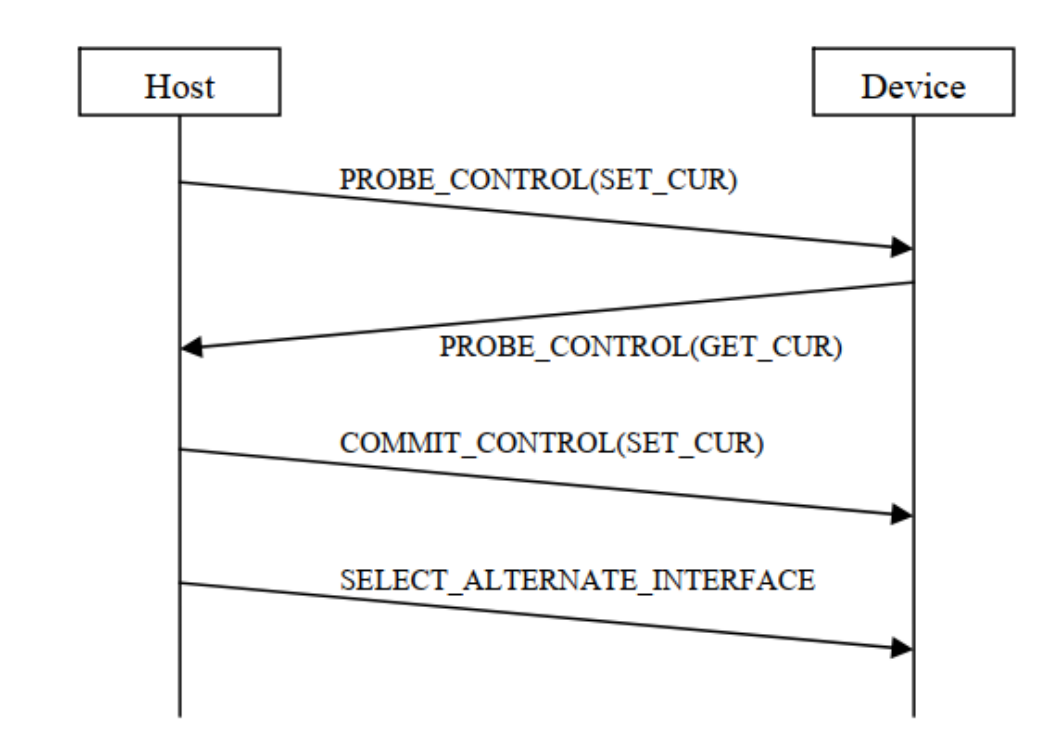
Figure 3. UVC parameter negotiation. (1) Host sends desired settings (PROBE). (2) Device adjusts them to its capabilities and replies (PROBE). (3) Host accepts them with COMMIT. (4) Device sets format, resolution and bandwidth from the committed values.
Source case: macOS 10.14 and earlier cannot use the RV1109 3KB/microframe setup correctly. Capture negotiation with an analyzer or Wireshark. The endpoint descriptor has wMaxPacketSize = 3 * 1024 bytes, but the Device replies with dwMaxPayloadTransferSize = 1024 during PROBE_CONTROL(GET_CUR). macOS consequently requests 1KB/microframe and preview fails. The probe reply must match the descriptor microframe configuration. RV1109 UVC APP defaults dwMaxPayloadTransferSize to 1024. Fix application logic to read the actual endpoint maximum packet size and return 3072 in dwMaxPayloadTransferSize during PROBE_CONTROL(GET_CUR).
- USB-controller malfunction. The Device controller exchanges control requests and video with the Host; failure prevents preview. Capture abnormal bus traffic with an analyzer and inspect driver code. If an analyzer is impractical, enable controller tracing through the kernel UVC interfaces and inspect the controller register state at failure.
See the USB DWC2 OTG and USB DWC3 OTG interface subsections.
-
The Device application mishandles class requests. The Device kernel forwards Host requests through V4L2 events to userspace. After parsing and processing, the application uses ioctl on the UVC driver to return a response. Incorrect handling can prevent enumeration. An analyzer alone can show the missing Device response but cannot distinguish application and controller faults. Enable UVC control-request tracing. If
setup requestis not followed byuvc_send_response, the application is implicated. Correct its class-request logic to respond correctly and promptly. -
Host malfunction. USB 2.0 transactions are initiated by the Host; a Device cannot send spontaneously. If the Host omits streaming-on SetInterface, or sends no IN packets to the streaming endpoint afterwards, no image stream can be transferred. Capture complete transactions with an analyzer. Without one, use Host-side USB capture tools; on DWC3 devices (RV1109/RV1126/RK1808/RK3399/RK356X), also collect Device controller-driver information through its debugging interface. Host-side fixes are outside this guide.
2.4.4 Frozen preview
Freezes are strongly scenario-dependent; reproducing them and constructing a debug environment is difficult, making them particularly hard to locate. The visible symptom is that the USB controller stops producing a continuous image stream, but the controller is not necessarily at fault. Analyze the actual case. Three common causes are:
-
Fault in the Device image-encoding module.
-
Faulty application queue buf/dequeue buf handling, leaving the UVC driver without queued buffers.
-
UVC-controller malfunction.
For causes 2 and 3, use V4L2 tracing to follow queue buf, dequeue buf and buf done; use UDC core and DWC3 tracing to follow the controller driver. There is no universal fix. If no effective correction is available, the dynamic reinitialization interface can be used for recovery.
2.4.5 Preview latency
The UVC image path is long and every module can add delay. Capture the complete image stream during startup with an analyzer to locate the broad source. For Device-side delay, then measure each stage separately: Sensor -> ISP -> UVC APP -> V4L2 -> UVC driver -> USB Device controller.
- The driver transmits an all-zero first frame. At startup the application may queue a buffer before its first image is ready, with bytesused = 0 to indicate empty data. V4L2 normally replaces zero with the frame size calculated from resolution, then the USB controller transmits an all-zero frame. This costs tens to hundreds of milliseconds. Rockchip Device controllers can send a zero-length packet; setting allow_zero_bytesused = 1 in the UVC driver avoids transmitting the zero-filled frame. The Linux 4.19 source commit follows:
commit 124b7feb0eeff964978842322f0b1e6faab1f742
Author: William Wu <william.wu@rock-chips.com>
Date:   Thu Jun 18 18:26:35 2020 +0800

    usb: gadget: uvc: allow zero bytesused for rockchip uvc

    For rockchip platforms, the userspace uvc application use
    bytesused == 0 as a way to indicate that the data is all
    zero and unused. In that case, the uvc driver should use
    the allow_zero_bytesused flag to keep bytesused 0 rather
    than use the buf actual size instead. This can help to
    preview 1080P@MJPG faster.

    Change-Id: Ic4d561f18e85d759b5a2405db4f6fb48533e1781
    Signed-off-by: William Wu <william.wu@rock-chips.com>
- Image buffering occurs on Device or Host.
Source case 1: RV1109 uses 3KB/microframe and Host PotPlayer preview has high latency; changing to 1KB/microframe improves it. Analysis identifies Host buffering. The project iq default is 0, so ISP initially outputs its driver default 60fps, then switches to 30fps after receiving the UVC 30fps setting within 1s. At 3KB/microframe, one frame takes 13ms and the Host receives more than 30fps while PotPlayer displays only 30fps, accumulating delay. At 1KB/microframe a frame takes about 33ms, limiting delivery to 30fps without buffering or obvious delay. Fix: change the iq default to output exactly 30fps as specified by UVC.
Source case 2: a continuous-output command to a structured-light module introduces delay.
The source experiment found approximately 180ms extra delay for single/three-channel operation with the continuous-output command versus without it. The module synchronizes three video channels after the command, delaying the next frame by about 180ms; CIF buffers four complete frames, causing latency. If three-channel synchronization is unnecessary, disable module synchronization or omit the command in the APK. If synchronization is required, handle the CIF-buffered images to address the delay at its source.
Source case 3: structured-light MJPEG 1080P latency. Single-channel operation without the command at 1080P is about 180ms slower than at 480P. Host APK libuvc memcpy-copies received kernel data into its own frame queue, asynchronous with the kernel’s 10 rotating receive URBs. 1080P software decoding/display is slow; by the first displayed frame, the kernel and libuvc queue have received 6–7 frames. Those buffered frames cause latency. Improve Host software-decoding efficiency and avoid buffering. These are source experiments, not ArmSoM measurements.
2.4.6 UVC EMI problems
EMI problems often relate to Device circuit design and can prevent preview or freeze it. A Linux Host typically reports usb usb1-port1: disabled by hub (EMI?), re-enabling.... The driver infers possible EMI because a controller such as EHCI repeatedly polls port enable and sees it change from enabled to disabled while attachment remains reported. Thus the log is a useful investigation direction, not proof of EMI. Remedies follow:
-
Measure the USB eye diagram and provide the report to hardware and USB-driver engineers. Use it to improve the circuit and USB PHY register settings, enhancing signal quality and reducing EMI problems.
-
Measure common-mode noise with an oscilloscope. Excess noise degrades DP/DM and can trigger EMI errors. Series common-mode chokes on DP/DM and improved common grounding can reduce it.
3. References
-
Rockchip_Developer_Guide_USB_CN
-
kernel/Documentation/devicetree/bindings/usb/generic.txt
-
kernel/Documentation/devicetree/bindings/usb/dwc3.txt
-
kernel/Documentation/devicetree/bindings/usb/rockchip,dwc3.txt
-
kernel/Documentation/trace/ftrace.rst
-
USB Video Class v1.1