
ArmSoM platform reference from Chinese RK-KF-YF-098 V1.3.1. The source covers Rockchip chips except MCUs and Linux 4.4 or later; this does not establish adaptation of every ArmSoM board. Verify board, SoC, SDK/BSP, kernel patches, USB interface and codec. Logs/tests are source examples, not ArmSoM measurements; no hardware validation was performed. Only a Chinese PDF was supplied; all languages use its original figures.
Source ambiguities retained: Full/High Speed is written as 12/480 MHz; 176 kHz as 1056 bytes; 60×24×96 kHz as 132 Mbit/s; SOF period as 128us. These units/calculations require checking, not silent replacement. The Kernel-5.10 volume paragraph says uvc_app while other passages say uac_app. Verify Windows UAC2 Feature Unit limitations against newer-kernel defaults in the actual BSP. Examples remove configfs links and switch USB functions, potentially interrupting ADB; none were executed.
Source technical preface: UAC1/UAC2 support basic recording/playback; UAC1 Legacy needs a real sound card and supports playback only; Audio Source supports recording only with 15 sample rates. Select according to product needs. Physical device buttons for volume/mute need additional HID control, not supported by the SDK described in the source. Development references:
Kernel/Documentation/usb/gadget-testing.txt — 6. HID function
Kernel/Documentation/ABI/testing/configfs-usb-gadget-hid
Universal Serial Bus Audio Device Class Specification for Basic Audio Devices — 8 HID Support in Basic Audio Devices
1. Kernel UAC configuration
1.1 Related kernel commits
Update the Kernel-5.10 UAC1/UAC2 code to at least the following commit for full functionality.
usb: gadget: u_audio: add uevent for ppm compensation
For Kernel-4.4/4.19 UAC1/UAC2, first verify that the kernel includes the following patch series. If the patches are absent, report the issue through Rockchip Redmine or contact the source-document author. Patch list:
usb: gadget: f_uac1: set baInterfaceNr of ac_header_desc dynamically
usb: gadget: u_audio: fix dev_dbg information
usb: gadget: f_uac: fix volume control to uevent
usb: gadget: u_audio: disable eps when usb disconnect
usb: gadget: u_audio: add uevent for ppm compensation
usb: gadget: f_uac: update maxpacket in function bind
usb: gadget: f_uac: add pktsize calculating at setting playback srate
usb: gadget: f_uac: add volume and mute feature unit
UPSTREAM: usb: gadget: f_uac2: fix packet size calculation
usb: gadget: u_audio: fix the risk of strcpy out of bounds
usb: gadget: f_uac1: disable IN/OUT ep if unused
usb: gadget: u_audio: add uevent for set_alt and set_srate
FROMLIST: usb: gadget: f_uac*: Support multiple sampling rates
FROMLIST: usb: gadget: f_uac*: Reduce code duplication
FROMLIST: usb: gadget: f_uac1: Fix endpoint reading
1.2 Related configuration
CONFIG_USB_CONFIGFS_F_UAC1 enables UAC1; CONFIG_USB_CONFIGFS_F_UAC2 enables UAC2; CONFIG_USB_CONFIGFS_F_UAC1_LEGACY enables UAC1 Legacy; CONFIG_USB_CONFIGFS_F_ACC is required by Audio Source; CONFIG_USB_CONFIGFS_F_AUDIO_SRC enables Audio Source.
1.3 Related documents
Documentation/usb/gadget_configfs.txt
Documentation/usb/gadget-testing.txt
Documentation/ABI/testing/configfs-usb-gadget-uac1
Documentation/ABI/testing/configfs-usb-gadget-uac1_legacy
Documentation/ABI/testing/configfs-usb-gadget-uac2
1.4 Support list
Table 1-1. UAC1/UAC2 device features on Rockchip.
| Function | Uevent control | Multiple sample rates | Multiple channels | Feature Unit volume | Clock synchronization |
|---|---|---|---|---|---|
| UAC1 | YES | YES | YES | YES | YES |
| UAC2 | YES | YES | YES | YES | YES |
[1] Uevent control means that the kernel sends UAC start/stop, sample-rate and volume events to userspace uac_app to control the sound card; see Uevent. [2] UAC2 Feature Unit volume control is incompatible with Windows. Enable it for UAC1 and disable it for UAC2; see UAC Usage. [3] Clock synchronization dynamically adjusts the audio-clock frequency to synchronize USB host and audio-device clocks. In the source SDK, only RV1126-Linux-4.19 supports this; see PPM Compensation.
2. UAC1/UAC2 usage and tests
2.1 UAC1 information
USB Audio Class 1 standard (1998): the source describes a maximum of 24 bits/96 kHz, while the standard itself imposes no sample-rate limit. Class 1 is tied to USB 1 Full Speed, stated as 12 MHz in the source. One packet is sent each millisecond, with a maximum of 1023 bytes. Two channels × 24 bit × 96000 Hz = 4608000 bits/s or 576 Byte/ms, within that limit.
The source states that a higher common rate such as 176 kHz requires 1056 bytes, exceeding the packet limit. Win, OSX and Linux support Class 1 natively: no driver installation, plug-and-play, two channels at 24 bits/96 kHz. Rockchip UAC1 implements USB Audio Class specification 1.0 with capture and playback and needs no physical sound card. It sets bInterval=4. Defaults: High Speed; playback/capture 48 KHz; two channels each; 16 bits each. [1] Audio 1.0 predates USB 2.0 and has no High Speed concept. Empirical rules, such as isochronous endpoint bInterval=4, allow High Speed on particular OSs. The source reports operation on various platforms and better compatibility than UAC2 across Windows versions. [2] Kernel interfaces configure sample rate, channels and bit depth; see UAC Usage.
2.2 UAC2 information
USB Audio Class 2 (2009) additionally supports 32 bits and common rates above 96 kHz. It uses High Speed, stated as 480 MHz in the source, requiring USB 2 or 3. At 40 times Full Speed, recording 60 channels × 24 bits × 96 kHz (132 Mbit/s in the source) is described as feasible. The source describes no playback-resolution limit and backward compatibility with Class 1. OSX 10.6.4 and Linux have had Class 2 drivers since mid-2010, both supporting up to 384 kHz. Microsoft initially lacked UAC2; a Windows 10 update in April 2017 added native drivers. Older Windows requires a third-party driver. Rockchip UAC2 implements Audio Class 2.0, capture/playback without a physical sound card. Defaults: High Speed; playback/capture 48 KHz and two channels.
Bit depth: 16 bits for playback and capture. [1] Native Windows UAC2 support starts with Windows 10 version 1703. [2] Windows and Linux respond to audio events slightly differently and require compatibility handling; Linux behaves like Android. [3] Windows remembers device drivers: after configuration changes, preferably uninstall the driver so it redetects the device. [4] Kernel interfaces configure rate, channels and depth; see UAC Usage.
2.3 UAC usage
Rockchip UAC1/UAC2 configuration and functionality are largely identical; compatibility and protocol differ. Add CONFIG_USB_CONFIGFS_F_UAC1=y for UAC1 or CONFIG_USB_CONFIGFS_F_UAC2=y for UAC2 to the kernel defconfig. Linux configfs: example Kernel-4.4/4.19 script follows.
#!/bin/sh

UAC=uac2

USB_ATTRIBUTE=0x409
USB_GROUP=rockchip
USB_SKELETON=b.1

CONFIGFS_DIR=/sys/kernel/config
USB_CONFIGFS_DIR=${CONFIGFS_DIR}/usb_gadget/${USB_GROUP}
USB_STRINGS_DIR=${USB_CONFIGFS_DIR}/strings/${USB_ATTRIBUTE}
USB_FUNCTIONS_DIR=${USB_CONFIGFS_DIR}/functions
USB_CONFIGS_DIR=${USB_CONFIGFS_DIR}/configs/${USB_SKELETON}

function_init()
{
    mkdir ${USB_FUNCTIONS_DIR}/${UAC}.gs0
}

configfs_init()
{
    echo "Debug: configfs_init"
    mkdir /dev/usb-ffs

    mount -t configfs none ${CONFIGFS_DIR}
    mkdir ${USB_CONFIGFS_DIR} -m 0770
    echo 0x2207 > ${USB_CONFIGFS_DIR}/idVendor
    echo 0x0310 > ${USB_CONFIGFS_DIR}/bcdDevice
    echo 0x0200 > ${USB_CONFIGFS_DIR}/bcdUSB
    mkdir ${USB_STRINGS_DIR}   -m 0770
    SERIAL=`cat /proc/cpuinfo | grep Serial | awk '{print $3}'`
    if [ -z $SERIAL ];then
        SERIAL=0123456789ABCDEF
    fi
    echo $SERIAL > ${USB_STRINGS_DIR}/serialnumber
    echo "rockchip"  > ${USB_STRINGS_DIR}/manufacturer
    echo "uac-test"  > ${USB_STRINGS_DIR}/product

    function_init

    mkdir ${USB_CONFIGS_DIR}  -m 0770
    mkdir ${USB_CONFIGS_DIR}/strings/${USB_ATTRIBUTE}  -m 0770
}

parameter_init()
{
    if [ "$UAC" == "uac2" ]; then
        CONFIG_STRING=uac2
        echo "parameter_init ${CONFIG_STRING}"
    elif [ "$UAC" == "uac1" ];then
        CONFIG_STRING=uac1
        echo "parameter_init ${CONFIG_STRING}"
    else
        echo "parameter_init ${UAC} is invalid"
    fi
}

config_init()
{
    UAC_GS0=${USB_FUNCTIONS_DIR}/$1.gs0
    echo 3 > ${UAC_GS0}/p_chmask
    echo 2 > ${UAC_GS0}/p_ssize
    echo 8000,16000,44100,48000 > ${UAC_GS0}/p_srate
    echo ${FU} > ${UAC_GS0}/p_feature_unit
    echo 3 > ${UAC_GS0}/c_chmask
    echo 2 > ${UAC_GS0}/c_ssize
    echo 8000,16000,44100,48000 > ${UAC_GS0}/c_srate
    echo ${FU} > ${UAC_GS0}/c_feature_unit
}

syslink_function()
{
    ln -s ${USB_FUNCTIONS_DIR}/$1 ${USB_CONFIGS_DIR}/f${USB_FUNCTIONS_CNT}
    let USB_FUNCTIONS_CNT=USB_FUNCTIONS_CNT+1
}

bind_functions()
{
    USB_FUNCTIONS_CNT=1

    if [ "$UAC" == "uac2" ]; then
        syslink_function uac2.gs0
    elif [ "$UAC" == "uac1" ];then
        syslink_function uac1.gs0
    else
        echo "parameter_init ${UAC} is invalid"
    fi

    echo ${CONFIG_STRING} > ${USB_CONFIGS_DIR}/strings/${USB_ATTRIBUTE}/configuration
}

program_kill()
{
    P_PID=`ps | grep $1 | grep -v grep | awk '{print $1}'`
    test -z ${P_PID} || kill -9 ${P_PID}
}

usb_device_stop()
{
    echo "none" > ${USB_CONFIGFS_DIR}/UDC
    program_kill adbd
    program_kill mtp-server
    ls ${USB_CONFIGS_DIR} | grep f[0-9] | xargs -I {} rm ${USB_CONFIGS_DIR}/{}
}

case "$1" in
start)
    echo "usb_config in $1"
    DIR=$(cd `dirname $0`; pwd)
    parameter_init
    if [ -z $CONFIG_STRING ]; then
        echo "$0: no function be selected"
        exit 0
    fi
    test -d ${USB_CONFIGFS_DIR} || configfs_init
    echo 0x0019 > ${USB_CONFIGFS_DIR}/idProduct
    config_init
    bind_functions
    sleep 1
    UDC=`ls /sys/class/udc/| awk '{print $1}'`
    echo $UDC > ${USB_CONFIGFS_DIR}/UDC
    ;;
stop)
    usb_device_stop
    ;;
restart|reload)
    # Do restart usb by udev
    echo "USB_FORCE_CHANGED" >> /tmp/.usb_config
    usb_device_stop
    sleep 1
    $0 start
    # Don't forget to clear "USB_FORCE_CHANGED"
    sed -i "/USB_FORCE_CHANGED/d" /tmp/.usb_config
    ;;
*)
    echo "Usage: $0 {start|stop|restart}"
    exit 1
esac

exit 0
[1] Run uac.sh restart to switch to UAC1/UAC2. [2] ${UAC} selects UAC1 or UAC2. [3] Define idProduct for the product without colliding with its other USB-function IDs. [4] Windows caches device drivers; after changing configuration, uninstall the driver for redetection. Kernel-5.10 integrates configuration in /oem/usr/bin/usb_config.sh:
[...]

uac1_device_config()
{
  UAC=$1
  mkdir ${USB_FUNCTIONS_DIR}/${UAC}.gs0
  UAC_GS0=${USB_FUNCTIONS_DIR}/${UAC}.gs0
  echo 3 > ${UAC_GS0}/p_chmask
  echo 2 > ${UAC_GS0}/p_ssize
  echo 1 > ${UAC_GS0}/p_mute_present
  echo 1 > ${UAC_GS0}/p_volume_present
  echo -5120 > ${UAC_GS0}/p_volume_min #-20db min must > -96db
  echo 8000,16000,44100,48000 > ${UAC_GS0}/p_srate

  echo 3 > ${UAC_GS0}/c_chmask
  echo 2 > ${UAC_GS0}/c_ssize
  echo 4 > ${UAC_GS0}/req_number
  echo 1 > ${UAC_GS0}/c_mute_present
  echo 1 > ${UAC_GS0}/c_volume_present
  echo -3200 > ${UAC_GS0}/c_volume_min #-12.5db
  echo 0 > ${UAC_GS0}/c_volume_max   #0db
  echo 32 > ${UAC_GS0}/c_volume_res #0.125db
  echo 8000,16000,44100,48000 > ${UAC_GS0}/c_srate

  ln -s ${UAC_GS0} ${USB_CONFIGS_DIR}/f2
}
uac2_device_config()
{
  UAC=$1
  mkdir ${USB_FUNCTIONS_DIR}/${UAC}.gs0
  UAC_GS0=${USB_FUNCTIONS_DIR}/${UAC}.gs0
  echo 3 > ${UAC_GS0}/p_chmask
  echo 2 > ${UAC_GS0}/p_ssize
  echo 1 > ${UAC_GS0}/p_mute_present
  echo 1 > ${UAC_GS0}/p_volume_present
  echo -5120 > ${UAC_GS0}/p_volume_min #-20db min must > -96db
  echo 8000,16000,44100,48000 > ${UAC_GS0}/p_srate

  echo 3 > ${UAC_GS0}/c_chmask
  echo 2 > ${UAC_GS0}/c_ssize
  echo 4 > ${UAC_GS0}/req_number
  echo 1 > ${UAC_GS0}/c_mute_present
  echo 1 > ${UAC_GS0}/c_volume_present
  echo -3200 > ${UAC_GS0}/c_volume_min #-12.5db
  echo 0 > ${UAC_GS0}/c_volume_max   #0db
  echo 32 > ${UAC_GS0}/c_volume_res #0.125db
  echo 8000,16000,44100,48000 > ${UAC_GS0}/c_srate

  ln -s ${UAC_GS0} ${USB_CONFIGS_DIR}/f2
}

[...]
2.3.1 Parameters
The Kernel-4.4/4.19 UAC1/UAC2 function directory exposes these parameter interfaces:
[root@RV1126_RV1109:/sys/kernel/config/usb_gadget/rockchip/functions/uac1.gs0]# ls
c_chmask        c_srate  p_chmask        p_srate  req_number
c_feature_unit  c_ssize  p_feature_unit  p_ssize
c means capture on the USB virtual sound card, corresponding to host playback; p means virtual-card playback, corresponding to host recording. These channels are independent. Sample rate: p_srate/c_srate default to a single 48000 rate; multiple rates are comma-separated, e.g. echo 8000,16000,44100,48000 > ${UAC_GS0}/c_srate. Channel: c_chmask/p_chmask default to 3 (stereo); multiple channels or disabling a direction are supported. For a 5.1 recording device without playback: echo 0x3F > p_chmask, then echo 0 > c_chmask. Bit depth: p_ssize/c_ssize default to 2 bytes (16 bits). Volume: c_feature_unit/p_feature_unit default to 0 (off); writing 1 enables control.
UAC2 Feature Unit volume control is incompatible with Windows, so enable it for UAC1 and disable it for UAC2. req_number is the number of buffers the UAC driver submits to the USB controller. USB permits NO DATA packets when an isochronous device has no prepared data, but macOS is incompatible with this behavior. Under high CPU load, increasing req_number increases buffering and OS compatibility. The Kernel-5.10 function directory differs from 4.4/4.19 as follows:
#ls /sys/kernel/config/usb_gadget/rockchip/functions/uac1.gs0/
c_chmask          p_ssize           p_volume_max      c_volume_max
c_srate           req_number        p_volume_res      c_volume_res
c_ssize           p_mute_present    c_mute_present    function_name
p_chmask          p_volume_present  c_volume_present
p_srate           p_volume_min      c_volume_min
Volume/mute enable nodes change from c_feature_unit/p_feature_unit to p_mute_present/p_volume_present and c_mute_present/c_volume_present. The kernel enables volume/mute by default; the SDK uac_app need not control them by default. MIN_DB/MAX_DB/RES_DB change to -100 dB/0 dB/1 dB. Nodes p_volume_max/p_volume_min/p_volume_res and c_volume_max/c_volume_min/c_volume_res let products adapt the values to their codec. [1] Adapt uac_app so the PC slider controls codec output more linearly; see Windows Audio-Tapered Volume Controls. [2] The device reports MIN_DB/MAX_DB during enumeration; the PC maps slider 0/100 to those endpoints.
2.3.2 Uevent
For accurate audio start/stop, multiple sample rates and volume control, userspace uac_app must receive and respond to kernel events. Uevents notify userspace; monitor the uac node and extract key strings. Start/stop:
g_audio_work: sent uac uevent USB_STATE=SET_INTERFACE STREAM_DIRECTION=IN STREAM_STATE=OFF
g_audio_work: sent uac uevent USB_STATE=SET_INTERFACE STREAM_DIRECTION=OUT STREAM_STATE=ON
Multiple sample rates:
g_audio_work: sent uac uevent USB_STATE=SET_SAMPLE_RATE STREAM_DIRECTION=OUT SAMPLE_RATE=44100
Volume/mute:
g_audio_work: sent uac uevent USB_STATE=SET_VOLUME STREAM_DIRECTION=IN VOLUME=-1154
g_audio_work: sent uac uevent USB_STATE=SET_VOLUME STREAM_DIRECTION=IN VOLUME=-350
g_audio_work: sent uac uevent USB_STATE=SET_VOLUME STREAM_DIRECTION=IN VOLUME=0
g_audio_work: sent uac uevent USB_STATE=SET_VOLUME STREAM_DIRECTION=IN VOLUME=1739
g_audio_work: sent uac uevent USB_STATE=SET_VOLUME STREAM_DIRECTION=IN VOLUME=2612
[1] IN means host recording; OUT means host playback. [2] Kernel-4.4/4.19 UAC1/UAC2 converts the raw PC volume-control value to a percentage and reports it to uac_app by uevent. [3] Kernel-5.10 reports the raw PC value directly; uvc_app (source spelling) must convert it into the codec dB value using the following reference formula:
// volume control 与 db 的转换公式
#define VOLUME_USB_TO_DB(v_usb) (v_usb <= 0x7FFF) ? v_usb : (-(((rt_int16_t)0xFFFF - v_usb) + 1))

// uac_app 将 db 转化为⾳量的⽅法
P:百分⽐;a:当前⾳量分⻉值;m:最⼤⾳量分⻉值
P = 10 ^ [(a - m)/10]
a = 10 * lg(P) + m
2.3.3 PPM compensation
USB timing comes from the host, whereas codec timing comes from the device. Independent clocks cause lost audio data, seen as periodic ALSA underrun/overrun messages. PPM compensation compares the host SOF packets sent every 128us (source value) with system time, calculates the PPM difference over an interval, and reports it through uevent:
g_audio_work: sent uac uevent USB_STATE=SET_AUDIO_CLK PPM=12
g_audio_work: sent uac uevent USB_STATE=SET_AUDIO_CLK PPM=-1
PPM is continuously calculated while USB is connected. Userspace listens for uevent values and adjusts the codec clock through its interface. The estimate becomes more stable over time; generally no new PPM value is reported after ten minutes. A USB disconnect restarts SOF counting: PPM returns to 0 before settling to a new value. Applications without strict real-time requirements may ignore the compensation reports.
2.3.4 Compatibility
For UAC2 on Windows, disable volume control by setting c_feature_unit and p_feature_unit to 0; otherwise Windows cannot load the UAC2 driver correctly. Table 2-1: host-system support for UAC volume control.
| Windows10 | Linux(ubuntu) | MacOS | |
|---|---|---|---|
| UAC1 | Supported | Unsupported | Supported |
| UAC2 | Driver failure | Unsupported | Supported |
2.4 UAC tests
UAC1 and UAC2 use identical test procedures; UAC1 is the example. After successful configuration, connect USB to the PC. It should recognize USB Audio as shown in Figures 2-1 (Windows), 2-2 (Ubuntu output) and 2-3 (Ubuntu input).
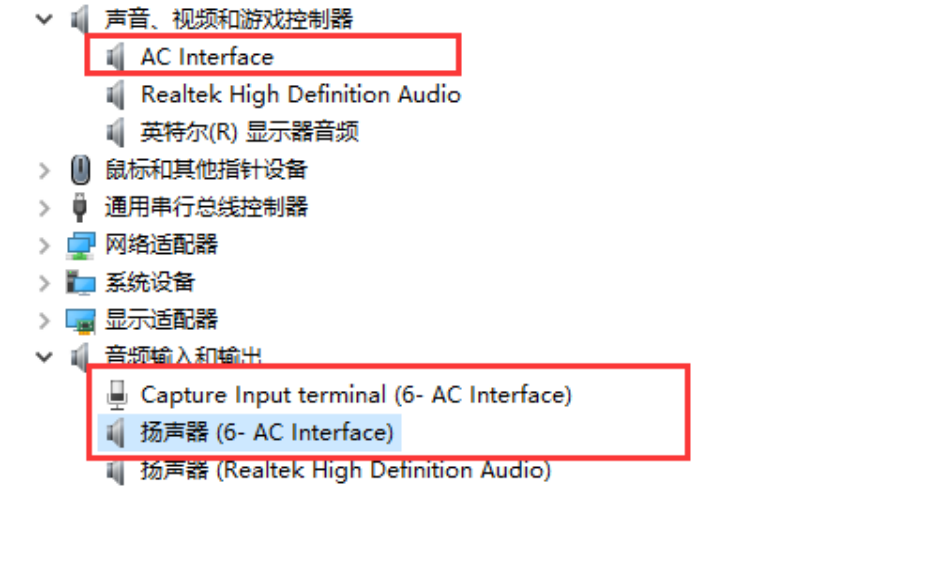
Figure 2-1. Windows USB Audio Class 1.
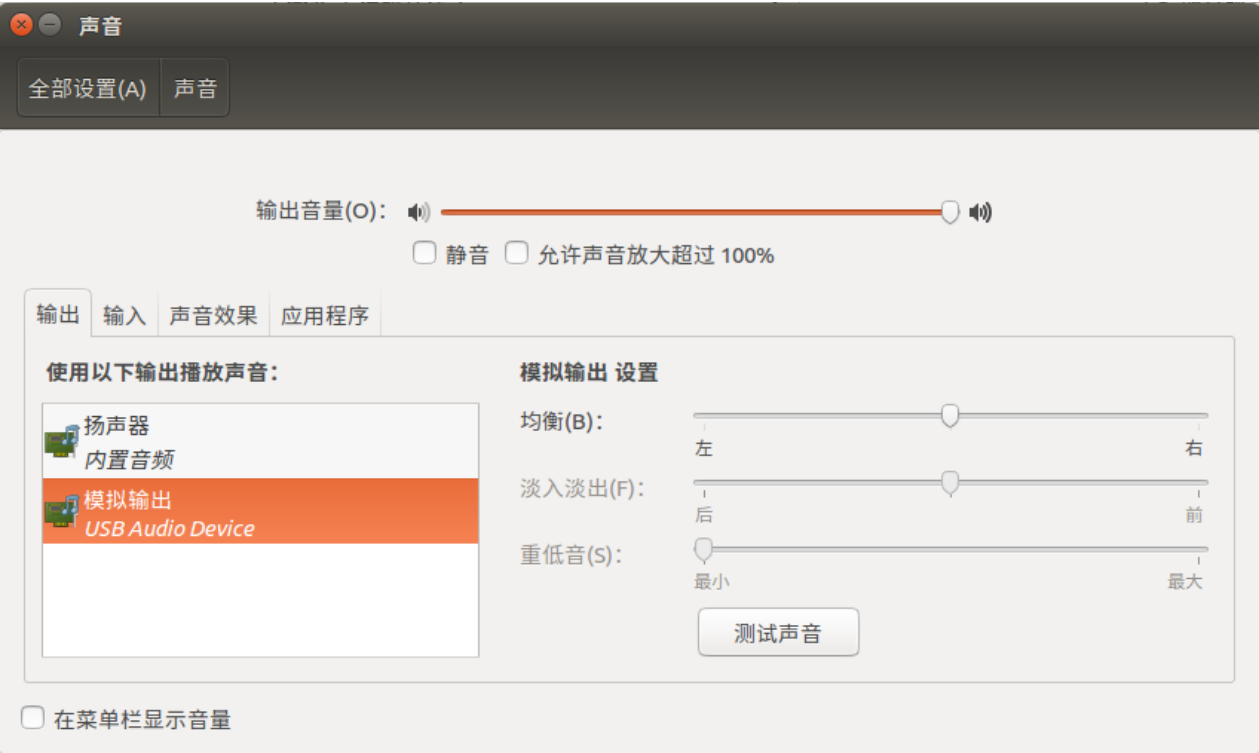
Figure 2-2. Ubuntu USB Audio Class 1 output.
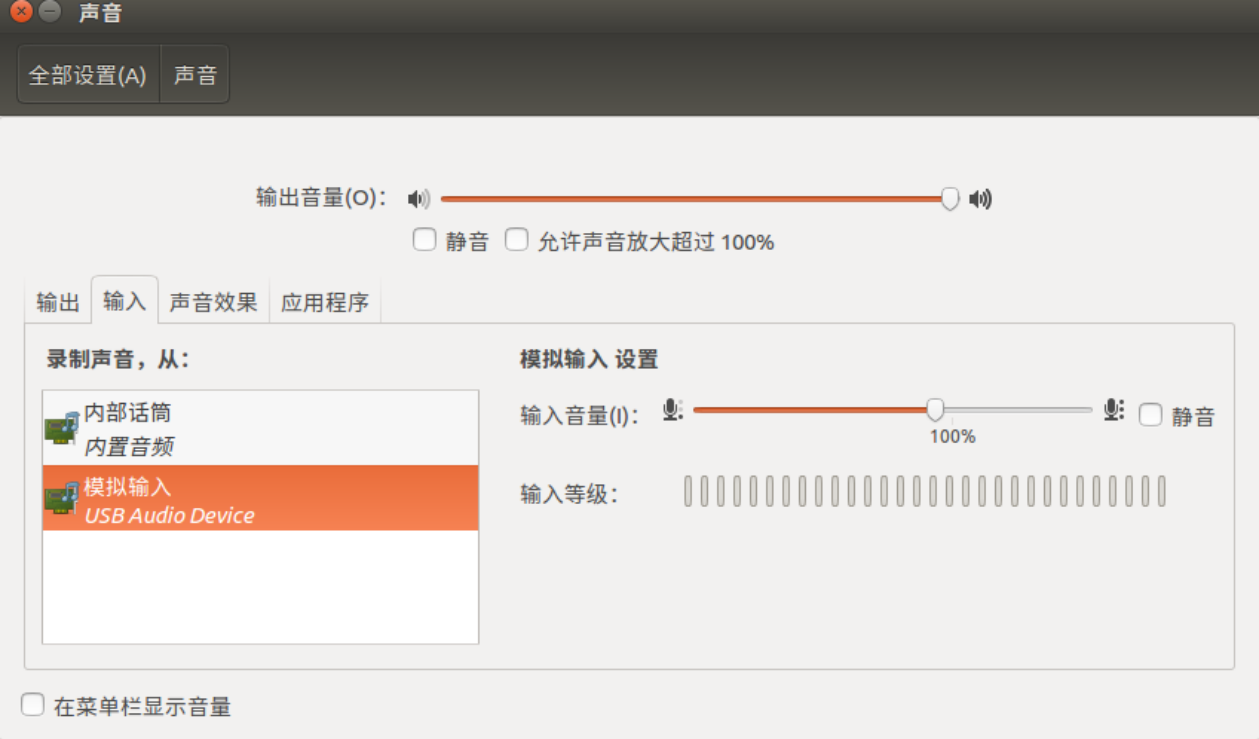
Figure 2-3. Ubuntu USB Audio Class 1 input. The RK3308 UART logs successful UAC1 enumeration as follows:
dwc2 ff400000.usb: new device is high-speed
dwc2 ff400000.usb: new address 19
android_work: sent uevent USB_STATE=CONNECTED
configfs-gadget gadget: high-speed config #1: b
android_work: sent uevent USB_STATE=CONFIGURED
Inspect UAC1 sound-card information. In this example it is card2 (UAC1Gadget), with playback node pcmC2D0p and capture node pcmC2D0c.
# cat /proc/asound/cards
 0 [rockchiprk3308v]: rockchip_rk3308 - rockchip,rk3308-vad
                      rockchip,rk3308-vad
 1 [rockchiprk3308p]: rockchip_rk3308 - rockchip,rk3308-pcm
                      rockchip,rk3308-pcm
 2 [UAC1Gadget     ]: UAC1_Gadget - UAC1_Gadget
                      UAC1_Gadget 0
 7 [Loopback       ]: Loopback - Loopback
                      Loopback 1

# ls -lh /proc/asound/card2
-r--r--r--    1 root     root           0 Dec 31 19:14 id
dr-xr-xr-x    3 root     root           0 Dec 31 19:14 pcm0c
dr-xr-xr-x    3 root     root           0 Dec 31 19:14 pcm0p

# ls /dev/snd/
controlC0  controlC7  pcmC1D0c   pcmC2D0p   pcmC7D1c
controlC1  pcmC0D0c   pcmC1D0p   pcmC7D0c   pcmC7D1p
controlC2  pcmC0D0p   pcmC2D0c   pcmC7D0p   timer
2.4.1 Windows UAC tests
Open Windows sound settings and select USB Audio as both output and input/microphone, as in Figure 2-4.
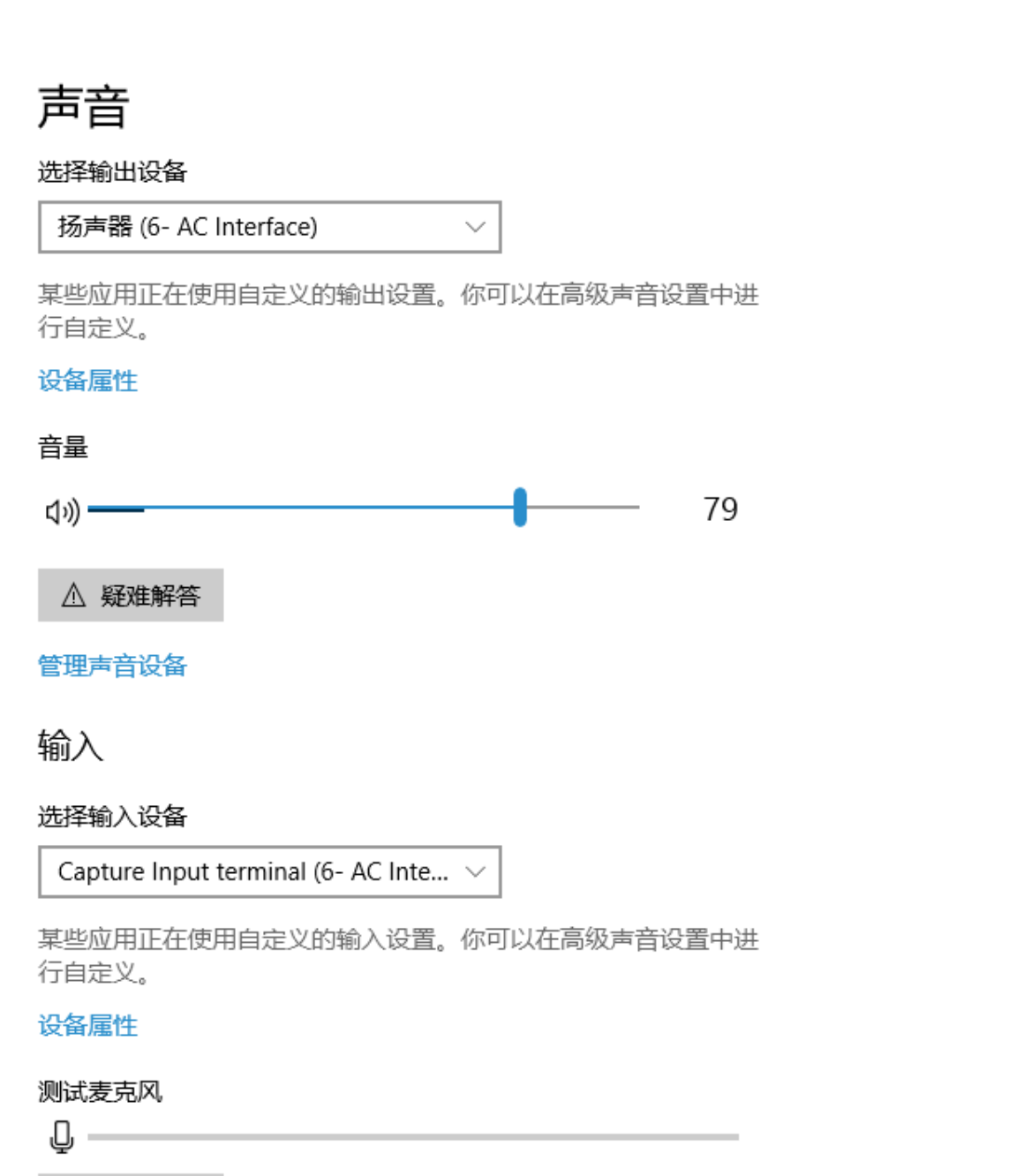
Figure 2-4. Windows audio settings. To test Windows UAC1 playback, execute the following command through RK3308 UART:
arecord -f dat -t wav -r 48000 -c 2 -D hw:2,0 | aplay -f dat -r 48000 -c 2 -D hw:0,0
The command records from Card2 (USB Audio) and plays through local Card0. Play music on Windows; RK3308 outputs it in real time. For the Windows UAC1 recording test, prepare playable audio using ADB push or arecord: 48 KHz, two channels, 16 bits.
For example, run arecord through RK3308 UART to save test.wav:
arecord -f dat -t wav -r 48000 -c 2 -D hw:2,0 /tmp/test.wav
After saving test.wav, run the UAC1 recording command:
aplay /tmp/test.wav -c 2 -r 48000 -D hw:2,0
Then use the built-in Windows Voice Recorder to save the recording, as in Figure 2-5.
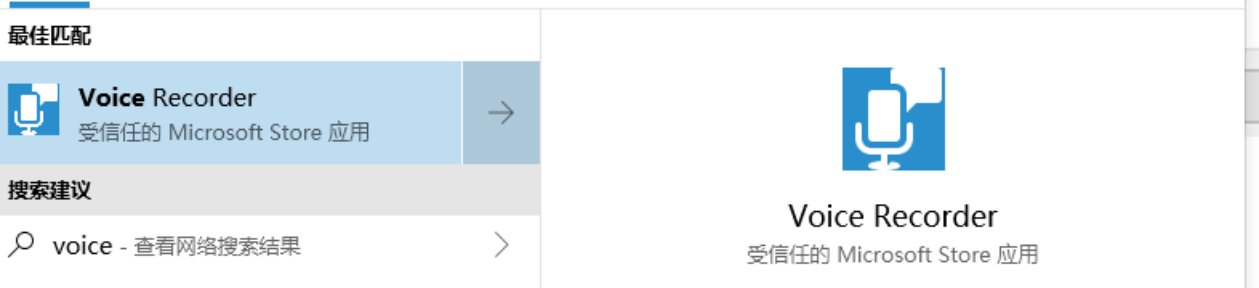
Figure 2-5. Windows Voice Recorder. Alternatively, monitor the recording in real time: Sound settings → Sound Control Panel → Recording → Properties → Listen; enable Listen to this device and select the playback speaker. See Figures 2-6 and 2-7.
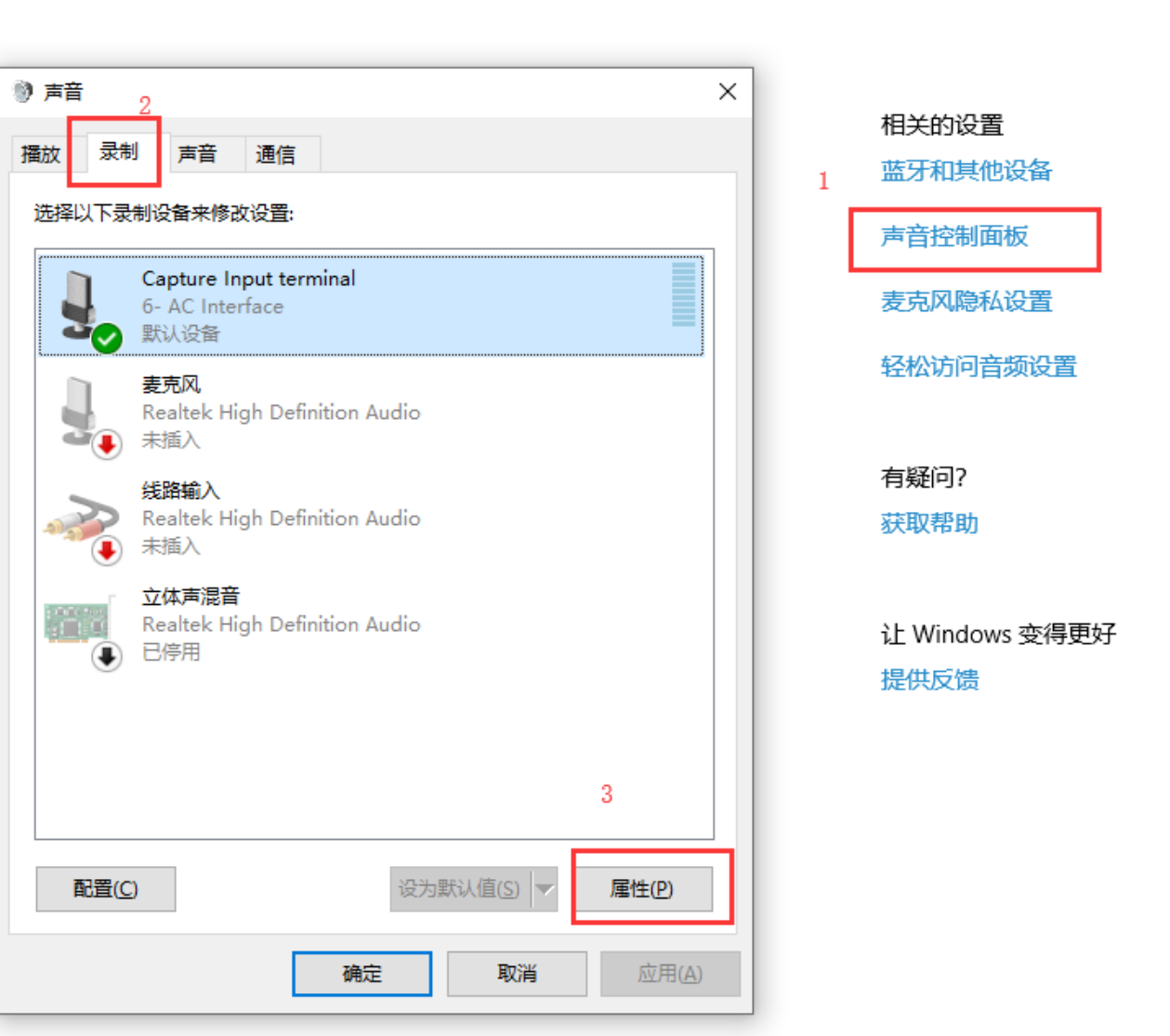
Figure 2-6. Windows recording monitor, step 1.
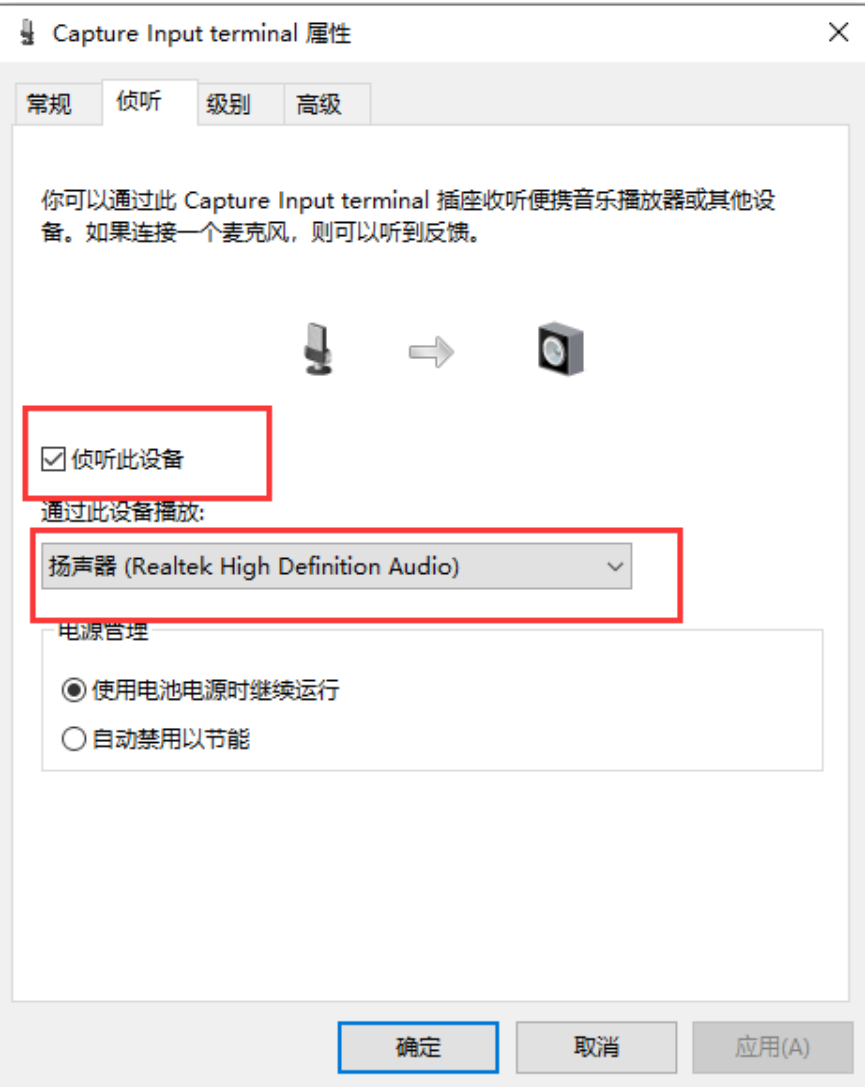
Figure 2-7. Windows recording monitor, step 2.
2.4.2 Ubuntu UAC tests
Open Ubuntu sound settings and select USB Audio as both output and input/microphone; see Figures 2-8 and 2-9.
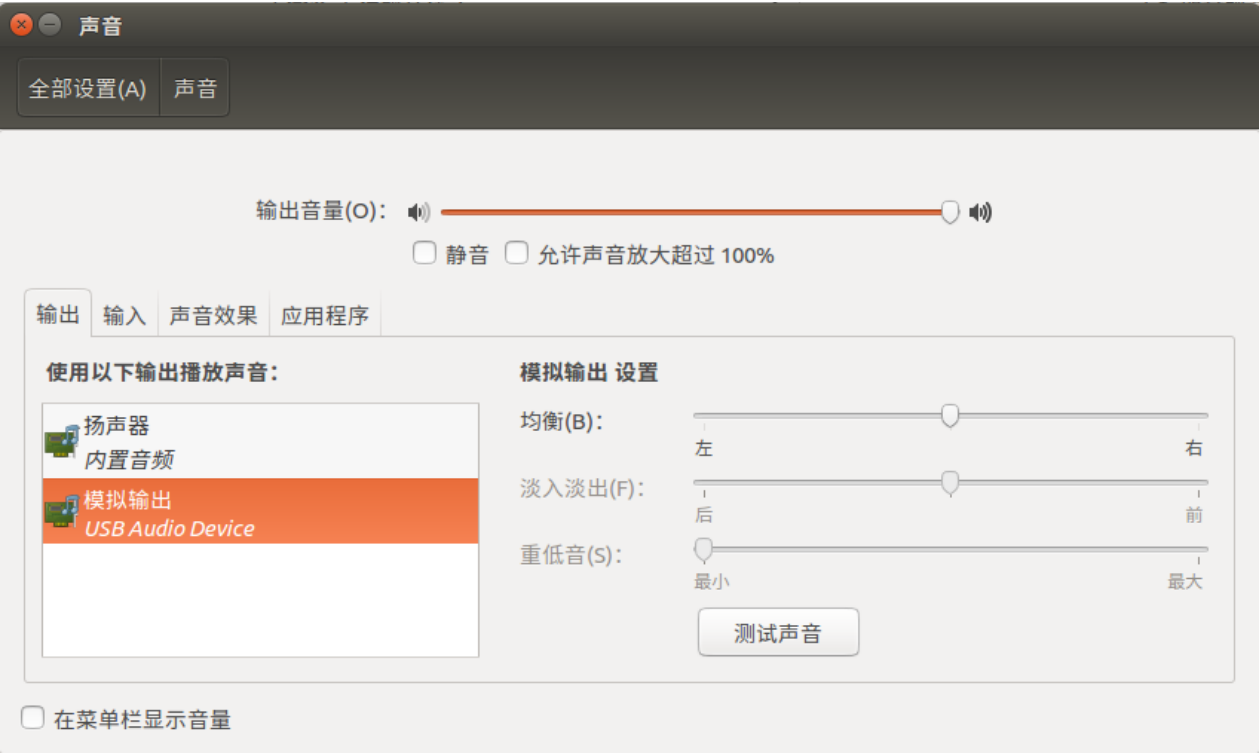
Figure 2-8. Ubuntu audio output settings.
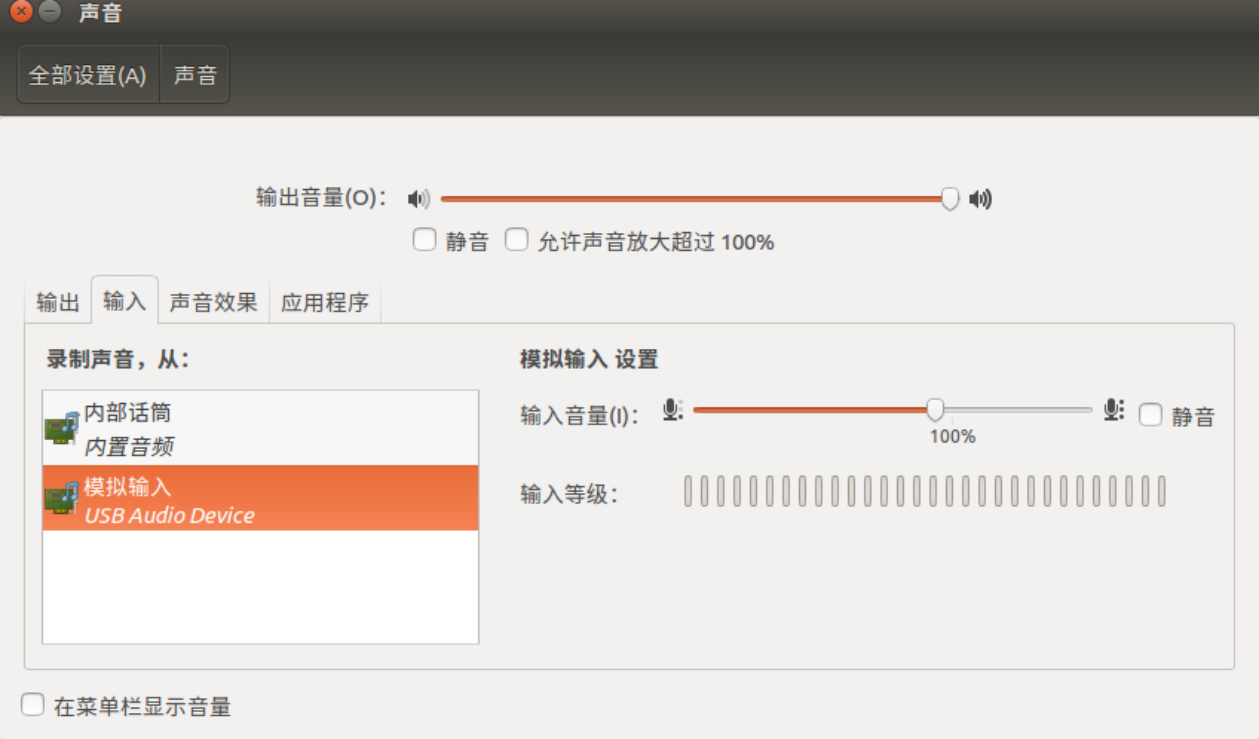
Figure 2-9. Ubuntu audio input settings. To test UAC1 playback, run this command through RK3308 UART:
arecord -f dat -t wav -r 48000 -c 2 -D hw:2,0 | aplay -f dat -r 48000 -c 2 -D hw:0,0
The command records Card2 (USB Audio) and plays through local Card0. Play music on Ubuntu and RK3308 outputs it in real time. For recording, prepare playable 48 KHz, two-channel, 16-bit audio using ADB push or arecord. Example: save test.wav with arecord through RK3308 UART.
arecord -f dat -t wav -r 48000 -c 2 -D hw:2,0 /tmp/test.wav
After saving test.wav, run the UAC1 recording command:
aplay /tmp/test.wav -c 2 -r 48000 -D hw:2,0
After running the command, open an Ubuntu recorder such as audacity for the test. Install audacity with:
sudo apt install audacity
Figure 2-10 shows the audacity recording interface.
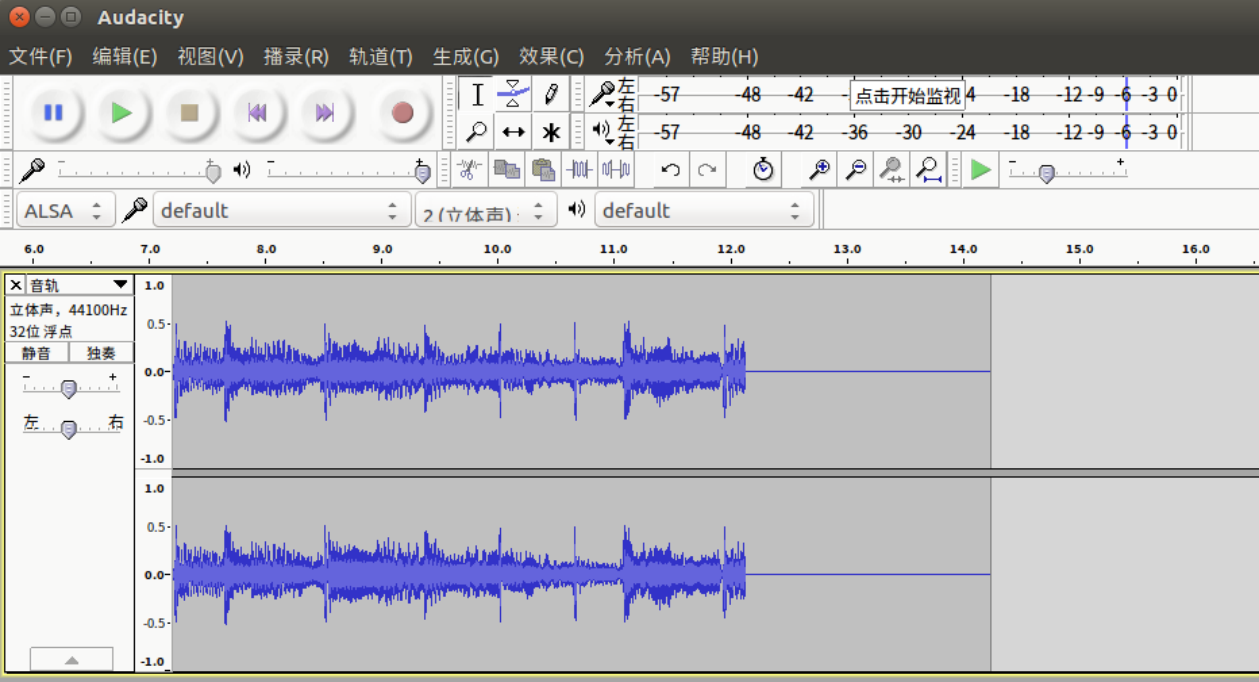
Figure 2-10. Ubuntu audacity.
3. UAC1 Legacy usage and tests
3.1 UAC1 Legacy usage
Default parameter meanings: audio_buf_size is the audio buffer size, 48000; fn_cap is capture PCM /dev/snd/pcmC0D0c; fn_cntl is control device /dev/snd/controlC0; fn_play is playback PCM /dev/snd/pcmC0D0p; req_buf_size is ISO OUT request buffer size, 200; req_count is ISO OUT request count, 256.
Rockchip UAC1 Legacy implements Audio Class 1.0 but supports playback only and requires a physical sound card, default /dev/snd/pcmC0D0p. Defaults: High Speed, playback 48 KHz (not configurable), two channels (not configurable), 16 bits. Add CONFIG_USB_CONFIGFS_F_UAC1_LEGACY=y to kernel defconfig. RK3308 EVB configuration example:
mount -t configfs none /sys/kernel/config
mkdir /sys/kernel/config/usb_gadget/rockchip  -m 0770
echo 0x2207 > /sys/kernel/config/usb_gadget/rockchip/idVendor
echo 0x0019 > /sys/kernel/config/usb_gadget/rockchip/idProduct
echo 0x0100 > /sys/kernel/config/usb_gadget/rockchip/bcdDevice
mkdir /sys/kernel/config/usb_gadget/rockchip/strings/0x409   -m 0770
echo "0123456789ABCDEF" > /sys/kernel/config/usb_gadget/rockchip/strings/0x409/serialnumber
echo "rockchip"  > /sys/kernel/config/usb_gadget/rockchip/strings/0x409/manufacturer
echo "USB Audio Device"  > /sys/kernel/config/usb_gadget/rockchip/strings/0x409/product
mkdir /sys/kernel/config/usb_gadget/rockchip/configs/b.1  -m 0770
mkdir /sys/kernel/config/usb_gadget/rockchip/configs/b.1/strings/0x409  -m 0770
echo 500 > /sys/kernel/config/usb_gadget/rockchip/configs/b.1/MaxPower
echo "uac1" > /sys/kernel/config/usb_gadget/rockchip/configs/b.1/strings/0x409/configuration
mkdir /sys/kernel/config/usb_gadget/rockchip/functions/uac1_legacy.gs0
ln -s /sys/kernel/config/usb_gadget/rockchip/functions/uac1_legacy.gs0
/sys/kernel/config/usb_gadget/rockchip/configs/b.1/uac1_legacy.gs0
echo ff400000.usb > /sys/kernel/config/usb_gadget/rockchip/UDC
If an ADB setup script runs at RK3308 startup, the configuration above will fail. During debugging, configure UAC1 Legacy manually with the following commands. For the final product, integrate ADB and UAC1 Legacy scripts according to requirements.
rm -rf /sys/kernel/config/usb_gadget/rockchip/configs/b.1/ffs.adb

mkdir /sys/kernel/config/usb_gadget/rockchip/functions/uac1_legacy.gs0
echo 0x0019 > /sys/kernel/config/usb_gadget/rockchip/idProduct
echo 0x0100 > /sys/kernel/config/usb_gadget/rockchip/bcdDevice
echo "USB Audio Device" > /sys/kernel/config/usb_gadget/rockchip/strings/0x409/product
echo "uac1" > /sys/kernel/config/usb_gadget/rockchip/configs/b.1/strings/0x409/configuration
cd /sys/kernel/config/usb_gadget/rockchip/configs/b.1
ln -s ../../functions/uac1_legacy.gs0

echo ff400000.usb > ../../UDC
idProduct may be product-defined but must not collide with other USB functions. UDC is the controller name under /sys/class/udc/. Windows caches drivers; after configuration changes uninstall the driver for redetection. After successful setup, connect USB to the PC; it recognizes USB Audio as in Figure 3-1.
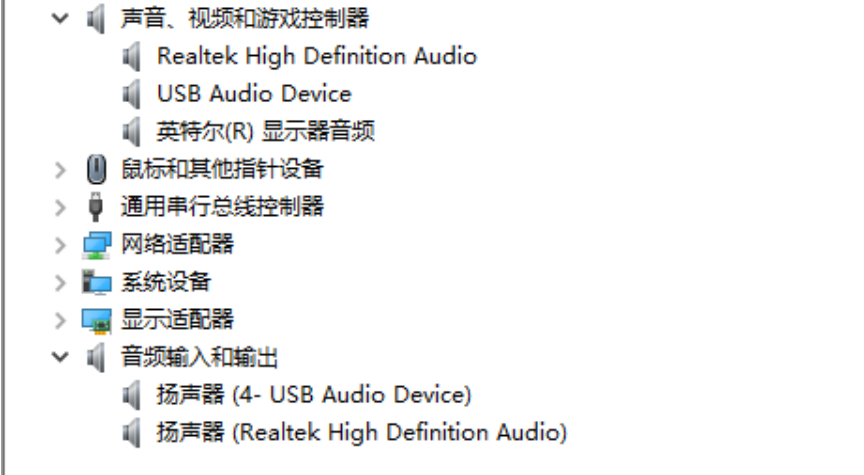
Figure 3-1. Windows USB Audio Class 1 Legacy. RK3308 UART log of successful enumeration:
configfs-gadget gadget: Hardware params: access 3, format 2, channels 2, rate 48000
dwc2 ff400000.usb: bound driver configfs-gadget
dwc2 ff400000.usb: new device is high-speed
dwc2 ff400000.usb: new address 25
android_work: sent uevent USB_STATE=CONNECTED
configfs-gadget gadget: high-speed config #1: b
android_work: sent uevent USB_STATE=CONFIGURED
UAC1 Legacy exposes these configuration interfaces. Changes are not applied dynamically and must be executed in the UAC setup script.
# ls -lh /sys/kernel/config/usb_gadget/g1/functions/uac1_legacy.gs0/
-rw-r--r--    1 root     root        4.0K Dec 31 19:08 audio_buf_size
-rw-r--r--    1 root     root        4.0K Dec 31 19:08 fn_cap
-rw-r--r--    1 root     root        4.0K Dec 31 19:08 fn_cntl
-rw-r--r--    1 root     root        4.0K Dec 31 19:08 fn_play
-rw-r--r--    1 root     root        4.0K Dec 31 19:08 req_buf_size
-rw-r--r--    1 root     root        4.0K Dec 31 19:08 req_count

audio_buf_size - audio buffer size 默认设置为 48000
fn_cap - capture pcm device file name 默认设置为 /dev/snd/pcmC0D0c
fn_cntl - control device file name 默认设置为 /dev/snd/controlC0
fn_play - playback pcm device file name 默认设置为 /dev/snd/pcmC0D0p
req_buf_size - ISO OUT endpoint request buffer size 默认设置为 200
req_count - ISO OUT endpoint request count 默认设置为 256
UAC1 Legacy does not create a corresponding sound-card device node on RK3308.
3.2 UAC1 Legacy tests
For PC playback settings, see the Windows or Ubuntu UAC test section. No command is needed on RK3308: after USB connection, UAC1 Legacy opens local Card0 for playback automatically.
4. Audio Source usage and tests
4.1 Audio Source usage
Rockchip Audio Source implements Audio Class 1.0 but supports recording only. Defaults: High Speed; playback rate 44.1 KHz, with the following 15 rates dynamically configurable by the PC.
8000, 11025, 16000, 22050, 24000,
32000, 40000, 44100, 48000, 56000,
64000, 72000, 80000, 88200, 96000,
Playback has two channels (not configurable) and 16-bit depth. Add CONFIG_USB_CONFIGFS_F_ACC=y, required by Audio Source, and CONFIG_USB_CONFIGFS_F_AUDIO_SRC=y to kernel defconfig.
RK3308 EVB Audio Source configuration example:
mount -t configfs none /sys/kernel/config
mkdir /sys/kernel/config/usb_gadget/rockchip  -m 0770
echo 0x2207 > /sys/kernel/config/usb_gadget/rockchip/idVendor
echo 0x0019 > /sys/kernel/config/usb_gadget/rockchip/idProduct
mkdir /sys/kernel/config/usb_gadget/rockchip/strings/0x409   -m 0770
echo "0123456789ABCDEF" > /sys/kernel/config/usb_gadget/rockchip/strings/0x409/serialnumber
echo "rockchip"  > /sys/kernel/config/usb_gadget/rockchip/strings/0x409/manufacturer
echo "USB Audio Device"  > /sys/kernel/config/usb_gadget/rockchip/strings/0x409/product
mkdir /sys/kernel/config/usb_gadget/rockchip/configs/b.1  -m 0770
mkdir /sys/kernel/config/usb_gadget/rockchip/configs/b.1/strings/0x409  -m 0770
echo 500 > /sys/kernel/config/usb_gadget/rockchip/configs/b.1/MaxPower
echo "audio" >
/sys/kernel/config/usb_gadget/rockchip/configs/b.1/strings/0x409/configuration
mkdir /sys/kernel/config/usb_gadget/rockchip/functions/audio_source.gs0
ln -s /sys/kernel/config/usb_gadget/rockchip/functions/audio_source.gs0
/sys/kernel/config/usb_gadget/rockchip/configs/b.1/audio_source.gs0
echo ff400000.usb > /sys/kernel/config/usb_gadget/rockchip/UDC
If RK3308 starts an ADB configuration script automatically, the setup above fails. For debugging, configure Audio Source manually with the commands below. Integrate ADB and Audio Source scripts appropriately for the final product.
rm -rf /sys/kernel/config/usb_gadget/rockchip/configs/b.1/ffs.adb

mkdir /sys/kernel/config/usb_gadget/rockchip/functions/audio_source.gs0
echo 0x0019 > /sys/kernel/config/usb_gadget/rockchip/idProduct
echo 0x0100 > /sys/kernel/config/usb_gadget/rockchip/bcdDevice
echo "USB Audio Device" > /sys/kernel/config/usb_gadget/rockchip/strings/0x409/product
echo "audio" >
/sys/kernel/config/usb_gadget/rockchip/configs/b.1/strings/0x409/configuration
cd /sys/kernel/config/usb_gadget/rockchip/configs/b.1
ln -s ../../functions/audio_source.gs0

echo ff400000.usb > ../../UDC
idProduct may be product-defined without conflicting with other USB functions. UDC is the controller name under /sys/class/udc/. After changes, uninstall cached Windows drivers to redetect the device. Once configured, connect USB: the PC recognizes USB Audio as in Figures 4-1 and 4-2.
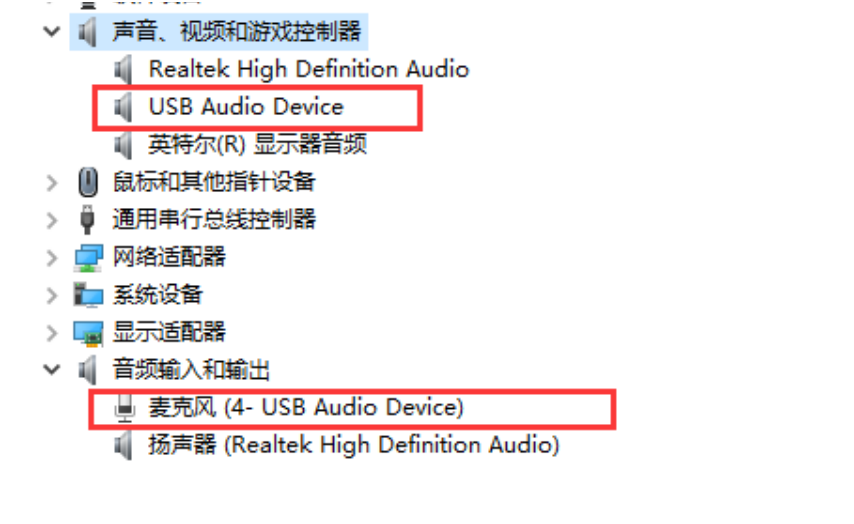
Figure 4-1. Windows USB Audio Source.
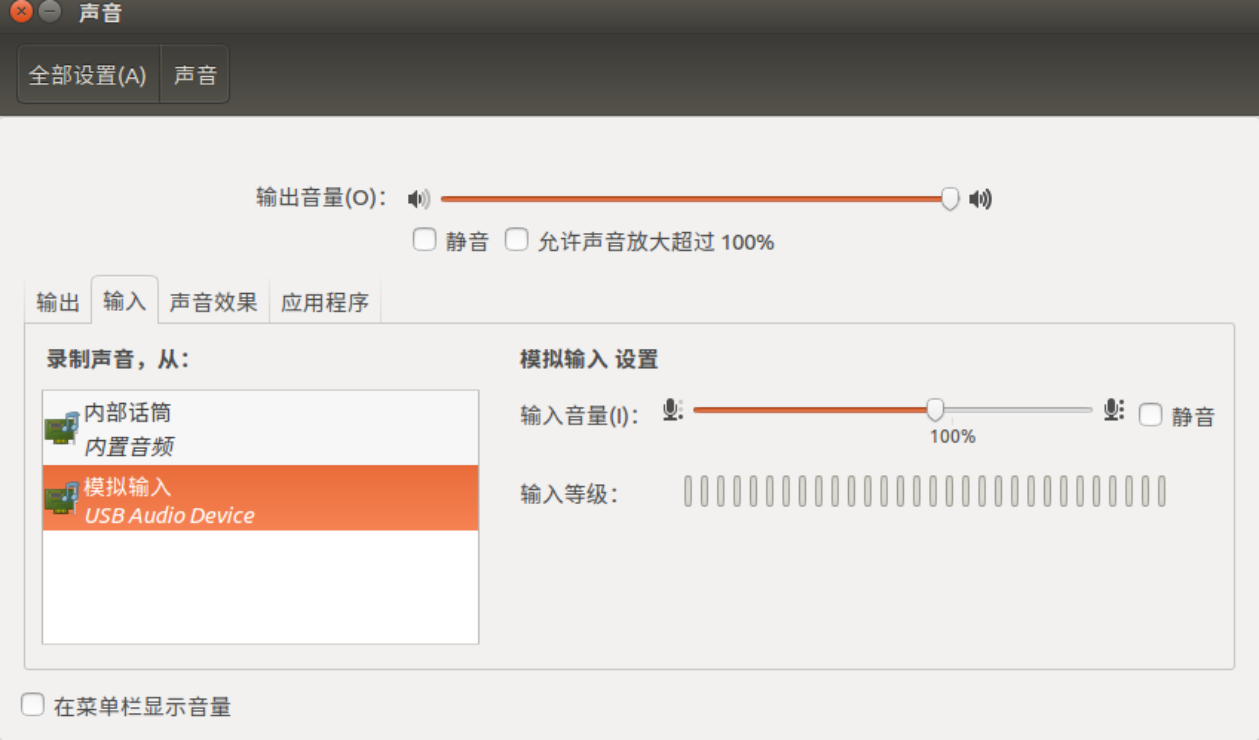
Figure 4-2. Ubuntu USB Audio Source. RK3308 UART log of normal Audio Source enumeration:
dwc2 ff400000.usb: new device is high-speed
dwc2 ff400000.usb: new address 23
android_work: sent uevent USB_STATE=CONNECTED
configfs-gadget gadget: high-speed config #1: b
android_work: sent uevent USB_STATE=CONFIGURED
Audio Source exposes no configurable kernel interfaces. Inspect its information as follows: the example is card2 (audiosource), with only playback node pcmC2D0p.
# cat /proc/asound/cards
 0 [rockchiprk3308v]: rockchip_rk3308 - rockchip,rk3308-vad
                      rockchip,rk3308-vad
 1 [rockchiprk3308p]: rockchip_rk3308 - rockchip,rk3308-pcm
                      rockchip,rk3308-pcm
 2 [audiosource    ]: audio_source - audio_source
                      USB accessory audio source
 7 [Loopback       ]: Loopback - Loopback
                      Loopback 1

# ls -lh /proc/asound/card2
-r--r--r--    1 root     root           0 Dec 31 19:06 id
dr-xr-xr-x    3 root     root           0 Dec 31 19:06 pcm0p

# ls /dev/snd/
controlC0  controlC2  pcmC0D0c   pcmC1D0c   pcmC2D0p   pcmC7D0p   pcmC7D1p
controlC1  controlC7  pcmC0D0p   pcmC1D0p   pcmC7D0c   pcmC7D1c   timer
4.2 Audio Source tests
For Audio Source recording, use the Windows or Ubuntu recording settings described earlier. RK3308 test command, assuming the default 44.1 KHz:
aplay /tmp/test.wav -r 44100 -c 2 -D hw:2,0
test.wav must have the same sample rate as the recording; otherwise noise or silence may result. The PC can dynamically select among 15 rates: Sound settings → Sound Control Panel → Recording → Properties → Advanced, then choose the rate (Figure 4-3).
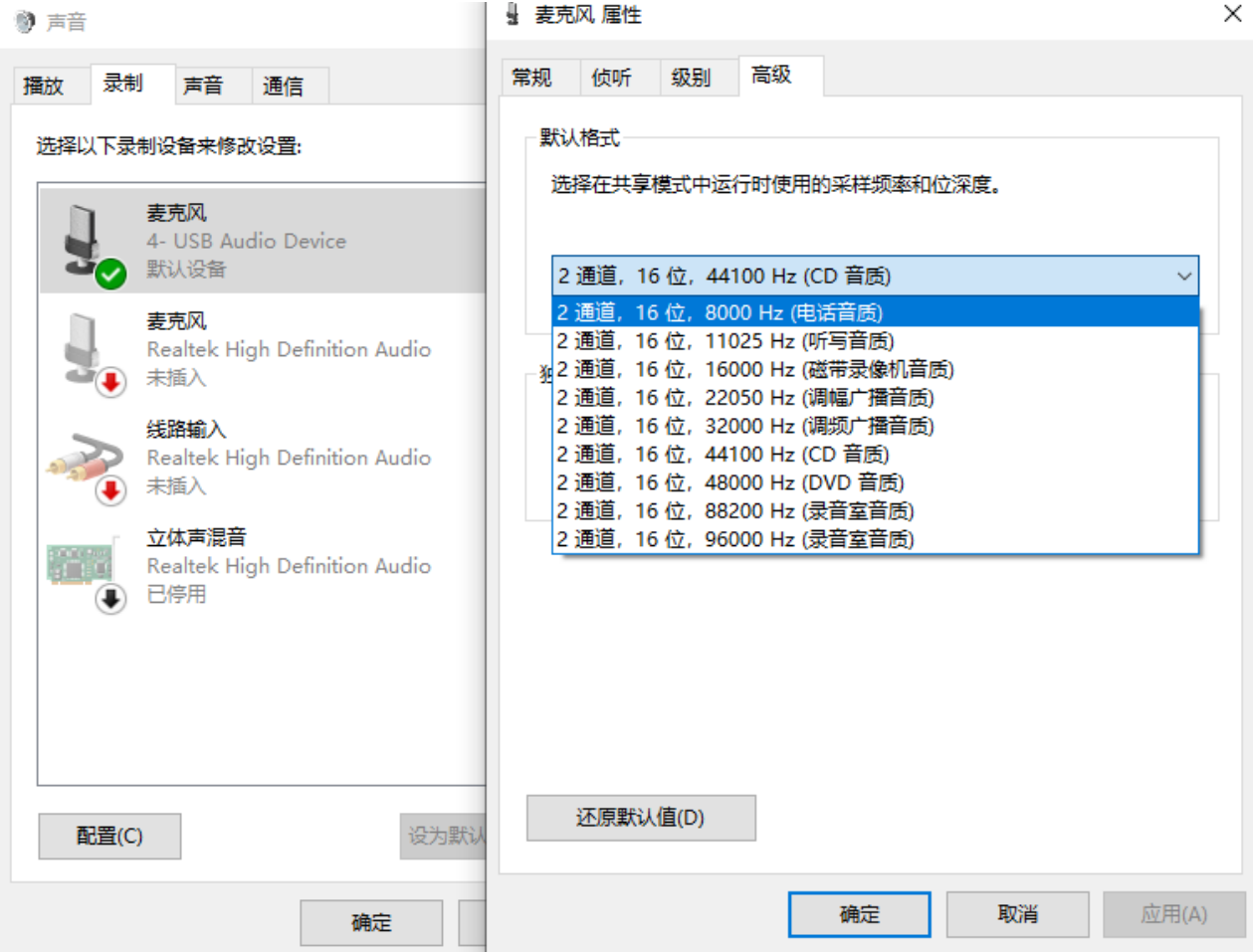
Figure 4-3. Windows USB Audio Source settings.
5. UAC1 Legacy and Audio Source composite usage and tests
5.1 Composite-device usage
UAC1 Legacy and Audio Source can form one composite USB device with recording and playback. Add CONFIG_USB_CONFIGFS_F_UAC1_LEGACY=y, CONFIG_USB_CONFIGFS_F_ACC=y (Audio Source dependency), and CONFIG_USB_CONFIGFS_F_AUDIO_SRC=y to kernel defconfig. Also apply support_uac1_legacy_and_audio_source.patch separately. Example RK3308 EVB composite setup:
mount -t configfs none /sys/kernel/config
mkdir /sys/kernel/config/usb_gadget/rockchip  -m 0770
echo 0x2207 > /sys/kernel/config/usb_gadget/rockchip/idVendor
echo 0x0019 > /sys/kernel/config/usb_gadget/rockchip/idProduct
echo 0x0100 > /sys/kernel/config/usb_gadget/rockchip/bcdDevice
mkdir /sys/kernel/config/usb_gadget/rockchip/strings/0x409   -m 0770
echo "0123456789ABCDEF" > /sys/kernel/config/usb_gadget/rockchip/strings/0x409/serialnumber
echo "rockchip"  > /sys/kernel/config/usb_gadget/rockchip/strings/0x409/manufacturer
echo "USB Audio Device"  > /sys/kernel/config/usb_gadget/rockchip/strings/0x409/product
mkdir /sys/kernel/config/usb_gadget/rockchip/configs/b.1  -m 0770
mkdir /sys/kernel/config/usb_gadget/rockchip/configs/b.1/strings/0x409  -m 0770
echo 500 > /sys/kernel/config/usb_gadget/rockchip/configs/b.1/MaxPower
echo "uac1" > /sys/kernel/config/usb_gadget/rockchip/configs/b.1/strings/0x409/configuration
mkdir /sys/kernel/config/usb_gadget/rockchip/functions/uac1_legacy.gs0
ln -s /sys/kernel/config/usb_gadget/rockchip/functions/uac1_legacy.gs0
/sys/kernel/config/usb_gadget/rockchip/configs/b.1/uac1_legacy.gs0
mkdir /sys/kernel/config/usb_gadget/rockchip/functions/audio_source.gs0
ln -s /sys/kernel/config/usb_gadget/rockchip/functions/audio_source.gs0
/sys/kernel/config/usb_gadget/rockchip/configs/b.1/audio_source.gs0
echo ff400000.usb > /sys/kernel/config/usb_gadget/rockchip/UDC
For other setup and debugging methods, see UAC1 Legacy Usage and Audio Source Usage.
5.2 Composite-device tests
See UAC1 Legacy Test and Audio Source Test.
6. References
USB protocols from USB-IF:
- Universal Serial Bus Specification, Revision 2.0
- Universal Serial Bus Audio Device Class Specification for Basic Audio Devices
- Universal Serial Bus Device Class Definition for Audio Devices, Release 1.0
- Universal Serial Bus Device Class Definition for Audio Devices, Release 2.0
- Universal Serial Bus Device Class Definition for Audio Data Formats (USB Audio Data Formats)
- Universal Serial Bus Device Class Definition for Terminal Types (USB Audio Terminal Types)
Other references:
- The Well-Tempered Computer (An introduction to computer audio) — USB
- Windows USB Audio 2.0 Drivers
- Windows Audio-Tapered Volume Controls
7. Appendix A: UAC1 device descriptor
Device Descriptor:
  bLength                18
  bDescriptorType         1
  bcdUSB               2.00
  bDeviceClass            0 (Defined at Interface level)
  bDeviceSubClass         0
  bDeviceProtocol         0
  bMaxPacketSize0        64
  idVendor           0x2207
  idProduct          0x0019
  bcdDevice            1.00
  iManufacturer           1 rockchip
  iProduct                2 USB Audio Device
  iSerial                 3 0123456789ABCDEF
  bNumConfigurations      1
  Configuration Descriptor:
    bLength                 9
    bDescriptorType         2
    wTotalLength          174
    bNumInterfaces          3
    bConfigurationValue     1
    iConfiguration          4 audio
    bmAttributes         0x80
      (Bus Powered)
    MaxPower              500mA
    Interface Descriptor:
      bLength                 9
      bDescriptorType         4
      bInterfaceNumber        0
      bAlternateSetting       0
      bNumEndpoints           0
      bInterfaceClass         1 Audio
      bInterfaceSubClass      1 Control Device
      bInterfaceProtocol      0
      iInterface              5 AC Interface
      AudioControl Interface Descriptor:
        bLength                10
        bDescriptorType        36
        bDescriptorSubtype      1 (HEADER)
        bcdADC               1.00
        wTotalLength           52
        bInCollection           2
        baInterfaceNr( 0)       1
        baInterfaceNr( 1)       2
      AudioControl Interface Descriptor:
        bLength                12
        bDescriptorType        36
        bDescriptorSubtype      2 (INPUT_TERMINAL)
        bTerminalID             1
        wTerminalType      0x0101 USB Streaming
        bAssocTerminal          0
        bNrChannels             2
        wChannelConfig     0x0003
          Left Front (L)
          Right Front (R)
        iChannelNames           7 Playback Channels
        iTerminal               6 Playback Input terminal
      AudioControl Interface Descriptor:
        bLength                 9
        bDescriptorType        36
        bDescriptorSubtype      3 (OUTPUT_TERMINAL)
        bTerminalID             2
        wTerminalType      0x0301 Speaker
        bAssocTerminal          0
        bSourceID               1
        iTerminal               8 Playback Output terminal
      AudioControl Interface Descriptor:
        bLength                12
        bDescriptorType        36
        bDescriptorSubtype      2 (INPUT_TERMINAL)
        bTerminalID             3
        wTerminalType      0x0201 Microphone
        bAssocTerminal          0
        bNrChannels             2
        wChannelConfig     0x0003
          Left Front (L)
          Right Front (R)
        iChannelNames          10 Capture Channels
        iTerminal               9 Capture Input terminal
      AudioControl Interface Descriptor:
        bLength                 9
        bDescriptorType        36
        bDescriptorSubtype      3 (OUTPUT_TERMINAL)
        bTerminalID             4
        wTerminalType      0x0101 USB Streaming
        bAssocTerminal          0
        bSourceID               3
        iTerminal              11 Capture Output terminal
    Interface Descriptor:
      bLength                 9
      bDescriptorType         4
      bInterfaceNumber        1
      bAlternateSetting       0
      bNumEndpoints           0
      bInterfaceClass         1 Audio
      bInterfaceSubClass      2 Streaming
      bInterfaceProtocol      0
      iInterface             12 Playback Inactive
    Interface Descriptor:
      bLength                 9
      bDescriptorType         4
      bInterfaceNumber        1
      bAlternateSetting       1
      bNumEndpoints           1
      bInterfaceClass         1 Audio
      bInterfaceSubClass      2 Streaming
      bInterfaceProtocol      0
      iInterface             13 Playback Active
      AudioStreaming Interface Descriptor:
        bLength                 7
        bDescriptorType        36
        bDescriptorSubtype      1 (AS_GENERAL)
        bTerminalLink           1
        bDelay                  1 frames
        wFormatTag              1 PCM
      AudioStreaming Interface Descriptor:
        bLength                11
        bDescriptorType        36
        bDescriptorSubtype      2 (FORMAT_TYPE)
        bFormatType             1 (FORMAT_TYPE_I)
        bNrChannels             2
        bSubframeSize           2
        bBitResolution         16
        bSamFreqType            1 Discrete
        tSamFreq[ 0]        48000
      Endpoint Descriptor:
        bLength                 9
        bDescriptorType         5
        bEndpointAddress     0x02  EP 2 OUT
        bmAttributes            9
          Transfer Type            Isochronous
          Synch Type               Adaptive
          Usage Type               Data
        wMaxPacketSize     0x00c8  1x 200 bytes
        bInterval               4
        bRefresh                0
        bSynchAddress           0
        AudioControl Endpoint Descriptor:
          bLength                 7
          bDescriptorType        37
          bDescriptorSubtype      1 (EP_GENERAL)
          bmAttributes         0x01
            Sampling Frequency
          bLockDelayUnits         1 Milliseconds
          wLockDelay              1 Milliseconds
    Interface Descriptor:
      bLength                 9
      bDescriptorType         4
      bInterfaceNumber        2
      bAlternateSetting       0
      bNumEndpoints           0
      bInterfaceClass         1 Audio
      bInterfaceSubClass      2 Streaming
      bInterfaceProtocol      0
      iInterface             14 Capture Inactive
    Interface Descriptor:
      bLength                 9
      bDescriptorType         4
      bInterfaceNumber        2
      bAlternateSetting       1
      bNumEndpoints           1
      bInterfaceClass         1 Audio
      bInterfaceSubClass      2 Streaming
      bInterfaceProtocol      0
      iInterface             15 Capture Active
      AudioStreaming Interface Descriptor:
        bLength                 7
        bDescriptorType        36
        bDescriptorSubtype      1 (AS_GENERAL)
        bTerminalLink           4
        bDelay                  1 frames
        wFormatTag              1 PCM
      AudioStreaming Interface Descriptor:
        bLength                11
        bDescriptorType        36
        bDescriptorSubtype      2 (FORMAT_TYPE)
        bFormatType             1 (FORMAT_TYPE_I)
        bNrChannels             2
        bSubframeSize           2
        bBitResolution         16
        bSamFreqType            1 Discrete
        tSamFreq[ 0]        48000
      Endpoint Descriptor:
        bLength                 9
        bDescriptorType         5
        bEndpointAddress     0x81  EP 1 IN
        bmAttributes            5
          Transfer Type            Isochronous
          Synch Type               Asynchronous
          Usage Type               Data
        wMaxPacketSize     0x00c8  1x 200 bytes
        bInterval               4
        bRefresh                0
        bSynchAddress           0
        AudioControl Endpoint Descriptor:
          bLength                 7
          bDescriptorType        37
          bDescriptorSubtype      1 (EP_GENERAL)
          bmAttributes         0x01
            Sampling Frequency
          bLockDelayUnits         0 Undefined
          wLockDelay              0 Undefined
Device Qualifier (for other device speed):
  bLength                10
  bDescriptorType         6
  bcdUSB               2.00
  bDeviceClass            0 (Defined at Interface level)
  bDeviceSubClass         0
  bDeviceProtocol         0
  bMaxPacketSize0        64
  bNumConfigurations      1
Device Status:     0x0000
  (Bus Powered)
8. Appendix B: UAC2 device descriptor
Device Descriptor:
  bLength                18
  bDescriptorType         1
  bcdUSB               2.00
  bDeviceClass            0 (Defined at Interface level)
  bDeviceSubClass         0
  bDeviceProtocol         0
  bMaxPacketSize0        64
  idVendor           0x2207
  idProduct          0x0019
  bcdDevice            2.00
  iManufacturer           1 rockchip
  iProduct                2 USB Audio Device
  iSerial                 3 0123456789ABCDEF
  bNumConfigurations      1
  Configuration Descriptor:
    bLength                 9
    bDescriptorType         2
    wTotalLength          219
    bNumInterfaces          3
    bConfigurationValue     1
    iConfiguration          4 audio
    bmAttributes         0x80
      (Bus Powered)
    MaxPower              500mA
    Interface Association:
      bLength                 8
      bDescriptorType        11
      bFirstInterface         0
      bInterfaceCount         3
      bFunctionClass          1 Audio
      bFunctionSubClass       0
      bFunctionProtocol      32
      iFunction               5 Source/Sink
    Interface Descriptor:
      bLength                 9
      bDescriptorType         4
      bInterfaceNumber        0
      bAlternateSetting       0
      bNumEndpoints           0
      bInterfaceClass         1 Audio
      bInterfaceSubClass      1 Control Device
      bInterfaceProtocol     32
      iInterface              6 Topology Control
      AudioControl Interface Descriptor:
        bLength                 9
        bDescriptorType        36
        bDescriptorSubtype      1 (HEADER)
        bcdADC               2.00
        bCategory               8
        wTotalLength           83
        bmControl            0x00
      AudioControl Interface Descriptor:
        bLength                 8
        bDescriptorType        36
        bDescriptorSubtype     10 (CLOCK_SOURCE)
        bClockID                6
        bmAttributes         0x01 Internal fixed Clock
        bmControls           0x01
          Clock Frequency Control (read-only)
        bAssocTerminal          0
        iClockSource            7 48000Hz
      AudioControl Interface Descriptor:
        bLength                 8
        bDescriptorType        36
        bDescriptorSubtype     10 (CLOCK_SOURCE)
        bClockID                5
        bmAttributes         0x01 Internal fixed Clock
        bmControls           0x01
          Clock Frequency Control (read-only)
        bAssocTerminal          0
        iClockSource            8 64000Hz
      AudioControl Interface Descriptor:
        bLength                17
        bDescriptorType        36
        bDescriptorSubtype      2 (INPUT_TERMINAL)
        bTerminalID             1
        wTerminalType      0x0101 USB Streaming
        bAssocTerminal          0
        bCSourceID              5
        bNrChannels             2
        bmChannelConfig   0x00000003
          Front Left (FL)
          Front Right (FR)
        bmControls    0x0003
          Copy Protect Control (read/write)
        iChannelNames           0
        iTerminal               9 USBH Out
      AudioControl Interface Descriptor:
        bLength                17
        bDescriptorType        36
        bDescriptorSubtype      2 (INPUT_TERMINAL)
        bTerminalID             2
        wTerminalType      0x0201 Microphone
        bAssocTerminal          0
        bCSourceID              6
        bNrChannels             2
        bmChannelConfig   0x00000003
          Front Left (FL)
          Front Right (FR)
        bmControls    0x0003
          Copy Protect Control (read/write)
        iChannelNames           0
        iTerminal              10 USBD Out
      AudioControl Interface Descriptor:
        bLength                12
        bDescriptorType        36
        bDescriptorSubtype      3 (OUTPUT_TERMINAL)
        bTerminalID             4
        wTerminalType      0x0101 USB Streaming
        bAssocTerminal          0
        bSourceID               2
        bCSourceID              6
        bmControls         0x0003
          Copy Protect Control (read/write)
        iTerminal              11 USBH In
      AudioControl Interface Descriptor:
        bLength                12
        bDescriptorType        36
        bDescriptorSubtype      3 (OUTPUT_TERMINAL)
        bTerminalID             3
        wTerminalType      0x0301 Speaker
        bAssocTerminal          0
        bSourceID               1
        bCSourceID              5
        bmControls         0x0003
          Copy Protect Control (read/write)
        iTerminal              12 USBD In
    Interface Descriptor:
      bLength                 9
      bDescriptorType         4
      bInterfaceNumber        1
      bAlternateSetting       0
      bNumEndpoints           0
      bInterfaceClass         1 Audio
      bInterfaceSubClass      2 Streaming
      bInterfaceProtocol     32
      iInterface             13 Playback Inactive
    Interface Descriptor:
      bLength                 9
      bDescriptorType         4
      bInterfaceNumber        1
      bAlternateSetting       1
      bNumEndpoints           1
      bInterfaceClass         1 Audio
      bInterfaceSubClass      2 Streaming
      bInterfaceProtocol     32
      iInterface             14 Playback Active
      AudioStreaming Interface Descriptor:
        bLength                16
        bDescriptorType        36
        bDescriptorSubtype      1 (AS_GENERAL)
        bTerminalLink           1
        bmControls           0x00
        bFormatType             1
        bmFormats         0x00000001
          PCM
        bNrChannels             2
        bmChannelConfig   0x00000003
          Front Left (FL)
          Front Right (FR)
        iChannelNames           0
      AudioStreaming Interface Descriptor:
        bLength                 6
        bDescriptorType        36
        bDescriptorSubtype      2 (FORMAT_TYPE)
        bFormatType             1 (FORMAT_TYPE_I)
        bSubslotSize            2
        bBitResolution         16
      Endpoint Descriptor:
        bLength                 7
        bDescriptorType         5
        bEndpointAddress     0x02  EP 2 OUT
        bmAttributes            9
          Transfer Type            Isochronous
          Synch Type               Adaptive
          Usage Type               Data
        wMaxPacketSize     0x0100  1x 256 bytes
        bInterval               4
        AudioControl Endpoint Descriptor:
          bLength                 8
          bDescriptorType        37
          bDescriptorSubtype      1 (EP_GENERAL)
          bmAttributes         0x00
          bmControls           0x00
          bLockDelayUnits         0 Undefined
          wLockDelay              0
    Interface Descriptor:
      bLength                 9
      bDescriptorType         4
      bInterfaceNumber        2
      bAlternateSetting       0
      bNumEndpoints           0
      bInterfaceClass         1 Audio
      bInterfaceSubClass      2 Streaming
      bInterfaceProtocol     32
      iInterface             15 Capture Inactive
    Interface Descriptor:
      bLength                 9
      bDescriptorType         4
      bInterfaceNumber        2
      bAlternateSetting       1
      bNumEndpoints           1
      bInterfaceClass         1 Audio
      bInterfaceSubClass      2 Streaming
      bInterfaceProtocol     32
      iInterface             16 Capture Active
      AudioStreaming Interface Descriptor:
        bLength                16
        bDescriptorType        36
        bDescriptorSubtype      1 (AS_GENERAL)
        bTerminalLink           4
        bmControls           0x00
        bFormatType             1
        bmFormats         0x00000001
          PCM
        bNrChannels             2
        bmChannelConfig   0x00000003
          Front Left (FL)
          Front Right (FR)
        iChannelNames           0
      AudioStreaming Interface Descriptor:
        bLength                 6
        bDescriptorType        36
        bDescriptorSubtype      2 (FORMAT_TYPE)
        bFormatType             1 (FORMAT_TYPE_I)
        bSubslotSize            2
        bBitResolution         16
      Endpoint Descriptor:
        bLength                 7
        bDescriptorType         5
        bEndpointAddress     0x81  EP 1 IN
        bmAttributes           13
          Transfer Type            Isochronous
          Synch Type               Synchronous
          Usage Type               Data
        wMaxPacketSize     0x00c0  1x 192 bytes
        bInterval               4
        AudioControl Endpoint Descriptor:
          bLength                 8
          bDescriptorType        37
          bDescriptorSubtype      1 (EP_GENERAL)
          bmAttributes         0x00
          bmControls           0x00
          bLockDelayUnits         0 Undefined
          wLockDelay              0
Device Qualifier (for other device speed):
  bLength                10
  bDescriptorType         6
  bcdUSB               2.00
  bDeviceClass            0 (Defined at Interface level)
  bDeviceSubClass         0
  bDeviceProtocol         0
  bMaxPacketSize0        64
  bNumConfigurations      1
Device Status:     0x0000
  (Bus Powered)