
This article preserves the complete technical content of RK-KF-YF-C15 V1.5.0: Chinese pages 4–15 and the lower part of English page 4 through page 17. Source scope is RK3576, kernel 6.1. Verify actual ArmSoM UFS routing, PHY supplies and reference clock, SDK/BSP, U-Boot and supported-device list. This is a platform reference without ArmSoM hardware validation. Code follows the Chinese source across all four languages; Chinese uses its original figure, while EN/RU/DE use the English PDF counterpart. Performance logs are vendor examples using 512GB UFS 3.1, not ArmSoM measurements.
FIO writes to
/dev/block/sdaoverwrite device data; do not run them on a disk containing data to keep. LUN configuration, programming and power-detection changes also require target-specific validation. Sourcestatus = <okay>;is retained as a DTS syntax issue. HS-GEAR4 table values do not establish RK3576 G4 support: the resource table lists G1–G3 only. Footnote markers (2)/(3) have no accompanying text in the source; their meaning is not inferred.
ArmSoM Docs · Rockchip Linux kernel
1. Chip resources
RK3576
| Resource | Compatible UFS versions | PHY rates | PHY supply | Notes |
|---|---|---|---|---|
| UFS | 2.1, 2.2, 3.0 and 3.1 | HS G1-G3 and PWM G1-G3 | 0.85v and 1.8v |
Precautions:
-
Do not initialize UFS when the PHY is unpowered: the system will hang.
-
If UFS is unused, set its DTS node to “disabled” to avoid slowing boot.
2. DTS configuration
RK3576
| Resource | Reference configuration | Controller node | PHY node |
|---|---|---|---|
| UFS | rk3576.dtsi | ufs: ufs@2a2d0000 | – |
-
compatible = "rockchip,rk3576-ufs";Required default configuration; driver:drivers/ufs/host/ufs-rockchip.c. -
assigned-clock-parents = <&cru CLK_REF_MPHY_26M>Required: selects the PPLL 26MHz reference clock by default. With an independent external 26MHz oscillator, useassigned-clock-parents = <&clk_gpio_mphy_i>;and additionally specify the I/O input clock and frequency in DTS:
clk_gpio_mphy_i: clk_gpio_mphy_i{
            compatible = "fixed-clock";
            #clock-cells = <0>;
            clock-frequency = <26000000>;
            clock-output-names = "clk_gpio_mphy_i";
};
-
status = <okay>;Required: enables UFS. Set “disabled” if the project does not use UFS, to avoid affecting boot speed. -
pinctrl-0 = <&ufs_refclk>;Required: configures UFS_REFCLK as functional I/O, outputting the reference clock to the UFS device. -
reset-gpios = <&gpio4 RK_PD0 GPIO_ACTIVE_HIGH>;
Required: configure UFS_RSTN as GPIO so the driver controls device reset.
-
vcc-supply = <&vcc_ufs_s0>;Optional: main UFS device supply. -
vccq-supply = <&vcc1v2_ufs_vccq_s0>;Optional: UFS VCCQ supply. -
vccq2-supply = <&vcc1v8_ufs_vccq2_s0>;Optional: UFS VCCQ2 supply. -
freq-table-hz = <50000000 250000000>, <0 0>, <0 0>, <0 0>;Optional: sets UFS DVFS clock ranges. Each array element defines minimum and maximum clocks, in the order of clocks referenced by the UFS node in dtsi. With no I/O, clocks fall to the minimum and rise to maximum before transmission. For a clock that needs no dynamic adjustment, set both minimum and maximum to 0.
3. menuconfig configuration
Enable the following options.
CONFIG_SCSI_UFSHCD=y
CONFIG_SCSI_UFS_BSG=y
CONFIG_SCSI_UFS_HWMON=y
CONFIG_SCSI_UFSHCD_PLATFORM=y
CONFIG_SCSI_UFS_ROCKCHIP=y
4. U-Boot support for UFS
The source SDK supports UFS by default; compile it directly to obtain UFS support.
4.1 DTS changes
Node configuration matches the kernel. Enable it in rk3576-u-boot.dtsi for U-Boot.
&ufs {
    u-boot,dm-spl;
    status = "okay";
};
4.2 config configuration
UFS requires SCSI protocol support; configure SCSI accordingly.
CONFIG_SPL_UFS_SUPPORT=y
CONFIG_CMD_UFS=y
CONFIG_UFS=y
CONFIG_ROCKCHIP_UFS=y
CONFIG_SCSI=y
CONFIG_DM_SCSI=y
4.3 UFS MPHY power detection
Accessing UFS MPHY registers without power hangs the system. usbplug and uboot check MPHY power before UFS initialization. This detection is incompatible with some older UFS devices, so uboot provides an option to disable it, as shown in the patch below.
diff --git a/configs/rk3576-usbplug.config b/configs/rk3576-usbplug.config
index 822967e7cf5..26cfa5956fe 100644
--- a/configs/rk3576-usbplug.config
+++ b/configs/rk3576-usbplug.config
@@ -101,3 +101,4 @@ CONFIG_SCSI=y
 CONFIG_CMD_UFS=y
 CONFIG_ROCKCHIP_UFS=y
 CONFIG_CMD_SCSI=y
+CONFIG_ROCKCHIP_UFS_DISABLED_LINKUP_TEST=y
diff --git a/configs/rk3576_defconfig b/configs/rk3576_defconfig
index 3ec1fdefe00..15d0451ddc9 100644
--- a/configs/rk3576_defconfig
+++ b/configs/rk3576_defconfig
@@ -223,3 +223,4 @@ CONFIG_RK_AVB_LIBAVB_USER=y
 CONFIG_OPTEE_CLIENT=y
 CONFIG_OPTEE_V2=y
 CONFIG_OPTEE_ALWAYS_USE_SECURITY_PARTITION=y
+CONFIG_ROCKCHIP_UFS_DISABLED_LINKUP_TEST=y
Rebuild usbplug and uboot after the change:
#echo 编译usbplug
./make.sh rk3576-usbplug
#echo 拷⻉usbplug.bin到rkbin替换对应⽂件,下⾯⽂件名只是参考
cp usbplug.bin ../rkbin/bin/rk35/rk3576_usbplug_v1.02.bin
#重新编译uboot和loader
./make.sh rk3576
5. UFS LUN customization
Configure LUNs before using UFS. The default SDK configures four LUNs, as follows.
| LUN ID | Name | Size | FLASH mode | BOOT support | Purpose |
|---|---|---|---|---|---|
| 0 | user(sda) | Total capacity − 48MB | XLC | No | System firmware and user data |
| 1 | boot0 (sdb) |
4MB | SLC | Yes | loader storage |
| 2 | boot1 (sdc) |
4MB | SLC | Yes | Backup loader |
| 3 | data(sdd) | 8MB | SLC | No | User-defined use |
If the default is unsuitable, change LUN configuration in the uboot function ufs_lu_configuration. Then rebuild usbplug as follows.
#echo 编译usbplug
./make.sh rk3576-usbplug
#echo 拷⻉usbplug.bin到rkbin替换对应⽂件,下⾯⽂件名只是参考
cp usbplug.bin ../rkbin/bin/rk35/rk3576_usbplug_v1.02.bin
#重新编译uboot和loader
./make.sh rk3576
6. Vendor Storage support
6.1 Uboot
Uboot supports Vendor Storage by default without restrictions.
6.2 Kernel
The kernel UFS driver does not support Vendor Storage, but some drivers need reads during the kernel stage. Define a “ram-vendor-storage” node and reserved memory in DTS; uboot passes the data it read for the kernel driver to consume.
diff --git a/arch/arm64/boot/dts/rockchip/rk3576-android.dtsi b/arch/arm64/boot/dts/rockchip/rk3576-android.dtsi
index 4e6574156dc0..b4ec015c2638 100644
--- a/arch/arm64/boot/dts/rockchip/rk3576-android.dtsi
+++ b/arch/arm64/boot/dts/rockchip/rk3576-android.dtsi
@@ -55,6 +55,17 @@ ramoops: ramoops@40110000 {
                        ftrace-size = <0x00000>;
                        record-size = <0x14000>;
                };
+
+               vendor_storage_rm: vendor-storage-rm@00000000 {
+                       compatible = "rockchip,vendor-storage-rm";
+                       reg = <0x0 0x0 0x0 0x0>;
+               };
+       };
+
+       vendor_storage: vendor-storage {
+               compatible = "rockchip,ram-vendor-storage";
+               memory-region = <&vendor_storage_rm>;
+               status = "okay";
        };
 };
For application-level Vendor Storage reads/writes, see Android hardware/rockchip/libvendor_storage/vendor_storage_test.c. Kernel writes require an application-layer proxy, which is cumbersome. The kernel write interface writes memory only and does not persist data to UFS.
7. UFS interface performance
The source uses FIO directly on sda, without extra filesystem or encryption/decryption overhead, with a 512GB UFS 3.1 device. Results below are vendor examples, not ArmSoM measurements.
7.1 Sequential write
Test command:
/data/fio -filename=/dev/block/sda -direct=1 -iodepth 32 -thread -rw=write -bs=1024k -size=1G -numjobs=8 -runtime=180 -group_reporting -name=seq_100write_1024k
Source test result:
seq_100write_1024k: (g=0): rw=write, bs=(R) 1024KiB-1024KiB, (W) 1024KiB-1024KiB,
(T) 1024KiB-1024KiB, ioengine=psync, iodepth=32
...
fio-2.20
Starting 8 threads
Jobs: 7 (f=1): [W(1),f(3),_(1),f(3)][100.0%][r=0KiB/s,w=966MiB/s][r=0,w=965 IOPS]
[eta 00m:00s]
seq_100read_1024k: (groupid=0, jobs=8): err= 0: pid=2389: Wed Jun 26 16:34:04
2024
  write: IOPS=946, BW=947MiB/s (993MB/s)(8192MiB/8652msec)
    clat (msec): min=3, max=32, avg= 8.25, stdev= 2.53
     lat (msec): min=3, max=32, avg= 8.42, stdev= 2.53
    clat percentiles (usec):
     |  1.00th=[ 7072],  5.00th=[ 7136], 10.00th=[ 7200], 20.00th=[ 7264],
     | 30.00th=[ 7264], 40.00th=[ 7264], 50.00th=[ 7264], 60.00th=[ 7328],
     | 70.00th=[ 7392], 80.00th=[ 9536], 90.00th=[ 9920], 95.00th=[14400],
     | 99.00th=[14912], 99.50th=[25728], 99.90th=[29824], 99.95th=[32384],
     | 99.99th=[32384]
   bw (  KiB/s): min=89495, max=126959, per=0.01%, avg=121531.16, stdev=7781.67
    lat (msec) : 4=0.02%, 10=90.32%, 20=9.12%, 50=0.54%
  cpu          : usr=2.04%, sys=5.14%, ctx=16467, majf=0, minf=0
  IO depths    : 1=100.0%, 2=0.0%, 4=0.0%, 8=0.0%, 16=0.0%, 32=0.0%, >=64=0.0%
     submit    : 0=0.0%, 4=100.0%, 8=0.0%, 16=0.0%, 32=0.0%, 64=0.0%, >=64=0.0%
     complete  : 0=0.0%, 4=100.0%, 8=0.0%, 16=0.0%, 32=0.0%, 64=0.0%, >=64=0.0%
     issued rwt: total=0,8192,0, short=0,0,0, dropped=0,0,0
     latency   : target=0, window=0, percentile=100.00%, depth=32

Run status group 0 (all jobs):
  WRITE: bw=947MiB/s (993MB/s), 947MiB/s-947MiB/s (993MB/s-993MB/s), io=8192MiB
(8590MB), run=8652-8652msec

Disk stats (read/write):
  sda: ios=0/16382, merge=0/0, ticks=0/126485, in_queue=126485, util=98.29%
7.2 Sequential read
Test command:
/data/fio -filename=/dev/block/sda -direct=1 -iodepth 32 -thread -rw=read -bs=1024k -size=1G -numjobs=8 -runtime=180 -group_reporting -name=seq_100read_1024k
Source test result:
seq_100read_1024k: (g=0): rw=read, bs=(R) 1024KiB-1024KiB, (W) 1024KiB-1024KiB,
(T) 1024KiB-1024KiB, ioengine=psync, iodepth=32
...
fio-2.20
Starting 8 threads
Jobs: 8 (f=8): [R(8)][100.0%][r=1020MiB/s,w=0KiB/s][r=1020,w=0 IOPS][eta 00m:00s]
seq_100read_1024k: (groupid=0, jobs=8): err= 0: pid=2368: Wed Jun 26 16:31:59
2024
   read: IOPS=1001, BW=1002MiB/s (1050MB/s)(8192MiB/8177msec)
    clat (msec): min=5, max=32, avg= 7.96, stdev= 1.69
     lat (msec): min=5, max=33, avg= 7.96, stdev= 1.69
    clat percentiles (usec):
     |  1.00th=[ 7584],  5.00th=[ 7712], 10.00th=[ 7712], 20.00th=[ 7776],
     | 30.00th=[ 7840], 40.00th=[ 7840], 50.00th=[ 7840], 60.00th=[ 7840],
     | 70.00th=[ 7840], 80.00th=[ 7904], 90.00th=[ 7968], 95.00th=[ 7968],
     | 99.00th=[ 8160], 99.50th=[20096], 99.90th=[33024], 99.95th=[33024],
     | 99.99th=[33024]
   bw (  KiB/s): min=96256, max=132395, per=0.01%, avg=128637.07, stdev=8204.70
    lat (msec) : 10=99.44%, 20=0.06%, 50=0.50%
  cpu          : usr=0.38%, sys=3.85%, ctx=24282, majf=0, minf=2048
  IO depths    : 1=100.0%, 2=0.0%, 4=0.0%, 8=0.0%, 16=0.0%, 32=0.0%, >=64=0.0%
     submit    : 0=0.0%, 4=100.0%, 8=0.0%, 16=0.0%, 32=0.0%, 64=0.0%, >=64=0.0%
     complete  : 0=0.0%, 4=100.0%, 8=0.0%, 16=0.0%, 32=0.0%, 64=0.0%, >=64=0.0%
     issued rwt: total=8192,0,0, short=0,0,0, dropped=0,0,0
     latency   : target=0, window=0, percentile=100.00%, depth=32

Run status group 0 (all jobs):
   READ: bw=1002MiB/s (1050MB/s), 1002MiB/s-1002MiB/s (1050MB/s-1050MB/s),
io=8192MiB (8590MB), run=8177-8177msec

Disk stats (read/write):
  sda: ios=16384/0, merge=0/0, ticks=119146/0, in_queue=119145, util=98.96%
7.3 Random write
Test command:
/data/fio -filename=/dev/block/sda -direct=1 -iodepth 32 -thread -rw=randwrite -bs=4k -size=1G -numjobs=8 -runtime=180 -group_reporting -name=rand_100write_4k
Source test result:
rand_100write_4k: (g=0): rw=randwrite, bs=(R) 4096B-4096B, (W) 4096B-4096B, (T)
4096B-4096B, ioengine=psync, iodepth=32
...
fio-2.20
Starting 8 threads
Jobs: 7 (f=7): [_(1),w(7)][100.0%][r=0KiB/s,w=270MiB/s][r=0,w=69.0k IOPS][eta
00m:00s]
seq_100read_1024k: (groupid=0, jobs=8): err= 0: pid=2402: Wed Jun 26 16:35:55
2024
  write: IOPS=55.2k, BW=215MiB/s (226MB/s)(8192MiB/38022msec)
    clat (usec): min=35, max=18933, avg=137.53, stdev=421.10
     lat (usec): min=36, max=18935, avg=138.68, stdev=421.21
    clat percentiles (usec):
     |  1.00th=[   49],  5.00th=[   56], 10.00th=[   61], 20.00th=[   68],
     | 30.00th=[   75], 40.00th=[   82], 50.00th=[   88], 60.00th=[   96],
     | 70.00th=[  108], 80.00th=[  127], 90.00th=[  183], 95.00th=[  278],
     | 99.00th=[  532], 99.50th=[  796], 99.90th=[ 6688], 99.95th=[ 6944],
     | 99.99th=[11584]
   bw (  KiB/s): min=22220, max=39863, per=0.01%, avg=27702.29, stdev=2097.44
    lat (usec) : 50=1.25%, 100=62.00%, 250=30.71%, 500=4.86%, 750=0.66%
    lat (usec) : 1000=0.07%
    lat (msec) : 2=0.03%, 4=0.01%, 10=0.40%, 20=0.02%
  cpu          : usr=3.73%, sys=13.05%, ctx=3190681, majf=0, minf=0
  IO depths    : 1=100.0%, 2=0.0%, 4=0.0%, 8=0.0%, 16=0.0%, 32=0.0%, >=64=0.0%
     submit    : 0=0.0%, 4=100.0%, 8=0.0%, 16=0.0%, 32=0.0%, 64=0.0%, >=64=0.0%
     complete  : 0=0.0%, 4=100.0%, 8=0.0%, 16=0.0%, 32=0.0%, 64=0.0%, >=64=0.0%
     issued rwt: total=0,2097152,0, short=0,0,0, dropped=0,0,0
     latency   : target=0, window=0, percentile=100.00%, depth=32

Run status group 0 (all jobs):
  WRITE: bw=215MiB/s (226MB/s), 215MiB/s-215MiB/s (226MB/s-226MB/s), io=8192MiB
(8590MB), run=38022-38022msec

Disk stats (read/write):
  sda: ios=0/2096660, merge=0/13, ticks=0/180540, in_queue=180540, util=99.93%
7.4 Random read
Test command:
/data/fio -filename=/dev/block/sda -direct=1 -iodepth 32 -thread -rw=randread -bs=4k -size=1G -numjobs=8 -runtime=180 -group_reporting -name=rand_100read_4k
Source test result:
rand_100read_4k: (g=0): rw=randread, bs=(R) 4096B-4096B, (W) 4096B-4096B, (T)
4096B-4096B, ioengine=psync, iodepth=32
...
fio-2.20
Starting 8 threads
[ 1393.016346][  T542] healthd: battery l=50 v=3300 t=2.6 h=2 st=3 c=-1600 fc=100
chg=au
Jobs: 8 (f=8): [r(8)][100.0%][r=223MiB/s,w=0KiB/s][r=56.0k,w=0 IOPS][eta 00m:00s]
seq_100read_1024k: (groupid=0, jobs=8): err= 0: pid=2412: Wed Jun 26 16:37:30
2024
   read: IOPS=57.5k, BW=224MiB/s (235MB/s)(8192MiB/36499msec)
    clat (usec): min=60, max=2949, avg=133.28, stdev=34.67
     lat (usec): min=61, max=2949, avg=133.69, stdev=34.78
    clat percentiles (usec):
     |  1.00th=[   95],  5.00th=[   99], 10.00th=[  103], 20.00th=[  108],
     | 30.00th=[  113], 40.00th=[  118], 50.00th=[  124], 60.00th=[  131],
     | 70.00th=[  141], 80.00th=[  153], 90.00th=[  173], 95.00th=[  197],
     | 99.00th=[  262], 99.50th=[  294], 99.90th=[  374], 99.95th=[  418],
     | 99.99th=[  580]
   bw (  KiB/s): min=27040, max=29907, per=0.01%, avg=28834.42, stdev=390.23
    lat (usec) : 100=5.06%, 250=93.56%, 500=1.36%, 750=0.02%, 1000=0.01%
    lat (msec) : 2=0.01%, 4=0.01%
  cpu          : usr=3.61%, sys=13.20%, ctx=3825319, majf=0, minf=8
  IO depths    : 1=100.0%, 2=0.0%, 4=0.0%, 8=0.0%, 16=0.0%, 32=0.0%, >=64=0.0%
     submit    : 0=0.0%, 4=100.0%, 8=0.0%, 16=0.0%, 32=0.0%, 64=0.0%, >=64=0.0%
     complete  : 0=0.0%, 4=100.0%, 8=0.0%, 16=0.0%, 32=0.0%, 64=0.0%, >=64=0.0%
     issued rwt: total=2097152,0,0, short=0,0,0, dropped=0,0,0
     latency   : target=0, window=0, percentile=100.00%, depth=32

Run status group 0 (all jobs):
   READ: bw=224MiB/s (235MB/s), 224MiB/s-224MiB/s (235MB/s-235MB/s), io=8192MiB
(8590MB), run=36499-36499msec

Disk stats (read/write):
  sda: ios=2088272/0, merge=16/0, ticks=222685/0, in_queue=222685, util=99.91%
8. UFS device information and operations
On Linux-kernel platforms, use ufs-utils to query and operate UFS devices. Common commands follow.
- Query device health.
ufs-utils  desc -t 9 -p /dev/bsg/ufs-bsg0  #Linux平台
ufs-utils  desc -t 9 -p /dev/ufs-bsg0      #Android平台
Device Health Descriptor: [Byte offset 0x0]: bLength = 0x25
Device Health Descriptor: [Byte offset 0x1]: bDescriptorType = 0x9
Device Health Descriptor: [Byte offset 0x2]: bPreEOLInfo = 0x1
Device Health Descriptor: [Byte offset 0x3]: bDeviceLifeTimeEstA = 0x1
Device Health Descriptor: [Byte offset 0x4]: bDeviceLifeTimeEstB = 0x1

bPreEOLInfo:
Pre End of Life Information
00h: Not defined
01h: Normal
02h: Warning. Consumed 80% of reserved blocks.
03h: Critical. Consumed 90% of reserved blocks.
Others: Reserved

bDeviceLifeTimeEstA
bDeviceLifeTimeEstB:
provides an indication of the device life time  based on the amount of performed
program/erase cycles
00h: Information not available
01h: 0% - 10% device life time used
02h: 10% - 20% device life time used
03h: 20% - 30% device life time used
04h: 30% - 40% device life time used
05h: 40% - 50% device life time used
06h: 50% - 60% device life time used
07h: 60% - 70% device life time used
08h: 70% - 80% device life time used
09h: 80% - 90% device life time used
0Ah: 90% - 100% device life time used
0Bh: Exceeded its maximum estimated device life time
Others: Reserved
- Query the current protocol version, speed and lane count.
#查询当前双⽅运⾏的协议版本:
ufs-utils  desc -t 9 -p /dev/bsg/ufs-bsg0  #Linux平台
ufs-utils  desc -t 9 -p /dev/ufs-bsg0      #Android平台

#查询链接状态
ufs-utils uic -t 1 -a -p /dev/bsg/ufs-bsg0 #Linux平台
ufs-utils uic -t 1 -a -p /dev/ufs-bsg0     #Android平台

1. 速度(HS Gear接⼝速度请查看附录):
Gear: 1:Gear1  2:Gear2  3:Gear3  4:Gear4
HSSeries: 1: rate A  2: rate B
[0x1568]PA_TxGear                : local = 0x00000001, peer = 0x00000001
[0x1583]PA_RxGear                : local = 0x00000001, peer = 0x00000001
[0x156a]PA_HSSeries              : local = 0x00000002, peer = 0x00000002

2. Lane数量:
双⽅可以提供的物理层lane数量
[0x1520]PA_AvailTxDataLanes      : local = 0x00000002, peer = 0x00000002
[0x1540]PA_AvailRxDataLanes      : local = 0x00000002, peer = 0x00000002
双⽅实际物理层链接上的lane数量
[0x1561]PA_ConnectedTxDataLanes  : local = 0x00000002, peer = 0x00000002
[0x1581]PA_ConnectedRxDataLanes  : local = 0x00000002, peer = 0x00000002
双⽅实际通信使⽤到的lane数量
[0x1560]PA_ActiveTxDataLanes     : local = 0x00000001, peer = 0x00000001
[0x1580]PA_ActiveRxDataLanes     : local = 0x00000001, peer = 0x00000001

如果双⽅物理层链接上lane数量⼩于双⽅可以提供的物理层lane数量,则说明信号不佳导致有lane训练失
败,或者实际硬件只接了⼀个lane。
如果双⽅实际通信使⽤的lane数量⼩于双⽅实际物理层链接上的lane数量,说明配置信息被修改过,可以是
ufs驱动修改pwr_info或者通过ufs-utils修改。
In these queries, Gear 1/2/3/4 means Gear1/Gear2/Gear3/Gear4, and HSSeries 1/2 means rate A/rate B. PA_AvailTxDataLanes/PA_AvailRxDataLanes are physically available lanes; PA_ConnectedTxDataLanes/PA_ConnectedRxDataLanes are connected lanes; PA_ActiveTxDataLanes/PA_ActiveRxDataLanes are lanes used for actual communication. Fewer connected than available lanes indicates failed training from poor signals or hardware with only one lane wired. Fewer active than connected lanes indicates changed configuration, through the UFS driver pwr_info or ufs-utils.
9. Common issues
9.1 Boot fails after firmware upgrade: GPT error
UFS uses 4K blocks, so GPT must be generated with a 4K block size. Update tools to the following versions or later.
RKDevTool_v3.28_for_window

FactoryTool_v1.88

upgrade_tool_v2.30_for_linux
9.2 Boot fails after upgrade without serial output
Incorrect “BOOT MODE CONFIG”: use the schematic table of that name to select UFS boot. An unsupported UFS device is another possible cause; try a new device of another model.
9.3 Error statistics during kernel aging tests
bash-5.2# cat /sys/kernel/debug/ufshcd/2a2d0000.ufs/stats
PHY Adapter Layer errors (except LINERESET): 0  #UECPA类型
Data Link Layer errors: 0                       #UECDL类型
Network Layer errors: 0                         #UECN类型
Transport Layer errors: 0                       #UECT类型
Generic DME errors: 0                           #UECDME类型
Auto-hibernate errors: 0                        #UHES和UHXS类型
IS Fatal errors (CEFES, SBFES, HCFES, DFES): 0
DME Link Startup errors: 0                      #DME link startup错误
PM Resume errors: 0                             #唤醒失败
PM Suspend errors : 0                           #待机失败
Logical Unit Resets: 1                          #复位设备次数,开机、休眠唤醒、出错处理
均会增加
Host Resets: 0                                  #复位控制器重新初始化次数,出错会增加
SCSI command aborts: 0                          #SCSI命令通信出错次数
9.4 Kernel cannot mount partitions after boot
[    3.220417]  sda: sda1 sda2 sda3 sda4 sda5 sda6 sda7 sda8 sda9
[    3.221108] sd 0:0:0:0: [sda] Attached SCSI disk
[    3.467971] EXT4-fs (sda7): bad block size 1024
[    3.468341] EXT4-fs (sda7): bad block size 1024
[    3.468528] EXT4-fs (sda7): bad block size 1024
[    3.468733] FAT-fs (sda7): utf8 is not a recommended IO charset for FAT
filesystems, filesystem will be case sensitive!
[    3.468903] ISOFS: unsupported/invalid hardware sector size 4096
[    3.470737] EXT4-fs (sda7): bad block size 1024
[    3.471013] EXT4-fs (sda7): bad block size 1024
[    3.471260] EXT4-fs (sda7): bad block size 1024
[    3.471494] FAT-fs (sda7): utf8 is not a recommended IO charset for FAT
filesystems, filesystem will be case sensitive!
[    3.471659] ISOFS: unsupported/invalid hardware sector size 4096
[    3.472991] List of all partitions:
[    3.473009] 0100            4096 ram0
[    3.473014]  (driver?)
[    3.473035] 0800       124936192 sda
[    3.473039]  driver: sd
[    3.473050]   0801            8192 sda1 17b18c43-1d24-4484-8883-d0c618e42411
[    3.473054]
[    3.473065]   0802            8192 sda2 97c64638-8824-46d3-d83e-582a6a48d4fb
[    3.473070]
[    3.473080]   0803            4096 sda3 e6edc612-f94f-44b7-b9f1-1561474fafbb
[    3.473084]
[    3.473095]   0804           65536 sda4 d04a9010-9d09-4d47-96ba-3fa854d3c5c5
[    3.473099]
[    3.473110]   0805          131072 sda5 f2d9eb7f-2700-4ba8-9422-0e502db7c35c
[    3.473114]
[    3.473124]   0806           32768 sda6 1382357d-a655-48e7-f1da-99e05054ea34
[    3.473129]
[    3.473139]   0807        14680064 sda7 614e0000-0000-4b53-8000-1d28000054a9
[    3.473143]
[    3.473153]   0808          131072 sda8 d5f63744-ff57-4447-c9ee-b98e63e9b69b
[    3.473158]
[    3.473168]   0809       109871084 sda9 ec8c0d6e-d426-462e-bfc0-366c6e064804
[    3.473172]
[    3.473185] 0810            4096 sdb
[    3.473189]  driver: sd
[    3.473201] 0820            4096 sdc
[    3.473205]  driver: sd
[    3.473217] 0830            8192 sdd
The image tool specified an incorrect filesystem block size. In the log above, ext4 was made with 1KB blocks, while UFS requires support for 4KB blocks.
9.5 U-Boot fails to detect UFS
In dual-storage boot, such as eMMC+UFS with UFS not primary, failed detection causes U-Boot to disable UFS in the DTB. The kernel then shows no UFS-controller initialization output either. This usually indicates a UFS hardware issue: first confirm the device is on the vendor AVL and has been provisioned in maskrom upgrade mode; then check power and surrounding components against the reference schematic.
Timedout waiting for UIC response
Host controller enable failed
ufshcd_pltfrm_init() failed -5
FDT: UFS was not detected, disabling UFS.
10. Appendix
10.1 Obtaining ufs-utils
After obtaining Redmine access, download ufs-utils from the source link. Access and availability have not been verified here.
10.2 HS Gear information
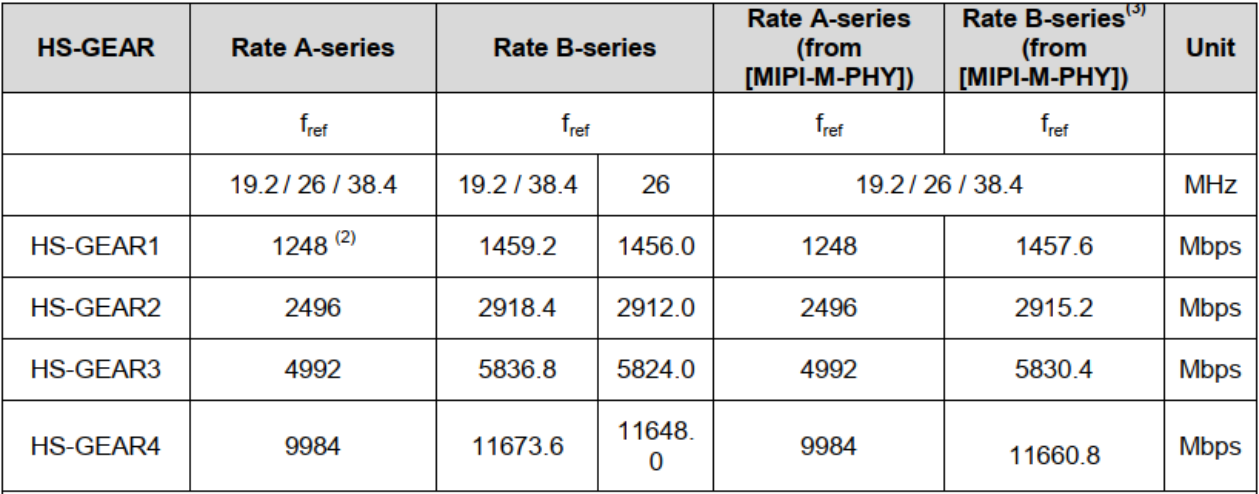
HS Gear: English PDF original
| HS-GEAR | Rate A-series (f_ref 19.2/26/38.4 MHz) | Rate B-series (f_ref 19.2/38.4 MHz) | Rate B-series (f_ref 26 MHz) | Rate A-series (from MIPI-M-PHY, f_ref 19.2/26/38.4 MHz) | Rate B-series (3) (from MIPI-M-PHY, f_ref 19.2/26/38.4 MHz) | Unit |
|---|---|---|---|---|---|---|
| HS-GEAR1 | 1248 (2) | 1459.2 | 1456.0 | 1248 | 1457.6 | Mbps |
| HS-GEAR2 | 2496 | 2918.4 | 2912.0 | 2496 | 2915.2 | Mbps |
| HS-GEAR3 | 4992 | 5836.8 | 5824.0 | 4992 | 5830.4 | Mbps |
| HS-GEAR4 | 9984 | 11673.6 | 11648.0 | 9984 | 11660.8 | Mbps |