
This is a Rockchip platform reference, not an ArmSoM hardware-tested tutorial. Examples, logs, latency figures and support claims belong to the original document. Before adapting them to ArmSoM, verify the exact SoC, board HDMI-input routing, bridge chip/wiring, clocks and power, SDK/BSP, kernel and Android HAL. Support for all boards must not be inferred. Only a Chinese PDF was supplied. English and Russian fully translate its technical body, and all three articles use the Chinese original figures; text inside images has not been represented as English. Code and source-language comments are preserved. No flashing, register, permission or SELinux commands were executed.
Source technical version: V1.1.7. RK3588 native HDMI RX covers 4K60/4K30/1080P60/720P60, hotplug, recording, EDID, HDCP 1.4/2.3 and CEC. RK3588S lacks this block. RK3576 HDMI-to-MIPI examples do not imply native HDMI RX.
| Chip platform | Kernel | Android |
|---|---|---|
| RK3588 (RK3588S has no HDMI RX) | Linux 5.10 | 12.0 |
Editorial notes · ArmSoM documentation · Rockchip
1. HDMI IN overview
1.1 HDMI RX features
HDMI 1.4b/2.0 RX: up to 4K@60fps
Supported formats: RGB888/YUV420/YUV422/YUV444, 8-bit
Pixel clock: up to 600MHz
HDCP1.4/2.3
CEC hardware engine
E-EDID configuration
S/PDIF: 2-channel output
I2S: 2/4/6/8-channel output
Note: RK3588S does not contain an HDMI RX module.
1.2 HDMI IN block diagram

HDMI RX architecture — Chinese PDF p. 5
Depending on the application, HDMI RX can be integrated with either the TIF or Camera framework. TIF provides lower image-transfer latency; Camera exposes standard Camera APIs, simplifying recording and integration with downstream image-processing algorithms.
2. HDMI RX driver code and DTS configuration
2.1 SDK version requirements
HDMI IN support may continue to evolve. The source recommends upgrading the SDK to the latest applicable release. Query the SDK version as follows:
rk3588_s:/ # getprop | grep rksdk
[ro.rksdk.version]: [ANDROID12_RKR9]
2.2 Driver code and kernel configuration
Driver code:
drivers/media/platform/rockchip/hdmirx/
Kernel configuration:
CONFIG_VIDEO_ROCKCHIP_HDMIRX=y
2.3 DTS configuration
Refer to the RK3588 EVB1 DTS configuration in the SDK:
arch/arm64/boot/dts/rockchip/rk3588-evb1-lp4.dtsi
2.3.1 HDMI RX controller
/* Should work with at least 128MB cma reserved above. */
&hdmirx_ctrler {
   status = "okay";


   /* Effective level used to trigger HPD: 0-low, 1-high */
   hpd-trigger-level = <1>;
   hdmirx-det-gpios = <&gpio2 RK_PB5 GPIO_ACTIVE_LOW>;
   pinctrl-names = "default";
   pinctrl-0 = <&hdmim1_rx &hdmirx_det>;
};

hdmi {
   hdmirx_det: hdmirx-det {
      rockchip,pins = <2 RK_PB5 RK_FUNC_GPIO &pcfg_pull_up>;
   };

};
Board settings must match the actual circuit connections:
hpd-trigger-level: active level that triggers HPD. <1> means the RK3588 control pin and HDMI-port HPD have the same level; <0> means opposite levels.
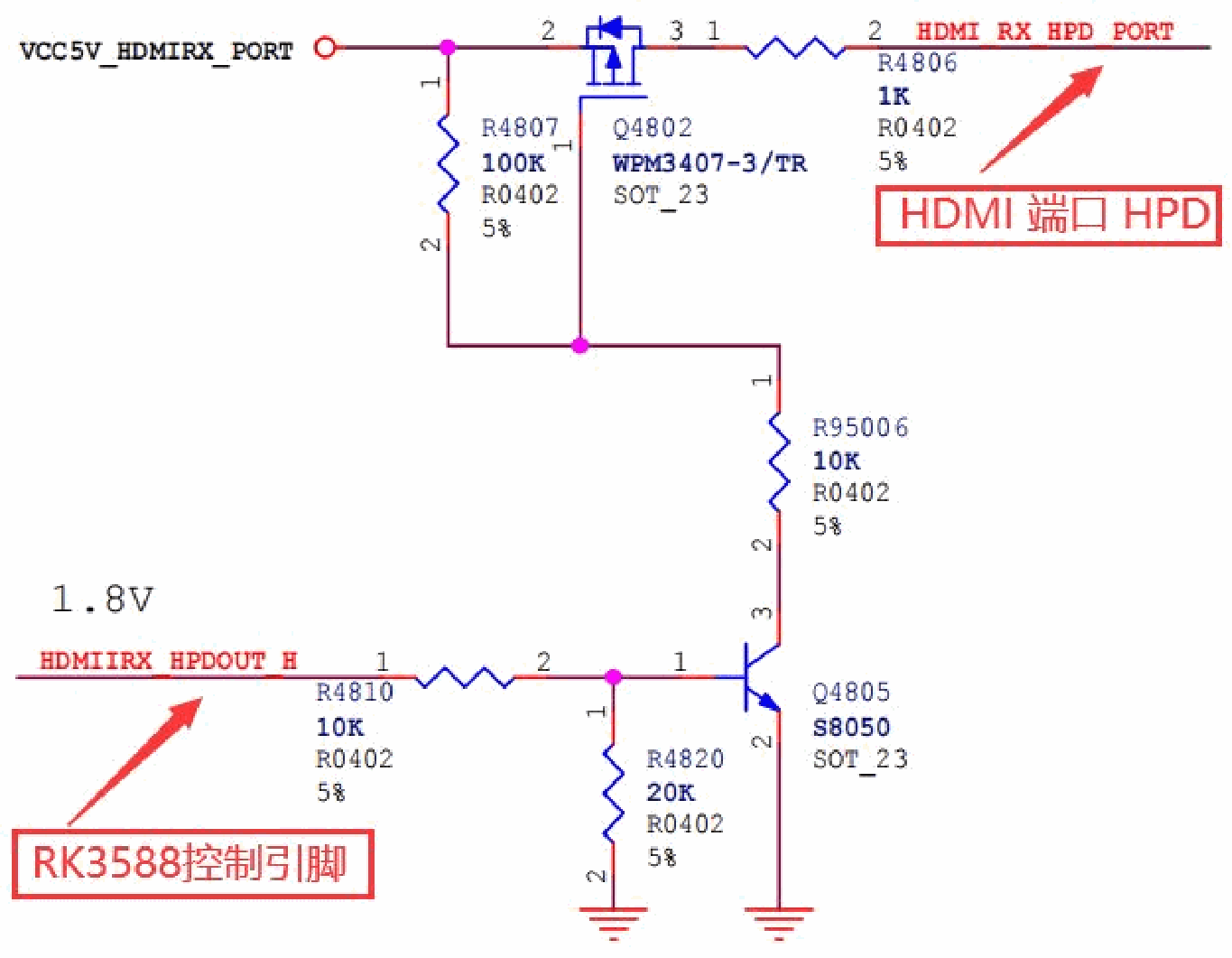
HPD control circuit — Chinese PDF p. 7
hdmirx-det-gpios: HDMI plug-detection pin. Configure the GPIO and active level according to the hardware. For active-low operation, configure an internal pull-up in pinctrl.
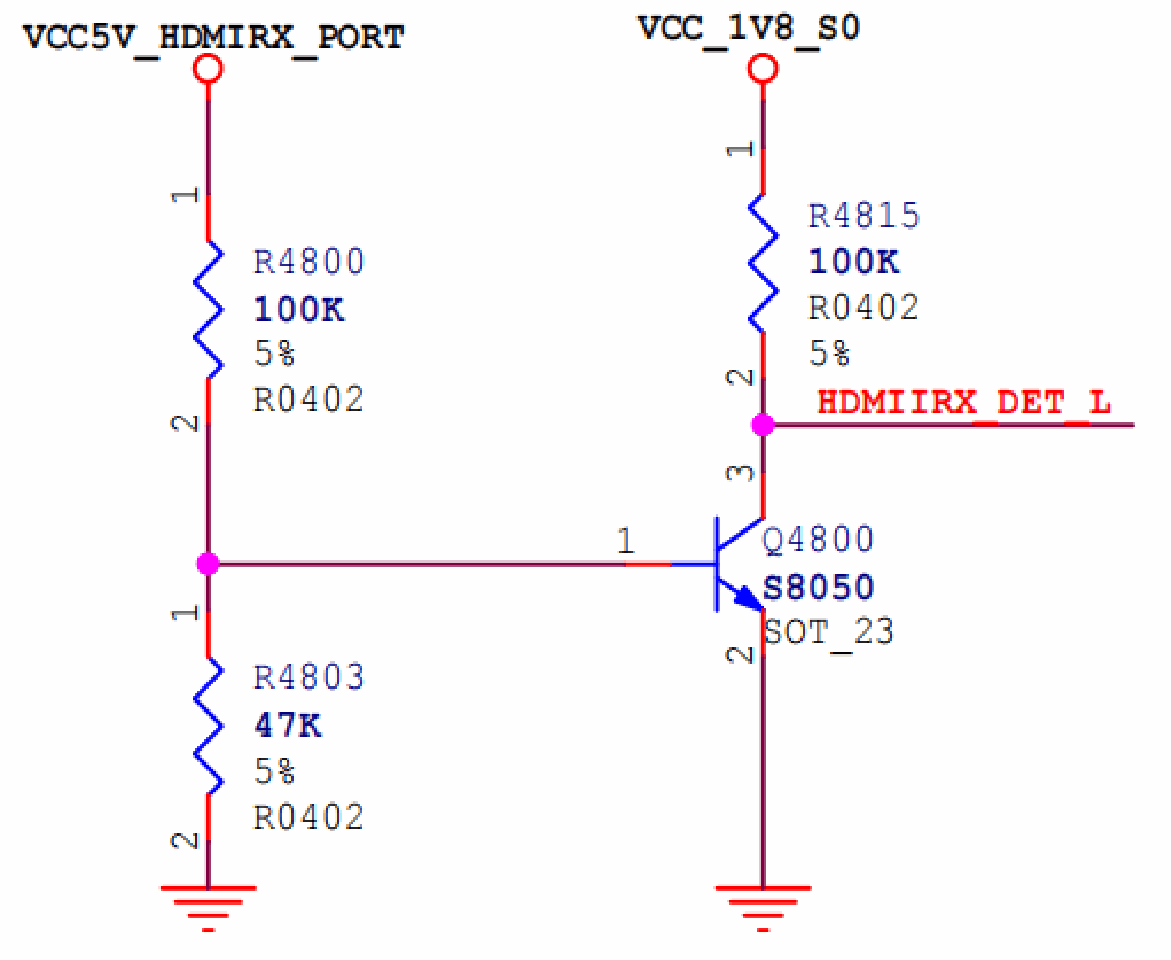
HDMI insertion-detection circuit — Chinese PDF p. 7
2.3.2 Reserved memory
RK3588 HDMI RX can use only physically contiguous memory. Reserve at least 128 MB of CMA memory; to increase it, change the reserved-memory size in DTS:
Note: this calculation assumes 3840x2160, RGB888, and four rotating buffers.
/* If hdmirx node is disabled, delete the reserved-memory node here. */
reserved-memory {
   #address-cells = <2>;

   #size-cells = <2>;
   ranges;

   /* Reserve 128MB memory for hdmirx-controller@fdee0000 */
   cma {
      compatible = "shared-dma-pool";
      reusable;
      /* Start address: 256 * 0x100000, Length: 128 * 0x100000 */
      reg = <0x0 (256 * 0x100000) 0x0 (128 * 0x100000)>;
      linux,cma-default;
   };
};
2.3.3 Audio configuration
Add the sound-card configuration to DTS:
diff --git a/arch/arm64/boot/dts/rockchip/rk3588-evb1-lp4.dtsi
b/arch/arm64/boot/dts/rockchip/rk3588-evb1-lp4.dtsi
index 4aa6a8ce9364..84c9c51d3b7f 100644

--- a/arch/arm64/boot/dts/rockchip/rk3588-evb1-lp4.dtsi
+++ b/arch/arm64/boot/dts/rockchip/rk3588-evb1-lp4.dtsi
@@ -47,6 +47,26 @@ play-pause-key {
           };
      };
+     hdmiin_dc: hdmiin-dc {
+          compatible = "rockchip,dummy-codec";
+          #sound-dai-cells = <0>;
+     };
+
+     hdmiin-sound {
+          compatible = "simple-audio-card";

+          simple-audio-card,format = "i2s";
+          simple-audio-card,name = "rockchip,hdmiin";
+          simple-audio-card,bitclock-master = <&dailink0_master>;
+          simple-audio-card,frame-master = <&dailink0_master>;
+          status = "okay";
+          simple-audio-card,cpu {
+                sound-dai = <&i2s7_8ch>;
+          };
+          dailink0_master: simple-audio-card,codec {
+                sound-dai = <&hdmiin_dc>;
+          };
+     };
+

      pcie20_avdd0v85: pcie20-avdd0v85 {
           compatible = "regulator-fixed";
           regulator-name = "pcie20_avdd0v85";
@@ -460,6 +480,10 @@ &i2s6_8ch {
      status = "okay";
 };
+&i2s7_8ch {
+     status = "okay";
+};
+
Specify the HDMIIN sound-card information in the HAL:
diff --git a/tinyalsa_hal/audio_hw.c b/tinyalsa_hal/audio_hw.c
index ea97bee..509d140 100644

--- a/tinyalsa_hal/audio_hw.c
+++ b/tinyalsa_hal/audio_hw.c
@@ -362,6 +362,7 @@ struct dev_proc_info HDMI_IN_NAME[] =
 {
   {"realtekrt5651co", "tc358749x-audio"},
+  {"rockchiphdmiin", NULL},
   {NULL, NULL}, /* Note! Must end with NULL, else will cause crash */
 };
The default SDK described in the source already includes these settings. If the sound-card name is changed, add the corresponding information to the HAL’s HDMI_IN_NAME array.
2.3.4 HDCP configuration
RK3588 has two HDCP2.3 controllers, hdcp0 and hdcp1. The source states that each has three ports and lists the following assignments:
hdcp0: DPTX0 and DPTX1
hdcp1: HDMIRX, HDMITX0 and HDMITX1
Enable hdcp1 if HDMIRX requires HDCP2.3.
HDCP1.4-only support:
&hdmirx_ctrler {
   status = "okay";

   hdcp1x-enable;
};
Enable HDCP2.3 as follows. Enabling it also provides HDCP1.4 compatibility by default:
&hdcp1 {
   status = "okay";
};


&hdmirx_ctrler {
   status = "okay";
   hdcp2x-enable;
};
2.3.5 CEC configuration
&hdmirx_ctrler {
   status = "okay";
   cec-enable;

};
2.4 EDID configuration
RK3588 supports configurable EDID. The EDID in the source driver includes the following resolutions:
3840x2160P60、3840x2160P50、3840x2160P30、3840x2160P25、3840x2160P24、
1920x1080P60、1920x1080P50、1920x1080P30、1920x1080i60、1920x1080i50、
1600x900P60、1440x900P60、1280x800P60、

1280x720P60、1280x720P50、1024x768P60、
720x576P50、720x480P60、720x576i50、720x480i60、
800x600P60、640x480P60
Supported input formats include:
RGB888、YUV420、YUV422、YUV444
The source provides two EDID groups selectable by upper-layer applications:
edid_init_data_340M: resolutions with pixel clock below 340M, mainly HDMI1.4 resolutions, including 4K60 YUV420.
edid_init_data_600M: resolutions with pixel clock 594M, supporting 4K60 YUV422/YUV444/RGB888.
For custom EDID requirements, edit the corresponding array directly in the driver:
drivers/media/platform/rockchip/hdmirx/rk_hdmirx.c
static u8 edid_init_data_340M[] = {
   0x00, 0xFF, 0xFF, 0xFF, 0xFF, 0xFF, 0xFF, 0x00,
   0x49, 0x70, 0x88, 0x35, 0x01, 0x00, 0x00, 0x00,

   0x2D, 0x1F, 0x01, 0x03, 0x80, 0x78, 0x44, 0x78,
   ...
};

static u8 edid_init_data_600M[] = {
   0x00, 0xFF, 0xFF, 0xFF, 0xFF, 0xFF, 0xFF, 0x00,
   0x49, 0x70, 0x88, 0x35, 0x01, 0x00, 0x00, 0x00,
   0x2D, 0x1F, 0x01, 0x03, 0x80, 0x78, 0x44, 0x78,
   ...
};
Alternatively, configure EDID dynamically through the video node’s ioctl interface:
static const struct v4l2_ioctl_ops hdmirx_v4l2_ioctl_ops = {
   ...

   .vidioc_g_edid = hdmirx_get_edid,
   .vidioc_s_edid = hdmirx_set_edid,
   ...
};
EDID may be edited with an EDID editor and then substituted into the driver. The source suggests obtaining a graphical EDID editor separately.
3. HDMI IN video architecture
3.1 HDMI IN video workflow
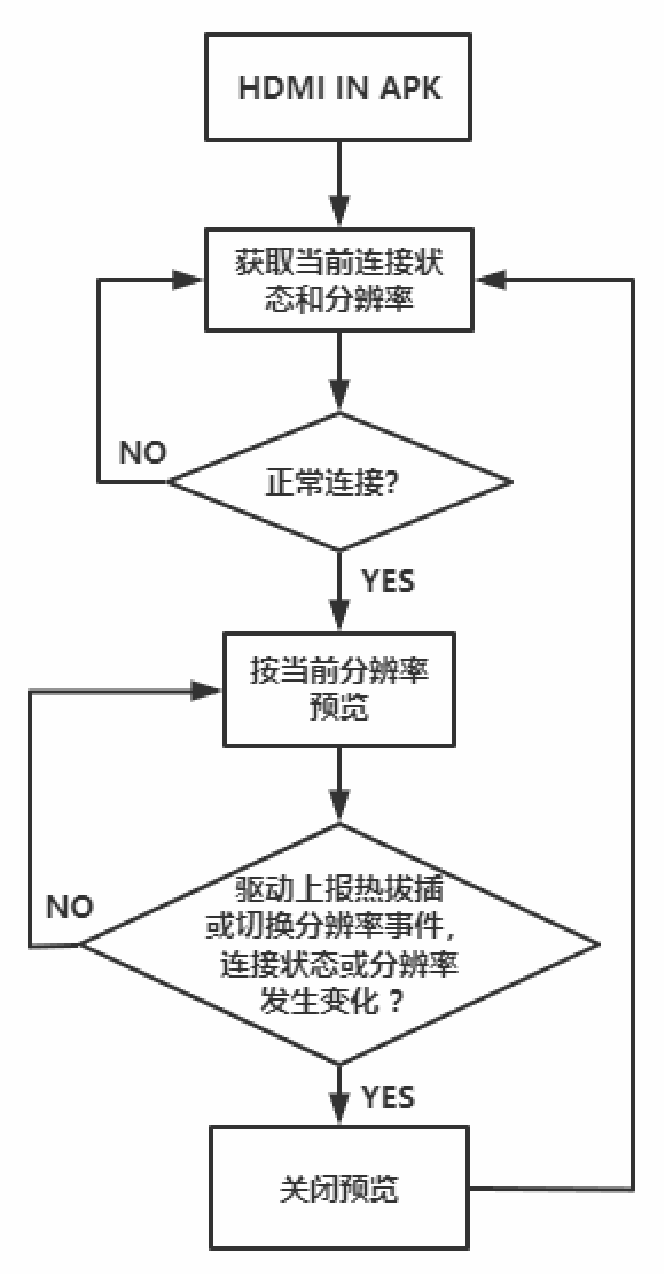
APK open/close flow — Chinese PDF p. 12
3.2 Main HDMI RX driver architecture
Pay particular attention to the following interrupts and delayed_work handlers:
hdmirx_5v_det_irq_handler: 5 V detection interrupt triggered by the HDMIIRX_DET_L GPIO, used to detect HDMI insertion and removal.
hdmirx_hdmi_irq_handler: HDMI RX controller interrupt, mainly used during initialization/configuration and HDMI signal-change monitoring.
hdmirx_dma_irq_handler: HDMI RX DMA interrupt, mainly used for buffer rotation during image preview.
hdmirx_delayed_work_hotplug: delayed_work associated with the 5 V detection interrupt; configures HDMI RX in response to hot-plug events.
hdmirx_delayed_work_res_change: reconfigures the controller and waits for signal lock when the HDMI RX controller detects a signal-change interrupt.
Resolution-change flow:
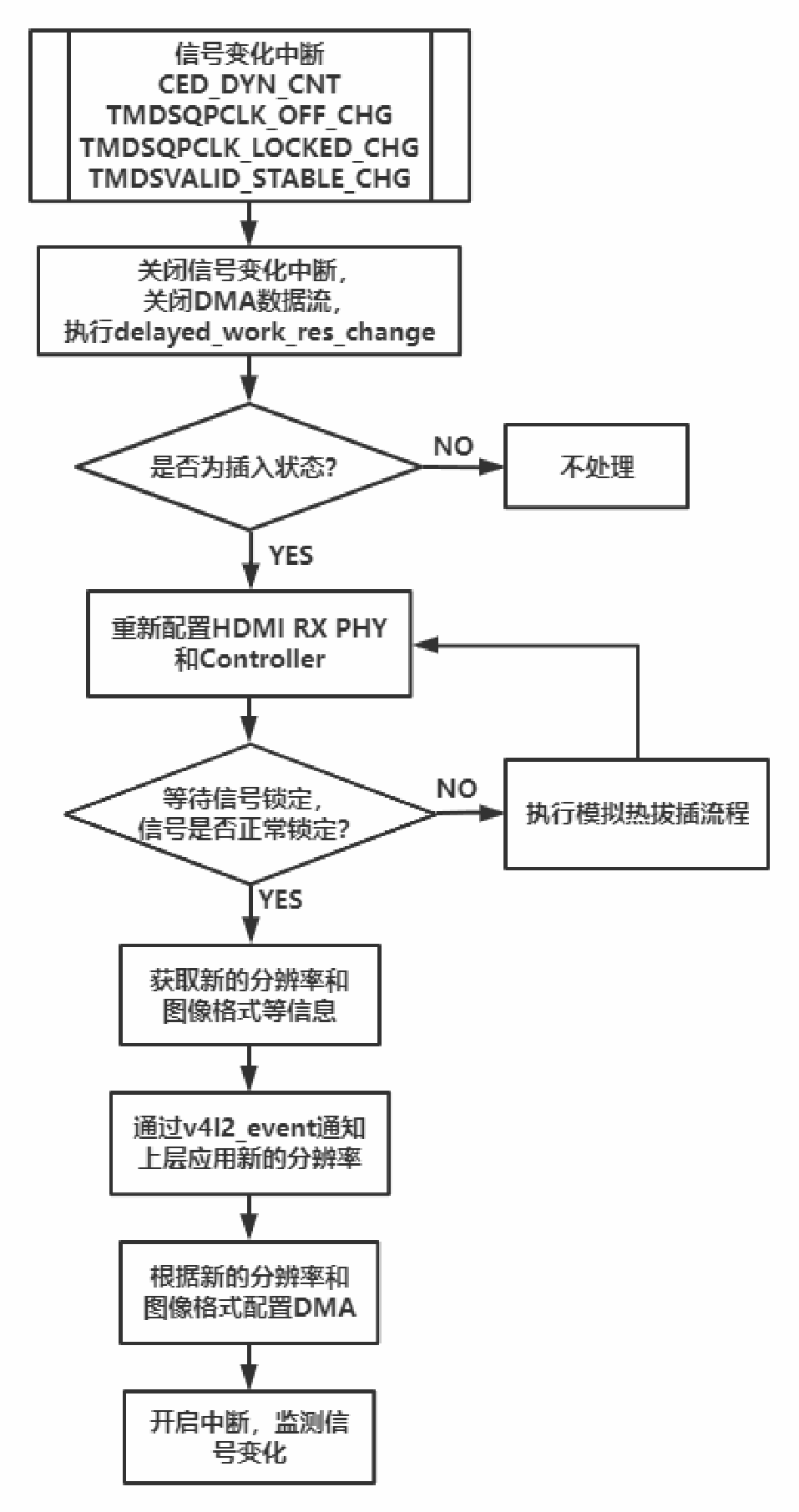
Resolution-change flow — Chinese PDF p. 13
Hot-plug flow:
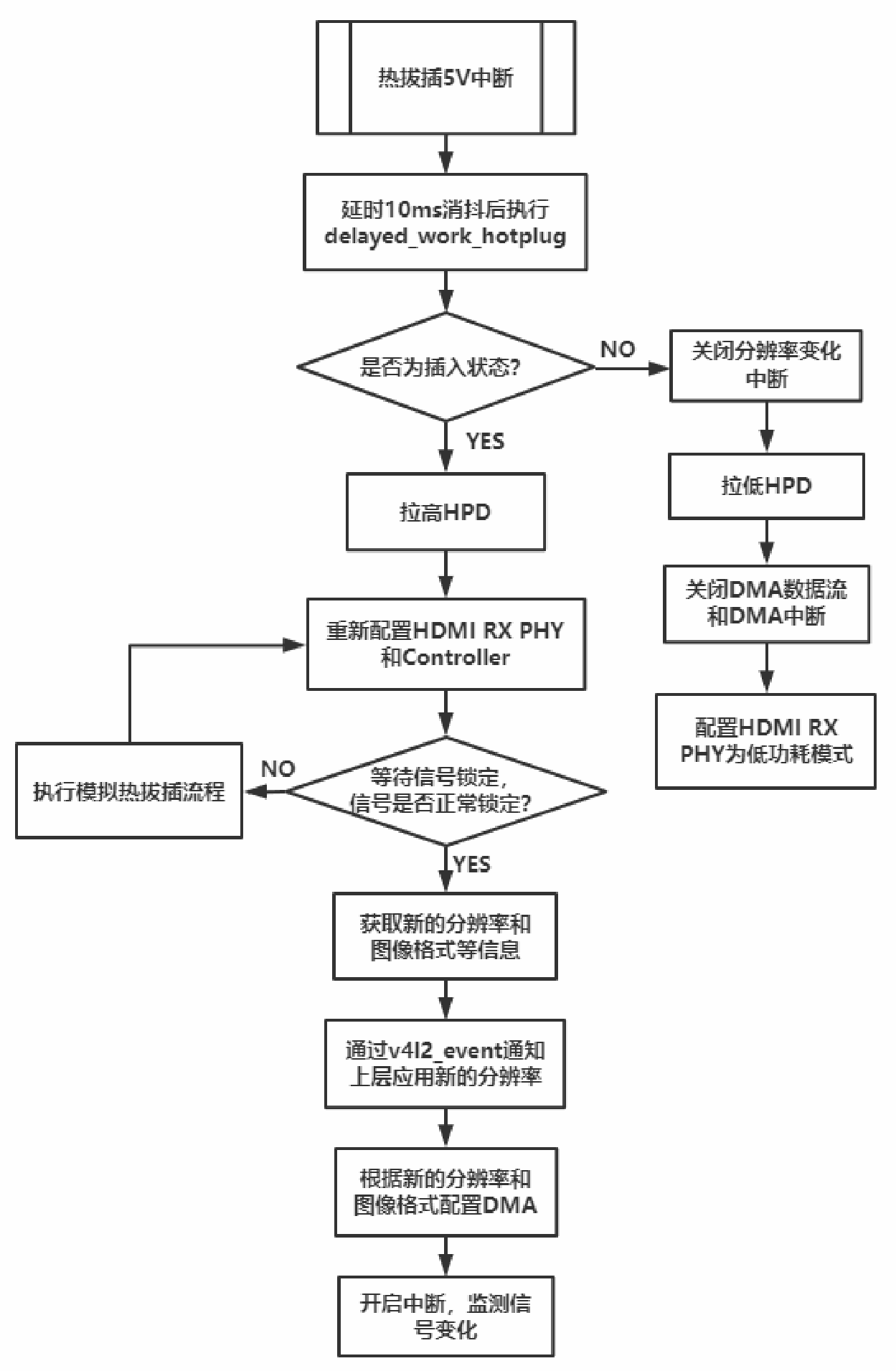
Hotplug flow — Chinese PDF p. 14
3.3 Image-buffer rotation
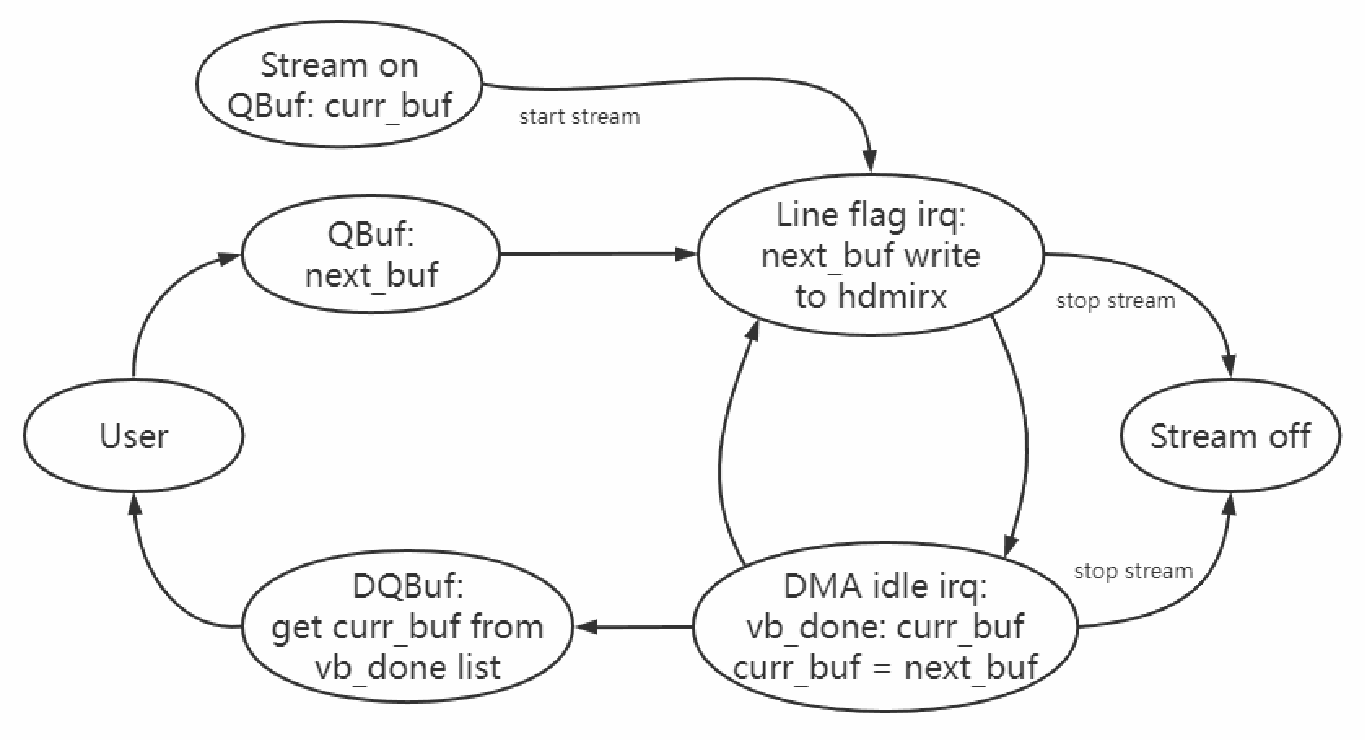
Image-buffer rotation — Chinese PDF p. 15
QBuf / DQBuf: users submit free buffers through QBuf and retrieve buffers filled with image data through DQBuf.
Line flag irq: an interrupt is generated after a configured number of lines, stated in the source as width/2, or half a frame. The interrupt handler updates the buffer. A physical buffer address written to HDMI RX does not take effect immediately, but at the next vsync. Because vblank is short, updating during it may be too late and the next frame could overwrite the previous frame; therefore the buffer is updated in advance. The source’s width/2 wording is retained for verification.
DMA idle irq: the DMA-idle interrupt is equivalent to a frame-end interrupt. It occurs after one frame has been transferred; the buffer is added to vb_done list, awaiting retrieval through DQBuf.
Stream on: starts streaming, initially using curr_buf.
Stream off: after the user requests stream-off, the driver waits for an interrupt before stopping the stream, then returns all buffers.
3.4 Image-transfer latency
The source reports approximately 20–30 ms latency with TIF and accelerated display. This is not an ArmSoM measurement.
The source reports approximately 100–120 ms display latency with the Camera framework. This is not an ArmSoM measurement.
4. HDMI IN HDCP
HDCP1.4 and HDCP2.3 keys must be purchased separately through the official HDCP licensing channel; RK3588 does not contain built-in HDCP keys, according to the source.
4.1 HDCP1.4
4.1.1 DTS configuration
Refer to the HDCP configuration section and set hdcp1x-enable;.
4.1.2 Programming keys
Obtain the key-splitting and conversion tool from the SDK:
RKTools/windows/Rockchip_HdcpKey_Writer_V1.0.1.7z 工具包下面有 KeyConvertor key 的拆
分和转换工具,更新到   KeyConvertor-V2.0.5 可以拆分成一个bin文件只有一个key.
Obtain the key-programming tool from the SDK:
RKTools/windows/Rockchip_HdcpKey_Writer_V1.0.1.7z
First extract the required keys from the original key file with the splitting/conversion tool, then convert the extracted keys into an .skf programming file.
If not using the Rockchip programming tool, split the keys so that each file contains one key. Enter 1 in the tool’s keys-per-file field and extract the files; conversion to .skf is unnecessary.
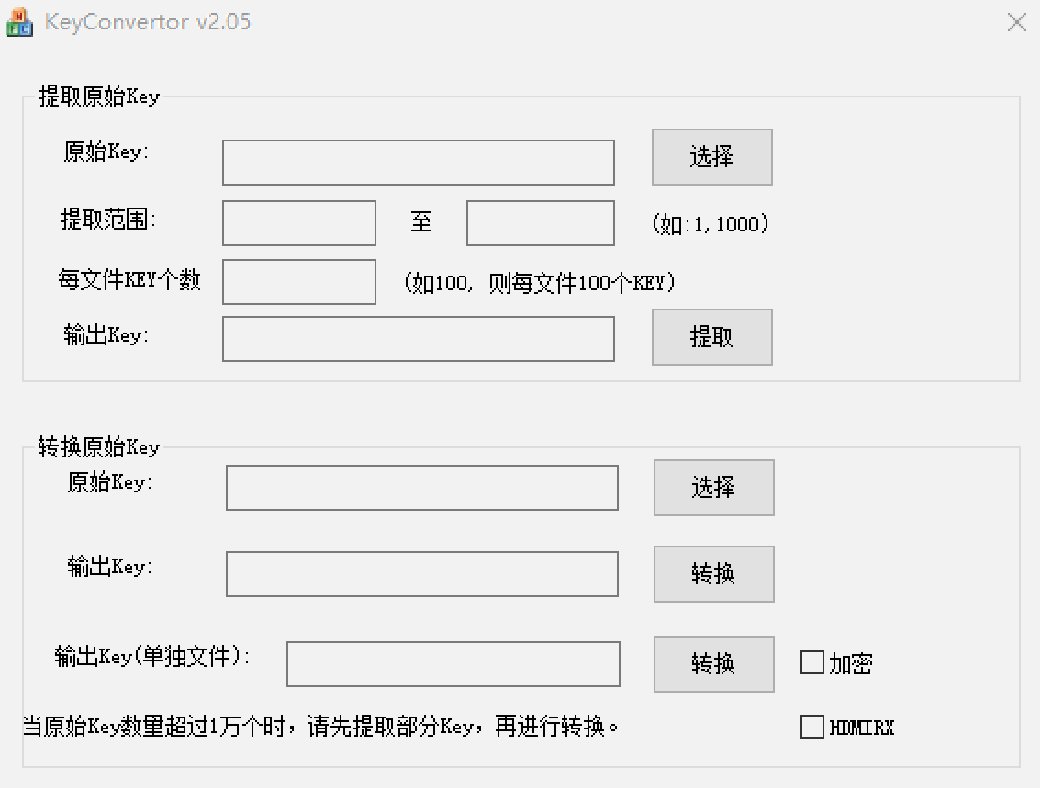
HDCP key conversion tool — Chinese PDF p. 16
Put the device in Loader mode. In the programming tool select hdcp1.4Hdmirx and RK3588. RK3588 adds AES encryption for HDCP1.4 keys, so Do AES is optional: without it only SEED encryption is used; with it AES is applied on top of SEED. The source describes this as more secure. Import the .skf file and click Write to program the key.
Note: after programming one key, the tool automatically advances to the next key.
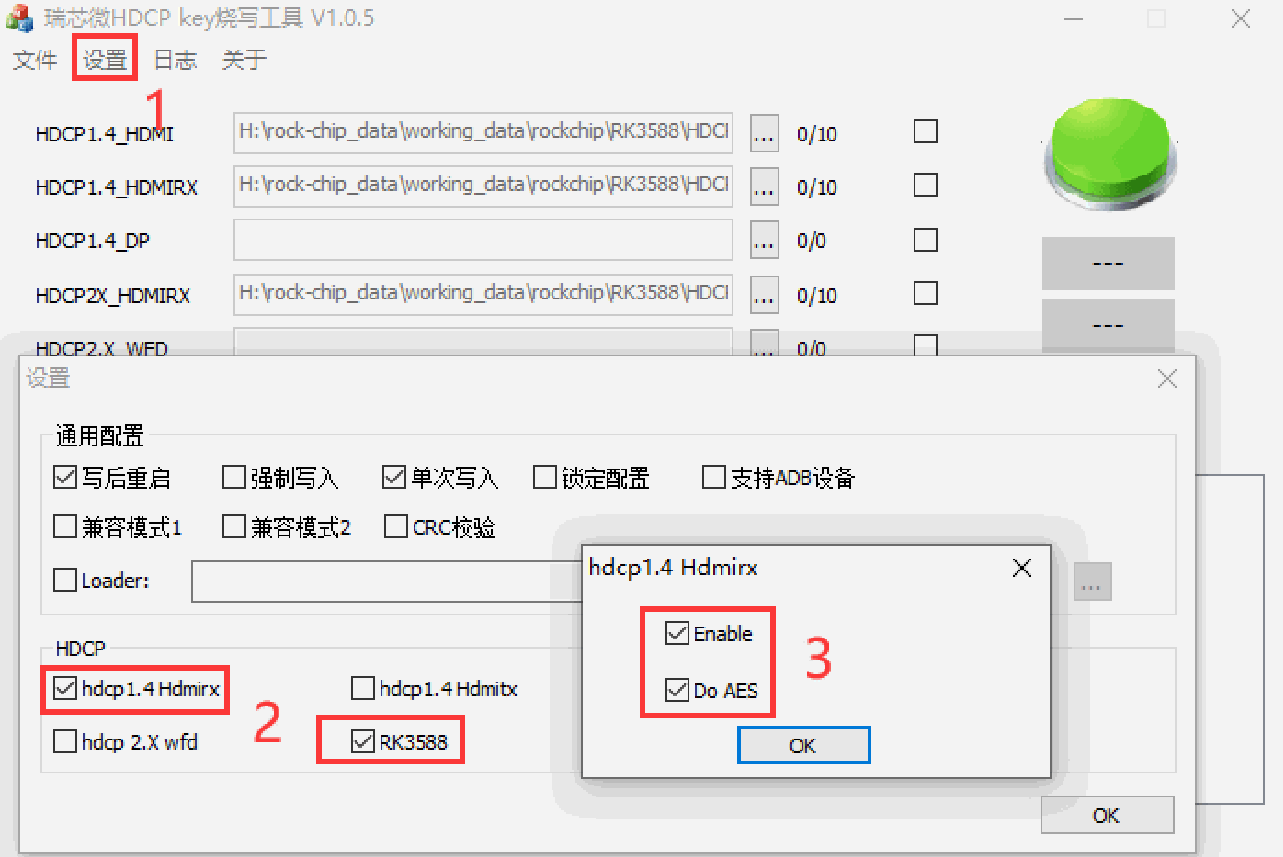
HDCP 1.4 programming configuration — Chinese PDF p. 17
HDCP1.4 key structure:
一个HDCP 1.4 KEY有308 Bytes,分别如下:
8 Bytes KSV: 5 Bytes KSV + 3 Bytes 0x0组成;
280 Bytes DPK;

20 Bytes SHA.
4.1.3 Checking HDCP1.4 status
cat /sys/class/misc/hdmirx_hdcp/status


HDCP Disable: hdcp1.4 没使能
HDCP1.4: Authenticated start: 认证过程中
HDCP1.4: Authenticated success: 认证成功
HDCP1.4: Authenticated failed: 认证失败
HDCP1.4: Unknown status: 未知状态
4.2 HDCP2.3
The HDCP2.3 firmware-packaging tool is supplied separately in the source workflow. Obtain the HDCP2.3 tool package through Redmine first.
4.2.1 DTS configuration
Refer to the HDCP configuration section and set hdcp2x-enable;.
4.2.2 Packaging firmware and starting the service
Extract WC_HDCP2_BASE_ESM_Firmware in Linux. Copy hdcp_receivers.bin to its root and tools/ directories. If HDMITX is also required, copy hdcp_transmitter.bin to the same directories.
DWC_HDCP2_BASE_ESM_Firmware$
cp ../hdcp_receivers.bin .

cp ../hdcp_receivers.bin tools/
Run build_rockchip_fw.sh to package the firmware and RX keys:
DWC_HDCP2_BASE_ESM_Firmware$ ./build_rockchip_fw.sh
The packaging process prompts for the following inputs:
(1) Select firmware type: 1 -build firmware for both HDMIRX and HDMITX. The source names the generated file ./firmware/hdpc2_hdmi.fw here; subsequent instructions use hdcp2_hdmi.fw. Verify this filename discrepancy.
1 -build firmware for both HDMIRX and HDMITX
2 -build firmware for HDMITX only
3 -build firmware for DP

Choose the fw type: 1
(2) Specify how many RX keys to create, for example 10 or 100. Individual keys are generated as fw_hdcp_receivers_*.bin under ./rxkeys/hdcpkeys?-?/. When using a custom programming tool, these .bin files can be programmed directly.
Create Rx Key Number:
10
......

Create 10 keys to tools/rxkeys/hdcpkeys1-10/
(3) For the Rockchip programming tool, package the keys into an .skf file under ./rxkeys/hdcpkeys?-?/. Otherwise answer n.
Do want to pack these keys to .skf file? [y/n]:
y


10 file packed to ./rxkeys/hdcpkeys1-10/hdcprxkeys1-10.skf
Programming HDCP2.3 RX keys:
(1) Place hdcp2_hdmi.fw in device/rockchip/rk3588/. The build copies it to vendor/firmware/hdcp2_hdmi.fw.
(2) In RKDevInfoTool.exe select HDCP2X_HDMIRX and import the generated hdcprxkeys1-10.skf. Program in Loader mode. After each key, the tool automatically advances to the next one and waits.
(3) HDCP2.3 keys do not require AES encryption in this workflow. Select only RK3588 and hdcp2x hdmirx.
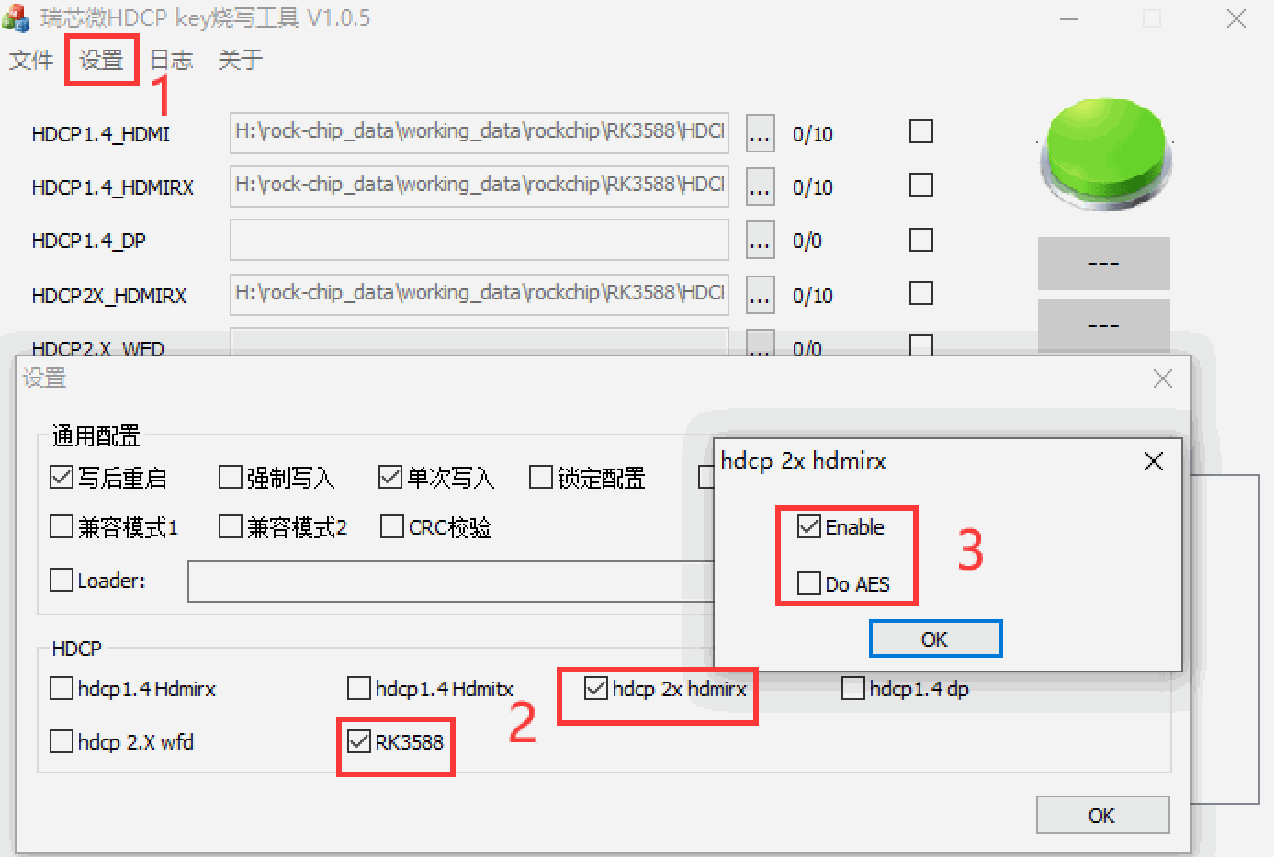
HDCP 2.3 programming configuration — Chinese PDF p. 19
hdcp2_rx_tx service
The service loads automatically at boot. If authentication fails, inspect the logs with logcat | grep HDCP2.
4.2.3 Checking HDCP2.3 status
cat /sys/class/misc/hdmirx_hdcp/status

HDCP Disable: HDCP没使能

HDCP2.3: Authenticated success: 认证成功
HDCP2.3: Authenticated failed: 认证失败
HDCP2.3: No dectypted: 源端没有开启HDCP2.x
4.3 Programming HDCP keys
(1) Use Rockchip’s programming tools from RKTools/windows/ in the SDK.
(2) Alternatively, develop a key-programming application using Rockchip’s libhdcp.so. The application calls its interfaces to encrypt keys and write them to vendor storage. This library is not included in the default SDK described by the source; request it through Redmine.
libhdcp.so provides the following interfaces:
enum HDCP_KEY_ID {
   HDCP1X_KEY_HDMITX_RK33 = 0,
   HDCP1X_KEY_HDMITX_RK3588,

   HDCP1X_KEY_HDMIRX_RK3588,
   HDCP1X_KEY_HDMIRX_RK628,
   HDCP1X_KEY_DP_RK3588,
   HDCP2X_KEY_HDMIRX_RK3588,
};
/*
 * Encrypt the key, but is not written to vendor

 *
 * id: HDCP KEY type
 * keyin: HDCP1.x 308 Byte raw Key, HDCP2.x 1000 Byte Key
 * keyin_size: HDCP1.x 308, HDCP2.x 1000
 * keyout: The encrypted key
 * keyout_size: HDCP1.x 314, HDCP2.x 1000
 */
int hdcp_key_process(enum HDCP_KEY_ID id, uint8_t *keyin, int keyin_size, uint8_t
*keyout, int keyout_size);

/*
 * Encrypt key and write it to vendor

 *
 * id: HDCP KEY type
 * keyin: HDCP1.x 308 Byte raw Key, HDCP2.x 1000 Byte Key
 * keyin_size: HDCP1.x 308, HDCP2.x 1000
 */
int hdcp_key_process_and_write(enum HDCP_KEY_ID id, uint8_t *keyin, int
keyin_size);

/*
 * Write key to vendor
 *
 * id: HDCP KEY type
 * key: HDCP1.x 308 Byte raw Key, HDCP2.x 1000 Byte Key

 * size: key size
 */
int hdcp_key_write(enum HDCP_KEY_ID id, uint8_t *key, int size);

/*
 * Read key from vendor
 *
 * id: HDCP KEY type
 * key: HDCP1.x 308 Byte raw Key, HDCP2.x 1000 Byte Key
 * len: key length
 */
int hdcp_key_read(enum HDCP_KEY_ID id, uint8_t *key, int *len);
5. HDMI IN CEC
Make the following changes in device/rockchip/common:
TX: ro.hdmi.device_type=4 (Playback; the source spells it Playerback).
RX: ro.hdmi.device_type=0 (TV).
diff --git a/device.mk b/device.mk
index d600bf1..a5e9ae3 100644
--- a/device.mk
+++ b/device.mk
@@ -699,10 +699,10 @@ endif
 endif


 # hdmi cec
-ifneq ($(filter atv box, $(strip $(TARGET_BOARD_PLATFORM_PRODUCT))), )
+ifneq ($(filter atv box tablet, $(strip $(TARGET_BOARD_PLATFORM_PRODUCT))), )
 PRODUCT_COPY_FILES += \

frameworks/native/data/etc/android.hardware.hdmi.cec.xml:$(TARGET_COPY_OUT_VENDOR
)/etc/permissions/android.hardware.hdmi.cec.xml
-PRODUCT_PROPERTY_OVERRIDES += ro.hdmi.device_type=4
+PRODUCT_PROPERTY_OVERRIDES += ro.hdmi.device_type=0
 PRODUCT_PACKAGES += \
      hdmi_cec.$(TARGET_BOARD_PLATFORM)


+DEVICE_MANIFEST_FILE +=
device/rockchip/common/manifests/android.hardware.tv.cec@1.0-service.xml
 # HDMI CEC HAL
 PRODUCT_PACKAGES += \
diff --git a/manifests/android.hardware.tv.cec@1.0-service.xml
b/manifests/android.hardware.tv.cec@1.0-service.xml
new file mode 100644
index 00000000..5afa59d7
--- /dev/null
+++ b/manifests/android.hardware.tv.cec@1.0-service.xml
@@ -0,0 +1,11 @@
+<manifest version="1.0" type="device">

+  <hal format="hidl">
+     <name>android.hardware.tv.cec</name>
+     <transport>hwbinder</transport>
+     <version>1.0</version>
+     <interface>
+        <name>IHdmiCec</name>
+        <instance>default</instance>
+     </interface>
+  </hal>
+</manifest>
6. Adapting the HDMI IN APK
6.1 APK source paths
packages/apps/TV/partner_support/samples: provides the TV-source data service, interacting with the HAL and preview APK through the framework. It runs as a hidden service at boot and has no launcher icon.
packages/apps/rkCamera2: preview APK interacting with the TV-source service through the framework. Its launcher name is HdmiIn. Product developers commonly replace it with their own preview APK.
hardware/rockchip/tv_input: HAL code that exchanges commands with the driver for stream on/off, hot-plug events and resolution changes.
HDMI IN is disabled in the default SDK code described by the source. Set the following property to enable it and build the related modules, including the APKs above:
vim device/rockchip/rk3588/BoardConfig.mk
BOARD_HDMI_IN_SUPPORT := true
Enabling BOARD_HDMI_IN_SUPPORT configures vendor.hwc.enable_sideband_stream_2_mode by default. The source prints its value as l (lowercase letter L); verify the intended value against the build configuration. After boot, use getprop to check that it was set.
6.2 HdmiIn preview APK
MainActivity uses TIF preview, reusing parts of Android’s TV Input Framework, and supports HDMI-to-MIPI and HDMI RX paths. A custom preview APK must use the standard TvView widget. For HDMI-to-MIPI driver configuration, refer to the source-referenced Android 12+ HDMIIN Bridge Chip Developer Guide.
String INPUT_ID =
"com.example.partnersupportsampletvinput/.SampleTvInputService/HW0";
Uri channelUri = TvContract.buildChannelUriForPassthroughInput(INPUT_ID);

//tvinput.hdmiin.type取值0为HDMI RX,1为HDMI TO MIPI。需在tune之前设置,不设置默认为HDMI
RX
//SystemProperties.set("tvinput.hdmiin.type", "1");
tvView.tune(INPUT_ID, channelUri);
Important: products with HDMI-to-MIPI but no HDMI RX, such as RK3576 or RK3588 with HDMI RX disabled in DTS, must configure tvinput.hdmiin.type. Otherwise TIF shows a black screen and cannot preview HDMI-to-MIPI. RK3576 example:
device/rockchip/rk3576/device.mk
PRODUCT_PROPERTY_OVERRIDES += \

   tvinput.hdmiin.type=1
For TIF preview, enable vtunnel and vendor.hwc.enable_sideband_stream_2_mode. The following DTS enables vtunnel on the default RK3588 EVB1; adjust DTS for other products.
diff --git a/arch/arm64/boot/dts/rockchip/rk3588-evb1-lp4.dtsi
b/arch/arm64/boot/dts/rockchip/rk3588-evb1-lp4.dtsi
index a10dad37f9cf..b3dd3a8bbb19 100644

--- a/arch/arm64/boot/dts/rockchip/rk3588-evb1-lp4.dtsi
+++ b/arch/arm64/boot/dts/rockchip/rk3588-evb1-lp4.dtsi
@@ -275,6 +275,10 @@ &dp1_in_vp2 {
      status = "okay";
 };

+&rkvtunnel {
+     status = "okay";
+};
+
 /*
 * mipi_dcphy0 needs to be enabled

 * when dsi0 is enabled
diff --git a/arch/arm64/boot/dts/rockchip/rk3588.dtsi
b/arch/arm64/boot/dts/rockchip/rk3588.dtsi
index fa4a7e35099e..e3acf575aefd 100644

--- a/arch/arm64/boot/dts/rockchip/rk3588.dtsi
+++ b/arch/arm64/boot/dts/rockchip/rk3588.dtsi
@@ -8,6 +8,10 @@
 #include "rk3588-vccio3-pinctrl.dtsi"

 / {
+     rkvtunnel: rkvtunnel {
+           compatible = "rockchip,video-tunnel";
+           status = "disabled";
+     };
      aliases {
           dp0 = &dp0;

           dp1 = &dp1;
diff --git a/arch/arm64/configs/rockchip_defconfig
b/arch/arm64/configs/rockchip_defconfig
index c742a4cc4fe5..039173d51bbe 100644
--- a/arch/arm64/configs/rockchip_defconfig
+++ b/arch/arm64/configs/rockchip_defconfig
@@ -684,6 +684,7 @@ CONFIG_ROCKCHIP_MPP_IEP2=y
 CONFIG_ROCKCHIP_MPP_JPGDEC=y
 CONFIG_ROCKCHIP_MPP_AV1DEC=y
 CONFIG_ROCKCHIP_MPP_VDPP=y
+CONFIG_ROCKCHIP_VIDEO_TUNNEL=y
 CONFIG_SOUND=y
 CONFIG_SND=y

 CONFIG_SND_DYNAMIC_MINORS=y
Important: TIF requires five rotating buffers. For 3840x2160 BGR888, RGB888 or NV24, the theoretical CMA size is 3840 * 2160 * 3 * 5 = 121500KB ≈ 119M. Since the system may also consume CMA and fragmentation can occur, allocate more, for example 256M. See Section 2.3.2 for increasing reserved memory.
In the following example, logcat reports cma: Out of memory, and reading the allocated CMA buffers shows fewer than five. This indicates insufficient reserved CMA memory.
rk3588_u:/ # cat /d/dma_buf/bufinfo | grep cma
24883200   00000002   00080007    00000002    cma  00000416

   cma
24883200   00000002   00080007    00000002    cma  00000415
   cma
24883200   00000002   00080007    00000002    cma  00000414
   cma
24883200   00000002   00080007    00000002    cma  00000413
   cma
rk3588_u:/ #

W tv_input_Sideband: dequeueBuffer 259 do allocateBuffer
I android.hardware.graphics.allocator-V1-service: alloc_format: FMT:0x113,MOD:0
I android.hardware.graphics.allocator-V1-service: mali_gralloc_adjust_dimensions:
alloc_format=FMT:0x113,MOD:0 usage=0x11000000a0000833 alloc_width=3840,

alloc_height=2160
D cma  : __cma_alloc(cma 00000000a43238b2, count 6075, align 8)
E cma  : __cma_alloc: cma: alloc failed, req-size: 6075 pages, ret: -12
I cma  : number of available pages:
1@543+1@575+4@588+2@598+2@606+2@638+2@1694+2@1726+2@1758+2@1766+2@1774+2@1782+2@1
790+2@1798+2@1806+2@1814+2@1822+2@1830+2@1838+2@1846+2@1854+2@1862+2@1870+2@1878+

2@1886+2@1894+2@1902+2@1910+2@1918+2@1926+2@1934+2@1942+2@1950+2@1958+2@1966+2@19
74+2@1982+2@1990+2@1998+2@2006+2@2014+2@2022+2@2030+2@2038+2@2046+2@2054+2@2062+2
@2070+2@2078+2@2086+2@2094+2@2102+2@2110+2@2118+2@2126+2@2134+2@2142+2@2150+2@215
8+2@2166+2@2174+2@2182+114@2190+69@8379+69@14523+69@20667+5957@26811=> 6402 free
of 32768 total pages
D cma  : __cma_alloc(): returned 0000000000000000
E DMABUFHEAPS: Unable to allocate from DMA-BUF heap: cma: Out of memory
E DMABUFHEAPS: No ion heap of name cma exists
E DMABUFHEAPS: No ion heap of name cma exists
E android.hardware.graphics.allocator-V1-service: libdmabufheap allocation failed
for cma heap
E android.hardware.graphics.allocator-V1-service: buffer allocation failed: Out

of memory
E android.hardware.graphics.allocator-V1-service: buffer allocation failed: Out
of memory
E GraphicBufferAllocator: Failed to allocate (3840 x 2160) layerCount 1 format 40
usage 11000000a0000833: 1
RockchipCamera2 uses Camera preview and supports both HDMI-to-MIPI and HDMI RX. Normally tapping the app icon launches MainActivity. To use the Camera pipeline, first enable HDMI IN camera support with the following property:
vim device/rockchip/rk3588/BoardConfig.mk
CAMERA_SUPPORT_HDMI := true
Also set persist.sys.hdmiinmode to 2. Tapping HdmiIn then launches RockchipCamera2 for Camera-based preview. The system Camera app can also be used.
6.3 TIF versus Camera preview
| TIF | Camera | |
|---|---|---|
| Advantages | Low latency | The app can obtain preview data for post-processing |
| Disadvantages | No screen rotation, split screen, picture-in-picture or independent displays; app cannot obtain preview buffers; screencap screenshots unsupported | Higher latency than TIF |
(1) TIF does not support picture-in-picture. Switch to Camera to use it. In the MainActivity TIF example, tap anywhere and select PIP in the dialog to switch to Camera picture-in-picture. CAMERA_SUPPORT_HDMI := true must already enable the Camera preview path.
(2) TIF supports recording and screenshots through virtual displays created with Google’s standard MediaProjectionManager. The screenrecord command is also supported.
For these recording/screenshot features, or mirroring to a PC through ADB, configure the following property:
vim device/rockchip/rk3588/device.mk
PRODUCT_PROPERTY_OVERRIDES += debug.sf.enable_hwc_vds=true
If the product directory under device has been overridden, apply the setting in that product’s directory. After boot, run getprop debug.sf.enable_hwc_vds through ADB and verify that it returns true. (3) TIF does not support screenshots using ADB screencap, including volume-plus-power shortcut screenshots. Use the MediaProjectionManager virtual-display method described in item (2).
7. Driver debugging
7.1 Obtaining debugging tools
Debugging requires v4l2-ctl. The SDK described by the source automatically includes it when building firmware; its SDK directory is:
hardware/rockchip/camera/etc/tools/
7.2 Debugging-command examples
Enable debug logging when diagnosing problems; see the logging section.
7.2.1 Listing HDMIRX video nodes
grep -H hdmirx /sys/class/video4linux/video*/name
7.2.2 Finding the rk_hdmirx device
Use v4l2-ctl -d to select a video node and -D to display its information. Check Driver name to identify the rk_hdmirx device.
rk3588_s:/ # v4l2-ctl -d /dev/video17 -D
Driver Info:

      Driver name : rk_hdmirx
      Card type   : rk_hdmirx
      Bus info    : fdee0000.hdmirx-controller
      Driver version : 5.10.66
      Capabilities : 0x84201000
           Video Capture Multiplanar
           Streaming
           Extended Pix Format
           Device Capabilities
      Device Caps : 0x04201000
           Video Capture Multiplanar
           Streaming
Extended Pix Format
7.2.3 Retrieving stored driver timings
Retrieve the timings stored when the device locked to the signal:
rk3588_s:/ # v4l2-ctl -d /dev/video17 --get-dv-timings
DV timings:

      Active width: 3840
      Active height: 2160
      Total width: 4400
      Total height: 2250
      Frame format: progressive
      Polarities: -vsync -hsync
      Pixelclock: 594024000 Hz (60.00 frames per second)
      Horizontal frontporch: 172
      Horizontal sync: 92
      Horizontal backporch: 296
      Vertical frontporch: 8
      Vertical sync: 10
      Vertical backporch: 72

      Standards:
      Flags:
7.2.4 Querying timings in real time
Read timings directly from HDMI RX registers:
rk3588_s:/ # v4l2-ctl -d /dev/video17 --query-dv-timings
      Active width: 3840
      Active height: 2160

      Total width: 4400
      Total height: 2250
      Frame format: progressive
      Polarities: -vsync -hsync
      Pixelclock: 594024000 Hz (60.00 frames per second)
      Horizontal frontporch: 172
      Horizontal sync: 92
      Horizontal backporch: 296
      Vertical frontporch: 8
      Vertical sync: 10
      Vertical backporch: 72
      Standards:

      Flags:
When query-dv-timings runs with debug level 2, dmesg shows detailed timings, pixel format, color depth and TMDS clock information, as in the following example:
[16750.029542][ T2247] fdee0000.hdmirx-controller: hdmirx_get_pix_fmt: pix_fmt:
YUV422
[16750.029581][ T2247] fdee0000.hdmirx-controller: hdmirx_get_colordepth:

color_depth: 24, reg_val:4
[16750.029592][ T2247] fdee0000.hdmirx-controller: get timings from dma
[16750.029602][ T2247] fdee0000.hdmirx-controller: act:3840x2160,
total:4400x2250, fps:60, pixclk:594024000
[16750.029610][ T2247] fdee0000.hdmirx-controller: hfp:172, hs:92, hbp:296,
vfp:8, vs:10, vbp:72
[16750.029618][ T2247] fdee0000.hdmirx-controller: tmds_clk:594024000
[16750.029626][ T2247] fdee0000.hdmirx-controller: interlace:0, fmt:1, vic:127,
color:24, mode:hdmi
[16750.029633][ T2247] fdee0000.hdmirx-controller: deframer_st:0x11
[16750.029643][ T2247] fdee0000.hdmirx-controller: query_dv_timings:
3840x2160p60.00 (4400x2250)
7.2.5 Querying resolution and image format
Query the current resolution and image format:
rk3588_s:/ # v4l2-ctl -d /dev/video17 --get-fmt-video
Format Video Capture Multiplanar:

      Width/Height : 3840/2160
      Pixel Format : 'NV16'
      Field        : None
      Number of planes : 1
      Flags        : premultiplied-alpha, 000000fe
      Colorspace   : Unknown (1025fcdc)
      Transfer Function : Unknown (00000020)
      YCbCr Encoding : Unknown (000000ff)
      Quantization : Default
      Plane 0      :
        Bytes per Line : 3840
        Size Image : 16588800
7.2.6 Starting the image stream
Start streaming with the correct video node, resolution and pixelformat for the actual setup:
v4l2-ctl --verbose -d /dev/video17 \
--set-fmt-video=width=3840,height=2160,pixelformat='NV16' \
--stream-mmap=4
Format mapping: RGB888 -> ‘RGB3’, YUV422 -> ‘NV16’, YUV420 -> ‘NV12’, YUV444 -> ‘NV24’.
7.2.7 Capturing an image file
Save an image file on the device, retrieve it to a PC with adb pull, and inspect it using a tool such as 7yuv or YUView:
v4l2-ctl --verbose -d /dev/video17 \
--set-fmt-video=width=3840,height=2160,pixelformat='NV16' \
--stream-mmap=4 --stream-skip=3 \

--stream-to=/data/4k60_nv16.yuv \
--stream-count=5 --stream-poll
7.2.8 Normal streaming log
If reception works normally, the log reports the frame rate. Source example:
VIDIOC_QUERYCAP: ok
VIDIOC_G_FMT: ok
VIDIOC_S_FMT: ok

Format Video Capture Multiplanar:
      Width/Height : 3840/2160
      Pixel Format : 'NV16'
      Field        : None
      Number of planes : 1
      Flags        : premultiplied-alpha, 000000fe
      Colorspace   : Unknown (1025fcdc)
      Transfer Function : Unknown (00000020)
      YCbCr Encoding : Unknown (000000ff)
      Quantization : Default
      Plane 0      :
        Bytes per Line : 3840
        Size Image : 16588800

VIDIOC_REQBUFS: ok
VIDIOC_QUERYBUF: ok
VIDIOC_QUERYBUF: ok
VIDIOC_QBUF: ok
VIDIOC_QUERYBUF: ok
VIDIOC_QBUF: ok
VIDIOC_QUERYBUF: ok
VIDIOC_QBUF: ok
VIDIOC_QUERYBUF: ok
VIDIOC_QBUF: ok
VIDIOC_STREAMON: ok
idx: 0 seq: 0 bytesused: 16588800 ts: 103.172405

idx: 1 seq: 1 bytesused: 16588800 ts: 103.189072 delta: 16.667 ms
idx: 2 seq: 2 bytesused: 16588800 ts: 103.205738 delta: 16.666 ms
idx: 3 seq: 3 bytesused: 16588800 ts: 103.222404 delta: 16.666 ms
idx: 0 seq: 4 bytesused: 16588800 ts: 103.239070 delta: 16.666 ms fps: 60.00
idx: 1 seq: 5 bytesused: 16588800 ts: 103.255736 delta: 16.666 ms fps: 60.00
idx: 2 seq: 6 bytesused: 16588800 ts: 103.272402 delta: 16.666 ms fps: 60.00
8. Troubleshooting
8.1 Enabling logging
Set the HDMI RX driver debug level from 0 to 3 with the following command:
echo 2 > /sys/module/rockchip_hdmirx/parameters/debug
dmesg -n 8
For logs from power-on and boot, the source recommends modifying the code and rebuilding/flashing the relevant kernel components. Reference patch:
diff --git a/drivers/media/platform/rockchip/hdmirx/rk_hdmirx.c
b/drivers/media/platform/rockchip/hdmirx/rk_hdmirx.c
index c763a9558169..bd7f3effb45a 100644

--- a/drivers/media/platform/rockchip/hdmirx/rk_hdmirx.c
+++ b/drivers/media/platform/rockchip/hdmirx/rk_hdmirx.c
@@ -34,7 +34,7 @@
 #include "rk_hdmirx_cec.h"

static struct class *hdmirx_class;
-static int debug;
+static int debug = 2;
 module_param(debug, int, 0644);
 MODULE_PARM_DESC(debug, "debug level (0-3)");

diff --git a/include/media/v4l2-common.h b/include/media/v4l2-common.h
index 1cc0c5ba16b3..e74f3a85f0b8 100644

--- a/include/media/v4l2-common.h
+++ b/include/media/v4l2-common.h
@@ -75,7 +75,7 @@
 #define v4l2_dbg(level, debug, dev, fmt, arg...)   \
      do {                                          \
           if (debug >= (level))                    \
-                v4l2_printk(KERN_DEBUG, dev, fmt , ## arg); \
+                v4l2_printk(KERN_INFO, dev, fmt , ## arg); \
      } while (0)
Note: debug level 3 is generally discouraged because it generates a large amount of output.
8.2 Reading and writing registers with io
The io tool can access HDMI RX registers. Enable the following kernel configuration:
CONFIG_DEVMEM=y
Example register query using io:
// 通过以下命令可查看io使用帮忙:
io -h


rk3588_s:/ # io -4 -l 0xc 0xfdee0594
fdee0594: 0000000f 80008000 00008000
8.3 Querying HDMI RX status
Query current HDMI RX status, including signal lock, image format, timings and pixel clock:
rk3588_s:/ # cat /d/hdmirx/status
status: plugin

Clk-Ch:Lock Ch0:Lock   Ch1:Lock    Ch2:Lock
Ch0-Err:0  Ch1-Err:0   Ch2-Err:0
Color Format: YUV422         Store Format: YUV422 (8 bit)
Mode: 3840x2160p60 (4400x2250) hfp:172 hs:92 hbp:296 vfp:8 vs:10
vbp:72
Pixel Clk: 594024000
Query HDMI RX controller registers:
rk3588_s:/ # cat /d/hdmirx/ctrl

--------------------hdmirx ctrl--------------------

00000000: 48515258 30313130 6c753031 01000310
00000010: Reserved 31353138 30333039 32303231
00000020: WO...... 00211f01 198b7b25
00000040: WO...... 00001001 00000000
00000050: 00000001
...
---------------------------------------------------
Query HDMI RX PHY registers:
rk3588_s:/ # cat /d/hdmirx/phy

--------------------hdmirx phy---------------------

0000004f: 01000000
0000100f: 01000000
0000110f: 01000000
0000120f: 01000000
0000130f: 01000000
0000104a: 01002600
...
---------------------------------------------------
Query display-layer information:
rk3588_s:/ # cat /d/dri/0/summary
Video Port0: DISABLED
Video Port1: DISABLED
Video Port2: DISABLED
Video Port3: ACTIVE
   Connector: DSI-1

      bus_format[100a]: RGB888_1X24
      overlay_mode[0] output_mode[0] color_space[0], eotf:0
   Display mode: 1080x1920p60
      clk[132000] real_clk[132000] type[48] flag[a]
      H: 1080 1095 1099 1129
      V: 1920 1935 1937 1952
   Esmart3-win0: ACTIVE //HDMI-IN预览图层
      win_id: 11
      format: RG24 little-endian (0x34324752) SDR[0] color_space[0]
glb_alpha[0xff]
      rotate: xmirror: 0 ymirror: 0 rotate_90: 0 rotate_270: 0
      csc: y2r[0] r2y[0] csc mode[0]

      zpos: 0
      src: pos[0, 0] rect[1920 x 1080]
      dst: pos[0, 0] rect[1080 x 1920]
      buf[0]: addr: 0x00000000f070a000 pitch: 5760 offset: 0
   Cluster3-win0: ACTIVE
      win_id: 6
      format: AB24 little-endian (0x34324241)[AFBC] SDR[0] color_space[0]
glb_alpha[0xff]
      rotate: xmirror: 0 ymirror: 0 rotate_90: 0 rotate_270: 0
      csc: y2r[0] r2y[0] csc mode[0]
      zpos: 1
      src: pos[0, 0] rect[1080 x 1920]
      dst: pos[0, 0] rect[1080 x 1920]

      buf[0]: addr: 0x00000000ef903000 pitch: 4352 offset: 0
8.4 HDMI IN signal does not lock
Example log when HDMI IN cannot lock:
[ 285.949990][ T191] fdee0000.hdmirx-controller:
hdmirx_wait_lock_and_get_timing signal not lock, tmds_clk_ratio:0
Diagnostic steps:
Measure HDMIIRX_DET_L and check that its level matches the circuit design and changes when HDMI is inserted or removed.
At the HDMI connector, check that HDMI_RX_HPD_PORT rises when HDMI is inserted and falls when it is removed.
With HDMI connected, use an oscilloscope to verify normal TMDS output.
Check the log for successful SCDC communication. The source states that tmds_clk_ratio must be 1 when pixel clock exceeds 340M. If the source outputs 4K60 at pixel clock 594M but the log shows tmds_clk_ratio:0, SCDC communication has failed. Inspect HDMI DDC communication or retry unplugging/replugging.
Query register status:
console:/ # io -4 0xfdee0050
fdee0150: 00000001 // bit0:1表示HPD拉高,0表示HPD拉低


// 0x0594:bit[3:0]表示scdc_ch2locked、scdc_ch1locked、scdc_ch0locked、
scdc_clockdetected;
// 0x0598:bit[31]:scdc_err_det1_valid,bit[15]:scdc_err_det0_valid,低bit为误码数量
统计;
// 0x059c:bit[31]:scdc_erdet_lane0_valid,bit[15]:scdc_err_det2_valid,低bit为误码
数量统计;
console:/ # io -4 -l 0xc 0xfdee0594
fdee0594: 0000000f 80008000 00008000 // 正常锁定时的值
If a device locks only intermittently after hot-plugging, try increasing the wait-for-lock timeout to determine whether lock can complete.
diff --git a/drivers/media/platform/rockchip/hdmirx/rk_hdmirx.c
b/drivers/media/platform/rockchip/hdmirx/rk_hdmirx.c
index 39e4e15a6e17..a612fe30bda4 100644

--- a/drivers/media/platform/rockchip/hdmirx/rk_hdmirx.c
+++ b/drivers/media/platform/rockchip/hdmirx/rk_hdmirx.c
@@ -1264,7 +1264,7 @@ static int hdmirx_wait_lock_and_get_timing(struct
rk_hdmirx_dev *hdmirx_dev)
      u32 mu_status, scdc_status, dma_st10, cmu_st;
      struct v4l2_device *v4l2_dev = &hdmirx_dev->v4l2_dev;

-     for (i = 0; i < 300; i++) {
+     for (i = 0; i < 600; i++) {
           mu_status = hdmirx_readl(hdmirx_dev, MAINUNIT_STATUS);
           scdc_status = hdmirx_readl(hdmirx_dev, SCDC_REGBANK_STATUS3);
           dma_st10 = hdmirx_readl(hdmirx_dev, DMA_STATUS10);
@@ -1283,7 +1283,7 @@ static int hdmirx_wait_lock_and_get_timing(struct

rk_hdmirx_dev *hdmirx_dev)
           hdmirx_tmds_clk_ratio_config(hdmirx_dev);
      }

-     if (i == 300) {
+     if (i == 600) {
           v4l2_err(v4l2_dev, "%s signal not lock, tmds_clk_ratio:%d\n",
                       __func__, hdmirx_dev->tmds_clk_ratio);
           v4l2_err(v4l2_dev, "%s mu_st:%#x, scdc_st:%#x, dma_st10:%#x\n",
If a device often fails to lock after resolution changes, try adding a delay before raising HPD and check whether that helps.
diff --git a/drivers/media/platform/rockchip/hdmirx/rk_hdmirx.c
b/drivers/media/platform/rockchip/hdmirx/rk_hdmirx.c
index 8183485a6e4c..27b900e90501 100644

--- a/drivers/media/platform/rockchip/hdmirx/rk_hdmirx.c
+++ b/drivers/media/platform/rockchip/hdmirx/rk_hdmirx.c
@@ -2768,6 +2768,7 @@ static void hdmirx_delayed_work_res_change(struct
work_struct *work)
           hdmirx_submodule_init(hdmirx_dev);
           hdmirx_update_bits(hdmirx_dev, SCDC_CONFIG, POWERPROVIDED,
                             POWERPROVIDED);
+          msleep(300);
           hdmirx_hpd_ctrl(hdmirx_dev, true);
           hdmirx_phy_config(hdmirx_dev);
           hdmirx_audio_setup(hdmirx_dev);
Some signal generators or sources may have poor signal quality. HDMI RX then detects high error counts on individual channels and cannot lock. Read registers 0xfdee0594–0xfdee059c to check for errors:
rk3588_s:/ # io -4 -l 0xc 0xfdee0594
fdee0594: 0000000f 80008000 00008000 //正常数值


rk3588_s:/ # io -4 -l 0xc 0xfdee0594
fdee0594: 0000000f 804c8001 00008aff //检测到误码,分别对应ch1、ch0、ch2统计的误
码总数
If errors on one channel prevent lock, the source gives the following way to disable the driver’s internal error check to improve compatibility. This is a diagnostic workaround, not proof that the signal meets specifications.
diff --git a/drivers/media/platform/rockchip/hdmirx/rk_hdmirx.c
b/drivers/media/platform/rockchip/hdmirx/rk_hdmirx.c

index 606a08cd00505..6236196991c2a 100755
--- a/drivers/media/platform/rockchip/hdmirx/rk_hdmirx.c
+++ b/drivers/media/platform/rockchip/hdmirx/rk_hdmirx.c
@@ -1416,11 +1416,7 @@ static void hdmirx_controller_init(struct rk_hdmirx_dev
*hdmirx_dev)
                   CED_GBCHECKEN_QST |
                   CED_CTRLCHECKEN_QST |
                   CED_CHLOCKMAXER_QST_MASK,
-                  CED_VIDDATACHECKEN_QST|
-                  // CED_DATAISCHECKEN_QST |
-                  CED_GBCHECKEN_QST |
-                  CED_CTRLCHECKEN_QST |

-                  CED_CHLOCKMAXER_QST(0x10));
+                  0);
 }

 static void hdmirx_format_change(struct rk_hdmirx_dev *hdmirx_dev)
8.5 No image or black screen
HDMI IN no-image problems fall into two categories: driver faults and upper-layer/application faults. The following is a basic diagnostic sequence.
Driver checks:
(1) Check the kernel log for signal lock and correct resolution. If a switch is used, check that it also locks and outputs normally. See the hot-plug log example.
(2) Check whether every channel is locked and the resolution matches the source: cat /d/hdmirx/status.
(3) Use logs or registers to verify stream-on. The source refers to bit1 of the value read by io -4 0xfdee4414 as indicating normal stream-on; verify the exact bit condition against the driver.
(4) Set log level 3 and check for frame data; a log entry is printed every half-frame.
Upper-layer checks:
(1) Run date to record the approximate time of the problem.
(2) Inspect display layers with cat /d/dri/0/summary.
(3) Run dumpsys SurfaceFlinger.
(4) Save logcat output.
(5) After confirming streaming and the display layer in step (2), capture an image with the following command:
android12:
rm -rf data/system/dumpimage

mkdir data/system/dumpimage
chmod 777 data/system/dumpimage
setprop vendor.hdmiin.debug.dump 1
setprop vendor.hdmiin.debug.dumpnum 5
1s后立⻢
setprop vendor.hdmiin.debug.dumpnum 0
2s后立⻢
setprop vendor.hdmiin.debug.dump 0

android13:
rm -rf data/system/dumpimage
mkdir data/system/dumpimage
chmod 777 data/system/dumpimage

setprop vendor.tvinput.debug.dump 1
setprop vendor.tvinput.debug.dumpnum 10
半s后立⻢
setprop vendor.tvinput.debug.dumpnum 0
等个2s后
setprop vendor.tvinput.debug.dump 0
Check for files under data/system/dumpimage, archive that directory and provide the archive for diagnosis. If no files appear, SELinux may be responsible. The source suggests setenforce 0 followed by repeating the command; use such a permissive-mode test only in a controlled debugging environment, not as a production security configuration.
(6) Preserve the failure state, avoid unrelated actions, and provide the information above. If support cannot be reached promptly and the device cannot remain in that state, the following emergency command captures 10 seconds of information. Run it only after saving the earlier information, especially logcat: it executes logcat -c and deletes earlier logs. The source advises avoiding this step unless necessary and contacting support first.
setprop vendor.tvinput.debug.level 3
logcat -c
logcat

抓10s
setprop vendor.tvinput.debug.level 0
Special case: streaming and captured images are normal, but the display is black. AVMUTE may be active. Diagnose with the following commands:
(1) Check the AVMUTE status bit:
io -4 0xfdee4458 //bit25 avmute statue
io -4 0xfdee1030 //bit 0 GCP Set_AVMUTE bit4 GCP Clear_AVMUTE
(2) Change the AVMUTE color to verify it; the default is black:
io -4 0xfdee0430 0xff00 //设置RGB格式avmute为红色,yuv格式为其他颜色,若变色说明是
avmute导致。
Some web pages or advertisements use HDCP encryption. If the sink does not enable HDCP, AVMUTE may result.
8.6 Unstable signal and loss of lock
Some sources may intermittently flash black during preview, or logs may repeatedly show lock/resolution attempts followed by streaming failure. The source reports this with signal generators, TV boxes and DVD players. Possible causes follow; see the loss-of-lock log example.
The source encrypts with HDCP while the sink has not enabled HDCP, preventing lock.
Common HDCP-encrypted sources include Apple computers, DVD players and TV boxes.
Poor-quality or excessively long cables, or loose connectors, can make the HDMI signal at the SoC noncompliant.
Replace the cable and test stability to determine whether only particular cables fail.
Excessive drive strength or swing on an upstream switch may cause reflections on PCB traces.
Adjust switch drive strength, swing and termination as appropriate, in coordination with the switch vendor.
Overly sensitive interrupt settings may trigger disconnect/retry when a signal change is detected.
Close preview and inspect which interrupt is triggered, then check whether disabling it changes the behavior. The source recommends coordinated debugging through Redmine.
The source output may be unstable for an initial interval.
Add a delay and report the resolution only after the signal stabilizes.
diff --git a/drivers/media/platform/rockchip/hdmirx/rk_hdmirx.c
b/drivers/media/platform/rockchip/hdmirx/rk_hdmirx.c
index a69f8f6bd577..ede8d91f06dc 100644

--- a/drivers/media/platform/rockchip/hdmirx/rk_hdmirx.c
+++ b/drivers/media/platform/rockchip/hdmirx/rk_hdmirx.c
@@ -1674,7 +1675,7 @@ static int hdmirx_wait_lock_and_get_timing(struct
rk_hdmirx_dev *hdmirx_dev)
      }

      hdmirx_reset_dma(hdmirx_dev);
-     usleep_range(200*1000, 200*1010);
+     usleep_range(500*1000, 500*1010);
      hdmirx_format_change(hdmirx_dev);

      return 0;
8.7 Source resolution change fails
The source reports this on Apple computers, NVIDIA graphics cards and some laptops using domestic Chinese operating systems. During a resolution change, the driver normally lowers then raises HPD to reconnect. The source device may interpret this as sink removal and cancel the change. Configure HPD as a GPIO so it remains high throughout the resolution change.
Request the corresponding patch through Redmine: rk3588_hdmirx_config_hpd_as_gpio_config_scdc_pwr_asap_230513.patch.
8.8 Incorrect TMDSCLK measurement
This is commonly reported for 4K@60 RGB input: the source supplies TMDSCLK at 594M, but the driver measures 148.5M, producing incorrect frame and audio sample rates. See the TMDSCLK error log.
Request the patch through Redmine: rk3588_a12_hdmirx_patch_fps_err_0714.patch.
8.9 Black flashes in special source scenarios
Opening certain web pages, such as Youku or the source’s spelling blibli, or resizing windows may change the signal or increase errors, indirectly causing interrupts or loss of lock.
(1) An interrupt triggers reconnection: close preview to identify the interrupt in the logs and check whether disabling that interrupt resolves the issue. The source recommends submitting a Redmine issue.
(2) Increased errors cause loss of lock: disable error checking as described in the signal-does-not-lock section.
9. Typical logs
Usually set debug level 2 to obtain the relevant dmesg output, or modify the code as described in the logging section.
9.1 Hot-plug log
// 检测到拔出动作
[29830.165185][ T2655] fdee0000.hdmirx-controller: hdmirx_delayed_work_hotplug:
plugin:0

// 关闭中断
[29830.165203][ T2655] fdee0000.hdmirx-controller: hdmirx_interrupts_setup:
disable
// 拉低HPD
[29830.165211][ T2655] fdee0000.hdmirx-controller: hdmirx_hpd_ctrl: disable,
hpd_trigger_level:1
[29830.177109][ T598] fdee0000.hdmirx-controller: hdmirx_query_dv_timings port
has no link!
...
// 检测到插入动作
[29843.128833][ T2655] fdee0000.hdmirx-controller: hdmirx_delayed_work_hotplug:
plugin:1

// 拉高hpd
[29843.139653][ T2655] fdee0000.hdmirx-controller: hdmirx_hpd_ctrl: enable,
hpd_trigger_level:1
...
[29843.247796][ T2655] fdee0000.hdmirx-controller: wait_reg_bit_status: i:0,
time: 10ms
[29843.286353][ T2655] fdee0000.hdmirx-controller: wait_reg_bit_status: i:38,
time: 50ms
[29843.286373][ T2655] rk_hdmirx fdee0000.hdmirx-controller:
hdmirx_audio_interrupts_setup: 1
// HDMI信号锁定
[29843.703996][ T2655] fdee0000.hdmirx-controller:
hdmirx_wait_lock_and_get_timing signal lock ok, i:54!

...
// 图像格式
[30098.978794][ T2655] fdee0000.hdmirx-controller: hdmirx_get_pix_fmt: pix_fmt:
YUV422
[30098.978803][ T2655] fdee0000.hdmirx-controller: hdmirx_get_colordepth:
color_depth: 24, reg_val:4
// 详细分辨率timing
[30098.978813][ T2655] fdee0000.hdmirx-controller: get timings from ctrl
[30098.978819][ T2655] fdee0000.hdmirx-controller: act:1920x1080,
total:2200x1125, fps:60, pixclk:148500000
[30098.978825][ T2655] fdee0000.hdmirx-controller: hfp:84, hs:48, hbp:148, vfp:4,
vs:5, vbp:36

// TMDS CLK
[30098.978829][ T2655] fdee0000.hdmirx-controller: tmds_clk:148500000
[30098.978835][ T2655] fdee0000.hdmirx-controller: interlace:0, fmt:1, vic:127,
color:24, mode:hdmi
[30098.978840][ T2655] fdee0000.hdmirx-controller: deframer_st:0x11
...
// 上报分辨率变化事件
[30099.023034][ T2655] fdee0000.hdmirx-controller: hdmirx_format_change: New
format: 1920x1080p60.00 (2200x1125)
[30099.023039][ T2655] fdee0000.hdmirx-controller: hdmirx_format_change: queue
res_chg_event
9.2 Resolution-change log
// 信号变化,检测到数据误码中断
[ 312.662740][ C4] fdee0000.hdmirx-controller: avpunit_0_int_handler:
avp0_st:0x700000

[ 312.662750][ C4] fdee0000.hdmirx-controller: mu2_st:0x2
// TMDS信号变化中断
[ 312.662756][ C4] fdee0000.hdmirx-controller: mainunit_2_int_handler:
TMDSVALID_STABLE_CHG
[ 312.662760][ C4] fdee0000.hdmirx-controller: hdmirx_hdmi_irq_handler:
en_fiq
[ 312.688916][ T196] fdee0000.hdmirx-controller: hdmirx_delayed_work_audio: no
supported fs(0), cur_state 0
[ 312.688928][ T196] rk_hdmirx fdee0000.hdmirx-controller: audio off
// 进入切换分辨率流程,当前HDMI状态为插入
[ 312.723309][ T196] fdee0000.hdmirx-controller:
hdmirx_delayed_work_res_change: plugin:1

[ 312.723316][ T196] fdee0000.hdmirx-controller: hdmirx_interrupts_setup:
disable
[ 312.724986][ C4] fdee0000.hdmirx-controller: mu0_st:0x4000000
[ 312.724991][ C4] fdee0000.hdmirx-controller: hdmirx_hdmi_irq_handler:
en_fiq
// 相关配置完成后拉高HPD
[ 312.725000][ T196] fdee0000.hdmirx-controller: hdmirx_hpd_ctrl: enable,
hpd_trigger_level:1
...
// 信号锁定
fdee0000.hdmirx-controller: hdmirx_wait_lock_and_get_timing signal lock ok, i:2!
...
// 获取新的分辨率,图像格式等

[ 312.849040][ T196] fdee0000.hdmirx-controller: hdmirx_get_pix_fmt: pix_fmt:
YUV420
[ 312.849049][ T196] fdee0000.hdmirx-controller: hdmirx_get_colordepth:
color_depth: 24, reg_val:4
[ 312.849056][ T196] fdee0000.hdmirx-controller: get timings from ctrl
[ 312.849060][ T196] fdee0000.hdmirx-controller: act:3840x2160,
total:4400x2250, fps:60, pixclk:296996000
[ 312.849064][ T196] fdee0000.hdmirx-controller: hfp:84, hs:48, hbp:148, vfp:8,
vs:10, vbp:72
[ 312.849067][ T196] fdee0000.hdmirx-controller: tmds_clk:296996000
[ 312.849070][ T196] fdee0000.hdmirx-controller: interlace:0, fmt:3, vic:127,
color:24, mode:hdmi
9.3 Signal-unlocked error log
// 信号未锁定
[ 285.949990][ T191] fdee0000.hdmirx-controller:
hdmirx_wait_lock_and_get_timing signal not lock, tmds_clk_ratio:0

[ 285.950011][ T191] fdee0000.hdmirx-controller:
hdmirx_wait_lock_and_get_timing mu_st:0x0, scdc_st:0x0, dma_st10:0x10
...
// 读取到错误的分辨率
[ 257.222739][ T193] fdee0000.hdmirx-controller: get timings from dma
[ 257.222744][ T193] fdee0000.hdmirx-controller: act:39024x0, total:17732x1,
fps:8375, pixclk:148500000
[ 257.222749][ T193] fdee0000.hdmirx-controller: hfp:4294904560, hs:184,
hbp:41260, vfp:1, vs:0, vbp:0
[ 257.222753][ T193] fdee0000.hdmirx-controller: tmds_clk:148500000
[ 257.222758][ T193] fdee0000.hdmirx-controller: interlace:0, fmt:0, vic:127,
color:24, mode:dvi

// 连续读取到错误分辨率
[ 257.254994][ T193] fdee0000.hdmirx-controller: hdmirx_try_to_get_timings: res
not stable!
9.4 Driver stream-on/off log
// 开流使能dma,获取到30帧数据打印
[ 2360.096789][ T473] fdee0000.hdmirx-controller: hdmirx_start_streaming:
start_stream cur_buf y_addr:0x10700000, uv_addr:0x10700000

[ 2360.096813][ T473] fdee0000.hdmirx-controller: hdmirx_start_streaming: enable
dma
[ 2360.689582][ T205] fdee0000.hdmirx-controller: rcv frames
...
// 关流
[ 2475.818301][ T473] fdee0000.hdmirx-controller: stream start stopping
[ 2475.818575][ T205] fdee0000.hdmirx-controller: hdmirx_dma_irq_handler: stop
stream!
[ 2475.818613][ T473] fdee0000.hdmirx-controller: stream stopping finished
9.5 HDMI IN stream output
// 查看数据流打印需要将log等级开到3,每隔半帧打印一句log,打印如下:
[ 2778.207227][ T205] fdee0000.hdmirx-controller: dma_irq st1:0x80, st13:1080

[ 2778.215891][ T205] fdee0000.hdmirx-controller: dma_irq st1:0x100, st13:540
[ 2778.223889][ T205] fdee0000.hdmirx-controller: dma_irq st1:0x80, st13:1080
[ 2778.232559][ T205] fdee0000.hdmirx-controller: dma_irq st1:0x100, st13:540
[ 2778.240557][ T205] fdee0000.hdmirx-controller: dma_irq st1:0x80, st13:1080
[ 2778.249222][ T205] fdee0000.hdmirx-controller: dma_irq st1:0x100, st13:540
[ 2778.257226][ T205] fdee0000.hdmirx-controller: dma_irq st1:0x80, st13:1080
[ 2778.265887][ T205] fdee0000.hdmirx-controller: dma_irq st1:0x100, st13:540
[ 2778.273887][ T205] fdee0000.hdmirx-controller: dma_irq st1:0x80, st13:1080
[ 2778.282557][ T205] fdee0000.hdmirx-controller: dma_irq st1:0x100, st13:540
9.6 Signal-unlocked error log
// 信号未锁定
[ 285.949990][ T191] fdee0000.hdmirx-controller:
hdmirx_wait_lock_and_get_timing signal not lock, tmds_clk_ratio:0

[ 285.950011][ T191] fdee0000.hdmirx-controller:
hdmirx_wait_lock_and_get_timing mu_st:0x0, scdc_st:0x0, dma_st10:0x10
...
// 读取到错误的分辨率
[ 257.222739][ T193] fdee0000.hdmirx-controller: get timings from dma
[ 257.222744][ T193] fdee0000.hdmirx-controller: act:39024x0, total:17732x1,
fps:8375, pixclk:148500000
[ 257.222749][ T193] fdee0000.hdmirx-controller: hfp:4294904560, hs:184,
hbp:41260, vfp:1, vs:0, vbp:0
[ 257.222753][ T193] fdee0000.hdmirx-controller: tmds_clk:148500000
[ 257.222758][ T193] fdee0000.hdmirx-controller: interlace:0, fmt:0, vic:127,
color:24, mode:dvi

// 连续读取到错误分辨率
[ 257.254994][ T193] fdee0000.hdmirx-controller: hdmirx_try_to_get_timings: res
not stable!
9.7 Loss of lock after successful locking
// 驱动开流
[140.628993][ T1525] fdee0000.hdmirx-controller: hdmirx_start_streaming:
start_stream cur_buf y_addr:0x10b00000, uv_addr:0x10b00000

[140.629009][ T1525] fdee0000.hdmirx-controller: hdmirx_start_streaming: enable
dma
[140.632067][ T198] fdee0000.hdmirx-controller: line_flag_int_handler: last have
no dma_idle_irq
[141.223426][ T198] fdee0000.hdmirx-controller: rcv frames
// 预览3s后检测到信号变化
[144.955132][ C4] fdee0000.hdmirx-controller: mu0_st:0xc0000000
[144.955142][ C4] fdee0000.hdmirx-controller: mu2_st:0x2
[144.955173][ C4] fdee0000.hdmirx-controller: mainunit_2_int_handler:
TMDSVALID_STABLE_CHG
[144.955179][ C4] fdee0000.hdmirx-controller: hdmirx_hdmi_irq_handler: en_fiq
[144.958942][ T1525] fdee0000.hdmirx-controller: stream start stopping
...

// 锁定后报TMDSVALID_STABLE_CHG、TMDSQPCLK_LOCKED_CHG、TMDSQPCLK_OFF_CHG、AVP1中断
[ 176.865529][ T55] fdee0000.hdmirx-controller: hdmirx_format_change: New
format: 1920x1200p59.99 (2592x1242)
[ 176.873290][ T55] fdee0000.hdmirx-controller: hdmirx_format_change: queue
res_chg_event
[ 176.873311][ T55] fdee0000.hdmirx-controller: hdmirx_set_ddr_store_fmt:
pix_fmt: RGB888, DMA_CONFIG1:0x12000001
[ 176.873317][ T55] fdee0000.hdmirx-controller: hdmirx_interrupts_setup:
enable
[ 176.873355][ C4] fdee0000.hdmirx-controller: hdmirx_hdmi_irq_handler: hdmi
irq not handled!
[ 176.873358][ C4] fdee0000.hdmirx-controller: avp0:0x0, avp1:0x0, mu0:0x0,
mu2:0x0, pk0:0x800, pk2:0x0, scdc:0x0
[ 177.389362][ C4] fdee0000.hdmirx-controller: avpunit_0_int_handler:

avp0_st:0x200000
[ 177.389378][ C4] fdee0000.hdmirx-controller: mu2_st:0x2
[ 177.389397][ C4] fdee0000.hdmirx-controller: mainunit_2_int_handler:
TMDSVALID_STABLE_CHG
[ 177.389403][ C4] fdee0000.hdmirx-controller: hdmirx_hdmi_irq_handler:
en_fiq
[ 177.390164][ C4] fdee0000.hdmirx-controller: mu0_st:0x10
[ 177.390185][ C4] fdee0000.hdmirx-controller: mainunit_0_int_handler:
TMDSQPCLK_LOCKED_CHG
[ 177.390189][ C4] fdee0000.hdmirx-controller: hdmirx_hdmi_irq_handler:
en_fiq
[ 177.392165][ C4] fdee0000.hdmirx-controller: mu0_st:0x10

[ 177.392185][ C4] fdee0000.hdmirx-controller: mainunit_0_int_handler:
TMDSQPCLK_OFF_CHG
[ 177.392190][ C4] fdee0000.hdmirx-controller: hdmirx_hdmi_irq_handler:
en_fiq
[ 177.393391][ C4] fdee0000.hdmirx-controller: mu2_st:0x2
[ 177.393410][ C4] fdee0000.hdmirx-controller: mainunit_2_int_handler:
TMDSVALID_STABLE_CHG
[ 177.393415][ C4] fdee0000.hdmirx-controller: hdmirx_hdmi_irq_handler:
en_fiq
[ 177.397433][ C4] fdee0000.hdmirx-controller: avpunit_1_int_handler:
avp1_st:0x40000000
[ 177.397445][ C4] fdee0000.hdmirx-controller: hdmirx_hdmi_irq_handler:
en_fiq

[ 177.397994][ C4] fdee0000.hdmirx-controller: avpunit_1_int_handler:
avp1_st:0x80000000
[ 177.398002][ C4] fdee0000.hdmirx-controller: hdmirx_hdmi_irq_handler:
en_fiq
9.8 TMDSCLK measurement error
// 源端实际输入4k@60 实际tmdsclk为594M
[147.366197][ T192] fdee0000.hdmirx-controller: get timings from ctrl
[147.366201][ T192] fdee0000.hdmirx-controller: act:3840x2160, total:4400x2250,

fps:16, pixclk:153864000
[147.366206][ T192] fdee0000.hdmirx-controller: hfp:176, hs:88, hbp:296, vfp:8,
vs:10, vbp:72
[147.366210][ T192] fdee0000.hdmirx-controller: tmds_clk:153864000,
pix_clk:153864000
[147.366214][ T192] fdee0000.hdmirx-controller: interlace:0, fmt:0, vic:0,
color:24, mode:hdmi
...
// 由于tmdsclk统计错误导致音频采样率错误
[152.555134][ T187] rk_hdmirx fdee0000.hdmirx-controller:
hdmirx_delayed_work_audio: audio underflow and overflow 0x3000000, with fs
invalid 12400
[152.555191][ T187] rk_hdmirx fdee0000.hdmirx-controller: hdmirx_audio_fifo_init
[152.758428][ T192] rk_hdmirx fdee0000.hdmirx-controller:
hdmirx_delayed_work_audio: audio underflow and overflow 0x3000000, with fs
invalid 12400

[152.758458][ T192] rk_hdmirx fdee0000.hdmirx-controller: hdmirx_audio_fifo_init
[152.965070][ T192] rk_hdmirx fdee0000.hdmirx-controller:
hdmirx_delayed_work_audio: audio underflow and overflow 0x3000000, with fs
invalid 12400
[152.965093][ T192] rk_hdmirx fdee0000.hdmirx-controller: hdmirx_audio_fifo_init
9.9 Reboots on hot-plug or resolution change
Null-pointer error and reboot after unplugging:
[ 453.482730][ T819] fdee0000.hdmirx-controller: hdmirx_set_fmt: req(3840,
2160), out(3840, 2160), fmt:0x33524742

[ 453.482745][ T819] fdee0000.hdmirx-controller: hdmirx_get_content_type:
Graphics
[ 453.482752][ T819] fdee0000.hdmirx-controller: hdmirx_get_pix_fmt: pix_fmt:
RGB888
[ 453.987489][ T819] fdee0000.hdmirx-controller: C-Plane 0 size: 24883200,
Total imagesize: 24883200
[ 453.987524][ T819] fdee0000.hdmirx-controller: hdmirx_set_fmt: req(3840,
2160), out(3840, 2160), fmt:0x33524742
[ 453.987539][ T819] fdee0000.hdmirx-controller: hdmirx_get_content_type:
Graphics
[ 453.987545][ T819] fdee0000.hdmirx-controller: hdmirx_get_pix_fmt: pix_fmt:
RGB888
[ 454.111292][ C3] hrtimer: interrupt took 15194002 ns

[ 454.144120][ T3686] Unable to handle kernel paging request at virtual address
ffffffc0c684007d
DDR 73dffea49e typ 23/09/20-14:18:32,fwver: v1.14
LPDDR4X, 2112MHz
channel[0] BW=16 Col=10 Bk=8 CS0 Row=16 CS1 Row=16 CS=2 Die BW=16 Size=2048MB
channel[1] BW=16 Col=10 Bk=8 CS0 Row=16 CS1 Row=16 CS=2 Die BW=16 Size=2048MB
channel[2] BW=16 Col=10 Bk=8 CS0 Row=16 CS1 Row=16 CS=2 Die BW=16 Size=2048MB

[ 4088.362084][T31719] Unable to handle kernel paging request at virtual address
0000000200000077
[ 4088.364060][ T268] dw-hdcp fde70000.hdcp: hdcp reset
[ 4088.366597][T31719] Mem abort info:

[ 4088.366599][T31719] ESR = 0x96000005
[ 4088.366601][T31719] EC = 0x25: DABT (current EL), IL = 32 bits
[ 4088.366602][T31719] SET = 0, FnV = 0
[ 4088.366604][T31719] EA = 0, S1PTW = 0
[ 4088.366604][T31719] Data abort info:
[ 4088.366606][T31719] ISV = 0, ISS = 0x00000005
[ 4088.366607][T31719] CM = 0, WnR = 0
[ 4088.366609][T31719] user pgtable: 4k pages, 39-bit VAs, pgdp=000000010318c000
[ 4088.366614][T31719] [0000000200000077] pgd=0000000000000000
[ 4088.367094][ T580] Unable to handle kernel write to read-only memory at
virtual address ffffffc008105928
[ 4088.367373][T31719] , p4d=0000000000000000
[ 4088.367375][ C1] ------------[ cut here ]------------
[ 4088.367386][ C1] WARNING: CPU: 1 PID: 0 at kernel/workqueue.c:1660
queue_delayed_work_on+0xb4/0x114
HDMIRX-related interrupt followed by reboot after unplugging:
[ 417.412262][ T827] fdee0000.hdmirx-controller: C-Plane 0 size: 24883200,
Total imagesize: 24883200

[ 417.412293][ T827] fdee0000.hdmirx-controller: hdmirx_set_fmt: req(3840,
2160), out(3840, 2160), fmt:0x33524742
[ 417.412308][ T827] fdee0000.hdmirx-controller: hdmirx_get_content_type:
Graphics
[ 417.412314][ T827] fdee0000.hdmirx-controller: hdmirx_get_pix_fmt: pix_fmt:
RGB888
[ 417.666427][ C4] fdee0000.hdmirx-controller: mu0_st:0xc0000000
[ 417.666443][ C4] fdee0000.hdmirx-controller: hdmirx_interrupts_setup:
disable
[ 417.666468][ C4] fdee0000.hdmirx-controller: mainunit_2_int_handler:
TMDSVALID_STABLE_CHG
[ 417.666581][ T3437] ------------[ cut here ]------------
DDR 73dffea49e typ 23/09/20-14:18:32,fwver: v1.14

LPDDR4X, 2112MHz
channel[0] BW=16 Col=10 Bk=8 CS0 Row=16 CS1 Row=16 CS=2 Die BW=16 Size=2048MB
channel[1] BW=16 Col=10 Bk=8 CS0 Row=16 CS1 Row=16 CS=2 Die BW=16 Size=2048MB
channel[2] BW=16 Col=10 Bk=8 CS0 Row=16 CS1 Row=16 CS=2 Die BW=16 Size=2048MB
Reboot when streaming starts after insertion:
[  31.300604][ T556] fdee0000.hdmirx-controller: hdmirx_get_color_range:
color_range: limit
[  31.300662][ T556] fdee0000.hdmirx-controller: hdmirx_get_color_space: video

standard: xvYCC601
[  31.316905][ T556] fdee0000.hdmirx-controller: hdmirx_start_streaming:
start_stream cur_buf y_addr:0x10900000, uv_addr:0x10900000
[  31.316924][ T556] fdee0000.hdmirx-controller: hdmirx_start_streaming: enable
dma
[ 417.666581][ T3437] ------------[ cut here ]------------
DDR 73dffea49e typ 23/09/20-14:18:32,fwver: v1.14
LPDDR4X, 2112MHz
channel[0] BW=16 Col=10 Bk=8 CS0 Row=16 CS1 Row=16 CS=2 Die BW=16 Size=2048MB
channel[1] BW=16 Col=10 Bk=8 CS0 Row=16 CS1 Row=16 CS=2 Die BW=16 Size=2048MB
Black or green screen after insertion; unplugging/replugging or changing the source does not restore the picture.
The source reports some inputs causing an HDMIRX fault without a bus fault. DMA then fails to transfer data, producing a black screen. Set log level 3 and check whether DMA-related interrupts alternate normally. Missing dma_idle_irq is also indicative of this problem.
Normal log:
[ 2778.207227][ T205] fdee0000.hdmirx-controller: dma_irq st1:0x80, st13:1080
[ 2778.215891][ T205] fdee0000.hdmirx-controller: dma_irq st1:0x100, st13:540
[ 2778.223889][ T205] fdee0000.hdmirx-controller: dma_irq st1:0x80, st13:1080

[ 2778.232559][ T205] fdee0000.hdmirx-controller: dma_irq st1:0x100, st13:540
[ 2778.240557][ T205] fdee0000.hdmirx-controller: dma_irq st1:0x80, st13:1080
[ 2778.249222][ T205] fdee0000.hdmirx-controller: dma_irq st1:0x100, st13:540
Abnormal log:
[ 2778.215891][ T205] fdee0000.hdmirx-controller: dma_irq st1:0x100, st13:540
[ 2778.232559][ T205] fdee0000.hdmirx-controller: dma_irq st1:0x100, st13:540

[ 2778.249222][ T205] fdee0000.hdmirx-controller: dma_irq st1:0x100, st13:540
[ 2778.265887][ T205] fdee0000.hdmirx-controller: dma_irq st1:0x100, st13:540
[ 2778.282557][ T205] fdee0000.hdmirx-controller: dma_irq st1:0x100, st13:540
10. Patches for reboot problems
Updating the SDK can reduce the probability of HDMIRX-related reboots according to the source; it does not claim to eliminate them. The submitted code is included in the following versions:
| SDK version | kernel |
|---|---|
| android-12.0-mid-rkr14 | 5.10 |
| android-13.0-mid-rkr6 | 5.10 |
| android-14.0-mid-rkr1 | 6.1 |
| linux-5.10-gen-rkr5 | 5.10 |
Note: NVR-sdk-v1.7 does not include the latest reboot patches described by the source; they must be supplied separately.
If the SDK has not been upgraded to one of the listed versions, apply the separate patches referenced by the source: https://redmine.rock-chips.com/documents/130.
kernel-5.10
Method 1: preserve your own modifications, apply the corresponding patches using git am, then restore your changes manually.
Method 2: replace the driver sources under ../hdmirx/, apply patches 0009, 0010 and 0022, then restore your own changes. This is the source’s upgrade procedure, not an action performed during this article preparation.
rkbin
The source mentions rk3588_bl31_v1.41.elf and requires a version at least after v1.39, then names rk3588_bl31_v1.39.elf as the baseline. The inclusive/exclusive wording is inconsistent; verify the required BL31 version for the actual SDK rather than guessing.
Check the version in: vim rkbin/RKTRUST/RK3588TRUST.ini.
The source usually recommends v1.42, also addressing other DDR issues; patch bulletin: https://redmine.rock-chips.com/issues/441328.
Update the matching ddr_bin version together with BL31.
After updating BL31 and flashing U-Boot, inspect the boot log to confirm the replacement. The source gives the following build timestamp for v1.42:
INFO: Preloader serial: 2
NOTICE: BL31: v2.3():v2.3-639-g87bcc5dfe:derrick.huang
NOTICE: BL31: Built : 18:06:16, Sep 9 2023
After applying the patches, verify that the following important functions match:
Interrupt configuration:
static void hdmirx_interrupts_setup(struct rk_hdmirx_dev *hdmirx_dev, bool en)
{

   struct v4l2_bt_timings *bt = &hdmirx_dev->timings.bt;

   v4l2_dbg(1, debug, &hdmirx_dev->v4l2_dev, "%s: %sable\n",
         __func__, en ? "en" : "dis");

   if (en && bt->pixelclock > 590000000 && hdmirx_dev->pix_fmt != HDMIRX_YUV420)
{
      hdmirx_update_bits(hdmirx_dev, VMON_CONTROL,
              VMON_IRQ_THR_MASK, VMON_IRQ_THR_MASK);
      hdmirx_update_bits(hdmirx_dev, VMON_CONTROL2,
              VMON_IRQ_VERTICAL_MASK |
              VMON_IRQ_HORIZONAL_MASK,
              VMON_IRQ_VERTICAL_SEL(0x1f) |

              VMON_IRQ_HORIZONAL_SEL(0x1f));
      hdmirx_update_bits(hdmirx_dev, DEFRAMER_CONFIG0,
              VS_REMAPFILTER_EN_QST |
              VS_FILTER_ORDER_QST_MASK |
              HS_FILTER_ORDER_QST_MASK,
              VS_REMAPFILTER_EN_QST |
              VS_FILTER_ORDER_QST(0x3) |
              HS_FILTER_ORDER_QST(0x0));
   } else {
      hdmirx_update_bits(hdmirx_dev, VMON_CONTROL,
              VMON_IRQ_THR_MASK, 0);
      hdmirx_update_bits(hdmirx_dev, VMON_CONTROL2,

              VMON_IRQ_VERTICAL_MASK |
              VMON_IRQ_HORIZONAL_MASK,
              VMON_IRQ_VERTICAL_SEL(0x1f) |
              VMON_IRQ_HORIZONAL_SEL(0x0));
      hdmirx_update_bits(hdmirx_dev, DEFRAMER_CONFIG0,
              HS_FILTER_ORDER_QST_MASK,
              HS_FILTER_ORDER_QST(0x3));
   }
Stream-on:
static int hdmirx_start_streaming(struct vb2_queue *queue, unsigned int count)
{
   ...

   touch_flag = (hdmirx_dev->bound_cpu << 1) | 0x1;
   sip_hdmirx_config(HDMIRX_AUTO_TOUCH_EN, 0, touch_flag, 100);
   ...
   sip_hdmirx_config(HDMIRX_INFO_NOTIFY, 0, DMA_CONFIG6, HDMIRX_DMA_EN);
   ...
}
Special changes
Some customers reported a higher reboot probability in paths through switches or bridges such as DP-to-HDMI. Analysis requires the bridge vendor’s involvement. The source identifies Lontium LT8641 (switch) and LT8711 (DP2HDMI) as having optimizations for RK3588 hot-plug scenarios; consult the vendor for the corresponding firmware and test it. These are source reports, not ArmSoM validation results.