
Based on the Chinese and English Rockchip RK-YH-YF-801 V1.1.8 sources (2025-10-24), retaining the full technical application, authorization, synchronization, SDK-version, tool and troubleshooting content. Original chapter 4 contains only contact/complaint information and is removed, along with cover legal, audience and revision pages; other chapter numbers remain unchanged. The 143-row SDK matrix and recommendation stars are historical source records, not current maintenance status or an ArmSoM board-support commitment. No account application, download, key change, repository deletion or hardware test was performed.
Security: submit only the .pub public key, never private keys, .git-credentials or authorization tokens. The source “public-key backup” command archives all of ~/.ssh and may include private keys; encrypt and restrict access to that backup. Passwordless keys, StrictHostKeyChecking no and accepting unknown hosts in the source are not general security recommendations: verify host fingerprints independently and follow your organization’s key-protection rules. Repository deletion, –force-sync and overwrite operations may lose local changes; back up and verify exact targets first.
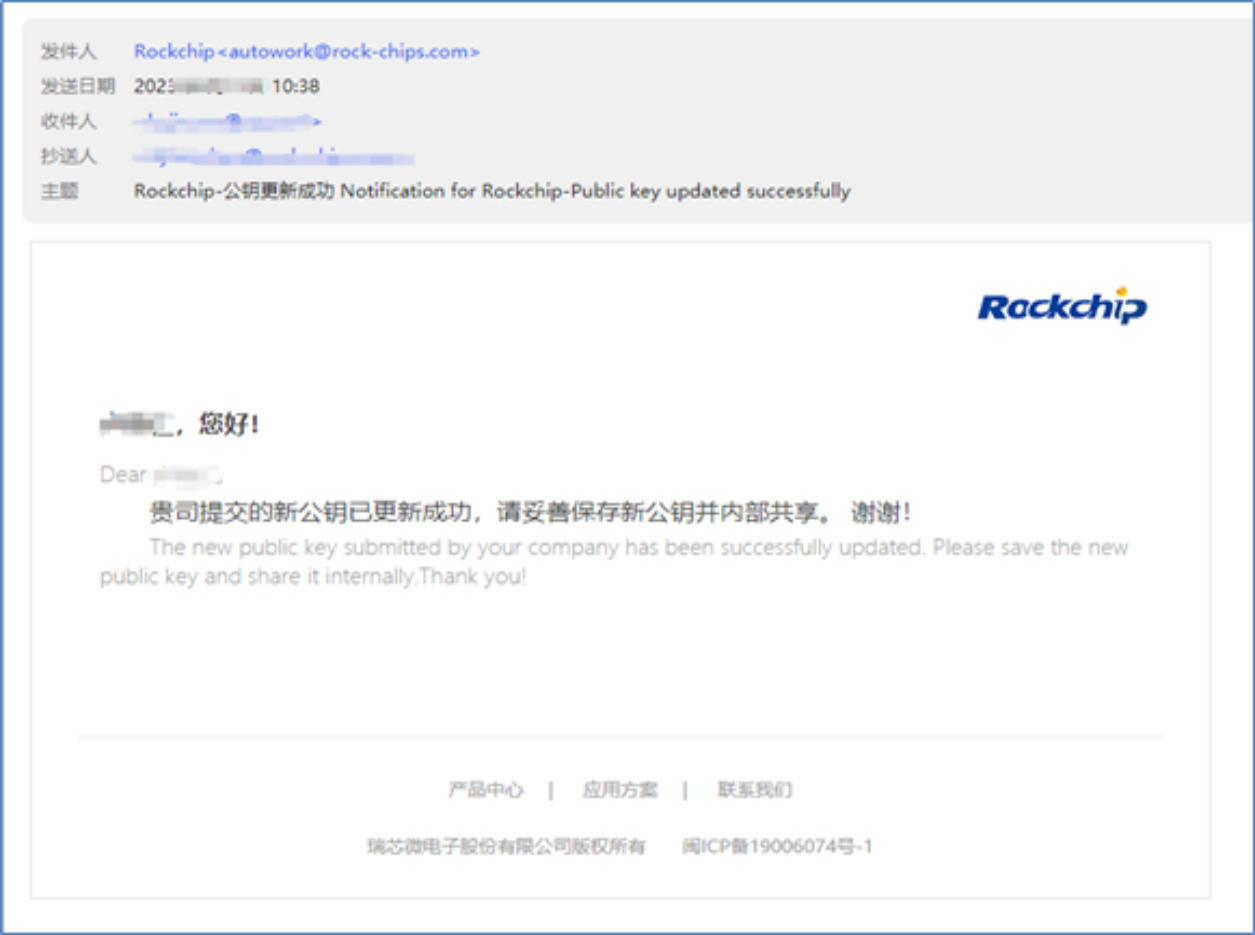
Source differences: English says three authorization files but lists only two; the Chinese count of two is used. Linux tools follows Chinese tools rather than English Tools. English 1.2.2 incorrectly says base packages; its title follows Chinese direct server synchronization. RK1808 is added from the English ToyBrick list. The English public-key subsection actually shows a Redmine-account activation email; that original screenshot is retained with this clarification. Most interface images are Chinese/bilingual. Only reviewed images are used, with contact footers cropped and contact-only screenshots omitted. Commands in the release-note screenshot are horizontally truncated and must not be treated as complete executable commands.
Source code is retained literally and is not guaranteed executable: the English ssh-keygen email contains Markdown link syntax, some -p options use the en dash –p, gitconfig includes • bullets, and the backup filename is id_ras_backup.tag.gz. Check actual command syntax before use; these source formatting and spelling issues are not silently corrected.
1. Operating Manual
This chapter introduces Rockchip SDK application process, including public key, SDK application form and data receiving window.
1.1 Process and Steps for Obtaining a SDK
To obtain a Rockchip SDK, do as follows:
1.1.1 Operating Process
The application process for the Rockchip SDK, including all released software materials, is shown below.

1.1.2 Fill Out the Information Registration Form
If you are a new user who establishes cooperation with Rockchip for the first time, after signing the relevant business agreement between the two parties, the system will push the “Rockchip Customer Information Form” notification email and fill in your company’s registration information as follows:
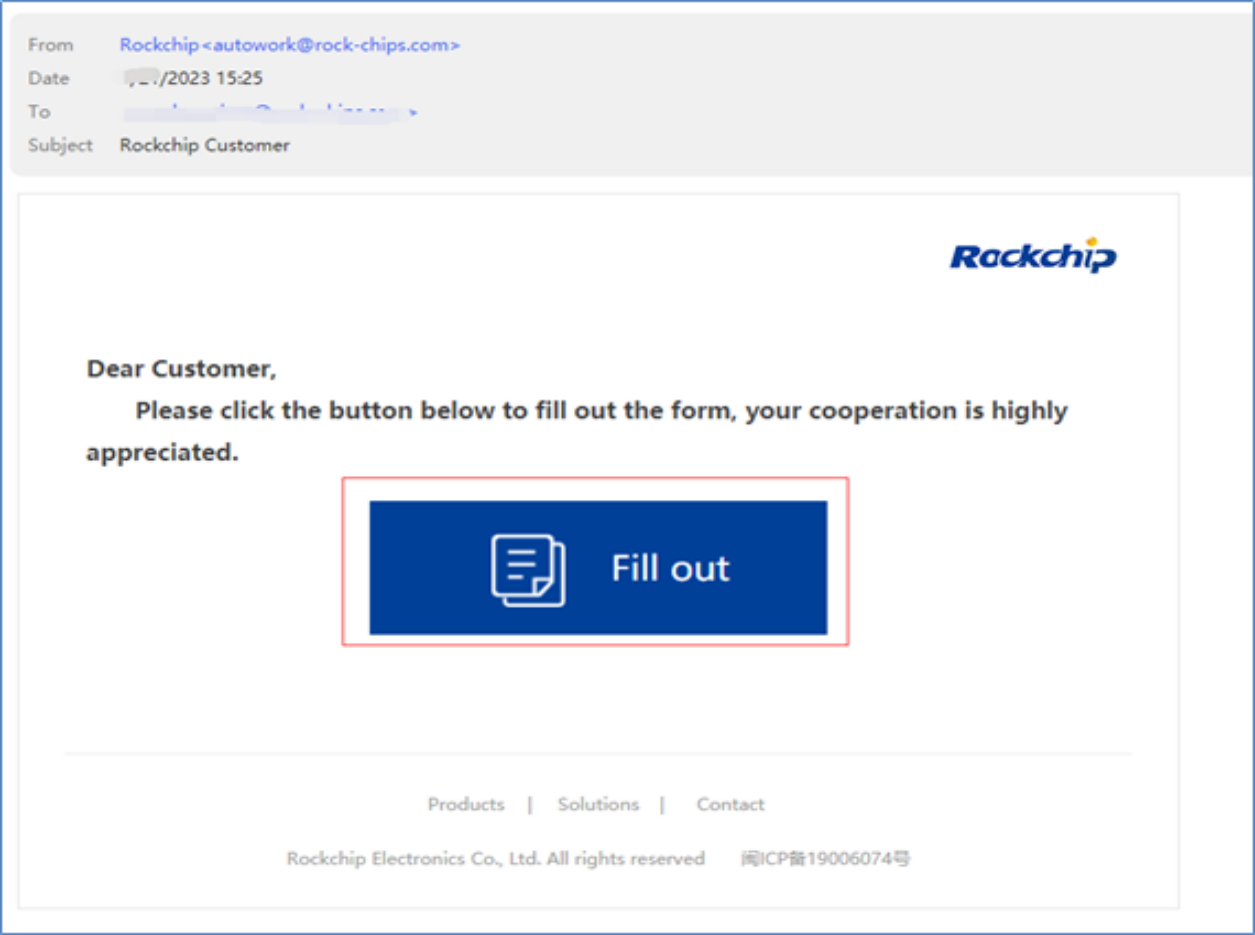
After you click on the “Fill out the Information Form” link, the registration information is as follows:
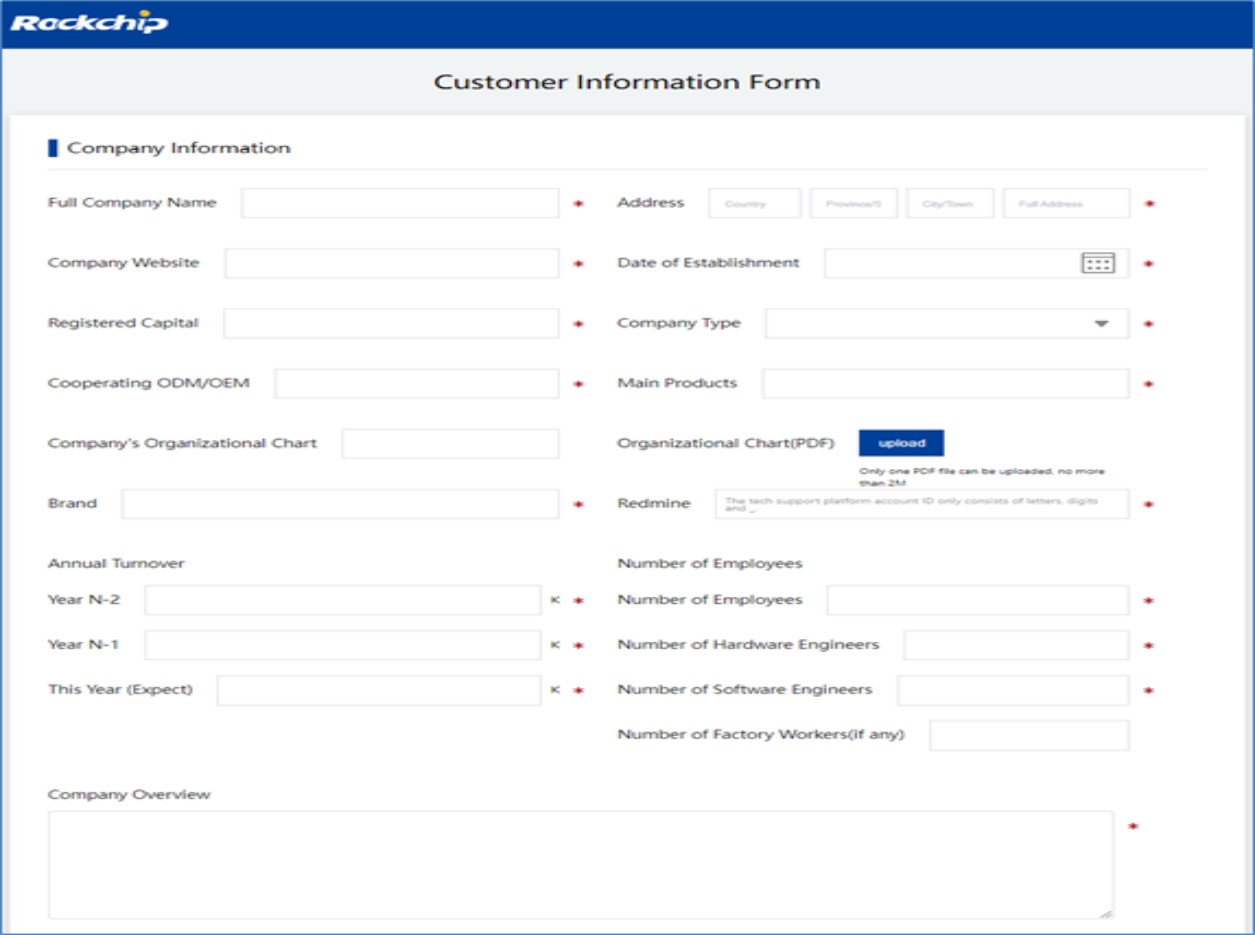
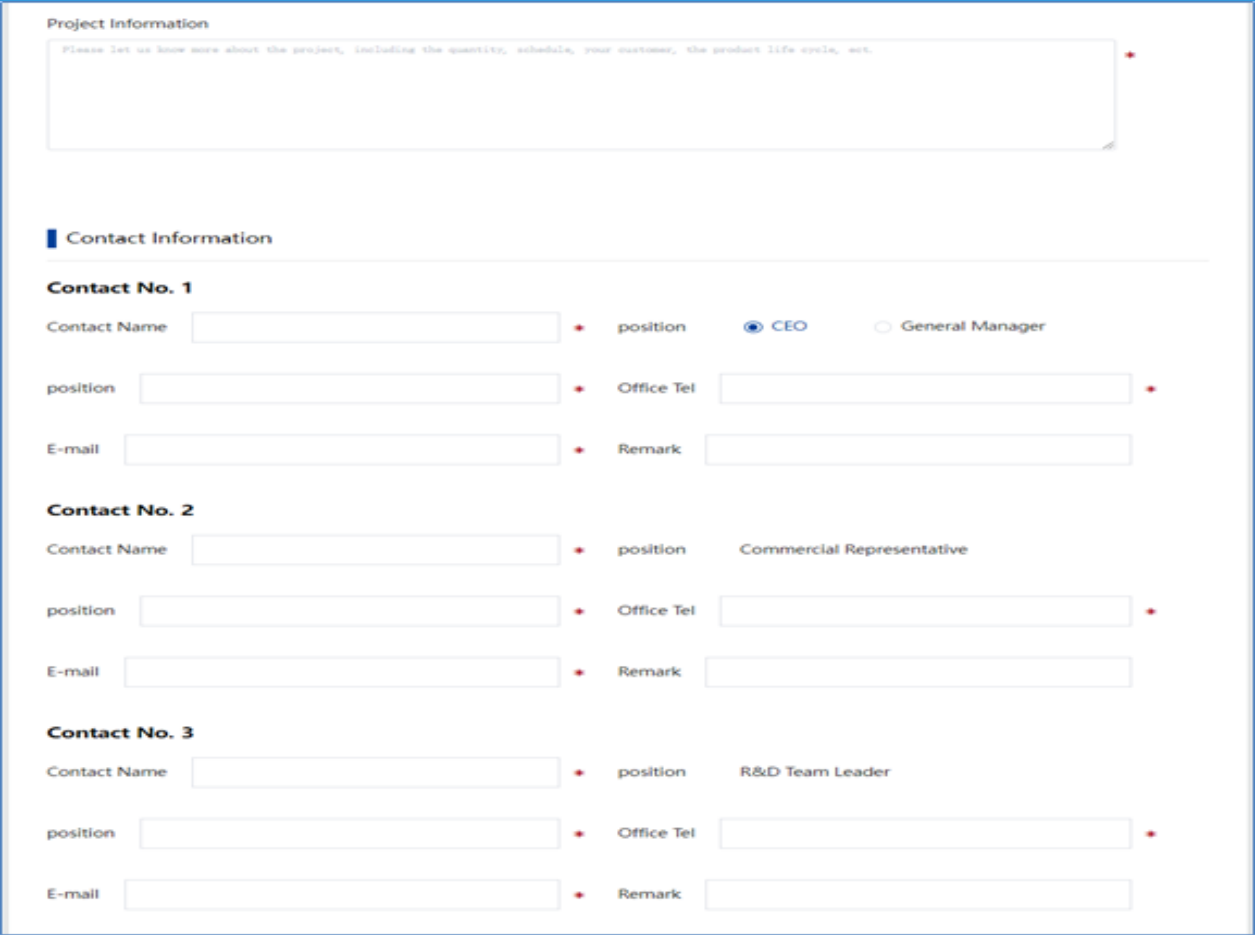
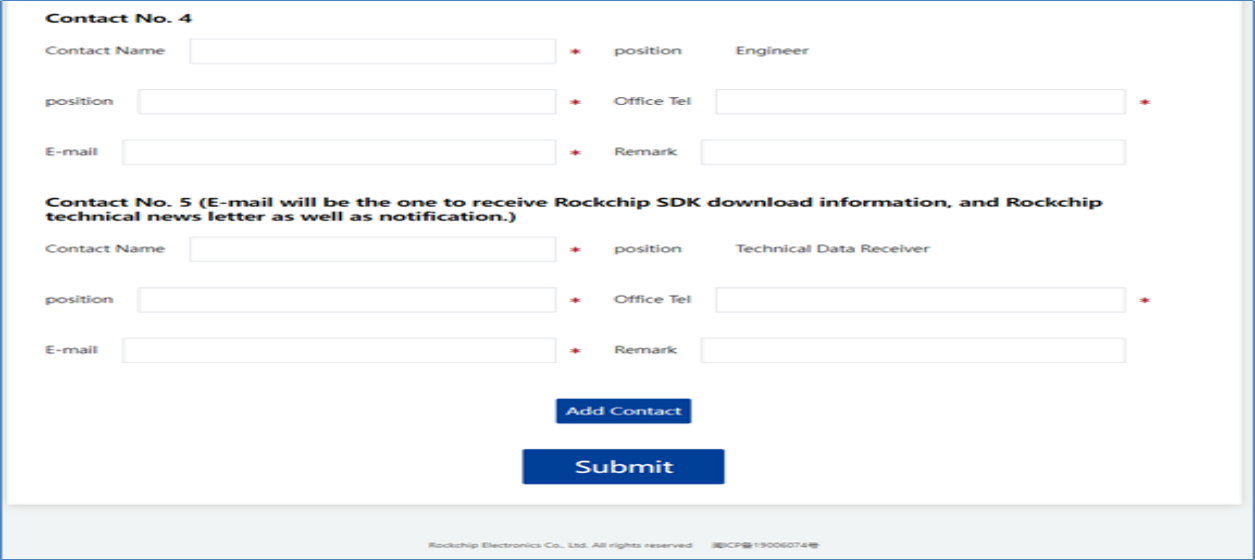
1.1.3 Provide Data Receiving Window
The “documentation receiving window” refers to the person designated by your company to coordinate with Rockchip, responsible for receiving software, hardware, and platform-related release information provided by us. According to our policy, each legal entity is assigned only one account, which should be centrally managed and shared within your organization. Please ensure proper backup of all materials. If there is a change in the designated contact, kindly inform your Rockchip business representative via email in a timely manner, so we can update our records and ensure you do not miss important future notifications. Note: We recommend setting the documentation contact email as a shared email address for your R&D team (e.g., xxrd@xx.com) to avoid missed information due to forwarding issues by individuals, which could impact project progress or cause unnecessary losses.
1.1.4 Provide SDK Application Form
You may apply for one or more SDK versions. Since Rockchip offers a wide range of chip models and corresponding SDK versions, please refer to the following list for details (see Section 2.1 2.1 Official SDK Version or visit the Redmine platform: https://redmine.rock-chips.com/projects/fae/documents for the supported SDK version list and related descriptions). Please provide the required SDK version number based on your project needs and send the application using your work email to your designated Rockchip business contact, so they can complete the internal registration process. When applying, please include the following information:
| Rockchip SDK Supplication Form | |
|---|---|
| NO. | Version of the SDK to be applied for activation |
| 1 | |
| 2 | |
| 3 | |
| 4 | |
| 5 | |
| 6 | |
| 7 |
1.1.5 Generate Public Key
Run the following command in your directory on Ubuntu OS:
xx@ubuntu:~$ cd ~
xx@ubuntu:~$ ssh-keygen -t rsa -C [user@rock-chips.com](mailto:user@rock-chips.com)
Note: To generate a public key, you only need to run the above command, without entering a password. user@rock-chips.com is your company’s work email address, instead of personal email. After you run the command, the corresponding key file is generated in the following directory:
xx@ubuntu:~$ ls -l .ssh/
total 12
-rw------- 1 rockchip rockchip 1675 Oct 31 2018 id_rsa
-rw-r--r-- 1 rockchip rockchip 403 Oct 31 2018 id_rsa.pub
Please keep the generated private key file id_rsa and password properly. After your company receives the email notification of Rockchip-SDK Public Key Submission , please submit the id_rsa.pub public key according to the email instructions,For details, see section 1.1.6 1.1.6 Providing Public Keys.
1.1.6 Provide Public Key
Once the designated Rockchip business contact has completed the internal procedures, the system will send out the “Rockchip-SDK Public Key Submission” email as needed. If your company’s public key is already stored in the system, there is no need to resubmit it, and the email will not be sent again. This email is only triggered during the first collaboration between both parties, when your company’s public key has not yet been recorded in the system. The email content is as follows:
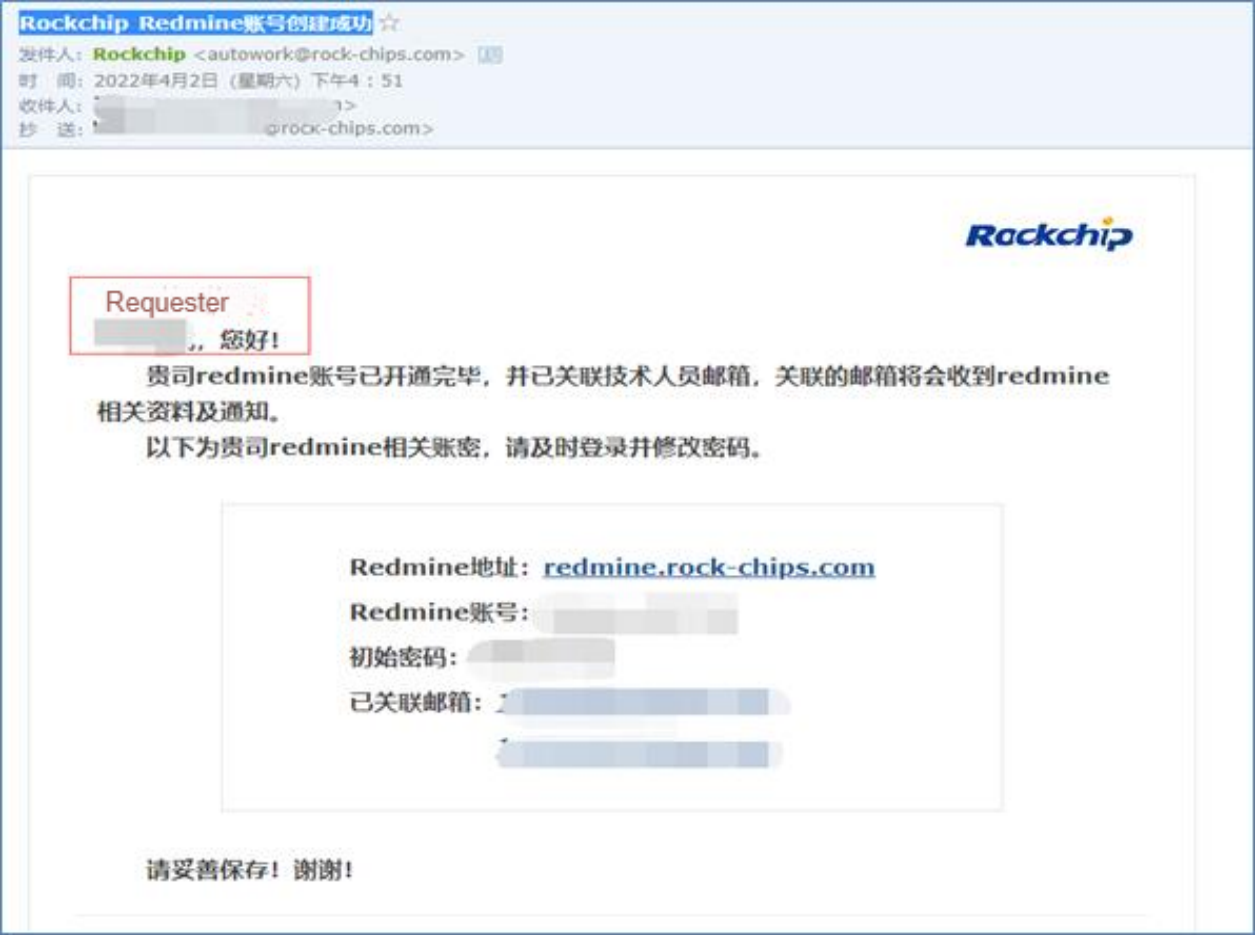
When you click “SDK Kit Submission”, the following page will pop up:
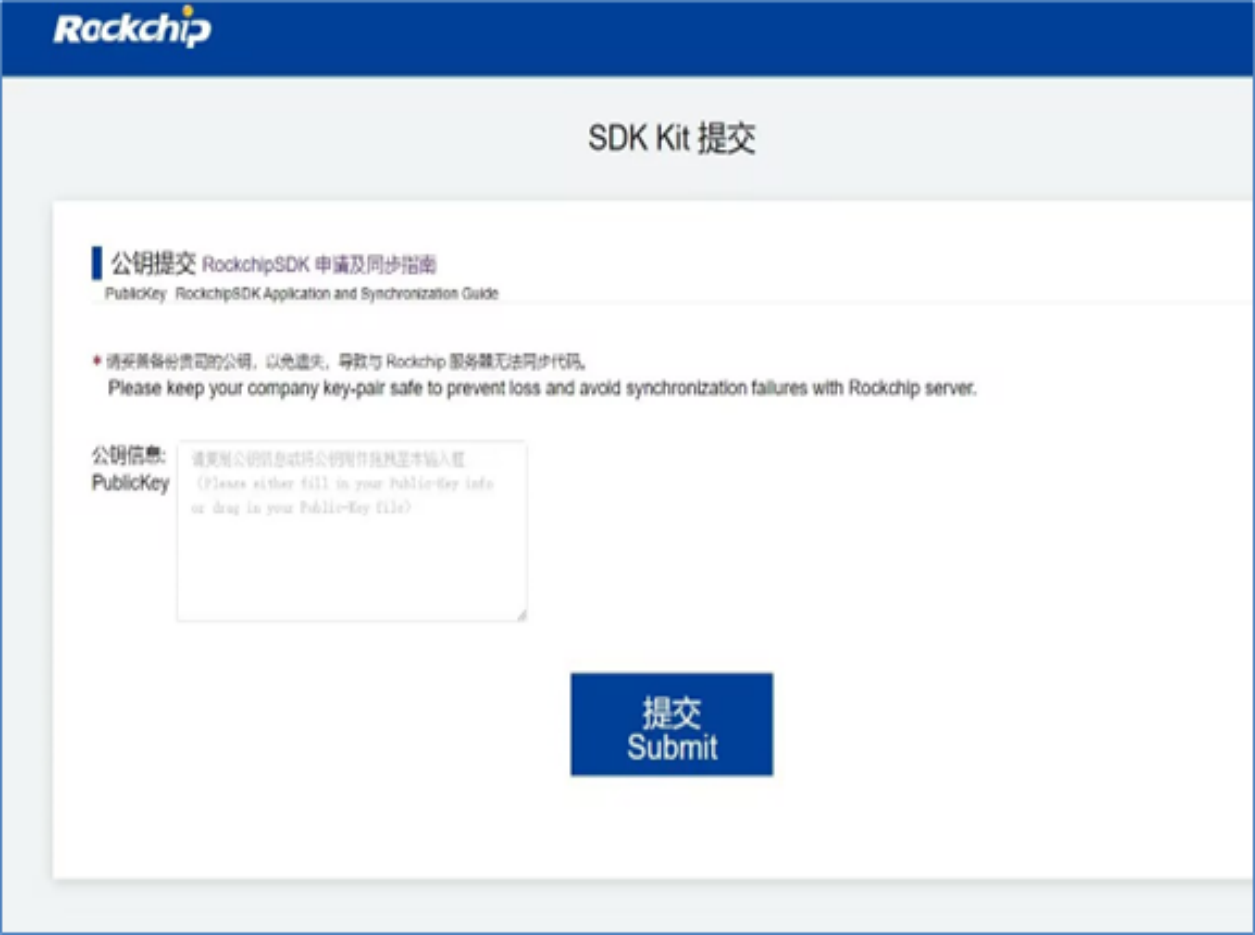
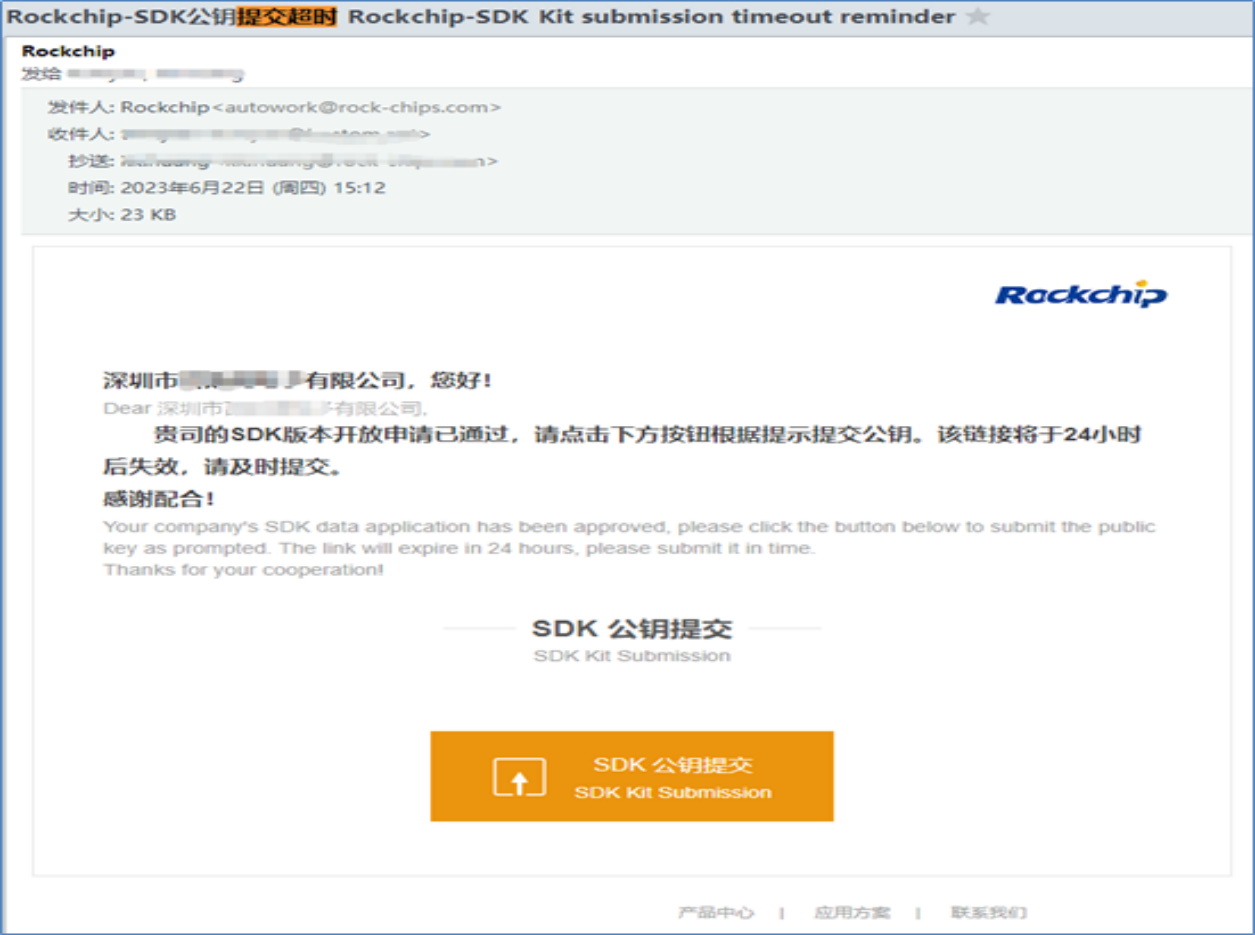
Please copy and paste the content of your company’s public key file (`*.pub ) directly into the designated field and submit it. Refer to chapter 1.1.5 1.1.5 Generate Public Key for details. The submission link provided by Rockchip for the public key is valid for 7 days. If the submission is not completed within this period, the system will send a “Rockchip-SDK Kit Submission Timeout” reminder email, along with a 24-hour extension opportunity. If the submission is still not completed after the extension, you will need to reapply and activate a new submission link.
1.1.7 Backup Public Key
Please properly back up your company’s public key to avoid loss and failure to synchronize code with the Rockchip server.
xx@ubuntu:~$ tar zcvf id_ras_backup.tag.gz ~/.ssh
1.1.8 Change the Public Key
Please keep the generated public-private key pair secure. This key is independent of server replacements or other system changes, and does not need to be updated frequently. It will not affect SDK synchronization. If the key pair is lost or needs to be replaced due to special circumstances, please contact the appropriate Rockchip business representative via email. Once the internal review and approval process is completed, the system will resend the public key submission link to you. The related email content is as follows:
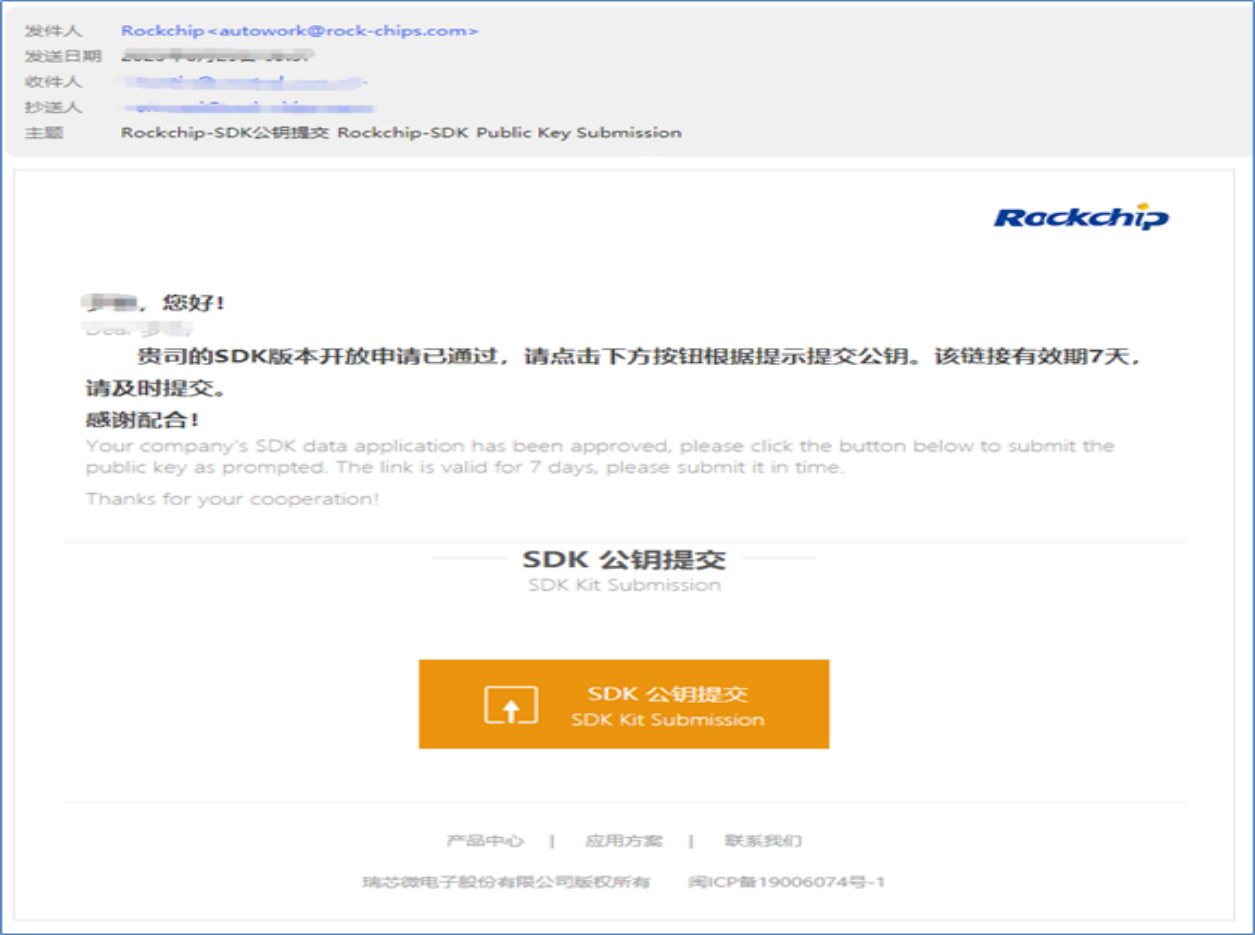
This link isvalid for 7 days, if the deadline is missed, the link will expire and a new application will be required. Upon receiving the notification, please submit a new public key as soon as possible. After successful submission, the system will redirect to the following page:
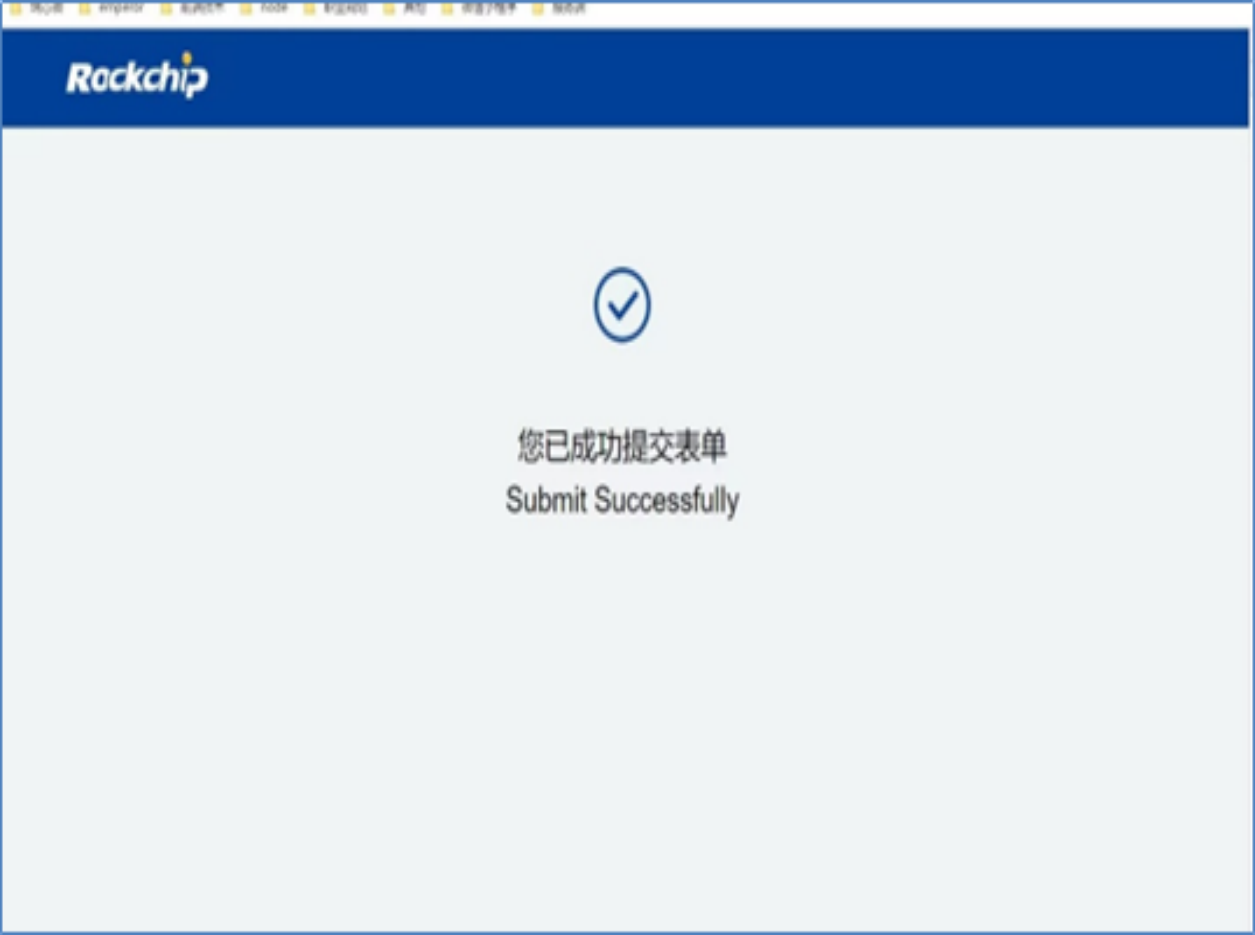
Once the public key update process has been archived and activated by Rockchip, you will receive a system- generated notification email titled “Rockchip - Public Key Update Successful”, indicating that the public key is now officially in effect. The email content is as follows:
1.2 How to Get Access to the SDK
When Rockchip’s internal process continues to the next step, you will then receive an email notification “Rockchip-SDK has been activated” sent by the system:
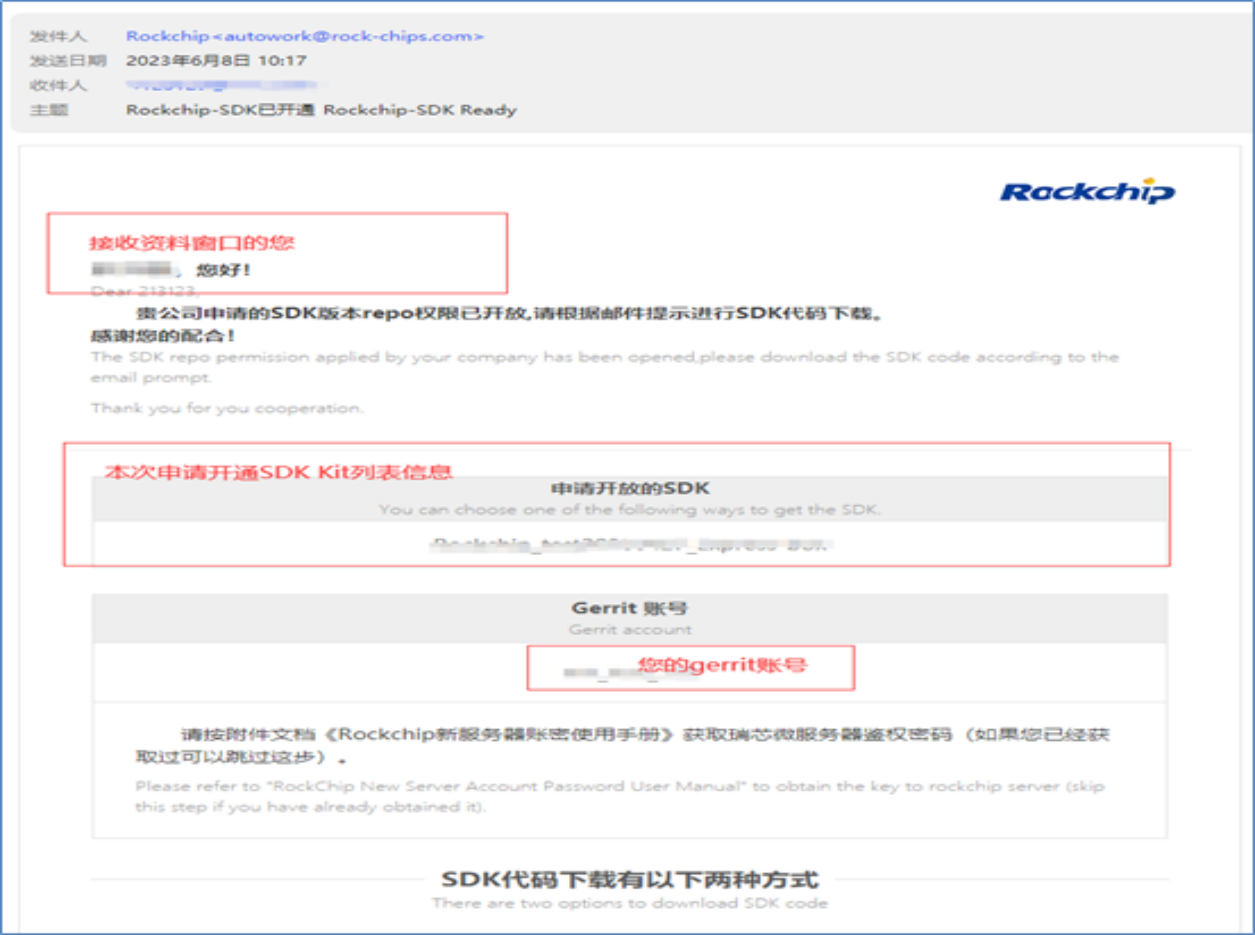
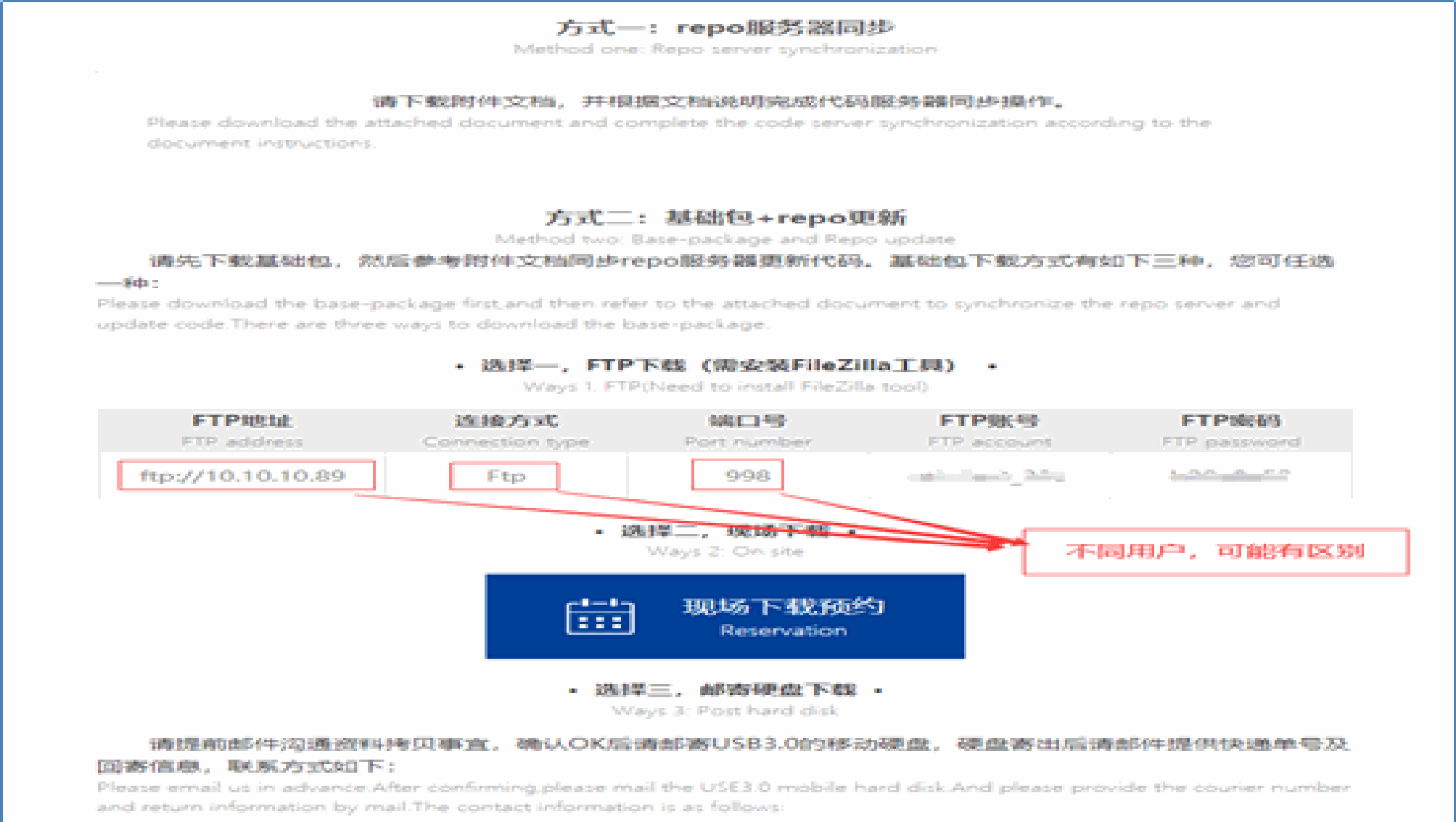
As the SDK versions continue to evolve, features are being enhanced and security levels are progressively improved, resulting in a growing amount of code within the SDK. Currently, there are two ways to obtain the SDK: Directly synchronize with the server sync to download the complete source code along with the SDK base package. Download the SDK base package first, and then perform synchronization sync to retrieve the full source code.
1.2.1 Authentication and Authorization Mode (Mandatory)
In order to maintain the security of the code server, we have increased the required secondary verification of the download permission. Obtain the download authorization script using the git clone method, this method requires you to manually enter your Gerrit account, the designated documentation contact’s email address, and the name of your private key file. The detailed steps are as follows: a. Obtain the script
xx@ubuntu:~$ git clone https://gerrit.rock-chips.com:8443/repo-release/tools/script
b. Run the script
xx@ubuntu:~$ ./Generate-Credential.x
Switch to the directory where the script is located and run it. Enter your Gerrit account, the documentation contact’s email, and the private key file name. After the key and account verification, you will obtain the download and sync authorization.
└── script
├── Generate-Credential.x
└── README.md
c. Example of running the script
Please input your username (make sure to use the username exactly the same as the one in RK
email!!): Gerrit_Account
Please input your email (make sure to use the company email address!!): data_owner_email
Please input your SSH private key filename (e.g. id_rsa): id_rsa
If the following information is displayed, the script is successfully executed.
Your Credential check has passed
New git credential will be added into your history!!
You are All Set!!
When the final output shows the following prompt, it indicates that the script execution has failed. Please refer to section 5.1 Q&A to check if the issue is caused by configuration problems, or verify if your company’s local security devices are blocking the download protocol communication (SSH).
Credential mismatch issue, please refer to the instruction documents attached to the
Rockchip-SDK Ready email to correctly configure the gerrit account and ssh key.
Do you want to retry (y/n)?
Running the authorization script successfully will also generate the following two files
└──~/.gitconfig # Contains Gerrit account information and configuration
└──~/.git-credentials # Contains the Gerrit account corresponding to the HTTPS download
authorization
Note: After receiving the account, please ensure to use the private key corresponding to the public key you submitted earlier (the private key file should have permission 600, and the private key file name should be id_rsa ) to run the script. Once the local device is bound, you will be able to download data normally. The download authorization is bound to the local system account that runs the authorization script and is saved under that account’s Home directory. If you copy the ~/.gitconfig and ~/.git-credentials files to the Home directory of another device or user account, you can also perform downloads directly via the HTTPS protocol. Therefore, before initiating a download, please ensure that the required authorization files exist in the Home directory of the local system account. Running this re-authorization script will generate a new authorization, and the old download authorization will automatically become invalid.
1.2.2 Direct Download and Synchronization from the Server
In the “SDK Activation Notification Email,” you will find the corresponding SDK release notes document, which includes the download (repo) address and the method for synchronizing the downloaded code. The following example uses “Rockchip_Android13_SDK_Developer_Guide_CN.pdf”:
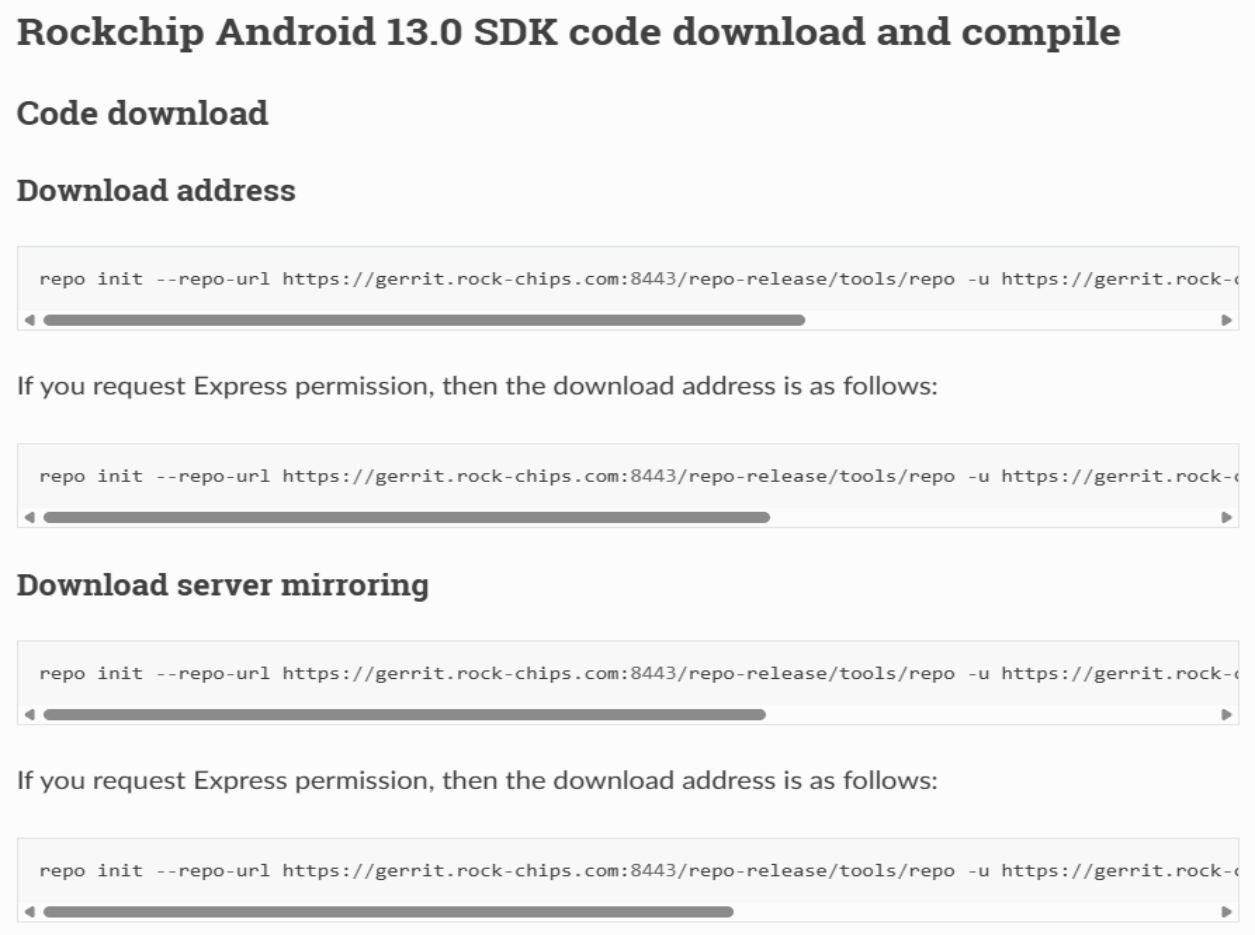
For details, see section 1.2.1 1.2.1 Authorization Verification.
1.2.3 provides methods for downloading the base package
The basic package we provide includes initial functional code, development tools, documentation, and version records of each repository. As some SDK versions exceed 100GB, the download (sync) time may be unpredictable due to network speed limitations. To save time, you can copy the basic SDK package first and then perform synchronization, which helps reduce the time required to download the entire project code. Please note that this basic package is only the initial version. Rockchip offers three download methods for your convenience, as detailed below: Important Note: This basic package does not contain the complete SDK source code. You must perform synchronization (sync) with Rockchip’s server to obtain the full version and ensure system stability and reliability. a. FTP download As shown above, the provided FTP download method includes information specific to your company: FTP address, connection method, port number, FTP account, and password. Since FTP download speed may be unstable and the Android SDK itself is large, we recommend considering the following two alternative download methods: b. Download on-site
The on-site reservation link is valid for 7 days. After expiration, you will need to reapply. Rockchip provides on- site SDK copying services at three office locations: Fuzhou, Shenzhen, and Shanghai. You may choose the location nearest to you for the appointment. After clicking “On-site Download Reservation,” a window will pop up as shown below:
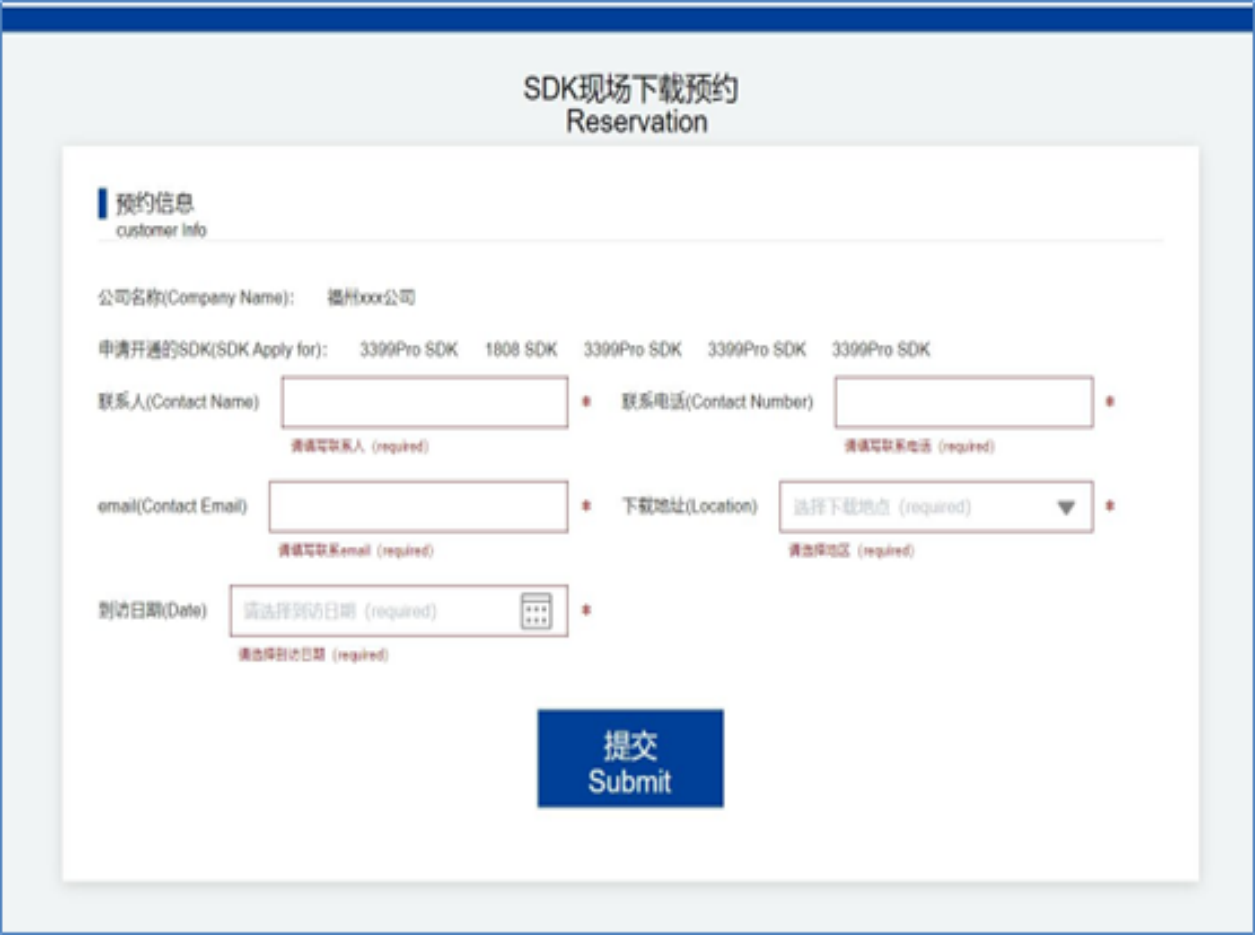
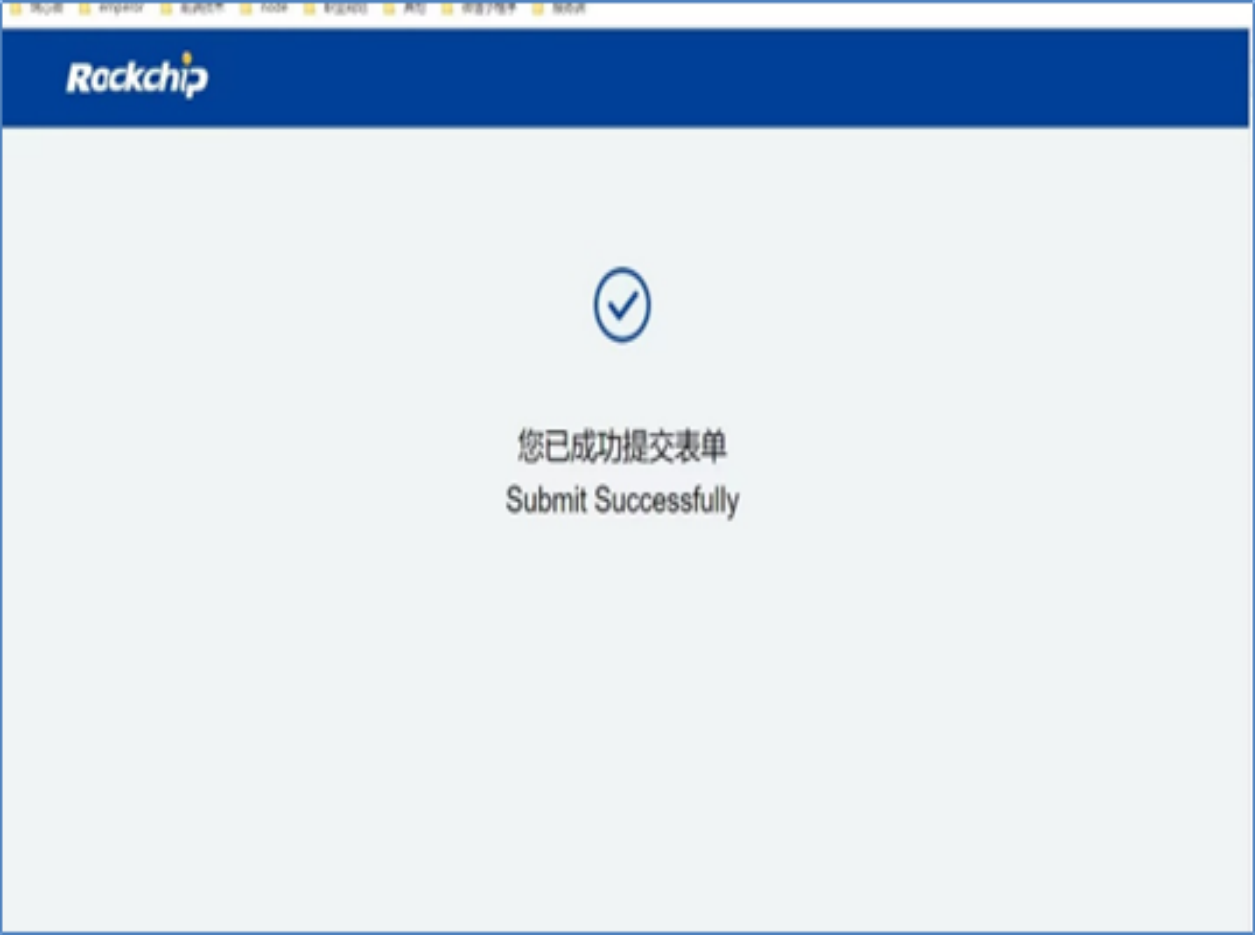
Please fill in the contact person’s name, phone number, email address, Rockchip office location (Fuzhou, Shenzhen, or Shanghai), and the intended visit time according to the instructions shown above. Once submitted successfully, the following confirmation message will be displayed:
After a successful reservation, the contact person will receive an email notification from the Rockchip system titled “Rockchip-SDK On-site Download Reservation Information”. The email content is as follows:
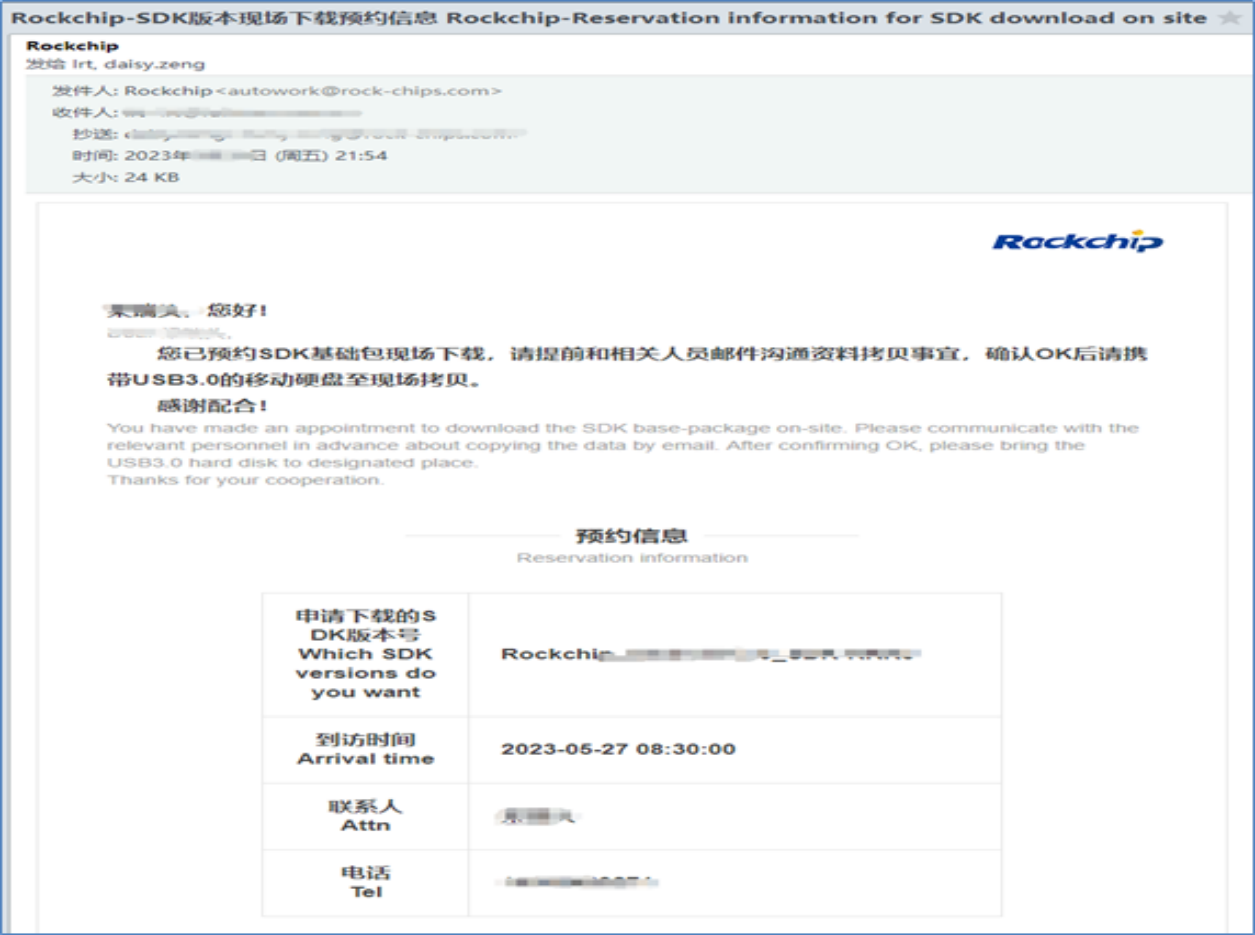
After receiving the email notification, please arrive at the selected location on time according to your reservation, bringing a high-capacity external hard drive or other storage device that supports a USB 3.0 interface to ensure compatibility with Rockchip’s host systems. If you require multiple SDK versions, it is recommended that your storage device has at least 512GB of available space to avoid any delays due to insufficient capacity. If there are any changes to your scheduled visit, please notify the designated contact person as soon as possible to avoid affecting coordination and your project timeline. c. Disk Delivery As shown in the figure above under “Mailing Hardware Method,” please send your high-capacity external hard drive or other storage device (must support USB 3.0 for compatibility with Rockchip hosts). If multiple SDK versions are required, it is recommended to reserve at least 512GB of free space on the device. Once we receive your package, Rockchip will arrange for SF Express to return it within one business day.
1.3 Download Mode Synchronized by the Server
The SDK obtained from Rockchip via on-site copy or FTP download is only a basic package. To obtain the complete version, you must perform a sync update over the network based on this package. For detailed sync instructions and procedures, please refer to the Rockchip_Android13_SDK_Developer_Guide_EN.pdf . An overview is provided below:
1.3.1 Check file integrity
Compressed SDK packages obtained via FTP, on-site copy, or disk delivery may encounter errors during the transfer process. After copying the files to your development environment, it is necessary to verify their integrity. For example, take the file Rockchip_Android13.0_SDK_RELEASE.tar.gz . An MD5 checksum value for this file is provided in a separate file alongside the *.tar.gz package. Other SDK versions will also have their corresponding MD5 values supplied in the same way.
xx@ubuntu:~$ md5sum Rockchip_Android13.0_SDK_RELEASE.tar.gz*
cb37437acfdd4d10cbae1809ee37c91d  Rockchip_Android13.0_SDK_RELEASE.tar.gz00
7a446207302810dfe08e386c9018faed  Rockchip_Android13.0_SDK_RELEASE.tar.gz01
68a68fe3127f0a9b8a97727b2fd27106  Rockchip_Android13.0_SDK_RELEASE.tar.gz02
4a6b06b48709eb0357e3aa5b18ba63d4  Rockchip_Android13.0_SDK_RELEASE.tar.gz03
b24083f7c4d36bba730e421d2c0a444b  Rockchip_Android13.0_SDK_RELEASE.tar.gz04
362641e26f93c600f12ea21bd178dac9  Rockchip_Android13.0_SDK_RELEASE.tar.gz05
97d0ab6b7d9d523496544605eaedf6f2  Rockchip_Android13.0_SDK_RELEASE.tar.gz06
d8958db52f86982490b66732e6daf0ea  Rockchip_Android13.0_SDK_RELEASE.tar.gz07
7f65e490ef4541997dd21c559262ca1e  Rockchip_Android13.0_SDK_RELEASE.tar.gz08
942f811b75b58aacb73628a6e3a304a5  Rockchip_Android13.0_SDK_RELEASE.tar.gz09
8f742ea39960725d7f6d8660e6974b48  Rockchip_Android13.0_SDK_RELEASE.tar.gz10
4d4342750dc746dbe5e2b9fc93254eb7  Rockchip_Android13.0_SDK_RELEASE.tar.gz11
0c15e71f234fb242b0b494cf25382672  Rockchip_Android13.0_SDK_RELEASE.tar.gz12
921b93b045f9d1d71f308d8d9df4e3ca  Rockchip_Android13.0_SDK_RELEASE.tar.gz13
22c9261fa4e3700287c525ec25075691  Rockchip_Android13.0_SDK_RELEASE.tar.gz14
After running the md5sum command, compare the output MD5 value with the one provided by Rockchip. If the two values match exactly, it means the compressed file is complete and intact. If they differ, the file is corrupted and must be copied or downloaded again.
1.3.2 Update the SDK method
The Rockchip SDK will only be officially released after passing internal testing and acceptance standards. Since the stability and maturity of the SDK are gradually enhanced through multiple iterations and updates, you need to regularly sync with the Rockchip server to keep the code up to date, enabling you to experience new features of the platform and the system’s robustness. For detailed information on the SDK version, please refer to the release notes (such as the “Rockchip_Android13_SDK_Developer_Guide_CN.pdf”). For SDK sync methods and troubleshooting, please refer to section 5.4 5.4 SDK Synchronization Exception Handling.
1.4 Process and Method of Obtaining Hardware Data
Rockchip hardware documentation and SDK KIT are provided separately. The hardware-documentation application process is shown below.
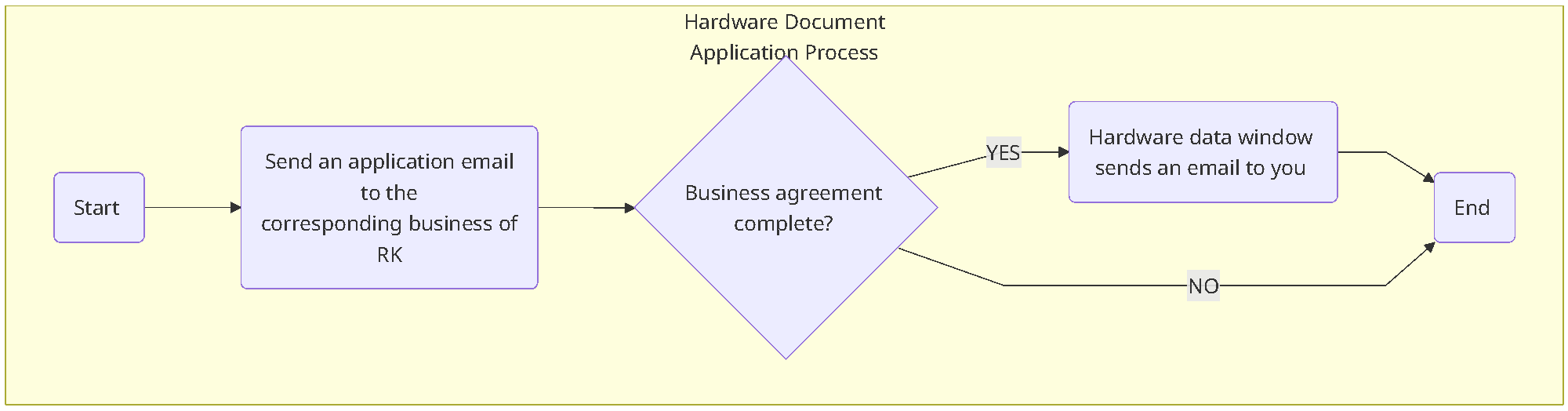
Rockchip’s hardware documentation is categorized by chip platform, and you can apply for resources for one or more platforms at a time. The documentation mainly includes platform hardware reference designs, such as power solutions, DDR templates, hardware design guidelines, and design references for key features. When designing product hardware, you need to pay attention to the following points: a. The power management solution must use the solution provided in the reference design. b. The DDR template must be directly used from the corresponding template in the reference design, without modification. c. Key components must use the key component list provided by Rockchip (such as DDR, eMMC, Flash, WiFi/BT, Camera, etc.). d. The documentation must be kept up to date, as Rockchip will continue to optimize it. If you do not intend to follow the above guidelines in your hardware design, please confirm with the corresponding Rockchip business contact in advance. Otherwise, the Rockchip technical team may not be able to provide stable and effective technical support, which could adversely affect your project schedule.
You can also check the update status of Rockchip hardware documentation here: https://redmine.rock-chips.com/projects/fae/documents (Hardware reference design version list). If the version of the documentation you received is lower than the version in this list, please contact the Rockchip documentation contact to obtain the latest version and improve project development efficiency.
2. SDK Version
This section primarily introduces the methods for obtaining the Rockchip SDK. Currently, the official provides three channels: a. Rockchip Internal Server: This method requires following the official SDK application process to obtain the SDK. b. Open-source GitHub Repository: The SDK is publicly available for download, and no application process is needed. c. Toybrick Open-source Community: Provides SDK downloads for certain platforms, also without requiring an application process.
2.1 Official SDK Version
Below are the Android OS and Linux OS versions supported by Rockchip chips, along with detailed information on the product types supported by each version and the current level of technical support: Note: a. For detailed information on all SDK versions, please refer to (SDK supported versions list and explanation): https://redmine.rock-chips.com/documents/54 b. The recommendation index reflects the current maintenance focus of Rockchip’s main SDK versions. When selecting an SDK version for your project, please refer to this parameter. c. The two Android SDK versions currently under long-term maintenance for industrial products are: RK3399_ANDROID7.1-Industry-SDK_V1.0 RK3288_ANDROID7.1_TABLET-SDK_V1.00_20170629 d. The Android express version includes the GMS package and is intended for users who are certified by Google and have MADA credentials. If you require this version, please apply for the express version; the standard Android version does not include the GMS package. e. For explanations regarding the suffix letters of chips, please refer to the respective chip datasheet. S–> Indicates the small-size package version model; M–> Indicates the model that conforms to the vehicle regulation version; J–> Indicates the model that conforms to the industry regulation version; K–> Indicates the model that conforms to the wider range of temperature version(e.g. -20°C ~ 85°C or -40°C~85°C, etc. For details, please refer to the corresponding Datasheet);
-S–>Indicates the wafer for SMIC. f. SDK versions for product forms such as NAS, NVR, display controllers, SoC arrays, edge computing boxes, and PCIe interconnects: RK3588_Rockchip_Linux_SDK-SmartHub RK3576_Rockchip_Linux_SDK-SmartHub RK3568_Rockchip_Linux_SDK-SmartHub
| Chip | SDK version (source identifier) | Recommendation |
|---|---|---|
| RK3588(S/J/M) | ROCKCHIP_ANDROID16.0_SSI_SDK(express version) |
***** |
| RK3588(S/J/M) | RK3588_Rockchip_Android15.0(express version) |
* |
| RK3588(S/J/M) | Rockchip_Android14.0(express version) |
* |
| RK3588(S/J/M) | RK3588M_Rockchip_Android14.0_SDK-Car |
** |
| RK3588(S/J/M) | RK3588_ANDROID13.0_SDK_RELEASE(express version) |
* |
| RK3588(S/J/M) | RK3588_ANDROID12.0_SDK_RELEASE |
* |
| RK3588(S/J/M) | RK3588M_Android12_SDK_Release-Car |
* |
| RK3588(S/J/M) | RK3588_RKTTS_SDK |
* |
| RK3588(S/J/M) | RK3588_IPC_SDK_202205 |
* |
| RK3588(S/J/M) | RK3588M_QNX_AAOS12_SDK |
** |
| RK3588(S/J/M) | RK3588_LINUX6.1_SDK_RELEASE |
***** |
| RK3588(S/J/M) | RK3588_LINUX_EDGE_SDK_202206 |
* |
| RK3588(S/J/M) | RK3588_Rockchip_Linux_SDK-SmartHub |
* |
| RK3588(S/J/M) | RK3588_LINUX_NVR_SDK_Release_V1.0.0_20220304 |
* |
| RK3576(S/J/M) | ROCKCHIP_ANDROID16.0_SSI_SDK(express version) |
***** |
| RK3576(S/J/M) | Rockchip_Android15.0(express version) |
** |
| RK3576(S/J/M) | Rockchip_Android14.0(express version) |
** |
| RK3576(S/J/M) | RK3576M_Android14.0_SDK-Car |
** |
| RK3576(S/J/M) | RK3576M_Android14.0_SDK-Car |
** |
| RK3576(S/J/M) | Rockchip_Android14.0_SDK_Release-Media_Streaming |
** |
| RK3576(S/J/M) | RK3576_Android11_CloudDesk_SDK |
* |
| RK3576(S/J/M) | RK3576_Android9.0_SDK_Release |
* |
| RK3576(S/J/M) | RK3576_NVR_SDK |
** |
| RK3576(S/J/M) | Rk3576_RKTTS_SDK |
* |
| RK3576(S/J/M) | RK3576_LINUX6.1_SDK |
***** |
| RK3576(S/J/M) | RK3576_Rockchip_Linux_SDK-SmartHub |
** |
| RK3568/6(J/M) | ROCKCHIP_ANDROID16.0_SSI_SDK(express version) |
***** |
| RK3568/6(J/M) | Rockchip_Android15.0(express version) |
** |
| RK3568/6(J/M) | Rockchip_Android14.0(express version) |
** |
| RK3568/6(J/M) | ROCKCHIP_ANDROID13.0_SDK_RELEASE(express version) |
* |
| RK3568/6(J/M) | RK3568(6)_ANDROID12.0_SDK_RELEASE |
* |
| RK3568/6(J/M) | RK3568(6)_ANDROID11.0_SDK_RELEASE_V1.0.0_20210106 |
* |
| RK3568/6(J/M) | RK3566_ANDROID11.0_EBOOK_SDK_RELEASE_V1.0.0_20210126 |
* |
| RK3568/6(J/M) | RK356X_ANDROID11_CLOUDDESK_SDK_202307 |
* |
| RK3568/6(J/M) | RK356X_AMP_SDK_RELEASE |
* |
| RK3568/6(J/M) | RK356X_NVR_SDK_V1.4.0_20220611 |
* |
| RK3568/6(J/M) | RK3568_RK3566_Linux6.1_SDK_Release |
***** |
| RK3568/6(J/M) | RK3568_Rockchip_Linux_SDK-SmartHub |
** |
| RK3568/6(J/M) | RK356X_STANDALONE_SDK_RELEASE_V1.0.0_20210713 |
* |
| RK3562(J) | ROCKCHIP_ANDROID16.0_SSI_SDK(express version) |
***** |
| RK3562(J) | RK3562_Android15.0(express version) |
** |
| RK3562(J) | RK3562_Android14.0(express version) |
** |
| RK3562(J) | RK3562_Rockchip_Android14.0_SDK_Release-Media_Streaming |
** |
| RK3562(J) | ROCKCHIP_ANDROID13.0_SDK_RELEASE(express version) |
* |
| RK3562(J) | RK3528_ANDROID9.0-Box_ALPHA_V0.0.1_20221202 |
* |
| RK3562(J) | RK3562_RKTTS_SDK |
* |
| RK3562(J) | RK3562_LINUX5.10_SDK_V1.0.0_20230620 |
** |
| RK3562(J) | RK3562_Linux6.1_SDK_Release |
***** |
| RK3528(J/A) | RK3528_Rockchip_Android14.0_SDK_Release-Media_Streaming |
***** |
| RK3528(J/A) | ROCKCHIP_ANDROID13.0_SDK_RELEASE(express version) |
* |
| RK3528(J/A) | RK3528_ANDROID9.0-Box_ALPHA_V0.0.1_20221202 |
* |
| RK3528(J/A) | Rockchip_RK3528_Linux_SDK_20230410 |
***** |
| RK3506(J) | RK3506_Linux6.1_SDK |
***** |
| RK3506(J) | RK3506_RT-Thread_SDK_Release |
** |
| RK3399(K) | ROCKCHIP_ANDROID16.0_SSI_SDK(express version) |
***** |
| RK3399(K) | Rockchip_Android15.0(express version) |
** |
| RK3399(K) | Rockchip_Android14.0(express version) |
** |
| RK3399(K) | ROCKCHIP_ANDROID13.0_SDK_RELEASE(express version) |
** |
| RK3399(K) | RK3399_ANDROID12.0_SDK_RELEASE |
* |
| RK3399(K) | RK3399_ANDROID11.0_SDK_RELEASE_V1.0.0_20210106 |
* |
| RK3399(K) | Rockchip_Android10.0_SDK_Release_20191211 |
* |
| RK3399(K) | RK3399_Android9.0_SDK_V1.0_20190104 |
* |
| RK3399(K) | RK3399_Android8.1_SDK_V1.00_20180517 |
* |
| RK3399(K) | RK3399_ANDROID7.1-Industry-SDK_V1.0 |
*** |
| RK3399(K) | RK3399_LINUX6.1_SDK_RELEASE |
***** |
| RK3399(K) | RK3399_LINUX5.10_SDK_RELEASE |
* |
| RK3399PRO | RK3399Pro_Android9.0_SDK_V1.00_20190806 |
* |
| RK3328 | RK3328_ANDROID12.0_SDK_RELEASE |
***** |
| RK3328 | RK3328_ANDROID11.0_BOX_SDK_V1.0.1_20201030 |
* |
| RK3328 | RK3328_ANDROID10.0-BOX_V1.0_20191125 |
* |
| RK3328 | RK3328_ANDROID9.0-BOX-SDK_V1.0_20181206 |
* |
| RK3328 | RK3328_ANDROID8.1-BOX-SDK_V1.0_20180319 |
* |
| RK3328 | RK3328_ANDROID7.1_BOX-SDK_v1.00_20170223 |
* |
| RK3328 | RK3328_linux_v1.00_20170419 |
* |
| RK3326(-S) / PX30(-S/K) / RK3358(M/J) | ROCKCHIP_ANDROID16.0_SSI_SDK(express version) |
***** |
| RK3326(-S) / PX30(-S/K) / RK3358(M/J) | Rockchip_Android15.0_SDK(express version) |
** |
| RK3326(-S) / PX30(-S/K) / RK3358(M/J) | Rockchip_Android14.0_SDK(express version) |
** |
| RK3326(-S) / PX30(-S/K) / RK3358(M/J) | ROCKCHIP_ANDROID13.0_SDK_RELEASE(express version) |
* |
| RK3326(-S) / PX30(-S/K) / RK3358(M/J) | RK3326&PX30_ANDROID12.0_SDK_RELEASE |
* |
| RK3326(-S) / PX30(-S/K) / RK3358(M/J) | RK3326&PX30_ANDROID11.0_SDK_RELEASE |
* |
| RK3326(-S) / PX30(-S/K) / RK3358(M/J) | RK3326&PX30_ANDROID10.0_SDK_20191211 |
* |
| RK3326(-S) / PX30(-S/K) / RK3358(M/J) | RK3326&PX30_ANDROID9.0_SDK_20180925 |
* |
| RK3326(-S) / PX30(-S/K) / RK3358(M/J) | RK3326&PX30_ANDROID8.1-TABLET-SDK_V1.0.0_20180505 |
* |
| RK3326(-S) / PX30(-S/K) / RK3358(M/J) | PX30_Linux6.1_SDK_Release |
***** |
| RK3326(-S) / PX30(-S/K) / RK3358(M/J) | PX30_LINUX5.10_SDK_RELEASE |
* |
| RK3326(-S) / PX30(-S/K) / RK3358(M/J) | Rockchip_RK3326_Linux6.1 |
***** |
| RK3326(-S) / PX30(-S/K) / RK3358(M/J) | RK3326_LINUX5.10_SDK_RELEASE |
* |
| RK3326(-S) / PX30(-S/K) / RK3358(M/J) | RK3358_Linux6.1_SDK_Release |
***** |
| RK3326(-S) / PX30(-S/K) / RK3358(M/J) | RK3358_LINUX5.10_SDK_RELEASE |
* |
| RK3308(J/M) | RK3308_Linux6.1_SDK_Release |
***** |
| RK3308(J/M) | RK3308_LINUX5.10_SDK_RELEASE |
** |
| RK3308(J/M) | RK3308_Linux_PartyBox_SDK |
** |
| RK3288(W/K) | RK3288W_ANDROID12.0_SDK_RELEASE |
***** |
| RK3288(W/K) | RK3288(W_Version)_ANDROID11.0_SDK_RELEASE |
* |
| RK3288(W/K) | RK3288_ANDROID10.0_SDK_Release |
* |
| RK3288(W/K) | RK3288(W-Version)_Android9.0_SDK_V1.0_20190410 |
* |
| RK3288(W/K) | RK3288W_ANDROID8.1_SDK_V1.0_20180508 |
* |
| RK3288(W/K) | RK3288_ANDROID7.1_TABLET-SDK_V1.00_20170629 |
* |
| RK3288(W/K) | RK3288_LINUX5.10_SDK |
** |
| RK3229 | RK3229_ANDROID10.0_BOX_SDK_V1.0_20200109 |
*** |
| RK3229 | RK3229_ANDROID9.0_BOX_SDK_V1.0_2019012 |
* |
| RK3229 | RK3229_ANDROID8.1-BOX-SDK_V1.0_20180423 |
* |
| RK3229 | RK3229_ANDROID7.1_BOX-SDK_V1.00_20170831 |
* |
| RK3229 | RK3229_ANDROID6.0-RBOX-SDK_V1.00_20160831 |
* |
| RK3229 | RK3229_wireless_dongle_v1.00_20161130 |
** |
| RK182X | RK182X_AI_COPROCESSOR_SDK |
***** |
| RK182X | RK182X_RT-THREAD_SDK |
***** |
| PX3SE | PX3SE_LINUX_SDK_V0.2 |
** |
| PX3SE | PX3SE_ANDROID7.1_SDK_V1.00_20170719/td> |
** |
| RK3128(H) | RK3128H_ANDROID8.1-BOX-SDK_V1.0_20180601 |
*** |
| RK3128(H) | RK312X_ANDROID7.1-TABLET-SDK_V1.00_20170519 |
* |
| RK3128(H) | RK3128_ANDROID7.1-BOX-SDK_V1.00_20170823 |
* |
| RK3128(H) | RK312X_LINUX5.10_SDK_RELEASE_202304 |
* |
| RK3126(C) | Rockchip_Android10.0_SDK_Release_20191211 |
**** |
| RK3126(C) | RK3126C_ANDROID9.0_SDK_V1.0_20190103 |
* |
| RK3126(C) | RK3126C_ANDROID8.1-SDK_V1.00_20180105 |
* |
| RK3126(C) | RK312X_ANDROID7.1-TABLET-SDK_V1.00_20170519 |
* |
| RK3126(C) | RK312X_LINUX5.10_SDK_RELEASE |
** |
| RK3066 | RK3066_ANDROID4.4.2-SDK_V1.00_2014.02.12 |
* |
| RK3036 | RK3036_wireless_dongle_v1.00_20161130 |
* |
| RK3036 | RK3036_LINUX5.10_SDK_RELEASE |
* |
| RK2118(M) | RK2118_RT-Thread_SDK |
***** |
| RK2116(M) | RK2116_RT-Thread_SDK |
***** |
| RK2108 | RK2108_RT-THEAD_SDK_V1.0.0_20200812 |
* |
| RK2106 | RK2106_FreeRTOS_BETA_V0.1_20181229 |
** |
| RV1126B(P) | RV1126B_Linux6.1_SDK |
***** |
| RV1126B(P) | RV1126B_Linux_IPC_SDK-IPC, CVR |
***** |
| RV(K)1108 | RV1108_LINUX_SDK_V2.1_20190329 |
* |
| RV(K)1108 | RV1108_CVR_V1.4_20180604 |
* |
| RV(K)1108 | RV110X_LINUX_IPC_SDK_V1.2_20170607 |
* |
| RV1106/3(B) | RV1106_RV1103_IPC_LINUX_SDK |
***** |
| RV1106/3(B) | RV1106B_RV1103B_LINUX_IPC_SDK |
***** |
| RV1106/3(B) | RV1106_RV1103_Linux_CVR_SDK-CVR |
* |
| RV1106/3(B) | RV1106_RV1103_SMART_DOOR_LINUX_SDK |
* |
| RV1106/3(B) | RV1103_SCANER_LINUX_SDK_V0.0.1_20220915 |
* |
| RV1106/3(B) | RV1106_RV1103_Linux_Battery_IPC_Doorbell-电池IPC和⻔铃 |
* |
| RKNanoD | RKNANOD_MP3_SDK_V1.3_20161102 |
*** |
| RKNanoD | RKNANOD_WIRELESS_AUDIO_SDK_V1.6_201611149 |
* |
| RK628 | RK628(Third party) |
** |
| SOFIA3GR | SOFIA3GR_Android6.0-SDK_20160428 |
* |
| SOFIA3GR | SoFIA_3G-R_ANDROID5.1-SDK行⻋记录仪 |
* |
| XMM6321 | XMM6321_Phone_Android4.4-SDK(stop updating) |
* |
| XMM6321 | XMM6321_Watch_Android4.4-SDK_20151015(stop updating) |
* |
2.2 Open Source File
Rockchip has open-sourced some detailed documentation, which is available at https://opensource.rock-chips.com/wiki_Main_Page. Currently, platforms supported include RK3568, RK3399, RK3288, RK3328, and PX30.
2.3 Open Source Community
Rockchip has officially launched the ToyBrick open-source community, focused on AI development. This platform aims to provide developers with an efficient, convenient, and stable development environment, assisting in the rapid adoption of AI applications and accelerating the deployment of AI industry products, ultimately enhancing the industry application ecosystem. The platform supports multiple core solutions, including RK3588, RK3399PRO, RK1808, RK3568, and more. It offers the following resources: purchasing methods for corresponding platform development boards, SDK downloads for Android OS and Linux OS, complete hardware documentation, software development documents, and tool support. For more details, please visit the ToyBrick official community: http://t.rock-chips.com/forum.php. Note: For issues related to ToyBrick development boards, please submit them directly in the open-source community (https://t.rock-chips.com/forum.php). These issues will not be processed through Rockchip’s Redmine Bug system https://redmine.rock-chips.com. In special cases, please contact the corresponding Rockchip business window for assistance in coordination.
2.4 Patch Release
Rockchip officially launched platform patch release link: https://redmine.rock-chips.com/projects/rockchip_patch/issues. Whether to add the corresponding patch is decided based on the specific situation of the patch and your project.
3. Documentation and Tools
The documents and development tools provided by Rockchip to customers are released in sync with the corresponding SDKs. Currently, two main SDK systems are supported: Android OS and Linux OS. The storage paths for documents and tools in these two SDKs differ slightly, so please refer to the directory structure in each respective SDK for details.
3.1 Android SDK
The following is the directory for storing the Android OS SDK documents and tools: The path to save the documents is: RKDocs folder in the root directory of SDK. Tools are stored in the RKTools folder in the root directory of the SDK.
3.2 Linux SDK
The following is the path for storing the Linux OS SDK documents and tools: The documents are stored in the docs folder under the SDK root directory. The tools are stored in the tools folder in the root directory of the SDK. Note: The documents and tools provided by Rockchip are integrated into the corresponding SDK versions with each code update. Since different SDK versions may include varying tools and documents, it is essential to use tools that strictly correspond to the current SDK version during development. Using mismatched code and tools may result in issues such as firmware flashing failures or system startup problems, which can significantly hinder development progress.
5. Q&A
This section summarizes common issues you may encounter during the application or usage of Rockchip SDK.
5.1 SDK Management
Each SDK base package requires a separate application for code synchronization authorization. Unauthorized accounts will not be able to sync code with the Rockchip server via Repo. Please refer to the SDK release documentation provided with the base package for the specific synchronization method.
Chinese-source addition: Keep and manage the Rockchip SDK carefully. Rockchip does not supply duplicate copies automatically; if materials are lost, apply again through the corresponding business contact.
5.2 SDK Code Update
5.2.1 SDK Synchronization
Each base package has to apply for code synchronization rights separately, otherwise the repo cannot be synchronized to the Rockchip server to update the code. For synchronization methods, refer to the corresponding SDK release notes (provided with the base package to customers).
5.2.2 SDK Applications for Multiple Platforms
SDKs for different Rockchip chip platforms need to be applied for separately. For example, if your company has been granted access to the RK3288 platform SDK and later needs the RK3399 SDK, you will need to contact the corresponding business contact for assistance in applying for the new platform’s SDK. Once approved, the technical team will provide access to the related materials.
5.3 Version Controller
Rockchip released SDK code management in Google’s way repo , do not recommend you delete the SDK repo and git version records. This will result in additional work for subsequent SDK updates and Rockchip technical support. Due to some historical reasons, to delete the SDK version record, create a separate git or svn version controller internal management development, you can refer to the following methods.
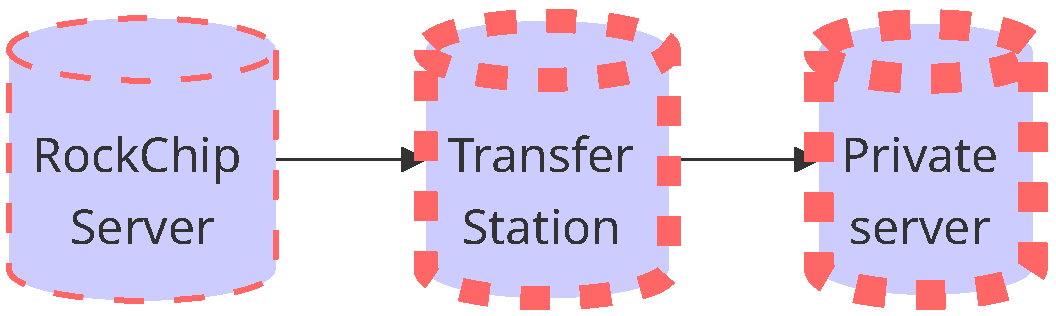
It is recommended to maintain two separate code environments: one as a “staging server” and the other for daily development. The role of the staging server is to sync code with the official Rockchip server and migrate the differences to the local development server. It also serves as a reference benchmark for confirming the code version when working with Rockchip. The development server can be customized according to your project requirements and usage preferences. This approach offers the following advantages: It helps Rockchip’s technical team accurately identify the code version when assisting with troubleshooting.
It resolves issues where some development servers cannot directly sync code due to network limitations, ensuring code consistency in the development environment by migrating updates via the staging server.
5.4 SDK Synchronization Exception Processing
5.4.1 SDK Sync Confirmation
Before starting the code synchronization, please make sure to complete the following check steps to ensure the environment is correctly configured: a. SSH Key File Confirmation Ensure that the following files are present in the ~/.ssh/ directory: id_rsa (private key) id_rsa.pub (public key) known_hosts (automatically generated during the first SSH connection) You can check these files using the following command:
xx@ubuntu:~$ ls -l ~/.ssh/
-rw------- 1 xx xx  1675 Apr 9 08:40 id_rsa
-rw-r--r-- 1 xx xx 400 Apr 9 08:40 id_rsa.pub
-rw-r--r-- 1 xx xx  2220 Apr 9 08:40 known_hosts
b. Private Key File Limit There should be no more than one key file in the .ssh directory. If multiple keys are required, please manage them using key-chain as per the SDK release instructions. c. Private Key Permission Settings Ensure that the id_rsa file has 600 permissions. If not, please execute the following command:
xx@ubuntu:~$ chmod 600 ~/.ssh/id_rsa
d. Network Connection Confirmation (ping and port availability):
`Non-chinese mainland customers`
xx@ubuntu:~$ telnet gerrit.rock-chips.com 8443
Trying 54.151.98.191...
Connected to gerrit.rock-chips.com.
Escape character is '^]'.
xx@ubuntu:~$ telnet gerrit.rock-chips.com 8222
Trying 54.151.98.191...
Connected to gerrit.rock-chips.com.
Escape character is '^]'.

`Chinese mainland customers`
xx@ubuntu:~$ telnet gerrit.rock-chips.com 8443
Trying 58.22.7.114...
Connected to gerrit.rock-chips.com.
Escape character is '^]'.
xx@ubuntu:~$ telnet gerrit.rock-chips.com 8222
Trying 58.22.7.114...
Connected to gerrit.rock-chips.com.
Escape character is '^]'.
If there is no response, it indicates that the access port is restricted. Please contact your company’s IT department to investigate potential network blocking. e. Public Key and Private Key Matching Use the following command to generate the public key for comparison:
xx@ubuntu:~$ ssh-keygen -y -f id_rsa > id_rsa.pub.tobecompared
Then compare the contents of id_rsa.pub.tobecompare with id_rsa.pub (ignore the email part at the end). If they do not match, it indicates that the keys are not compatible, and you should regenerate them. f. SSH Connection Test Refer to the SDK release documentation to obtain the SDK download address. If it includes repo init – repo-url https://gerrit.rock-chips.com , use the following ssh command to test:
xx@ubuntu:~$ ssh -vT Gerrit_account@gerrit.rock-chips.com –p 8222
The following test command:
xx@ubuntu:~$ ssh -vT xxx@gerrit.rock-chips.com -p 8222
OpenssH_7.4p1, OpenSSL 1.0.2k-fips 26 Jan 2017
debug1: Reading configuration data /home/gerrit/ .ssh/config
debug1: /home/gerrit/.ssh/config line 11: Applying options for gerrit.rock-chips.com
debug1: Reading configuration data /etc/ssh/ssh_config
debug1 /etc/ssh/ssh_config line 58: Applying options for *
debug1: Connecting to gerrit.rock-chips.com [***] port 8222
debug1: Connection established.
...
debug1: SSH2_MSG_SERVICE_ACCEPT received
debug1: Authentications that can continue: publickey
debug1: Next authentication method: publickey
debug1: Trying private key:/home/gerrit.ssh/id_rsa
debug1: Authentication **
succeeded** (publickey).
Authenticated to gerrit.rock-chips.com_([xxxx]:8222).debugi: channel e: new [client-session]
debug1: Entering interactive session.
debug1: pledge: network debugi: Sending environment.
debug1: Sending env LANG = en_us.UTF-8

   ****welcome to Gerrit code Review****

 Hi xxx, you have **successfully connected** over SSH.
 Unfortunately, interactive shells are disabled.
 To clone a hosted Git repository, use:

 git clone ssh: / /xxx@gerrit.rock-chips.com:29418/REPOSITORY_NANE.git

debug1: channel 0: free: client-session, nchannels 1
Connection to gerrit.rock-chips.com closed by remote host.
Transferred: sent 2484,received 1904 bytes, in 50.0 seconds
Bytes per second: sent 49.6,received 38.0
debugl: Exit status_-l
When executing the SSH command, if you see the prompt “Are you sure you want to continue connecting (yes/no)?”, please type “yes” and press Enter. After executing the test command, if you see successfully connected, it means the ssh connection is successful. If the connection fails, there might be issues with the PC (or server) environment settings or network communication being blocked by security devices. You can try using a different PC (or server) or switch to a hotspot network to verify. Note that virtual machines using bridged networking often encounter ssh connection issues. g. SSH Configuration File Check ( ~/.ssh/config ) Ensure that the configuration file exists with the following content:
xx@ubuntu:~$ cat ~/.ssh/config
Host gerrit.rock-chips.com
 HostName gerrit.rock-chips.com
 User **Gerrit account**
 Port 8222
 IdentityFile ~/.ssh/**private key file name**
 PreferredAuthentications publickey
 StrictHostKeyChecking no
 UserKnownHostsFile ~/.ssh/known_hosts
 PubKeyAcceptedKeyTypes +ssh-rsa
If the file does not exist, please manually create it and set the correct permissions.
xx@ubuntu:~$ ls -l  ~/.ssh/config
-rw-r--r-- 1 xx xx 220 Nov 28 18:43 config
h. After completing the environment confirmation Please follow the process outlined in the SDK release notes and begin the code synchronization.
5.4.2 SDK Synchronization Error and Solution
Here are common errors you might encounter during the SDK synchronization process, along with corresponding solutions: a. python version error Example error log:
Traceback (most recent call last):
File "/root/repo/main.py", line 628, in <module>
_Main(sys.argv[1:])
File "/root/repo/main.py", line 602, in _Main
result = run()
File "/root/repo/main.py", line 595, in <lambda>
run = lambda: repo._Run(name, gopts, argv) or 0
File "/root/repo/main.py", line 264, in _Run
result = cmd.Execute(copts, cargs)
File "/root/repo/subcmds/init.py", line 531, in Execute
self._SyncManifest(opt)
File "/root/repo/subcmds/init.py", line 324, in _SyncManifest
clone_filter=opt.clone_filter):
File "/root/repo/project.py", line 1144, in Sync_NetworkHalf
clone_filter=clone_filter, retry_fetches=retry_fetches):
File "/root/repo/project.py", line 2139, in _RemoteFetch
ret = gitcmd.Wait()
File "/root/repo/git_command.py", line 379, in Wait
rc = self._CaptureOutput()
File "/root/repo/git_command.py", line 407, in _CaptureOutput
s.dest.write(buf)
UnicodeEncodeError: 'ascii' codec can't encode characters in position 8-12: ordinal not in
range(128)
Or
Traceback (most recent call last):Start related error
Solution: Please switch to python3.0 recommended version (3.10.x or later, if python 2.0 is used, please use
2.7.11 or later) and follow the following steps to avoid version problems caused by repo or python environment.
xx@ubuntu:~$ ./Gerrit_Account (Gerrit Account naming script).x (Make sure authorization
script has been run and the authorization file has been generated according to the
"Authentication and Authorization Mode (Mandatory)" chapter of this document.)
xx@ubuntu:~$ git clone https://gerrit.rock-chips.com:8443/repo-release/tools/repo (tag
v2.18)
xx@ubuntu:~$ cd rksdk (Switch to the sdk directory)
xx@ubuntu:~/rksdk$ ../repo/repo sync -c (Call just downloaded repo tool to resynchronize)
b. When the key is generated, the password is set to contains the following log information: Example error log:
Enter passphrase for key '/home/junyikeji/.ssh/id_rsa':
Solution: It is recommended to use the keychain tool for unified management of keys, or alternatively, reset the private key password to empty:
xx@ubuntu:~$ ssh-keygen -f ~/.ssh/id_rsa –p
c. SDK permission problem: contains the following log information: Example error log:
Get ssh://git@ww.rockchip.com,cn:2222/Android s/rk3588-manifests.git
fatal: Could not read from remote repos itory.

please make sure you have the correct access rights
and the repository exists.
Solution: Please confirm whether the corresponding SDK permissions have been applied for. d. git configuration error: contains the following log information: Example error log:
Please tell me who you are.
git config --global user.email "you@example.com"
git config --global user.name "Your Name"
to set your account's default identity.
Solution: Configure global Git user information or create a .gitconfig file:
xx@ubuntu:~$ vi ~/.gitconfig
[color]
•       ui = true
[user]
•       name = xxx(fill in your name)
•       email = yyy(fill in your email)
e. Sub-warehouse synchronization failed or reference is damaged. Example error log:
From ssh://www.rockchip.com.cn/repo/android/RKTools
[new branch] android-5.1 -> rk/android-5.1
[new branch] remotes/rk/rk3288/mid/android-5.1 -> rk/remotes/rk/rk3288/mid/android-5.1
[new branch] rk3036/wireless_dongle/5.1/develop -> rk/rk3036/wireless_dongle/5.1/develop
error: 'refs/remotes/rk/rk312x' exists; cannot create 'refs/remotes/rk/rk312x/mid/android-
5.1'
! [new branch] rk312x/mid/android-5.1 -> rk/rk312x/mid/android-5.1 (unable to update local
ref)
error: unable to resolve reference refs/remotes/rk/rk322x/box/android-5.1: Not a directory
! [new branch] rk322x/box/android-5.1 -> rk/rk322x/box/android-5.1 (unable to update local
ref)
error: 'refs/remotes/rk/rk3288' exists; cannot create 'refs/remotes/rk/rk3288/mid/android-
5.1'
Solution: Delete the erroneous sub-repository directory and then re-synchronize:
xx@ubuntu:~$ rm -rf RKTools
xx@ubuntu:~$ .repo/repo/repo sync
Alternatively, if a checkout error occurs in the local repository, you need to delete the corresponding mirror and non-mirror repository paths at the following three locations, and then continue with the synchronization. (This type of synchronization failure is often caused by manually interrupting the synchronization, which leads to corrupted local sync data).
xx@ubuntu:~$ rm -rf .repo/project-objects/(sub-repository)
xx@ubuntu:~$ rm -rf .repo/projects/(sub-repository)
xx@ubuntu:~$ rm -rf ./(sub-repository)
f. locale setting exception: Example error log:
projects: 50% (235/469) perl: warning: Setting locale failed.
perl: warning: Please check that your locale settings:
LANGUAGE = (unset),
LC_ALL = (unset),
LC_PAPER = "zh_CN.UTF-8",
LC_ADDRESS = "zh_CN.UTF-8",
LC_MONETARY = "zh_CN.UTF-8",
LC_NUMERIC = "zh_CN.UTF-8",
LC_TELEPHONE = "zh_CN.UTF-8",
LC_IDENTIFICATION = "zh_CN.UTF-8",
LC_MEASUREMENT = "zh_CN.UTF-8",
LC_TIME = "zh_CN.UTF-8",
LC_NAME = "zh_CN.UTF-8",
LANG = "en_US.UTF-8"
are supported and installed on your system.
perl: warning: Falling back to the standard locale ("C").
Solution: Add the following content to the end of .bashrc and load the configuration:
xx@ubuntu:~$ vi ~/.bashrc
export LC_ALL=C
Save and execute:
xx@ubuntu:~$ source ~/.bashrc
g. GitError error ( force-sync needs to be enabled) Example error log:
GitError: --force-sync not enabled; cannot overwrite a local work tree. If you're
comfortable with the possibility of losing the work tree's git metadata, use `repo sync --
force-sync frameworks/native` to proceed.
Solution: Use version v2.18 repo and synchronize again.
xx@ubuntu:~$ git clone https://gerrit.rock-chips.com:8443/repo-release/tools/repo (Download
the tag v2.18 repo tool under your local home directory)
xx@ubuntu:~$ cd rksdk (Switch to the sdk directory)
xx@ubuntu:~/rksdk$ ../repo/repo sync -c --force-sync(Call just downloaded repo tool to
resynchronize)
h.”fetch” failed to execute: Example error log:
Fetching projects: 99% (477/481) Fetching projectplatform/external/libusb-compat
Fetching project platform/external/libseccomp-helper
error: Cannot fetch android/rk/u-boot
Solution: Confirm the use of repo tool version v2.18 and ensure that access permissions are correct.
xx@ubuntu:~$ git clone "https://gerrit.rock-chips.com:8443/repo-release/tools/repo"
xx@ubuntu:~$ cd rksdk (Switch to the sdk directory)
xx@ubuntu:~/rksdk$ ../repo/repo sync -c --force-sync(Call just downloaded repo tool to
resynchronize)
i. Error when using sudo Example error log:
xx@ubuntu:~$ sudo .repo/repo/repo sync -c
xx: Permission dented (publickey).
fatal: could not read from remote repository.
Please make sure you have the correct access rights and the repository exists.
Caborted by user
Solution: Please perform the repo operation using the same user who ran the authorization script, and do not use sudo .
xx@ubuntu:~$ .repo/repo/repo sync -c
j. https download error: Example error log:
gnutls_handshake() failed: An unexpected TLS packet was received
Or
gnutls_handshake() failed: Start related error
Solution: Because: Update the git , curl , and gnutls modules in the system.
xx@ubuntu:~$ sudo apt-get update
xx@ubuntu:~$ sudo apt upgrade git -y
xx@ubuntu:~$ sudo apt upgrade curl -y
If the issue persists after upgrading and reinstalling dependencies, please use one of the following methods: It is recommended to use Ubuntu 20 or higher system version (required for compiling both Android SDK and Linux SDK). Alternatively, you can use ‘ssh’ protocol for downloading, as shown in the example below:
xx@ubuntu:~$repo init --repo-url https://gerrit.rock-chips.com:8443/repo-release/tools/repo
-u https://gerrit.rock-chips.com:8443/Android_U/manifests -b master -m
Android14.xml

update:

xx@ubuntu:~$ repo init --repo-url ssh://username@gerrit.rock-chips.com:8222/repo-
release/tools/repo
-u ssh://username@gerrit.rock-chips.com:8222/Android_U/manifests -b master -m
Android14.xml
If you encounter issues that are not covered above, please submit them to the Rockchip official Bug system (https://redmine.rock-chips.com/), and the Rockchip team will assist you in resolving the issue. For connection failures caused by local network issues, users are responsible for handling them independently.