
ArmSoM platform reference: Chinese RK-KF-YF-100 V1.1.1 covers the 30, 31, 32, 33 and PX series, Sofia and RV1108 with Linux 3.10/4.4. This does not establish support for every ArmSoM board. Verify board, SoC, BSP, wiring, controller and kernel. All performance figures are source examples, not ArmSoM measurements; no hardware validation was performed. No English PDF exists in the supplied pair; all four languages use four figures from the Chinese PDF.
Source caveats: historical USB names, “400MBps?”, Webcam 648×480 / UYV and bandwidth KB/MB without a per-second suffix are retained, not asserted as current standards. Source rm of=…, ehco and blkparse long-dash options / a space inside its path are questionable and retained for traceability; verify actual tool syntax before use. Raw disk writes, cache drops, Gadget changes, CPU offlining and disabling firewalls affect the system; these are source lab procedures only, were not executed, and require an isolated test setup. HID protocol=2 versus the Keyboard comment also remains unresolved.
1. Theoretical USB transfer rates
1.1 USB Communication Flow
Figure 1-1 shows a layered USB communication model: the host/device connection consists of connections at several layers. The bus-interface layer provides the physical connection and sends/receives data. The device layer is visible to USB system software, which uses it for general device operations. The application layer can provide additional functions to the host through cooperating client software. Device- and application-layer communication is logical; the bus-interface layer performs its corresponding physical communication.
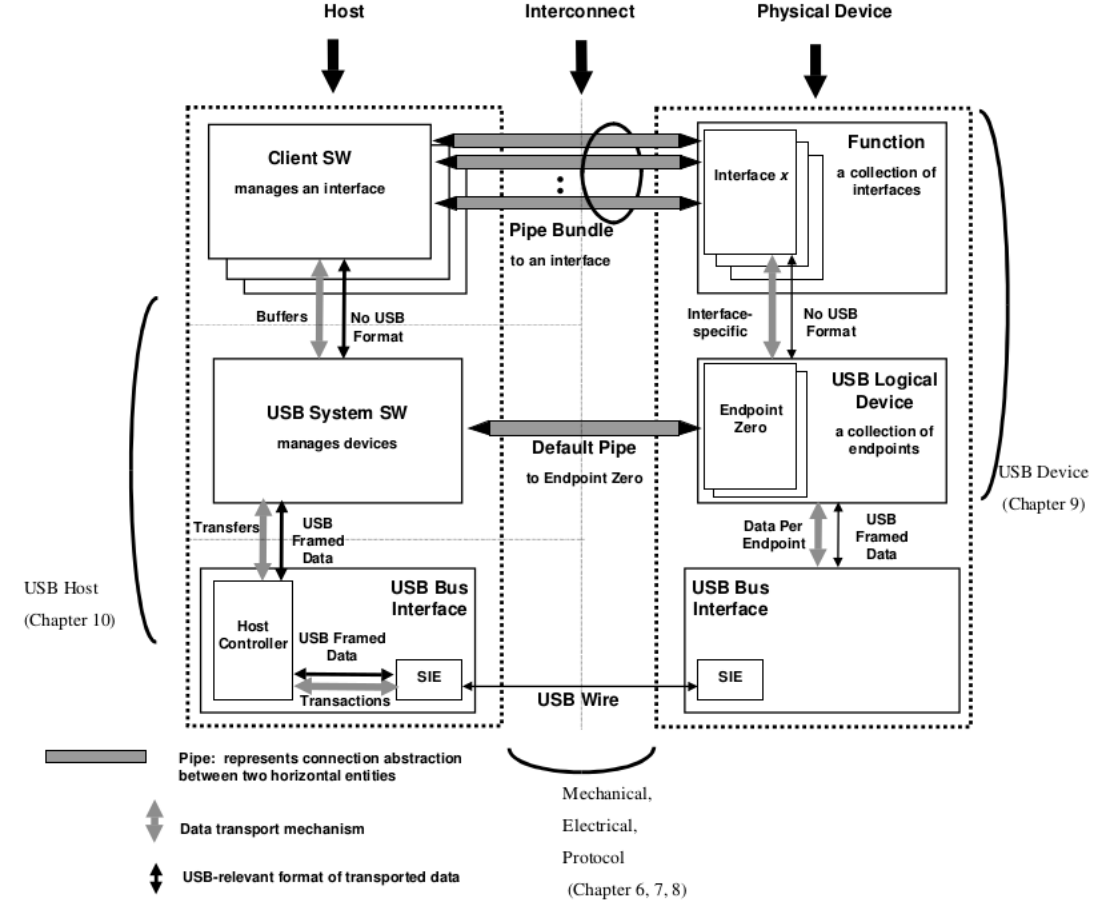
Figure 1-1. USB Communication Flow
1.2 Physical-layer rate
The physical-layer rate is the rate on the physical USB bus. The historical source lists five standard rates: USB1.0, USB1.1, USB2.0, USB3.0 (USB3.1 Gen1), and USB3.1 Gen2. Table 1-1 gives their maximum rates.
| USB version | Maximum rate | Speed designation |
|---|---|---|
| USB 1.0 | 1.5Mbps | Low speed(Low-Speed) |
| USB 1.1 | 12Mbps | Full speed(Full-Speed) |
| USB 2.0 | 480Mbps | High speed(High-Speed) |
| USB 3.0(USB 3.1 Gen1) | 5Gbps | SuperSpeed(Super-Speed) |
| USB 3.1 Gen2 | 10Gbps | Not yet defined in source(Super-Speed+) |
1.3 Protocol-layer rate
USB device types use different class protocols: disks use the USB Mass Storage Class subclass Bulk-Only Transport, cameras use USB Video Class, and HID uses USB Human Interface Devices Class. Consult USB-IF for more specifications. Protocols define different packet formats; some require command and handshake packets. They also use different transfer types: disks use Bulk, cameras Isochronous, HID Interrupt.
USB supports four types:
- Control: enumeration on connection and other device-specific operations.
- Interrupt: reliable small transfers with strict latency requirements, such as keyboards and gamepads.
- Bulk: reliable large transfers with relaxed latency, such as disks and Ethernet adapters.
- Isochronous: real-time transfer with lower reliability requirements, such as cameras and audio.
Their physical-bus behavior differs less than their mechanisms, host scheduling, bandwidth limits and maximum packet lengths. Table 1-2 compares the four types.
| Transfer type | USB 2.0 | USB 3.0 |
|---|---|---|
| Control | Max Packet: 64Bytes Burst:Not supported OUT flow control only(PING) |
Max Packet: 512Bytes Burst:1 Flow control supported(ERDY) |
| Interrupt | Max Packet: 0 〜 1024 ×3 Bytes Max Transfer Speed:23.44MBps Burst:Not supported No flow control |
Max Packet: 0 〜 1024 ×3 Bytes Max Transfer Speed:23.44MBps Burst:1 ~ 3 Flow control supported(ERDY) |
| Bulk | Max Packet: 512Bytes Max Transfer Speed:53.25MBps Burst:Not supported OUT flow control only(PING) |
Max Packet: 1024Bytes Max Transfer Speed:400MBps? Burst:1 〜 16 Flow control supported(ERDY)) |
| Isochronous | Max Packet: 0 〜 1024 ×3 Bytes Max Transfer Speed:23.44MBps Burst:Not supported No flow control |
Max Packet: 0 〜 1024 ×16 × 3Bytes Max Transfer Speed:375.04MBps Burst:1 ~ 16 Flow control supported(PING -> PING_RESPONSE) |
Table 1-2 shows that maximum theoretical rates differ by transfer type. Transfer-type limits and device-class protocol interaction make practical throughput much lower than the physical-bus rate.
1.4 Main throughput factors
USB throughput depends mainly on the following factors:
-
Signal quality. Evaluate the USB eye diagram. Poor signals cause packet loss and retries on the physical bus, reducing throughput.
-
Controller AHB CLK and DMA Burst Length. Higher AHB CLK and larger DMA bursts can improve DMA-transfer efficiency.
-
CPU frequency affects code execution and memcpy. Higher frequency can improve USB-driver and application efficiency and thus throughput.
-
URB (USB Request Block) buffer size is the data block requested per controller transfer. For source examples classified as MSC, such as USB Disk and USB MTP, increasing the buffer can reduce transfer interrupts if storage-block-size effects on eMMC/NAND performance are disregarded. The source gives maximum single transfers of 512KB for DWC2 and 16MB - 1 Bytes for DWC3.
-
Storage read/write performance. MSC devices such as disks depend on both host storage and the USB disk medium.
-
File-system format.
Common formats are VFAT, EXT4 and NTFS. In the source stack, the kernel block layer merges small VFAT/EXT4 blocks into 120K before writing, while NTFS writes from userspace without that block-layer merge. With small application requests such as 4KB, NTFS copy speed can therefore be significantly below VFAT/EXT4. See section 2.1 for analysis.
2. USB Host performance analysis
2.1 USB Disk throughput
Test method. Assume insertion into USB Host yields the following partition:
/dev/block/sda1
Mount path:
/mnt/media_rw/0E64-5F76/
Host eMMC file path: /sdcard/. The methods below assume these paths.
Use a sufficiently large test file. For a 3399 EVB with 4G DDR, the source recommends 2G; it reports inaccurate rates with 1024MB. Its explanation is that proc/sys/vm/dirty_background_ratio is commonly 5%, requiring 4G × 5% = 204.8MB dirty pages before asynchronous writeback. Adding conv=fsync to dd writes cached data to disk.
Two methods follow. Method 1: manually or with cp copy a large file such as a movie, measure elapsed time and compute rate. Step 1 creates the test file with dd for step 2.
busybox dd if=/dev/zero of=/mnt/media_rw/0E64-5F76/test bs=64K count=16K
Step 2. Time the cp operation.
echo 3 > /proc/sys/vm/drop_caches
time cp /mnt/media_rw/0E64-5F76/test /sdcard/.
This tests disk read speed. Reverse the paths to test writing. Method 2 uses dd. For disk reads, step 1 creates a test file for the subsequent copies.
busybox dd if=/dev/zero of=/mnt/media_rw/0E64-5F76/test bs=64K count=16K
Step 2. Clear the cache before every dd command.
echo 3 > /proc/sys/vm/drop_caches
Test read speed with 4K blocks.
busybox dd if=/mnt/media_rw/0E64-5F76/test of=/dev/null bs=4K count=256K
Step 3. Clear the cache before every dd command.
echo 3 > /proc/sys/vm/drop_caches
Test read speed with 64K blocks.
busybox dd if=/mnt/media_rw/0E64-5F76/test of=/dev/null bs=64K count=16K
Step 4. Clear the cache before every dd command.
echo 3 > /proc/sys/vm/drop_caches
Test read speed with 128K blocks.
busybox dd if=/mnt/media_rw/0E64-5F76/test of=/dev/null bs=128K count=8K
Step 5. Clear the cache before every dd command.
echo 3 > /proc/sys/vm/drop_caches
Test read speed with 512K blocks.
busybox dd if=/mnt/media_rw/0E64-5F76/test of=/dev/null bs=512K count=2K
USB disk write test: Step 1. Clear cache before each dd command.
echo 3 > /proc/sys/vm/drop_caches
Test write speed with 4K blocks.
busybox dd if=/dev/zero of=/mnt/media_rw/0E64-5F76/test bs=4K count=256K
Step 2.
rm of=/mnt/media_rw/0E64-5F76/test
sync
echo 3 > /proc/sys/vm/drop_caches
Test write speed with 64K blocks.
busybox dd if=/dev/zero of=/mnt/media_rw/0E64-5F76/test bs=64K count=16K
Step 3.
rm of=/mnt/media_rw/0E64-5F76/test
sync
echo 3 > /proc/sys/vm/drop_caches
Test write speed with 128K blocks.
busybox dd if=/dev/zero of=/mnt/media_rw/0E64-5F76/test bs=128K count=8K
Step 4.
rm of=/mnt/media_rw/0E64-5F76/test
sync
echo 3 > /proc/sys/vm/drop_caches
Test write speed with 512K blocks.
busybox dd if=/dev/zero of=/mnt/media_rw/0E64-5F76/test bs=512K count=2K
Method 1 measures actual file-copy throughput but combines host storage, file-system and USB-controller effects, so it does not isolate controller performance. Method 2 removes host-storage/file-system effects to measure controller-to-disk transfer, but the USB device file system still affects copying. Accessing sd* partition nodes under /dev/ bypasses it but can destroy existing disk data: use extreme caution. conv=fsync writes cached data to disk; sufficiently large files also reduce caching effects. The source recommends both methods: try method 1, then method 2 if throughput is below expectations to locate a controller bottleneck.
Original-source results with dd: USB2.0 Host typically 25–35MBps; USB3.0 Host without UAS typically 60–100MBps; UAS disks up to about 350MBps. Disks vary substantially, and some read 3–5 times faster than they write. Test several models and compare the same disks with the same method on Ubuntu PC.
RK3399/RK3328 USB3 supports UASP (USB Attached SCSI PROTOCOL), potentially greatly improving performance. Both kernel CONFIG_USB_UAS (enabled by default in the source Kernel3.10/4.4) and disk UAS support are required. Enumeration logs show whether UAS is used.
[80373.513866] usb 4-1: new SuperSpeed USB device number 2 using xhci_hcd
[80373.534854] usb 4-1: New USB device found, idVendor=174c, idProduct=55aa
[80373.534871] usb 4-1: New USB device strings: Mfr=2, Product=3, SerialNumber=1
[80373.534873] usb 4-1: Product: CHIPFANCIER
[80373.534874] usb 4-1: Manufacturer: WINTOGO
[80373.534876] usb 4-1: SerialNumber: 000001485761816
[80373.537036] scsi host6: uas (说明将以UAS协议进⾏通信)
[80373.537648] scsi 6:0:0:0: Direct-Access    WINTOGO  CHIPFANCIER      0    PQ: 0 ANSI: 6
Result analysis and optimization example: RK3399 EVB reading/writing a USB3 disk. Other scenarios can use the same analysis method.
Source test setup: RK3399 EVB, 2G DDR + 16G eMMC; SanDisk Type-C USB3.0 32G formatted NTFS. Scenario: copy a large file from USB3 disk to eMMC using cp/dd. USB mount path /mnt/media_rw/0E64-5F76/, eMMC path /sdcard/. With 4G DDR, the source recommends a 2GB file to reduce caching effects; conv=fsync forces cached data to disk, and large files also reduce cache influence. Step 1 creates a 1GB test file with dd for subsequent copying.
busybox dd if=/dev/zero of=/mnt/media_rw/0E64-5F76/test bs=64K count=16K
Step 2 tests copying from USB3 disk to eMMC. With a 1GB test file, the source reports 0m48.42s real 0m00.29s user 0m18.17s system, or 1024M/48 = 21MBps, below its expected USB3 rate.
Step 3 copies directly from /dev/block/sda1 to /sdcard/test, bypassing the USB disk file system. The source reports about 20MBps and concludes the slow copy is not caused by the 3399 file system itself.
Step 4 tests USB disk and eMMC separately with dd. Start with USB3 disk reading; clear caches before each command.
time cp /mnt/media_rw/0E64-5F76/test /sdcard/.
time cp /dev/block/sda1 /sdcard/test
echo 3 > /proc/sys/vm/drop_caches
Test read speed with 4K blocks.
busybox dd if=/mnt/media_rw/0E64-5F76/test of=/dev/null bs=4K count=256K
Source result: 1073741824 bytes (1.0GB) copied, 14.183164 seconds, 72.2MB/s. Clear cache before each dd command.
echo 3 > /proc/sys/vm/drop_caches
Test read speed with 64K blocks.
busybox dd if=/mnt/media_rw/0E64-5F76/test of=/dev/null bs=64K count=16K
Source result: 1073741824 bytes (1.0GB) copied, 12.546069 seconds, 81.6MB/s. Clear cache before each dd command.
echo 3 > /proc/sys/vm/drop_caches
Test read speed with 128K blocks.
busybox dd if=/mnt/media_rw/0E64-5F76/test of=/dev/null bs=128K count=8K
Source result: 1073741824 bytes (1.0GB) copied, 12.601817 seconds, 81.3MB/s. Clear cache before each dd command.
echo 3 > /proc/sys/vm/drop_caches
Test read speed with 512K blocks.
busybox dd if=/mnt/media_rw/0E64-5F76/test of=/dev/null bs=512K count=2K
Source result: 1073741824 bytes (1.0GB) copied, 12.402147 seconds, 82.6MB/s. Next test 3399 eMMC writing; clear caches before each dd.
echo 3 > /proc/sys/vm/drop_caches
Test write speed with 4K blocks.
busybox dd if=/dev/zero of=/sdcard/test bs=4K count=256K
Source result: 1073741824 bytes (1.0GB) copied, 39.525297 seconds, 25.9MB/s
rm of=/sdcard/test
sync
echo 3 > /proc/sys/vm/drop_caches
Test write speed with 64K blocks.
busybox dd if=/dev/zero of=/sdcard/test bs=64K count=16K
Source result: 1073741824 bytes (1.0GB) copied, 37.505206 seconds, 27.3MB/s
rm of=/sdcard/test
sync
echo 3 > /proc/sys/vm/drop_caches
Test write speed with 128K blocks.
busybox dd if=/dev/zero of=/sdcard/test bs=128K count=8K
Source result: 1073741824 bytes (1.0GB) copied, 37.461603 seconds, 27.3MB/s
rm of=/sdcard/test
sync
echo 3 > /proc/sys/vm/drop_caches
Test write speed with 512K blocks.
busybox dd if=/dev/zero of=/sdcard/test bs=512K count=2K
Source result: 1073741824 bytes (1.0GB) copied, 37.086531 seconds, 27.6MB/s. USB3 disk reads are good and similar for small/large blocks, while all eMMC writes are slow. The source identifies the eMMC medium as the bottleneck. Here 4K/64K/128K/512K writes are all slow, but it says many Rockchip eMMC parts—and USB3 disks—may be slow only at 4K. If only 4K writes are slow, investigate that block size further. Step 5 examines cp and block-layer behavior using strace and blktrace.
Trace cp with strace:
strace cp /mnt/media_rw/0E64-5F76/test /sdcard/.
The source finds that cp on RK3399 reads/writes 4KB blocks. Use blktrace to inspect block-layer merging. Important copy-related parameters:
max_hw_sectors_kb
max_sectors_kb
max_hw_sectors_kb and max_sectors_kb control the merged block size written to storage: commonly 120KB for USB disks and 512KB for eMMC in the source. eMMC paths:
/sys/block/mmcblk1/queue/max_hw_sectors_kb
/sys/block/mmcblk1/queue/max_sectors_kb
USB Disk:
/sys/block/sda/queue/max_hw_sectors_kb
/sys/block/sda/queue/max_sectors_kb
USB disk max_hw_sectors_kb is set in this code:
drivers/usb/storage/scsiglue.c
/*limit the total size of a transfer to 120 KB */
.max_sectors =  240, (单位为block512 bytes)
Upper layers can configure this parameter; example path for RK3399 Type-C1:
/sys/devices/platform/usb@fe900000/fe900000.dwc3/xhci-hcd.9.auto/usb4/4-1/4-1:1.0/host0/target0:0:0/0:0:0:0/max_sectors
Inspect the I/O scheduler:
rk3399:/data# cat /sys/block/mmcblk1/queue/scheduler
noop [cfq] selects cfq, implying that small-block merging should occur. Android includes blktrace, but it may be disabled. Modify its mk file, build the tool and adb push it to /system/bin. In Android.mk, change the first-line BUILD_BLKTRACE:= false to:
BUILD_BLKTRACE:= true
Enable CONFIG_BLK_DEV_IO_TRACE in the kernel to use blktrace:
Kernel hacking  --->
    [*]Tracers  --->
        [*]  Support for tracing block IO actions
Example blktrace capture procedure:
- Create a directory for captured data.
mkdir /dev/blktrace
- Start blktrace capture.
blktrace -d /dev/block/mmcxxx -o /dev/blktrace/blktrace &
/dev/block/mmcxxx is the block device under analysis, such as mmcblk1 on 3399.
- Execute the copy command:
busybox dd if=/dev/zero of=/data/test bs=4K count=256K
- Stop blktrace. After the copy, terminate its thread; data is saved under /dev/blktrace. Alternatively use -w to stop after a specified number of seconds. Parse captured data:
blkparse –i /dev/blktrace/ blktrace.blktrace.0 –o /dev/blktrace/blkparse.txt
The source statistics show cfq merging 4k blocks into 1024 sectors, or 512K, before eMMC writes (Figure 2-1).
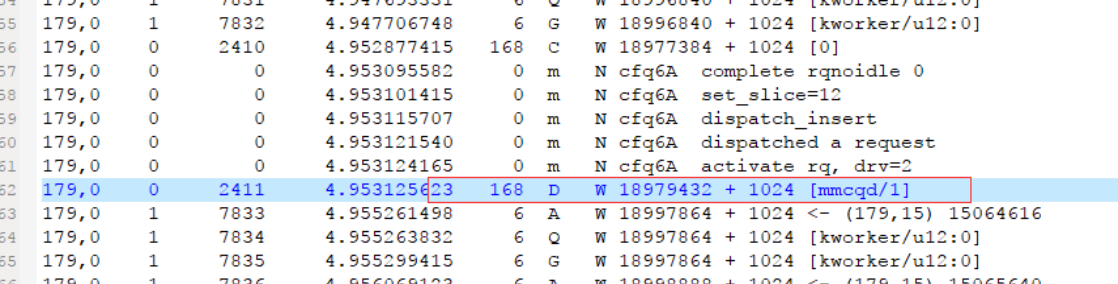
Figure 2-1. blktrace data. The source concludes that 3399 block-layer merging works correctly. See the linked blktrace I/O analysis for more detail.
The source repeats “step5” for file-system analysis. VFAT/EXT4 merge small blocks in the kernel; its NTFS implementation uses FUSE, userspace writes and extra copying. With small requests such as 4KB and CPU frequency scaling, NTFS may be slower. RK3399 Android cp requests only 4KB, so NTFS USB3 disks often perform poorly in that setup.
Optimization factors are USB disk read/write performance, host storage, host-controller performance, file-system format, application request size and CPU frequency. First locate the bottleneck using these methods, then optimize.
2.2 USB Ethernet throughput
Test tool: iperf, a network-performance tool for TCP/UDP bandwidth quality. It measures maximum TCP bandwidth, offers many parameters and UDP features, and reports bandwidth, delay variation and packet loss. Official site: https://iperf.fr/ ; downloads for Windows, Android, Ubuntu and macOS: https://iperf.fr/iperf-download.php . On Ubuntu install it with:
sudo apt install iperf
Android can install iperf.apk. Instructions: https://iperf.fr/iperf-doc.php and http://man.linuxde.net/iperf . UDP is commonly used to measure bandwidth limits, jitter and packet loss. Start at the theoretical link rate, e.g. -b 100M for a 100Mbps client/server link. Then retest using the measured bandwidth; jitter/loss should improve. Repetition yields a stable practical bandwidth.
Example UDP setup: Ubuntu PC server; RK3399 USB2/USB3 Host connected to UGREEN USB3 Ethernet, then Ethernet cable to the PC. Configure the PC IPv4 address, subnet mask and gateway as Figure 2-2.
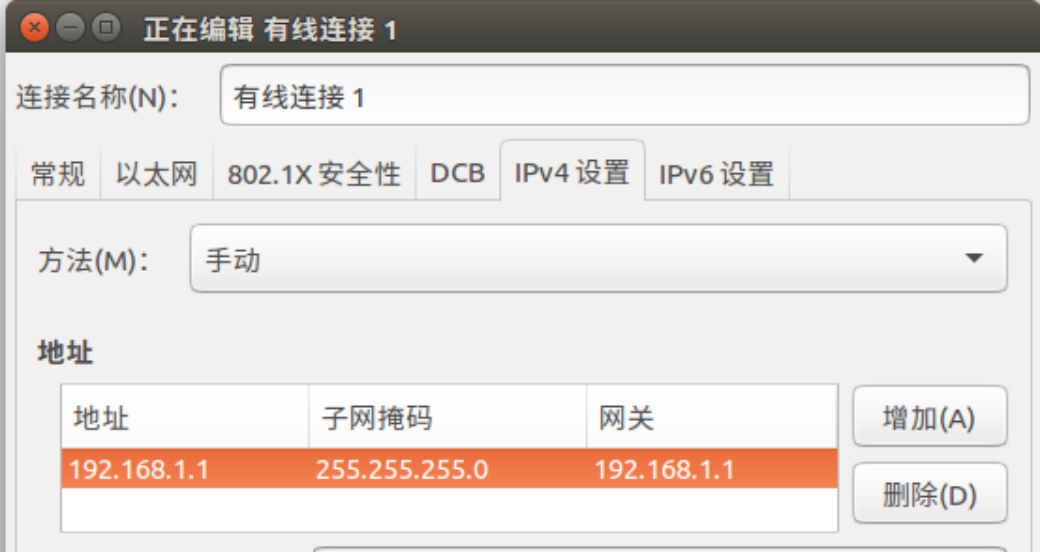
Figure 2-2. Ubuntu PC IP setup. Screenshot values: IPv4 method Manual, address 192.168.1.1, subnet mask 255.255.255.0, gateway 192.168.1.1. These are the source test setup, not universal network settings. Then run:
wlf@wlf-ubuntu:~$ iperf -u -s
------------------------------------------------------------
Server listening on UDP port 5001
Receiving 1470 byte datagrams
UDP buffer size:  208 KByte (default)
------------------------------------------------------------
3399 client: first inspect the USB Ethernet adapter information.
eth1      Link encap:Ethernet  HWaddr 60:38:E0:E3:20:96
          inet6 addr: fe80::6238:e0ff:fee3:2096/64 Scope: Link
          UP BROADCAST MULTICAST  MTU:1500  Metric:1
          RX packets:0 errors:0 dropped:0 overruns:0 frame:0
          TX packets:2 errors:0 dropped:0 overruns:0 carrier:0
          collisions:0 txqueuelen:1000
          RX bytes:0 TX bytes:168
Then configure the IP address:
ifconfig eth1 192.168.1.2 up
Start the bandwidth test:
iperf -u -c 192.168.1.1 -b 1000M -t 60
-b is the UDP bandwidth in bits/sec. The source recommends -b 100M for USB2.0 adapters and -b 1000M for USB3.0. Original UGREEN USB3.0 Ethernet result:
------------------------------------------------------------
Client connecting to 192.168.1.2, UDP port 5001
Sending 1470 byte datagrams
UDP buffer size:  208 KByte (default)
------------------------------------------------------------
[  3] local 192.168.1.2 port 40116 connected with 192.168.1.1 port 5001
[ ID] Interval       Transfer     Bandwidth
[  3]  0.0-60.0 sec  5.61 GBytes   803 Mbits/sec
[  3] Sent 4096616 datagrams
The same method gives about 95Mbits/sec for CISCO USB2.0 Ethernet. Source reference rates in both directions: USB2.0 Host 95–100Mbits/sec; USB3.0 Host 750–800Mbits/sec. If a product falls short, inspect errors with ifconfig and tcpdump; excessive errors warrant USB eye-diagram testing to verify signal quality.
2.3 USB Camera throughput
Use the built-in Camera APK preview and run logcat over serial to inspect the reported real-time frame rate:
CameraHal: debugShowFPS(622): Camera 1312 Frames, 30.000 FPS
UVC driver debugging: enable UVC trace output.
echo 0xffff > /sys/module/uvcvideo/parameters/trace
echo 8 > /proc/sysrq-trigger
Disable UVC trace:
ehco 0 > /sys/module/uvcvideo/parameters/trace
Inspect UVC decode statistics. Table 2-1 gives the source’s maximum USB Camera frame rates.
cat /d/usb/uvcvideo/*/stats
| YUYV format | MJPEG format | H264 format | |
|---|---|---|---|
| USB 2.0 | 640×480 @30fps | 1280×720 @30fps | 1920×1080 @30fps |
| USB 3.0 | 640×480 @60fps | 1280×720 @60fps | 1920×1080 @60fps |
These rates assume one camera per USB controller. With two or more cameras, measure the actual result. Most cameras use isochronous transfers. The source’s theoretical USB2.0 isochronous bandwidth is
23.44MBps, versus 375.04MBps for USB3.0. Maximum frame rate mainly depends on (a) camera output capability and (b) host-driver isochronous performance. Check (a) on a PC. For (b), consider higher USB QOS priority, faster interrupt response, higher controller AHB CLK and longer DMA bursts.
3. USB Device performance analysis
3.1 USB MTP throughput
Connect the target to a PC in MTP mode and manually copy a large file, e.g. a movie over 1GB. Time it and calculate the average rate. Keep the device idle on its desktop and prevent suspend. After connecting, wait for media-library scanning to finish (watch logcat) before copying.
Source test: RK3399 BOX SDK Android N + Kernel4.4. Read means RK3399 → PC; Write means PC → RK3399. 16K, 64K and 1M are MTP Tx/Rx buffer lengths. Both large and small cores were fixed at their maximum frequency. Table 3-1: RK3399 BOX SDK MTP rates.
| Read 16K | Write 16K | Read 64K | Write 64K | Read 1M | Write 1M | |
|---|---|---|---|---|---|---|
| USB 2.0 | 24.7 MBps | 22.8 MBps | 22.8 MBps | 21.5 MBps | 24.7 MBps | 25.6 MBps |
| USB 3.0 | 65.6 MBps | 109.0 MBps | 71.3 MBps | 107.5 MBps | 87.3 MBps | 110.0 MBps |
Source test: RK3126C prototype, Android O + Kernel4.4. Table 3-2: MTP rates.
| Read 16K | Write 16K | Read 64K | Write 64K | |
|---|---|---|---|---|
| USB 2.0 | 14.85 MBps | 7.1 MBps | 15.15 MBps | 7.8 MBps |
Result analysis and optimization:
MTP uses bulk transfer. The source estimates USB2.0 bulk at about 39MBps (10 transactions of 512 Bytes per 125μs) and USB3.0 at 400MBps, but practical MTP is much slower. Fixed high CPU frequency improves copying versus frequency scaling. Poor storage performance also severely limits MTP; see section 2.1. Kernel4.4 exposes the time spent in each vfs_read/vfs_write during MTP through this status interface:
cat /sys/kernel/debug/usb_mtp/status
Reset the statistics:
echo 0 > /sys/kernel/debug/usb_mtp/status
Raising USB2 controller AHB CLK to 150MHz and maximizing DMA Burst can improve DMA efficiency and throughput. DWC2 supports at most 512KB per transfer; DWC3 supports 16MB - 1B. Larger MTP Tx/Rx buffers reduce interrupts (source default 64KB). The source recommends 64KB for USB2 and 1MB for USB3. Kernel4.4 module parameters:
/sys/module/usb_f_mtp/parameters/mtp_tx_req_len: Tx buffer length, bytes./sys/module/usb_f_mtp/parameters/mtp_tx_reqs: number of Tx buffers./sys/module/usb_f_mtp/parameters/mtp_rx_req_len: Rx buffer length, bytes.
3.2 USB MSC throughput
Example: Linux4.4 RK3399 EVB USB3.0 MSC. Configure Mass storage as a module.
<*>   USB Gadget Support  --->
      <M>   USB Gadget Drivers
      <M>     Mass Storage Gadget
Apply this kernel patch:
index f3c7f15..5418d06 100644
--- a/arch/arm64/boot/dts/rockchip/rk3399.dtsi
+++ b/arch/arm64/boot/dts/rockchip/rk3399.dtsi
@@ -404,7 +404,7 @@
                        compatible = "snps,dwc3";
                        reg = <0x0 0xfe800000 0x0 0x100000>;
                        interrupts = <GIC_SPI 105 IRQ_TYPE_LEVEL_HIGH 0>;
-                       dr_mode = "otg";
+                       dr_mode = "peripheral";
                        phys = <&u2phy0_otg>, <&tcphy0_usb3>;
                        phy-names = "usb2-phy", "usb3-phy";
                        phy_type = "utmi_wide";
Build the kernel, then the Mass storage modules:
make ARCH=arm64 modules SUBDIRS=drivers/usb/gadget
Generated modules:
libcomposite.ko
usb_f_mass_storage.ko
g_mass_storage.ko
After boot, use dd to create lun0.img under data, then load the modules.
insmod libcomposite.ko
insmod usb_f_mass_storage.ko
insmod g_mass_storage.ko  file=/data/lun0.img removable=1
Connect Ubuntu PC, format lun0 and access Mass storage from the PC. Use the following loop for read-rate testing:
while true;
do time dd iflag=direct,nonblock if=/media/wlf/4625f014-95f3-419c-96c9-a38f91186eb2/test0 of=/dev/null bs=1024k count=400;
done
Alternatively measure throughput with a USB3.0 Agilent analyzer (Figure 3-1).
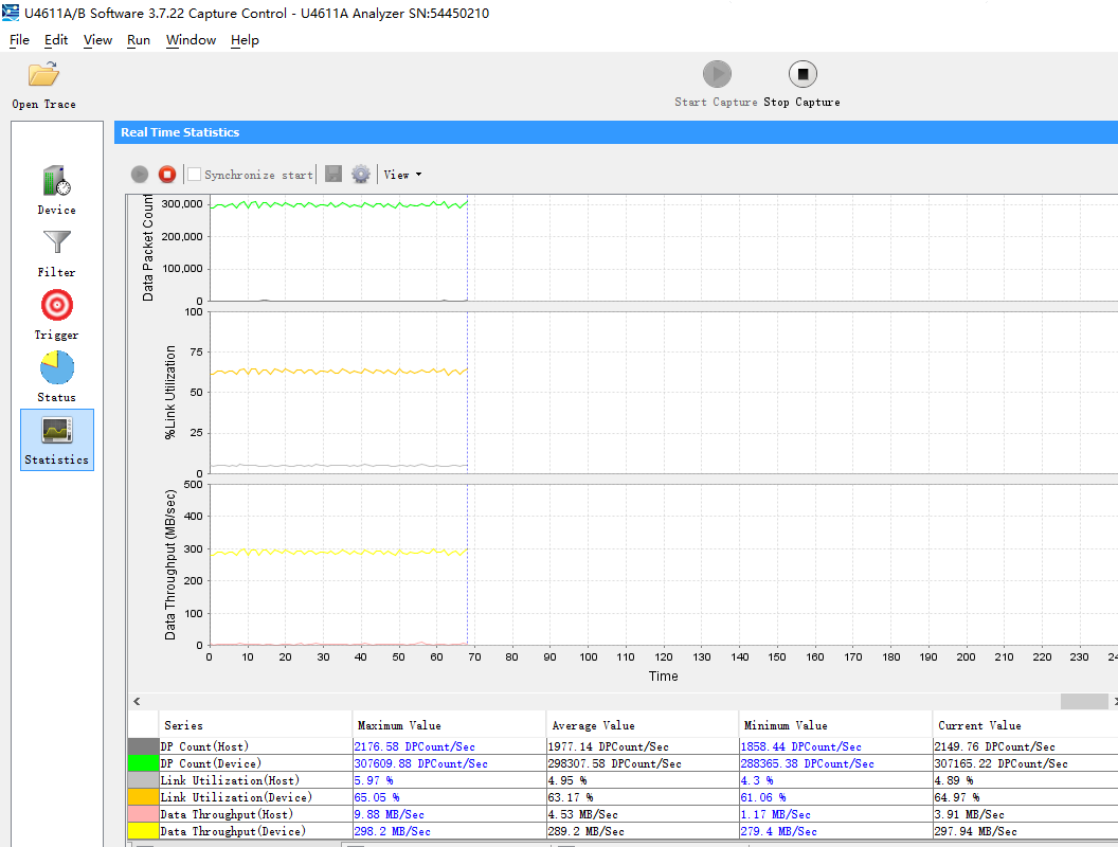
Figure 3-1. Agilent USB3 throughput measurement. Source results: RK3399 frequency scaling, 250MBps read; small cores disabled and big cores fixed at 1.8, 300MBps read.
3399 关闭⼩核
echo 0 > /sys/devices/system/cpu/cpu0/online
echo 0 > /sys/devices/system/cpu/cpu1/online
echo 0 > /sys/devices/system/cpu/cpu2/online
echo 0 > /sys/devices/system/cpu/cpu3/online

3399 定频⼤核
echo userspace > /sys/devices/system/cpu/cpu4/cpufreq/scaling_governor
echo 1800000 >  /sys/devices/system/cpu/cpu4/cpufreq/scaling_setspeed
The source concludes that CPU frequency strongly affects USB MSC throughput: higher frequency gives higher read speed.
3.3 USB Gadget Webcam throughput
Tools: AMCAP on Windows; guvcview on Ubuntu (install with sudo apt install guvcview). Both display real-time frame-rate statistics.
Gadget Webcam requires both a kernel UVC gadget driver and application UVC handling. In the source SDK generation, Kernel3.10/4.4 support gadget drivers but only RV1108 has application-side UVC gadget support; other platforms can adapt RV1108 or the linked GitHub usb gadget uvc driver test application. Kernel3.10 UVC Gadget supports Isochronous and Bulk transfers. Default is isochronous 1KB per 125μs microframe. Four configurations offer different bandwidth/frame-rate limits.
Configuration 1 (default): isochronous 1KB per 125μs, maximum bandwidth 8000KB, i.e. 7.8MB as written in the source. Table 3-3: RV1108 maximum frame rates, configuration 1.
| YUYV format | MJPG format | H264 format | |
|---|---|---|---|
| USB 2.0 | 648×480 @12fps | 1920×1080 @30fps | 1920×1080 @30fps |
UVC Gadget configuration 2: Isochronous 2KB per 125μs microframe. Apply the following patch. Increased bandwidth can cause image flicker; if this occurs, consider raising USB QOS priority, USB AHB CLK (aclk_peri and hclk_peri) above 150MHz, and other DMA-efficiency improvements.
diff --git a/drivers/usb/gadget/f_uvc.c b/drivers/usb/gadget/f_uvc.c
index 382536d..17eac12 100644
--- a/drivers/usb/gadget/f_uvc.c
+++ b/drivers/usb/gadget/f_uvc.c
@@ -37,7 +37,7 @@ static unsigned int streaming_interval = 1;
 module_param(streaming_interval, uint, S_IRUGO|S_IWUSR);
 MODULE_PARM_DESC(streaming_interval, "1 - 16");

-static unsigned int streaming_maxpacket = 1024;
+static unsigned int streaming_maxpacket = 2048;
Maximum bandwidth: 16000KB, i.e. 15.62MB in source notation. Table 3-4: RV1108 maximum frame rates, configuration 2.
| YUYV format | MJPG format | H264 format | |
|---|---|---|---|
| USB 2.0 | 648×480 @24fps | 1920×1080 @30fps | 1920×1080 @30fps |
UVC Gadget configuration 3:
Isochronous 3KB per 125μs microframe. Apply the following patch. Increased bandwidth can cause image flicker; if this occurs, consider raising USB QOS priority, USB AHB CLK (aclk_peri and hclk_peri) above 150MHz, and other DMA-efficiency improvements.
diff --git a/drivers/usb/gadget/f_uvc.c b/drivers/usb/gadget/f_uvc.c
index 382536d..17eac12 100644
--- a/drivers/usb/gadget/f_uvc.c
+++ b/drivers/usb/gadget/f_uvc.c
@@ -37,7 +37,7 @@ static unsigned int streaming_interval = 1;
 module_param(streaming_interval, uint, S_IRUGO|S_IWUSR);
 MODULE_PARM_DESC(streaming_interval, "1 - 16");

-static unsigned int streaming_maxpacket = 1024;
+static unsigned int streaming_maxpacket = 3072;
Maximum bandwidth: 24000KB, i.e. 23.43MB in source notation. Table 3-5: RV1108 maximum frame rates, configuration 3.
| UYV format | MJPG format | H264 format | |
|---|---|---|---|
| USB 2.0 | 648×480 @30fps | 1920×1080 @30fps | 1920×1080 @30fps |
UVC Gadget configuration 4: Bulk transfer. Apply the following patch. Bulk mode does not support resolution switching, so the source advises against it when multiple resolutions are required.
diff --git a/drivers/usb/gadget/f_uvc.c b/drivers/usb/gadget/f_uvc.c
index d146ce7..9eb7aad 100644
--- a/drivers/usb/gadget/f_uvc.c
+++ b/drivers/usb/gadget/f_uvc.c
@@ -45,7 +45,7 @@ static unsigned int streaming_maxburst;
 module_param(streaming_maxburst, uint, S_IRUGO|S_IWUSR);
 MODULE_PARM_DESC(streaming_maxburst, "0 - 15 (ss only)");

-static bool bulk_streaming_ep;
+static bool bulk_streaming_ep = true;
 module_param(bulk_streaming_ep, bool, S_IRUGO | S_IWUSR);
Maximum bandwidth: 35MB in source notation. Table 3-6: RV1108 maximum frame rates, configuration 4.
| UYV format | MJPG format | H264 format | |
|---|---|---|---|
| USB 2.0 | 648×480 > 30fps | 1920×1080 > 30fps | 1920×1080 > 30fps |
3.4 USB Rndis throughput
Rndis is TCP/IP over USB: running TCP/IP on the device makes it appear as a network adapter. Test with iperf (section 2.2). Kernel configuration for Linux3.10 Android Gadget USB Rndis:
Device Drivers  --->
   [*] USB support  --->
       <*>   USB Gadget Support  --->
           <*>   USB Gadget Drivers (Android Composite Gadget)  --->
                 Android Composite Gadget
Nodes under /sys/class/android_usb/android0/f_rndis configure the adapter. Linux3.10 Ethernet Gadget USB Rndis configuration:
Device Drivers  --->
   [*] USB support  --->
       <*>   USB Gadget Support  --->
           <*>   USB Gadget Drivers (Ethernet Gadget (with CDC Ethernet support)) --->
                 Ethernet Gadget (with CDC Ethernet support)
Linux4.4 Configfs USB Rndis configuration:
Device Drivers  --->
   [*] USB support  --->
       <*>   USB Gadget Support  --->
           <*>   USB Gadget Drivers (USB functions configurable through configfs) --->
                  [*]       RNDIS
Example: Linux3.10 Android Gadget USB Rndis enumeration log:
shell@android:/ # setprop sys.usb.config rndis
[ 2445.809337] rndis_function_bind_config MAC: 36:C8:78:69:C5:D3
[ 2445.809532] android_usb gadget: using random self ethernet address
[ 2445.809666] android_usb gadget: using random host ethernet address
[ 2445.812255] rndis0: MAC 0a:d4:f2:e3:c5:c7
[ 2445.812330] rndis0: HOST MAC ea:88:5c:93:9d:b5   如连接window,则对应windows以太网卡MAC
[ 2446.208233] DWC_OTG: ********soft connect!!!*****************************************
[ 2446.541253] android_usb gadget: high speed config #1: android
[ 2446.542681] android_work: sent uevent USB_STATE=CONFIGURED
Set the IP address and start rndis:
ifconfig rndis0 192.168.1.2 up
The source requires 192.168.1.2 and the PC to be in the same subnet and describes it as 192.168.XX.XX; actual subnet masks must also match. See section 2.2 for configuration/testing. The source suggests disabling Windows Firewall if ping fails; retain this as historical isolated-test advice, not a general security recommendation.
Original High-speed results (Super-Speed was not tested): Linux3.10 Android Gadget, upload 20Mbps/download 40Mbps; Linux3.10 Ethernet Gadget, 100Mbps both ways; Linux4.4 Configfs, 100Mbps both ways. The source identifies Linux3.10 Android Gadget low throughput in both directions as a known issue requiring optimization.
3.5 USB Gadget HID throughput
Tools: Windows HidTest.exe, PortHelper1.7.exe or HID API; Ubuntu hid_gadget_test from Linux3.10 Documentation/usb/gadget_hid.txt or HID API. Source RK3188 Gadget HID test, case 1: report_length 512 bytes, interval 1ms, file 10768KB, high-speed. PC → 3188: 249KBps; 3188 → PC: 125KBps.
Case 2: report_length 512 bytes, interval 125us, file 10768KB, high-speed. PC → 3188: 872KBps; 3188 → PC: 2659KBps. Throughput mainly depends on HID report_length and interrupt-transfer interval. The source driver drivers/usb/gadget/hid.c does not provide a HID descriptor; developers must implement one following Documentation/usb/gadget_hid.txt. Example descriptor for report_length 512bytes:
index 79afa82..a05ad79 100644
--- a/drivers/usb/gadget/hid.c
+++ b/drivers/usb/gadget/hid.c
@@ -271,10 +272,93 @@ MODULE_DESCRIPTION(DRIVER_DESC);
 MODULE_AUTHOR("Fabien Chouteau, Peter Korsgaard");
 MODULE_LICENSE("GPL");

+static struct hidg_func_descriptor rk_hidg_desc = {
+   .subclass       = 0, /* No subclass */
+   .protocol       = 2, /* Keyboard */
+   .report_length      = 512,
+   .report_desc_length = 38,
+   .report_desc        = {
+       0x06, 0x00, 0xFF,    /*USAGE_PAGE (Vendor Defined Page 1)*/
+       0x09, 0x01,     /*USAGE (Vendor Usage 1)*/
+       0xA1, 0x01,         /*COLLECTION (Application)*/
+       0x09, 0x02,     /*  USAGE (Vendor Usage 2)*/
+       0x09, 0x03,     /*USAGE (Vendor Usage 3)*/
+       0x15, 0x00,         /*LOGICAL_MINIMUM (0)*/
+       0x26, 0xFF, 0x00, /*LOGICAL_MAXIMUM (255)*/
+       0x75, 0x10,         /*REPORT_SIZE (16)*/
+       0x96, 0x00, 0x01, /* REPORT_COUNT (256) */
+       0x81, 0x02,         /*INPUT (Data,Var,Abs)  */
+       0x09, 0x04,     /*USAGE (Vendor Usage 4)*/
+       0x15, 0x00,         /*LOGICAL_MINIMUM (0)   */
+       0x26, 0xFF, 0x00, /*LOGICAL_MAXIMUM (255)   */
+       0x75, 0x10,         /*REPORT_SIZE (16)*/
+       0x96, 0x00, 0x01,   /*REPORT_COUNT (256)*/
+       0x91, 0x02,         /*OUTPUT (Data,Var,Abs) */
+       0xC0            /*END_COLLECTION*/
+   }
+};
For report_length 1024bytes, change it as follows:
@@ -275,7 +275,7 @@ MODULE_LICENSE("GPL");
 static struct hidg_func_descriptor rk_hidg_desc = {
    .subclass       = 0, /* No subclass */
    .protocol       = 2, /* Keyboard */
-   .report_length      = 512,
+   .report_length      = 1024,
    .report_desc_length = 38,
    .report_desc        = {
        0x06, 0x00, 0xFF,    /*USAGE_PAGE (Vendor Defined Page 1)*/
@@ -285,13 +285,13 @@ static struct hidg_func_descriptor rk_hidg_desc = {
        0x09, 0x03,     /*USAGE (Vendor Usage 3)*/
        0x15, 0x00,         /*LOGICAL_MINIMUM (0)*/
        0x26, 0xFF, 0x00, /*LOGICAL_MAXIMUM (255)*/
-       0x75, 0x10,         /*REPORT_SIZE (16)*/
+       0x75, 0x20,         /*REPORT_SIZE (32)*/
        0x96, 0x00, 0x01, /* REPORT_COUNT (256) */
        0x81, 0x02,         /*INPUT (Data,Var,Abs)  */
        0x09, 0x04,     /*USAGE (Vendor Usage 4)*/
        0x15, 0x00,         /*LOGICAL_MINIMUM (0)   */
        0x26, 0xFF, 0x00, /*LOGICAL_MAXIMUM (255)   */
-       0x75, 0x10,         /*REPORT_SIZE (16)*/
+       0x75, 0x20,         /*REPORT_SIZE (32)*/
        0x96, 0x00, 0x01,   /*REPORT_COUNT (256)*/
        0x91, 0x02,         /*OUTPUT (Data,Var,Abs) */
        0xC0            /*END_COLLECTION*/
Adjust the HID interrupt-transfer interval through bInterval in hidg_hs_in_ep_desc and hidg_hs_out_ep_desc in drivers/usb/gadget/f_hid.c. The source default is 4 (1ms); the minimum is 1 (125us).